RSS
 

Posts Tagged ‘REVIEW’

Camera ready in two shakes: Motorola Moto X camera review

04 Mar

x-square.jpg

Born from the brief union between Google and Motorola, the Moto X bears several unique features worthy of both names, including instant activation when removed from a pocket and constant attention to voice commands. Two shakes of the handset brings up the Moto X’s simplified camera interface, which is where we come in. How does the Moto X measure up? Read our Motorola Moto X review to find out

News: Digital Photography Review (dpreview.com)

 
Comments Off on Camera ready in two shakes: Motorola Moto X camera review

Posted in Uncategorized


Elevate your movement: Cinetics Axis360 review

26 Feb

Cinetics_Axis360.jpg

Panning, tilting and sliding are essential actions in both photography and video. To elevate the quality of camera movement, particularly in video, you need professional-grade equipment, and it’s usually very expensive. But the folks at Cinetics aim to bridge the gap with the Axis360, an affordable, motorized tripod head and slider to help photographers create dynamic video and time-lapse photography. Read our review

News: Digital Photography Review (dpreview.com)

 
Comments Off on Elevate your movement: Cinetics Axis360 review

Posted in Uncategorized


New and improved: Nikon D4s First Impressions Review posted

25 Feb

news.png

Nikon’s latest flagship body, the D4s, gets an updated 16 megapixel full-frame sensor, Expeed 4-level processing, 1080/60p video recording and can now autofocus at up to 11fps. Beyond that it boasts a laundry list of small (but potentially meaningful) improvements over its predecessor. After spending some brief time with the camera, we’ve prepared some first impressions of the pro-level body. For a detailed analysis of what’s new in Nikon’s top-of-the-line, take a look at our first impressions review.

News: Digital Photography Review (dpreview.com)

 
Comments Off on New and improved: Nikon D4s First Impressions Review posted

Posted in Uncategorized


LedGo 4 x 150 LED Photo and Video Lighting Kit Review

22 Feb

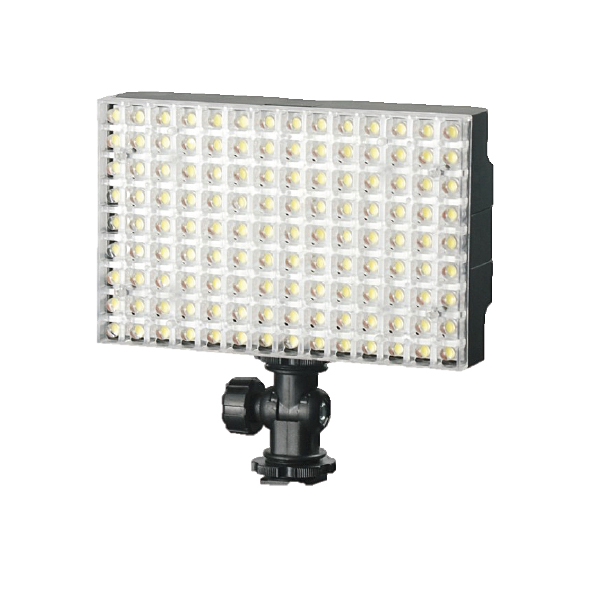
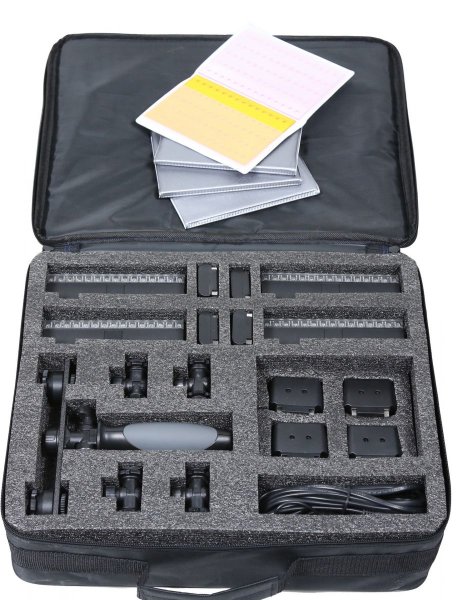
It’s been a long while since I used LED lighting for photography! In fact, it was the 6th of April, 2010. Reading back over that review, I can confirm that LED technology has come a long way! I have a great little kit on loan from ProTog here in Melbourne that consists of four LED panels, 150 LEDs each, lithium batteries, charger, AA battery adaptors, four gel packs to colour up your lights and mounting hardware, too.

LGB1504KB

LedGo 4 x 150 LED Photo / Video Lighting kit

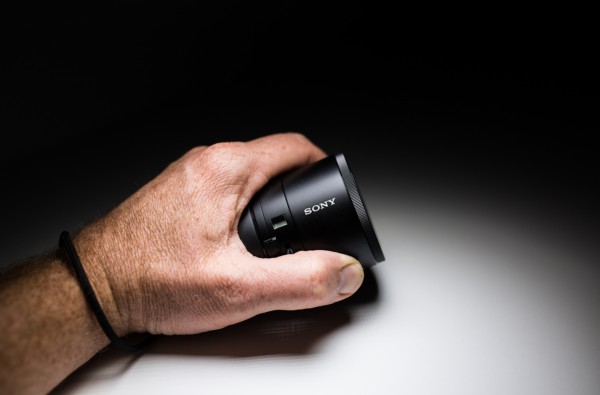
I first saw this little kit (which comes in different forms with various sized panels) when working with Jeff and the team from ProTog at the recent Digital Show here in Melbourne, I had a few chances to play with it as I was working the booth at the show. I noticed a massive difference by comparison to the LED panels I’d tried before (and I sound like a laundry detergent commercial, but…) whiter whites and brighter brights! I could see right away that these little panels had the ability to put out a decent amount of the good stuff! And, at the same time it can be so nicely controlled. A photograph below of something I’m playing with right now, the Sony QX100, but more on that later…

gtvone_sony_qx100_ledgo

So, I’ve been using the kit for three weeks now, I’ve used it for macro, portraits, fill lighting (in a boardroom on a boom) mixed with daylight and to say I’m very impressed is a tiny little massive understatement! It’s not that I can’t achieve the lighting I’m getting from the LedGo kit with a conventional flash, it’s that I can really quickly light a scene or even hand a light to a seven year old and say “here, point it at the side of your head” without them burning themselves or having to use two hands to hold the lights up.

The individual panels with battery attached weigh in at 334 grams (0.75 lbs) as per my kitchen scales, so easily within the realm of what a model can hold if you need to take a portrait. You can very quickly and easily gang two of the 150 panels together to give you plenty of light for a standard portrait, but remember that you have four panels in the kit, so you can use two as your key light and two as a hair light or… well, the possibilities are many.

LedGo_LED_LIGHT_LG1504-KIT-bag_REVIEW

If you’re not confident with your ‘mastering light’ something you may find appealing is the “forgiveness factor”. It’s very easy to grab a LedGo panel, pop it on a stand, or as I did so many times, a NastyClamp, and turn it on and flick my camera into “live View” mode – What You See is What You Get – this means it’s very easy to see exactly what effect you will have on your scene and subject if you have the light in the wrong spot. Shifting your hand, stand, or clamp an inch to the left will make your subject more backlit, moving it forward gives less shadow etc. All of this is right there in front of you and you can set up your scene as you like it and shoot it. Of course you can do this with flash too, but constant light may be easier for you to deal with if you’re just starting out.

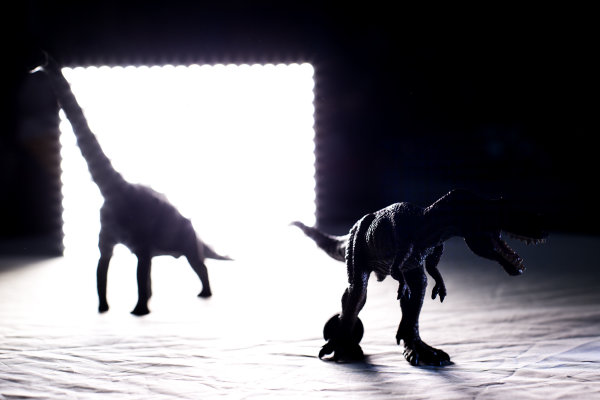
I’ve only had the gear for three to four weeks, but it’s been used a lot! By me AND (don’t worry ProTog!) by my 4 year old. It’s very sturdy and very easy to use! My little man likes to copy what I do and so, I found him lighting his dinosaurs one morning and taking photographs with my 5D MK3! I was somewhere between super impressed, and a little amused by the fact that he’d used the light as “the Dino door” — My point is that the LED panels can be handled by a 4 year old with no issues (for the light or the child).

LedGo_LED_Light_ProTog_Review

The first images I took with the kit were a small handful of product type shots – I’m not a product photographer but I liked the results…

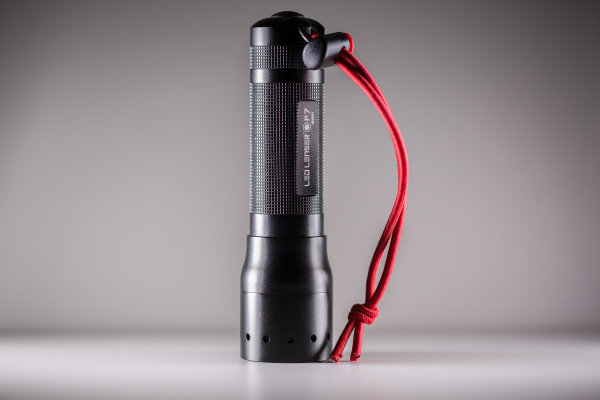
Led_Lenser_photograph_gtvone_ledgo_review

Above, the Led Lenser P7 is lit with two lights, one on each side. Same with the espresso below…

espressor_simon_pollock_ledgo_led_kit_protog_review

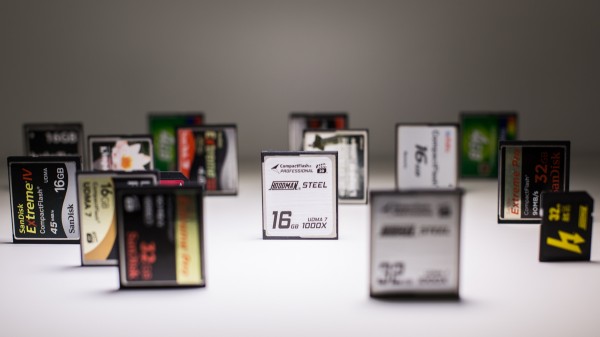
The photograph below of the memory cards is one single LedGo panel over the top, in nice and close to give me a bit of dramatic fall off.

memory_cards_ledgo_led_lighting_kit_review

I can’t fault the LedGo LED kit – the 150 led panels are rated at 90+ CRI (colour rendering index) which means that they’re very color accurate – the clip together and clip apart feature, the gels clip on and off very easily as do the feet that allow you to use a single light in the hotshoe of your camera or you can flip the bracket around and mount it to anything with a 1/4 20″ threaded mount. (like a tripod plate, so you can stick a panel(s) on a tripod very easily)

PROS:

  • ease of use
  • durability
  • not silly expensive
  • flexible

CONS:

  • The gels need to go on and the lights need to go together a certain way – the guys at ProTog told me how, so I knew, but it’s not in the instructions so you could damage a mounting tab if you’re a bit gung-ho about putting them together. (It’s pretty obvious, you’d have to be a bit of a muppet)

I have since picked up my own LedGo panel for myself from ProTog and do not hesitate in suggesting you pop out and try one – they’re not for everything, but for video, product, and spontaneous selfies (no, really) they’re utterly fantastic!

I rate the LedGo 4 x 150 LED Panel kit a Nine of a possible Eleven stars. Clearer instructions and iIll hand those stars back to you…

–Sime

The post LedGo 4 x 150 LED Photo and Video Lighting Kit Review by Sime appeared first on Digital Photography School.


Digital Photography School

 
Comments Off on LedGo 4 x 150 LED Photo and Video Lighting Kit Review

Posted in Photography


Don’t leave pictures stranded: Eye-Fi Mobi SD card review

21 Feb

Mobi-Feature.jpg

If you’re looking for a Wi-Fi card that’s simple to setup and blasts images off into cyberspace in a matter of seconds while you take advantage of your camera’s far superior image quality (compared to a phone), you can’t go wrong with the Eye-Fi Mobi. How does the Mobi stack up against the pricier Eye-Fi Pro X2 card? Find out in our review

News: Digital Photography Review (dpreview.com)

 
Comments Off on Don’t leave pictures stranded: Eye-Fi Mobi SD card review

Posted in Uncategorized


Camera Review – the Sony A7R

19 Feb

Sony A7R Example shot from one exposure – ‘Ferocious Stump’ By Gavin Hardcastle

Initial Impression of the Sony A7R

I started writing this Sony A7R Review with the sentence ”I hate the Sony A7R”, such was my vitriol over this infuriating yet impressive piece of tech. And that’s what the A7R is, it’s a technological marvel crammed into a tiny, sharp edged box. If you’re like me, converting from Canon or Nikon, you’ll find the learning curve painful as you discard much of the logic you’ve grown so used to.
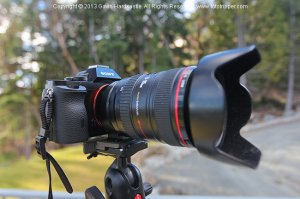
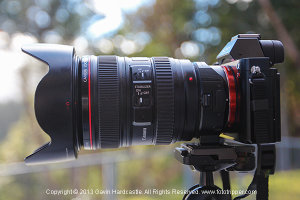
Sony A7R Review with Canon L LensesThat being said, each day my hatred of the Sony A7R diminished as I chipped away at the quirks to uncover the gems this little Pandora’s box has to offer. As expected, the image quality is superb. Having this kind of dynamic range at my fingertips is pure luxury and I’m seeing such a crisp sharpness from my old Canon 24-105mm lens that it’s quickly become my go-to lens of choice.

Sony A7R Example – HDR shot ‘The Frost Fangs’ By Gavin Hardcastle

Could I Learn to Love the Sony A7R?

Sony made a great sensor and some really clever technology, but in terms of ergonomics and overall creative workflow, they could learn a lot from the likes of Canon and Nikon. Compared to the sterile feeling A7R, my trusty old Canon 5D mkII feels like a worn in glove that’s perfectly moulded to my hand with everything in the right place. The A7R is like a soulless Cylon that sports the biggest firepower but is completely devoid of heritage or heart.

The problem is, my 5DmkII perished horribly a couple of months ago so I bought the Sony A7R and even splashed out the $ 412 Canadian dollars for the crappy Metabones adapter that fidgets around in the Sony E-Mount like a 5 year old after a super sized Slurpee binge.
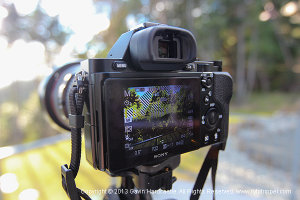
Sony A7R ReviewAlthough this is not Sonys fault, this entire setup really has its problems and I’ll be honest, if I hadn’t already taken the plunge and fully committed to this purchase, I’d probably have taken it back to the store to exchange it for something else. Oh but wait, there is nothing else that comes close to the Sony A7R in terms of specification versus price.

So I’m stuck with it, and what do people usually do when they have no choice, but to get along? They figure out ways around the problems and make do. That’s when my hatred of the Sony A7R started to turn into begrudging admiration, dare I say….. even… love?

Sony A7R Example – HDR shot ‘The Capitol’ By Gavin Hardcastle

Very Customizable

The good news is that the A7R is highly customizable, so if you’re willing to spend days digging through the menus, reading the useless manual and trying a bit of experimentation, you’ll be able to tweak it your tastes – I hope. NEX users will already be familiar with complicated menus and I’ve heard that the A7R is much simpler. I expect NEX users will read my review and groan, possibly even accuse me of being a purist old fart who can’t let go of the old DSLR ways (cue more groans from film shooters).

So, without further waffling, here’s a list of things I love about the A7R and a list of things I hate; so that you know what you’ll be getting yourself into should you decide to buy this powerful little beast of a camera.

What I love about the Sony A7R:

  • The 36 MP sensor is excellent in terms of resolution and dynamic range
  • It’s light weight, my tendonitis loves that – but there are drawback as you’ll see below
  • The digital spirit level in the display – always get perfectly level shots without a green plastic bubble in your hot shoe – nice
  • The manual focus assist – It displays little marching ants to indicate you’ve hit the sweet spot
  • The Live View looks great in the monitor screen
  • I can angle the monitor screen to make shooting near the ground easy. No more lying prone like a sniper and getting a neck crank.
  • The info icons on the display are very helpful once you learn what they all mean.

Sony A7R Example shot from one exposure ‘Tendrils’ By Gavin Hardcastle – click to see a larger version on Flickr

What I hate about the Sony A7R:

  • It’s too small. By all means keep it light, but for a grown man it would fit much nicer in the hand if it was slightly larger. When it comes to electronics – small isn’t always best.
  • I don’t like the EVF (electronic view finder). Call me old fashioned but I like being able to look through a piece of glass and see my composition even with the camera turned off. Not so much an issue with the A7R specifically, as this is just the way of mirrorless cameras in general.
  • The battery life is pretty shabby due to the EVF and monitor screen always being in use. You’ll be buying that extra battery grip for sure. You can switch off the monitor to save juice.
  • Auto Focus is pretty dire compared to Canon/Nikon but I’ll reserve final judgement until I try out a native Sony/Zeiss lens.
  • If you use the default controls for manual shooting it’s very easy to accidentally hit the adjustment wheel. I’m forever changing my ISO and white balance without meaning to – most enraging.
  • Bracketing will not work in unison with the 2 second self timer. You have to choose one or the other. If you want to bracket without touching the shutter you’ll need to buy a remote.
  • The TimeLapse and Timelapse LE app is utterly useless. No bramping (bulb ramping) and it won’t trigger bracketing mode.
  • It’s slow to save files – If you shoot RAW+JPEG in low light you’ll get very familiar with the ‘Processing’ message on the monitor screen. The drawback of having 36 megapixels I guess.
  • Ergonomics – it’s like a matchbox. Ever heard of curves Sony?
  • Ditch your old SD cards. 36 MP Raw files need some super fast cards .
  • The balance is terrible with legacy DSLR lenses. If you shoot handheld and have a medium to large lens, you’ll hate the feel of the A7R. The native Sony/Zeiss lenses however, are all nice and small so it’s only an issue with your clunky old DSLR glass – which might be exactly why you bought the A7R in the first place.
  • Shutter shock with long lenses causes significant vibration and ruins images due to blurring. Apparently this can be improved by adding a weight to the camera. Some user have reported the battery grip fixes the issue. One more example of the camera being too small for its own good.
  • There is no separate battery charger. You have to connect the camera to the mains via the shortest cable I’ve ever seen. You’ll be shelling out an additional $ 50 for the Sony BC-QM1 battery charger.
  • Auto White Balance fails 80% of the time when using Canon lenses via an adapter.

The Manual (pamphlet) of shallowness

The Sony A7R comes with the most useless user manual I’ve ever seen. It has about as much depth as a Miley Cyrus song and leaves you with more questions than answers. On page 82, the manual mentions that there is an in depth ‘Help Guide’ available at a url that is no longer available. After much scouring of the interwebs I found the real link to the Sony A7 / A7R Help Guide which still works at the time of writing. I’m sad to say I’ve read the entire thing and still needed to find answers to my many problems by forum digging.

Sony A7R Example shot from one exposure ‘Tenacity’ By Gavin Hardcastle

Extra dollars you’ll have to spend on accessories

  • Battery charger
  • Remote shutter release if you want to bracket with 2 second timer
  • Battery grip – for added weight, better balance and longer battery life
  • Extra battery
  • New super fast memory cards

Do you really need 36 megapixels?
Sony A7R Review and Example Shots

Of course you do. It doesn’t matter if you only ever print small images, with 36 megapixels your compositional horizons are greatly expanded because you now have the power to crop like a boss. If you don’t own a $ 6k super telephoto lens, it’s no problem, just take the shot and crop it in post with plenty of resolution left over.

Will you need a new hard drive?

Of course you will. These RAW files are humongulous. If you’re squeamish about losing precious disk space, the Sony A7 is probably the better option with its faster auto focus, smaller files and lower price tag.

Do I recommend this camera?

If you’re a landscape shooter, I would recommend that you buy this camera. If you’re any other kind of shooter and never have the need to print massive images and don’t do much cropping, buy the A7.

Why this is an awesome camera

I admit it, I love the A7R. Even though my list of grumbles is way longer than my list of plus points, it all boils down to the fact that the image quality of the A7R is simply awesome. I’ve learned to work around the annoying quirks and when you consider that Sony’s native lenses are very, very small, it all starts to make sense. Sure, it’s great that we can all attach our old lenses via adapters, but if I could afford to replace my giant, heavy Canon glass with miniature sized Zeiss glass that might possibly do a better job – I totally would.

Have you tried out the Sony A7R? What is your experience? Share with us in the comments please.

The post Camera Review – the Sony A7R by Gavin Hardcastle appeared first on Digital Photography School.


Digital Photography School

 
Comments Off on Camera Review – the Sony A7R

Posted in Photography


Your camera’s best amigo: Miggo Strap and Grip review

18 Feb

Miggo-4.jpg

The Miggo straps and grips bring a lot of innovation to the way we tote and transport our beloved investments. Their versatile multi-use designs combine a high quality camera wrap, a method of securing the camera to your person and lens cap pocket all in one. Are the days of traditional camera toting coming to an end? Find out in our review

News: Digital Photography Review (dpreview.com)

 
Comments Off on Your camera’s best amigo: Miggo Strap and Grip review

Posted in Uncategorized


13 February, 2014 – Fuji X100s Review

14 Feb


There is one camera company that is really getting noticed these days, and that is Fuji. They seem unstoppable as they continually are releasing new cameras and lens at a very fast pace. They stand apart with their APS-C X-Trans CMOS II sensor. It all started with the X100 and since that introduction Fuji has followed with numerous other X branded cameras. Not forgetting where their roots are they released the next generation X100s a few months ago. This little camera has a huge following and if there is a camera that has done retro right it is the X100s. Alain Briot a regular contributor here on Luminous-Landscape switches gears from his regular essays and does a Camera Review Of The X100s.

We are very excited about the new Fuji X-T1 camera recently announced. In addition Fuji has made a number of new lens announcements. We are eager to try out the new 10-24mm zoom. This lens combined with the 18-55mm and 55-200mm zoom will make a formidable kit. We will be posting articles and information on all this in the near future.

Are you planning on attending this year’s WPPI Trade Show and Convention in Las Vegas March 3-5? If so drop us an email. Kevin and Chris will be there reporting on the show and it would be great to meet some where and say hi.


The Luminous Landscape – What’s New

 
Comments Off on 13 February, 2014 – Fuji X100s Review

Posted in News


Shaking up the market? Sony a7R review posted

14 Feb

a7r-55-beauty.jpg

Two products that have been getting a lot of attention lately are the Sony a7 and a7R full-frame mirrorless cameras. Last month we took an in-depth look at the Alpha 7, and were mostly pleased with how it turned out. Now it’s time to take a look at its big brother, the Alpha 7R, which offers a 36 megapixel sensor with no low-pass filter and a more conventional autofocus system. Is the a7R worth the price premium over the a7? Find out in our review

News: Digital Photography Review (dpreview.com)

 
Comments Off on Shaking up the market? Sony a7R review posted

Posted in Uncategorized


Nikon D5300 review: Approachable, yet serious

13 Feb

d5300.jpg

The Nikon D5300 presents an entry-level photographer with some serious specifications, starting with a 24 megapixel APS-C sensor. It shapes up to be quite the formidable DX-format camera with 1080/60p HD video recording, built-in Wi-Fi/GPS, a 39-point AF system and a flip-out LCD. It’s not short on features, but do its handling and image quality match the tall specs list? Read our full review

News: Digital Photography Review (dpreview.com)

 
Comments Off on Nikon D5300 review: Approachable, yet serious

Posted in Uncategorized