RSS
 

Posts Tagged ‘REVIEW’

Lens Review Canon 300mm f4 Lens for Sports Photography

11 Jun

Recently I went to a Little League baseball game and shot with my Canon 5D Mark III and my newly purchased, 300mm f/4 L IS. It was the first time shooting sports with my new camera, so I was eager to see how the body would perform as well as the lens.

300mm lens sports 01

The 300mm is touted as one of Canon’s best sports lenses, so I was counting on it to deliver some quality images. The 5D Mark III, while not specifically a sports camera, is often considered a viable option by sports photographers because of its new autofocus system. I was eager to try it out, and see if I could handle shooting sports on a full-frame camera.

But this post is about the 300mm, not the 5D Mark III. So let’s get to the good stuff  – review Canon 300mm f4 lens.

300mm f/4L IS – weight and handling

When I first purchased the 300mm f/4L IS, I was surprised by how small and light it was. Bigger than my 70-200 f/4, yes – by a large margin. But it wasn’t a beast like I was expecting. If you’re familiar with the 70-200 f/2.8 IS, the 300mm is similar to that lens in size and weight. But it’s certainly not overwhelming, like the 300mm f/2.8. It’s actually comfortably hand-holdable.

300mm lens sports 02

I brought my monopod to the game, thinking I would use it with the 300mm, but I never needed it. I handheld the 300mm comfortably the whole game, and I’m not super strong. I was pleasantly surprised by how easy it was to handle the lens. It fits perfectly in my camera bag’s long-lens compartment, and I can carry it over my shoulder when I’m walking around. During the game, I ended up sitting on the ground (I explain why here), holding the camera and lens up to my eye, for most of the game.

runnerTip: If your arms get tired from holding your camera up so much, a monopod will be your best friend.

The feel of this lens is like all Canon L-series lenses – solid. It’s all metal construction, and feels substantial in your hand. It features a built-in lens hood that you can expand and twist to lock. The lens hood doesn’t come off – when you’re not using it, unscrew and slide it back onto the lens.

Summary: Pleasantly surprised by the 300mm’s relatively light weight and easy handling.

Reach

300mm turned out to be the perfect focal length for the game I was shooting. As I mentioned above, reach was not a problem. I had anticipated wanting more reach than my full-frame sensor offered, so I brought along a Canon Rebel T3i too, but didn’t use it. For youth sports, 300mm was perfect. Of course, it depends on the sport you’re shooting – if you’re at a big soccer field, maybe you’d want to use 300mm on a crop sensor camera, while you might want a 70-200 if you’re doing something close like basketball. Could I have gotten lots of great shots with the 300mm on a crop sensor camera at this game? Of course. But many of the players were perfectly framed with 300mm on the full-frame.

300mm lens sports 03

Now, if you have a crop sensor (APS-C) camera, I would still recommend the 300mm f/4L IS, but it depends greatly on your sport. If you’re not sure, I might start out with a cheaper 70-300 zoom lens and see what focal lengths you use most. If you find yourself always using the long end of the zoom, then that’s a pretty good indication that the 300mm f/4L might be a great choice for you.

At my game, I think 300mm on crop (480mm) would have been a bit long, but I could have always shot the farther action. If I had been using a crop sensor, a 70-200mm would probably have worked better. But the bokeh at 300mm f/4 was so nice compared to my 70-200 f/4, I don’t know if I could have gone back. The reach, power, and feel of the 300mm felt so far ahead of my 70-200 f/4L. I felt like a beast using it all night.

Summary: 300mm on full-frame was perfect for closer subjects. It also definitely works if you have a crop sensor. Think about the sport you’re shooting and how far away you’ll be from the action.

batter

Autofocus

The 300mm f/4L IS is an L-series lens, so it should come as no surprise that the autofocus is fast and snappy. The lens has USM, which stands for Ultra Sonic Motor – Canon’s fast autofocus motor. The USM autofocus on the 300mm is excellent, quiet and instant. Tracking is fast and it keeps up with the action.

The fast autofocus at 300mm is sort of a luxury to me. I have a bad habit of setting up for a specific shot (like the pitcher throwing the ball), getting the shot, then putting my camera down to look for the next shot. When a play happens, my instinct is to put my camera down and watch (bad, I know). But during the game, when I realized this was happening, I made a point to try to shoot spontaneously during plays. There was one play where I put my camera down but then saw a shot about to appear. Thanks to the fast autofocus, I simply framed the shot, focused, and snapped the photo in a few moments. I came out with this shot:

300mm lens sports 04

Summary: I love the fast autofocus on the 300mm f/4. It responds to my every command, instantly.

Image Stabilization

I don’t have much to say on Image Stabilization (IS). I used it throughout the game, but I don’t think it was necessary. I was using a fast enough shutter speed to freeze the action. There’s really no need for IS when shooting action, because IS only helps with camera shake from your hands. You still need a fast shutter speed to freeze action, which means camera shake isn’t a problem at that point either.

Summary: Next time I’ll leave IS off. It’s not a necessary feature for sports shooters.

pitcher

Final Thoughts

Honestly, the 5D Mark III and 300mm f/4L IS was an amazing combination for shooting sports. The camera was nice and the lens performed flawlessly. It made sports photography a lot easier for me than previously, when I shot with the 70-200 f/4.

Overall, I highly recommend the 300mm f/4L IS as a sports lens. It’s the perfect focal length for medium to far distances. The autofocus is snappy and reliable, and the lens is easy to handhold. If you need a new telephoto lens for sports photography, I can wholeheartedly recommend the Canon 300mm f/4L IS.

The post Lens Review Canon 300mm f4 Lens for Sports Photography by James Trent appeared first on Digital Photography School.
Digital Photography School

 
Comments Off on Lens Review Canon 300mm f4 Lens for Sports Photography

Posted in Photography


11 June, 2014 – Sony RX100 MKIII Hands On Review

11 Jun

Sony has just started shipping its third-generation RX100, the Mark III. This pocket sized camera builds on the strengths of its two predecessors with a unique pop-up OLED EVF, a more articulated rear LCD, a faster and wider lens, and an enhanced video codec.

After two weeks of working with the RX100 MKIII Michael Reichmann’s hands-on report is now available.


The Luminous Landscape – What’s New

 
Comments Off on 11 June, 2014 – Sony RX100 MKIII Hands On Review

Posted in News


Lens Review Tamron 24-70 mm f/2.8 Di VC USD

08 Jun
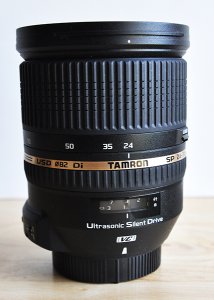
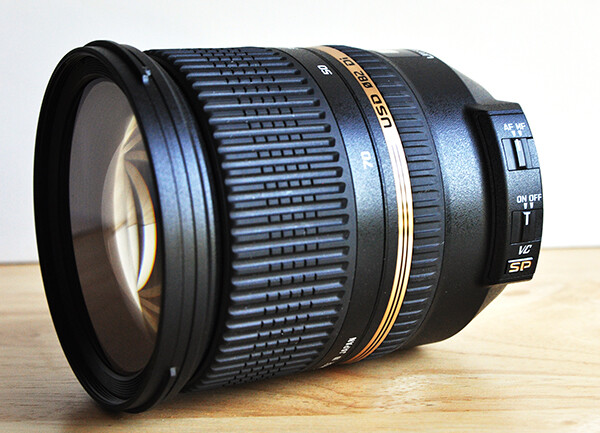
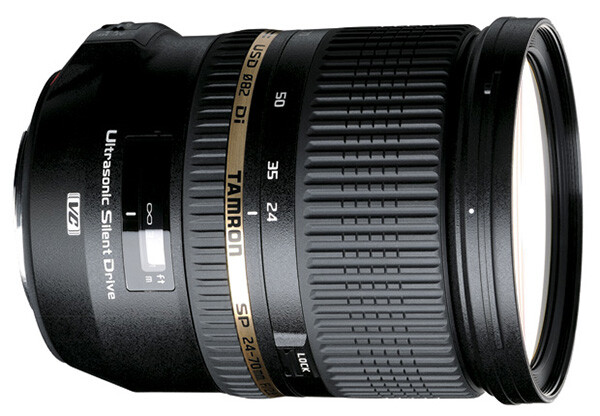
The Tamron 24-70mm f/2.8 Di VC USD is a great lens choice for both professionals and enthusiasts.

The Tamron 24-70mm f/2.8 Di VC USD is a great lens choice for both professionals and enthusiasts.

I won’t make you wait until the end of the review for the verdict– this lens absolutely rocks. Plain and simple. Despite what I consider to be a huge and unfortunate misconception among many professional photographers, there are some truly amazing, high-quality lenses being designed and produced by companies other than Nikon and Canon. Dismissing them as being somehow inferior simply because their logos don’t match up with those on the camera would be a big mistake. The Tamron SP 24-70mm f/2.8 Di VC USD is just such a lens. I recently had the opportunity to put it through its paces, and this is where the test drive took me.

The Specs

Let me start with deciphering the alphabet soup. Designed for digital (Di), this lens includes Tamron’s proprietary Vibration Compensation (VC) for less camera shake and smoother image stabilization, as well as its Ultra Silent Drive (USD) motor, ensuring fast, virtually silent auto focusing. This Super Performance series (SP) lens includes 17 elements in 12 groups, which vastly reduces chromatic aberration.

  • Focal Length:  24-70mm
  • Maximum Aperture:  f/2.8
  • Lens Construction:  17 elements in 12 groups
  • Minimum Focal Distance:  0.38m (15.0 inches)
  • Maximum Magnification Ratio:  1.5 on APS-C sensor cameras
  • Filter Size:  ø82mm (3.2 inches)
  • Length:  108.5mm (4.3 inches)
  • Extended Length:    116.9mm (4.6 inches)
  • Diameter:  ø88.2mm (3.5 inches)
  • Weight:  825g (29.1 oz)
  • Diaphragm Blades:  9 (rounded diaphragm)
  • Standard Accessories:  Lens Hood
  • Cost:  $ 1,224 (USD), compared with $ 1,887 (Nikon) and $ 2,299 (Canon L Series)
  • Compatible Mounts:    Nikon, Canon, Sony (NOTE: The Sony version of this lens does not include the vibration compensation feature, since Sony DSLR bodies already have this functionality).

First Impressions

In some ways, I was sold on this lens before I even put it on a camera. Taking it out of the box for the first time, I was immediately impressed with the feel of it. It’s obvious that this lens was both designed and constructed with high-quality materials and great attention to detail. A common complaint among photographers about “off-brand lenses” (a term I hate, by the way), is that they just don’t have the same feel or build quality as lenses coming from Nikon or Canon. I’ve used several Tamron lenses over the years (the 28-75mm f/2.8 being among my favorites), and I can tell you that you’d be hard-pressed to find any flaws in the construction and build of this lens. As a matter of fact, this is Tamron’s first lens to include extra seals for moisture-resistant construction.

tamron-lens-review-digital-photography-school-002

Lens Creep

Lens creep is a fairly common problem with zoom lenses of lower quality. If you have ever zoomed a lens all the way out, only to have it slowly slide back down on you when trying to shoot at a sharp, upward angle, you know what I’m talking about. The opposite can also happen, where a poorly crafted zoom can start sliding out all on its own when pointed at a downward angle. While lens creep usually manifests itself more readily with longer, heavier zooms, it can be an issue on shorter lenses also. I experienced no lens creep at all on this lens, regardless of where I was along the zoom range.

Focus

As noted in the specs above, this lens is equipped with Tamron’s Ultra Silent Drive (USD) motor, which is supposed to help ensure fast, virtually silent autofocus. This is particularly useful for wedding and event photographers who are trying to be as unobtrusive as possible. One of the things that helps me hide in plain sight is quiet autofocus. One word of caution is worth mentioning. While the USD is virtually silent on the outside of the camera, it is possible that additional noise might be picked up when shooting video.

Autofocus was fast, accurate, and, as mentioned, quiet. There might have been a slight bit of focus lag in extremely low light situations, but I would expect that from just about any lens in dark conditions. My only complaint regarding the manual focus on this lens is the size of the rubber focus ring. I think it’s a little too small, even for average hands. Add my big Chewbacca hands into the mix, and manual focus ends up taking a little more concentration that it should actually need. As far as the actual manual focus mechanics, however, I have no complaints at all. There was no lag whatsoever on the ring, making it smooth, accurate and responsive.

tamron-lens-review-digital-photography-school-009

Chromatic Aberration

Forgive me for a minute or two while I geek out on the science end of things. Chromatic aberration is a type of distortion in which the lens fails to focus on all colors to the same convergence point. It is also a type of distortion which appears more frequently in lower quality lenses. It occurs because different lenses have different refractive indices for different wavelengths of light. Before your eyes glass over too much, let me just say that chromatic aberration becomes visible as fringes of color along boundaries separating light and dark parts of the image (i.e., contrast). As a general rule, chromatic aberration is mainly an issue at the combination of a lens’ shortest focal length and its widest aperture. This particular lens was designed specifically to minimize chromatic aberration and those efforts appear to be successful. While the laws of physics make it practically impossible to completely eliminate chromatic aberration, this lens exhibited it so slightly that I actually had trouble finding it. To that end, I’d say that any chromatic aberration actually created by this lens is inconsequential.

As long as we’re on the subject, let me offer one additional point regarding chromatic aberration that has nothing to do with this review. Colored fringes (often purple) around image highlights can be due to lens flare and have nothing at all to do with chromatic aberration.

Sharpness, Vignetting and Distortion

I found this lens to be very sharp in the center at all focal lengths and apertures. While stopping down a lens (moving to a smaller aperture) can sometimes result in an increase in sharpness and resolution, there was virtually no change in this lens between 24mm and 35mm. It wasn’t until I got between 50mm and 70mm that I think I might have noticed a very slight improvement by stopping down, but it was too slight to be of any real concern to me.

On a full frame Nikon D800, the corners are slightly less sharp than the center–a fairly common issue in lenses of this focal length. Having said that, however, corner image quality improves at all focal lengths as the lens is stopped down. I found the optimum aperture for the corners to be around f/8. Taking both center and corner sharpness into account, I’d put the “sweet spot” for this lens to be around f/5.6, but don’t let this keep you from capturing great “wide open” shots at f/2.8. The big surprise for me came when I compared corner sharpness on the Tamron with a Nikkor 24-70 f/2.8 and found corner sharpness on the Tamron to be better than the Nikkor.

While there is some visible distortion at the wider end of the lens, it does drop off quite quickly as you zoom in from 24mm. This is of most concern when shooting portraits. Making sure that faces are not distorted is an obviously valid concern, and is easily addressed by zooming the lens all the way in to 70mm.

Putting it to the Real Test

It’s easy to get passionate about lenses, regardless of brand name. It’s also easy, however, to get lost in the details. Look hard enough and you’ll find issues relating to chromatic aberration, sharpness, vignetting, and distortion in any, and every, lens you try. As pointed out earlier, we’re dealing with the laws of physics. That’s why the ultimate test of any lens has to be how it performs in everyday shooting conditions.

The first thing I want to know about any lens is what it’s going to do for me. Like many photographers, I make a living capturing a wide variety of subject matter. Since most of us don’t have unlimited gear budgets, the best purchases are those that are going to fill more than just one function. This is one of those lenses that does a great job, regardless of whether I am shooting portraits, food, or architecture. The fact that it does a great job as an all-around, everyday lens for personal photography is a bonus for the professional and a necessity for the enthusiast.

First came outdoor portraits. This first image was taken in the shade with no direct sunlight. There was a single off-camera strobe in a softbox to the left of the camera, approximately three feet from the subject. I was impressed with the speed of the autofocus, as well as how this lens captured the fine details. As noted, the wrong focal length can sometimes distort a subject. Zooming a 24-70mm all the way in to 70mm, like I did here can prevent that.

tamron-lens-review-digital-photography-school-003

1/125, f/8, ISO 200, 70mm, off-camera flash.

I was in the middle of a cookbook shoot when this lens arrived, and I was curious to see how it would do in an all natural light scenario. When we shoot food in the studio, we generally use a single natural light source (big window) to backlight or sidelight the dish, along with a bounce card for fill. Shooting from the shadow side of the food can sometimes pose a challenge for auto-focus, but this lens had no problems at all, even when I selected a focus point in the darkest part of the frame.

tamron-lens-review-digital-photography-school-004

1/80, f/5.6, ISO 400, 70mm, natural light.

But let’s take low light a step further. Really low light. In the images below, the photo on the right was taken with only ambient light in order to show how the autofocus performs in very low light situations. For purposes of the test, I placed my focal point on the subject’s left eye- the one in shadow. The photo on the left was taken at the same settings, with a single speedlight in a softbox to the left of the camera. The autofocus obviously had to work a little harder than it might have in broad daylight, but not so much that it became a problem on the shoot.

tamron-lens-review-digital-photography-school-006

1/60, f/5.6, ISO 640, 70mm, off-camera flash.

If you read my article on How to Shoot Flowers, you know I spend a lot of time capturing flowers and their delicate details. Obviously,  I was excited to see how the lens would perform with flowers. Other than the crop, this image is straight out of the camera. The edges and textures are all very sharp. While not specifically a macro lens, it’s nice to know it can still capture fine details with precision.

1/500, f/2.8, iSO 100, ambient light.

1/500, f/2.8, iSO 100, ambient light.

While attending Photoshop World in Atlanta last month, I stopped by the Westcott expo booth, where models and lights were set up for the Westcott Shootout Contest. Since studio lights were already set for optimal conditions, it seemed like a great opportunity to test the lens for indoor portraits. Other than the black and white conversion, this image is straight out of the camera. The lens performed really well while trying to capture the glam look of 1940s Hollywood.

tamron-lens-review-digital-photography-school-005

1/200, f/5.6, ISO 1600, 70mm, constant LED studio lighting.

The lens had performed extremely well with portraits, food, and flowers, so I decided to see how it would do on an architectural interior shoot before I had to box it up and send it back. I was thrilled with how it captured the color and contrast.

1/160, f/10, 28mm, ISO 200, ambient light.

1/160, f/10, 28mm, ISO 200, ambient light.

Wrap-Up and Recommendations

Like I said at the very beginning — this lens rocks. It performed flawlessly in a variety of lighting and shooting situations. While I didn’t have time to take it out on a landscape shoot, there was absolutely nothing about my experience with this lens to indicate that nature and landscape results would have been any different. An excellent lens for either full-frame or APS-C sensor cameras, if you’re looking for a really great lens that can handle just about any assignment, the Tamron 24-70 f/2.8 should be at or near the top of your list of choices. The only down side to this lens was returning it to Tamron when I was done.

The post Lens Review Tamron 24-70 mm f/2.8 Di VC USD by Jeff Guyer appeared first on Digital Photography School.


Digital Photography School

 
Comments Off on Lens Review Tamron 24-70 mm f/2.8 Di VC USD

Posted in Photography


Adorama Flashpoint Budget Studio Monolight Review

06 Jun

Flashpoint-Budget-2.jpg

Offered in 160W ($ 70) or 300W ($ 100) power intensities, Adorama’s Budget Studio Monolights are geared toward studio photographers who are just starting out and are constrained by modest budgets. At a fraction of the price of professional heads, can the Flashpoint Budget Studio lights do the job? Find out in our review

News: Digital Photography Review (dpreview.com)

 
Comments Off on Adorama Flashpoint Budget Studio Monolight Review

Posted in Uncategorized


Phottix Mitros+ Review – the Best Flash System You Have Never Heard of

05 Jun
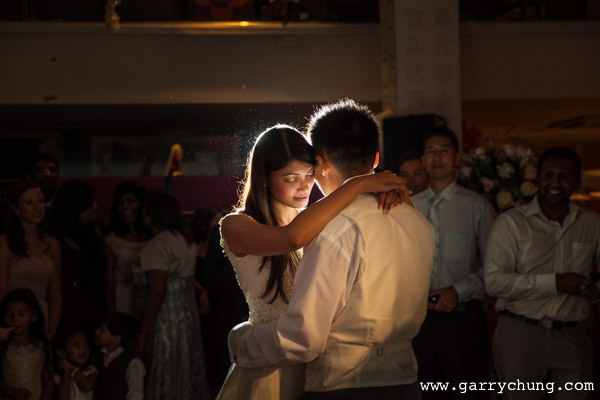
First dance

Photo taken using the Phottix Mitros+ system

As a professional wedding and portrait photographer, I would say the most important accessory in my kit bag besides my main camera and lenses would by my flashes. So when it came to making a decision on what flash system use, I did a lot of research and in the end I opted for the Phottix Mitros+/ Odin system. I don’t normally write gear reviews as I think the internet has enough top quality content. I realized however in my research that the Phottix Mitros+, although sold internationally, is comparatively less well known and not well documented on the web.

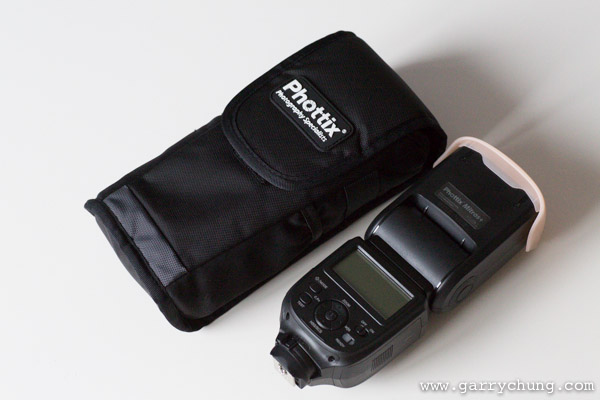
Phottix Mitros 107

Phottix Mitros+ – comes with carrying case and accessories

I am a big fan of using off-camera flash and as a Canon shooter and have previously been using Canon 580 EX II / Pocket wizard combination for the last 4 years. The Canon 580 EX IIs in all fairness have served me well. They have been dropped many times, and rained on, but never skipped a beat. The problem occurs when I take them off camera. Using the PocketWizard Mini TT1 and TT5 trigger and receiver I have experienced a whole host of reliability problems that eventually was the catalyst for me to look for alternate solution.

I started by looking at the Phottix Odin TTL triggering system, which I have used before and has had excellent reviews. That was when I realized Phottix also sells the Mitros+ flash, that includes the wireless transceiver built into the unit. The “+” denotes that it has radio transceiver built in as they also do a non “+” version with no transceiver. The Mitros+ flash is great for a number of reasons;

  • It’s one less piece of equipment to buy and worry about
  • There is so need to carry more batteries or worry about connection issues between your radio receiver and your flash
  • The Phottix Odin trigger system is also a tried, tested, reliable market leader and so I was confident it would work well

Review – Phottix Mitros+ Flash System

First impressions when you take the Mitros+ out of the box; it comes in a nice pouch and feels solidly built to take a few bumps, which is essential as I will put it though the rigours of professional use. The first thing you notice is that it makes a beep, like studio lights, to tell you the flash is recycled and ready for use. This is especially useful if you are firing at full power, and can be turned off using the custom functions if you don’t like it. I fired off a few successive frames and it seems extremely quick to recycle. This is by no means a scientific test but I set the flash in manual mode 1/2 power and fired consecutive bursts. It seems to recycle at least as fast, if not faster, than a Canon 580 EX II. In the real world, it holds up very well; I tested it all day in different lighting situations and the ETTL worked consistently. The battery consumption seems about the same as the 580 EX II, I did a full day shoot and didn’t need to change batteries, so all in all I am very happy.

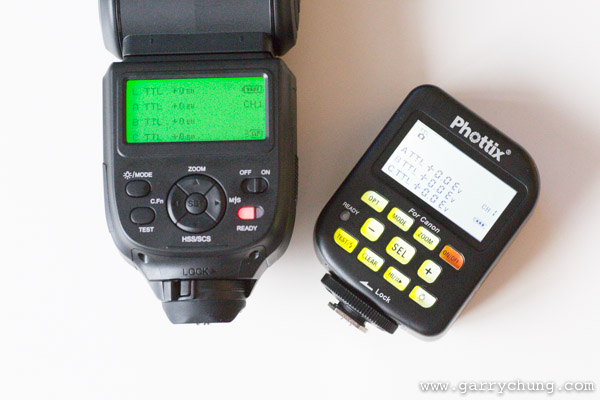
The real benefit of the unit however, is taking it off camera. It’s an absolute joy to use; no having to set up the PocketWizard receivers, and no misfires. I don’t have to do my usual five minutes of troubleshooting if the flashes aren’t firing. It just works like it is supposed to. With this system you can also control everything directly from my Odin transmitter, or using another Mitros+ flash. You can alter settings remotely such as TTL exposure compensation, manual power, high-speed sync and even flash zoom level. You can configure three groups of flashes and adjust each one individually. This basically allows you to control everything you need from the camera so no need to walk up and down making adjustments.

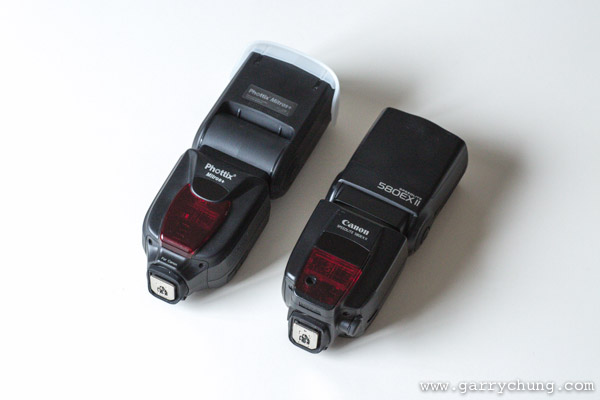
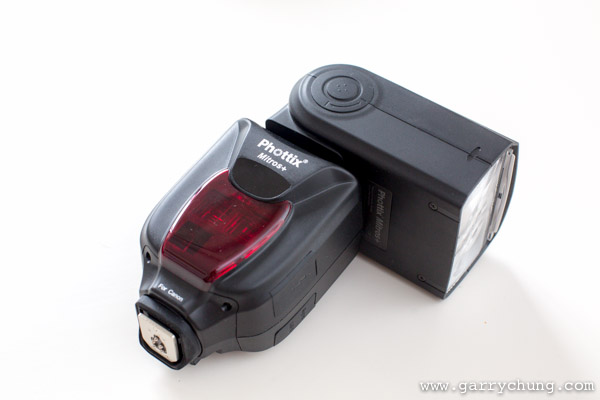
Phottix Mitros 101

Hands on it’s a quite a large flash as you can see here next to the Canon 580EX II

Features (as listed on the Phottix website)

  • E-TTL, M, Multi (Stroboscopic) modes
  • Auto/Manual Flash Head Zoom with 180 degree rotation and 97 degree tilt
  • High Speed Sync and Rear Curtain Sync
  • Flash Exposure Compensation: Manual, Bracketed
  • Fast Flash Mode: with 0.1-2.5 sec. recharge times
  • USB port for upgrades
  • 3.5mm Sync port
  • Canon-compatible IR Wireless Triggering with Master and Slave mode
  • Optical Slave Sync Mode
  • Uses 4 AA batteries
  • Port for external battery pack
  • Compatible with Phottix Odin TTL Flash Triggers for Canon
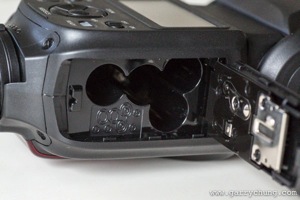
  • Battery Compartment for 4 AA batteries (below left)
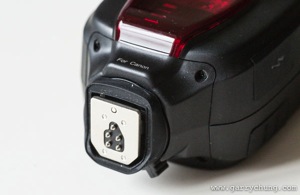
    Phottix Mitros 103 Phottix Mitros 102
  • Rubber seals around metal hot-shoe for weather sealing (above right)
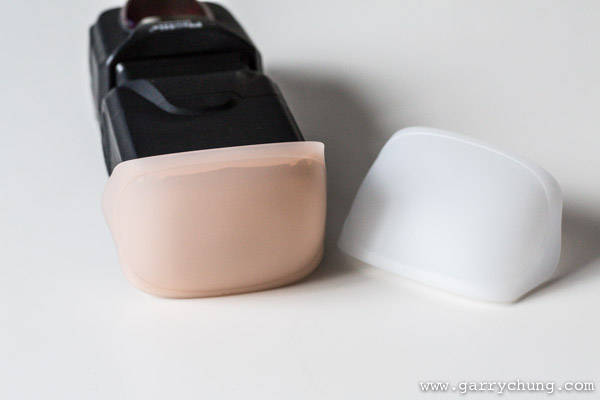
  • Mine also came with a plastic diffuser and 1/2 CTO which will come in handy (below left)
    Phottix Mitros 104 Phottix Mitros 100
  • Swivel and tilt head great for bouncing in all directions (above right)
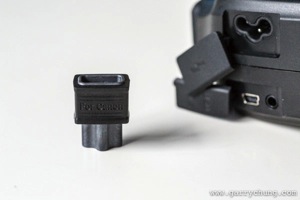
  • Connections for USB power, 3.5mm jack for sync and external power the kit also comes with an adapter to convert the head for Canon’s CP-E4
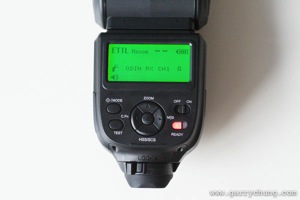
  • The display a the back is large backlit and clear
    Phottix Mitros 106 Phottix Mitros 108
  • Menu System identical to Phottix Odin when set to Trigger Mode

Phottix Mitros 109

The litmus test for me to judge how intuitive a menu system is; if I need to read the manual, it’s probably not that intuitive. I very quickly figured out how switch from ETTL to Manual, activated high-speed sync and got the radio trigger system working. I actually think the menu system is better than the Canon 580 EX II, which took me a long time to figure out. Like the Canon speedlite, you can also control flash exposure compensation from the Canon 5D Mark III’s menu, although this is not recommended by Phottix. An advantage of the Mitros is that it has an indicator to see how much battery life left, which is absent in the Canon 580 EX II.

I recently took the Mitros+ system for an intensive four day shoot on Tinian Island and I am glad to report it has been flawless. I was asked to do a beach shoot at 1 p.m. in the blazing afternoon heat and managed to overpower the sun with three of Mitros+ flashes set up in cluster.

Mitros 100

Final image

Mitros 101

Lit with three Phottix Mitros+ flashes

The determining factors for choosing the Phottix system were twofold

Firstly, it is an open system. Odin can be used to trigger not just the Mitros+ but other studio lights as well. In comparison the latest Canon 600EX–RT flash and Canon ST-E3 trigger are only compatible with each other. I have also bought Phottix Odin receivers to bolt onto my old Canon 580s, so can use them with the Mitros+/Odin system together.

Another positive for Phottix is that it’s more backwards compatible than the Canon 600 EX-RT, which is not fully compatible with pre-2012 models, such as Canon 5D Mark II, which I also own. I read reports that you lose features like HSS, (High Speed Sync) and the sync speed is lowered to 125th/sec but I haven’t tested it myself. It seemed very odd to me that a third party company can get their flash working with older Canon cameras but Canon can’t. I have tested the Mitros+ system with both the Canon 5D Mark II and 5D Mark III. It works fine and it is even compatible using infrared with the Canon 580 EX IIs, so you can use the Mitros+ to trigger the Canon flashes and vice versa. The Mitros+ also has optical slave which is something Canon never put on the 580 EX for unknown reasons.

The final factor is the Phottix retails at $ 399 USD, which offers a significant saving to the Canon equivalent. At time of print, the Mitros+ is $ 150 USD cheaper than the Canon 600EX–RT flash.

I talked about comparisons with Canon in my review as I am a Canon user, but the Mitros+ is available for Nikon now also. It should be quite attractive to Nikon shooters as I think Nikon have yet to release a flash with a built-in radio transceiver.

Conclusion

Things really have moved on for third party flash manufacturers in the last few years. When I first researched into non-proprietary flash systems, they were generally cheaper, but vastly inferior product to the brand name equivalents. The Mitros+ is a great quality product, at a great price. It’s well built, easy to use and packed with features. Phottix as a company feels like they are selling products designed by photographers, and have really listened to their customers. Looking back at reviews of the original Mitros when it came out, customers were just saying “if only it had the Odin radio system built in that would be fantastic”, not long after the Mitros+ was released.

The Phottix Odin radio trigger system fully deserves all the praise it gets. PocketWizard, which has historically commanded such a market dominance in this sector, should be well aware of the new competition – which I think is a good thing. I remember paying nearly $ 500 USD for a PocketWizard TT1 Trigger and TT5 receiver, but had to as there was just no competition at the time. I experienced range issues, reception/connection problems, broken hot-shoe and general unreliability which is unacceptable for such a premium priced product.

The Mitros+ / Odin combination so far has been solid as a rock in terms of reliability. Time will tell if the build quality is as good as it looks but at least Phottix shipped with a two year warranty peace of mind. For those of you looking to either buy your first flash, or add to existing flash system, it’s worth keeping an eye out for products from third party manufacturers such as Phottix. Light is light at the end of the day, and I don’t care what brand name it says on the side as long as it gives me consistently good results and so far my Mitros+ has done exactly that.

Here are a few more images created with the Phottix Mitros+

Buggy 100

Food

Outdoor off camera flash

The post Phottix Mitros+ Review – the Best Flash System You Have Never Heard of by Garry Chung appeared first on Digital Photography School.


Digital Photography School

 
Comments Off on Phottix Mitros+ Review – the Best Flash System You Have Never Heard of

Posted in Photography


Full speed ahead: Sony a6000 Review

03 Jun

a6000_beauty.jpg

The Sony a6000 offers some considerable advantages over its Sony NEX-6 predecessor. It has a 24.3 megapixel APS-C sensor and an updated hybrid AF system with 179 phase-detect and 25 contrast-detect points. Also included is a built-in 1.44 million-dot EVF and a tilting 3.0-inch display with 921,600 dots. With an impressive AF system, fast 11 fps continuous shooting with subject tracking and lots of extras, the a6000 is poised very competitively in the mirrorless class. Read the review

News: Digital Photography Review (dpreview.com)

 
Comments Off on Full speed ahead: Sony a6000 Review

Posted in Uncategorized


Accessory review: Vanguard Heralder 51T Rolling Backpack

03 Jun

Vanguard-Heralder-4.jpg

The Vanguard Heralder 51T combines the conveniences of a backpack with the travel-friendliness of a rolling case. At almost ten pounds it’s no day bag, but it is equipped with loads of compartments and pockets, a large removable interior tray, tripod sling, laptop storage and a rain cover. Is it the best of both worlds, or would you be better off with a dedicated backpack or roller? Read our review

News: Digital Photography Review (dpreview.com)

 
Comments Off on Accessory review: Vanguard Heralder 51T Rolling Backpack

Posted in Uncategorized


Rhino Slider PRO 4ft Review – Camera Rail System for Time Lapse and Video

02 Jun

If you’re into Videography or time lapse photography, chances are you’ve either already got yourself a slider or are considering making that purchase. Smooth camera movement can really add major production value to your footage and the key word here is ‘smooth’. Having your camera glide through space like it’s floating on air gives a huge boost to any kind of footage.

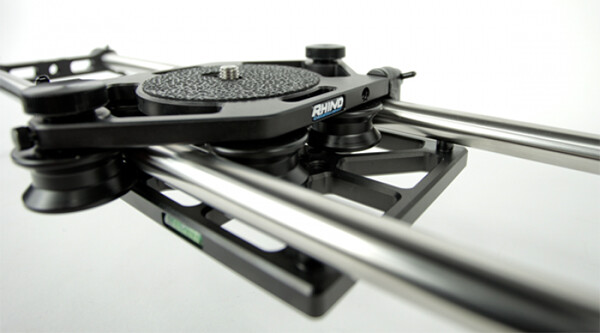
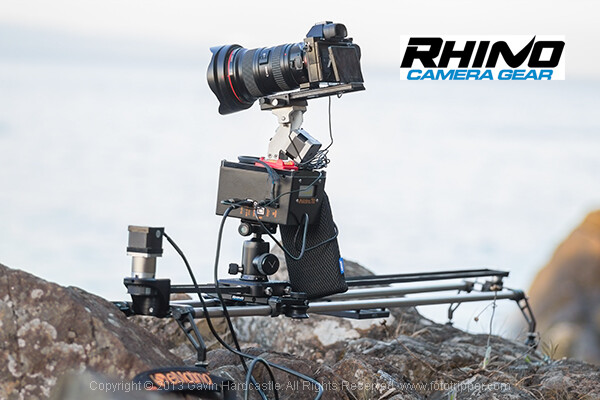
Enter the Rhino Slider Pro 4ft from Rhino Camera Gear, currently priced at $ 550. As the name suggests, this is a four foot wide slider, onto which you can attach your camera or take things a step further and add a robotic tripod head for a three axis solution of motion control awesomeness.

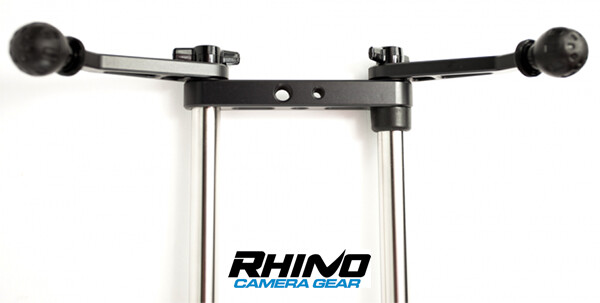
Rhino Slider PRO 4ft

How Smooth is the Slide?

The most important thing to consider when thinking about buying a slider is the smoothness of the sliding action. This is where the Rhino slider excels. The sliding motion of the carriage on to which you place your camera is as smooth as silk. Once you’ve set the tension on the outer wheels of the carriage, you’re good to go and you can rely on a super smooth slide every time.

Rhino Slider Pro Review

Build Quality

There is a huge difference between the build quality of a sub $ 300 slider and what you’re getting with the Rhino. This is a sturdy, well built unit, that performs well in all kinds of conditions. Sliders are a bit like tripods, if you buy a really cheap one –  it’ll probably end up in the trash. Spend a little more and you’ll get a unit that delivers the goods and lasts a long time. All of the Rhino slider parts are well machined and have that solid, reliable feel to them.

Rhino Slider Review PRO 4ft - Gavin Hardcastle

Heavy is Good Right?

Of course, all of that stability comes at a cost of added weight. The product page on the Rhino Camera Gear web site says that the Rhino Pro 4FT Slider weighs around 10 pounds (4.54 kg). That might not sound like much but by the time you’ve strapped on your camera bag, tripods and any other gear, you’ll be carrying the Rhino slider in its case and holding it in your hand. Talk about a forearm workout. Turns out you can’t have your cake and eat it.

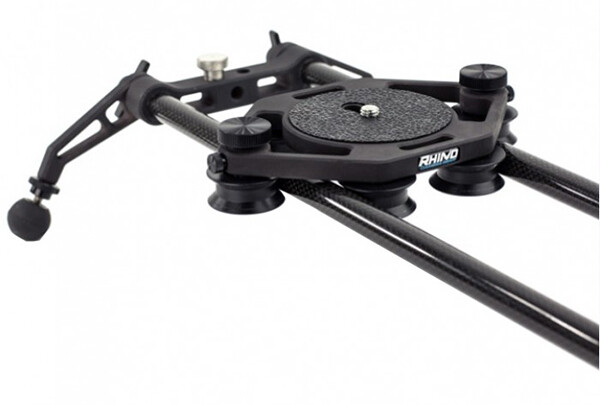
For those concerned about the weight, you might want to consider the carbon fibre rails or two foot rails to keep things more portable on long bush hikes.

Rhino Slider Carbon Legs

Rhino Slider Pro shown with Carbon fibre rails which weigh much less than the stainless steel ones.

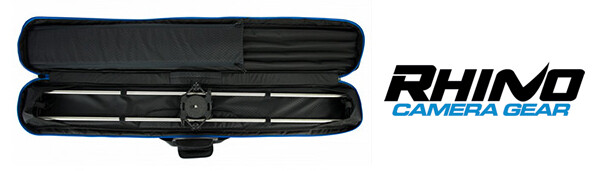
The Rhino Gear Carry Case

The test unit I received from Rhino Camera Gear came with the Rhino Armor – Slider Carrying Case 4ft, which is an additional $ 100. Let’s be honest, you’re not very likely to be dragging a 4ft slider into the bush without the carry case so you might as well consider it a foregone conclusion that your total cost will be $ 650. On the plus side, the carry case has space for extra rails so that you can extend the length of your slide. Having more rails means more weight, so I’d definitely opt for the carbon rails.

I found the case to be just a little too short. It was difficult and fiddly to fit the slider back in the case due to the four legs on the ends of the slider. If the case had been an inch longer I reckon this would have been much easier. I’m guessing they make it super tight so that the slider doesn’t shift in the case during transport but there’s tight, and then there’s this.

Rhino Armor Carry Case

Pros for the Rhino Slider PRO 4ft

  • Super smooth sliding action
  • Build quality
  • Value for money
  • Ease of use

Cons against the Rhino Slide PRO 4ft

  • Carry Case could be an inch longer to make it easier to pack the slider
  • Stainless steel rails are heavy – consider buying carbon rails if you are going on long hikes
  • End plates could have been taller. I found that the carriage hit my tripod plates long before it hit the rubber brakes.

Rhino Slider PRO Review

Would I Recommend It?

Having looked at the prices of similar sliders that boast the same build quality, the Rhino slider is looking like a bargain at $ 550 (+ $ 100 for the carry case). Before shelling out the dollars though I’d like to test out the carbon fibre rails to see if they perform as well. If the whole rig could be made lighter, that would eliminate my worst grumble and make this a near perfect product. If you’re not too bothered about the weight of those stainless steel rails, I think you’ll be extremely satisfied with the build quality and smooth sliding action of the Rhino Slider Pro 4ft from Rhino Camera Gear.

The post Rhino Slider PRO 4ft Review – Camera Rail System for Time Lapse and Video by Gavin Hardcastle appeared first on Digital Photography School.


Digital Photography School

 
Comments Off on Rhino Slider PRO 4ft Review – Camera Rail System for Time Lapse and Video

Posted in Photography


Accessory review: FotodioX WonderPana FreeArc Filter System

29 May

WonderPana-1.jpg

If you shoot primarily with wide-angle and ultra wide-angle lenses, you know how difficult it is to add filters. A lot of wide-angle lenses feature deep petal-style lenshoods and lack normal filter threads, making it impossible to add standard threaded filters. The FotodioX WonderPana uses a threaded ring and mount system which enables the attachment of 145mm round filters and square drop-in filters to several ultra wide-angle optics. Read our review

News: Digital Photography Review (dpreview.com)

 
Comments Off on Accessory review: FotodioX WonderPana FreeArc Filter System

Posted in Uncategorized


Fujifilm X-T1 Mirrorless Camera Review

28 May
Supplied by Fujifilm

The weather resistant Fujifilm X-T1 Mirrorless Camera

I was thrilled when Fujifilm Canada sent me their brand new X-T1 to play with just over a month ago. Along with the camera body itself they sent me three lenses including the XF 55-200mm F3.5-4.8 R LM OIS, the XF 35mm F1.4R and the XF 60mm F2.4 R macro lenses. Upon removing these items from the box I was immediately impressed with the professional fit and finish of the camera body, lenses and lens hoods. Larger companies like Canon could learn a thing about lens hood design from Fujifilm. While the camera body is weather resistant, none of the lenses currently available at the time of this review shard that characteristic.

Electronic viewfinder

Mirrorless cameras seem to be all the rage these days and for good reason. Leaving the mirror out of the light path allows for smaller, lighter, less mechanically complex cameras to be built. But, without a mirror to reflect light into the viewfinder, mirrorless cameras are dependent on providing a viewfinder image via an electronic viewfinder (think of a tiny monitor). Past attempts at electronic viewfinders by Fujifilm and other manufacturers has generally resulted in sub-standard results due to laggy (slow to respond) electronic viewfinders with hard to view results.

Supplied by Fujifilm Canada

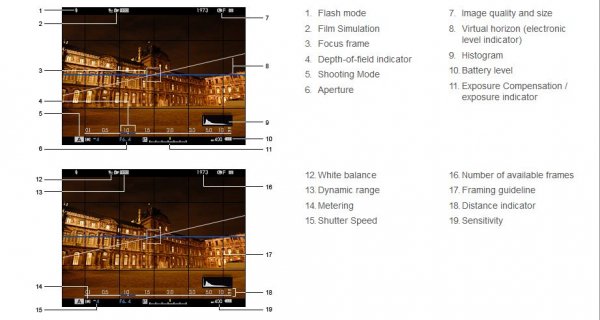
Fujifilm Viewfinder Layout

The X-T1’s viewfinder suffers from none of these problems. The viewfinder is large, bright and very responsive. I normally shoot with one of Canon’s pro cameras and the X-T1’s viewfinder was, surprisingly, a tiny bit larger. An advantage of the electronic viewfinder is that extra information can be superimposed over the image, allowing photographers to make real-time adjustments to exposures before the image is made by glancing at a histogram, instead of having to wait until after the photo is made as is the case on a standard digital SLR camera.

Autofocus

Another issue plaguing many mirrorless cameras has been their autofocus performance. Fujifilm has tackled this head-on by providing 49 focus points spread out across the entire image and those focus points are adjustable in size so that you can customize them based on the type of subject you are photographing. Where most mirrorless cameras rely on a type of autofocus system detecting contrast to determine whether the image is in focus or not, the central nine focus points on the X-T1 use the faster, more accurate phase modulation focus system for superior results.

Image quality

I found the images produced by the sensor of the X-T1 to be especially nice; low in noise and more resolution than I was expecting from a 16 megapixel APS-C sized sensor. That could be due to the fact that the X-Trans CMOS II sensor in the X-T1 uses a unique arrangement of colour filters which supposedly eliminate the need for an optical low-pass filter thereby resulting in increased resolution and perceived sharpness.

© Paul Burwell Photography

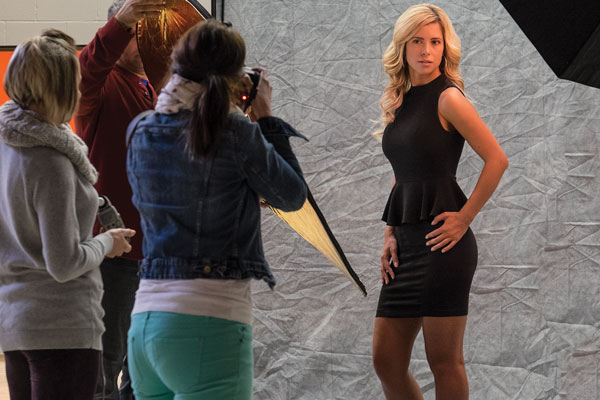
Students photographing model – ISO 3200 – XF55-200mm F3.5-4.8 R LM OIS Lens
1/25 at F6.4, ISO 3200, 95mm

WiFi

The X-T1 also has built in WiFi capabilities that allow you to download a free app for your smart device. This app allows you to remotely control your camera from a distance. A nifty application that requires additional hardware on most other current cameras to achieve similar results.

Supplied by Fujifilm

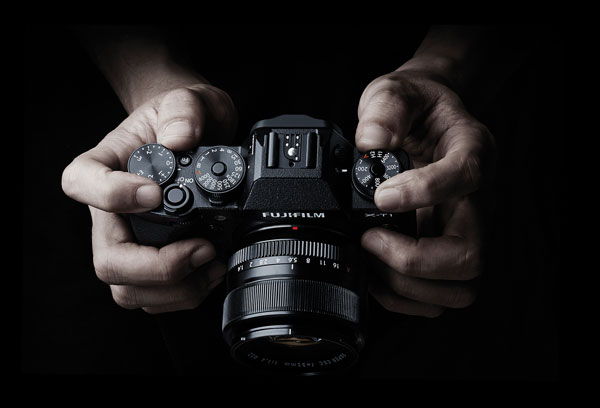
Controls on top of the camera

Camera controls

What I became especially fond of while working with the X-T1 is the controls for aperture, shutter speed, ISO and exposure compensation. Aperture is controlled by rotating a ring on the lens, just next to the body. ISO, shutter speed and exposure compensation are all controlled via dials on the top of the camera. Reminded me of some of my old-school SLR cameras, but it took me virtually no time to adapt from the Canon cameras I’ve used for the last 20 years or so.

Size and weight

The camera body itself is extremely light-weight but fit comfortably in my somewhat gigantor hands. I suspect adding the optional battery grip and/or hand grip would make it even better and of course battery grips always help with the making of vertical photographs. That said, most of the controls were easily accessible and with the body itself weighing in at just 440g (15.4 ounces), it is a camera that I could easily carry and shoot with for extended periods of time with little or no hand/shoulder/arm fatigue setting in. Even with the 55-200mm lens attached, the weight was just 1020g (36 ounces).

Customization

Another pro-camera feature I was thrilled to find on the X-T1 was a total of six different completely configurable multi-function buttons. This allowed me to fine-tune access to features like selecting focus points, depth-of-field preview, macro mode, autofocus mode and white balance so that I could program the buttons most convenient for me to the functions I use most.

© Paul Burwell Photography

Studio Tulips – XF60mm F2.4 R Macro Lens
5.3 Seconds at F8.0, ISO 200, 60mm

Dislikes

If you’re wondering if there is anything I didn’t like about the camera, there is. I strongly dislike the four-way controller on the back of the camera. Where the other buttons on the camera offer tactile feedback when pressed, that feedback is absent on the four-way controller. Since I needed to use the four-way controller to select different focus points, I was constantly using (or trying to) the four-way controller. I found it virtually impossible to use without glancing towards it (thus removing my eye from the viewfinder and missing a chance at retiring via a photo of a brief appearance by Sasquatch if that circumstance had occurred) and continually frustrated by it. Living where I live in Canada and therefore in cooler temperatures, it is absolutely impossible to use with any sort of gloves in conjunction with the four-way controller, and on a mostly professional-feel camera like this, it was a bad design or manufacturing decision.

Another quality issue on the camera body is the door that slides opens to allow for the removal of the SD memory card. It feels ridiculously flimsy and I felt lucky to be able to send the camera back to Fujifilm with the door intact because it always felt like it was about to break off.

© Paul Burwell Photography

Red-breasted Nuthatch – XF55-200mm F3.5-4.8 R LM OIS Lens
1/800 at f4.8, ISO 800, 200mm

Overall

Overall though, this camera is a gigantic win for Fujifilm in my opinion. I’m a wildlife photographer by nature and for the most part, that’s the type of shooting I did with the camera. I was suitably impressed with the autofocus, and was thrilled with the quality of the lenses and sort of images that the sensor produced. Regardless of the situation (high or low ISO), the images were always impressive and the camera did a great job at judging the white balance although I always shot in RAW mode just to give me that extra flexibility in case the camera got in terribly wrong.

Need for longer lenses

For a wildlife photographer though, Fujifilm’s biggest weakness is the lack of larger lenses. The biggest lens I could get my hands on was the 55-200mm (84-305mm equivalent on a full-frame camera). While that’s okay for casual wildlife photography, it stops well short of “real” telephoto focal lengths. For instance, just a couple of days ago I was out at my favourite marsh with my camera, 500mm lens with two teleconverters attached (2.0x and 1.4x) for a grand total of 1400mm of image magnification. However, Fujifilm representatives tell me they have plans for bigger glass in the future and if that comes to be, I know that it would make a tempting package for me to have in my kit.

Snowshoe Hare - XF55-200mm F3.5-4.8 R LM OIS Lens 1/200 at f 4.8, ISO 400, 200mm

Snowshoe Hare – XF55-200mm F3.5-4.8 R LM OIS Lens
1/200 at f 4.8, ISO 400, 200mm

Room for improvement in some areas

Another area that still needs some work is the autofocus system. While the X-T1 is a great improvement over other mirrorless systems I’ve tried, it still suffers from performance issues with moving subjects rapidly changing distances between shots. Theoretically, the X-T1 can shoot 8 frames-per-second in continuous drive and focus modes. However, if the subject you’re focused on is rapidly moving towards you, the camera’s processing slows down and I was lucky to get 2 or 3 frames per second.

An additional improvement I’d like to see is an expansion in the number of phase-detect autofocus points. Nine out of forty-nine isn’t a bad ratio, but more would be better. I love the control over the size of focus points, but having more of the high-performance phase-detect points would help a lot too for composition on moving subjects.

For accurate exposures, I love having a live histogram overlaid on my image in the viewfinder. However, it was frustrating to have that histogram disappear when I half-pressed the shutter button to focus on my subject. While in continuous focus mode, having the histogram remain visible would help me make better exposures overall.

© Paul Burwell Photography

Red-breasted Nuthatch – XF55-200mm F3.5-4.8 R LM OIS Lens
1/800 at f5.6, ISO 400, 200mm

Final word

Overall, I highly recommend this camera. I teach hundreds of photography students each year the basics of operating their interchangeable lens cameras. I can confidently state that a student with this camera system would probably find learning the basics a bit easier than with a standard digital SLR camera system if for no other reason than the live histogram available in the electronic viewfinder and the easy to access, logically laid out controls. Further, for the seasoned user, the X-T1 body and lenses make a great combination for producing high-quality professional results.

The post Fujifilm X-T1 Mirrorless Camera Review by Paul Burwell appeared first on Digital Photography School.


Digital Photography School

 
Comments Off on Fujifilm X-T1 Mirrorless Camera Review

Posted in Photography