One of the great advantages of smartphone technology is the way that it makes photography more convenient. I’m not just talking about using the camera that came with your phone. There are now smartphone apps coming out that allow you to connect with, and even control, your DSLR camera. One of these apps is the brand new slingShot DSLR Remote Control, which just came to the Google Play Android market on January 25, 2015. Using this app makes it possible to adjust the settings on your camera, see what the camera sees in live view, and view the resulting image after it’s snapped. All of this, and you don’t even have to be standing right next to your camera.
How it Works
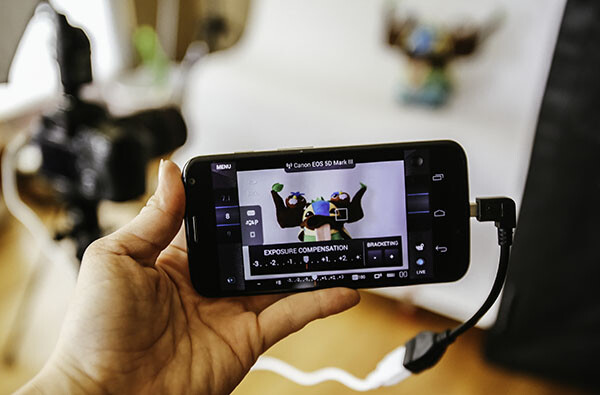
The slingShot app connects with your camera in one of two ways: via Wi-Fi if your camera has it, or via a physical USB On-The-Go (OTG) cable. If you have a Wi-Fi enabled camera, you’re already likely to be familiar with how the function works in that your camera will create its own Wi-Fi network that your phone will then sync with. For photographers with non-Wi-Fi cameras, the connection to your phone is made with the aforementioned OTG cable. While these cables definitely aren’t as common as others, they are cheap, easy to find online, and really convenient for connecting other devices to your phone or tablet besides your DSLR, such as a wireless USB mouse or keyboard.
Compatibility
At this moment, the app claims on its website to only support the following models:
- Camera Via Wi-Fi Connection: Canon EOS 6D, Canon EOS 70D and Nikon 5300.
- Camera Via USB Connection: Canon EOS 6D, EOS 70D and Nikon D5300 and D7000.
- Phone: Android 4.0 or higher; phone must also have Wi-Fi or full USB host support capabilities.
Despite the app’s relatively short list of supported devices, you may want to try it out for yourself. For example, the app doesn’t specify compatibility with the Canon EOS 5D Mark III, but it worked just fine with mine.
How to Control Your Camera with the App
1. Assuming you have a supported camera model and Android phone (no iOS support at the moment), the first step is to download the slingShot app from the Google Play store. This app does cost $ 8.99, but its features may make it worth the cost, depending on how useful you find them.
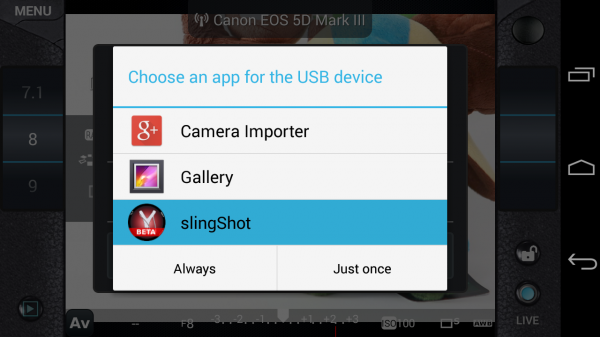
2. After you install the slingShot app, proceed to connect your camera to the phone. If your camera has Wi-Fi, walk through the procedures to enable the wireless connection, or simply connect the camera by using a OTG USB cable. When your camera and phone are successfully connected, you’ll see the screen below pop up, asking which app you want to activate. Choose the slingShot app.
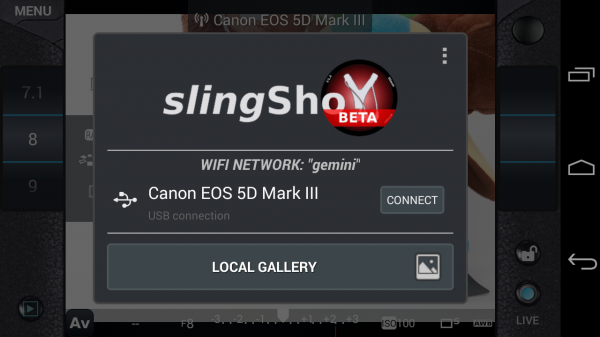
3. A screen will then flash up on your phone indicating that your camera has been detected. Press the “Connect” button to continue.
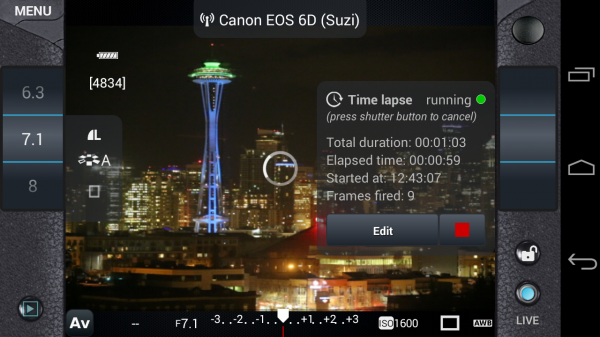
4. You will then see the menu controls on your phone (see below), as well as an indicator in the upper middle of the frame confirming that your camera is connected; in this case, I have my Canon 6D connected via Wi-Fi. You will also have the ability to use your phone to control aspects of your DSLR such as shutter speed, aperture, exposure, ISO, white balance, and image quality; you can even tap on the button in the upper right corner to take a photo.
However, you won’t be able to see what the camera is seeing until you enable live view mode on your camera and then press the “LIVE” button on the lower right corner of the app. Once the live view is on, the rest of the app controls are very smooth and easy to use, requiring just a tap or swipe of the finger to enable. There are also some extra features that appear when you tap on the menu button in the upper left corner, one of the most notable being the ability to do time lapse shots.
Time lapse feature
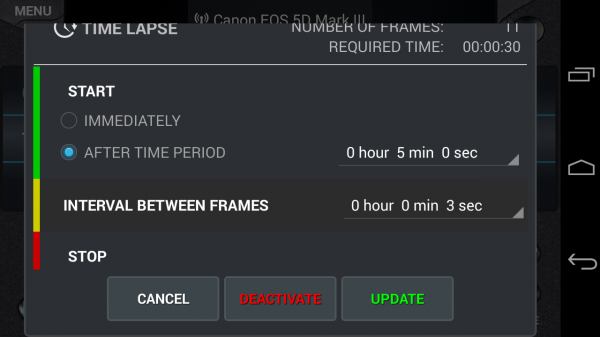
I’ve played around with quite a few DSLR remote control apps, but none have come with the time lapse functionality. slingShot’s time lapse feature is in the Menu and it offers a range of customizable settings. You can set it to start immediately or after a set period of time, you can also set the interval between frames, and give it a time to stop or have it stop after a certain number of frames are snapped. I tried the time lapse function out on both my Canon 6D and 5D Mark III and it worked perfectly the first time around.
There are a couple things that didn’t work so well. First, if your camera falls asleep, the time lapse function is turned off, even if you have a timer set. Second, the ability to reset the time lapse with different conditions is difficult to do; each time I had to simply reconnect my camera and phone to get rid of the initial settings I input. However, the fact that this app can do basic time lapses is still impressive and will likely be improved upon in future updates.
Previewing images
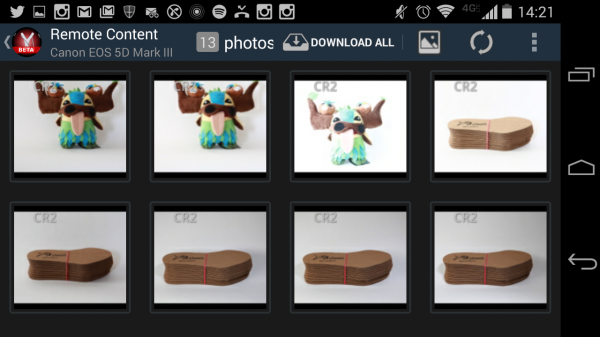
Another simple use of the slingShot app is to use it to preview DSLR content on your phone. Simply connect via Wi-Fi or OTG cable and press the play button in the app’s lower left corner. You’ll then see the screen show (see image below) a neat gallery of photos from your CF or SD card. Even if you have older content that wasn’t shot with the app, you’ll be able to see it and download it to your phone, or share via email or social media. This app will even read and convert RAW files at pretty decent speeds.
Potential Deal Breakers
While there are many positive aspects to the slingShot app, there are a few possible deal breakers. First, there are a few bugs in the app that don’t necessarily affect its overall functionality, but make its cool trick features such as time lapse not work as well as one might hope. On the other hand, the team behind the app is still actively making updates, so there’s a good chance these errors will be fixed. Another possible point of contention is the app’s $ 9.99 price tag. While you can download slingShot’s Beta version for free, you can only use it for 11 days before you’re made to purchase the actual app in order to keep using it. While the price isn’t super extravagant, it is on the steeper side compared to some other apps available. Also, there are a few other DSLR controller apps that offer the same functionality at lower prices. In fact, if you have a Wi-Fi DSLR, such as the Canon 6D in my case, there’s a (free) app from Canon that comes with it that enables DSLR control.
If the idea of being able to control your DSLR with your phone sounds like a winning deal, be sure to download slingShot app! Has anyone else given it a try? Thoughts?
googletag.cmd.push(function() {
tablet_slots.push( googletag.defineSlot( “/1005424/_dPSv4_tab-all-article-bottom_(300×250)”, [300, 250], “pb-ad-78623” ).addService( googletag.pubads() ) ); } );
googletag.cmd.push(function() {
mobile_slots.push( googletag.defineSlot( “/1005424/_dPSv4_mob-all-article-bottom_(300×250)”, [300, 250], “pb-ad-78158” ).addService( googletag.pubads() ) ); } );
The post Review: slingShot DSLR Remote Control App by Suzi Pratt appeared first on Digital Photography School.

Digital Photography School
You must be logged in to post a comment.