RSS
 

Posts Tagged ‘REVIEW’

Long and short of it: Tamron 16-300mm F3.5-6.3 Di II VC PZD Macro review

15 Sep

Tamron’s 16-300mm F3.5-6.3 takes the superzoom concept it made famous a few steps forward. It offers a significant increase in telephoto range, and also goes wider to bring real wide-angle capability to the superzoom category for the first time. It’s also earned a ‘Macro’ designation with its close focusing ability. Is it truly a super zoom? Take a look at our analysis. Read more 

Articles: Digital Photography Review (dpreview.com)

 
Comments Off on Long and short of it: Tamron 16-300mm F3.5-6.3 Di II VC PZD Macro review

Posted in Uncategorized


Cecilia Gallery Camera Neck Strap Review

10 Sep

Hey there FashionPhotographyBlog.com readers! A while ago we posted a review of the unique camera straps produced by New York-ased, camera strap manufacturers, Cecilia Gallery. We loved the Incan-inspired Peruvian designs and great quality of the Argentinian leather in their hand-crafted camera straps. This time round, Cecilia Gallery announced their latest range of 2.5cm leather neck strap and we were fortunate enough to get a hold of one of these new straps to give it a bit of a road test and to find out how these new camera straps stack up to their predecessors – a quite high benchmark I reckon, since we loved their original straps, but we were up to the challenge.

 Cecilia Gallery 2.5 cm Camera Neck Strap Review

In case you are not aware, Cecilia Gallery produces camera straps using quality materials sourced from all over the world, from the alpaca wool of Peru, the cowhide leathers of Argentina, to nylon fro the mills in the US. The unity of these pieces created a stunning range of eclectic, trendy, patterned camera straps for DSLRs. Now the company is expanding with a new set of neck straps, that are thinner and ideal for smaller cameras, like mirrorless cameras. While this new range of camera straps takes on a more simplified approach with a refined elegance compared to the larger, stylish patterned straps onIt the original straps, the new 2.5cm neck straps may be the compatible assessor for the photographer that is looking for a subdued and robust camera strap that is fashioned with good quality leather.     


To put it out there, the black 2.5cm leather neck strap we reviewed is a simple camera strap with very basic design features. Whether that is a pro or a con, that is really up to the individual’s taste. I like the idea of whipping my camera out and intriguing people with my camera strap with its Peruvian patterned stitching. It’s a great conversation starter. However, if I think laterally about it, when I travel overseas I don’t want to draw too much attention to my camera. So really, you know your own circumstance best to know how much attention you would like your camera strap to draw. Just know that Cecilia Gallery has camera straps to cater for both, conservative and colourful tastes. The same soft, Argentinean leather, that is now quintessentially associated with Cecilia Gallery’s products, is echoed through to the 2.5 cm neck straps. The texture of the strap is finely pebbled as I ran my fingers across the quality stitching, Cecilia Gallery definitely upholds their impeccable quality in this strap.    

Cecilia Gallery 2.5 cm Camera Neck Strap Review


I did find that the neck pad on the 2.5cm leather neck strap, quite stiff which makes it tricky to wrap the strap over the wrist. Softer neck pads would make it easier to run from location to location – just shoot, wrap the strap around your wrist like a makeshift hand-strap and then go. Those who do the same thing, you know what I’m talking about right? It wouldn’t be a problem if you are not a “wrist wrapper”. Mind you, I did assume that the neck pad was stiff because the strap was brand new and had not had the leather broken into yet.   


Flexible, small split rings that come with 2.5cm leather neck strap are sturdy and able handle the pulling of any camera gear attached to them. However, one issue that I did find was that on a couple of occasions the split rings got caught on the leather bumpers. This occurred when I put the camera over my neck or shoulder. The rings catch onto the leather bumpers easily because they are thick soft leather pads. In order to avoid this, you’ll need to do manoeuvre the ring upwards and keep it clear from the bumpers, so that rings don’t get caught. It’s just something I noticed, and it won’t bother you unless you are constantly putting down and putting back on multiple cameras on camera straps around your body.


Cecilia Gallery 2.5 cm  Camera Neck Strap Review

If you want to get technical with the specs of this camera strap, I’ve provided them here (courtesy of Cecilia Gallery’s website):  


– Leather: full-grain Argentinian cowhide;

– Interior: nylon (175lb tensile strength)/polyester;

– Hardware: nickel-plated tempered steel ring, zinc-alloy slider & keeper;

– Adjustable length: 37 in. – 54 in. (94 cm – 137 cm);

– Neck length and width: 14.5 in. x 1 in. (37 cm x 2.5 cm).


To adjust the strap to your preference, there are two sliders that can shorten the strap down to 37 inches or increase the length up to 54 inches. The neck pad itself isn’t moveable, however, it’s sufficiently wide enough to rest the camera comfortably around your neck and does the job as you go around with your camera. The strap may look simple, but like Cecilia Gallery’s previous products, they are built to handle the wear and tear that photographers place on their camera straps.


According to Cecilia Gallery’s website, the 2.5cm neck strap camera straps have been tested to carry up to 175 pounds. Mind you, I imagine that the more weight you add to the camera the more pressure you will add to your neck with the weight of camera digging into you. That was a major issue I had other camera straps I’ve used, particularly when I traveled and had to carry baggage or was on foot all day with the camera tugging on me. Luckily, this camera strap has extra polyester padding to distribute and cushion the weight.    


Cecilia Gallery 2.5 cm Camera Neck Strap Review

Cecilia Gallery’s 2.5cm neck strap is a minimal fuss leather camera accessory that pairs itself nicely with mirrorless cameras and their slimline appearance. Soft leather, strong nylon webbing, polyester padding to protect your neck and adjustable straps to custom tailor the length to your needs, this camera strap is an affordable product for the quality you are getting. There were some negligible issues in regards to the bumpers getting caught on the split rings and the rigidness of the neck pad when we first tested the straps. However, I’m sure these can be solved with a bit more time for the leather to wear.


The black 2.5cm neck strap we reviewed is priced on Cecilia Gallery’s website currently at $ 68. Whether that’s cost effective or pricey for you, we are looking at the long-term value of the product. The company is known to make sophisticated and sturdy camera straps, and the last thing I want to deal with when I’m on a shoot is the camera strap breaking on me, and more so, the camera that was around my neck is now smashed on the ground. For me, investing in a Cecilia Gallery camera strap is an affordable insurance for my piece of mind when it comes to handling and protecting my camera. For more information about Cecilia Gallery’s 2.5 neck straps you can check out here.


Stay tuned, because one lucky person can receive their own black 2.5cm neck strap courtesy of Cecilia Gallery. FashionPhotographyBlog.com has one to giveaway, and you can find details on how to enter our competition right here on our website shortly.


Fashion Photography Blog & Cecilia Gallery presents The Classic Camera Strap Giveaway Compeition


PHOTO SOURCE:

Images courtesy of Cecilia Gallery


Fashion Photography Blog

 
Comments Off on Cecilia Gallery Camera Neck Strap Review

Posted in Uncategorized


Sirui T-004X Aluminum Tripod Review

07 Sep

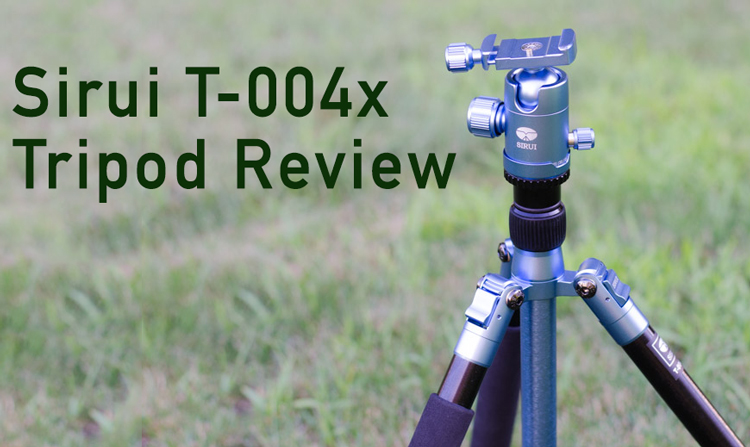
Tripods may not be the most exciting of gadgets in the photographer’s arsenal, but they are one of the more important. While the new Sirui T-004x tripod doesn’t exactly revolutionize the industry, if you are a travel or hiking enthusiast, you might want to give it a look.

SiruiTripodReview

Introduction – The Basics

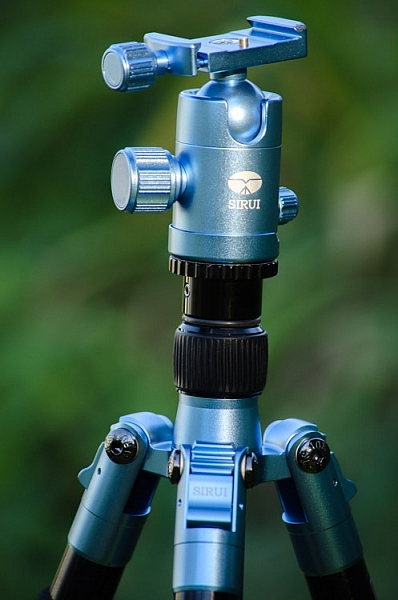
The Sirui T-004x is one of the best light-weight aluminum tripods I’ve had the opportunity to test. When I first opened the package I questioned whether this little tripod would hold a point a shoot steady, let alone my Nikon D7000. But, after a couple solid days of testing, I can safely say that Sirui has a great combination of strength and portability in their T-004x offering.

In my testing the Sirui was able to hold the D7000, paired with either the Nikon 55-300mm f/4.5-5.6 or the Tokina 11-16 f/2.8 wide angle lens without a problem. Unfortunately, I didn’t have anything larger to try, but T-004x is rated at 13.2 lbs (5.9 kg) which should be enough for most midsize DSLRs and smaller.

The Good

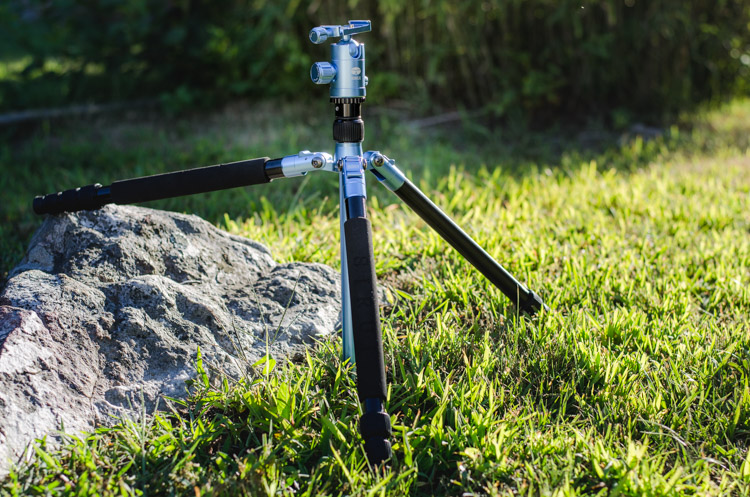
The standout feature of the Sirui T-004x has got to be its weight and folded size – this thing is tiny! When fully folded it becomes super portable at 15.7 inches (39.9 cm) long and weighs in at just 2.0 lbs. (0.9 kg).

SiruiTripodReview2

It comes with all the basics that you’d expect of today’s tripods. The four section legs can adjust to three different angles, independently of one another for photographing on tough terrain. The twist locks on each section are quick and easy to use – they also held tight throughout my testing. There’s a reversible center column so that you can set up for close macro photographs. Sirui also includes a shorter center column, which allows you to get even closer to the ground, should you want to take a super low camera angle perspective.

The Basic Specs

  • Load Capacity: 13.2 lbs (5.99 kg)
  • Max Height: 58″ (147.32 cm)
  • Min Height: 4.9″ (12.45 cm)
  • Folded Length: 15.7″ (39.88 cm)
  • Weight: 3.7 lbs (1.68 kg)
  • Leg Sections: 4

The Not so Good

When reviewing this tripod within the mindset of what it is supposed to be (a light weight travel tripod) it’s hard to find a lot of bad.

I will say that I am not a huge fan of the ball head that came with the Sirui as the twist knobs are a bit slow compared to the flip lever action I’m used to on my Manfrotto. This was especially noticeable with the quick release plate where it requires a few good twists of the release knob to remove the camera from the tripod. Of course, these are minor inconveniences, and if it bothers you enough you could replace the head with something more suited to your liking.

SiruiTripodReview1

Due to the compromises that had to be made in order to make this as light and as portable as possible, the overall ruggedness of the tripod is questionable. Now, I didn’t put it through anything too serious in my testing, but I’d imagine that a tumble down a rocky hill, or dropping it a off a ledge might result in some damage. Being as light as it is I’d also expect it to be quite susceptible to wind – though there is a bag hook on the center column that you could use for added weight if needed.

So Who’s the Sirui T-004x for?

The ideal photographer for the Sirui T-004x would be someone who needs a lightweight travel tripod. Whether you’re a frequent flyer, or a frequent hiker, the Sirui would be a good option for you. If you’re looking for something to take a bit of abuse, or will be using it during weddings, portrait sessions, or other situations where a bit more stability and heft are required this probably isn’t want you’re looking for.

What tripod do you currently use? Leave a comment below!

googletag.cmd.push(function() {
tablet_slots.push( googletag.defineSlot( “/1005424/_dPSv4_tab-all-article-bottom_(300×250)”, [300, 250], “pb-ad-78623” ).addService( googletag.pubads() ) ); } );

googletag.cmd.push(function() {
mobile_slots.push( googletag.defineSlot( “/1005424/_dPSv4_mob-all-article-bottom_(300×250)”, [300, 250], “pb-ad-78158” ).addService( googletag.pubads() ) ); } );

The post Sirui T-004X Aluminum Tripod Review by John Davenport appeared first on Digital Photography School.


Digital Photography School

 
Comments Off on Sirui T-004X Aluminum Tripod Review

Posted in Photography


Sigma 35mm f/1.4 Art Lens Review

02 Sep

When it comes to off-brand (or third party) camera gear, do you feel a bit skeptical? I was in the same boat for my entire photography career, choosing to invest exclusively in Nikon gear when I was a Nikon shooter, then all Canon when I switched over for the Canon 5D Mark III. “You get what you pay for” is what all of my photography colleagues would tell me, and I was an avid believer until this past summer when I invested in my first ever off-brand camera lens: the Sigma 35mm f/1.4.

Dubbed Sigma’s true flagship lens, the 35mm f/1.4 debuted in 2012 as the very first addition to the Art category, in Sigma’s newly announced lens categories. This shiny prime lens entered a crowded market in which Canon, Nikon, and Sony all have competitive offers, but Sigma’s version comes in at a fraction of the price, which is one of its most attractive features. So in this case, does the adage, “you get what you pay for” truly apply?

Sigma 35mm f/1.4 lens review

Let me preface this article by stating that this is the very first 35mm prime lens that I’ve owned, so I cannot make true comparisons between Sigma’s lens and that of other manufacturers, but I took it through several test runs to see how it held up. These were my findings.

Main Features

Sigma’s 35mm fixed lens is equipped with a fast f/1.4 maximum, and f/16 minimum aperture. It has quiet, quick Hypersonic Motor (HSM) focusing with manual override and a 0.3m (one foot) minimum focal distance – no image stabilization is included. The lens has mounts for all major DSLR camera types including Canon, Nikon, Sony, and Pentax, and it works on both full frame and APS-C (crop sensor) cameras. Out of the box, the lens comes with front and rear caps, a lens hood and a warranty and instruction guide, all packaged within a nicely padded, zippered nylon case. Brand new, this lens retails for $ 899, significantly less than other versions made by Canon and Nikon, which run upwards of $ 1,300.

Pros

Fast, accurate autofocusing speed

On the technical side of things, this lens performed impressively well. Even when shooting at f/1.4, all images produced by this lens were super sharp. Autofocusing speed was pretty fast and accurate, even when attempting to use this lens in an action setting like the concert below.

Sigma 35mm f/1.4 lens review

Little to no visible distortion

After spending some time with the Canon 24mm f/2.8 prime lens that produces quite a bit of barrel distortion, I was pleasantly surprised to find that the Sigma 35mm has pretty much no visible distortion. Although bear in mind that lens distortion can be easily fixed in post production using Photoshop’s lens Correction filter (or Lightroom’s Lens Correction panel).

Sigma 35mm f/1.4 lens review

Cons

Mostly plastic build

Perhaps the first thing that struck me about this lens when I first interacted with it what its sleek, yet mostly plastic build. Compared to Canon and Nikon versions that are made of a mix of metal and plastic, this mostly plastic Sigma lens felt like it may not hold up very well in the long run. The Sigma seems to live up to its Art lens designation with the feeling that this lens would hold up better being used for artistic purposes, more so than run and gun type of shooting.

Larger and heavier than Canon/Nikon equivalent

Despite being made of mostly plastic, the Sigma also feels pretty heavy (23.5 oz./ 665g), and it is indeed slightly heavier than its Nikon (21.2 oz / 600g) and Canon (20.5 oz. / 580g) equivalents.

Sigma 35mm f/1.4 lens review

Overall Take

While I loved capturing the world through a sharp 35mm prime lens, it was difficult to get over this lens’ size. The 35mm is known as a classic lens in photojournalism and street photography, and yet due to its size and plastic build, it was questionable if the Sigma 35mm f/1.4 could hold up well over time, especially in on-the-go style photography. As a result, I have to agree with my photography colleagues that you’d get what you pay for over time.

Investing in the more expensive Canon 35mm f/1.4 would be worth the extra expense ($ 899 for the Sigma, $ 1479 for the Canon) just because the L lens designation ensures a higher quality, more durable lens. As an additional option, the slower Canon 35mm f/2 comes with image stabilization and is priced lower at $ 599.99, so that may be a better budget option. And a final, even cheaper alternative might be to add 5mm to the lens focal length by going for the Canon 40mm f/2.8 pancake lens, the smallest and cheapest ($ 149 USD) of them all.

Basically, splurge for the Sigma 35mm f/1.4 and enjoy comparable, superior optics to the Canon and Nikon equivalents, but what you save in money might cost you later when testing the long-term durability of this lens.

Sigma 35mm f/1.4 lens review

googletag.cmd.push(function() {
tablet_slots.push( googletag.defineSlot( “/1005424/_dPSv4_tab-all-article-bottom_(300×250)”, [300, 250], “pb-ad-78623” ).addService( googletag.pubads() ) ); } );

googletag.cmd.push(function() {
mobile_slots.push( googletag.defineSlot( “/1005424/_dPSv4_mob-all-article-bottom_(300×250)”, [300, 250], “pb-ad-78158” ).addService( googletag.pubads() ) ); } );

The post Sigma 35mm f/1.4 Art Lens Review by Suzi Pratt appeared first on Digital Photography School.


Digital Photography School

 
Comments Off on Sigma 35mm f/1.4 Art Lens Review

Posted in Photography


Week in Review: Two by two

29 Aug

Around here it was a week of ‘twos’ – Olympus debuted the second generation of its OM-D E-M10 camera, Canon introduced version two of its popular 35mm F1.4L lens, and we published our thoughts on shooting with Sony’s RX10 II. We’ll sum it all up for you just in case you missed any of the action this week. Read more

Articles: Digital Photography Review (dpreview.com)

 
Comments Off on Week in Review: Two by two

Posted in Uncategorized


Custom SLR Dual Camera Strap – Product Review

25 Aug

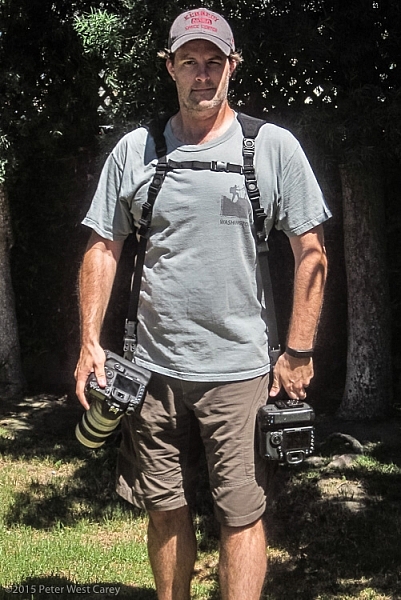
CustomSLR-Dual-Strap-DPS-PWC2015-0805-1314To be honest, I thought the Custom SLR Dual Camera Strap looked like a dorky idea when I was first asked to review it. The idea is simple: sometimes you need to carry two cameras (especially heavy cameras) and the logistics of such a feat have always been cumbersome. One strap over this way and the other maybe off of the other shoulder? Double criss-cross?

Custom SLR, a company that got its start thanks to a number of successful Kickstarter campaigns, crafted a solution using one of their best selling camera straps, times two. They sent me a copy of the Dual Camera Strap to test during a small boat cruise with UnCruise Adventures in Alaska last month. I was excited for the trip as it would mean I could take both my cameras and long lenses (28-300mm and a rented 150-600mm) for both close and distant images of marine wildlife. Having that range from 28mm-600mm (on crop factor cameras) always available was important to me so I was willing to try the Dual Camera Strap, with hopes I wouldn’t always be fumbling for the right camera.

What is it?

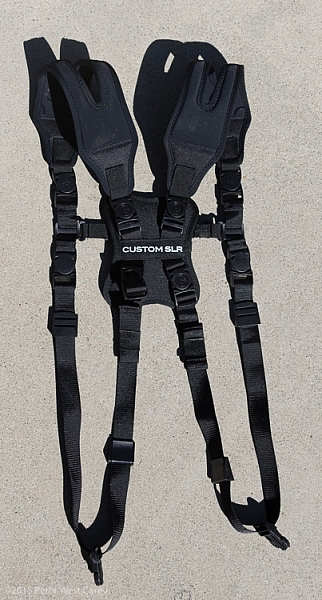
The unit is really five parts in one. Two of those parts are copies of the traditional Glide One Strap System by Custom SLR, meant to hold one camera, over one shoulder. Then they introduced a unique buckle connector that fits in the middle of your back. Lastly, there are two small pieces of webbing that add a sternum connector.
CustomSLR-Dual-Strap-DPS-PWC2015-0805-5547

The great thing about this setup is it uses two straps that can work alone. You’re not stuck with always using the dual setup when you only want to use one camera.

Let’s take a look at how it all fits together then I’ll tell you about my experience with the setup.

Anatomy of a Dual Camera Strap

The setup starts with the individual straps. Each has a piece of split neoprene to help evenly distribute weight on your shoulder. On the underside of the the split strap is a silicone print to provide traction, ensuring the strap doesn’t move around your shoulder.
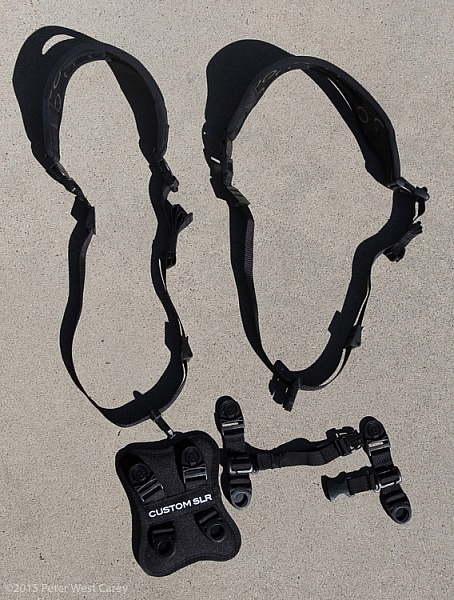
CustomSLR-Dual-Strap-DPS-PWC2015-0805-5550

Cameras are connected to a strap via a beefy quick-release clip attached to a tripod screw, with a loop to make hand-tightening possible (no need for tools). I have used one of these single straps in my daily photography and travels to over a dozen countries for the past three years. It’s now getting a little frayed but never once has the screw mount or quick-release failed.

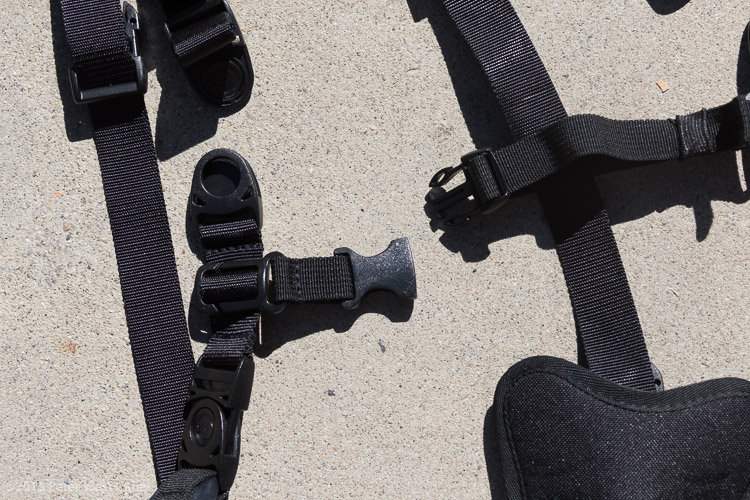
Next there is a connector that attaches the two straps in the middle of your back. Simply disconnect each single strap and clip them into the connector. The clips are one-way, making the process fairly idiot-proof.
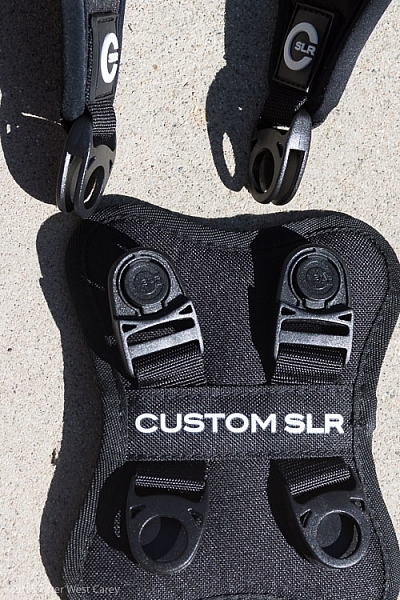
CustomSLR-Dual-Strap-DPS-PWC2015-0805-5555

Lastly, to keep the system stable, you need to insert a sternum strap that clips the two single straps together in the front.
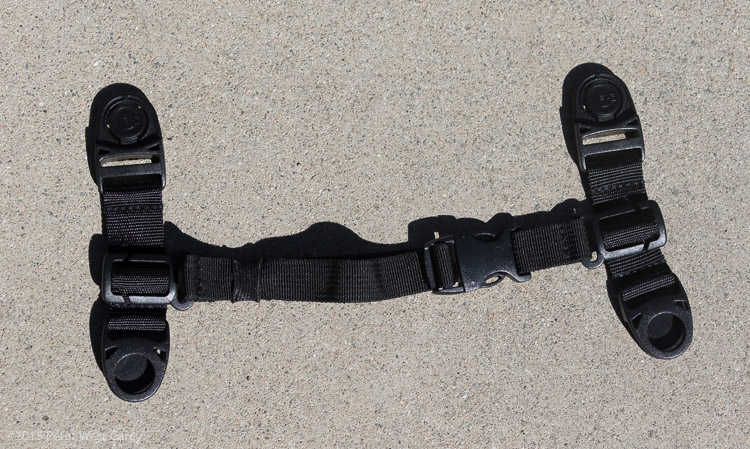
CustomSLR-Dual-Strap-DPS-PWC2015-0805-5551

Having received my unit already setup, I took it apart, jumbled up the pieces, and tried to put it all together at a leisurely pace. It took me one minute and 50 seconds to go from two single straps to the Dual setup, and that included making a small error and correcting it. It’s pretty easy.
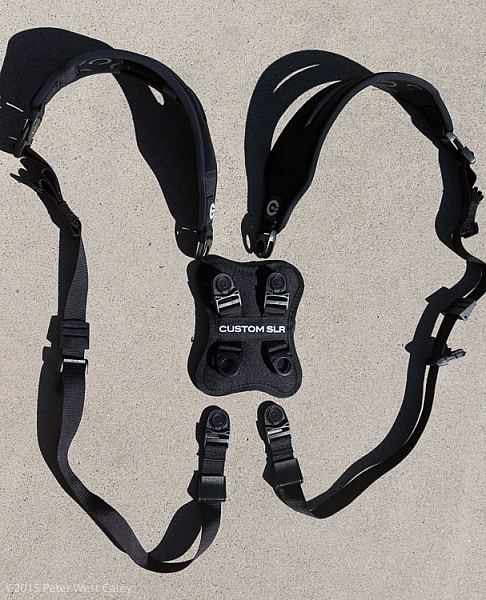
CustomSLR-Dual-Strap-DPS-PWC2015-0805-5554

CustomSLR-Dual-Strap-DPS-PWC2015-0805-5556

Attach Your Cameras

When changing from single straps to dual, the straps first need to be shortened. This is because each strap is simply looping around one shoulder and not across your body.

Next, screw in the tripod mount, called a C-Loop, to each camera. As Custom SLR likes to create a whole inter-functioning ecosystem, the C-Loop also works with their M-Plate tripod quick release system. This additional plate gives better stability when using long lenses, but is sold separately (shown in second photo).

CustomSLR-Dual-Strap-DPS-PWC2015-0805-5553

CustomSLR-Dual-Strap-DPS-PWC2015-0805-5552

Suiting-Up – Harness First, Then Cameras

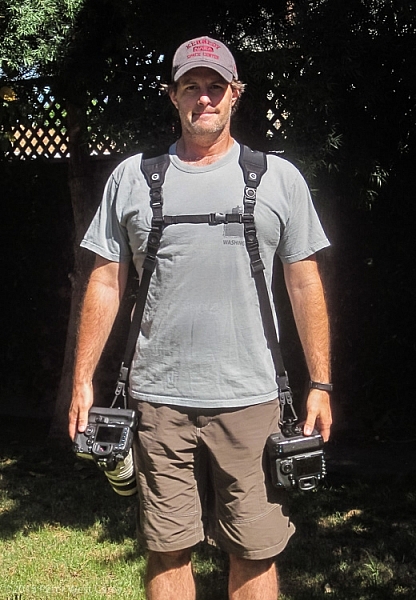
Now to put it all together! It’s best to put on the harness first before attaching cameras. It can be done the other way around, but it is quite clunky and will bang up your cameras. Then, clip each camera into your preferred side.

CustomSLR-Dual-Strap-DPS-PWC2015-0805-1314

CustomSLR-Dual-Strap-DPS-PWC2015-0805-1317

How Does it Feel?

What I enjoyed about the Dual Strap was how comfortable it was with the weight. I was wearing about 16lbs (7.2kg) of gear and it was no different than using a solid backpack with cameras stowed inside. In fact, short of a waist belt, this setup is just like a backpack with two comfortable stretchy neoprene shoulder straps.

How Does it Work?

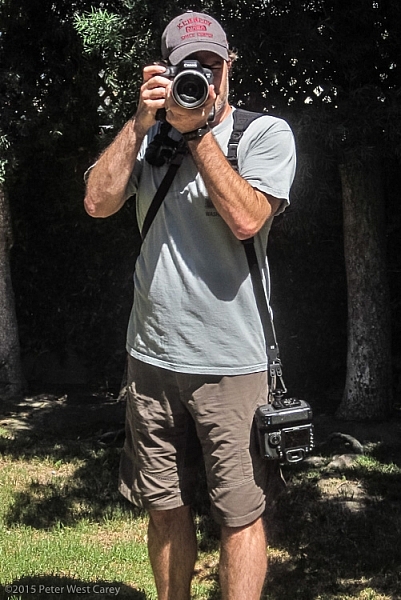
In practice the unit takes some getting used to during initial setup. Having two cameras dangling from your hips also takes a different sense of awareness when maneuvering in crowds, or around hard surfaces. Keeping your hands on your cameras helps with stability.

Each camera is free to glide up and down its own strap, yet is kept ready at your fingertips. When one camera is held up and the weight on that strap lessened, the second camera stays in place, without swinging to the side or sliding off your shoulder, as has been my case before using this strap.

CustomSLR-Dual-Strap-DPS-PWC2015-0805-1348  CustomSLR-Dual-Strap-DPS-PWC2015-0805-1349

CustomSLR-Dual-Strap-DPS-PWC2015-0805-1351 CustomSLR-Dual-Strap-DPS-PWC2015-0805-1352

I realize I look a little odd with this setup on my body. But the comfort and ease of use, quickly quieted my ego from worrying too much about what others think.

In short, the Dual Camera Strap now goes with me wherever I take both my camera bodies. I can break it down quickly for single camera use (I typically leave the sternum strap section attached to make setup quicker) and when I know I want both cameras at hand, there is simply no replacing this unit.

Additionally, I could still wear my F-Stop Lotus backpack over this setup, although range of motion was slightly lessened, but not enough to stop me from using the two together.

Conclusion

Dorkiness be damned, this thing works, and it works well. I wore the strap for more than 40 hours in a month, and after I figured out the best way to put it on (straps first, then attach cameras), it was a piece of cake.

There is something empowering having two cameras at the ready, and no longer worrying about one of them slipping off your shoulder. The Custom SLR Dual Camera Strap performs as advertised, and is a great solution if you have a two camera carrying problem.

Disclaimer: This product was provided to the author by the manufacturer for the purposes of doing a review. All reviews on dPS are 100% unbiased and based on the author’s opinions only. 

googletag.cmd.push(function() {
tablet_slots.push( googletag.defineSlot( “/1005424/_dPSv4_tab-all-article-bottom_(300×250)”, [300, 250], “pb-ad-78623” ).addService( googletag.pubads() ) ); } );

googletag.cmd.push(function() {
mobile_slots.push( googletag.defineSlot( “/1005424/_dPSv4_mob-all-article-bottom_(300×250)”, [300, 250], “pb-ad-78158” ).addService( googletag.pubads() ) ); } );

The post Custom SLR Dual Camera Strap – Product Review by Peter West Carey appeared first on Digital Photography School.


Digital Photography School

 
Comments Off on Custom SLR Dual Camera Strap – Product Review

Posted in Photography


Custom SLR Dual Camera Strap – Product Review

25 Aug

CustomSLR-Dual-Strap-DPS-PWC2015-0805-1314To be honest, I thought the Custom SLR Dual Camera Strap looked like a dorky idea when I was first asked to review it. The idea is simple: sometimes you need to carry two cameras (especially heavy cameras) and the logistics of such a feat have always been cumbersome. One strap over this way and the other maybe off of the other shoulder? Double criss-cross?

Custom SLR, a company that got its start thanks to a number of successful Kickstarter campaigns, crafted a solution using one of their best selling camera straps, times two. They sent me a copy of the Dual Camera Strap to test during a small boat cruise with UnCruise Adventures in Alaska last month. I was excited for the trip as it would mean I could take both my cameras and long lenses (28-300mm and a rented 150-600mm) for both close and distant images of marine wildlife. Having that range from 28mm-600mm (on crop factor cameras) always available was important to me so I was willing to try the Dual Camera Strap, with hopes I wouldn’t always be fumbling for the right camera.

What is it?

The unit is really five parts in one. Two of those parts are copies of the traditional Glide One Strap System by Custom SLR, meant to hold one camera, over one shoulder. Then they introduced a unique buckle connector that fits in the middle of your back. Lastly, there are two small pieces of webbing that add a sternum connector.

CustomSLR-Dual-Strap-DPS-PWC2015-0805-5547

The great thing about this setup is it uses two straps that can work alone. You’re not stuck with always using the dual setup when you only want to use one camera.

Let’s take a look at how it all fits together then I’ll tell you about my experience with the setup.

Anatomy of a Dual Camera Strap

The setup starts with the individual straps. Each has a piece of split neoprene to help evenly distribute weight on your shoulder. On the underside of the the split strap is a silicone print to provide traction, ensuring the strap doesn’t move around your shoulder.

CustomSLR-Dual-Strap-DPS-PWC2015-0805-5550

Cameras are connected to a strap via a beefy quick-release clip attached to a tripod screw, with a loop to make hand-tightening possible (no need for tools). I have used one of these single straps in my daily photography and travels to over a dozen countries for the past three years. It’s now getting a little frayed but never once has the screw mount or quick-release failed.

Next there is a connector that attaches the two straps in the middle of your back. Simply disconnect each single strap and clip them into the connector. The clips are one-way, making the process fairly idiot-proof.

CustomSLR-Dual-Strap-DPS-PWC2015-0805-5555

Lastly, to keep the system stable, you need to insert a sternum strap that clips the two single straps together in the front.

CustomSLR-Dual-Strap-DPS-PWC2015-0805-5551

Having received my unit already setup, I took it apart, jumbled up the pieces, and tried to put it all together at a leisurely pace. It took me one minute and 50 seconds to go from two single straps to the Dual setup, and that included making a small error and correcting it. It’s pretty easy.
CustomSLR-Dual-Strap-DPS-PWC2015-0805-5554

CustomSLR-Dual-Strap-DPS-PWC2015-0805-5556

Attach Your Cameras

When changing from single straps to dual, the straps first need to be shortened. This is because each strap is simply looping around one shoulder and not across your body.

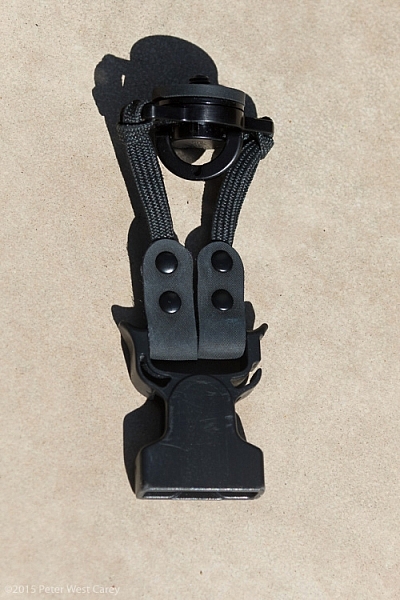
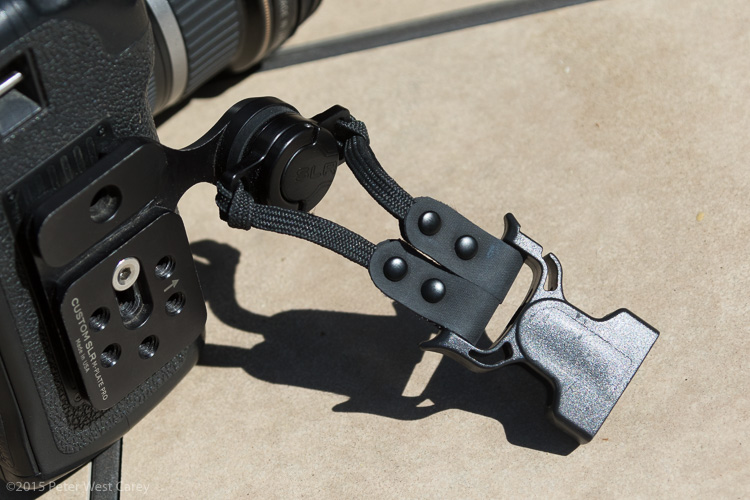
Next, screw in the tripod mount, called a C-Loop, to each camera. As Custom SLR likes to create a whole inter-functioning ecosystem, the C-Loop also works with their M-Plate tripod quick release system. This additional plate gives better stability when using long lenses, but is sold separately (shown in second photo).
CustomSLR-Dual-Strap-DPS-PWC2015-0805-5553

CustomSLR-Dual-Strap-DPS-PWC2015-0805-5552

Suiting-Up – Harness First, Then Cameras

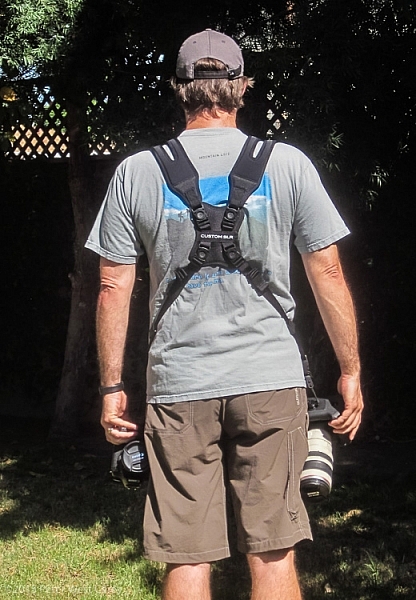
Now to put it all together! It’s best to put on the harness first before attaching cameras. It can be done the other way around, but it is quite clunky and will bang up your cameras. Then, clip each camera into your preferred side.
CustomSLR-Dual-Strap-DPS-PWC2015-0805-1314

CustomSLR-Dual-Strap-DPS-PWC2015-0805-1317

How Does it Feel?

What I enjoyed about the Dual Strap was how comfortable it was with the weight. I was wearing about 16lbs (7.2kg) of gear and it was no different than using a solid backpack with cameras stowed inside. In fact, short of a waist belt, this setup is just like a backpack with two comfortable stretchy neoprene shoulder straps.

How Does it Work?

In practice the unit takes some getting used to during initial setup. Having two cameras dangling from your hips also takes a different sense of awareness when maneuvering in crowds, or around hard surfaces. Keeping your hands on your cameras helps with stability.

Each camera is free to glide up and down its own strap, yet is kept ready at your fingertips. When one camera is held up and the weight on that strap lessened, the second camera stays in place, without swinging to the side or sliding off your shoulder, as has been my case before using this strap.
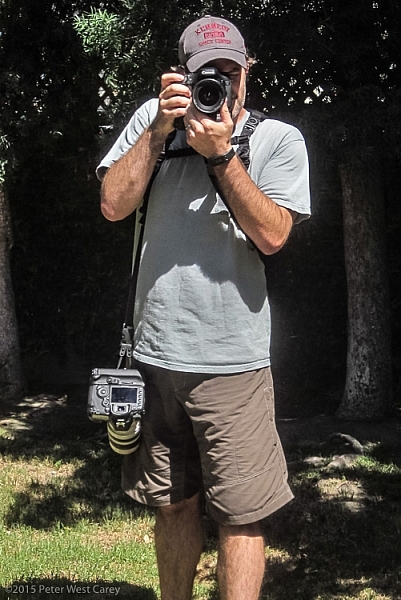
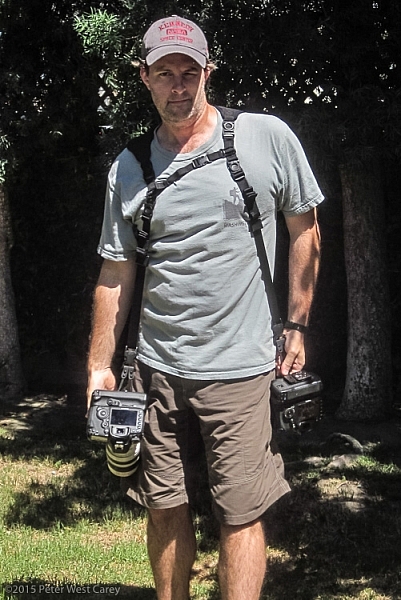
CustomSLR-Dual-Strap-DPS-PWC2015-0805-1348  CustomSLR-Dual-Strap-DPS-PWC2015-0805-1349

CustomSLR-Dual-Strap-DPS-PWC2015-0805-1351 CustomSLR-Dual-Strap-DPS-PWC2015-0805-1352

I realize I look a little odd with this setup on my body. But the comfort and ease of use, quickly quieted my ego from worrying too much about what others think.

In short, the Dual Camera Strap now goes with me wherever I take both my camera bodies. I can break it down quickly for single camera use (I typically leave the sternum strap section attached to make setup quicker) and when I know I want both cameras at hand, there is simply no replacing this unit.

Additionally, I could still wear my F-Stop Lotus backpack over this setup, although range of motion was slightly lessened, but not enough to stop me from using the two together.

Conclusion

Dorkiness be damned, this thing works, and it works well. I wore the strap for more than 40 hours in a month, and after I figured out the best way to put it on (straps first, then attach cameras), it was a piece of cake.

There is something empowering having two cameras at the ready, and no longer worrying about one of them slipping off your shoulder. The Custom SLR Dual Camera Strap performs as advertised, and is a great solution if you have a two camera carrying problem.

Disclaimer: This product was provided to the author by the manufacturer for the purposes of doing a review. All reviews on dPS are 100% unbiased and based on the author’s opinions only. 

googletag.cmd.push(function() {
tablet_slots.push( googletag.defineSlot( “/1005424/_dPSv4_tab-all-article-bottom_(300×250)”, [300, 250], “pb-ad-78623” ).addService( googletag.pubads() ) ); } );

googletag.cmd.push(function() {
mobile_slots.push( googletag.defineSlot( “/1005424/_dPSv4_mob-all-article-bottom_(300×250)”, [300, 250], “pb-ad-78158” ).addService( googletag.pubads() ) ); } );

The post Custom SLR Dual Camera Strap – Product Review by Peter West Carey appeared first on Digital Photography School.


Digital Photography School

 
Comments Off on Custom SLR Dual Camera Strap – Product Review

Posted in Photography


Bang for the Buck: Olympus OM-D E-M10 II Review

25 Aug

The Olympus OM-D E-M10 II is the next evolution of an already impressive camera. The E-M10 II introduces 5-axis stabilization to the entry-level OM-D line, while it maintains the 16.1MP Live Mos sensor and TruePic VII engine of its predecessor. A number of ergnomic and feature upgrades make the E-M10 II an enticing little ILC at a nice price. Does it deliver? Read more

Articles: Digital Photography Review (dpreview.com)

 
Comments Off on Bang for the Buck: Olympus OM-D E-M10 II Review

Posted in Uncategorized


Flashpoint Ring Li-On Ringflash Review

16 Aug

Adorama has been on a roll with its rechargeable lithium-ion battery powered flash units. Not long ago, they debuted the FlashPoint Zoom Speedlight, and now they have upped the ante with a monster 400ws ringflash. I recently got my hands on this ringflash and ran it through some tests to see how it would perform. Read on for some specs and details!

Adorama Flashpoint Ring Li-on ring flash

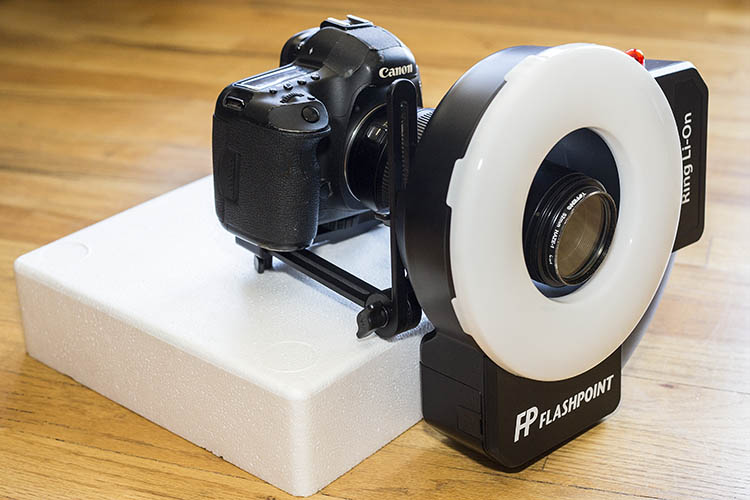
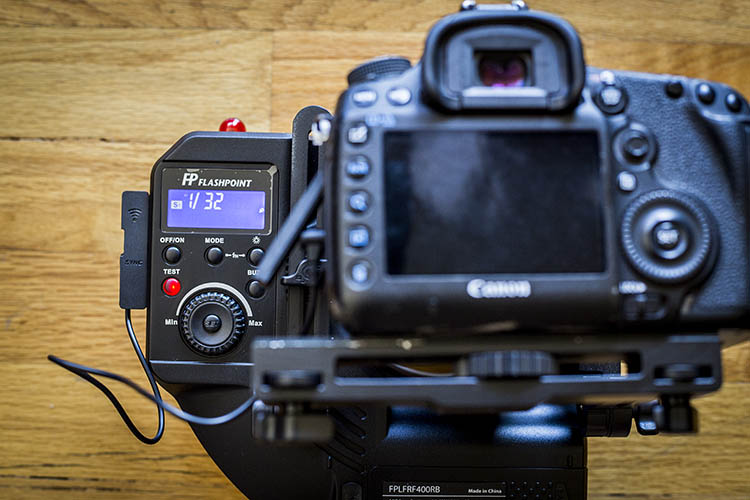
Ring Li-on flash with Canon 5D Mark III and Canon 100mm f/2.8 macro lens attached.

What’s in the Box

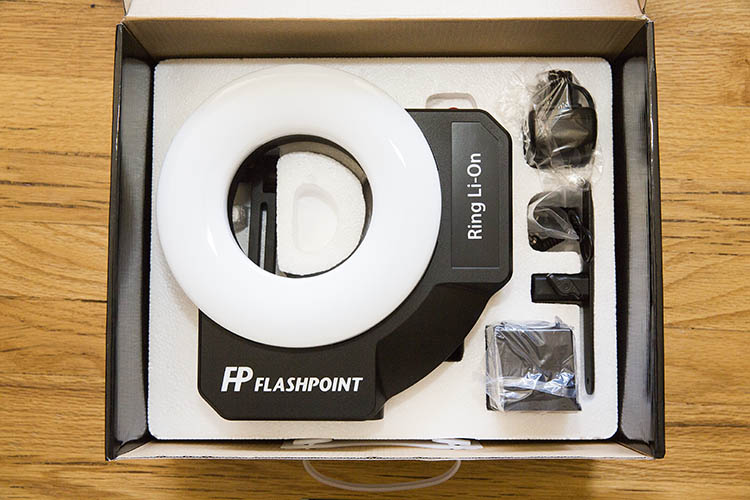
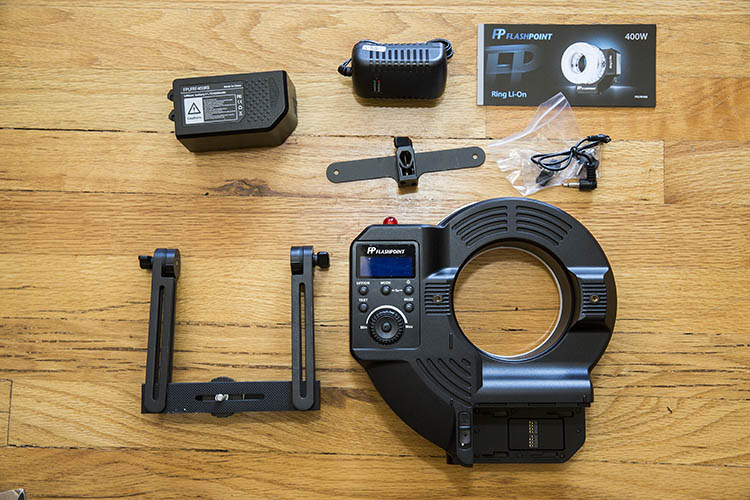
The first thing you’ll notice about this ringflash is its size, as indicated by the large box it arrives in. Included in the box are:

  • (1) FlashPoint Ring Li-On 400ws Ringflash with a Guide Number of 82
  • (1) Snap-on diffuser ring
  • (1) PC cable
  • (1) Rechargeable battery
  • (1) Battery charger
  • (1) Fully adjustable camera bracket with 1/4″ x 20 screw mount

With the rechargeable battery, the flash weighs in at 3.1 pounds (1.4kg), and has dimensions of 8.9 x 9.1 x 2.8″. Due to its size, I found it was very difficult to use this flash in handheld mode, without using the included bracket to hold it in place with my camera, or on a tripod. As a result, the final product ends up weighing quite a bit. Even though it is fully transportable, I would not consider this setup to be the most compact and travel-friendly, especially since the flash doesn’t come with a carrying case. However, the easily affixed umbrella bracket and tripod mounting included with the flash make it a breeze to use this flash in a hands-free studio setup.

Adorama Flashpoint Ring Li-on ring flash

The flash can be triggered via the included PC cable with a 3.5mm jack, or remotely from a distance of 150+ feet away using the Flashpoint Commander set (sold separately). This means that the Flashpoint Ring Li-on Ringflash can be triggered by any camera that has a PC socket, adapter in a hot shoe, or connection to the wireless Flashpoint Commander system. The only possible limitation is  lens size. If you opt to shoot through the Ring Li-on flash, it must be done with a lens no larger than 3.5 inches in diameter, otherwise it won’t fit through the middle opening in the flash.

Adorama Flashpoint Ring Li-on ring flash

Features

Despite its somewhat cumbersome size, one of the Ring Li-on’s best features is the 11.1V Lithium-ion cell battery with a 4500mAh capacity. This powerful battery can run the flash through about 450 full-power discharges, before needing a recharge. Additionally, the powerful battery also allows for the flash to perform with a solid guide number of 82 (feet at ISO 100), which is very rare among portable ringflashes.

Flash output is very easily controlled via an intuitive, illuminated rear selection dial that clearly indicates battery levels, LED model/video lamp power, and flash modes of Manual, 2 Slave, and Stroboscopic. The flash’s power is adjustable in 1/3 stop increments from full power down to 1/128th power with a recycling time of between 0.5 seconds and 2.8 seconds on a fully charged battery. Flash duration averages between 1/300 to 1/20000 seconds depending on the power of the output.

Another great feature of the Ring Li-on flash is the ability to emit constant 440 lux LED lighting with three level output settings for use as a modeling light or a video light, and it will even power-off automatically after a set period of time to conserve battery power.

Adorama Flashpoint Ring Li-on ring flash

Ring Li-on Flash in Practice

For those of you unfamiliar with ringflashes, they tend to be favored among fashion and portrait photographers thanks to the ringed catchlights that are produced in the subject’s eyes. Macro photography shooters may also find ringflashes appealing since they produce virtually shadow-free lighting with even illumination. You may also have seen ringflashes used by medical and dental professionals, again because of the even lighting produced.

In the portrait below, the Ring Li-on flash produces a look with very balanced lighting that is very soft on the shadows. The subject is evenly exposed, and we see the signature ring-shaped catchlight in his eyes.

Adorama Flashpoint Ring Li-on ring flash

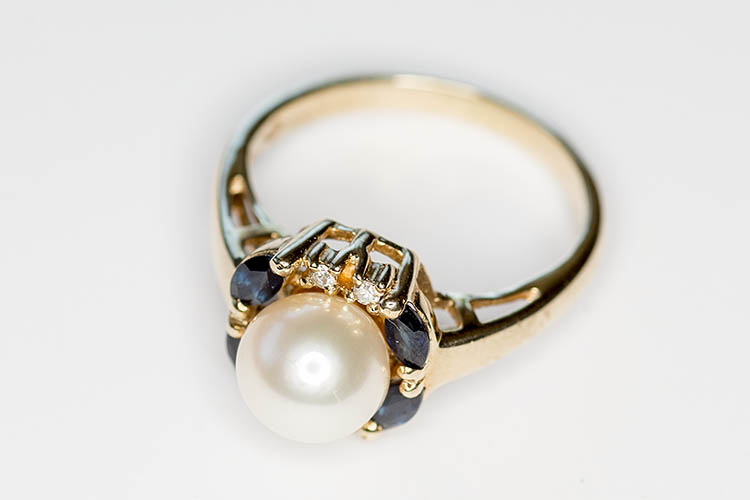
The Ring Li-on flash also performs superbly when paired with a macro lens, although I strongly advise using the provided bracket to help stabilize your rig. Below, the Ring Li-on flash was used to photograph a family heirloom ring. Little to no shadow is detectable, and the ringflash’s catchlight is reflected in the pearl. In the final example, the Ring Li-on is used to take a macro photo of a succulent plant, thus providing even lighting with just a hint of a shadow even in this layered plant.

Adorama Flashpoint Ring Li-on ring flash

Adorama Flashpoint Ring Li-on ring flash

Your Turn

What’s your take on ringflashes? How do you incorporate them into your photography work, if at all?

googletag.cmd.push(function() {
tablet_slots.push( googletag.defineSlot( “/1005424/_dPSv4_tab-all-article-bottom_(300×250)”, [300, 250], “pb-ad-78623” ).addService( googletag.pubads() ) ); } );

googletag.cmd.push(function() {
mobile_slots.push( googletag.defineSlot( “/1005424/_dPSv4_mob-all-article-bottom_(300×250)”, [300, 250], “pb-ad-78158” ).addService( googletag.pubads() ) ); } );

The post Flashpoint Ring Li-On Ringflash Review by Suzi Pratt appeared first on Digital Photography School.


Digital Photography School

 
Comments Off on Flashpoint Ring Li-On Ringflash Review

Posted in Photography


So what do we think? Our video review of the Sony RX100 IV

12 Aug

We’ve condensed everything you need to know about the Sony RX100 IV into less than the length of a pop record. Having shot, tested and lived with the little Sony for more than a month, we’ve summed up the findings of our review in video form. Is it worth the extra cash over the Mark III? Come join us in sunny Seattle as we look at the pros and cons of Sony’s capable but pricey super-compact. Read more

Articles: Digital Photography Review (dpreview.com)

 
Comments Off on So what do we think? Our video review of the Sony RX100 IV

Posted in Uncategorized