RSS
 

Posts Tagged ‘REVIEW’

Inching forward? Canon PowerShot G5 X review posted

14 Dec

Canon PowerShot G5 X Review

Key Features

  • 20.2MP 1″-type BSI CMOS sensor
  • DIGIC 6 processor
  • F1.8-2.8, 24-100mm equiv. lens
  • Optical image stabilization
  • Built-in ND filter
  • 3″ fully articulating touchscreen LCD
  • 2.36M-dot electronic viewfinder
  • 1080/60p video
  • Wi-Fi with NFC

The PowerShot G5 X is one of the latest members of Canon’s 1″-type sensor family, which began with the G7 X in 2014. It takes what made that camera appealing – namely its sensor, lens, and direct controls, and puts them into a body that adds an electronic viewfinder, fully articulating touchscreen LCD, hot shoe, and additional control dial – all without a large increase in size.

The G5 X’s 20.2MP 1″-type BSI CMOS sensor – designed by Sony and first used in its RX100 II and III – performs very well and, given that the image pipeline on the G5 X is the same as its predecessor’s, should continue to do so. The 24-100mm F1.8-2.8 optically stabilized lens is also the same as on the G7 X, so there shouldn’t be any surprises there, either.

From a feature standpoint, the G5 X is essentially the same as the G7 X. You’ve got your manual exposure controls, customizable buttons and dials, built-in neutral density filter, Raw support, 6 fps continuous shooting (JPEG only), a fun star trail mode, 1080/60p video recording and Wi-Fi with NFC. 

Sadly, two of the G7 X’s most disappointing traits have carried over to the G5 X, namely sluggish Raw shooting performance and lackluster battery life. 

Meet the Family

From left to right: the PowerShot G1 X Mark II, G3 X, G5 X, G7 X, and G9 X

There are now five members in Canon’s premium compact’ family: the G1 X Mark II, G3 X, G5 X, G7 X and G9 X. The G1 X Mark II is the flagship model, using a considerably larger 1.5″-type sensor instead of the 1″-types used by the rest of the group. 

The G7 X is Canon’s original 1″-type sensor camera, and the models that have followed are a variation on the same theme. The G3 X is the long zoom model, the G5 X is for the EVF crowd, and the G9 X is an ultra-compact model with a shorter, slower lens. 

Here’s a quick table to help you sort out the differences between the five models:

  G1 X Mark II G3 X G5 X G7 X G9 X
MSRP $ 799 $ 999 $ 799 $ 699 $ 529
Sensor 12.8MP 1.5″-type CMOS 20.2MP 1″-type BSI CMOS
Lens (equiv.) 24-120mm
F2.0-3.9
24-600mm
F2.8-5.6
24-100mm F1.8-2.8 28-84mm
F2.0-4.9
LCD size/type 3″ tilting touch 3.2″ tilting touch 3″ rotating touch 3″ tilting touch 3″ fixed touch
EVF Optional Yes No
Hot shoe Yes No
JPEG burst 5.2 fps 5.9 fps 6.5 fps 6.0 fps
Video 1080/30p 1080/60p
Audio in/out No Yes No
Battery life (CIPA) 240 shots 300 shots 210 shots 210 shots 220 shots
Dimensions 116 x 74 x 66mm 123 x 77 x 105mm 112 x 76 x 44mm 103 x 60 x 40mm 98 x 58 x 31mm
Weight 553g 733g 377g 304g 185g

That’ll do it for comparisons – let’s dive into the world of the PowerShot G5 X now.

Articles: Digital Photography Review (dpreview.com)

 
Comments Off on Inching forward? Canon PowerShot G5 X review posted

Posted in Uncategorized


Review: Incase DSLR Pro Pack Backpack

13 Dec

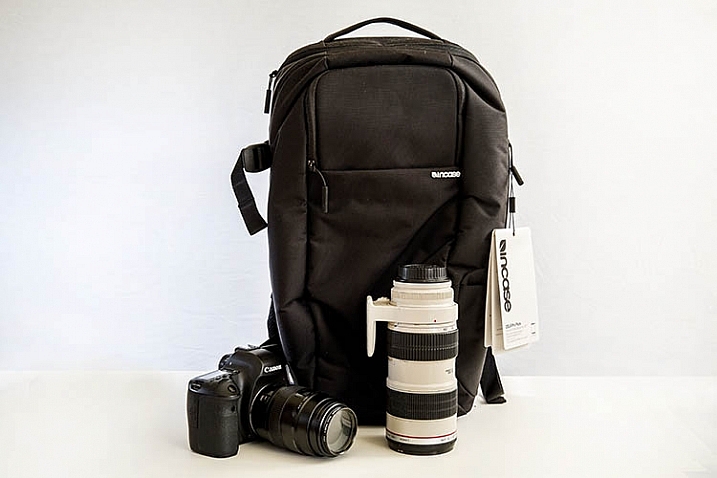
As a freelance photographer, my office while on assignment is, more often than not, whatever I can carry on my back. Everything from my multiple pieces of DSLR camera gear and laptop, plus its accessories, must fit in a bag (or two) to be ready to whip out at a moment’s notice. This presents a constant dilemma of figuring out the most efficient, yet safe, way to carry and store very expensive electronics while on the go. At this point, there are a myriad of DSLR laptop bags out there, but I’ll show you why the Incase DSLR Pro Pack is my new favorite travel companion.

Incase DSLR laptop backpack

Lightweight and sturdy

The first thing you’ll notice about this bag is that even when it’s empty, it’s super light. Weighing in at 2.7 lbs (1.22 kg), this bag won’t weigh you down while on the go. It’s also made of sturdy 840D nylon material that will protect your gear from the elements.

Incase DSLR laptop backpack

Thick padding for lots of gear

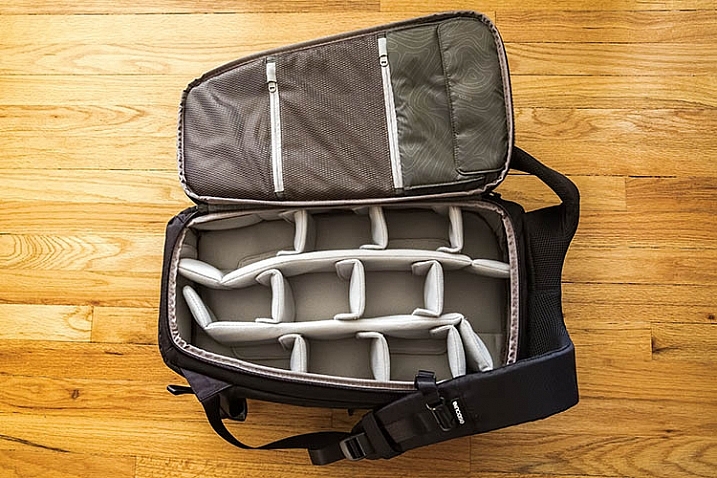
First, let’s take a look at the most important part of this bag: where it stores your camera gear! Out of the box, this bag comes preconfigured with soft, thick, padded dividers (also fully adjustable). Don’t tend to carry that much camera gear? You could likely come up with a configuration that can hold other things, like clothes or shoes if you’re traveling. You will likely need to customize this grid of padding to yourr own liking depending on how much gear you’re looking to carry.

Incase DSLR laptop backpack

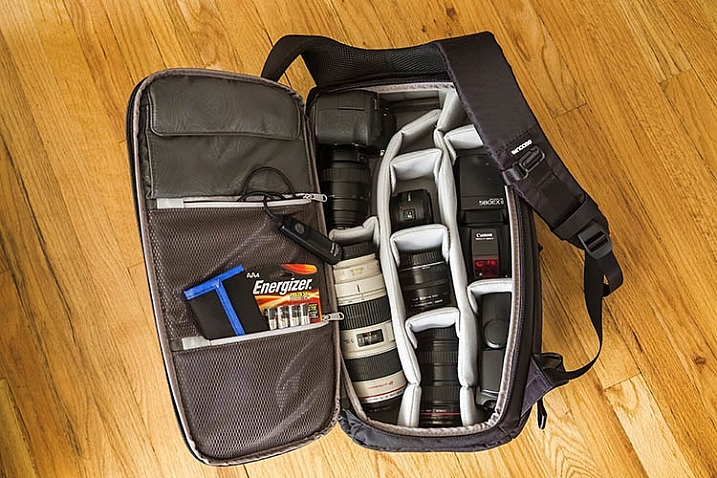
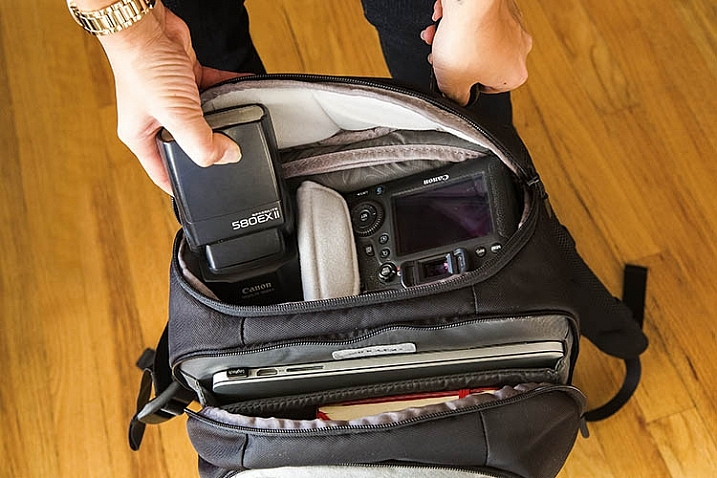
On a typical freelance photography assignment, I’ll bring loads of gear, and I was impressed with how it all fit into the backpack. My kit below includes the following:

  • (1) Canon 6D DSLR with 100mm f/2.8 macro lens attached
  • (1) Canon 16-35mm f/2.8 wide-angle lens
  • (1) Canon 70-200mm f/2.8 telephoto zoom lens
  • (1) Canon 24mm f/2.8 prime lens
  • (1) Canon 50mm f/1.8 prime lens
  • (2) Canon 580 EXII flashes
  • A bag of accessories including: remote release cable, extra batteries, and remote flash triggers

Incase DSLR laptop backpack

Unique design for easy access to gear

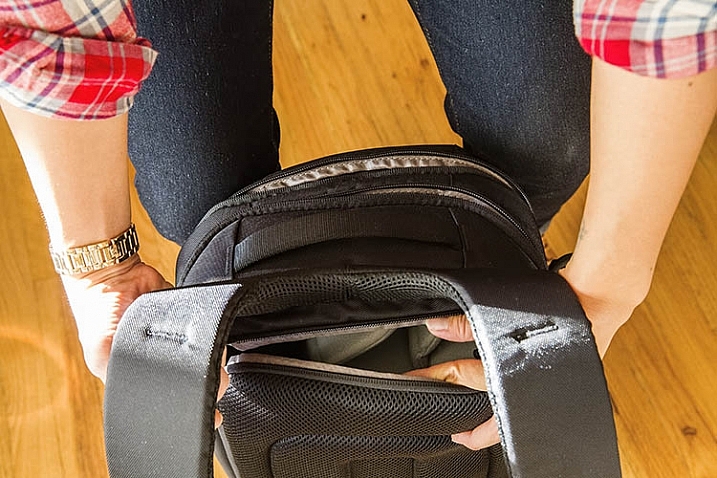
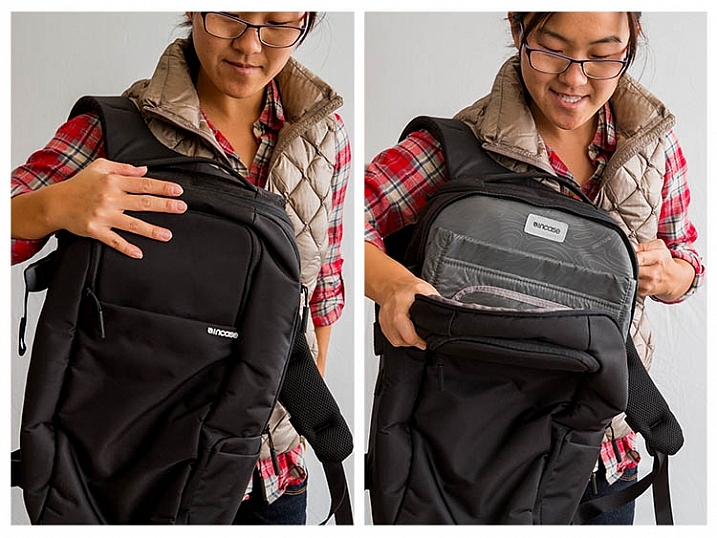
Perhaps the best feature of the Incase DSLR Pro Pack bag is the unique way it stores your gear. Instead of opening from the outside, you actually unzip the camera compartment from the bag’s backside. This can make it tough to access all of your gear at once, but here’s the genius part – the bag’s design allows you to easily unzip the top of the camera section and take out a couple pieces of gear that are stored closer to the top. In the demo photo below, you can see how it works.

Incase DSLR laptop backpack

Incase DSLR laptop backpack

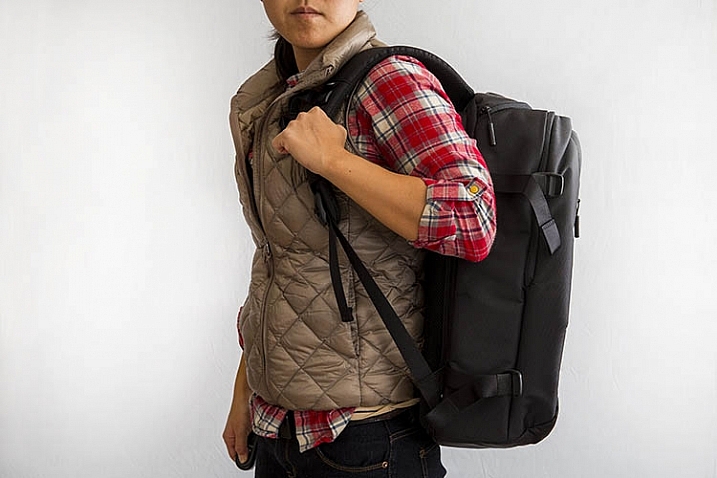
Speaking of the back of the bag, check out that thick, mesh material lining the back and straps. They feel as comfy as they look, keeping your back and shoulders protected as you haul your gear around.

Side pocket for tripod or monopod attachment

If you travel with larger items such as a tripod, monopod or umbrella, you could also tack that on to this bag with the buckles, and extra pocket located on the right-hand exterior of the bag.

Extra room up front for more office accessories

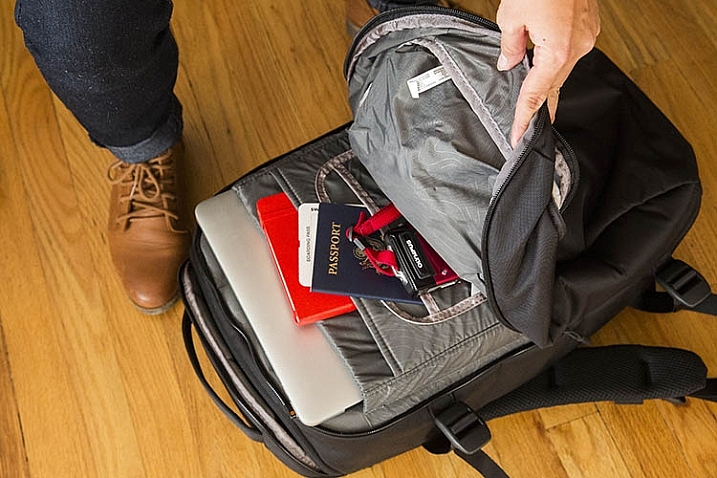
Since the bag’s backside provides primary access to photo gear, that means the front pockets provide very easy access to the rest of the accessories you choose to pack. In this case, that could include a laptop (up to the size of a 15″ MacBook Pro), a notebook, pocket-sized point and shoot camera, and important documents like your passport.

Incase DSLR laptop backpack

Incase DSLR laptop backpack

Two things I wish were included

Ergonomics are a top feature to look out for when selecting a new backpack. While this backpack is ergonomic in many ways, including the mesh back padding and a secure chest strap, I wish there were also waist straps. This would make me feel a bit more comfortable if I were hauling my full camera and laptop kit around on my back.

Another feature I’d like to see (especially as a Seattle resident) is the inclusion of a rain jacket. While I have no doubt that the bag’s durable 840D nylon would protect my gear from a light sprinkling, I’m not so confident about it handling a downpour very well.

Overall a high rating for this bag. Have you tried this one or any other camera/laptop backpacks out? Please share your favorite in the comments below.

googletag.cmd.push(function() {
tablet_slots.push( googletag.defineSlot( “/1005424/_dPSv4_tab-all-article-bottom_(300×250)”, [300, 250], “pb-ad-78623” ).addService( googletag.pubads() ) ); } );

googletag.cmd.push(function() {
mobile_slots.push( googletag.defineSlot( “/1005424/_dPSv4_mob-all-article-bottom_(300×250)”, [300, 250], “pb-ad-78158” ).addService( googletag.pubads() ) ); } );

The post Review: Incase DSLR Pro Pack Backpack by Suzi Pratt appeared first on Digital Photography School.


Digital Photography School

 
Comments Off on Review: Incase DSLR Pro Pack Backpack

Posted in Photography


Gear Review – Glow QuadraPro Portable Softbox

11 Dec

There is no greater teacher in life than time and experience. If I could go back in time and teach myself some photography lessons, high on my list would be OCF – off-camera flash. Back when I was starting out in photography, I used to dread using my flash. In fact, I think for the first two years of my photography career, I did not even own one. If a client would enquire about a family photoshoot, I would promptly reply back saying I am strictly a natural light photographer and the best times to schedule the session would be a little after sunrise or around sunset. I think I might have even turned down some indoor photo sessions because I hated the look and feel of a flash.

Fast forward a few years, as I ventured into the genre of wedding photography, I started to get over my fear of using a flash. As I educated myself on studio lights, flashes, and all the other lightning paraphernalia out there, I stopped hyperventilating as much at the thought of using artificial light for my photos. Although I am now fairly comfortable using an on-camera flash, I still consider myself a novice artificial light photographer. The next step to mastering artificial lights is to get comfortable with off-camera flash. To that end, I knew I needed, at the bare minimum, a light stand, a soft box, and my flash. So when I got the opportunity to review the GLOW QuadraPop Portable Softbox from Adorama I jumped at the chance.

Screen Shot 2015-12-03 at 1.37.49 PM

Let me preface this article by setting the record straight. I have never used an off-camera lighting system from the ground up. I have watched several online classes and tutorials on how a single light off-camera system works. In fact there are several wonderful articles on dPS that discuss off-camera flash like this one. But this is the first time I have handled such a setup ,and so, in essence, I am reviewing this product as a novice off-camera flash/softbox user.

Contents and what’s in the box

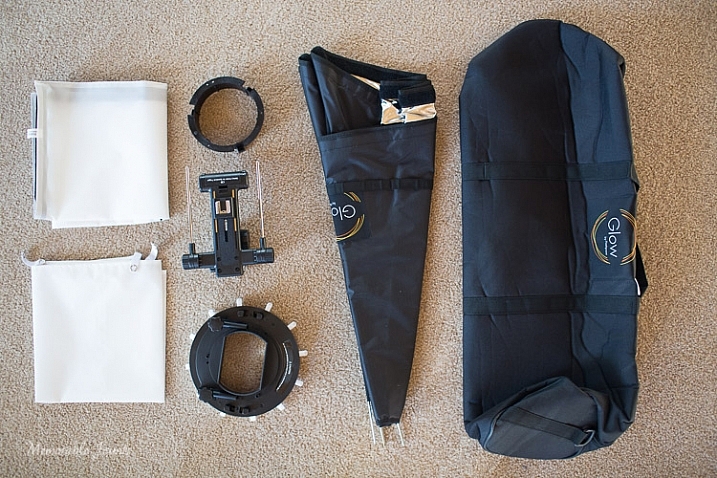
The QuadraPro comes fully equipped to use with a speedlight, as well as a studio strobe. Included in the box were the actual soft box, angle adjustment shoe bracket that can be adjusted for height and depth, removable inner and outer diffusers, removable cold shoe, and a protective bag to carry the QuadraPro on location. The only thing you will need to have is a light stand. I have a generic, lightweight stand that I had purchased from a local camera shop last year, and the GLOW QuadraPro worked perfectly with it.

Memorable Jaunts Glow QuadraPro Softbox Article Image Whats in the bag-1

I have to admit that when I opened the box, I was a little nervous about how to set up the whole system. I am used to reading manuals and watching product videos prior to handling equipment, but for this softbox setup I decided to skip all the research and prep work, and start using the product right away. The setup did take me a few minutes to figure out, but once I read through the one page instruction sheet that comes with the GLOW QuadraPro, it was easy enough.

The flash cold shoe bracket was easy to use, but attaching the actual softbox to the QuadraPro ring did take me a couple of tries. Once I was able to secure the rods into the rings, it was easy to snap them in to place by adjusting the rings in a circular manner. The inner and outer diffuser panels are quite literally a snap to attach. The outer diffuser panel has a velcro attachment mechanism, while the inner panel snaps with push buttons.

Ease of use and comfort

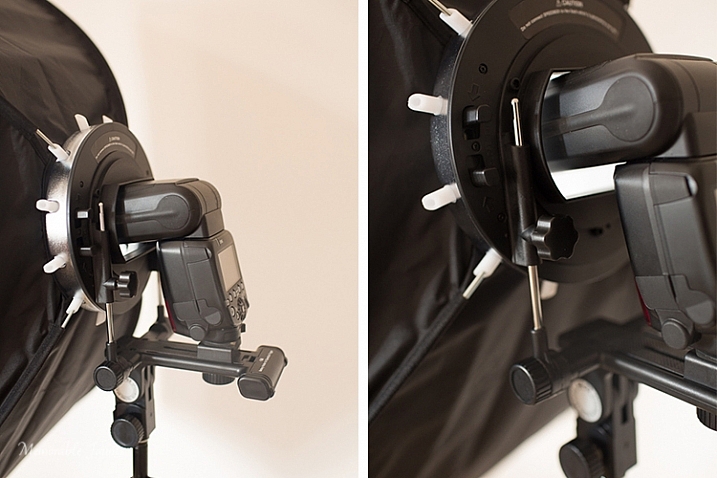
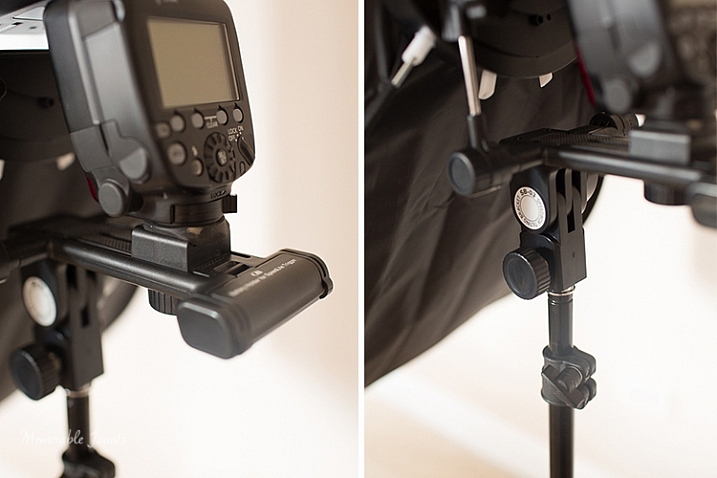
The Glow QuadraPop line is perfect for mobile studios, on-location work, and also travel. The entire system is quite lightweight, and easy to set up and dismantle. This is ideal for individual portraits and product shots, as well as for use on location. The one I used is the QuadraPop Rectangular softbox that comes in two sizes – 28×38″ and 24×34″. I used the GLOW QuadraPop with both the internal, and external, diffuser panels. Additionally the flash shoe bracket has an angle adjustment knob for easy tilting, thereby adjusting the angle of light – perfect for photographing things from above.

Memorable Jaunts Glow QuadraPro Softbox Article Image Angle Adjustment on the Flash Hotshoe-3

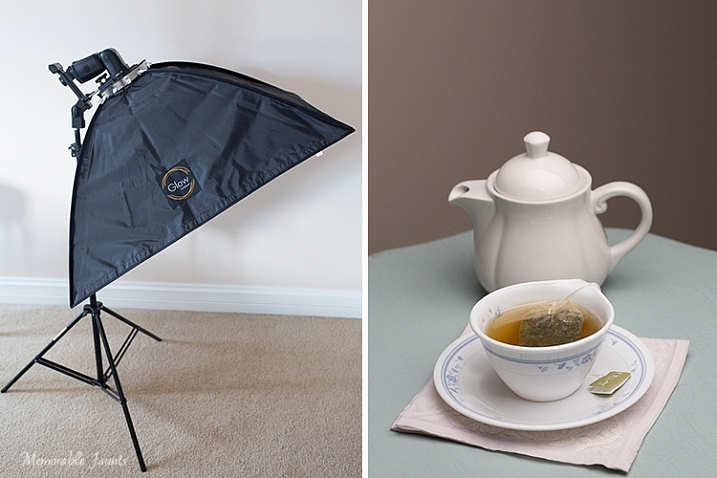
My afternoon tea was photographed with the softbox above and to the right of the tea cup, as seen in the reflection on the surface of the tea in the cup, and the light on the tea pot.

Basic setup and portability

I created a quick video on how easy it is to set up the softbox:

Memorable Jaunts Glow QuadraPro Softbox Article Image Softbox Setup-1

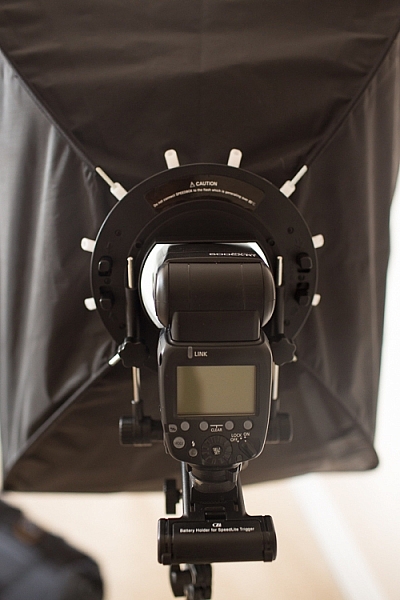
The softbox is mounted on the circular ring using the white clasps. The softbox is mounted on the light stand via the cold-shoe mount that also holds the flash.

Memorable Jaunts Glow QuadraPro Softbox Article Image Softbox Setup-4

The cold-shoe mount has an adjustable screw that slides the flash forward or backward on the base.

Memorable Jaunts Glow QuadraPro Softbox Article Image Softbox Setup-6

Back view of the fully assembled GLOW QuadraPro Softbox with the flash attached.

Memorable Jaunts Glow QuadraPro Softbox Article Image Softbox Setup-8

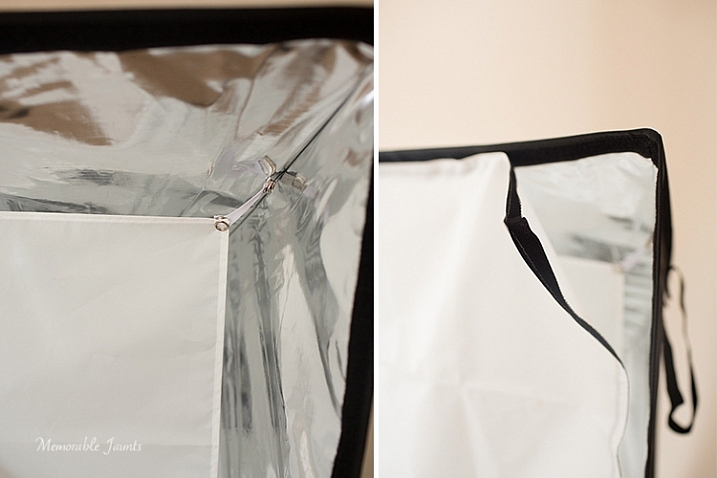
Inside diffuser panel that snaps into place, while the outside diffuser panel has velcro that attaches to the inside of the softbox close to the edge.

Indoor and outdoor use

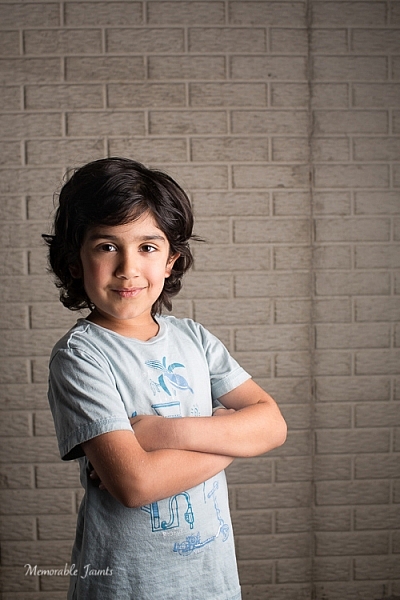
I planned on putting the GLOW QuadraPop to the test with both indoor and outdoor use. But, just as I was writing this article, Chicago got the first major snow storm of the season. So, with subzero temps, I decided to forgo the outdoor test and just use it indoors with my obliging models, a.k.a my kids!

While indoors I moved the GLOW system from one room to the other, to see how easily I could manage carrying the system around. Before moving it, I removed the flash from the cold-shoe attachment, and also collapsed the softbox by squeezing the tabs on the sides of the ring. This did take some force, as the softbox rods were quite secure in their respective white sockets. I did not remove the diffuser panels as recommended, because I wanted the set up process to be easy at my next location (similar to what it would be like on a live on-location photoshoot). This made the set up, and take down process, much easier and faster.

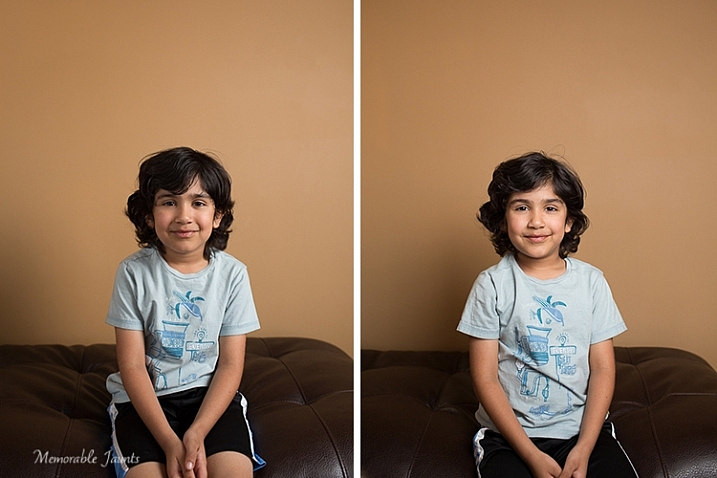
Please note – I was experimenting with various softbox positions and had the flash on ETTL. My focus here was not on posing, but on the look and feel of a diffused lighting setup using a single softbox, i.e. the GLOW QuadraPro.

Memorable Jaunts Glow QuadraPro Softbox Article Image Indoor setup -4

The image on the left has the softbox to the right of the camera. There is a slight shadow on the left hand side, and a nice drop-off of light on the background. The image on the right has the softbox placed directly in front of the model for a more even tone, and even lighting on the face.

Memorable Jaunts Glow QuadraPro Softbox Article Image Indoor setup -3

For this image, I moved to the basement where it was much darker. I quite like the effect of the dramatic lighting on the left side of his face, with some shadows on the other side. His body is turned slightly towards the softbox, which is at approximately at a 45 degree angle from the subject’s position.

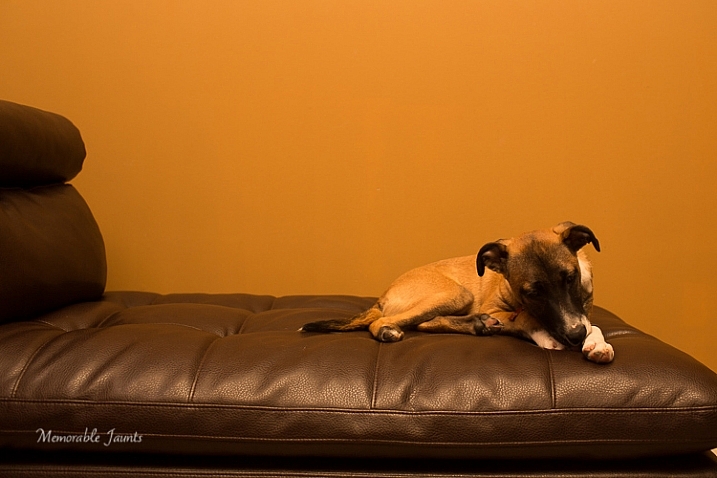
Next up, my other willing model who had to be constantly bribed with treats and food!

Memorable Jaunts Glow QuadraPro Softbox Article Image Indoor setup -5

This image was taking WITHOUT the softbox. The flash was just bounced straight up without any additional diffusion. The image is quite dark and the color of the wall is quite terrible in this image.

Memorable Jaunts Glow QuadraPro Softbox Article Image Indoor setup -8

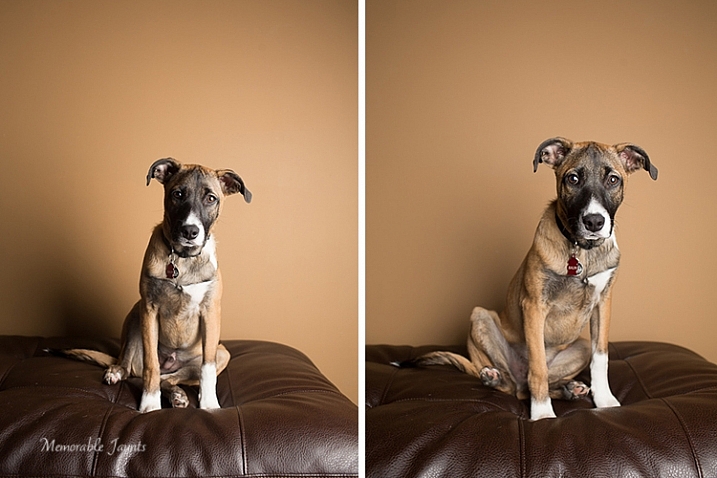
The image on the left had the softbox placed at a 45 degree angle to the dog. The image on the right has the softbox pointed straight ahead, giving a more even lighting and beautiful catchlights in his eyes. Plus the color of the wall is more true to its actual color!

Final Thoughts

In conclusion, the GLOW QuadraPro softbox is a fairly easy to use, lightweight and portable, flash diffusion system. I quite liked the convenience of having the setup all ready to use as I was experimenting with a single off-camera flash. Initially the softbox was a bit difficult to put together, and that was purely because I have never used this type of lighting system from the ground up. But once I got used to the clamps, they were very easy to assemble and dismantle.

googletag.cmd.push(function() {
tablet_slots.push( googletag.defineSlot( “/1005424/_dPSv4_tab-all-article-bottom_(300×250)”, [300, 250], “pb-ad-78623” ).addService( googletag.pubads() ) ); } );

googletag.cmd.push(function() {
mobile_slots.push( googletag.defineSlot( “/1005424/_dPSv4_mob-all-article-bottom_(300×250)”, [300, 250], “pb-ad-78158” ).addService( googletag.pubads() ) ); } );

The post Gear Review – Glow QuadraPro Portable Softbox by Karthika Gupta appeared first on Digital Photography School.


Digital Photography School

 
Comments Off on Gear Review – Glow QuadraPro Portable Softbox

Posted in Photography


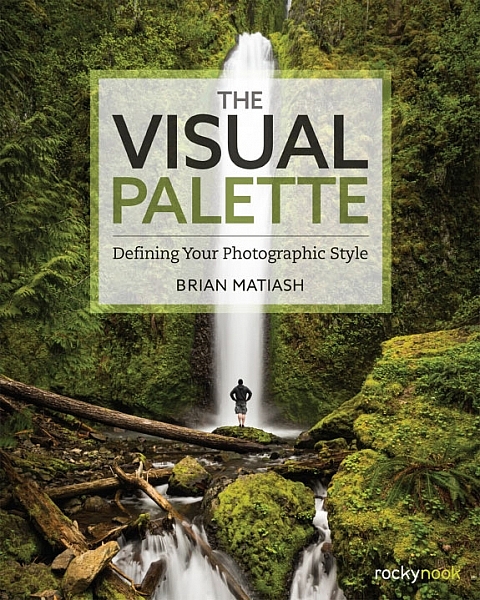
Book Review: The Visual Palette by Brian Matiash

10 Dec

The Visual Palette book review

Brian Matiash is a photographer based in Portland, Oregon. The Visual Palette is his first book published by Rocky Nook.

As the title suggests this is not a technical book. It’s aimed at evolving photographers who grasp the basics, but need some guidance in developing the creative side of their photography. The book is divided into three sections – Composition, Post-Processing and Stylization, and Sharing Your Work and Your Brand. Each section builds on the lessons learned in the one before.

The Visual Palette book review

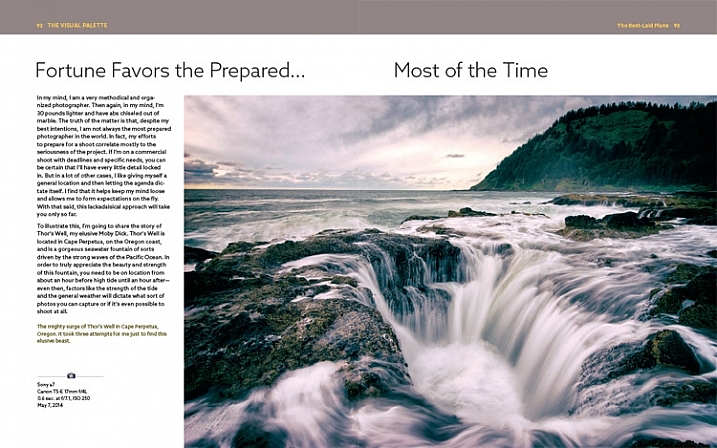
Screenshot from The Visual Palette

The book starts with composition. How you see, compose, and tell stories with photos is a major factor that sets your work apart from another. This section covers techniques like the rule-of-thirds, creating depth and using leading lines, as well as giving tips for photographing familiar subjects and learning to see.

The book continues with post-processing and stylization. This is where you bring further individuality to your work by the style in which you chose to process. It suggests separating photo editing into two distinct skills – post-processing and stylization.

  • Post-processing is the preparation work – preparing a clean image that gives an accurate representation of the scene.
  • Stylization is the process of adding your own artistic interpretation to the image.

I really like this idea, and think there is a lot to be gained by separating the concepts.

The book covers the tools you can use to achieve both skills. Be forewarned – there is a lot of grungy HDR in this section, and the processing may look a bit over the top for those of you not into this style of photography.

On the other hand, Brian does explain how he has moved from a grungy HDR style to a more natural one over the years – a journey that many photographers will probably identify with.

The Visual Palette book review

Screenshot from The Visual Palette

The final part of the book explores the process of sharing your work and building your personal brand. This will appeal to a wide spectrum of readers, from those who simply want to share their photos on Flickr or 500px, to professional photographers who need to build a brand to promote their work. If you haven’t put much thought much into how you share and promote your work, then you will find this section very useful.

Personal stories

As Brian explores the ideas in the book he relates his own experiences, giving you an insight to his thought processes, and his development as a photographer.

It could be argued that dividing the book into three topics results in a lightweight treatment of each. In a way that’s true – if you want to learn more about composition, for example, you would be better off buying a book dedicated to the topic. However, the aim of this book is to give you a primer in each of the areas it covers. You can then follow up by buying a book that explores the topics that interest you most in more depth.

For these reasons, The Visual Palette is more likely to appeal to beginners than advanced photographers.

The Visual Palette book review

Screenshot from The Visual Palette.

Annoyances and niggles

The review copy was provided in PDF form, and there were a couple of problems that stopped me fully enjoying the experience of reading it.

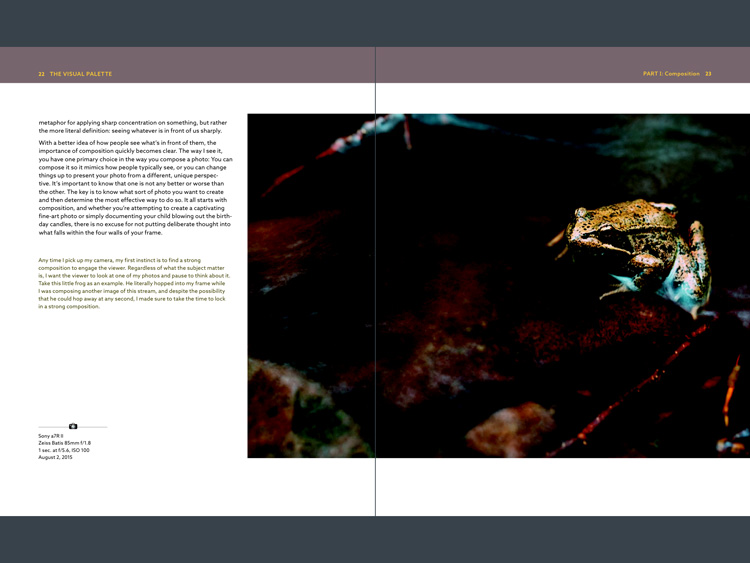
The first is related to layout. In iBooks or Acrobat Reader (on an iPad) you can only view one page at a time (on a computer you can view page spreads in Reader). Given that the book is designed as a series of double page spreads, and that many photos cross the gutter, this prevented me from seeing the photos properly. You can’t look at, and appreciate the photo, when it is split into two by the formatting. It greatly lessened the enjoyment of the book, and to be honest, put me off buying another ebook from Rocky Nook.

The Visual Palette book review

Here’s an example of what I mean. This is a screenshot from iBooks, which presents the pages one at a time. Not good when you have lot of photos that cross the gutter.

The solution would be to format the book especially for viewing on the iPad (and other tablets), so that each page in the PDF document contains a double page spread from the book. ILEX do this already with their ebooks (note: ILEX don’t publish PDF ebooks any more, restricting ebook sales to the Amazon Kindle store), and I’d like to see Rocky Nook follow suit.

It is possible to see spreads in Goodreader, but that brings me to the next point.

The second annoyance relates to color management. Adobe Acrobat Reader is the only PDF reader that accurately displays the colors and tones of the photos in the book on an iPad. However, Acrobat Reader only lets you view one page at a time, so we are back to the first problem.

The Visual Palette book review

This screenshot is from Adobe Acrobat Reader. Now we can see the photo with the correct brightness and contrast. But you can’t view two pages together, and the photo is still cut off.

In Goodreader and iBooks the photos are too dark, have too much contrast, and the colors are inaccurate.

This is a screenshot from Goodreader, which can display two pages together, as the designer intended them to be seen. Great – now you can see the entire photo. But that's not much use when the photo is too dark to see properly.

This is a screenshot from Goodreader, which can display two pages together, as the designer intended them to be seen. Great – now you can see the entire photo. But that’s not much use when the photo is too dark to see properly.

I hope someone from Rocky Nook reads this and takes some action to put it right. Anybody who buys the PDF version of this book and tries to view it in iBooks or Goodreader will be disappointed with the quality.

Conclusion

The Visual Palette is well written, well thought out, and full of useful ideas. While little of the content will be new to advanced photographers, most of it will be useful to people starting out.

There are some good photos in the book (and unfortunately a few weak ones), although the heavy-handed treatment of some of them may put readers off who feel that there is a little more to stylization than using HDR techniques. However, if you ignore that, you’ll find a lot of good ideas in the written content.

I’m giving this book three and a half stars for the content. I recommend the printed book over the PDF ebook which is virtually unreadable in its current format.

Given my experience with the PDF version of this book I thought it would be interesting to ask your opinion about ebooks in general. Have you bought any? What did you think of the design? What format do you prefer, PDFs or epub/mobi? What feedback would you give publishers regarding design and content?

And of course, if you have read The Visual Palette and would like to let us know what you think, or if you have any questions regarding the book, please let us know in the comments below.

googletag.cmd.push(function() {
tablet_slots.push( googletag.defineSlot( “/1005424/_dPSv4_tab-all-article-bottom_(300×250)”, [300, 250], “pb-ad-78623” ).addService( googletag.pubads() ) ); } );

googletag.cmd.push(function() {
mobile_slots.push( googletag.defineSlot( “/1005424/_dPSv4_mob-all-article-bottom_(300×250)”, [300, 250], “pb-ad-78158” ).addService( googletag.pubads() ) ); } );

The post Book Review: The Visual Palette by Brian Matiash by Andrew S. Gibson appeared first on Digital Photography School.


Digital Photography School

 
Comments Off on Book Review: The Visual Palette by Brian Matiash

Posted in Photography


Review of the Wacom Intuos Photo Pen and Touch Tablet

05 Dec
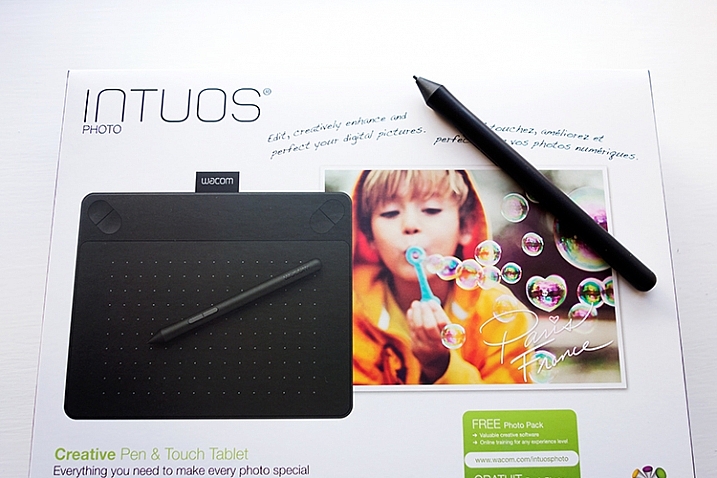
Intuos Photo Creative Pen and Touch Tablet

Intuos Photo Creative Pen and Touch Tablet

In this article I’ll review the Wacom Intuos Photo Creative Tablet Small. Wacom brought out this model, and three other similar ones, back in September 2015. The only difference is they come bundled with different software. Otherwise the specs are the same.

Can you benefit from using a tablet?

The short answer to this question is, yes. Do you actually need one? Possibly not. But, if your workflow demands a lot of retouching to your images, then you will indeed benefit from using a tablet. The pen (stylus) essentially replaces your mouse, and allows for more precise actions where pinpoint accuracy, especially pressure sensitivity, are indispensable.

I’ve being using a Wacom tablet for a number of years. Although, I will admit when I first got my Graphire4, I took it out of the box and thought, “Hmm that looks nice” and put it straight back into the box. Long story short, some time later, I was about to give it away when I decided I’ll give it another go. Initially, it did take a little bit of getting use to. Whereas now, I would find it difficult resorting back to a mouse for editing my images.

The Graphire4 served me well even though it had only 512 levels of pressure sensitivity. So it was time for an upgrade.

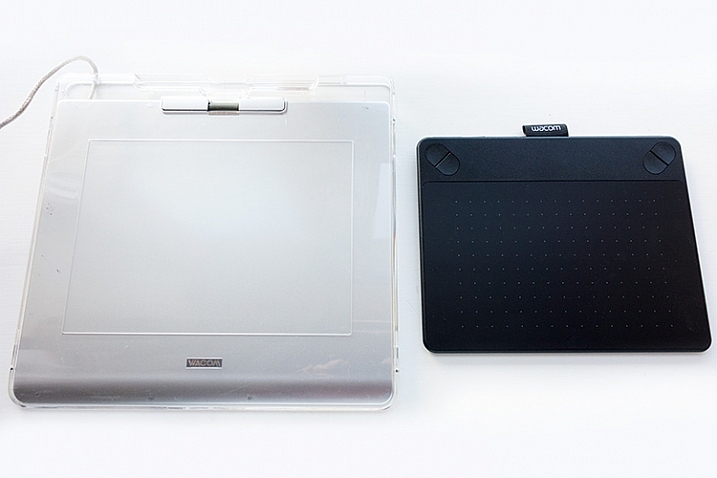
two-tablets-side-by-side

The Graphire4 tablet on the left versus the new Intuos Photo Small on the right

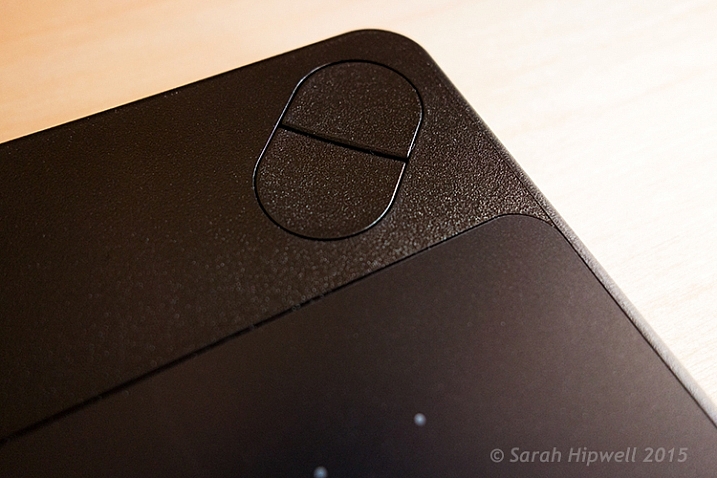
The new Intuos Photo has 1024 levels of pressure, which was immediately noticeable, and very responsive. It has four Express Keys (the Graphire4 had only two) which you can configure to whatever shortcuts you choose. There also two buttons on the stylus, which offer the same customization.

ExpressKey

There are 4 ExpressKeys on this tablet, two on the left and two on the right, which can be customized for shortcuts.

I didn’t notice any lag time when moving the stylus across the surface, and the pen feels so intuitive, just like a real pen. It’s is very responsive and doesn’t have that scratchy feel when using broad brush strokes, you might expect because the surface is matte.

Features and design

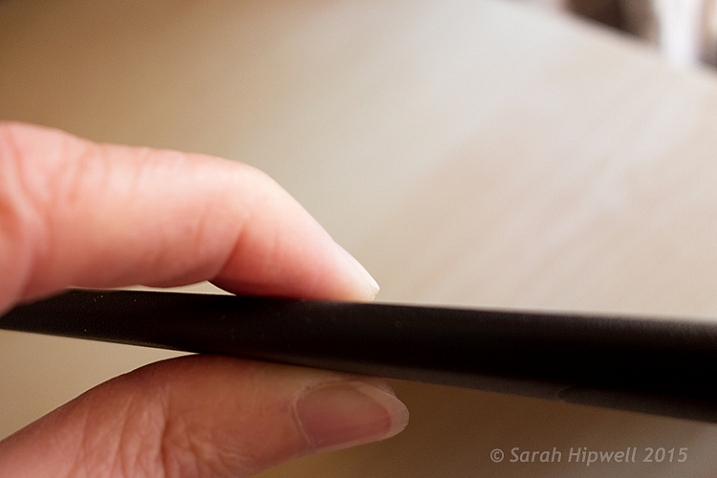
This tablet is small, slim, and lightweight, which makes it very portable. Although it is light, it does feel solid.

slim-tablet

I’m holding the Intuos Photo between my fingers to illustrate how slim it is.

It has multi-touch gestures, which operate in the same manner as a trackpad. I wouldn’t use this feature, as I use my keyboard for shortcuts, but it’s cool nonetheless. There is a switch at the back to turn this feature off. My hand would activate the zoom feature, which was distracting.

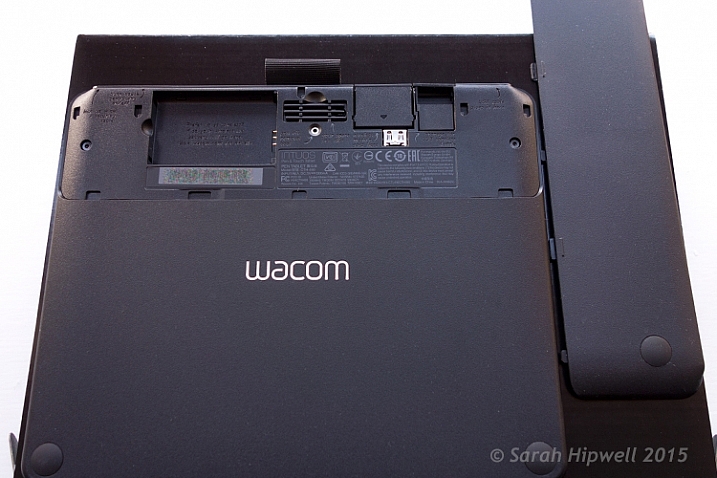
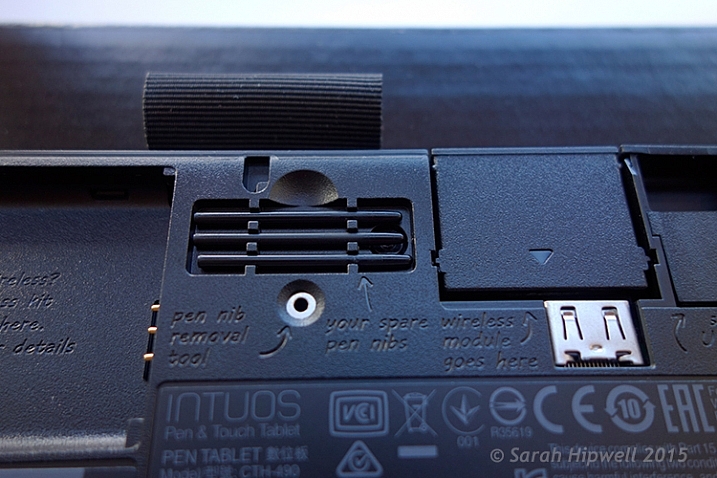
If you turn the tablet upside down and slip this portion of the base off, you will find slots for the Wireless bits to go. You have to purchase the Wireless Accessory Kit separately. You get four spare pen nibs tucked away neatly, saved for when you need them.

back-off

Back of the Intuos Photo where the Wireless kit goes (sold separately).

I did find the engraved instructions neat. It did appeal to my sense of aesthetics!

stylus-spare-nibs

Close up to show the four spare nibs for the pen (stylus). Notice the neat engraved instructions.

Size can matter!

Before I purchased the Intuos Photo Small, I wasn’t sure whether to choose this size (6 x 3.7 inches) or go for the medium size. The medium is called the Wacom Intuos Art Pen and Touch Tablet Medium (8.5 x 5.3 inch active area). The larger model retails at $ 199.95.

The price wasn’t just the only determining factor for me. I have a 24” monitor so I wasn’t sure if this size tablet would match the monitor? I’ve found no issue, the size is good for me. However, if I had a bigger monitor, I would probably have gone with the medium tablet. Another factor to consider is how much space do you have on your desk? The Intuos Photo is small and compact.

What software is included?

  • Macphun Creative Kit
  • Corel AfterShot Pro (Mac)

In order to get the software, a download key is printed on the inside of the box. I have downloaded the Macphun Creative Kit (Tonality Pro, Intensify Pro, Snapheal Pro, Noiseless Pro) but that’s as far as I got. I haven’t tested out the software yet.

My verdict

Wacom tablets are a leading brand. Their Intuos Pro range are expensive. However, the Pro range offer 2048 levels of pen pressure sensitivity, wireless connectivity, and other features. So this makes the Intuos Photo Small a really good deal for the price. I find the pressure sensitivity levels suffice for my workflow.

Another plus, if you suffer from RSI (Repetitive Stress Injury) issues, especially if you spend a considerable amount of time in front of your computer editing your images, I certainly find holding a pen preferable to gripping a mouse for any length of time.

To sum up, if you have a (much) older Wacom tablet, I would recommend the Intuos Photo as an upgrade. If you haven’t used a tablet before and are thinking of buying one. This model is a good place to start and it is competitively priced.

Cons (or maybe quirks)

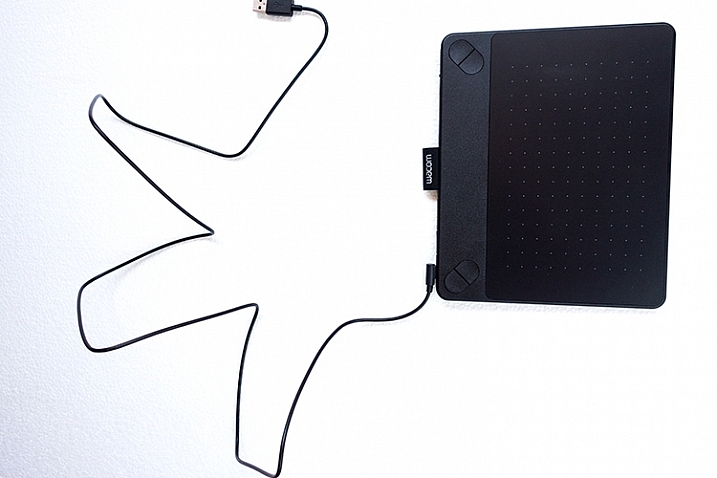
This is more of an observation rather than a gripe. The USB cable supplied is 148cm (58 inches) in length! Not sure of the rationale behind this…maybe a ploy to get you to buy the Wireless Accessory Kit, which is sold separately.

USB-cable-very-long

USB cable measuring 148cm(58 inches) in length.

The stylus is much lighter and slimmer compared to the chunkier and heavier model I was more use to. It does feel a little cheap.

I’ve found the pen inclined to roll between my thumb and fingers, so that at times, I had to keep rolling the pen around again to where the two buttons are at the side to access them. This was getting quite irritating. I feel a rubberised moulding would help in preventing the pen from rolling around. Similar to the rubber grip found on ordinary pens. So I came up with my own inexpensive solution to modify the pen.

DIY hack for the stylus

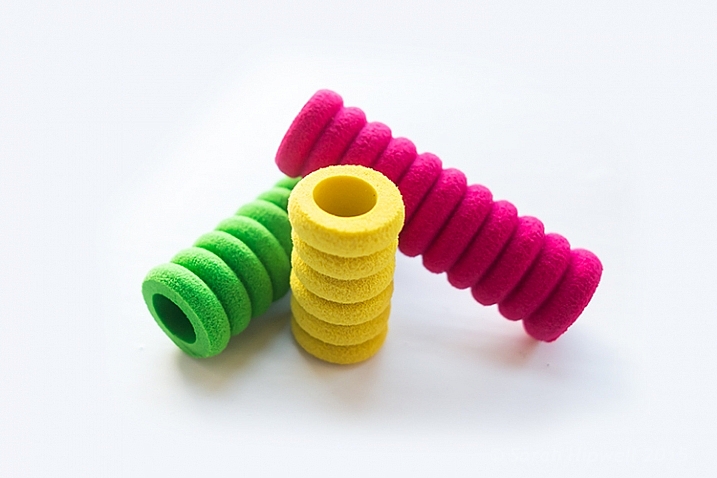
I bought these pen grips at a local stationary shop. I cut one in half and rolled it up until it reached just below the two buttons. This way, I can grip the pen better, and roll it more easily, so that the two buttons rest next to my thumb for easy access. The four in a pack came to less than $ 2USD.

pen-grips

Ordinary biro pen grips that are sold in stationary shops.

DIY stylus holder hack

The Intuos Photo has a fabric sleeve to house the pen, which I presume is for when you’re transporting this tablet in your bag. The sleeve is tight fitting, so this is not practical for everyday use while sitting working at your desk. The tablet doesn’t come with a pen holder.

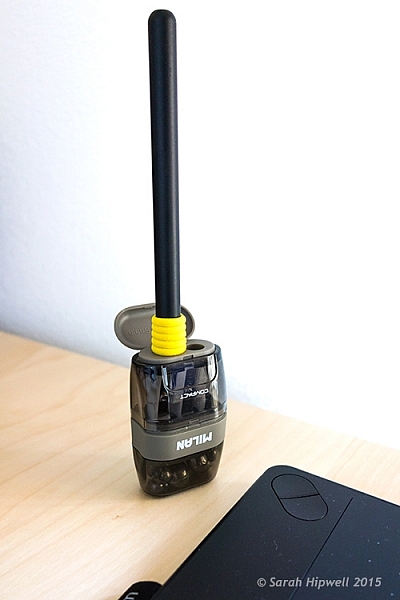
So, while I was in the same stationary shop to get my pen grips, I spied this pencil sharpener with eraser holder and thought that would make a great stylus holder. It was a perfect fit (see photo below). Again, this item cost less than $ 2! Just to add a little weight stability, I put fishing lead balls in the bottom part, only because I had them anyway.

Stylus-hack-holder

DIY stylus holder hack from a pencil sharpener with an ordinary pen grip on the stylus.

Do you use a tablet or a mouse? Which is your preference for editing your photos? Share in the comments below.

googletag.cmd.push(function() {
tablet_slots.push( googletag.defineSlot( “/1005424/_dPSv4_tab-all-article-bottom_(300×250)”, [300, 250], “pb-ad-78623” ).addService( googletag.pubads() ) ); } );

googletag.cmd.push(function() {
mobile_slots.push( googletag.defineSlot( “/1005424/_dPSv4_mob-all-article-bottom_(300×250)”, [300, 250], “pb-ad-78158” ).addService( googletag.pubads() ) ); } );

The post Review of the Wacom Intuos Photo Pen and Touch Tablet by Sarah Hipwell appeared first on Digital Photography School.


Digital Photography School

 
Comments Off on Review of the Wacom Intuos Photo Pen and Touch Tablet

Posted in Photography


Apple iPhone 6s Plus camera review

01 Dec

The iPhone 6s Plus is the iPhone 6s’ bigger brother and, apart from the larger 5.5-inch screen, mainly distinguishes itself from the smaller model by offering optical image stabilization system in its camera module. Compared to its predecessor, the 6s Plus ups camera resolution to 12MP, adds 50% more phase detection sensors and is capable of 4K footage. Our review tests its camera performance. Read more

Articles: Digital Photography Review (dpreview.com)

 
Comments Off on Apple iPhone 6s Plus camera review

Posted in Uncategorized


For Women Photographers: Review of the Madison Camera Bag by Aide de Camp

24 Nov

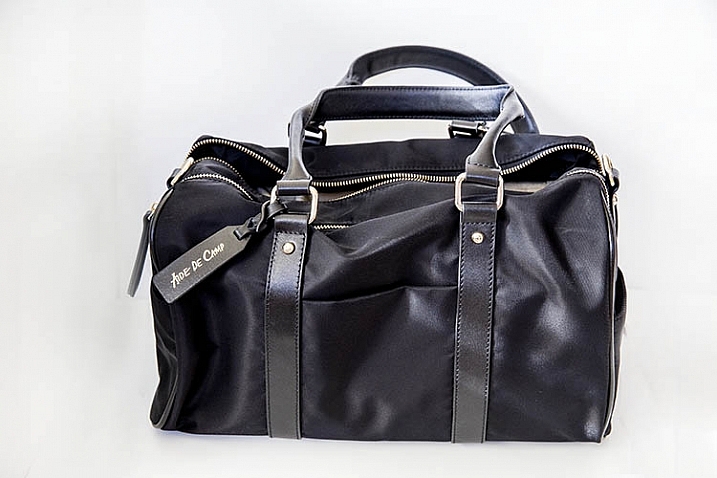
Last weekend, I went out on a photo date with Madison, and came home swooning. In a world where camera bags largely take the form of backpacks, shoulder sling bags, and messenger bags, finding a vessel to transport camera gear is notoriously difficult for women who would rather carry something that appears more feminine.

That is the problem identified by Michele Ng, a former marketing executive who founded Aide de Camp with the intent of producing attractive camera bags for busy and active women. The result is a collection of bags that, on the surface, resemble purses or totes that a woman would be proud to flaunt on her shoulder, yet on the inside are padded and structured to keep expensive camera gear safe. I took Madison, one of Aide de Camp’s flagship bags, on a test run and was very pleasantly surprised with the results.

Suzi-Pratt-Madison-6

Impressive from the get-go

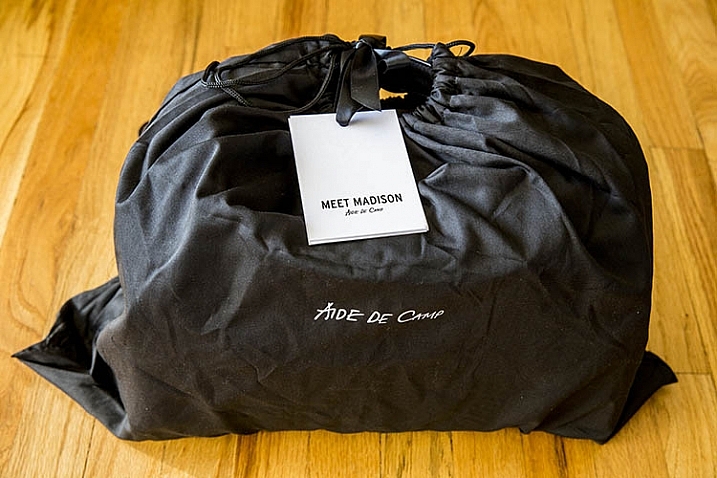
Aide de Camp’s products impress from the moment you open their packaging. Instead of the distinctly unstylish cardboard and bubble wrapped items we’ve come to expect from most other retailers, the Madison camera bag arrived at my doorstep in a sturdy black cardboard box and black fabric pouch, both totally solid enough to reuse in other ways. It was like unwrapping a Christmas present, and it set the tone for the pretty, yet functional, product inside.

fashionable camera bag

Surprisingly large

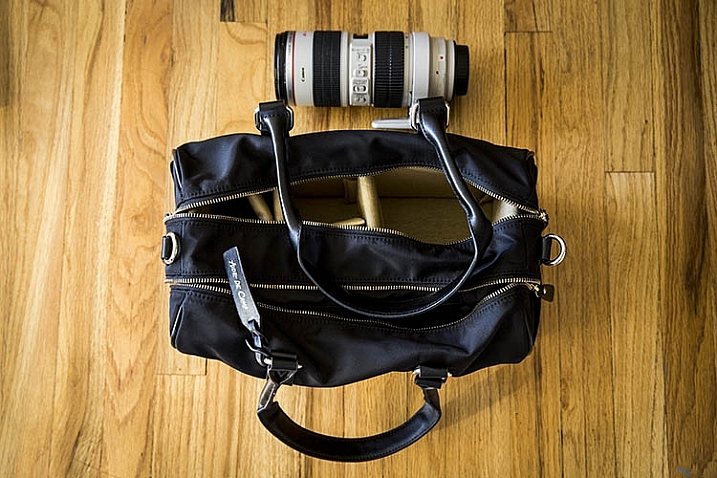
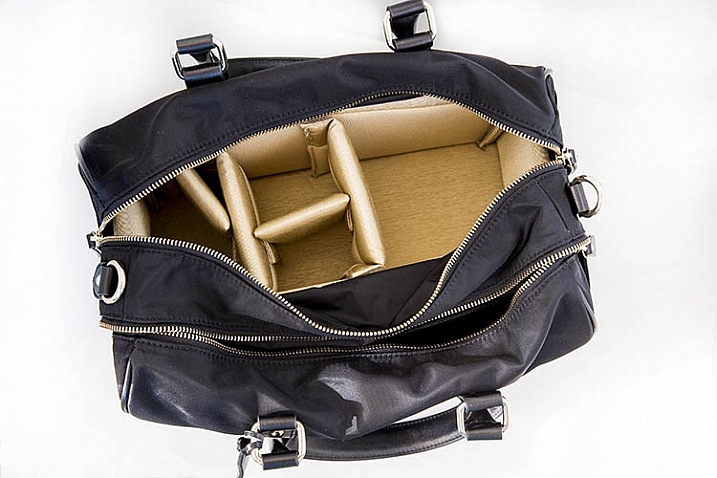
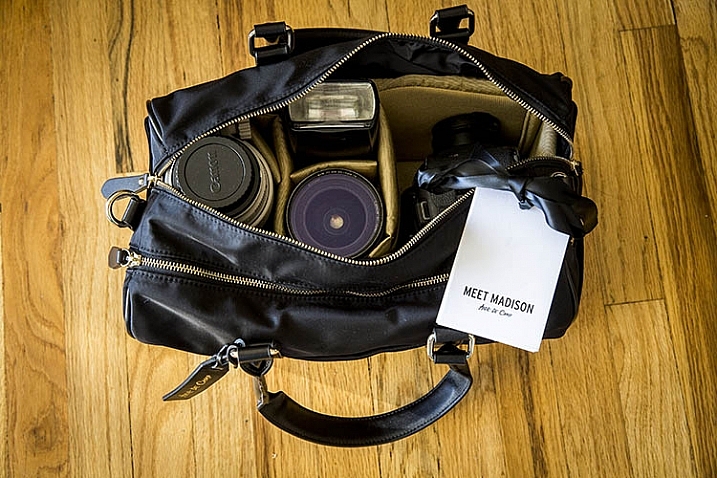
Madison’s approximate dimensions are 14.5″W x 8.5″H x 8″D, making it a pretty sizable shoulder bag, as pictured below with a Canon 70-200mm f/2.8 in the frame as a reference to its size. The bag has two main compartments; one with a thickly padded, removable camera insert box, and the other with thinner compartments for holding everyday items such as a wallet, tablet, e-reader, etc.

The spacious, easily accessible, secondary pocket was a definite perk as many other camera bags seem to add extra pockets as an afterthought, making them impossibly thin and difficult to access. Also, the removable insert is sold on its own item on Aide de Camp’s website, making it easy to convert just about any spacious bag into a camera bag. Given the fact that Madison, and most Aide de Camp bags, come with a removable camera insert, this bag could easily double as a weekend or overnight bag.

Suzi-Pratt-Madison-4

Suzi-Pratt-Madison-5

Fits more gear than you would expect

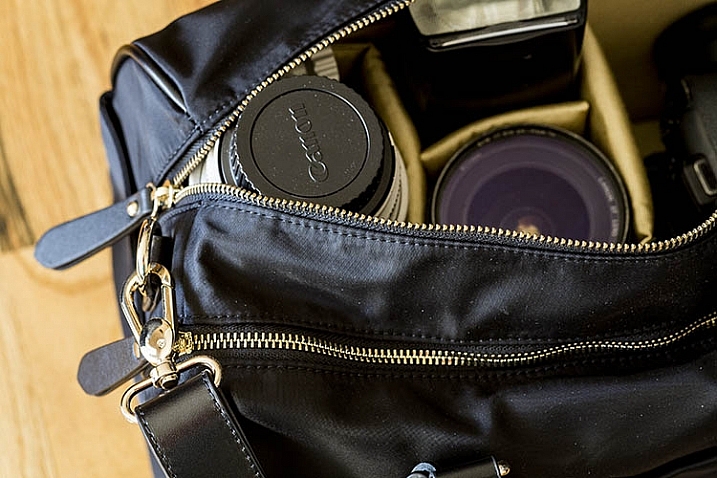
Given Madison’s ample size, it should come as no surprise that you can pack almost all of your essential camera gear in this bag. The bag’s website promised that both mirrorless camera systems and small DSLR cameras could fit, yet I was amazed when even my larger Canon 5D Mark III with a 50mm f/1.4 lens attached was able to comfortably sit in Madison’s camera insert box without feeling too cramped. I was also able to put a Canon 580 EXII flash, a Canon 16-35mm f/2.8, and Canon 70-200mm f/2.8 lens in the camera section of the bag and zip it up without too much of a hassle, although the telephoto lens was just barely able to fit. Even with the camera section fully maxed out, the secondary pocket was still pretty spacious and I could easily slip a tablet, e-reader, and other essential items in with no problem.

Suzi-Pratt-Madison-2

Made of premium materials

After unwrapping Madison, I was struck by how solidly built the bag was, while at the same time maintaining a sleek, rich appearance. Madison’s exterior is composed of water-resistant lightweight nylon along with genuine leather handles and trim, and 14-karat gold plated zippers. The bag itself has two short 9″ long handles, but it also comes with an optional cross body strap that is adjustable from 34-53 inches in length.

Suzi-Pratt-Madison-1

Only one feature to be wary of

For all of Madison’s fashionable and practical features, there is one glaring detail that is hard to notice: the bag’s straps are not padded, making it not very ergonomic if you were to pack the bag with heavy camera gear. In that sense, it’s wise to follow Aide de Camp’s recommendation and only put mirrorless or compact DSLR camera gear in this bag if you plan to carry it for a long time.

Over to you

Do you think there’s a demand for camera bags that appear more feminine and fashionable? If so, would you give Madison a try? Have you tried other similar brands? What did you think?

googletag.cmd.push(function() {
tablet_slots.push( googletag.defineSlot( “/1005424/_dPSv4_tab-all-article-bottom_(300×250)”, [300, 250], “pb-ad-78623” ).addService( googletag.pubads() ) ); } );

googletag.cmd.push(function() {
mobile_slots.push( googletag.defineSlot( “/1005424/_dPSv4_mob-all-article-bottom_(300×250)”, [300, 250], “pb-ad-78158” ).addService( googletag.pubads() ) ); } );

The post For Women Photographers: Review of the Madison Camera Bag by Aide de Camp by Suzi Pratt appeared first on Digital Photography School.


Digital Photography School

 
Comments Off on For Women Photographers: Review of the Madison Camera Bag by Aide de Camp

Posted in Photography


Playing the Ace? Sony a7R II Review

18 Nov

Though it’s the fifth model in Sony’s full-frame E-mount lineup, the a7R II arguably represents just as much of a technological leap forward as its first mirrorless full-frame predecessors did. Its 42MP full-frame BSI CMOS sensor, 399 on-sensor phase detection point AF system and 5-axis IS are just a few reasons why the a7R II is one of the most talked-about cameras of the last year. See how it performed in our comprehensive testing. Read more

Articles: Digital Photography Review (dpreview.com)

 
Comments Off on Playing the Ace? Sony a7R II Review

Posted in Uncategorized


Sony A7RII Mirrorless Full Frame Camera Review

17 Nov

Do you ever get the feeling you’re being played by the camera manufacturers? Sony appears to have no shame in regularly drip feeding its technology to consumers, eager for the next best thing in image quality.

If you don’t mind your hot new camera becoming a dinosaur six months after you buy it, Sony is the camera brand for you. You see, Sony has been very crafty by releasing a wide range of new mirrorless cameras, in such a way that you’ll probably need more than one of them, if you want to avail yourself of their best features.

The Sony A7RII Mirrorless Full Frame Body continues this money grabbing trend. The A7R was like the ultimate prototype, with a lot of usability problems, but it did produce gorgeous images. The next big hitter was the A7S with its amazing lowlight performance, and limited 4K video recording functionality (I say limited, because it cannot do internal 4K recording) .

Enter the Sony A7RII – the next resolution monster from Sony.

Sony A7RII Review

As you may know, I switched from Canon to the Sony A7R system as soon as it was launched, and overall I’m delighted with the results, even if the actual functionality of the camera can be painfully annoying at times.
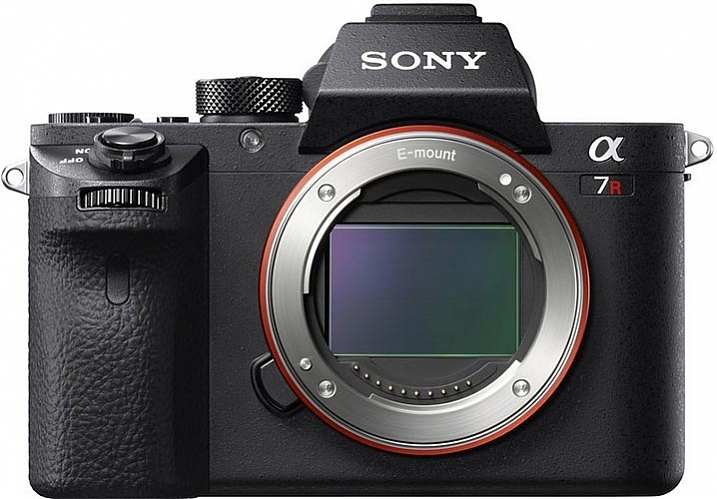
Sony A7RII Review by Gavin Hardcastle

Image courtesy of Sony

For $ 4000 CDN ($ 3198 USD) the 42 Megapixel Sony A7RII packs a lot of firepower into a very small package, when you look at the specs. If your credit card is quivering in anticipation of buying this camera, there are a few things you might want to consider before throwing down your dollars.

I’m going to approach the question of whether or not you should buy this camera based on the assumption that there are likely three types of buyer for this camera:

  1. Existing Sony A7R users considering the upgrade.
  2. DSLR users considering switching to the Dark Side.
  3. New camera buyers with no current investment in any system.
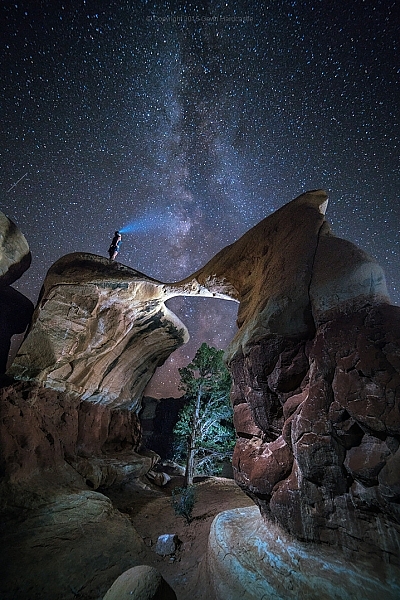
Sony A7RII Review - Astrophotography, Gavin Hardcastle

#1 – Existing Sony A7R users considering the upgrade

If you already own the Sony A7R, here are four major reasons to shell out the big bucks for the upgrade:

  1. If you shoot a lot of handheld work and want the 5-axis image stabilization.
  2. You want to shoot 4K video (see below for my thoughts on that).
  3. You value the silent shutter for less vibration, and therefore sharper images.
  4. You value the new Eye Detect autofocus.

If none of the features listed above have any great importance to your photography, you’re probably better off keeping your A7R, and spending your upgrade dollars on some of the stunning new Zeiss glass for E-Mount that’s available now, or coming out soon. The Batis and Loxia range of lenses are a force to be reckoned with. Also, realize, that based on Sony’s track record, there will probably be a Sony A7RIII on the shelves before you’ve filled your first memory card.

But what about the extra megapixels?

The difference between 36mp and 42mp is not that big a deal. In realistic terms, all it means is that you’ll be able to makes prints ever so slightly larger with the A7RII, and you’ll have a little bit more resolution to play with when cropping. To give you an idea of how big the difference is take a look at this comparison.

Sony A7RII pixel dimensions vs A7R

What about the Silent Shutter?

I was very keen to discover how much of a sharpness improvement I could expect from the new silent shutter (and therefore vibration free) on the A7RII.

Using the Zeiss Loxia f/2.8 35mm lens, I took the above shots on the A7RII and the A7R, with identical settings and focus point. The only difference was that the A7RII was set to silent shooting mode, and therefore didn’t suffer from the notorious shutter shock vibration of the A7R, which is something of a problem for fast exposures and when using telephoto lenses.

The results were impressive. Zooming in to 100%, I can see a significantly sharper image produced by the A7RII, when shooting in bright daylight with fast shutter speeds.
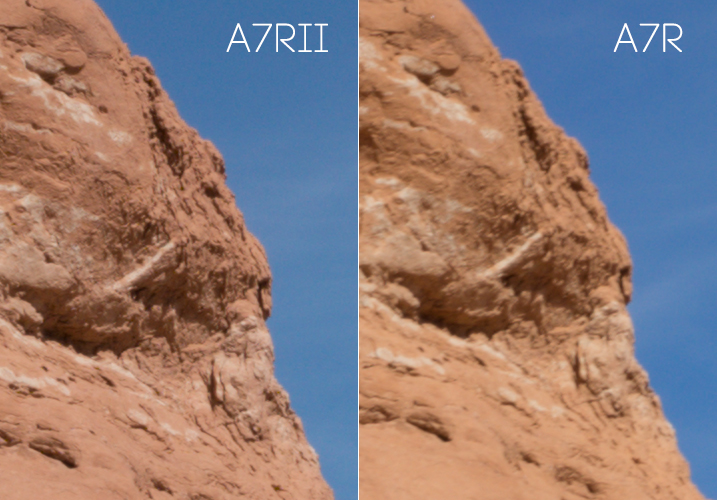
Sony A7RII Sharpness test

Both shots used the Zeiss Loxia 35mm at f/11 with focus manually set at the same point. No sharpening was added in post- production.

After the above comparison, I thought I’d do the same thing in low-light, with a long exposure, to see if the increase in sharpness was consistent.

With this post sunset shot of Bryce Canyon, the sharpness increase on the A7RII is much less significant. Zoomed in to 100% I can barely see a slightly sharper image produced by the A7RII, but the difference is not as significant in low-light situations with long exposures. Once you add a little sharpening in Adobe Camera RAW there is no visible sharpness difference between the A7R and A7RII image when shooting long exposures in low-light.
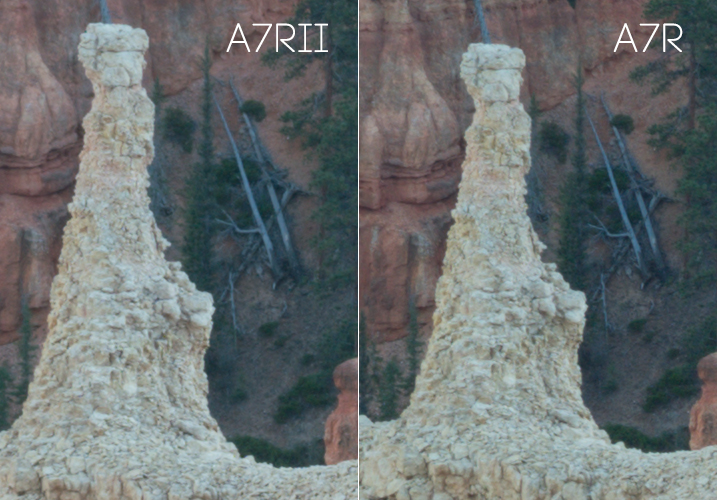
Sony A7RII Review - Resolution Comparison

100% magnification. Both shot with Sony FE 55mm lens at f/11. No sharpening was added in post-production.

It has better noise performance right?

When I heard that the A7RII had much better noise performance than the A7R, I was pretty excited to see how it would fare with astrophotography.

In my tests I could see hardly any improvement over the A7R when pushing the ISO up to 3200 during long exposures for astrophotography. Don’t get me wrong, the A7R was already pretty impressive at astrophotography when paired with good f/2.8 lenses. But, if you’re considering upgrading mainly for the supposed better noise performance, you may be setting yourself up for disappointment.
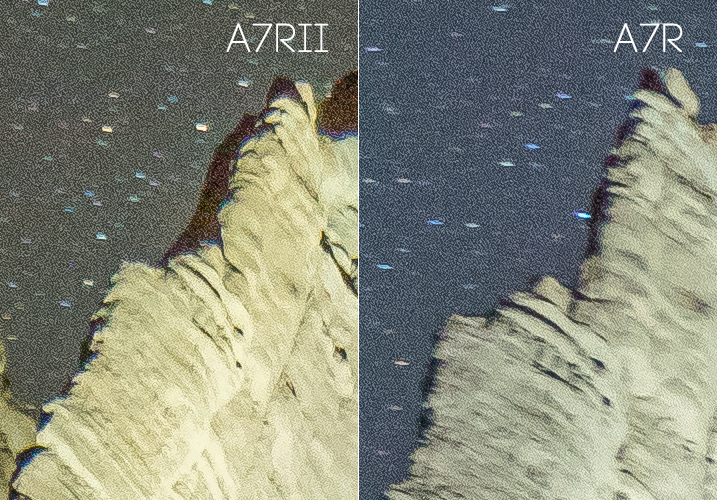
The Sony A7RII for astrophotography

What about the USB power option?

If I wanted to carry around a brick all day I’d still be shooting with a DSLR.

Granted this is a major improvement on the A7R which wouldn’t allow you to use the camera when connected to a USB power source, but I only ever use this feature when shooting a time-lapse sequence longer than the measly one hour provided by the feeble Sony batteries, which I pop like Tic Tacs.

A better solution would be to provide longer lasting batteries. The A7RII has a bigger body than its previous version, so how about a bigger battery?

What about dynamic range?

In my tests I couldn’t see any improvement in dynamic range between the A7RII and the A7R in real use cases. By real use cases, I mean the limits by which you can recover shadow detail and highlight detail in your photos. It’s typical to deliberately underexpose your shots, so that you can recover the shadow detail when processing, and you won’t usually have to worry about blown out  highlights.
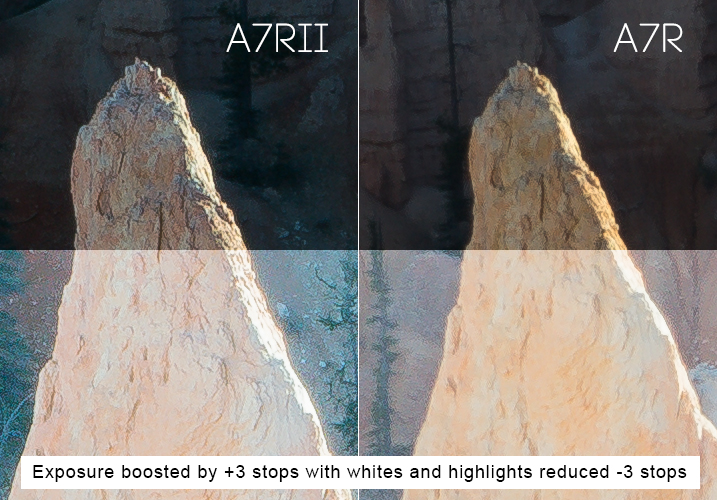
Sony A7RII Review - Dynamic Range Test

I deliberately underexposed these shots to avoid blown out highlights. I knew I could recover the shadow detail in post-production. Shown in the bottom half of the images, I increased the exposure by a ridiculous three stops in ACR, then reduced the Whites and Highlights sliders by three stops. I can see no noticeable difference in dynamic range between either camera, but the A7RII image is considerably sharper in this fast exposure as previously mentioned because of the silent shutter.

I tried this many times with both the A7RII and the A7R, and my conclusion is that they both performed equally well. I’m sure there will be some scientific test that proves the A7RII has better dynamic range, but when it comes to what you’ll observe with your own eyes, I doubt you’ll see any noticeable difference between both cameras in most situations.

If other users are observing better dynamic range in fast exposures, I wonder if what they’re seeing is actually the increase in sharpness on the A7RII, which simply records more detail than the A7R when shooting in silent shutter mode.

Sony A7RII Review by Gavin Hardcastle with Example Images

The 5-Axis Image Stabilization

This is a very good feature. If you’re using adapted prime lenses with no vibration reduction, you’ll really see the benefit of this feature when shooting handheld in low-light, where otherwise trashed shots can end up being very usable.

You’ll also be able to capture smoother handheld video with the image stabilization switched on, and with the additional Custom Function button on the camera body you can easily assign IS to that button, to save digging around in the menus to turn it on and off. This is a major improvement over the A7R.

The menu system of Purgatory

The one consistent gripe among all reviewers of the A7 series over the last couple of years has been the atrocious Sony menu system. They should have dealt with this issue long ago, but decided it wasn’t worth bothering on this upgrade.

Sony doesn’t seem to use any sensible kind of logic as to where they place menu items. For example, you’d expect anything to do with Autofocus to be grouped in one menu – but no, it’s scattered all over the place as if deliberately trying to test your patience. Things like this are a real turn-off for professionals who don’t have the time to waste on menu digging.

Get a grip Sony and sort this out! I’ll happily provide a much better layout for FREE if it means I no longer have to suffer the menu of misery.

Much better autofocus

Let’s be honest, the autofocus on the A7R is pretty lame, when compared to high-end DSLR cameras. If you’re seriously considering using the A7RII for portraiture the new Eye Detect autofocus function is a major attraction, and it works very well. If you primarily shoot landscapes this feature alone might not be worth the upgrade.

Sony A7RII Image Examples for Astrophotography by Gavin Hardcastle

It does 4K video right?

Well – kind of. If you want full frame 4K video you’ll probably want to buy the A7SII instead, because the 4K full frame footage that I shot with the A7RII looks more like scaled up 1440p, and comes out looking pretty soft.

You’ll get proper 4k image quality when shooting in the Super 35 mode, but you’re basically shooting in crop sensor mode, so you loose a major part of the frame to get that crisp 4K video quality. The other downside, is that the better looking Super 35 mode suffers from bad rolling shutter.

Once again, this is another example of how Sony eeks out their technology across different camera models, ensuring that you have to buy more than one camera if you want all the coolest features. That being said, Sony is still offering better value than their competitors when it comes to how much bang you’re getting for your buck.

Better color rendering?

It’s been said that the A7RII produces better colors than the A7R, but I’ve yet to see any improvement from the test shots that I made. I’ve always been quite happy with colors produced by my A7R, but try as I might, I can’t see any difference (good or bad) in the colors produced by either camera. My examples above may show a slightly different color tone, but I’m putting that down to the time difference between shots while I got everything set up.

Sony A7RII Review in Peek-a-Boo Canyon by Gavin Hardcastle

Isn’t the EVF mind blowing?

There’s been a lot of hype over the improved image quality on the EVF (Electronic View Finder) of the Sony A7RII, and while it’s definitely better than the A7R, it all amounts to nothing once you’ve punched in and magnified the image so that you can accurately set your focus manually.

Sadly, the magnified image quality of the new EVF still looks like a bag of smashed crabs, and I didn’t find it to be any more usable than the A7R for that specific purpose. I tried viewing in both Normal, and High Quality modes, and my conclusion is that the new EVF doesn’t live up to all the hype. Sorry Sony Fanboys.

Where you really notice the improved resolution of the EVF is during playback, and that can be very useful when you need to check the focus after shooting. This is something I do very often when working with poorly made Samyang lenses that have terrible build quality, but produce amazingly sharp images when focused correctly (especially for astrophotography). So, in that respect it’s great, but don’t for a second think that it’ll be any easier to set perfect focus using the EVF magnification.
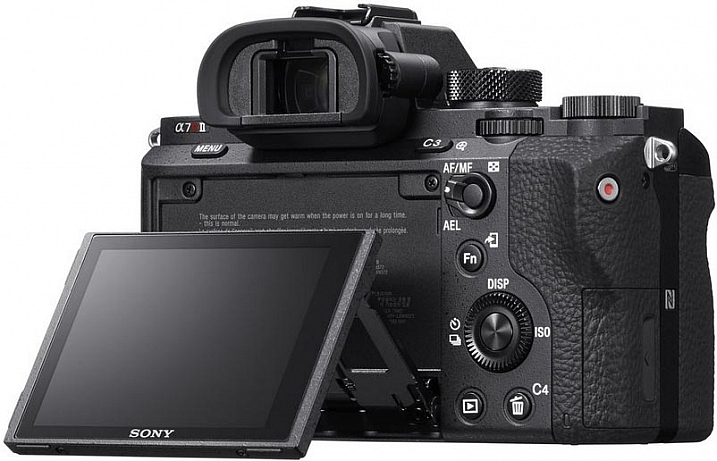
Review of the Sony A7RII Digital Camera

Image courtesy of Sony

It’s bigger and heavier than the A7R

The first thing I noticed as soon as I held the A7RII, was how much bigger and heavier it felt. While I liked the slightly larger size of the A7RII, I was none too happy about the added weight.

One of the major attractions of mirrorless camera systems is their small size, and even with the added weight of carrying lots of spare batteries, it’s still a relief not to be lugging around a breeze-block (cinderblock) of a DSLR.

If Sony could keep the same light weight to these cameras, but make them slightly larger and more ergonomically pleasing to the average hand size, I think they’ll win a lot of new business.

#2 – DSLR users considering switching to the Dark Side

If you’re considering jumping ship from another camera system, there are some things you need to consider before buying into the Sony brand. For most hobbyists these issues aren’t that big of a deal but for professionals these might be deal breakers.

  • No second memory card slots
  • Tedious and slow menu system induces violent tantrums
  • Slow response times when changing settings, writing to card, previewing and using apps
  • Battery life gives you a maximum of one hour of shooting
  • Small size is not comfortable for long periods shooting handheld unless you have tiny hands
  • Weather sealing is pathetic on the A7 series, don’t even test it

Adapt your DSLR Glass
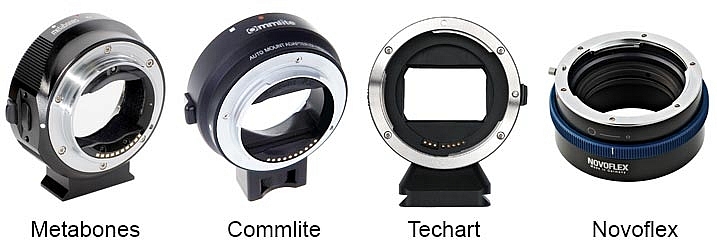
Sony A7RII Lens Adapters

On the plus side, there are now many choices of lens adapter available from different manufacturers, some of which can now handle aut focus. If you own a lot of expensive DSLR glass you’ll most likely be able to adapt it to the Sony E-Mount system. I’ve personally gone down this route but I’ve begun to gradually invest in native Zeiss glass for the Sony because the bulky size of the adapted DSLR lenses makes for a very uncomfortable experience and my camera bag needs to get smaller, not bigger.

Is there really any competition?

It’s pretty slim pickings in the DSLR camp if you need big megapixels. The Canon 5DSR offers more pixels but I’ve yet to see it produce better image quality than the A7RII, especially when it comes to low light shooting and ISO performance. The Nikon D810 is still the king of dynamic range in the DSLR world, but it falls behind the A7RII when it comes to accurate manual focusing using Live View, they don’t even have flip screens!

None of the high end DSLR cameras currently records 4K video.

If you’re outgrowing your current DSLR, or thinking of adding a second camera, that can produce superb images, the Sony A7RII is a logical choice if you can afford the asking price.

3 – New camera buyers with no current investment in any system
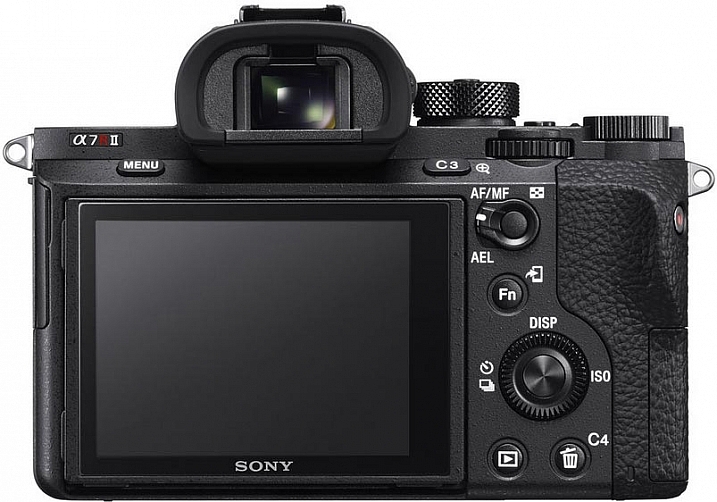
Sony A7RII Camera Review by Gavin Hardcastle

Image courtesy of Sony

If you’re not already invested in any camera system and are thinking of splashing out in this camera, I can summarize the entire ethos of the Sony A7 series for you in one sentence.

Image Quality Over Functionality. That’s what it’s all about. The Sony A7 series of cameras cannot compete with high end DSLR cameras in terms of functionality and reliability in high pressure shooting situations. But when it comes to sheer image quality, sharpness and low light performance, Sony crushes the competition with ruthless dominance.

If you’re a landscape photographer there really is no competition in this price bracket. The Sony A7RII will produce spectacularly sharp and detailed images when paired with good quality lenses.

What do you need from your camera?

Your decision as to whether or not you should buy this camera depends entirely on your shooting style and requirements. Want to shoot weddings and sporting events where reliability is paramount? Buy a high end DSLR. Want to shoot stunning landscapes with the utmost clarity? It doesn’t get much better than the A7RII for the current asking price.

But hold on – What about the A7R?

If the $ 3200 USD price tag of the A7RII (body only) puts too much strain on your bank account, I would recommend that you seriously consider saving some money for Zeiss glass and look for a good used A7R. There should be quite a few Sony fanboys out there, selling off their now obsolete Sony A7Rs for peanuts. Snag one of those for a bargain price and you might still have money left over for a Zeiss Loxia 21mm f/2.8, and maybe even the Sony FE 55mm f/1.8 which are both excellent lenses.

The attraction of top glass
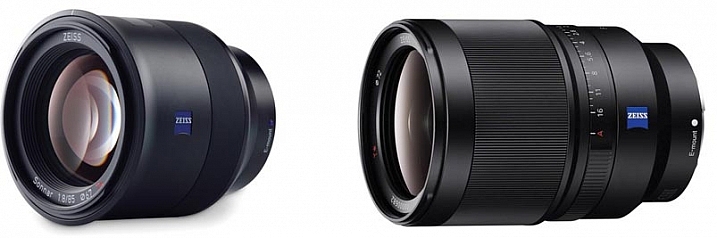
The Zeiss Batis 85mm and Sony SEL35F14Z 35mm lenses

Image courtesy of Zeiss

When the Sony A7 range first came out there were hardly any native lenses to choose from. Now there are more and more high quality lenses from Sony and Zeiss that are so good, I can see some photographers buying into the A7 system simply to take advantage of lenses like the Zeiss Batis 85mm and Sony SEL35F14Z Distagon T FE 35mm f/1.4, which are quickly becoming legendary lenses.

The Sony A7RII gets 4.5 stars

Sony A7RII Test Shots and Review

Why not 5 stars? In some ways Sony has listened to its users and fixed, or worked around, many of the issues voiced by A7R users. However the menu system is still atrocious, and the full frame 4K video is something of a let down.

I would have placed more value on improved dynamic range over the extra few megapixels, and there has been zero improvement in battery life even though the A7RII is a larger camera than its predecessor.

Maybe Sony will fix all of these issues in the A7RIII, and based on recent history, that camera should be in the shops before the next Star Wars sequel comes out.

Special Note: All of the test shots created for the review were done before the latest firmware update which now allows the A7RII to shoot 14-bit uncompressed RAW files.

googletag.cmd.push(function() {
tablet_slots.push( googletag.defineSlot( “/1005424/_dPSv4_tab-all-article-bottom_(300×250)”, [300, 250], “pb-ad-78623” ).addService( googletag.pubads() ) ); } );

googletag.cmd.push(function() {
mobile_slots.push( googletag.defineSlot( “/1005424/_dPSv4_mob-all-article-bottom_(300×250)”, [300, 250], “pb-ad-78158” ).addService( googletag.pubads() ) ); } );

The post Sony A7RII Mirrorless Full Frame Camera Review by Gavin Hardcastle appeared first on Digital Photography School.


Digital Photography School

 
Comments Off on Sony A7RII Mirrorless Full Frame Camera Review

Posted in Photography


Review of the Nitz Custom Handmade Camera Strap

15 Nov

Camera straps are one of those secondary things that most of us photographers don’t really put much thought into. However, consider this: the only thing keeping your camera away from the hard ground when it’s out of your hands, is your strap. It needs to satisfy some basic requirements, in order to serve us well. It needs to be strong, well-secured to our camera, and it needs to be comfortable.

It also doesn’t hurt if the strap doesn’t break the bank; after all, we have many other things we’d like to spend our hard-earned money on, like lenses, other accessories, or even a new camera body.

Nitz Custom Handmade Camera Strap is a product that not only meets all of those requirements – it exceeds them with extreme prejudice.

IMG_2209

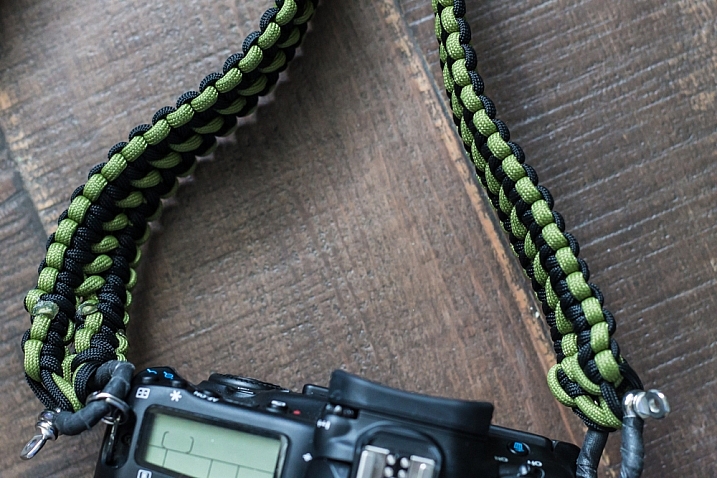
Photographer Chris Nitz created the product initially out of his own need. He wasn’t happy with the mass-produced camera straps available on the market, and set out to create one on his own. After experimenting with different materials, he settled on Type III Commercial Grade 550 parachute cord, and began weaving a few prototypes together. The result was a strap that met all of his own requirements, and inevitably began to attract the attention of his fellow photographers.

My main takeaway from the experience of ordering, and using a Nitz strap, was how custom tailored the entire process is. When you order one of these products, you know a few things immediately from visiting the website. You know that this strap is being made specifically for you, as a photographer. You know that you’re getting a product that is meant to last, and protect the equipment you value so much. Chris is also proud of the fact that all of the materials for his straps are sourced from right here in the United States.

Finally, you understand immediately that Chris is well aware of the financial budgets many photographers have, and his commitment to our pocketbooks, as well as the environment, are clear.

My experience began by visiting the Nitz Strap online store. Several options are available for every aspect of the product, and you begin by choosing the type of strap. At the moment, Chris is concentrating on neck straps for the heavier cameras, and wrist straps for the smaller, lighter models.

IMG_2208

After choosing a strap type, you then move on to the length and width of the product. Several different types of weaves are offered, each one differing in width. Want something thin, compact and discreet? Choose the “Thin Line”, a weave about 3/4″ wide. If you need something beefier, there are three more options available. Lengths available range between 12″ and 16″ for wrist straps, and from 36″ to an impressive 50″ for neck straps.

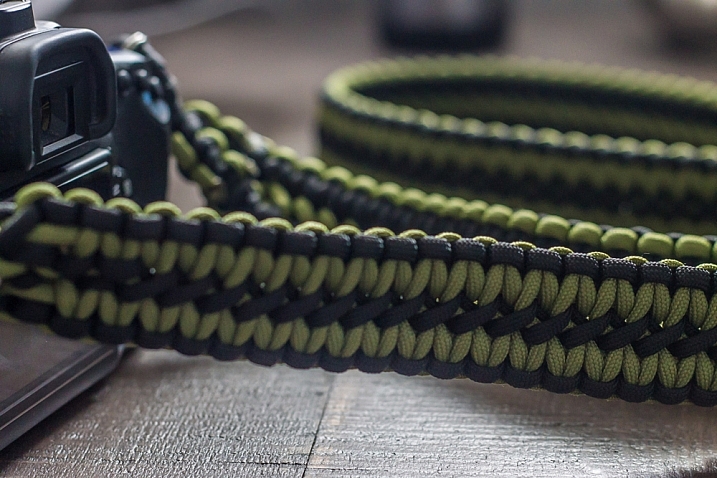
As I wanted something wide that my future cameras could grow into, and a longer option than my Canon strap, I ordered the 50″ Double Cobra weave, which is Nitz’s widest strap at 1.25″. This would allow me a bit more length to let the camera hang from my shoulder (my most common setup), or wear my equipment cross-body to lessen the chance of it slipping off and falling to the ground.

After selecting these basics, it’s time to move on to choosing the hardware you’ll use to connect the strap to your camera and keep it secure. The options here almost invoke a feeling of overkill; these straps are rated to hold up to 150 pounds depending on hardware, and any configuration you choose will be a huge step up from the connections we’re used to getting in standard camera kits.

All straps include two very capable, metal split rings, to connect hardware to the strap points on your camera. But some ingenious additional options stand out here, including a simply perfect tripod screw that allows you to connect the strap directly into your tripod mount point for quick and easy removal. I chose the anchor shackle connector, a small, but immensely sturdy piece of metal rated up to 400 pounds on its own.

IMG_2210

At this point in the ordering process, it’s time to have some fun. Nitz Strap comes in a very impressive assortment of color and pattern options, many of which they keep in regular stock. Two colors are standard with your order, although you have the options of incorporating up to four colors into your creation, at the expense of possible additional wait time to get the product.

Want a camouflage strap? Check. American flag? Christmas themed? Tie Dye? They’re all there. You’ll have fun going through the over 200+ color options offered.

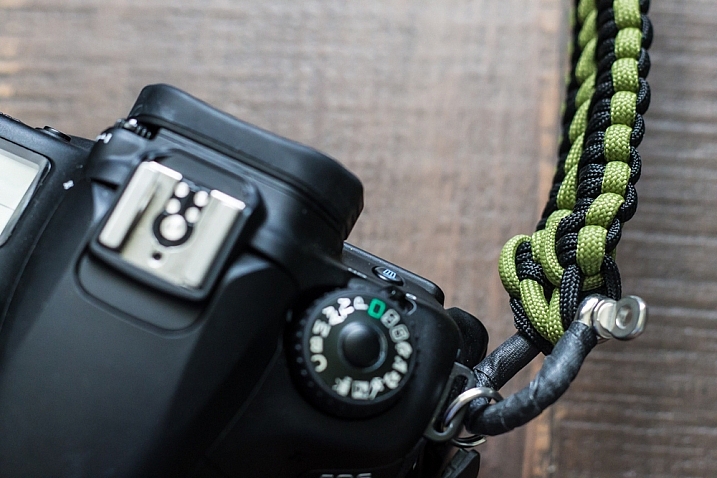
I wanted something that would satisfy my natural attraction to simple, dark, and matching palettes, and went with a very classy looking black and moss green weave that I figured would go with my all-black Canon body very well.

Another point that Chris means to make is that you don’t have to break the bank to keep your equipment safe and secure. Pricing differs depending on options of course, but I was able to create the custom camera strap of my dreams in less than 10 minutes, and ended up spending less than $ 100 USD.

My particular experience was a quick and completely painless one. I contacted Chris via e-mail about my order so he could talk me through some of the options I picked. I was amazed at how quickly he put the strap together and shipped it out (even though he had to order the moss green cord I requested as it was temporarily out of stock).

IMG_2212

Only five days went by between the time I clicked the order button, to the point I had the strap in my hand. The entire process really did make me feel I was having a custom strap made for me as an individual photographer, by another photographer.

And let’s be clear about this; these straps are beautiful. As cliché as it sounds, the craftsmanship on the strap I received was nothing short of impeccable. The hand weaving was perfectly done, with no loose ends. Even the way Chris tidies up the ends of the cords, blends in with the rest of the product.

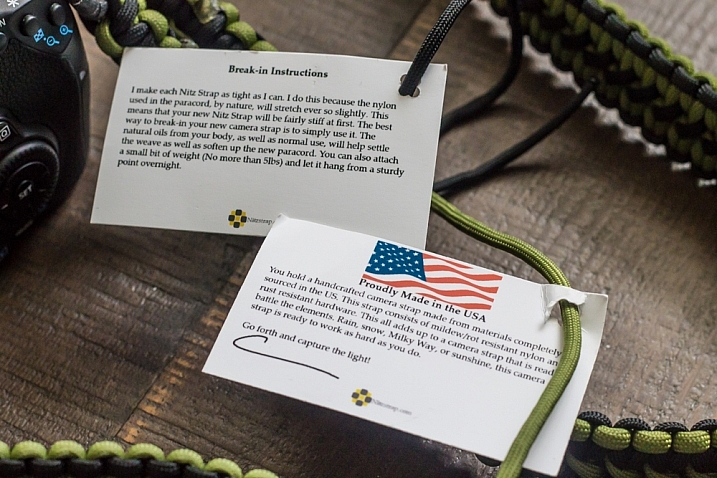
The strap came in very simple packaging, rolled up in a coil, with a couple of tags adorning it. These tags are made from recycled paper, and attached to the strap with the remaining end pieces of the cord that was used to create it. There are no paper receipts here, everything is handled through e-mail. You’re never going to get a bad rap from me when little details like this are included to make a small, but meaningful contribution to our environment.

IMG_2216

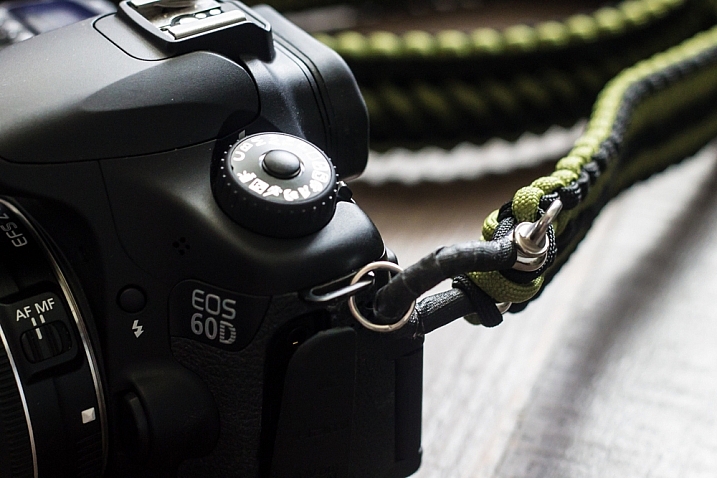
After struggling a bit to get the strap onto my camera via the heavy-duty split rings (since I didn’t choose one of the simpler attachment options available, I don’t plan to switch this strap out to a different camera), it was immediately obvious that I had found a permanent solution to keeping my 60D safely around my neck.

The strap was sturdy to the point of making me feel like it was almost too much for my camera. I would feel confident swinging it over my head by the strap as hard as I could; that’s how secure this thing feels. The strong anchor shackles are tightly wrapped in gaffer tape, and the whole package just looks professional, sturdy, and very, very slick.

If I had to nitpick about one thing, it would be how stiff and unforgiving the strap is at first touch out of the package. But even this is by design. Chris weaves the parachute cord together as tightly as possible for strength, creating an impossibly tough piece of fabric. This type of cord is known for softening over time, which means after a bit of use out in the field, the strap becomes much more pliable, and it conforms to your neck or shoulder. I have found this is exactly the case, as in less than two weeks my strap is almost perfectly broken in to my liking.

IMG_2220

Overall I couldn’t be much happier with the product I received from Nitz Strap. Even as a photographer who gets excited about little accessories for my camera, I was beyond pleased with what I ordered. I already plan to order another one for my film camera body in the near future. This strap definitely has my endorsement, and I recommend you at least visit Chris’ site at www.nitzstrap.com to check out all of the options I’ve discussed; I’m sure you’ll be just impressed with what you see as I was!

Disclaimer: Nitz Strap did provide this product to our writer to test out free of charge. However at dPS we only do completely unbiased reviews. But, as you can see the author plans on purchasing another one for his other cameras so that speaks to the product’s quality.

googletag.cmd.push(function() {
tablet_slots.push( googletag.defineSlot( “/1005424/_dPSv4_tab-all-article-bottom_(300×250)”, [300, 250], “pb-ad-78623” ).addService( googletag.pubads() ) ); } );

googletag.cmd.push(function() {
mobile_slots.push( googletag.defineSlot( “/1005424/_dPSv4_mob-all-article-bottom_(300×250)”, [300, 250], “pb-ad-78158” ).addService( googletag.pubads() ) ); } );

The post Review of the Nitz Custom Handmade Camera Strap by Tim Gilbreath appeared first on Digital Photography School.


Digital Photography School

 
Comments Off on Review of the Nitz Custom Handmade Camera Strap

Posted in Photography