RSS
 

Posts Tagged ‘REVIEW’

History Repeating: Olympus PEN-F First Impressions Review

27 Jan

The original Olympus PEN-F first hit the streets in 1963. Built around the half-frame film format, it quickly gained a following thanks to its beautiful, yet simple design and small size. Getting 70 images to a roll of film probably didn’t hurt, either. Now, 53 years later the PEN-F is back.

The digital reincarnation of the 35mm film Olympus PEN-F does not replace the current digital PEN flagship E-P5, rather it slides in next to it as the ‘premium’ option in the PEN family. The reason being that unlike digital PENs before it, the F has something much more OM-D-like: a built-in 2.36 million dot OLED electronic viewfinder. The F also boasts the highest output resolution of any Olympus body to date, boasting a 20MP Four Thirds sensor (probably the same one we’ve seen in the Panasonic Lumix DMC-GX8).

Released specifically to appeal to street shooters and the design conscious looking for a capable camera with retro-styling and rangefinder-like controls, the PEN-F has a lot going for it.

Olympus PEN-F features:

  • 20MP Live MOS Four Thirds format sensor
  • 5-axis image stabilization with automatic panning detection
  • 2.36 million dot OLED electronic viewfinder
  • Up to 10 fps continuous shooting (20 fps with electronic shutter)
  • Highly customizable interface, twin controls
  • Fully articulating 1.04 million dot, 3″ LCD touchscreen
  • 50MP High-res Shot mode
  • 1/8000 sec top mechanical shutter speed (1/16,000 with e-shutter)
  • 1080/60p video recording

All of the above come packaged in a machined aluminum and magnesium body, with no visible screws anywhere. A faux-leather wrap encircles the PEN-F and the body itself is both well-weighted and has a very solid feel to it. 

With many of the same guts as the OM-D EM-5 II and sleek rangefinder-style looks (reminiscent of Fujifilm’s X100 series cameras), the most direct competitors for the PEN-F are probably Sony’s a6000 and Fujifilm’s just-announced X-E2S – both of which are APS-C format cameras. Of course, the PEN-F also has to compete against alternatives within the OM-D series as well.

To help us to better understand how the PEN-F fits into the market place as a whole, we chatted with Eric Gensel, a technical specialist with Olympus. He breaks down exactly how the PEN-F fits in Olympus’ lineup, who the target-audience of the camera is and what went into the design process:

Compared to its siblings

Many of the highlight features of the PEN-F aren’t new. In fact a lot of the key spec is shared with other recent Olympus releases. However, some functions have been improved upon. For instance, thanks to its 20MP sensor, the Pen F is capable of higher resolution in multi-shot mode compared to the OM-D E-M5 II, up to 80MP in Raw mode (50MP in JPEG). It also features a dedicated creative control knob on the front, as well as four customizable shooting modes, accessed via the locking exposure mode dial.

It’s hard to see the PEN-F as a large step forward given how many of its core features are inherited from other models, but it offers a handling experience that is unique in Olympus’s lineup. Is the PEN-F more than just a pretty face? Let’s dig in.

 
Olympus PEN-F
Olympus OM-D
E-M5 II
Olympus PEN E-P5
Pixel count 20MP 16MP 16MP
Image stabilization 5-axis 5-axis 5-axis
Stabilization (CIPA) 5 stops 5 stops 4 stops
Max shutter speed

1/8000
(1/16000 electronic)

1/8000
(1/16000 electronic)
1/8000
On-sensor PDAF No No No
Continuous shooting
(without /with AF)
10 fps / 5 fps 10 fps / 5 fps 9 fps / 5 fps
Flash Clip-on
Tilt/bounce/rotate
Clip-on
Tilt/bounce/rotate
Pop-up flash
Viewfinder Built-in 2.36M-dot LCD
1.23x mag
Built-in 2.36M-dot LCD
1.48x mag
Optional VF-4 accessory EVF w/ 2.36M-dot LCD and 1.48x mag
Max video res/rate 1080/60p 1080/60p 1080/30p
Max bitrate 77Mbps 77Mbps 20Mbps
Mic socket No Yes No
Rear screen

Fully articulating 3″ touchscreen
1.04M-dots

Fully-articulated
3.0″ touchscreen
1.04M-dots
Flip up/down
3.0″ touchscreen
1.04M-dots
Wi-Fi Yes Yes Yes
Environmental sealing? No Yes No
Battery life (CIPA) 330 310 330
Weight 427 g 469 g 420 g
Dimensions 125 x 72 x 37mm 124 x 85 x 45mm 130 x 94 x 63mm

Pricing and availability

The Olympus PEN-F will be available at end of February – early March 2016, and will hit the streets at a body-only price of $ 1199. It ships with the FL-LM3 flashgun seen in the image at the top.

If you're new to digital photography you may wish to read the Digital Photography Glossary before diving into this article (it may help you understand some of the terms used).

Conclusion / Recommendation / Ratings are based on the opinion of the reviewer, you should read the ENTIRE review before coming to your own conclusions.

We recommend to make the most of this review you should be able to see the difference (at least) between X, Y, and Z and ideally A, B, and C.

This article is Copyright 1998 – 2016 and may NOT in part or in whole be reproduced in any electronic or printed medium without prior permission from the author.

Articles: Digital Photography Review (dpreview.com)

 
Comments Off on History Repeating: Olympus PEN-F First Impressions Review

Posted in Uncategorized


A classic reinvented? Domke Chronicle Review

20 Jan

Domke Chronicle Ruggedwear Review
$ 349/£296 | www.tiffen.com | Buy Now

Domke has a long history of making bags that to serve the needs of working photographers. From day one, Domke bags have been designed for accessibility, durability and style that intentionally avoids attracting attention, and have enjoyed popularity with generations of pro photographers. A few years ago, after gathering input from professionals and longtime customers (myself included), Domke introduced the Next Generation line, bringing modern updates to its classic bag.

For a little background, I’ve used a Domke J-2 (a ballistic nylon version of the F-2) as my standard DSLR working bag for almost 15 years. I don’t use it to carry every little thing. I don’t use it when I want to travel light and fast. I don’t use it when I’m going to be hiking up a mountain. But I use it when I know I’m going to be in and out of my bag all day long. Weddings, kids’ birthdays, family reunions and the like all require quick and easy access to bodies, lenses and accessories. The J-2 has served me well for years and despite its age, still looks and functions well enough that I could take it to a wedding tomorrow. 

As a long time user I was interested to see what the Next Generation bags had to offer. Since the Chronicle is the Domke Next Generation bag closest in size to my old J-2, I figured that was a good place to start. Domke even calls the Chronicle ‘The grandchild of the F-2.’

Specifications

  • Exterior: 15.75″ (L) x 7″ (W) x 10″ (H) (40 cm x 17.8 cm x 25.4 cm)
  • Interior: 12.25″ (L) x 6.5″ (W) x 9.25″ (H) (31.1 cm x 16.5 cm x 23.5 cm)
  • Weight: 4.2 lbs. (1.9 kg)
  • Fabric/color choices: RuggedWear Black, RuggedWear Military, Canvas Khaki/Black and Cordura Black
  • Fits a medium DSLR and 2-3 lenses plus accessories

In Use

In many ways, the Chronicle, and much of Domke’s Next Generation lineup, is very similar in design to its classic bags. That being said, there are a number of upgrades, some minor and some more significant. In use, the Chronicle will feel familiar to anyone who has used a Domke bag in the past. The Gripper Strap on your shoulder, side pockets for accessories, metal snap hooks to close the main compartment’s flap, and a removable grab handle strap are all there and just as useful as ever.

The Next Generation bags bring a new fabric to the Domke lineup, Ruggedwear. Ruggedwear is a waxed-canvas fabric that Domke claims combines toughness, water resistance, and a retro ‘well-worn’ look. In my book, it’s pretty good looking and seems as tough as my other Domke bags. The top access zipper makes grabbing your camera or changing a lens significantly quicker. This is a feature I highly value on my shoulder bags and feel that it is exactly the kind of functionality that other Domke bag users will value.

The expandable side and front pockets reduce overall size of the bag while still giving you options for tucking in that one last piece of equipment. A redesigned top flap and side rain hoods offer more reliable protection from the elements. The velcro ‘silencers’, small flaps that cover the velcro closures and keep them from making noise, are a neat idea, but I have to admit that I have yet to use them. The antique stainless hardware is a nice upgrade. Sadly, the plastic clips that attach the grab strap are a significant downgrade. They feel flimsy enough to break in the very near future. I wish Domke had used their traditional metal clips.

New plastic clip on the left, classic metal clip on the right.

Moving away from Domke’s standard 1/2/4 section inserts, the Next Generation system offers an extensive system of internal divider options. There are dozens, if not hundreds, of different ways you can set up the Chronicle. It comes with three dividers, two full width and one half width (along with one movable ‘pocket’). The dividers have velcro edges and stick to the sides or to each other in just about any position you choose. If those provided do not give you enough options, Domke sells additional dividers along with pockets, pouches, and padding that will help you set up your bag in just about any configuration. The Chronicle only comes with three of these dividers, which I feel is too few considering its price tag. I would have liked to see 1-2 more dividers included.

Like my Domke J-2, the Chronicle has a well padded and removable baseplate. Unlike most older Domke bags, the Chronicle has four padded ‘walls’ around the sides. This has the advantage of giving your gear an additional measure of protection that it wouldn’t have in a softer-sided traditional Domke bag. It also has the effect of giving the bag more boxy structure than the older bags. The Chronicle doesn’t form to your hip or back when carrying it. Sure, you could remove the walls, but unlike the J-2 with its inner lining of velcro or the F-2 with its inserts, the Next Generation divider system has nowhere to attach without the ‘walls.’ 

The gear capacity of the Chronicle is really dependent on how you set up the dividers. My default for shoulder bags is to have a large space on one side for a body+lens and then the lens dividers over to the other side. For me, this is the best compromise between maximizing space and still being able to quickly grab my camera. This was how I set up my old J-2 for every wedding I shot and it is how I set up the Chronicle. With this layout, I was pretty easily able to carry my 6D+ 24-70/2.8, 16-35/2.8, 70-200/2.8 a speedlight and assorted other small accessories.

By setting up the dividers so that things are a little more tightly packed, you should be able to also fit in a spare body or a couple of prime lenses pretty easily. A mirrorless kit is almost swallowed by a bag this size and generally I would suggest something smaller (perhaps the Domke Next Generation Herald). But depending on the body you use and the number of lenses you carry, the Chronicle could easily haul a lot of mirrorless gear and keep it accessible.

New vs Old

Compared to the old J-/F-2 designs, I really appreciate some of the new features. The expandable side pockets, the quick access zipper, and divider system top that list. In addition, the Chronicle’s new top flap and side ‘ears’ do a better job of protecting gear from the elements than the smaller J-2 flap.

Historically, I have thought I preferred the less structured shape of the J-2. It hugs my side better and feels as if I can move through crowds more easily. But in recent years I have come to realize a few things about shoulder bags. Past a specific size, a big shoulder bag is just a big bag no matter what. While a bag like the J-2 might protrude slightly less than the Chronicle, they are still pretty big. Furthermore, a more structured bag is a lot easier to actually use while working. The added stiffness aids in getting gear in and out; you aren’t fighting with the bag to get a lens back into its divider.

“For as much as I’ve always respected the world-weary photojournalist look of the older Domke bags, I think the Chronicle is just a little more classy looking”

Finally, the more rigid design of the Chronicle makes it unlikely to tip over when set down on the ground. Overall, I could work with either of these bags. The J-2 (and the F-2 before it) has had years of hard use proving its worth. However, the Chronicle has enough important improvements that I would choose it if I had to pick just one. To be honest, for as much as I’ve always respected the world-weary photojournalist look of the older Domke bags, I think the Chronicle is just a little more classy looking, particularly in the Ruggedwear fabric. 

What’s the Bottom Line?

The Domke Chronicle Ruggedwear is a solid, well-designed bag that should stand up to the abuse that serious photography can dish out. And let’s be honest, updating a classic can be difficult. Look at the historical joke that ‘New Coke’ has become. Domke, however, has stayed true to its soul with the Next Generation line and most specifically, with the Chronicle. Most all of the updated features are solid improvements with very few misses.

Yes, this is a premium bag at a price that starts to edge close to the truly high-end offerings out there. But this is not simply a fashion accessory either. At the end of the day, just like the old F-2, this is a bag one can work out of. It is a bag that should be as at home coming out of a staff photographer’s trunk as it is at a wedding or portrait session. Most everything you truly need out of a shoulder bag is here, and there’s very little that you don’t.

What we like:

  • An update of a classic functional design
  • Overall construction quality
  • Made in the USA
  • Top zipper access
  • Expandable side pockets
  • Velcro silencers
  • Extensive divider system

What we don’t like:

  • Premium price tag
  • Plastic clips on grab handle
  • Too few dividers included
  • Boxy shape

Final Rating: 

Articles: Digital Photography Review (dpreview.com)

 
Comments Off on A classic reinvented? Domke Chronicle Review

Posted in Uncategorized


Retro through-and-through: Fujifilm X-Pro2 First Impressions Review

17 Jan

The X-Pro2 is a high-end, rangefinder-esque mirrorless camera that directly succeeds the first X-mount camera: the X-Pro1. The Pro2 now sports a 24MP APS-C sensor and a host of feature improvements in a body that very closely resembles that of its predecessor.

Fujifilm X-Pro2 features

  • 24MP X-Trans CMOS III sensor (APS-C)
  • 273 Autofocus points (77 of which PDAF)
  • 2.36M-dot OLED/Optical hybrid viewfinder with pop-up picture-in-picture tab
  • ISO 200-12800, expandable to 100-51200 with Raw shooting at all settings
  • 1/8000 sec maximum shutter speed and 1/250 sec flash sync
  • Acros black and white film simulation
  • Grain Effect option for JPEGs
  • 1080/60p movies

The X-Pro2’s higher resolution sensor also gains wider-spread on-sensor phase-detect AF coverage, which is another significant improvement. In addition it has a small, thumb-operated joystick that allows you to more easily select an AF point and, in turn, the camera lets you select from a any of the camera’s AF points.

Other changes include allowing Auto ISO to extend up to 12800 and the ability to shoot Raw files at all the camera’s ISO settings (extended settings have always been JPEG-only on previous X-series cameras), as well as the ability to apply lossless compression to Raw files. The X-Pro2’s shutter has been improved, too, and can now shoot as fast as 1/8000 sec, with flash sync extended to 1/250 sec of a second.

But much of what else made the original X-Pro1 stand out remains. The genuinely rangefinder-styled body, rather than just being a rectangle with a band of faux leather around it, mimics most of the control points and design accents of a 1960s camera. It still has the all-metal construction but more attention has been made to provide environmental sealing, as you’d expect in a camera at this price.

And, although the body looks broadly the same, it’s been significantly reworked to offer improved ergonomics as well as additional features. The hybrid viewfinder has been improved through the inclusion of an X100T-style pop-up tab in the corner, onto which an LCD image can be projected.

Here’s a spec comparison between the X-Pro2 and its predecessor, as well as the X-T1:

 
Fujifilm X-Pro2
Fujifilm X-T1
Fujifilm X-Pro1
Pixel count 24MP 16MP 16MP
AF points 273 points (77 of which PDAF) hybrid system.
All directly selectable.
77 point (15 of which PDAF) hybrid system
49 directly selectable (9 of which PDAF)
49 point CDAF system
All directly selectable.
Viewfinder 2.36M-dot OLED/Optical Hybrid 2.36M-dot OLED 1.44M-dot LCD/Optical Hybrid
ISO Range 200-12800
(100-51200 Extended)
200-6400
(100-51200 JPEG-only)
200-6400
(100-25600 JPEG-only)
Auto ISO settings 3 1 1
Maximum frame rate
With AFC/With Live View
8 fps / 3 fps 8 fps / 3 fps 6 fps / 3 fps
Maximum shutter speed 1/8000 (Mechanical)
1/32000 (Electronic)
1/4000 (Mechanical)
1/32000 (Electronic)
1/4000 (Mechanical)
X-Sync Speed 1/250 sec 1/180 sec 1/180 sec
Movie shooting 1080/60p 1080/60p 1080/24p
Wi-FI Yes Yes No
Customizable Q Menu Yes Yes No
Custom ‘My Menu’ Yes No No
Direct controls Shutter Speed
Exposure Comp
AF Drive Mode
ISO
Shutter Speed
Exposure Comp
AF Drive Mode
ISO
Drive Mode
Metering Mode
Shutter Speed
Exposure Comp
AF Drive Mode
Direct AF point control Yes – Joystick Optional – At expense of custom buttons No
Custom buttons 6 6 (2 if direct AF select chosen) 2
Exposure Comp Dial ±3EV (±5EV using front dial) ±3EV ±2EV
Rear screen 3″ Fixed (3:2)
1.62M-dot (900 x 600)
3″ Tilting (3:2)
1.04M-dot (720 x 480)
3″ Fixed (4:3)
1.23M-dot (640 x 480)
Command dials 2 (Push-button type) 2 1 (Push-button type)
Card slots 2 (1 of which UHS-II) 1 (UHS-II) 1 (UHS-I)
Film Simulations* 9 8 7
AF Tracking Yes Yes No
Eye-detection AF Yes Yes No
AF in MF mode AF-C or AF-S AF-C or AF-S AF-S
Panorama mode No Yes Yes
Compressed Raw? Optional (Lossless) No No
Battery life 350 OVF
250 EVF
350 EVF ~300 OVF
Battery percentage? Yes No No
Maintain zoom when changing image in playback Yes No No
Lens Modulation Opt Yes Yes No
Grain simulation Yes No No
Split prism focus guide Color/Mono Mono No
Brightline display Yes N/A No

*Not including color filter simulation variations

As you can see, compared to the X-Pro1, the Pro2 is significantly improved. Almost every aspect of the camera has been refreshed and these updates quickly add up to a much nicer-to-use, more capable camera.

However, in the four years that have passed since the launch of the X-Pro1, a lot has changed, with mirrorless cameras maturing dramatically and expectations for features such as continuous autofocus and movie shooting leaping forwards. However, neither of these two factors is likely to be a prime concern for would-be buyers, instead, the main thing likely to make life difficult for the X-Pro2 could be the existence of its own sister model: the X-T1.

The X-T1 was described at launch as a flagship model and offers a fully fleshed-out feature set for enthusiasts, semi-pros and perhaps even some professionals. It has sealed magnesium alloy construction, a huge electronic viewfinder, weather sealing and abundant external controls. So is there really still room for a new X-Pro alongside the DSLR-style model?

Scanning through the table above, there are certainly some areas in which the X-Pro2 is more advanced than the X-T1, but details such as shutter speed and pixel count are just generational improvements that would make just as much sense in a X-T2. So one of the main things we’ll be looking to address in this review is: how does the hybrid viewfinder change the shooting experience and is it enough to allow the X-Pro and X-T lines to continue in parallel?

 Review History
29 Jan 2016 First Impression Review based on Pre-Production camera running Firmware 1.00

If you're new to digital photography you may wish to read the Digital Photography Glossary before diving into this article (it may help you understand some of the terms used).

Conclusion / Recommendation / Ratings are based on the opinion of the reviewer, you should read the ENTIRE review before coming to your own conclusions.

We recommend to make the most of this review you should be able to see the difference (at least) between X, Y, and Z and ideally A, B, and C.

This article is Copyright 1998 – 2016 and may NOT in part or in whole be reproduced in any electronic or printed medium without prior permission from the author.

Articles: Digital Photography Review (dpreview.com)

 
Comments Off on Retro through-and-through: Fujifilm X-Pro2 First Impressions Review

Posted in Uncategorized


Week in Review: 2016 CES edition

09 Jan

Week in Review: 2016 CES edition

CES isn’t always a blockbuster show for photography, but Nikon fixed that for us this year. Welcome to 2016, the year of the long-awaited D300 replacement. But that wasn’t all – a few hours before Nikon trounced all over the other show announcements, Olympus took the wraps off a 300mm F4 Pro lens, Panasonic put a 1″ sensor into a travel zoom camera and Kodak brought back Super 8. If this week was any indication of how the rest of 2016 will go, then we’ll be needing a lot more of the ‘Just Chill’ anti-energy drinks that Dan brought into the office last week.

Nikon D5/D500

We knew that Nikon had a professional grade full-frame camera coming, so while we weren’t surprised to see the D5 announced at CES, we were not expecting the D500. Possibly the longest-awaited successor to a popular model ever, the D500 replaces the D300S after six years – long after many enthusiast Nikon photographers had given up hope of ever seeing it.

Like the D5, the D500 uses a 20MP CMOS sensor and 153-point AF system. But being an APS-C format camera, that AF array stretches almost to the edges of the frame. Both the D5 and D500 are hugely impressive and we look forward to getting them in our studio very soon.

Nikon KeyMission 360

Nikon had quite a few ‘firsts’ this week, including the introduction of its first 360-degree camera. Despite a name that reminds of Tom Cruise movies, the KeyMission 360 looks enticing. Fully rugged and capable of 4K video, the KeyMission uses two lenses on opposite sides of the camera to create immersive video and stills. We weren’t able to get any closer to it than this and were told that the design is ‘not quite final yet.’ For now it’s just a mysterious figure behind glass and a super intense name.

Panasonic Lumix DMC-ZS100/TZ100

Joining the ever-expanding ranks of 1″-type sensor compacts is the Panasonic Lumix DMC-ZS100. With its 25-250mm equivalent field of view it provides more reach than the RX100s without the substantial size gains seen in the likes of the company’s own DMC-FZ1000 or Canon’s PowerShot G3 X. Throw in an EVF and Panasonic has a little travel cam ready to accompany you on your next journey.

Samsung

We’re still hoping for some signs of life from Samsung’s NX series but it’s looking pretty grim. We expected the scene at the company’s CES booth to be heavy on VR, high-tech refrigerators and gadgets like the new Galaxy TabPro S, but we’d hoped for at least a glimpse of their camera lineup on the tech world’s biggest stage but nope, not a peep at the press conference and not a single NX1 at the booth.

Maybe, argues staff writer Dan Bracaglia, it’s time to open up your smart fridge, crack open a cold beverage and pour it out for Samsung’s mirrorless line. And that’s a real shame.

Olympus M.Zuiko PRO 300mm F4

When we were briefed on the Olympus M. Zuiko PRO 300mm F4 we were told about the amazing tolerances used when making this lens. This quote isn’t verbatim, but it went something like ‘If the front element is a football field, we are removing inconsistencies the size of a human hair.’

This geeky attention to detail has always been characteristic of Olympus, and the sharpness of the 300mm is a testament to the manufacturer’s hard work. Combine that with a 600mm equivalent prime that can feasibly be used handheld, and we have one impressive tube of metal and glass on our hands. Check out our sample gallery to witness the sharpness for yourself.

Kodak Super 8

Slated for a Fall 2016 release date, the Kodak Super 8 was among the most surprising products we saw at CES this year. It’s not entirely clear how, but the Super 8 still shoots Super 8 film cartridges (which Kodak will process and digitize for you) while allowing you to preview your cinematic masterpiece by way of a flip-out LCD monitor.

A built-in handle/microphone, an array of ports and a versatile C-mount round out the package. Sure, Kodak is leaning pretty heavily on nostalgia-fueled hype surrounding the format and being stingy with actual details on the Super 8 itself, but we still can’t wait to get our hands on a production model.

Week in Review: 2016 CES edition

One does not simply walk into the Las Vegas Convention Center during the first week of January. Prepping for and surviving CES is like an athletic event, never-ending networking happy hour and a Sunday at Ikea all wrapped into one. For several days in a row. So here’s a shout out to Dan and Dale, the DPR staffers who were our eyes and ears on the ground at the show this year. Thanks for hauling your laptops and camera gear through the convention hall for days on end, taking lots of notes and photos, and eating boxed press lunches while sitting on the floor. We owe you a couple of Just Chills.

Articles: Digital Photography Review (dpreview.com)

 
Comments Off on Week in Review: 2016 CES edition

Posted in Uncategorized


Inching forward? Canon PowerShot G5 X review posted

24 Dec

Canon PowerShot G5 X Review

Key Features

  • 20.2MP 1″-type BSI CMOS sensor
  • DIGIC 6 processor
  • F1.8-2.8, 24-100mm equiv. lens
  • Optical image stabilization
  • Built-in ND filter
  • 3″ fully articulating touchscreen LCD
  • 2.36M-dot electronic viewfinder
  • 1080/60p video
  • Wi-Fi with NFC

The PowerShot G5 X is one of the latest members of Canon’s 1″-type sensor family, which began with the G7 X in 2014. It takes what made that camera appealing – namely its sensor, lens, and direct controls, and puts them into a body that adds an electronic viewfinder, fully articulating touchscreen LCD, hot shoe, and additional control dial – all without a large increase in size.

The G5 X’s 20.2MP 1″-type BSI CMOS sensor – designed by Sony and first used in its RX100 II and III – performs very well and, given that the image pipeline on the G5 X is the same as its predecessor’s, should continue to do so. The 24-100mm F1.8-2.8 optically stabilized lens is also the same as on the G7 X, so there shouldn’t be any surprises there, either.

From a feature standpoint, the G5 X is essentially the same as the G7 X. You’ve got your manual exposure controls, customizable buttons and dials, built-in neutral density filter, Raw support, 6 fps continuous shooting (JPEG only), a fun star trail mode, 1080/60p video recording and Wi-Fi with NFC. 

Sadly, two of the G7 X’s most disappointing traits have carried over to the G5 X, namely sluggish Raw shooting performance and lackluster battery life. 

Meet the Family

From left to right: the PowerShot G1 X Mark II, G3 X, G5 X, G7 X, and G9 X

There are now five members in Canon’s premium compact’ family: the G1 X Mark II, G3 X, G5 X, G7 X and G9 X. The G1 X Mark II is the flagship model, using a considerably larger 1.5″-type sensor instead of the 1″-types used by the rest of the group. 

The G7 X is Canon’s original 1″-type sensor camera, and the models that have followed are a variation on the same theme. The G3 X is the long zoom model, the G5 X is for the EVF crowd, and the G9 X is an ultra-compact model with a shorter, slower lens. 

Here’s a quick table to help you sort out the differences between the five models:

  G1 X Mark II G3 X G5 X G7 X G9 X
MSRP $ 799 $ 999 $ 799 $ 699 $ 529
Sensor 12.8MP 1.5″-type CMOS 20.2MP 1″-type BSI CMOS
Lens (equiv.) 24-120mm
F2.0-3.9
24-600mm
F2.8-5.6
24-100mm F1.8-2.8 28-84mm
F2.0-4.9
LCD size/type 3″ tilting touch 3.2″ tilting touch 3″ rotating touch 3″ tilting touch 3″ fixed touch
EVF Optional Yes No
Hot shoe Yes No
JPEG burst 5.2 fps 5.9 fps 6.5 fps 6.0 fps
Video 1080/30p 1080/60p
Audio in/out No Yes No
Battery life (CIPA) 240 shots 300 shots 210 shots 210 shots 220 shots
Dimensions 116 x 74 x 66mm 123 x 77 x 105mm 112 x 76 x 44mm 103 x 60 x 40mm 98 x 58 x 31mm
Weight 553g 733g 377g 304g 185g

That’ll do it for comparisons – let’s dive into the world of the PowerShot G5 X now.

Articles: Digital Photography Review (dpreview.com)

 
Comments Off on Inching forward? Canon PowerShot G5 X review posted

Posted in Uncategorized


Review: The Everyday Messenger Bag by Peak Design

23 Dec

I have had several camera and equipment bags over the years, ranging from simple backpacks to over-the-shoulder models, to free bags that came with gear I bought. While all of them have been effective to varying degrees, each one has had its own share of problems. Some are too bulky, while others are not big enough. Some have pockets in strange places, and others have no pockets at all. Some have nicely-padded straps and big cushions for gear, but these usually result in bags that are too cumbersome and awkward for everyday use.

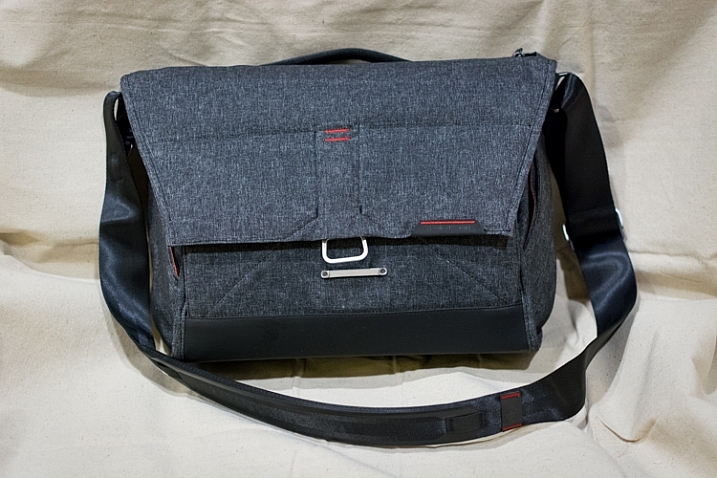
In short, while all the bags I have used have been functional, none of them have been very well designed with a photographer’s needs in mind. Enter the Everyday Messenger Bag by Peak Design.

everyday-messenger-bag-front-closed

I first heard about this bag on an episode of This Week in Photo, where host Frederick Van Johnson interviewed Trey Ratcliff, a well-known photographer who was similarly frustrated with the state of modern camera carrying equipment. Ratcliff had been working with Peak Design to create a bag that was ideally suited for not just photographers, but anyone who would need to carry various things around on a daily basis. By the end of the podcast I was intrigue,d and within a few days my wife and I backed Ratcliff’s project on Kickstarter.

However, like some of the other projects we had supported, we were not sure if our pledge would result in a high-quality product, or simply evaporate into cyberspace never to be heard from again. Thankfully Ratcliff and Peak Design held true to their word, and at the end of November our Everyday Messenger arrived, and we have been using it quite a bit ever since.

Thoughtful Design

At first glance the Everyday Messenger looks just like any other bag of its kind; it’s big enough for some cameras, a lens or two, and a laptop and/or tablet. There are pockets, a padded strap, and some zippers to let you access everything. In fact my initial reaction to the bag was a bit of a disappointment. Why spend more than $ 200 on a bag that seems the same as a $ 50 bagthat  I could buy from Amazon or a department store?

The answer, I discovered after using it for a while, lies in the details. While not perfect, there are many subtle aspects to this bag that you just don’t normally see on other camera bags, which make the Everyday Messenger imminently more practical for photographers.

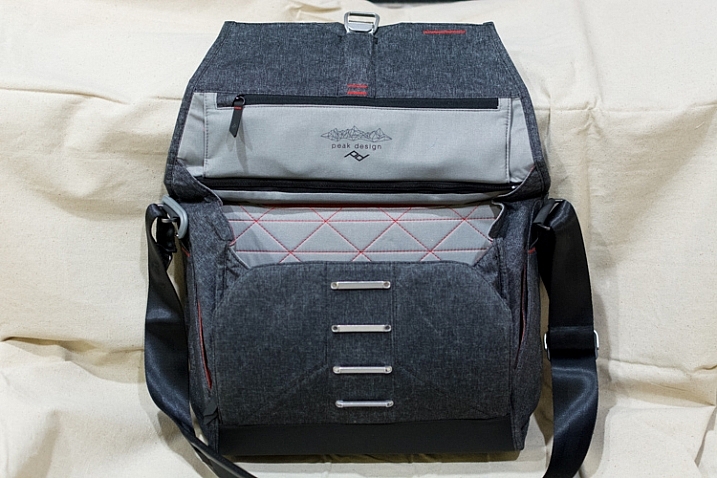
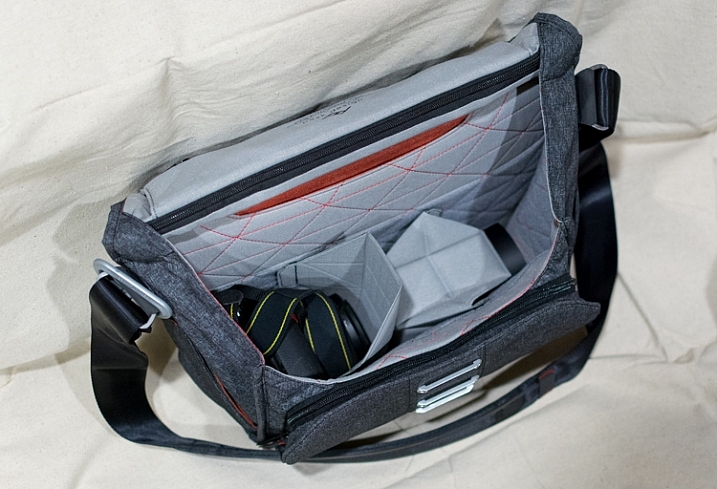
everyday-messenger-bag-front-open

“She may not look like much, but she’s got it where it counts” – Han Solo, describing either the Millennium Falcon or his Everyday Messenger bag.

One of the biggest hassles with my other camera bags has been actually getting things out of the bagUsually it involves unbuckling a clasp, and fiddling with a zipper that goes around a few sides of the bag, to reveal the gear stuffed inside. It’s a cumbersome maneuver that can be anywhere from mildly irritating to downright frustrating, especially in the middle of a photo shoot.

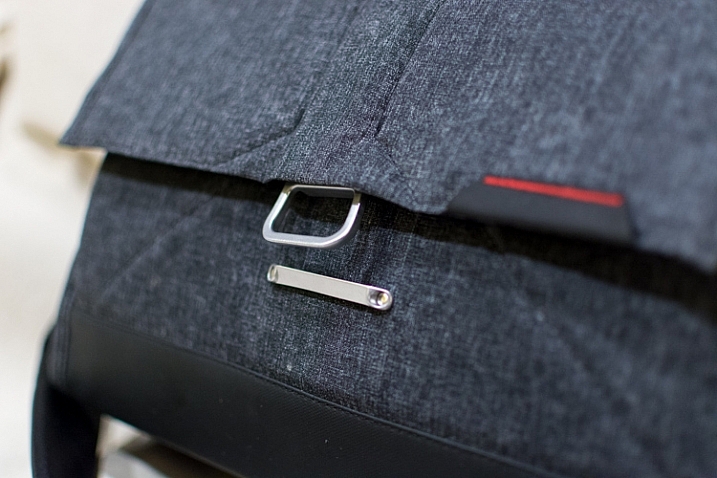
The Everyday Messenger solves this with a magnetic clasp that hooks to one of four positions, releases with a quick flick of your wrist, and snaps securely back in place with minimal effort. It also has two weather-sealed zippers on top; one which provides access to the main pouch and another for the laptop/tablet storage section in the back. All this adds up to a bag that is clearly designed to hold your equipment safe and secure, while letting you get at it as quickly as possible, and has quickly made all my other bags look archaic by comparison.

everyday-messenger-bag-front-clasp

The front clasp opens and closes easily, but locks securely. I thought it would be gimmicky at first, but it has turned out to be surprisingly useful, and quite durable.

Attention to Detail

There are dozens of little examples like this scattered throughout the Everyday Messenger bag that make it incredibly useful for photographers, as well as anyone else who needs a bag to carry things around. In fact my wife, a college professor, has been using it to carry all manner of papers and books, along with her laptop, around campus. After a week of using it she said, and I quote, “My official verdict is – it’s awesome.”

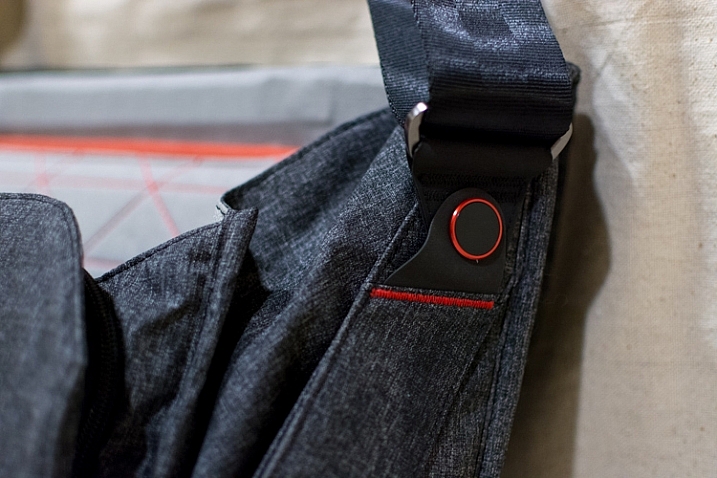
The clasp on the shoulder strap adjusts with a quick release mechanism to make it longer or shorter, and even the strap itself is unique in its design. Instead of a shoulder pad that slides back and forth, a 15-inch section of the shoulder strap is padded from the inside. This not only eases much of the stress on my shoulder, but is far more comfortable than any other camera bag strap I have ever used. The strap seems well suited for those who like over-the-shoulder bags, but can also be made long enough to accommodate users who prefer to sling the bag across their chest.

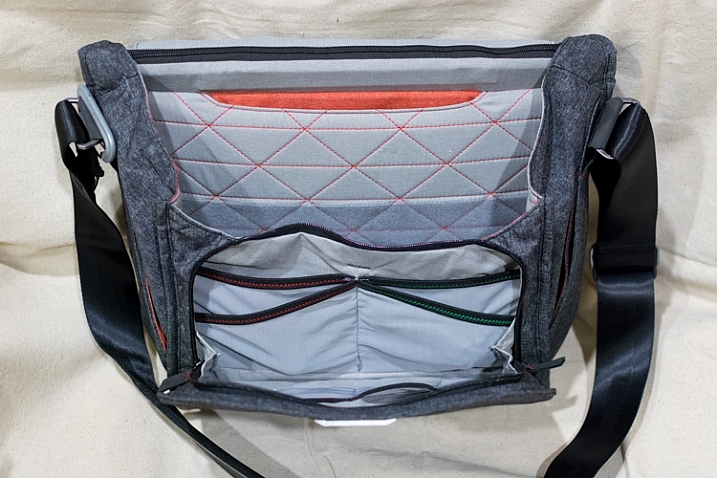
everyday-messenger-bag-all-open

If you want pockets, this bag has plenty to spare.

The little touches don’t stop with the shoulder strap and zippers. Two pockets on each side of the bag offer quick access to small things like lens filters, batteries, or even keys, which can be clipped to a security strap so they won’t get lost. Inner pockets in the lining of the bag are coded red and green, and are designed for memory cards or batteries that are either ready to go or all used up. The shoulder strap attaches to the bag itself with a rotating joint, instead of the common swivel style you see on most bags, which means the Everyday Messenger moves naturally at your hip instead of jostling back and forth. And unlike almost every other messenger-style bag I have used, this one stands perfectly upright whether empty or full, thanks to a thick underlining.

All of this adds up to a bag that carries your stuff like any other, but does so in a way that is more practical and easier to use than you might expect.

everyday-messenger-bag-strap-swivel

The shoulder strap rotates front to back where it is attached to the bag, which makes things far more comfortable on long walks than most other bags.

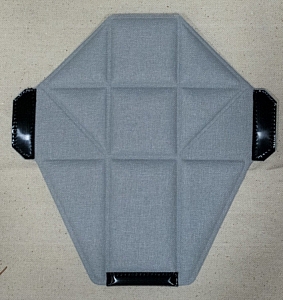
The inside of the Everyday Messenger looks like what you would expect – a big empty compartment, with velcro dividers to keep your larger gear items separate from each other. Unlike most other bags though, the creators added a somewhat unique twist on the dividers themselves; they are designed to fold and flex in order to accommodate oddly-sized equipment and even let you stack things on top of one another. If you have a larger lens it can be placed on the side, and multiple camera bodies can be put next to it, or stacked on top of each other, with everything padded on all sides. These dividers make the bag far more practical for photographers, as compared to traditional rectangular or messenger-style bags, but I should note that the dividers themselves do seem a tad flimsy compared to other bags I have used. Thus far they seem fine, but I wonder how well they will hold up after several months of daily use.

Of course a camera bag is more than the sum of its features, and all the padding, pockets, and clever nooks and crannies in the world don’t matter if the bag is uncomfortable out in the field. Thankfully the Everyday Messenger does quite well in this regard. The padded neck strap and thick cross-bracing on top distribute the weight of the bag evenly, and even with a laptop, a camera, and some lenses in the bag, it was still fairly portable and easy to use. As with other aspects of the bag, only time will tell how it handles in the long run, but for now I can safely say that this one is much more comfortable and user-friendly than almost every other I have used.

everyday-messenger-bag-gear-inside

Thanks to the folding dividers I can pack a DSLR with lens attached, another lens on the side, and still have a large padded cavity on top of the extra lens for my flash or other items.

The only reservations I have about wholeheartedly recommending this bag relate to its price, and overall durability. Peak Design claims it is made of: Weatherproof waxed 500D Kodra, which is used in many outdoor-related products, and even some military applications as well. It does feel a bit thin, so like the internal dividers, I do wonder if the bag is suited for the long haul. However, I don’t think it would necessarily be any worse than any other bag I have owned.


Finally, one of the most basic questions about this bag involves the price – is it really worth $ 250? That depends on your needs. Certainly that amount will fetch you one, or even several, perfectly fine camera bags from manufacturers like Lowepro, Ruggard, Crumpler, Tamrac, and many others. While all those bags are nice, and much less expensive, I have found the Everyday Messenger to be more enjoyable to use on a daily basis. It won’t hold as much equipment as some other bags, so if you are a professional who needs the most amount of space for all sorts of gear, you might want to look elsewhere. But if you’re a casual photographer, who likes to transport your gear on a regular basis, I can confidently recommend the Everyday Messenger Bag.

everyday-messenger-bag-divider

These oddly-shaped dividers are quite handy, though they do feel a bit thin and flimsy compared to some dividers in other camera bags.

Pros:

  • Well thought out design
  • Lots of storage for a variety of camera gear
  • Sturdy, rugged, and waterproof
  • Stands upright on its own, empty or fully loaded
  • Ingenious front clasp, along with top zippers, make accessing your gear very easy

Cons:

  • Material is slightly thin and might wear out over time
  • Price is a bit high

googletag.cmd.push(function() {
tablet_slots.push( googletag.defineSlot( “/1005424/_dPSv4_tab-all-article-bottom_(300×250)”, [300, 250], “pb-ad-78623” ).addService( googletag.pubads() ) ); } );

googletag.cmd.push(function() {
mobile_slots.push( googletag.defineSlot( “/1005424/_dPSv4_mob-all-article-bottom_(300×250)”, [300, 250], “pb-ad-78158” ).addService( googletag.pubads() ) ); } );

The post Review: The Everyday Messenger Bag by Peak Design by Simon Ringsmuth appeared first on Digital Photography School.


Digital Photography School

 
Comments Off on Review: The Everyday Messenger Bag by Peak Design

Posted in Photography


DxOMark Mobile Report added to our iPhone 6s Plus review

23 Dec

DxOMark has just released its full report into the technical ins and outs and real-world performance of the iPhone 6s Plus’s 12MP camera. We’ve added DxO’s findings into our previously-published in-depth review of the iPhone 6s Plus and you can read the whole thing over at connect.dpreview.com

Articles: Digital Photography Review (dpreview.com)

 
Comments Off on DxOMark Mobile Report added to our iPhone 6s Plus review

Posted in Uncategorized


DxOMark Mobile Report added to our iPhone 6s Plus review

22 Dec

DxOMark has just released its full report into the technical ins and outs and real-world performance of the iPhone 6s Plus’s 12MP camera. We’ve added DxO’s findings into our previously-published in-depth review of the iPhone 6s Plus and you can read the whole thing over at connect.dpreview.com

Articles: Digital Photography Review (dpreview.com)

 
Comments Off on DxOMark Mobile Report added to our iPhone 6s Plus review

Posted in Uncategorized


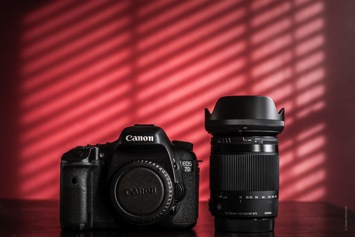
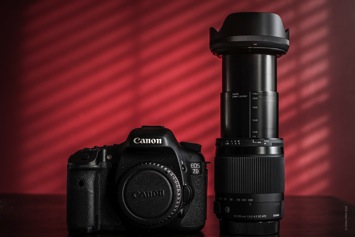
Sigma 18-300mm F3.5-6.3 DC Macro Lens Review

18 Dec

It seems that in the world of photography today the demand for lighter, and more versatile, gear is at an all time high. The average photographer (if there is such a thing) wants to be able to cover a huge variety of subjects, and carry as few lenses as possible. Shooting quick and light has become the goal of many. In addition, even the hobbyist photographer has become more knowledgeable and more discerning about what cameras and lenses they choose to use. This has lead to an increased demand for all-in-one lenses that are built to higher performance standards than we’ve saw since, well, ever.

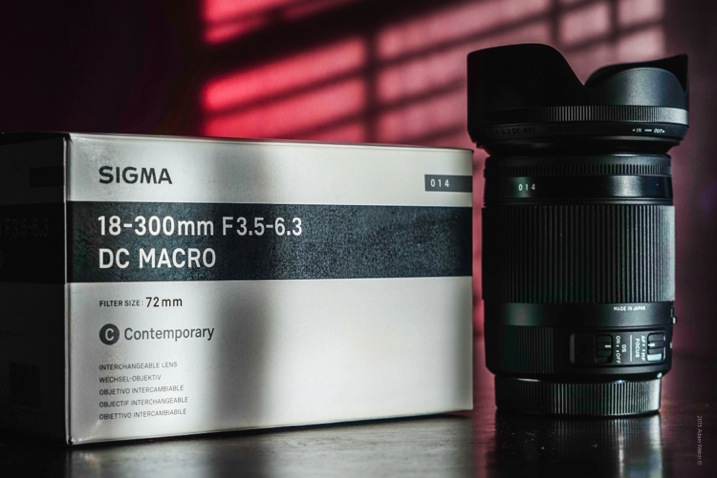
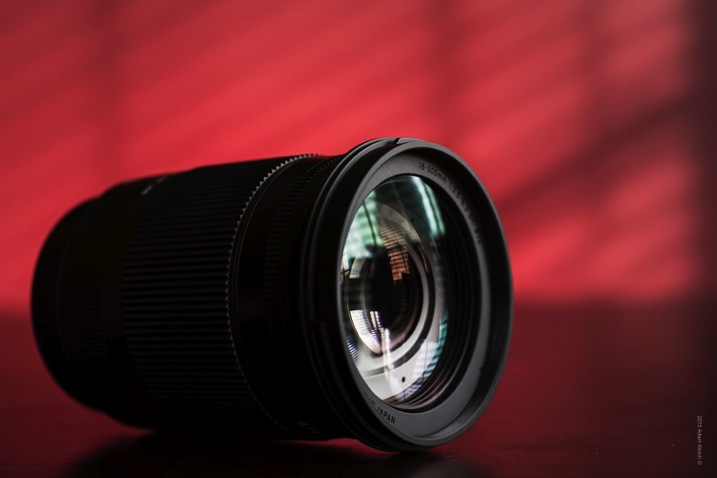
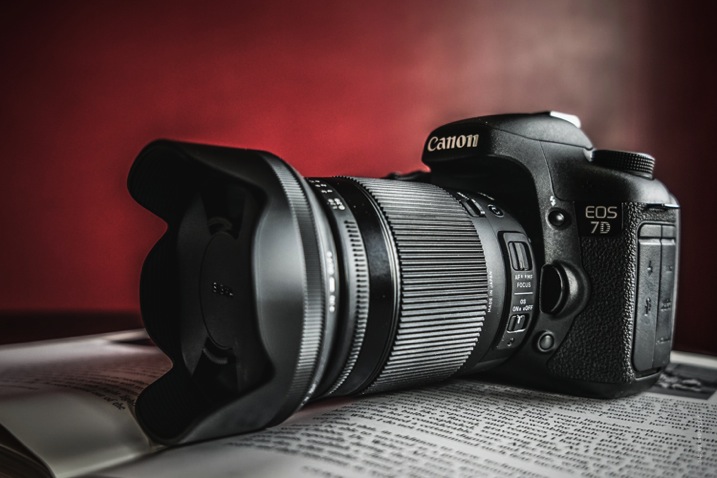
Enter the Sigma 18-300mm F3.5-6.3 DC Macro OS HSM C Lens

Lens 1

Now, take a mental breath after reading that title and then we’ll continue. Don’t let the name for this lens (which I will shorten to Sigma 18-300mm) trouble you, because we’ll talk more about all those letters and their meanings soon. Sigma has attempted to squeeze a lot of features, versatility, and performance into a lens that won’t break the bank. Let’s see if the good folks over at Sigma have succeeded.

The lengthy title for the Sigma 18-300mm is simply a road map so that you know exactly what the lens brings to the table.

  • The DC of course means that it is intended for digital camera bodies.
  • OS designates the lens is equipped with image stabilization technology.
  • HSM relays that the lens sports a hypersonic motor drive autofocusing mechanism.
  • The macro designation means that it has a relatively close minimum focusing distance and is capable of producing macro images (1.0x or 1.1x magnification).
  • Lastly, C stands for indicated this lens is part of Sigma’s Contemporary series. This lens is designed to be mounted only to APS-c(cropped) sensor cameras.

Down to business…

Lens 4

Build Quality and Function

The lens arrived well packaged from Sigma. The optics were all clean and free of smudges and dust. First handling of the lens proved to be immediately impressive.

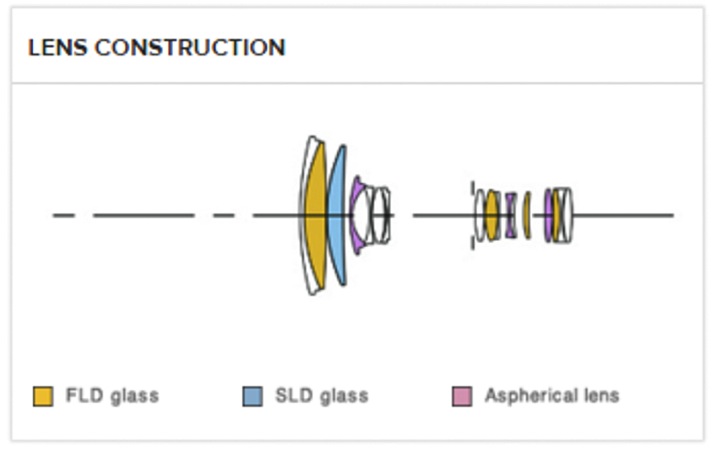
Lens Elements

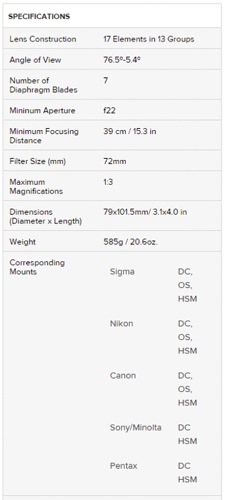
Specs

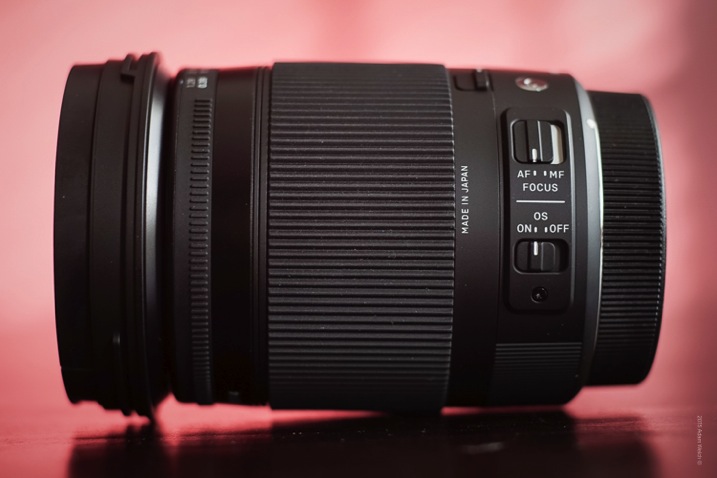
The lens felt very solid but in no way overly heavy. Both the focus and zoom rings are rubberized, and provide a suitable grip for cold or damp fingers. Everything is exceptionally tight and smooth. Some telephoto lenses of this type arrive a little too tight and require some use before the zoom ring operates easily, but the Sigma 18-300mm was just right out of the box. Autofocusing performed very well and was quite fast using my Canon 7D, but the image stabilization was not the best. It became virtually unnoticeable at longer focal lengths, so it remained off for the majority of the test images.

The overall body of the lens is finished with a very understated yet attractive matte black appearance, in case you love form as much as function. Included in the box is quality petal-type lens hood, which fits the lens perfectly and mounts in reverse for storage. Sigma also placed a small rubberized ring at the base of the hood which really helps in the on/off application. It’s a small detail but worth mentioning.

Speaking of details: The effort (or lack thereof) a manufacturer puts towards the little things is of great importance. Here are a few small points that stand out about the Sigma 18-300mm.

  • Zoom-Lock: The zoom-lock switch is a great feature for any zoom lens in my opinion, by preventing gravity from gradually extending the lens while carrying your camera on a strap.
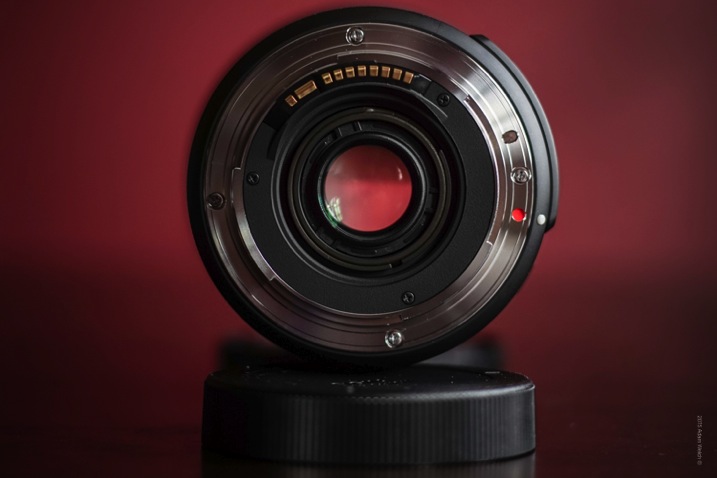
  • Raised mounting indicators: Attaching your lens to your camera can be difficult in low light or if you’re in a hurry. Sigma has chosen to use a small white bead embedded into the lens body instead of merely paint. It makes lining up the lens much easier, and is longer lasting.
  • Lens Hood Indicators: In addition to the rubberized ring, the lens hood also has mounting markings to help mount the hood on the go or in low light.

Lens 3

Lens 9 Lens 10

Lens 8

Lens 12

Image Quality

Sharpness and Distortion

Test images showed that sharpness is acceptable/good across all apertures for a lens in this range, and likewise with contrast. Each of these images were shot at 18mm, at apertures ranging from f/3.5 to f/22. Maximum sharpness seemed to be achieved between f/8 and f/16.

F3 5

Shot at f/3.5

F5 6

Shot at f/5.6

F8

Shot at f/8

F16

Shot at f/16

F22

Shot at f/22

There is some moderate softening at the corners, and minor vignetting at 18mm, but it’s not overly distracting. Very minimal, if any, distortion was encountered even at the shortest focal length.

Wide

This is a scene shot at the shortest focal length of 18mm and at f/6.3.

For comparison, here are two images shot from the previous vantage point, after zooming to 300mm (shot at f/6.3).

300mm 1

300mm 2

Color

Color rendition is very good with the Sigma 18-300mm. Colors came through true to life, and quite crisp across all focal lengths. However, it had a significant amount of chromatic aberration which was quite apparent, and worsened towards the edges of the frame. Fortunately, it was easily removed with one click using Lightroom, so all is not lost.

Macro Use

After-all, this lens bears the designation of a macro lens so let’s talk a little about how it truly performs as such. Dedicated macro lenses produce images with a magnification factor of around 1.0 or 1.1x (meaning the subject is life size on the camera sensor). The Sigma 18-300mm has a maximum magnification factor of 1.3x. Though it may not be considered a true macro lens, it performs astonishing well for a lens with such a large focal range.

Macro

Sigma lists the minimum focusing distance at around 15.3 inches (39cm), but in my tests focus was achieved even closer. You can really get up close and personal using this lens. In addition, there is an optional macro adapter (great build also) available for this lens which will further enhance its macro capabilities.

Macro Adapter

Extras

An interesting accessory available for this, and most Sigma glass, is a USB dock which can be used for tweaking the parameters of your particular lens. This could be of some use to the sports and wildlife crowd. Here is a description of the docking station provided by Sigma.

“The Sigma USB dock works in conjunction with Sigma Optimization Pro software in order to connect a photographer’s lens to their personal computer to update firmware, calibrate the lens and other customizations such as the focus parameter. For the Sports category, changes can be made to: Autofocus speed, focus limiters, manual focus override and optical stabilization functionality. Updating the firmware can be done via the internet. Sigma Photo Pro is available for Mac and PC computers.”

Summary

Overall, the Sigma 18-300mm lens does a fantastic job of combining high telephoto zoom capabilities with macro functionality. While not perfect, it performs well in many ways.

Here’s what you’ll probably like:

  • Great focal range for a multitude of shooting situations.
  • Low optical distortion.
  • Surprisingly acceptable macro performance.
  • Build quality is absolutely fantastic.
  • Attention to detail and usability is superb.
  • Good sharpness for a lens in this price range.
  • Fast autofocus.
  • Silky smooth operation of zoom and focusing rings.
  • Available USB Calibration Dock.

Lens 14

Here’s what you may not like:

  • Moderate but resolvable chromatic aberration.
  • Image stabilization performance is questionable.

The Sigma 18-300mm F3.5-6.3 DC Macro OS HSM C is a more than capable lens option for those where are seeking to combine the local focal range of a telephoto lens, with the close-up capabilities of a macro.

Does this lens offer the best of both worlds? No.

Does this lens bring you a little bit of both, while offering great image quality at an affordable price? Yes.

Sigma has produced a very capable lens option which will delight those who maintain realistic performance expectations from their gear. It is an impressive lens at a budget price. Give it a try!

Have you tried this lens or any other all-in-one? What are your thoughts?

googletag.cmd.push(function() {
tablet_slots.push( googletag.defineSlot( “/1005424/_dPSv4_tab-all-article-bottom_(300×250)”, [300, 250], “pb-ad-78623” ).addService( googletag.pubads() ) ); } );

googletag.cmd.push(function() {
mobile_slots.push( googletag.defineSlot( “/1005424/_dPSv4_mob-all-article-bottom_(300×250)”, [300, 250], “pb-ad-78158” ).addService( googletag.pubads() ) ); } );

The post Sigma 18-300mm F3.5-6.3 DC Macro Lens Review by Adam Welch appeared first on Digital Photography School.


Digital Photography School

 
Comments Off on Sigma 18-300mm F3.5-6.3 DC Macro Lens Review

Posted in Photography


In Fine Detail: Canon EOS 5DS / 5DS R In-Depth Review

18 Dec

Preview based on pre-production Canon EOS 5D S & SR

Canon has added to its EOS 5D range with the launch of two 50MP cameras, the 5DS and the 5DS R. Both cameras are high resolution full frame models, primarily aimed at stills photographers. The only difference between the models is that the ‘S’ has an optical low-pass filter, while the ‘S R’ has a self-cancelling filter (the same relationship as Nikon’s D800 and D800E models shared).

The two cameras will exist alongside the EOD 5D Mark III, acting as dedicated high resolution cameras primarily intended for studio, landscape and wedding shoots, rather than the all-round capability offered by the existing model. The Mark III still trumps the S and S R in terms of maximum ISO and continuous shooting speed.

Canon EOS 5DS / 5DS R key features

  • 50MP CMOS sensor
  • 5 fps continuous shooting
  • ISO 100-6400 (Extends to 12,800)
  • 61-point AF module with input from 150k pixel metering sensor
  • Dual Digic 6 processors
  • 3.0″ 1.04M-dot LCD
  • CF & SD slots (UHS-I compatible)
  • 1080/30p video
  • M-Raw and S-Raw downsampled formats
  • 30MP APS-H crop and 19.6MP APS-C crop modes
  • USB 3.0 interface

Most of the big new features on the high-res 5Ds are about ensuring you’re able to get the best of the cameras’ extra resolution. Our experiences with the Nikon D8X0 series cameras has shown us that simply having a high resolution sensor isn’t enough: to take full advantage of it you need to really obsess about stability.

To this end, Canon has reinforced the tripod socket and surrounding area to allow stable engagement with a tripod. It has also used a more controllable, motorized mirror mechanism, like the one in the EOS 7D II, that allows a deceleration step before the mirror hits its upper position – reducing mirror slap.

The third change is a revised mirror lock-up mode that allows you to specify an automatic delay between the mirror being raised and the shutter opening to start the exposure. It allows the user to choose the shortest possible delay that has allowed mirror vibration to subside: maximizing sharpness while minimizing the loss of responsiveness.

Although the S and the SR can both shoot movies with the same choice of frame rates and compression as the 5D III, they don’t offer clean HDMI output or headphone sockets. The message is pretty clear – if video is a major concern, these aren’t the cameras for you.

 
Canon EOS 5DS
Canon EOS 5DS R
Canon EOS 5D
Mark III
Pixel count 50.2MP 50.2MP 22.1MP
Processor Digic 6 Digic 6 Digic 5+
Maximum ISO ISO 6400
(12,800 ext)
ISO 6400
(12,800 ext)
ISO 25,600
(102,400 ext)
Maximum ISO ISO 6400
(12,800 ext)
ISO 6400
(12,800 ext)
ISO 25,600
(102,400 ext)
Maximum frame rate 5 fps 5 fps 6 fps
Autofocus 61 point, of which 41 are cross type and 5 are double-cross type 61 point, of which 41 are cross type and 5 are double-cross type 61 point, of which 41 are cross type and 5 are double-cross type
Metering sensor 150k pixels (RGB+IR) 150k pixels (RGB+IR) 63-segment (RG/GB)
Optical low-pass (anti-aliasing) filter? Yes Self-cancelling Yes
Uncompressed HDMI output No No Yes
Headphone jack? No No Yes
USB connection USB 3.0 USB 3.0 USB 2.0

A series of features in the EOS 5DS and S R are ones we first saw in the EOS 7D Mark II. This includes the flicker detection function that warns you of lighting flicker and can synchronize the camera’s continuous shooting so that it only fires at the brightest moments to ensure consistent exposure (rather than the constant variation you can otherwise get in such situations).

Two other 7D II features to make an appearance in a 5D camera for the first time are the built-in intervalometer function that can be used to shoot time lapse sequences. And, as a first for Canon, these can then be combined in-camera to create a 1080/24p time-lapse movie.

Canon EOS 5DS / SR overview video

If you're new to digital photography you may wish to read the Digital Photography Glossary before diving into this article (it may help you understand some of the terms used).

Conclusion / Recommendation / Ratings are based on the opinion of the reviewer, you should read the ENTIRE review before coming to your own conclusions.

We recommend to make the most of this review you should be able to see the difference (at least) between X, Y, and Z and ideally A, B, and C.

This article is Copyright 1998 – 2015 and may NOT in part or in whole be reproduced in any electronic or printed medium without prior permission from the author.

Articles: Digital Photography Review (dpreview.com)

 
Comments Off on In Fine Detail: Canon EOS 5DS / 5DS R In-Depth Review

Posted in Uncategorized