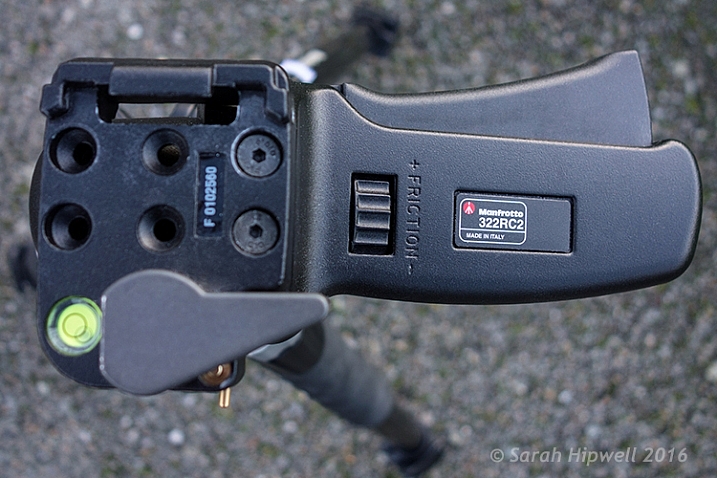
RSS
 

Posts Tagged ‘REVIEW’

Review of the Vü Professional Filter System

21 Feb

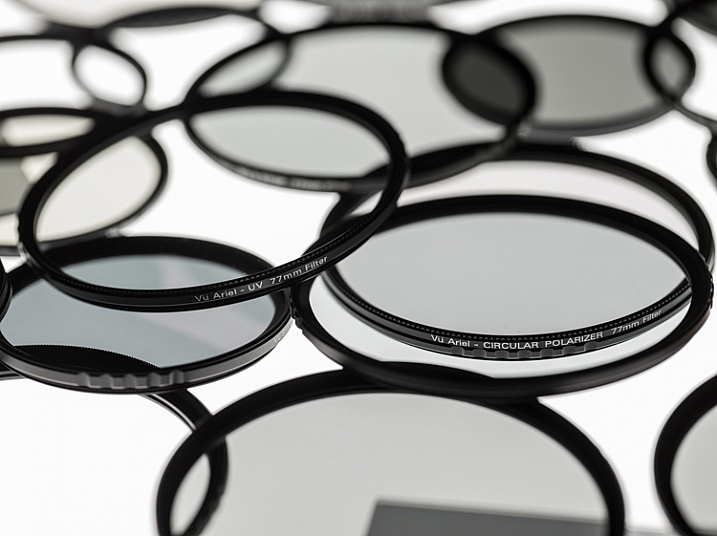
Filters are wonderful little tools that help modify the light coming through your camera lenses, and alter what is recorded onto the sensor or film, whichever the case may be. Different filter types exist for varying purposes; polarizing filters deepen sky color and remove glare and reflections from shiny surfaces, a UV filter screens out ultraviolet light and adds a protective surface over the camera lens, while a graduated neutral density (GND) filter allows you to expose a foreground properly while avoiding a bright, blown-out sky.

The Vü filter system represents the higher-tier of camera accessories in this segment of hardware, and I was fortunate enough to have a couple of weeks using them.

VU_Layout_wLogo

Image courtesy of Vü Filters

Upon opening the complete set of the company’s filters, the first thing I noticed was the quality and attractiveness of the packaging. All of the boxes were constructed of very sturdy material, clearly marked, and conveyed a great sense of style.

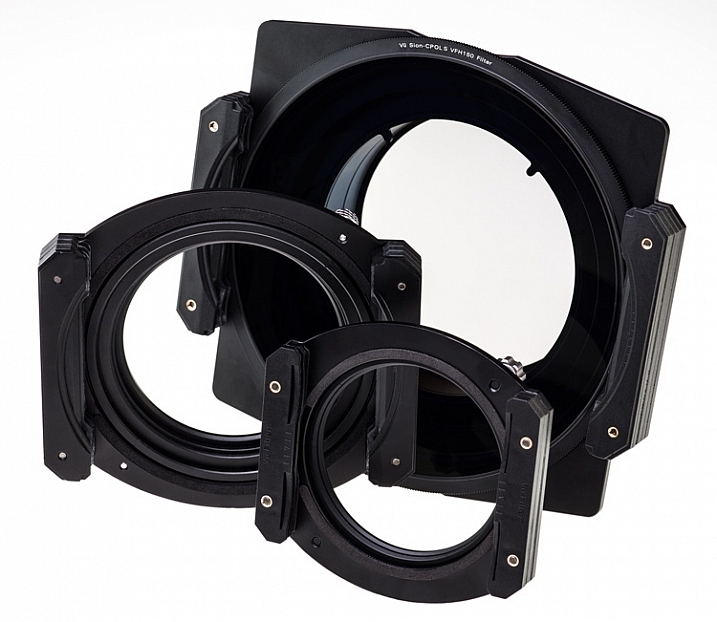
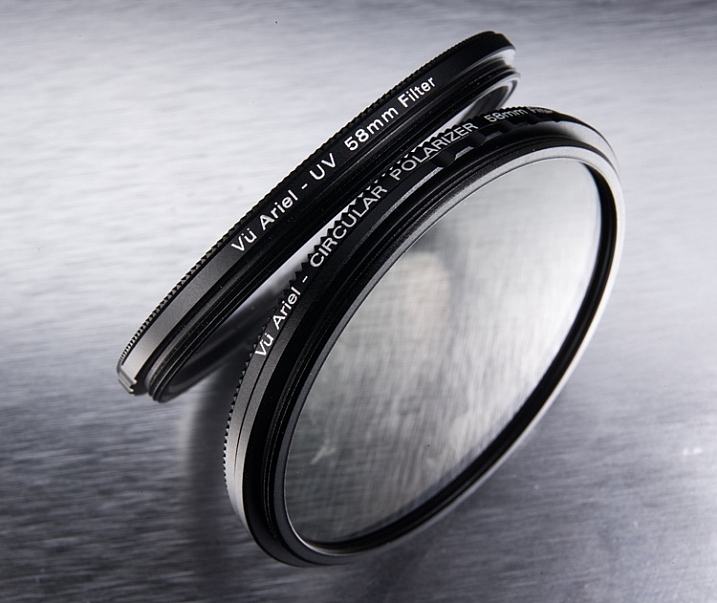
The set I received consisted of several filters and accessories, including a filter holder, drop-in filters, and lens adapters for the lenses I specified when ordering (in this case, a Canon EF-S 50mm f/1.8, and Canon EF-S 24mm f/2.8 STM). As my time was limited, I restricted my use to the screw-on Circular polarizing Filter ($ 59-126 depending on filter size)), the 10-stop Neutral Density (ND) Filter ($ 144) and Drop-in Filter Holder ($ 150).

If you’re looking for a quick, overall thought on the system, it’s generally good. The filters are high-quality and are very well constructed.

Circular Polarizing Filter
Vu_CPOL_Group_Left

Image Courtesy of Vü Filters

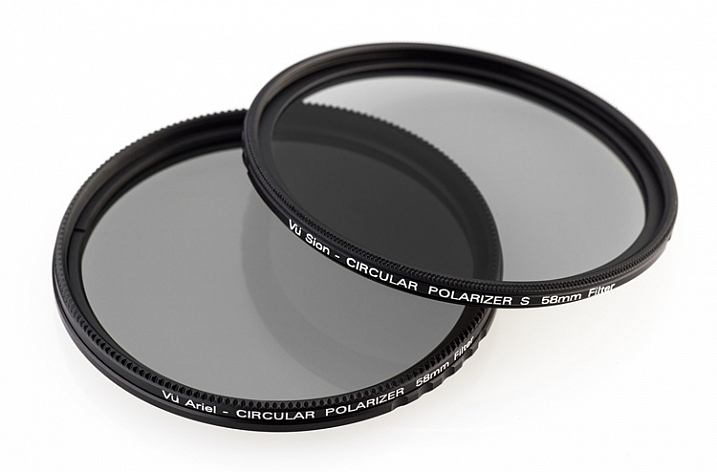
The circular polarizing filter did just what I expected. It darkened the desired areas in my photo, removed any extra shininess from the image, and generally smoothed the photo over, giving it a look that is hard to discern or describe, but which definitely exists.

The circular polarizer tends to smooth out rough points, darkens skies, and removes some of the reflective properties of shiny surfaces.

The circular polarizer tends to smooth out rough points, darkens skies, and removes some of the reflective properties of shiny surfaces.

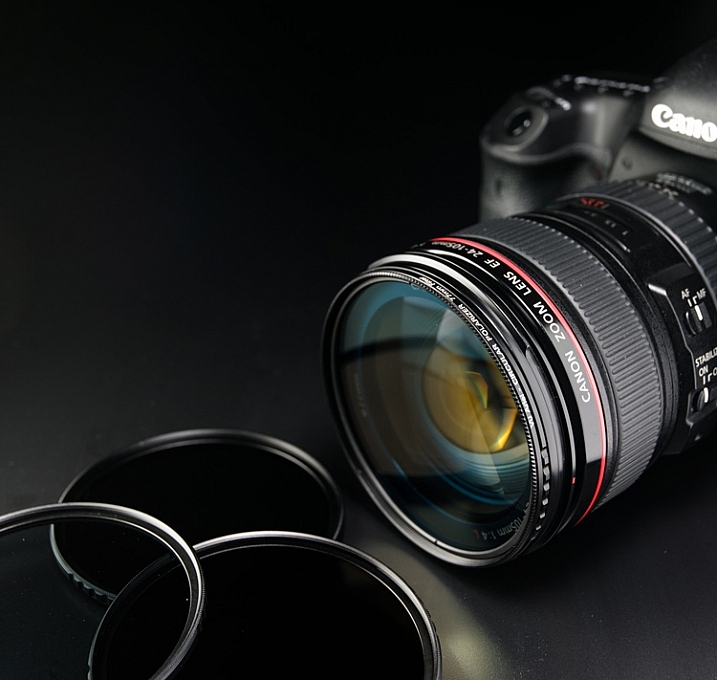
Using this filter was the easiest, as it only required I that connect it to the step-down adapter for my particular lens size, and then screw that assembly onto the lens itself.
Ariel_Lens_01

Image courtesy of Vü Filters

As with all polarizing filters, this one works best when light is coming from the right angle, in this case, about 45 degrees. Using it when light is directly in front of, or behind you, won’t yield much or any of an effect on your image.

Again, the polarizer helped darken this sky a bit more to where I wanted it to be.

Again, the polarizer helped darken this sky a bit more, to where I wanted it.

10-Stop Neutral Density Filter
VFH100_CanonFront_CPOL_NDGrad

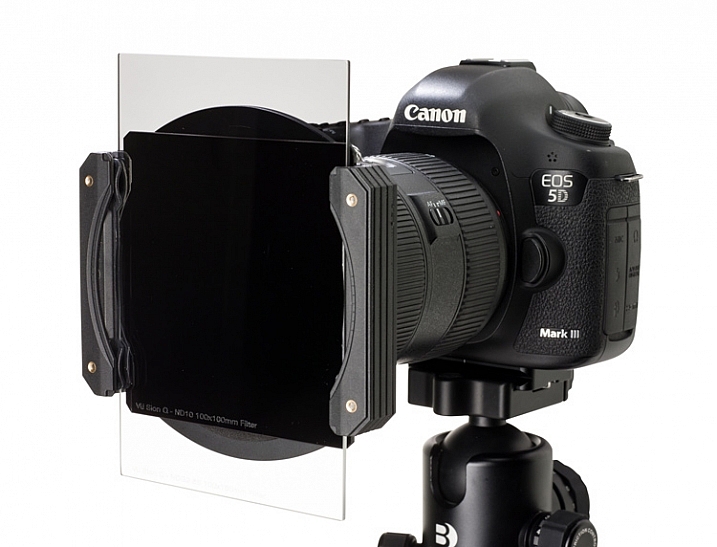
Image courtesy of Vü Filters showing the filter holder, 10-stop ND, and Graduated drop-in filters mounted on a Canon lens.

I was most excited to try the 10-stop neutral density filter. The purpose of this filter is to reduce the amount of light coming through the lens. As you might imagine, this particular filter reduces that amount by 10 stops of light, which is quite a bit. The beauty of it, is that you can use a much slower shutter speed in daylight, and capture long exposure images when it would normally be impossible.

I tried this myself using the Vü 10-stop ND filter, and was extremely happy with the results. I was able to capture the ebb and flow of the ocean waters at our nearby beach, well after the sun had risen. With the filter, 25 and 30 second exposures were possible, which produced shots that I would never have thought possible.

The 10-stop neutral density filter allows you to take long-exposure shots when there is plenty of light available.

The 10-stop neutral density filter allows you to take long exposure shots when there is still plenty of light available.

The Vü ND filter fortunately does not suffer from common ailments of other dark, lower quality filters, such as color shifting near the corners of the lens. Tones remain faithful and consistent across the entire image.

To me, that’s the grand measure of the usefulness of this system; shots that would have been impossible, or extremely difficult to create, can now be accomplished using these types of accessories. As a photographer, it opens up a multitude of ideas and situation I can now explore.

Drawbacks of the system

Of course, everything can’t be roses, and I did have a couple of complaints about the Vü system.

First and foremost, as wonderfully performing and artfully constructed as the system is, I’m afraid that some novices may get a bit lost figuring out how to use them, creating a barrier to entry that could easily be avoided.

The boxes of filters, and bags of adapters, come devoid of any instructions, inside or out. An advanced user that has experience with different filter systems will figure it out rather quickly, but someone who lacks this experience will likely fuddle around until they eventually understand how everything fits together.
VFH150_Parts Vu_FilterHolder_Group_02

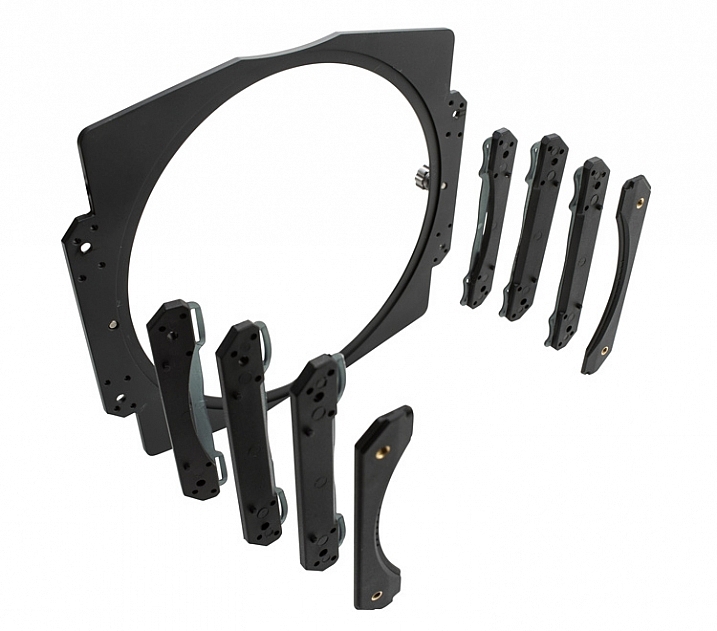
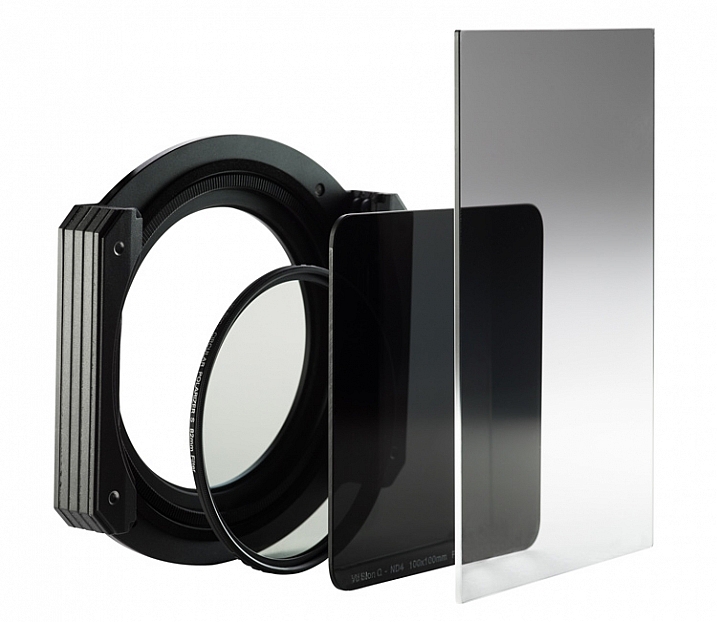
As an example, attaching the 10-stop ND filter to my camera’s lens (a Canon 60D with the Canon EF-S 24mm 2.8 STM) was a bit of a chore. The large metal filter holder was required, since this particular filter is the drop-in type, meaning the filter is a large square piece of thick glass. The filter slides vertically into the holder attachment, which is then attached to the lens via an adapter ring, suited for your lens’s filter size.

Another example of long-exposures at daytime with the neutral density filter.

Another example of long-exposures at daytime with the neutral density filter.

It took several tries to get this right, and in the end was no small feat. I wasn’t positive after I was done that I had attached it correctly, but it functioned without any issues, so I’m assuming I did. A simple set of instructions for each piece would negate this problem altogether in my opinion.

The Vü website gives details and information about the products themselves, but I couldn’t find a support section where a user could quickly fetch instructions.
VFH100_FilterGroup

Once you figure out how to attach the product to your camera, and put them together, the filters and holder feel very solid and well constructed. Several sizes of adapter rings are available, to ensure the filters will fit almost any lens, and additional accessories for the system are also available. The holder, as I mentioned before, is large and a bit unwieldy, and using it without a tripod would be difficult.

My contact at the company was very helpful and knowledgable, and made sure everything got to me as quickly as possible.

Editor’s note: the video below was provided by the supplier when we discussed this issue with them. This should help solve the problem.

Summary

At the end of the day, regardless of any assembly difficulties I might have experienced, I found the filters very attractive from several standpoints. The filters were obviously made with the serious photographer in mind, and didn’t skimp on materials, strength, or quality.
VU_TableTop_06 Ariel_Hero_f32

Pricing is, in my opinion, below what you would expect for this level of craftsmanship. Ordering their whole line would be expensive, but picking and choosing individual filters within the system, would prove affordable for most photographers.

Most importantly, the filters themselves work fabulously, and produce very good images. Some in the industry still consider filters to be a degradation to image quality, but after seeing the images these filters can produce, I slide off the fence into the more positive side of the field, and would use these accessories in all of my work.

Have you given Vü filters a try? Sound off below and tell us your experience!

Learn more about Vü filters, including the full product line, and you can purchase them online at Amazon.

googletag.cmd.push(function() {
tablet_slots.push( googletag.defineSlot( “/1005424/_dPSv4_tab-all-article-bottom_(300×250)”, [300, 250], “pb-ad-78623” ).addService( googletag.pubads() ) ); } );

googletag.cmd.push(function() {
mobile_slots.push( googletag.defineSlot( “/1005424/_dPSv4_mob-all-article-bottom_(300×250)”, [300, 250], “pb-ad-78158” ).addService( googletag.pubads() ) ); } );

The post Review of the Vü Professional Filter System by Tim Gilbreath appeared first on Digital Photography School.


Digital Photography School

 
Comments Off on Review of the Vü Professional Filter System

Posted in Photography


Week in Review: One for the history books

21 Feb

Week in Review: One for the history books

It was a Wednesday like any other Wednesday. The sun rose in the East. The DPReview staff made their morning coffee run. They sat down at their desks. And then they wrote. They wrote. For unlike another Wednesday, this Wednesday would see the introduction of a historic camera: the Pentax K-1. Memories of Pentax’s first promise of a full-frame DSLR were all but a distant memory, but Pentax would finally step into the world of full-frame digital photography. 

To say it was a busy week is an understatement. The world didn’t only get full-frame Pentax this week, it got so many more things: a Canon EOS 80D! A kit lens with a strange detachable power zoom accessory! A Panasonic GF-series update made just for selfies! 

Just to be sure you didn’t miss anything, you better take a look back with us.

It’s all gonna be O-K

After years of promises and months of teasing, this week Ricoh finally unveiled the Pentax K-1, a 36.4MP full-frame DSLR built around the K lens mount. At a very enticing body-only MSRP of $ 1800, the K-1 offers 5-axis IS, built-in Wi-Fi and 4.4 fps burst shooting. We took a look back at the long and winding road Pentax has taken to full-frame, and while the K-1 shows a lot of promise, we think Ricoh still has a tough road ahead.

Subtle video upgrades

Just hours after the K-1 announcement, Canon swooped in and dropped the EOS 80D, G7 X Mark II, an updated 18-135mm F3.5-5.6 and a couple of interesting accessories (more on that in a second).

The 80D is a fairly incremental update to the 70D, but it does offer updated Dual Pixel AF with continuous focus as well as an upgraded 45-point all cross-type AF system. Subtle enhancements in the video department, like the addition of 1080/60p recording and a headphone socket, nudge the camera 80D toward video enthusiasts, but don’t hoist it into the ranks of video-centric cameras like the Sony A7S and Panasonic GH4. Still, it should offer plenty to help a non-pro get good results.

In this week’s unusual innovations we saw Canon introduce the PZ-EI Power Zoom adapter, the first OEM-branded accessory of its kind, specifically built for its new 18-135mm. For just an extra $ 150, prospective 80D owners who are interested in shooting video with their new kit can pick up a PZ-E1 and gain control over zoom speed by way of physical controls or Canon’s Smart Utility app. It’s a neat solution and relatively inexpensive solution for video shooters, rather than building power zoom functionality into the lens and raising the cost (and weight of the lens) for everybody.

Know thy selfie

Speaking of long and winding roads, the introduction of the selfie-tastic Panasonic Lumix DMC-GF8 this week underscored just how far that series has wandered from where it started. The GF8’s brightly colored accents (or ‘unisex’ silver and brown, if you prefer), beauty re-touch features and 180-degree articulated selfie-friendly LCD are all a far cry from the pioneering little GF1. That camera’s enthusiast features long ago drifted and evolved into the GX-series, while Panasonic seems to be making a Casio-esque play with its entry-level GF-series to capitalize on shoppers interested in selfie-centric features in some Asian countries. To each his own, right?

Two good?

It’s easy to get excited about the Sony RX1R II‘s potential. A compact 42MP full-frame camera with updated AF and a Zeiss 35mm F2 lens has that effect. But it’s also easy to suffer a case of sticker shock when you realize it’s $ 3300. Our full review, published this week, digs into the camera’s performance to see if the problems that plagued the RX1R persist, and whether it’s a $ 3300 well spent. There’s just one way to find out…

Go wide

Yeah, we’ve heard it before: a 75-100mm focal length is more flattering for portraits than wide-angle lenses. But what if we all stepped away from our 85mm portrait primes for a minute and embraced a different perspective? Tech Editor Rishi Sanyal does just that in our lens technique video. Using the Sigma 24-35mm F2 Art to make his case, he captured some environmental portraits at sunset in Seattle’s gorgeous Discovery Park (the nice part, not the bit by the sewage treatment plant). 

Rumors of new lenses are coming fast and furious, including this rumored Sigma 50-100mm F1.8 Art for APS-C. It would seem that the timing is right, too, what with CP+ starting next week. We’ll be in Yokohama covering the show, so tune in next week as we separate rumors, fact and fiction. 

Articles: Digital Photography Review (dpreview.com)

 
Comments Off on Week in Review: One for the history books

Posted in Uncategorized


Nikon D5 and D500 Review: Exceptional Image and Video Quality

18 Feb

Professional photographers and shutterbugs alike were excited when Nikon Corporation launched in January 2016 the Nikon D5 (the most advanced professional DSLR to date), as well as the Nikon D500 (which replaced the D300S, Nikon’s previous DX-format flagship DSLR). Let’s take a deeper look at each of the new Nikon cameras. Nikon D5: Setting New Benchmarks for Speed, Accuracy, and Continue Reading

The post Nikon D5 and D500 Review: Exceptional Image and Video Quality appeared first on Photodoto.


Photodoto

 
Comments Off on Nikon D5 and D500 Review: Exceptional Image and Video Quality

Posted in Photography


Special K? Pentax K-1 First Impressions Review

18 Feb

After years of promises and months of teasing, Ricoh has finally unveiled the Pentax K-1, a 36.4MP full-frame DSLR built around the K lens mount. It becomes the only conventional DSLR to offer a full frame sensor with image stabilization.

The camera is extensively sealed and features magnesium alloy construction. But despite its range-topping status and high-end build, it has a relatively low list price of $ 1799.

Pentax K-1 Key Specifications

  • 36.2MP full-frame CMOS sensor with no anti-aliasing filter
  • 5-axis image stabilization rated to 5 stops by CIPA standard testing
  • 100% pentaprism viewfinder with 0.7x magnification
  • 33-point AF system (25 cross-type)
  • Extensive weather-sealing
  • 1/200 sec flash sync speed
  • 14-bit Raw recording (DNG or PEF)
  • AA filter simulation
  • Multi-shot Pixel Shift Resolution mode
  • Built-in GPS with electro-magnetic compass and Astrotracer function
  • 4.4 fps continuous shooting (6.5 fps in APS-C crop mode)
  • Wi-Fi
  • 1080/30p video

Sensor-shift cleverness

As this list of spec highlights should make clear, the K-1 makes the most of its moveable sensor. As well as the image stabilization, which is rated to an impressive 5 stops, the camera offers a host of other clever features. These include anti-aliasing filter simulation which vibrates the sensor during exposure to intentionally blur high frequency detail across multiple pixels, to avoid moiré. Then there’s the Pixel Shift Resolution mode that increases color resolution by shooting four consecutive images with the sensor moved by one pixel – effectively canceling the Bayer color filter array and lowering noise by image averaging.

The other sensor-shift modes are also clever: the K-1 includes Horizon Correction, which rotates the sensor if you hold the camera slightly off-level, and the Astrotracer system that uses the sensor’s movement to cancel-out the effect of the Earth’s rotation when taking images of stars (something it can calculate using its GPS).

Upgraded AF and metering

The sensor at the heart of the SAFOX 12 AF module. It gives 33 AF points in all, 25 of which are cross type and three of which offer greater accuracy when paired with bright lenses.

The camera gets a new AF module (called SAFOX 12) which features 33 focus points, 25 of which are cross type. The central three of these offer higher precision when used with F2.8 or faster lenses and they continue to focus down as far as -3EV.

An 86,000-pixel RGB metering sensor acts to offer 77-segment metering but also aids the camera’s autofocus system, enabling scene analysis and subject detection to yield accurate exposures and automatically select the correct AF point to stay on your subject (subject tracking) when using continuous AF.

Core competence

Overall, though, it’s not the clever use of the sensor that most stands out about the K-1, it’s Ricoh’s obvious focus on the core photographic capabilities. There’s a reason we chose to list the viewfinder size so far up the list of specifications – it’s because we think it’s something users coming from existing Pentax cameras will most appreciate. Sure, there are multiple exposure modes and time lapse options, but the things that most jumped out are the high resolution sensor, the well positioned dials, the large viewfinder and image stabilization – the core things that help you to get better images. Speaking of core things: some may bemoan the omission of a dedicated AF point control, though the four way controller can be re-purposed for this.

Which isn’t to say the K-1 is entirely without the occasional flourish. Aside from clever sensor shift modes (that some – particularly landscape – photographers will surely come to love), the most obvious of these is its ‘Cross-Tilt’ LCD. The Cross-Tilt mechanism takes a tilting LCD cradle and mounts it on four legs that slide along a cross-shaped series of slots, allowing the screen to extend outwards and move in a complex manner, before the screen itself is tilted up/down.

The K-1’s Cross-Tilt LCD system has all the elegance of two deck chairs mating, but it provides a useful range of articulation.

Mounted to the back of the LCD are four white LEDs that can be used to shed light on the rear controls. Another LED, whose behavior can be set independently, shines a light on the lens mount for easier alignment when swapping lenses in the dark. The camera’s card bay and remote release port are also illuminated by LEDs.

For the most part, though, the camera’s focus is very much toward a traditional approach to still photography. Video capture tops-out at 1080/30p (which can also be encoded as 60i, if you prefer), which is a long way from cutting edge, but we very much doubt that Ricoh has would-be film makers in mind with this model.

Still shooters are likely to appreciate the camera’s Smart Function system, which adds a third command dial to the top right corner of the camera and a further control to define its function. The three dials give direct control over three of the camera’s parameters with the ability to customize one of them without going anywhere near a menu.

Pricing

And how much does Ricoh want for this twin-dial, weather-sealed, magnesium alloy, image-stabilized full frame camera? The list price is a fiercely competitive $ 1799, body only. To put that in perspective, that’s $ 200 lower than the launch price of Nikon’s more basic D610 and $ 300 less than what Canon originally expected for the EOS 6D, meaning there’s only a $ 100 premium over the list price of Sony’s image-stabilized a7 II.

This is a very similar pattern we’ve seen from Ricoh before, with the company’s models often including higher-end features (twin control dials, prism viewfinders and weather sealing) at a lower price than you’d need to spend to get them from one of the other DSLR makers.

Lens lineup

At present, Pentax offers a mixture of full-frame compatible lenses, including a handful of screw-drive FA prime lenses from the film-era and the much-loved 31, 43 and 77mm FA Limiteds from the late ’90s/early 2000s. However, the company is already starting to flesh-out a range of more modern ‘D FA’ zooms, including a 15-30mm F2.8, a 24-70mm F2.8 (both suspiciously reminiscent of certain current Tamron-branded zooms) a 70-200mm F2.8 and an 150-400mm F4.5-5.6. For now, though, those looking for modern, fast-focusing primes will be disappointed.

But that isn’t the whole story, of course. Part of the reason for all the interest in a full-frame Pentax is the vast collection of K-mount lenses that exist around the world. The K-1 lets you use the aperture rings on these lenses and can give a focus confirmation beep with the central AF point, even with manual focus lenses. When you mount an older, manual lens the K-1 prompts you to manually specify the focal length so that the image stabilization can be tuned appropriately.

 Review History
17 Feb 2016 First Impression Review based on Pre-Production camera running Firmware 0.3

If you're new to digital photography you may wish to read the Digital Photography Glossary before diving into this article (it may help you understand some of the terms used).

Conclusion / Recommendation / Ratings are based on the opinion of the reviewer, you should read the ENTIRE review before coming to your own conclusions.

We recommend to make the most of this review you should be able to see the difference (at least) between X, Y, and Z and ideally A, B, and C.

This article is Copyright 1998 – 2016 and may NOT in part or in whole be reproduced in any electronic or printed medium without prior permission from the author.

Articles: Digital Photography Review (dpreview.com)

 
Comments Off on Special K? Pentax K-1 First Impressions Review

Posted in Uncategorized


Ultra-compact: Sony Cyber-shot RX1R II review

15 Feb

Sony CyberShot RX1R II Review

The Sony Cyber-shot RX1R II is a full-frame, 42MP compact camera with a fixed 35mm F2 lens. The successor to the 24MP RX1R, the Mark II inherits a lot of technology from Sony’s flagship a7R II mirrorless interchangeable lens camera. 

Between the continuing evolution of the RX100 and a7-series’, Sony is on a big roll when it comes to small tech. And in this case, ‘small’ doesn’t mean ‘insignificant’. With many of its recent cameras, Sony has achieved the miniaturization of technology and functionality traditionally reserved for bulkier DSLRs and the like.

With the Cyber-shot RX1R II for example. Sony has somehow managed to cram a high-res electronic viewfinder, a Zeiss Sonnar T* 35mm F2 lens and the same full-frame 42MP BSI CMOS sensor and autofocus system from the a7R II into a coat-pocketable body. For many photographers that probably sounds like a dream come true, but as you might expect, there have been a few compromises along the way.

Key features

  • 42MP BSI CMOS full-frame sensor
  • BIONZ X processor
  • Fixed ZEISS Sonnar T* 35mm F2 lens
  • Hybrid autofocus system
  • Variable low-pass filter
  • Tilting 3″, 1.23 million dot LCD
  • Pop-up 2.36M-dot OLED electronic viewfinder
  • 1080/60p video recording
  • Wi-Fi with NFC

Though the RX1R II bears more than a passing resemblance to its predecessor, there are a lot of changes. And since the introduction of the RX1 and RX1R back in 2012, Leica introduced the Q, a full frame compact with a fixed 28mm F1.7 lens. Though it sits above the RX1R II in price and offers a wider lens, a lot of photographers will see them as natural competitors – at least in spirit. Take a look at how they compare.

  Sony RX1R   Sony RX1R II  Leica Q
MSRP $ 2799 $ 3299 $ 4250
Sensor 24MP CMOS 42MP BSI CMOS 24MP CMOS
Low-pass filter No Variable No
ISO range
(expanded)
50-102400 50-102400 100-50000 
Lens 35mm F2 35mm F2 28mm F1.7
Min. focus distance 14cm 14cm 17cm
AF system Contrast det. Hybrid Contrast det.
AF points 25-pt 399-pt 49-pt
EVF resolution No EVF 2.36M-dot OLED 3.68M-dot LCOS
LCD 3″ 1.23M-dot fixed 3″ 1.23M-dot tilting 3″ 1.04M-dot fixed touchscreen
Burst rate 5 fps 5 fps 10 fps
Video 1080/60p 1080/60p 1080/60p
Wi-Fi No Yes, with NFC Yes
Battery life (CIPA) 220 shots 220 shots N/A
Dimensions 113 x 65 x 70mm 113 x 65 x 72mm 130 x 80 x 93mm
Weight 482 g 507 g 640 g

For some more preliminary impressions of the RX1R II, check out Barney’s Gear of the Year article, and the accompanying video below.

Now, let’s get to the full spec sheet of the RX1R II. 

Articles: Digital Photography Review (dpreview.com)

 
Comments Off on Ultra-compact: Sony Cyber-shot RX1R II review

Posted in Uncategorized


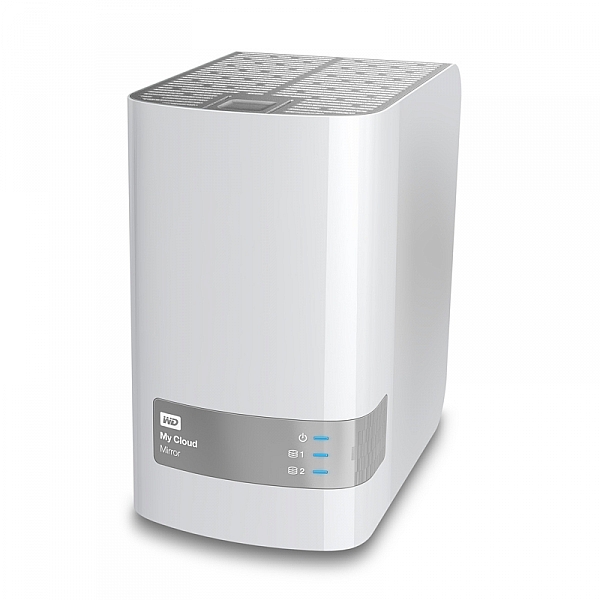
Review : WD MyCloud Mirror Personal Cloud Storage

14 Feb

Some would argue that, these days, it’s just as important to backup our mobile (camera) devices for the very reason we backup our regular digital photographs. Here’s my take on doing just that with my review of the My Cloud Mirror.

wdfMyCloud_Mirror (1)

MyCloud Mirror Personal Cloud Storage on Amazon

Even though I have my camera with me most of the time, I still have my iPhone (or your Android or Windows thing or heck, even your Blackberry) with me about 99.8% of the time. That’s maybe more than most people as my 9 to 5 is social media and photography, so I tend to have the phone near, and as a result, I take a lot of photographs with the thing.

It’s the iPhone 6 Plus, it has a half decent camera and as a result I take a lot of photos, videos, time lapse sequences, slow motion videos, etc. The bottom line is, I use it to create a LOT of content, and I know a lot of you guys do too. The theme with my other storage and backup related articles here on dPS has been “don’t lose stuff when you don’t need to!” and really, the same goes for your phone. You use it to create memories, even if you can’t print those memories out at A1 size (23.4 x 33.1″), they are still moments that you might like to remember. (Or they’re just photographs of every coffee you’ve ever had and really, you should just stop that!*)

wdfMyCloud_Mirror

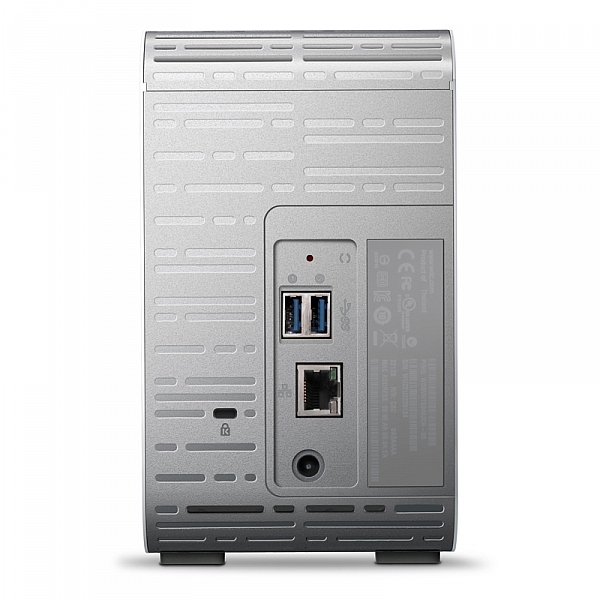
As ever, without slapping down a whole page of technical jargon that you really don’t understand, I shall explain the WD MyCloud Mirror in the easiest way I can. You unbox it, plug it into power and to your network, (Cat5 cable between your MyCloud and your internet modem / router) follow the configuration instructions, and within minutes (unless you really are very very bad at things with buttons and knobs) you will have a storage drive that is both connected to your computer on your home network / wireless, and you will have a storage “cloud” that is available to you on your phone (apps available in Google Play and iTunes app store) and via any internet connected browser.

Maybe the skeptic in you is saying, “but I still have to remember to actually backup my phone!” Actually, and you knew I’d say that, it does it automatically (make sure your app settings are right) so you can shoot on your phone, and have your photos automatically transferred to your MyCloud Mirror (you control if it does it all the time or only when you’re connected via Wifi to avoid crazy mobile data bills).

Simon_Pollock_WD_MyCloud_Review

My ultimate test of the WD MyCloud Mirror was on a recent trip to Fiji for a photography workshop. I was using a Fijian sim card in my iPhone and had wifi at random hours of the day. I set the MyCloud app to upload my iPhone content when on Wifi, and that’s exactly what it did – seamlessly! My wife could navigate to a website back in Melbourne and see what I’d photographed on my phone, and show my boys where I was – it was great. Now, you can do that using a camera, card reader, and a laptop with wifi (or a hundred other ways) but for those moments that I simply whipped out my phone and snapped a memory, they were preserved and immediately available for others to see (or to not see, depending on your security settings, obviously).

Some specs for you to wrap your head around

  • Keep your content in one, double-safe place
  • Get abundant, dual-drive storage with access from anywhere
  • Save everything with twice the protection using Mirror Mode (RAID 1-default)
  • Easily transfer to and from Dropbox™ and other cloud accounts

You can use the MyCloud Mirror with the following

  • Windows® 8.1 or earlier, Windows 7, Windows Vista® or Windows XP (32 bit) SP 3 operating systems
  • Mac® OS® X Mavericks, Mountain Lion™, Lion™ or Snow Leopard® operating systems
  • DLNA®/UPnP® devices for streaming
  • Router with Internet connection

Supported browsers:

  • Internet Explorer® 8 or higher
  • Safari® 6 or higher
  • Firefox® 21 or higher
  • Google Chrome™ 27 or later on supported Windows and Mac OS platforms

What’s that about a mirror?

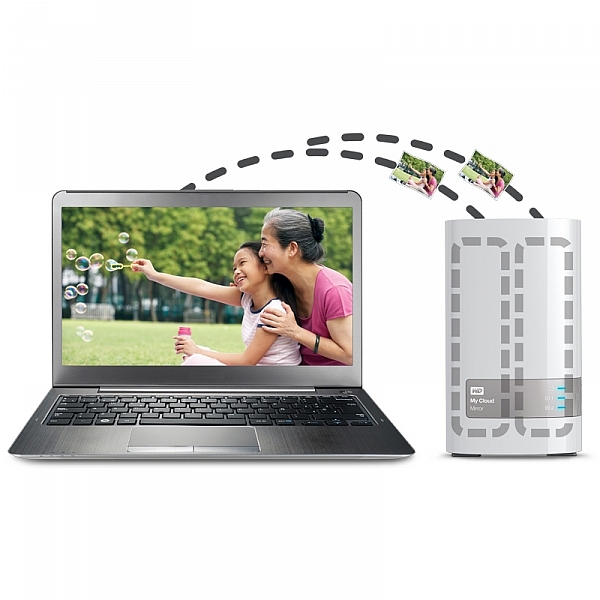
You may also have picked up on the word mirror in the name of the MyCloud, it does indeed have two disks in it and it mirrors your data. While you’re backing it up from your phone, you’re also making a redundant copy of it onto the second drive, so if disk number #1 should fail, disk #2 will still have all of your duck-faced selfies (be honest, who doesn’t love a duck-faced selfie). Here’s a picture of that happening, just perchance I’ve confused you with my techno-babble.

wdfMyCloud_Mirror (3)

In summary, I totally love the WD MyCloud Mirror (I have the 4/2 (mirrored) TB version). I can’t recommend it enough for those of you that are half serious about your phone photography, or even just half serious about storage and content access while you’re anywhere with an internet connection.

The WD MyCloud Mirror has been online for three months to test its reliability. It’s been online, and available all of that time, without a hiccup. I was sent the unit for test and review purposes, and will always give an unbiased opinion of a product. I award the MyCloud Mirror Five stars for simplicity in setup and usage, as well as (three months) constant reliability.

*there’s a good chance that sentence was about, and directed at me :) 

googletag.cmd.push(function() {
tablet_slots.push( googletag.defineSlot( “/1005424/_dPSv4_tab-all-article-bottom_(300×250)”, [300, 250], “pb-ad-78623” ).addService( googletag.pubads() ) ); } );

googletag.cmd.push(function() {
mobile_slots.push( googletag.defineSlot( “/1005424/_dPSv4_mob-all-article-bottom_(300×250)”, [300, 250], “pb-ad-78158” ).addService( googletag.pubads() ) ); } );

The post Review : WD MyCloud Mirror Personal Cloud Storage by Sime appeared first on Digital Photography School.


Digital Photography School

 
Comments Off on Review : WD MyCloud Mirror Personal Cloud Storage

Posted in Photography


Review: Think Tank Turnstyle Sling Bag

09 Feb

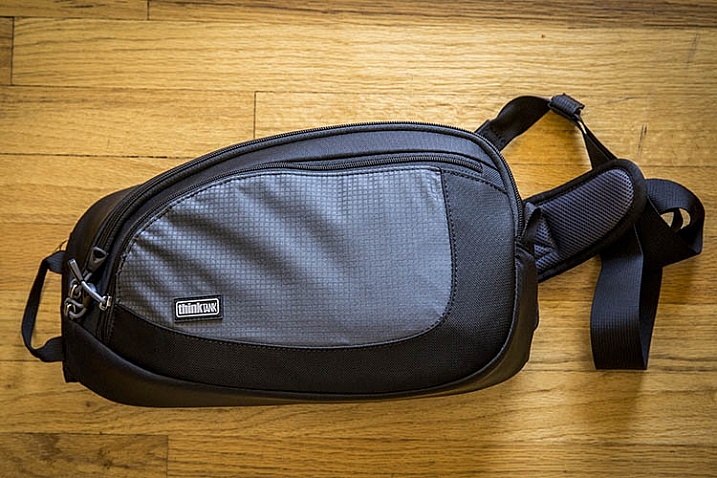
From messenger bags to suitcases, camera bags today come in just about every shape and form. After spending years tinkering mainly with backpacks and belt packs, I decided to try out a relatively new type of camera bag: the Think Tank TurnStyle sling bag. With its unique body-conforming design, and the rugged durability that comes with all Think Tank products, the TurnStyle has quickly become my new favorite camera bag. Here’s why:

ThinkTank TurnStyle Sling Bag Review

Think Tank TurnStyle Sling Bag

First off, it’s important to know that the TurnStyle bag comes in two colors (charcoal or slate blue) and three sizes. TurnStyle 5 is the smallest, meant to haul compact mirrorless camera systems, while TurnStyle 20 is the largest, capable of carrying a standard DSLR with a 70-200mm f/2.8 attached, plus another lens. Right in the middle of these two bags is the one I opted for: the TurnStyle 10, which could purportedly hold a standard DSLR with a 24-70mm f/2.8 attached. This is where I had a bit of a gripe with the bag off the bat.

ThinkTank TurnStyle Sling Bag Review

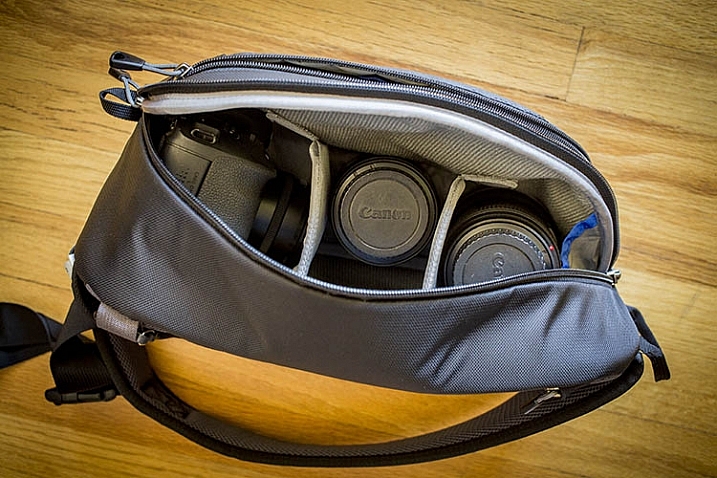
What Fits in the TurnStyle 10

While the TurnStyle 10 is definitely a roomy bag, it couldn’t exactly hold my Canon 5D Mark III with a 24-70mm f/2.8 attached. The camera with lens does fit into the bag, but it won’t even come close to zipping up. (Note: I figured out I can make it fit if I take out all the dividers).

What does fit, albeit on the snug side, is my Canon 6D with the 24-70mm f/2.8 lens attached; in this setup, there are two more lens compartments open that can hold small or medium-sized lenses or a Canon Speedlite. In the above photo, the configuration shows a Canon 6D with 40mm f/2.8 pancake lens attached, a Canon 100mm f/2.8 macro lens, and a 24-70mm f/2.8 lens.

What definitely will not fit in this bag is a 70-200mm f/2.8 lens, unless it’s the only thing the bag is carrying. This makes the TurnStyle 10 a perfect travel photography camera bag, assuming you’re carrying a smaller DSLR body, and relatively few accessories. If you intend to carry a heavy-duty DSLR kit, the TurnStyle 20 will be a more accommodating size.

ThinkTank TurnStyle Sling Bag Review

Best Features

Body-Conforming Design

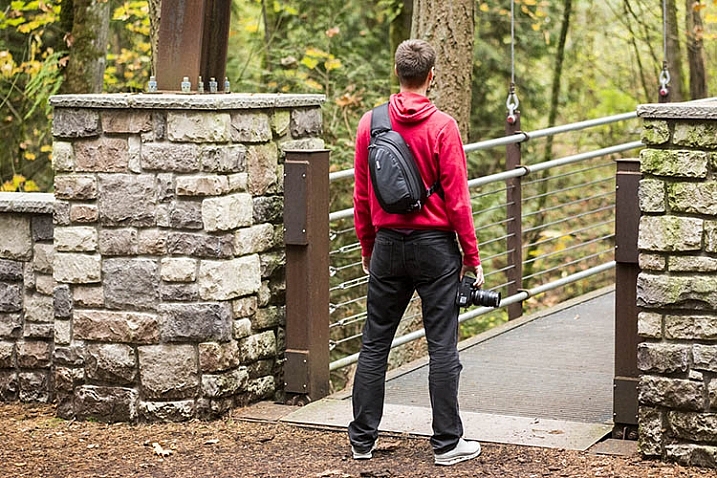
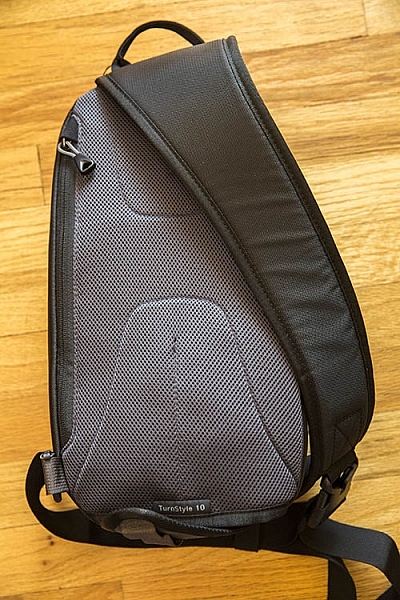
By far the best part of the TurnStyle bag series is its body-conforming design. Initially, the idea of the bag only having one strap may make it seem like you’ll end up carrying too much weight on one side of your body, but that is far from the case. The thickly padded single shoulder strap does indeed contour your body nicely, making even the heaviest gear bag feel relatively lightweight. This overall design makes the TurnStyle bag by far the most ergonomic camera bag I’ve ever used.

Suzi Pratt_Turnstyle 04

Converts into a Belt Pack

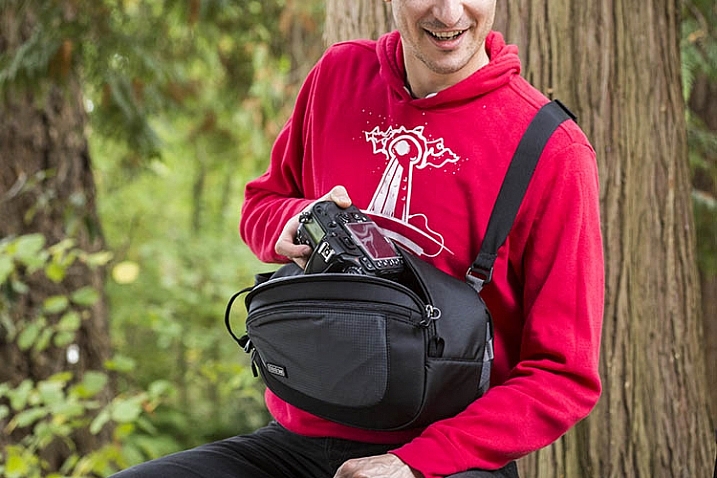
Another positive design feature is the ability to easily rotate the bag from your back to your chest, for quick access to your gear without having to take the bag off. You could even adjust the strap’s length, and turn the bag into a belt pack for better accessibility.

Made of Quality Materials

Similar to all other Think Tank products, the exterior components of the TurnStyle are highly durable and visually appealing. The bag’s exterior is made of rip-stop polyester with a water-repellant coating, and all zippers are abrasion-resistant. That is the say, this bag holds up even when you expose it to the elements, making it perfect for taking on your next photo safari vacation.

ThinkTank TurnStyle Sling Bag Review

Many Dedicated Pockets

The TurnStyle’s main compartment for holding your camera gear, comes with removable foam dividers so that you can customize the interior padding, based on what you’re carrying. There is also has a padded back pocket for holding a tablet or paperwork, and a larger zippered pocket on the front of the bag for holding essentials such as your wallet, cell phone, memory cards, etc. Finally, there is the signature component that accompanies all Think Tank bags: a dedicated rain cover that shields your bag from the elements.

Over to You

So is the Think Tank TurnStyle bag right for you? Honestly, it comes down to how much gear you want to carry with you. While you could combine this bag with a waist pack or shoulder bag to hold more gear, you experience the full benefits of the TurnStyle bag when carrying minimal gear. In this sense, it’s best suited for travel or street photographers, shooting with mirrorless or smaller DSLR cameras. If you plan to carry a longer telephoto lens, you’re probably better off with either the larger TurnStyle bag, or a different style altogether.

Have you tried out a sling-style camera bag? What were your thoughts on it? Do you have another favorite bag? Please share in the comments below.

googletag.cmd.push(function() {
tablet_slots.push( googletag.defineSlot( “/1005424/_dPSv4_tab-all-article-bottom_(300×250)”, [300, 250], “pb-ad-78623” ).addService( googletag.pubads() ) ); } );

googletag.cmd.push(function() {
mobile_slots.push( googletag.defineSlot( “/1005424/_dPSv4_mob-all-article-bottom_(300×250)”, [300, 250], “pb-ad-78158” ).addService( googletag.pubads() ) ); } );

The post Review: Think Tank Turnstyle Sling Bag by Suzi Pratt appeared first on Digital Photography School.


Digital Photography School

 
Comments Off on Review: Think Tank Turnstyle Sling Bag

Posted in Photography


Sony Xperia Z5 camera review

09 Feb

The Sony Xperia Z5 currently shares the top spot in DxoMark’s mobile rankings with the Samsung Galaxy S6 Edge Plus. With a 23MP BSI CMOS sensor, F2.0 lens and hybrid AF system it’s easy to understand how it might have ended up at the top of the rankings. Our full review digs into image quality as well as our experience using the Z5 for photography. Read more

Articles: Digital Photography Review (dpreview.com)

 
Comments Off on Sony Xperia Z5 camera review

Posted in Uncategorized


Extreme made easy: GoPro HERO4 Session review

03 Feb

GoPro HERO4 Session review

Waterproof, ruggedized, incredibly-small and lightweight, the Session is a no-brainer to toss in your bag or coat pocket before heading out on an adventure. 

The GoPro HERO4 Session is the company’s latest action camera release. Unlike GoPros before it, the Session is completely waterproof without the need for any housing. It is also the smallest, lightest GoPro to date, 50% smaller than the HERO4 (Black or Silver) and 40% lighter.

The GoPro HERO4 Session is capable of video capture at the following resolutions and frame rates:

 Video Resolution Frame rate 
1920 x 1440  30 fps, 25 fps
1920 x 1080  60 fps, 50 fps, 48 fps (in Ultra Wide mode only), 30 fps, 25 fps
1280 x 960  60 fps, 50 fps, 30 fps, 25 fps
1280 x 720  100 fps, 60 fps, 50 fps, 30 fps, 25 fps
848 x 480  120 fps, 100 fps

The Session has dual microphones – one on the front and another on the back – for improved audio quality. The camera will automatically choose to prioritize one mic over the over, depending on the scenario. Stills can be captured at a frame rate as fast as 10 fps (limited to 1 sec bursts). Images are captured at 8MP resulting in a 3264 x 2448 still.

The Session can also capture time-lapses. Available intervals include 0.5, 1, 2, 5, 10, 30 and 60 secs.

Auto Low Light, a feature that determines video frame-rate based on lighting conditions, gives the promise of better low light video quality, something that action cams are not particularly good at. It’s worth noting that video files will playback at the selected frame-rate and resolution when using Auto Low Light.

ProTune, an option that allows users to dial in more advanced settings, is available on the HERO4 Session. Selecting ProTune allows users to set their ISO limit (either ISO 400 or ISO 1600), and toggle sharpness on and off. The Session also features a spot meter mode, that, as you may have guessed, determines exposure based on a small point in the center of the frame.

What’s included

In addition to the unit itself, the GoPro HERO4 Session ships with just enough to get you started, including: a standard frame, a low-profile frame, one curved adhesive mount, one flat adhesive mount, a ball joint buckle and mounting buckles. A Micro-USB cable is also included for charging and transferring files directly from the GoPro to a computer.

Compared to Siblings

The price of the GoPro HERO4 Session recently dropped to $ 200. Here’s how it sizes up against GoPro’s other current offerings:

  HERO4 Session  HERO4 Black  HERO4 Silver  HERO+
Max Video Resolution

1440/30p

4K (UHD) 2160/30p

4K (UHD) 2160/15p

1080/60p
Photo Resolution 3264 x 2448 4000 x 3000 4000 x 3000  3264 x 2448
 Waterproof (without a housing) Yes  No  No No
 Max Still Burst 10 fps 30 fps 10 fps 5 fps
 Weight 74 g 152 g 147 g 123 g
 Street price $ 200 $ 500 $ 400 $ 200

Design

The HERO4 unit itself is a tiny 1.5″ cube. The body has only two buttons: the large record button on top, located directly in front of the LCD, and a small Info/Wi-Fi button on the lower portion of the back (see lower image). Press the record button once to turn the camera on and start capture – by default the video will be 1080/30p. Press and hold the record button for two seconds to start a time-lapse. By default it will shoot a photo every half-second. In both cases, hitting the record button again stops capture and powers the device down.

Users can change video and still capture settings, in addition to turning on Wi-Fi by hitting the Info/Wi-Fi button and poking through the options. However, the two-button ergonomics can make for a pretty confusing user experience. We found it much easier to change settings by using the GoPro app. 

The LCD on top displays the battery life, recording mode, resolution and clip length (when capturing video), or the number of photos left (if you’re shooting a time-lapse). A small switch on the side of unit, when pressed, reveals the Micro-SD card slot and Micro-USB port (see below).

The HERO4 Session is impressively tough. The body is coated in a rubber-like material, and the door containing the Micro-USB port and microSD slot appears well-sealed. We’re not entirely sure what kind of glass the front element is made of, but several run-ins with a flying skateboard didn’t even leave a scratch. Seriously, we beat this unit up quite a bit over the course of field testing it, with no damage to speak of. 

Articles: Digital Photography Review (dpreview.com)

 
Comments Off on Extreme made easy: GoPro HERO4 Session review

Posted in Uncategorized


Review of the Manfrotto 322RC2 Joystick Tripod Head

31 Jan
Manfrotto-322RC2-Joystick-head-in-horizontal-position

Manfrotto 322RC2 Joystick Tripod Head

I don’t use my tripod extensively in the same way a landscape shooter does, but I do consider a tripod an essential part of a photographer’s arsenal.

With regard to tripod heads, I have used a ball head for many years and they are extremely versatile. They’re very quick and easy to adjust. The most basic models having a single locking screw or lever; release it and you get a full range of pan, tilt, and swivel adjustments. Once you have the camera in position, you simply tighten the screw/lever to lock the head in place.

I use my tripod essentially in the following ways:

  • When the shutter speed is too slow to hand hold my camera, and I want to get a tack sharp image (s), or shooting in low light conditions.
  • Framing the shot through the viewfinder and then taking in the scene with my eyes without having to hold my camera, or having it on me. I like to see the shot I want to to take, rather than take the shot that I see through the viewfinder.
  • Most simply to act as a perch for the camera, ready to go. I spend most of my time prepping the shot before taking it.

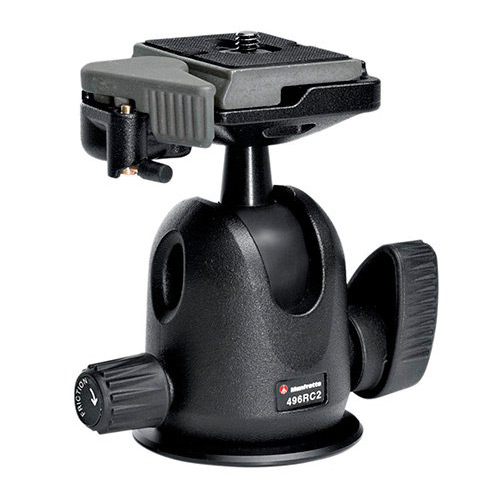
The ball head that I used was the Manfrotto 486RC2 compact ball head which has now been discontinued and replaced by the 496RC2.

Manfrotto-496RC2-Ball-Head-2

Image courtesy of Manfrotto

Over recent months, I have found this system of loosening the screw/lever on the ball head to make small adjustments frustrating, due to the weight of the camera and lens. I had to hold the camera with one hand and move the lever with the other. This was cumbersome at times, as the lever was sometimes too tight.

This may sound fickle. But I like my gear to work efficiently, and for me not be conscious of it, or thwarted by it. I prefer to concentrate on the shot I am about to take.

It was time for me to purchase a new head but I was undecided over whether to stick with the ball head type, or try a different style head altogether. Recently, I was working on a job in tandem with another photographer. He had the joystick type head on his tripod. I gave it a go, and found it it incredibly intuitive to use.
Talk about being smitten. I just loved it. It turned out to be the Manfrotto 322RC2.

Build

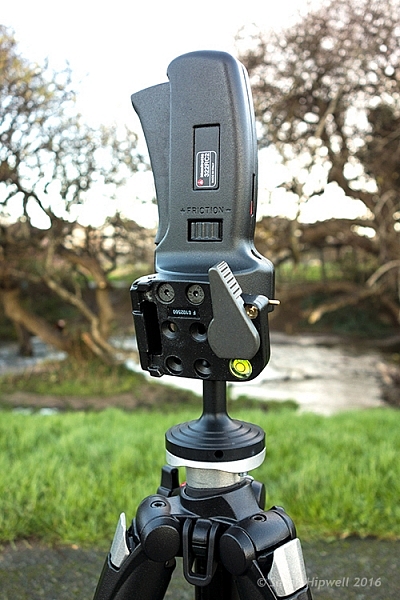
Manfrotto-322RC2-Joystick-head-in-vertical-position

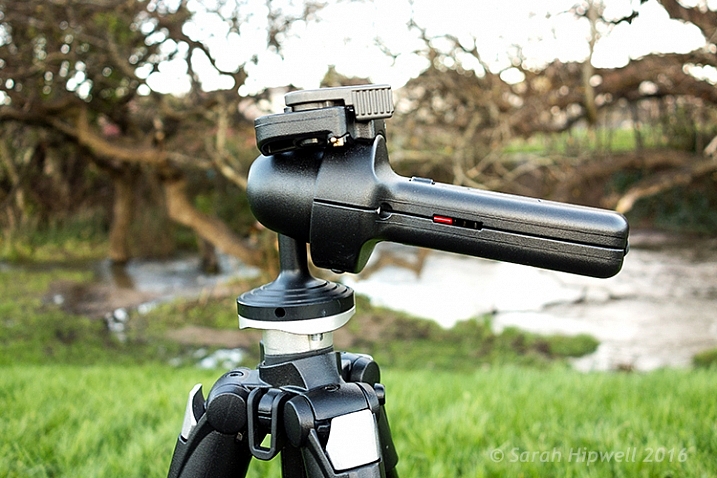
The Manfrotto 322RC2 is built out of magnesium. It weighs 1.43 lbs (.70kg).

The 322RC2 is made of magnesium, and is designed to keep the weight of your kit as close as possible to the tripod’s centre of gravity, by way of its reduced height. It weighs 1.43 pounds (.70kg), and while it’s not lightweight, it doesn’t feel heavy either, and the accompanying literature states that it can accommodate up to 11 lb. (5kg).

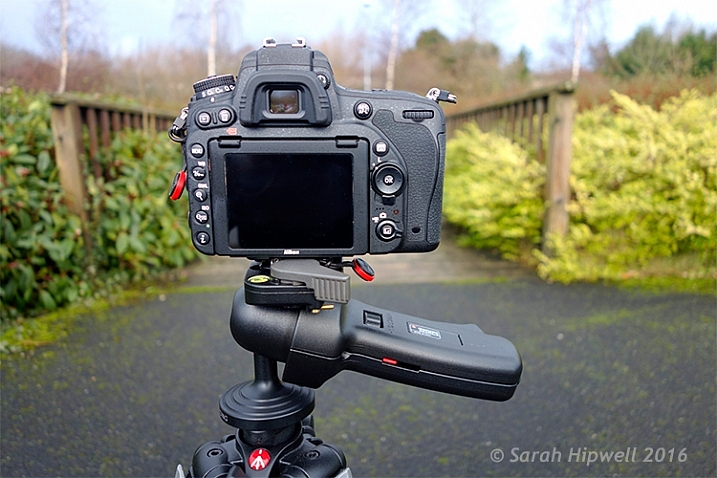
Camera-in-horizontal-mode

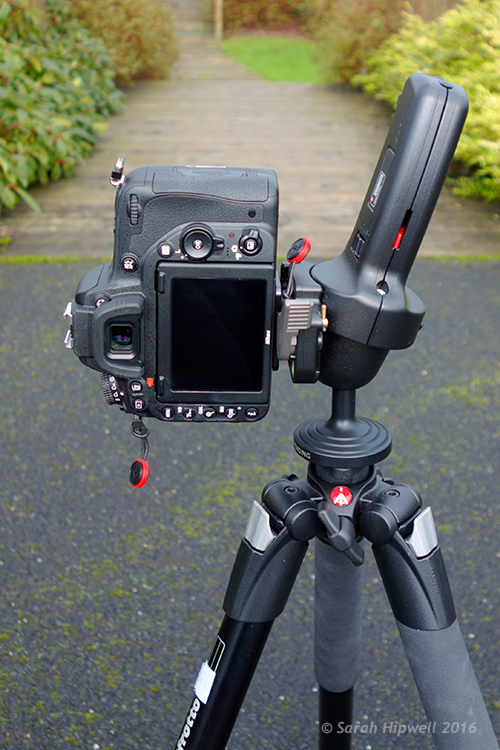
I have my Nikon D750 with the 24-120mm f/4G ED VR attached which is roughly 1.510kg (just over 3 lb.).

Key Features

Let’s take a closer look at the key features:

  • One single lever for quick control of all movements
  • Quick release plate with built-in secondary safety pin
  • Built-in bubble spirit level
  • Friction control, adjustable for different camera weights
  • Customizable for left or right handed use, in a vertical or horizontal position
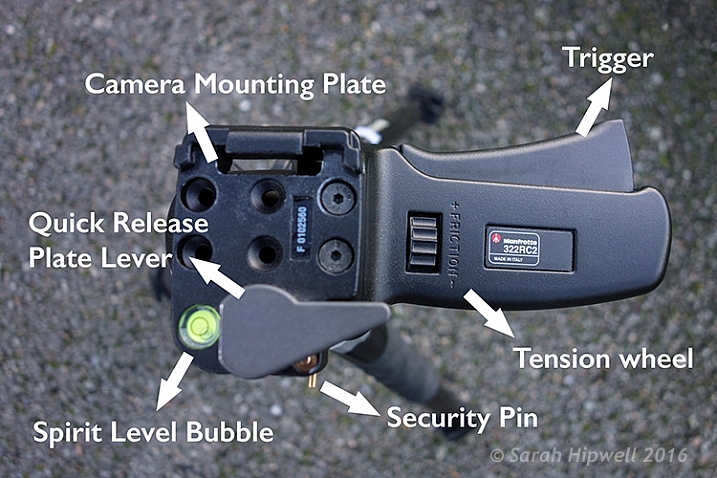
Top-view-of-322RC2-joystick-head

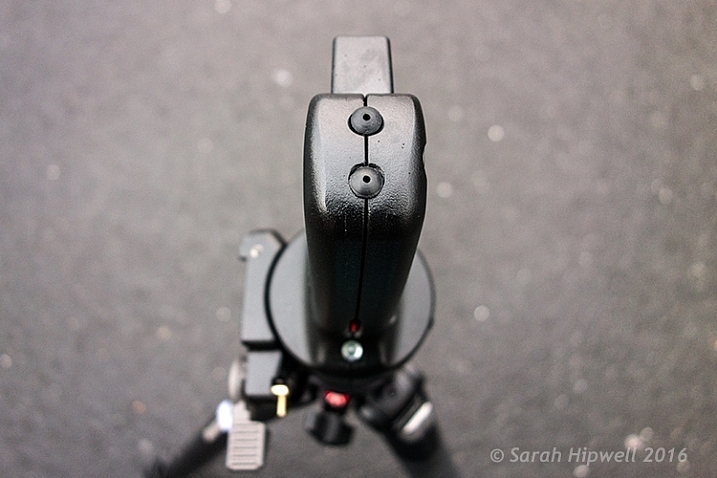
Top view of the Manfrotto 322RC2. The trigger is big so that all your fingers rest against in when squeezing it.

Camera-in-vertical-mode

Going from horizontal to vertical mode is so easy using this joystick head.

Straight out of the box, I was able to attach the head to my tripod. It does come assembled for right-hand users, but the 200PL quick release plate assembly can be removed and positioned for left-handed use. Uniquely, it can also be placed on the top of the grip in a vertical position like the traditional 222 design, but when used in this position the maximum load reverts to 2.5 kg capacity.

Where-the-200PL-assembly-plate-sits-on-the-grip-handle

Top view of the end of the grip on the Manfrotto 322RC2, where you can attach the 200PL assembly plate, so that the camera sits on top, similar in deign of the 222 model by Manfrotto.

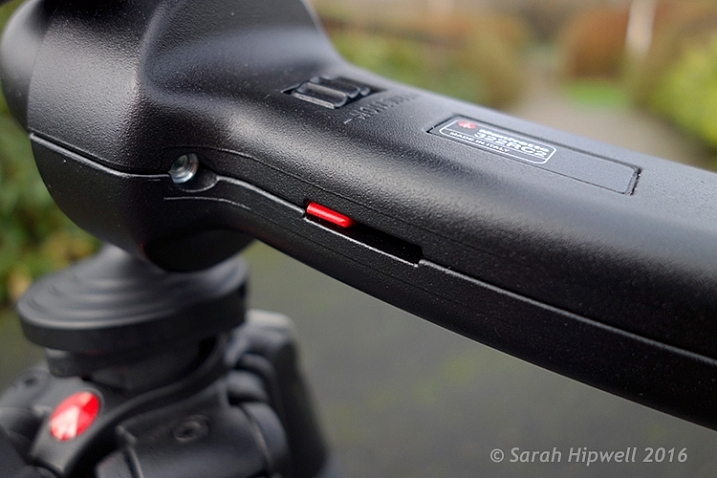
I was able to adjust the friction wheel by turning it either to the right or left. I then placed my camera and lens onto the quick release plate, and made further adjustments allowing for the weight of both. This friction control wheel lets you regulate the power of the blocking mechanism to match the weight of your camera/lens, which is key to its design.

close-up-of-tension-indicator

The friction wheel scrolls to the right or left. The small red strip is the tension indicator which moves to the left or right as you adjust the friction wheel.

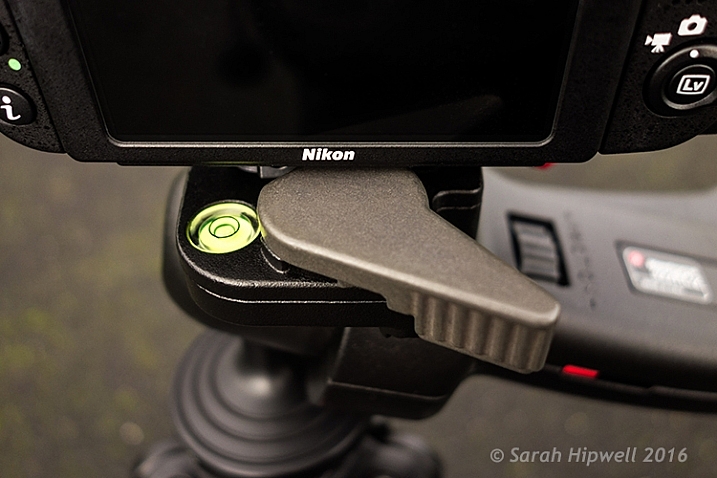
The built-in bubble spirit level is a nice touch. There wasn’t one on the ball head, so this feature just makes orientating your camera, horizontally or vertically, quick and easy.

Spirit-bubble

The bubble spirit level is a handy feature, especially if you are adjusting your camera positions between landscape and portrait modes.

Observations

I’ve only had this joystick head a mere six weeks, so I can’t really comment on what the cons may be at this point. Obviously, this type of tripod head may not be to your liking, or suit your photography needs.

Although, this tripod head isn’t lightweight, I feel the weight justifies what it will be holding, especially when you combine the weight of a DSLR body and a large zoom lens. That said, from my experience, I only wish I had come across it sooner. The two areas I find it most useful are:

Title-Manfrotto-322RC2-Joystick-head

  • It is easy and intuitive to use
  • It offers very flexible camera positioning, using just one hand

In fact, the more I use it, the more I like it. Maybe over time, I will encounter some negative aspects, one thing I noticed is that it doesn’t fit into my existing tripod case with the head attached. By placing the head in a vertical position, this adds another nine inches to the total length.

I didn’t want to buy another dedicated camera tripod bag, as they can be expensive. So instead, I just bought a Hockey bag ($ 16.00) to store my tripod away when not in use, or to bring to location shoots. I now use my old tripod case for my small light stands and umbrellas.

There isn’t an independent pan lock. This doesn’t bother me, but I can see this being a necessary feature for some photographers who shoot panoramas, and so forth.

Conclusion

I would definitely recommend this tripod head, but I think the best advice is to test it out first. This type of tripod head is a matter of personal choice. Plus, this head is not new on the market, so check around for deals.

Disclaimer: I was not contacted or sponsored to test the above equipment. Opinions are purely by the author only.

googletag.cmd.push(function() {
tablet_slots.push( googletag.defineSlot( “/1005424/_dPSv4_tab-all-article-bottom_(300×250)”, [300, 250], “pb-ad-78623” ).addService( googletag.pubads() ) ); } );

googletag.cmd.push(function() {
mobile_slots.push( googletag.defineSlot( “/1005424/_dPSv4_mob-all-article-bottom_(300×250)”, [300, 250], “pb-ad-78158” ).addService( googletag.pubads() ) ); } );

The post Review of the Manfrotto 322RC2 Joystick Tripod Head by Sarah Hipwell appeared first on Digital Photography School.


Digital Photography School

 
Comments Off on Review of the Manfrotto 322RC2 Joystick Tripod Head

Posted in Photography