RSS
 

Posts Tagged ‘REVIEW’

For Everyman and Everywoman: Peak Design Everyday Messenger Bag Review

16 Apr

Peak Design Everyday Messenger
$ 249.95 | peakdesign.com | Buy Now

Peak Design isn’t a company that’s satisfied with the status quo. The San Francisco-based accessory design firm aims to produce highly functional and stylish photo gear, designing each detail from the ground up. The company has run a number of successful Kickstarter campaigns to help bring their designs into production, and that’s exactly how the Peak Design Everyday Messenger bag came to be. With a focus on style, substance and pockets for everything, the bag has been created specifically for photographers but can be used as a messenger bag by anyone with gear to haul.

The company was born out of the founder’s frustrations while traveling the world in 2010 with his camera gear. Peak Design’s ‘re-think the basics’ approach carries through in the Everyday Messenger, in ways that are immediately obvious – and some that aren’t. From its angular appearance to a proprietary closure system, no detail is too big or small for the company’s designers to re-think and re-tool. 

Inside and out, it’s obvious Peak Design has put effort into producing a bag that aims to get photographers of all levels through their day, whether they’re on a shoot or on the way to work. Take a look at what sets the Everyday Messenger apart, and whether or not its fresh approach indeed translates to a better bag for everyone.

Specifications

  • Empty bag weight: 2.5lbs
  • Average Outer dimensions: 30 x 43 x 18 cm / 12 x 17 x 7 in
  • Colors Available: Charcoal and Heritage Tan

In Use

The Everyday Messenger bag is comfortable to carry. I carried this bag while traveling on a couple of weekend trips, as well as around town for work and for shoots. I found it easy to use and comfortable to wear for the most part. A reversible, seatbelt style adjustable strap distributes the weight whether you decide to wear it as a traditional messenger bag, a low slung messenger bag, pop it on one shoulder or use the stabilizing straps as a waist belt.

Folks who are familiar with Peak Design’s camera straps will be familiar with the quick adjusting aluminum handle conveniently allowing you to adjust the length of the strap with one hand. This is a great feature for photographers who tend to hold their camera in one hand and might need to adjust their bag as they move along.

A patent-pending MagLatch closure system allows you to open and close the bag using one hand, and four latches allow the bag to expand and contract. A magnetic catch will close the bag shut and then a quick pull down on the latch lets you open and close the bag. The closure system did take a little getting used to, and when I filled the bag with my DSLR and a couple of lenses it didn’t feel as secure as I’d hoped; I felt the need to double check the latch to make sure it was closed and catching properly. I found when the bag wasn’t as wide or full, for example when I was using a mirrorless camera system versus a wider-bodied DSLR, that it became easier to manage. However, having to double-check the latch didn’t deter from how much I liked the other features.

The bag does tend to get a bit bulky and cumbersome if filled to maximum capacity, however for someone who over 6′ tall that is likely not an issue. 

Thoughtfully designed flexible inserts allow you to configure interior compartments however you want. The Everyday’s dividers are unique – while other camera bags offer rectangular foam pads that can be arranged to create space within a camera bag, the Everyday offers three 8-sided inserts. They are pre-folded so you can bend and flex them to your heart’s content, configuring custom areas to contain and protect your gear.

One of the bag’s best features is how the inserts fold over to create a box-like area, allowing you to store gear on top of each other. I managed to store an 85mm lens, protected by the folded insert, throw a flash on top of that, with my camera body with a 24-70mm lens right next to it, and then another lens in the next compartment. It became a well-filled bag and I was confident that all was secure and protected.

A convenient waterproof zipper allows access to the interior of the bag while wearing it, making it easy to grab gear on the go. You don’t have to take the bag off and put it down to get out your camera or a lens, rather just unzip and you can have your hands on your camera in no time. I did find it easier to pull out my camera body from the center of the bag rather than have it placed over to the side of the bag and wrestle the camera body from there. 

A zippered front pocket has eight color-coded interior mesh pockets: four red, four green, meant to denote which batteries and memory cards are fresh and which are spent. I found this system really user-friendly, and it’s just one more thoughtful detail that Peak Design has included for photographers. The front pocket zips all the way open and folds down to access whatever you have stored inside, or you can just zip down the top part and still get to your gear. 

Inside the main compartment is an interior pocket, perfect for passports, travel documents, phones, cash, credit cards, travel papers, small notebooks. This pocket is also conveniently accessed through the top zipper opening.

There is another smaller pocket on the inside flap of the bag but even better, behind that pocket is a built in carry option for most tripods. One of the tripod’s legs can slide through the back of the pocket, and with the flap closed the tripod can be carried braced on the front of the bag. This bag really does have hidden features everywhere.

Photo courtesy of Peak Design

The bag’s stabilizing straps tuck away into side pockets and behind them are additional pockets – perfect for a lens cap. But of course, there’s more: within one of those pockets is a tether with one of Peak Design’s anchor links that can be used to keep track of your keys.

On either side of the bag are anchor straps that can be used in conjunction with Peak Design’s quick-release Capture camera clips. As I didn’t have one of the clips I wasn’t able to test this out, and while it seems like a good idea in theory as someone who is shorter than average this might make the bag slightly unwieldy for me.

A zippered protected compartment holds a 15 inch laptop, and if you need, an additional pocket will hold a tablet or notebook. This bag is not super-flexible and the addition of a 15″ laptop makes it less so. Carrying photography gear and a laptop became a near impossibility for me, however, as it became too heavy and cumbersome.

The material is waxed, weather-proofed and looks smart too. I felt totally comfortable that my gear was protected while having to venture out in a downpour.

Summing Up

I enjoyed using this bag with and without my camera gear. It easily fit my DSLR, plus a couple of long lenses, or I’d put my laptop into the back pocket with a portable drive, plus a couple of notebooks and head off to a coffee shop. Where I found the bag worked less well for me was when carrying my laptop and DSLR plus lenses. I did that while traveling and found that carrying all of that gear for too long was just too heavy. 

There is no getting around the fact that the Everyday Messenger bag is big, and just because you can pack it to its limit doesn’t mean you necessarily should. Flexibility of the bag becomes a little more limited with a 15″ laptop in the back pocket. When the bag was full, I found myself double checking the Mag-Latch closure system just to make sure it was catching and closing.

The team at Peak Design seems to have thought of almost every detail and while the Everyday Messenger Bag is not cheap, it is certainly possible to use this as your everyday-everything bag, and you will certainly get your money’s worth.

What we like:

  • Comfortable shoulder strap
  • So many pockets make it functional and versatile
  • Sturdy and well-designed
  • Capture Clip anchor points on the sides of the bags
  • Plus Peak Design offers a lifetime guarantee, for fabric, straps or zippers that fail, not for normal wear and tear obviously

What we don’t like:

  • Can feel too big if you are smaller or shorter in stature
  • Bag becomes quite cumbersome with both a 15″ laptop and DSLR + lenses
  • Having to double check the closure system when the bag was more full

Articles: Digital Photography Review (dpreview.com)

 
Comments Off on For Everyman and Everywoman: Peak Design Everyday Messenger Bag Review

Posted in Uncategorized


Microsoft Lumia 950 camera review

15 Apr

In addition to strong camera specifications like a 1/2.4″-type 20MP Sony sensor and Zeiss branded F1.9 lens, the Lumia 950 boasts some tantalizing mobile photography features like Raw capture and extensive manual controls. Unfortunately, its imaging feature set is behind the competition in some notable ways. Read more

Articles: Digital Photography Review (dpreview.com)

 
Comments Off on Microsoft Lumia 950 camera review

Posted in Uncategorized


Review: Lastolite 6×4 Foot Panelite Collapsible Reflector with Translucent Diffuser

12 Apr

review-lastolite-panelite-diffuser-0803

How many times have you heard that there are certain times of day you shouldn’t photograph people? For example, at midday in harsh sunlight. The logic is pretty sound. Direct, hard light can lead to unflattering shadows and ultra high contrast, which can result in unsatisfactory portraiture. However, if you follow this advice blindly, and only wait for the golden hours each day, you’re missing out on an enormous amount of time that could be spent photographing people.

There are several options to combat this problem, but one of the easiest and most effective, is a piece of gear called a diffusion panel.

What is a diffusion panel?

At its most basic, a diffusion panel is a piece of translucent material that allows harsh direct light to pass through it, so it effectively becomes a light source of its own. This softens the light and can allow you to obtain great, flattering, natural light portraits, in unfavorable conditions.

review-lastolite-panelite-diffuser-2745

There are many types of diffusion panels available ranging from very small, handheld ones, to giant ones that are many meters across and require dedicated stands.

When size matters

Small diffusion panels are useful, and if you happen to have a 5-in-1 reflector, you probably already have one. These are indispensable for still-life and tabletop work; however, in terms of portraiture, their small size often limits them to closely cropped images and headshots.

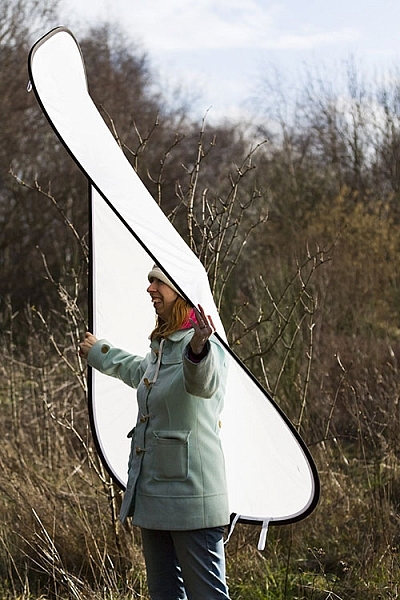
This is where the Lastolite Panelite Reflector comes in. At 6×4 feet (1.8m x 1.2m) it’s large enough to cover enough area for full length portraits. At $ 128 retail, its price also means that it isn’t way out of reach for the serious portrait photographer.

Putting it through its paces

To test it out, I took the Lastolite Panelite Reflector out on location, at mid-afternoon on clear days. The sun was low at this point, but still very harsh, and the high contrast would have been difficult, if not impossible, to manage without a modifier.

review-lastolite-panelite-diffuser-0385

By Diffusing the sun back lighting the scene, you can even out the exposure of the highlights and shadows which is far more pleasing for portraits.

review-lastolite-panelite-diffuser-0569

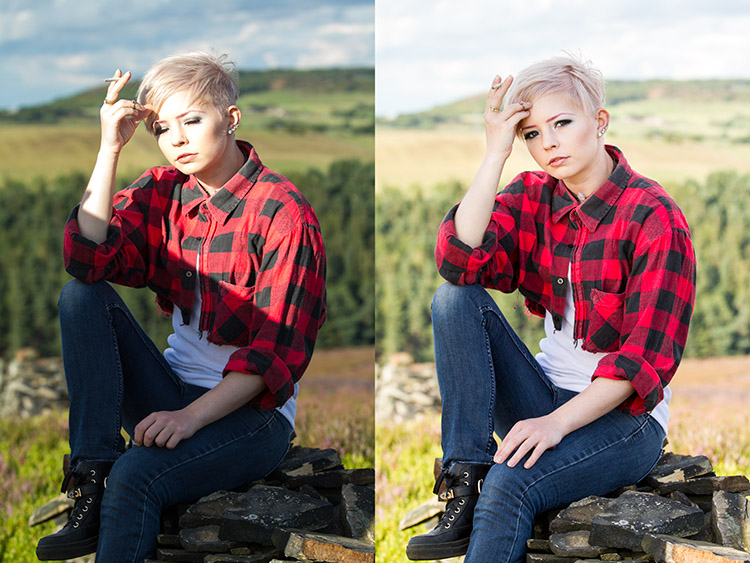
On the left, the bottom half of the image is shaded by the diffuser. You can see the two stop difference in exposure. In the image on the right, you can see how the hard directional sunlight has been softened (note that more exposure was needed overall so the background was also brightened in the process).

review-lastolite-panelite-diffuser-2621

Apart from the unflattering shadows in the left hand image, the direct sun made it painful for the model to look into the camera. With the diffusion panel (right image), her eyes were shielded from the harsh light.

review-lastolite-panelite-diffuser-2734

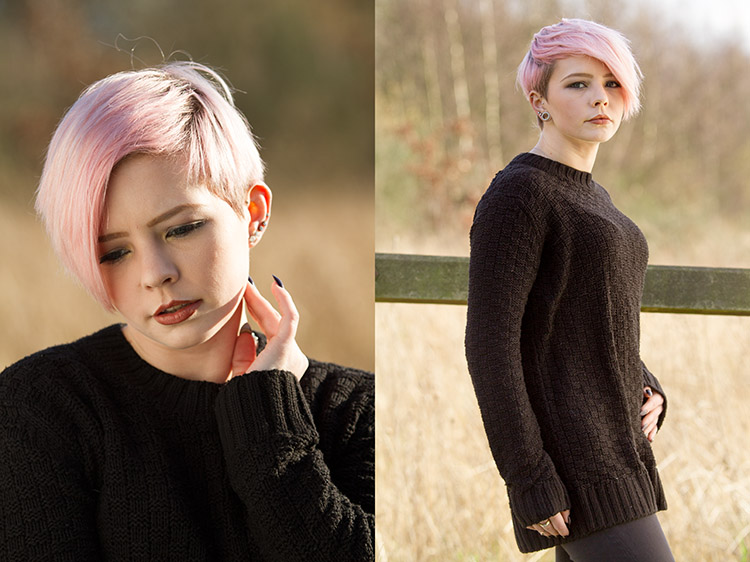
In the left hand image, the extreme contrast from the back lighting made exposing for the rest of the image a nightmare. By diffusing the back light, the exposure was evened out, but still allowed for a pleasing rim light (image above right).

Let’s look at some of the pros and cons of using this light panel.

PRO: Two stop diffusion

review-lastolite-panelite-diffuser-2737

By reducing contrast, the loss of two stops of light can be a huge help in some scenarios.

When working with the extremes of bright sunlight, it can be difficult to get away from small apertures like f/16. This is a problem because these settings won’t allow for a shallow depth of field. By reducing the light on your subject by two stops with the diffuser, that hypothetical aperture of f/16 becomes f/8 and makes background blur much easier to control.

PRO: Size

review-lastolite-panelite-diffuser-2656

This thing is huge. It’s not the biggest on the market, but it’s big enough for full length portraits, which is a major plus. I did not yet have the opportunity to test it on groups of people, but I believe it should work well for up to four people, with careful control.

review-lastolite-panelite-diffuser-0734

The ability to diffuse a large enough area for 3/4 and full length portraits is a big plus.

PRO: Portable

Like a lot of Lastolite’s product, the diffusion panel is collapsible, and folds up to a tiny fraction of its size. Packed in its case, I would compare it to the surface of a medium sized cafe table. Combined with its light weight, it’s easy enough to throw in the back of a car, and carry along on location with you, without strain.

PRO: Price

At $ 128, this is not a budget tool. However, for photographers serious about location based portraiture, the Lastolite Panelite Reflector comes in cheaper than lighting modifiers of moderate quality and unlike those, this doesn’t require lights to go with it.

CON: Extra hands

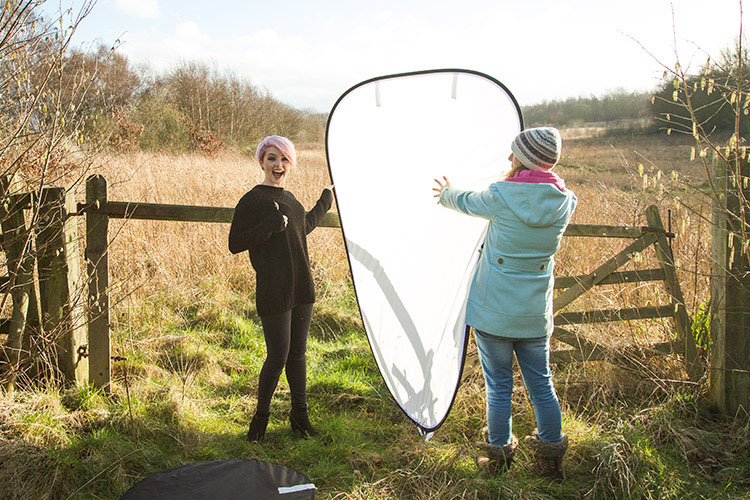
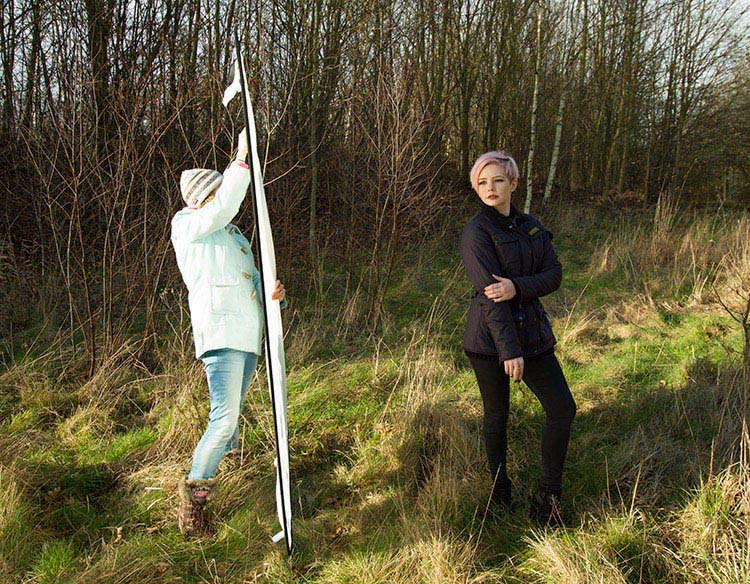
The Lastolite Panelite Reflector is large, and you will find it very difficult to manage without an assistant to hold it for you. If it needs to be held much higher than ground level, you may well need two people. It may be possible to rig it to some stands, but this leads into the next point.

CON: Be wary of wind

review-lastolite-panelite-diffuser-2695

A small gust of wind sparked a several minute struggle to regain control over the panel.

The only real problem I came across while testing the Lastolite Panelite Reflector was that the slightest gust of wind will send it flying, and folding in on itself. Whoever is holding it for you needs to have a sure grip on it, and even then the whole process is still irksome.

If you’re into slapstick, this can be hilarious to watch, but any time spent trying to get the diffusion panel to play along, is time not spent taking photographs.

CON: Dirt

Like white reflectors, softboxes and white umbrellas, the Lastolite Panelite Reflector is really, really white and will be hard to clean when it inevitably gets dirty.

Overall thoughts

review-lastolite-panelite-diffuser-0640

If nothing else, when used head on, the Panelite Reflector creates some interesting catch-lights.

To sum it up easily, the Lastolite Panelite Reflector does exactly what it says on the tin. It’s portable, creates a beautiful diffused light, and is relatively affordable. Although, it can prove tricky to handle under some conditions, I found the results to be well worth the extra logistics and effort, and I am looking forward to a long an extended relationship with it in my photographic arsenal.

googletag.cmd.push(function() {
tablet_slots.push( googletag.defineSlot( “/1005424/_dPSv4_tab-all-article-bottom_(300×250)”, [300, 250], “pb-ad-78623” ).addService( googletag.pubads() ) ); } );

googletag.cmd.push(function() {
mobile_slots.push( googletag.defineSlot( “/1005424/_dPSv4_mob-all-article-bottom_(300×250)”, [300, 250], “pb-ad-78158” ).addService( googletag.pubads() ) ); } );

The post Review: Lastolite 6×4 Foot Panelite Collapsible Reflector with Translucent Diffuser by John McIntire appeared first on Digital Photography School.


Digital Photography School

 
Comments Off on Review: Lastolite 6×4 Foot Panelite Collapsible Reflector with Translucent Diffuser

Posted in Photography


Crossing the Bridge: Canon XC10 Review

09 Apr

Canon XC10 key features

  • 12 Megapixel 1″ CMOS sensor
  • DIGIC DV5 image processor
  • Fixed 10x (24 – 240mm equivalent) zoom lens with image stabilizer
  • Face Detection/Tracking auto-focus mode
  • Records 4K XF-AVC UHD (3840 x 2160) video to CFast 2.0 cards
  • 305Mbps video codec (4K)
  • Canon Log (12 stops of dynamic range)
  • Slow and Fast motion capture
  • 12 Megapixel stills (JPEG only, no Raw)

Hybrid cameras are those capable of capturing both high-quality stills and video. Although they have been around since the release of the Nikon D90 and Canon 5D Mark II, a professional mirrorless hybrid camera is a new category for Canon. When Canon announced the XC10 at NAB 2015, there was some confusion as to what kind of camera it was. Was it a system targeted towards Canon DSLR shooters or Vixia shooters? A drone camera? Or a micro ENG camera? The only thing that was certain was that Canon positioned the camera as one that could credibly be used for both video and still photography work.

The XC10 is an all-in-one compact hybrid camera that features both 4K and Full HD video capture as well as 12 Megapixel stills. It has great ergonomics for handheld shooting, is built around a 1″-type sensor, and includes the ability to record Canon Log, providing up to 12 stops of dynamic range. Optically, it uses a fixed zoom with a 2x Digital Teleconverter and Optical Image Stabilization, as well as a built-in ND filter.

The XC10’s lens gives you a focal range of 27.3-273mm equivalent for video capture and 24.1-241mm equiv. for stills. For monitoring, the camera features a touchscreen with Vari-Angle LCD monitor and an included loupe to mount to the LCD for viewing in bright environments. Unlike the 1080p EOS 5D Mark III, the XC10’s video workflow options should meet the standards for professional video shooters, offering H.264 4:2:2/8-bit MXF 4K UHD (3840 x 2160) files (up to 305Mbps) to internal CFast 2.0 cards, or Full HD (1920 x 1080) to SD cards.

Its form factor sets the XC10 apart from typical DSLR and compact mirrorless cameras like the Sony a7R II or Panasonic GH4. With its adjustable side grip and loupe attached for continuous run-and-gun video shooting, the XC10 slightly resembles Canon’s Cinema EOS cameras, such as the C300 Mark II and the C100 Mark II. With its side grip and adjustable LCD, you can comfortably shoot and monitor your shots at any angle.

Though probably intended for slightly different audiences, on paper the XC10 has a couple of competitors in this space: Sony RX10 II/III and Panasonic FZ1000. All three cameras contain 1″-type sensors and capture 4K video. The RX10 II/III also give you cinematic picture profiles, including S-Log2 which, like Canon Log, extends the cameras’ latitude. Unlike the RX10 II/III and FZ1000, which are aimed at stills photographers, the XC10 does not support Raw image capture. Also, the XC10 is by far the most expensive of the three with a retail price of $ 2,499 (though street prices hover around $ 1,999).

And if video is your primary format, the XC10 could well be a solid replacement for your DSLR, especially if you need to capture 4K. So the question becomes, can the XC10 be a credible stills camera for people who primarily shoot video but need high quality stills in certain situations? Let’s find out.

Articles: Digital Photography Review (dpreview.com)
 
Comments Off on Crossing the Bridge: Canon XC10 Review

Posted in Uncategorized


Huawei Mate S camera review

07 Apr

The Huawei Mate S boasts a 13MP RGBW sensor, an F2.0 lens and optical image stabilization, with a build quality that places it at the premium end of the market. While its spec positions it against the likes of the Samsung Galaxy S6 and LG G4, if your priority is imaging capabilities the Mate S can’t quite match the competition. Read more

Articles: Digital Photography Review (dpreview.com)

 
Comments Off on Huawei Mate S camera review

Posted in Uncategorized


Power Zoom: Panasonic Lumix DMC-ZS100/TZ100 Review

05 Apr

Key Features

  • 20.1MP 1″-type BSI CMOS sensor
  • F2.8-5.9, 25-250mm equiv. lens
  • Depth from Defocus AF
  • 4K/UHD video capture
  • 3″ touchscreen LCD
  • 1.2M-dot equiv. EVF
  • Post Focus / 4K Photo functions
  • Wi-Fi

As the 1″-type enthusiast compact market has grown over the last 2 years, there has been a noticeable gap in the market. There were small, standard zoom (24-70mm) models and long zooms (24-600mm), but nothing in-between for those who want a longer lens without sacrificing body size.

Enter Panasonic, a company with a long history of making travel zoom cameras. In fact, the company made what many would consider the first one: the DMC-TZ1, way back in 2006. Panasonic entered the 1″-type market in 2014 with its DMC-FZ1000, a camera we liked enough to give it a Gold award.

At this year’s Consumer Electronics Show in Las Vegas, the company announced the DMC-ZS100 (TZ100 outside of North America), which took the guts of the FZ1000 and shrank the body down to the roughly the size of a Sony RX100 IV. Naturally, you can’t stuff a fast 25-400mm lens into a compact body, but the ZS100’s 25-250mm equiv. F2.8-5.9 lens is nothing to sneeze at, either. The camera uses the same 20.1MP sensor as the FZ1000 which is more than likely the same as the one in the Sony RX100 II and III.

The ZS100 is chock full of features, most notably its Depth from Defocus autofocus system, 4K video capture and electronic viewfinder. It also has a 3″, touch-sensitive LCD, Wi-Fi (but, unlike most Panasonic products, no NFC) and useful 4K Photo and Post Focus features.

Why Pay More?

Imagine you’re shopping for a compact travel zoom camera, and you’re viewing the selection at a Big Box retailer. You reach the Panasonic section and see the DMC-ZS60, which offers a 30X zoom and costs $ 450, next to the ZS100 which ‘only’ has a 10X zoom but costs $ 250 more. It’s not a stretch to imagine a camera buyer asking themselves why they should pay more for what seems like less.

While the ZS60 does indeed have a longer lens than the ZS100, there is a trade-off:

Above is a graph showing equivalent aperture vs equivalent focal length, which is described in detail here. The yellow line at the top is the ZS60 (1/2.3″ sensor), while the ZS100 (1″ sensor) is in blue below it. In terms of equivalent aperture (which takes into account sensor size), the ZS60 is effectively around 2 stops ‘slower’ than the ZS100.

This means several things. For one, the ZS100 can capture roughly four times the total light at every focal length, if you keep the aperture open and use the same shutter speed. Since the sensor is gathering more light, you get a better signal-to-noise ratio, which in turn leads to higher image quality. This will be especially noticeable in low light, when the ISO needs to go up.

There’s another benefit to having a 1″ sensor rather than the 1/2.3″ one. The lenses used on larger sensors tend to offer more control over depth-of-field, allowing you for blurrier backgrounds in portraits.

The one area in which the ZS60 bests the ZS100 is in terms of zoom, as you can see by how much further the yellow line extends.

Understanding the math behind all of this is a bit confusing, but the end result is the same: the ZS100 will produce better quality images and can produce more background blur than the ZS60, though you’ll have to sacrifice both zoom power and money in order to get it.

Compared to its peers

Using what we’ve learned from above, let’s take a look at how the ZS100 fits among its 1″ sensor peers:

In this group, which includes cameras from Sony, Canon and Panasonic, you’ll notice that the benefit of shorter, faster lenses: their equivalent apertures start low, and stay low. For example, Canon’s G7 X I and II, which have focal ranges of 24-100mm equiv., are  2 stops faster than the ZS100.

The Sony RX10 I/II reaches out to 200mm (not far from the 250mm on the ZS100), but since it has a fixed F2.8 lens, its equivalent aperture is over 2 stop faster than the ZS100 at full zoom. That said, the RX10 I and II are also much larger and heavier cameras. The FZ1000 isn’t quite as large as the RX10s and even with its F2.8-4 aperture range, it still has a 1+ stop advantage over the ZS100 for much of its zoom range.

So what can you conclude from this chart?

  • Smaller cameras sacrifice focal range to keep size down but can offer fast apertures
  • Long zoom cameras sacrifice size for focal range. This is especially the case with the RX10s. Canon’s G3 X strays from the group, with its slower F2.8-5.6 lens.
  • In order to have a 25-250mm equiv. lens in a body that fits in your jacket pocket, Panasonic had to make some compromises. Its lens isn’t as long as the large-zoom cameras or as fast as those of the small cameras – instead it’s a blend of the two. If the ZS100 had a faster lens like, say, the FZ1000, you’d be looking at a camera nearly as large, which would make the ZS a lot less desirable.

Articles: Digital Photography Review (dpreview.com)
 
Comments Off on Power Zoom: Panasonic Lumix DMC-ZS100/TZ100 Review

Posted in Uncategorized


Week in Review: Spring Fever

02 Apr

Week in Review: Spring Fever

There was excitement in the air this week around the office. Was it the unseasonably warm weather? The arrival of a new flagship DSLR? A smattering of product announcements mid-week? It’s hard to say. Whatever it was, it was a week in which Sony supersized its RX10 series, we took a peek at the Nikon D5’s ISO 3 million and learned how to make beer with stinging nettles. Catch up on everything you may have missed in the past seven days.

Week in Review: Spring Fever

The headline of the week goes to the Sony RX10 III announcement, which offers three times the zoom reach of its predecessor, covering a 24-600mm equivalent range. It packs a 20MP 1″-type sensor with 4K/UHD capability, a tilting LCD and a 2.36 million dot EVF in a dust and moisture-resistant body. All of that lens range doesn’t come cheap though – the RX10 III will sell for $ 1500, a $ 200 increase over its predecessor.

On top of the updated superzoom, Sony announced two new full-frame lenses. The business end of the Sony FE 70-300mm F4.5-5.6 is pictured here, and along with it came a 50mm F1.8. If the $ 1000 Zeiss-branded Sony 55mm F1.8 is too rich for your blood, you’ll be thrilled to know that the 50mm F1.8 is a mere $ 250. That’s still more than you’d pay for the Nikon or Canon equivalent, but it’s something, right? Sony let us manhandle their lenses at this week’s press event. You can take a look at some hands-on photos for a closer look and check out some initial sample images.

We see the words ‘I don’t care about video’ expressed fairly often in the comment section, and DPReview writer Richard Butler finds that sentiment a little disheartening. In the spirit of trying something new, the self-professed beginning videographer took the opportunity to test the Sony a6300’s video capabilities to shoot, direct and produce a mini-documentary. The subject is one that’s near and dear to our hearts – craft beer. Find out how a local brewery produces its stinging nettle beer, and see how the Sony a6300 performs.

As parent company Yahoo has fallen on hard times, it looks as though Flickr may be looking for a new home. Yahoo is seeking bids for its web properties, and though it hasn’t said exactly which operations it’s looking to sell off, it would seem that Flickr fits the description. But don’t clear out your savings account just yet – there are a number of reasons why a sale may never happen.

Have you ever wondered what ISO 3 million looks like? Wonder no more. Not only can you see what the Nikon D5’s highest extension ISO setting looks like in our studio, you can take a look at the full range of high ISO settings in their natural environment: a concert venue. We’ve even tested the camera’s dynamic range performance. There’s more to come from the Nikon D5, but for now you can marvel at the highest of high ISO settings.

We sat down with some Nikon executives at CP+ recently. As these things tend to go, we couldn’t pry much information out of them about future plans on the record, but they did confirm some interesting points, including the reason why there’s a D500: you. Years of lobbying for a D300S replacement led directly to the creation of the Nikon D500. It seems that complaining can get you somewhere after all.

Articles: Digital Photography Review (dpreview.com)

 
Comments Off on Week in Review: Spring Fever

Posted in Uncategorized


Review: Manfrotto 5001B Nano Light Stand

27 Mar

Rating: 10/10

Among the most essential parts of a photographer’s lighting kit, is a sturdy light stand. While there are a wide variety of options that definitely fall into the sturdy category, many of these light stands are also heavy, bulky, and difficult to travel with. One light stand that is pretty much the complete opposite of every other option out there, is the Manfrotto 5001B Nano. Compact, lightweight, and surprisingly tall for its size, this light stand is my go-to favorite that accompanies me on every one of my photo shoots, however it won’t necessarily meet the needs and expectations of every photographer. Here are some reasons why you might love this light stand, and why you might opt for another option.

Manfrotto 5001B Nano Lighting Stand 1

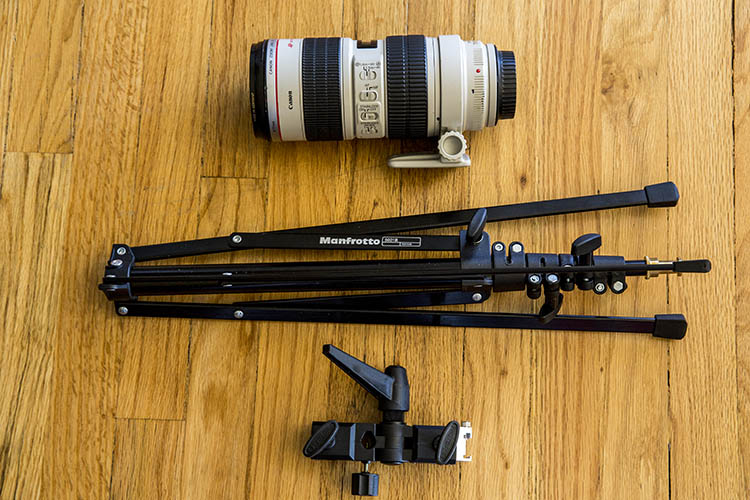
Manfrotto Nano 5001B shown next to the Canon 70-200mm f/2.8 lens and light stand adapter (neither of these is included and must be purchased separately).

Manfrotto 5001B Nano Specifics

Weighing in at a mere 2.2 pounds (1kg), this aluminum light stand stands at just around 19-inches (0.48m) when it is collapsed, and can extends up to 74.8 inches (1.9m) tall when all of its 5-sections are fully extended. According to the product manual, it has a maximum payload of 3.3 pounds (1.5kg) . Compared to other light stands, most of these stats aren’t particularly impressive, and it should now be apparent why the Manfrotto 5001B Nano won’t be suitable for every photographer. But, here are some situations when this light stand absolutely shines.

Manfrotto 5001B Nano Lighting Stand 1

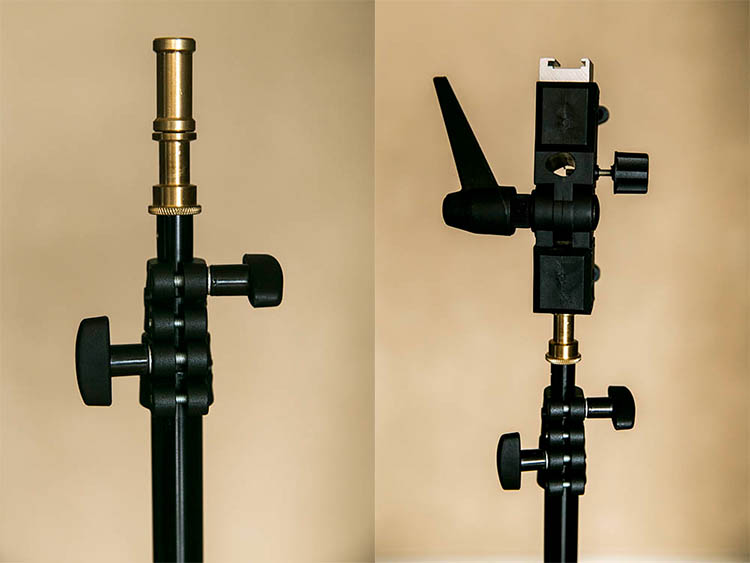
Lighting stand as seen with a Speedlight adapter attached. Adapter sold separately.

Extremely Compact and Travel-Friendly

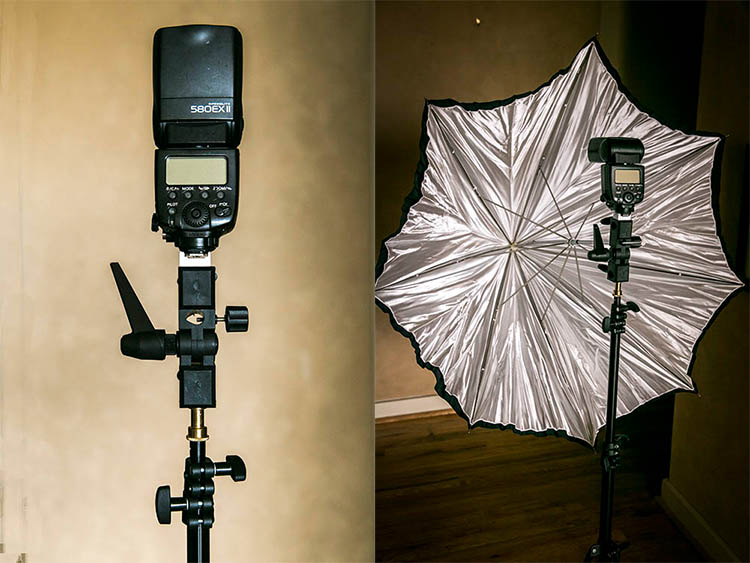
The main benefit of this light stand is its compact size, which makes it easy to carry when shooting on location, or in situations when you need a stand or two without carrying an excessive amount of gear. When pairing this light stand with a speedlight, and simple lighting modifiers like an umbrella or any of the Westcott Rapid Box series, you get a simple yet effective lighting setup that won’t take up a ton of room when assembled for use, and when transporting it.

Flexible Light Stand Legs

Unlike most other light stands, the Manfrotto Nano’s legs have little rubber tips to prevent sliding, and the legs themselves are very thin and not rounded, allowing the stand to fold down to 19 inches. The method of folding the stand can take some getting used to, but another unique aspect of the stand is its ability to get extremely low to the ground, thanks to the unusual folding of the legs. This increases the light stand’s overall footprint, offering increased stability, as well as the option of lighting areas close to the ground, without taking up a ton of floor space.

Manfrotto 5001B Nano Lighting Stand 1

Light stand with adapter, speedlight, and umbrella attached. The ideal use for this stand.

Trading Stability for Compact Size

As mentioned earlier, not every photographer will be in love with the Manfrotto 5001B Nano, as it often trades stability for its compact size. Flexible legs are great for packing up small, but also a recipe for disaster if the gear it holds is not balanced or is too heavy. Being very lightweight, without the option of suspending sandbags, this stand is also susceptible to being knocked over by even a slight bump or gust of wind, so outdoor photographers will want to have an assistant to hold it in place.  It’s definitely not as sturdy or as beefy as other light stands, meaning you won’t want to rely on it if you use heavy strobes, or big lighting modifiers.

In Summary

If you’re a location shooter, who doesn’t carry a ton of camera gear and has compact lighting equipment, the Manfrotto 5001B Nano will be your new best friend. Having one or two as travel light stand alternatives, will give you the flexibility to do a quick and easy lighting setup in tight spaces, without carrying extra weight. However, steer clear of these light stands if you prefer uncompromised stability and/or have heavy, valuable lighting gear.

amzn_assoc_placement = “adunit0”;
amzn_assoc_enable_interest_ads = “true”;
amzn_assoc_tracking_id = “dpsgeneral-20”;
amzn_assoc_ad_mode = “auto”;
amzn_assoc_ad_type = “smart”;
amzn_assoc_marketplace = “amazon”;
amzn_assoc_region = “US”;
amzn_assoc_linkid = “6710d26f550e9793f41475ee806fee9e”;
amzn_assoc_emphasize_categories = “13900861”;
amzn_assoc_fallback_mode = {“type”:”search”,”value”:”digital cameras”};
amzn_assoc_default_category = “Photo”;

googletag.cmd.push(function() {
tablet_slots.push( googletag.defineSlot( “/1005424/_dPSv4_tab-all-article-bottom_(300×250)”, [300, 250], “pb-ad-78623” ).addService( googletag.pubads() ) ); } );

googletag.cmd.push(function() {
mobile_slots.push( googletag.defineSlot( “/1005424/_dPSv4_mob-all-article-bottom_(300×250)”, [300, 250], “pb-ad-78158” ).addService( googletag.pubads() ) ); } );

The post Review: Manfrotto 5001B Nano Light Stand by Suzi Pratt appeared first on Digital Photography School.


Digital Photography School

 
Comments Off on Review: Manfrotto 5001B Nano Light Stand

Posted in Photography


Leica Q In-depth Review

24 Mar

The Leica Q (Typ 116) is a high-end, fixed-lens compact camera with a 24MP full-frame sensor and a 28mm F1.7 Summilux stabilized lens. It represents a new product line for Leica, and was the first full-frame Leica to incorporate an autofocus system.

Leica – one of the most traditional of traditional camera manufacturers – has been pretty innovative in recent years, bringing us the luxuriously black medium-format S-series, the full-frame mirrorless SL, and the innovative, stylish (if not particularly likable) Leica T.

The Q is styled in a similar way to Leica’s high-end M-series rangefinders, but with the addition of a high resolution electronic viewfinder and touch-sensitive LCD screen. Unlike the Leica T, where Leica made the touchscreen absolutely central to the handling experience, the Q’s touchscreen is essentially optional, and works in concert with several conventional (physical) control points. This combination of classic and modern is central to the Q, which melds manual control with electronic assistance fluidly in its ergonomics.

The Q’s full-frame image sensor and fast wide-angle lens are its two most important features. In combination, our tests show that they are capable of extraordinarily sharp images. It also turns out that shooting with the Q is just, well, a lot of fun. A lovely mechanical manual focus ring makes focusing a pleasure, but fast and accurate autofocus is on hand if you’d prefer. Likewise for manual aperture and shutter speed control; both have dedicated dials, but both can also be left on ‘A’ for auto. Images can be composed on the rear LCD if you like, but a built-in EVF offers a bright and detailed view of the world beyond the lens. While the design of the Q is reminiscent of the Fujifilm X100T, philosophically its closest match is the Sony RX1R II.

Leica Q key features

  • 24MP full-frame CMOS sensor
  • Fixed 28mm F1.7 ASPH lens with image stabilization
  • ISO 100-50000
  • 3.68M dot-equivalent LCOS electronic viewfinder
  • 3″ fixed touchscreen LCD with 1.04 million dots
  • 10 fps continuous shooting
  • 1080/60p HD video capture
  • Wi-Fi and NFC connectivity with dedicated Leica app
  • Magnesium-alloy body
  • Mechanical (leaf) and electronic shutter

Leica may be known for making cameras that help photographers slow down their process, but the Q also has the ability to help speed things up. It offers 10 fps bursts, even when capturing full resolution DNG images. The camera is ‘smart’, offering both Wi-Fi and NFC, and has a dedicated app for remote shooting and viewing images. Video is captured at 1080p at either 30 or 60 fps.

If the 28mm lens feels too wide, there is a feature called ‘digital frame selector’ that drops frame markers in the field of view, equivalent to your choice of 35 or 50mm. Of course you will lose some resolution cropping in. And for street shooters, options like face detect and touch-to-focus/touch-to-shoot (using the LCD) can be very effective, especially when shooting from the hip. Of course you can always pre-focus manually using the focus depth scale, if you prefer.

Compared to Sony Cyber-shot RX1R II

As mentioned above, in terms of specification, the Leica Q’s closest competitor is Sony’s Cyber-shot RX1R II. On paper, the main differences between the Leica and the Sony involve their sensors and the different lens specifications. You’ll find a detailed breakdown of key specifications below.

  Leica Q Sony RX1R II
Sensor 24MP Full Frame CMOS 42MP Full Frame BSI CMOS
Lens 28mm F1.7 35mm F2
ISO range (expanded) 100-50,000 50-102,400
Built-in viewfinder Yes Yes
LCD specs 3″ touch LCD with 1.04M dots 3″ tilting LCD with 1.2M dots
Burst 10 fps 5 fps
Video 1080/60p 1080/60p
Pop-up flash No No
Hot shoe Yes Yes
Macro mode Yes Yes
Wi-Fi enabled Yes, with NFC Yes, with NFC
Weight 640 grams 507 grams

Pricing and Availability

The Leica Q retails for $ 4250 and is available now.

If you're new to digital photography you may wish to read the Digital Photography Glossary before diving into this article (it may help you understand some of the terms used).

Conclusion / Recommendation / Ratings are based on the opinion of the reviewer, you should read the ENTIRE review before coming to your own conclusions.

We recommend to make the most of this review you should be able to see the difference (at least) between X, Y, and Z and ideally A, B, and C.

This article is Copyright 1998 – 2016 and may NOT in part or in whole be reproduced in any electronic or printed medium without prior permission from the author.

Articles: Digital Photography Review (dpreview.com)
 
Comments Off on Leica Q In-depth Review

Posted in Uncategorized


Upwardly mobile: Sony a6300 First Impressions Review

17 Mar

The Sony a6300 is the company’s latest mid-range mirrorless camera. Like the a6000 it still offers 24MP resolution but the autofocus ability, video capability, build quality, viewfinder resolution and price have all been increased.

The most exciting change from our perspective is the a6300’s new sensor. Although the pixel count remains the same, the a6300’s sensor has a whopping 425 phase-detection AF points ranged across the sensor. The a6000 already offered one of the best AF systems in its class, when it comes to identifying and tracking subjects, so an upgrade in this area sounds extremely promising. The sensor is also built using newer fabrication processes that use copper wiring to help improve the sensor’s performance and possibly contributing to the camera’s slightly enhanced battery life.

The a6000 has been a huge success and has dominated its field to the extent that its combination of capability and price still looks impressive even as it enters the twilight of its career (Sony says it will live on, alongside the a6300*). That model represented a dip down-market for the series, with a drop in build-quality and spec relative to the NEX-6 that preceded it. The a6300 corrects that course, and sees the model regain the high-resolution viewfinder and magnesium alloy build offered by the older NEX-6.

Key features:

  • 24MP Exmor CMOS sensor
  • 425 phase detection points to give ‘4D Focus’ Hybrid AF
  • 4K (UHD) video – 25/24p from full width, 30p from smaller crop
  • 2.36m dot OLED finder with 120fps mode
  • Dust and moisture resisitant magnesium alloy body
  • Built-in Wi-Fi with NFC connection option
  • Built-in microphone socket

As with the previous 6-series E-mount cameras, the a6300 features a flip up/down 16:9 ratio screen. The shape of this screen hints at the 6300’s intended uses: video shooting as well as stills. The a6300’s movie features have been considerably uprated. It not only shoots 4K (UHD) at 24p or 25p from its full sensor width (or 30p from a tighter crop). It also gains a mic socket, the video-focused Picture Profile system (which includes the flat S-Log2 and S-Log3 gamma curves), and the ability to record time code.

This added emphasis on video makes absolute sense, since the camera’s stills performance is likely to be competitive with the best on the market but its video capabilities trounce most of its current rivals. The a6300 not only includes focus peaking and zebra stripes but, if its on-sensor phase detection works well, the ability to re-focus as you shoot with minimal risk of focus wobble and hunting, should make it easier to shoot great-looking footage.

All this makes it hard to overstate how promising the a6300 looks. A latest-generation sensor can only mean good things for the camera’s image quality and an autofocus system that moves beyond the performance of one of our benchmark cameras is an enticing prospect. Add to that excellent, well-supported video specifications, a better viewfinder and weather-sealed build, and it’s tempting to start planning for the camera’s coronation as King of the APS-C ILCs. Perhaps with only the price tag floating over proceedings, threatening just a little rain on that particular parade.

Specifications compared:

As well as comparing the a6300 with the a6000 as its predecessor/sister model, we’ll also look at what you get if you save up a bit more money and opt for full frame, rather than APS-C. We think at least some enthusiast users will find themselves making this decision, so are highlighting the differences.

  Sony a6000 Sony a6300 Sony a7 II
MSRP (Body Only) $ 650 $ 1000 $ 1700
Sensor size APS-C (23.5 x 15.6mm) APS-C (23.5 x 15.6mm) Full Frame (35.8 x 23.9 mm)
Pixel count 24MP 24MP 24MP
AF system Hybrid AF
(with 179 PDAF points)
Hybrid AF
(with 425 PDAF points)
Hybrid AF
(with 117 PDAF points)
Continuous shooting rate 11.0 fps 11.0 fps 5.0 fps
Screen 3″ tilting 921k dot LCD 3″ tilting 921k dot LCD 3″ tilting 1.23m dot LCD
Viewfinder OLED 1.44m dots OLED 2.36m dots 120fps refresh option OLED 2.36m dots
Movie Resolution 1920 x 1080 / 60p 4K 3840 x 2160 / 30p, 1920 x 1080 / 120p, 60p 1920 x 1080 / 60p
Image stabilization In-lens only In-lens only In-body 5-axis
Number of dials Two Two Three (plus Exp Comp.)
Maximum shutter speed 1/4000sec 1/4000sec 1/8000sec
Built-in flash  Yes Yes No
Hot shoe Yes Yes Yes
Flash sync speed 1/160sec 1/160sec 1/250sec
Battery life
(with EVF)
360 shots
(310 shots)
400 shots
(350 shots)
350 shots
(270 shots)
Weight (w/battery) 344 g (12.1 oz) 404 g (14.3 oz) 599 g (21.1 oz)
Dimensions 120 x 67 x 45 mm (4.7 x 2.6 x 1.8″) 120 x 67 x 49 mm (4.7 x 2.6 x 1.9″) 127 x 96 x 60 mm (5 x 3.8 x 2.4″)

A hit-for-six, slam-dunk, home-run?

If it’s successful in its attempts to step up from the performance of the a6000 then the a6300 could be sensational. However, there are three questions that we’d like to see addressed. The first relates to handling: why does a camera costing this much only have one dial that you can access without changing the position of your grip? The rear dial isn’t the worst we’ve encountered, but at this price point, we’d usually expect to find a dial under the forefinger and another under the thumb while maintaining a shooting grip.

The second relates to lenses. Sony is bundling the a6300 with the 16-50mm power zoom that’s far more notable for its convenience than its optical consistency, a move that’s likely to raise the question of what other lenses to fit. Sony offers a handful of reasonably-priced APS-C specific prime lenses as well as some more expensive FE-compatible full frame primes. However, in terms of standard zooms, you’re currently limited to the inexpensive 16-50mm or the considerably better 16-70mm F4 Zeiss that costs around the same amount as the camera again. The success of Sony’s full frame a7 cameras is only likely to improve third-party lens availability but there’s a risk that Sony’s focus will be on those full frame users for the foreseeable future.

Our final concern is the lack of joystick or touchscreen to reposition the AF point. This may be mitigated during stills shooting if the lock-on AF system works well enough (starting AF tracking and then recompose your shot in the knowledge that the AF point will stay where you want it), but it appears to be a real omission for refocusing while shooting video. We’ll see how significant all these concerns turn out to be, as the review unfolds.

Price and kit options

 The 16-50mm power zoom is far more notable for its convenience than its optical consistency.

The a6300 will sell for around $ 1000/£1000/€1,250, with a 16-50mm F3.5-5.6 power zoom kit commanding an MSRP of $ 1,150/£1,100/€1,400. This is a significant step up from the a6000’s $ 650/$ 800 launch price and even an increase compared to the similarly well-built NEX-6’s $ 750/$ 900 MSRP.

 Review History
17 March 2016 Intro, Specs, Body and Handling, Operations and Control and Studio Comparison published

*Unusually, the manufacturer’s claim that it’ll live on, alongside its apparent replacement model seems plausible. The differences in spec and price could allow them to sit fairly comfortably alongside one another, rather than the claim simply meaning ‘we’ll keep saying it’s a current model until most of the unsold stock has gone, to avoid angering retailers.’


If you're new to digital photography you may wish to read the Digital Photography Glossary before diving into this article (it may help you understand some of the terms used).

Conclusion / Recommendation / Ratings are based on the opinion of the reviewer, you should read the ENTIRE review before coming to your own conclusions.

We recommend to make the most of this review you should be able to see the difference (at least) between X, Y, and Z and ideally A, B, and C.

This article is Copyright 1998 – 2016 and may NOT in part or in whole be reproduced in any electronic or printed medium without prior permission from the author.

Articles: Digital Photography Review (dpreview.com)

 
Comments Off on Upwardly mobile: Sony a6300 First Impressions Review

Posted in Uncategorized