RSS
 

Posts Tagged ‘REVIEW’

Elevating X-Trans? Fujifilm X-T2 Review

19 Oct

The Fujifilm X-T2 is an updated version of the company’s top-level DSLR-shaped APS-C camera. It’s built around the same 24MP X-Trans sensor as the X-Pro2 but ends up being much more than an X-T1 with more pixels. Instead, the X-T2 is a camera that does much to address the X-System’s remaining weaknesses, which can only broaden its already considerable appeal.

Fujifilm X-T2 Key Features:

  • 24MP X-Trans CMOS III sensor
  • 325 AF points (169 of which offer phase detection)
  • AF point selection joystick
  • 2.36M-dot OLED EVF with 0.005 sec refresh time (60 fps or 100 fps in boost mode)
  • 3″ 1.04M-dot articulating LCD
  • 4K UHD video at up to 30 fps for up to 10 min (30 min with booster grip)
  • F-Log flat profile and 4K out over HDMI
  • 8 fps continuous shooting with AF (11 fps with booster grip)
  • 5 fps continuous shooting with live view updates between capture
  • Dual SD card slots (UHS-II compatible)
  • USB 3.0 socket

The X-Pro2 represented a good step forward for image quality within the system and the X-T2 gains all of that improvement, but there are also some considerable changes in terms of autofocus, video and flash control, suggesting Fujifilm wants its the X-T2 to be an all-round more capable camera than its predecessor, rather than just building on its existing strengths.

The body seems broadly unchanged at first glance but there’s a clever doubly-hinged flip-out screen that seems to offer many of the flexibility advantages of a fully articulated monitor while retaining the more compact form of a tilting screen.

There’s also a Performance Boost mode that speeds up several aspects of the camera’s behavior (at the expense of some battery life), but that really comes into its own when the optional ‘Power Boost Vertical Grip’ is added. None of these additions comes for free, though: at $ 1599, body only, the X-T2’s launch price has jumped $ 300, compared to its predecessors’.

Autofocus

Part and parcel of that 24MP sensor are the 169 phase-detection points that we saw in a large central square region of the sensor on the X-Pro2. Beyond this, the X-T2 now gains an extra two columns of 13 contrast-detection AF points down each side of the frame, widening its AF area and bringing it to a total of 325 AF points in total.

Fujifilm also promises a more powerful processor and revised algorithms, along with faster sensor read-out, to improve the camera’s speed, regardless of whether it’s using a combination of phase detection and contrast detection (Hybrid AF), or simply the latter alone.

To get the best-possible performance out of the newly refined AF system, the X-T2 introduces a use case-based AF-C setup system. Much like the one we’ve seen on high-end Canon DSLRs, this lets you specify the types of movement you’re expecting from your subject, so that the camera can try to respond appropriately.

Video

The X-T2 makes a bigger leap forward into video than we were expecting. There was much chatter around the time of the X-Pro2’s launch that the camera’s hardware was, theoretically, capable of 4K capture, but that the company hadn’t pursued its development for such a stills-orientated model. Well, it has now.

The X-T2’s movie capabilities are a big step forward for the system.

But Fujifilm has done more than just do enough to be able to emblazon the phrase ‘4K capable’ on the box: the camera also gains a mic socket and on-screen audio monitoring with the ability to assign mic volume to a Fn button. There’s also an ‘F-Log’ flat profile to give flexibility while color grading.

The good news is that our first shots of our test scene suggest the camera’s 4K footage is much more impressive than the 1080p that the first X-Trans cameras could muster. Fujifilm says its taken from an area 1.8x larger than the 4K UHD region, which suggests oversampling in each dimension. Combine this with 4K output over HDMI and the X-T2 looks like the first X-Trans camera that might appeal to shooters interested in shooting both stills and video.

Flash control

One of the missing pieces of an increasingly well fleshed-out XF mount system has been the lack of advanced flash control – something that the X-T2 is looking to address. Up until now, users have had to turn to third-party makers if they wanted to communicate TTL flash information to remote flash units.

The newly introduced EF-X500 flash allows high speed flash sync and remote TTL flash control for the first time, making it significantly easier to use the X-T2 with strobes.

Optional ‘Power Booster Grip’

Along with the X-T2, Fujifilm has introduced the VPB-XT2, a vertical battery grip that holds two extra batteries. As well as significantly extending the camera’s battery life, the grip also extends the camera’s ‘Boost’ mode. With the grip attached, this is able to draw power from multiple batteries, increasing the camera’s maximum continuous shooting rate, as well as extending its video recording time to 30 minutes.

The entertainingly-named ‘Vertical Power Booster Grip’ can house two addition batteries (without displacing the camera’s internal unit), helping increase capacity to around 1000 frames between charges. It also adds a headphone socket and a ‘Boost’ switch that improves responsiveness and ups the frame rate to 11 fps.

This grip features the same level of environmental sealing as the camera body and also plays host to a headphone socket for audio monitoring while shooting video.

Review History

Review History
6 July 2016 First Impressions, Studio Scene and Beta Gallery published,
based on pre-production camera running f/w 1.34
19 October 2016 Image Quality, Autofocus and Conclusion published,
based on production camera running f/w 1.00

Articles: Digital Photography Review (dpreview.com)

 
Comments Off on Elevating X-Trans? Fujifilm X-T2 Review

Posted in Uncategorized


Modest Updates: Nikon D3400 Review

18 Oct

Key Features

  • 24MP APS-C CMOS sensor
  • 11-point phase detect auto-focus system
  • 1080/60p video capability
  • Fixed 3″ 920k-dot LCD screen
  • 5/fps burst shooting
  • Bluetooth LE for image transfer

The D3400 is a very modestly updated version of the D3300. It’s an entry level DSLR targeted toward first-time ILC shooters and those who are ready to move on from their smartphones to a more advanced shooting platform.

The camera is built around the same 24MP APS-C CMOS sensor found in its predecessor along with an ‘EXPEED 4’ image processor, Full HD video capture and an 11-point autofocus system. Unfortunately the camera doesn’t have Wi-Fi, but it does have Bluetooth LE connectivity for transferring images from the camera to a smart phone via the ‘SnapBridge’ app.

Nikon packs a lot of very desirable features into the D3400 for the price.

In terms of competition, the D3400’s sits between the Canon Rebel T6 and the Canon Rebel T6i. The D3400’s $ 649 launch price for a kit with the new AF-P 18-55mm F3.5-5.6 VR lens puts it between the $ 549 list price of for the T6/EOS 1300D kit and the significantly more expensive $ 899 MSRP for the T6i with the 18-55mm VR zoom. The T6 has a lower resolution, 18MP sensor but its lower price makes it a threat at this price-sensitive point in the market.

Specs Comparison

The table below illustrates that not much has changed from the D3300 to the D3400. The biggest changes seen in the D3400 are in battery life (which we suspect is due to the less powerful flash), weight and the new built in Bluetooth LE that works with SnapBridge to enable photo sharing. The D3400 also tends to come kitted with a new ‘AF-P’ version of the 18-55mm VR lens which uses a new focus motor to offer improved performance in live view and video.

For beginning DSLR shooters the elimination of the external mic port (if video is important to you) and, more notably, the Ultrasonic Sensor Cleaning from the D3400 is something to definitely keep in mind when deciding which camera to purchase.

If you’re not wedded to the idea of owning a DSLR, the Fujifilm X-A3 (which features an articulating touchscreen LCD and twin control dials), and the Sony a5100 (which acts more in the way of a point and shoot), are both mirrorless cameras. These offer excellent features and image quality in a much smaller package. These are definitely two other options to also consider looking at before making a purchase.

It is worth noting that the traditional DSLR still holds some key advantages over mirrorless rivals. They offer much better battery life and lens selection, for example. The optical viewfinder is another important factor for many photographers. For more on the subject, read our primer.

  Nikon D3300 Nikon D3400 Canon Rebel T6i (EOS 750D) Pentax K70 Fujifilm X-A3
Price (MSRP) $ 649.95 w/18-55mm kit $ 649.95 w/18-55mm kit

$ 899.00 w/18-55mm kit

$ 899.95 w/18-135mm kit $ 599.95 w/16-50mm kit
Sensor 24.2MP 24.2 MP 24 MP 24 MP 24 MP
Image Processing EXPEED 4 EXPEED 4 DIGIC 6 PRIME MII EXR Processor II
LCD Fixed 3.0″ 921k-dot LCD Fixed 3.0″ 921k-dot LCD Fully Articulated 3.0″ 1.04M-dot LCD Fully Articulated 3.0″ 921k-dot LCD Fully Articulated 3.0″ 1.04M-dot touchscreen LCD
AF System 11-point (one cross-type) 11-point (one-cross type) 19-point (all cross-type) 11-point (9-cross-type) 77-point
Viewfinder
magnification (coverage)
0.85x (95% coverage) 0.85x (95% coverage) 0.82x (95% coverage) 0.95x (100% coverage) None
ISO Range 100-12,800 (expansion to 25,600) 100-12,800 (expansion to 25,600) 100-12,800 (expansion to 25,600) 100-102,400 200-6400 (expansion 100-25600)
Connectivity  With optional WU-1a Mobile Adapter Bluetooth LE Wi-Fi with NFC Wi-Fi Wi-Fi
Video Capture max res. 1080/60p 1080/60p 1080/30p 1080/30p 1080/60p
Continuous Shooting 5 fps 5 fps 5 fps 6 fps 6 fps
Built in Flash
(Range)
Yes (12m) Yes (7m) Yes (12m) Yes (12m) Yes (7m)
Sensor Cleaning Ultrasonic No Ultrasonic Ultrasonic Ultrasonic
External Mic Port Yes No Yes Yes No
Weather Sealing No No No Yes No
Battery Life 700 shots 1200 shots 440 shots 410 shots 410 shots
Dimensions 124 x 98 x 76mm 124 x 98 x 76 mm 132 x 101 x 78 mm 126 x 93 x 74 mm 117 x 67 x 40 mm
Weight 460g 395g 555g 688g 339 g

Articles: Digital Photography Review (dpreview.com)

 
Comments Off on Modest Updates: Nikon D3400 Review

Posted in Uncategorized


Sigma 30mm F1.4 DC DN Contemporary Micro Four Thirds Lens Review

12 Oct

The Sigma 30mm F1.4 DN DC Contemporary was announced February 2016, and sits atop Sigma’s line of DN mirrorless lenses, with a two-stop advantage over their previous 30mm F2.8 offering.

As a Micro Four Thirds lens, it is one of only several current autofocus F1.4 prime lenses available, with its closest competitor being the Panasonic Leica Summilux DG 25mm F1.4. While the Panasonic offers a field-of-view equivalent to a ‘classic’ 50mm lens, the Sigma ends up around 60mm. While that makes its focal length possibly a bit long for street shooting, it helps a little when it comes to portraiture and close-up work.

Let’s see how the basic specifications between the Panasonic Leica 25 and Sigma 30 compare:

  Panasonic Leica Summilux DG 25mm F1.4 Sigma 30mm F1.4 DC DN | C
Price $ 598 $ 339
Image Stabilization No No
Max Aperture F1.4 F1.4
Minimum Aperture F16 F16
Aperture Ring No No
Diaphragm Blades 7 9
Minimum Focus 0.30 m (11.81?) 0.30 m (11.81?)
Maximum Magnification 0.11x 0.14x
Motor Type Micromotor Stepper motor
Full Time Manual Yes No
Weight 200 g (0.34 lb) 265 g (0.58 lb)
Dimensions (DxL) 63 mm (2.48?)  X 55 mm (2.15?) 65 mm (2.56?) X 73 mm (2.87?)
Sealing None None
Filter Thread 46mm 52mm

Regardless of where it sits in terms of focal length and usability, the Sigma enters the opposite of a crowded marketplace as an autofocus F1.4 Micro Four Thirds prime. It also gets the advantage of being the cheapest autofocus F1.4 Micro Four Thirds prime available, even undercutting the price of some F1.8 options as well. 

Thankfully, the Sigma doesn’t feel entirely cheap. The barrel is well made with a satin black finish and ridges for grip when mounting or removing the lens. Sadly, the plastic hood feels a little inexpensive, and doesn’t feel like it clicks in to position with much confidence. Build quality of the lens itself is on par with the Pana-Leica, with both having smooth, sturdy focus rings with rubberized ridged grips.

The extra bit of diameter and length on the Sigma make it a bit bulky and unbalanced when mounted to some of slimmer Micro Four Thirds cameras, like the Olympus PEN series, or the E-M5 II. When mounted to a larger SLR shaped body, like the GH4, the Sigma fits nicely.

We’re assuming the extra size, relative to the Panasonic stems from it needing to be large enough to cover an APS-C sized sensor, in its E-mount incarnation.

Does the discounted price mean the Sigma comes with discount performance? Can it shake off past stigmas about third party lenses and go toe-to-toe with a lens touting one of the most revered names in the business? Let’s take a closer look at the numbers.

Articles: Digital Photography Review (dpreview.com)

 
Comments Off on Sigma 30mm F1.4 DC DN Contemporary Micro Four Thirds Lens Review

Posted in Uncategorized


Sigma 30mm F1.4 DC DN Contemporary Micro Four Thirds Lens Review

11 Oct

The Sigma 30mm F1.4 DN DC Contemporary was announced February 2016, and sits atop Sigma’s line of DN mirrorless lenses, with a two-stop advantage over their previous 30mm F2.8 offering.

As a Micro Four Thirds lens, it is one of only several current autofocus F1.4 prime lenses available, with its closest competitor being the Panasonic Leica Summilux DG 25mm F1.4. While the Panasonic offers a field-of-view equivalent to a ‘classic’ 50mm lens, the Sigma ends up around 60mm. While that makes its focal length possibly a bit long for street shooting, it helps a little when it comes to portraiture and close-up work.

Let’s see how the basic specifications between the Panasonic Leica 25 and Sigma 30 compare:

  Panasonic Leica Summilux DG 25mm F1.4 Sigma 30mm F1.4 DC DN | C
Price $ 598 $ 339
Image Stabilization No No
Max Aperture F1.4 F1.4
Minimum Aperture F16 F16
Aperture Ring No No
Diaphragm Blades 7 9
Minimum Focus 0.30 m (11.81?) 0.30 m (11.81?)
Maximum Magnification 0.11x 0.14x
Motor Type Micromotor Stepper motor
Full Time Manual Yes No
Weight 200 g (0.34 lb) 265 g (0.58 lb)
Dimensions (DxL) 63 mm (2.48?)  X 55 mm (2.15?) 65 mm (2.56?) X 73 mm (2.87?)
Sealing None None
Filter Thread 46mm 52mm

Regardless of where it sits in terms of focal length and usability, the Sigma enters the opposite of a crowded marketplace as an autofocus F1.4 Micro Four Thirds prime. It also gets the advantage of being the cheapest autofocus F1.4 Micro Four Thirds prime available, even undercutting the price of some F1.8 options as well. 

Thankfully, the Sigma doesn’t feel entirely cheap. The barrel is well made with a satin black finish and ridges for grip when mounting or removing the lens. Sadly, the plastic hood feels a little inexpensive, and doesn’t feel like it clicks in to position with much confidence. Build quality of the lens itself is on par with the Pana-Leica, with both having smooth, sturdy focus rings with rubberized ridged grips.

The extra bit of diameter and length on the Sigma make it a bit bulky and unbalanced when mounted to some of slimmer Micro Four Thirds cameras, like the Olympus PEN series, or the E-M5 II. When mounted to a larger SLR shaped body, like the GH4, the Sigma fits nicely.

We’re assuming the extra size, relative to the Panasonic stems from it needing to be large enough to cover an APS-C sized sensor, in its E-mount incarnation.

Does the discounted price mean the Sigma comes with discount performance? Can it shake off past stigmas about third party lenses and go toe-to-toe with a lens touting one of the most revered names in the business? Let’s take a closer look at the numbers.

Articles: Digital Photography Review (dpreview.com)

 
Comments Off on Sigma 30mm F1.4 DC DN Contemporary Micro Four Thirds Lens Review

Posted in Uncategorized


Fast and light: Nikkor 24mm F1.8G ED lens review

05 Oct

The AF-S Nikkor 24mm F1.8G ED was first announced back in August 2015. It joins Nikon’s growing family of modern full frame primes alongside the 20mm F1.8G, 28mm F1.8G, 35mm F1.8G, 85mm F1.8G and the 50mm F1.8G. It’s priced at just under $ 750 making it a well matched option to be paired with cameras like the Nikon D610 and the Nikon D750. The Nikkor can also be used on DX format cameras with an equivalent focal length of 36mm.

This fast wide-angle prime will most likely appeal to architecture, landscape and portrait or wedding photographers. Additionally, the F1.8 max aperture may come in handy for those looking to utilize the lens for astrophotography work as well.

At 24mm the lens is Nikon’s second widest prime option to date, coming in just behind the Nikkor 20mm lens. It’s worth noting that there are a few other options at 24mm that potential buyers should definitely be aware of. One of those options is the slightly faster Sigma 24mm F1.4 DG HSM Art that comes in at just under $ 850.

The Sigma 24mm can be seen mounted on a Nikon D810 on the left and the Nikkor 24mm can be seen mounted on a D810 on the right.

Although the Sigma is a bit pricier, it is a sensible alternate option for folks looking for a lens at this focal length. By comparison the Nikkor 24mm F1.4G ED is is priced at just under $ 2000 which makes the Sigma version that much more attractive to potential buyers. We will be taking a closer look at the Nikkor 24mm F1.8G and the Sigma 24mm F1.4 as an alternative lens option in this review.

APS-C

If you’re an APS-C shooter the 36mm equivalent focal length with an equivalent aperture of F2.7 will be a nice addition to your lens kit, being flexible enough to allow environmental and photojournalistic portraits while still being wide enough to accommodate for some landscape and architectural photography as well. It is worth noting however that if you’re looking to purchase this lens for an APS-C camera, then other options, such as Sigma’s 18-35mm F1.8 lens, might be a better alternative for the money. For this reason, we’re not going to consider this lens for use on APS-C in this review.

Nikkor 24mm F1.8G ED Headline Features

  • 24mm Focal Length
  • F1.8 Maximum Aperture
  • ‘Silent wave’ focus motor with full-time manual override
  • F-mount FX format lens, works on both DX and FX format Nikon SLRs
  • Accepts standard screw-type 72mm Filters

Lens Specifications

  AF-S Nikkor 24mm F1.8G ED Sigma 24mm F1.4 DG HSM A (Nikon Mount)
Price (MSRP) $ 745 $ 849
Announced 2015 2015
Lens Type Wide Angle Prime Wide Angle Prime
Lens Mount Nikon F Nikon F
Max Format Size 35mm FF 35mm FF
Focal Length 24mm 24mm
Image Stabilization No No
Max Aperture F1.8 F1.4
Minimum Aperture  F16 F16
Aperture Ring  No No 
Diaphragm Blades 7 (rounded)  9 (rounded)
Elements 12  15
Groups  9 11
Special Elements/Coatings  2 extra-LD glass elements and 2 aspherical elements, Nano Crystal Coat and Super Integrated Coating 2 aspherical elements, 3 FLD and 4 SLD glass elements coupled with Multi Layer Coatings
Minimum Focus 23cm (9.1″) 25cm (9.9″)
Maximum Magnification 0.2x  0.19x
Autofocus Yes  Yes
Motor Type Silent Wave Motor autofocus mechanism HSM (Hyper Sonic Motor)
Full Time Manual  Yes Yes
Focus Method  Internal Internal
Distance Scale Yes Yes
DoF Scale Yes Yes 
Weight  355g (12.5 oz) 665g (23.1 oz)
Dimensions (DxL) Approx. 78 x 83mm (3.1 x 3.3″) 85 x 90mm (3.4 x 3.6″)
Materials Metal Mount/Plastic and composite material Metal Mount/Thermally Stable Composite (TSC) material
Sealing  None  None
Color Black Black
Filter Thread 72mm 77mm
Hood Supplied  Yes Yes
Hood Product Code HB-76 Bayonet Hood  
Tripod Collar No No

The Nikkor 24mm has a metal lens mount and a mostly plastic/composite material body. It feels surprisingly light for being such a fast prime lens; especially when compared to the Sigma 24mm lens which weighs nearly twice the amount and is slightly larger in size (this is broadly to be expected with the Sigma’s 2/3 stop extra light gathering ability). The build quality of the Sigma lens definitely feels more robust with the majority of its components constructed of metal and a composite material that can be found on most of Sigma’s Art series lenses.

It’s worth mentioning that both the Nikkor and the Sigma 24mm lenses lack comprehensive weather sealing, but the Nikkor does offer some protection with rubber gasket around the lens mount, so that’s definitely something to keep in mind if you plan to use these lenses in adverse weather conditions.

With these specifications in mind, how do these lenses stack up against one another in terms of performance? In this review we will be looking at the performance of the Nikkor 24mm and how it compares to the heavier and faster Sigma 24mm. 

Articles: Digital Photography Review (dpreview.com)

 
Comments Off on Fast and light: Nikkor 24mm F1.8G ED lens review

Posted in Uncategorized


Lens Review: Sigma 18-35mm f/1.8 DC HSM Art Lens

21 Sep

In the world of photography, there are several different schools of thought when it comes to third party lenses. Some photographers love them, some photographers choose to only purchase lenses made by their camera manufacturer. Personally, I have never had a problem with third party lenses, and they make up about half of my current camera bag. So when I had the chance to try out the Sigma 18-35mm f/1.8 DC HSM lens for APS-C cameras for about a month, I happily jumped on the opportunity to put it to good use!

sigma-lens-review-8

Lens Features and Build

Right out of the box, it was evident that this lens is something special. Sigma 18-35mm f/1.8 Art Lens offers a focal range that makes it useful for a number of different genres of photography such as weddings, portraits, and family photography. As an added bonus, it offers a fast constant aperture (f/1.8) that’s practically unheard of in similar zoom lenses.

Sigma’s Art line has been getting a lot of buzz over the past couple of years for being high-quality lenses at an affordable price point, and this one certainly did not disappoint. Some third party lenses can have the tendency to feel plastic-y, but this lens is made of Thermally Composite Material, which both looks and feels sturdy and professional.

sigma-lens-review-9

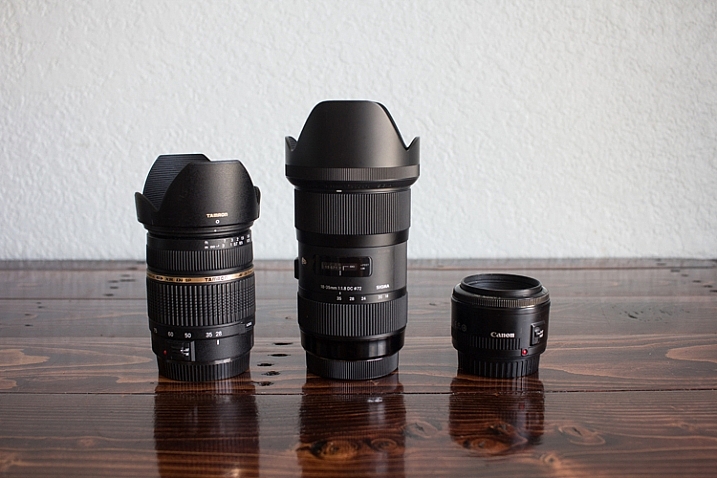
For size comparison: Left: the Tamron 28-75mm f/2.8 | Center: the Sigma 18-35mm f/1.8 | Right: the Canon 50mm f/1.8

This particular lens was physically larger than I expected based on other lenses in my bag, and it felt quite a bit heavier than I imagined as well. One weekend I took this lens to an RC air show, and several people commented to me that they wished they’d brought a telephoto lens like I had! It definitely isn’t a particularly small and compact lens. In terms of functionality, the zoom was heads above any other lens I own in terms of smoothness, and the auto-focus is fast and silent.

Sharpness Test

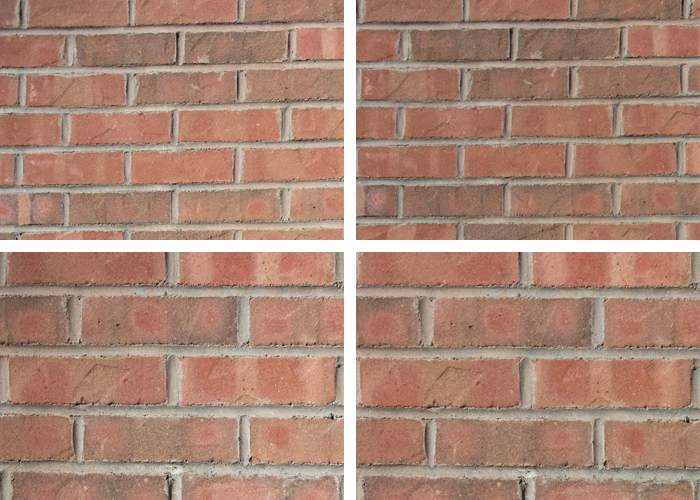
In order to test edge-to-edge sharpness of this lens, I used a tripod to photograph a brick wall at different focal lengths and apertures. Then I zoomed in and compared the top left-hand corner of each image to check for sharpness and vignetting.

Clockwise from Upper Left: 18mm at f/1.8, 18mm at f/16, 35mm at f/16, 35 mm at f/1.8. I cropped to include only the upper left hand corner of each image to check for edge to edge sharpness.

Clockwise from upper left: 18mm at f/1.8; 18mm at f/16; 35mm at f/16; 35 mm at f/1.8. I cropped to include only the upper left-hand corner of each image to check for edge-to-edge sharpness.

When shooting wide open, some consumer lenses have a tendency towards vignetting and/or have a loss of sharpness towards the edge of the image that can be very frustrating as a photographer. In this case, I noticed no discernible difference in sharpness along the edge of the image whether I was shooting at f/1.8 or f/16, even when zooming in significantly on the image. I also didn’t notice any vignetting even when shooting at small apertures. In fact, any vignetting that you see on any of the images in this article was added in the post-processing phase.

I was really pleased with the performance of this lens, and had no issues with its edge-to-edge sharpness, vignetting, or lens creep, in the month that I tested it out.

In the Field: People Photography

sigma-lens-review-1

Newborn photography

I’m primarily a child and family portrait photographer, so those genres were the first places that I put the Sigma 18-35mm f/1.8 to the test. In terms of newborn photography, I typically shoot on location in the client’s home for newborn sessions. While I find this works very well for the comfort of both mom and baby, the one variable that can sometimes be difficult is the available natural light. In the case of photographing newborns in unpredictable lighting situations, having a zoom lens with such a fast aperture is a huge asset.

sigma-lens-review-2

Kids photography

Next, I took the lens to the park with my kids, my nieces, and my nephew. Half of these kiddos were just about to move across the US, and so I wanted to be sure to take a few photos of them all together for our family. The Sigma 18-35mm stayed on my camera nearly the entire time we were at the park because it transitioned from a few semi-posed portraits to candid images of the kids playing together so seamlessly.

sigma-lens-review-3

Single portraits

Though I typically prefer using a 50mm lens on the 60D for portraits (which is closer to 85mm when considering the crop factor), I was surprised at how useful the 18-35mm lens was for single-person portraits as well. The thing that I really loved about this lens was that with my kids, I often have to choose whether I want to photograph an event with a portrait bent, or a photojournalism one because sometimes there’s just not enough time to do both.

If we head to the fire station with the girls, I can capture portraits of them in the fire gear with my 50mm lens, or I can capture pullbacks of them with the trucks with my 24mm lens. I could have taken my zoom lens, but it doesn’t have the ability to shoot as wide open as I often prefer in portraits. The Sigma 18-35mm lens is the best of all worlds–it’s wide enough to shoot pullbacks with the firetrucks and offers the functionality to zoom in and shoot portraits with a beautiful smooth bokeh at the aperture that I prefer.

Overall, this is a really fantastic and functional lens for people photography. Whether you’re interested in portraits or weddings, this lens can handle nearly any people photography situation absolutely beautifully.

In the Field: Nature and Landscapes

sigma-les-review-10

Though my real passion is in people photography, there are lots of other genres of photography that I enjoy as a hobbyist. I figured that in reviewing this lens, it only made sense to put it through some of those paces as well.

Whether photographing wide landscapes or flower blooms up close, this lens didn’t disappoint. I should mention that this lens features a maximum aperture of f/16, which may or may not be sufficient for someone who specializes primarily in landscapes. For me, as someone who shoots people photography but occasionally wants to be able to photograph a beautiful sunset or landmark, a maximum aperture of f/16 is more than sufficient.

sigma-lens-review-7

I did notice that even when shooting during the golden hour, this lens doesn’t tend towards large sun flares. Rather, it tends towards smaller sunbursts or small flares, which I find to be a benefit for both nature photography and for photographing people during the golden hour.

sigma-lens-review-5

Astrophotography

Lastly, I decided to use this lens to try out astrophotography. I’ve dabbled with photographing the moon before. But I haven’t had much success photographing stars because I just didn’t have the right lens that offered both a fairly wide angle and a fast aperture.

I was really pleased with the results of shooting the Sigma at 18mm, f/2.2, and 1600 ISO. Though I did notice some minor lens coma, it was far less noticeable than any other lens I’ve ever tried at similar settings. Again, astrophotography is not my specialty. However, it is something that I’ve enjoyed experimenting with on occasion, and it’s a bonus to me that a lens I’d primarily use for photographing people could also be used in this way as well!

sigma-lens-review-4

Overall Impressions

This is a really fantastic lens. If I owned it, I’m certain that it would get a ton of use. I could absolutely envision it as being my “walking around” lens that is attached to my camera most of the time.

That said, the one thing that would prevent me from purchasing it is that at $ 799, it’s more than I typically like to spend for a lens that only works for APS-C cameras. My photography budget is definitely not unlimited, so I think long and hard before I make any new purchases. When I do make a purchase, I typically try to choose lenses and other equipment that will serve me now, while also being good investments as I look to the future. I love my Canon 60D, and it currently suits all of my photographic needs just fine. However, I can’t say with 100% certainty that I would never eventually upgrade to a full-frame camera.  So I would be hesitant to invest this significantly in a lens that would not be able to transition with me.

All that said, this is where it is absolutely crucial that you consider your own approach to photography. Not every photographer in the world needs or wants a full-frame camera, and that is perfectly fine. If you are fairly certain that you don’t have plans to transition to full-frame in the near future, then I really cannot recommend this lens highly enough. It is well-made, high quality, and useful in so many different situations. Kudos to Sigma for producing a really extraordinary product with the Sigma 18-35mm f/1.8 DC HSM Art Lens!

googletag.cmd.push(function() {
tablet_slots.push( googletag.defineSlot( “/1005424/_dPSv4_tab-all-article-bottom_(300×250)”, [300, 250], “pb-ad-78623” ).addService( googletag.pubads() ) ); } );

googletag.cmd.push(function() {
mobile_slots.push( googletag.defineSlot( “/1005424/_dPSv4_mob-all-article-bottom_(300×250)”, [300, 250], “pb-ad-78158” ).addService( googletag.pubads() ) ); } );

The post Lens Review: Sigma 18-35mm f/1.8 DC HSM Art Lens by Meredith Clark appeared first on Digital Photography School.


Digital Photography School

 
Comments Off on Lens Review: Sigma 18-35mm f/1.8 DC HSM Art Lens

Posted in Photography


Modern Mirrorless: Canon EOS M5 First Impressions Review

15 Sep

The Canon EOS M5 is the most enthusiast-friendly EOS M yet. It’s a 24MP mirrorless camera built around a Dual Pixel APS-C sensor, giving it depth-aware focus across most of the frame. On top of this it adds a built-in electronic viewfinder, a good number of external controls and a well implemented touchscreen.

This level of direct control puts it in competition with Sony’s a6000 and a6300, and Panasonic’s GX85 (GX80) and GX8 enthusiast models. All of these cameras aim to offer stills and video capabilities in relatively small bodies but with a reasonable level of direct external control.

Key Specifications

  • 24MP Dual Pixel APS-C CMOS Sensor
  • 2.36M-dot OLED electronic viewfinder
  • 1.62M-dot tilting rear touchscreen
  • Electronic video stabilization combines with in-lens IS to give 5-axis IS
  • 7 fps continuous shooting (9 fps with focus and exposure locked)
  • Wi-Fi with always-connected Bluetooth

In fact it’s the implementation of this touchscreen that we’re most impressed with. Much like the system developed by Panasonic, the M5 not only lets you use the rear touchscreen to position focus, it also allows its use as a touchpad to move the focus point, when you’re shooting through the viewfinder. This, combined with decisive autofocus, should be really significant for both stills and video shooting.

The camera has four dials in total: two main dials on the top of the camera, a dedicated exposure compensation dial and a fourth dial encircling the four-way controller on the back of the camera. This is a much higher level of direct control than offered on the simpler EOS M-series models offered previously, suggesting Canon expects the user to take more hands-on control of the shooting experience.

Three of the four control dials on the M5 are on the top plate, giving users easy access to exposure parameters.

While the lack of 4K video capability is a disappointment, the ability to use the touchscreen to re-position the focus point with a high level of confidence that the camera will smoothly glide the focus to the right point is highly desirable. We maintain that, for many applications, easily-shot, good quality 1080 is just as valuable as poorly shot 4K, so we’re not too put off by this development.

The touchscreen-plus-Dual-Pixel-AF combination is also useful for stills shooting – you can not only use the touchscreen to drag the focus point around the screen but also use it to select between available faces if shooting or recording in face detection mode.

The other significant benefit of the M5 finally receiving Canon’s Dual Pixel AF system is that it should now be able to focus adapted EF and EF-S lenses effectively but without being limited to the small central focus area offered when using comparable Rebel / EOS x-hundredD DSLR models.

Compared with its peers

The enthusiast photographer has a good number of choices, when looking for a reasonably sized mirrorless camera with a good degree of direct controls. Sony offers the a6000 and a6300, depending on how much you need 4K video and how demanding your AF needs are. Meanwhile, Panasonic offers both the GX85 and GX8, with the more expensive model offering higher resolution and a better viewfinder. All four of these models are extremely capable, with ease-of-use being the Canon’s most obvious response to their broadly higher video specifications.

  Canon EOS M5 Sony a6300 Panasonic GX8
MSRP $ 1099 with 15-45mm lens $ 1149 with 16-50mm lens $ 1199 body only
Pixel count 24MP 24MP 20MP
Focus method ‘Dual Pixel’ on-sensor PDAF On-sensor PDAF Contrast detection*
EVF 2.36M dots 2.36M dots 2.36M dots
 Dials Two on top plate
Exposure Comp
Four-way/dial
Top plate
Four-way/dial
Two on top plate
Exposure Comp
Continuous shooting 9 fps
(7 with live view and C-AF)
11 fps
(8 with live view)
8 fps
(5.5 with live view)
Video specifications 1080/60p 4K/30p
1080/120p
4K/30p
1080/60p
Peaking/Zebra Yes/No Yes/Yes  Yes/Yes
Touch focus in video Yes No  Yes
Battery life
Screen/EVF
295/295 shots
(410 in Eco mode)
400/350 shots 330/310 shots

* When using own-brand lenses the GX8 adds distance prediction based on the out-of-focus characteristics of the lens (A system Panasonic calls ‘Depth From Defocus’).

Articles: Digital Photography Review (dpreview.com)

 
Comments Off on Modern Mirrorless: Canon EOS M5 First Impressions Review

Posted in Uncategorized


Striding Forth: Canon EOS 5D Mark IV Review

15 Sep

Introduction

The Canon EOS 5D series is arguably one of the most recognizable camera lines of the digital age and the Mark IV is designed to appeal to the same wide range of enthusiasts and professionals. Nearly identical-looking to its predecessor, it receives substantial upgrades under the hood, including: a higher-resolution sensor with Dual Pixel autofocus, 4K video capture, an upgraded AF system, a touchscreen, improved weather-sealing, built-in Wi-Fi/NFC, an interval timer and GPS. All this adds up to a camera that fits into Canon’s product line nicely as the all-around full-frame option.

It is built around a new 30.4MP CMOS sensor and uses the Digic 6+ processor. The AF system is from the flagship 1D X Mark II and contains 61 AF points (41 of which are cross-type) with up to 24% expanded vertical coverage compared with the system in the Mark III. The center point is sensitive to -3EV in One Shot (AF-S) mode (in Live View the sensor is sensitive to -4EV with a fast lens).

4K video capture is a welcome addition to this camera and users can record in either 24 or 30p, albeit with a 1.64x crop. All footage is captured as Motion JPEG. Additionally, the camera allows for 4K Frame Grabs, effectively giving users 30 fps stills shooting with (Dual Pixel) AF. We’ve seen that the camera suffers from some rolling shutter, but it may still have some merit for capturing the decisive moment when 7fps just isn’t enough.

While developing the IV, Canon says it sought feedback from 5D-series users and found that dynamic range, resolution, AF precision and AF speed were the four most important areas improvements were requested. On paper, the Mark IV seems to address these aspects nicely.

Canon 5D Mark IV Key Specifications

  • New 30.4MP CMOS full-frame sensor with Dual Pixel AF
  • DCI 4K 30/24p video using Motion JPEG + 4K Frame Grab
  • 61-point AF system with 41 cross-type sensors (center point sensitive to -3 EV)
  • Dual Pixel AF (sensitive to -4EV) for continuous Servo AF in stills (first for a full-frame Canon camera) and video
  • ISO 100-32000 (expandable to 102400)
  • 7 fps continuous shooting
  • Dual Pixel Raw (image microadjustment, bokeh shift, ghosting reduction)
  • 150,000-pixel RGB+IR metering sensor
  • 1.62M-dot 3.2″ full-time touchscreen
  • Wi-Fi w/ NFC + GPS
  • Built-in bulb timer interval timers
  • Improved weather-sealing

In terms of AF, the increased coverage area is definitely a big deal: after all, it’s the exact same AF system found in the company’s flagship sports camera. The 150,000-pixel RGB-IR metering sensor, which feeds scene information to the AF system, is borrowed from the original 1D X, bringing enhanced subject identification (including faces) and tracking (‘iTR’), as well as improved metering and flicker detection.

The 5D Mark IV is Canon’s first full-framer that can continuously focus in Live View during stills capture, and because of the way Dual Pixel AF works, focus is generally very accurate, even with fast lenses. It’s surprisingly good at sticking to the original subject (or face) you initiated focus on, and it’s easy to specify your subject by tappping on it on the touchscreen in ‘Face Detect+Tracking’ mode.

The 5D Mark IV also has some new tricks up its sleeve including Dual Pixel Raw, a nifty option that can prove useful in specific shooting scenarios. It works by recording two 30MP images, one from each of the ‘left-looking’ and ‘right-looking’ photodiodes at each pixel. Previous Canons have combined these two signals at each pixel, but Dual Pixel Raw gives you the option of keeping them separate. This results in a file that’s twice as large, but one that allows for ‘image micro-adjustment,’ ‘bokeh shift’ and ghosting reduction (more on this on our Features page) in Canon’s supplied Digital Photo Professional software.

Compared to its peers

Canon now offers a range of full-frame models. On the high end you have the Canon’s sports and action-oriented 1D X Mark II, with its 20.2MP sensor and 14 fps continuous shooting (with AF). The 5DS (and ‘R’ variant), with their 50.6MP sensors, are the company’s high resolution options. The 5D Mark IV splits the difference in terms of resolution and is positioned as Canon’s all-rounder. For those on a budget, the EOS 6D soldiers on, four years after its introduction.

So how does the 5D Mark IV stack up against its closest sibling and predecessor? Take a look for yourself:

  Canon EOS 5D IV
Canon EOS 5D III
Canon EOS 5DS
MSRP $ 3499 $ 3499 $ 3699
Sensor 30.4MP 22.3MP 50.6MP
ISO range
(expanded)
100 – 32000
(expandable 50-102400)
100 – 25600
(expandable 50-102400)
100 – 6400
(expandable 50-12800)
AF points 61 (41 cross-type)
over expanded region
61 (41 cross-type) 61 (41 cross-type)

Live view/video AF ‘Dual Pixel’ phase detection Contrast detection Contrast detection
RGB metering sensor resolution 150k pixels 63-zone dual-layer 150k pixels
LCD 3.2″ 1.62M-dot touchscreen 3.2″ 1.04M-dot 3.2″ 1.04M-dot
Burst rate 7 fps 6 fps 5 fps

Video DCI 4K/30/24p 1080/30p 1080/30p
Headphone socket Yes Yes No
Card format 1x Compact Flash
1x SD

1x Compact Flash
1x SD

1x Compact Flash
1x SD
Built-in Wi-Fi/NFC Yes No No
GPS Yes No No

Obviously if you need the resolution, the Canon EOS 5DS is the more sensible choice. But in just about every other regard, the Canon EOS 5D Mark IV is the far more versatile camera and a worthy upgrade from the 5D Mark III.

Pricing and availability

The Canon EOS 5D Mark IV ships this September and will cost $ 3499 body only, $ 4399 with the 24-70mm F4L IS USM lens and $ 4599 with the 24-105mm F4L IS II USM lens.

Articles: Digital Photography Review (dpreview.com)

 
Comments Off on Striding Forth: Canon EOS 5D Mark IV Review

Posted in Uncategorized


Sigma 30mm F1.4 DC DN Contemporary for Sony E-mount lens review

13 Sep

The Sigma 30mm F1.4 DN DC Contemporary was announced in February 2016, and sits atop Sigma’s line of DN mirrorless lenses, with a two-stop advantage over their previous 30mm F2.8 offering. It’s currently the only APS-C F1.4 autofocus lens currently available for the Sony E-mount and has an MSRP of $ 339.00.

With F1.4 and a 45mm equivalent field of view, this lens on paper appears to be a good choice for a ‘walkaround’ normal prime lens. The bright aperture will satisfy low light shooters and bokeh fanatics, and the near 50mm field of view puts it right inside the versatile ‘normal’ lens range. While it won’t replace a dedicated macro lens with its magnification ratio of 1:7, it still is able to focus down to a working distance of 30cm (less than a foot).

The relatively low price, especially for an E-mount lens, means it’s also accessible to beginners and enthusiasts alike, making it sound like an ideal prime lens that may never leave the front of the camera once it’s mounted.

Within the E-mount system this lens has one natural competitor: the Sony 35mm F1.8 OSS. Let’s look at how the two stack up on paper:

  Sony E 35mm F1.8 OSS Sigma 30mm F1.4 DC DN | C
MSRP $ 448 $ 339
Image Stabilization Yes No
Max Aperture F1.8 F1.4
Minimum Aperture F22 F16
Aperture Ring No No
Diaphragm Blades 7 9
Number of elements 8 9
Number of groups 6 7
Special elements/coatings 2 aspherical elements 1 aspherical and 1 double-sided aspherical
Minimum Focus 0.30 m (11.81?) 0.30 m (11.81?)
Maximum Magnification 0.15x 0.14x
Motor Type Stepper motor Stepper motor
Full Time Manual No No
Weight 155 g (0.34 lb) 265 g (0.58 lb)
Dimensions (DxL) 63 x 45 mm (2.5 x 1.8 in.) 65 x 73mm (2.6 x 2.9 in.)
Sealing None None
Filter Thread 49mm 52mm

In terms of just spec we see a couple of major differences. First, while the Sony is 2/3 of a stop slower than the Sigma, it does include optical image stabilization. That alone gives it a better chance at being the preferred lens for video, although when shooting 4K the slightly wider FOV of the Sigma might fare better on any body that gives an additional crop.

In stills terms, though, there’s little real-world difference between the Sigma’s 45mm equivalent view and the 52.5mm equivalent of the Sony. The difference between them doesn’t suddenly open one up to a type of photography that couldn’t be achieved with the other.

Build quality between the Sigma and the Sony is fairly similar. They both use a machined metal chassis with plastic internals. Compared to older Sigma DN lenses, the 30mm F1.4 doesn’t let its focus elements rattle about when unmounted, which is a very welcome change. The focus ring is also an improvement, and a step above the Sony. The rubber grip turns smoothly and easily with minimal effort, making the Sony feel a bit stiff. The only downfall in terms of build is the Sigma’s lens hood, which doesn’t seem to confidently click in to place, and is made of rather fragile feeling plastic.

The long barrel of the Sigma, and even longer overall dimensions do make it quite large in comparison to APS-C Sony Alpha cameras, but the weight isn’t entirely off-balance. While heavier and much bigger, it is less expensive and brighter than the Sony 35 F1.8. The question is, does the extra weight and lack of OSS keep it from topping the Sony as the ideal ‘normal’ for APS-C E-mount shooters?

Articles: Digital Photography Review (dpreview.com)
 
Comments Off on Sigma 30mm F1.4 DC DN Contemporary for Sony E-mount lens review

Posted in Uncategorized


Review: Inexpensive Time Lapse with the YI 4K Action Camera

12 Sep

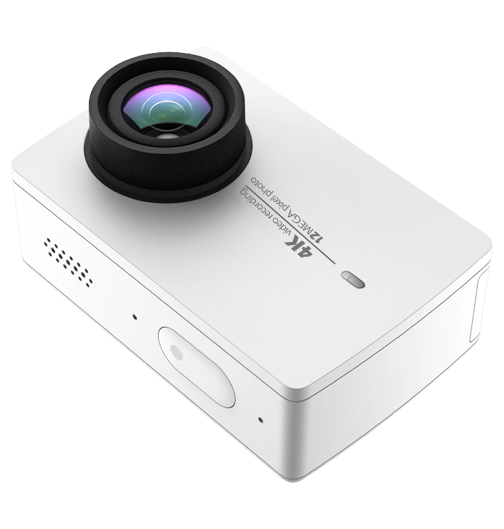
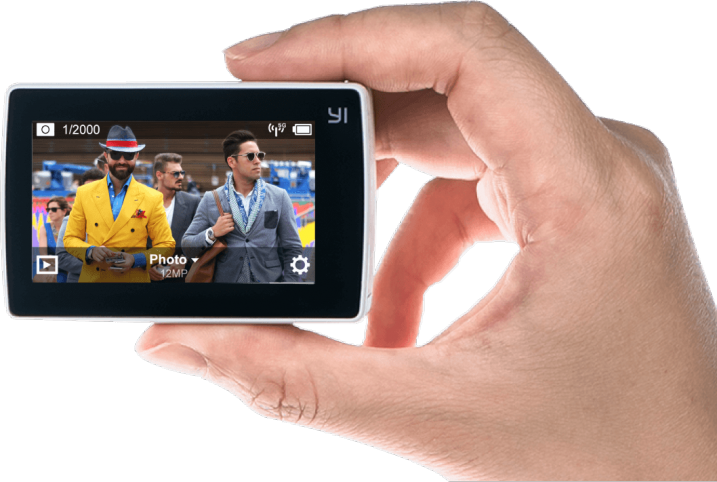
While this is essentially a review of a small action camera, that produces both stills and video, I’m going to focus on using the little YI 4K Action Camera, to kickstart your love of time lapse photography.

YI Technology – YI 4K Action Camera

Time lapse photography can produce stunning results that can inspire you to travel, to capture behind the scenes of your photographic projects, even as a great way to capture your holidays. Your week at the beach might only last a few minutes as a time lapse (as opposed to a couple of hours of video to make your friends sit through!) However you use it, there’s no denying it’s fun to use, and fun to try.

p15

Gear for time lapse photography

So, time lapse with amazing results requires a bit of gear, right? A camera that allows you to adjust your shutter and aperture. A trigger that allows you to set your camera to capture the time lapse, either indefinitely or for a certain period of time. If you want to take it further, you might look at something that allows you to have movement in your time lapse, rather than a static shot, just to add interest. (more on that, next article)

That being said, can you create a good enough looking time lapse, to start your journey into this fun and creative style of photography with an action camera? That’s the question I set out to find an answer to, with this latest hardware review.

I have a GoPro, it’s great! It’s the Hero4 Black, and it does time lapse, but it’s actually pretty expensive! Expensive enough, with some accessories and a spare battery, that you might actually consider just getting an entry level dSLR!

I also have a very brilliant Sony Action Cam 4K. Again, a spare battery and you’re up over half a grand. So, looking at options, I once again find myself wading into the “not really brand name” manufacturers of the lesser known! Enter YI Technology YI 4K Action Cam. There are a handful of reviews popping up online for this little camera, and most I’ve read or watched are positive. I’m not going to talk about the whole video side of the unit much, though it produces decent quality 4K footage for the price tag. This review is all about the camera’s time lapse ability.

p13

The specs in brief are as follows:

  • Main Processor – Ambarella A9SE chipset, includes a 800 MHz dual-core. Cortex-A9 ARM CPU and a high-performance digital signal processing (DSP) subsystem with a 32-Mpixel image sensor pipeline (ISP), and an advanced H.264 encoder capable of 4K resolution.
  • Image Sensor – SONY IMX377, 1/2.3″, 12 megapixels CMOS image sensor with Exmor R ability.
  • LCD Screen – 2.19″, 640×360 resolution touch screen, 330PPI, 250cd/m2 brightness, 30FPS, 160° FOV, 16:9.
  • Lens – Lens f/2.8 aperture / 155° wide-angle lens, 7G, f=2.68mm.
  • Wi-Fi – Broadcom BCM43340 Dual-band 5GHz /2.4GHz, built-in (802.11 abgn), offers 30Mbps download speed.
  • Weight – 3.4 ounces camera + battery (96.4 grams).
  • Size – 65 x 42 x 30 mm.

Said to have a Gorilla Glass rear touch screen, and I’ve got to say, that it’s actually useable! Responsive and clear, and also quite good at playing back your Time Lapse sequence on the camera.

Yi-4K-ActionCam-Review-Time-Lapse-Simon-Pollock-Gtvone

What’s it like to work on your time lapse creation with the YI 4K?

It’s actually very simple, there’s a touch screen rear display (as per above) and you simply tap it, select time lapse (either photo or video version of time lapse), dial in some adjustment, and press the go button! Now, the unit saves the time lapse in one of two formats, you may have noticed I said “Photo or Video time lapse” above, which is basically the output you get when you select either. In video time lapse mode, you get a single file at the end of your sequence, with photo time lapse you get the time lapse movie as the individual images.

There are benefits to both. With the video version of the sequence, you get a simple video at the end, that you can directly upload and share with your friends. The downside of this is that if you get a dodgy image (bird flies across, a drastic light change, etc.) in the middle of your time lapse, with the photo version you can simply delete the offending frame and you’re good to go. In video mode, you would need to edit that frame out with a video editor of sorts. Keeping in mind you may lose a little continuity in your time lapse if you delete more than a couple of frames, and you’ll see jumps.

I’ve made a quick example. At 1:03 in this video mode time lapse, someone over my back fence switched on their outside light and the white balance (auto, in video time lapse mode) jumped a gate and ran off into the hills! Take a look, you’ll see what I mean. It’s only 4 frames and I could edit it out, but left it in to show you what I mean. In photo time lapse mode, you can preselect the white balance and this wouldn’t have happened. My sweet darkening purples changed to blue.

Does the YI 4K work as an entry level time lapse camera? Absolutely it does, and with better specs than the current GoPro Hero 4 Black, it’s a decent little all-round package if you want something less expensive to document your photoshoots with too.

Conclusion?

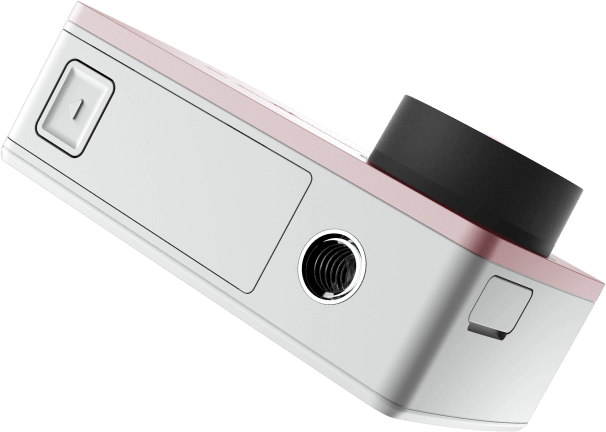
I really enjoyed using the YI 4K as I call it. It’s easy to use, produces a good result, and is very well priced for what you get. One other thing I really like is the inclusion of a 1/4 20″ metal tripod mount in the bottom of the camera. So, you can stick a tripod plate on it, or screw it straight onto a light stand for use on set, or just to get your YI4K up high for a time lapse.

I’m not about to bin my GoPro or Sony Action Cam, but there is rumoured to be a GoPro 5 dropping sometime very soon – we shall see how they stack up.

p6

What I like about the YI 4K Action Camera:

  • Simple iOS app to change all settings on the YI 4K.
  • Good quality images from an Action Cam.
  • Multiple options for time lapse (Video / Stills).
  • Fantastic touchscreen included in device by default.
  • Good battery life.
  • Tripod mount on the camera.

What I’d like to see improved:

  • More standard accessories

I’m not really thinking I should give this a star rating as I’ve really only used it for time lapse, but if I were to give it a rating, it’d have to be a 4.5 out of 5 I think! Good job, YI Technology.

googletag.cmd.push(function() {
tablet_slots.push( googletag.defineSlot( “/1005424/_dPSv4_tab-all-article-bottom_(300×250)”, [300, 250], “pb-ad-78623” ).addService( googletag.pubads() ) ); } );

googletag.cmd.push(function() {
mobile_slots.push( googletag.defineSlot( “/1005424/_dPSv4_mob-all-article-bottom_(300×250)”, [300, 250], “pb-ad-78158” ).addService( googletag.pubads() ) ); } );

The post Review: Inexpensive Time Lapse with the YI 4K Action Camera by Sime appeared first on Digital Photography School.


Digital Photography School

 
Comments Off on Review: Inexpensive Time Lapse with the YI 4K Action Camera

Posted in Photography