RSS
 

Posts Tagged ‘REVIEW’

Nikon D5200 Review

15 Mar

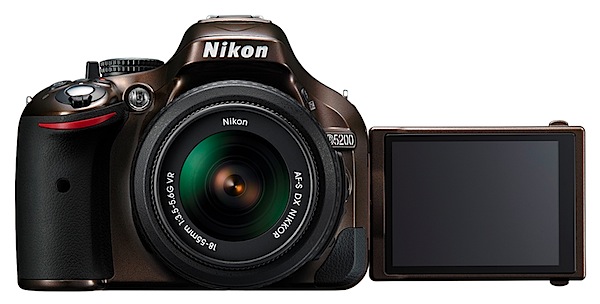
Nikon D5200 front.jpg

No matter what your ambitions or skill level are, this camera could arguably be an ideal option for many when it comes down to plonking the plastic on the counter or tapping the computer key to order offline. For many a budding photographer with ambitions a DSLR is the best game in town.

None of those pesky MILCs or compact digicams can satisfy the hunger!
Nikon D5200 LCD Front.jpg

Besides, it’s a Nikon. And the specs are damn fine.
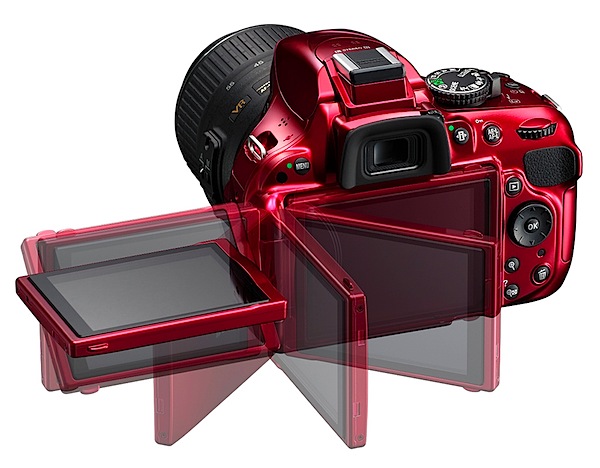
Nikon D5200 LCD back.jpg

Nikon D5200 Features

True, the sensor is close to half the area of a 35mm full frame but, unless you’re going to indulge in heavy cropping or demand an enormous print output, the 23.5×15.6mm CMOS will work fine for many.

Besides, the maximum image size of 6000×4000 pixels can lead to a print of 51x34cm at 300 dpi.

Video in MPEG4 can be recorded at Full HD and 1920×1080 resolution.

With the help of the vari-angle screen I made some nice, controlled camera movies in shooting video, with the AF system tracking accurately throughout the moves. However, shoot a still and the video shuts down!

More

  • AF system: 39-point AF system with nine cross-type sensors.
  • Metering: the 2016 pixel RGB metering sensor provides data to the camera’s Scene Recognition System, which optimises exposure, autofocus and white balance immediately before the shutter is released.
  • Optical viewfinder.
  • 7.5cm (3-in) vari-angle LCD monitor has 921,000 pixel resolution which can be swung 180 degrees laterally and through a 90 degree vertical arc.
  • Compatible with Wireless Mobile Adaptor WU-1a.
  • Compatible with WR-R10 Wireless Remote transceiver and WR-T10 Wireless Remote transmitter to control key camera functions from a distance.
  • ISO range from 100 to 6400 with expansion to ISO 25,600.
  • Continuous shooting up to 5fps.
  • High dynamic range (HDR) using two images.
  • GPS compatible: records exact location when using the optional GP-1 unit.
  • 16 scene modes: night portrait, beach/snow, food etc.
  • Seven effects modes: night vision, colour sketch, miniature effect, high and low key etc.

Cafe.jpg

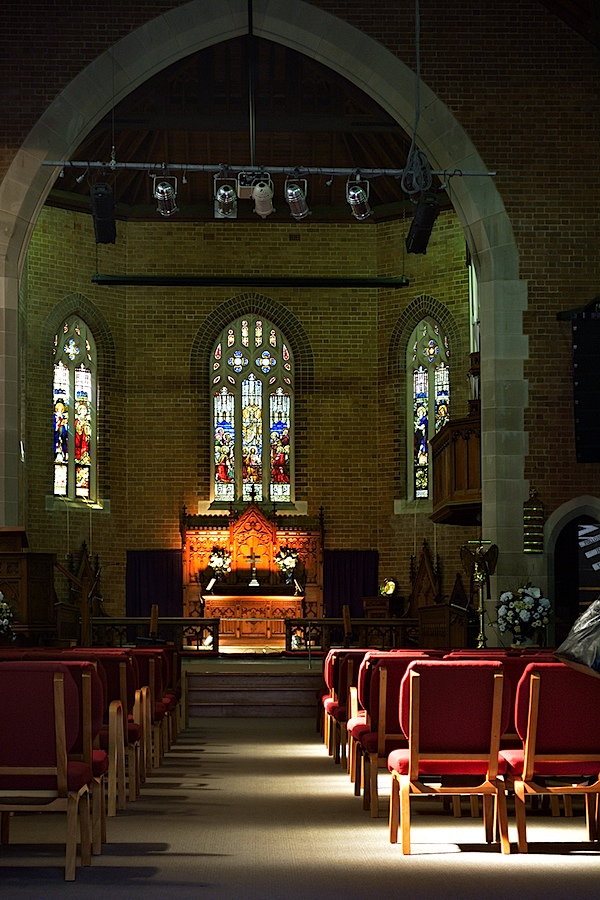
Church interior.JPG

Figures and beach 2.JPG

Nikon D5200 Handling

First, an anecdote: I like to grab a new camera, manual unread, and get shooting as soon as I pull it out of the box. OK all clear, nice, crisp display of the camera status on the rear LCD, here’s the ISO setting, current aperture, auto white balance in play etc etc.

Look through the optical viewfinder, all clear and sharp. And I’ll bet you that this is the reason you’re reading this review and considering a DSLR!

Now, where’s Live View?

In my office’s subdued light it was hard to see at first: a small black lever hanging off the mode dial. And it works, summoning up the view on the LCD. And what a brilliant place to put it! I also found that you must be in Live View to record video.

Back to the walk around: as befits its price level there’s not a jungle of external controls to bewilder the newbie or the timid.

Left and near the top: menu button.

Right and on top: power/shutter button; mode dial (PASM, scene modes, effects, macro etc); info button; exposure compensation; video record; single/continuous shooting and of course the Live View lever.

Back off the top edge: information edit button which pilots you through the rear screen menu options; exposure and AF lock button.

Rear: the multi selector wheel navigates around the rear screen options; replay; memory card access lamp; trash; screen zoom.

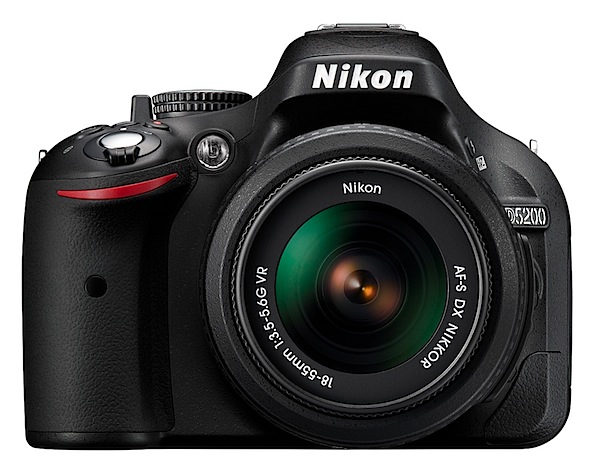
Overall, the camera is quite compact for a DSLR and even with the review f3.5/18-55mm lens attached was not a big bundle to carry and handle. The prominent speed grip helps handling and most controls are close to an operative right forefinger. Sorry, southpaws!
BTW in Live View the four way jog dial at the rear moves the AF outline around the screen. A big help.

The screen menu layout is typically Nikon: clear and unmistakable without being a forest of text.

Nikon D5200 ISO Tests

Nikon D5200 ISO 100.JPG

Nikon D5200 ISO 400.JPG

Nikon D5200 ISO 800.JPG

Nikon D5200 ISO 1600.JPG

Nikon D5200 ISO 3200.JPG

Nikon D5200 ISO 6400.JPG

In my view, the D5200 performed very well all the way up to ISO 3200 and I could quite happily use ISO 6400 for certain subjects that could ‘live’ with increased noise and a drop in sharpness, such as city lights etc.

Nikon D5200 Review Verdict

Quality: excellent.
Why you would buy it: it’s a Nikon; well-priced DSLR; excellent video capture.
Why you wouldn’t: you don’t want a DSLR!

For a camera that I figure is very affordable for many people this has to be one of the best buys around: 24.1 megapixel capture, vari-angle screen; Full HD capture. Very appealing!

Nikon D5200 Specifications

Image Sensor: 23.5×15.6mm CMOS. 24.1 million effective pixels.
Metering: Matrix, centre-weighted, averaging and spot.
A/D processing: 14-bit.
Lens Mount: Nikon F.
Exposure Modes: Auto, Program AE, shutter and aperture priority, manual.
35 SLR Lens Factor: 1.5x.
Shutter Speed: Bulb, 30 to 1/4000 second. Flash X-sync: up to 1/200 sec.
Continuous Speed: up to 5fps.
Memory: SD/SDHC/SDXC cards.
Image Sizes (pixels): 6000×400 to 2992×2000. Movies: 1920×1080 to 640×424.
Viewfinders: Eye level pentaprism and 7.5cm LCD (921,000 pixels).
File Formats: NEF (RAW), JPEG, NEF (RAW)+JPEG, MPEG4.
Colour Space: Adobe RGB, sRGB.
ISO Sensitivity: Auto, 100 to 6400. With expansion up to ISO 25,600.
Interface: USB 2.0, AV, HDMI mini, DC input, external stereo mic, remote.
Power: Rechargeable lithium ion battery, AC adaptor.
Dimensions: 129x98x78 WHDmm.
Weight: Approx. 555 g (with battery).
Price: get a price on the Nikon D5200 (body only) or Nikon D5200 with 18-55mm f/3.5-5.6 AF-S DX VR NIKKOR Zoom Lens or Nikon D520018-105mm f/3.5-5.6 AF-S DX VR ED NIKKOR Zoom Lens or Nikon D5200with 18-55mm f/3.5-5.6G AF-S DX VR and 55-300mm f/4.5-5.6G ED VR AF-S DX NIKKOR Zoom Lenses + EN-EL14 Battery + 10pc Bundle 32GB Deluxe Accessory Kit.

Post originally from: Digital Photography Tips.

Check out our more Photography Tips at Photography Tips for Beginners, Portrait Photography Tips and Wedding Photography Tips.

Nikon D5200 Review

Digital Photography School

 
Comments Off on Nikon D5200 Review

Posted in Photography


Portrait Photography: Secrets of Posing & Lighting [Book Review]

12 Mar

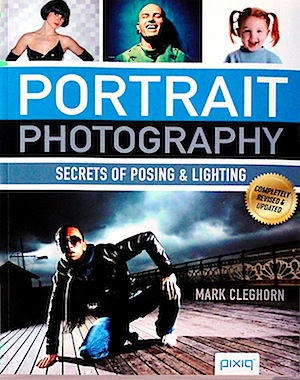
Portrait Photography.jpgPortrait photography, IMHO, is up there in degrees of difficulty with wildlife and sports/action photography … but at least, when faced with a tiger or a pole vaulter, you don’t have to face a possibly irate subject when you’ve finished the shot. Hopefully!
With portrait photography you not only have to face the sitter during and after the session but you also have to deal with that particular person if they’re also the client!

The book’s author Mark Cleghorn has been a pro photographer for over 30 years, specialising in ‘creative’ wedding and portrait photography. He is a member of a number of pro associations and has won a number of awards for his work as well as running many training workshops and seminars.

In Cleghorn’s view ‘Understanding the fundamentals of posing and lighting is crucial to successful portrait photography.’

You might also add the stricture — KISS! His own personal motto is ‘Natural light before reflector, reflector before flash, and flash as a last resort.’ He also suggests you should understand how to use and manipulate natural ambient light before you complicate things with technology …. Got me!

The chapter headings are informative:

  • So much equipment, so little money.
  • Poses and expressions.
  • Studio lighting made simple.
  • Creative lighting techniques.
  • On location.

First up, choosing a camera and lenses. The advice is that while a bulky, expensive medium format camera gives a better quality of image and delivers huge file sizes that are perfect for advertising, they are overkill for a simple portrait.

The DSLR is a preferable choice due to its comparatively reasonable cost, moderate size, along with access to a wide range of lenses and access to complete camera control.

This is followed by a rundown of the three types of flash available: accessory, shoe-mounted; power pack kits; monolights. Considerable detail is given on how to modify their flash output, the use of gels, metering, softboxes, reflectors, snoots and spotlights, diffusion, etc.

A key chapter covers posing and expression, which is where the human interface is at its most important and Cleghorn displays his extreme knowledge of the human figure and how to show it off at its best: ‘Every pose … starts with the feet, as it is the way in which the subject stands that determines whether or not he or she looks comfortable.’

His advice on how to photograph children is golden: keep things simple, allow the expressions to tell the story, work on the same level and, with very young children, encourage them to move around the studio, make it seem like a game.

And how to cope with problems like a subject’s bald head, spectacles, double chins, squinting and those who are obviously overweight, disabled subjects, those with ‘sleepy eyes’, big ears or noses and (with couples) differing heights. The advice is magic!

Moving on to lighting, there’s detailed discussion on how to place lights, control fill, hair and backlights and control their output. Low, mid and high key lighting is covered in considerable detail, with excellent examples shown.

Some off the wall techniques are demonstrated, like the projection of another image onto the subject, introducing a surreal effect. The use of a single light source and softlight are discussed as well as the role of the cross processing effect achievable in Photoshop.

Quite a few pages are given over to the searching for and use of suitable locations, natural exteriors and shooting in the home.

I often wonder, having read such a useful book, as to the sanity of such a high end and obviously successful photographer in this field in giving away such seriously useful hints, tips and advice.

This is the ‘go to’ book on the subject!

Author: M Cleghorn.
Publisher: pixiq.
Size: 28x22x1cm. 128 pages.
ISBN 978 1 4547 0243 6.
Price: get a price on Portrait Photography: Secrets of Posing & Lighting at Amazon (currently 36% off).

Post originally from: Digital Photography Tips.

Check out our more Photography Tips at Photography Tips for Beginners, Portrait Photography Tips and Wedding Photography Tips.

Portrait Photography: Secrets of Posing & Lighting [Book Review]


Digital Photography School

 
Comments Off on Portrait Photography: Secrets of Posing & Lighting [Book Review]

Posted in Photography


Accessory Review: Cinetics Cine System

09 Mar

CineSkates-Feature.jpg

The Cinetics Cine System is a low-cost kit which enables videographers to achieve smooth panning and zoom shots as well as window and vehicle mounted footage. The system is built around Joby’s popular Gorillapod Focus flexible tripod, and includes wheeled feet and the ‘CineSquid’ attachment allowing you to firmly mount a DSLR or small video camera to windows. We covered the Cine System last year in an article about interesting photography-related Kickstarter projects, and were really intrigued by its potential. Click through for a link to our review. 

News: Digital Photography Review (dpreview.com)

 
Comments Off on Accessory Review: Cinetics Cine System

Posted in Uncategorized


Just posted: Canon EF 24-70mm f/2.8L II USM lens review

07 Mar

canon_24-70_2p8_ii.png

Just posted: Our review of Canon’s top-end standard zoom, the EF 24-70mm f/2.8L II USM. Launched a year ago to replace its 10-year old predecessor, it’s designed as a workhorse for professional photographers, and features a completely new optical design and improved, weathersealed build. In the latest of our lens reviews produced in collaboration with DxOMark, we take a look both lab and real-world performance. As usual, you can also compare it to a wide range of similar lenses using our unique lens data widget. Click through to see what we thought.

News: Digital Photography Review (dpreview.com)

 
Comments Off on Just posted: Canon EF 24-70mm f/2.8L II USM lens review

Posted in Uncategorized


Understanding HD Video [Book Review]

04 Mar

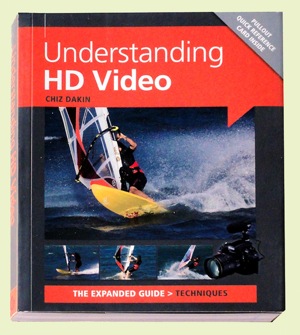
Understanding HD VideoAfter a careful read of Chiz Dakin’s book, I came to the conclusion that — for the right reader — her volume is the ant’s pants, the bees’ knees of ‘how to’ books in the video field.
The right reader? Well that comes down to those who are competent in stills photography, own a DSLR or a CSC camera and know how to work with different lenses, be savvy with ISO, histograms etc.

CSC? Compact System Camera or what could also be called a MILC (Mirrorless Interchangeable Lens Camera).

I also figure it would probably not be right for the hardened videographer, accustomed to video camcorders, as most of the info within its pages is aimed at the stills brigade … and how jump ship into the world of movies.

High end cameras such as Canon’s EOS MkII and MkIII and Nikon’s D800 are becoming increasingly popular with feature film and documentary makers due to their reasonable price (compared to high end video cameras) and ability to use lenses with focal lengths that image to a full frame 35mm area. Lenses of these focal lengths enable photographers to work with a reduced depth of field and produce that ‘film look’. The odd thing is that the true 35mm movie frame is roughly half the size of the 35mm still frame! Oh well!

The early chapters take the reader through the differences between camcorders and movie-enabled still cameras: their radically different ergonomics; limited recording time; tricky sound capture arrangements; challenging focus ergonomics etc.

Then we get into the language of video shooting: how to capture movement; framing the scene; managing or supplementing light; creating an acceptable storyline; selecting camera angles.

Quite a few pages are devoted to creating the story line, which may at first seem an odd subject in what could be seen as a techy book. But, different to stills photography, video making is a linear process: scene one comes before scene two etc.

It may seem overkill when there follows a chapter listing the personnel on a typical video crew but, as many festival entrants know, even on a simple, home made video you can often need a Director (of course!), a Producer, camera operator, lighting gaffer, grip, art director etc to produce something with more going for it than a simple home movie.

More about the basics: how to select locations; pick the right time of the day or even the right time of the year; choose camera angles; ‘crossing the line’ rules.

Then we get to discuss differing types of cameras, with an admission that even smartphones can have their place in the scheme of things, especially when ‘you need to record somewhere that you couldn’t (or wouldn’t) want to put a bigger camera.’

Lenses come into view with explanations of how effective focal length is affected by sensor size and the roles of prime lenses vs zooms, extreme wide angle lenses, macros, teles and shift lenses.

There is much essential and useful info on memory cards, transfer bit rates, the different file formats, NTSC vs PAL, bit rates, frame rates etc.

There is one piece of advice that is, to my mind, worth the book’s cover price alone: if you set the camera to auto exposure, when panning the camera from a dark area to a light one it will cause distracting exposure shifts. Better to switch to manual exposure so the lens aperture, shutter speed and ISO setting will all be locked.

Result: exposure stays the same wherever the camera is pointed.

Overall, an enormously useful book, full of all the stuff you need to make movies!

Author: C Dakin.
Publisher: Ammonite Press.
Distributor: Capricorn Link.
Size: 14.5x18x1.5cm. 192 pages.
ISBN: 978 1 90770 862 6.
Price: Get a price on Understanding HD Video (Expanded Guide Techniques) by Chiz Dakin at Amazon (22% off at present).

Post originally from: Digital Photography Tips.

Check out our more Photography Tips at Photography Tips for Beginners, Portrait Photography Tips and Wedding Photography Tips.

Understanding HD Video [Book Review]


Digital Photography School

 
Comments Off on Understanding HD Video [Book Review]

Posted in Photography


Nikon 1 V2 Review

03 Mar

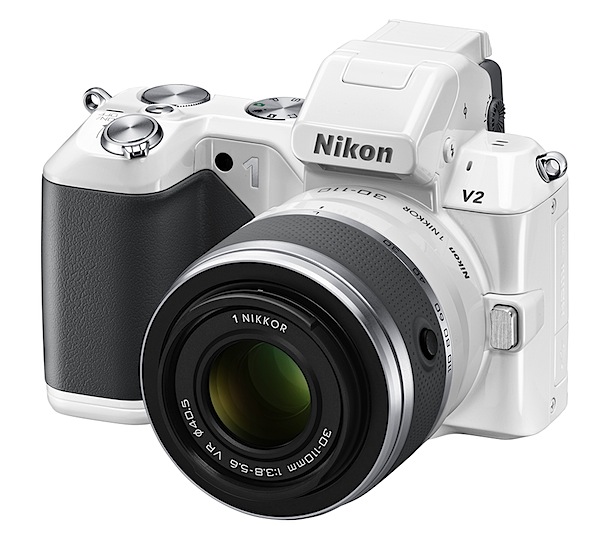
Nikon 1 V2 Review white.jpg

Straight out of the box I have to say the Nikon 1 V2 is the sexiest camera I’ve ever wrapped my mitts around.

In ivory, with a finish reminiscent of a highly polished car’s enamel, the camera is a stand out. Unlike most other mirrorless interchangeable lens cameras (MILC) the Nikon 1 V2 has a pronounced speed grip that is so effective it rivals even that of high end DLRs. The body is possibly pocketable but maybe not so easily with a lens mounted, but overall the body is quite small. And there’s a black body if your dress style is more modest.

Nikon 1 V2 Review.jpg

Nikon 1 V2 Review back.jpg

Nikon 1 V2 Review top.jpg

The body is quite a departure from the launch Nikon 1 model which also was less endowed pixel-wise at 10.1 million pixels capture; unlike the newcomer, it had no internal flash while the new model also now offers a command dial.

The latter, set into the top deck right next to the electronic turret viewfinder, offers access to auto plus PASM exposure modes; to the right are the power toggle, shutter button, video record and command dial.

The rear surface presents four buttons that take you to replay, menu, display options and trash. Off to the right is the four way jog dial that has options to apply exposure compensation, continuous shooting and self timer plus flash options. Note: to the rear of the flash is a Nikon 1 i-TTL hot shoe port, allowing the use of optional lighting and camera accessories.

The CMOS captures 14.2 million pixels and a maximum image size of 4608×3072 or 39x26cm as a print.

MPEG4 video can be recorded at Full HD res of 1920×1080 pixels. You can’t capture stills while in movie mode and I found also in movie mode the auto focus does not track while you’re recording … so you have to tap the shutter button occasionally to bring it to heel! Perhaps the Nikon 1 lenses designed specifically for this camera behave differently.

Nikon 1 V2 Features

The camera is fairly feature full and indicates that Nikon is dead serious in pursuing the MILC portion of the market.

Nikon 1 V2 Menu.JPG

For one thing, the hybrid auto focus system relies on a 73 point AF array to deliver accuracy and very precise focus, even on moving subjects.

Continuous shooting is a stand out: photographers can capture approximately 15 up to 45 fps; you can also shoot a run of 40 frames at approximately 60 fps. Taking it further, you can shot at 400 or 120 fps with a size limitation of 640×240 or 320×120 pixels respectively. The camera’s internal memory can store up to 100 successive images.

A novel mode is the Enhanced Motion Snapshot Mode which saves a four second movie file plus a separate JPEG image; alternatively you can save a 10 second movie file without a separate JPEG image.

And there’s Best Moment Capture Mode, an advanced creative mode that allows you to ‘slow down’ a moment while you are shooting. By pressing the shutter button halfway down when focused, photographers can capture approximately 1.33 seconds of live action, while the subject is displayed at five times slower than real time. Helps you catch that instant when things are happening real fast.

Cars 1.JPG

Cars 3.JPG

Then there’s Smart Photo Selector, where you can capture up to 20 shots with a single tap on the shutter button: the camera will then automatically select the five best images, based on optimum exposure, focus and facial recognition. You can also shoot simultaneous Full HD video and high res stills of a subject.

Viewing is via a turret finder and the rear 7.5cm LCD screen: I found the top finder to be useful only as a sighting tool, with the image quality very poor. Rear screen? FIne!

Lenses

The camera was supplied with an AF-S Nikkor f1.8/50mm lens that was fixed to the camera with the FT1 optional adaptor: the end result was a somewhat bulky piece of kit but at least the adaptor did provide a secondary tripod mount in its base. This 50mm translated to a 135mm optic in 35 SLR terms, so it was far from ideal.

As it was not a VR lens, it provided no vibration reduction, which made video shooting a tricky challenge. To find out exactly what lenses can be used: http://imaging.nikon.com/lineup/acil/accessories/mount_adapter_ft1/compatibility.htm

When purchasing the V2 you can get a twin lens kit with a 10-30mm and a 30-110mm. More info on Nikon 1 compatible lenses can be found here.

Nikon 1 V2 ISO Tests

Nikon 1 V2 ISO 160.JPG

Nikon 1 V2 ISO 800.JPG

Nikon 1 V2 ISO 1600.JPG

Nikon 1 V2 ISO 3200.JPG

Nikon 1 V2 ISO 6400.JPG

All the way up to ISO 3200 I considered the camera to be on top of its game. By ISO 6400 noise and lack of definition to be past a useful level.

Nikon 1 V2 Review Verdict

Quality: impressive.
Why you’d buy the V1: access to Nikkor lenses; small form factor.
Why you wouldn’t: no vari-angle finder.

There’s a lot to like in this model. It will please many Nikon fans. A classic Nikon.

Nikon 1 V2 Specifications

Image Sensor: 14.2 million effective pixels.
Metering: Matrix, centre-weighted and spot.
Lens Mount: Nikon 1 mount.
Exposure Modes: Program AE, shutter and aperture priority, manual.
Effective Sensor Size: 13.2×8.8mm CMOS.
35 SLR Lens Factor: 2.7x.
Shutter Speed (stills): 30 to 1/4000 sec (mechanical) or 30-1/16,000 sec (electronic) plus Bulb and Time (with optional remote). Flash sync: 1/250 sec (mechanical shutter) or 1/60 sec (electronic).
Continuous Shooting: 5 fps as well as 10, 30 or 60 fps using the Electronic (Hi) shutter.
Memory: SD/SDHC/SDXC cards.
Image Sizes (pixels): Stills: 4608×3072 to 2304×1536.
Movies: 1920×1080/60i and 30p; 1280×720, 640×240, 320×120.
Viewfinder: 12mm (1,440,00 million pixels); 7.5cm LCD screen (921,000 pixels).
File Formats: JPEG, NEF (RAW), JPEG+NEF, MPEG4.
Colour Space: sRGB, Adobe RGB.
ISO Sensitivity: Auto, 160 to 6400.
Interface: USB 2.0, HDMI mini, audio input, accessories.
Power: Rechargeable lithium ion battery, DC input.
Dimensions: 107.8×81.6×45.9 WHDmm.
Weight: 337 g (inc battery and card).
Price: Get a price on the Nikon 1 V2 Body Only or Nikon 1 V2 with a 10-30mm VR 1 NIKKOR Lens or Nikon 1 V2 with a 10-30mm & 30-110 VR 1 NIKKOR Lens.

Post originally from: Digital Photography Tips.

Check out our more Photography Tips at Photography Tips for Beginners, Portrait Photography Tips and Wedding Photography Tips.

Nikon 1 V2 Review


Digital Photography School

 
Comments Off on Nikon 1 V2 Review

Posted in Photography


Just posted: Fujifilm X-E1 Review

02 Mar

fujifilm_xe1.png

Just posted: Fujifilm X-E1 review. With a sensor and imaging pipeline that is identical to the X-Pro1’s the X-E1 promises much of the X-Pro1’s fun in a more compact and affordable package. We’ve spent the past few weeks using the X-E1 intensely with the full range of lenses now available for the X-system, and have prepared a full in-depth review. Following the release of raw support from Capture 1 and much improved raw support from Adobe, the X-E1 (and X-Pro 1) just got a whole lot more appealing, too. Click through for a link to our full review. 

News: Digital Photography Review (dpreview.com)

 
Comments Off on Just posted: Fujifilm X-E1 Review

Posted in Uncategorized


Just posted: Fujifilm X-E1 Review

01 Mar

fujifilm_xe1.png

Just posted: Fujifilm X-E1 review. With a sensor and imaging pipeline that is identical to the X-Pro1’s the X-E1 promises much of the X-Pro1’s fun in a more compact and affordable package. We’ve spent the past few weeks using the X-E1 intensely with the full range of lenses now available for the X-system, and have prepared a full in-depth review. Following the release of raw support from Capture 1 and much improved raw support from Adobe, the X-E1 (and X-Pro 1) just got a whole lot more appealing, too. Click through for a link to our full review. 

News: Digital Photography Review (dpreview.com)

 
Comments Off on Just posted: Fujifilm X-E1 Review

Posted in Uncategorized


Plastic Cameras: Lo-Fi Photography in the Digital Age [Book Review]

27 Feb

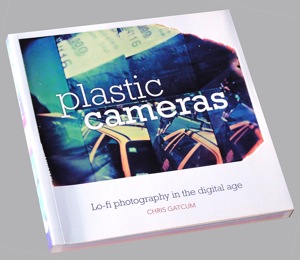
Plastic camerasYears ago a cinematographer friend told me of a dinner he once had in Paris with a Mr Cooke. Mr Cooke of the famed British optical firm Cooke, Taylor and Hobson.
During the meal Mr Cooke explained that he spent most of his waking and working hours designing lenses to perform with maximum sharpness and minimum degrees of aberration to achieve the perfect capture of the photographic image. In spite of these heroic efforts he spoke with some level of bitterness that certain cinematographers persisted in covering his carefully crafted lenses with all sorts of rubbish, grease and diffusers to degrade, soften and generally muck up the performance of these precisely manufactured optics … all in the pursuit of artistic expression!

Just as the plastic cameras described in this book do today!

Author Gatcum is of the opinion that digital photography and the associated image editing software has made it so much easier to produce perfect shots … but there are many enthusiasts out there who don’t necessarily want ‘perfect shots’. It’s at this point in the argument that plastic cameras and their ‘lo-fi’ aesthetic enter the discussion.

You have only to flip through the images in the book to enjoy the thrills and spills that plastic cameras can create! Images with severe vignetting, extreme aberrations, uneven sharpness across the frame, colour that shows that things are definitely not right in the lenses’ colour capture. For not right, read very right in the vocab of the adventurous photographer!

From my own experiences with early Diana cameras and more recent LOMO replicas you have to take a chance, sometimes succeeding with a shot that stuns! Or that doesn’t! Perfection is not on the menu! Chance is the name of the game!

Diana F front

The story really starts with the original Diana, made by the Great Wall Plastics factory in Hong Kong in the 1960s and first sold for about a dollar. By the 1970s the resourceful and wise out there quickly saw the Diana’s potential and snapped them up from junk shops to began using them for creative photography. These days the original $ 1.00 Dianas sell on eBay for $ 50 plus.

By 2007 the Lomography company saw an opportunity and cleverly re-manufactured the Diana and its sub models, selling them for prices approaching $ 100, complete with all their imperfections.

These days we’re spoilt for choice. The book lists dozens of crazy models, all available from companies such as Lomo and the like.

Like the magnificent 120 format Holga and its variations. These include the Holga 120 TLR, the Holgaroid, the Holga 120 3D, Holga PC pinhole camera. Also in 35mm: Holga 135 TLR.

Lomo of course markets a wide variety of models: the 35mm based LC-A, the Lomo Smerna duet of models, with one sporting a flash socket. Plus many, many more.

And a long list from other makers: Blackbird; Recesky TLR; Halina Panorama; Twinkle 2; Split-Cam; Robot 3; Action 4; Agat 18k; Ikinimo 110 … the list goes on.

Then the game got clever: you can now buy Holga lenses that fit current DSLR models such as Olympus and Panasonic Four Thirds format models.

There are even apps that digitally replicate the look and feel of plastic cameras!
The book is a ball of fun and even if you never buy a plastic camera to pursue the path of erratic photographic capture you will enjoy the ride as you thumb through its pages.

Footnote: these days the name Cooke appears on high level lenses used still in feature film and TV series photography. They’re highly regarded and no doubt are frequently plastered with layers of Vaseline, parachute silk, ripstop nylon etc!

Author: G Gatcum.
Publisher: Ammonite Press.
Distributor: Capricorn Link.
Length: 192 pages.
ISBN: 978 1 90770 840 4.
Price: “Get a price on Plastic Cameras at Amazon (currently 22% off)

Post originally from: Digital Photography Tips.

Check out our more Photography Tips at Photography Tips for Beginners, Portrait Photography Tips and Wedding Photography Tips.

Plastic Cameras: Lo-Fi Photography in the Digital Age [Book Review]


Digital Photography School

 
Comments Off on Plastic Cameras: Lo-Fi Photography in the Digital Age [Book Review]

Posted in Photography


Sony NEX-6 Review

24 Feb

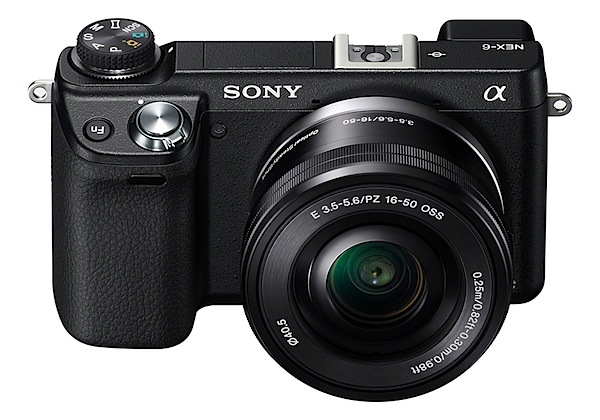
Sony NEX-6 Review.jpg

I usually start a review of a camera like this straight after brekky, while I’m fresh, with an uncluttered mind.

But sometimes it seems I would have been better off by kicking off with a cluttered mind!

So I pick up the NEX-6. Hit the power button. Look in the LCD. Looks awfully dark. What’s up? Go the finder menu and hit the factory reset button. No better. Look in the menu for the PASM options. None there!

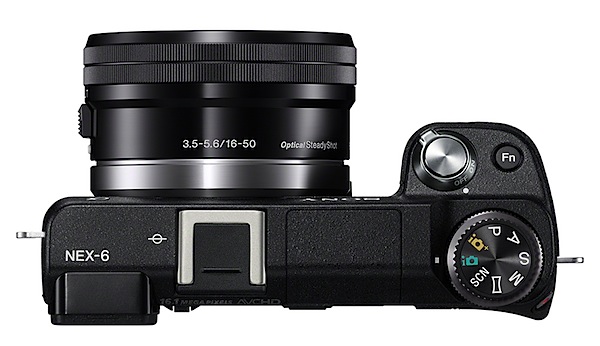
Oh! Oh! Dumbo missed the legibly inscribed, external PASM settings on the top mode dial. Just like most other cameras, but unlike the two most recent mirrorless interchangeable lens cameras that passed through my hands, the Canon EOS-M and Sony’s NEX-5R, which tucked these vital options away in the finder menu and touch screen respectively.

With the NEX-6 many will appreciate the easy access to external exposure controls like these.

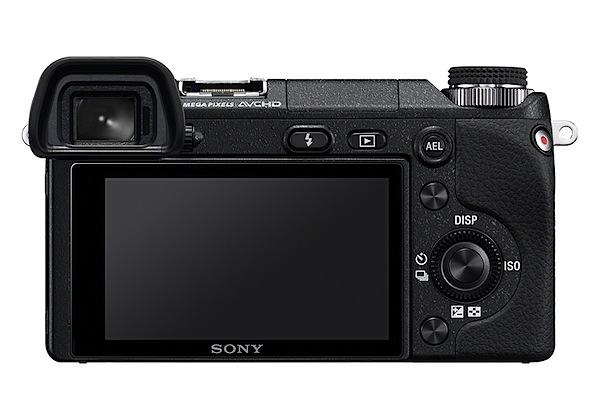
Sony NEX-6 Review back.jpg

Sony NEX-6 Review tilt.jpg

Sony NEX-6 Review Top.jpg

Cosmetically, the camera looks gorgeous, simply garbed in black with legibly labelled external controls. It feels good too, thanks to a prominent speed grip. With the review f3.5/16-50mm review lens attached, it is almost pocketable.

Sony NEX-6 Features

The power and Function buttons are mounted on a front sloping deck that falls naturally to an operative forefinger.
Scene selection 1.jpg

Scene selection 2.jpg

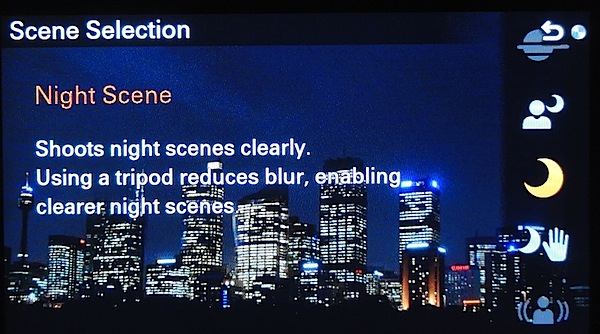
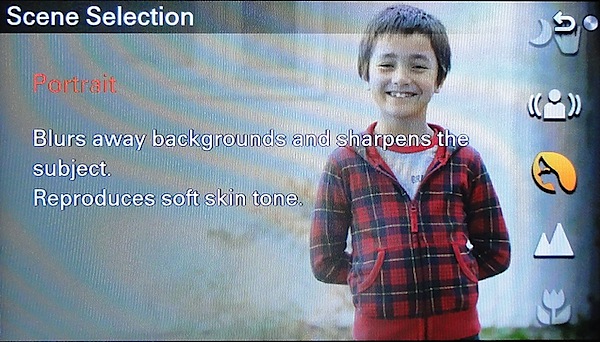
As I mentioned, the mode dial carries the PASM choices plus iAuto and Superior auto exposure options, plus scene modes (nine in all) and Sony’s excellent sweep panorama. Set lower and on the extreme right corner is the video record button: later, when out shooting, I found this location to be a damned nuisance!

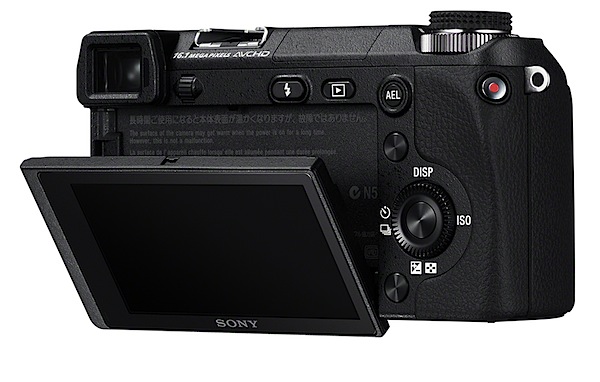
At the rear there is the replay button, flash pop up, AEL (to fix the exposure); the four way control wheel carries ISO, display options, single/continuos shooting and exposure compensation. There are three more, unlabelled near-invisible buttons: two assignable ‘soft keys’ and the central control wheel.

Chatswood shopping centre 2.JPG

Chatswood shopping centre 3.JPG

The CMOS captured a maximum image size of 4912×3264 pixels, or 42x28cm as a print.

Movies at Full HD res of 1920×1080 pixels can be shot in either AVCHD (full res) or MPEG4 (at two lower res settings).

The camera is furnished with full Wi-Fi access. This allows relatively simple wireless stills and video transfers to smartphones or tablets running the supplied PlayMemories Mobile (Windows only) app. Images can also be transferred wirelessly to a networked computer or viewed wirelessly on any DLNA-compatible TV.

Thankfully, the NEX-6 has a vari-angle LCD screen, tiltable to 90m degrees upwards or 45 degrees down.

Sony NEX-6 ISO Tests

Sony NEX-6 ISO 100.JPG

Sony NEX-6 ISO 400.JPG

Sony NEX-6 ISO 800.JPG

Sony NEX-6 ISO 1600.JPG

Sony NEX-6 ISO 3200.JPG

Sony NEX-6 ISO 6400.JPG

Sony NEX-6 ISO 12800.JPG

Sony NEX-6 ISO 25600.JPG

A very clean performance all the way to ISO 3200. By ISO 6400 very slight rise in noise. Still very useable at ISO 12800 in terms of quality, sharpness and lack of visible noise. Noise up at ISO 25600 but still useable with the right subjects.

Sony NEX-6 Review Verdict

Quality: slightly above average.
Why you’d buy the Sony NEX-6: easy to use; access to a reasonable range of lenses.
Why you wouldn’t: no touch screen operation; the memory cat\rd slot is fiddly to deal with.

If you don’t need the image size of the NEX-7, this could be an ideal choice. Good one!

Sony NEX-6 Specifications

Image Sensor: 16.1 million effective pixels.
Metering: multi zone, centre-weighted, spot.
Lens Mount: Sony E-mount.
Exposure Modes: iAuto, Program AE, shutter and aperture priority, manual.
Effective Sensor Size: 23.5×15.6mm CMOS.
35 SLR Lens Factor: 1.5x.
Shutter Speed (stills): 30 to 1/4000 second and Bulb. Flash sync: 1/160 sec.
Continuous Shooting: up to 10 fps.
Memory: SD/SDHC/SDXC, Memory Stick Pro Duo cards.
Image Sizes (pixels): Stills: 4912×3264 to 2448×1376.
Movies: 1920×1080 (AVCHD), 1440×1080 and 640×480 (MPEG4).
Viewfinder: 7.5cm LCD screen (921,600 pixels).
File Formats: JPEG, RAW (Sony ARW 2.3), JPEG+RAW, AVCHD, MPEG4.
Colour Space: sRGB, Adobe RGB.
ISO Sensitivity: Auto, 100 to 25600.
Interface: USB 2.0, HDMI mini, Wi-Fi.
Power: Rechargeable lithium ion battery, DC input.
Dimensions: 120x67x43 WHDmm.
Weight: 345 g (inc card and battery).
Price: Get a price on the Sony NEX-6 (Body Only) or the Sony NEX-6 with 16-50mm Power Zoom Lens or the Sony NEX6 with 16-50mm Power Zoom Lens and 55-210mm Lens.

Post originally from: Digital Photography Tips.

Check out our more Photography Tips at Photography Tips for Beginners, Portrait Photography Tips and Wedding Photography Tips.

Sony NEX-6 Review


Digital Photography School

 
Comments Off on Sony NEX-6 Review

Posted in Photography