RSS
 

Posts Tagged ‘REVIEW’

Just posted: Sony Cyber-shot DSC-RX1 review updated with lens data

22 Feb

Sony_RX1.jpg

We’ve updated our Sony Cyber-shot DSC-RX1 review with an additional page of lens data, brought to you in collaboration with DxOMark. The RX1’s headline feature may well be its 24MP full frame image sensor, but the fixed Carl Zeiss Sonnar T* 35mm F2 lens is an equally crucial part of its imaging chain. We’ve added a full set of technical lens measurements to our review to illustrate how it performs, presented in our unique data widget. You can also see how it measures up against the best 35mm lenses available for SLRs.   

News: Digital Photography Review (dpreview.com)

 
Comments Off on Just posted: Sony Cyber-shot DSC-RX1 review updated with lens data

Posted in Uncategorized


Synology DS1512+ NAS review

21 Feb

Hello there! I’d just finished writing this Synology 1512+ review and subsequently deleted it all… Why, you ask? Well – I have a bit of a history in I.T. and as such, found myself getting TOTALLY geeky with my review..

Those of you that have read any of my reviews to date, here on dPS, will know that I try to keep it ‘real world‘ …So, I’m going to write it again and dispense with all the ones and zeros in an effort to help you decide if moving to a Synology NAS is the way forward, or not.

Synology DiskStation 5-Bay (Diskless) Network Attached Storage DS1512+
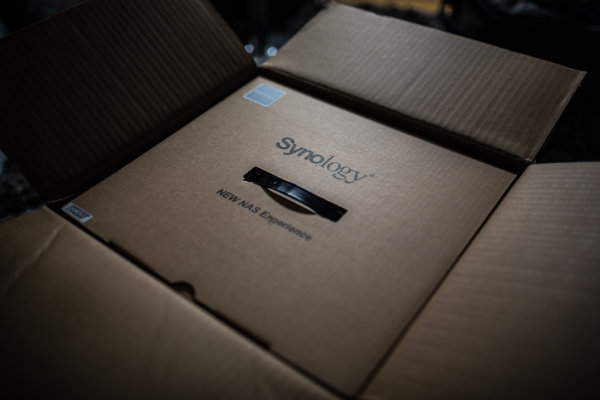
Unboxing_Synology_1512_NAS

The Synology DS 1512+ is a 5 drive NAS that can give you up to around 15TB of space depending on how you set it up – that’s a heck of a lot. You can also add external disk shelves (DX510 @ about $ 600) that will take you upto 60TB of space… To put that into perspective, my image library is between 3 and 4TB and it spans the last 10 years.. You may have a lot more, you may have less – but one day you WILL have more.

Here are a few of the specs as per the Synology website. This little black box is no lightweight!

Synology DiskStation DS1512+ offers a high-performance, scalable, and full-featured network attached storage solution that meets the needs of small and medium-sized businesses that require an efficient way to centralize data protection, simplify data management, and rapidly scale storage capacity with minimal time spent on setup and management. The Synology DS1512+ is backed with Synology’s 3-year limited warranty.

  • 194.83 MB/sec Writing, 200.31 MB/sec Reading1
  • Scaling up to 15 Drives with Synology DX510/DX513
  • Featuring SuperSpeed USB 3.0
  • Expandable RAM Module (Up to 3GB)
  • 2 LAN with Failover and Link Aggregation Support
  • CPU Passive cooling Technology & System Fan Redundancy
  • VMware®, Citrix®, Microsoft® Hyper-V® Compliance
  • Running on Synology DiskStation Manager (DSM)

The 1512+ can come configured with hard drives already in the unit and set up, mine came without drives and I went ahead and put four 2TB drives and a single 1TB drive in the unit and set it up using Synology’s Hybrid Raid.

SO, very basically, let’s look at what all these crazy acronyms mean, shall we? (Yes, I realise half of you (us) are a little geeky and already know this stuff) RAID for example, is not something my three year old constantly does to the biscuit tin, well, it is, but in this case RAID stands for “Redundant Array of Inexpensive (or independent, you choose) Disks” which is basically exactly what it says on the tin… A bunch of disks, joined together to act in a handful of different ways as one, i’ll explain those in a bit.
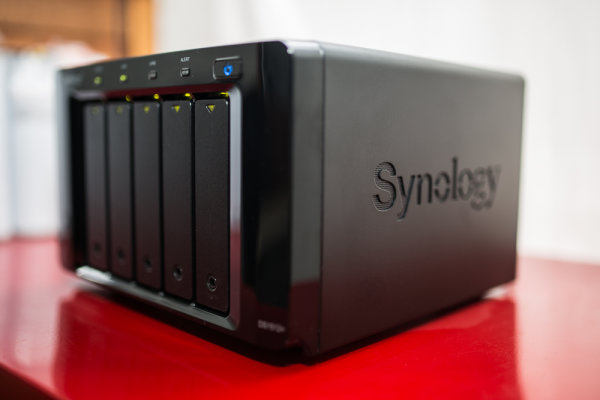
Synology_1512_Photographers_Nas_Review

NAS or Network attached storage is the next one we’ll cover… So, rather than sticking a USB or Firewire cable in the side of your computer, you can tuck this little fellow away near your home / office router (wireless modem / modem) and, obviously depending on if you have the right hardware, can connect it to your network and access it via either wireless or wired network.. Me, I use a Draytek Vigor 120 ADSL2+ modem attached to an Apple Airport Extreme.. My Synology is plugged into my Airport Extreme and I connect to it wirelessly from my computer.

Now, you asked about the different things RAID could do… Well, there are a few different ‘levels’ of standard RAID, the Synology can perform each of these, though I’m not going to bore the trousers off of you by explaining what each of them do here, you can spend a quiet evening reading up on them …as I said, I set up my NAS using “Synology Hybrid Raid” as it does what I want, and I’m semi-certain if you’re like me, it will do what you want.

  • JBOD
  • RAID-0
  • RAID-1
  • RAID-5
  • RAID-5+Spare
  • RAID-6
  • RAID-10

These different raid levels provide everything from no disk redundancy to a lot (2x) of disk redundancy with differences in read and write speed at each RAID level… For me, how to choose what RAID level was made very simple with the Synology, as they have the Synology Hybrid Raid. SHR is based on standard RAID, but allows the device to use all of the space on each disk… You can read the exact technical details on Synology’s website if you’re into that – as I said, I wasn’t going to bust out the pocket protector in this review… I do have a good analogy though!!

You have 5 water buckets, three medium sized ones and two large ones (and no, this isn’t a Bruce Willis film) …if you fill each bucket up to the same level as the smaller buckets when they’re full, you will see you have space left in the two bigger buckets… traditionally, that space is lost if you RAID that set of disks together. With SHR, you can group that remaining space together to give you another volume (or another drive letter if that’s easier to understand, depending on how you share it…) so, the first part of your Synology will give you 5TB and the remaining space might give you an extra 2TB. Winning! Finished reading Wikipedia? Have a quick look at this RAID calculator, It’s pretty neat!

Using a NAS / RAID on its own isn’t a backup as such… Be Warned!

Whilst you have ‘fault tolerance’ when using a Synology Hybrid Raid setup, the same as with most RAID arrays, you still need a backup of your data. For example, my main portion of space is across four hard drives within my NAS as per the image below, if one of those drives should have an untimely death, my Synolgy would chuckle, beep and carry on serving data – this is how (some) RAID levels work. Here’s an overview of how my Synology is setup.

4 x 2TB Hard Drives, joined together using SHR to give me a single drive with 5.36TB of useable space – you can see that in the image below.
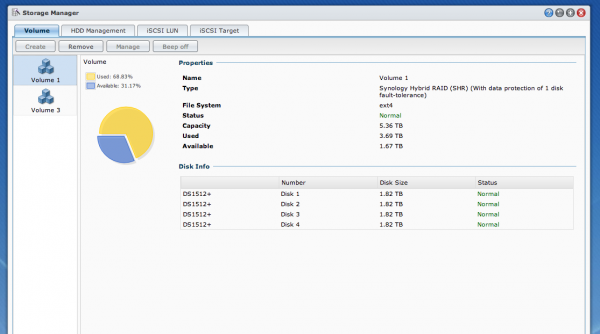
Synology_raid_array_setup_review

I also have a single 1TB drive in the Synology as it takes 5 disks and I didn’t have five 2TB disks, so I’ve added a single 1TB that I’ve called ‘Media’ and I use that to serve music, movies, tv shows and pictures to anyone on my network / to my Android DTV box. I also have “iTunes server” installed, this is software that installs in seconds and runs on the Synology and can serve any iTunes content out across my network to iTunes clients… (You can also add USB speakers to your Synology and play music directly from the unit… rad…)
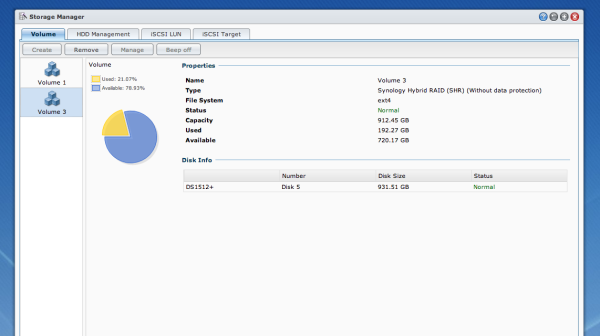
Synology_DSM_Review

But the best thing is that I had a few of these eSata hard drives sitting around, not all the same brand or model, yet the Synology will happily treat them all nicely – have a look below at the list of drives.
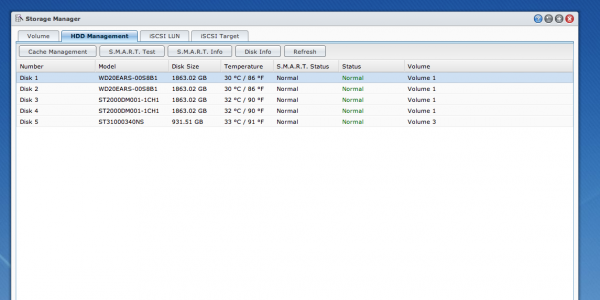
synology_simon_pollock_review

So how do I use it?

After continually growing my photo library for the last 12 years or so, I have a lot of digital image files – the majority in the last four years as file size increased etc. So disks get bigger and rather than have a set of single external drives looking after my archive, I’ve employed this Synology. You can see above that I have 4 separate disks that are looking after my archive, they’re a similar size to the G-Tech I use as my working drive…

You use a G-Tech too? But didn’t you just implement a Synology?

Yes! Remember that part where I said that a NAS on its own isn’t a backup? Well, when you look at my workflow below, you’ll understand where the Synology comes into its own.

Here’s my workflow;

Take a photo -> Lexar USB 3 CF reader -> Macbook Pro with Lightroom 4 -> G-Tech 4TB which is my Firewire attached disk, the drive I work from etc. Now, where I’ve added this network attached storage drive is at this point – when I import a card full of images, I ask Lightroom to make a second copy to the Lightroom folder on my NAS, you can see in the image below..
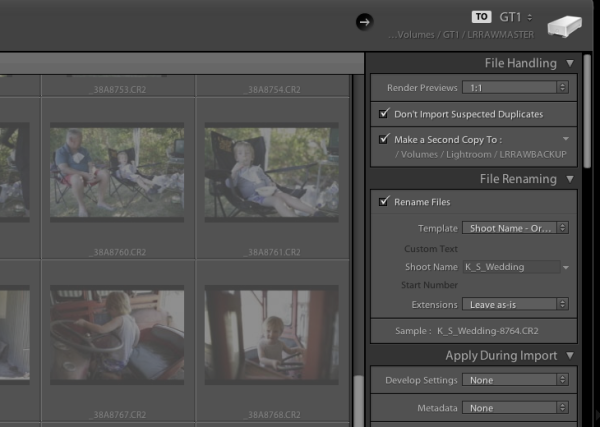
simon_pollock_lightroom_synology_workflow

You can see at the top that I’m importing to GT1, a 4TB G-Tech Firewire drive, then below that you can see i’m rendering 1:1 previews and then below that I’m making a second copy to my Synology. All done, all backed up… At the end of my import and subsequent edit, I can export that catalogue into the same raw backup folder on the NAS and everything from that shoot is in one convenient place.

Sure, but why a NAS?

Well, yes, why a NAS? The Synology is around $ 800 and then you need to buy disks for it, whilst not the most expensive unit on the market – actually, it’s very competitively priced – it’s not spare change. For me there are a number of reasons to choose a Synology NAS, and after having the Synology installed and kindly and quietly doing exactly what I’ve asked it for a month or so, I question myself as to why I didn’t do it a LONG time ago! Here are my reasons for NAS…

  • Computer independent (a Mac and a PC can read it.. which if you share drives with your missus, is a good thing!).
  • It can be used for much more than a simple external drive in a one box format. WordPress server for example! take a look
  • When my 5 hard drives fill, I swap them out without having to buy external drives (cost saving in the long term).
  • The Synology sits quietly in a corner, stays cool and goes to sleep when I’m not using it. (depends how you set yours up)
  • It serves all the music / photos / media easily and quickly.

The ability to access my data from anywhere (with an internet connection) including my phone etc, knowing that my disks are monitored and i’ll be alerted if something looks fishy, to be able to grow my disks with ever increasing storage needs… major plus ticks in my book.

The Synology was so simple to setup, yes, I have an IT background but here’s what I did to set the unit up and connect to it… Plugged it in to the power, plugged in one of the provided network cables and put that in a free network port on the back of my Airport Extreme… and, err, turned it on… That was about it! I’ve since upgraded the operating system (DSM) which is a very simple and quick task. I’ve installed the virus software on the box which is an app and manages itself. There is also a great support forum, lots and lots of enthusiastic users etc.

The Synology is a very good unit with lots of software available to do anything from manage ip security cameras to run your small business network and back up your files to an offsite location. A great tool in my toolbox of digital life.

Who is the Synology 1512+ for? Anyone with storage requirements, but I’ll be personally suggesting it to anyone looking to break free of the constant external drive purchasing circle.

I find no negatives, only positives with the Synology DS 1512+ …bravo, Synology – 11 stars

–Sime

Post originally from: Digital Photography Tips.

Check out our more Photography Tips at Photography Tips for Beginners, Portrait Photography Tips and Wedding Photography Tips.

Synology DS1512+ NAS review


Digital Photography School

 
Comments Off on Synology DS1512+ NAS review

Posted in Photography


Just Posted: Sony Cyber-shot DSC-RX1 review

20 Feb

Sony_RX1.jpg

Just posted: Our review of the Sony Cyber-shot DSC-RX1. The RX1 is one of the most ambitious cameras Sony has ever built: a full-frame compact with a fixed 35mm F2 lens. Those specifications make the RX1 a high-end, niche camera, as its $ 2,800/€3,100/£2,600 price tag confirms. So how does it perform? We’ve run through the RX1 through our standard tests and looked into its performance and what this unique camera offers. Click here to see what we found.

News: Digital Photography Review (dpreview.com)

 
Comments Off on Just Posted: Sony Cyber-shot DSC-RX1 review

Posted in Uncategorized


Panasonic Lumix DMC-LX7 Review

17 Feb

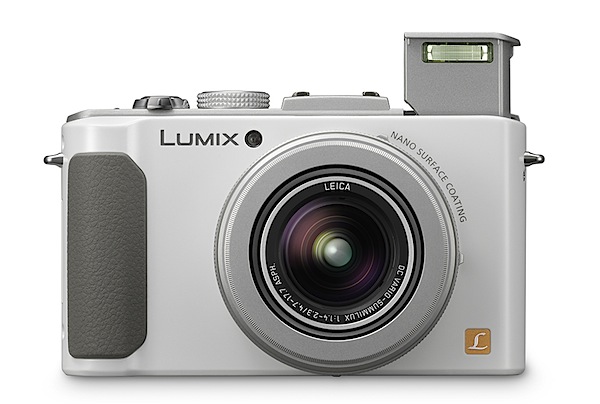
Panasonic Lumix DMC-LX7 Review.jpg

It seems to me that the fixed lens, compact camera game has spawned two sub species: ultra long zoom models and those with ultra fast lenses … to some they’re called ‘bright’.

The Panasonic Lumix DMC-LX7 belongs in the latter category and a dazzling model it is too: compact, light in weight and full of power.

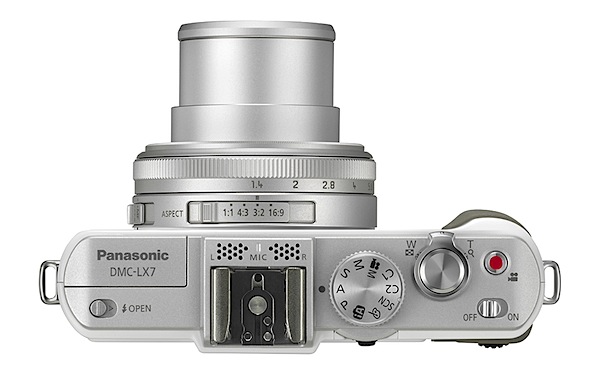
Panasonic Lumix DMC-LX7 Review Top.jpg

The Leica Vario Summilux lens has a maximum aperture of f1.4, stopping down to only f2.3 when the 3.8x zoom is extended from its wide 24mm to the tele end of 90mm (35 SLR equivalent).

Panasonic Lumix DMC-LX7 Features

The 10.1 megapixel MOS sensor captures a maximum 3968×2736 pixel image: 34x23cm as a print.

Video? Full HD 1920×1080 pixel resolution, saved in either AVCHD or MPEG4. No, you cannot shoot stills while recording video.

One oddity: although the camera has 70MB of internal memory, in addition that provided by any loaded SD card, it will record video only in VGA (640×480) format to that internal memory.

In typical fashion I kicked on the power before reading the manual, selected Program as my exposure mode, then spent some time scratching my head as to how to alter the lens aperture. Voila! Twirl the lens ring! With the LX7 you get direct access to the f numbers. Simply ‘mazing!

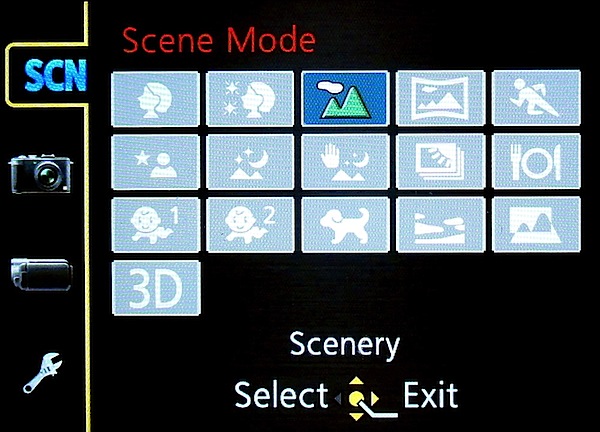
Scene modes.jpg

The camera’s top deck contains the mode dial (auto, Program, aperture and shutter priority, manual exposure, 15 scene modes (plus 3D), two custom modes and a creative video mode that offers manual control of shutter speed and lens aperture. Beside the mode dial are the shutter button and zoom lever, on/off switch, video record and flash button.
Fruit seller.JPG

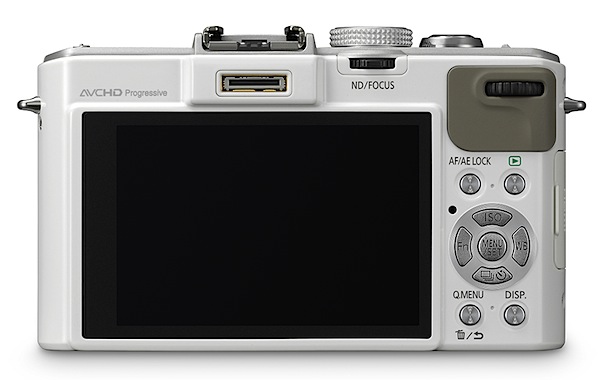
Rear: a button for exposure lock, menu, display and replay. The four way jog dial offers access to ISO settings, a Function button, single or continuous shooting and white balance. But note: these tiny buttons have incised text on a silver background that is almost illegible in most ambient situations. Black mark!

Panasonic Lumix DMC-LX7 Back.jpg

The side of the lens barrel has three settings: manual and two for auto focus (normal range and macro). Interestingly, to the rear of the lens is a direct control switch for the image aspect ratio (1:1 to 16:9).

Strand arcade 1.JPG

More: there is an internal neutral density filter equivalent to three f stops that allows you to reduce the incoming light and use a larger aperture for special effects. This is selectable via a tiny button behind the mode dial. The same button has a dual purpose: it can also control manual focus. Brilliant!
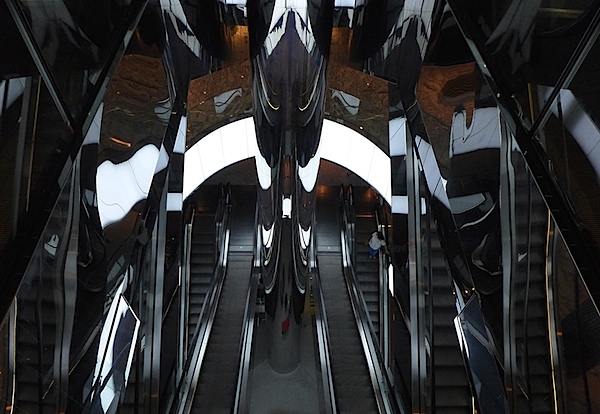
Westfield centre.jpg

Framing decisions are helped by the ever-increasingly seen level gauge. I hope this trend continues.

There are 16 Creative Control filters that include settings to capture images with an expressive look, high and low key, cross processing, sepia and others.

Other inclusions:

Time lapse, in which you can preset the camera to begin taking pictures at constant intervals for landscape scenes etc.

Photo Style gives you the ability to maximise the image quality to higher contrast, give a mono look, use a scenery setting and a ‘look’ for portraits etc.

The accessory shoe extends the LX7′s talents considerably. You can attach a live viewfinder, an optical finder and auxiliary flash.

Distortion

None at either end of the zoom. Excellent!

Start Up

Two seconds from power in to first shot; follow-ons as fast I could hit the shutter button.

Panasonic Lumix DMC-LX7 ISO Tests

Panasonic DMC-LX7 ISO 100.JPG

Panasonic DMC-LX7 ISO 400.JPG

Panasonic DMC-LX7 ISO 800.JPG

Panasonic DMC-LX7 ISO 1600.JPG

Panasonic DMC-LX7 ISO 3200.JPG

Panasonic DMC-LX7 ISO 6400.JPG

The level of noise only became evident at ISO 3200. Even more so at ISO 6400.

Panasonic Lumix DMC-LX7 Review Verdict

Quality: Excellent, especially at larger apertures.

Why you’d buy the Panasonic Lumix DMC-LX7: small, powerful camera.

Why you wouldn’t: no reason.

While this camera could easily serve as day-to-day snapshot camera, it would be wasted. It would be ideal as a companion shooter to a DSLR. IMHO it would not be ideal as a travel companion due to its limited zoom range.

Panasonic Lumix DMC-LX7 Specifications

Image Sensor: 10.1 million effective pixels.
Metering: multi zone, centre-weighted, spot.
Lens: Leica DC Vario-Summilux f1.4-2.3/4.7-14.7mm (24-90mm as 35 SLR equivalent).
Exposure Modes: Auto, Program AE, shutter and aperture priority, manual.
Sensor Size: 15mm MOS.
Shutter Speed (stills): 60 to 1/4000 second.
Continuous Shooting: up to 11 fps.
Memory: SD/SDHC/SDXC plus 70MB internal memory.
Image Sizes (pixels): Stills: 3968×2736 to 480×480.
Movies: 1920×1080, 1280×720, 1440×1080 and 640×480.
Viewfinder: 7.6cm LCD screen (920,000 pixels).
File Formats: JPEG, RAW, JPEG+RAW, MPO (3D), AVCHD, MPEG4.
Colour Space: sRGB, Adobe RGB.
ISO Sensitivity: Auto, 80 to 12800 (with boost).
Interface: USB 2.0, HDMI mini.
Power: Rechargeable lithium ion battery, DC input.
Dimensions: 111x68x46 WHDmm.
Weight: 298 g (inc battery).
Price: get a price on the Panasonic LUMIX DMC-LX7 at Amazon.

Post originally from: Digital Photography Tips.

Check out our more Photography Tips at Photography Tips for Beginners, Portrait Photography Tips and Wedding Photography Tips.

Panasonic Lumix DMC-LX7 Review


Digital Photography School
 
Comments Off on Panasonic Lumix DMC-LX7 Review

Posted in Photography


Sigma 70-200 HSM II 2.8 Hands-On Outdoor Review

17 Feb

hey guys ithree6mafia here, just doing my last review on the lens that i love the sigma 70-200, remember to SUBSCRIBE!COMMENT!RATE! and as usual send me a question of about anything as i will answer it:) THANKS FOR ALL THE SUPPORT:DD!! ADD ME ON FACEBOOK! www.facebook.com FOLLOW ME ON TWITTER! twitter.com JOIN THE FORUM 🙂 www.facebook.com
Video Rating: 3 / 5


Coolpix P500 – Nikon Coolpix P500 Review

16 Feb

www.coolpixp500.org Coolpix P500 review – Does Nikon Coolpix P500 perform better? COOLPIX P500 | COOLPIX P500 REVIEW | Dont buy NIKON P500 Until you Read This Read the coolpix P500 nikon review before you buy. Does it perform better than its predecessor? With nikon coolpix p500 you’ve never been closer to the action than you are with this 36x wide-angle optical Zoom-NIKKOR® ED glass lens. The nikon coolpix p500’s optical zoom (22.5–810mm) pulls you in from wide panoramas to crisp close ups. Plus, a side zoom control marks the end of shaky zooms—freeing you to capture great action photos with minimal blur. So whether you’re shooting a mountain vista or zooming in on a snowboarder, say goodbye to missed shots. This lens catches it all. It even allows for macro shooting as close as 0.4 inches Stunning photos in not so stunning shooting conditions. biker doing a flip Whether you’re aiming at a midnight skyline or zooming in on a hang-glider in a sun drenched sky, Nikon enables you to take incredible photographs and movies. With its 12.1-megapixel backside-illuminated CMOS sensor, dual image processors and Nikon’s EXPEED C2 image processing engine, it frees you to shoot highly detailed images with minimal noise and distortion. The COOLPIX P500 is ideal for shooting high speed action, so you’re sure to capture the fastest skateboarders, skiers and windsurfers. It’s armed with ISO speeds up to 3200 and equipped with a five-way Vibration Reduction (VR) Image Stabilization System
Video Rating: 4 / 5

Getting to grips with my new Nikon…


Two Minute Review: Canon EF-S 18-200 mm f/3.5-5.6 IS Lens

16 Feb

Photographer Steve Meyer extolls the virtues of Canon’s EF-S 18-200mm f/3.5-5.6 IS lens. Check in with Steve at www.stevemeyer.net !! (c) 2011 Green Hill Camera http Produced for Green Hill by Kozak Films www.kozakfilms.com


Review of the Think Tank Retrospective 10 Bag

15 Feb

To receive a free bag from Think Tank, visit www.ThinkTankPhoto.com/affiliate and enter code AP-512, This will get you a choice of a few items to receive free with purchase! This is a review of the Think Tank Retrospective 10 bag for DSLR cameras. This is a great bag for amateurs and pros alike! To find out how my subscribers can receive a FREE gift when ordering from Think Tank, Message me on YouTube! Check out Think Tank at www.ThinkTankPhoto.com

Wonder Full is the free. open air light and water show that plays every night at the waterfront, Marina Bay Sands, Singapore. Using light, lasers, LEDs and huge water screens it’s South East Asia’s biggest free light show. Shot with a Nikon D7000.
Video Rating: 5 / 5


Pentax X-5 Review

15 Feb

After unpacking this long-awaited camera my first impression of the Pentax X-5 was that it looked startlingly like a DSLR! Prominent speed grip, big lens, eyepiece, same feel.

But it is of course a bridge camera, with a magnificent 26x zoom lens reach, operable from the top zoom lever.

Pentax X-5 Review

Pentax X5_BLACK.jpg

Pentax X-5 rear.jpg

Pentax X-5 Features

Those who prefer external controls will be in delight: the top deck houses the zoom lever and shutter button, on/off switch, exposure correction button and mode dial. The latter provides access to the various exposure modes (auto, manual), a user setting, movie, special subjects (such as night snap, sports, landscapes, portrait), scene modes (15 in all).

The rear surface has a button to switch screen to turret finder viewing, display options, an e-dial (to change exposure values, shutter speed and aperture), video record, replay, the four way jog dial to access flash, still/continuous shooting, mode and macro options.
Menu.jpg

art.jpg

The menu system is minimal and the text used is chunky, tho’ highly readable.

To my delight I found the LCD screen to be of the vari-angle variety, tiltable 60 degrees downwards or raisable 90 degrees upwards, although in the latter position the turret finder fouls part of the view. On a camera at this price peg it was a surprise!
Beach people 1.JPG

Lifeguards.JPG

The maximum image size is a surprisingly large 4608×3456 pixels, sufficient to make a 39x28cm print.

Video is recorded at Full HD 1920×1080 pixels resolution in MPEG4. You can’t capture stills while shooting video.

There is a dual shake-reduction system; be careful with this as it combines a sensor-shift type mechanism along with digital correction. You can choose the sensor-shift, a combination of sensor-shift and electronic — or elect to go with neither. My advice: choose the sensor-shift mode as your images may suffer degradation with electronic processing.

The power supply is four AA batteries (alkaline, NiMh, lithium). The penalty of using such an approach is a larger camera body, while the benefits are easy availability of batteries while you’re travelling. I have one comment about the battery/card hatch: it was notorious difficult to open and close, possibly the result of mis-treatment by previous reviewers but more likely an indicator of how the cover will wear in the long term.

An interesting feature for the dabblers is a series of digital filters which you can apply to a stored image; in this approach you can create a sepia image, apply a retro look, make it look like a fish eye lens shot and others.

Startup Time

From a cold start it was only two seconds to being able to fire the first shot from power on; follow-ons came in as fast as I could hit the button.

Distortion

No problems at the wide end but there was very slight pincushion distortion at the tele end.

Pentax X-5 ISO Tests

Pentax X-5 ISO 100.JPG

Pentax X-5 ISO 400.JPG

Pentax X-5 ISO 800.JPG

Pentax X-5 ISO 1600.JPG

Pentax X-5 ISO 3200.JPG

Pentax X-5 ISO 6400.JPG

Noise begins to appear at ISO 1600, then gradually worsens until it become near-unacceptable at ISO 6400.

Pentax X-5 Review Verdict

Quality: average, although you may find atmospheric haze at at long tele settings.
Collaroy beach full wide.JPG

Collaroy beach full tele 2.JPG

Why you’d buy the Pentax X-5: nice long 26x zoom range; 16 megapixels capture.

Why you wouldn’t: not pocketable.

This is an interesting camera not least because of its long zoom range, other features — and all in one well-priced package.

Pentax X-5 Specifications

Image Sensor: 16 million effective pixels.
Sensor: 11mm CMOS.
Lens: f3.1-5.9/40-104mm (22.3-580mm as 35c SLR equivalent).
Metering: Multi segment, centre-weighted, spot.
Exposure Modes: Auto, Program AE, shutter and aperture priority, manual.
Shutter Speed: 4 to 1/1500 second.
Continuous Shooting: up to 10 fps.
Memory: SD/SDHC/SDXC/Eye-Fi plus 75.3MB internal memory.
Image Sizes (pixels): Stills: 4608×3456 to 640×480.
Movies: 1920×1080, 1280×720, 640×480.
Viewfinder: Turret (230,000) 7.6cm LCD screen (460,000).
File Formats: JPEG, MPEG4.
ISO Sensitivity: Auto, 100 to 6400.
Interface: USB 2.0, HDMI mini, AV, Eye-fi, DC input.
Power: 4AA batteries.
Dimensions: 119x86x107 WHDmm.
Weight: 595 g (inc batteries).
Price: Get a price on the Pentax X-5 at Amazon.

Post originally from: Digital Photography Tips.

Check out our more Photography Tips at Photography Tips for Beginners, Portrait Photography Tips and Wedding Photography Tips.

Pentax X-5 Review


Digital Photography School

 
Comments Off on Pentax X-5 Review

Posted in Photography


Just Posted: Canon EOS 6D In-depth Review

13 Feb

canon_eos6d.png

Just Posted: Our in-depth review of the Canon EOS 6D. Announced last autumn but only recently available in stores, the 20MP EOS 6D is Canon’s newest full-frame camera, offering a cut-down feature set compared to its big brother the 5D Mark III, but at a more affordable price. The 6D has some unique tricks up its sleeve though, including built-in Wi-Fi and GPS, as well as a super-sensitive central AF point capable of focussing in extremely low light. Is the 6D the budget-friendly full-frame DSLR that Canon enthusiasts have been waiting for? Click through to read our full 25-page review. 

News: Digital Photography Review (dpreview.com)

 
Comments Off on Just Posted: Canon EOS 6D In-depth Review

Posted in Uncategorized