RSS
 

Posts Tagged ‘REVIEW’

The Photography Bible [BOOK REVIEW]

13 Apr

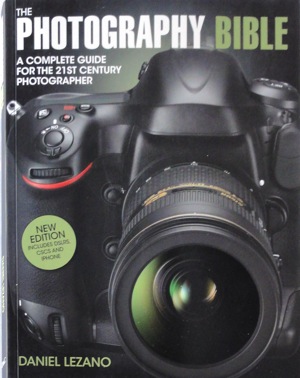
The Photography Bible coverConfession: I’m a sucker for books like this!

‘The Photography Bible brings you up-to-the-minute information on the rapidly changing world of photography, including the latest digital cameras … [and] offers expert photographic advice to help improve your photography ….’

I absolutely love a single book that has the full story. The trouble is that, at the immediate moment the author hands his text file to the book’s publisher, the whole game changes! Camera models change almost overnight and the whole tech story is a very mobile feast!

But, in spite of those cautions, Daniel Lezano’s book does a fine job of packaging most of the data into a single publication.

The opening chapter does a thorough job of describing the current camera types, including generous illustrations and detailed text: from DSLR to Compact System Cameras (MILC) or digi compacts, bridge models, waterproof models … plus a brief rundown on medium format DSLRs, camcorders, the weird Lytro camera and even smart phones with camera capabilities. It should help prospective buyers to narrow down their choices before spending the hard-earned.

Then follows details on camera components: sensors, stabilisers, sensor cleaning systems, LCD screens, Live View, HD video etc.

For the more curious there is some excellent info on the different AF systems which surely, is one of the most misunderstood of camera functions.

Similarly, with such matters as exposure: the role of the lens aperture in exposure and the ‘look’ of an image; differing modes such as auto, Program AE etc; metering systems such as multi zone and spot; how to deal with excessively dark or bright scenes.

My congrats to the author for opening up the subject of resolution and the tricky subject of the ‘megapixel myth’. May I quote? ‘There is a very common misconception that you can determine the quality of a camera simply by judging it on the number of pixels.’ Bravo!

An area that may confuse even the more digitally-educated reader is the subject of sensor types: CMOS and CCD are discussed, along with useful detail on Fujifilm’s X-Trans CMOS and Foveon’s X3 CCD … but I have a disconcerting feeling that tech change is proceeding at such a velocity that there are already sensor types out there that scream for attention.

The book then moves on to subjects that are more in the realm of photo handy hints, such as dealing with white balance, types of memory cards and a useful discussion of how cards are speed rated.

More: file formats; flash and studio lighting; filters; lenses, along with the role of wide and tele focal lengths; printers and scanners; image software and the mysteries of Photoshop; basic composition.

Overall, I found the book to be useful for the newbie to digital photography. I felt, however, it could have gained by including more technical detail on digital hardware, why sensors do what they do along with their foibles, etc.

A good starter. Well illustrated. Clear text.

The book could have benefitted from a chapter on video shooting with digicams, especially now that digi still cameras have developed such enormous capabilities in this area!

Author: Delezano.
Publisher: D&C.
Size: 25x19x1.5cm. 176 pages.
ISBN: 1 4463 0217 0.
Price: Get a price on the Photography Bible at Amazon.

Post originally from: Digital Photography Tips.

Check out our more Photography Tips at Photography Tips for Beginners, Portrait Photography Tips and Wedding Photography Tips.

The Photography Bible [BOOK REVIEW]


Digital Photography School

 
Comments Off on The Photography Bible [BOOK REVIEW]

Posted in Photography


Just posted: HTC 8X review

09 Apr

lifestyle_edit2.jpg

We’ve just posted our review of the HTC 8X on connect.dpreview.com. The 8X is HTC’s current Windows Phone flagship device and comes with a 4.3-inch 720p screen and an 8MP camera with a fast F2.0 lens. Can the HTC rival the Android and iOS competition and is it good enough to grab some of Nokia’s Windows Phone market share? We put the 8X through our usual review process to find out. Click through to go to the full review.

News: Digital Photography Review (dpreview.com)

 
Comments Off on Just posted: HTC 8X review

Posted in Uncategorized


Just posted: Our Fujifilm XF 14mm 1:2.8 R lens review

02 Apr

xf14mm.png

Just posted: Our review of the Fujinon XF 14mm 1:2.8 R lens. Fujifilm has been steadily building up its X-system of rangefinder-inspired mirrorless cameras since its launch in January last year, and the 14mm F2.8 is the fifth lens in the family. It’s a 21mm-equivalent ultra-wide prime that’s designed to match the full field of view offered by the X-Pro1’s optical viewfinder. Like the other XF primes it has an aperture ring on the lens barrel, but it also includes an improved manual focus ring with distance and depth of field scales. Fujifilm makes some grand claims for its optical performance; click through to see if it lives up to them in our detailed review.

News: Digital Photography Review (dpreview.com)

 
Comments Off on Just posted: Our Fujifilm XF 14mm 1:2.8 R lens review

Posted in Uncategorized


Accessory Review: Tamrac Evolution 9 Photo Backpack

30 Mar

tamrac.png

Since the quest for the perfect camera bag will likely never end, we continue ours with a look at the Tamrac Evolution 9, a larger bag that can be used as a backpack or slingpack. Capable of holding a pro digital SLR with a long zoom, a 17-inch notebook, plus several lenses and accessories, the Evolution 9 seemed durable and well designed. Click through for our review to learn how it held up in the field.

News: Digital Photography Review (dpreview.com)

 
Comments Off on Accessory Review: Tamrac Evolution 9 Photo Backpack

Posted in Uncategorized


Just posted: Sony Alpha NEX-6 Review

27 Mar

sony_nex6.png

We’ve just posted our review of Sony’s NEX-6 mirrorless interchangeable lens camera. The NEX-6 brings a much-requested mode dial and ISO standard hot shoe to Sony’s mirrorless lineup, and also adds a Hybrid AF system, Wi-Fi, and downloadable ‘apps’. The NEX-6 also features a 16MP CMOS sensor, articulating LCD, XGA OLED electronic viewfinder, and fun point-and-shoot features like Sweep Panorama and various automatic modes. Click through to read our full review of what may be the most rounded NEX yet.

News: Digital Photography Review (dpreview.com)

 
Comments Off on Just posted: Sony Alpha NEX-6 Review

Posted in Uncategorized


Sony Cyber-Shot RX1 Review

26 Mar

Sony Cyber-Shot RX1 Review.jpg

When reviewing this camera’s direct predecessor, the RX100, I remarked that Sony’s claim it was “The best pocket camera ever made” was a bit steep. Part of my scepticism was the company’s claim that its sensor was considerably larger than the rest of the crowd …. In reality, the CMOS’ diagonal figure measured only 15.8mm, packed to the brim with 20.2 million effective pixels.

But, with the RX1, we really start to talk real figures.

Sure, the asking price tops out at around $ 3000.

But, check the specs!

Sony Cyber-Shot RX1 1.jpg

Sony Cyber-Shot RX1 back.jpg

Sony Cyber-Shot RX1 top.jpg

Sony Cyber-Shot RX1 Features

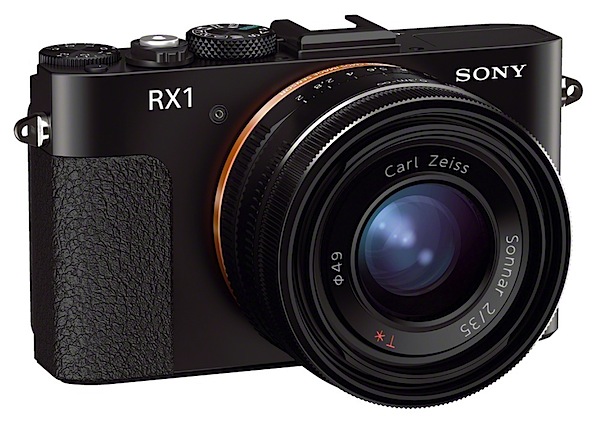
The CMOS sensor is within a bat’s whisker of a 35mm full frame, so the fixed f2/35mm Carl Zeiss Sonnar T* lens delivers a full frame image.

Justifiable claim: “world’s first compact camera with 35mm full-frame 24.3 effective megapixel sensor.

In size, it is close to many other high end compacts, such as Panasonic’s LX7, Nikon 1 V2, Fujifilm X-Pro1 and others.

With the RX1 we enter Cartier-Bresson territory as he patrolled the streets of Paris with a Leica and a 50mm lens. He covered the chrome camera in black tape or even a handkerchief to conceal it. With the RX1 you don’t need to disguise it, as it’s already finished in black!
So it’s a certain type of camera for certain types of photography.

Not sports! However, fast action can be captured successfully with the 5fps continuous shooting speed. Just keep the subject close!
Fisherman's beach pano 1.JPG

Perfect for people pictures. Works exceedingly well for shooting panoramics, thanks to Sony’s excellent Sweep Panorama feature. Scenics? Yes.

Fisherman's beach winch.JPG

Macro subjects? Yes but 35mm is far from ideal as a macro focal length, especially as the camera-to-subject distance needs to be just 20cm from image plane.
Macro lens setting.jpg

However I quite liked the arrangement with the lens front ring: rollable from 0.2m to 0.35m macro to general purpose 0.3m to infinity.

The maximum image is 6000×4000 pixels which can be printed out to 51x34cm at 300 dpi resolution.

Video? Yes. Full HD 1920x1080m AVCHD can be recorded. While the AF tracks sell while on the move you cannot shoot stills mid-video recording.

The ISO range runs from 50 to 25,600 (using the expanded mode).

Handling

Straight out of the box the RX1 is a handsome beast, with external controls clearly id’d with largish white text, easy to see even in dim light.

The camera seems surprisingly heavy in the hand, but well-balanced. Pocketable, just about. But I could have wished for a larger speed grip.

After fooling around with an HTML file of the instructions, I eventually sourced a PDF file of the manual.

The tiny 74 page booklet, enclosed with the camera is intended to serve as ‘the manual’ … but with minuscule type, tiny illustrations, cramped pages … hopeless!
Custom settings.jpg

Controls

Front of camera and to the left is a three position button that takes you from auto to manual focus plus another setting that allows you to drive auto and manual focus at the same time … you use auto to begin with, then fine tune with manual. These options are selectable with a tiny knurled wheel that’s a devil to rotate!

Top deck: the eleven position mode dial has most of what’s needed to drive the camera: auto exposure; PASM; Scene Modes (portrait, sports etc … seven in all); three preset memory settings; movie shooting; sweep panorama. And a C (Custom) button: to this you assign custom functions such as ISO, white balance etc.

The power lever and shutter button is right next door. Farther right is the three f stop up/down exposure compensation dial.
Fn button.jpg

Back: menu and Fn buttons; the movie record button, which is impossibly located on the extreme right corner of the camera body; control wheel; display and trash buttons; flash button. Plus the AEL button: in aperture or manual settings you hold this button down and manually adjust the aperture on the lens itself. Neat.

Sony Cyber-Shot RX1 ISO Tests

Sony DSC-RX1 ISO 400.JPG

Sony DSC-RX1 ISO 800.JPG

Sony DSC-RX1 ISO 1600.JPG

Sony DSC-RX1 ISO 3200.JPG

Sony DSC-RX1 ISO 6400.JPG

Sony DSC-RX1 ISO 12800.JPG

Sony DSC-RX1 ISO 25600.JPG

Cameras such as this are not ideal for ISO test shooting due to their inability to stand back with a long focal length. However…

At ISO 3200 noise begins to appear. By ISO 6400 sharpness is still OK, noise not objectionable. At ISO 12800 noise is up but sharpness is still acceptable. As you would expect, ISO 25600 delivers more noise, less sharpness but still useable.

(insert Bowling 1 ISO 800, Bowling 1 ISO 25600)
Bowling 1 ISO 800.JPG

Bowling 2 ISO 25600.JPG

Check out my bowling alley shots.

Startup Times

From startup to first shot took about two seconds; further shots came in as fast as I could hit the button.

Distortion

Very slight barrel distortion with the 35mm lens. Strange, in such a highly corrected optic.

Sony Cyber-Shot RX1 Review Verdict

Quality: excellent, sharp, accurate colour capture.

Why you’d buy the RX1: full list of features; nice lens; easy to use.

Why you wouldn’t: heavy price; could be confusing for the novice; with such a high-specced camera I did feel the LCD screen was far too small (and not a vari-angle either!); video quality not as good as I expected.

Some will find the RX1 perfect for their needs. Others will find it limiting. It’s really a case of horses for courses. Welcome to a finely engineered, specialist camera!

If the badge said ‘Leica’ there would be not a murmur at the high price ticket! But with the Sony monicker there will, I’m sure, be some buyer resistance. Top lens though!

To use a camera with a fixed 35mm lens takes some discipline. As I said, a very precise horse for a very defined course!

Sony Cyber-Shot RX1 Specifications

Image Sensor: 24.3 million effective pixels.
Metering: Multi segment, centre-weighted, spot.
Lens: Carl Zeiss Sonnar T* f2.0/35mm.
A/D processing: 14-bit.
Exposure Modes: Program AE, shutter and aperture priority, manual.
Effective Sensor Size: 35.8×23.9mm Exmoor CMOS.
Shutter Speed (stills): 30 to 1/4000 second and Bulb.
Continuous Shooting: 2.5/5 fps.
Memory: SD/SDHC/SDXC, Memory Stick Pro Duo cards.
Image Sizes (pixels): Stills: 6000×4000 to 2640×1488.
Movies: 1920×1080 (AVCHD), 1440×1080 (MPEG4), check!!!.
Viewfinder: 7.5cm LCD screen (1,229,000 pixels).
File Formats: JPEG, RAW (Sony ARW 2.3), JPEG+RAW, MPEG4, AVCHD.
Colour Space: sRGB, Adobe RGB.
ISO Sensitivity: Auto, 100 to 25600.
Interface: USB 2.0, HDMI mini, Eye-Fi.
Power: Rechargeable lithium ion battery, DC input.
Dimensions: 113x65x70 WHDmm.
Weight: 482 g (inc battery).
Price: Get a price on the Sony Cyber-Shot RX1 at Amazon.

Post originally from: Digital Photography Tips.

Check out our more Photography Tips at Photography Tips for Beginners, Portrait Photography Tips and Wedding Photography Tips.

Sony Cyber-Shot RX1 Review


Digital Photography School

 
Comments Off on Sony Cyber-Shot RX1 Review

Posted in Photography


Just posted: Sony Alpha NEX-6 Review

26 Mar

sony_nex6.png

We’ve just posted our review of Sony’s NEX-6 mirrorless interchangeable lens camera. The NEX-6 brings a much-requested mode dial and ISO standard hot shoe to Sony’s mirrorless lineup, and also adds a Hybrid AF system, Wi-Fi, and downloadable ‘apps’.  The NEX-6 also features a 16MP CMOS sensor, articulating LCD, XGA OLED electronic viewfinder, and fun point-and-shoot features like Sweep Panorama and various automatic modes. Click through to read our full review of what may be the most rounded NEX yet.

News: Digital Photography Review (dpreview.com)

 
Comments Off on Just posted: Sony Alpha NEX-6 Review

Posted in Uncategorized


24 March, 2013 – Sony Duo 11 Review

24 Mar

What are you using to review and work on your images in the field? Our regular contributor Miles Hecker has just written a review of a new tablet / laptop, the Sony Duo 11. Maybe it’s for you as well.

There is now less than a week to enter our latest contest that lets you win an Ipad loaded with all of our videos.

Don’t forget our "win-an-iPad 
with all our software included" contest.

Win a New 128GB iPad with Retina Display
Including all Major Luminous Landscape Videos
– Pre-Installed –

Find Out More 


The Luminous Landscape – What’s New

 
Comments Off on 24 March, 2013 – Sony Duo 11 Review

Posted in News


Just posted: Samsung Galaxy Note II review

23 Mar

DSC05758b.jpg

We’ve just posted our review of the Samsung Galaxy Note II on connect.dpreview.com. The Note II comes with a large 5.5-inch screen but is it just a phone for users who like it big or can it offer advantages over its smaller-sized siblings in the mobile imaging context? We did some finger stretches and then put the Note II to work as both an image capture and editing tool. Click through to go to the full review.

News: Digital Photography Review (dpreview.com)

 
Comments Off on Just posted: Samsung Galaxy Note II review

Posted in Uncategorized


Samsung Galaxy Review

21 Mar

GALAXY Camera_6.jpg

As a fan of the Mac I find it hard to avoid news of the constant sniping, litigation and general blazing that is going on between Apple and Samsung over alleged patent infringements, new developments, new products and amazing improvements to existing iDevices.

However, in a way, I see the Apple vs Samsung barney as a good thing, with the eventual outcomes arriving as radical new devices and/or useful advances in many products.

So, it is in this environment that I am reviewing a newcomer from the Dark Side! Move over Microsoft, there’s a new boy in town.

GALAXY Camera_4.jpg

GALAXY Camera_3.jpg

As Samsung says: This is the first Galaxy Camera, featuring Wi-Fi connectivity and Android 4.1 (Jelly Bean) software. It combines high performance photography with mobile technology ….

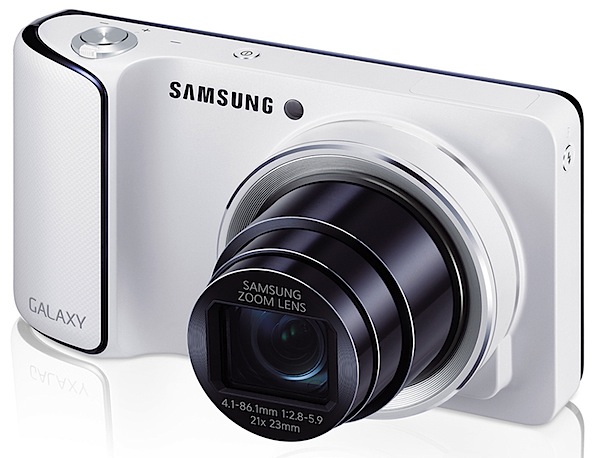
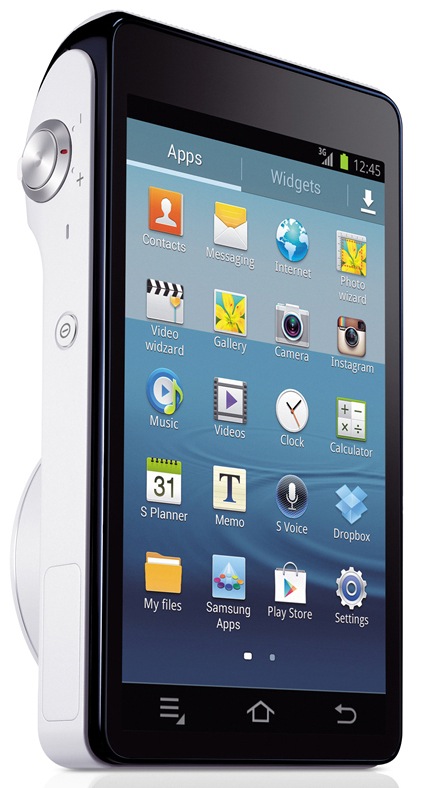
Straight out of the box, the camera is simply gorgeous in its all-white livery, with dramatic relief as you turn it around to show the enormous 12.2cm rear screen in black (with power off!). Very Apple!

Whilst it’s pocketable, it is much larger than many compact digicams.

GALAXY Camera_2.jpg

If you’re not a patient screen tapper you may find the comprehensive touch screen interface a bit of a challenge at first: you go nowhere unless you tap! External controls are minimal: tiny power button on top, nearby is the shutter button and zoom lever; left edge is where you tap a button to raise the onboard flash cell.

Flash.jpg

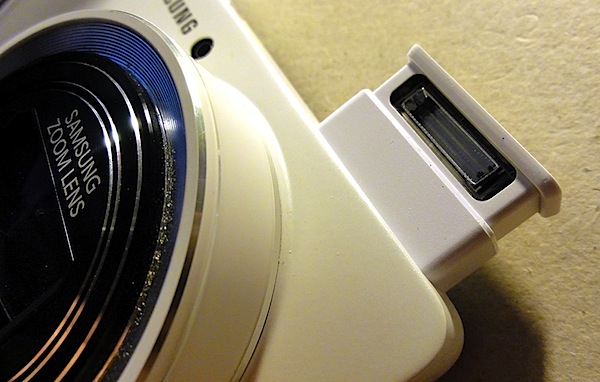
The camera’s right edge houses a mini HDMI port; beneath the camera is a latch which, when raised gives access to the battery, memory card and SIM card.

Re the touch screen: once familiar with it I found life to be trés trés easy and much better than many cameras’ convoluted menus.

To begin with, you must encounter the main screen which has icons for virtually all your needs: apps such as Paper Artist, Instagram and Photo Wizard can be triggered here.

I immediately went to Camera which took me to the exposure options I needed to run the camera.

Three on screen options: Auto, Mode and Video.

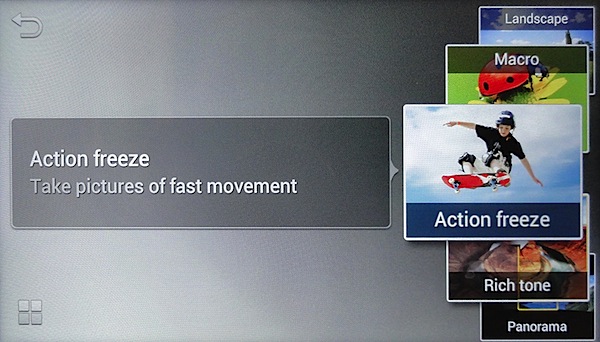
Mode was my next stop; in this department I could select Auto (again), Smart and Expert. Smart gave me on screen visual examples of image treatments that could impart such effects as Beauty Face, Continuous (a burst of shots), Macro, Rich tone, Light Trace, Panorama etc.
Expert 1.jpg

Expert 2.jpg

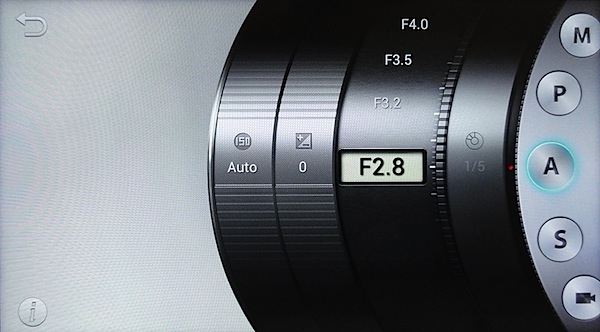
The Expert option was obviously my next stop if I was to raise my skills above auto shooting: here I could choose Program AE, shutter or aperture priority, manual exposure and video (again). An interesting display: a lens barrel showing choices of ISO setting, exposure compensation and aperture selection.
Car park full wide 3.JPG

Car park full tele 3.JPG

Samsung Galaxy Features

The maximum lens aperture is f2.8, which shrinks to f5.9 when the 21x zoom is extended to its ultimate 35 SLR equivalent of 481mm.

Maximum image size is 4068×3456 pixels, leading to a print size of 34x29cm
Shop manikin head 1.JPG

Sunflowers 2.JPG

Video can be shot in MPEG4 at 1920×1080 or 720×480 res. I found the Galaxy camera to be excellent as a video camera: it smoothly helped auto focus to sharpen up on subjects as I moved around; the large screen, even held at waist height, made it an excellent viewfinder when on the move.

There’s a whole heap of fun awaiting for you when you get into the software side of the camera: users can browse the Web and download applications from Google Play or the Samsung Apps stores.

Voice commands.jpg

Built in voice control allows you to tell the camera what to do! What a party starter! Simply call out Smile! Shoot! Zoom in! and other commands to get the camera to perform under your control. And it works!

I did discover that settings such as voice operation on/off, lens aperture setting and ISO and are cancelled after a restart.

Startup Time

About 23 seconds before I could fire off the first shot. This possibly because it’s booting the Android operating system.

Distortion

No problems at the wide and the tele end of the zoom.
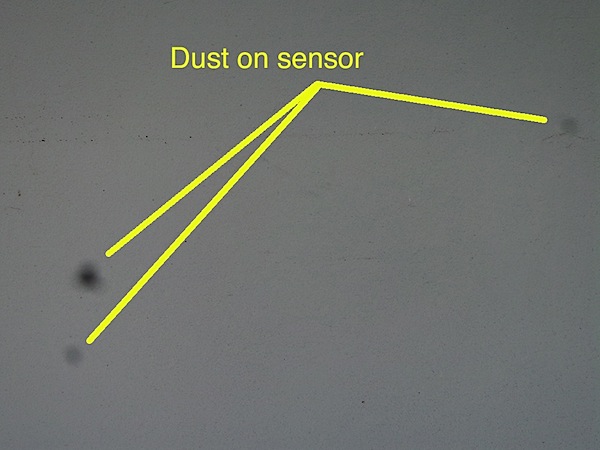
Dust on sensor.JPG

Dust Spots

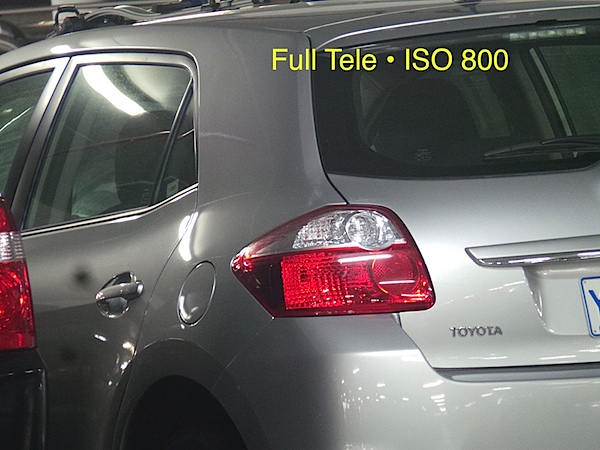
Hopefully, it was only this camera, but I did find that dust spots appeared when the lens was set at full tele.

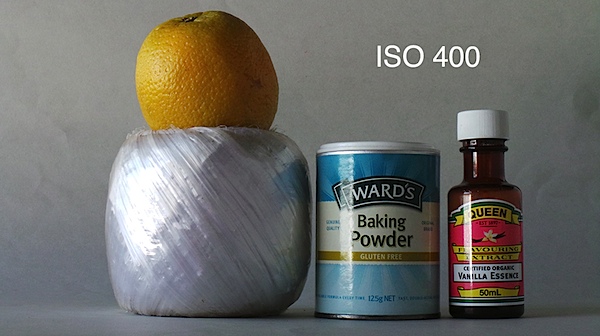
ISO Speeds

Samsung Galaxy ISO 100.JPG

Samsung Galaxy ISO 400.JPG

Samsung Galaxy ISO 800.JPG

Samsung Galaxy ISO 1600.JPG

Samsung Galaxy ISO 3200.JPG

At ISO 400 a drop in sharpness and a lift in noise is apparent; by ISO 800 these are even worse; by ISO 3200 these problems make the image unusable.

Samsung Galaxy Review Verdict

Quality: about average; no more.
Why you would buy the Samsung Galaxy: it’s the latest iDevice.
Why you wouldn’t: expensive for a camera; despite its glamorous Android and Wi-Fi trappings it’s no more than a point-and-shoot digicam; you hate touch screens.

My experience with the Galaxy camera was a positive one. Thrown upon the seeming ‘rocks’ of a totally touch screen menu with no external controls left me with no scars … in fact, it gave me a glimpse of a possible future for digicams totally equipped this way: large screens, no external controls, touch screen operation.

A few hangups:

Startup 1.jpg

Startup 2.jpg

From a cold start, the camera seemed to take an eternity to get to operational readiness: as I’ve already mentioned, it took about 23 seconds to get going, after a series of glam startup screens.

The leaflet tucked into the camera box is totally inadequate; go to www.samsung.com/us/support/owners/product/EK-GC100ZWAATT to download a useful 134 page PDF manual.

Be careful you don’t load a memory card into the SIM slot by accident; it can be difficult to remove.

If you have difficulty saving images to the memory card, try re-formatting the card. It saved my day!

Let the fun continue!

Also in black.

Samsung Galaxy Specifications

Image Sensor: 16.3 million effective pixels.
Sensor Size: 11mm CMOS.
Lens: f2.8-5.9/4.1-86.1mm (23-481mm as 35 SLR equivalent).
Image Stabiliser: Optical.
Metering: Multi, centre-weighted, face detection.
Shutter Speed: (Auto) 1/8 to 1/2000; (Manual) 16 to 1/2000 second.
Continuous Shooting: 20 shots at 3.8 fps.
Memory: micro SD, micro SDHC, micro SDXC cards plus 8GB internal memory.
GPS Location Tagging: Yes.
Image Sizes (pixels): 4068×3456 to 1024×768.
Movies: 1920×1080 and 1280×720 (both 30fps); 640×480 (30 and 60fps) and 320×240 (30fps) and 768×512 (slo mo 120fps).
Viewfinder: 12.2cm LCD.
File Formats: JPEG, MPEG4, AAC, WAV etc.
ISO Sensitivity: Auto, 100 to 3200.
Interface: USB 2.0, HDMI mini, Wi-Fi, GPS equipped, DC.
Power: Rechargeable lithium ion.
Dimensions:129x71x19 WHDmm.
Weight: Approx. 305 g (inc battery).
Price: Get a price on the Samsung Galaxy Camera on Amazon.

Post originally from: Digital Photography Tips.

Check out our more Photography Tips at Photography Tips for Beginners, Portrait Photography Tips and Wedding Photography Tips.

Samsung Galaxy Review


Digital Photography School

 
Comments Off on Samsung Galaxy Review

Posted in Photography