RSS
 

Posts Tagged ‘Resolution’

Serious resolution: Phase One XF with IQ3 100MP back tested

03 Oct

Phase One XF with IQ3 100MP back tested

Phase One has enjoyed two significant updates since we last tested the company’s medium format offering: the 645DF+ body has been replaced by the more modern XF, and the IQ2 series of backs has been replaced by the updated IQ3 series. Added to that, Phase One has introduced a 100MP sensor to the IQ3 range. The new 100MP sensor is of the 54 x 40mm format, so somewhat larger than the previous 50MP 44 x33mm sensor. What is also significant is that it is a CMOS sensor and comes with all the flexibility that technology brings to these big and bulky cameras.

Phase One says that it has developed the sensor alongside Sony, and that a new design has introduced a range of benefits, including helping to increase the ISO range that can be offered, improving color accuracy and boosting dynamic range.

When I spoke to Lau Nørgaard, the head of R&D at Phase One, and asked him whether anyone needs 100MP he replied that the obvious customer base was anyone who needs to make big prints that will be inspected close-up.

Less obvious perhaps are the workflow advantages such resolution brings. He cited an example of someone photographing a car and then having to shoot all the details individually. With a 100MP back you shoot the whole car once and cut out all the detail shots from that image. Online clothing retailers like to provide roll-over enlargements of garments that show the texture of the fabric, and this back is ideal for that  – the weave of the finest fabric can be shown even from a full length shot that includes three or four models. The resolution also presents less of a risk of aliasing. Museums, galleries and aerial surveyors are obvious customers, as they need the detail, but Lau also explained that images of anything from this back will benefit from the pixel count even when downscaled – noise is reduced, and the superior color and tonal information is retained.

The new XF body

The Phase One XF is a 645-style medium format SLR body that’s designed to accept digital backs, with the company encouraging photographers to use its IQ1 and IQ3 series backs with resolutions of 40, 50, 60, 80 and 100 million pixels. Phase One has given its body a complete make-over and while it remains much the same basic form factor as the previous model, it is now much less mechanical and clunky, and features a number of dramatic improvements.

Key new features Phase One XF:

  • Shutter and mirror dampening
  • Electronic first curtain
  • Touch screen top plate display
  • Improved integration with the IQ3 backs
  • New handling layout
  • Metering in camera rather than in prism
  • Accepts waistlevel finder
  • Seismograph built-in
  • Separate battery from back – but can power share
  • Built-in wireless flash sync via Profoto Air Sync

There are so many really key improvements to this body that it is hard to know where to start. The experience of using the XF is dramatically different to using the 645DF+, which is why I think Phase One has given it a completely different name instead of making it a ‘Mark II’ or ‘X’.

Let’s start with the new shutter and mirror mechanism. The mirror action is still more violent than you’d encounter with a 35mm-style DSLR but the impact created when it flips up and down is a good deal reduced compared to the previous model. The shutter action is also much smoother, so when the shutter is tripped the whole operation is quieter. In the previous camera the mirror and the shutter were connected in the same mechanical set-up, but now the two operate as individual units – so in mirror-up mode the shutter can re-cock itself without the mirror having to flip back and forth.

Phase One has introduced a seismograph to the body that measures the amount the camera is vibrating, and displays the results as a moving graph on the top plate display. This helps to ensure the user trips the shutter when the camera is at its steadiest, and the incorporation of ‘vibration delay’ allows the camera to trip itself automatically when internal vibrations have died down. 

Further help towards reducing vibration comes in the form of an electronic first curtain mode that works when the mirror is already up – similar to that used in DSLRs like the Nikon D810. Phase One’s Lau Nørgaard told me that the company’s engineers studied the acceleration and rate of travel of the second curtain and mirrored that with the read-out progress of the electronic first curtain to ensure that the whole frame would be evenly exposed.

The new handling arrangements also make this a significantly easier camera to use, with a touch screen on the top plate that provides direct access to the shooting and exposure modes. Three dials controls shutter speed, aperture and ISO, while a mini-menu is controlled via a pair of Leica-style long silver buttons. In short, pretty much anything that you’ll need to access quickly and regularly has a short and direct path from the right-hand grip.

In the 645DF+ metering was handled through the prism of the camera, but in the XF it has moved to the body to allow exposure reading when using the new waist-level finder. There is an additional flash sync socket on the IQ3 backs for when the waist-level finder is in use, as the main one is on the prism head.

The XF body is light years ahead of the 645DF+, and a good deal more advanced than the Hasselblad H5D series cameras. It feels very modern for a medium format DSLR, and is so much easier to use and navigate as a consequence of the mass of new features.

Articles: Digital Photography Review (dpreview.com)

 
Comments Off on Serious resolution: Phase One XF with IQ3 100MP back tested

Posted in Uncategorized


Rollei Actioncam 430 comes with 4K resolution and Full-HD slow motion

22 Sep

Market leader GoPro launched its new action cam models at a Photokina event on Monday. Rollei already announced its latest top-end action camera about a month ago, but we just got the chance to look at the new device at the Rollei booth at Photokina.

The Actioncam 430 offers impressive camera specs and can record 4K video at 30 fps, 2K at 60 fps, 120 fps at Full-HD resolution and up to 200 fps at 720p, allowing for the recording of high definition slow-motion footage. In stills mode the Sony image sensor captures 12MP photographs and the lens covers an angle of view of 180 degrees. Images can be framed and reviewed on a 2″ TFT display with a 320 x 240 pixel resolution and a status display at the front keeps you informed about current shooting mode, remaining recording time and battery status. 

The Actioncam 430 can be remote-controlled via a mobile app and a wristband-style wireless remote, with a range of up to 15 meters, is included in the box as well. The Rollei is not waterproof but comes with a case that is recommended for depths of up to 40m/131ft. The camera is compatible with most GoPro accessories and available now in Europe for €249 (approximately $ 275). No information on availability in other regions has been announced yet.

Articles: Digital Photography Review (dpreview.com)

 
Comments Off on Rollei Actioncam 430 comes with 4K resolution and Full-HD slow motion

Posted in Uncategorized


New resolution: how much progress has the Fujifilm X-T2 made for video?

18 Jul

4K video capability was one of the big surprises in the X-T2’s specification. We’ve taken a closer look at how the camera operates in movie mode and added a sample video to our First Impressions Review.

Only beta firmware exists at present, so there’s no F-Log mode available yet, and the operation may yet change, so we explain where the X-T2 has improved and how it could be made still better.

As well as our (beta) video sample, we’ve also expanded our still image sample gallery.

Articles: Digital Photography Review (dpreview.com)

 
Comments Off on New resolution: how much progress has the Fujifilm X-T2 made for video?

Posted in Uncategorized


Pentax K-1 Pixel Shift Resolution: Updated Field Test

05 Jun

Metlako Falls in the Columbia River Gorge of Oregon State offered a unique setting to push the limits of the K-1’s pixel shift technology. This is a conventional single exposure utilizing no Pixel Shift. Pentax K-1, HD Pentax D FA 24-70mm F2.8 ED SDM WR 70mm, F20, 0.3 sec, ISO 100.

A note from the editor:

Earlier this week we published an article examining the performance of the Pentax K-1’s Pixel Shift mode when shooting waterfalls – a common landscape photography subject. We found various issues, including movement artifacts and false colors in Raw files shot using this function.

It has since become clear that some of these issues are unique to the current build of Adobe Camera Raw. We’ve spoken to Adobe, and the ACR team has confirmed that support for the K-1 in ACR 9.5.1 is ‘final’. Certainly, Pixel Shift shots of our (non-moving) studio test scene look absolutely fantastic when converted in ACR. However, in scenes that contain movement, it’s a different story altogether. The K-1’s bundled software, SilkyPix, on the other hand, while crash-prone and a little awkward to use, does a much better job. SilkyPix also supports the K-1’s Motion Correction feature in Pixel Shift files, which Adobe has now confirmed is not supported by ACR.

Once all this started to become apparent, we pulled our original article and started a more detailed look at the K-1’s performance when Raw files are run through the bundled software, SilkyPix. You can read it below.

Thanks to all of the K-1 users that contributed helpful comments and suggestions as we worked on these additional tests.

Barney

Introduction

It’s clear that the Pixel Shift Resolution shooting modes make a huge difference to image quality from our studio tests, but how does that translate to real world shooting situations?

In previous iterations of this feature (in the K3 II) we found that movement within a scene could cause major issues during Pixel Shift Capture. So if leaves rustled in the wind or your subject moved in any way the camera compensated poorly for the movement, which then resulted in pixel blur and artifacts in the regions where the movement occurred.

Like the K-3 II, Pixel Shift on the K-1 takes four separate exposures at single pixel increments; however, the K-1 now offers a ‘Motion Correction’ option. If movement is detected in subsequent images, the camera is supposedly able to differentiate pixels that have changed from the first frame and clone in pixels to cover that area from the first frame of the 4-shot capture. In theory, this should produce a much better final product then was possible in the Pentax K3 II.

To determine just how much the technology has improved in the K-1 over the previous iteration, I took the camera out into the field to really push the limits of the Pixel Shift Resolution shooting modes. I converted the resulting files in both Adobe Lightroom (my Raw converter of choice) (using ACR 9.5.1, which Adobe has confirmed represents final support for Pixel Shift) and also SilkyPix, which is bundled with the K-1.

The Gorge

The Columbia River Gorge, located along the Columbia River that borders Washington and Oregon state offers a variety of amazing scenic locations in addition to a number of challenging shooting environments. In order to test the capabilities and limitations of the Pixel Shift resolution mode in the K-1, I decided to focus on the seemingly endless amount of waterfalls that parallel the Columbia River about an hour or so outside of Portland, OR.

In an effort to get the most bang for my buck I decided to hike along the Eagle Creek trail, heading toward Punch Bowl Falls. There are a number of beautiful spots to take in the views and two waterfalls (Punch Bowl and Metlako falls) to make the trip more than worthwhile. The weather conditions were, well, pretty miserable. My fiancé and I experienced moderate rain throughout most of the day which definitely put a damper (literally) on the trip.

Most of the Eagle Creek trail is carved into some fairly steep cliffs and snakes its way back along the deep river valley that lies several hundred feet below the trail.

Pentax K-1, HD PENTAX-D FA 28-105mm F3.5-5.6 ED DC WR, 28mm, F6.3, 1/50, ISO 100

Pushing the Limits of Pixel Shift Resolution

Our first stop was Metlako Falls located about a mile from the trail head. The access trail to Metlako is poorly marked, so it’s definitely easy to miss if you aren’t careful. I chose this waterfall because it offers an excellent opportunity to examine not only how the Pixel Shift deals with movement but also detail resolution, since the waterfall is surrounded by dense and lush foliage. The following widget contains files that were shot at 70mm and an aperture of F/10 to limit the effects of diffraction and to really give you a sense of the detail resolution that is possible with the Pixel Shift mode turned on.

Using the widget below you can examine files converted using Adobe Lightroom, Silkypix, and out of camera JPEGs. We’re showing files taken with Pixel Shift turned off, and with Pixel Shift turned on with Motion Correction enabled.

$ (document).ready(function() { ImageComparisonWidget({“containerId”:”reviewImageComparisonWidget-55670867″,”widgetId”:363,”initialStateId”:null}) })

As you see there can be significant benefits$ (document).ready(function() { $ (“#imageComparisonLink2569”).click(function() { ImageComparisonWidgetLink(2569); }); }) to shooting with the Pixel Shift Resolution mode turned on (note that SilkyPix applies significant sharpening by default, which we chose to not turn off). The detail in the foliage$ (document).ready(function() { $ (“#imageComparisonLink2570”).click(function() { ImageComparisonWidgetLink(2570); }); }) is much better with Pixel Shift, and a nearly 2EV theoretical increase in dynamic range means greater latitude for Raw processing of contrasty scenes (in reality, the advantage appears to be somewhere in between 1EV and 2EV).

While files from our movement-free studio scene look great when run through ACR, our waterfall images (converted in the same way, using the same software) show very unpleasant color artifacts$ (document).ready(function() { $ (“#imageComparisonLink2571”).click(function() { ImageComparisonWidgetLink(2571); }); }). SilkyPix does a much better job, and there’s no sign of any false colors in the same areas in files converted through the K-1’s bundled software.

However, while there’s no crazy false color, even in the out of camera JPEGs and Raw images processed using SilkyPix you can still see some issues with pixel blur$ (document).ready(function() { $ (“#imageComparisonLink2525”).click(function() { ImageComparisonWidgetLink(2525); }); }) where movement took place (mostly in the foliage surrounding the waterfall) as the four frames were captured. This can lead to some strange cross-hatch artifacting$ (document).ready(function() { $ (“#imageComparisonLink2572”).click(function() { ImageComparisonWidgetLink(2572); }); }). And when it comes to landscapes, finding truly static shooting environments can be difficult, if not impossible.

With that said, if you process your Pixel Shift files through SilkyPix, the end result might be good enough (depending on the amount of movement you’re dealing with) that cloning or masking in rough-looking areas via your favorite post processing software becomes an option. Interestingly, sometimes SilkyPix does an even better job of motion correction$ (document).ready(function() { $ (“#imageComparisonLink2573”).click(function() { ImageComparisonWidgetLink(2573); }); }) than the camera JPEG engine itself. In fact, much of the image is quite usable in the SilkyPix conversion, but if you’re the kind of person that desires the detail Pixel Shift brings, you’ll still find yourself cloning out motion artifacts$ (document).ready(function() { $ (“#imageComparisonLink2574”).click(function() { ImageComparisonWidgetLink(2574); }); }) in many regions for a scene like this one.

Out of Camera JPEG Options

If you don’t mind JPEG output, you can also retroactively add motion correction in-camera to an image shot with Pixel Shift.

After applying the Pixel Shift to the file, you can export it as an out of camera JPEG. With that said, I don’t know too many landscape photographers that shoot in JPEG or want to produce out of camera JPEGs, since they’re mostly un-editable from a post processing standpoint. You’re probably better off using SilkyPix, with all the caveats that brings (more on that later).

Out of Camera JPEG Pixel Shift (scaled 50%)

No Motion Correction

HD Pentax D FA 24-70mm F2.8 ED SDM WR, 70mm, F16, 1/4, ISO 100

Out of Camera JPEG Pixel Shift (scaled 50%)

Motion Correction

HD Pentax D FA 24-70mm F2.8 ED SDM WR, 70mm, F16, 1/4, ISO 100

Dynamic Range Benefits

There’s another benefit to Pixel Shift we briefly alluded to: since information from four Raw files are essentially combined, noise is decreased. It’s not that frames are averaged, but that 4x as much total light is collected and used in generating the final image, which decreases relative shot noise. This suggests a nearly 2 EV theoretical increase in dynamic range (ignoring read noise), and indeed a significant improvement is evident in the +4 EV pushed shots below. The non-pixel shift file still shows respectable noise performance in the shadows thanks to the very high dynamic range sensor, and the Pixel Shift file is even cleaner. While it’s not quite a 2EV advantage, the Pixel Shift files in our studio dynamic range tests look better than the standard shots despite a 1EV relative underexposure. Hence, we’d estimate a benefit of somewhere between 1 and 2 EV.

$ (document).ready(function() { ImageComparisonWidget({“containerId”:”reviewImageComparisonWidget-19122861″,”widgetId”:364,”initialStateId”:null}) })

So what does this mean?

When it comes to Pixel Shift Raws, ACR is unable to cope with any sort of movement that may have occurred in the short time that the K-1 takes to capture the four separate files. Color artifacts and cross-hatching result in areas of motion, although the rest of the image experiences a significant detail increase. ACR doesn’t support Motion Correction at all. So (for now, at least) Pixel Shift and ACR simply don’t mix.

SilkyPix, on the other hand, handles Pixel Shift Raws in a different manner from ACR, which alleviates the color artifacts that we see in the files processed through ACR. It can also interpret the Raws shot with Motion Correction activated and produce a final image with far fewer motion artifacts – sometimes doing an even better job than the K-1’s in-camera JPEG engine.

Digging a little deeper, we’ve found that only the first of the four exposures taken during the Pixel Shift process is used to mask in problem areas when the Motion Correction setting has been enabled (in in-camera JPEGs or SilkyPix conversions). This makes sense – comparing the four files to find the sharpest one would be too computationally intensive to be practical – but it does mean that if the first exposure should happen to contain the most blur, results might not be optimal.

Conclusion

The amount of detail in the Pixel Shift files is markedly better than those taken with the mode turned off, but for landscape work (assuming anything short of totally still conditions) artifacts caused by movement in the scene can still cause issues. I’m glad that things aren’t quite as bad as we feared from looking solely at the output from Adobe Lightroom, but even the K-1’s bundled SilkyPix software shows some movement artifacts in Pixel Shift files. And, at least for Mac users, SilkyPix is not the most stable or easy to use software out there. 9 out of 10 times we tried to use it, we got an unusable image preview even at 100% – making editing cumbersome, if not impossible. Capture One and DxO Optics Pro don’t currently support the K-1 or Pixel Shift (e.g. on the older K-3 II) at all.

The reality, then, is that Raw shooters wanting to take advantage of Pixel Shift for scenes with motion will have to resort to (the buggy and cumbersome) SilkyPix. That’s a real limitation, but not an insurmountable one – you can perform rudimentary processing in SilkyPix and then output a 16-bit TIFF to continue processing in Lightroom or Photoshop.  

In absolutely perfect shooting conditions though (macro, portrait, and some telephoto work), the K-1’s Pixel Shift shooting modes can offer outstanding results. The OOC JPEG and SilkyPix Raw images below depict a (mostly) static cityscape, and the real-world detail resolution is very impressive when movement isn’t a factor. 

$ (document).ready(function() { ImageComparisonWidget({“containerId”:”reviewImageComparisonWidget-16261297″,”widgetId”:371,”initialStateId”:null}) })

It is worth noting, however, that if there is a chance of any movement occurring in the frame I would definitely recommend backing your files up with non-Pixel Shift exposures so you can choose to mask areas in using post processing tools or choose to use the non Pixel Shift files. We’ll be posting more sample images from my trip to the Gorge soon, and be on the look out for our forthcoming full review of the K-1 as well!

Articles: Digital Photography Review (dpreview.com)

 
Comments Off on Pentax K-1 Pixel Shift Resolution: Updated Field Test

Posted in Uncategorized


Canon EOS 80D updates Dual Pixel AF, bumps resolution with 24MP sensor

19 Feb

$ (document).ready(function() { SampleGalleryV2({“containerId”:”embeddedSampleGallery_6720371049″,”galleryId”:”6720371049″,”isEmbeddedWidget”:true,”standalone”:false,”selectedImageIndex”:0,”startInCommentsView”:false,”isMobile”:false}) });

Canon has updated its prosumer DSLR line with the EOS 80D, offering a newly developed 24.2MP APS-C sensor, 45-point all cross-type autofocus module, updated Dual Pixel AF for live view still and video recording, and Wi-Fi with NFC.

Canon claims its new AF module, a notable improvement over the 70D’s 19-point system, is capable of focusing in low light conditions down to -3EV at the center point. Dual Pixel AF now offers continuous focus, and all pixels are able to perform phase detection focus while being used for still imaging. Video recording is offered at an improved 1080/60p.

The 80D uses a DIGIC 6 processor and provides a native ISO range in stills shooting from 100-16,000, expandable to 25,600. Burst shooting at up to 7 fps is on par with the 70D. The 80D is equipped with an approximately 100% coverage optical viewfinder and a fully articulated 3″ 1.04M-dot touchscreen LCD, as well as built-in Wi-Fi with NFC.

The Canon EOS 80D will be available in March for $ 1199 body-only or $ 1799 bundled with an updated EF-S 18-135mm F3.5-5.6 IS USM kit lens.

Press release:

SHARE YOUR PASSION THROUGH IMAGES USING
THE NEW EOS 80D DSLR CAMERA AND EF-S 18-135mm NANO USM LENS

Designed to Help Unleash the Creative Potential in Us All, New Imaging Technology
Will Help You Shoot & Share Amazing Images and Video

MELVILLE, N.Y., February 17, 2015 – Artists looking to turn their passion into popular online videos or to show the world their unique perspective through social networks now have a new tool available to them that helps them tear down creative barriers and produce dynamic visual content for both still and video.  Canon U.S.A., Inc., a leader in digital imaging solutions, is proud to introduce the new Canon EOS 80D Digital SLR camera, featuring an new 45-point AF system1, 24.2 megapixel CMOS sensor for crisp images with fine detail. For the budding videographer or online video star, the camera features Dual Pixel CMOS Autofocus (DAF) technology coupled with an intuitive touchscreen capability for easy focusing when shooting video.

Canon is also introducing a new EF-S 18-135mm f/3.5-5.6 IS USM lens optimized for high-speed autofocusing when shooting stills and quiet and smooth zoom when shooting video. The lens is also compatible with Canon’s new Power Zoom Adapter for smooth cinematic ‘pulls’ when changing focal length on a subject, and responsive adjustments at the push of a button for stills or video.

Updated features in Canon EOS 80D DSLR Camera include: 

  • New 45-point all cross-type AF system 
  • Intelligent Viewfinder with approximately 100% viewfinder coverage 
  • Newly Developed 24.2 Megapixel (APS-C) CMOS sensor
  • DIGIC 6 image processor for enhanced image quality
  • Improved Dual Pixel CMOS AF for smooth, fast and accurate autofocus with video and stills 
  • Built-in Wi-Fi 2 and NFC2 capability for easy transfer of images and movies to compatible mobile devices
  • 1080/60p Full HD video to capture brilliant results in MP4 format for easy movie sharing on select social networking sites
  • Vari-angle Touch Screen 3.0-inch Clear View LCD II monitor enables flexible positioning and clear viewing even outdoors 

“In today’s world, where everyone is a photographer or videographer, we at Canon are looking to provide the tools and features that help creative-minded people stand out from the pack and get noticed. The right technology cannot make someone creative, but it will help bring a creative vision to life,” said Yuichi Ishizuka, president and COO, Canon U.S.A., Inc. “The right combination of camera and lens helps those with a vision stand out and be recognized. We look forward to seeing what this new generation of passionate artists will create with these new tools.” 

New AF System and Dual Pixel CMOS AF
The 45-point all cross-type viewfinder AF system in the new Canon EOS 80D DSLR camera, compared to 19-points in the Canon EOS 70D DSLR camera, is now wider both horizontally and vertically for easier compositions with off-center subjects. Low light AF performance has been improved all the way down to EV-3 at the center point to achieve sharp results even in extreme low-light situations. The camera’s AI (Artificial Intelligence) Servo AF II autofocusing system utilizes color tracking with a 7,560-pixel RGB+IR metering sensor that automatically detects skin tone and colors to enhance tracking sensitivity, even with moving subjects that are rapidly changing pace or direction.  Enhancing the ease-of-use of the new AF system is the Canon EOS 80D’s new Intelligent Viewfinder which features approximately 100% viewfinder coverage. The full coverage helps prevent photographers from missing objects that are in the corners of the scene, which can reduce the need to crop images later on. 

Dual Pixel CMOS AF employs a new Canon CMOS sensor with which all of the effective pixels are able to perform both still imaging and phase-detection AF simultaneously to achieve dramatically improved AF performance during Live View and video shooting. The Dual Pixel CMOS AF technology in the Canon EOS 80D camera features enhanced tracking sensitivity and is compatible with the full line of Canon EF Series lenses, including the new Canon EF-S18-135mm f/3.5-5.6 IS USM  standard zoom lens. 

High-Quality Still and Video Image Performance
Featuring a new 24.2 megapixel APS-C Canon CMOS sensor and Canon’s superb DIGIC 6 Image Processor, as well as an improved still image ISO range of 100–16000 (Video ISO range 100–12800, both expandable to 25600), the Canon EOS 80D DSLR camera is capable of producing sharp, detailed images and videos even in low-light conditions. High-speed continuous shooting up to seven frames per second (fps) combined with the 45-point all cross-type AF allows photographers to capture fast moving subjects easily and accurately, while the camera’s Scene Intelligent Auto Mode delivers optimized photos and offers outstanding scene detection for amazing results even when shooting in low light. HDR mode provides creative filter effects, such as natural, art standard, art bold, art vivid and art embossed. For added convenience, the Canon EOS 80D camera features Anti-Flicker shooting, similar to that found in the EOS 7D Mark II DSLR camera. Anti-Flicker shooting produces consistently high-quality results even when shooting in areas with fluorescent lighting or other flickering light sources by detecting the flicker cycle of the light source and shooting when brightness is near its peak. 

When users select the EOS Movie mode, the Canon EOS 80D DSLR camera offers the ability to shoot in 1080p Full HD video up to 60 fps, compared to 30 fps in the Canon EOS 70D, in MP4 format and in either ALL-I or IPB compression modes with optional embedded time code. For expanded creativity the Canon EOS 80D DSLR camera features HDR movie and Time-Lapse movie modes and Movie creative filters like fantasy, old movie, memory, dramatic monochrome and miniature. Movie Servo AF custom settings allow users to speed up or slow down focusing speeds, enhancing creativity and artistic expression. For added flexibility, the Canon EOS 80D digital SLR camera also features a built-in headphone jack, a built-in stereo microphone with manual audio level adjustment, and an additional stereo microphone jack.

News Lens, Power Zoom Adapter, and Directional Stereo Microphone Enhance Video Quality
In addition to the new Canon EOS 80D DSLR camera, Canon U.S.A., Inc., is also introducing the Canon EF-S18-135mm f/3.5-5.6 IS USM Lens, a newly designed lens with a premium exterior design that will serve as the kit lens for the new Canon EOS 80D camera. This the first Canon lens equipped with Nano USM, a new type of focusing motor that combines the benefits of a ring USM (ultrasonic motor) for high-speed AF during still photo shooting and lead-screw type STM (stepping motor) for smooth and quiet movie AF, and improved AF speeds up to 4.3x (Tele) and 2.5x (Wide) faster than the previous model. The Canon EF-S18-135mm f/3.5-5.6 IS USM Lens also provides up to four stops of optical image stabilization. A new lens hood, the EW-73D, is included with the new lens.

To further enhance the ease-of-use when shootings movies with a Canon DLSR or Cinema EOS cameras, Canon is introducing the Power Zoom Adapter PZ-E1, specifically constructed to be compatible with the design of the new Canon EF-S18-135mm f/3.5-5.6 IS USM Lens. The Canon Power Zoom Adapter PZ-E1 is the world’s first detachable zoom adapter that provides silent and smooth zoom and can adjusted incrementally to 10 different levels of zoom speed3. Additionally, the PZ-E1 can be controlled remotely using the Canon Camera Connect app4.

In addition to the new lens and power zoom adapter, Canon is introducing the first Canon-branded external microphone for the EOS system, the Canon Directional Stereo Microphone DM-E1. This new accessory microphone will help improve sound quality while shooting video, allowing users to rotate the direction of the microphone up and down from 90 to 120 degrees depending on the shooting situation. The DM-E1’s durable shock mount construction helps to reduce camera operation noise and lens drive sounds and is built to withstand the rigors of a variety of shooting situations. Featuring a frequency response range of 50Hz to 16kHz, the DM-E1 comes with a wind screen to help limit peripheral sound from wind and other outside factors, allowing shooters to utilize the microphone in a broad amount of shooting situations. Featuring a built-in power supply from a single “button-type” lithium cell battery, the DM-E1 also has a power indicator lamp allowing users to easily check its battery level. 

Availability
The Canon EOS 80D Digital SLR camera and EF-S18-135mm f/3.5-5.6 IS USM Lens are currently scheduled to be available in March 2016 for an estimated retail price of $ 1,199.00 for the body only, $ 1,799.00 with the new EF-S18-135mm f/3.5-5.6 IS USM Lens and $ 599.99 respectively. 

The Canon Power Zoom Adapter PZ-E1 and Directional Stereo Microphone DM-E1 are currently scheduled to be available in June 2016, for estimated retail prices of $ 149.99 and $ 249.99 respectively.  

For more information visit, www.usa.canon.com/eos.

1. The number of AF points, cross-type AF points and dual cross-type AF points vary depending on the lens used.

2. Compatible with iOS® versions 7.1/8.4/9.0, AndroidTM smartphone and tablet versions 4.0/4.1/4.2/4.3/4.4/5.0/5.1.  Data charges may apply with the download of the free Canon Camera Connect app. This app helps enable you to upload images to social media services. Please note that image files may contain personally identifiable information that may implicate privacy laws. Canon disclaims and has no responsibility for your use of such images. Canon does not obtain, collect or use such images or any information included in such images through this app.

3. As of 2/17/2016.

4. Data charges may apply with the download of the free Canon Camera Connect app. This app helps enable you to upload images to social media services. Please note that image files may contain personally identifiable information that may implicate privacy laws. Canon disclaims and has no responsibility for your use of such images. Canon does not obtain, collect or use such images or any information included in such images through this app.

Canon EOS 80D specifications

Price
MSRP $ 1199 (body only), $ 1799 (w/18-135 lens)
Body type
Body type Mid-size SLR
Body material Magnesium alloy
Sensor
Max resolution 6000 x 4000
Image ratio w:h 1:1, 4:3, 3:2, 16:9
Effective pixels 24 megapixels
Sensor photo detectors 26 megapixels
Sensor size APS-C (22.5 x 15 mm)
Sensor type CMOS
Processor DIGIC 6
Color space sRGB, Adobe RGB
Color filter array Primary color filter
Image
ISO Auto, 100-16000 (expands to 25600)
Boosted ISO (maximum) 25600
White balance presets 6
Custom white balance Yes
Image stabilization No
Uncompressed format RAW
JPEG quality levels Fine, normal
File format
  • JPEG (Exif v2.3)
  • Raw (Canon 14-bit CRW)
Optics & Focus
Autofocus
  • Contrast Detect (sensor)
  • Phase Detect
  • Multi-area
  • Center
  • Selective single-point
  • Tracking
  • Single
  • Continuous
  • Touch
  • Face Detection
  • Live View
Autofocus assist lamp Yes
Manual focus Yes
Number of focus points 45
Lens mount Canon EF/EF-S
Focal length multiplier 1.6×
Screen / viewfinder
Articulated LCD Fully articulated
Screen size 3
Screen dots 1,040,000
Touch screen Yes
Screen type TFT LCD
Live view Yes
Viewfinder type Optical (pentaprism)
Viewfinder coverage 100%
Viewfinder magnification 0.95×
Photography features
Minimum shutter speed 30 sec
Maximum shutter speed 1/8000 sec
Exposure modes
  • Program
  • Shutter priority
  • Aperture priority
  • Manual
  • Bulb
Scene modes
  • Food
  • Kids
  • Candlelight
  • Night Portrait
  • Handheld Night Scene
  • HDR Backlight Control
  • Portrait
  • Landscape
  • Close-up
  • Sports
Built-in flash Yes
Flash range 12.00 m (at ISO 100)
External flash Yes (via hot shoe)
Flash X sync speed 1/250 sec
Drive modes
  • Single
  • High speed continuous
  • Low speed continuous
  • Silent single shooting
  • Silent continuous shooting
  • 10/2 sec self-timer/remote ctrl
Continuous drive 7.0 fps
Self-timer Yes (2 or 10 sec)
Metering modes
  • Multi
  • Center-weighted
  • Spot
Exposure compensation ±5 (at 1/3 EV, 1/2 EV steps)
Videography features
Resolutions 1920 x 1080 (60p, 30p, 24p), 1280 x 720 (60p, 30p)
Format MPEG-4, H.264
Videography notes Choice of ALL-I or IPB codecs
Microphone Stereo
Speaker Mono
Storage
Storage types SD/SDHC/SDXC (UHS-I support)
Connectivity
USB USB 2.0 (480 Mbit/sec)
HDMI Yes (mini-HDMI)
Microphone port Yes
Headphone port Yes
Wireless Built-In
Wireless notes 802.11/b/g/n with NFC
Remote control Yes (Wired, wireless, or via smartphone)
Physical
Environmentally sealed Yes
Battery Battery Pack
Battery description LP-E6N lithium-ion battery & charger
Battery Life (CIPA) 960
Weight (inc. batteries) 730 g (1.61 lb / 25.75 oz)
Dimensions 139 x 105 x 79 mm (5.47 x 4.13 x 3.11)
Other features
Orientation sensor Yes
Timelapse recording Yes
GPS None

Articles: Digital Photography Review (dpreview.com)

 
Comments Off on Canon EOS 80D updates Dual Pixel AF, bumps resolution with 24MP sensor

Posted in Uncategorized


ZY Optics launches improved Speedmaster F0.95 35mm lens, claiming 30% better resolution

17 Feb
The new model (right) is smaller and lighter than the original version of the lens (left)

The Shenyang Zhongyi Optical & Electronic Company Limited has introduced an updated version of its super-fast 35mm lens for APS-C-sensor cameras that it claims has better resolution and reduced chromatic aberrations. The manual focus Mitakon Speedmaster 35mm F0.95 II is also smaller and lighter than the original model, with a length of 60mm instead of 82mm, a filter thread of 55mm instead of 58mm and a weight of 460g/1.06lb compared to 680g/1.5lb.

The latest version uses a new optical design that features 11 elements in 8 groups, and includes a single extra-low dispersion element, two extra-high refractive index elements, and three elements made in high-refractive glass. The company says the new design produces 30% more resolution via better overall sharpness and reduced chromatic aberrations. Performance wide open is also greatly improved, ZY Optics says.

A click-less aperture ring makes the lens suitable for video recording, so it is a shame the Micro Four Thirds system isn’t supported in the initial offering. Fuji X, Sony E and EOS-M camera system owners will be provided for though.

The lens costs $ 599, and you can learn more on the ZY Optics website.

Press release:

ZY Optics releases the improved Zhongyi Mitakon Speedmaster 35mm f/0.95 Mark II for Sony E / Fuji X / EOS-M cameras

Shenyang China, Feb 14, 2016 – Zhongyi Optics (ZY Optics) has released an improved version of their first f/0.95 lens, Zhongyi Mitakon Speedmaster 35mm f/0.95 Mark II. The mark II verison features a drastic improvement of sharpness, better control of chromatic abberations and much compact size. The new version comes with a Fuji X / Sony E / EOS-M mount and is able to cover the image circle of APS-C sized sensors.

Zhongyi Mitakon Speedmaster 35mm f/0.95 Mark II is a ultra-fast prime lens which provides a 35mm-equivalent focal length of around 53mm in APS-C cameras. A maximum aperture of f/0.95 makes it extremely convenient to shoot at a low light conditions without flash. The new optical design incorporates a 11 elements in 8 groups structure, including 1pc of Extralow disperson elements, 2 pcs of Extra-high Refractive Index elements and 3pcs of High Refractive Index elements. This structure effectively improved the image resolution by 30% compared to the previous version from corners to corners. This also controls the chromatic abberations very well and deliver excellent image sharpness even at f/0.95.

The new Speedmaster 35mm f/0.95 is light and compact. The total weight is reduced from 680g to 460g, making it an ideal companion for the compact mirrorless cameras. Manual focus design and a click-less, silent aperture ring promote smooth handling and are especially well-suited to video applications. The lens is built in metallic enclosure with additional protective process and finest finishing, which gives extra durability and aesthetic.

Pricing & Availability
Mitakon Speedmaster 35mm f/0.95 is now available to purchase at ZY Optics authorized resellers and at our official website (http://www.zyoptics.net/). The Recommended Retail price is USD 599.

Articles: Digital Photography Review (dpreview.com)

 
Comments Off on ZY Optics launches improved Speedmaster F0.95 35mm lens, claiming 30% better resolution

Posted in Uncategorized


Image Size and Resolution Explained for Print and Onscreen

17 Sep

One of the most confusing things for a new photographer is understanding image size, resolution, and printing. I’ll try and explain what these things mean, and how to make the best choices depending on what you want to do with your photos.

Megapixels and photo size

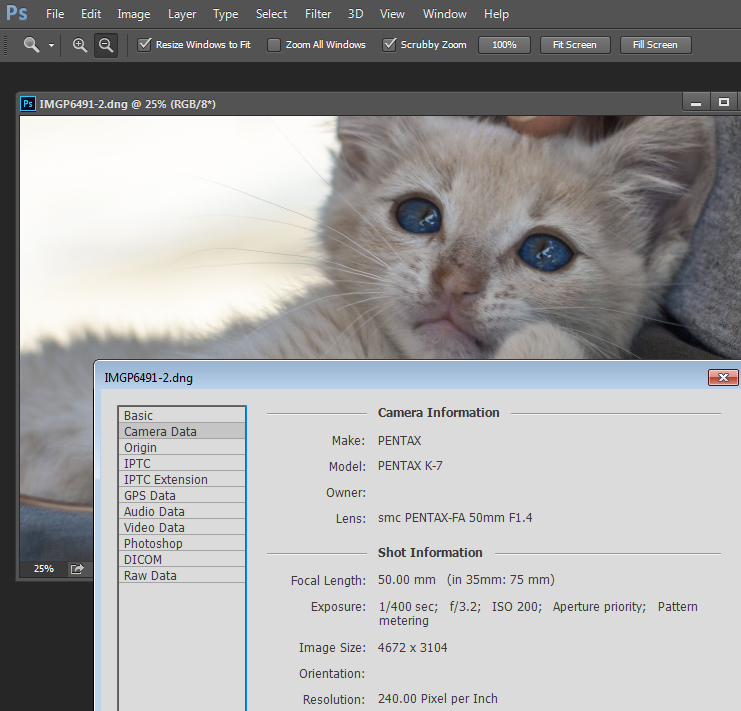
Find information about a photo using File > File Info

As a photographer you will already have confronted the term megapixel when you first purchased your camera. While technically a megapixel is equal to 1,048,576 pixels, in reality, camera manufacturers round this number to 1,000,000 when stating how large an image the camera will capture.

So, my camera, for example, is stated to capture 14.6 megapixel images which is around 14,600,000 pixels per image (14.6 x 1,000,000). This information tells you nothing about the actual pixel dimensions of the image – it only tells you the total number of pixels that comprise the image.

My camera, like most dSLRs, captures images with an aspect ratio of 1.5. So the ratio comparing the number of pixels along the long edge of the image, to the short edge is 3:2. Each full size raw image is 4672 x 3104 pixels in dimension. So, by multiplying the number of pixels along the width by those of the height (4672 x 3104 = 14,501,888) we get the actual number of pixels in the image. You and I might call this 14.5 MP but the camera manufacturer rounds this up and calls it a 14.6 MP camera.

You can check the width and height of an image using your photo editing software. In Photoshop, with the image open, choose File > File Info > Camera Data. The image above shows this information dialogue box.

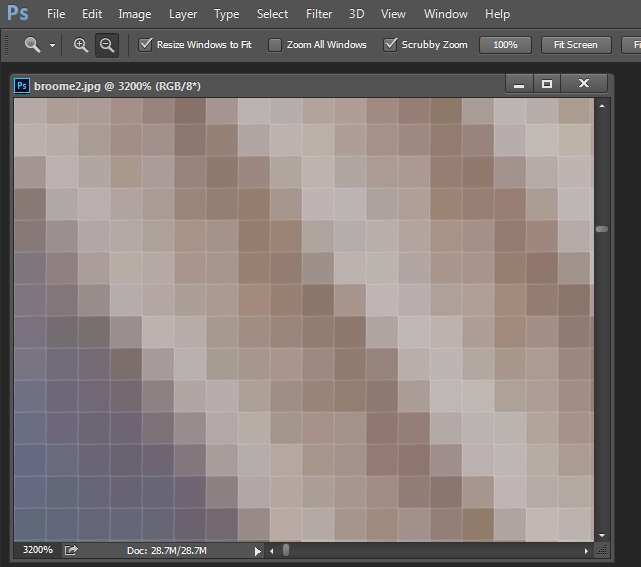
A pixel itself is a single picture element, and for our purposes it’s the smallest element that your photo can be divided into. A pixel can be only one color, and a photograph is made up of a grid of thousands of pixels, each of varying colors that together make up your image. You can see these pixels if you open a photo inside a photo editing program and zoom in until you see single blocks of color (like below). Each of these is a pixel.

An image of pixels in a photo

Why size is important when printing

When you’re printing an image you may encounter the term ppi or pixels per inch. Most printing services, and indeed your own printer, will require a certain density of pixels in the image (ppi) to be able to render an print that looks good, with smooth color transitions so you can’t see each individual pixel. Typical printing ppi values range from 150 to 300 ppi, although some high-end magazines may require images which are 1200 ppi.

So, for example, if you want to print an image 4 x 6 inches at 300 ppi, then you need a file that has at least 4 x 300 (1200) pixels along its short side and 6 x 300 (1800) pixels on the long side. So, it needs to be at least 1200 x 1800 pixels in size.

To print an 8 x 10 inches at 300 ppi use the same math – multiply the printed image width and height in inches each by 300 pixels. The result is 2,400 x 3,000 pixels, which is the size image you need to print an 8 x 10 at 300 ppi.

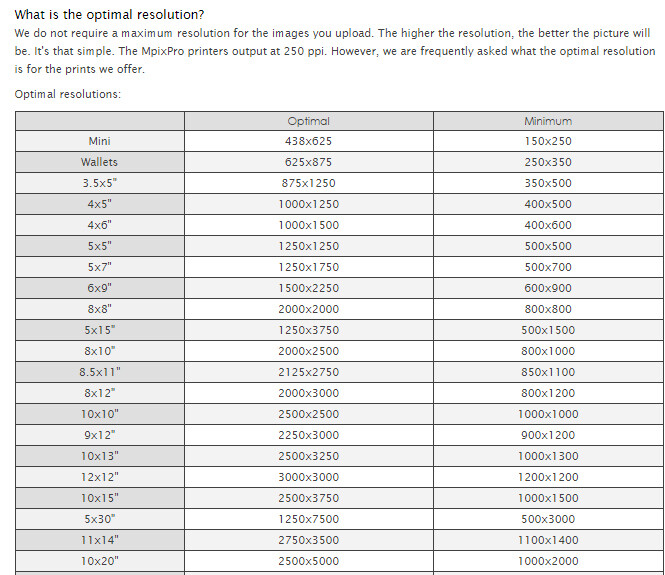
When cropping and sizing an image for printing, you’ll need to know what ppi the image should be – your printer manual or the printing service should be able to tell you this. This is a screenshot from the MpixPro.com website showing their Optimal and Minimum image sizes for standard print sizes. Their printer outputs at 250 ppi (but can handle 100 ppi images) – other services may differ – so always check before preparing your images:

Print size required for MpixPro printing

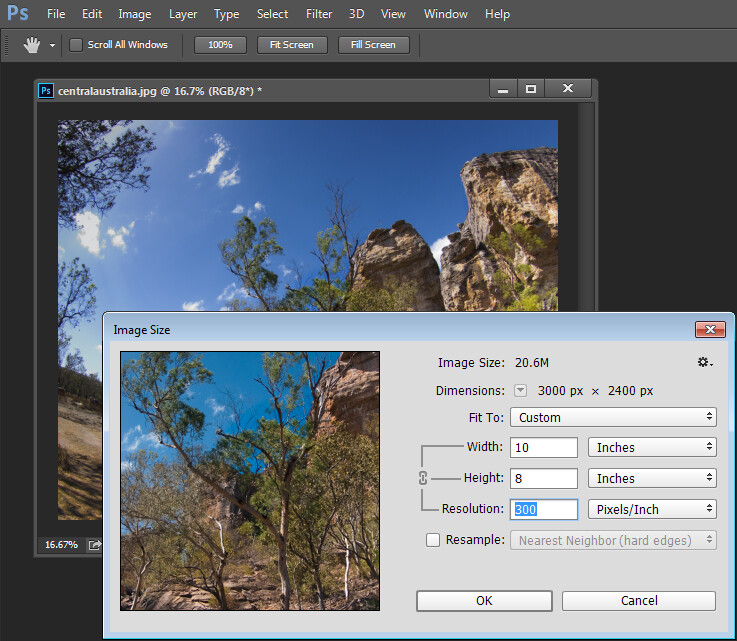
Use the crop or resize feature in your software to size the image to the desired width and height, and the ppi resolution. Here an image cropped to a size of 3000 x 2400 pixels is being adjusted from 72 ppi to 300 ppi in preparation for printing at 300 ppi. There is no resampling required as the image is already the correct dimension and only the resolution requires adjusting.

Adjusting resolution in a photo without resampling it

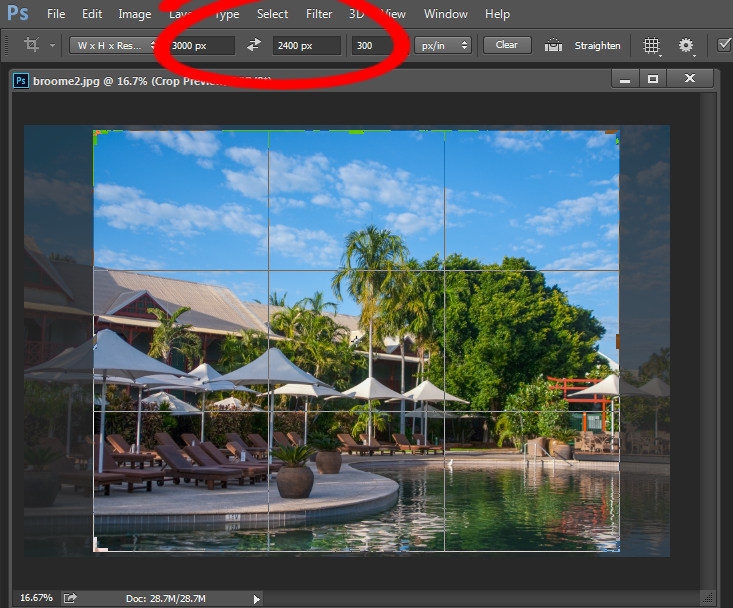
Photoshop, like other applications, will also crop an image to a fixed size and resolution if you type these value into the tool options bar when you have the Crop tool selected (see below). If your image is smaller than the typed dimensions then the image will be enlarged using the default resampling method as it is cropped. While it isn’t generally advisable to enlarge images – provided the image is already close in size to the desired size, enlarging it a little bit generally won’t cause a noticeable loss of quality.

Crop an image in Photoshop setting size and resolution

Sizing for screen

When it comes to displaying images on the screen you need far less pixels than you do for printing. This is because the density of pixels on the screen is far less than what is required for printing. So, for example a typical monitor is 1920 by 1080 pixels in size so, to fill the monitor you only need an image that is 1920 by 1080 pixels in size. That’s about the same size image you need for a 4 x 6 print at 300 ppi, yet this size image displays perfectly on a 23 inch diagonal monitor.

googletag.cmd.push(function() {
tablet_slots.push( googletag.defineSlot( “/1005424/_dPSv4_tab-all-article-bottom_(300×250)”, [300, 250], “pb-ad-78623” ).addService( googletag.pubads() ) ); } );

googletag.cmd.push(function() {
mobile_slots.push( googletag.defineSlot( “/1005424/_dPSv4_mob-all-article-bottom_(300×250)”, [300, 250], “pb-ad-78158” ).addService( googletag.pubads() ) ); } );

The post Image Size and Resolution Explained for Print and Onscreen by Helen Bradley appeared first on Digital Photography School.


Digital Photography School

 
Comments Off on Image Size and Resolution Explained for Print and Onscreen

Posted in Photography


Ricoh Theta S boosts resolution, introduces Google Street View integration

03 Sep

Ricoh has unveiled the latest version of its 360-degree camera, the Theta S. Thanks to two 12MP 1/2.3″ sensors, the S is capable of 14MP 360-degree still image capture, up from the previous model’s 6MP images. Brighter lenses, 1080/30p video and integration with Google’s new Street View app are all onboard. Read more

Articles: Digital Photography Review (dpreview.com)

 
Comments Off on Ricoh Theta S boosts resolution, introduces Google Street View integration

Posted in Uncategorized


Instagram stores higher resolution images

07 Jul

After its recent app update it seems Instagram has further improvements up its sleeve – the mobile image sharing platform has started storing higher resolution images on its servers. In the app and on the web interface images are still displayed at the smaller 640 x 640 pixel size, but a look at the website source code reveals that images are now actually stored at 1080 x 1080 pixels. Read more

Articles: Digital Photography Review (dpreview.com)

 
Comments Off on Instagram stores higher resolution images

Posted in Uncategorized


World’s highest resolution panoramic photo is stitched from 70,000 images

03 Jun

A team of five photographers has created what they describe as the world’s highest resolution panoramic photograph by stitching 70,000 digital images together to create a 365 gigapixel photograph. Recorded using a Canon EOS 70D with the EF 400mm f/2.8L IS II USM lens on a 2x converter, the picture took 35 hours of shooting over the course of 15 days just to capture. Read more

Articles: Digital Photography Review (dpreview.com)

 
Comments Off on World’s highest resolution panoramic photo is stitched from 70,000 images

Posted in Uncategorized