RSS
 

Posts Tagged ‘Remote’

MIOPS displays its MIOPS Mobile smart camera remote

25 Sep

The makers of the MIOPS smart trigger have returned to Kickstarter looking to fund their latest project, the MIOPS Mobile and are showing a prototype at their Photokina booth. The Mobile connects your DSLR and smartphone via a Bluetooth LE connection and uses your mobile device’s built-in sensors to offer a range of creative capture modes. The camera can be triggered by vibration, sound, motion, a predefined travel distance or a combination of all those events. Advanced timelapse modes are included as well and all parameters and modes are controlled via an iOS or Android smartphone app. 

Remote shutter control is on board as well – functions include Cable Release, Press&Hold, Press&Lock, Timed Release, Self Timer and Timed Release with Self Timer. The system is compatible with 350 camera models from most major manufacturers and the battery provides power for approximately 24 hours of use with one charge. Firmware is updated automatically over the air. More information including a video can be found on the MIOPS Mobile Kickstarter page. The funding goal has already been reached but you can still secure a unit with a $ 79 pledge. Shipping is planned for April 2017.

Articles: Digital Photography Review (dpreview.com)

 
Comments Off on MIOPS displays its MIOPS Mobile smart camera remote

Posted in Uncategorized


Cascable remote control app adds support for 50 cameras

13 Aug

Cascable, a Wi-Fi-based camera remote control app for Apple devices, has been updated to version 2.0. This update is a major one, adding both new features and additional support over the previous version. Most notably, Cascable 2.0 now supports 50 camera models from Sony, Canon, Nikon and Olympus. It also adds a new Night Mode dark theme, faster image previews and better photo management.

According to Cascable, user feedback indicated that version 1.0’s photo preview method was too cumbersome. To remedy this, Cascable 2.0 automatically provides a preview of a shot as soon as it is taken, though at a lower resolution than the original photo. Photo management has also been improved by showing the most recent photos first, and any photo can now be quickly previewed using Force Touch or a tap.

Finally, Cascable says the latest software version has better handling of RAW + JPEG workflows, namely via the elimination of duplicate images. Users can zoom into images at a 1:1 resolution, and metadata with a histogram is now presented during fullscreen photo viewing.

Cascable 2.0 uses a different payment structure compared to the 1.x versions, being made available as a free base app with ‘Pro’ feature packs that cost $ 9.99 individually (there are three total) or $ 24.99 as a bundle. The update is free to all existing customers. Cascable 2.0 is available to download now from iTunes.

Via: Cascable Blog

Articles: Digital Photography Review (dpreview.com)

 
Comments Off on Cascable remote control app adds support for 50 cameras

Posted in Uncategorized


CASE Remote Air is the world’s smallest smart camera controller

20 Jul

CheeringTech, the maker of the CASE smartphone remote for DSLRs, has launched a crowdfunding campaign on Indiegogo for a lighter and smaller next-generation version, the CASE Remote Air.

CheerinTech says at 2.4″ x 1.6″ x 0.2″ the CASE Remote Air is the world’s smallest smart camera controller. At only 50 grams it is also very lightweight. Like similar devices, it connects to the USB-port of your DSLR and creates a Wi-Fi hotspot that allows for a wireless connection to your smartphone or PC. Using a dedicated app you can then see the camera’s live view image on the display of your smartphone, alter camera parameters, control video shooting or use one of the special modes, such as focus-stacking or time-lapse. In addition, you can download images from the camera to your device, including Raw files.

CASE Remote Air works with many Canon and Nikon DSLRs and can be controlled from Android and iOS mobile devices or PC and Apple computers. You can currently reserve a CASE Remote Air for $ 79 plus shipping. Delivery is expected for October. More information, including a full list of compatible cameras, can be found on the Indiegogo crowdfunding site. 

Articles: Digital Photography Review (dpreview.com)

 
Comments Off on CASE Remote Air is the world’s smallest smart camera controller

Posted in Uncategorized


Go hands-free: GoHawk offers bite-triggered remote shutter for GoPro

16 Jun

Mounting your GoPro on your chest or helmet frees up your hands for all those extreme moments you’d like to capture, but when you still need to operate the shutter, are you truly hands-free? The GoHawk by Oregon-based POA Labs wants to help.

Currently in prototype form, the GoHawk is an accessory kit that includes three remote shutter options: a handlebar, tongue and bite switch. The GoHawk is also designed to tell its user when the GoPro is actually recording via an LED indicator light that can be positioned inside of a helmet. Also included is an auxiliary USB power port for extended shooting.

The unit is compatible with the GoPro Hero4 and essentially works like a camera cable release – that is triggering the switch via, your teeth, tongue or finger will allow you to record video, shoot single exposures or trigger a burst. The LED indicator light will be illuminated red while the GoPro is recording video or shooting stills and blue while the unit is on standby.

POA Labs is seeking a total of $ 20,000 in funding. The unit and a single type of switch (your choice) is offered with a $ 131 pledge. Backers of the GoHawk can expect their units to ship in September 2016 if the funding campaign is a success.

GoPro shooters and filmmakers would surely welcome the ability to trigger and monitor recording without lifting a finger. For more information, check out the Kickstarter page.

Articles: Digital Photography Review (dpreview.com)

 
Comments Off on Go hands-free: GoHawk offers bite-triggered remote shutter for GoPro

Posted in Uncategorized


Nikon issues D810 and D810A firmware updates with remote control bug fix

06 Apr

Firmware updates for the Nikon D810 and D810A cameras are now available. Both updates fix a bug that may cause the cameras to stop responding if attached to a WR-R10 wireless remote control running firmware 3.00. The updates bring the Nikon D810 to firmware version 1.11, and the Nikon D810A to firmware version 1.01.

Via: Nikon

Articles: Digital Photography Review (dpreview.com)

 
Comments Off on Nikon issues D810 and D810A firmware updates with remote control bug fix

Posted in Uncategorized


Manfrotto updates Digital Director app to add remote control of its LED light panels

15 Dec

Italian accessory manufacturer Manfrotto has released a new app for its Digital Director iPad cradle that allows users to wirelessly control Manfrotto Lykos and Litepanels Astra LED lights. The 2.0 app is capable of handling up to 13 panels via a Bluetooth connection, so brightness levels can be controlled from the camera position. The app can switch the lights on and off as well, and when the BiColor models are in use color temperature can be adjusted between daylight and tungsten settings. Lights can be controlled individually, or in groups, though some models will need a Bluetooth dongle to make them compatible with the system. 

The update also brings zebra patterning to the live view display, showing when areas of the image to be captured will be over- or under-exposed, and focus peaking can now be customized with different colors and strengths. In review mode the app can now crop images, either freely or with set proportions, and pictures can be rated in the gallery with stars that are compatible with other desktop software programs. 

For more information visit the Manfrotto website, and you can read our review of the Manfrotto Digital Director here. 


Press release:

Manfrotto Announces New Digital Director App 2.0

Upper Saddle River, N.J. (December 10, 2015) – Manfrotto, a leading global innovator and manufacturer of premium photo, video and lighting support products and accessories, has launched the Digital Director App 2.0, the updated App for Manfrotto’s Digital Director, which brings new enhancements to professional and enthusiast photographers and videographers who wish to make shooting much smarter. 

The Digital Director App 2.0, now available in the App Store on Apple iPads, includes new and improved features, in particular:

REMOTE CONTROL OF LIGHTS

The new Digital Director App 2.0 not only controls all Nikon and Canon DSLR key camera functions, but turns the iPad into an innovative interface, enabling total remote control of Manfrotto LYKOS and Litepanels ASTRA LED lights (up to 13 lights!) via Bluetooth®. Lights can be controlled remotely: you can turn lights on/off, adjust dimming level and color temperature, set up groups and configure multiple scenes directly from the iPad.

FOCUS PEAKING & ZEBRA FILTER 

From the Digital Director App 2.0’s general settings, in the Digital Director Options, it’s possible to set up new features. The implemented Focus Peaking Filter presents new options: the possibility to adjust the intensity of the filter and to select the desired color for the peaking (red, blue, green, yellow). In addition, the new Zebra Filter helps to adjust exposure through striped patterns that indicate the overexposed and/or underexposed areas of the image.

INTUITIVE POST PRODUCTION IMAGE ADJUSTMENT

The new App 2.0 offers new tools for post production: cropping free or with proportion, blur and saturation. Together with the existing functions (rotate, contrast, light, checking histogram and EXIF information), it may also allow you to make final adjustments on the image in just a single touch of your finger on the iPad screen.

The App 2.0 integrates new and improved features such as control of new Manfrotto LYKOS LED lights and Litepanels ASTRA, new Focus Peaking settings, Zebra filter, new post-processing tools, gallery photo sorting and image rating that is included in the .jpeg file shared from Digital Director via FTP and email. With these upgrades, Digital Director can better help professional and enthusiast image makers make their shooting workflow more effective and intuitive.

DIGITAL DIRECTOR

Manfrotto Digital Director is the only Apple certified (MFi – Made for iPad Certification) electronic device that connects your camera and iPad, via USB cable, to help manage the photo and video workflow from the setting of your camera (Canon and Nikon DSLR) to sharing your pictures. It features a built-in Apple microchip that works with the 600MHz 256MB DRAM ARM® Cortex®-A8 microprocessor, simultaneously, in order to ensure the perfect communication between the iPad and the camera. The result is perfect control of all shooting parameters of different DSLR cameras, a smooth and consistent video streaming between devices with extremely low latency time, and an ultra-fast, high-quality image download onto the iPad.

Articles: Digital Photography Review (dpreview.com)

 
Comments Off on Manfrotto updates Digital Director app to add remote control of its LED light panels

Posted in Uncategorized


Cascable iOS app offers remote control of WiFi-enabled cameras

23 Jun

Cascable is a new iOS app that aims to create a better experience for photographers using Wi-Fi connected cameras. Currently supporting Canon EOS cameras, Cascable provides access to exposure settings and allows for shutter release control from the Apple Watch. Read more

Articles: Digital Photography Review (dpreview.com)

 
Comments Off on Cascable iOS app offers remote control of WiFi-enabled cameras

Posted in Uncategorized


Review of the CASE Remote Trigger and App

16 Mar

The CASE Remote from Cheering Tech is a small box that connects to a DSLR camera via a USB cable and lets you wirelessly control almost every function, and some more.

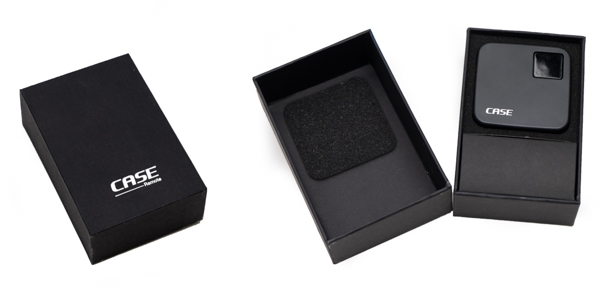
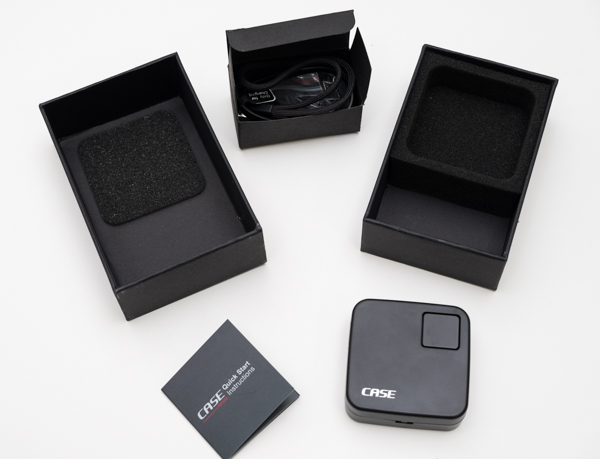
I was offered the device for review from Cheering Tech and decided to try it on without many expectations. When I received the unit I was surprised by the quality of the packaging and presentation. The design of the CASE Remote is really nice, fairly small at two inches square and 70 grams (2.5oz). The size makes the remote convenient, and easy to throw anywhere in the camera bag.

20150214_untitled_0025-Edit

20150214_untitled_0027

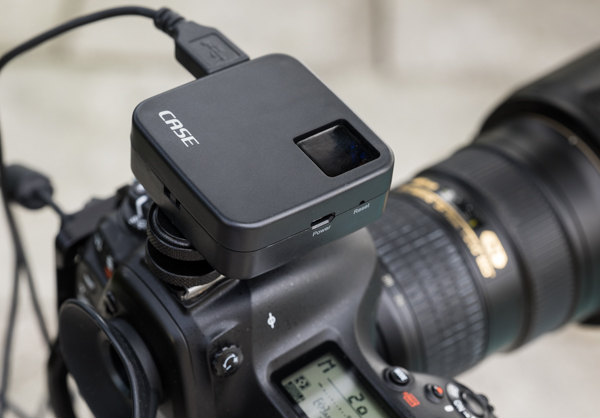
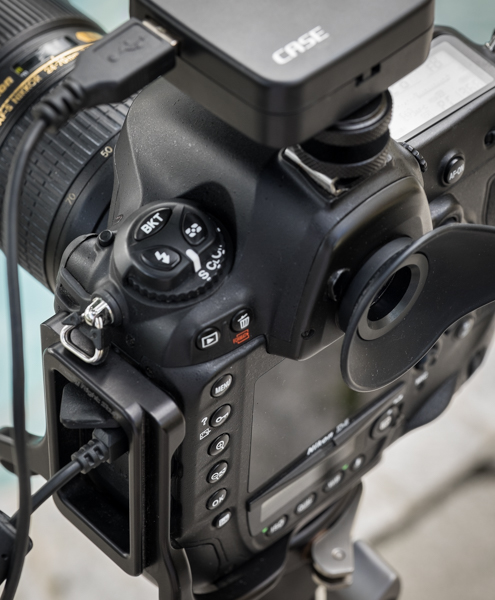
The CASE Remote ships with a convenient hot-shoe adapter so you can easily attach it to the camera, and a USB cable to charge it. Something worth mentioning is that it does not include the USB cable necessary to connect it to the camera though – you need to use your own (one that came with the camera).

Mounting it to the camera was a snap. You turn it on by pressing one square button at the top of the unit, which also contains lights which indicate battery life and system status. Once powered on, the CASE Remote creates its own WiFi network to which you connect your mobile device to access the app. The SSID and password for the connection comes in the back of the little instruction manual. I couldn’t find a way to change it or reset it to my own.

20150221_untitled_0037

20150221_untitled_0040

What you can do with the CASE Remote:

  • Live view support on iOS (iPhone, iPad) and Android devices
  • Download photos to your device
  • Set camera functions right from your phone or tablet
  • HDR function
  • Time-lapse function
  • Focus stacking function
  • GPS function

The device is ideal for different types of shooting, but especially for landscape or architectural work. The app is well designed and easy to use; however, something that I’d love to see improved in future iterations is the shutter lag. There is a delay on the live view function from the camera to the app, and there is also a brief delay when you press the shutter before the camera fires. But this is not usually an issue for the type of photography mentioned above.

IMG_1370

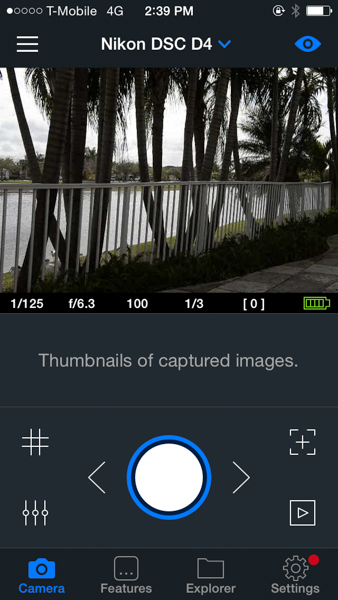
From the main screen of the app, you can control and access almost any function of the camera. Live view can be turned on or off, and you can also activate a grid on top of the image if you want.

IMG_1373
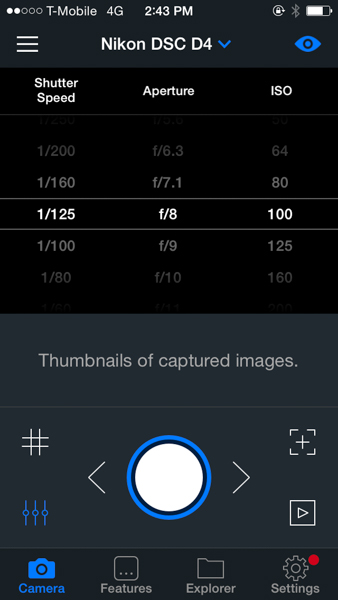
There is a quick way to control shutter speed, aperture and ISO straight from the main screen by just pressing the lower left icon; that really comes handy and is a fast way to change settings.

IMG_1369

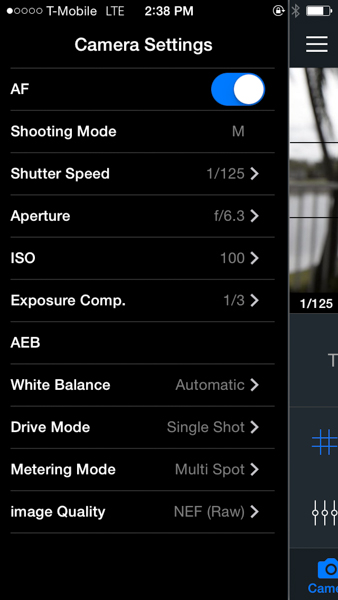
The camera settings menu lets you control almost every aspect of the camera. From there you can turn on and off the autofocus function, the shooting mode, shutter speed, aperture, ISO, exposure compensation, white balance, drive mode, metering mode and image quality. I find this really complete as once you are in the app you don’t really need to go back to the camera to change anything – every function can be handled from there.

IMG_1374

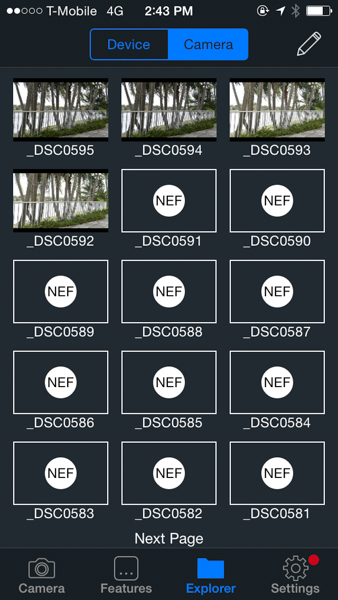
The Explorer function lets you see the photos taken from the camera. You’ll only be able to see JPGs, the RAW files will show as icons. However, you can download both types straight to your phone or tablet from there.

IMG_1380

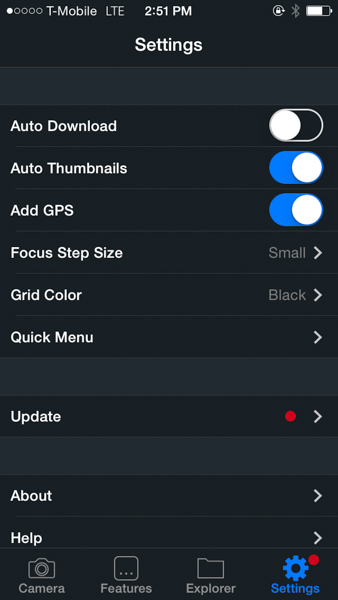
The Settings function lets you control several general settings, like auto-download the photos to your device or add thumbnails to the main screen of the app. You can also control the GPS function from there.

IMG_1382

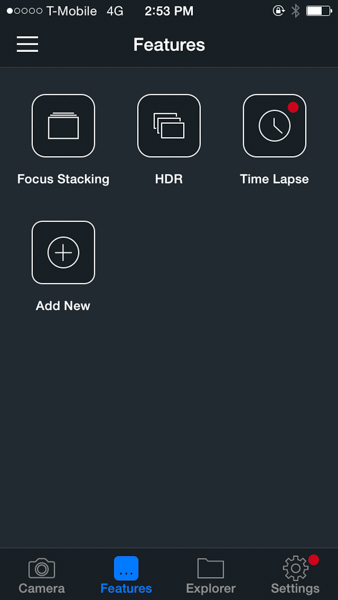
The focus stacking, HDR and time-lapse functions are accessed via the Features menu. As you can see on the screen shot, there is plenty of room for more to be added in the future.

At this time, the CASE Remote is only compatible with Nikon and Canon cameras, you can see the full list of supported models on their website. The company promises lifetime free updates via firmware upgrades and they claim to be working on support for Sony, Pentax and Fuji for later this year. The current asking price is $ 129 – a good value compared to other more expensive alternatives available in the market.

I’d really like to see improvements in the application delay and lag, but I think that overall this is a great product with lots of potential for future developments and features.

googletag.cmd.push(function() {
tablet_slots.push( googletag.defineSlot( “/1005424/_dPSv4_tab-all-article-bottom_(300×250)”, [300, 250], “pb-ad-78623” ).addService( googletag.pubads() ) ); googletag.pubads().enableSingleRequest();
googletag.pubads().disableInitialLoad();
googletag.pubads().collapseEmptyDivs( true );
googletag.enableServices();
} );

googletag.cmd.push( function() { googletag.display( ‘pb-ad-78623’ ); } );

googletag.cmd.push(function() {
mobile_slots.push( googletag.defineSlot( “/1005424/_dPSv4_mob-all-article-bottom_(300×250)”, [300, 250], “pb-ad-78158” ).addService( googletag.pubads() ) ); googletag.pubads().enableSingleRequest();
googletag.pubads().disableInitialLoad();
googletag.pubads().collapseEmptyDivs( true );
googletag.enableServices();
} );

googletag.cmd.push( function() { googletag.display( ‘pb-ad-78158’ ); } );

The post Review of the CASE Remote Trigger and App by Daniel Korzeniewski appeared first on Digital Photography School.


Digital Photography School

 
Comments Off on Review of the CASE Remote Trigger and App

Posted in Photography


Review: slingShot DSLR Remote Control App

18 Feb

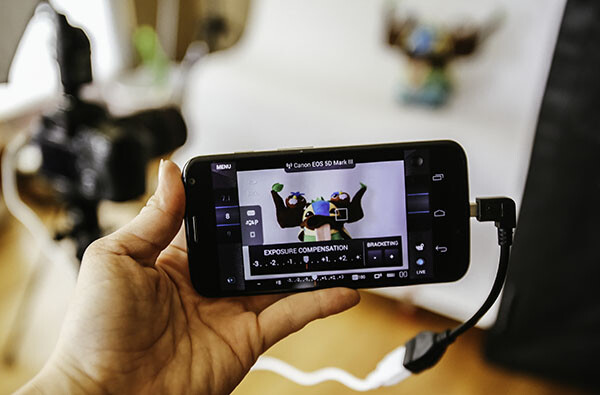
One of the great advantages of smartphone technology is the way that it makes photography more convenient. I’m not just talking about using the camera that came with your phone. There are now smartphone apps coming out that allow you to connect with, and even control, your DSLR camera. One of these apps is the brand new slingShot DSLR Remote Control, which just came to the Google Play Android market on January 25, 2015. Using this app makes it possible to adjust the settings on your camera, see what the camera sees in live view, and view the resulting image after it’s snapped. All of this, and you don’t even have to be standing right next to your camera.

How it Works

The slingShot app connects with your camera in one of two ways: via Wi-Fi if your camera has it, or via a physical USB On-The-Go (OTG) cable. If you have a Wi-Fi enabled camera, you’re already likely to be familiar with how the function works in that your camera will create its own Wi-Fi network that your phone will then sync with. For photographers with non-Wi-Fi cameras, the connection to your phone is made with the aforementioned OTG cable. While these cables definitely aren’t as common as others, they are cheap, easy to find online, and really convenient for connecting other devices to your phone or tablet besides your DSLR, such as a wireless USB mouse or keyboard.
slingShot Remote DSLR Controller

Compatibility

At this moment, the app claims on its website to only support the following models:

  • Camera Via Wi-Fi Connection: Canon EOS 6D, Canon EOS 70D and Nikon 5300.
  • Camera Via USB Connection: Canon EOS 6D, EOS 70D and Nikon D5300 and D7000.
  • Phone: Android 4.0 or higher; phone must also have Wi-Fi or full USB host support capabilities.

Despite the app’s relatively short list of supported devices, you may want to try it out for yourself. For example, the app doesn’t specify compatibility with the Canon EOS 5D Mark III, but it worked just fine with mine.

How to Control Your Camera with the App

1. Assuming you have a supported camera model and Android phone (no iOS support at the moment), the first step is to download the slingShot app from the Google Play store. This app does cost $ 8.99, but its features may make it worth the cost, depending on how useful you find them.

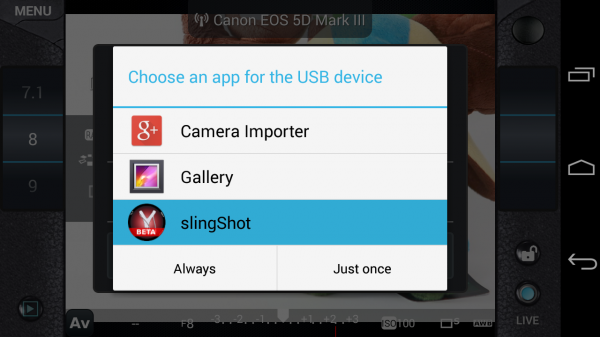
2. After you install the slingShot app, proceed to connect your camera to the phone. If your camera has Wi-Fi, walk through the procedures to enable the wireless connection, or simply connect the camera by using a OTG USB cable. When your camera and phone are successfully connected, you’ll see the screen below pop up, asking which app you want to activate. Choose the slingShot app.
slingShot Remote DSLR Controller

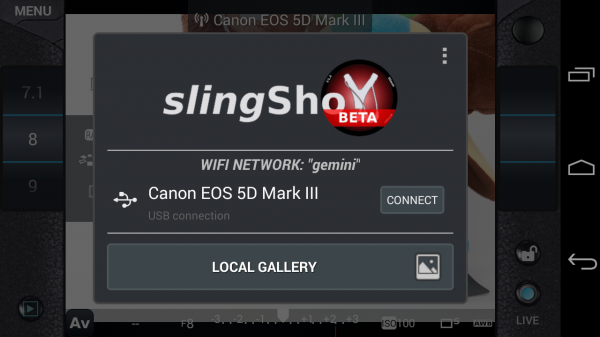
3. A screen will then flash up on your phone indicating that your camera has been detected. Press the “Connect” button to continue.
slingShot Remote DSLR Controller

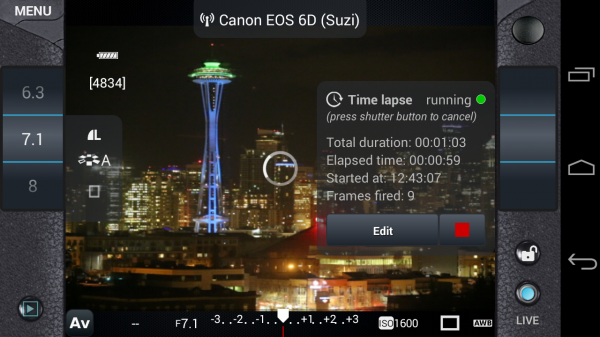
4. You will then see the menu controls on your phone (see below), as well as an indicator in the upper middle of the frame confirming that your camera is connected; in this case, I have my Canon 6D connected via Wi-Fi. You will also have the ability to use your phone to control aspects of your DSLR such as shutter speed, aperture, exposure, ISO, white balance, and image quality; you can even tap on the button in the upper right corner to take a photo.

However, you won’t be able to see what the camera is seeing until you enable live view mode on your camera and then press the “LIVE” button on the lower right corner of the app. Once the live view is on, the rest of the app controls are very smooth and easy to use, requiring just a tap or swipe of the finger to enable. There are also some extra features that appear when you tap on the menu button in the upper left corner, one of the most notable being the ability to do time lapse shots.
slingShot Remote DSLR Controller

Time lapse feature

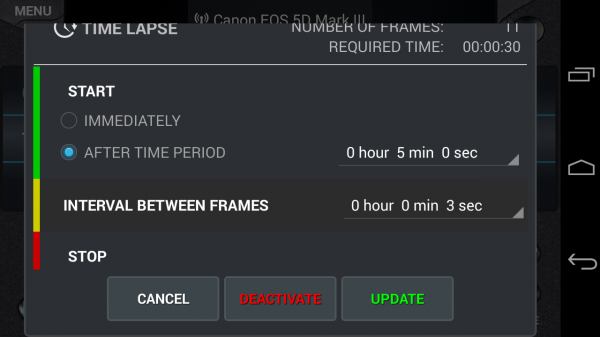
I’ve played around with quite a few DSLR remote control apps, but none have come with the time lapse functionality. slingShot’s time lapse feature is in the Menu and it offers a range of customizable settings. You can set it to start immediately or after a set period of time, you can also set the interval between frames, and give it a time to stop or have it stop after a certain number of frames are snapped. I tried the time lapse function out on both my Canon 6D and 5D Mark III and it worked perfectly the first time around.

There are a couple things that didn’t work so well. First, if your camera falls asleep, the time lapse function is turned off, even if you have a timer set. Second, the ability to reset the time lapse with different conditions is difficult to do; each time I had to simply reconnect my camera and phone to get rid of the initial settings I input. However, the fact that this app can do basic time lapses is still impressive and will likely be improved upon in future updates.
slingShot Remote DSLR Controller

Previewing images

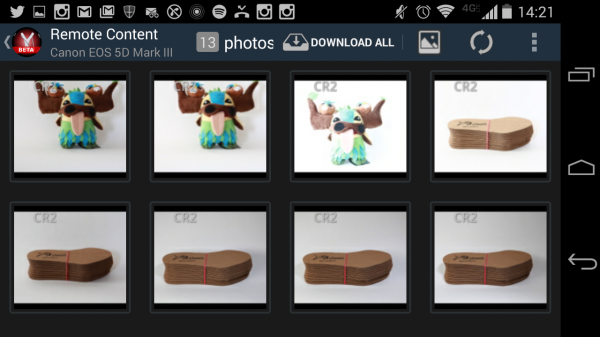
Another simple use of the slingShot app is to use it to preview DSLR content on your phone. Simply connect via Wi-Fi or OTG cable and press the play button in the app’s lower left corner. You’ll then see the screen show (see image below) a neat gallery of photos from your CF or SD card. Even if you have older content that wasn’t shot with the app,  you’ll be able to see it and download it to your phone, or share via email or social media. This app will even read and convert RAW files at pretty decent speeds.
slingShot Remote DSLR Controller

Potential Deal Breakers

While there are many positive aspects to the slingShot app, there are a few possible deal breakers. First, there are a few bugs in the app that don’t necessarily affect its overall functionality, but make its cool trick features such as time lapse not work as well as one might hope. On the other hand, the team behind the app is still actively making updates, so there’s a good chance these errors will be fixed. Another possible point of contention is the app’s $ 9.99 price tag. While you can download slingShot’s Beta version for free, you can only use it for 11 days before you’re made to purchase the actual app in order to keep using it. While the price isn’t super extravagant, it is on the steeper side compared to some other apps available. Also, there are a few other DSLR controller apps that offer the same functionality at lower prices. In fact, if you have a Wi-Fi DSLR, such as the Canon 6D in my case, there’s a (free) app from Canon that comes with it that enables DSLR control.

If the idea of being able to control your DSLR with your phone sounds like a winning deal, be sure to download slingShot app! Has anyone else given it a try? Thoughts?

googletag.cmd.push(function() {
tablet_slots.push( googletag.defineSlot( “/1005424/_dPSv4_tab-all-article-bottom_(300×250)”, [300, 250], “pb-ad-78623” ).addService( googletag.pubads() ) ); } );

googletag.cmd.push(function() {
mobile_slots.push( googletag.defineSlot( “/1005424/_dPSv4_mob-all-article-bottom_(300×250)”, [300, 250], “pb-ad-78158” ).addService( googletag.pubads() ) ); } );

The post Review: slingShot DSLR Remote Control App by Suzi Pratt appeared first on Digital Photography School.


Digital Photography School

 
Comments Off on Review: slingShot DSLR Remote Control App

Posted in Photography


CASE Remote is a smartphone remote for your DSLR

25 Jul

Many modern digital cameras can be remote controlled via dedicated apps on your smartphone and a Wi-Fi link. Unfortunately this option is not available on older or lower spec models that come without a built-in Wi-Fi module. CASE Remote, currently available for pre-order on indiegogo.com, is compatible with a large number of Nikon and Canon models and slots into your camera’s hotshoe. Click through to read more at connect.dpreview.com.

Articles: Digital Photography Review (dpreview.com)

 
Comments Off on CASE Remote is a smartphone remote for your DSLR

Posted in Uncategorized