RSS
 

Posts Tagged ‘Remote’

Apple patents remote control for iPhone camera

20 Mar

applepatent1.jpg

A patent for a wireless accessory that allows users to remotely control the camera of an iPhone – including image preview, capture and review – has been granted to Apple by the U.S. Patent and Trademark Office. Of course we don’t know at this point if the patent will ever result in an actual product but there is no doubt that, at the right price, it could be a useful accessory. Learn more

News: Digital Photography Review (dpreview.com)

 
Comments Off on Apple patents remote control for iPhone camera

Posted in Uncategorized


Remote Wildlife Photography From My Basement

19 Mar

A couple of weeks ago it was -30 Celsius (-22 Fahrenheit) and I was intent on photographing a pair of Red-backed Voles that seem to have established themselves in the backyard of my home in Edmonton, Alberta, Canada. Before I got myself a new gadget, I probably would have suited up in my heavy duty Canada Goose parka, some long underwear, snow pants and about four hand warmers and camped out for a morning to get a few shots of these cute little guys.

But now I’m a bit older and maybe even a bit wiser and I do so love my technology. And one of those technological gadgets allows me to get me shots without having to worry about freezing any of my favourite appendages right off. What’s the gadget I’m talking about? It’s called the CamRanger and it allows me to operate my camera anywhere that I’m within WiFi range (~35m indoors and ~100m outdoors).

CamRanger_SetupThe CamRanger itself is a little white plastic box measuring about 3.5” x 2” that you connect to the USB port of your camera via a USB cable. The device itself is powered by a rechargeable lithium battery. Once the CamRanger is plugged into your camera it sets up its own WiFi network. Connecting a device to that WiFi network (like an iPhone, iPad, Android device, Mac or Windows computer) allows you to wirelessly control your camera from that device.

In my case, I used my iPad to connect to the CamRanger attached to my camera. I set the camera up on a tripod with the lens pointing at the holes in the side of a snow bank that the voles were using to access the world outside their lair. Once set up, I could scurry into my own lair which in this case was my home office in our basement.

I activated the Live View feature to keep an eye on what the camera was seeing. I’d been watching these voles for a few days (they set up camp under one of our bird feeders) and I knew that they came out for about an hour each morning just after sunrise. Sure enough, not long after getting everything set up and waiting for my glasses to defrost, the voles started making their appearance.

From my position warmly tucked away in the basement I could consult the live histogram and make adjustments to the exposure (Shutter Speed, Aperture and ISO) to make sure that my exposure was perfect. I turned on a feature in the software app called “Focus Peaking” that allowed me to clearly see what was, and wasn’t in focus and I fine-tuned that focus via controls in the app.

With all that set up, it was just a matter of waiting for the voles to get themselves into a photogenic position and then I’d tap the remote shutter button on the CamRanger app and take a shot. The voles usually spend their time cautiously emerging from their lair, then darting out to find one seed or another, and quickly returning to the shelter of their tunnel entrance to safely eat the seed. If they got a particularly good seed, they’d retreat further within the tunnel, presumably to stash it away.
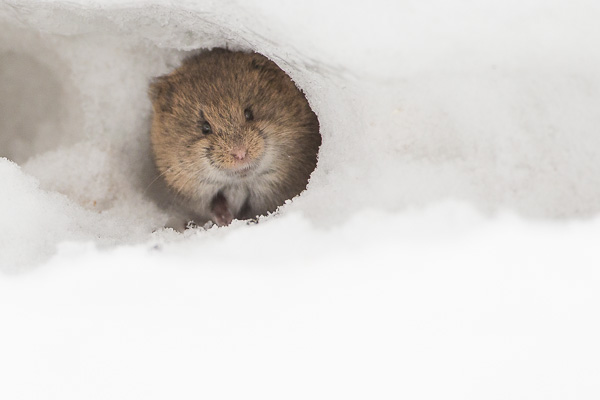
Northern Red-backed Vole - © Paul Burwell Photography

Northern Red-backed Vole – © Paul Burwell Photography

During these breaks in the action, I used another feature of the CamRanger to download the full resolution images to the iPad so that I could magnify them to check for critical sharpness. There is a bit of lag between what you see on the app’s Live View display and what is happening in the “real world” along with a slight delay between when you press the shutter button on the app and when the signal arrives at the camera to make the photograph. It isn’t long (think milliseconds) but it can be enough that by the time the photo is made the fast little critter isn’t where you thought it should be, and focus is off or the composition isn’t great.

I use my CamRanger a lot and love its ability to remotely initiate photography and video sessions. It also has a built in intervalometer to make time lapse photos and can do advanced bracketing of exposures for HDR type applications. Another favourite CamRanger feature of mine is its ability to provide very precise focus control for macro photography and it can even perform automatic focus stacking to provide enhanced depth-of-field images by running them through some third party software.

Northern Red-backed Vole - © Paul Burwell Photography

Northern Red-backed Vole – © Paul Burwell Photography

A few years ago I’d dreamed of the possibility of having remote operational control of my camera at a distance and now, with the help of the CamRanger, that’s a reality. My toes and fingers are eternally grateful! CamRanger is widely available and sells for about $ 300 US dollars.

More on wildlife photography here:

  • 5 Most Common Mistakes in Wildlife Photography – and How to Avoid Them
  • Manipulating Natural Light in Wildlife Photography
  • Making Sharper Wildlife Photographs – [Part 1 of 2]
  • Making Sharper Wildlife Photographs – [Part 1 of 2]

The post Remote Wildlife Photography From My Basement by Paul Burwell appeared first on Digital Photography School.


Digital Photography School

 
Comments Off on Remote Wildlife Photography From My Basement

Posted in Photography


Pointing Nowhere: Mysterious Arrows in Remote Places

31 Dec

[ By Steph in Global & Travel & Places. ]

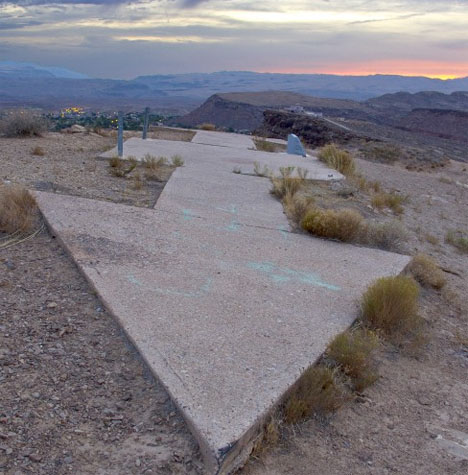
Mysterious Concrete Arrows Airmail 1

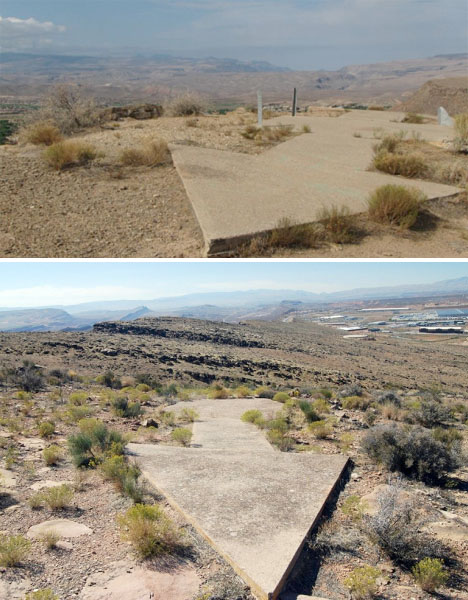
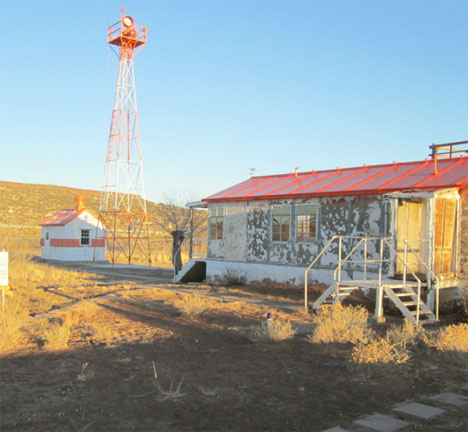
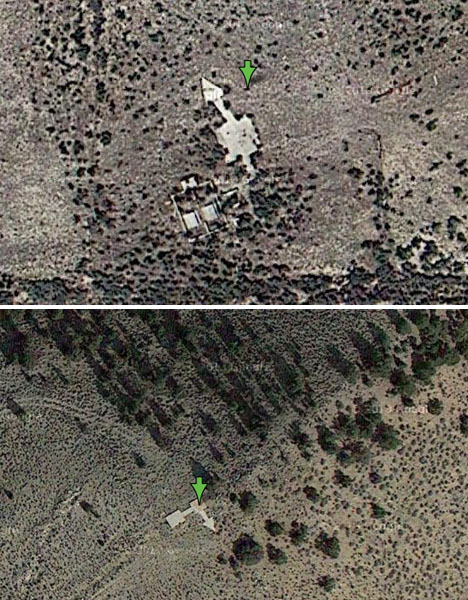
The remains of large concrete arrows can be found in patches of dirt and grass across the United States from New York to San Francisco. Many locals have wondered what they’re for, seemingly pointing nowhere at all and often located in fairly remote places. They were installed in the 1920s, each accompanied by a fifty-foot tower and a tiny hut, and became obsolete within a decade.

Mysterious Concrete Arrows Airmail 2

So what were they for? Getting mail delivered in the time period just after the birth of the airplane, but before the wide use of radar and radio communications. The arrows helped guide airmail pilots at night, when flights would otherwise be grounded due to inability to properly navigate. The ability to deliver mail by plane represented a huge step in the evolution of U.S. mail delivery, vastly speeding up a system that had previously relied on stagecoach lines.

Mysterious Concrete Arrows Airmail 3

Mysterious Concrete Arrows Airmail 4

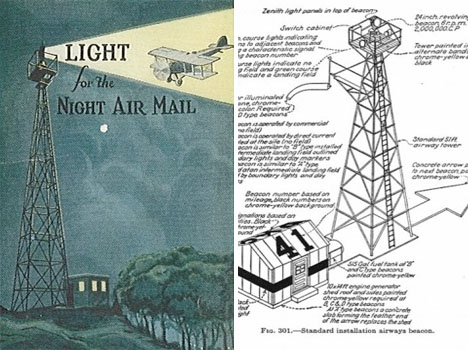
The system used fifty-foot beacon towers with rotating lights placed on top of concrete foundations shaped like arrows, usually between 50-70 feet in length. A small hut offered a place to stay for the people who maintained the generators and lights. The beacons were only visible from a distance of about 10 miles.

Mysterious Concrete Arrows Airmail 5

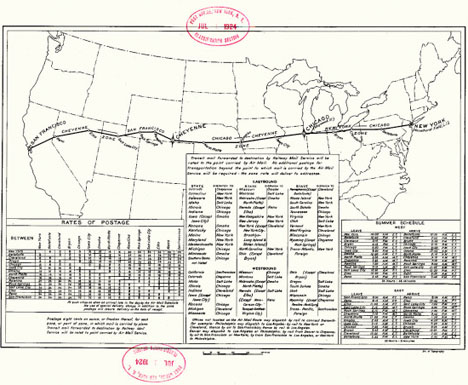
By the end of the first year of the program, the airmail service had 18 terminal airfields and more than 500 beacon lights in operation along the main mail delivery route, and continued to expand throughout the 1920s. But by 1933, new technology and the high cost of operation during the depression shut the program down. The towers were disassembled for their steel during World War II. A few have been preserved, like the one pictured above at the Western New Mexico Aviation Heritage Museum.

Mysterious Concrete Arrows Airmail 6

While many of the arrows have since been lost to development, those further afield still offer a (sometimes mystifying) glimpse of the past. The blog Sometimes Interesting has compiled a list with map links to arrows that still remain in New Mexico, Wyoming, Idaho, Nevada and other states.

Share on Facebook


[ By Steph in Global & Travel & Places. ]

[ WebUrbanist | Archives | Galleries | Privacy | TOS ]


WebUrbanist

 
Comments Off on Pointing Nowhere: Mysterious Arrows in Remote Places

Posted in Creativity


Shutterbug Remote looks to launch next-gen device

02 Jul

shutterbugremote.png

The creators of the Shutterbug Remote are looking to fans of the remote camera trigger technology to fund version 2.0 of their device. Aimed at photographers who want to capture time lapse videos, time delay portraits, low-light images, HDR bracketing and other complex shots, developers are envisioning even more features and broader compatibility in a next-gen version; learn more at connect.dpreview.com.

News: Digital Photography Review (dpreview.com)

 
Comments Off on Shutterbug Remote looks to launch next-gen device

Posted in Uncategorized


Nikon announces advanced WR-1 radio remote control

21 Feb

WR1leading2.png

Alongside the D7100, Nikon announced the WR-1 Transceiver, a unique radio-frequency wireless remote control. Able to remotely control multiple cameras capturing stills and videos, and even time-lapse sequences, the Nikon WR-1 Transceiver mounts on the camera’s hot shoe, but communicates via a cable attached to the master camera. Expected to retail for £649.99 in the UK, the WR-1 will ship in March 2013 (US pricing has yet to be announced).

News: Digital Photography Review (dpreview.com)

 
Comments Off on Nikon announces advanced WR-1 radio remote control

Posted in Uncategorized


Drag Racing Remote Camera Destroyed

31 Jan

Come along for the ride as motor sports photographer Mark J. Rebilas has an 000 camera destroyed by an out-of-control top fuel dragster at Auto Club Famoso in Bakersfield, California. Among the gear destroyed was a Nikon D700 with battery grip, a Nikon 400mm 2.8 lens, and a Pocket Wizard Plus receiver. The Manfrotto Magic Arm that the camera was mounted to was the only piece of gear to survive.
Video Rating: 4 / 5


SB600 Remote

23 Jan

SB600 Remote usage
Video Rating: 4 / 5

 
Comments Off on SB600 Remote

Posted in Nikon Videos


Nikon ML-L3 Remote Review

24 Dec

I would reccommend the remote to anyone, as I will be using it quite a bit despite most of the negative comments I gave it 🙂 Hope this review helps anyone looking for a remote.
Video Rating: 4 / 5


Review of the Flashpoint Remote Flash Trigger Kit

18 Dec

www.WeeklyPhotoTips.com www.ThePhotographyPodcast.com We had the pleasure of getting our hands on the Flashpoint Remote Flash Trigger Kit and started falling in love as we were unpacking it. Once we began actually using the flash trigger kit the love was complete. Head over to the blog and learn more about what we liked, why we liked it, see sample images, and links to where you can get it (with free shipping). See you over there! www.WeeklyPhotoTips.com www.ThePhotographyPodcast.com
Video Rating: 4 / 5


Triggertrap mobile app adds Wi-Fi control for remote smart camera triggering

13 Nov

TT.png

App-based smart camera trigger system ‘Triggertrap’ can now be used remotely if the user has two smart devices. The latest version of the mobile app, which allows a wide range of cameras to be triggered in response to a range of events or with sophisticated time-lapse functions, features a Wi-Fi mode. In Wi-Fi mode, a remote ‘master’ iOS device can be used to remotely configure and trigger a camera that is connected to a Tirggertrap mobile dongle and a second smart device (either an iOS or Android phone or tablet).

News: Digital Photography Review (dpreview.com)

 
Comments Off on Triggertrap mobile app adds Wi-Fi control for remote smart camera triggering

Posted in Uncategorized