RSS
 

Posts Tagged ‘quick’

8 Quick Composition Tips to Help Improve Your Images

10 Sep
Using different composition techniques can result in more dynamic images

Using different composition techniques can result in more dynamic images

You have likely heard of the Rule of Thirds, in fact it seems as if this is the only rule of composition. To be fair though, the Rule of Thirds is a good go to tool when you are unsure of how to put a scene together compositionally. There are many other techniques that can be used to improve your composition. Techniques like balance, leading lines, symmetry, depth of field, and so on, can all make a big difference to your image.

In many ways a photograph is very similar to a painting. Photographers learned early on that composition is a key component to engage people in an image. Composition literally means to put together, so when you think about composing an image, you need to think about the visual elements that you will put together in your image.

As a photographer, you need to decide when to use certain techniques, and when not to use them. Most compositional techniques are simply guidelines, or frameworks, there are very few hard and fast rules.  What they do offer is a starting point for putting an image together. Perhaps you may look at a scene and not know how to capture it. That is a good time to put some of the techniques into action and work the scene from there. They have been tried and tested by visual artists (painters, photographers and moviemakers) around the world for decades. The only constraint is don’t be dogmatic about applying them. Once you understand how to use the rules, you will then know how to break, and break out of them. By doing this, you will take your photographic creativity to a new level and your images will become that much better.

As always, with anything photographic, you need to experiment and practice. Know your equipment, experiment by shooting different scenes under different lighting conditions. Find what works for you and hone that skill. The art of composition is not a particularly technical art, but it can make an amazing difference to your images.

Good composition can make any subject interesting

Good composition can make any subject interesting

The great thing about composition is that you don’t need specialist equipment. The most important pieces of equipment are your camera and your tripod. I know, I know, we all sigh when we hear about the tripod. Once you see how much easier your photographic life becomes with a tripod, you will not be so reluctant to carry it around. There are also  better options for tripods nowadays (think Gorillapod and other travel-style ones). Remember though, a tripod is a key piece of equipment for successful composition. A tripod will help you to compose your image and keep that composition. Whenever possible, use a tripod to set up your shots, that way you can be sure that there is no movement when you photograph.

A lot of the time, you will be shooting images handheld. That is perfectly fine, and you can apply the compositional techniques to handheld shots. Sometimes you may need to take more than one image and adjust your composition to correct or change it.

Here are eight additional composition tips to help improve your images.

The yellow funicular and the blue house add an element of balance to this scene

The yellow funicular and the blue house add an element of balance to this scene

1. Balance

Often when you place an image on one of the thirds, the rest of the frame may be left without much in the way of anything of interest. This is often referred to as negative space, not because it is bad, it is simply to point out that it is not the centre of interest. In some images, negative space can work well, but in other images there may need to be another object in the frame, or even a colour to balance the centre of interest. Photographers use this compositional tool to do exactly that, balance the centre of interest with another object.

2. Leading Lines

We look at an image in the same way that we read a page of words. In the western world that means we look at an image from left to right. Our eyes are naturally drawn into the image by lines. If you have a road or a river winding through your image, the viewers eye will automatically run along those lines. If your centre of interest is at the end of that river or road, that is a good way to compose the image. Sometimes it is enough to have the river or road meandering through the image as it makes the image interesting to look at.

The lines pull us into, and through the scene. The lines can be straight, diagonal, curving, zigzag, S – Shape and many other types. The important thing is to create as dynamic an entry point to an image if possible.

The numerous lines in this scene direct your eyes down the street

The numerous lines in this scene direct your eyes down the street

3. Symmetry and Patterns

We live in a world that is defined by symmetry and patterns. They are all around us in so many ways. There are natural patterns that are captivating to photograph and there are man-made objects that accentuate balance. It is very gratifying to photograph a perfectly uniform scene. The symmetry brings order to the scene and gives a sense of peace and harmony to your image. Sometimes it is good to break the symmetry, show it in a different way, and by doing so create a sense of tension.

A symmetrical doorway

A symmetrical doorway

4. Viewpoint

Kneel down or lie down to get the eye level of your subject

Kneel or lie down to get to the eye level of your subject

Changing your viewpoint when shooting a subject makes a huge difference to the visual impact. It is natural to shoot everything from your eye level. By doing that you tend to create images that have been seen before. By changing your viewpoint, you immediately give a different perspective on very familiar subjects. If you are taking photos of small children or pets and animals, try and get down to their eye level. This is a view that most adults won’t see very often and will make a big difference in the impact of your image. To change your viewpoint, try a few of these tips:

  • Stand on a chair or ladder to get up higher than your subject
  • Kneel or lie down to get underneath a subject, i.e. for shooting a field of flowers
  • Photograph the subject directly from the top
  • Shoot from a diagonal angle to emphasize shape or texture

The important thing here is to make sure that you change YOUR viewpoint and by doing that, you will breathe new life into a well known subject.

5. Background

A distracting background can completely ruin an image. The human eye will naturally settle on the area of an image that is: the brightest, most colorful, sharpest and has the most contrast. Be aware of what is behind your centre of interest. If there is a pole, a distracting pattern, an awkward colour or some other object, you may need to reconsider your shooting angle. This is not always possible, but sometimes, taking two or three steps to the left or right can make all the difference. Look around for an unobtrusive background, or change your aperture settings to achieve a shallow depth of field and by doing so, soften the background.

Move around your subject until the background is nit distracting to the rest of the image

Move around your subject until the background is not distracting viewers from the subject

6. Depth

Photography is a two-dimensional art form. As a result, you use certain techniques to imply three-dimensionality. One way to do this is to have subject matter in the foreground, middle and background. This creates depth, and the eye will naturally walk through the image. This implies a deep depth of field from a technical point of view, so ensure that you use a smaller aperture (i.e. f/8, f/11 or f/16) making everything in the scene in focus. This technique is particularly important when photographing landscape images.

Sometimes, it is great to have a whole scene in focus

Sometimes, it is great to have a whole scene in focus

7. Framing

The world is full of natural objects that can be used to frame a subject (e.g., archways, tree lined streets, holes, and so on create natural frames). By placing your subject in the middle of these natural frames you will create a strong visual pull towards your centre of interest.

Use natural elements to frame your scene

Use natural elements to frame your scene

8. Get in Tight

Sometimes, closer is better and less distracting.

Sometimes, closer is better and less distracting.

It is often tempting to put more detail into a frame to show more about what was happening, but this can lead to confusion. The important maxim to remember is this: less is more. The art of simplifying an image is not easy, but if done correctly can make an image far more dramatic. When you find that your composition has more than one centre of interest, or seems confusing, try these steps:

  • Get in as close as you can to your subject
  • Simplify the composition
  • Be sure to avoid any distracting colours or objects in the background
  • Use a shallow depth of field

Finally

Composition and the rules around it are flexible. There really is no right or wrong way to compose an image, but there are better ways to do so. Some composition techniques can make a huge difference to an image and take it from being a snapshot to becoming a truly great photo. The important thing is to experiment with these techniques. Combine them wherever possible. Try them out as often as you can on different subject matter, and know when NOT to use them. The important part is to make sure that you master them. Use them when you need to. Find out what works for you and go from there. By doing this, not only will your images improve, so will your ability to see an image in a scene.

This is the most important part of photography and very often what separates an average photographer from a great photographer. The ability to see an image in a scene makes all the difference and these compositional techniques help you to do that.

Don't forget to experiment and break the rules where necessary

Don’t forget to experiment and break the rules where necessary

The post 8 Quick Composition Tips to Help Improve Your Images by Barry J Brady appeared first on Digital Photography School.
Digital Photography School

 
Comments Off on 8 Quick Composition Tips to Help Improve Your Images

Posted in Photography


Quick Review: Zenfolio’s Photograher Central

22 Aug

Recently, Zenfolio announced its newest online venture, Photographer Central – an online directory of photographers. This website promises to bring customers in direct contact with local photographers while making the search free and easy to use. Does it live up to its claims? We took the service for a test spin. Read more

Articles: Digital Photography Review (dpreview.com)

 
Comments Off on Quick Review: Zenfolio’s Photograher Central

Posted in Uncategorized


A Quick Video with 7 Tips to Create More Powerful Images

17 Aug

In this short tutorial photographer Josh Cripps shares with you 7 tips to help you create more powerful images right now. You don’t have to buy any more gear, or take any classes. Put these tips into practice and get out there shooting.

So are you getting close enough to your subjects? How about composition? Do you create depth in your images? Are you practiced in the art of using leading lines? All your shots from eye level – why not change up the perspective a bit? How about using the light to your advantage?

That’s a quick summary of the tips in this video. Watch the whole thing to see some great image examples for each one. If you need ideas of what to shoot you can always check out the weekly photography challenge, this week it’s Blue. To see the current challenge you can always fine it in the right hand sidebar next to this article.

The post A Quick Video with 7 Tips to Create More Powerful Images by Darlene Hildebrandt appeared first on Digital Photography School.

Digital Photography School

 
Comments Off on A Quick Video with 7 Tips to Create More Powerful Images

Posted in Photography


Time-Lapse Photography – a Quick Guide to Building Your Movie

11 Aug

Time-lapse photography shows you events that occur over an extended period that are captured on camera and shown in a relatively short time.

Time-lapse imagery is the capture of individual images of a subject at preset intervals over a preset duration. These individual images are then combined using software, thereby compressing the event into a much shorter time span.  If you were to witness an ice cube melting it would take an hour or more. With time-lapse the process from solid to liquid could be seen in seconds.

What do you need to do time-lapse photography?

Cameras

Though point-and-shoot cameras will do the job, digital single lens reflex cameras (DSLR’s) and mirror-less cameras allow for the most flexibility. They not only capture images that are of a higher quality but have features most suitable for time-lapse. In particular, they are capable of manual exposure and focus control. They also have an array of lenses to choose from and all the accessories required for capturing time-lapse sequences.

Lenses

All focal lengths are suitable based on the subject you select. A lens that has a manual aperture ring is best as the aperture blades do not open and close for each shot captured.

Intervalometer

The key to achieving a great lime-lapse sequence is a good intervalometer. This is a device capable of triggering your camera with accurate intervals and precise shutter actuations. It can be an external or internal device.

Tripod

Image Stabilization and Vibration Reduction are good but they are no substitutes for a good tripod for time-lapse photography. Use a solid tripod.

Batteries and/or AC Couplers

Because of the long duration of time-lapse sequences, the batteries in your camera may drain out before the sequence is completed. Here are a few tips to help you increase your battery life:

  • The single battery in your camera powers a number of functions. Many of these can be switched off for time-lapse capture or you can decrease their “on-time”.
  • A major drain on the battery is the LCD display and Live View. Use these screens only if it is imperative and then make certain that you lower the brightness using one of the custom functions. Also, limit the preview duration, keeping it to a minimum.
  • Don’t use your camera’s LCD screen for viewing and deleting images. Leave that activity to be performed on your computer after you have downloaded your images.
  • If you are shooting a sequence indoors you can use an AC coupler to power your camera.  An AC coupler is used in lieu of the camera battery.

Formula for Time-Lapse Capture

The typical frame rate for movies is between 24 and 30 frames per second. As a guideline, the greater the frames per second the smoother the playback.

When using a DSLR, you have all the control to create good time-lapse sequences. Selection of shutter speed, depth of field and the interval between shots can be set as desired. Just remember, the faster the movement of the subject or subjects within your project, the shorter the interval between images captured. However, you may be limited in low light situations.

Here is a guide for intervals:

1 Second

1 – 5 Seconds

15 to 30 Seconds

3 – 15 minutes

Air and Road Travel

Sunrise Sunset

Moon going across the sky

Growing Plants

City Scenes with Traffic

Crowd Scenes

Stars and Milky Way

Home Building Projects

Bicycle Rides

Slow Moving Clouds

A good starting point for any subject matter is to create your time-lapse with a shorter interval than you may think is appropriate. You can always discard alternate or irrelevant images from your final sequence if you want to speed up the action.  For example, if you decide to use a 30 second interval for a moon sequence, but want to be sure that the final sequence will be smooth, shoot at 15 second intervals. You can get back to your original plan by removing every alternate image for the final sequence.

Prepare your images

Using any software editing program, crop or size your captured images to a width of 1920 pixels and a height of 1080 pixels for a 1080p HD video (use 1280 pixels by 720 pixels for 720p video). Make sure your crop registration is identical for all the images.  If you are not comfortable doing this, use the automatic resizing provided by most time-lapse assembly software.

Now that the images of the sequence are ready, you can use one of the many free applications for Windows and Mac operating systems to create your video. Some of these are VideoVelocity from CandyLabs, Photolapse from Stephan van der Palen and Time-Lapse Assembler created by Dan Bridges. For under $ 30 Apple Quicktime Pro 7 can be used to create some excellent time-lapse video.

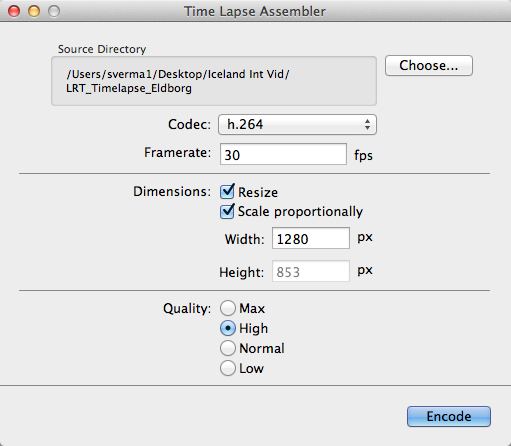
How to use Time Lapse Assembler for Mac

tla-1

  1. Open Time Lapse Assembler
  2. Select the directory that contains the image sequence
  3. Select the codec. Use h.264 or mp4v for making .mov files or mp4v for making .mp4 movies
  4. Leave the frame rate at 30fps
  5. Set the dimension to resize
  6. Scale proportionately
  7. For HD video you can adjust the width to 1920 or 1280 (1920 for 1080P video and 1280 for 720p video)
  8. Select Quality High (you can always use Max but the rendering will take longer
  9. Click on Encode
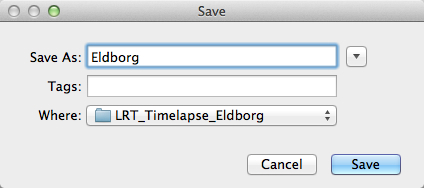
  10. You will be presented with a Save window. Name your sequence and click Save.

tla-2

The software will produce a Quicktime compatible movie file that can be viewed as is, or used for further editing in iMovie or any other video editing software.

See below an example of the video in very low resolution:

Here are the steps for Quicktime Pro 7

  1. Open Quicktime
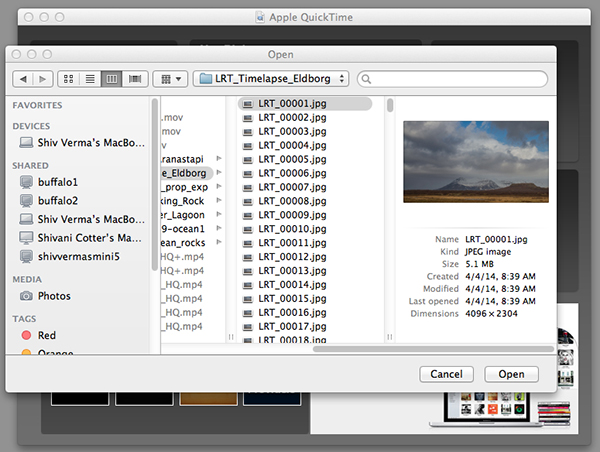
  2. Go to the menu and under File – click on Open Image Sequence. Go to the directory where you downloaded your images (make sure you have only the images that belong in the sequence in this folder)
  3. Click on the first image of the sequence and click Open

    Select the Sequence

    Select the Sequence

  4. You will be presented with a choice for picking your frame rate – use 30 frames per second for a smooth sequence. Now click OK
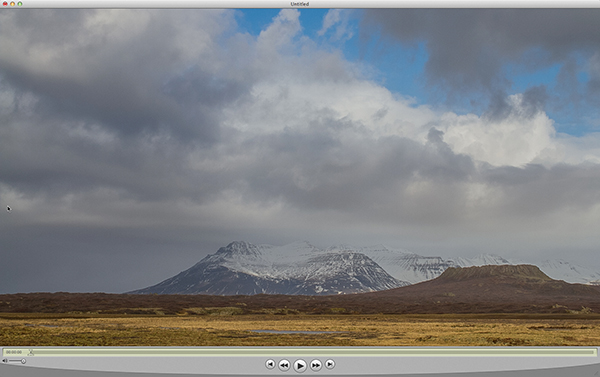
  5. Quicktime will import all the images in that folder and assemble them in their original sequence and at their original resolution. You probably will not be able to see the entire image as it is larger than the resolution of your screen but you can go to the Menu>View>Fit to Screen. You now have the first frame visible in its entirety.
    Assembled Sequence

    Assembled Sequence

    If you attempt to play this sequence you will not see the movie as you might like it to be. It will not be smooth and may pause for long periods. This is because the individual frames are very large and the video has not been rendered for playback.

  6. Save this sequence File>Save
  7. You will be presented with options as to where you would like to save the Quicktime file.
  8. Save the file in the same directory as the original images and name the file

The next steps will render a viewable video

  1. You will export this sequence File>Export
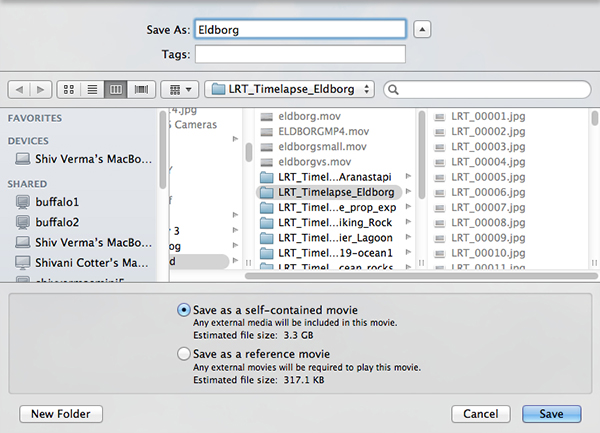
  2. You will get the typical “Save As” option and the “Where” option. Save the export in the same folder as the original files giving it a pertinent name.
    QT-3
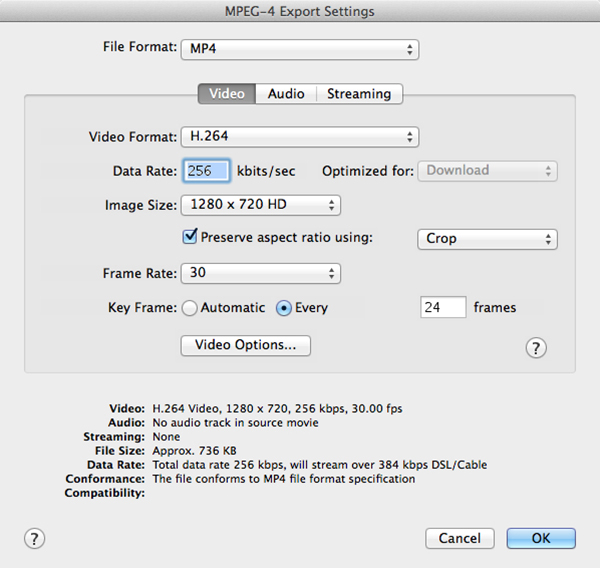
  3. There are two other sets of export criteria and an options button. For now, export the sequence as a QuickTime Movie and in the Options Section use H264.
    QT-4
  4. The export will take some time so be patient. Once the rendering and export is complete you will be able to watch the video. 

Have fun making your time-lapse – enjoy!

The post Time-Lapse Photography – a Quick Guide to Building Your Movie by Shiv Verma appeared first on Digital Photography School.

Digital Photography School

 
Comments Off on Time-Lapse Photography – a Quick Guide to Building Your Movie

Posted in Photography


Quick Review: That Steady Thing

10 Jul

The simple idea that tripods are inconvenient to carry for extended periods has given birth to a host of attempts to find an easier way to steady a camera during a long exposure. A new device that joins this list is That Steady Thing – a metal boss that sits between a monopod’s leg and its head, into which a pair of steadying legs screw. See if it lives up to its name. Read more

Articles: Digital Photography Review (dpreview.com)

 
Comments Off on Quick Review: That Steady Thing

Posted in Uncategorized


26, June 2014 – Acadia National Park – A Quick Guide To Photography

26 Jun


It’s summer time and a lot of you will be heading out to America’s National Parks to capture their beauty and to enjoy the great outdoors.  I was in Yosemite NP last week working on a NEW LuLA tutorial.  It’s one of the grandest National Parks of them all. I’m still working on images and will post some on the home page soon.  Today’s article is by QT Luong.  He is known for being the first person to photograph all 59 US National Parks in Large Format.  He has come on board as a regular contributor and we will be regularly publishing his articles on his National Park Photography guides.  we’ll start with the ‘A’s and today’s article is  Acadia National Park – A Quick Guide To Photography.


The Luminous Landscape – What’s New

 
Comments Off on 26, June 2014 – Acadia National Park – A Quick Guide To Photography

Posted in News


The Rotten Apple Project: Quick and Dirty Urban Hacks

05 Apr

[ By Steph in Art & Installation & Sound. ]

Rotten Apple Urban Hacks 1

Sometimes, a reclaimed piece of junk is all it takes to make a bus stop, bike rack, subway station or virtually any other urban setting more comfortable and fun. The Rotten Apple project consists of incredibly fast and cheap urban interventions that anyone can replicate in their own cities, from a simple hinged wooden board that turns a bike rack into a folding seat to improvised tools that transform scaffolding into a musical instrument.

Rotten Apple Urban Hacks 2

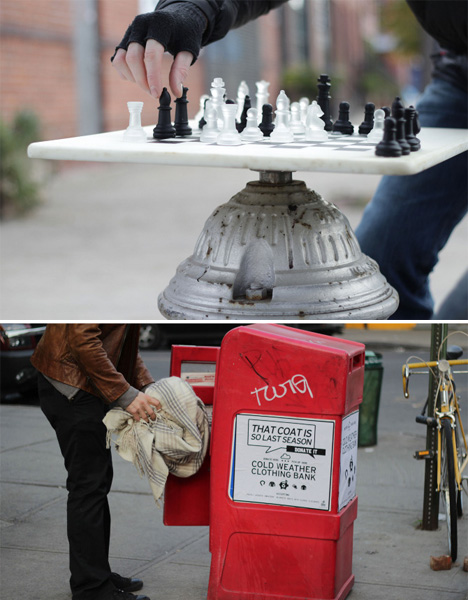
A piece of scrap wood and some chess pieces, fitted onto the top of a fire hydrant, becomes a public game board. An old, unused newspaper dispenser is a cold weather clothing bank with the addition of a sticker.

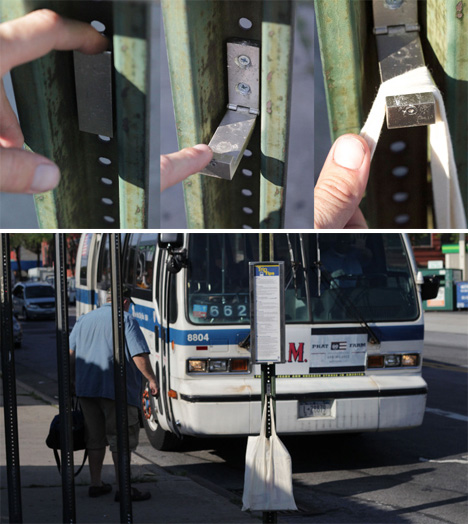
Rotten Apple Urban Hacks 3Commuters waiting on the bus have a place to hang their bags thanks to an old IKEA clothes hook added to a street sign. Other signs were modified into sidewalk tetherballs or double-height bike racks.

Rotten Apple Urban Hacks 4

Rotten Apple Urban Hacks 5

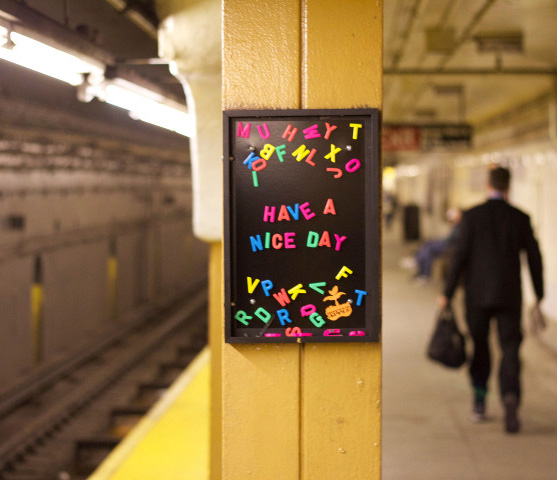
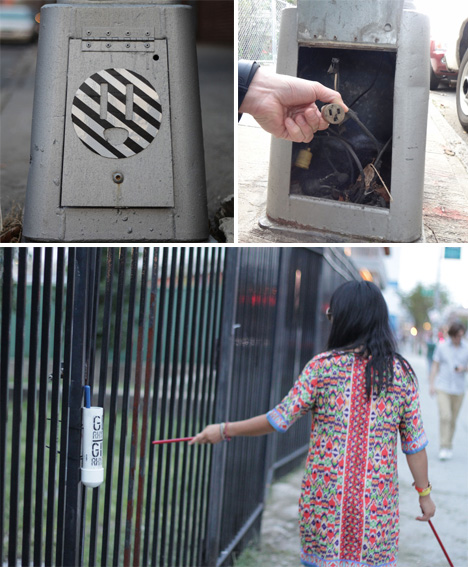
Magnetic boards on the subway platform aren’t just a fun way to pass the time, they can also brighten up someone’s day with a cheerful message. A window of an abandoned building, bricked up long ago, is a public bookshelf, and a sticker applied to an electric main notifies passersby that there’s an outlet hidden inside so they can charge their phones.

Rotten Apple Urban Hacks 6

The people who run Rotten Apple have chosen to remain anonymous, leaving only this quote from Victor Pananek as a clue to their motivations: “Design, if it is to be ecologically responsible and socially responsive, must be revolutionary and radical in the truest sense. It must dedicate itself to… maximum diversity with minimum inventory… or doing the most with the least.”

Share on Facebook


[ By Steph in Art & Installation & Sound. ]

[ WebUrbanist | Archives | Galleries | Privacy | TOS ]


WebUrbanist

 
Comments Off on The Rotten Apple Project: Quick and Dirty Urban Hacks

Posted in Creativity


Mirrorless marvel? A quick look at the Nikon 1 V3

13 Mar

intro.png

Nikon’s 1-System cameras have tended to slip under the radar of most enthusiasts. The company’s new V3 mirrorless camera is Nikon’s attempt to change that, with its impressive AF and burst shooting specs and more customizable controls. We were able to spend some time with the Nikon 1 V3 and have put together a quick overview of the camera for your reading pleasure.

News: Digital Photography Review (dpreview.com)

 
Comments Off on Mirrorless marvel? A quick look at the Nikon 1 V3

Posted in Uncategorized


A Quick and Easy Way to Make Money with your Photography While Having Some Fun

17 Feb

Many photographers have the dream of selling their fine art photography and seeing their prints hanging in collector’s homes. I’m sorry to burst your bubble but that is probably the most difficult way to make money. Even the biggest names in photography don’t make a living solely by selling prints. Yet, it is conceivable to make a little bit of extra cash with your pictures and here is a realistic easy way to make money with your photography.

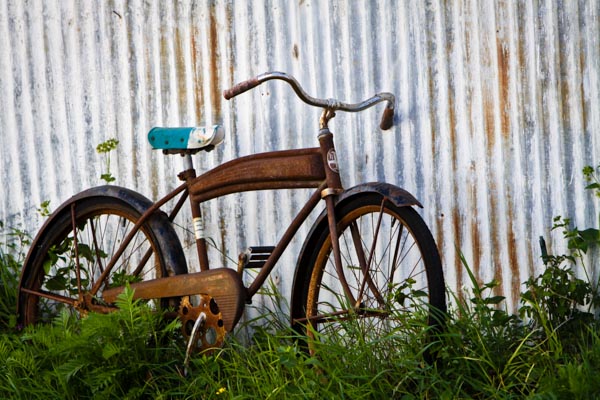
Everyone loves a card with an old rusty bicycle! ©Valerie Jardin

Everyone loves a card with an old rusty bicycle!
©Valerie Jardin

Think Locally!

Instead of trying to reach the world at large and compete with hundreds of thousands of other talented photographers trying to sell their work, think locally!

You could spend several weekends every year sitting in a booth at an art fair only to sell enough to break even and pay for your entry fee. Yes, art fairs are good exposure, but photography is not the biggest seller and there are usually several photographers trying to sell prints at the same event. Also, those art fair weekends are valuable days for any photographer, wouldn’t you rather be out shooting than selling?

Another option is to show your work at a restaurant or a coffee shop. If you do, make sure there is an opening party to create a buzz around your work and invite everyone you can think of. Do not leave your images on display for more than a month, no one will notice them after a few weeks.

I’m going to tell you a little secret…

Years ago, when I still had a little bit of spare time, I often teamed up with two or three other artists in different media forms and organized private art parties. We combined our contact lists and invited our friends and family to attend an ‘art open house’ for a few hours. We did this several times a year. We took turns hosting the event and split the cost of the snacks and beverages. We also urged people to bring a friend along. By combining our contact lists we would reach a large number of people and always end up with a minimum of 30 to 50 attendees.

Why is it better to have 50 people coming to your open house rather than hundreds walking by your booth during an art show? The people who come to your private art open house are there for the sole purpose of checking out your work, socializing and spending money! I used to sell hundreds of dollars worth of small prints and greeting cards in just one evening, while having the best time socializing with friends and other artists.

A card for Mother's Day... ©Valerie Jardin

A card for Mother’s Day…
©Valerie Jardin

What sells?

Small ticket items! You can always have a few large, framed prints, on display for the wow factor and a possible sale or two – but small items, such as greeting cards, will sell! People are still very keen on greeting cards, especially in North America. I realize that different countries have different customs. You may think that, in this age of electronic mail, physical cards would disappear. On the contrary, e-cards and social media greetings are so common and impersonal, that receiving an actual card in the mail has become a novelty.

The advantage of selling cards is that everyone can afford them and has a use for them. Make sure you have a large variety of cards with your best images. If people can’t decide which ones to choose, they are more likely to buy all of them! Another tip: Display some as a pack wrapped with a bow, they make fun gift ideas for friends, co-workers, teachers, etc. Another tip: Offer a ‘bargain basket’ with a limited selection of discounted cards. Some people will only buy if they feel like they’re getting a good deal. Also, use this phrase as incentive “one free card if you buy ten”. It works!

Everyone knows a musician who would enjoy receiving this card! ©Valerie Jardin

Everyone knows a musician who would enjoy receiving this card!
©Valerie Jardin

How do you make greeting cards?

It takes a little bit of time and effort to make those cards and there are several ways of doing it. You can certainly order your cards already made through a wholesaler. It’s the easiest way to proceed but also the most costly and your profit margin will suffer.

You can make your own! If you have a good quality photo printer, you can download a greeting card template and print them at home on some nice stock paper. Watch out for the high cost of the ink and figure out how much each card is going to cost in ink, paper and envelope. The goal is to make nice cards for as little as possible.

An inexpensive way to do it, but a bit more time consuming, is to affix photographs on stock paper. Pre-scored card paper with matching envelopes can be purchased in bulk quantities at a craft store for a very reasonable price.Your next step is to print your logo and contact info on the back of the cards. The tedious part is to place the photo on the front of the card with double sided permanent tape.

You can wrap each card in a clear sleeve to give them a more professional look. Or ‘go green’ and not wrap them at all. Ordering 4×6 prints online to use on your card stock is cheap, just pennies per print (usually cheaper than printing your own).

Remember, cards you buy at the store are expensive! Yours will be unique and you can easily sell them for $ 5 per card, which adds up when people buy them by the dozen or as a pack to give them as gifts… If you do it right, you can easily make a 300-400% profit on each card.  Remember, the goal is not to make a living by doing this. But you can easily make a few hundred dollars during each party, and feel pretty good about yourself!

Valerie Jardin Photography-17

There is a card for every season!
©Valerie Jardin

The fun part and the bonus for you, the photographer!

Shooting for greeting cards becomes a great photography project. Think of all the different themes you can shoot for: Christmas, Hanukkah, Father’s Day, Mother’s Day, Birthdays, Valentine’s Day, etc. All of a sudden you become a stock photographer for your own little business needs. I used to spend a few hours each week shooting just for my greeting card collection. For example, if I was out shooting for a Father’s Day theme, I would think: golf, fishing, antique cars, etc. Every self-assignment becomes a treasure hunt. It was like shooting for a stock agency. The difference was that I made a lot more money and I had a lot more fun selling those cards than I did with iStock!

This little experiment was serving a dual purpose. I was having fun and learning a lot while working on a photography project that also brought extra cash for trips or photo gear!

Another advantage is that it spreads your name around. Many times people emailed or called me to place an order after receiving one of my cards for a special occasion. Hence the importance of having your contact information on the back of each card! Today I don’t make cards anymore but, ironically, I often get requests from greeting card companies to licence my images for that purpose.

If you love photography and, if you have a little bit of spare time, there is no reason why you can’t make some extra cash selling your pictures. Good luck!

When you start shooting for your greeting card collection, opportunities will present themselves everywhere and your photo walks become fun treasure hunts with a purpose! ©Valerie Jardin

A card for the book worm? When you start shooting for your greeting card collection, opportunities will present themselves everywhere and your photo walks become fun treasure hunts with a purpose!
©Valerie Jardin

Do you have any other little tips that have worked for you to make money with your photography? If so please share in the comments below.

More articles on using your photography to make some extra cash:

  • “Photography Business Secrets” – A Review
  • 5 Things to Consider Before Starting Your Photography Business
  • Top 10 Ways to Sabotage your Professional Photography Aspirations

The post A Quick and Easy Way to Make Money with your Photography While Having Some Fun by Valerie Jardin appeared first on Digital Photography School.

Digital Photography School

 
Comments Off on A Quick and Easy Way to Make Money with your Photography While Having Some Fun

Posted in Photography


Quick Off-Camera Flash Tutorial

17 Feb

Using off-camera flash is one of the most requested articles we get here at dPS. I found this short but informative video on YouTube on using off-camera flash. My thought after watching it was “oh that poor girl” at it was clearly shot in some rather nasty weather.

check it out here:

For more articles on off-camera flash see:

  • Balancing Color for Flash and Ambient Light using Gels
  • Working with Off Camera Flash and TTL
  • Balancing Flash and Ambient Light Using an Incident Light Meter
  • Yongnuo YN622C TTL Flash Trigger Review – I personally have a set of these and they work GREAT!!
  • The Basics of a One Light Setup: A Lighting Tutorial

The post Quick Off-Camera Flash Tutorial by Darlene Hildebrandt appeared first on Digital Photography School.


Digital Photography School

 
Comments Off on Quick Off-Camera Flash Tutorial

Posted in Photography