RSS
 

Posts Tagged ‘Powerful’

24 Powerful Images With Complementary Colors

04 Apr

Complementary colors are ones which are opposite on the color wheel.

Lacie Lynnae

By Lacie Lynnae

They appear often in nature and are called complementary because they do just that, complement one another. They work well and make strong compositions.

Photograph Water and fire by wim denijs on 500px

Water and fire by wim denijs on 500px

Examples of common color combinations that work are:

  • Orange and blue
  • Yellow and purple
  • Red and green

Here are 24 examples of images that use complementary colors for a powerful composition:

Photograph Flower 03 by MaX Smiles on 500px

Flower 03 by MaX Smiles on 500px

Photograph The Concert Hall by Jürgen Lehmann on 500px

The Concert Hall by Jürgen Lehmann on 500px

Photograph The Red Dress by Ken Thai on 500px

The Red Dress by Ken Thai on 500px

Photograph Cloud Atlas by Meer Sadi on 500px

Cloud Atlas by Meer Sadi on 500px

Photograph Silent Witness by Moni  on 500px

Silent Witness by Moni on 500px

Photograph Cosmos by Julia Carvalho on 500px

Cosmos by Julia Carvalho on 500px

Photograph Fickle macro by Stolpulus II on 500px

Fickle macro by Stolpulus II on 500px

Photograph Dream sailing by Roberto D'Antoni on 500px

Dream sailing by Roberto D'Antoni on 500px

Photograph Calm Sunset in El Nido by Sunny Merindo on 500px

Calm Sunset in El Nido by Sunny Merindo on 500px

Photograph Heart of October by Mihai Dulu on 500px

Heart of October by Mihai Dulu on 500px

Photograph Norah by Suzy Mead on 500px

Norah by Suzy Mead on 500px

Photograph A colorful morning by Martijn Barendregt on 500px

A colorful morning by Martijn Barendregt on 500px

Photograph Perfect Cuteness by Gurdyal Singh on 500px

Perfect Cuteness by Gurdyal Singh on 500px

Photograph BayBridgeBlueFull by Bill Nichols on 500px

BayBridgeBlueFull by Bill Nichols on 500px

Photograph Star Chamber by Joseph Rossbach on 500px

Star Chamber by Joseph Rossbach on 500px

Photograph pondering by Alex Serres on 500px

pondering by Alex Serres on 500px

Photograph attractor by Pascal Faber on 500px

attractor by Pascal Faber on 500px

Photograph white eye by Woody L. Chu on 500px

white eye by Woody L. Chu on 500px

Photograph I am not a Lady Bug :P by Gideon James Draviam on 500px

I am not a Lady Bug :P by Gideon James Draviam on 500px

Photograph delicious pomegranate cocktail by Oxana Denezhkina on 500px

delicious pomegranate cocktail by Oxana Denezhkina on 500px

Photograph ...complementary colors... by Marko  Grubisic on 500px

…complementary colors… by Marko Grubisic on 500px

Photograph Complementary colors by Mauro Moroni on 500px

Complementary colors by Mauro Moroni on 500px

Photograph Red sea by Vitaliy Sokol on 500px

Red sea by Vitaliy Sokol on 500px

Photograph Yellow Butterfly by alaine  on 500px

Yellow Butterfly by alaine on 500px

googletag.cmd.push(function() {
tablet_slots.push( googletag.defineSlot( “/1005424/_dPSv4_tab-all-article-bottom_(300×250)”, [300, 250], “pb-ad-78623” ).addService( googletag.pubads() ) ); } );

googletag.cmd.push(function() {
mobile_slots.push( googletag.defineSlot( “/1005424/_dPSv4_mob-all-article-bottom_(300×250)”, [300, 250], “pb-ad-78158” ).addService( googletag.pubads() ) ); } );

The post 24 Powerful Images With Complementary Colors by Darlene Hildebrandt appeared first on Digital Photography School.


Digital Photography School

 
Comments Off on 24 Powerful Images With Complementary Colors

Posted in Photography


Relio is a powerful LED light in your pocket

11 Dec

It seems ultra-portable LED-based external light sources are the flavor of the season. Last month brought the Lume Cube, and today there is Relio. Relio is a 35mm small aluminum cube that uses a USB connection as power source for its LED light. It can be mounted on tripods and other camera supports using a 1/4-inch standard thread. Read more

Articles: Digital Photography Review (dpreview.com)

 
Comments Off on Relio is a powerful LED light in your pocket

Posted in Uncategorized


Directing your Viewer’s Eyes with Lightroom to Make a More Powerful Image

17 Aug

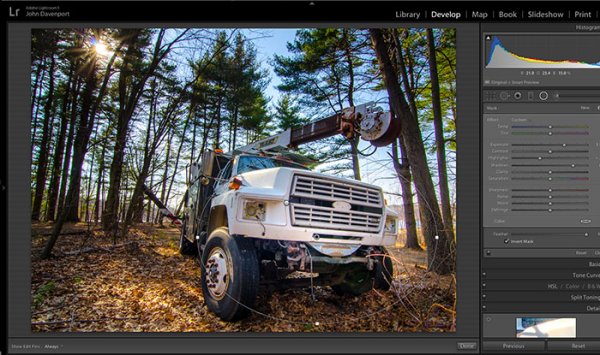
One key to a successful photograph is that it directs the viewer’s attention towards the subject in question. There are many ways that this can be achieved through composition and lightning in the field, but did you know, you can also direct the attention of your viewer’s eyes through post-production?

truck edit-2

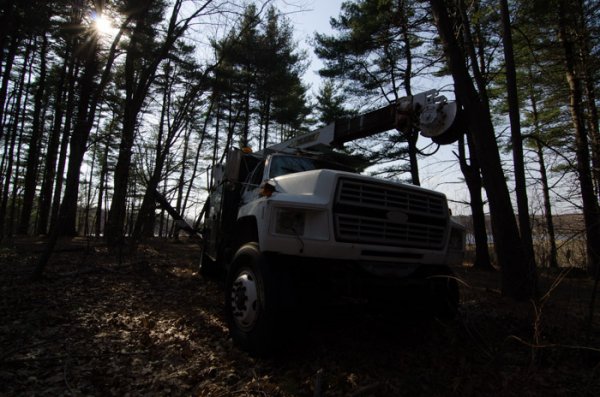
You still need an interesting subject for this to work, as directing your viewer’s eyes to a boring location within a frame is still going to result in a boring photograph. For the sake of this tutorial I’ll be using this photograph of an abandoned utility truck, but you could use anything from an interesting tree, to a model, to your pet, and achieve similar results.

First a few basic edits to bring the photo to life

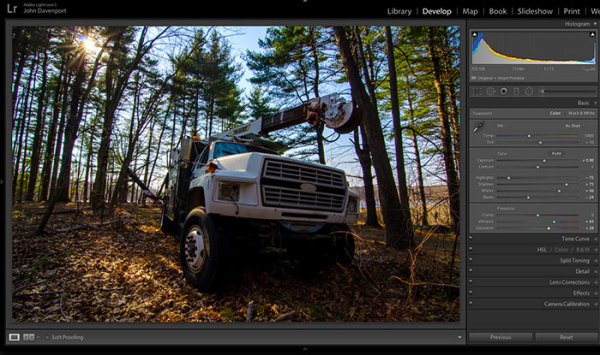
Before we can work on drawing the attention of the viewer this photograph needs a bit of life pumped back into it. Having shot this photograph into the sun, the foreground and front of the truck are going to require some basic recovery techniques. I’ll be using the Basic Tab in Lightroom 5 to recover the detail and add some interest to the shot.

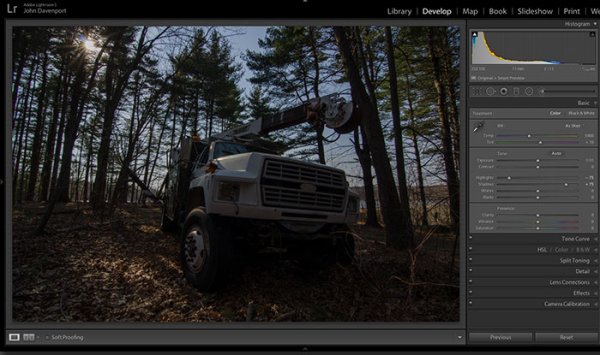
Step One: Highlights and Shadows

direct-viewers-attention-11

Shooting into the sun can be tricky as it often will cause your sky to turn white. Reducing the highlights slider will help to counteract this. It does so by targeting the brightest areas of your photograph without effecting the overall white point of the image. The shadows slider has a similar effect on the darker areas of the image, allowing detail to be brought out in the grill of the truck and along some of the trees.

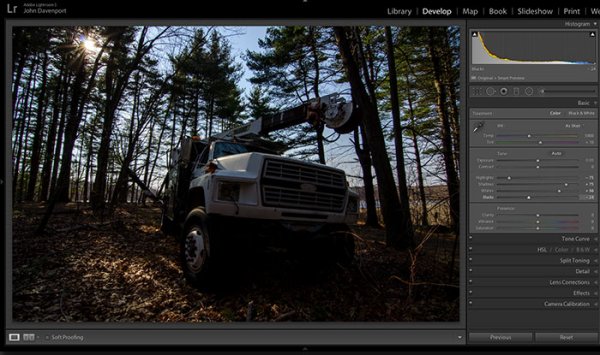
Step Two: Add contrast with the Blacks and Whites sliders

direct-viewers-attention-10

One of the problems with the highlights and shadow recovery technique above is that it often will reduce the contrast of the image and create a sort of muddled and dull look. To counteract this you can use the whites and blacks sliders to effectively set your white and black points, as well as bring a bit of contrast back into the image. This allows you to have a bit more control over the contrast of your image as opposed to the more global Contrast slider adjustment.

Do this by dragging your White slider to the right until your histogram touches the right edge of the graph. Make sure not to go too far and clip any highlights. Holding down the Alt (Option) key while you drag the slider will show any areas that are clipped – so drag to the right until you see some, then bring it back to the left just until they are no longer visible. Do the same with the Blacks slider by pulling it to the left. The Alt (Option) key works with this one too, but in the case of Blacks you actually do want a little clipping. Having a good black in your image will add that contrast you’re looking for.

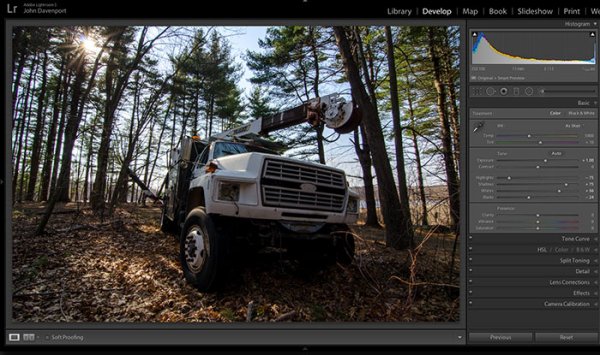
Step Three: Even out the exposure

direct-viewers-attention-9

Now that the highlights, shadows, whites and blacks are set –  a quick bump up on the exposure slider will even out the rest of the scene and get us close to something we’re ready to work on.

Step 4 (optional): Saturation and Vibrance

direct-viewers-attention-8

For this particular shot I wanted to add a bit more saturation to the trees and the floor of the forest. It’s going to depend on the shot that you’re working on, and the look that you are trying to achieve, as to whether this step is necessary. But it doesn’t hurt to play around with it before you move on to the next steps.

For more on Lightroom’s Basic Tab read: Master These Five Lightroom Sliders and Your Photos Will Pop

Now to draw the attention of the viewer

While the truck itself is a strong subject, and one that does capture the viewer’s attention on its own, there are a few tools that Lightroom has to offer which will allow for even more attention grabbing goodness.

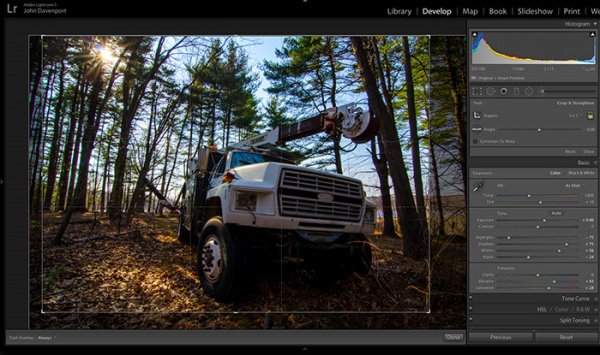
Cropping for better positioning

direct-viewers-attention-7

The crop tool allows you to have more control over the positioning of your subjects within the frame. In this shot the truck was a bit too centred and there was a little too much dead space in the forest so by cropping in a bit closer the shot becomes a bit more balanced, allowing the viewer’s eyes to stay focused on the truck.

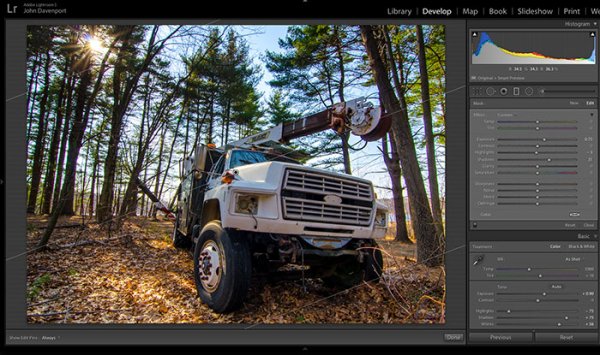
The Graduated Filter tool

direct-viewers-attention-6

By adding a graduated filter to the bottom right of the image more detail can be recovered from the front of the truck without effecting the rest of the exposure. This allows for a more compelling focal point for the viewer to rest their eyes on. When you go about placing graduated filters in your own images be sure to think about how it’s effecting the overall light of the scene and ask yourself if it looks natural.

Getting creative with graduated filters can allow you to have some really interesting results read 4 Fun Tricks to Enhance Your Photos With Lightroom’s Graduated Filter Tool for more creative uses of the graduated filter tool.

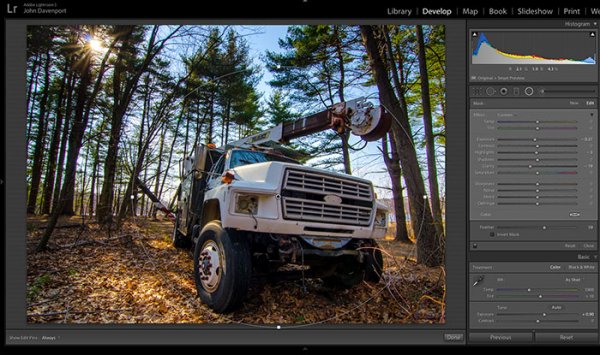
The Radial Filter tool

direct-viewers-attention-4

The radial filter allows for a subtle vignette to be added to the image which helps to keep the viewer’s eye within the frame. It also has the added benefit of darkening the sky, without darkening the truck, allowing for deeper blues to come through. After I was happy with this first radial filter I dropped in a second one to increase the brightness and detail of the grill of the truck. To do this the radial filter was inverted and the exposure and clarity sliders were increased.

direct-viewers-attention

Removing distractions

direct-viewers-attention-2

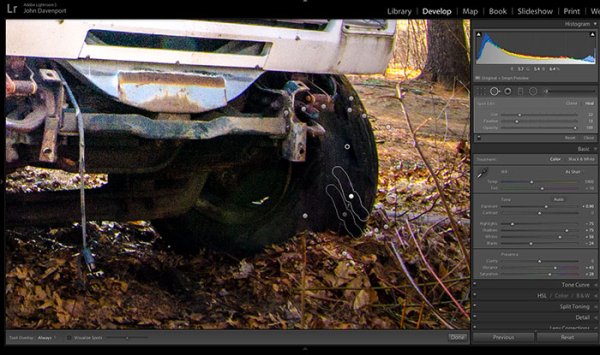
Once you’ve gone through all the work of drawing attention to a particular area of a photograph you’ll want to go through with Lightroom’s clone/healing tool and remove anything that competes for that attention. Adobe has greatly improved this tool in Lightroom 5 allowing you to drag paths, making it possible to remove distracting branches with ease.

The Final Edit

With a few quick adjustments in the basic tab, a simple crop, and a few of Lightroom’s filters –  this utility truck really grabs the attention and is a vast improvement over the original straight out of camera shot. Go try this workflow for yourself and share your own before and after in the comments below!

truck-edit2

Watch this Edit Click for Click

For those who prefer to sit back and watch – here’s  a quick video of the edit above.

The post Directing your Viewer’s Eyes with Lightroom to Make a More Powerful Image by John Davenport appeared first on Digital Photography School.


Digital Photography School

 
Comments Off on Directing your Viewer’s Eyes with Lightroom to Make a More Powerful Image

Posted in Photography


A Quick Video with 7 Tips to Create More Powerful Images

17 Aug

In this short tutorial photographer Josh Cripps shares with you 7 tips to help you create more powerful images right now. You don’t have to buy any more gear, or take any classes. Put these tips into practice and get out there shooting.

So are you getting close enough to your subjects? How about composition? Do you create depth in your images? Are you practiced in the art of using leading lines? All your shots from eye level – why not change up the perspective a bit? How about using the light to your advantage?

That’s a quick summary of the tips in this video. Watch the whole thing to see some great image examples for each one. If you need ideas of what to shoot you can always check out the weekly photography challenge, this week it’s Blue. To see the current challenge you can always fine it in the right hand sidebar next to this article.

The post A Quick Video with 7 Tips to Create More Powerful Images by Darlene Hildebrandt appeared first on Digital Photography School.


Digital Photography School

 
Comments Off on A Quick Video with 7 Tips to Create More Powerful Images

Posted in Photography


Using Composition to Create More Powerful Portraits

18 Jul

As part of my series on portrait photography, in this article, I will discuss composition, one of the most important aspects of creating a good portrait image.

F11A6332 1

  • Are there any laws regarding framing a portrait?
  • Can I leave hands, fingers, or part of the head out of the frame?
  • Does a portrait have to include a face?

I will answer these questions that my students often ask. It is important to keep in mind that as in all aspects of art, there are no “rules” or “must dos” here, because you can do anything as long as it works for you. So, I will describe techniques that work for me and I hope that they will work for you, resulting in much stronger portrait photography portfolio.

What is a good portrait?

A good portrait is an image of a person that manages to tell a story. A good portrait evokes emotion. A good portrait tells us something about the person in the image, and composition is a key element that helps us create a storytelling portrait.

How can I create a storytelling portrait with the help of composition?

I think good composition is a combination of the scene on the ground and the scene within your head. It combines the available with the desirable.

Here are a few examples of portraits I made recently (using natural light only) with explanations of the thinking process and goals in terms of composition. As Ansel Adams said, don’t forget that every image has two people behind it. the photographer and the viewer. So you might not feel the same emotions as I do with the images I created. But that’s okay, because photography is both an art and a science.

Choosing how much background to include

F11A3496 Exposure 1

Focal length 24mm

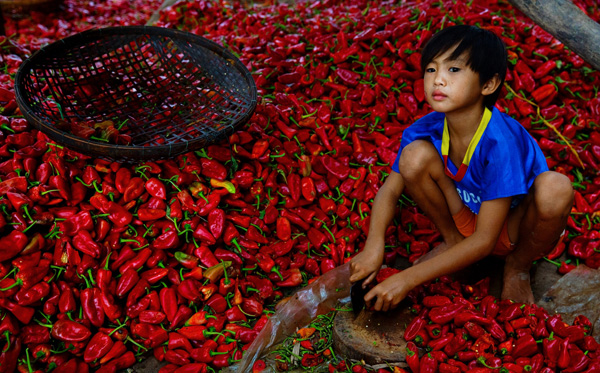
I met this boy cutting Paprika in rural Cambodia. It was summer vacation and he was there with his family and other villagers. What’s my visual narrative in one line? “Small boy, big work.”

I immediately knew two things: one, the background is a significant element and two; I wanted to capture the boy working alone. So, I started with the background and decided on a high angle in order to capture this “mountain” of Paprika. It was important for me to show the boy’s entire body with some space above his head so that the viewer could compare (remember my one line story?) the size of the boy to the size of the work.

I even included that basket in the composition to add balance to the entire frame. After I set up my composition, I waited about 20 minutes to capture the boy looking up. I knew that if he was working with his head and eyes down, the whole story would fall apart. I think the wait was worth it.

For me, this is one of the most complex decisions in photography: to identify visual storytelling potential and decide how much time you’re willing to wait until the story materializes.

Story 56 the kid 1

Focal length: 17mm

I used the same technique here in Kyrgyzstan, for this shot of six year old Aytinger, which I made for National Geographic Traveler magazine. Visual narrative in one line, “Small boy, big world”.

Here, I made the background much more dominant compared to the previous image. Here the boy is very small compared to the land. Imagine if I framed this image with only his face? I would lose the entire story, because his face alone doesn’t tell the story I want to portray. It was important for me to “include” the path and the big cloud in the horizon, to add sense of an “epic” feel to the image.

Web11 1

Focal length: 70mm

Here, you can see a different kind of portrait framing. Visual narrative in one line – “Quiet, peaceful, youth”.

I wanted to evoke peace and harmony. So I focused only on the face of this young monk, and included almost no background, in order to avoid interference from the environment. Also, note how the central composition (the subject is in the center of the frame) is balanced with the two orange frames on the sides.

I used soft natural light (coming from the right side of the frame) in order to create a sense of something religious and pure.

Cropping in tight

42 1

Focal length: 70mm

This is the type of framing that I’m asked many questions about by my students: whether it is allowed to cut off part of the head like this. Sure, as long as it helps the visual story you want to tell. Visual narrative in one line, “A sad reflection”.

Apollo’s wife died not long before I met him in the hills of northern Laos. In the image, Apollo’s face and the feeling of something tilting or shifting in his world is the only important thing. By framing his face on the right, while he was looking down and to the right, I wanted to create a feeling of an “unbalanced world”. Compare the very low key, dim lighting (with negative exposure compensation) in this image to the previous one of the monk. I was using the dark part of his house to evoke this story.

TheAccess 4photography people

Focal length: 85mm

This framing is even more radical than the previous one. Please note that this is the composition I did on the ground (no cropping) for a story I did for National Geographic Traveler magazine on Western China. Visual narrative in one line, “Strong and wise”.

Leaving space

When I saw the eyes of this man, the oldest man sitting in the back of a teahouse in remote western China, I knew I didn’t need anything else but his blue eyes. So I made it the dominant factor of my composition.

Story 35 alone 1

Focal length: 24mm

Now you might ask, is this a portrait too? Well, yes, for two reasons: one, do you see a person, and two, do you feel a sense of story?

What’s my visual narrative? It was a particularly hot afternoon. Dozens of worshipers left the mosque. I paused for a moment, trying to change lenses, as I noticed this guy. It seems that he was not affected by the hustle passing him by. He remained alone, continuing to read the prayer book. At first, my initial thought was “wow, what loneliness”. But then I thought, ”wow, what strength”.

I used the empty spaces of the place to enhance the sense of loneliness, but the balanced; “by the rules” composition (rule of thirds) should give the sense of power I was aiming for. The reason I chose to use negative exposure compensation and thus create a silhouette was to not compete with red color in the background and give it a sense of harmony.

Put it all together

You may be asking – “Okay, I understand the thought process. But honestly, do you really think about it before the creation of the frame or only afterwards?”.

Well, I do believe that good portrait photography is an outcome of a thinking process. Should I add the background or not? Should I crop the head or leave it full? Sometimes by over-thinking, the subject might lose patience. It has happened to me more than once. But for me, having the time to think, to plan, and to achieve the story I wanted is part of the fun.

Feel free to leave questions and comments below.

Note: the author would like to thank Nicholas Orloff for his help of writing this article.

The post Using Composition to Create More Powerful Portraits by Oded Wagenstein appeared first on Digital Photography School.


Digital Photography School

 
Comments Off on Using Composition to Create More Powerful Portraits

Posted in Photography


A Collection of Powerful Black and White Images

13 Jun

I have a background in black and white photography – using actual film and processing in a darkroom. The entire first year of my two year college photography program was spent doing black and white photography only, nothing else. I came to love working in the darkroom and seeing the image appear on the paper was magic.

Now in the digital age, making black and white is a choice you can make after you shoot the images – which gives you options we didn’t have in the film days. So I wanted to share some B&W images to get you thinking about the possibilities.

For some some tips on shooting and converting to B&W try these:

  • Tips for Shooting and Processing Better Black and White Photographs
  • Black and White Conversions: An Introduction to Luminosity
  • 3 Tips for Better Black and White Conversion using Lightroom
  • How to See in Black and White [and how HDR can be a Powerful Tool for the Monochrome Photographer]

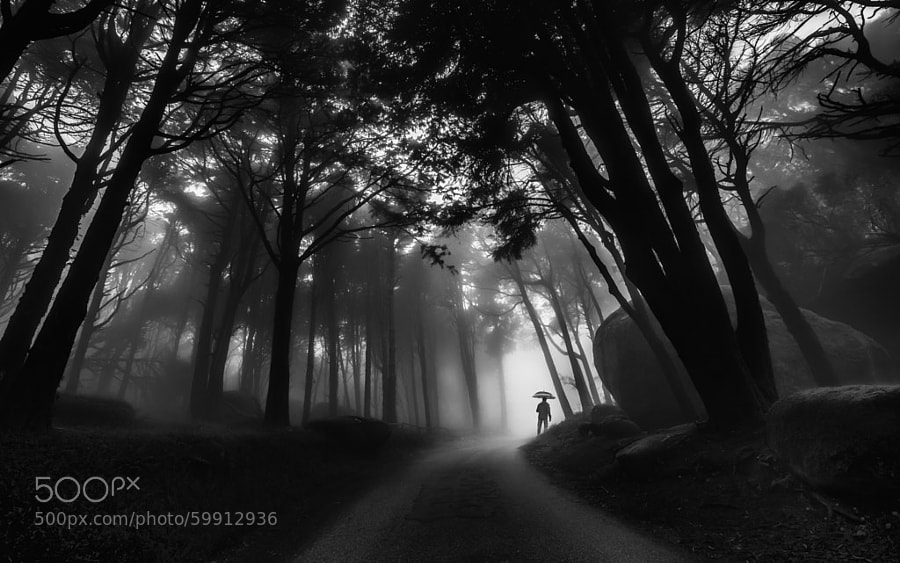
Photograph Through the mist by Paulo Mendonça on 500px

Through the mist by Paulo Mendonça on 500px

Photograph The Old Bridge by Mostafa Hamad on 500px

The Old Bridge by Mostafa Hamad on 500px

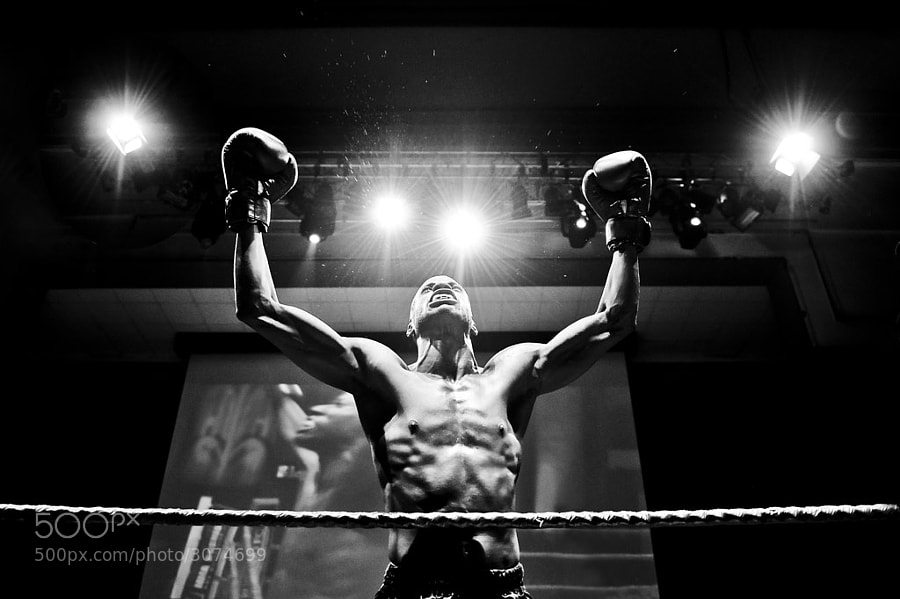
Photograph The Winner by Andrius Petrucenia on 500px

The Winner by Andrius Petrucenia on 500px

Photograph Untitled by enzo farina on 500px

Untitled by enzo farina on 500px

Photograph City of Fog by Johannes Burkhard on 500px

City of Fog by Johannes Burkhard on 500px

Photograph Winter in the Ore mountains II by Daniel ?e?icha on 500px

Winter in the Ore mountains II by Daniel ?e?icha on 500px

Photograph Milford Sound, Fiordland National Park, Southland, New Zealand by Russell Pike on 500px

Milford Sound, Fiordland National Park, Southland, New Zealand by Russell Pike on 500px

Photograph Darkness Peaks by Simon Pouyet on 500px

Darkness Peaks by Simon Pouyet on 500px

Photograph La Familia by Luis Beltrán on 500px

La Familia by Luis Beltrán on 500px

Photograph Fisherman Wanderer by Joel Santos on 500px

Fisherman Wanderer by Joel Santos on 500px

Photograph Corpus Christi at Night by Joe V on 500px

Corpus Christi at Night by Joe V on 500px

Photograph Ancient Light of Wisdom by Joel Santos on 500px

Ancient Light of Wisdom by Joel Santos on 500px

Photograph *** by Ann Nevreva on 500px

*** by Ann Nevreva on 500px

Photograph Black is my colour.. by Marianna Roussou on 500px

Black is my colour.. by Marianna Roussou on 500px

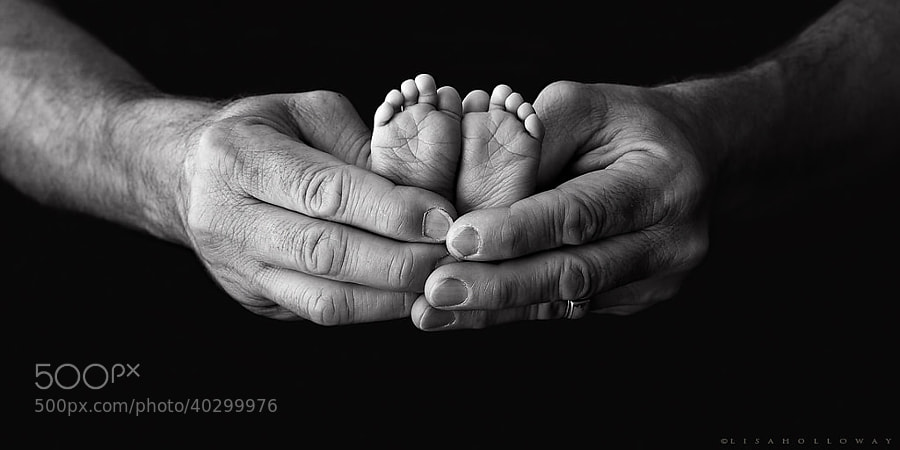
Photograph Tiny Feet by Lisa Holloway on 500px

Tiny Feet by Lisa Holloway on 500px

Photograph A Sea of Stars by Lisa Holloway on 500px

A Sea of Stars by Lisa Holloway on 500px

Photograph Daisy codera by Rainer Ressmann on 500px

Daisy codera by Rainer Ressmann on 500px

Photograph Almost closed by Kimhwan SEOULIST on 500px

Almost closed by Kimhwan SEOULIST on 500px

Photograph Paint Noir by András Sümegi on 500px

Paint Noir by András Sümegi on 500px

Photograph shielded from the danger of the outside world by David Mar Quinto on 500px

shielded from the danger of the outside world by David Mar Quinto on 500px

Photograph Alone by Ana Grama on 500px

Alone by Ana Grama on 500px

Photograph Go, go by Edwin Leung on 500px

Go, go by Edwin Leung on 500px

Photograph Breakfast by La Mo on 500px

Breakfast by La Mo on 500px

Photograph 77.2013 - Canary Wharf ... by Pawel Tomaszewicz on 500px

77.2013 – Canary Wharf … by Pawel Tomaszewicz on 500px

Photograph Building in the Building by Roman K on 500px

Building in the Building by Roman K on 500px

Photograph Mantis by Arnaud Bratkovic on 500px

Mantis by Arnaud Bratkovic on 500px

Photograph Hammer by Enrico Panina on 500px

Hammer by Enrico Panina on 500px

Photograph BB King by Ken Stewart on 500px

BB King by Ken Stewart on 500px

Photograph Rocks JK by Daniel Czerwinski on 500px

Rocks JK by Daniel Czerwinski on 500px

Photograph Recursion by Frank Wijn on 500px

Recursion by Frank Wijn on 500px

Photograph A monochrome end of fall by Felicia Simion on 500px

A monochrome end of fall by Felicia Simion on 500px

Photograph Behind the old Window by Adrian Limani on 500px

Behind the old Window by Adrian Limani on 500px

Photograph Havana Life by Liban Yusuf B&W on 500px

Havana Life by Liban Yusuf B&W on 500px

Photograph Broken B&W by Liban Yusuf B&W on 500px

Broken B&W by Liban Yusuf B&W on 500px

Photograph M o t i o n   BW by Liban Yusuf B&W on 500px

M o t i o n BW by Liban Yusuf B&W on 500px

**I just love this guy’s images of Cuba, inspires me to do more night shooting when I go back in January. So I had to share a few of his shots.

Photograph Kissed by light by Bipphy Kath on 500px

Kissed by light by Bipphy Kath on 500px

Photograph Angel....please give me your light... by Ines van Megen-Thijssen on 500px

Angel….please give me your light… by Ines van Megen-Thijssen on 500px

Photograph No sigh, immured tears by regis boileau on 500px

No sigh, immured tears by regis boileau on 500px

Photograph Ballerina III by Vanessa Paxton on 500px

Ballerina III by Vanessa Paxton on 500px

Photograph Ex ospedale psichiatrico di Mombello by PierSparrow  on 500px

Ex ospedale psichiatrico di Mombello by PierSparrow on 500px

The post A Collection of Powerful Black and White Images by Darlene Hildebrandt appeared first on Digital Photography School.


Digital Photography School

 
Comments Off on A Collection of Powerful Black and White Images

Posted in Photography


Single Image Star Trails – a Powerful Technique to Create Star Trails in Minutes Using Phototoshop

11 Jun

10258929_1466264890276738_7906982947618430010_o

If you are reading this, you must be among those who have a special place in their hearts for stars, galaxies and the wonders of the universe. With recent advancements in camera technology, many photographers have captured the beauty of the night sky in spectacular ways. The truth is that every photographer is fascinated by the glittering stars, and captivating night skies, that have the power to instantly teleport us to a world beyond our wildest imaginations. From a photographic perspective, star trails can add another dimension to an otherwise average shot and that is likely the primary reason for many photographers desire to learn how to capture star trails. If you are struggling to find out and learn about this rewarding effect, get your camera and computer ready. But before that, let me introduce you to star trails.

10373061_1472036406366253_4127720884282225109_oWhat are Star Trails?

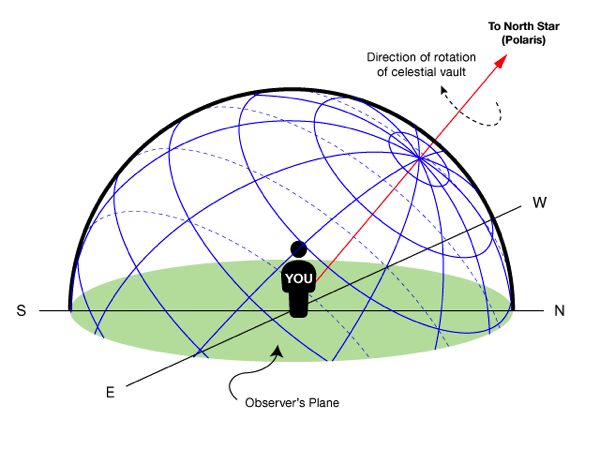
Star trails is a photographic effect that gives an illusion of motion to the stars along a circular or an elliptical path. Technically, stars do not move when we observe them. They are quite stationary very much like our Sun. In reality, the circular motion of the stars we see in star trail images is a result of rotation of the Earth along its axis. For better understanding, please refer to the ‘equatorial grid’ figure under “Understanding Star Trails” section below.

How are Star Trails captured?

Traditionally, star trails are captured by taking multiple shots of the sky in succession over a period of many hours. Modern DSLR cameras also allow you to take a single exposure of an extended length of 30 minutes or more but many photographers prefer to take multiple shots at 30 seconds each and stack them together. Doing it this way eliminates any chances of shaky exposures that can occur due to wind or bumping into the setup while the shutter is open. If you are attempting to make almost a full circle star trails, then the number of shots required to create it can go in hundreds. Later, all those shots are stacked together in Photoshop or a free software such as StarStax to create a single image that shows the circular paths of the stars.

Photographers have been using this method for years with great results. But if you do not have the option to return to the same location again, then the conventional method would feel limited, as it requires you to stay in one spot for hours, thereby limiting your options to take multiple shots and capture a variety of angles on location in one night.

Understanding Star Trails

Equatorial grid

Equatorial grid from observer’s point of view

Imagine that ‘YOU’ are inside a giant sphere (see above diagram). Now, depending on the direction you look at, the effect of the star trails will be as follows:

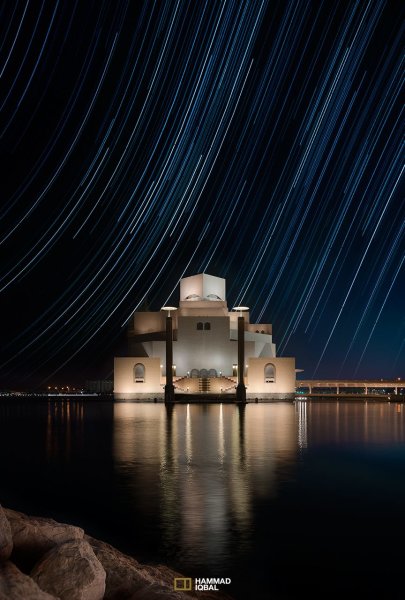
Facing North: Star trails effect will appear to be circular with some stretching of the circular lines at the far edges of the frame.

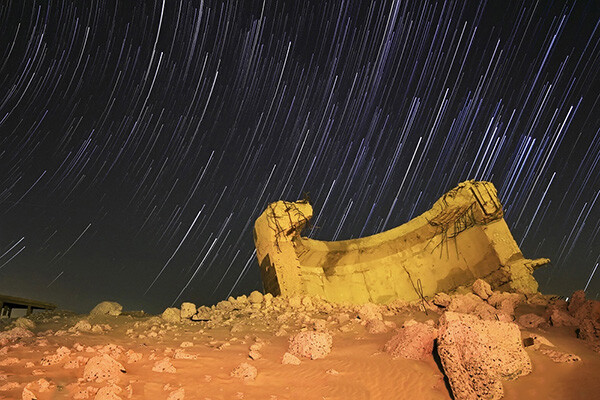
Facing East: The trails will appear to be straight in the middle moving diagonally in an upward direction from bottom center to top center. They will also appear to be converging at both top left and bottom right at the far sides of your frame. See image below:

East West Trails Umm ul Aish Kuwait

Umm-ul-Aish, Kuwait – image shows the upward motion of East star trails

Facing West: In this direction, the trails will appear to be the exact opposite of what you see when looking towards the South. Moving downwards and to the right from top to bottom in a diagonal line, they will also appear to be converging at both bottom left and top right at the far edges of your frame.

Facing South: If you are facing South head-on, the star trails will appear to be moving from left to right in an upward curve.

One-shot Star Trails – the Technique

I have been developing a new method to create star trails in Photoshop. Unlike the ‘Star Trails’ Photoshop action that you might already be familiar with, this technique is much more than that. It eliminates all limitations associated with the traditional method of capturing star trails. Unlike the conventional method, this technique only requires a single shot, that’s right, only ONE shot of the night sky to create realistic star trails. Since this technique is a result of a joint effort between me and my friend Mobeen Mazhar, who is a great landscape photographer from Pakistan, we have named it the “HM technique” or “HM star trails”.

When implemented correctly, this technique will open endless possibilities for you in your star trail adventures and is sure to spark new hope among photographers for all levels of expertise. Now, let’s take a look at different types of star trails and how you can use this new technique to create them in Photoshop with just one shot.

Creating North Star Trails

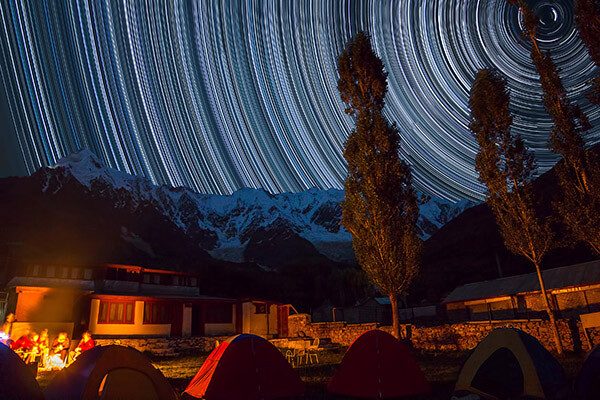
North Star Trails Nanga Parbat

Nanga Parbat-Trashing, Pakistan – North Star trails created with HM technique

This is the most common and simplest type of star trails. Traditionally, it can be achieved by pointing your camera towards North with the focus set to infinity and then taking consecutive long exposure shots (30 seconds) at high ISO settings. Since the North Star remains almost stationary, the final effect is circular with the stars seeming to revolve around a pivot point, which is the North Star. Then at the time of post-processing, all shots are stacked using Photoshop or StarStaX.

The downside to this approach is that it can take as many as 700 shots over a period of five to eight hours to get a full circle trail. Now watch the video below to learn to create North Star trails within minutes using just a single shot of the night sky.

Creating Meteor Shower Trails

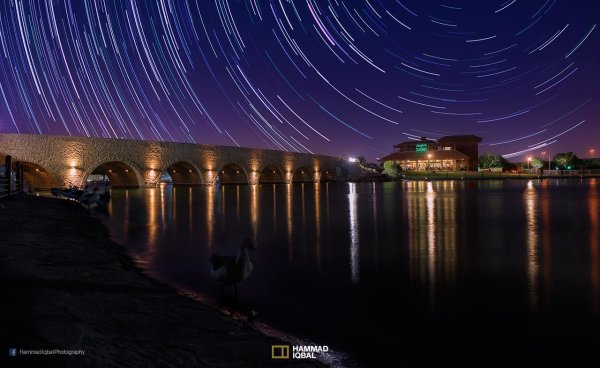
Meteor shower AspirePark

Aspire Park, Doha – meteor shower trails created with HM technique

Meteor shower trails is by no means an official name. This is fundamentally a beautiful variation of the North Star trails. Instead of a long continuous streak of light, the trails seem to disappear at the origin which gives it depth and dimension. There is also another variation of the meteor shower trails in which the tip of the trail is thicker, brighter and looks like a blob or droplet.

The underlying technique of the meteor shower trails is the same as shooting the North Star trails. The only difference is in post-processing. The meteor or comet effect is achieved by using the ‘Comet mode’ in StarStaX as shown below.

‘Comet Mode’ feature in StarStax

But regardless, the traditional method still requires that you spend hours on a single spot to take hundreds of consecutive shots. Now watch the video below to see how you can create amazing meteor shower trails in minutes, and once again, all you need is a single shot of the night sky.

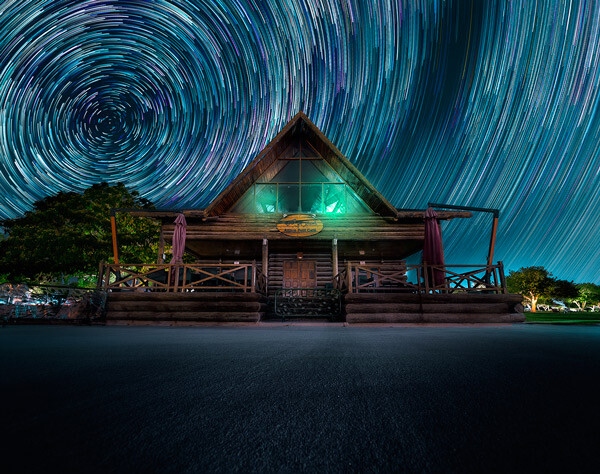
Creating Vortex Star Trails

Vortex Aspire Park Doha

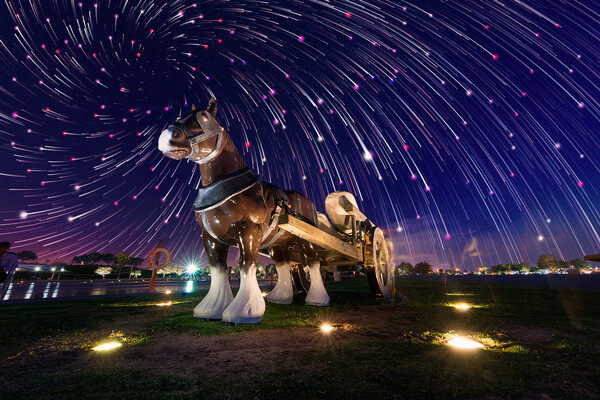
Aspire park, Doha – Vortex star trails created with HM technique

This is by far my favorite kind of star trails and is quite complex to achieve. Unlike the previous two types of trails, vortex star trails require special equipment which can be costly and may prevent most photographers from trying it. The vortex effect is achieved by zooming in or out on the lens during the long exposure. It may sound simple at first but the trick is to avoid vibrations as you zoom during the 30-second long exposure. Hence it makes it extremely difficult, if not impossible, to do it with bare hands without shaking the whole setup.

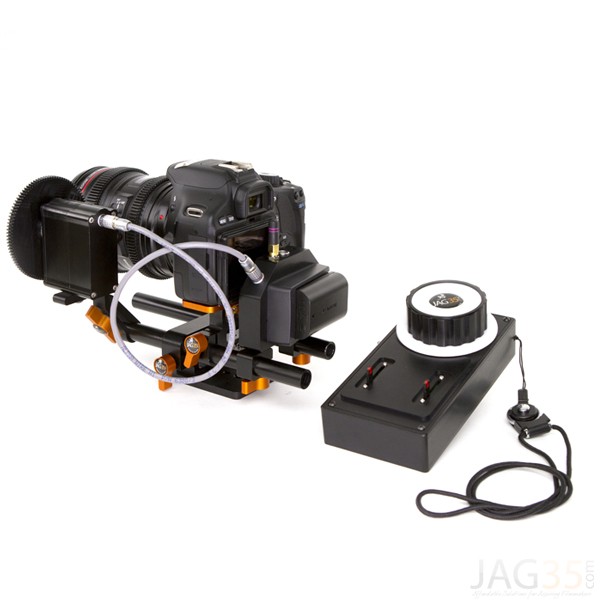
But if you have plenty of free cash to burn, you can get the tools which would include a geared ring that goes on the zoom ring of your lens, a motor and a wireless remote for controlling the motor. The setup is basically what DSLR filmmakers use for focus racking, that is a motorized follow focus system as shown below. The system is very useful if you shoot professional video with your DSLR but for photographers, the cost might not be justifiable.

Electronic follow focus

Wireless electronic follow focus kit v2 by Jag35

Do not worry because the following video will show you how to create vortex star trails in Photoshop. No cash required.

Conclusion

With the help of this powerful new technique, you will be able to maneuver on location, shift your focus towards making a variety of compositions, save countless hours, battery power and thousands of shutter actuations on your DSLR. Would you have thought that a single shot could give you such incredible flexibility in your star trail photography?

Tip: Just make a note of the direction your camera is facing to help you create star trails in relation to the reference direction.

I am sure that this tutorial will add a new skill to your photography arsenal. If you have any questions, post them in the comments below. Thank you.

Technique developed by Hammad Iqbal and Mobeen Mazhar

Mobeen Mazhar is a passionate traveler and has spent more than a decade exploring Pakistan and its natural beauty. Photography gives him a mode to express his love for nature and a medium to document his travel experiences. He is a landscape specialist, regular travelogue writer and travel expert for Pakistan. You can find his photographic work at Facebook, 500px and Flickr.

The post Single Image Star Trails – a Powerful Technique to Create Star Trails in Minutes Using Phototoshop by Hammad Iqbal appeared first on Digital Photography School.


Digital Photography School

 
Comments Off on Single Image Star Trails – a Powerful Technique to Create Star Trails in Minutes Using Phototoshop

Posted in Photography


5 Tips for a Powerful Picture Every Time

02 May

Play-At-First.jpgYou see plenty of landscape, portrait and commercial photographs every day on the web and in magazines. You can tell by the lighting, staging and seemingly overall perfection of everything in those pictures that days, maybe even weeks of planning were needed to pull of such amazing photographs.

With that much planning, all that is left to do when it is time to take the picture is press the shutter. The photographer behind the lens probably even knew exactly what time she was going to press the shutter. In short, the photographer did everything necessary to prepare for the picture.

But what about the other side of photography?

You have also seen equally powerful pictures that captured something spectacular in the spur of the moment. These are the kind of photographs that you may think you could never plan for because they present themselves with no prior notice or warning.

Van Wreck

Have you ever heard the saying that “luck favors the prepared”? No truer statement could ever be said about photographers and photography.

It’s true that luck can find anyone at any given time, but if you want to be able to pull off amazing photos with just a moment’s notice you need to be as prepared as a studio or commercial. But this approach to photography takes a completely different type of preparation.

Here are five photography tips for a powerful picture every time. These tips will help prepare you to perfectly capture once in a lifetime pictures time and time again.

1. Always have a camera

A prepared photographer needs to have a camera close by at all times. It sounds elementary, but any good top five list is going to start off with the basics first. If you don’t have a camera with you, you will not be able to capture that picture of a bald eagle in your backyard. Without your camera, you are left only with your story of a bald eagle. Odds are you have already have a camera on you or near you right now. Your phone! The first tip in photography preparation; always have your camera (any camera) close by.

Eagle

2. Study light

Photography is all about light (and having a camera). Without light there is no photography. But there is so much more to light than just having it. As a photographer you must become a student of light. What color is the light? How strong is the light? Where is the light coming from? How long until the light changes? Where can you find more light right now?

Cowboy Lights Up

As you move through your day (camera at your side), take the time to notice the light sources around you. If you are in a meeting, look around the conference room. Is there light coming through the window? What kind of lights are in the ceiling? Are there desk lamps? What about the light coming from everyone’s computer screens? Could you open the curtains to let in more light?

By reminding yourself throughout the day to recognize and understand your lighting situation you are learning how to master light rather than have it master you. Then you are on your way to taking better pictures at a moment’s notice.

3. Visualize

While you are studying the light around you take a moment and pretend that you are taking a picture. While in that same theoretical meeting, look across the table at your colleagues. Imagine taking a picture of them. Which side of their face has more lighting? Are they backlit? How would you overcome that? Would your picture be better if you moved across the room? Is there a ray of sunlight that, if you could, you would ask your boss to step into because it would highlight her hair color so well?

By taking the time to play pictures out in your mind you are actually training your mind to think like a photographer. You are preparing your mind to be ready. It’s called visualization and athletes do it all the time. Ever wonder why a golfer takes so long to hit the ball? It’s because he is envisioning his swing, and the ball going where he wants it to go before he hits it.

Photographers and photography are no different. Train your mind by constantly imagining that you are taking a picture.

4. Think ahead

This tip goes hand in glove with tip number 3. You should always be thinking ahead, be it five seconds, five minutes or five hours. To be ready to take a photo at the drop of a hat you have to put yourself in a situation that has yet to happen.

Fire Chief On Truck

It’s like the pre-flight safety instructions you hear before a plane takes off. It does no one any good to get that information when the plane is in distress. Knowing where the exit doors are ahead of time saves lives. Knowing what ISO setting you will need if your kids break out in a song and dance routine for the grandparents can save Christmas.

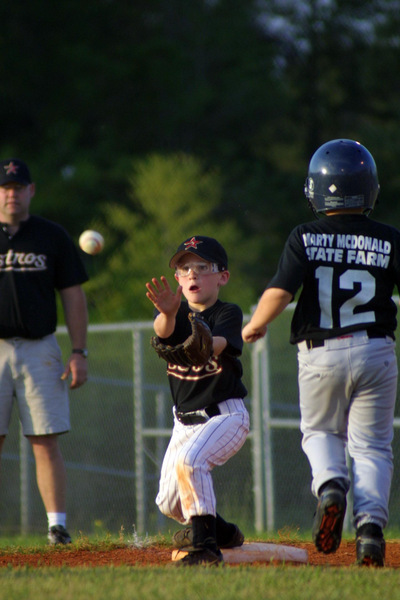
Always be thinking ahead and absorbing your surroundings to better anticipate action that hasn’t yet taken place. Sports photographers may do this better than anyone. The better they understand how the sport is played the more likely they will be to capture the key moments in a game. A photographer covering a baseball game recognizes that there will be a play at first base and he will instinctively put his focus on the first base bag and wait for the play to get to him.

Play At First

To always be ready to capture a picture at the drop of a hat you have to be a student of life, and a student of movement and moments. Learn to anticipate and not just react.

5. Practice

The final tip is one that combines the other four and that is to practice being ready at all times. It may sound silly, but why do you think golfers, baseball players and airplane pilots practice? So that when it comes time to hit the ball, catch the ball or avoid a crash they have already placed themselves in that situation and performed the needed mind and body movements over and over again. Come game time (or in an emergency) instincts take over.

Luck favors the prepared and trust me, if my plane loses an engine I want a pilot who has already thought through what needs to be done to prevent the plane from crashing. I don’t want him fumbling over buttons and dials trying to figure out how to keep the plane in the air. I want him to instinctively know what must be done to save the plane.

As a practical matter, have a friend change your camera settings so that you have no idea how your aperture, ISO and shutter speed are set. Have your friend point at something (it doesn’t matter what because this is practice).Then quickly grab your camera and adjust your settings to best capture that object. Then, do it again with another object or person or passing car. Take your camera on walks with you and have your friends constantly test your skills. Make a game out of it until you instinctively know what to do.

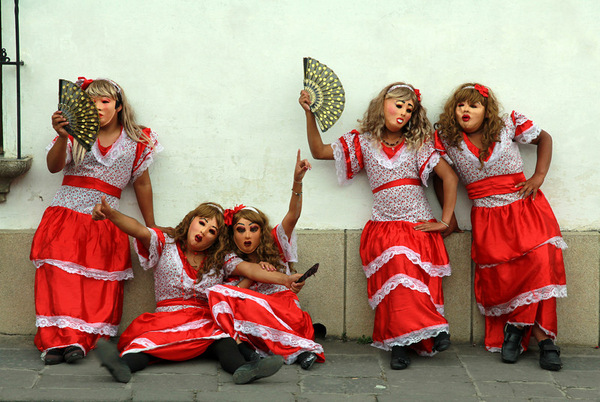
Men In Dresses

To be ready to take a powerful picture at any moment you literally have to be ready to take a picture at any moment. Keep a camera near you at all times. Be aware of your light because it is always changing. Constantly visualize taking pictures. Always be aware of your surroundings to better anticipate action, and to perfect all of this, practice.

Remember, luck favors the prepared. Luck is not a strategy. Do you have any other tips you’d like to share? Please do so on the comments below.

The post 5 Tips for a Powerful Picture Every Time by Scott Umstattd appeared first on Digital Photography School.


Digital Photography School

 
Comments Off on 5 Tips for a Powerful Picture Every Time

Posted in Photography


Create Powerful Silhouettes by Telling a Story

06 Feb

Create Powerful Silhouettes by Telling a Story

Telling the Story

Silhouettes remove all the distractions and clutter in the scene and distill the image down to its most basic, this is why the story is so important. Just using shapes you must make a photo that is recognizable, and that the viewer can relate to. While this sounds easy in practice, it can be difficult to achieve. You must have the right elements. The light needs to be in the right location, the subject needs to be facing the right way, and they need to be in a pose that makes their action recognizable.

Silhouette 1

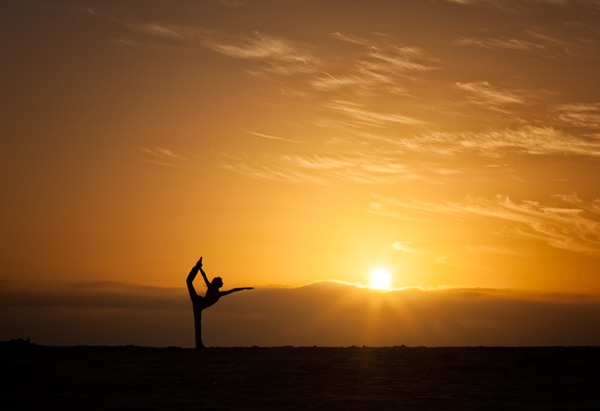
Movement by the subject helps tell a strong story in your silhouettes

Tips for creating good silhouettes that tell a story

Clean outlines

If you have multiple objects that are back-lit you want to make sure there is separation between the objects so that each one is distinct and recognizable.

Profiles or straight on shots work well

For people, profiles or straight on shots work best. For profiles you should be able to clearly make out the shape of the nose and chin on their face. For straight on shots the subject’s arms should be away from their body, and their legs parted so you can see both legs and not just a single blob. Recognizable shapes – this is important for every silhouette.

Capturing action

Movement in your subject can create strong lines and positions that are instantly recognized by the viewer and help convey the story of what the subject is doing.

Props

Silhouette 2

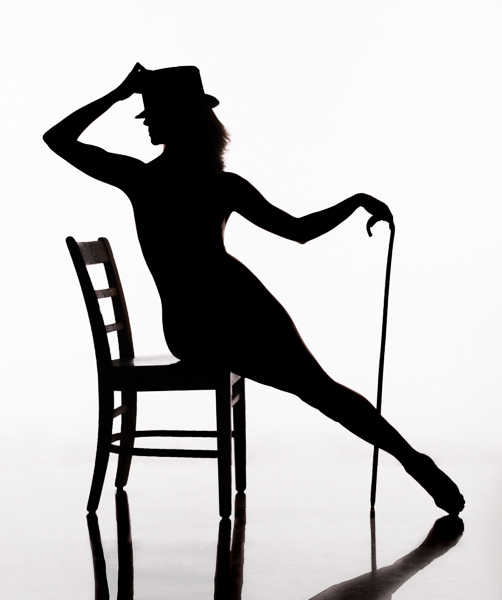
The added hat and cane help enhance the story in this image

Props can help tell the story, an outline of a flower, a tip of a hat can add meaning to the image.

Interaction between subjects

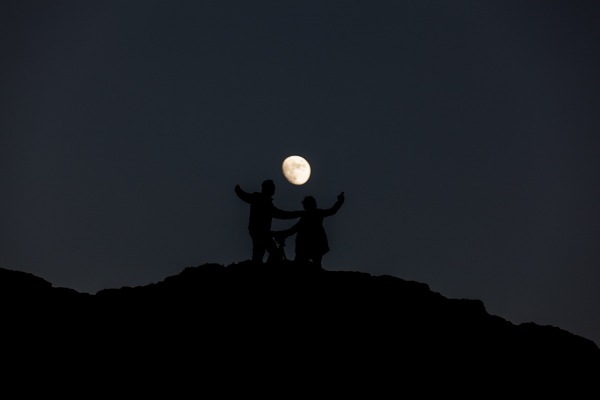
Having multiple subjects can be challenging because you want to minimize overlap of their shapes so they each maintain their own identity. There is a balance between telling the story and having the subjects interact in a minimal way. For example holding hands or kissing often work well, but a hug results in silhouette that is just a big black blob.

Silhouette 3

Separation between subjects is important. This image would be stronger if the man’s leg did not merge with the camera and tripod

Lighting for Silhouettes

To light a silhouette you need to light the subject from behind. The type of light is not important; it can be natural or artificial and can be direct or indirect. The important thing is that the lighting is behind the subject, and the subject is not lit. Technically silhouetting occurs when you have a lighting ratio of 16:1 or greater (4 stops), however I will describe how you can create a silhouette in post-production using lower lighting ratios.

Natural Silhouette Lighting

One of the most common types of silhouettes using natural lighting is to place the subject between the camera and the setting sun or moon. Your camera exposure should be set for the background lighting, either the sunset or moon, and this will cause the subject to appear black against the light background. Another common technique is to use the light reflected off of a wall or the side of a building.

Silhouette 4

This lighted wall in Las Vegas provides great back-lighting for silhouettes

Studio Silhouette Lighting

There are two common techniques for creating silhouettes using studio strobes. The first is to use a white background and bounce the strobes off the background. The second is to point the strobes towards the camera and place the subject between the strobes and the camera. This second technique can also produce a light flare in the image which can give an interesting effect.

Post-processing techniques

Silhouette 5

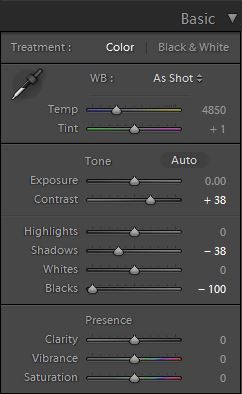
If you have a backlit subject, but can still see some detail in the subject you can often make it a pure silhouette in Lightroom, or Camera RAW. Use the develop module in Lightroom and adjust the Contrast, Highlights, Shadows, and Blacks sliders. Use different combinations to darken the subject. Typically you will need to increase Contrast and decrease one, or all of the other three sliders. Either the Shadow or Blacks slider should be set to -100, try both to see which produces the desired effect. Decreasing Highlights is typically only necessary if the edges of the subject are lit and you wish to make them darker.

Conclusion

Silhouettes are a fun and easy to do and by concentrating on the story being told you can create an image that has impact.

Want more silhouettes?

  • 5 tips for photography silhouettes (non-human subjects)
  • How to photograph silhouettes in 8 easy steps
  • 12 stunning silhouettes
  • Great B/W silhouette images

The post Create Powerful Silhouettes by Telling a Story by Craig Colvin appeared first on Digital Photography School.


Digital Photography School

 
Comments Off on Create Powerful Silhouettes by Telling a Story

Posted in Photography


15 Tips for More Powerful Portraits

04 Feb

15 tips every portrait photographer must know for making more powerful portraits!

Powerful portrait tips 01

Here are 15 tips on getting powerful portraits

1. Have respect

This is my number one rule. It doesn’t matter if I am photographing a poor boy in Laos or the CEO of a large company in New York-I always respect the people I photograph. I live by the motto: “you should never get close to people in order to take their photo; you should take their photo in order to get closer to them”. Act as if your camera is a bridge and not a weapon. I have friends who are amazing street photographers, who manage to work with such discretion that they can get the portrait without the person realizing he was photographed. Certainly, there are some exceptions, but I believe that people are not zebras and we are not hunters. To summarize the point, I photograph old people in same manner I would like someone to take pictures of my grandmother.

Powerful portrait tips 04

2. Ask yourself – Do I understand what a portrait is?

“A Portrait is painting, photograph, sculpture, or other artistic representation of a person […] the intent is to display the likeness, personality, and even the mood of the person” (from Wikipedia)

While this is a very basic definition of the concept, it can help us to understand the true nature of good portrait photography. A portrait must tell a story. What kind of story? A story about the person in the image. How can you tell a story of a person in one image? You can’t! You can never capture the whole story, because human beings are too complex. You can either choose to focus on a specific emotion expressed by the subject or by yourself. I call the first method “highlighting”, in which you zero in on a specific story, at a specific time.

Powerful portrait tips 02

For example: when I took the photo of the Japanese girl (above) I was trying to highlight this specific moment, when she held her mother’s hand, when she has not yet decided – whether to leave or hold on tight. Sometimes the best stories don’t reveal the whole story at once. Like in this image from China (below). Do you think this girl is waiting for someone who should be coming soon, or is she watching someone leave?

Powerful portrait tips 03

The second method, in which you imprint your on feeling onto the story, can start with answering the following question: How did you feel when you met this person? Because a good image is told by two people – the one in the image, and the one behind the camera.

3. Look for emotion

Someone’s exotic face from some remote tribe is nice to look at, but for it to be a true visual storytelling portrait, this face must evoke emotion. Steve McCurry called this the “unguarded moment”, the essential soul peeking out. It can be happiness, fear or excitement. Emotion is the best way to create a bond between the image and your viewers.

The best way to “catch” emotion on your camera’s sensor is by choosing the right moment to click the shutter. Be on the lookout for a specific powerful moment that can evoke the story on the person’s face.

Powerful portrait tips 05b

4. Start with your comport zone

Going out to the streets to shoot portraits of strangers is not an easy task to start with. The best way to hone your craft is by starting with a person you already know. By skipping the need to “break the ice”, it will be easier for you to think about other important elements in your portrait, such as: the light, composition, posing and color. You don’t have to travel far for an interesting face; you can start with friends and family.

Powerful portrait tips 11b

5. Get out from your comfort zone

A day without learning something new is a wasted one. One of the most important things to note when dealing with portrait photography is that usually, the problem is with ourselves. “I do not want to hurt or offend”, and “I do not want to invade someone’s privacy” are all excuses which we tell ourselves on why we photograph people with a telephoto lens from a distance. So, if you truly want to take your portrait photography to the next level and be able to evoke emotion in your work, you must, as my mother says: “fake it till you makes it”. It is not as complicated as it seems in your head. Get out to the streets, find an interesting person and just go for it by saying: “Hello, I am a photography enthusiastic and I would like to take your photo…I would love to send you a copy as well”. You might be surprised with the results. By using this technique, the worst thing that can happen is that you will get a refusal and then just move on to the next person.

Powerful portrait tips 08

6. Choice the right focal length

“What is the best lens for portraits?” is a very common question among my students, and the answer is simple – there is no one best lens for portrait photography. You should adjust the focal length to your working style. When considering your next lens, you should take into account the following elements:

  • The distance from which you usually like to photograph people
  • The weight you are willing to carry around
  • What is the maximum aperture for low light photography and for shallow depth of field?
  • And of course, price

For me, most of my portraits are done with an 85mm or 24-70mm lens.

7. Choice the wrong focal length

Try this creative exercise. Go outside and take a portrait with a lens you are not used to working with. If you always work with a telephoto lens, try using a wide angle one. If you prefer to get close to your subject, take a step back and wait for the decisive moment. A good photographer is a flexible one.

Powerful portrait tips 10b

8. Study the great masters of portrait photography

Whenever I need inspiration, I turn to the portfolios of this great photography masters:

  • Dorothea Lange – one of the first photographers of Social realism
  • Steve McCurry – probably the best color portrait maker in history
  • Richard Avedon – unique fashion and portrait photography
  • Sebastião Salgado- outstanding B&W documentary portraits
  • Annie Leibovitz- Editorial portraits

(Please add your own in the comments section)

Powerful portrait tips 19c

9. Experience variable depth of field

We all love portraits with that sweet low depth of field, which makes everything blurry in the background. In portraits, shallow depth of field is usually good because it leads the viewer’s eyes directly to the subject by making it sharper than the rest of the image. YET, please note that there is such a thing as a too shallow depth of field. In this case, the sharpness by the AutoFocus may be on the eyebrows or eyelashes instead of the eyes. Practice in order to understand the elements that affect the depth of field: the distance to the subject, focal length and aperture.

Powerful portrait tips 13

10. Leave the flash behind

The more gear you have with you, the less available you are to give attention to the person you are photographing. If we are dealing with studio photography, then the person knows what to expect. There is no need take your flash to India or China when there is so much beautiful available light. Craft your skill while working with natural light only BEFORE jumping to the next step of using reflectors, flashes or any other extra gear.

Powerful portrait tips 14

11. Don’t follow the crowd

Try this little exercise: type “woman with cigar in Cuba” into Google and see what happens. The same woman appears in almost all the images right? Those are images of many different photographers. I do not mean to hurt anyone, but how come with 3 million people visiting the country each year and with a population of 5,612,165 women, the same woman comes up in almost every image? Here’s a tip for you, before heading somewhere, anywhere, near or far, you should understand the place, culture and the “story” of the person in front of you. By doing your homework you will not fall into the trap of the “fake authenticity”

Powerful portrait tips 15

12. Think about the background

Many elements are required to create an interesting portrait: light, composition, angle, etc.., but one element is so important that I sometimes give it my pure attention: the background. You can think of the background in two levels. First, as an aesthetic element. Make sure there are no distracting elements, such as bright colors or moving objects in the background. Secondly, another level of using the background, is as an element to bring your story to life.
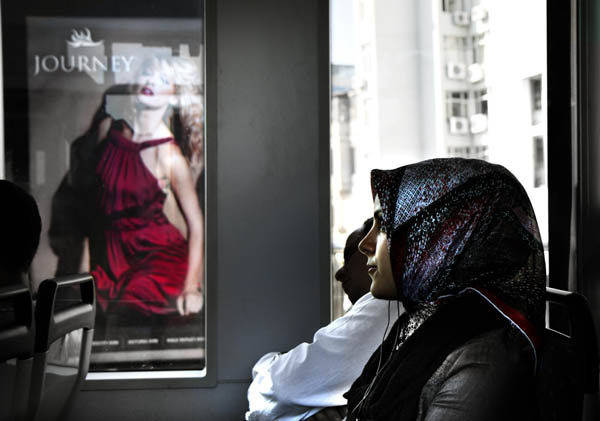
Powerful portrait tips 16

13. Keep it fun

If you are dealing with subjects who are not paid models, you should give something back as well as taking the photo. I do not want to discuss paying the person (maybe in another post) but you should make it easy and fun for your subject: telling a joke, showing the image on the back of the camera and making sure they are not in the sun are good points to start with.

Powerful portrait tips 17

14. Always ask for the person’s name

It doesn’t matter if you do travel portraits of strangers or work as a wedding photographer; always ask for the person’s name and if promised, send the photo. Don’t make excuses about the language barrier. If I don’t work with a fixer (a local man or woman, who can help with the translation) I will always have a phrasebook or try to use drawings and images that can help me to communicate.

15. Add depth to your images by the a 45 degrees light

Think carefully about the direction of light. By placing the subject at an angle of 45 degrees from the light source, you can create a wonderful effect of volume. As I made this picture (below), which was taken at a grocery store Georgia, using only natural light by a window on the right.

Powerful portrait tips 18

And one more…

ENJOY

It does not matter if you’re photographing people as a hobby or to pay your rent. Teach yourself to enjoy to process and not just the outcome (the finale image). Enjoy getting closer, getting to know each other and overcoming cultural barriers. If you do what you do with passion, your viewers will see it right away.

I would like to thank Linda Burnette for her help in writing this article.

The post 15 Tips for More Powerful Portraits by Oded Wagenstein appeared first on Digital Photography School.


Digital Photography School
 
Comments Off on 15 Tips for More Powerful Portraits

Posted in Photography