RSS
 

Posts Tagged ‘portraits’

Tips for Using Golden Hour Light for Portraits

24 Mar

Memorable_Jaunts_Portraits_During_Golden_Hour_DPS_Article-12

Most photographers will argue vehemently that the golden hour – that pocket of time just after sunrise and just before sunset – produces some of the most gorgeous light ever. Golden light shows up during this time, generally about an hour or so before sunset (after sunrise). However these times are not exact because golden light does depend on where you live. The further away from the equator you are located, the longer golden hour lasts. The closer to the equator you are, the shorter it is. Golden hour is also seasonal.

Memorable_Jaunts_Portraits_During_Golden_Hour_DPS_Article-13

There is a reason why most natural light photographers tend to schedule their portrait sessions around golden hour – to maximize the amount of golden light that they can use and get amazing results for their clients.

Why do you want to use golden light?

There are several reasons why golden light is so sought after.

Golden light is very soft

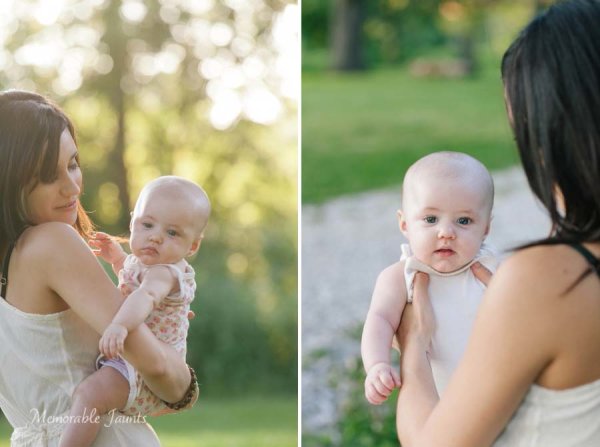
Memorable_Jaunts_Portraits_During_Golden_Hour_DPS_Article-7

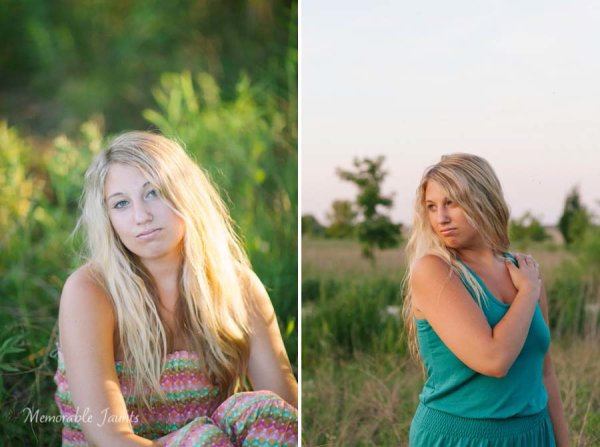
Soft light illuminates the skin tones evenly.

Since the sun is almost setting or just rising during golden hour, the sunlight tends to be much softer than when the sun is high in the sky. During the golden hour, you can have your subjects look towards the sun and not have to squint or shield their eyes. Practice discretion on how long you want them to stare at the sun, and also take care not to point lens and cameras directly into the sun.

Golden light is warm

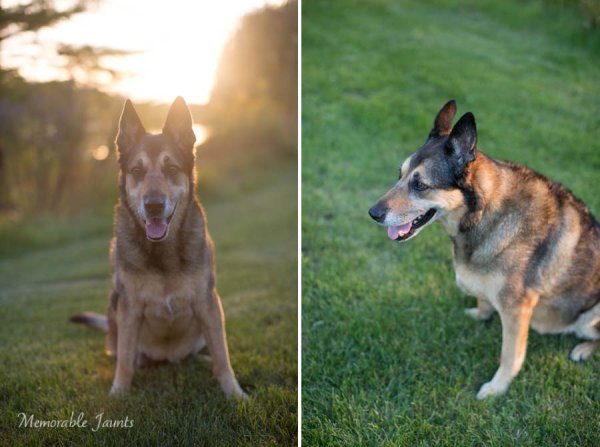
Memorable_Jaunts_Portraits_During_Golden_Hour_DPS_Article-10

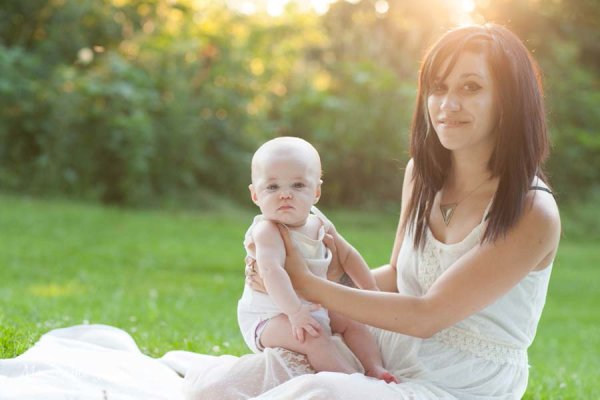
The warm colors of sunlight are striking against the green grass.

It is easy to think that any form of sunlight is warm – whether the sun is high in the sky, or close to the horizon. But in reality, the warmth varies as the sun moves across the sky. Sun near the horizon has less intensity of direct light since it must travel through more of the atmosphere. You may notice, it is much easier to look at a sunrise and sunset with the naked eye – not that you should because it can damage the retina. As per wikipedia, more blue light is scattered during golden hour, so the sun’s light appears more reddish.

Golden light has dimension

When the sun is high in the sky, particularly around noon, the overhead light is very harsh, creating strong highlights and dark shadows. This type of lighting is not very flattering or desirable especially in portrait photography. Most photographers will use external flash or even a reflector to add additional light to the subject’s face or body, to make the light more even. Because the contrast is lower during golden hour, shadows and highlights are not that extreme. In addition, the sun’s smaller angle to the horizon produces long shadows.

Memorable_Jaunts_Portraits_During_Golden_Hour_DPS_Article-14

How do you use golden light?

Location scouting

Take the time to know the area that you are looking to do photography. There are many website and apps that can provide exact sunrise and sunset times. Some even take it a step further and provide golden hour times – which is specifically for photographers! Even the location matters when searching for golden light. If your photoshoot is in a park that has a lot of tree cover, the light will be further diffused, giving you the option of having a spotlight type effect for your portraits. If you are in a big city, take advantage of the natural block that tall buildings provide when photographing a subject.

Metering

Golden light can be challenging from a metering perspective. Most people leave it in standard (matrix or evaluative) mode and then play around in post-production to try and get the look they want. There is an easier way to eliminate all that time spent in front of the camera. Spot metering is my preferred metering method particularly for backlighting situations. I spot meter off the subject’s face or shadowy part of the image and then recompose and adjust exposure compensation half a stop or more to get the look I want.

Front lighting

Memorable_Jaunts_Portraits_During_Golden_Hour_DPS_Article-1

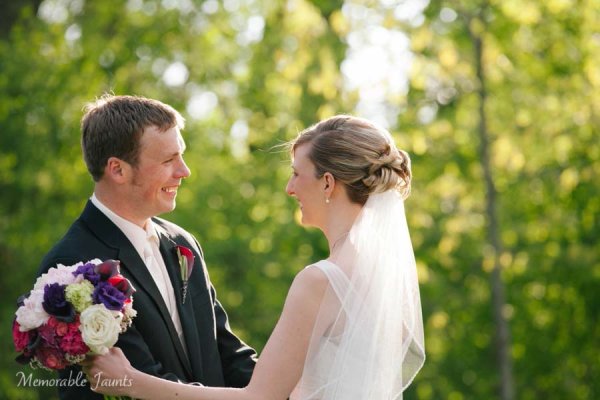
Options for front lighting include the sun along the side of the subject as well as subject facing the sun.

Front lighting is when your subjects face the sun directly. Because of the low angle of the sun and the soft light, the sun isn’t as harsh and your subjects will not be squinting as they face the sun. The light is even and warm so make sure that is the look you want – gorgeous, warmly lit, imagery!

Backlighting

Memorable_Jaunts_Portraits_During_Golden_Hour_DPS_Article-9

Memorable_Jaunts_Portraits_During_Golden_Hour_DPS_Article-6

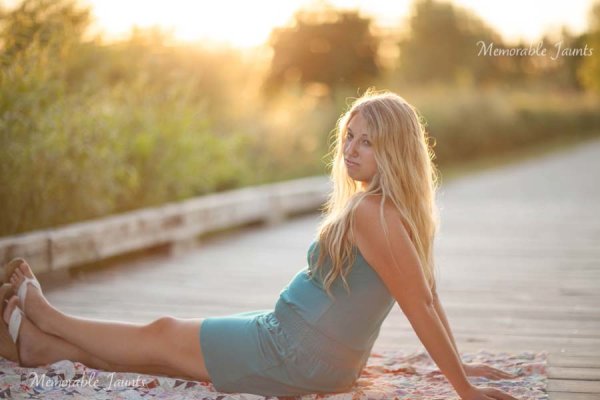
Backlighting is when you put the subjects between you and the sun. This creates a warm glow and looks really stunning. Make sure you expose for your subject’s skin tones. If you expose for the sun, then you will get a silhouette effect (which might not be the look you are going for, but is equally stunning).

Rim light

Memorable_Jaunts_Portraits_During_Golden_Hour_DPS_Article-3

Rim lighting occurs when you are using the sun to backlight the subject. Here the subject is between you and the sun. If you have a darker background, you can see a faint glow outlining them. That is a rim light and it really helps the subjects pop out in the image, drawing attention to them, adding separation of subject from the background.

No matter what type of golden hour lighting you use, you are bound to get some awesome images. Experiment with various locations and techniques. Also go back to the same location at various times of the year and track how golden hour lighting changes – you will learn to gauge, judge, and use light as a key element in your portrait photography.

googletag.cmd.push(function() {
tablet_slots.push( googletag.defineSlot( “/1005424/_dPSv4_tab-all-article-bottom_(300×250)”, [300, 250], “pb-ad-78623” ).addService( googletag.pubads() ) ); } );

googletag.cmd.push(function() {
mobile_slots.push( googletag.defineSlot( “/1005424/_dPSv4_mob-all-article-bottom_(300×250)”, [300, 250], “pb-ad-78158” ).addService( googletag.pubads() ) ); } );

The post Tips for Using Golden Hour Light for Portraits by Karthika Gupta appeared first on Digital Photography School.


Digital Photography School

 
Comments Off on Tips for Using Golden Hour Light for Portraits

Posted in Photography


How to Use Foreground for Dramatic Portraits

06 Feb

I remember a long time ago, I took a close up shot that I absolutely loved of a little kid on a slide for an article on a local park that had won a national award. I proudly brought it to my magazine editor, who said, “That’s great , but where’s the rest of the shot?” She couldn’t tell if Continue Reading

The post How to Use Foreground for Dramatic Portraits appeared first on Photodoto.


Photodoto

 
Comments Off on How to Use Foreground for Dramatic Portraits

Posted in Photography


Using Low Key Lighting in Your Portraits: Getting Moody On the Down Low

26 Jan

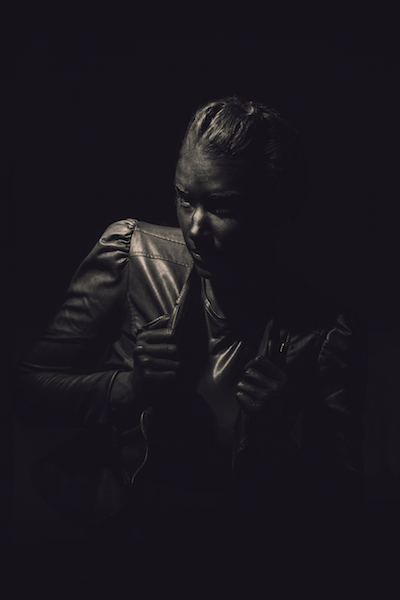
So you’ve been shooting for a while and you want to add a little more visual oomph to your shots, why not try a little low key? Low key lighting is a classic technique, a la where you use shadow and high contrast to show the shape of your model. Making the background dark can be super complicated or super Continue Reading

The post Using Low Key Lighting in Your Portraits: Getting Moody On the Down Low appeared first on Photodoto.


Photodoto

 
Comments Off on Using Low Key Lighting in Your Portraits: Getting Moody On the Down Low

Posted in Photography


How to Use Triangles to Improve Your Portraits Composition

23 Jan

Do you ever look at a picture and absolutely love it, but you don’t know why? There are a lot of elements that can go into a great shot, but the hardest thing to see/ easiest thing to pick up on are triangles, which are leading lines that frame your subject, drawing your eye deeper into their inner lives. The Continue Reading

The post How to Use Triangles to Improve Your Portraits Composition appeared first on Photodoto.


Photodoto

 
Comments Off on How to Use Triangles to Improve Your Portraits Composition

Posted in Photography


How To Take Awesome Instant Portraits

15 Jan
Extra photos for bloggers: 1, 2, 3

Reason #2654 why instant cameras are the coolest thing since sliced artisanal bread: portraits, baby!

Keep these tricks up your sleeve next time you’re photographing your friend/nanna/cat/batman figure to give your portraits a bit of POW!

Embrace instant and give your digital camera a rest, like, this instant.


Learn How To Take Awesome Instant Portraits

WHY IT’S COOL

Your portraits can not only be enjoyed instantly, they’ll have some serious attitude.

IDEA 1: EXPOSE LOOOOOOONGER

beforeLong exposures are really fun to play with. You can paint with light, or capture movement. Or both.

Ask your subject to wave fairy lights in front of their face while keeping the shutter open to capture it all.


IDEA 2: BLUR, YES SIR

beforeFor a surreal look, throw out all the rules and set the focus to short distance when photographing from a long distance, or visa versa.

Because sometimes a hint at something is better than the real thing.


IDEA 3: EMBELLISH

beforeGive your portraits a personal touch and another dimension by painting over it with nail polish or glitter glue.

Who says more isn’t more?


IDEA 4: DOUBLE UP

beforeGive your portraits some texture by turning on your camera’s multiple exposure function, and take a photo of a pattern (graffiti, flowers or even wallpaper work really well) before taking a photo of your subject.

This technique takes a lot of experimentation and always give an interesting result!

GRAB YOURSELF AN INSTANT CAM!

beforeLimited Edition Polaroid SX-70

Calling all nostalgia lovers! This guy is the original instant camera, made only up until 1977 and hand restored to perfect condition just for you.

Lomo Instant Camera

Lomography your thang? The Lomo Instant comes with three additional lenses (fisheye, portrait and close up) and gives you a bunch of creative controls including those sexy long exposures, multiple exposures, manual aperture and gel filters for color flash, if you please.

Instax Mini 8 Camera

Ahh simple pleasures. The classic does one thing: take instant photos. And it does it with a smile on it’s little camera face every time. Just load film, point, shoot and collect your credit card sized photo.

Instax 90 Neo Classic Instant Camera

The wiser, more distinguished sibling of the classic Instax Mini Cam, this sexy beast let’s you play with double exposures, long exposures, adjustable shooting modes and wait for it…a self timer. SELF PORTRAITS OMG!

Instax Wide 300

Instax Mini too…mini for you? Go wide! This is your guy if you want all the features of the classic Instax Mini, but think your mug deserves a larger canvas.

TAKING IT FURTHER

  • Chances are that you will end up with a couple of dud shots but be sure to hang on to them. Just cut out the photos with a craft knife, leaving only the frame. Now hold it in front of your subject’s face for a meta touch.
  • Or what about putting an actual instant photo within another? Then again and again. How deep can you go?
  • Turn your camera upside down or tilt diagonally, get down low or shoot from right above.

© Erika for Photojojo, 2015. |
Permalink |
No comment |
Add to
del.icio.us

Post tags:


Photojojo

 
Comments Off on How To Take Awesome Instant Portraits

Posted in Equipment


How to Create Dark Moody Low-Key Portraits with Minimal Gear

14 Jan

To paraphrase Samuel L. Jackson in Jackie Brown, “Grids: when you absolutely, positively got to kill every lumen in the room, accept no substitutes.” Do you have a room or environment that you want to appear black? You don’t even need a black backdrop or the dark cover of night to create a dark, dramatic scene. All you need is a flash, a grid and enough space to allow your subject to be at least 5-10 feet away from any walls. As long as you can keep your strobe light from falling on the ground, background or other objects in the scene, only the subject will be illuminated.

1

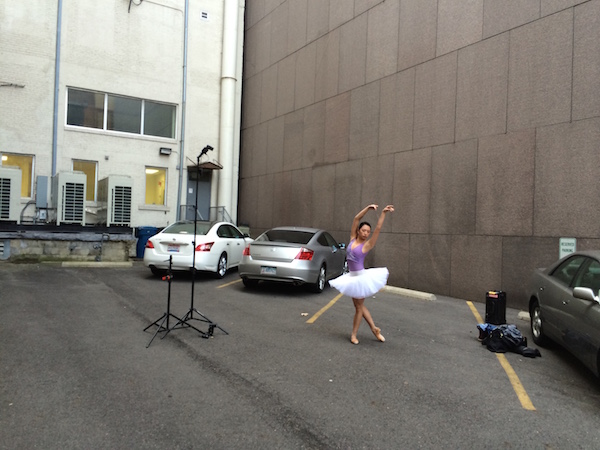
The scene: If you want to black out your environment to create dark moody low-key images, look for shaded areas with enough space to allow at least 5-10 feet between your subject and the background. The darker the background wall is, the better.

2

The raw file: If you look closely, you will see that there is a bit of background detail, which can be easily eliminated in Lightroom.

It was a particularly windy day that I photographed ballerina Kristie Latham. Since I didn’t have an assistant, and sandbags were too heavy to lug around by myself (I was already pulling my case and carrying two light stands), I would have to shoot without light modifiers. Note, if I had added an umbrella to the light stand without it being sandbagged or held by an assistant, it would have blown over onto a nearby car within five seconds. Though an un-modified flash on a light stand can still be blown over by the wind, it’s much less likely to happen. That said, I still made sure that it wasn’t too close to any nearby cars.

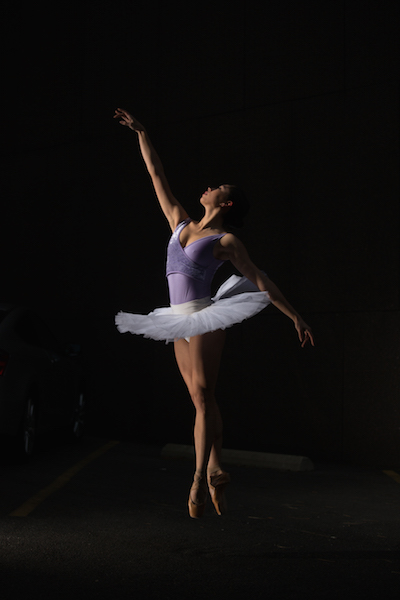
I wanted to highlight her form and the details of her outfit – specifically the tutu – so even though the light was going to be hard without modifiers, it would actually work out to my advantage. I began by setting up the main light. I placed it high – about 8 feet – in order to create dramatic, directional light. After taking a test shot, I saw that the light fell off below her tutu, since it came out about a foot from her body, causing her legs to go into shadow. To remedy this, I added a second light, placing it on the ground, aimed slightly up, to avoid lighting the ground. The second light worked at illuminating the lower half of her body (image above). By zooming the flashes in to a medium setting of 70mm, it allowed just enough light spread to cover her, while not spilling on too much of the environment around her. While a bit of background detail can be seen in the raw file, it can easily be removed in Lightroom in post-production.

3

The final shot: Kristie is now completely isolated in the void. Poetic.

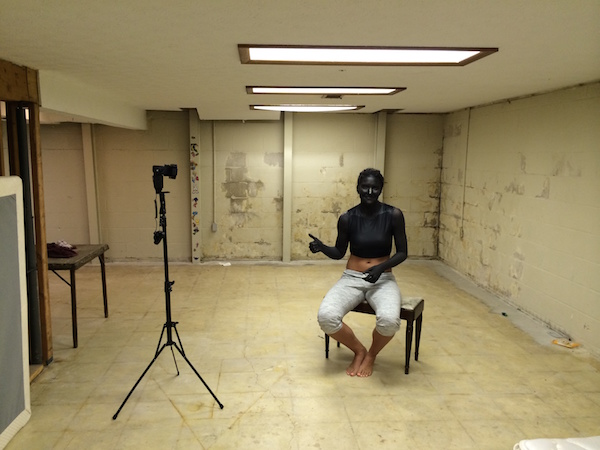
In a slightly different environment, I was doing a shoot with model Dani Dikeman, in a basement. She was in black body paint, wearing all black above the waist. I wanted the whole scene to appear black, save for the highlights on Dani and the textures of her outfit. It was a conceptual portrait shoot, this portion being the Hell portion of a Heaven/Hell-themed shoot. (The as-yet-to-be-shot Heaven scenario will, fittingly, be all white.)

4
The setup: This scenario took place in a basement.

I met Dani at the makeup artist’s house, about an hour after they got started on the makeup, in order to give them a head start on the lengthy application. I knew that the basement was going to be an optimal shooting space because it was not only windowless, but wide open and barren. I quickly set up the sole flash, see above, and then waited while they put the finishing touches on the makeup and hair.

5
The raw file: Though a bit of Dani’s unpainted abdomen and sweatpants are visible in the shot, a quick Lightroom adjustment would have the image ready to go.

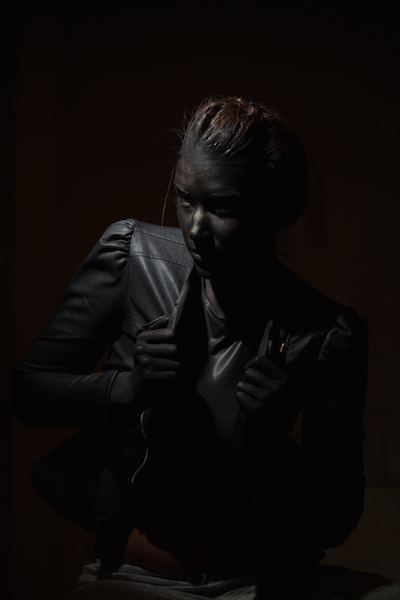
The shoot actually went rather quickly (15 minutes), which is ironic since the makeup application took two hours. Though the basement wasn’t especially large, by using a grid on my light to contain light from spilling on the nearby walls, the environment read pretty close to black in the raw files, as seen above. Although Dani’s unpainted abdomen and sweatpants visible in the shot, this wasn’t too big of an issue. Because the light falloff was so dramatic from her bust to her torso, a quick adjustment in Lightroom, lowering the exposure and it went easily to black.

6
The final shot. All black everything.

Have you done all dark or low key images before? Have any other tips or comments to share?

googletag.cmd.push(function() {
tablet_slots.push( googletag.defineSlot( “/1005424/_dPSv4_tab-all-article-bottom_(300×250)”, [300, 250], “pb-ad-78623” ).addService( googletag.pubads() ) ); } );

googletag.cmd.push(function() {
mobile_slots.push( googletag.defineSlot( “/1005424/_dPSv4_mob-all-article-bottom_(300×250)”, [300, 250], “pb-ad-78158” ).addService( googletag.pubads() ) ); } );

The post How to Create Dark Moody Low-Key Portraits with Minimal Gear by Nick Fancher appeared first on Digital Photography School.


Digital Photography School

 
Comments Off on How to Create Dark Moody Low-Key Portraits with Minimal Gear

Posted in Photography


What to Wear for a Photo Shoot: Clothing for Portraits

09 Jan

What to wear? It’s an age old question. One that never goes away. And what to wear for a photo shoot even gets harder. Two weeks ago, Santa brought my oldest daughter, Zoe, ten BILLION outfits from across the globe. Knit sweaters, lace sweaters, casual sweaters, fringed sweaters…if there was a sweater being made, she got it, in addition to Continue Reading

The post What to Wear for a Photo Shoot: Clothing for Portraits appeared first on Photodoto.


Photodoto

 
Comments Off on What to Wear for a Photo Shoot: Clothing for Portraits

Posted in Photography


Small Flash Portraits on Location with Adorama TV

04 Jan

How to light portraits with a small flash or speedlight is a common topic request from our readers here at dPS.

In this video tutorial Daniel at Adorama goes over how to use a speedlight both on-camera and off-camera to take quick and easy portraits on location. He shows tips for modifying the light, balancing with the ambient or available light in the scene, and even using a gel for color balance.

Get some great tips from this video:

Have you tried these techniques before? Had any success? Share any tips you have in the comments below.

googletag.cmd.push(function() {
tablet_slots.push( googletag.defineSlot( “/1005424/_dPSv4_tab-all-article-bottom_(300×250)”, [300, 250], “pb-ad-78623” ).addService( googletag.pubads() ) ); } );

googletag.cmd.push(function() {
mobile_slots.push( googletag.defineSlot( “/1005424/_dPSv4_mob-all-article-bottom_(300×250)”, [300, 250], “pb-ad-78158” ).addService( googletag.pubads() ) ); } );

The post Small Flash Portraits on Location with Adorama TV by Darlene Hildebrandt appeared first on Digital Photography School.


Digital Photography School

 
Comments Off on Small Flash Portraits on Location with Adorama TV

Posted in Photography


6 Tips for Better Portraits on Location

20 Dec

Whew it’s been a while since I actually wrote a tutorial here on dPS so I thought it was time. Some of my most popular articles are about portrait lighting patterns and other aspects of creating great portraits. In this article I want to give you a few tips to help you take better portraits on location, flatter your subjects and make sure you are all happy with the final results.
Mayorga Dec14 0018 600px

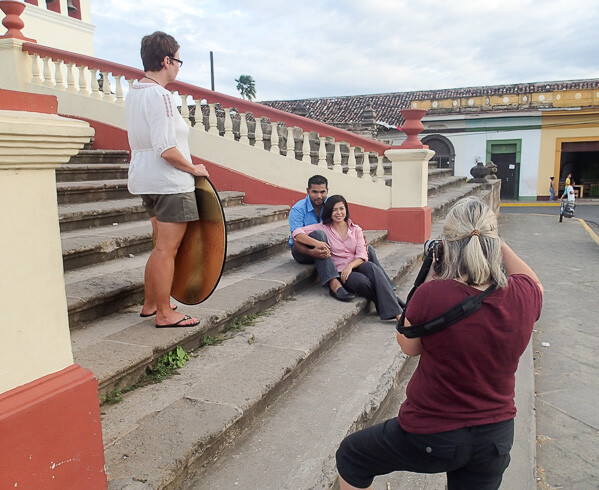
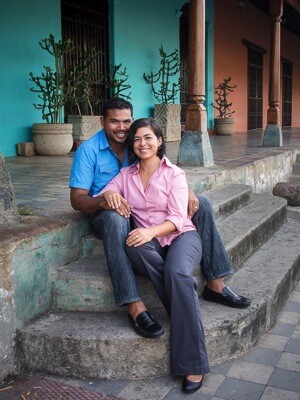
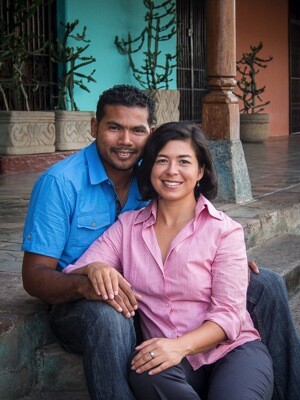
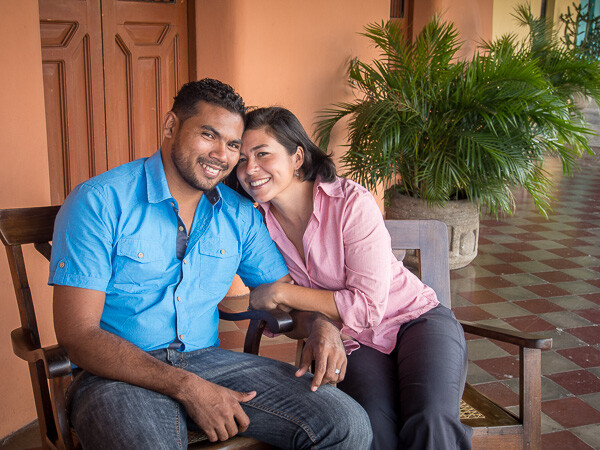
My models for this article are my Nicaraguan friend Luis and his fiancé Sonia. He’s been a great help to us on our tours here and has become a good friend so this was win/win for us as they get a nice portrait of themselves (they don’t have a professional one) and I am allowed to use their photos and their session for teaching purposes here.

Quick summary:

This is a quick list of the five tips, we’ll cover each in more detail and look at some examples.

  1. Ask your subject’s what they like and want
  2. Look for the light
  3. Find a good background
  4. Pose you subjects to flatter them
  5. Communicate with them
  6. Do something they want, even if it’s not art

First a note about gear

A lot of people get hung on up having the top of the line gear, pro lenses, the fancy bells and whistles, and all the extra gizmos. While it is nice to have the best gear, I want to show you it is possible to make great portraits with ANY gear. All the photos in this article were taken in Granada, Nicaragua (where I am currently living/working for 2.5 months) with an Olympus OM-D E-M5 mirrorless camera, and 12-50mm f3.5-6.3 lens (equivalent to a 24-100mm on a full frame camera). NO flash was used only a reflector in a couple situations.

Tip #1 talk to your subjects before the session

Knowing what people want for their portrait, and their expectations is essential to making a portrait they will like. Ask them what kind of clothes they’ll be wearing – formal or casual – that may make certain locations a better choice than others. Talk about feel or mood for the portrait. If it’s a couple are they touchy feely or not. You need to know these things going in, not later when they hate their photos or feel uncomfortable doing something that isn’t really “them”.

For my couple I found out that she liked certain churches here in town, gardens, and the volcano (keep reading to see how I worked some of that into the session). I scouted out a few locations ahead of time with a friend so I could check out the lighting. If you are going to do this, go at the same time of day you want to do the session. I like to work at golden hour with the sun is low and not overhead, which brings us to the next tip.

Tip #2 Look for the light

First and foremost photography is about light. If you have no light or bad light it’s really hard to make good photos. Back to golden hour – this is when the sun is low in the sky either right before sunset or after sunrise. Most portrait photographers choose this time of day as the optimal time to work instead of fighting with midday overhead lighting. Do yourself a favour and make your life easier – whenever possible schedule portraits at golden hour. Find out the sunset time for your area and start an hour or so before that.
Mayorga Dec14 0003 600px

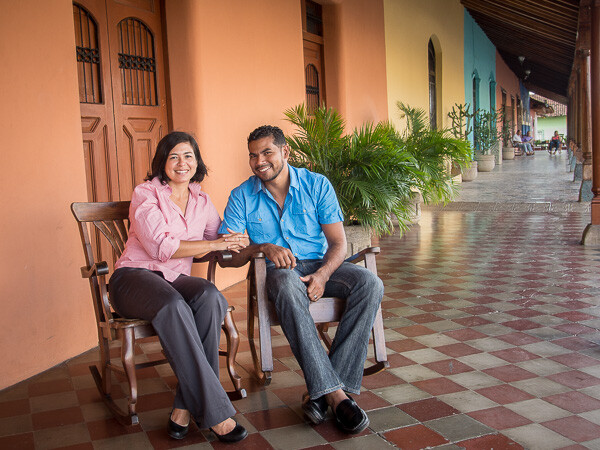
In the first spot for our session we actually started on the porch of the house we’re renting here. Across the street is a big white church reflecting the light back under the porch. There’s an overhang covering the top so there is no direct overhead light. It is the perfect situation for great portrait light and one I seek out wherever I’m shooting. Just by turning the subject’s faces a little bit you can create different lighting on. Read more about that in my first ever dPS article: 6 Portrait Lighting Patterns Every Photographer Should Know.

In the image above you can see the direction of light is coming from camera right (their left). See how he is turned away from the light source slightly and has broad lighting, then watch how it is corrected in the next few images.
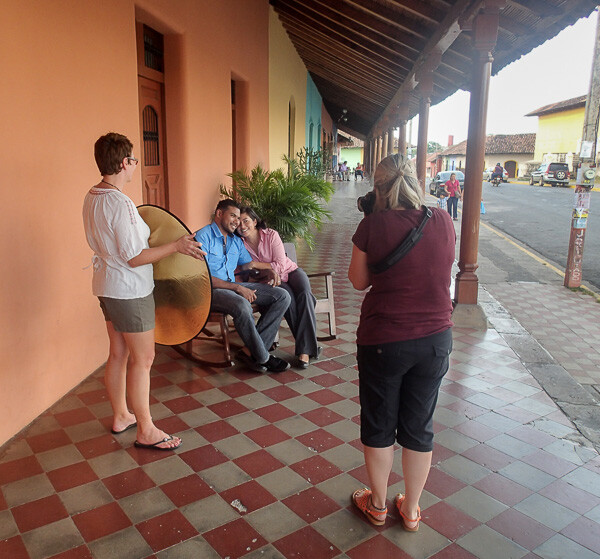
Mayorga BTS 0029 600px

Behind the scenes shot

Mayorga BTS 0041 600px

Use an assistant and reflector when you have a chance. Here I had my assistant holding a white reflector to bounce a bit of light into their faces.

Tip #3 Find a good background

Everything in photography is subjective. So how do we define a good background from a bad one? Well there are a few things that can help:

  • Watch for bright spots (and areas of high contrast) in behind your subjects it will draw the viewers eye, usually as a distraction, which is not desired.
  • Avoid bright colours in the background for the same reason. You want the viewers eye to go direction to the people, not the stuff behind them. This is often a problem when your subjects request a garden or flowers in for their background. They do not know this stuff, so it is your job to educate them and make a portrait that is both pleasing to the eye, and to them!
  • Make it appropriate for the subject. Again the idea of a portrait is to portray the person, so sometimes you need to show more of the environment to do so. Just make sure it is fitting for them and helps either flatter them or tell their story.
  • Keep it simple and blur it when possible. A busy and sharp background will draw attention. Use the KISS principle and a large enough aperture to get that background out of focus. A longer lens also helps – something which was limited for me in this situation so do the best you can with what you have.

In the examples below see how I started with the full church in the background and made a few alterations to simplify and get the focus more on the people.
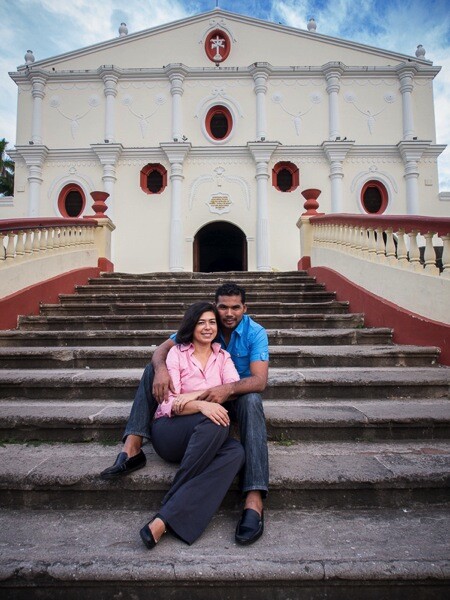
Mayorga Dec14 0041 600px

First shot at the church. Notice how the wide angle lens makes their lower bodies and feet look larger? This is also the same church that was bouncing the light in the first setup.
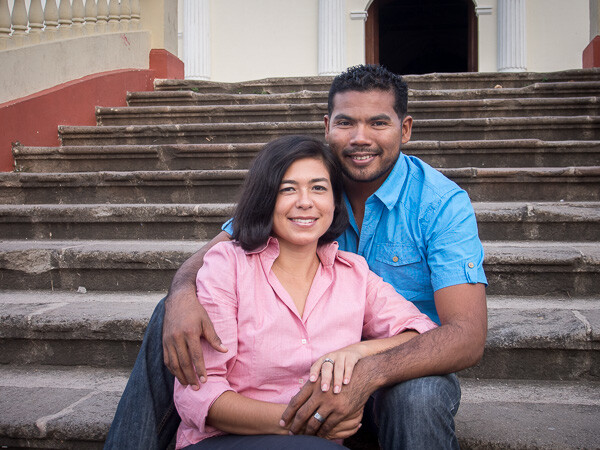
Mayorga Dec14 0049 600px

Much better! In this variation I moved back and zoomed in using a longer lens to get less of the background and crop out the lower bodies.
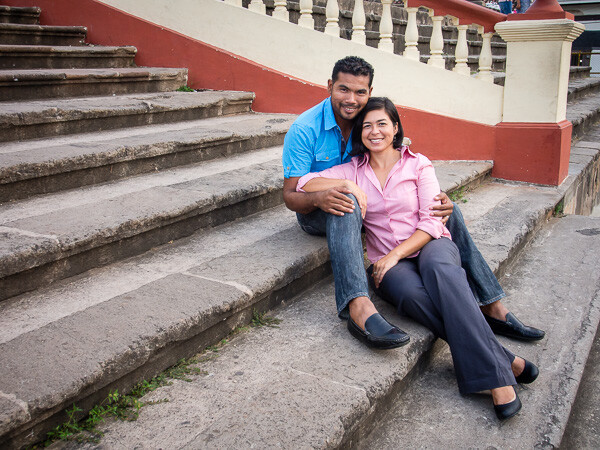
Mayorga Dec14 0030 600px

Next angle shooting from the side on the stairs using the nice leading lines. Again the wider lens makes feet or anything closer to the camera look bigger. Not so much desired, but not horrible in this instance.

Mayorga Dec14 0031 600px

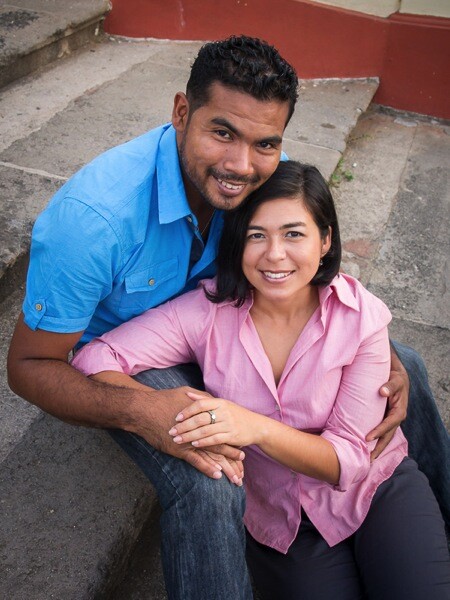
Once again zooming to focus more on their faces and in this case a slightly higher camera angle, is far more flattering to them.
Mayorga Dec14 0034 600px

Lastly try something different. A super high angle and them looking up has a completely different feeling.

Tip #4 Pose to flatter people

Posing people is one of the hardest things to learn but also one of the most important. People are nervous about having their photos taken, and that is often reflected in their body position. It is your job to get them to loosen up and to help them look their best.

The best way I know how to show people a pose is to do it for them, then get them to repeat it. So I’ll go stand in their spot, strike the pose I want them to do and then have them copy me. Or you can face them and have them mirror you.
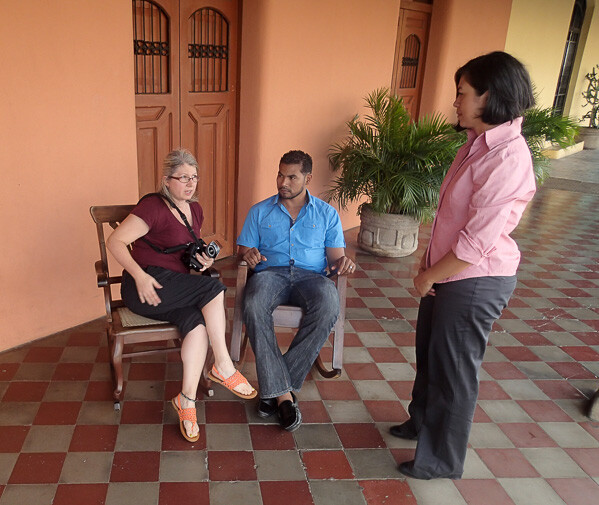
Mayorga BTS 0009 600px

Here I am showing her how to sit and what not to do – stick your butt towards the camera.
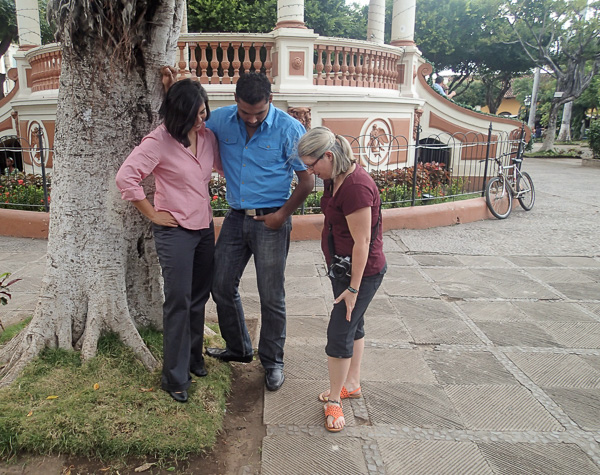
Mayorga BTS 0117 600px

And how to position their feet – very important! How the feet are positioned makes a difference to how the body looks. Pay attention from head to toe, literally. If you want them to turn their body – tell them to turn their feet, the body will follow.

Mayorga Dec14 0051 600px Mayorga Dec14 0054 600px

Here are a few general tips for posing people:

  • If it bends bend it! Get them to shift their weight to one leg (ALWAYS the back one and hip away from the camera) and let one leg bend naturally. Stiff legged = boring = they look nervous and won’t like the photos.
  • Arms too: get them to put a hand in a pocket (but only the fingers not the thumb, that way they won’t shove it too far in there pulling their pant leg funny), hook a thumb in a belt loop, or if you’re working with a couple hold hands and touch. Remember you should already know if they are touchy feely or not (see tip #1 above) so you know what they’ll be comfortable with. Having people who are family, close friends, or couples touch in their portrait helps to add a feeling of connection and usually helps them relax too.
  • Observe their natural body positions and use them. If you see that she sits a certain way, or puts a hand on her hip – get her to do that. Often I’ll give more loose posing directions to start and see what they end up with on their own – then refine it a little if necessary. They’ll relate more to the portrait if it something they do naturally, and you may even get comments like “Oh that is SO me!”
  • Get ladies to cross legs at the ankles not knees. Crossing at the knee is how most of us sit normally but it makes the legs look unnecessarily bulky. Trust me on this – NO woman wants to look bulkier! Ankles crossed looks feminine and makes a nice line for the legs to follow.
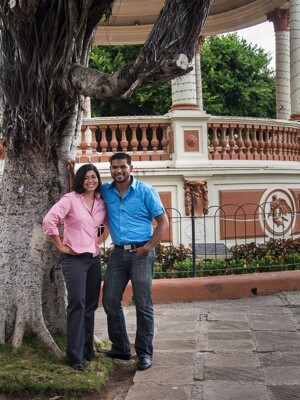
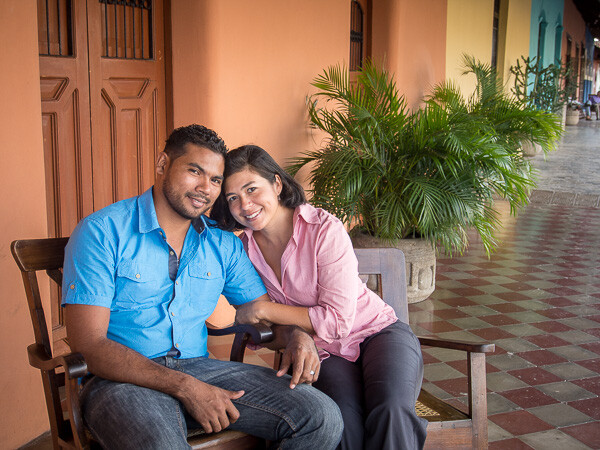
  • Posing a couple: If you are dealing with a couple with a large height difference (as I was in this session) get the man to sit and have her drape her arms around him from the side. Or in a standing pose have him widen his stance more. Putting his feet farther apart will actually lower his total height – a neat little trick that really works.
  • Avoid cropping off people’s hands and feet, they end up looking amputated. If you’re going to crop in, come in closer to make it more obvious and crop to the knees (or higher) and elbows.
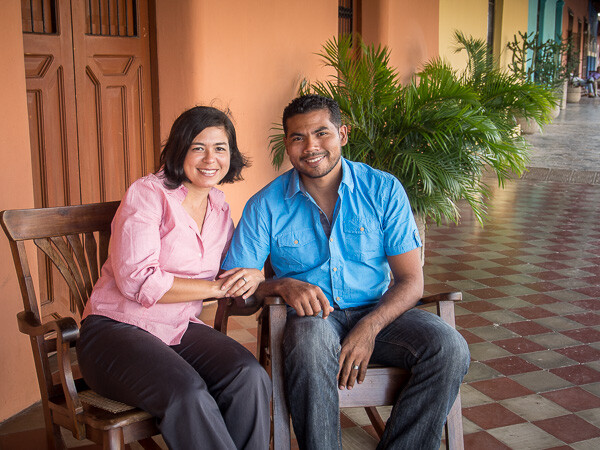
Mayorga Dec14 0006 600px
In this image (above) with her on the left, I felt it wasn’t as flattering when she leaned to the side (exposing more hip area. Remember in the standing pose – hip pushed away from the camera – same with sitting.
Mayorga Dec14 0015 600px

Pose better. He looks bigger, which he is, and her pose is more flattering. At top of the article when we talked about light he was turned away from the church (light source) and had broad lighting. Now that is reversed and he has short and she has broad lighting. I didn’t mind it so much and the pose and expressions were great so I went with it. But a slight head turn changes that:
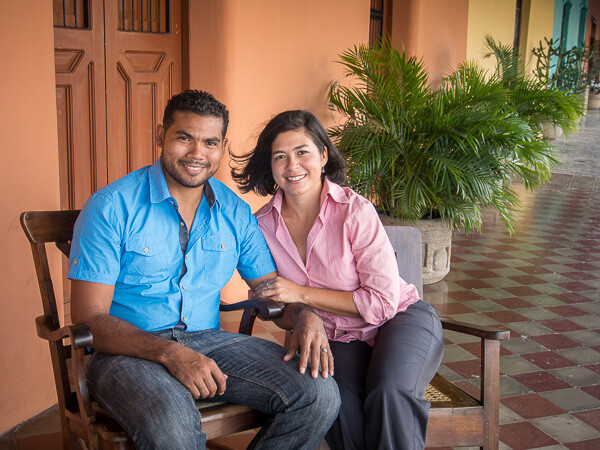
Mayorga Dec14 0012 600px

Tip #5 Communicate with them

Let’s go back to people are nervous getting their portrait done. The best way to help them relax is to talk to them. It’s not rocket science just talk. Tell them what you’re doing, ask them how their day was, find some common ground to talk about while you fuss with your gear. Just talk!

Novice photographers also being nervous tend to clam up and go about their business setting up their camera, tripod, metering, testing, etc., and forget they have real people standing there waiting for direction. Silence is awkward, build a rapport with them and help them relax at the same time.

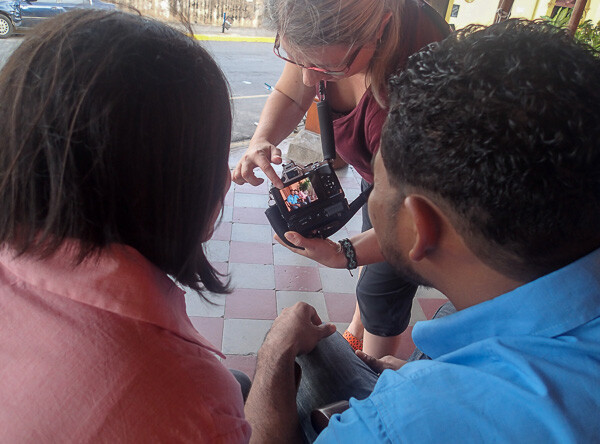
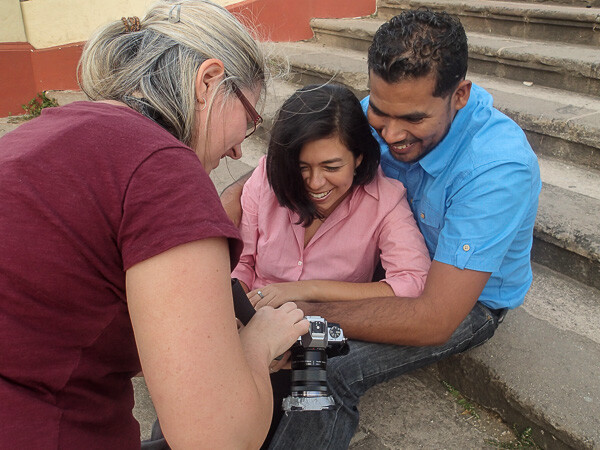
Also show them some of the photos now and then and tell them how great they’re doing and how fantastic they look. When you share with them you think the photo session is going great they almost instantly relax and get into it more. You may even find them wanting to participate more and come up with ideas for photos.
Mayorga BTS 0035 600px

Mayorga BTS 0063 600px

Tip #6 Do one of their ideas

Sometimes people will throw out ideas at the session or in your initial fact finding discussion. Don’t discount these right away. Often the suggestions will have some meaning to them or just simply show their tastes. Try to incorporate at least one or two of their ideas into the portrait session, even if you know it’s not going to be the best shot or come out as art. Do it to have some fun and let them know they are an important part of the process.

In this example remember she said she like a couple of the churches, to see the volcano, and gardens. Let’s see how that came out:
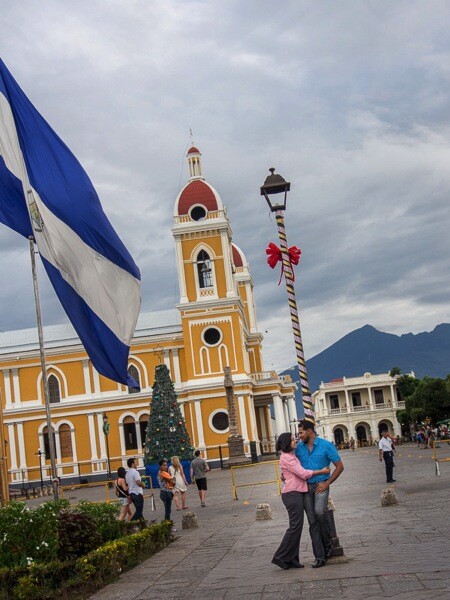
Mayorga Dec14 0075 600px

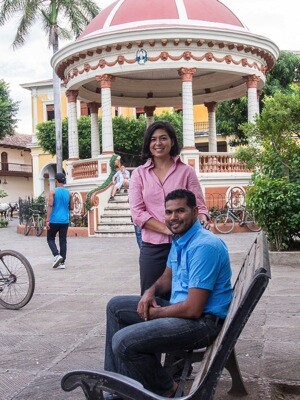
The white church was already used in some of the shots above. We worked the location near our house and then just went for a walk to see what else caught our eyes. The main square here has the big yellow cathedral, and giant Nicaraguan flag, and the volcano in the distance. So I tried to get all of those elements into one shot, and somehow manage to see the couple still. The image above is the result. It doesn’t completely suck but they are pretty small and I wasn’t crazy about the candy cane looking light post.

Once again I zoomed in to a longer focal length and got a bit closer to crop out their feet. Ignoring the annoying cars behind them, I think this is more effective and still shows all the elements. Waiting for the flag to blow was also important to be able to see it. Patience young grasshopper!
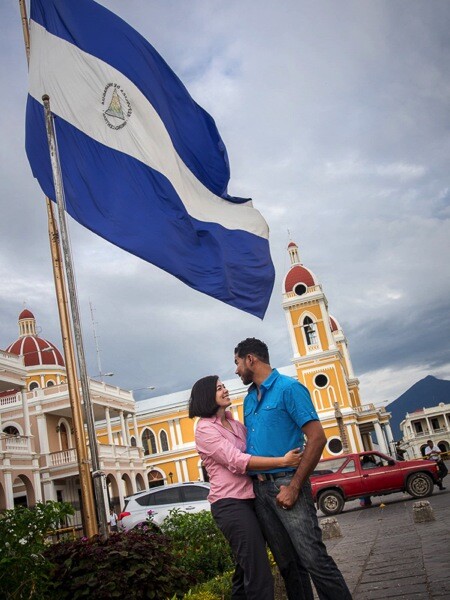
Mayorga Dec14 0090 600px

We were losing light fast (happens at sunset) but I wanted to get a few more in for them. Next up they liked the gazebo. I tried to get it in the background but there was a guy sitting there and was near impossible to get him out of the shot and too many people wandering through the background. That and the light just wasn’t working, their eyes and faces were way too dark (below left) and there was no light to get with the reflector (too cloudy).

Mayorga Dec14 0093 600px Mayorga Dec14 0096 600px

Moving them under an overhanging branch of a large tree (above right) helped block some of the overhead light of the cloudy sky and still allowed a portion of the gazebo to show in the image.

Finally walking back to our house we noticed a row of plants on the stoop. So I decided to make it work as a garden-like shot. It’s not my first choice for background but they liked it and that’s all that really matters.
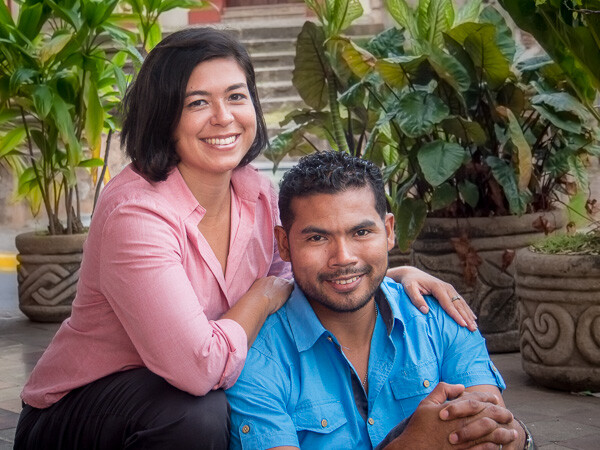
Mayorga Dec14 0125 600px

Final tips

Being a portrait photographer is part lighting technician, part psychologist, and juggler. You have to take all the elements and make them work together including technical, aesthetic and work with real live people at the same time. Like I said – juggling!

If I can give you one tip to sum up doing portraits on location it would be this:

Don’t be afraid to admit it’s not working and try something else. There are lots of possibilities even in one location
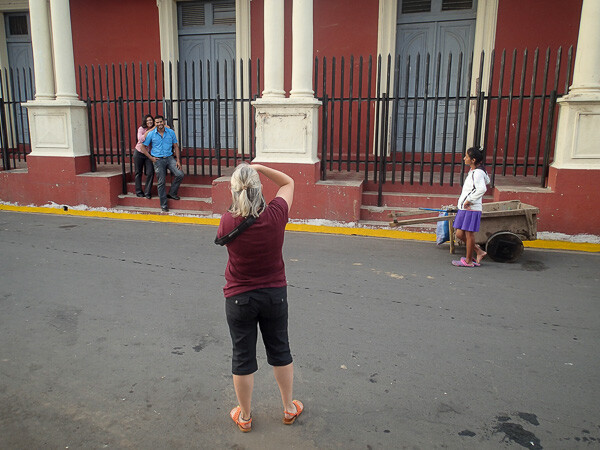
Mayorga BTS 0089 600px
Another behind the scenes shot. I didn’t end up liking the result here but I thought you might like to see the street and a bit of the city of Granada.

googletag.cmd.push(function() {
tablet_slots.push( googletag.defineSlot( “/1005424/_dPSv4_tab-all-article-bottom_(300×250)”, [300, 250], “pb-ad-78623” ).addService( googletag.pubads() ) ); } );

googletag.cmd.push(function() {
mobile_slots.push( googletag.defineSlot( “/1005424/_dPSv4_mob-all-article-bottom_(300×250)”, [300, 250], “pb-ad-78158” ).addService( googletag.pubads() ) ); } );

The post 6 Tips for Better Portraits on Location by Darlene Hildebrandt appeared first on Digital Photography School.


Digital Photography School
 
Comments Off on 6 Tips for Better Portraits on Location

Posted in Photography


Deal 4: Our Best Selling Portraits eBooks are $7 Each

17 Dec

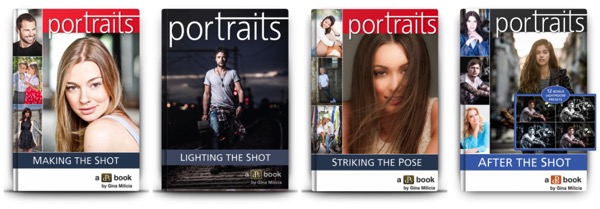
Today we’re rolling out a deal that our team are very excited about – our best selling Portrait eBooks are just $ 7 each for the next 24 hours!

Portraits $  7

Over the last couple of years we’ve worked with talented Aussie portrait photographer – Gina Milicia – to put together this comprehensive library of portrait eBooks.

There are four in the series that cover everything from taking your shots, lighting your subject, posing your subject through to processing your portraits.

Every time we’ve added to the series we’ve seen them push our servers to the limits so tonight we’re a little worried as we’ve never discounted all four of them this low at the same time!

These eBooks normally sell for $ 19.99 but are yours today for $ 7 – a saving of 65%.

Can’t Stop at Just One? Bundle Them!

Pick up any of the above eBooks for just $ 7 (USD) or… grab the full set for just $ 21 PLUS we’ll throw in our popular quick reference cookbook – 14 Recipes for Amazing Portraits as a bonus.

NewImage

This great little cookbook is the perfect companion to the rest of the bundle and walks you through 14 portraits, how they were shot, how they were lit, how they were styled, the gear that was used etc.

That’s 5 eBooks worth close to $ 90 that are yours today for just $ 21.

Grab 1 for $ 7 or Buy the Lot – But Don’t Wait too Long!

Whether you pick up one of our portrait titles for $ 7 or pick up the full set for $ 21 – just be sure to get in before this deal is gone for good in just 24 hours time.

Invest in your portrait photography here.

googletag.cmd.push(function() {
tablet_slots.push( googletag.defineSlot( “/1005424/_dPSv4_tab-all-article-bottom_(300×250)”, [300, 250], “pb-ad-78623” ).addService( googletag.pubads() ) ); } );

googletag.cmd.push(function() {
mobile_slots.push( googletag.defineSlot( “/1005424/_dPSv4_mob-all-article-bottom_(300×250)”, [300, 250], “pb-ad-78158” ).addService( googletag.pubads() ) ); } );

The post Deal 4: Our Best Selling Portraits eBooks are $ 7 Each by Darren Rowse appeared first on Digital Photography School.


Digital Photography School
 
Comments Off on Deal 4: Our Best Selling Portraits eBooks are $7 Each

Posted in Photography