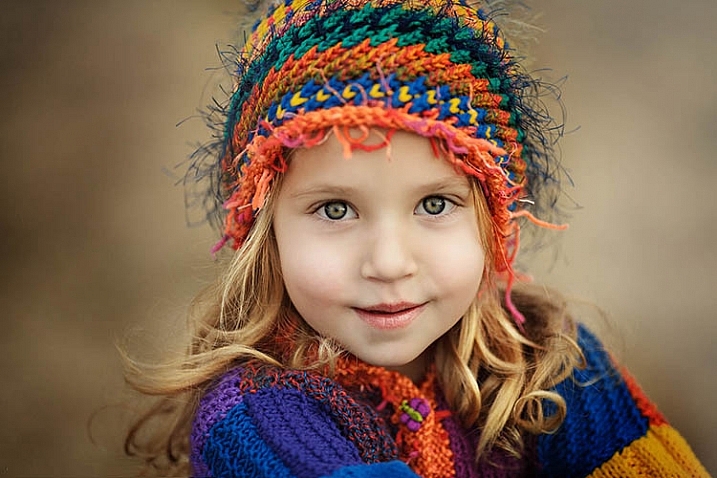
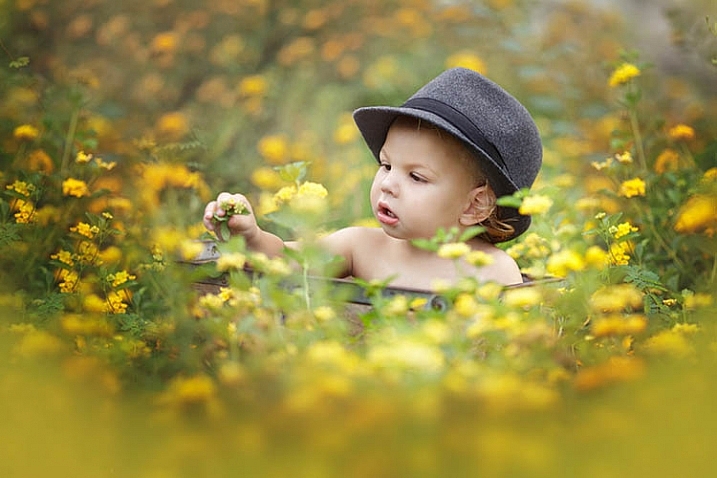
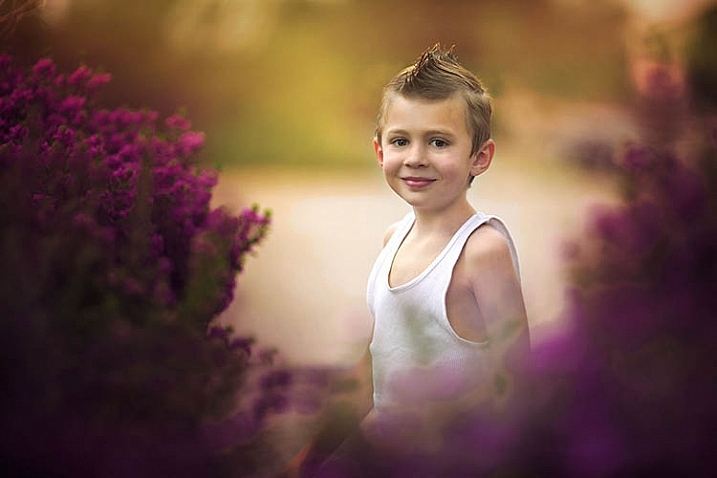
RSS
 

Posts Tagged ‘portraits’

How to Enhance Portraits Using Gray Layers to Dodge and Burn in Photoshop

24 Jul

What is dodging and burning?

The techniques of dodging and burning are hand-me-downs from the days of the darkroom. The idea was to manipulate parts of an image while the paper was being exposed to light from the enlarger, where the negative was fitted. In order to decrease the exposure (lighten) on parts of an image, the paper had to be exposed for less time, which was dodging. To increase exposure (darken) it needed to be exposed for more time, which was burning.
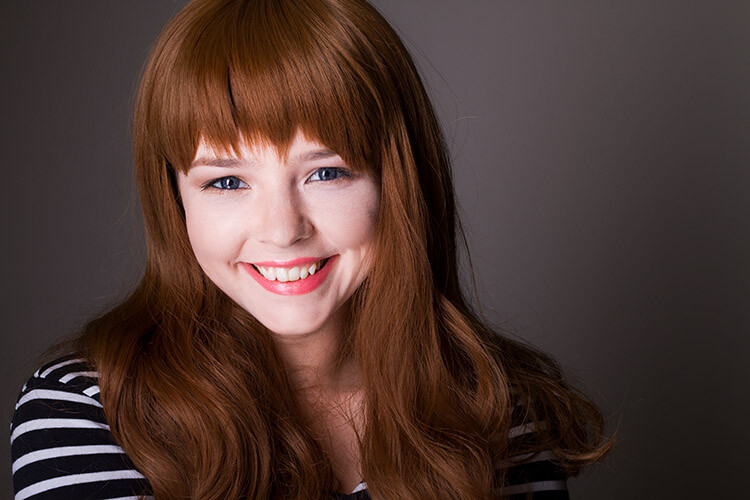
Before dodging and burning
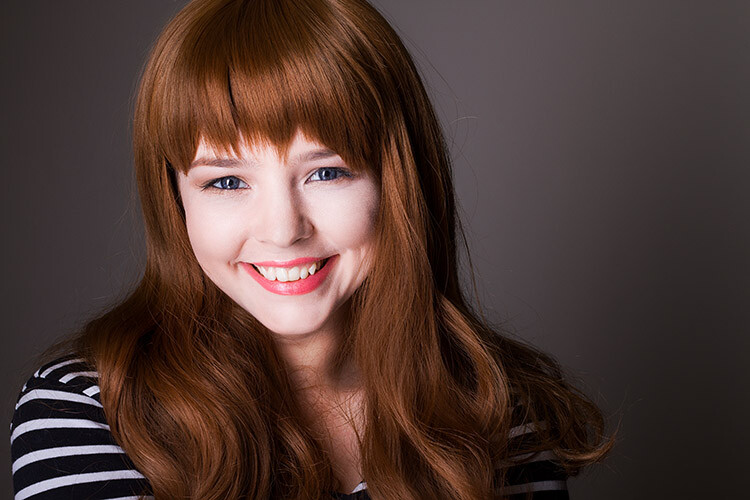
Before dodging and burning

After dodging and burning (it’s subtle, look at her hair and cheeks – don’t overdo it with this technique)

One way of doing this, was by holding bits of paper or card over the parts of the image that didn’t require manipulation. Because these adjustments only applied to certain parts of an image, it required a certain amount of dexterity (as well as a lot of paper) to get right. Because of this complexity and precariousness, dodging was used primarily to lighten dark areas. Burning was then used to darken highlight areas.

The Photoshop version of the technique; however, is far more forgiving. Photoshop allows very fine control over an image and even allows pixel by pixel retouching. The versatility this provides turns the traditional darkroom method on its head. It allows you to use small brush strokes to brighten and exaggerate small areas of highlights, or darken shadows, instead of applying to only broad areas.

This technique is very easy to learn, but it does require some practice to get down, as it’s very easy to go overboard with it, and overcook your images.

Why dodge and burn?

Tools like curves and levels give you control over the tonality and contrast of an entire image (excluding the use of layer masks). This is called a global adjustment, but they aren’t always effective for most images.

Dodging and burning allows you fine control over the tonality of your images in small, concentrated areas. These are called local adjustments. This allows you to pick out small parts of an image to work on, while leaving areas that need no work untouched.

While useful in all genres of photography, the use of local adjustments comes into its own in portraiture. If you think in terms of contrast alone; hair, eyes, skin, and clothes all require very different treatments in order to look their best. For example, if you pump up the contrast in an image to make a pair of jeans look punchy, that will wind up destroying the skin tones in your portrait. One of the easiest ways to overcome this is using a local adjustment technique like dodging and burning.

This tutorial will get you started with a two layer dodging and burning technique, that will give you far more control over your images than you would have with global adjustment tools alone. This is an intermediate technique and you need to have a basic understanding of how to use layers in Photoshop.

For this demonstration, I am going to go beyond what I would normally consider acceptable and overcook the image, to ensure that it is visibly clear what is happening at various stages of the process.

Setting up the layers

Before you start this technique, I suggest that you first finish any blemish removal in your image.

That said, the first step in Photoshop is to create a new layer by going to Layer>New Layer or by pressing ctrl+shift-n. Rename this layer, “Highlights”.
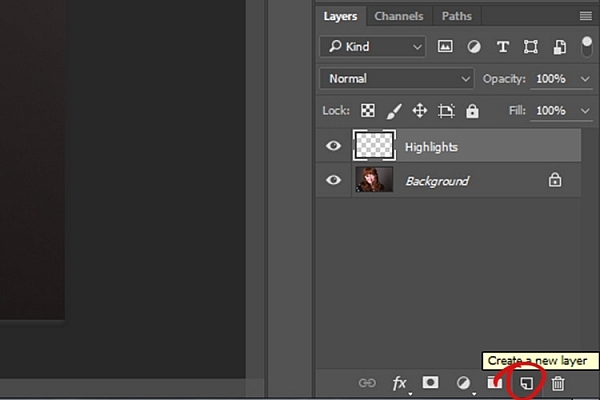
dodging-and-burning-with-grey-layers-newlayer

With this new layer selected, go to Edit>Fill or shift+f5 and choose 50% gray from the menu. Press OK. Your image should now be entirely gray.
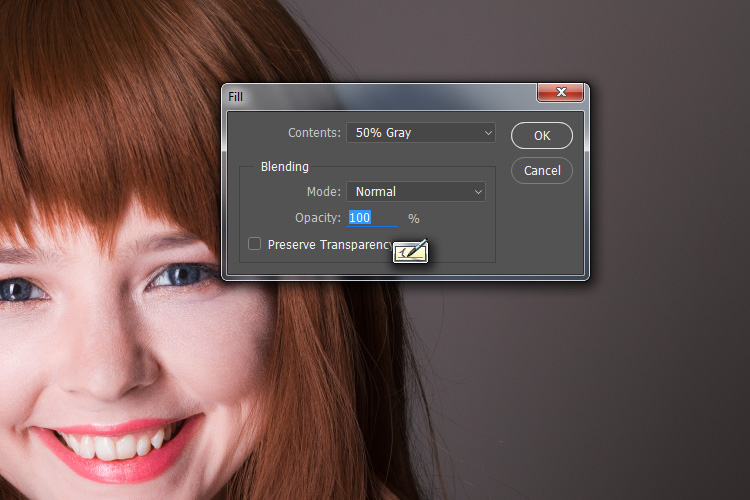
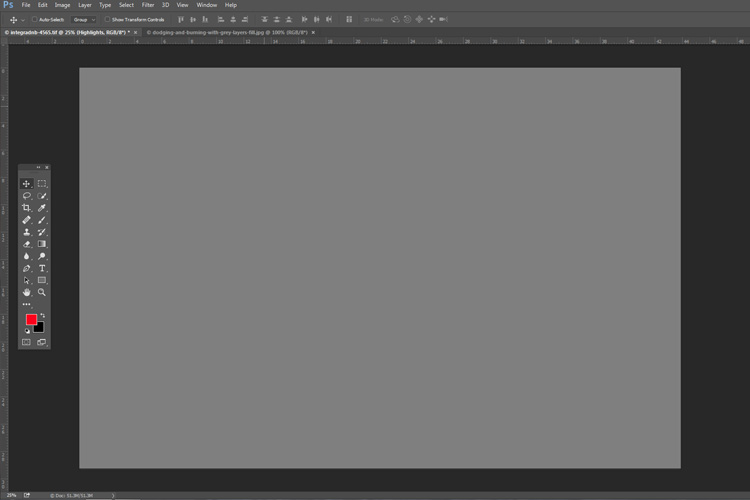
dodging-and-burning-with-grey-layers-fill

dodging-and-burning-with-grey-layers

The next step is to change the blending mode of your gray layer. From the drop down menu in the layers palette, choose Overlay or Soft Light. Either choice is fine, but using Overlay will result in a far more pronounced effect than Soft Light. Experiment with both, see how it works for you, and which you prefer. Once the blending mode is changed, you should be able to see your image again.

dodging-and-burning-with-grey-layers-softlight

Next, create another new layer. Layer>New Layer or ctrl+shift+n and rename it to “Shadows”. Again, fill it with 50% gray. Edit>Fill>50% Gray or shift+f5
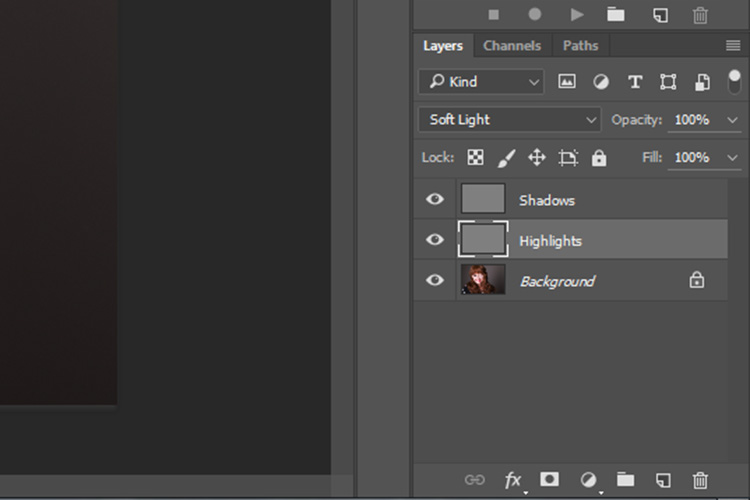
dodging-and-burning-with-grey-layers-layers

Set this layer’s blending mode to the same as the one you chose for your Highlight layer.

That’s the preparation work done. Once you’re used to it, this whole process only takes a few seconds. It’s also possible to set it up as an action, so Photoshop will do it for you at the press of a button.

Dodging

To start, select your Highlight layer and choose the brush tool. Pick a large, soft brush (Hardness number is low and edges are fuzzy). You can change the brush settings by right clicking within your image.
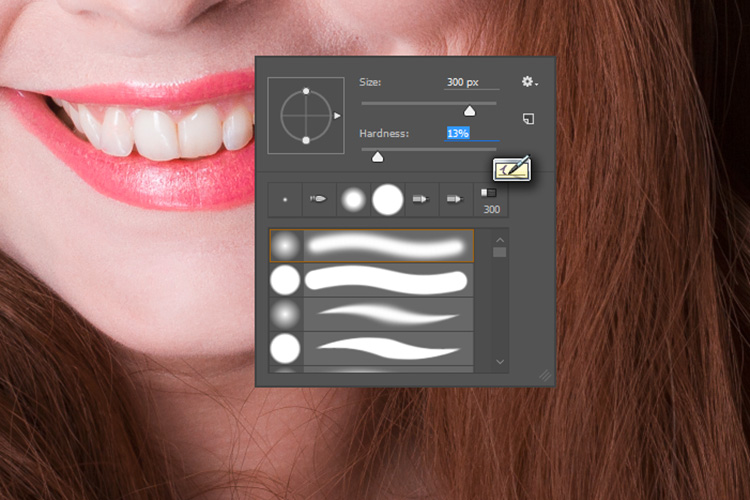
dodging-and-burning-with-grey-layers-brush

With the brush selected, look for the tool settings at the top of your screen. You’re looking for a pair of sliders labeled opacity and flow. Set your brush’s opacity to 15% and the flow to 10% (see below circled in red). You can change them later, but this is a good starting point.
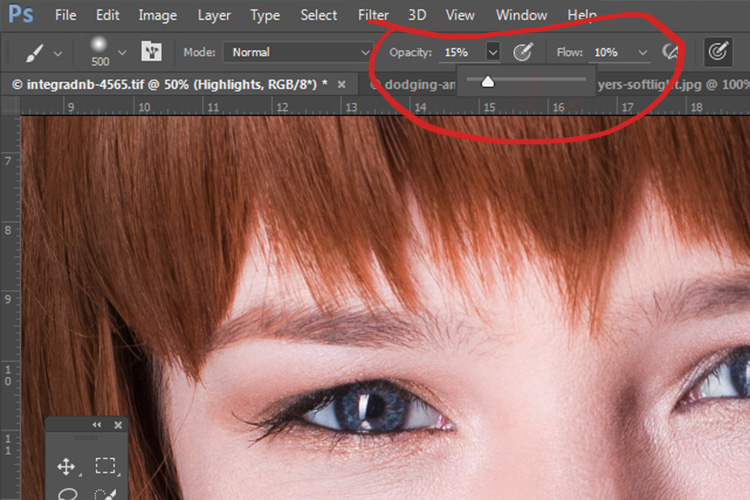
dodging-and-burning-with-grey-layers-brushopacity

Make sure that your brush colors are set to white and black. You can press D (default) on your keyboard to do this. Also, you can press X to swap between them. Knowing these shortcuts will save you an incredible amount of time.

Now you’re ready to dodge.

Assuming you’re working on a portrait, find a highlight area on your subject’s skin that you would like to emphasize. With white set as your foreground color, paint into that area (make sure you are on the Highlight layer not your image). Because the brush’s opacity is so low, you may not notice a difference at first. Just keep brushing into it, and build up strokes until you have the desired effect. Do this for all of your highlight areas.
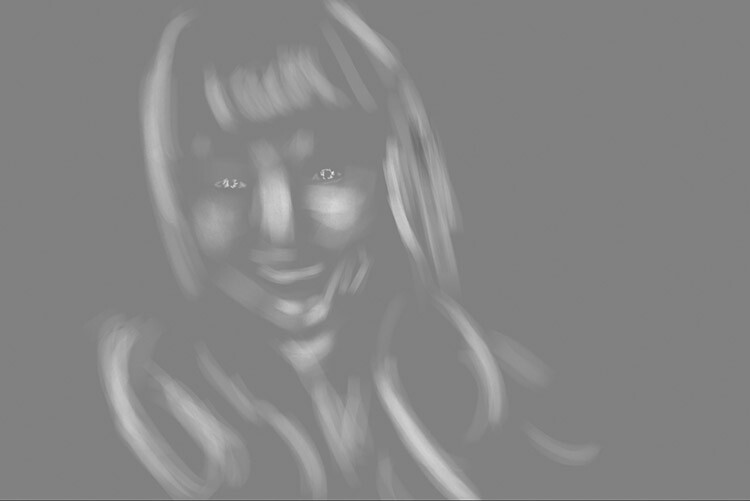
With the blending mode set to normal, your highlight layer may look something like this.

Note: If you decide that you’ve gone too far, just fill the layer with 50% gray again and start over.

Burning

With your highlights done, select your Shadow layer by clicking on it in the layer palette. Select black as your foreground color and paint into the shadows in the same manner you did for your highlights (make sure you are painting on the Shadow layer not your image).
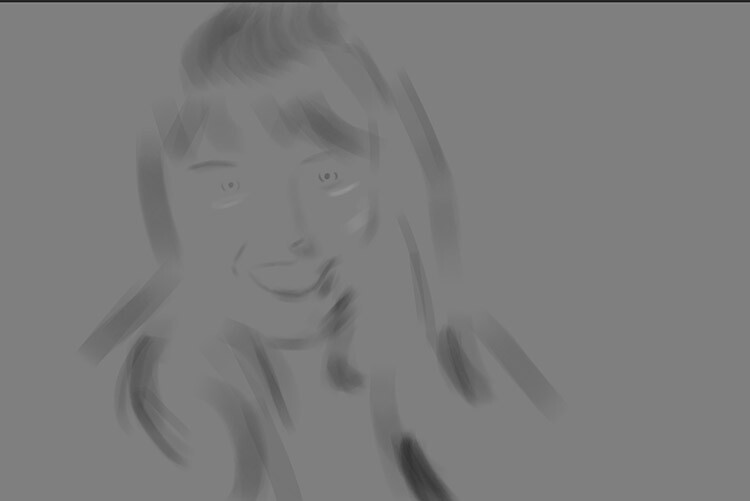
With the blending mode set to normal, your shadow layer may look something like this.
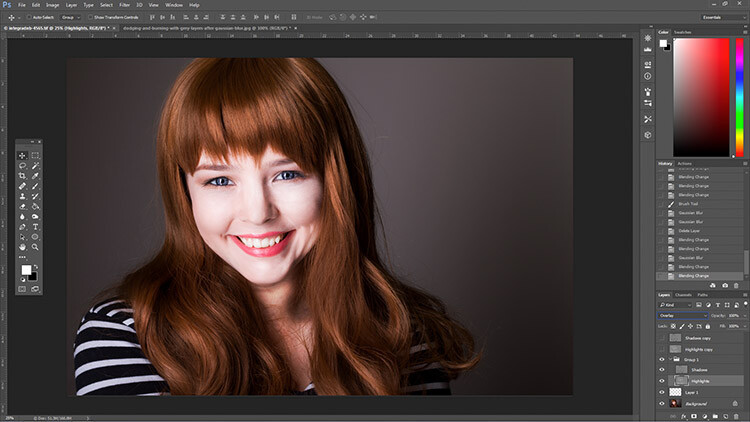
After dodging and burning is complete, you may have something that looks like this.

Add Gaussian Blur

The next step is to smooth out your brush strokes. Select your Highlight layer and select Filter>Blur>Gaussian Blur. Choose an amount between 20 and 40 pixels, and press okay.
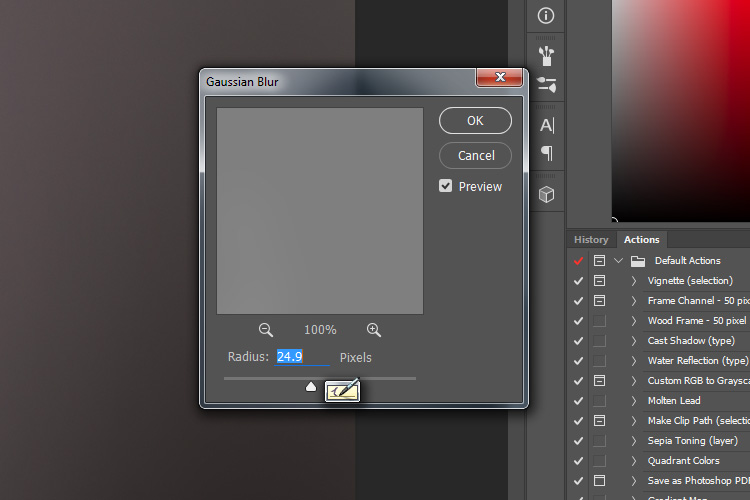
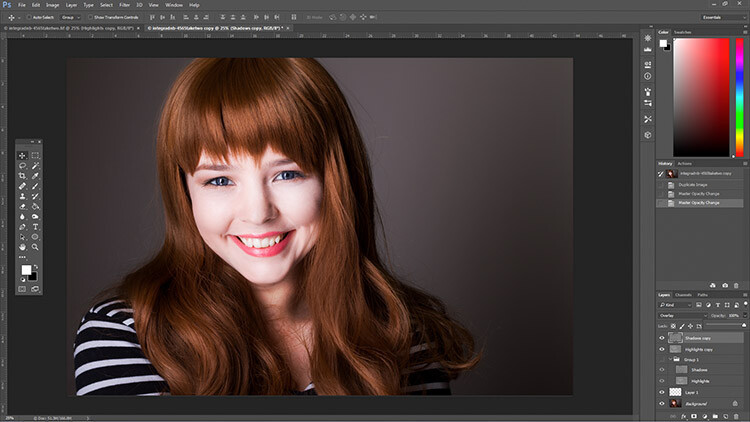
dodging-and-burning-with-grey-layers-gaussian

After the Gaussian Blur filter is applied.

Do the same for your shadow layer.

Final Steps

The last thing to do is is change the opacity of your layers. It may not seem like it, but at this point the effect is probably way too strong.

Select one of your painted layers. Find the opacity slider in the layer palette, and drag it to the left. Watch your image as you move the slider and stop once you’ve reached the desired effect.
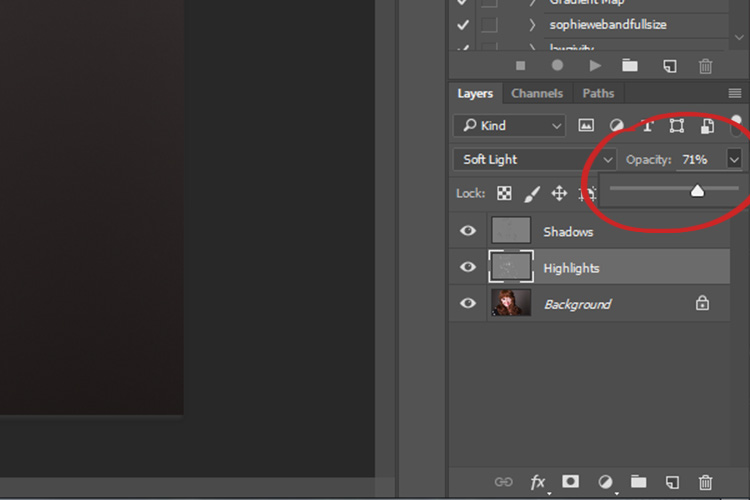
dodging-and-burning-with-grey-layers-layeropacity

Do this for the second layer, and that’s it! You have dodged and burned.
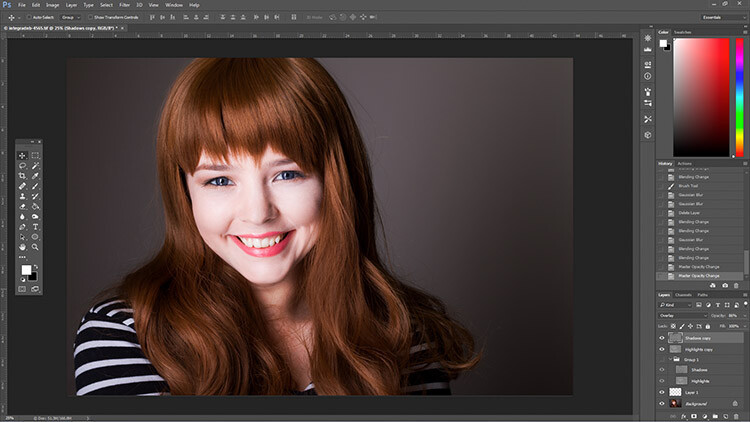
The final image after the opacity of the dodge and burn layers has been reduced.
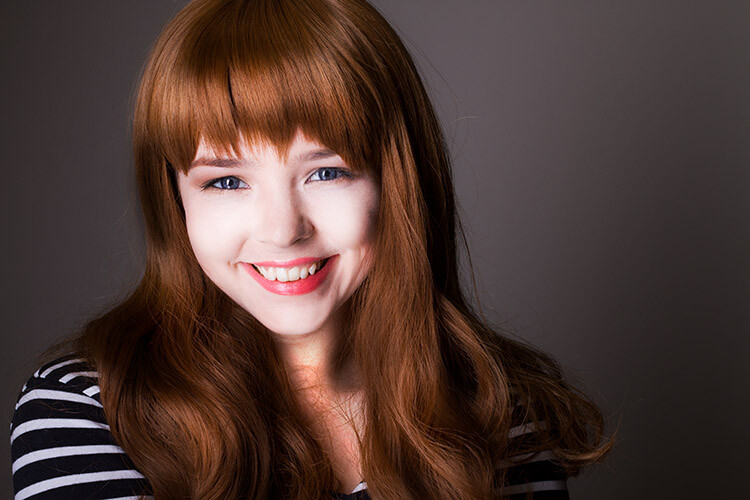
It's really easy to overcook an image with this technique. Use low opacity brush strokes and take your time to avoid having your images look like this one.
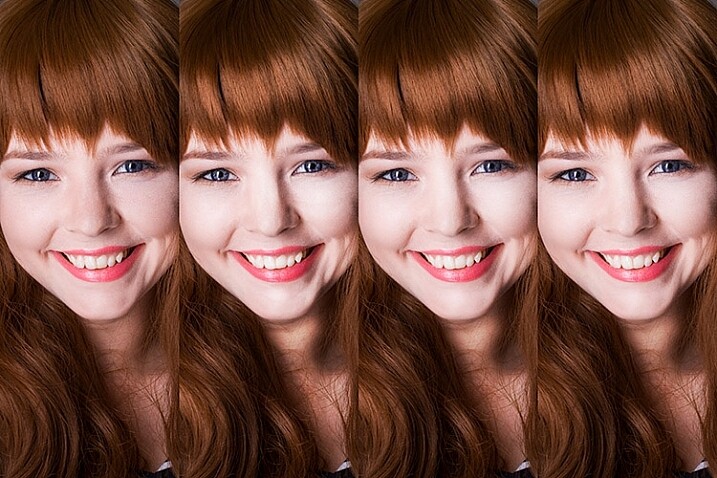
It’s really easy to overcook an image with this technique. Use low opacity brush strokes and take your time to avoid having your images look like this one.

From Left to right: 1) Before 2) Dodge and burn with no blur. 3) Gaussian Blur filter applied. 4) Opacity of dodge and burn layers reduced.

Tips and Notes

  • Like most retouching techniques, subtlety is key. At first, overcooking your images with this technique is inevitable. Keep practicing and you’ll figure it out in no time.
  • Always zoom in to 100% or closer when working on small areas like eyes.
  • A graphics tablet will help with smooth, natural brush strokes. If you can only use a mouse or trackpad, experiment with more liberal use of Gaussian Blur to mask the brush strokes.
  • When painting shadows or highlights, try to match the light in the image. You can paint white (dodge) into your shadows, but this will probably look very strange in the end.
  • Change the brush size often, and appropriately, to the area you are working on. Keyboard shortcuts make this a breeze (use [ and ] to increase and decrease brush size).
  • Experiment with different brushes until you find one that suits your taste.
Before dodging and burning
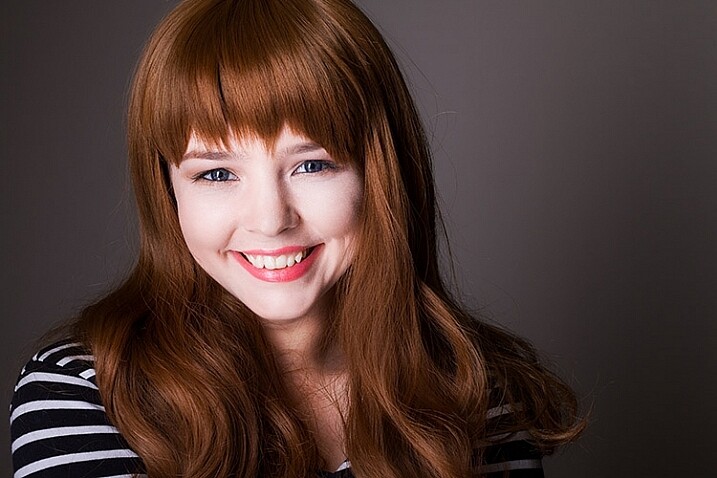
Before dodging and burning

After dodging and burning

More Tips and Notes

  • It’s all too easy to concentrate on the face, but try not to forget other parts of the image like your subject’s hair, clothes, and the rest of their body.
  • Both dodging and burning can be done on a single gray layer. Feel free to do this, but the two layer technique grants you even more control, without much extra effort.
  • Consider setting up a keyboard shortcut for Gaussian Blur. This saves a lot of time.
  • You can create as many sets of gray layers as you want. For example, if you want to use very small brushes to dodge and burn the eyes, you might choose to do this on a separate set of layers in order to use less blur at the end. If you use a lot of layers sets like this, consider using layer groups to keep them organized and don’t forget to name your layers.
  • If the shadows and highlights you are working with have very hard edges, try using a harder brush and a lower amount of Gaussian Blur.
  • Consider watching and trying some digital painting and sketching tutorials for Photoshop. These can really help to increase your brush control and lend to more natural results.

googletag.cmd.push(function() {
tablet_slots.push( googletag.defineSlot( “/1005424/_dPSv4_tab-all-article-bottom_(300×250)”, [300, 250], “pb-ad-78623” ).addService( googletag.pubads() ) ); } );

googletag.cmd.push(function() {
mobile_slots.push( googletag.defineSlot( “/1005424/_dPSv4_mob-all-article-bottom_(300×250)”, [300, 250], “pb-ad-78158” ).addService( googletag.pubads() ) ); } );

The post How to Enhance Portraits Using Gray Layers to Dodge and Burn in Photoshop by John McIntire appeared first on Digital Photography School.
Digital Photography School

 
Comments Off on How to Enhance Portraits Using Gray Layers to Dodge and Burn in Photoshop

Posted in Photography


5 Tips for Taking Better Portraits in Nature

23 Jul

I can’t get enough of being outside in nature.

I often go out on trail runs with my friends, and we spend most of the run grinning from ear to ear, exclaiming how lucky we are to be here on this earth, and how beautiful every single thing is. I love to go camping with my family, where we set up hammocks in the trees, listen to the birds singing, and the leafy wind sounds as we gaze up into the sky.

900

So it makes perfect sense to me to take photos of people in the great outdoors. Nature elevates the whole photo to something much more interesting than a simple studio backdrop. People are my favorite subjects, and nature is my favorite setting, so I’d love to share a few ideas to help your nature portraits be even more exciting.

1 – Nature’s Colors Can Complement Perfectly

300

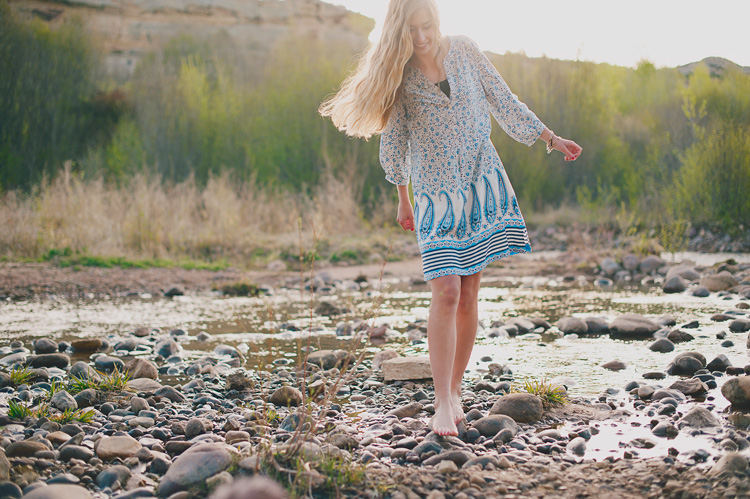
Sometimes you may notice that your subject’s hair, eyes, lips, or clothing matches some floral blooms, leaves, sky, or rocks perfectly. Photographing your subject with colors in mind can bring out some of those things beautifully, and make a gorgeous photo. Sometimes the colors may match exactly, or they may be opposite on the color wheel, and make your subject just pop.

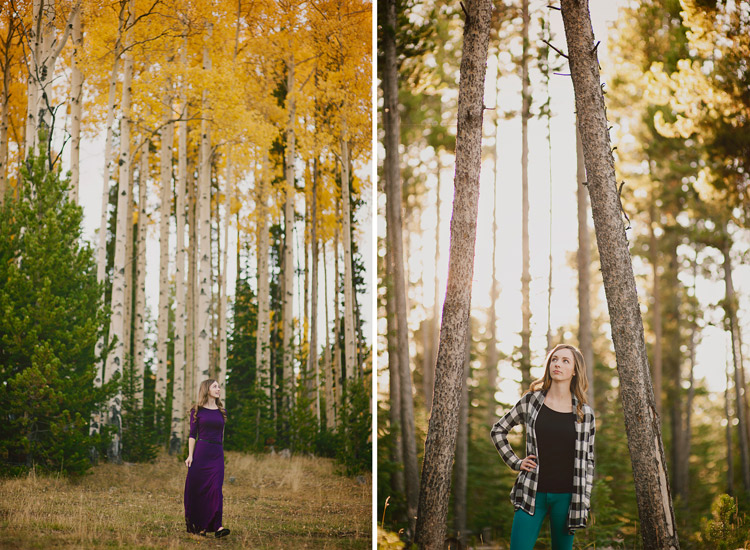
For example, if your subject is wearing purple, keep an eye out for yellow leaves. If you are doing your photographs in a place with lots of green, pops of red can really stand out. If your subject has startling blue eyes, use water or the sky to bring out that blue even more. Start paying attention to the colors in your photos, along with composition, light, etc., and your photos will have a whole new dimension to them.

700

2 – Focus on Nature and Let the People Blur into the Background

600

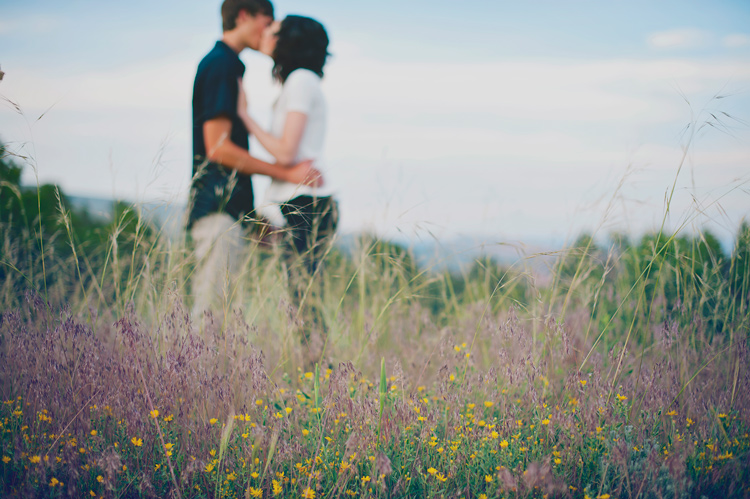
For a new perspective, try focusing your camera on nature in the foreground, and letting the people in the background be out of focus. This is especially effective for photos that feel like you’re getting a glimpse of something private, like a kiss, or a mother with her newborn baby.

You can do this by setting your aperture wide (a low number, for example, between f/1.8 and f/2.8), setting your camera to let you choose the focus point, then making sure your focus point is on the flowers, leaves, or rocks in the foreground. Make sure your subjects are standing far enough behind your foreground, so they will definitely be out of focus. You want it to look like it was done purposely, not like you accidentally missed the focus on your subjects.

3 – Be Playful and Interact With Nature

400

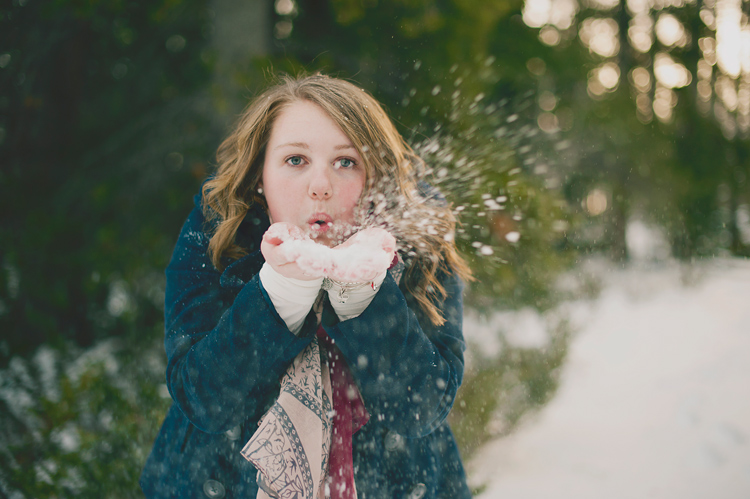
Nature is full of props to make your photos even more fun. You can use logs, rocks, and branches to perch on. You can use leaves or snow for your subject to blow on, or throw, in the air. You can have them walk through a stream, or throw rocks from the bank. Use a flower to tuck in the hair, or to smell. The ideas are endless, and if your subjects are really outdoorsy and they interact with nature regularly, make sure to capture that during your photo session with them.

Be kind to nature around you, though, and try to leave everything the same or better than you found it. Remember that if everyone broke branches, picked a bouquet of wildflowers, or stomped on untouched fragile foliage, there would be nothing left for any of us to enjoy. Tread lightly, pick up any trash, and don’t leave a trace.

200

4 – Dress Mother Nature up a Little Bit

800

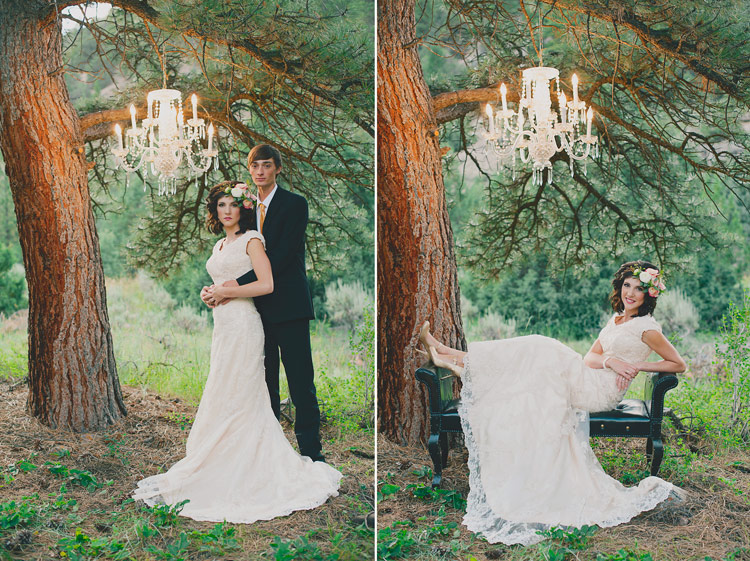
You can create a whimsical, unexpected photo, with a few unlikely props. Carefully hanging a chandelier from a tree, or a bench or couch in a field, can be a lot of fun. Try props like a retro typewriter in the middle of a forest, or balloons at the beach. It’s hard to look at a photo with something so playful and fanciful, without smiling.

5 – Make Nature the Star of the Show

100

I love images of beautiful scenes in nature, but I love a photo of a person IN a beautiful scene in nature even more. It shows scale, and adds so much interest to the photo. Your human in the photo may almost be an afterthought, maybe even almost blending in to the scene.

Look for beautiful scenes that would make pretty photos alone, then add your person into the shot. These types of photos work perfectly to print up gigantic and hang up on the wall. Close up photos are fantastic, but sometimes pulling way back, and getting more scenery than person in a photo, is the perfect thing to do.

1000

Summary

I hope these tips give you some ideas to get out and take some portraits in nature.

How have you used nature to enhance your portraits? I’d love to see your nature portrait photos in the comments if you’d like to share.

500

googletag.cmd.push(function() {
tablet_slots.push( googletag.defineSlot( “/1005424/_dPSv4_tab-all-article-bottom_(300×250)”, [300, 250], “pb-ad-78623” ).addService( googletag.pubads() ) ); } );

googletag.cmd.push(function() {
mobile_slots.push( googletag.defineSlot( “/1005424/_dPSv4_mob-all-article-bottom_(300×250)”, [300, 250], “pb-ad-78158” ).addService( googletag.pubads() ) ); } );

The post 5 Tips for Taking Better Portraits in Nature by Melinda Smith appeared first on Digital Photography School.

Digital Photography School

 
Comments Off on 5 Tips for Taking Better Portraits in Nature

Posted in Photography


DEAL: Save 71% on our Complete Portraits Pack of eBooks

08 Jul

July is here, and do you know what that means?

It’s time for our dPS Summer Sale where for the next 7 days we’re going to be sharing 7 amazing deals on training resources for photographers!

While it may not be summer for all of us right now, we can guarantee the 7 deals we have lined up for you over the next 7 days are HOT.

Deal #1: 71% Off The Complete Portraits Pack

Photography deal portraits pack

If you want to transform your dull and lifeless portraits into works of art… whether you’re a beginner, enthusiast, or pro – this deals for you.

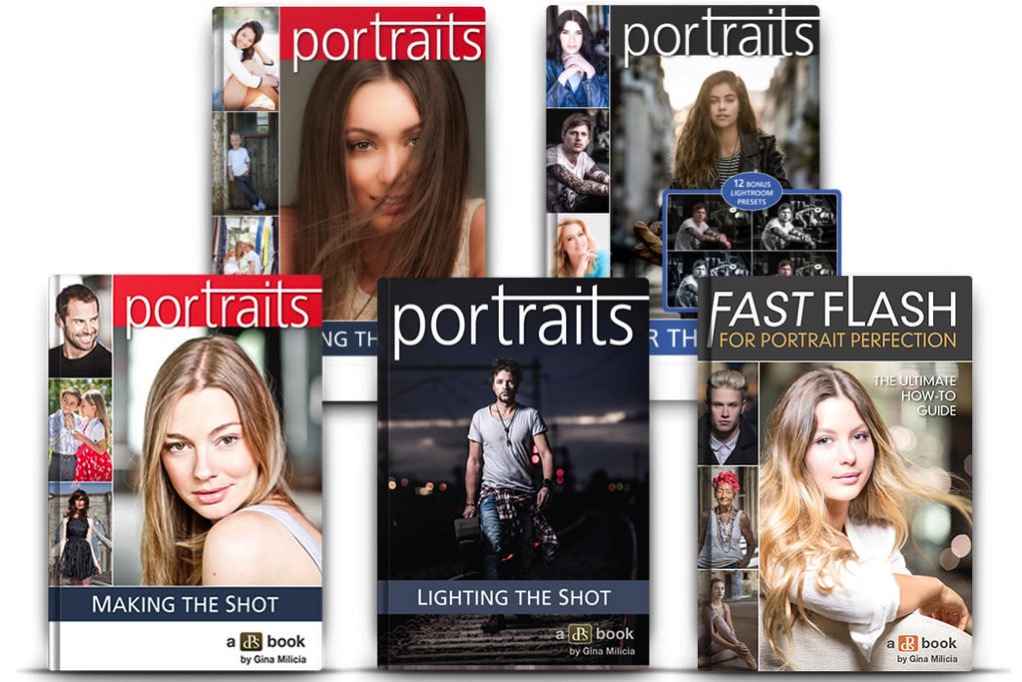
dSP favourite and world class photographer, Gina Milicia shares everything and more about portrait photography in 5 in-depth ebooks.

Get this ultra comprehensive Portraits pack for $ 29.

For just $ 29 (a staggering 71% off the regular price) you’ll learn how to take portraits with soul.

Here’s what you’ll get from one of the best in the biz with these exclusive dSP guides:

  • Portraits: Making the Shot – 84 pages of practical tips for bringing your portraits to life
  • Portraits: Lighting the Shot – 130 pages of the secrets to beautiful portrait lighting
  • Portraits: Striking the Pose – 119 pages and your go-to guide of natural posing positions
  • Portraits: After the Shot – 139 pages on master portrait post production and workflow
  • Fast FLASH For Portrait Perfection – 125 pages of Flash techniques & lighting set ups

These ebooks regularly sell for $ 19.99 each (dPS readers rave about them!) but when you buy today you’ll only pay $ 7 per ebook!

But here’s the deal – The Complete Portraits Pack only lasts for 24 hours.

So if you’ve ever been disappointed that your portraits didn’t capture the true spirit of your subject… or lacks the WOW factor… don’t miss out on this incredible deal.

Get your 5 ebooks today – they’re crammed with practical, easy to follow, step-by-step instructions, tips and tricks of portrait photography.

Not only is Gina Milicia one of the best photographers in the business – she’s one of the best teachers!

Subscribe to Get All 7 Deals the Moment they are Released

If you’re looking for more photography training deals you can subscribe over on our Summer Sale page here to get notified the moment all of the next 6 days of deals go live. There are some great ones still to come!

googletag.cmd.push(function() {
tablet_slots.push( googletag.defineSlot( “/1005424/_dPSv4_tab-all-article-bottom_(300×250)”, [300, 250], “pb-ad-78623” ).addService( googletag.pubads() ) ); } );

googletag.cmd.push(function() {
mobile_slots.push( googletag.defineSlot( “/1005424/_dPSv4_mob-all-article-bottom_(300×250)”, [300, 250], “pb-ad-78158” ).addService( googletag.pubads() ) ); } );

The post DEAL: Save 71% on our Complete Portraits Pack of eBooks by Darren Rowse appeared first on Digital Photography School.

Digital Photography School

 
Comments Off on DEAL: Save 71% on our Complete Portraits Pack of eBooks

Posted in Photography


6 Ways of Using Reflector to Take Better Portraits

03 Jul

I’ve been making my living as a photographer for over 20 years, and have accumulated thousands of dollars of gear over time. I have the latest Canon SLRs, a full complement of lenses, strobes, light stands, gels, filters, soft boxes, tripods, and even some video and audio gear. But the one thing that often makes the biggest difference in the quality of my portraits is a simple $ 20 reflector. I never leave home without it and neither should you.

When shooting outdoor portraits, the first thing many photographers think about is the background, but the pros consider the quality of the light first and foremost. They know, for example, that a portrait with nasty overhead lighting is not going to work, no matter how cool the background.

Photo12

A reflector can help you salvage bad light, and turn okay light into something magical. You can use your reflector from below to fill in shadows, or from above to block distracting light. You can bounce the sun from the silver reflector to create a main light, or you can use a reflector with a black side to create deeper shadows. You can even sit on your reflector to keep your pants clean when shooting outside, or pop it open dramatically to dazzle young children.

Most of the photos in this article were shot with a 5-in-1 reflector you can buy for less than $ 20. 5-in-1 refers to the fact that the reflector and cover can combine to give you five different options: white, silver, gold, and black sides, as well as a diffuser.

Here are 6 tips to help you use this versatile tool, a reflector, to transform your photos.

1. Using a Reflector for Fill Light

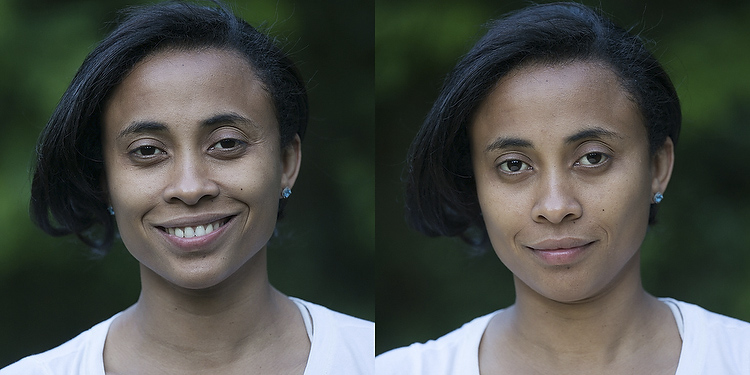
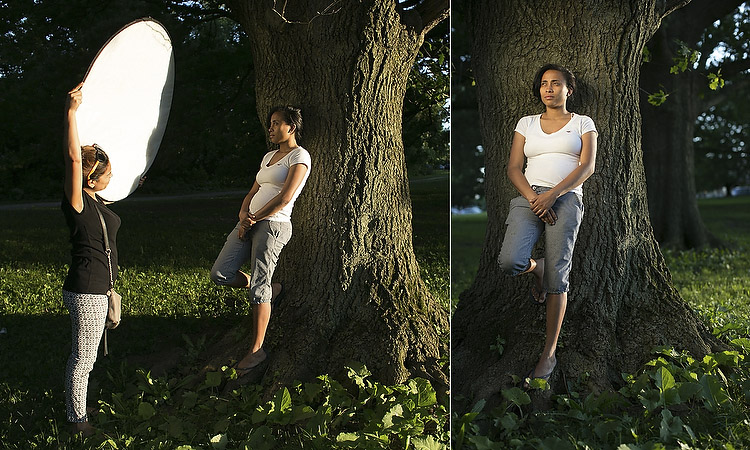
The most traditional use of the reflector is to simply reflect light into the shadows. I took my wife Karen out into our local park to demonstrate this.

Photo1

In the photo on the left (above), she is photographed in nice soft light, but there are still pretty deep shadows under her eyes and chin. In the photo on the right, she is holding a reflector at her waist. The shadows on her face are noticeably lighter and there is a subtle catch-light (reflection of the reflector) in her eyes. If she were an older person with more textured skin, the contrast would be even more dramatic.

Photo2

Of course, you may not always want to fill in the shadows in this way, but if you are trying to flatter someone it almost always helps. You don’t even need an official photo reflector. Anything that reflects light will work. In a pinch I’ve used everything from old newspapers to a nearby person wearing a white shirt.

2. Using a Reflector as the Main Light Source

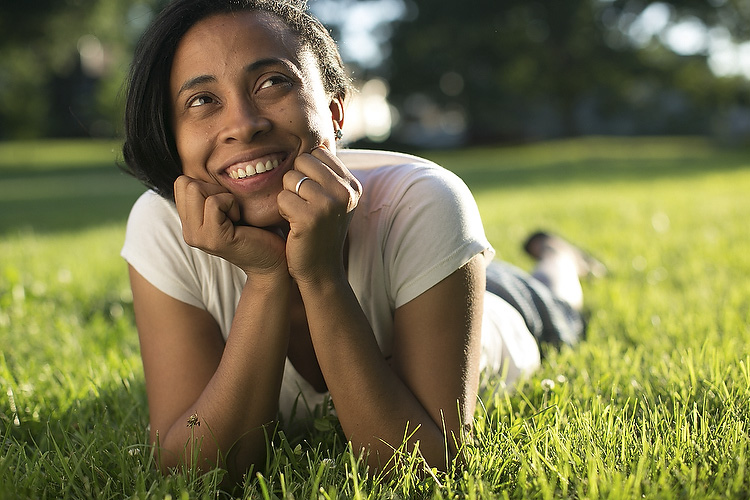
This is one of my go-to reflector moves, and an easy way to wow your friends and family. You place your subject with the light hitting them from behind, then use a reflector to bounce the light back into their face. You will get nice soft light on their face, with a dramatic rim light on the back of the subject’s head. The only trick is positioning yourself so the light doesn’t go straight into your lens and create lens flare (unless you like that look, of course).

Photo3

In the photo above the is sun hitting the left side of her face and arm. The light from a reflector is bouncing back some of the sun to light up her face.

You may also notice the shallow depth of field in this photo. If you are lighting with a reflector, you can jack up your shutter speed as much as you like to allow for a wide aperture (this photo was shot at 1/1250th of a second at f/2.0, with a 50mm lens). If you were using flash to create this same effect, you would have to lower your shutter speed (to 1/250th or whatever matches your camera’s maximum) to sync with the flash, requiring a larger aperture and greater depth of field (killing the whole look).

Yes, yes, some of you are no doubt thinking, “What about high speed sync?!” Well, yes, that could give you the same effect if you had the right equipment (and know how to do that). Or, you know, you could just use an old newspaper.

Photo4

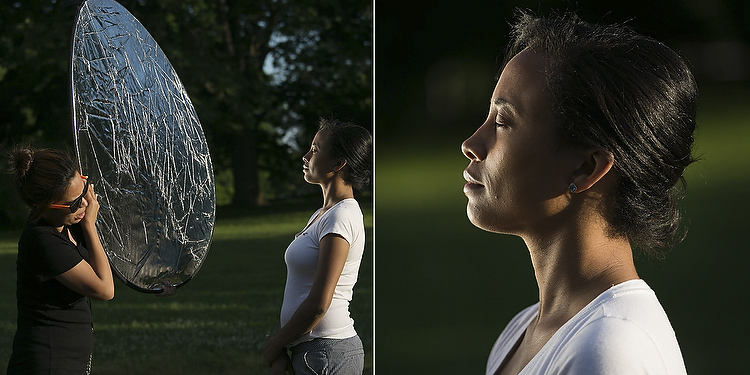
In the next example above, we positioned Karen against a tree and had her cousin Claudia reflect a spot of sunlight on her from about 10 feet away. At this distance, the light from the reflector looks more like it is coming from a grid spot or snoot (hard light) – in other words, it’s a focused and dramatic beam (notice the fall-off of light on her legs). It’s a cool look that you can recreate with a reflector, a few feet of aluminum foil, or your bathroom mirror. Your friends will be wowed, and ask what fancy gear you used for the shot (and your family will ask what happened to the bathroom mirror).

Using a slight variation of this technique, we moved the reflector slightly behind the subject (relative to the camera) to created a dramatic rim light on the face in a profile shot (see below).

Photo4a

3. Using a Reflector to Block Light

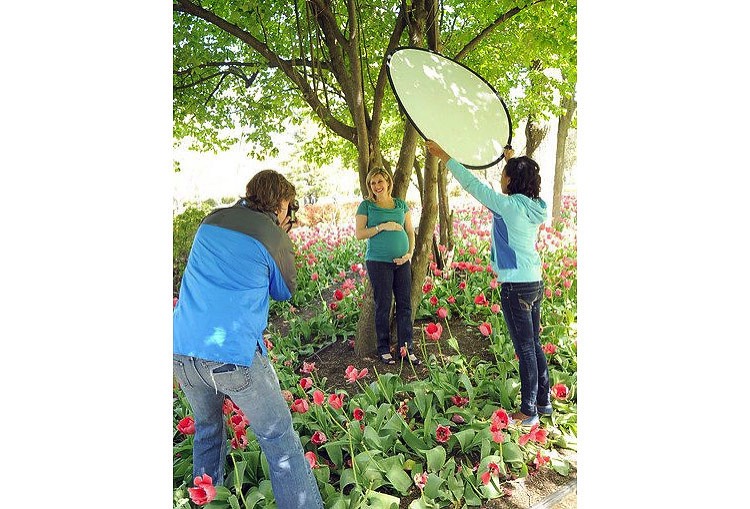
Sometimes you’ll find yourself in some beautiful shady light under a tree, except for that pesky sunbeam that finds its way through the leaves to light up your subject’s left ear. When this happens, turn your reflector into a light blocker (sometimes called a flag or gobo).

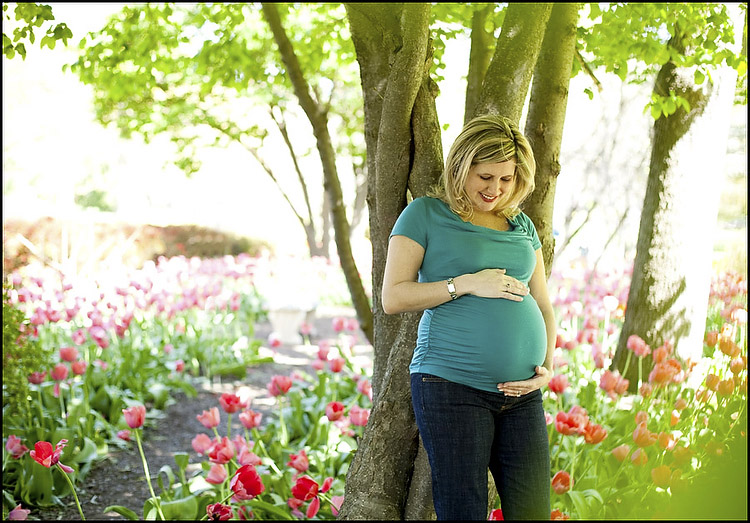
A few years ago, I was doing a maternity portrait in a local park, when a newspaper photographer snapped my picture using just this technique. If you look at the reflector, you can see the bright spots of sunlight that it’s blocking (imagine how those spots would have ruined the final image if we didn’t block them).

Photo5

Photo6

4. Using a Black Reflector to Create More Dramatic Shadows

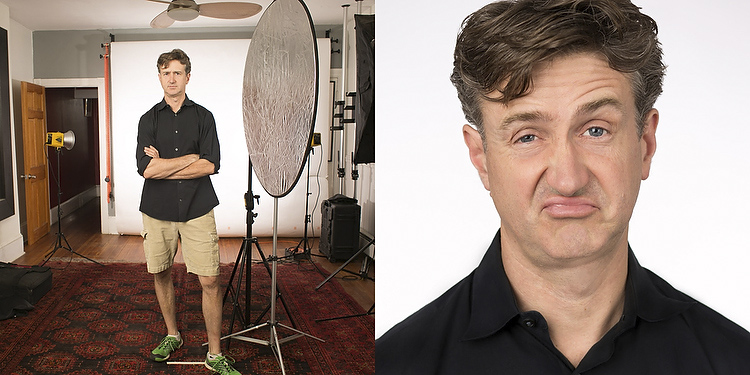
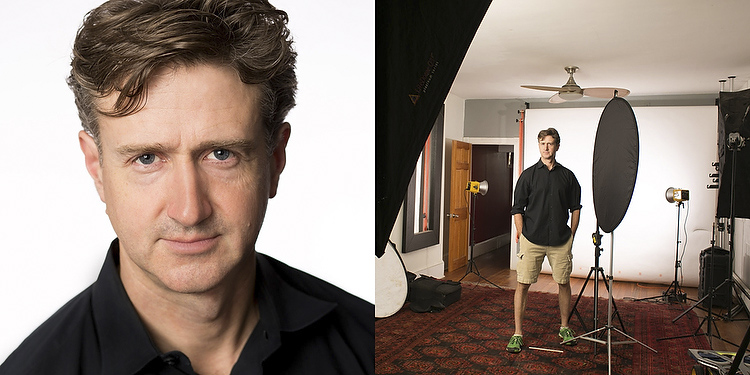
Sometimes you actually want to deepen the shadows. I use this technique all the time in my headshot studio. Below is a photo of me with a white background. In one shot, I have a silver reflector opposite the main light, sending light back towards my left cheek. In the other, the reflector has a black cover on it, gobbling up reflected light, leaving a dark shadow on the cheek.

Photo7

Photo8

Except for the small change of literally flipping the reflector from one side to the other, the lighting setup is identical, but as you can see the difference is pretty dramatic. (For you studio lighting enthusiasts out there, my key light here is a large soft box, and there are two bare heads pointing at the background to make sure it is nice and bright white).

This is the same technique used in the famous Steve Jobs portrait where he has his hand on his chin. In addition to creating a little drama, you can also use this technique to give someone a photographic face-lift by trimming pounds from the dark side of their face and under their chin.

5. Who Holds the Reflector?

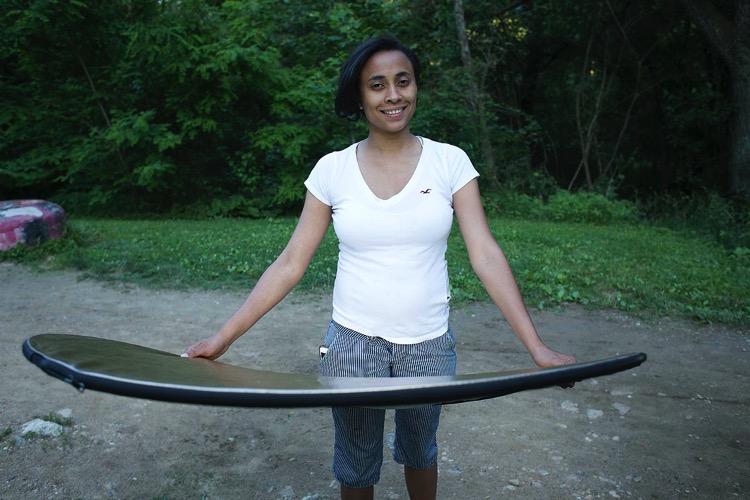
You may be saying to yourself, “But, I don’t have an assistant! Who’s going to hold the reflector for me?”. I usually don’t have an assistant either, but there is usually someone nearby who is more than happy to help, be it a family member, passerby, intern, wedding guest, etc. Sometimes you can even have the subject of the photo hold the reflector themselves (as in the photo of my wife holding the reflector at her waist in the photo above). Of course if you’re in the studio, or outside on a day without too much wind, you can just pop your reflector onto a light stand (like in the studio shots of me above).

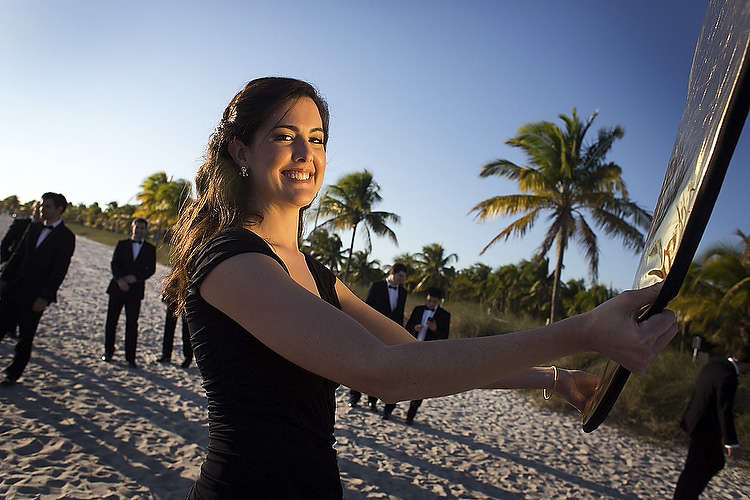
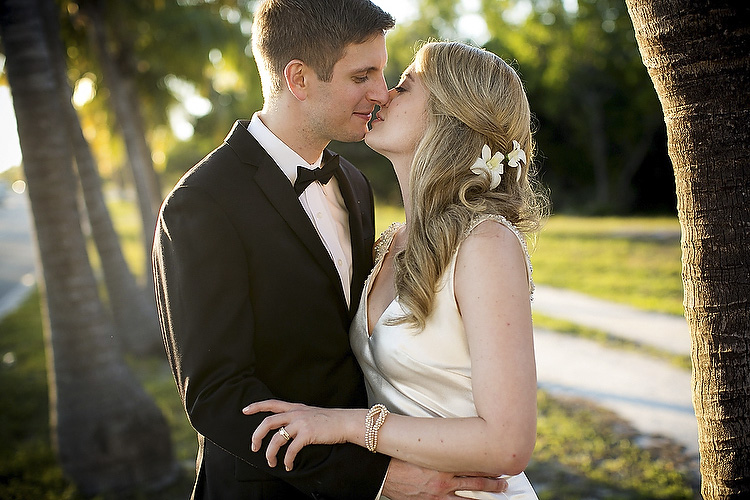
In the photo below, I was shooting wedding portraits on a beach in the Florida Keys. My reflector assistant that day was one of the bridesmaids, who truly enjoyed helping her friends out with their portraits.

Photo9

Photo10

6. Reflectors in the Environment

Once you get the hang of reflectors, you’ll probably start noticing reflected light everywhere. Ever see a white building getting blasted by the sun? Well that’s nothing but a giant reflector! Depending on what’s around it, you may have found yourself a giant studio, with no rental fee.

Mind you, anything that reflects enough light can work as a reflector. A brick building, large truck, flock of seagulls flying by at just the right moment…

Final Notes

Although they may not be as sexy as strobe kits, reflectors can often yield similar, or superior results for your portraits, and are cheaper and easier to use. I will leave you with a few more assignment photos, shot using nothing more than a reflector.

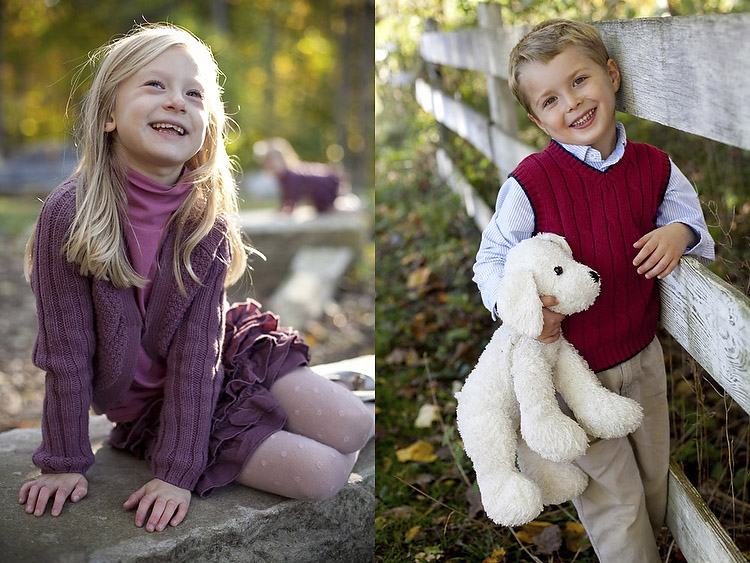
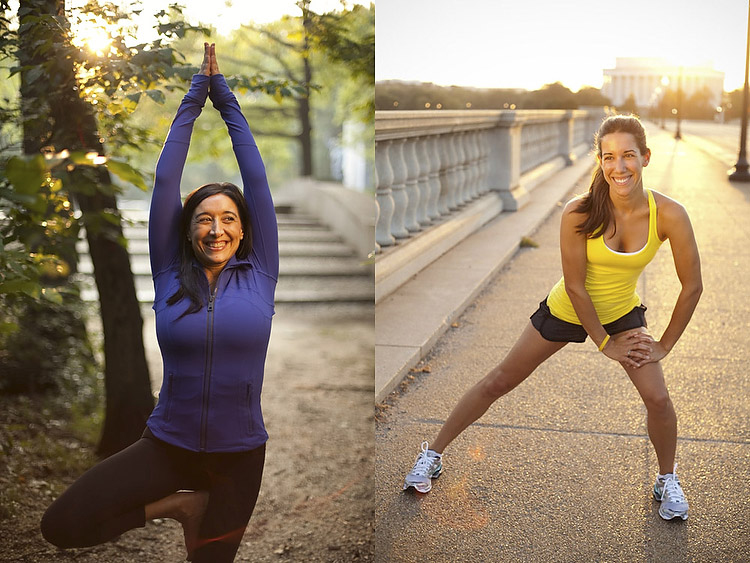
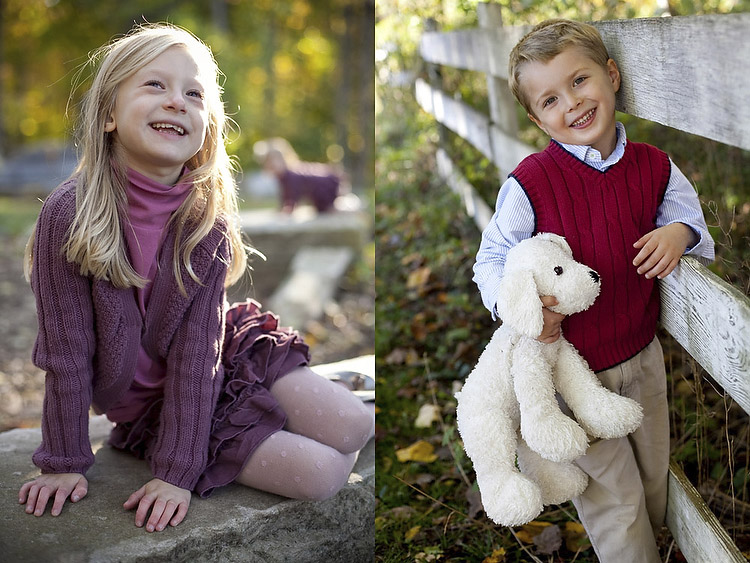
In the child portraits below, note that there is light behind the kids in both cases, but there is still beautiful light on their faces. Same goes for the athlete portraits.

Photo11

Photo12

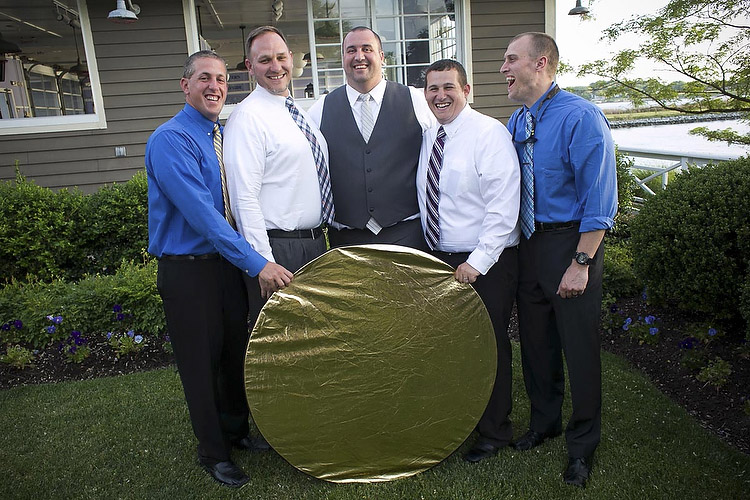
As a final image, I leave you with a group of wedding guests who were so enamoured of my reflector that they wanted a picture with it. Hopefully you will soon have similar feelings towards your own reflector!

Photo13

Do you have any additional reflector tips to add? Please do so in the comments below.

googletag.cmd.push(function() {
tablet_slots.push( googletag.defineSlot( “/1005424/_dPSv4_tab-all-article-bottom_(300×250)”, [300, 250], “pb-ad-78623” ).addService( googletag.pubads() ) ); } );

googletag.cmd.push(function() {
mobile_slots.push( googletag.defineSlot( “/1005424/_dPSv4_mob-all-article-bottom_(300×250)”, [300, 250], “pb-ad-78158” ).addService( googletag.pubads() ) ); } );

The post 6 Ways of Using Reflector to Take Better Portraits by Dennis Drenner appeared first on Digital Photography School.

Digital Photography School

 
Comments Off on 6 Ways of Using Reflector to Take Better Portraits

Posted in Photography


Please Touch the Art: Tactile 3D Portraits Let the Blind See Themselves

11 Jun

[ By SA Rogers in Art & Sculpture & Craft. ]

andrew myers screw art 13

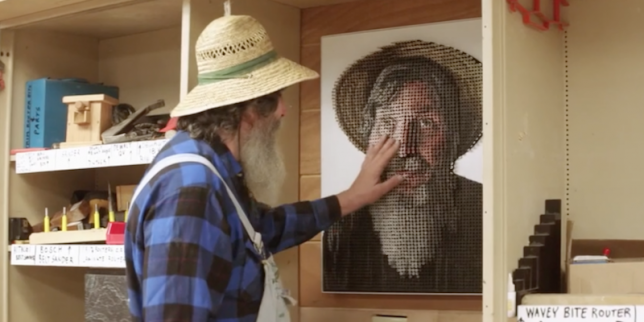
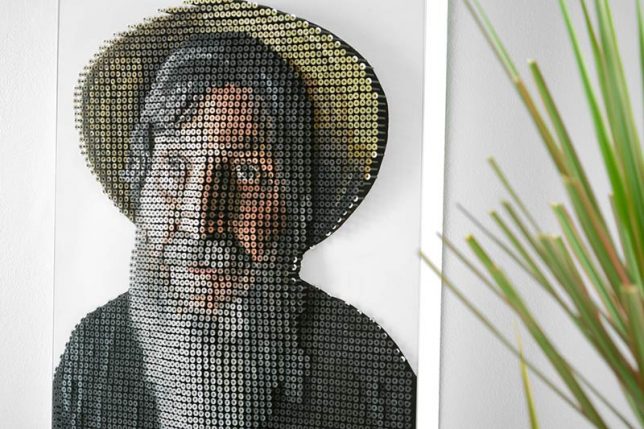
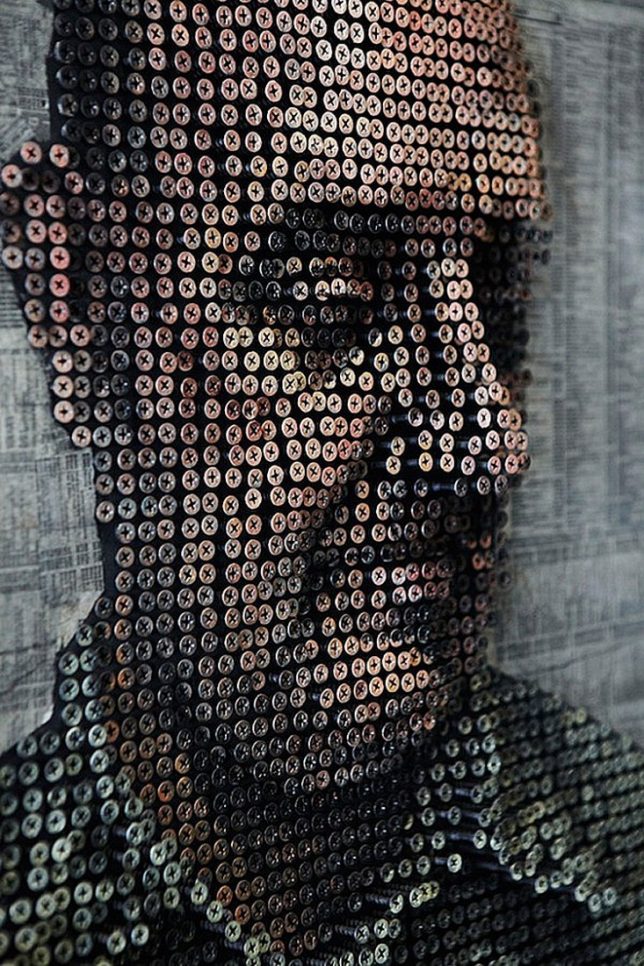
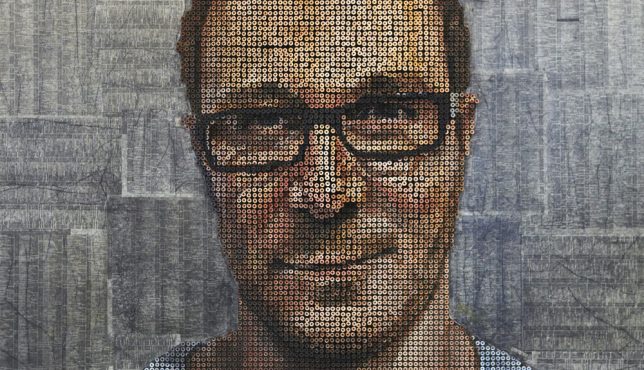
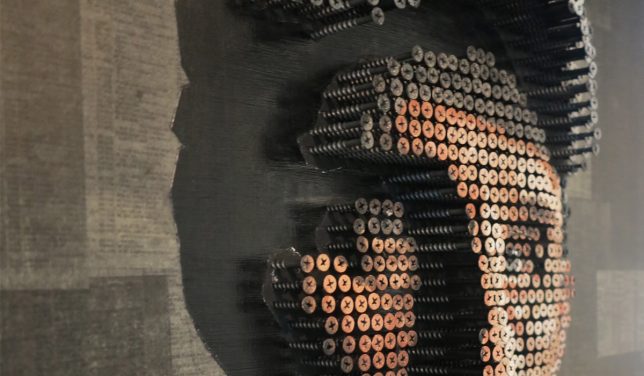
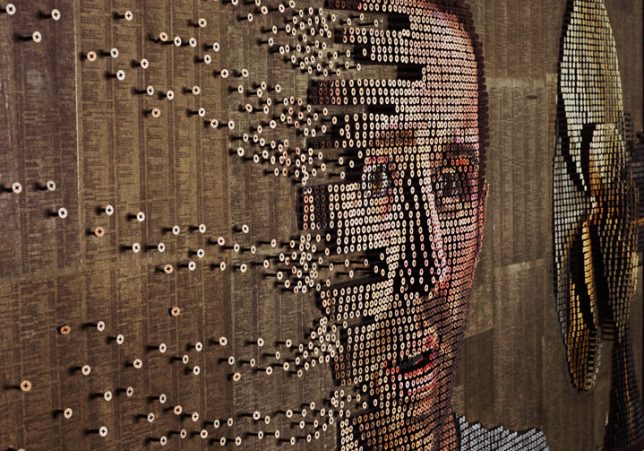
“My nose isn’t that big!” protests portrait subject George Wurtzel as he runs his hands over his own image, rendered in paint on thousands of screws raised from a wooden board in a relief pattern. He might not be able to see the colors, or the play of light and shadow that gives the portrait much of its nuance and realism, but he can still experience it in a way that wouldn’t be possible if it were merely painted onto a canvas. For artist Andrew Myers, who specializes in these unusual sculptural paintings, this moment marks a concept that has come full circle since he first watched another blind man eagerly explore his art with his fingertips, six years ago.

andrew myers screw art 12

Myers doesn’t just allow people viewing his artwork to touch it, he actively encourages it, noting that it’s an important part of the experience of taking it in. Realizing that this could potentially allow a blind person to see their own portrait, he set out to create a custom work with artisan and teacher George Wurtzel as his subject. George teaches at a 300-acre summer camp for the visually impaired in California’s Redwood Forest, and has also been tasked with renovating a barn into a new Tactile Art Center full of accessible art, where blind artisans can both sell their own work and feel the 3D works of others.

andrew myers screw art 1

andrew myers screw art 5

andrew myers screw art 7

andrew myers screw art 8

“We snuck into George’s future gallery and  hung the portrait for him to discover,” says Andrew. “As he experienced this for the first time (and between bursts of laughter) he kept repeating the phrase, ‘mind boggling.’ Not every piece of art needs to or should be touched… but perhaps it’s time we took a look at how pervasive and mandatory our ‘no touching’ rules really are – it might help everyone see artwork a little differently.”

andrew myers screw art 15

andrew myers screw art 2

andrew myers screw art 3

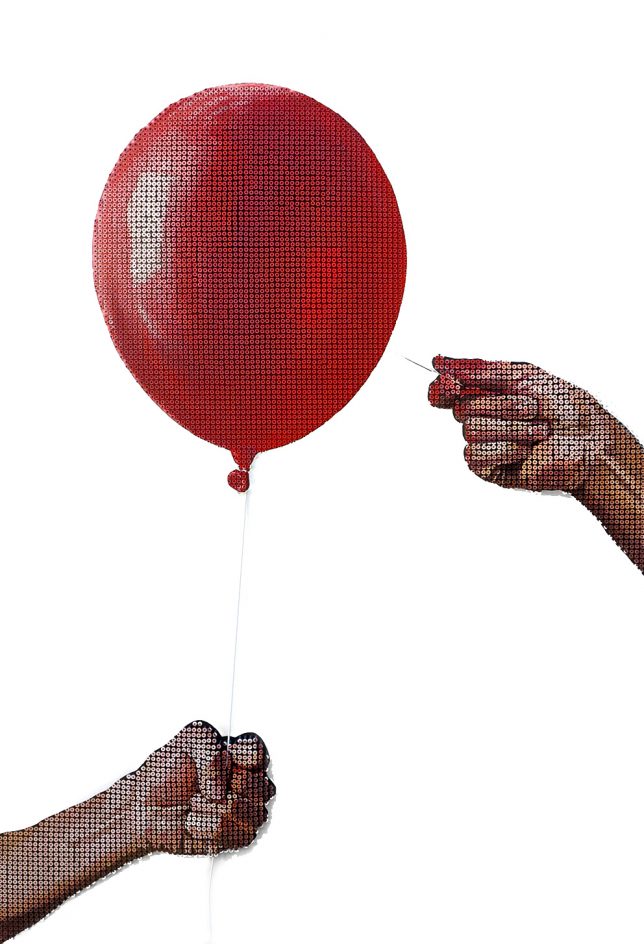
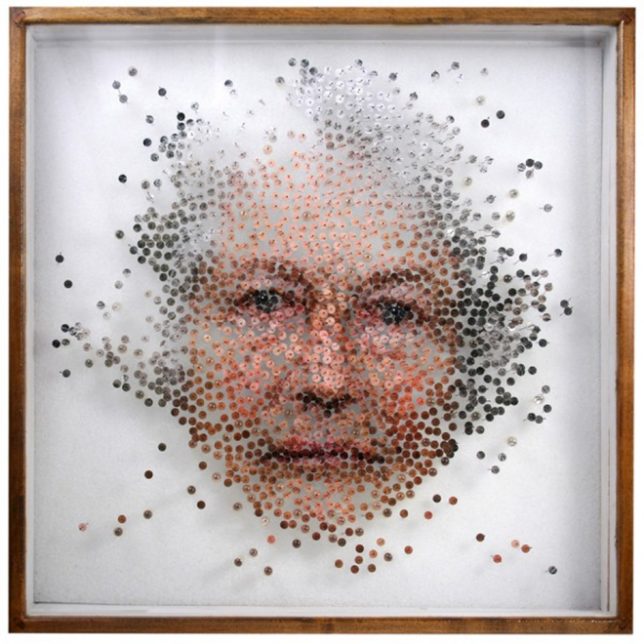
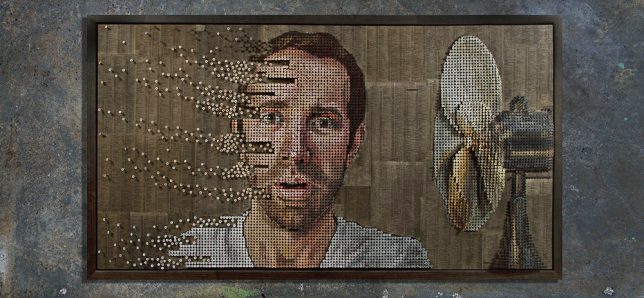
While Andrew’s portrait of George is comprised of about 4,000 screws, other works require upwards of 20,000. One portrait, ‘Fading Thoughts,’ takes his work a step further by infusing a scene with a sense of motion, with screws seemingly being blown off the canvas.

Share on Facebook


[ By SA Rogers in Art & Sculpture & Craft. ]

[ WebUrbanist | Archives | Galleries | Privacy | TOS ]


WebUrbanist

 
Comments Off on Please Touch the Art: Tactile 3D Portraits Let the Blind See Themselves

Posted in Creativity


How to Create Catch Lights in Your Natural Light Portraits

19 May

What is a catch light, and why you should have it in your portraits?

A very popular technique in portraiture – a catch light is a spark of light in your subject’s eyes. This spark will help you to draw your viewer’s attention to your subject’s eyes, making them full of life and, well, sparkling.

04
For this portrait, I made recently in Cienfuegos, Cuba, I used the light from the setting sun to create a catch light, even without having the subject looking up.

How to create a catch light in portraits?

To create a catch light, all you need is a source of bright light to reflect in your subject’s eyes. This source can be artificial, like a flash, or natural, like sunlight. In this article, I will focus on creating catch light in portraits using natural light.

Creating a catch light – indoor

To create a catch light in an indoor location, all you need to do is to make sure there is a visible source of light, which will be reflected in your subject’s eyes.

Position your subject near an open window or door, during daylight, and make sure there is a direct line between the source of light and the subject, without blocking objects like furniture. Your subject does not have to look directly into the source, as it might be too dazzling or uncomfortable. The important thing is that the light source must be visible as a reflection in the subject’s eyes.

01

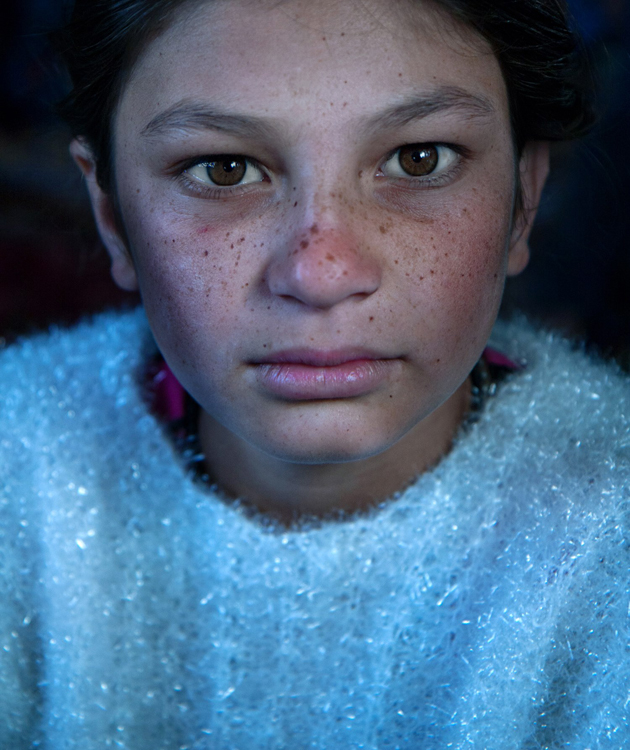
I met the lovely Nagina at her home in a small village of Roma people, outside Bukhara, Uzbekistan. Although she was only 10; she was very busy caring for her small brothers, along with few other neighbors’ children. She asked me to take her photo, and I was drawn to her gaze right away, choosing to go for a close-up portrait. The house was completely dark, except a large window, which was position at a 45-degree angle to her face, which created that catch light in her eyes.

Good to know: The closer your subject is to the light source (open window or door) the larger and more dominant the spark of catch light will seem.

Taking it to the next level: Think carefully about the location of your subject to the light source, as that will not only affect the size and visibility of the catchlight in the subject’s eyes, it will also control the entire Illumination of the subject’s face. To read more about how the direction of light will affect your portrait, check out: Understanding Natural Light Part 3: Direction of Light.

Creating a catch light – outdoors

For achieving the best results in an outdoor shooting, all you need to do is aim your subject to look at the largest light source – the sky. DO NOT instruct the subject to gaze at the sun, even for a brief moment, as it can lead to pain and damage to his or her eyes.

If you do not want to stage your subject, or if there is a language barrier, a great technique of aiming your subject’s gaze up, is by simply positioning yourself a bit above your subject. While they gaze it your lens, the sky (behind you) will reflect in their eyes. This is why I photograph many of my outdoor portraits at an angle, which is a bit higher than my subject.

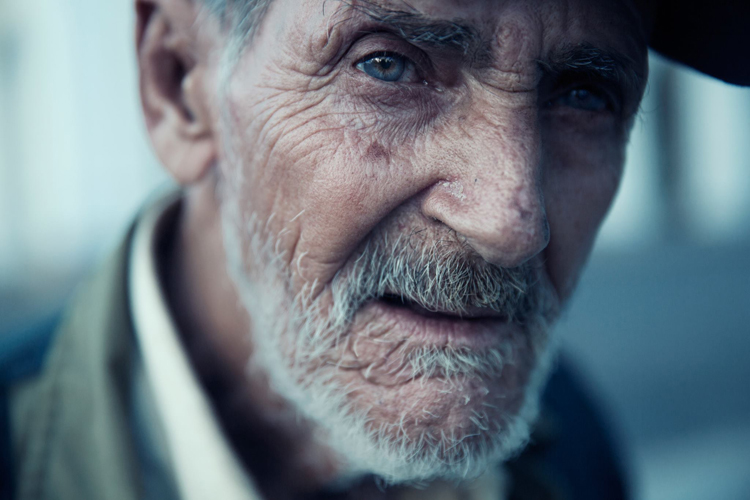
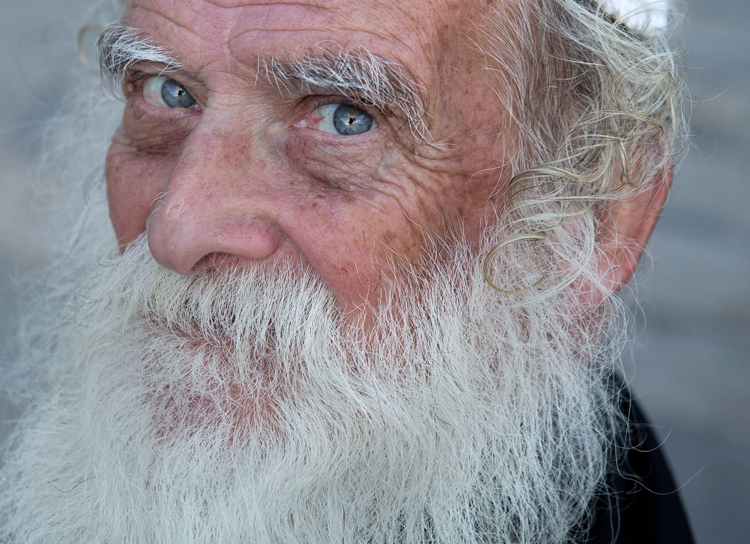
Mordecai is Jewish Orthodox, from the old city of Jerusalem. I was very surprised that he agreed to be photographed, even with joy. To give a spark to those amazing eyes I told him to look into my lens, while I positioned myself slightly higher than him, and the lovely skies of holy Jerusalem were reflected in his eyes.

02

Good to know: On a sunny day, I recommend positioning your subject in the shade, as gazing at sunny skies might be uncomfortable.

Taking it to the next level: If you want it or not, it is almost sure that apart from that spark of light, your own image (the photographer) will also be visible in the subject’s eyes. You can turn this fact into a creative portrait (of your subject) and a self-portrait (of yourself) in the same frame. Just do not forget to move the camera a bit, to let your face be visible. You can also use this technique for less narcissistic reasons, as with really tight close-up, as almost anything in front of your subject’s face will be reflected in his eyes. It is a wonderful technique for making a landscape shot, or an image of an iconic place, with a twist.

Creating a catch light – while using a reflector

Using reflectors in portrait photography is a wonderful technique (a more in-depth explanation about using reflectors in portrait photography, in this article: Reflectors: Your Secret Weapon for Amazing Portrait Photography), that can help you to create catch lights in almost any situation, indoor or outdoor, sunny or cloudy.

Not only do reflectors allow you to create that spark of catch light almost anywhere; but they will allow you much more control, over the intensity, color, and direction of that spark.

A pocket size silver reflector was the best tool for the job for this portrait, photographed in a very hot afternoon in Armenia.

03

Good to know: Reflectors come in many sizes and colors. For the best results, use a small pocket-sized silver reflector. Why? Because you do not need anything larger or heavier. Those small reflectors are the perfect weapon of choice, for creating a catch light in close-up portraits. Position the reflector just under the chin of your subject. You can hold the reflector with your left hand, or ask the subject to hold it.

Taking it to the next level: Although using a silver reflector will give you the most notable catch light, you can add warmth to the portrait by using a golden one, which will result in a golden catch light.

A mix of shade, slightly higher camera angle, and gaze upward toward the sky, helped create the catch light in these portraits photographed in India and Israel.

05

See how the eyes are alive in their portraits? The catch lights help add the sparkle you see there, and without them the portraits wouldn’t feel as alive, vibrant.

Now it’s your turn, show me your portraits with great catchlights. Please share in the comments below.

googletag.cmd.push(function() {
tablet_slots.push( googletag.defineSlot( “/1005424/_dPSv4_tab-all-article-bottom_(300×250)”, [300, 250], “pb-ad-78623” ).addService( googletag.pubads() ) ); } );

googletag.cmd.push(function() {
mobile_slots.push( googletag.defineSlot( “/1005424/_dPSv4_mob-all-article-bottom_(300×250)”, [300, 250], “pb-ad-78158” ).addService( googletag.pubads() ) ); } );

The post How to Create Catch Lights in Your Natural Light Portraits by Oded Wagenstein appeared first on Digital Photography School.

Digital Photography School

 
Comments Off on How to Create Catch Lights in Your Natural Light Portraits

Posted in Photography


How to Create Compelling Wide-Angle Portraits Using One Off-Camera Flash

11 May

What are your most memorable moments as a photographer? As a travel photographer, my short list of stand-out moments include wandering alone in Namibia’s dead tree forest, photographing sunbeams from the top of a cliff in China, and capturing the Aurora Borealis on the coast of Iceland.

1 Colombian Girl

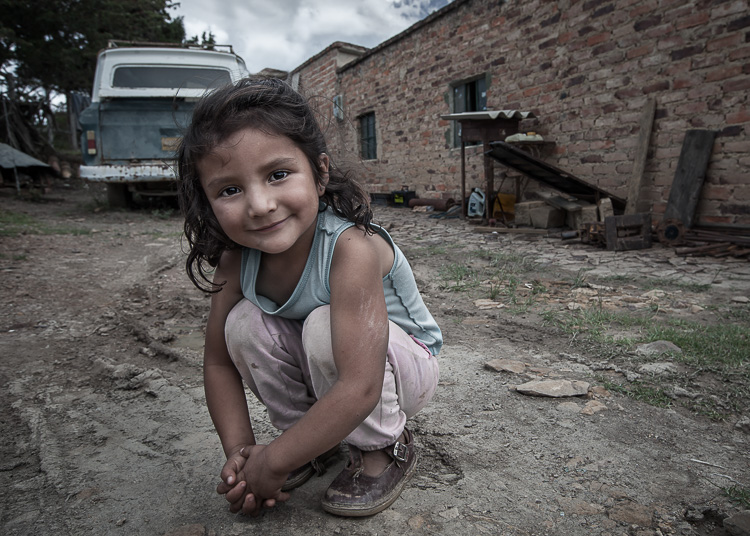
However, a year ago all of those amazing locations and moments were trumped by spending 30 minutes photographing a little girl outside her home near Villa de Leyva, Colombia (pictured above). This was the first time the girl had her portrait taken, let alone by a foreigner. With all the confidence of an experienced model, she literally stole the show that day. I believe the session is an important memory for her and instantly became my top moment photographing to date.

Ironically, two years ago I would not have even bothered taking this picture. I was focused on landscape and outdoor travel scenes. Also, if I’m honest with myself, I was somewhat intimidated by using artificial lighting and working with people as subjects. In April of 2014, I gave environmental portraiture a shot and have never looked back. It is now an important focus of my work.

This article will provide some guidance on how you can create images like the ones you see here, using a wide-angle lens and just one off-camera flash. But first, let me let you in on a little secret – it’s not that difficult.

Getting things right in camera is the important first step, which is the focus of this article. Processing your images is equally important, but I’ll cover that in a future article. So, let me start by providing you with the core techniques, then get into equipment and settings.

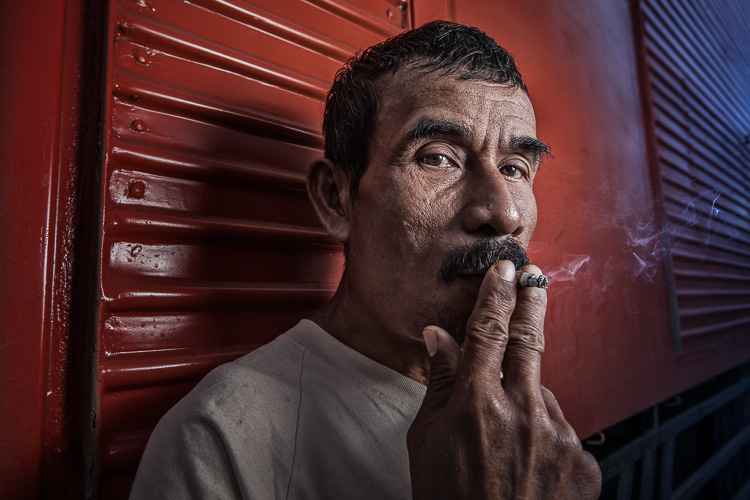
2 Smoking Guy

Use a (Relatively) Wide-Angle Lens

Lens choice is critically important in portraiture. Most portrait photographers reach for their 85mm or 105mm lens when heading out on a shoot. These focal lengths give a nice, realistic look to the subjects. However, I find myself drawn to portraits that have a surreal look to them, and include extra context that helps tell a story. Also, wide-angle lenses require you to shoot close to your subject, which also brings your viewer into the scene.

So, the first step is to leave your 85mm or 105mm in the bag, and grab a wide-angle lens. Most of the portraits you see here were created at 24mm using a full frame camera (use a 16mm for the same view if your camera has a cropped sensor). For me, this focal length is the perfect blend of reality and distortion. If you shoot much wider, elements closer to the lens, such as arms and hands, look too big or elongated. Also, wider focal lengths mean a much bigger background, which is usually not desirable.

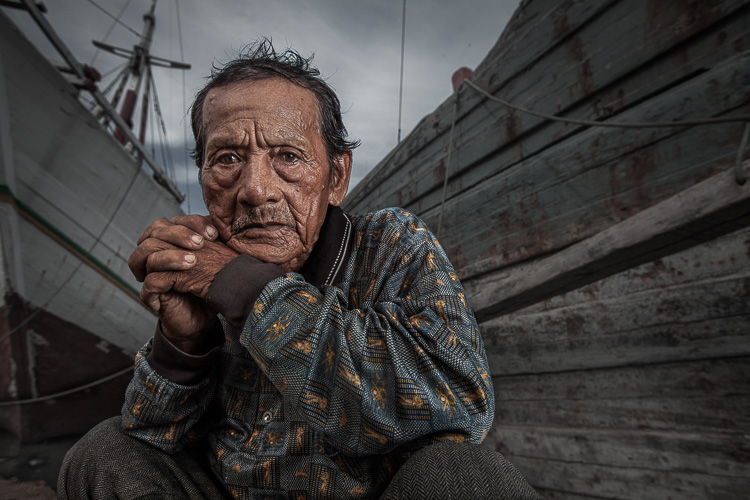
3 Dockworker Ships

Choose a Compelling Subject

Your subject is paramount. The Indonesian dockworker above is amazing. I spent 20 minutes photographing this guy and really had a difficult time choosing the best image. On the other hand, you could spend all day photographing me on the same dock, in front of the same ships, and have nothing but tossers at the end of the day.

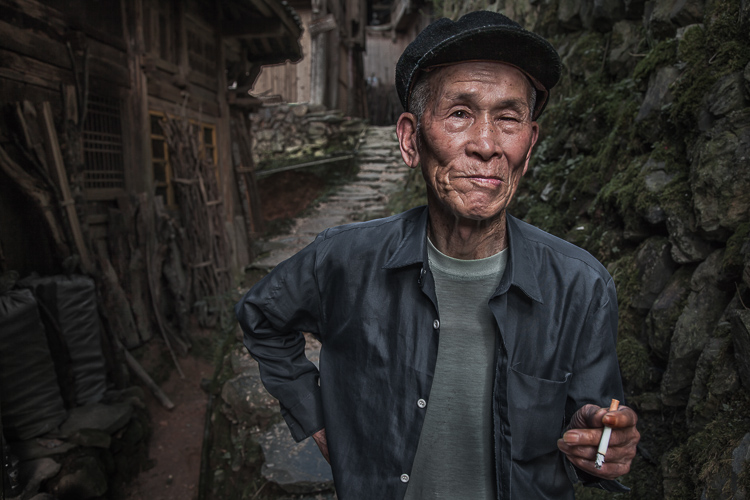
I look for people that have experienced life. The ideal subject has a particular interesting quality about him or her, that makes them stand out from the rest. However, my subjects also have an everyday person quality about them. Finding subjects can be challenging, especially if you live in the suburbs of Chicago, like I do. I am a travel photographer and usually find my subjects in rural areas overseas. However, there are great subjects everywhere.

Clothing is critically important. If your 90-year old rural villager is wearing a hat that says, “I Love New York”, then you will want to politely ask him to take it off, or at least turn it around for the picture. The point is, don’t let out-of-context clothing ruin or weaken your shot.
4 Smiley Guy

Choose a Complementary Background

Your image is only as strong as the weakest part of it, which is often the background. This is because, as photographer Jim Zuckerman puts it, “The world is a compositional mess”. There are two important qualities you want out of your background:

First, at the very least, your background must be non-distracting. Although you can easily isolate your subject with a longer focal length, the background becomes a major consideration with wide-angle portraits. Beginner, and even intermediate photographers, can overlook even some obvious distractions in the background. You have probably seen them before: trees that look like they are growing out of the subject’s head, patchy spots of bright light in the scene, colorful objects, straight lines and geometric shapes. You essentially don’t want anything that competes with your subject for attention.

The image of the Indonesian dockworker below is non-distracting, but not much more. He is essentially standing in front of a shipping container, so this image won’t win any awards for its background. Nevertheless, it is still a good picture because of the strength of the subject.

5 Dockworker Container

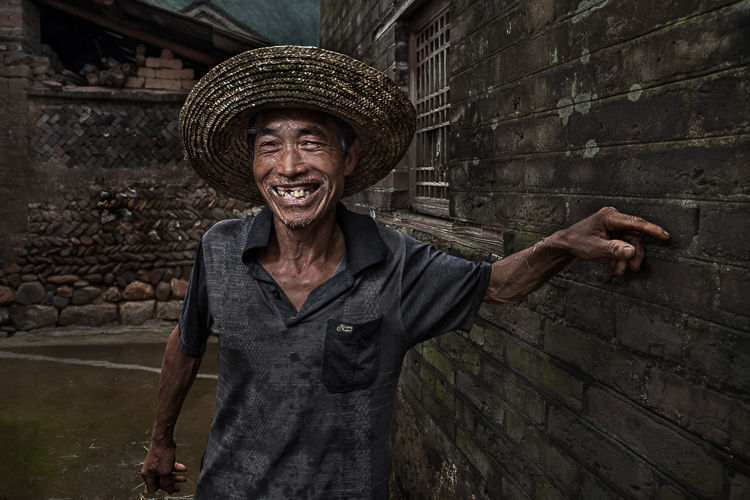
Second, whenever possible, include a background that complements your subject by providing a context. I’ve shot many images with simple non-distracting backgrounds. But, my favorite pictures are those with a background that tells a story about the subject. This is why I love shooting in places like rural China and Indonesia. These countries have many ancient villages that provide opportunities for amazing backgrounds, such as in the image below.

6 Chinese Guy Hat

I like to keep all evidence of modernity out of the background. I don’t like plastic stuff in my pictures. I don’t include modern looking buildings or cars. Instead, I prefer rural areas with weather-beaten buildings. Of course, this all depends on what you are after. The important thing is that the background complements the subject and does not distract from it.

Shoot in the Right Lighting Conditions

Because the majority of the background is not lit by the flash, many of the same outdoor photography lighting principles hold true, even if a flash is being used. Try shooting either early or late in the day (when the sun is low in the sky) or in overcast conditions. I actually prefer overcast conditions, but still shoot relatively early or late in the day.

Put Your Subjects at Ease

I don’t hire models, so some subjects work well and others not as well. What you want to avoid is a picture of your subject standing flat-footed, straight up and down, and holding a fake smile.

To help avoid this, it is a good idea to start your session by gaining their interest and confidence. If you have some images you’ve shot and processed, show them to give him or her an idea of what you are looking for, and hopefully peak their interest. This should communicate immediately that you are not looking for them to just stand there and smile. It should also show that the posing expectations will be basic.

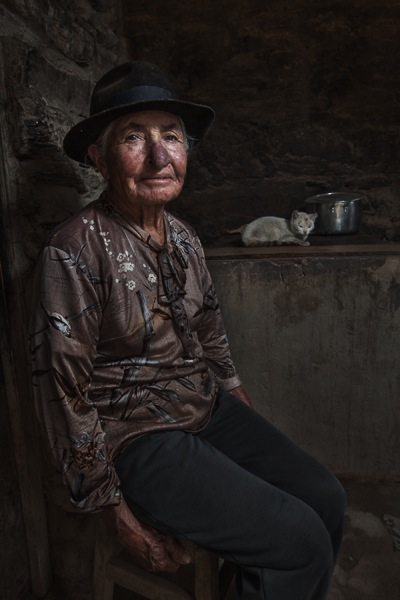
7 Colombian Lady Cat

Posing and Composition

Because I am shooting wide, I get quite close to my subjects and warn them ahead of time about this. For me, the eyes are a critically important part of the picture and must be very sharp. I focus on the closest eye, and re-focus frequently as I move around the subject slightly.

I generally ask him or her to look directly at the camera and not to smile, although not always. I then start moving slightly left or right, asking them to keep their head still and just follow the camera with their eyes. I usually shoot from slightly below eye level. I have them stand or sit at an angle to the camera. If the subject is standing, I have them put their weight on the back foot.

I like to include the subject’s hands in the composition. With a wide-angle lens, their hands in the foreground will look large, so try to strike a balance with the hands being prominent, but not too large. You can do this by simply positioning the hands closer to or farther away from the lens relative to their body.

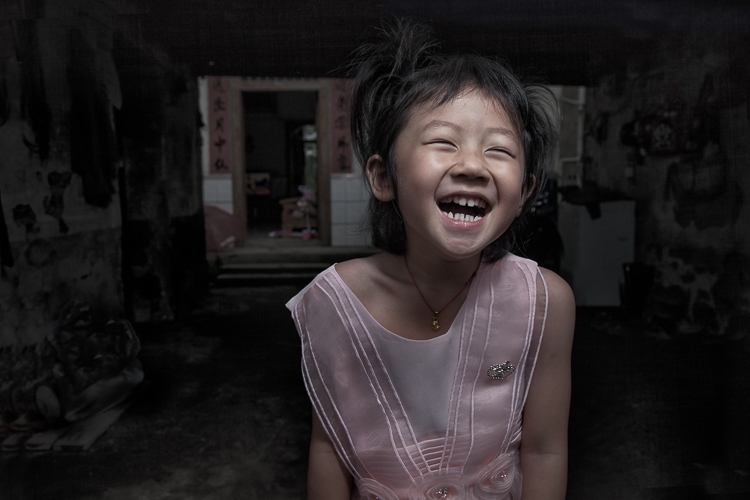
8 Chinese Girl Laughing

Equipment and Settings

The Camera

Your camera should be equipped with an internal or external flash trigger to control your off-camera flash. Here is how I set things up:

  • Start by leaving your flash or trigger initially turned off.
  • Set your camera to manual mode.
  • If the session is outdoors, I try for settings of ISO 100, f/7.1 and a shutter speed of around 1/160. You can adjust your f-stop and shutter speed to your preference, but keep in mind that you cannot go faster than your camera’s maximum flash sync speed.
  • Make the necessary adjustments to slightly underexpose the background by 1/3 to 2/3 stop. I usually start by adjusting shutter speed, but go no slower than 1/60 and no faster than 1/160. If necessary, I will then adjust my f-stop to f/5.6 at the widest. Then, and only then, will I start bumping up the ISO.
  • If you are indoors, you need to start with a higher ISO as a first step, and then make your adjustments to shutter speed and f-stop in the same manner.

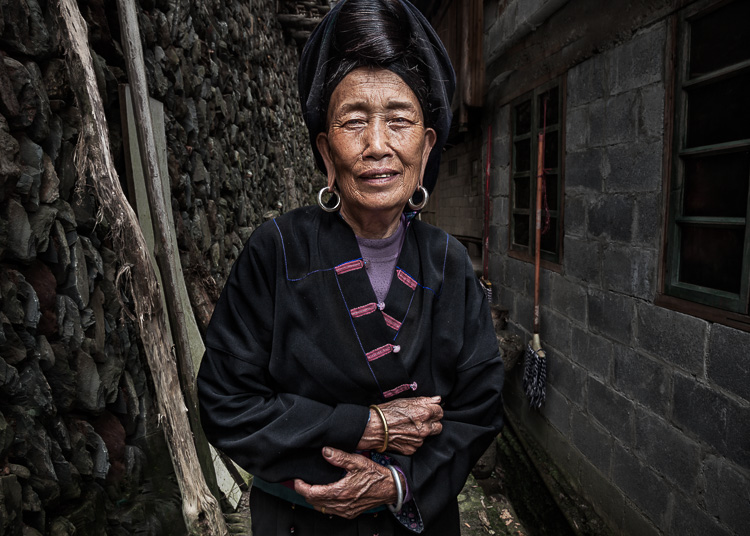
9 Chinese Woman

Lighting

For 90% of my portraits, I use a single off-camera flash, diffused with an umbrella or softbox. The most important rule with flash is “don’t ruin your shot,” which is usually done by putting too much flash on your subject. Instead, you want to get a decent balance of natural and artificial light, so that the flash is undetectable to the untrained eye, but lights your subject brighter than the underexposed background.

Now, turn your flash and trigger on:

  • Set your off-camera flash to manual mode.
  • I typically position the flash at a 45-degree angle to the subject, about 2-3 feet (slightly less than a meter) away, higher than their head, angled downward.
  • I usually start with 1/16 flash power when outdoors, and adjust from there until the subject stands out from the background, but does not look like they have been blasted with flash.

Post-Processing

You need to get things right in camera first. But, you will need to use a variety of post-processing techniques to get the effect you see in these images. I’ll coverthe techniques I use to process environmental portraits in a future article.

Thank you for reading, please share your wide-angle portraits and questions in the comments below.

googletag.cmd.push(function() {
tablet_slots.push( googletag.defineSlot( “/1005424/_dPSv4_tab-all-article-bottom_(300×250)”, [300, 250], “pb-ad-78623” ).addService( googletag.pubads() ) ); } );

googletag.cmd.push(function() {
mobile_slots.push( googletag.defineSlot( “/1005424/_dPSv4_mob-all-article-bottom_(300×250)”, [300, 250], “pb-ad-78158” ).addService( googletag.pubads() ) ); } );

The post How to Create Compelling Wide-Angle Portraits Using One Off-Camera Flash by Ken Koskela appeared first on Digital Photography School.

Digital Photography School

 
Comments Off on How to Create Compelling Wide-Angle Portraits Using One Off-Camera Flash

Posted in Photography


How to Take Low Key Lighting Portraits

07 May

Low key lighting when taking portraits is an effective technique that can leave you with some beautiful images.

Low key lighting portrait

In this video Gavin Hoey explains how to set up a low key lighting portrait in a small home or portable studio. It really is achievable with a relatively simple setup.

If you give some low key lighting portraits a go we’d LOVE to see your results in comments below.

Further Low Key Lighting Portrait Reading

Interested in learning more? Here’s some tutorials in our archives on low key lighting.

  • How to Create Dark Moody Low-Key Portraits with Minimal Gear
  • Get an Invisible Black Background to Your Portraits – Shooting Anywhere
  • Setting The Mood With Low Key Lighting
  • Low-Key Lighting for Dramatic Portraits
  • Low Key Lighting Portrait Example

googletag.cmd.push(function() {
tablet_slots.push( googletag.defineSlot( “/1005424/_dPSv4_tab-all-article-bottom_(300×250)”, [300, 250], “pb-ad-78623” ).addService( googletag.pubads() ) ); } );

googletag.cmd.push(function() {
mobile_slots.push( googletag.defineSlot( “/1005424/_dPSv4_mob-all-article-bottom_(300×250)”, [300, 250], “pb-ad-78158” ).addService( googletag.pubads() ) ); } );

The post How to Take Low Key Lighting Portraits by Darren Rowse appeared first on Digital Photography School.

Digital Photography School

 
Comments Off on How to Take Low Key Lighting Portraits

Posted in Photography


Play-Doh People: Manipulated Portraits Mimic Old School Horror Movies

06 May

[ By Steph in Art & Photography & Video. ]

play doh people main

Lumps of modeling clay in shades that match human flesh are globbed into the hollows of what should be faces in this series of portraits mixing photography with sculpture. Artist José Cardoso gets under the viewer’s skin with visuals that disturb and fascinate, perhaps prompting some to reach up and ensure that their own faces are still intact after checking out the entire collection.

play dough people 4

play dough people 3

play doh people 2

play doh people 10

play doh people 11

play doh people 13

Warped and distorted, with ragged edges, holes from poking fingers and glimpses of bone-like foreign objects embedded within, the Play-Doh takes the place of ordinary features, completely obscuring them or making it seem as if some careless child’s hand has ripped them away. There’s no hint of an attempt at modeling an actual representation of a face – just lumps. (The ones with bits of hair and dirt in the dough are especially cringe-worthy.)

play doh people 5

play doh people 6

play doh people 8

play doh people 7

play doh people 9

The series is deliberately reminiscent of the special effects in old school horror movies, especially those of David Cronenberg, and it’s easy to see that influence here. As scary as they may have been at the time, when we look back at films like Naked Lunch, The Fly, Videodrome and Shivers we can see that they clearly made use of a whole lo to rubber and clay to achieve those gory effects. In comparison, Cardoso’s work is quite restrained, but its subtlety is startlingly effective.

Share on Facebook


[ By Steph in Art & Photography & Video. ]

[ WebUrbanist | Archives | Galleries | Privacy | TOS ]


WebUrbanist

 
Comments Off on Play-Doh People: Manipulated Portraits Mimic Old School Horror Movies

Posted in Creativity


How to Make Colors Pop in Your Portraits – Without Using Photoshop

11 Mar

Complementary Colors 2_1

There are a lot of really great tools to use in Photoshop, or Lightroom, to get the colors in your photos to pop, creating a more vibrant portrait. But, did you know that you can create color popping portraits, before you even open them for post-processing? It’s true!

By incorporating some of the simple things below ,before you take a photo, the color in your portraits will really stand out, and help you create eye catching photographs.

Make sure your background colors complement the subject

Understanding what colors complement each other, will really help the colors in your portraits pop. Complementary colors are red and green, orange and blue, and purple and yellow. Using combinations of these colors with your subject and background, will help create a flattering portrait.

It’s important to know the colors of the location where you are going to be shooting. If you know you’ll be at a location filled with yellow wildflowers, have your subject wear purple shades. If your background is lush green grass, with green trees all around, your subject will look best in pinks or reds. Know the area you will be shooting, and have your subject wear the color that complements that background. A complementary color palette will make your photo stand out!

Example images of complementary color schemes below, and top.

Complementary Colors_1

Use a neutral background

If your subject is wearing really colorful clothing, there is an easy way to make that color really stand out. A trick to get your subjects to really pop is to take a closer look at your background. Find an area that is plain, with neutral tones. Colorful, busy backgrounds can be fun, but they can also make a photo too cluttered, and draw the eye away from the subject, especially if they are also wearing bright clothing.

Neutral Background_1

Too much color throughout the photo won’t cause anything to pop out at you. Backgrounds that are more neutral will cause the eye to look directly at the subject, and the colorful clothing or accessories they are wearing. Look for a duller background such as: a dirt path, a mountain, stones, or anything that has a more earthy tone.

Neutral background 2_1

Use a colorful background

You can still make the colors really pop out in your portraits, even if the subject is not wearing colorful clothes. If they are wearing white, black, or neutral colors, find an area in your environment with rich color. Look around for flowers, or brightly colored walls to place them near. With your neutral subject next to bright color, the colors will jump out.

Colorful background_1

Eliminate anything distracting

Finally, before you press the shutter, make sure that there are no distracting objects in the background, that will pull the eye away from the subject. Are there other people in the distant background? Trash on the ground? Different colored cars in a nearby parking lot? If you can see them through your camera, you will see these distracting things in your final picture.

Recompose your subject so you don’t see those people in the distance. Pick up any trash that might be on the ground near the subject. Eliminating anything that will distract from the subject, will make the subject, and the colors they are wearing, pop even more.

Colorful background 2_1

If you have used some of these tips to plan your portrait, the colors should look pretty nice without doing any extra work in Photoshop or Lightroom. If you’d like, you can use those programs to enhance the color even more. Levels, hue/saturation or selective color are some fantastic tools for creating brighter and bolder colors in Photoshop. Play around with the different tools and see if you can get your portrait bright and colorful.

Please share your portraits and any questions or tips you may have on this topic, in the comments below.

googletag.cmd.push(function() {
tablet_slots.push( googletag.defineSlot( “/1005424/_dPSv4_tab-all-article-bottom_(300×250)”, [300, 250], “pb-ad-78623” ).addService( googletag.pubads() ) ); } );

googletag.cmd.push(function() {
mobile_slots.push( googletag.defineSlot( “/1005424/_dPSv4_mob-all-article-bottom_(300×250)”, [300, 250], “pb-ad-78158” ).addService( googletag.pubads() ) ); } );

The post How to Make Colors Pop in Your Portraits – Without Using Photoshop by Emily Supiot appeared first on Digital Photography School.

Digital Photography School

 
Comments Off on How to Make Colors Pop in Your Portraits – Without Using Photoshop

Posted in Photography