RSS
 

Posts Tagged ‘Portrait’

Room with a View: How to Create this Window with Blinds Portrait Anywhere

13 Feb

In this post Gina Milicia – author of our brand new Posing eBook – walks us through the taking of one of her portraits of Christy Vandenberg.

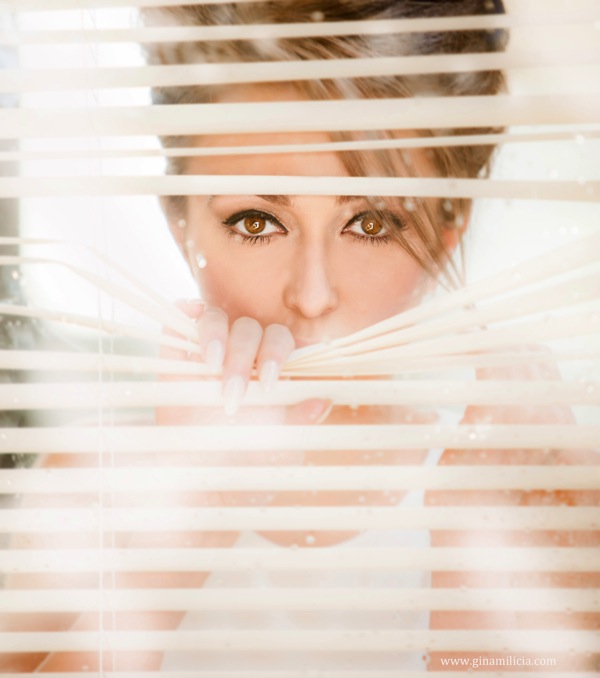
Final

I’m constantly on the look out for new and interesting ways to pose my models. This shoot only took me 20 minutes from start to finish and is really basic to set up and photograph.

The following tutorial is a step by step of how I pose and light my window portrait.

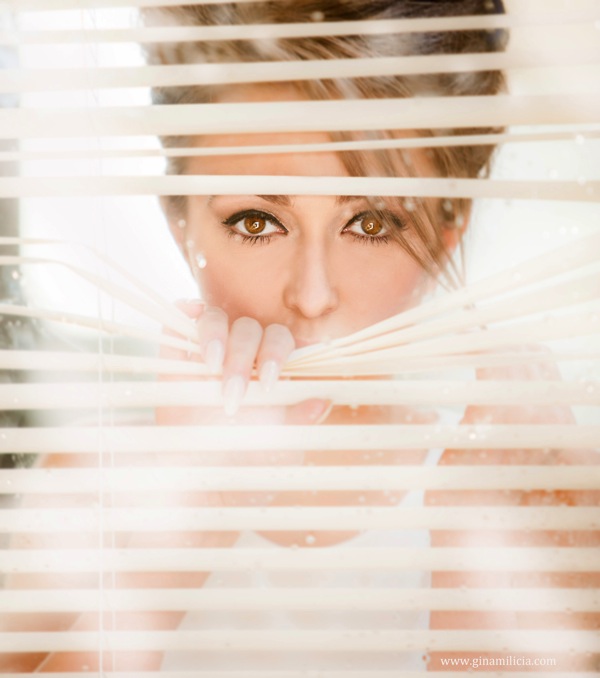
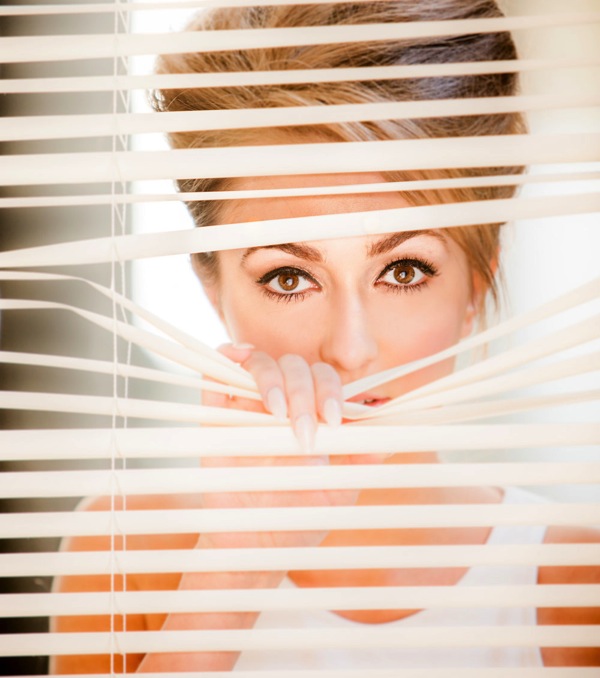
This set up is great way to add mood to a portrait. The reflections caused by the glass that partly obscure my model add a sense of mystery and romance to the shot.

This image was taken in my studio using daylight and can be recreated almost anywhere.

The example I’ve given is of a full-face shot but this also works with ¾ shots and profile shots and with or without venetian blinds.

Gear Checklist

  • Canon 5D Mark II
  • Canon EF 70-200mm f/2.8L IS lens*

I’ve used a focal length of 200mm but a focal length of anywhere between 70-200mm will work. If you have a cropped frame sensor a 50mm will also give a similar result.

  • Manfrotto 475B Pro

I shoot most of my headshots using a tripod because having my camera fixed gives me the freedom to focus on expression and pose rather than having to worry about whether my vertical and horizontal angles are straight.

The other reason I love shooting on tripod is it allows me to shoot portraits at very slow shutter speeds of 1/15th or 1/8th of a second, which I could never get using hand held.

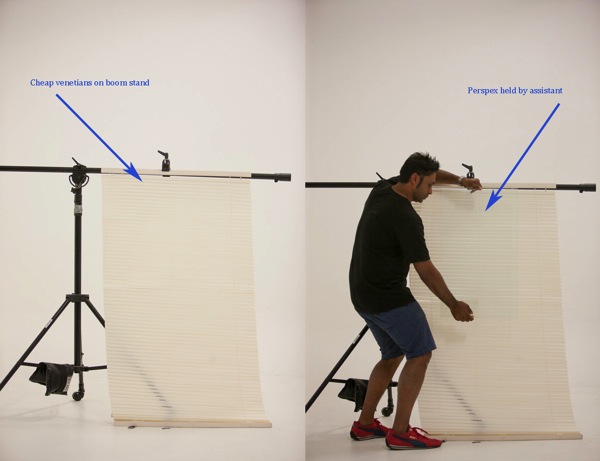
  • 1 x cheap Venetian blind + boom c stand or clothes rack to hold up venetians
  • 1 x sheet of clear Perspex* approx. 3ft x 3ft ( held by assistant)

* Perspex is lighter and cheaper than glass and easier to transport.

Camera Settings

  • ISO 400
  • 200mm
  • f/2.8 at 1/80th second
  • Daylight

I’ve used a long focal length of 200mm and short depth of field of f/2.8 because I wanted my models eyes to be in focus and the background to be out of focus.

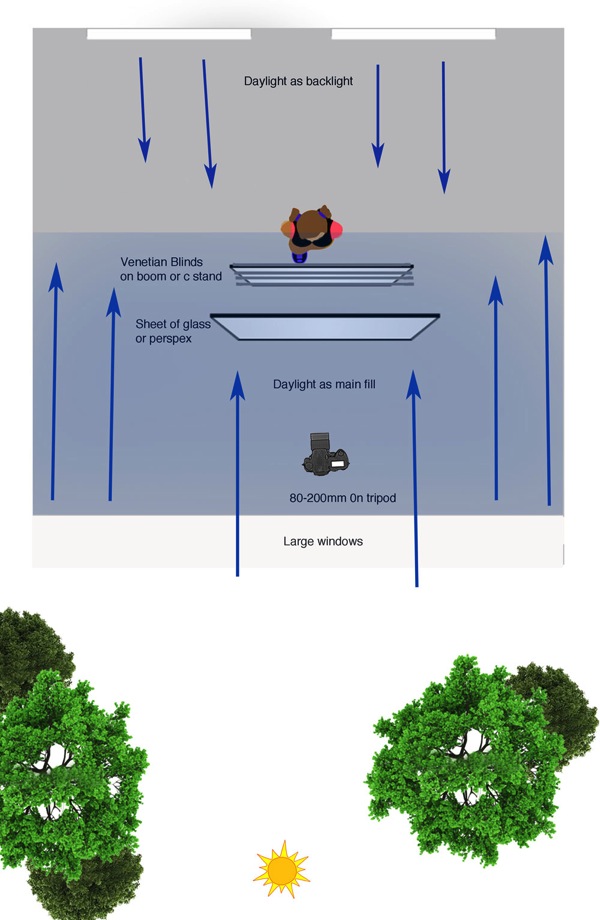
The lighting in this shot is very simple daylight coming in from a large window directly behind me.

The model is also backlit by two large windows directly behind her.

Window Diagram

Lighting diagram

Attach venetian blinds to your stand

Venetians 50

I positioned my model behind the venetians and then took a test shot to make sure my exposure was correct.

Venetian no glass 7

The Perspex is then held in front of the Venetian and tilted forward slightly to minimize reflections.

Flare 50

The style and type of reflections will vary depending on the location you shoot in.
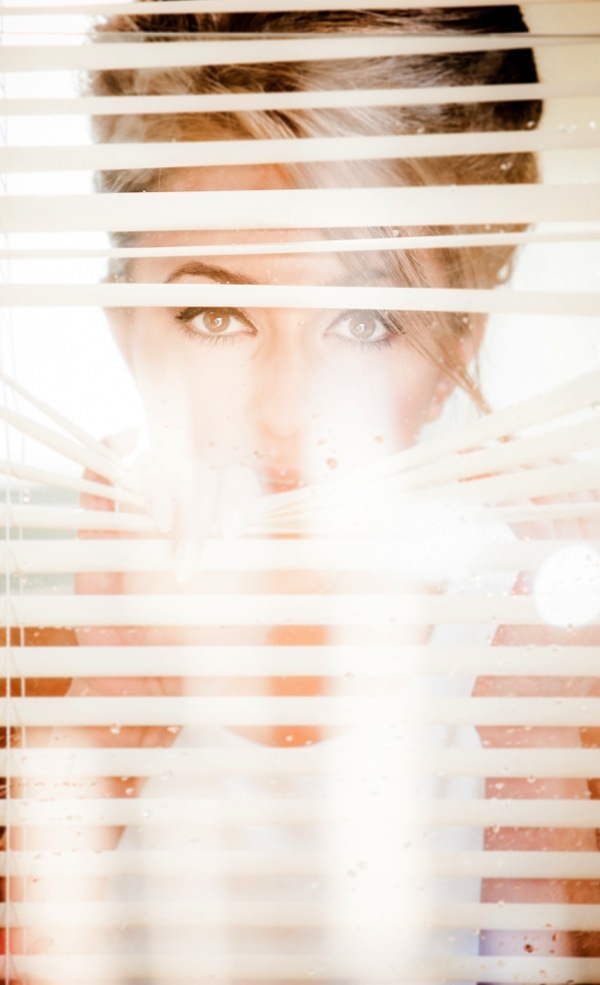
I experimented by having the Perspex tilted at various angles. The example above has a slightly more mysterious vibe because the face is obscured by reflections.

Finally I introduced texture to the image by spraying water on the Perspex.

Final

The post Room with a View: How to Create this Window with Blinds Portrait Anywhere by Gina Milicia appeared first on Digital Photography School.


Digital Photography School

 
Comments Off on Room with a View: How to Create this Window with Blinds Portrait Anywhere

Posted in Photography


Weekly Challenge – Portrait of a Man

08 Feb

Earlier today I shared an image collection of The Essence of Masculinity – Portraits of Men. Now, of course, it’s your turn!

First – go look at the image collection if you haven’t already done so. I tried to choose portraits that jumped out at me on Flickr for one reason or another. Usually it was lighting or an expression that caught my eye.

But there two  things that I think all of these images have in common is connection to the subject, and storytelling. There is a story in each one of these images and men. What stories do you see? What stories do you tell with your images?

So your challenge this week is to make a portrait of a man, perhaps someone you know, or maybe a complete stranger on the street. But dig a little deeper than just taking a photo of their face. Make a portrait of their essence.

The say the eyes are the windows to the soul. What better way to truly capture a person’s soul than through the eyes. Expression does not come from the mouth – it starts in the eyes. Go back again and look at the eyes of the men in those portraits, without looking at their mouths. Can you still see the expression? Can you feel them more deeply?

Here’s a few more portraits to get you inspired:

By Elvin

By StefaniaVS

By Joe Martin

By Randi Scott

By See-ming Lee

Sorry I thought this image was too funny, I couldn’t resist! Notice, humour is good too!

When you’ve created your stunning portraits please share!

Once you’ve taken your “portrait of a man” we’d love to see them in comments below. Simply upload your shot into the comment field (look for the little camera icon in the Disqus comments section as pictured below) and they’ll get embedded for us all to see or if you’d prefer upload them to your favourite photo sharing site and leave the link to them.

Need more portrait help?

Try one of the articles from the last two weeks (there’s been one every day) or start here:

  • Portrait Tutorial Feast – Best of dPS 2013
  • The Secrets of Great Portrait Photography – Great Video from Brian Smith
  • How to Make a Portrait of a Stranger in 8 Easy Steps

The post Weekly Challenge – Portrait of a Man by Darlene Hildebrandt appeared first on Digital Photography School.


Digital Photography School

 
Comments Off on Weekly Challenge – Portrait of a Man

Posted in Photography


The Most Important Do’s and Don’ts of Portrait Posing You’ll Ever Read

03 Feb

Have you ever seen those photographers whose portfolios have so so many amazing portraits? You look at all of their pictures, wondering how they do their magic. They must have “great subjects” or work with people that aren’t camera-shy like your friend. The truth is that great portraits aren’t about the models or how photogenic or “picture-perfect” they are, but Continue Reading

The post The Most Important Do’s and Don’ts of Portrait Posing You’ll Ever Read appeared first on Photodoto.


Photodoto

 
Comments Off on The Most Important Do’s and Don’ts of Portrait Posing You’ll Ever Read

Posted in Photography


3 Minutes with Portrait Photographer Alex Huff

02 Feb

The beauty of portrait photography is that it is as diverse as its subjects and often takes its cues from traditional paintings. One photographer who has found such inspiration is Alex Huff who is today’s guest on “3 Minutes with…” .

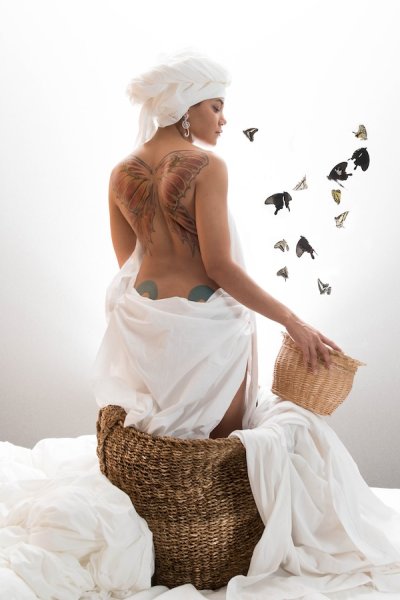
Butterfly Tattoo

Describe your photography in 100 words or less

My photography style strives to depict simple beauty with some influence from Dutch Golden Age paintings. The purpose of this particular collection is to showcase individual tattoos in the same frame as the objects and subjects they are designed after. This has allowed my models to revisit symbols that influenced them to get their ink in the first place. My goal is to photograph tattoos in a way that is true to their natural colors and gives them the same life and depth as the items they represent. I describe this process as my “tattoography”.

What gear/software do you use?

I use the Nikon D800 DSLR, 24-70mm f/2.8 & 85mm f/1.4 lenses, Elinchrom D-Lite monoheads, and SB-910 flashguns. My favorite modifiers are the Elinchrom 39″ Deep OctaBox, the Photoflex Extra Small OctoDome with eggcrate, and the Westcott 7′ parabolic umbrella. I edit almost entirely in Adobe Lightroom.

AlexHuff_Tattoography-6

What’s one quick tip that you’d give people interested portraiture photography?

My quick tip to portrait photographers would be to constantly reassure your model, especially while “chimping” or checking your monitor. As an occasional model myself, I understand how discouraging it is to witness a quiet, grimacing photographer behind the lens. Keep it lively, even if you are panicking inside. I also highly recommend letting models see their images halfway through a shoot and don’t be afraid to take their suggestions.

CherryBlossomMea

What three photography sites or photo blogs do you recommend?

Strobist – this blog always reminds me that lighting is creative and doesn’t have to be complicated.
Juxtapoz – they tend to feature a lot of tattoo photography which helps me keep up with how other people approach that subject.
The Unprofessional Photographer – This is my unconventional go-to. Sometimes you just gotta laugh. (Editor’s note: warning may contain crude or x-rated content, visit at your own risk!)

To view more of Alex Huff’s photography visit her web site: alexandriahuff.com

The post 3 Minutes with Portrait Photographer Alex Huff by Jim Goldstein appeared first on Digital Photography School.


Digital Photography School

 
Comments Off on 3 Minutes with Portrait Photographer Alex Huff

Posted in Photography


Weekly Photography Challenge Portrait of a Lady

01 Feb

This week and next we are featuring a series of articles on portraits. Earlier today I shared some portraits of women for you to enjoy and get inspired by. So you can probably guess what the weekly photography challenge is, right?

You got it – portrait of a lady!

By Ryan Seyeau

Surely there’s a lovely lady in your life that deserves a great portrait of herself. Now’s the time to create one of her, maybe as a gift. Or perhaps if you are a lady, a self portrait is in order.

Use natural light or flash, whatever you prefer and are most comfortable using. Practice your lighting skills. Try shooting or processing in B&W. Experiment with some LR Presets or try out some new processing tips like adding a texture overlay.

Here are a few images to get you thinking, spark the ideas.

By Chris Bailey

By Wen Chen

By Zuhair A. Al-Traifi

By Dan Finnen

By Michael Yan

By Priscilla Santana

By Alex Dram

By Mysi(new stream: www.flickr.com/photos/mysianne)

By Kris Kesiak

By Elizabeth Anne

By dawolf-

By acearchie

By Ji?í D?cký

When you’ve created your masterpiece please share!

Once you’ve taken your “portrait of a lady” we’d love to see them in comments below. Simply upload your shot into the comment field (look for the little camera icon in the Disqus comments section as pictured below) and they’ll get embedded for us all to see or if you’d prefer upload them to your favourite photo sharing site and leave the link to them.

The post Weekly Photography Challenge Portrait of a Lady by Darlene Hildebrandt appeared first on Digital Photography School.


Digital Photography School

 
Comments Off on Weekly Photography Challenge Portrait of a Lady

Posted in Photography


How I Got The Shot: Portrait Style

30 Jan

Lynsey Peterson_6howIgottheshot

Whenever I see “How I Got The Shot” articles, they are typically landscape or nature shots, or difficult lighting situations.  Rarely do you see a detailed account of the taking of a portrait image.  Maybe because for portrait shots, it’s often more about the connection between subject and photographer than the technicals, or maybe because it seems fairly straightforward.  That said, when I was first starting out in portrait photography, I spent many hours drooling over beautiful images I admired and wondering how they had been taken, and more importantly, how could I try to take something similar.

This article will not only discuss the technical accepts of the shot and the editing process, but also the interaction I had with the subject, which was key to this, and every shot I’ve ever taken.

Portrait Style

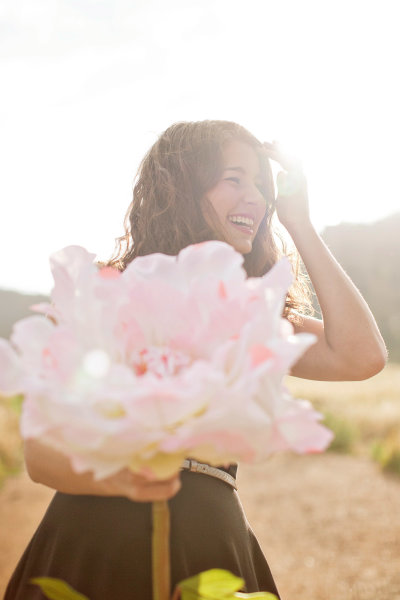
This beauty is Madeleine and these images are from her high school senior photo shoot taken last September.  I don’t often shoot this type of portrait. But, I say the same thing about weddings and dogs and yet I’ve photographed both in the last week, so maybe I should just face the fact that if you are lovely and ask me real nice, I’ll shoot just about anything.  Except food.  Food photography freaks me out.  Life is hard enough without having to make sure sesame seeds are all in the perfect place, or that there is just the right amount of shine on an edge of cheese.
Lynsey Peterson_1howIgottheshot

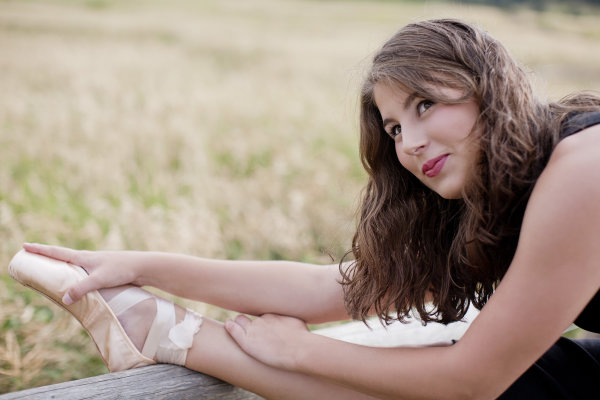
Madeline has studied dance on and off and had just started pointe dancing prior to this shoot, so incorporating her new pointe shoes into a few shots was something she wanted to try.

Technical stuff – gear

These images were shot at Boulder, Colorado’s Chautauqua Park in the rain, near sunset. I was likely wearing a black t-shirt, jeans, and flip-flops if you want to get the full visual, but I doubt that mattered much because 90% of the time I am wearing a black t-shirt, jeans, and flip-flops. Probably of more interest to you was the gear. I travel light and I’m not into fancy equipment (my money is better spent on quality flip-flops), so this was shot with my faithful Canon 5D and my workhorse/splurge Canon 50mm f/1.2L which rarely leaves my camera body.  I typically don’t use a lens hood, and didn’t here as I like a little flare.

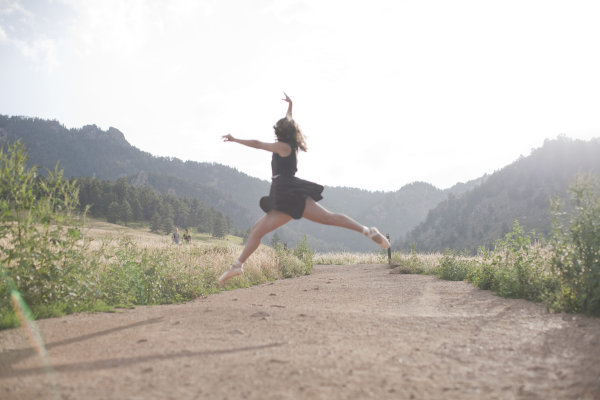
The image below that I will detail was shot in Aperture priority mode (f/2.5). I could possibly wax poetic about my camera, the settings, and lighting and other technical components for a few more paragraphs but it is truly not necessary. Here, as with most portrait photography, the details of how this image came to be were driven by the subject matter: the location choice was her favorite park; the jump was something that she felt she could do and a way to incorporate the dance element that I felt was least awkward and most genuine; and the settings were dictated by the need to shoot towards the mountains.

An argument could be made that this isn’t a true portrait, unlike the image I’ve shown above. An argument could also be made that flip flips aren’t real shoes. But they get me from point A to point B, are extremely comfortable, and allow for me to continue my hatred of anything on my feet. A portrait is a documenting someone’s likeness. This is a picture of a 17 year old girl that does ballet, has a beautiful free spirit, and mountain living in her DNA. I can’t think of a better way to document her likeness.

The Process

Let’s start with the Straight Out Of Camera (SOOC) image
Lynsey Peterson_2howIgottheshot

Other than minor editing to her skirt, this is exactly what the world looked like in my camera. I shot this in RAW and converted it to jpg in Photoshop. My settings were not spot on, and there are flaws. The most glaringly obvious flaw, being that focus on the subject is soft at best.  I mean, really soft–clouds and fluffy bunny rabbits soft. There were other images in this sequence where the focus was much sharper. But in those, I didn’t care for arm placement, or light, or a hundred other picky details. I could have taken the sharpest one of the bunch and edited it to perfection, completely changing or correcting things, turning something unreal into reality. Some photographers would may do that, but I am not going to fight for either side of that battle today. This is a picture of a girl jumping in mid-air and if you are looking at that happening in real life, it’s not going to look sharp as a tack. This is an image worthy of being delivered to the client, soft focus or not.

Image clean up

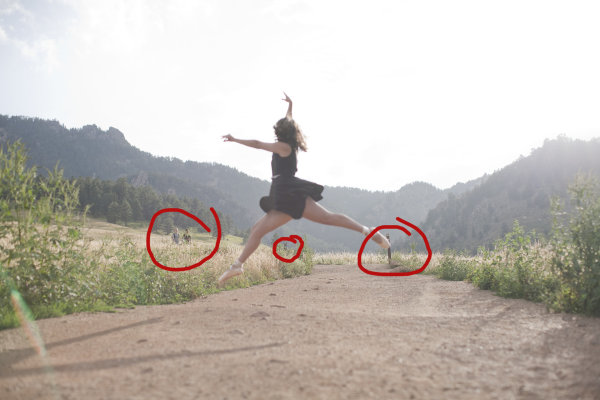
The first thing I always do to an image during the editing process is clean it up if necessary. This park is always crowded, and waiting for random people to be out of the shot isn’t an option I like because the entire mood could change. I also don’t like to use Photoshop to drastically change anything (as mentioned earlier when I refused to do Photoshop Plastic Surgery on a sharper image), but here the lessor of two evils is just to remove the innocent bystanders from the image entirely in post-production. Beyond the hikers, there are a few other elements that are distracting including the trail markers, which only take away from her being in midair.
Lynsey Peterson_3howIgottheshot

Things to clean up in Photoshop

Warm up!

This was not the first image we shot. People take time to warm up. If I had asked her right off the bat to leap as high as she could, without care as to who was watching or how she would do it, or what it would look – she wouldn’t have been comfortable enough to even try it. We started with some basic face-only shots, worked up to some dance poses in the shoes, and then found a spot where she felt comfortable enough to jump. Because of this, I didn’t have a lot of options for the exact frame. This was the flattest and least rocky area for the jump to be safe and successful.

Whenever I attempt an action portrait shot, I do several things the same when interacting with the subject: 

#1 – I always watch them the first time with my own eyeballs.  

I don’t even touch my camera. Not only do I need to see the entire view without the limits of a viewfinder, I need to earn their trust that I am interested in what they’re doing, with or without the picture. Then after encouragement, I make it clear that we may have to try this several times; she may not nail the jump, but then again I may not nail the shot, successful jump or not. To give you an idea, for the five jumps she did, I have 32 shots taken over the course of about 8 minutes.

#2 – this is typically the only time I break my rule of never letting a client see the image in the back of my camera.

For an action shot like this, I shoot until I have an image I like and then show my subject. It’s their action, their talent, their special trick. I have no idea how to leap in the air like this; I want to know that whatever they are doing is coming out as they envisioned it, or at least that they are happy with how it is likely to turn out. I, like most of the people who will view this, have no idea if this jump is technically correct in the world of pointe dance. That one ballet class I took in the first grade didn’t really cover much beyond how to stand straight in a tutu. However, in the moment I remember questioning even photographing this considering I didn’t know what to look for. In those moments, it’s best to realize that the only thing you should be looking for is a great image—you’re not always qualified to look for much else.
Lynsey Peterson_4howIgottheshot

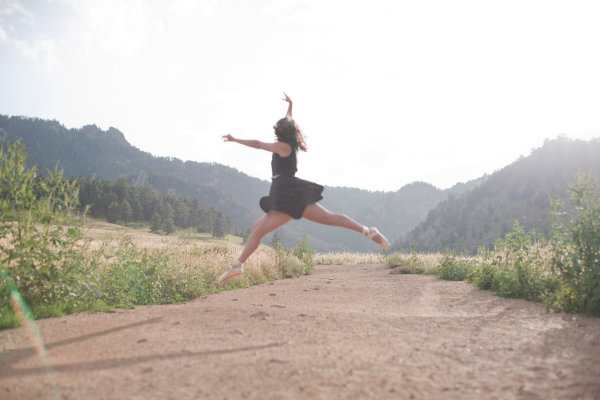
After image clean up

Most important – subject’s comfort level!

Now that I have cleaned up the things that didn’t need to be there and adjusted my exposure a bit, I will tell you the most important technical piece of this image: none of it matters. It really doesn’t. Why? I’m glad you asked. Even if I had the fanciest equipment available, perfect light, sharp eyes, and sturdy flip-flops, there is no way I could have gotten this shot if Madeleine didn’t feel comfortable. Not only is she fairly new to pointe dancing, she is a teenage girl. The most important thing I brought to this shoot was an ability to make her feel comfortable, a ton of patience, and an honest desire for her to love these pictures.

Without those things, this image and every other one I shot that day, don’t happen. For me, portrait photography is 95% people skills and 5% equipment. Maybe even a little luck thrown in for good measure. But we still need to make it sing the tune it was meant to carry. Throw in a little sparkle.  Wave the magic wand a bit. Put a layer of frosting on this cake.  Everyone loves frosting–I don’t know if I could trust someone that doesn’t.

Final touches in Photoshop

I started with a manual adjustment in Photoshop with Levels, a quick sharpener with the oddly named Unsharp Mask (60% and 2.0 pixels is my go-to setting), and then removed a few stray raindrops that were showing on her dress.  I opted to leave the framing the way I shot it—I like the bit of shadow you see of her legs in the bottom left corner, and I like where she is in relationship to the mountains in the background.

Now for the fun part: I use a few actions to kick-up the color and clarity a notch on most of my images. I like Totally Rad and the Pioneer Woman’s actions quite a bit and over the years have managed to customize my favorites to exactly what I like, saving me a great deal of time. Here I have used a few actions to both sharpen the color and also warm it up a bit, to give a nod to the sun flare that was already there. In doing so, I lost a bit of my sky detail, but I don’t miss it. Here is the finished version of the image:
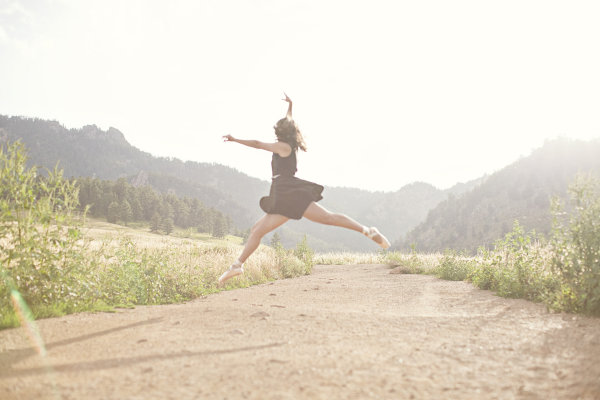
Lynsey Peterson_5_finalhowIgottheshot

And voila! It’s just that easy. Years of ballet lessons, a scheduled photo shoot, waiting out a rainstorm, getting to the perfect jump, and a bit of editing. Oh internet, I kid.

This is an image that I love. This is an image that my client loved. Will it end up in a magazine or be noticed by people beyond those that love Madeleine, and obviously anyone reading this? No. But it’s a shot that I am proud of. It’s a great example of the kind of portrait photography I like to do and a lovely addition to my portfolio. It happily hangs on a wall in my office, where it will stay as a reminder that not all beautiful and loved shots are technically perfect and portrait photography is a lot more than a camera and a pretty girl.
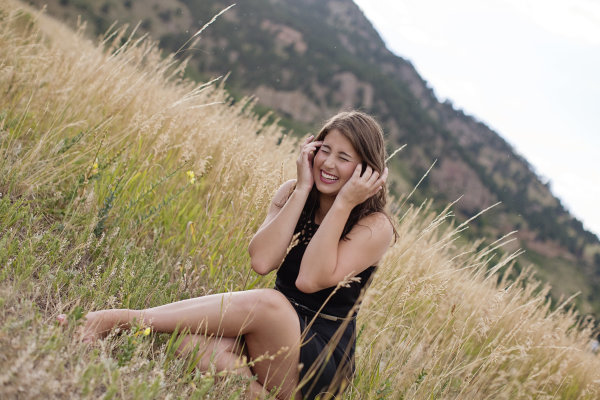
Lynsey Peterson_7howIgottheshot

The post How I Got The Shot: Portrait Style by Lynsey Peterson appeared first on Digital Photography School.


Digital Photography School
 
Comments Off on How I Got The Shot: Portrait Style

Posted in Photography


How to Choose the Perfect Portrait Lens

30 Jan

Portrait taken with 85mm lens

A question we often get asked at Digital Photography School is which lenses are best for portraits. It’s a tricky question because the answer is subjective. It depends on your budget, personal style of photography and the make of camera. It is further complicated by the relationship between sensor size and focal length.

Let’s start by exploring some of the things you need to think about when choosing the perfect portrait lens.

1. What about the lenses you already own?

It may be that you already own a lens that you haven’t thought of using to take portraits, but could actually do the job quite well. Do you have a 50mm prime? Or maybe a 100mm macro lens? A 70-300mm zoom? All of these are capable of being great portrait lenses.

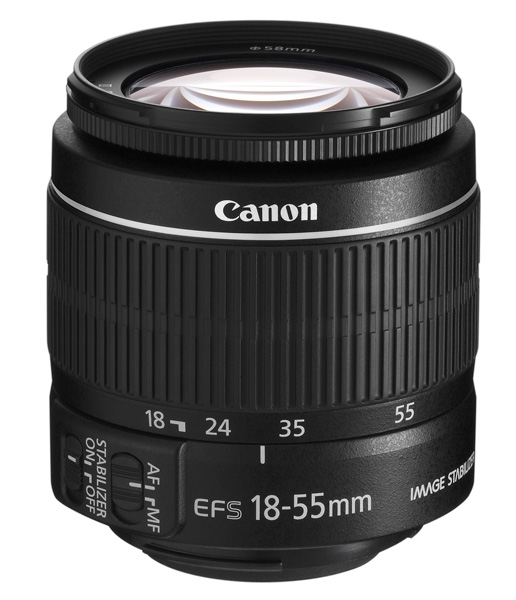
Even if your only lens is a kit lens, you may still be surprised by how well it performs (within its limitations). You can read more about that in my article Why Your Kit Lens is Better Than You Think.

Getting to Know Your Lenses will also help.

2. Do you need a zoom lens or a prime?

Prime lenses are great for portrait photography. One advantage is that they have a wider maximum aperture than a zoom lens covering the same focal length. This is useful for creating images with shallow depth-of-field (a common technique in portraits). It is also handy in low light, as it lets you take photos with faster shutter speeds or lower ISO than you could with a zoom with a smaller maximum aperture.

Canon EF-S 18-55mm lens

Another benefit is image quality. Prime lenses tend to have less elements than zooms, and the result is that image quality is better, and they produce sharper images with more contrast and less lens flare. If you’re on a budget (see next point) then an inexpensive prime will give you better results than an inexpensive zoom.

3. What’s your budget?

This is an important consideration because, as with most things, good quality lenses cost more. The best example of this is Canon’s 50mm lens range. There are four models, ranging from around $ 110 to $ 1600 in price. That’s a big difference, and your budget determines which model makes it to your shopping list.

More expensive lenses usually produce sharper images with less flare. The construction quality is better, they may be weatherproofed and have better or quieter autofocus mechanisms. The difference in image quality is usually greater between expensive and cheap zoom lenses than it is between expensive and inexpensive prime lenses.

The other trade-off (besides cost) for better quality built lenses, is extra weight. Top of the line lenses are usually made of metal and are heavier than the less expensive plastic lenses.

Bear in mind that good camera lenses should last decades, and sometimes spending more up front is beneficial in the long run. In the words of Sir Henry Royce (of Rolls-Royce):

The quality is remembered long after the price is forgotten”.

4. What focal lengths do you require?

The answer to this question depends on the size of your camera’s sensor (our article Crop Factor Explained tells you why). Rather than discuss specific focal lengths it’s easier to split lenses up into four categories. Once you’ve figured out what category of lens you’re interested in, and whether you would prefer a prime lens or a zoom, you can investigate which models are available for your camera.

Wide-angle lenses

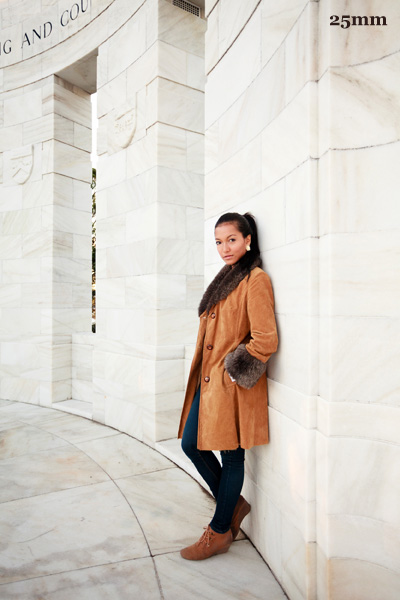
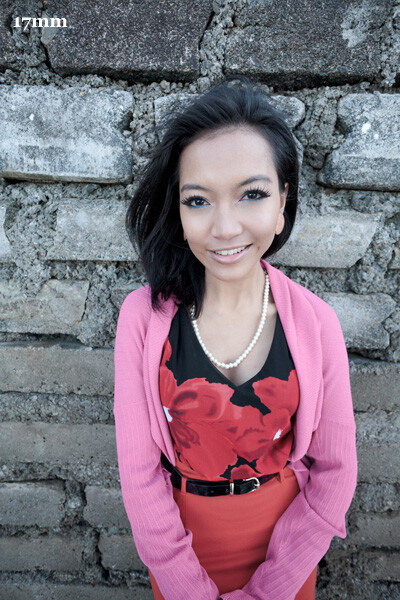
Wide-angle lenses are good for environmental portraits – those where you keep your distance a little from the subject and include their surroundings. They are generally not as good for close-up portraits as they distort your subject. Here are some examples:

Portrait taken with 25mm lens Portrait taken with 17mm lens

Normal lenses

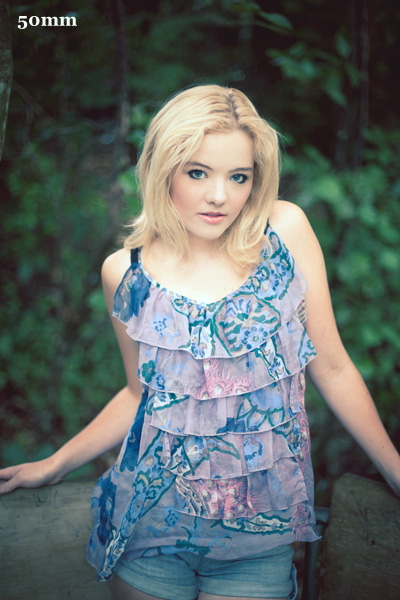
A normal lens is one with a focal length equivalent to around 50mm on a full-frame camera (that’s around 35mm on an APS-C camera, or 25mm on a Micro four-thirds camera). You may have read that these lenses give a similar perspective to that of the human eye. It’s a debatable point, but there’s no doubt they are interesting for portraits, occupying the middle ground between wide-angle and short telephoto lenses. They can be used for close-up portraits, although not completely without distortion (see image left, below)

Portrait taken with 50mm lens

A “normal” 50mm lens portrait

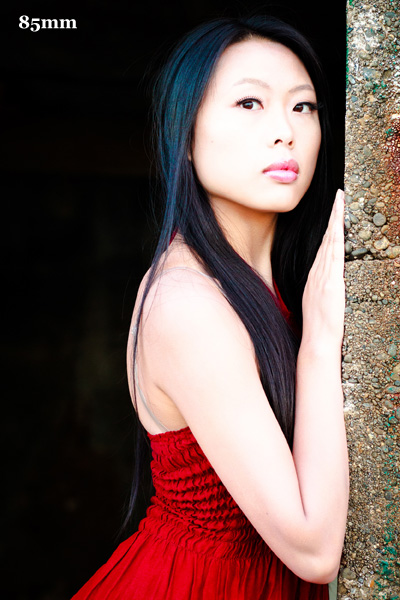
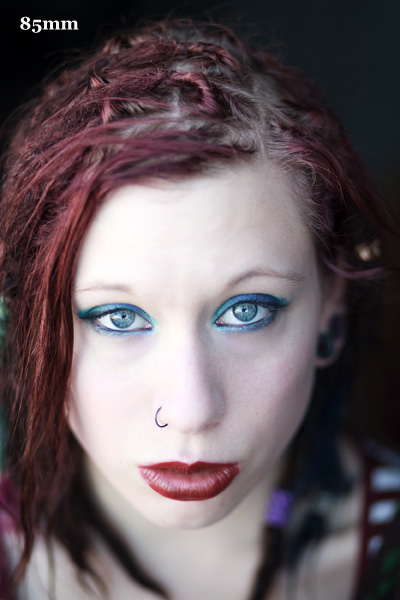
Portrait taken with 85mm lens

A short telephoto 85mm lens

Short telephoto lenses

These lenses are often called portrait lenses because they are an ideal focal length for taking flattering photos of people. You can move in close and take images without distortion, or step back and include the entire figure without moving so far away that it becomes difficult to communicate with your model. If your short telephoto is a prime lens, you get the additional benefit of wide apertures. Best of all these lenses, especially primes, tend to be reasonably priced.

My favourite lens for portraits is an 85mm prime lens (you can read more about it in my article How a Humble 85mm Lens Became My Favourite). (see image right, above)

If you have an APS-C camera then a 50mm prime lens is effectively a short telephoto. Yes, I’ve written about 50mm lenses too – let me point you towards Nifty Fifties – Why I Love 50mm Prime Lenses and Why a 50mm Lens is your new best friend.

Telephoto lenses

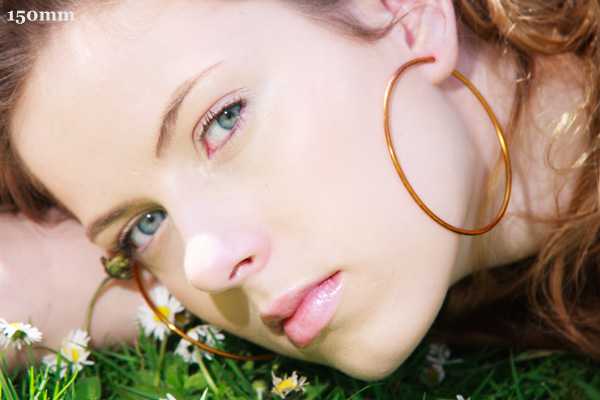
Telephoto lenses are often used by professional fashion and portrait photographers for the compressed perspective and their ability to isolate the model from the background. The downside of telephoto lenses is that they tend to be more expensive than shorter focal lengths, especially if you’d like one with a wide maximum aperture. They are definitely heavier as well. Having said that, there are plenty of relatively inexpensive lenses, especially zooms, in the 100mm-200mm range.

Portrait taken with 150mm lens

Selecting a focal length

If you’re unsure which focal lengths appeal to you, try this exercise. Go onto Flickr or 500px and do a search for portraits. Mark any you like as favourites. When you have marked at least twenty, go and have a look at them together. Examine them carefully and think about why you liked each one. Are there any common themes? Which focal lengths are used the most? Are the photographers using wide apertures for shallow depth-of-field? Are they predominantly black and white or colour? Is the photographer using natural light or flash? Are they predominantly close-ups or environmental portraits? The answers to these questions may help you decide which lenses to shortlist. Read more: 5 Easy Steps to Choose the Perfect Prime Lens for You

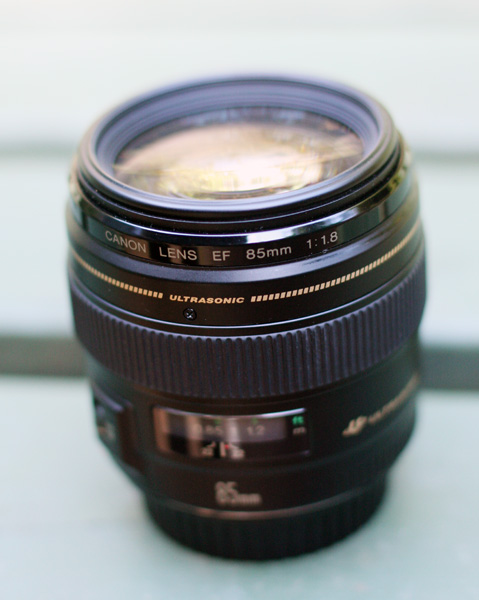
Canon EF 85mm f1.8 lens

My thoughts

I’m going to be specific and tell you exactly which lenses I use. My favourite lens for portraits is my Canon EF 85mm f/1.8 prime lens. I use it for approximately 80% of the portraits I take. I also use my Canon EF 40mm f2.8 pancake lens (it’s a moderate wide-angle) on my full-frame camera and, occasionally, a Canon EF 50mm f1.4 or EF 17-40mm f/4L zoom. The next lens on my list is a 24mm prime, and when I buy one I’ll no longer use the 17-40mm zoom for portraits. I favour primes over zooms because of image quality and the wider maximum apertures.

Your thoughts

Now it’s time to share your personal experiences. Which lenses have you purchased for taking portraits, and how did they work out?


Understanding Lenses

Understanding Lenses: Part II ebook coverI’ve written two ebooks for Canon EOS users about camera lenses. Click on the links to learn more about each one:

  • Understanding Lenses: Part I – A Guide to Canon Wide-angle and Kit Lenses
  • Understanding Lenses: Part II – A Guide to Canon Normal and Telephoto Lenses

The post How to Choose the Perfect Portrait Lens by Andrew S. Gibson appeared first on Digital Photography School.


Digital Photography School
 
Comments Off on How to Choose the Perfect Portrait Lens

Posted in Photography


Masters of Photography – Yousef Karsh Portrait Photographer

27 Jan
Karsh-self-portrait

Self portrait of Yousef Karsh from his official website

This is the next instalment of my series on the masters of photography, last time we looked at The Decisive Moment with Henri Cartier-Bresson. Something that my photography instructors gave me was an appreciation and love for the history of photography. If you are not familiar with some of the masters I will be featuring one now and then to help you become acquainted with some of the best in history.

Today we’re going to look at a man that was considered to be the world’s premiere portrait photographer in his time, perhaps of all time, and his images still stand among the best today. The word “iconic” is often used when speaking of his images of people like:

  • Winston Churchill
  • Ernest Hemmingway
  • Princess Elizabeth (later Queen)
  • Elizabeth Tailor
  • Albert Einstein
  • Georgia O’Keefe
  • Mother Teresa

Just to name a few! If you haven’t already guessed, or read the title, yes I’m talking about the legend, Yousef Karsh.

Yousef Karsh 1908-2002

I’m not going to give you his bio or list his accomplishments here. I want you to do your own research. Google his name and find his famous portraits. Study them. Watch the interview below (ignore the age and quality of this video, instead really focus and listen to what he says). What can you learn from him?

As I ultimately found myself doing portraits and weddings early in my photography career Karsh was highly influential on my style. I wanted to created the dramatic lighting he used on his subjects, but more than that I wanted to strive to connect with the person in front of my lens the way he did. He was not only a master of lighting, he was a master of getting the expression and making his subject feel at ease.

Watch and learn from Mr. Karsh!

Keep in mind this is Part One of this interview. Make sure to view Part Two and Part Three as well.

Want to take better portraits? Well you are in luck! Starting tomorrow, over the next two weeks we will be doing a Portrait Photography Deep Dive. What that means is we’ll be publishing articles on all things portrait related by both regular and guest authors. Make sure you’re signed up for the newsletter so you don’t miss anything!

If you want to read some past articles on portrait photography you can try these:

  • Reflectors: Your Secret Weapon for Amazing Portrait Photography
  • Portrait Tutorial Feast – Best of dPS 2013
  • Our 14 Best Portrait Photography Tutorials of 2012

Want to read more about Karsh and see his stunning portraits?

Here are a few books. I personally have the middle three in my library!


The post Masters of Photography – Yousef Karsh Portrait Photographer by Darlene Hildebrandt appeared first on Digital Photography School.


Digital Photography School
 
Comments Off on Masters of Photography – Yousef Karsh Portrait Photographer

Posted in Photography


Portrait Plus Retouching Software – A Review

26 Jan
Portrait Plus from ArcSoft packs powerful facial retouching tools into a user-friendly program.

Portrait Plus from ArcSoft packs powerful facial retouching tools into a
user-friendly program

One of the most difficult tasks in Photoshop is also one of the most common. Since we are in the business of making people look good, solid portrait retouching skills are perhaps some of the most important tools in your digital bag of tricks. A couple of months ago, I wrote an article detailing one of my favorite techniques for basic skin smoothing in Photoshop. It’s a pretty straightforward approach to smoothing skin and removing blemishes and I use it all the time. As convenient as it is, though, it can have an impact on editing time, particularly when I’m dealing with a lot of photos at once.

Portrait Plus from ArcSoft is a portrait retouching program that works as a stand-alone application (Windows and Mac) or as a Photoshop plug-in under the filters menu (Currently Windows only). It has a simple, user-friendly interface designed for efficient, seamless integration with your portrait workflow.

How does it work?

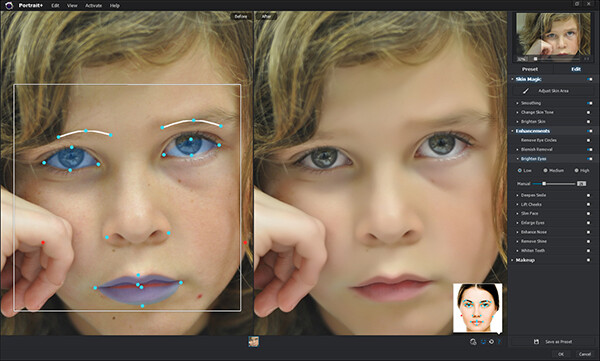
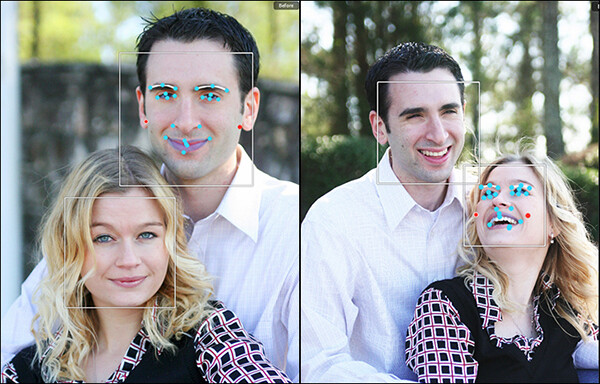
Simply put, Portrait Plus automatically detects the faces in your photos, and then identifies 24 key facial features. While this auto-detection is really pretty amazing, it’s not always perfect (and therefore my only real complaint).  Profiles turned too far away from the camera and semi-obscured features (think bangs over the eyes) will throw auto-detection for a loop. I had a couple of images where the auto-detection did not work, requiring me to manually select the facial features and target areas. While a bit frustrating, I don’t view this as that much of a negative, since you are likely to manually adjust the target areas yourself anyway as you become more comfortable with the software.

The overlay on the left shows the facial features automatically detected by the software.

The overlay on the left shows the facial features automatically detected by the software.

Once an image has been imported, you have a choice of using one of the program’s ten presets, or editing the photo manually, with the option of saving the results as a preset for future retouching work. While the manual editing tools are very extensive, and allow users to select specific areas and facial features, many of the test photos I ran through Portrait Plus for this review achieved excellent results with the presets alone. Facial retouching that could take several minutes or longer can be drastically reduced down to just one or two clicks of the mouse. In order to ensure consistency throughout the photo, Portrait Plus also detects all visible skin, giving the editor as much or as little control over the final image as possible.

Powerful editing tools

Here is a breakdown of the manual retouching tools.

Skin

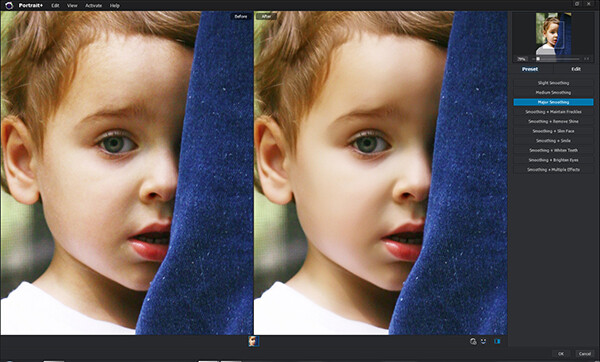
Some skin retouching software simply blurs over the imperfections.  By identifying very specific areas of the face, however, Portrait Plus gives you extensive control over what to repair and to what degree, for a more natural-looking result. By taking this targeted approach, Portrait Plus eliminates deep scars, pimples, scratches, and other imperfections, while restoring or maintaining one of the most important aspects of all–original skin tone.

  • Skin smoothing
  • Skin tone
  • Brighten skin
Original on the left. Skin-smoothed on the right.

Original on the left – skin-smoothed version on the right

Enhancements

If you’ve ever wanted to get in touch with your inner plastic surgeon, here’s your chance. By giving the user control over specific areas like the mouth, cheeks, eyes, and nose, reshaping and fine-tuning facial features has never been easier. Tools included are:

  • Remove eye circles
  • Blemish removal
  • Brighten eyes
  • Deepen smile
  • Lift cheeks
  • Slim face
  • Enlarge eyes
  • Enhance nose
  • Remove shine
  • Whiten teeth

Makeup

Depending on your lighting and camera settings, makeup does not always have the look you were going for in the final image. By having the ability to make these adjustments in post-production, you can either save your original idea, or go in a new direction. You’ve got to be very careful with this set of tools, however–a single mouse click can be the difference between a subtle adjustment and “alien eyes”. Effects included:

  • Blush
  • Lipstick
  • Colored contacts
  • Eye color
  • Eye lashes
  • Eye liner
  • Eye shadow
  • Shape eyebrows

Comparison

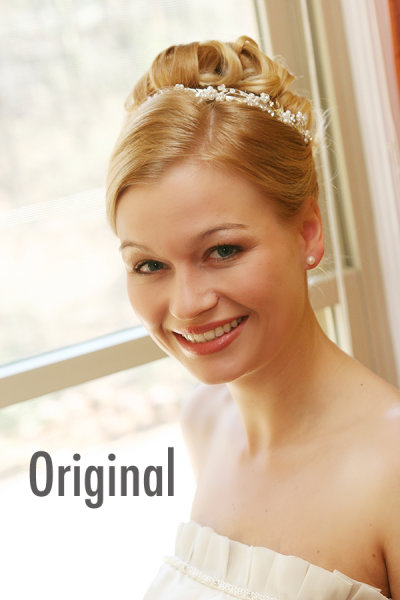
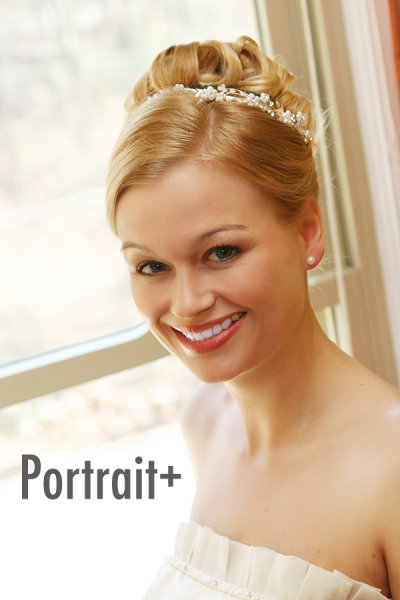
The original version of this portrait is straight off the camera, only edited for size. In the Portrait Plus version, you can see how edits like basic skin smoothing, along with a wider smile, slimmer face, whiter teeth, and digital lipstick provide subtle, but significant changes.

portrait-plus-dps-review-007

portrait-plus-dps-review-006

Many of the effects in this software package would take months to learn, and years to perfect if you were to attempt them yourself in Photoshop. While Portrait Plus does have a bit of a learning curve, it is far less steep than what you’d experience by trying to learn all of these edits on your own.

Multiple Faces

Portrait Plus does a great job of detecting multiple faces within the same image.

Portrait Plus does a great job of detecting multiple faces within the same image.

While I’ve not yet tested it on photos with more than two faces, ArcSoft’s website claims that Portrait Plus can detect up to 20 faces in a single image. This can come in particularly handy for event photographers, who often find themselves editing photos of large groups of people. Portrait Plus also allows you to “lock” faces, selecting which faces in a photo are retouched and which are left alone.

Supported file formats

The Windows stand-alone version can import JPEG, TIFF, PNG, and BMP images of 24 bits per pixel, while the Mac stand-alone imports JPEG, TIFF, PNG, and RAW files with 24 bits per pixel. Both Windows and Mac export JPEG and TIFF files. The Photoshop plug-in will import and export all Photoshop-supported file formats.

Wrap-up and recommendations

As a portrait photographer, I strive to get everything as close to perfect in the camera as I possibly can. While even the best portraits can always use a tweak or two, the reality is that some portraits require significant retouching. As important as the editing is, though, so is time with my family. So, whatever I can do to cut down on my editing time is a bonus. As good as I am at retouching, Portrait Plus is a bit of a game-changer. An intuitive, user-friendly Photoshop plug-in, Portrait Plus can seamlessly add a whole new dimension to any photographer’s editing arsenal.

Portrait Plus is available for download on the ArcSoft website.  Enter coupon code Portrait45 at check-out for a 45% discount. Valid through March 31, 2014.

The post Portrait Plus Retouching Software – A Review by Jeff Guyer appeared first on Digital Photography School.


Digital Photography School
 
Comments Off on Portrait Plus Retouching Software – A Review

Posted in Photography


Fujifilm unveils XF 56mm F1.2 R portrait lens for X system

06 Jan

56mm-news-520.png

CES 2014: Fujifilm has announced the XF 56mm F1.2 R, a fast short telephoto ‘portrait’ lens for its X system mirrorless cameras. With an angle of view equivalent to an 85mm lens on full frame, it uses an internal focus design for fast, silent autofocus. It has an aperture ring, but unlike the company’s wide angle primes, no distance or depth of field scales. It’ll be available in February, with a suggested retail price of $ 999.99 / £999.99. 

News: Digital Photography Review (dpreview.com)

 
Comments Off on Fujifilm unveils XF 56mm F1.2 R portrait lens for X system

Posted in Uncategorized