RSS
 

Posts Tagged ‘Portable’

Modular Urbanism: Coin-Operated System of Portable Street Furniture

26 Mar

[ By WebUrbanist in Design & Furniture & Decor. ]

share stack system

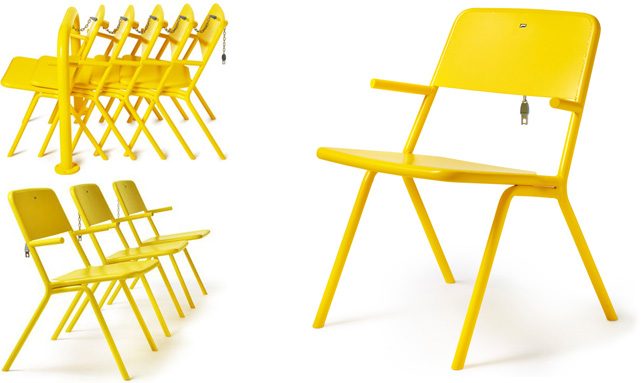
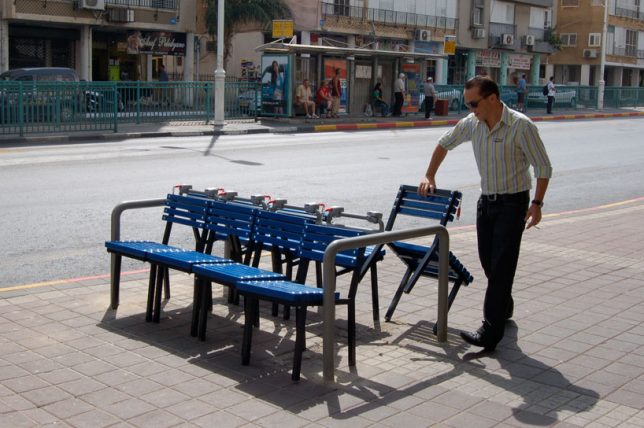
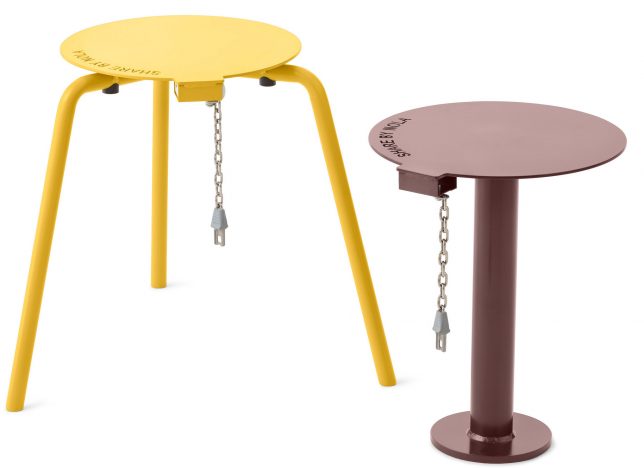
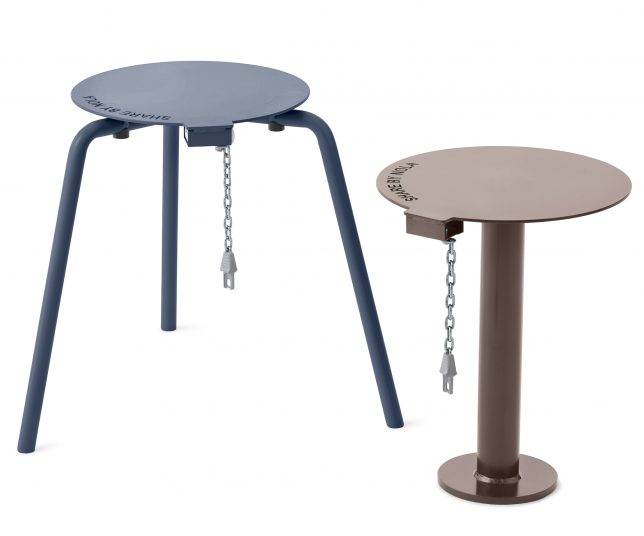
Much like coin-based cart systems found in supermarkets and airports, these stackable stools (which double as table surfaces) can be borrowed, moved around and returned with ease. Unlike fixed-position urban benches and tables, this design by Thomas Bernstrand lets users control their own experience, setting up a solo seat or group of seats and surfaces in the sun or shade as desired.

share stool stack

While not foolproof, of course (anyone intent on stealing them or leaving them out could do so), the furnishings do demand a small deposit to encourage people to to put them back when they are done. Also, the dangling chain and branded mark could help deter their disappearance into people’s homes.

share system

In the United States, where the maximum value of an everyday-use coin is fairly small, the incentive would be correspondingly diminished. But in Euro countries where denominations are typically higher, the price of failing to return the items would be significantly higher.

shair chairs

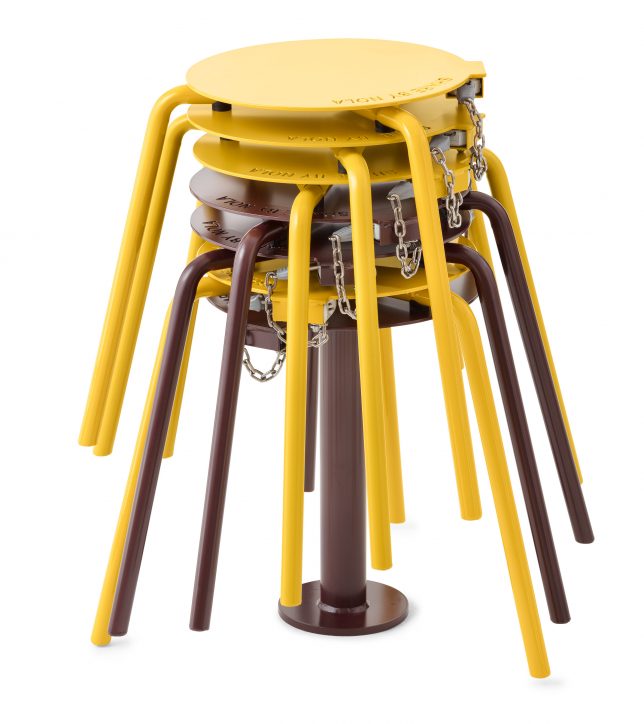
The metal stools are made to be heavy and durable, keeping them from being knocked over in the wind and making them suitable to frequent outdoor use. They also stack neatly into columns, taking up less space on the streets (or in shopping centers or parks or squares) when not in use.

share series chairs

The designs are an extension of the Share Series, a set of seats and other objects with similar coin-operated functionality intended for public use.

seats

Other pay-to-sit urban furniture projects include a chair series by Vincent Wittenberg, a bit more comfortable looking but they also take up more space on sidewalks.

Also: Fabian Brunsing, a Berlin-based artist and designer, took a different approach the problem (a bit more tongue-in-cheek). His bench uses coin deposits (but in this case non-refundable) that allow you to use a public bench. But when your time runs out: stand up fast to avoid the spikes.

Share on Facebook


[ By WebUrbanist in Design & Furniture & Decor. ]

[ WebUrbanist | Archives | Galleries | Privacy | TOS ]


WebUrbanist

 
Comments Off on Modular Urbanism: Coin-Operated System of Portable Street Furniture

Posted in Creativity


Studio Starter Kit: How to Design a Starter Portable Studio

22 Mar

In this article, I will give you some tips for creating your own studio starter kit. A portable studio that doesn’t break the bank or the budget.

For many new photographers, the idea of using strobes and portable flashes may seem too daunting. Once you get over that fear, however, you will realize that it is not as difficult as you once thought, nor it is completely unaffordable. I’m sure many of us see famous professional photographers use top brand names such as Profoto, Broncolor, Westcott, Pocket Wizard, Elinchrom, Bowens, Manfrotto, and Lastolite, just to mention a few. We look at the price tag and quake in our boots. That kind of gear is worth its weight in gold for sure and would last many many years, even with daily use, as long as they are used appropriately and with care.

But fear not! These are not the only brands that work and if you are after a starter kit, there are plenty of other more affordable options out there that do the job just fine.

Studio Starter Kit: How to Design a Starter Portable Studio

So, I will share with you some alternatives to top brands for a studio starter kit especially if you just what to try it out. Of course you can go the full nine yards and shell out for the best brands, or alternatively you could rent a few items first to test them out.

#1 Know your subject and understand your audience

First of all, assess what you need your portable studio for. What will you be shooting; headshots, photobooths, full body shots? Knowing your usage requirements will dictate the height your light stands, the power of your strobes or capabilities of your speedlights, for example.

googletag.cmd.push(function() {var gpt_slot = googletag.defineSlot( “/1005424/_dPSv5in-post-mobile(300×250)”, [300, 250], “pb-ruleset-mobile-ad-0” ).addService( googletag.pubads() );ruleset_mobile_slots.push( gpt_slot );});

googletag.cmd.push(function() {var gpt_slot = googletag.defineSlot( “/1005424/_dPSv5in-post-mobile(300×250)”, [300, 250], “pb-ruleset-desktop-ad-4” ).addService( googletag.pubads() );ruleset_desktop_slots.push( gpt_slot );});

Secondly, how often will you need to use your portable kit as you need to take into consideration the wear and tear on your equipment. This has more to do with the quality of the materials used in manufacturing. You don’t want your umbrellas and softboxes to rip from frequent use, for example, or the screws of your stands to come off so quickly.

Thirdly, what backdrop will you be using? Your stands need to be sturdy enough for the weight of your backdrop.

Studio Starter Kit: How to Design a Starter Portable Studio

#2 Do your research and read reviews

When you have a clear idea of your needs, allowing room for improvement and progression into other subjects, get on the internet and read reviews of various brands and compare them. It is a good idea to stick to a budget and if you can manage it, not to get into debt when acquiring equipment, although I know that sometimes that is not an option.

For the most basic studio starter kit, all you need is a light and one stand. That’s it. Of course, you do need a subject and a camera with a memory card. But, you don’t even need a remote trigger if you can use the built-in creative lighting system of your camera and flash. This works using infrared so that your camera and off-camera flash can communicate with each other for as long as both are within line of sight. For a better starter kit, though, I suggest you add a light modifier and a transceiver.

Studio Starter Kit: How to Design a Starter Portable Studio

Portable studio wish list

This would be my list for a good portable starter studio:

  • Backdrop stands x 1 set (a set will have two stands and a bar from which to hang the backdrop)
  • Clamps for your backdrop x 12 or depending on length of bar and number of clamps needed
  • Sandbags (one for each your stands)
  • Transceivers (or remote trigger and receiver system)
  • Light stands (preferably air-cushioned, as many as your lights)
  • Reflectors (preferably foldable and at least a 5-in-1)
  • Speedlight x 1 minimum (either the same brand as your camera or a third party compatible brand) or …
  • Strobe x 1 minimum (preferably with a battery pack so you won’t have to worry about power sockets on location)

Left image: background stand (Photosel) and clamps (Neewer)
Right image: Manfrotto Monopod with ballhead, Gorillapod, stands by: Neewer, Pixapro, and Photosel. I can’t remember the brand of my tripod (far left).

googletag.cmd.push(function() {var gpt_slot = googletag.defineSlot( “/1005424/_dPSv5in-post-mobile(300×250)”, [300, 250], “pb-ruleset-mobile-ad-1” ).addService( googletag.pubads() );ruleset_mobile_slots.push( gpt_slot );});

googletag.cmd.push(function() {var gpt_slot = googletag.defineSlot( “/1005424/_dPSv5in-post-mobile(300×250)”, [300, 250], “pb-ruleset-desktop-ad-5” ).addService( googletag.pubads() );ruleset_desktop_slots.push( gpt_slot );});

  • Adaptors for speedlight to stands x 1 minimum (you need this so that your speedlight can be connected to your light stand)
  • Light modifiers which can be any of the following; an umbrella (silver, white, black on the outside, silver on the inside, all white diffusion), octabox umbrellas (with or without grid), foldable softbox (with a speedlight mount)
  • Tripod or monopod (preferable but not essential)
  • Light meter (preferable but not essential)
  • Plenty of Gaffer tape
  • Spare batteries for your camera, speedlight, and/or strobe (whichever you are using)

Left image: A studio strobe by Pixapro, transceivers (Yongnuo on the left, Paul Buff Cybersyncs on the right), Nikon SB 910 Speedlight, and a Sekonic L-358 lightmeter on the far right.
Right image: Ring Flash by Neewer, video lights are Yongnuo, and the magic tube is by Travor.

Third party options

Alternative cheaper brands that offer an astonishing array of photographic accessories at a fraction of top brand name prices.

  • Pixapro (UK)
  • StrobePro (Canada)
  • Neewer
  • Fotodiox
  • Photoflex
  • Yongnuo
  • Paul C Buff – (Alien Bees and White Lightning)
  • Rogue Photographic Design
  • Godox
  • Walimex

These are only some of the many alternatives easily accessible nowadays through the internet. The photos shown within this article have been taken with my portable studio starter kit made up the Pixapro, Yongnuo, Neewer, Paul C Buff, Rogue Photographic Design, Sekonic, Nikon, and Manfrotto. Sometimes I use just one light, other times two, and sometimes I include a reflector as well.

Left image: The flash softbox is Westcott. The flat rectangular modifiers are Rogue flash benders and the mini-versions on the left (one is rolled up into a black tube which I use as a snoot) are from Kaavie, again from Amazon. 5-in-1 reflector showing in gold is Neewer.
Right image: The collapsable gray card is by Lastolite, next to it are light stand adaptors as well as spare batteries.

Continuous lighting

In addition to strobes, you might also want to include some continuous lighting in your arsenal.  There are many types of continuous lights, the most popular of which are video lights, ring and tube lights. The usually come with filters too, which is handy. The great thing about continuous lights is not only their portability but the price tag – they are super affordable nowadays with various brands competing in an already saturated market. Personally, I only use these occasionally and cannot justify spending much on them.

Backdrop

For backdrops, you can use paper or fabric. A good tip is to use fabric that doesn’t crease and doesn’t need ironing. There is nothing worse than having to Photoshop all the creases from a backdrop. Trust me, I have done it before!

googletag.cmd.push(function() {var gpt_slot = googletag.defineSlot( “/1005424/_dPSv5in-post-mobile(300×250)”, [300, 250], “pb-ruleset-mobile-ad-2” ).addService( googletag.pubads() );ruleset_mobile_slots.push( gpt_slot );});

googletag.cmd.push(function() {var gpt_slot = googletag.defineSlot( “/1005424/_dPSv5in-post-mobile(300×250)”, [300, 250], “pb-ruleset-desktop-ad-6” ).addService( googletag.pubads() );ruleset_desktop_slots.push( gpt_slot );});

Studio Starter Kit: How to Design a Starter Portable Studio

#3 Use your new studio

Having a studio in a box that never sees the light of day is a waste of your precious time doing all the above, not to mention money. Use your new kit and try out what works for you and what doesn’t. You will learn new things by experimenting and actually using your gear, rather than just reading what other people say. You will learn how to troubleshoot, and how to pack and unpack in the quickest time. If you don’t have a live subject to photograph, then take pictures of still life subjects to practice and find things out.

While there is no doubt that there are differences in the quality of the material used between brands, I believe that the difference in the quality of light is debatable and I’m pretty sure these differences are not life-changing. Ultimately, it’s not about the gear but how you use what you have.

Studio Starter Kit: How to Design a Starter Portable Studio

When it comes to light, the important thing to remember, more than the brand name, is that the bigger the light the better the quality, the closer the light to the subject the softer it is. When it comes to a portable studio kit, make portability a priority so that everything is easily collapsible. Don’t forget to consider the weight of your portable studio too as well as how much room it will take when transported. Many of the materials nowadays are made of lightweight durable metal, alloys or steels. You want a portable starter studio that really folds into a pocket!

Do share here any tips for starter portable studios especially if there is anything I haven’t included on the list above.

googletag.cmd.push(function() {var gpt_slot = googletag.defineSlot( “/1005424/_dPSv5in-post-mobile(300×250)”, [300, 250], “pb-ruleset-mobile-ad-3” ).addService( googletag.pubads() );ruleset_mobile_slots.push( gpt_slot );});

googletag.cmd.push(function() {var gpt_slot = googletag.defineSlot( “/1005424/_dPSv5in-post-mobile(300×250)”, [300, 250], “pb-ruleset-desktop-ad-7” ).addService( googletag.pubads() );ruleset_desktop_slots.push( gpt_slot );});

The post Studio Starter Kit: How to Design a Starter Portable Studio by Lily Sawyer appeared first on Digital Photography School.


Digital Photography School

 
Comments Off on Studio Starter Kit: How to Design a Starter Portable Studio

Posted in Photography


Elinchrom ELB 1200 portable flash system to launch this summer

02 Mar

$ (document).ready(function() { SampleGalleryV2({“containerId”:”embeddedSampleGallery_9219200983″,”galleryId”:”9219200983″,”isEmbeddedWidget”:true,”standalone”:false,”selectedImageIndex”:0,”startInCommentsView”:false,”isMobile”:false}) });

Elinchrom has introduced its new ELB 1200 portable lighting system for photographers, a model that builds upon the company’s existing ELB 400 system introduced in 2015. The new system features three new flash heads, the Action, Hi-Sync, and Pro, as well as a TSA-approved ‘Air’ lithium-ion battery capable of powering 215 full-power flashes and 80 minutes of continuous LED use. 

In addition to the TSA-approved ‘Air’ version of the battery, Elinchrom also has an ‘HD’ version with a higher capacity that can power 400 full-power flashes and 120 minutes of continuous light. The batteries are also capable of powering accessories via a 5v USB outlet, and they can both be switched into a ‘shipping mode’ for long distance travel.

The three aforementioned flash heads feature a daylight-balanced and dimmable LED CRI 92 lamp, which Elinchrom says is equivalent to a 250w Halogen lamp. The Hi-Sync flash head supports shutter speeds as fast as 1/8000s. The company expects the ELB 1200 to be available in the ‘middle of 2017,’ with pricing information being provided at a later date.

Check out Elinchrom’s product video below to see the kit in action.

Articles: Digital Photography Review (dpreview.com)

 
Comments Off on Elinchrom ELB 1200 portable flash system to launch this summer

Posted in Uncategorized


Pop-Up Car Tents: These 15 Rooftop Campers Are Like Portable Tree Houses

07 Feb

[ By SA Rogers in Design & Products & Packaging. ]

ikamper rooftop tent

Popping up from the rooftops of everything from rugged Jeeps to adorable BMW MINIs or extending from the sides of motorcycles and bicycles, these vehicle-based tents make shelter on the go as easy as it can be. Some cantilever dramatically over the ground so you feel like you’re hovering in midair, and others stretch surprisingly high into the sky, like your own personal portable ‘treehouse’ built right onto your car.

Overland Tacoma Habitat Levitating Tent

overland tacoma 1

overland tacoma 2

This pop-up tent by Nemo Equipment is custom-designed to fit the Toyota Tacoma pickup truck, using a hardtop as a base for a lightweight aluminum structural shell that opens and closes with the help of gas springs. When standing in the truck bed, users have an impressive 7 feet of headroom.

iKamper Skycamp & Hardtop One Rooftop Tents

ikamper rooftop tent

skycamp 2

skycamp 3

skycamp 4

The SkyCamp by iKamper is envisioned as a mobile treehouse experience that’s secured to the roof of a vehicle rather than a tree, complete with ladder access to the sleeping quarters. Nearly flat when not in use, the SkyCamp expands to impressive proportions, and add-ons can make the setup extend all the way to the ground for a lofted suite. The Hardtop One is a similar design, but expands vertically rather than diagonally.

Motorcycle Bivouac Exposed Camping

motorcycle bivouac

motorcycle bivouac 2

motorcycle bivouac 3

The ‘Bivouac’ by Exposed is designed to extend from a motorcycle to fit a single sleeper and their luggage, and pack up so tiny it can be mounted to the handlebars for transport. It may not be luxurious inside, but it’ll keep you and your motorcycle seat dry in the rain, and it’s perfect for the one-person explorer.

Prius Plus Hard Top Camper

camp inn camper 1

camp inn camper 2

camp inn camper 3

There’s something hilarious about the proportions of this hard-shell ‘Prius Plus’ camper, which is made to clamp right onto a Toyota Prius hybrid as a camper converter. It’s been described as a ‘saggy diaper,’ ‘tumorous growth’ and a ‘giant marshmallow from outer space,’ and it’s not hard to see why. But Japan-based manufacturer Camp Inn did pull off quite a feat in creating a full-height entry to the back of a compact vehicle, leading to enough space for for or five people to sleep. It’s not clear how it latches on, it probably causes a significant plunge in your fuel economy and it costs twice as much as the Prius itself.

Bike Tire Tent

bike tire tent

bike tire tent 2

bike tire tent 3

Cyclists can get in on the portable tent action, too, with ‘The Travel Tent’ by Chung-Jung Wu, Pei-Chun Chen & Li-Fu Chen. The design clips onto a bike wheel for easy portability while freeing up cargo space for other items, and extends into a pretty decently-sized one-person shelter.

Next Page – Click Below to Read More:
Pop Up Car Tents These 15 Rooftop Campers Are Like Portable Tree Houses

Share on Facebook


[ By SA Rogers in Design & Products & Packaging. ]

[ WebUrbanist | Archives | Galleries | Privacy | TOS ]


WebUrbanist

 
Comments Off on Pop-Up Car Tents: These 15 Rooftop Campers Are Like Portable Tree Houses

Posted in Creativity


Throwback Thursday: the Samsung i70, a portable media player

09 Jan

CES 2007 was much like the CES’ of its day: plenty of compact cameras were announced, Wi-Fi photo frames were all the rage and memory cards grew faster with higher capacities (Class 6 cards of 16GB were on the way!) Digital technologies also continued to converge, as evidenced by a camera Samsung announced that year: the i70. 

The i70 was Samsung’s latest attempt to combine a camera and a portable media player – it could play MP3s and videos, and included a text viewer. The camera featured a sliding design which, when expanded, revealed its 3x zoom lens coupled to a 7MP sensor.

The ‘i’ in i7 no doubt took some inspiration from the MP3 player of the day, the iPod. And it just so happened that days after the i70 launched, another ‘i’ made its debut: the first iPhone. In a matter of years, the iPhone would be the most popular camera in the world. Samsung may have had its head in the right place with a camera that could do more than take pictures, but Apple was a step ahead of them. 

Articles: Digital Photography Review (dpreview.com)

 
Comments Off on Throwback Thursday: the Samsung i70, a portable media player

Posted in Uncategorized


Flat-Pack Bicycle Helmet: Portable Paper Head Protection for Cyclists

01 Jan

[ By WebUrbanist in Design & Products & Packaging. ]

paper-bike-helmets

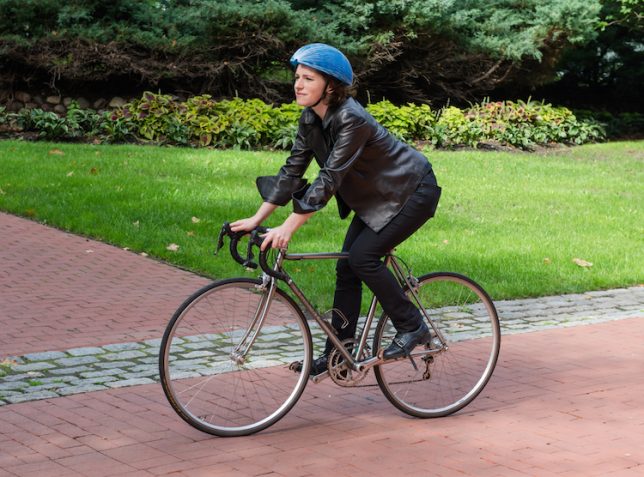
As urban cycling continues to increase in popularity, bike commuters still face the same challenge: carrying a clunky helmet with them wherever they go. For part-time, on-demand cyclists in places with bike share programs the problem is even more pronounced: hopping a ride is simply not a safe option unless they happen to have headgear handy.

paper-helmet

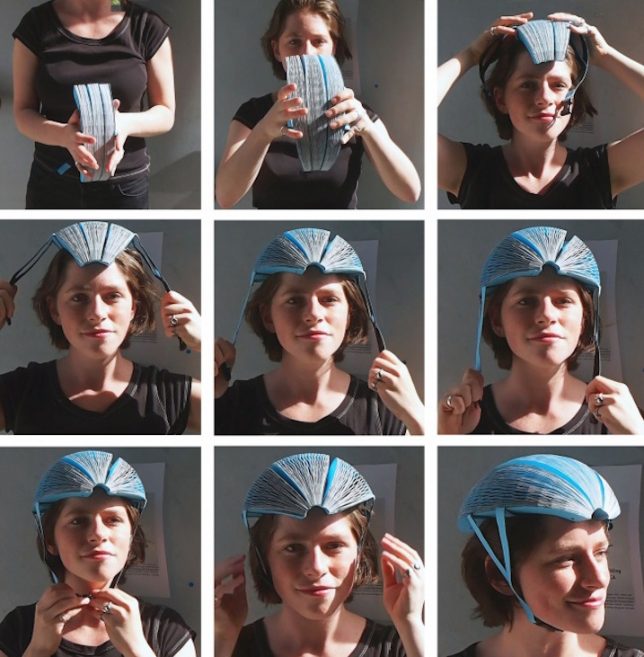
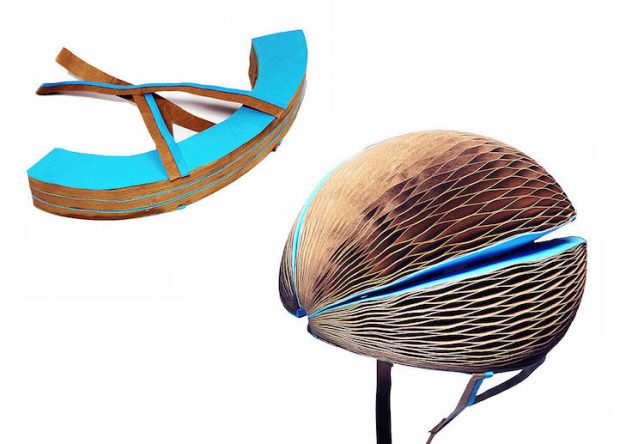
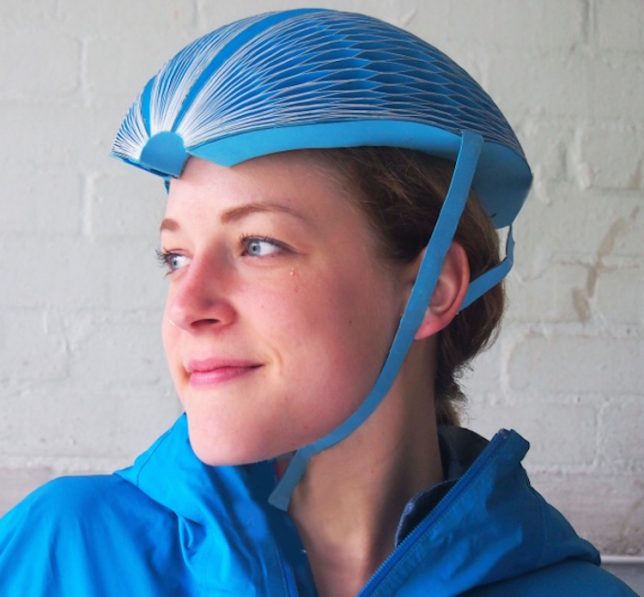
Hence the EcoHelmet by Isis Shiffer, a graduate of the Pratt Institute of Design in New York. Her collapsible helmet is designed to be low-cost (around $ 5) and easy to pack into vending machines paired with bike sharing stations.

safe-bike-paper

Recycled paper is woven into a folding honeycomb structure that is light, durable and portable, forming a protective cover in moments. A waterproof coating also protects the helmet from rainfall. Paper sounds like an implausible material, but the design has passed European safety reviews and is looking for approval in the United States. Still skeptical? The video below features some impressive impact tests — sure, the helmet may need to be replaced after an accident, but if it does the job in the moment that is what really matter.

collapsing-helmet-design

The low price tag presumably makes these cheap enough that riders won’t balk at buying one even for a single ride (though hopefully they would save and store them for future trips given how compact they are when folded up.

Share on Facebook


[ By WebUrbanist in Design & Products & Packaging. ]

[ WebUrbanist | Archives | Galleries | Privacy | TOS ]


WebUrbanist

 
Comments Off on Flat-Pack Bicycle Helmet: Portable Paper Head Protection for Cyclists

Posted in Creativity


Mobile Speed: Portable SSDs for photographers

02 Dec

Like many photographers, I spend a lot of time working in the field away from my office. By extension, that translates into a fair amount of time in front of my laptop computer backing up, organizing, and working with my images and videos before I get home.

For years my workflow depended on portable hard drives, but thanks to increased camera resolution and the need to shoot more video, particularly 4K video, I discovered that I was spending increasingly more time waiting around while bits moved across wires. And when I wanted to work with those files, the experience kept getting slower. I also worried a lot about spinning drives getting damaged in transit.

Mobile office? A perfect place for portable SSDs.

A couple years ago I switched to using external solid state drives, or SSDs, for all my mobile work. Back then there weren’t a lot of off-the-shelf products to solve my problem, so I took a DIY (do-it-yourself) approach and made my own. Times have changed, and there are now a proliferation of external SSDs to meet your needs.

Despite this, I still run into a lot of photographers who haven’t made the switch, and I’m continually surprised at how many of them have never even considered external portable SSDs, despite the fact that they often have one in their laptop.

Fortunately, we’ve reached a point where SSDs strike a reasonably good balance between price and performance. In this article I’ll take a look at some of my favorite portable SSDs that I’ve used over the past year, each of which appealed to me for a different reason, and let you know what I like about each one.

The portable SSD solutions featured in this article: (L to R) The do-it-yourself solution, Samsung T3, SanDisk Extreme 510, OWC Envoy Pro EX, Glyph Atom, Glyph Atom RAID

The DIY Solution

For those willing to get their hands dirty, the DIY (do-it-yourself) solution is a viable option. SSDs designed for laptops are plentiful online and there’s a huge selection of brands and sizes. At the time of publication, it’s possible to get a 1TB SSD for under $ 240, which is probably enough portable storage to meet the needs of most mobile photographers.

Turning a bare SSD into an external peripheral is surprisingly simple; all you need is an inexpensive hard drive case, like this one from Anker, and a USB cable. Snap the SSD inside, connect it to your computer, and format the drive.

The DIY (do-it-yourself) approach is the most economical method, and is also a great way to recycle an old SSD when you upgrade a laptop. Total assembly time: about 2 minutes.

There are plenty of cases available for around $ 10, and you can reuse them if you get a larger SSD later. I’ve been using the Anker case mentioned above for about two years and have upgraded the SSD inside three times. An external case is also a great option if you’ve upgraded the SSD in your laptop and want to recycle the old one as external storage.

Samsung T3

The Samsung T3 first caught my attention at CES in January, and I’ve been using one almost since then. The T3’s most compelling feature is that it’s small; a bit shorter than a credit card, and only 1cm thick. It also weighs close to nothing, making it great for travel. It uses a USB-C plug, but ships with a USB-C to USB-A cable so you can plug it into the existing ports on your computer right out of the box. 

The T3 has become one of my go-to SSDs when I’m traveling really light, as in 11-inch Macbook Air light. I barely notice it in my bag, and often carry it around in a shirt or pants pocket when I’m out working. In fact, this is the SSD that people ask me about most often when they see it, once they realize it’s not a card reader for my camera. This is the SSD to take with you if you want compact size, speedy performance, and a bit of style.

The Samsung T3 is a bit shorter than a credit card and 1cm thick. Put it in your pocket and you’ll barely know it’s there.

The T3 is also comes in a variety of capacities ranging all the way up to 2TB of storage, making it an incredibly compact way to store a lot of data. It’s available in several sizes including 250GB ($ 119), 500GB ($ 199), 1TB ($ 399), and 2TB ($ 799)

SanDisk Extreme 510

The SanDisk Extreme 510 gives the Samsung T3 a run for it’s money when it comes to portability, being just slightly larger due to it’s square shape. However, the difference in size is negligible when you consider how small they both are.

What sets the Extreme 510 apart from the T3 is that it’s designed for slightly more rugged use, with an IP55 rating for water and dust protection, including an integrated cap that fits over the USB port. It also has a rubber bumper around the edges to protect against drops, and it really works. Finally, there’s a small metal loop on one corner in case you want to attach a lanyard or clip the drive to your other gear.

This has turned into my favorite SSD when I need to travel light in potentially adverse conditions, such as during our Nikon D810 Field Test where dust seemed to get everywhere. I’ve even found myself using the metal loop to clip the drive to an attachment on the inside of my pack for security. My only complaints about the Extreme 510 are that the rubber cap over the USB port comes off a little too easily, and that it’s currently only available in one size (480GB).

The SanDisk Extreme 510 might look unconventional, but it’s a great choice for mobile use thanks to its water and dust resistance, and rubber bumper to protect against drops.

One interesting note about the Extreme 510 is that in my performance testing it had slightly slower than average write speeds, though I didn’t really notice this in practical use. The 480GB SanDisk Extreme 510 costs $ 249.

OWC Envoy Pro EX

Other World Computing (OWC) is known for high quality products with a focus on the Macintosh market, so it comes as no surprise that the OWC Envoy Pro EX’s case is a perfect match for a MacBook computer, right down to the anodized aluminum case. (Well, the silver variety at least.) That said, it should work with any computer as long as you format it correctly.

The Envoy Pro EX is in the middle of the pack when it comes to size, but leads the way when it comes to style, and its build quality is excellent, right down to the smallest details. I would almost call it Apple-esque, which I suppose is the point. I’ve received lots of comments about this drive, particularly from other Mac users.

The Envoy Pro EX is a great choice if presentation and appearance are of importance, particularly if you’re a Mac user. Whether you’re visiting clients or just trying to project a professional image, it does the job well. Or, if you just want a SSD that will match your MacBook’s style, and potentially outlast it as well, the Envoy Pro EX is a great choice. 

The OWC Envoy Pro EX is a well-built, stylish SSD that’s relatively compact. It’s also a perfect visual match for a silver MacBook or MacBook Pro. 

The Envoy Pro EX is available in a range of sizes including 240GB ($ 195), 480GB ($ 339), and 1TB ($ 559).

Glyph Atom and Atom RAID

The Atom and Atom RAID from Glyph Technologies are a bit heavier than the other SSDs in this article, but that simply reflects their build quality. These things are solid. Really solid. As in, I’m pretty sure I could run over them with my car and they would still work, solid. Both are enclosed in a very sturdy aluminum housing which is encased in a rubber sleeve to add some shock protection.

The Atoms are also the only SSDs in this article that feature support for USB 3.1, Gen 2. In a nutshell, this means they have twice the theoretical maximum data transfer rate of the other devices in this article (10 Gbps vs. 5 Gbps). The Atom comes in a candy bar shaped case similar in size to the OWC Envoy Pro EX.

The Glyph Atom is one of the most solid portable drives I’ve ever come across and is a great fit for serious production use where things get banged around a lot. 

The Atom RAID includes two SSDs in a RAID 0 configuration to provide even greater speed when transferring data, and it can deliver. Physically, it’s about 50% wider than the standard Atom and a bit heavier, but otherwise similar in design.

The Glyph Atom RAID is every bit as solid as the Atom, but includes two SSDs in a RAID 0 configuration for even more speed.

Both Atom devices use a USB-C connection and ship with native USB-C to USB-C cables as well as USB-C to USB-A cables. It’s a nice touch that Glyph provides cables for both types of connections out of the box. My only complaint about the design is that the LED status light on these drives is bright enough to illuminate the corner of a room in the dark.

The Atom and Atom RAID are hands-down the most durable SSDs I’ve tried, and the ones I would choose for a production environment where they get used, abused, and banged around every day. I’ve been using them non-stop for several weeks, shoving them in and out of bags with other gear, and am consistently impressed with how rugged they are. Whether the additional speed of the RAID model is justified depends on your requirements, but it’s there if you need it.

The Atom is available in capacities of 275GB ($ 129), 525GB ($ 229), and 1TB ($ 399). The Atom RAID is available in capacities of 1TB ($ 419) and 2TB ($ 819). You pay a bit of a premium for the RAID version, but if you need the speed it will probably cost you one way or another.

Performance

DPReview doesn’t do in-depth performance testing of products like hard drives. There are other sites that do a great job of things like that. However, in addition to using all these drives over the past several months, I put them all through some real world use tests on a 5K iMac using a Lightroom library with about 10,000 photos, as well as a 250GB Final Cut Pro X project. I also ran some common benchmarking software for a baseline comparison.

In real world use there was very little noticeable performance difference between any of the drives, with the exception of the DIY solution, which seemed just a bit slower when importing large amounts of data. Of course, this will depend on what SSD you use for a DIY build, so results may vary.

For slightly more objective results I ran speed tests on all the SSDs using Blackmagic Disk Speed Test and AJA System Test, both of which provided almost identical results. I also included a popular portable spinning hard drive, the WD My Passport, in the test for comparison.


Capacity Tested

 Write Speed Read Speed
DIY solution*  250GB  253 MB/s  266 MB/s
Samsung T3  1TB  383 MB/s

 406 MB/s

Sandisk Extreme 510  480GB  285 MB/s  420 MB/s
OWC Envoy Pro  960GB  378 MB/s  409 MB/s
Glyph Atom**  1TB  472 MB/s  431 MB/s
Glyph Atom RAID**  2TB  804 MB/s  572 MB/s

WD My Passport 5400 rpm portable hard disk

2TB  69 MB/s  104 MB/s

* Average results for two SSDs: a Samsung EVO 840 and SanDisk Extreme Pro. (Results for both drives were similar.) Actual performance for DIY solutions will depend on the SSD used.

** Tests for the Atom drives were performed using a new MacBook Pro with Touch Bar, which has Thunderbolt 3 ports capable of supporting the drives’ USB 3.1, Gen 2 interface.

When looking at these numbers, keep in mind that it’s possible to get slightly different results by adjusting the test parameters, though when I did so the overall trend stayed the same between drives. The take home message here is that all the drives are insanely fast compared to a portable spinning hard drive. That in itself shouldn’t be a surprise, but the table shows just how much faster the SSDs can be.

There are some interesting things to note from the data, however. I was surprised that my home-built DIY drive was consistently slower than the commercial offerings, especially since it’s basically just a bare SSD plugged directly into a USB 3.0 interface. It’s possible that different SSDs would have performed better in the same enclosure.

It’s also possible to see the advantages of the newer USB 3.1, Gen 2 transfer rates on the Atom drives, especially when you throw a RAID 0 configuration into the mix. Of course, to take advantage of these speeds you’ll need a computer that supports the new standard as well.

Conclusion

If you’re still using regular hard drives for your mobile photo work, there’s never been a better time to make the switch to portable SSDs. Of course, there are compelling reasons to stick with spinning hard drives; they deliver huge amounts of storage at low cost. Every photographer has their own price/performance threshold, but that ratio is getting better all the time.

From a performance perspective, almost any portable SSD will likely meet the needs of most photographers. The most economical solution is the DIY approach. It’s incredibly easy to assemble your own portable SSD, and prices for bare drives have come down a lot, especially if you’re willing to pick up a recently discontinued model.

When it comes to commercial SSD models, the best choice will likely come down to your specific needs. Do you need fast and light? Style? Rugged build? Each one has a sweet spot. Finally, don’t limit yourself to the SSDs included in this article. There are lots of options on the market today, and some may meet your needs better than these. If you haven’t made the switch, go online, see what’s available, and take the plunge!

Articles: Digital Photography Review (dpreview.com)
 
Comments Off on Mobile Speed: Portable SSDs for photographers

Posted in Uncategorized


Seagate 5TB Backup Plus Portable is ‘world’s largest capacity’ mobile storage drive

16 Nov

Seagate has introduced the 5TB Backup Plus Portable, calling it the world’s largest capacity portable external storage drive. The Backup Plus Portable features the BarraCuda 5TB internal drive in a 20.5mm-thick aluminum case; it supports both macOS (with an NTFS driver) and Windows with USB 3.0 connectivity.

Seagate announced the BarraCuda internal hard drive last month, and lists the 5TB model with data transfer speeds up to 140MB/s. At this capacity, the drive can store up to 600 hours of HD video, according to Seagate. The new Backup Plus offering will be available later this month in red, black, blue, and silver color options for $ 190.

Via: Seagate

Articles: Digital Photography Review (dpreview.com)
 
Comments Off on Seagate 5TB Backup Plus Portable is ‘world’s largest capacity’ mobile storage drive

Posted in Uncategorized


G-Technology introduces its first SSD portable stand-alone drive

01 Nov

Storage company G-Technology has announced a new stand-alone SSD storage device that it claims can manage transfer speeds of up to 540MB per second. The G-Drive slim SSD uses a USB 3.1 interface and requires no external power source to run. Designed to be used with Mac computers the 500GB and 1TB drives, which come finished in silver or ‘space gray’, can be formatted for PC using the company’s Windows Format Wizard software. The drives come with a ‘high-quality’ USB Type-C to Type-C cable as well as a Type-C to Type-A cable.

The drives are set to retail for $ 229.95 and $ 379.95, and are available now – with the space gray option an Apple Store exclusive.

For more information see the G-Technology website.

Press Release

G-TECHNOLOGY G-DRIVE LINEUP OF PORTABLE SOLUTIONS EXPANDED WITH SOLID STATE TECHNOLOGY AND FAST USB-C™ CONNECTIVITY

G-Technology®, a trusted premium storage brand by Western Digital (NASDAQ: WDC), today announced the expansion of its G-DRIVE portfolio, with its first solid state portable drive, the G-DRIVE slim SSD USB-C. The new drive brings faster interface speeds with USB-C connectivity and expanded external storage for next-generation computers such as MacBook and the all-new MacBook Pro, perfect for consumers and creative professionals across the world.

Available in 1TB and 500GB capacities, the G-DRIVE slim SSD USB-C delivers super-fast solid state drive performance of up to 540MB/s. It features the speedy 10Gb/s USB 3.1 Gen 2 interface, taking full advantage of the SSD performance. The included high-quality Type-C to Type-C cable and Type-C to Type-A cable, allows this drive to operate with any computer featuring Thunderbolt 3, USB-C or USB 3.0* ports. Requiring no external power source, the G-DRIVE slim SSD USB-C will ensure that high-quality videos, photos and music will be readily available whether traveling in the field, back at home or in the office.

“G-Technology continues to embrace advanced technologies in its line of products, and is excited to announce its fastest portable consumer storage solution to date,” said Mike Williams, vice president, advanced technologies/G-Technology, Content Solutions Group, Western Digital. “The G-DRIVE slim SSD USB-C embodies our commitment to delivering products that offer exceptional performance, style, and reliability, while combining SSD technology with the latest USB-C interface ensures users will have the latest technology and performance at their fingertips.”

Plug-and-play for Mac®, this sleek drive is available in space gray and silver, making it a perfect companion for a MacBook or MacBook Pro. The MSRP for the 500GB capacity is $ 229.95 and the 1TB is $ 379.95*. The product is available for purchase today at G-Technology resellers with the space gray model available exclusively at Apple Stores in early November.

G-Technology also announced today a new rose gold color for its G-DRIVE mobile USB-C line up, adding to its portfolio that also includes space gray and gold. Featuring a fast 1TB 7200RPM hard drive for transfer speeds of up to 136MB/s, the G-DRIVE mobile USB-C is compatible with any Thunderbolt 3, USB-C or USB 3.0 system**. The G-DRIVE mobile USB-C, is available in your favorite Apple colors, now at Apple stores, with rose gold coming in early November. The silver G-DRIVE mobile USB-C is available today at G-Technology resellers. The drives can be purchased at a manufacturer’s suggested retail price (MSRP) of $ 119.95*.

“When I am out on location I need fast, reliable portable storage solutions to help keep up with demanding shoots. With sleek designs and super speeds, I know I can count on G-Technology drives as my go-to back up and transfer solutions, wherever I need to be,” said Jeremy Cowart, celebrity photographer and G-Team Ambassador.

The G-DRIVE mobile USB-C and G-DRIVE slim SSD USB-C are easily reformatted for Windows users with the G-Technology Windows Format Wizard. For more information on G-Technology offerings, please visit www.g-technology.com.

Articles: Digital Photography Review (dpreview.com)

 
Comments Off on G-Technology introduces its first SSD portable stand-alone drive

Posted in Uncategorized


Bowens introduces Generation X studio and portable flash heads with TTL radio control

07 Oct

UK flash manufacturer Bowens will use the PhotoPlus Expo to launch its new range of Generation X flash heads in the USA. The new range has a completely new design and features a portable model that is powered by an in-body rechargeable battery.

There are four heads in the new range: the XMT 500, XMS 500, XMS 750 and XMS 1000, all of which offer radio controlled triggering and control via new on-camera transceiver XMSR Trigger. The XMS mono-block heads are designed for indoor and in-studio use while the XMT 500 takes a removable lithium ion cell that the company claims delivers up to 500 full power bursts per charge. This portable head also offers TTL control for Canon, Nikon and Sony users.

All of the new heads have a high speed sync mode that allows shutter speeds as short a 1/8000sec, and the XMSR radio remote allows such high speed shooting with any brand of camera. The XMT 500 has a minimum flash duration of 1/10,309sec, and the XMS heads have shortest durations of 1/5180sec, 1/4800sec and 1/4400sec, which makes them all suitable for freezing action and moving subjects.

The XMS 500 has 7 stops of adjustable power, while the XMS 750 and XMS 1000 offer 8 stops. The XMT can manage 9 stops and has a lowest output of just 2Ws. The battery-operated head has recycle times of between 0.01 and 2 seconds, and the XMS 1000 can also recover from a full power burst in 2 seconds. Bowens claims each of the heads has a flash-to-flash consistency of +/-30°K and +/-0.05 stops.

Bowens is particularly proud of a new adjustment lever that allows the heads to be tilted very quickly without the user having to wind open a bolt. The new lever just flips open to allow the angle of the head to be adjusted and then flips back to lock the head in position.

XMT 500            $ 1,799.99/£1199
XMS 500            $ 1,099.99/£799
XMS 750            $ 1,299.99/£899
XMS 1000          $ 1,499.99/£999
XMSR Trigger    $ 289.99

For more information see the Bowens website.

Press release

Bowens Launches Game Changing Generation X Flash Range

Upper Saddle River, N.J. (October 5, 2016) – Manfrotto Distribution, Inc., distributor of Bowens products in the United States, proudly announces the launch of the new Generation X flash range by Bowens. These innovative units will debut in the U.S. at PhotoPlus Expo in New York City later this month and mark a renaissance for the legacy lighting manufacturer.

Generation X comprises two new flash systems: XMT – an all-in-one battery unit for location lighting and XMS – engineered to be the go-to system for photographers who need a function-rich and completely reliable flash in the studio.

Announcing the launch, David Hollingsworth, Marketing Manager, said, “Generation X is just the first step in relaunching Bowens to the imaging world. These barrier-breaking new products combine state-of-the-art technology and cutting-edge design and are the result of many months of very intense market research and product development. They will be the vanguard of our plans for ongoing and regular new unit roll-outs in coming months and years.”

Added Hollingsworth, “We believe these are simply the best lights in their class available on the market today. New-look Bowens is creating beautifully designed and engineered products, tailored to our customers’ needs.”

John Gass, Technical Director said, “Generation X is the result of highly-focused analysis of our customers’ feedback through the years. These new units are revolutionary products which we believe are absolutely unbeatable in their class in terms of functionality, aesthetics and cost.”

He added, “For decades, customers have frequently described our products as ‘workhorses’ in the studio and on location. Now the workhorse has been transformed into a stallion; we tested the XMS at full power every five seconds over consecutive days and we couldn’t force this product to overheat.”

Generation X – at a glance:
The all-new 500Ws XMT boasts TTL and high speed sync functionality (up to 1/8000s) compatible with Canon, Nikon and Sony cameras: 9-stops of flash power adjustment; flash durations as short as 1/10309s: faster recycle times than ever before (as rapid as 0.01s): easy swap lithium-ion battery provides up to 500 full power flashes per charge: rear curtain sync; sync delay and strobe mode allow creative set-ups on the move.

The XMS, available in 500,750 and 1000Ws models (all fully controllable via the XMSR 2.4 Ghz radio control and trigger) features multi-voltage operation. These units offer outstanding specification with faster recycling times and flash durations. The XMSR model includes groundbreaking Bowens ‘Sync Offset’ functionality, enabling photographers to embrace any brand of camera to shoot at high sync speeds – up to 1/8000s.

The following models will be available this fall:
XMT 500 $ 1,799.99
XMS 500 $ 1,099.99
XMS 750 $ 1,299.99
XMS 1000 $ 1,499.99
XMSR Trigger $ 289.99

For additional information or to learn more about Bowens products, visit: https://www.manfrotto.us/bowens.

Articles: Digital Photography Review (dpreview.com)
 
Comments Off on Bowens introduces Generation X studio and portable flash heads with TTL radio control

Posted in Uncategorized