RSS
 

Posts Tagged ‘Portable’

DJI goes portable with the Mavic Pro

28 Sep

DJI just announced the release of their ultra portable consumer drone: the Mavic Pro. The Mavic offers a number of interesting features including the ability to track and follow its user, which is something that the GoPro Karma that was just released last week cannot do. It also has the same obstacle avoidance and tracking modes that can be found on the DJI Phantom 4 – features the Karma lacks.

The Mavic can fly at speeds up to 40MPH in ‘sport’ mode and can remain stable flying in winds up to 24MPH. The Mavic films in 4K/30p or 1080p at 96fps, and has a battery life of around 27 minutes of continuous flight time. On board the drone is a 12MP camera on a three-axis gimbal that can focus as close as 48cm/19in. The Mavic Pro offers DNG Raw shooting, and DJI claims that thanks to its gimbal design, it’s possible to shoot 2-second-long exposures from the air. A Tripod Mode is included that enables finer camera angle and position adjustments so you can frame your selfie just right.

Also of note is the Mavic Pro’s updated ActiveTrack mode that is trained to identify objects like people, cars and animals and can follow, circle or lead in front of its subject. 

The Mavic Pro’s controller has seen a design change from previous DJI controllers and it now sports a smaller design that features the ability to clip your phone right on the bottom of the unit. If you don’t want to use the controller, the drone can be controlled with on-screen joysticks right from your smartphone.

DJI also announced the debut of a brand new product that will allow for in flight viewing experiences called DJI Goggles. The goggles were specially designed for aerial first-person view (FPV) applications but the DJI Goggles also allow you to flick between third person view and FPV in under a second. You can comfortably wear your glasses while wearing the goggles and quit FPV mode instantly by flipping the mask up. The goggles display an 85-degree view from the drone in full 1080p for a true bird’s-eye view perspective of the world below. With built-in OcuSync, the goggles receive video directly from Mavic Pro in the air and not through the controller which reduces lag and allows you to share the in-flight view with a friend. 

The Mavic Pro’s U.S. retail price will be $ 999 with the remote controller included, and $ 749 without the remote controller. Additional Mavic Pro Intelligent Flight Batteries will cost $ 89. A Mavic Pro Fly More Combo, which includes a Mavic Pro, two extra Intelligent Flight Batteries, extra propellers, a charging hub, an adapter, a car charger and a shoulder bag, will be available for $ 1,299. It will begin shipping October 15th.

DJI Revolutionizes Personal Flight With New Mavic Pro Drone

Small Size And Folding Design Make Mavic Pro Perfect For Wherever You Go

September 27, 2016 – DJI, the world leader in unmanned aerial technology, Tuesday revolutionized personal flight by introducing Mavic Pro – a portable, powerful and easy-to-use drone featuring DJI’s most innovative flight technology in a sleek, foldable package that enables creative fun wherever you go.

Mavic Pro is DJI’s first personal drone designed to be taken just about anywhere. Small enough to toss in a bag and easy enough to launch quickly whenever the time and place are right, its unique folding design compresses the entire drone to practically the size of a water bottle.

The compact body of Mavic Pro holds a drone built for uncompromising performance. Equipped with a stabilized 4K camera and a visual navigation system, with a 4.3 mile (7 km) range and 27 minute flight time, Mavic Pro sets the new standard for compact drones.

“DJI has spent a decade making it easier for anyone to fly, and by rethinking everything about how a drones look, we have created an entirely new type of aerial platform for anyone to explore their creativity,” said Frank Wang, DJI’s CEO and founder.

“Mavic Pro is a technological triumph filled with features that once again show how DJI leads the industry. Most importantly, Mavic Pro allows you to reach the skies easily, see the world with new eyes and tell your stories like never before.”

Mavic Pro is designed to be ultra portable and quick to launch so it can take to the skies as soon as you need it. With four folding arms and propellers that tuck neatly away against its streamlined body, it can be easily carried in a purse or backpack, saving you the trouble of mounting propellers before a flight. It can be operated by the powerful long range remote controller, or simply by your smartphone at shorter range. When controlled by a smartphone, the whole system can be set up and airborne in less than a minute to capture every key moment.

Unparalleled Flight Experience

DJI’s commitment to unparalleled stability, maneuverability and safety is clear in Mavic Pro’s new FlightAutonomy system. FlightAutonomy is Mavic Pro’s brain and nervous system, a complex network of hardware and software consisting of five cameras, GPS and GLONASS navigation systems, a pair of ultrasonic range finders, redundant sensors and 24 powerful computing cores.

FlightAutonomy can position, navigate and plan routes for Mavic Pro, enabling it to avoid obstacles in various environments, with or without the help of satellite signals. FlightAutonomy provides a significant boost in working range and can cope with complex 3D environments. For navigation and obstacle avoidance, FlightAutonomy provides a superb speed-range envelope to make Mavic Pro self-navigational in various intelligent flight modes, and will avoid most obstacles at speeds up to 22 mph (36 kph).

An ultra light and aerodynamic airframe, together with DJI’s state-of-the-art propulsion and battery system, enables Mavic Pro to fly for up to 27 minutes. To experience the pure joy of flying, Mavic Pro can be switched to Sport Mode, which allows speeds of up to 40 mph (64.8 kph), increasing the drone’s agility and responsiveness. Mavic Pro flies smoothly and will remain stable in winds of up to 24 mph (38.5 kph), and uses DJI’s GEO geofencing system to help identify restricted areas, preventing flight in locations that might raise safety or security concerns automatically, and helping pilots make smarter decisions about when and where to fly.

As with all DJI drones, Mavic Pro is set to automatically return to its launch location if it ever loses contact with the controller or reaches critically low battery levels. The new Precision Landing feature records a burst of video with two stereo cameras every time Mavic Pro launches, then uses both video and satellite information when it returns to land within an inch of where it took off. If a pilot lets go of the controls, the drone will simply hover in place.

Advanced Stabilized Camera System

Mavic Pro’s small size is packed with powerful features. DJI’s advanced technology now includes our smallest-ever three-axis gimbal for shake-free photos and video. The autofocus camera features a minimum focusing distance of just 19 in (0.5 m) and can be flipped 90 degrees to portrait mode for vertical selfies and video. Mavic Pro records 4K video at 30fps and full 1080p HD at 96fps. Its 12-megapixel camera with Adobe DNG RAW support has been expertly tuned for aerial images. With the help of the high-precision gimbal, you can confidently shoot 2-second-long exposures in the air to get the most jaw-dropping aerial images.

New Remote and Live View Performance

A revolutionary new compact remote controller has been designed to provide a fully ergonomic experience with optimum comfort, and can accommodate a smartphone or control Mavic Pro on its own. Its built-in LCD screen displays essential telemetry data, while dedicated buttons for functions such as Return-to-Home and pausing during Intelligent Flight modes ensure a confident flight every single time. The video link system, OcuSync, represents new heights in DJI’s communication technology. It supports a range up to 4.3 miles (7 km) and live view resolutions up to 1080p.

The new band management algorithm makes OcuSync more robust in environments with many frequencies in operation. Mavic Pro is equipped with dual-band WiFi as a secondary link, allowing easy control via your smartphone for close range operation or for quick downloading of content from Mavic Pro straight to your device.

Most Intelligent Drone Ever

The powerful systems inside Mavic Pro are easy to use, even for beginners. Using just your phone’s touchscreen, you can use TapFly to direct Mavic Pro to go wherever you want, avoiding obstacles along the way. When you want to take a hands-free selfie, FlightAutonomy makes it possible to control the drone completely with just your gestures.

In Gesture mode, you can use gestures to have Mavic Pro locate you, center you in the frame and take the perfect shot as Mavic Pro’s flashing lights count down to the photo. Sharing your best aerial moments has never been easier with live streaming to Facebook Live, Periscope and YouTube through the DJI GO app.

An updated version of DJI’s ActiveTrack recognizes common subjects such as people, bicyclists, cars, boats and animals, which then sends Mavic Pro to follow behind, lead in front, circle above or track alongside the subject, keeping the camera focused on the subject while you concentrate on flight maneuvers. The new Terrain Follow mode means that you can race up a slope behind a subject while remaining at a constant height between 1 ft (0.3 m) and 33 ft (10 m).

At the other extreme, the new Tripod Mode is designed for indoor use, slowing and fine-tuning Mavic Pro’s position and angle based on controller movement inputs to allowing for precision framing and safe indoor flight.

Immerse Yourself

Mavic Pro also pairs with DJI’s new immersive DJI Goggles, displaying an 85-degree view from the drone in full 1080p for a true bird’s-eye view of the world below. With built-in OcuSync, the goggles receive video directly from Mavic Pro in the air and not through the controller, reducing lag to a minimum – and allowing you to share the in-flight view with a friend.

Specially designed for aerial first-person view (FPV) applications, DJI Goggles allows you to flick between third person view and FPV in under a second. You can comfortably wear your glasses while wearing the goggles and quit FPV mode instantly by flipping the mask up.

Price and Availability

Mavic Pro’s U.S. retail price will be $ 999 with the remote controller included, and $ 749 without the remote controller. Additional Mavic Pro Intelligent Flight Batteries will cost $ 89. A Mavic Pro Fly More Combo, which includes a Mavic Pro, two extra Intelligent Flight Batteries, extra propellers, a charging hub, an adapter, a car charger and a shoulder bag, will be available for $ 1,299.

Mavic Pro is immediately available for pre-order at dji.com/mavic and will begin shipping October 15. It will also be available in mid-October at DJI’s three flagship stores in Shenzhen, Seoul and Hong Kong. Mavic Pro can also be ordered on Apple.com and will be available in Apple Stores in early November.

DJI Care Refresh

A new optional protection plan, DJI Care Refresh, is available in select countries and provides peace of mind for Mavic Pro owners. DJI Care Refresh covers accidental damage to the Mavic Pro aircraft, gimbal or camera during normal use for up to 12 months, and for an additional charge will offer up to two full replacements that are new or equivalent to new. DJI Care Refresh is available for $ 99 before a new Mavic Pro is activated, or within the first 48 hours after activation.

For additional information, please contact:

Adam Najberg, DJI Global Communication Director – pr@dji.com

About DJI

DJI is a global leader in developing and manufacturing innovative drone and camera technology for commercial and recreational use. DJI was founded and is run by people with a passion for remote-controlled helicopters and experts in flight-control technology and camera stabilization. The company is dedicated to making aerial photography and filmmaking equipment and platforms more accessible, reliable and easier to use for creators and innovators around the world. DJI’s global operations currently span across the Americas, Europe and Asia, and its revolutionary products and solutions have been chosen by customers in over 100 countries for applications in filmmaking, construction, emergency response, agriculture, conservation and many other industries. 

For more information, visit our website: www.dji.com

Follow us on Facebook: www.facebook.com/DJI

Follow us on Twitter: www.twitter.com/DJIGlobal

Subscribe to our YouTube Channel: www.youtube.com/DJI

Articles: Digital Photography Review (dpreview.com)

 
Comments Off on DJI goes portable with the Mavic Pro

Posted in Uncategorized


Polaroid LED photo studio color box light offers portable, low-heat lighting

03 Sep

A new Polaroid-branded LED photo studio color box light has been introduced: a 907g / 2lb lightweight offering with an attachable handgrip, remote control and quiet operation easy-press buttons. Information including the color temperature, brightness and mode, as well as battery life, are displayed on an integrated LCD.

The new color box light is designed to be highly portable with support for both handheld and tripod usage; it can also be connected to other photo boxes for larger projects. According to Polaroid, the light features 600 LEDs and can achieve up to a 93% efficiency. 

The Polaroid LED photo studio color box light is available from Amazon now for $ 120.

Articles: Digital Photography Review (dpreview.com)

 
Comments Off on Polaroid LED photo studio color box light offers portable, low-heat lighting

Posted in Uncategorized


Lightweight & Portable Egg-Shaped Drone Folds Up Into Shell

28 Feb

[ By WebUrbanist in Gadgets & Geekery & Technology. ]

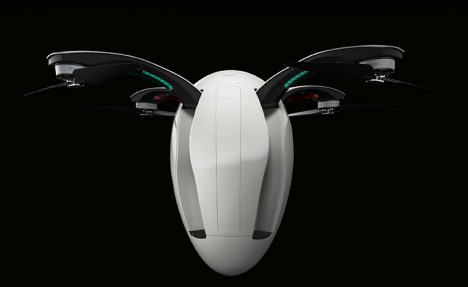
poweregg drone

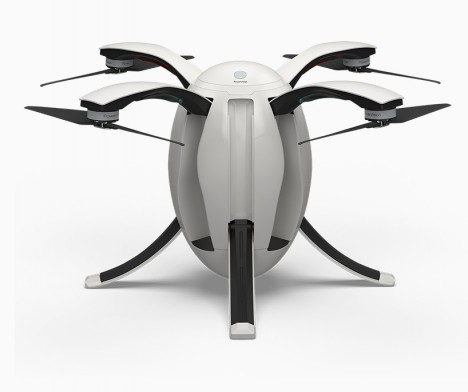
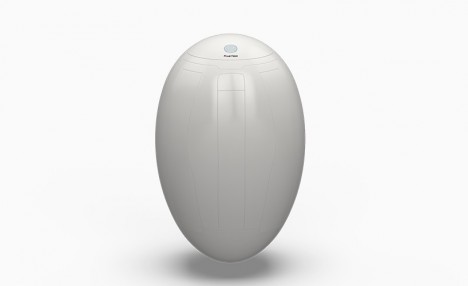
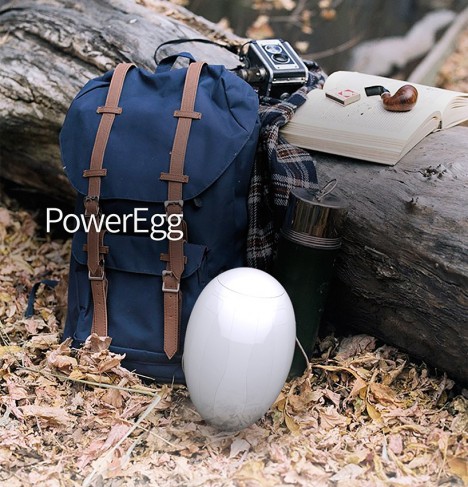
Boasting practical portability with an eye to aesthetics, the new PowerEgg stands out against its more ungainly competitors, able to fold up into a smooth oval when not in use.

powervision egg drone

PowerVision “wanted to create a beautiful yet functional design for the poweregg,” explains CEO Wally Zheng. “The oval shape is not only clean and pure but also has the structural and functional benefits. This simple yet vital design means that this is more than a flying robot but a work of art.”

poweregg size

The device features a 360-degree panoramic HD camera able to relay long-range video, advanced optical flow sensors for indoor navigation and an easy-to-use remote control.

powervision detail

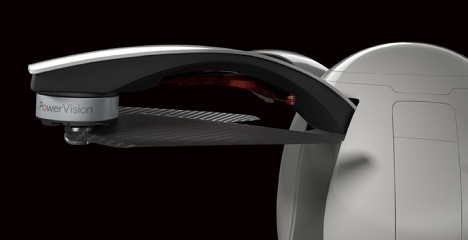
Developed over a year and a half, a great deal of work went into structural engineering, particularly making the moving parts work as it transforms to active from passive modes and back again.

poweregg deployed

“We want flying a drone to be child’s play, something even a five-year-old can do,’ continued Zheng. “With this next generation of drones, much like the internet expanded access to information in the virtual world, drones 2.0 led by innovations like the PowerEgg can expand access to the physical world and bring together humans and machines in this journey.”

Share on Facebook


[ By WebUrbanist in Gadgets & Geekery & Technology. ]

[ WebUrbanist | Archives | Galleries | Privacy | TOS ]


WebUrbanist

 
Comments Off on Lightweight & Portable Egg-Shaped Drone Folds Up Into Shell

Posted in Creativity


Gear Review – Glow QuadraPro Portable Softbox

11 Dec

There is no greater teacher in life than time and experience. If I could go back in time and teach myself some photography lessons, high on my list would be OCF – off-camera flash. Back when I was starting out in photography, I used to dread using my flash. In fact, I think for the first two years of my photography career, I did not even own one. If a client would enquire about a family photoshoot, I would promptly reply back saying I am strictly a natural light photographer and the best times to schedule the session would be a little after sunrise or around sunset. I think I might have even turned down some indoor photo sessions because I hated the look and feel of a flash.
Fast forward a few years, as I ventured into the genre of wedding photography, I started to get over my fear of using a flash. As I educated myself on studio lights, flashes, and all the other lightning paraphernalia out there, I stopped hyperventilating as much at the thought of using artificial light for my photos. Although I am now fairly comfortable using an on-camera flash, I still consider myself a novice artificial light photographer. The next step to mastering artificial lights is to get comfortable with off-camera flash. To that end, I knew I needed, at the bare minimum, a light stand, a soft box, and my flash. So when I got the opportunity to review the GLOW QuadraPop Portable Softbox from Adorama I jumped at the chance.

Screen Shot 2015-12-03 at 1.37.49 PM

Let me preface this article by setting the record straight. I have never used an off-camera lighting system from the ground up. I have watched several online classes and tutorials on how a single light off-camera system works. In fact there are several wonderful articles on dPS that discuss off-camera flash like this one. But this is the first time I have handled such a setup ,and so, in essence, I am reviewing this product as a novice off-camera flash/softbox user.

Contents and what’s in the box

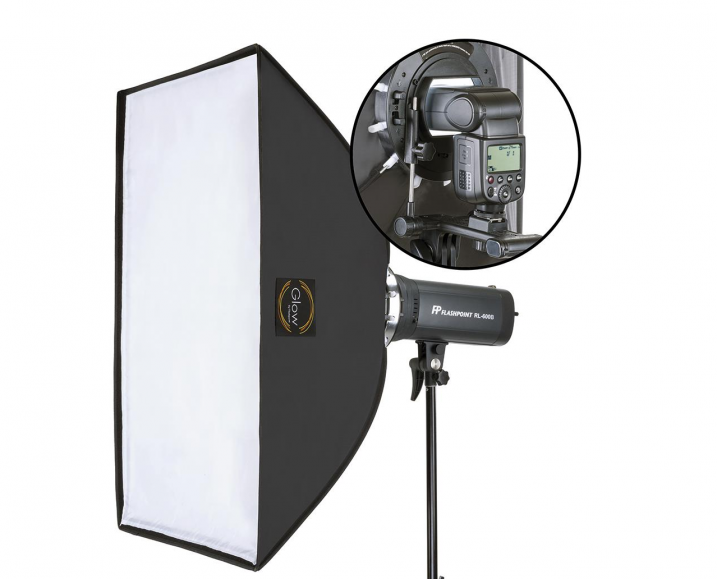
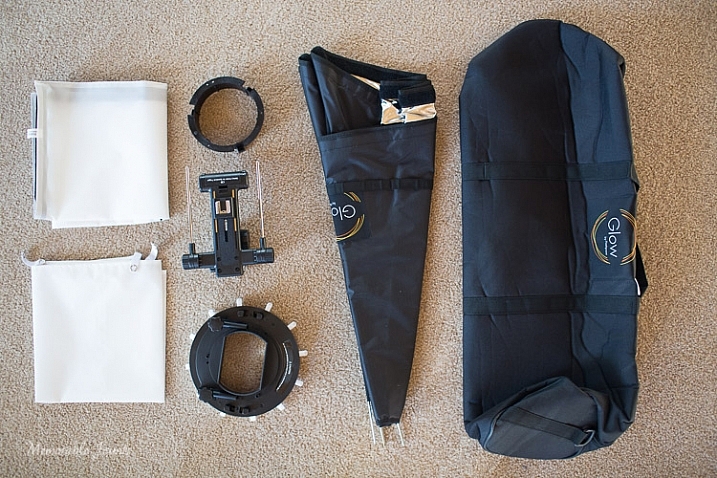
The QuadraPro comes fully equipped to use with a speedlight, as well as a studio strobe. Included in the box were the actual soft box, angle adjustment shoe bracket that can be adjusted for height and depth, removable inner and outer diffusers, removable cold shoe, and a protective bag to carry the QuadraPro on location. The only thing you will need to have is a light stand. I have a generic, lightweight stand that I had purchased from a local camera shop last year, and the GLOW QuadraPro worked perfectly with it.

Memorable Jaunts Glow QuadraPro Softbox Article Image Whats in the bag-1

I have to admit that when I opened the box, I was a little nervous about how to set up the whole system. I am used to reading manuals and watching product videos prior to handling equipment, but for this softbox setup I decided to skip all the research and prep work, and start using the product right away. The setup did take me a few minutes to figure out, but once I read through the one page instruction sheet that comes with the GLOW QuadraPro, it was easy enough.

The flash cold shoe bracket was easy to use, but attaching the actual softbox to the QuadraPro ring did take me a couple of tries. Once I was able to secure the rods into the rings, it was easy to snap them in to place by adjusting the rings in a circular manner. The inner and outer diffuser panels are quite literally a snap to attach. The outer diffuser panel has a velcro attachment mechanism, while the inner panel snaps with push buttons.

Ease of use and comfort

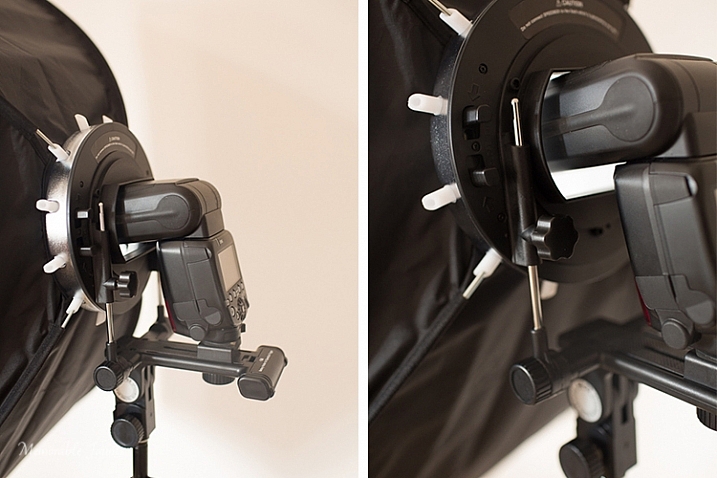
The Glow QuadraPop line is perfect for mobile studios, on-location work, and also travel. The entire system is quite lightweight, and easy to set up and dismantle. This is ideal for individual portraits and product shots, as well as for use on location. The one I used is the QuadraPop Rectangular softbox that comes in two sizes – 28×38″ and 24×34″. I used the GLOW QuadraPop with both the internal, and external, diffuser panels. Additionally the flash shoe bracket has an angle adjustment knob for easy tilting, thereby adjusting the angle of light – perfect for photographing things from above.

Memorable Jaunts Glow QuadraPro Softbox Article Image Angle Adjustment on the Flash Hotshoe-3

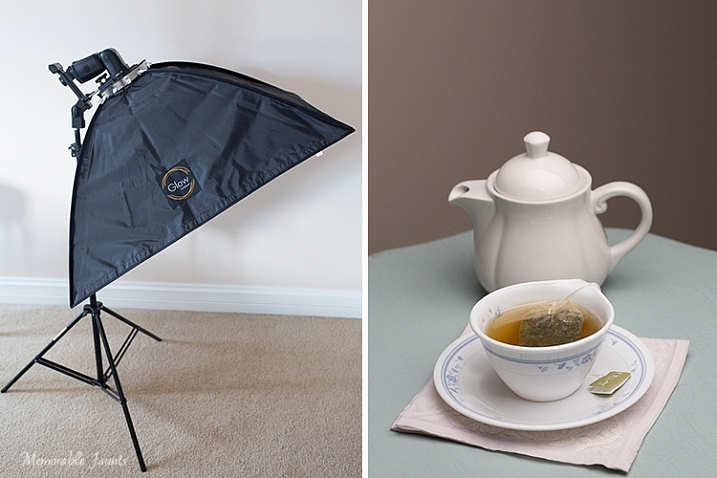
My afternoon tea was photographed with the softbox above and to the right of the tea cup, as seen in the reflection on the surface of the tea in the cup, and the light on the tea pot.

Basic setup and portability

I created a quick video on how easy it is to set up the softbox:

Memorable Jaunts Glow QuadraPro Softbox Article Image Softbox Setup-1

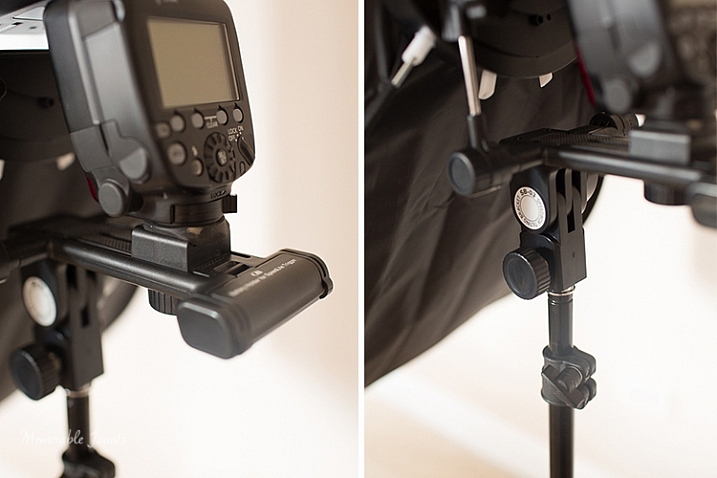
The softbox is mounted on the circular ring using the white clasps. The softbox is mounted on the light stand via the cold-shoe mount that also holds the flash.

Memorable Jaunts Glow QuadraPro Softbox Article Image Softbox Setup-4

The cold-shoe mount has an adjustable screw that slides the flash forward or backward on the base.

Memorable Jaunts Glow QuadraPro Softbox Article Image Softbox Setup-6

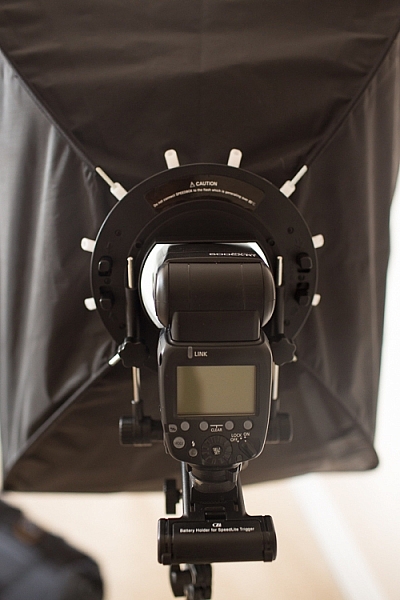
Back view of the fully assembled GLOW QuadraPro Softbox with the flash attached.

Memorable Jaunts Glow QuadraPro Softbox Article Image Softbox Setup-8

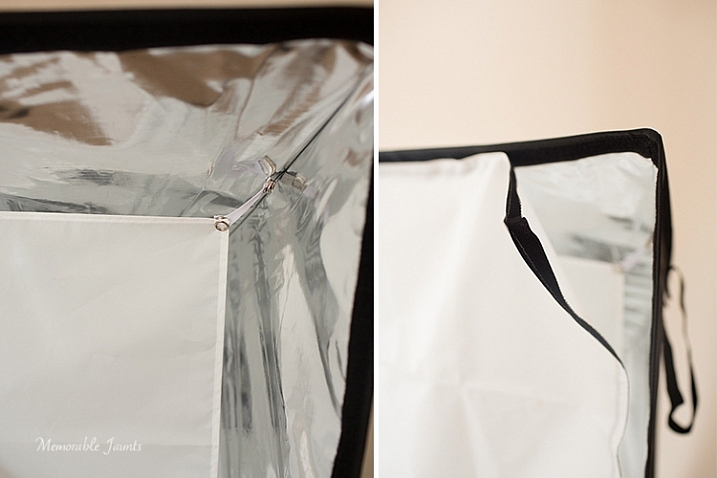
Inside diffuser panel that snaps into place, while the outside diffuser panel has velcro that attaches to the inside of the softbox close to the edge.

Indoor and outdoor use

I planned on putting the GLOW QuadraPop to the test with both indoor and outdoor use. But, just as I was writing this article, Chicago got the first major snow storm of the season. So, with subzero temps, I decided to forgo the outdoor test and just use it indoors with my obliging models, a.k.a my kids!

While indoors I moved the GLOW system from one room to the other, to see how easily I could manage carrying the system around. Before moving it, I removed the flash from the cold-shoe attachment, and also collapsed the softbox by squeezing the tabs on the sides of the ring. This did take some force, as the softbox rods were quite secure in their respective white sockets. I did not remove the diffuser panels as recommended, because I wanted the set up process to be easy at my next location (similar to what it would be like on a live on-location photoshoot). This made the set up, and take down process, much easier and faster.

Please note – I was experimenting with various softbox positions and had the flash on ETTL. My focus here was not on posing, but on the look and feel of a diffused lighting setup using a single softbox, i.e. the GLOW QuadraPro.

Memorable Jaunts Glow QuadraPro Softbox Article Image Indoor setup -4

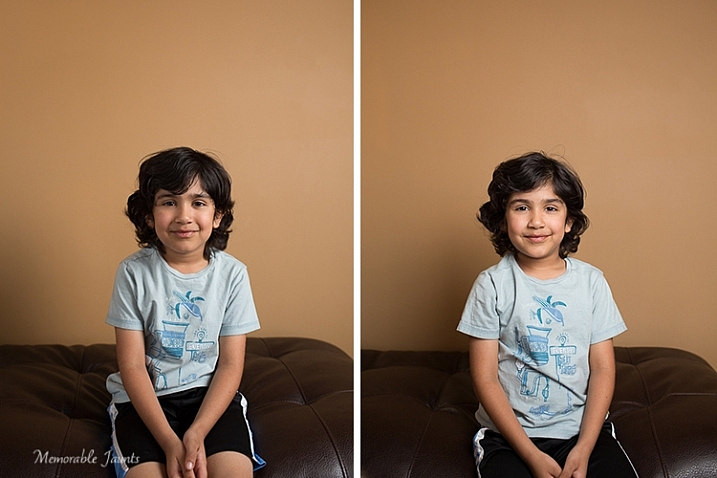
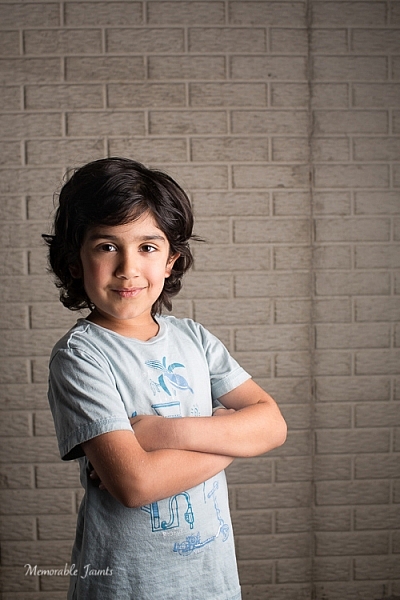
The image on the left has the softbox to the right of the camera. There is a slight shadow on the left hand side, and a nice drop-off of light on the background. The image on the right has the softbox placed directly in front of the model for a more even tone, and even lighting on the face.

Memorable Jaunts Glow QuadraPro Softbox Article Image Indoor setup -3

For this image, I moved to the basement where it was much darker. I quite like the effect of the dramatic lighting on the left side of his face, with some shadows on the other side. His body is turned slightly towards the softbox, which is at approximately at a 45 degree angle from the subject’s position.

Next up, my other willing model who had to be constantly bribed with treats and food!

Memorable Jaunts Glow QuadraPro Softbox Article Image Indoor setup -5

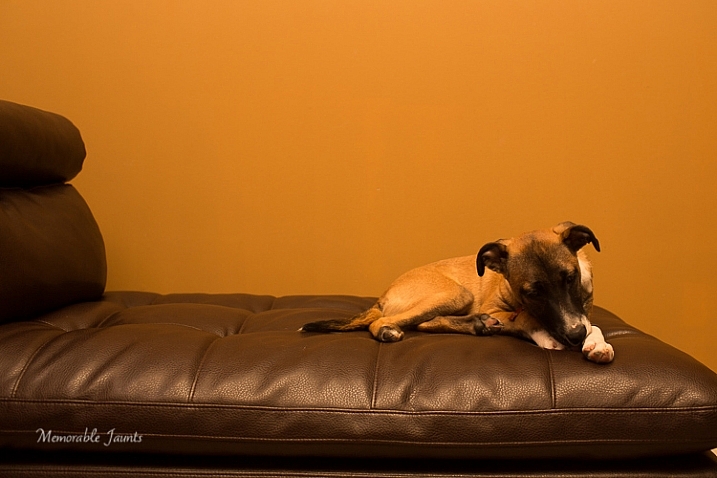
This image was taking WITHOUT the softbox. The flash was just bounced straight up without any additional diffusion. The image is quite dark and the color of the wall is quite terrible in this image.

Memorable Jaunts Glow QuadraPro Softbox Article Image Indoor setup -8

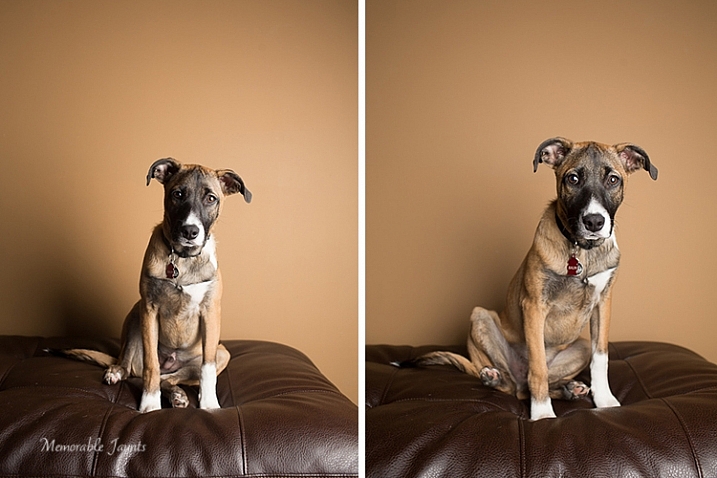
The image on the left had the softbox placed at a 45 degree angle to the dog. The image on the right has the softbox pointed straight ahead, giving a more even lighting and beautiful catchlights in his eyes. Plus the color of the wall is more true to its actual color!

Final Thoughts

In conclusion, the GLOW QuadraPro softbox is a fairly easy to use, lightweight and portable, flash diffusion system. I quite liked the convenience of having the setup all ready to use as I was experimenting with a single off-camera flash. Initially the softbox was a bit difficult to put together, and that was purely because I have never used this type of lighting system from the ground up. But once I got used to the clamps, they were very easy to assemble and dismantle.

googletag.cmd.push(function() {
tablet_slots.push( googletag.defineSlot( “/1005424/_dPSv4_tab-all-article-bottom_(300×250)”, [300, 250], “pb-ad-78623” ).addService( googletag.pubads() ) ); } );

googletag.cmd.push(function() {
mobile_slots.push( googletag.defineSlot( “/1005424/_dPSv4_mob-all-article-bottom_(300×250)”, [300, 250], “pb-ad-78158” ).addService( googletag.pubads() ) ); } );

The post Gear Review – Glow QuadraPro Portable Softbox by Karthika Gupta appeared first on Digital Photography School.


Digital Photography School

 
Comments Off on Gear Review – Glow QuadraPro Portable Softbox

Posted in Photography


LifePrint portable printer uses augmented reality app to bring photos to life

20 Nov

A portable photo printer called LifePrint, now seeking funding on Kickstarter, creates ‘living’ photos by combining a printed photograph with a digital video. An augmented reality app makes this possible, so that when a print is viewed through a smartphone’s camera, the video appears where the photo is located, making it seem as if the image – called a HyperPhoto – has come to life. Read more

Articles: Digital Photography Review (dpreview.com)

 
Comments Off on LifePrint portable printer uses augmented reality app to bring photos to life

Posted in Uncategorized


Got Your Goat: Portable Drinking Horn Coffee Mug is Good to Go

04 Nov

[ By WebUrbanist in Design & Products & Packaging. ]

drinkinghorn

Its shape inspired by goats, the creatures that helped humans discovered coffee, this modern-day drinking horn is curved to make drinking easier and capped to let you take your java on the road.

goat mug to go

goat mug portable

Designed by desnahemisfera in cooperation with Equa, the Goat Story drinking device comes equipped with a leather holder to act as a heat barrier while walking or a stand while sitting.

goat mug

The travel-ready cup also comes with a short and long leather carrying strap, which can also be combined to form an even longer version.

goat mug office

goat mug travel

From its creators: “As easy as 1-2-3, your GOAT STORY coffee mug will be able to stand on your office desk and it will be at a hand´s reach all the time. Just take the handle off, turn it around, place the mug in it. Voila! The ergonomic shape will help you drink your coffee. Have we mentioned that it won’t fall over?”

goat mug for coffee

goat mug with holder

“It comes with a cross body strap, which lets you carry your business case in one hand while replying e-mails on your phone, in between sips. Also, you can use the shorter strap to attach it to your bag or carry it around your wrist and keep your hands free.”

Share on Facebook


[ By WebUrbanist in Design & Products & Packaging. ]

[ WebUrbanist | Archives | Galleries | Privacy | TOS ]


WebUrbanist

 
Comments Off on Got Your Goat: Portable Drinking Horn Coffee Mug is Good to Go

Posted in Creativity


Audiovisual Trikes: Portable Projections Animate City Streets

26 Oct

[ By WebUrbanist in Art & Installation & Sound. ]

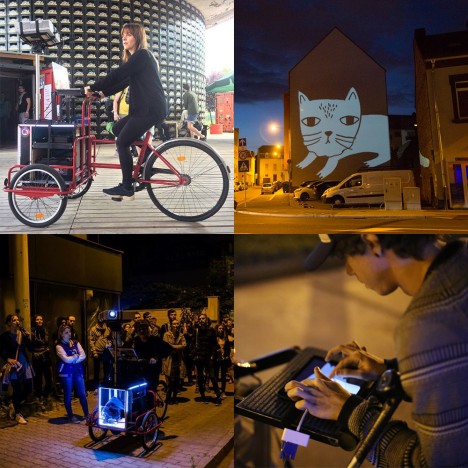
audiovisual tricycle performance art

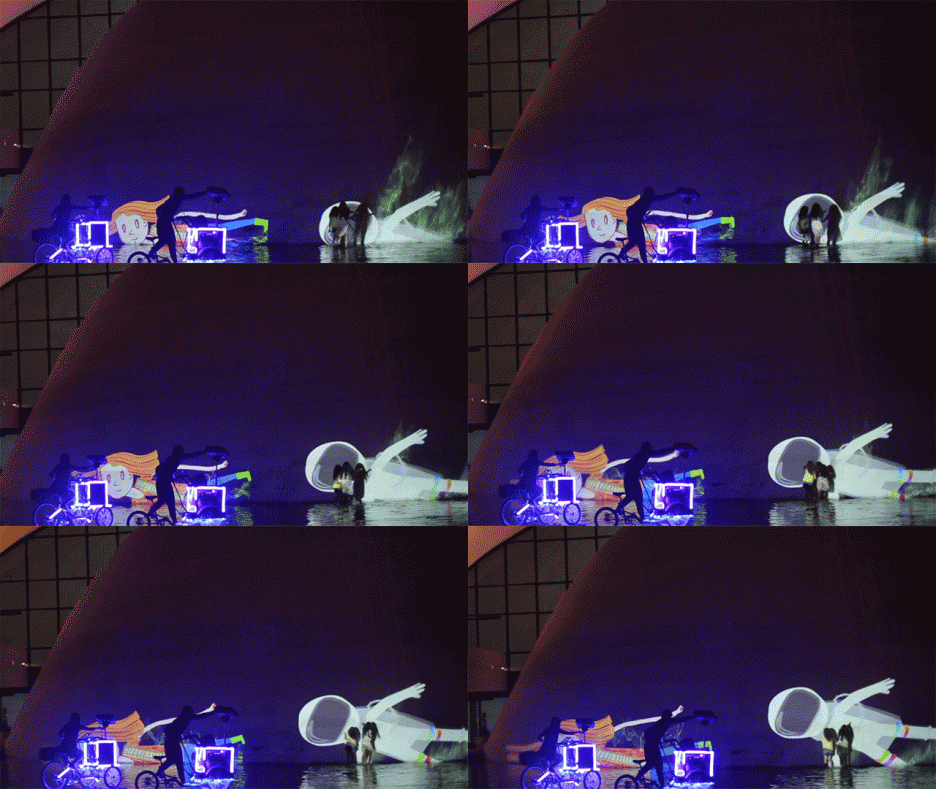
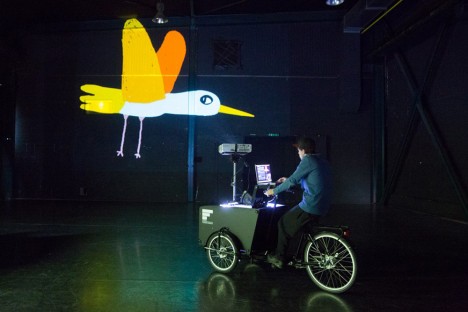
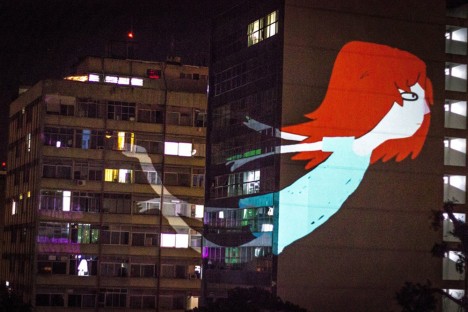
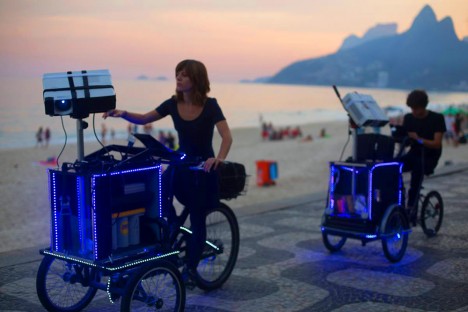
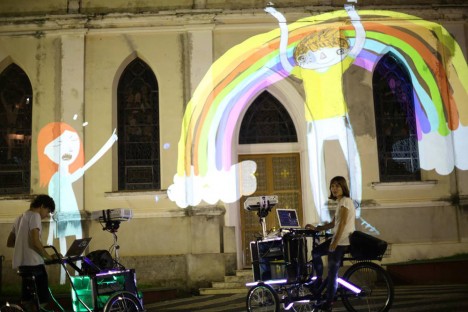
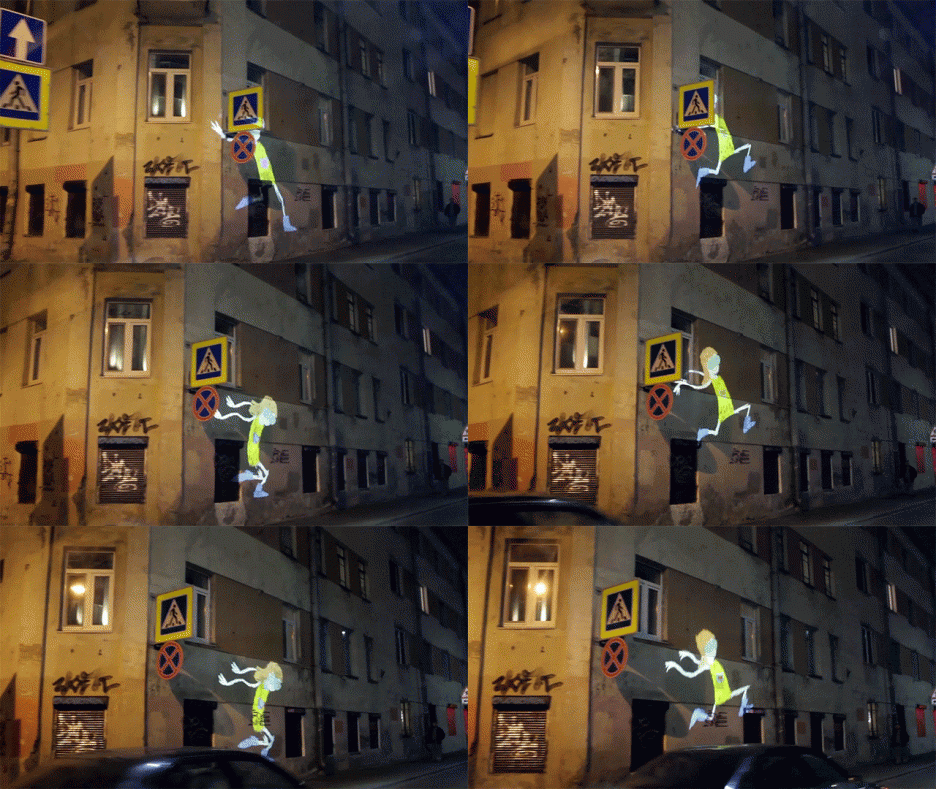
Lighting up streets and sidewalks of Rio de Janeiro, these mobile animation units utilize the movement of tricycles and available city surfaces to create amazing and interactive works of art.

interactive wall installation projection

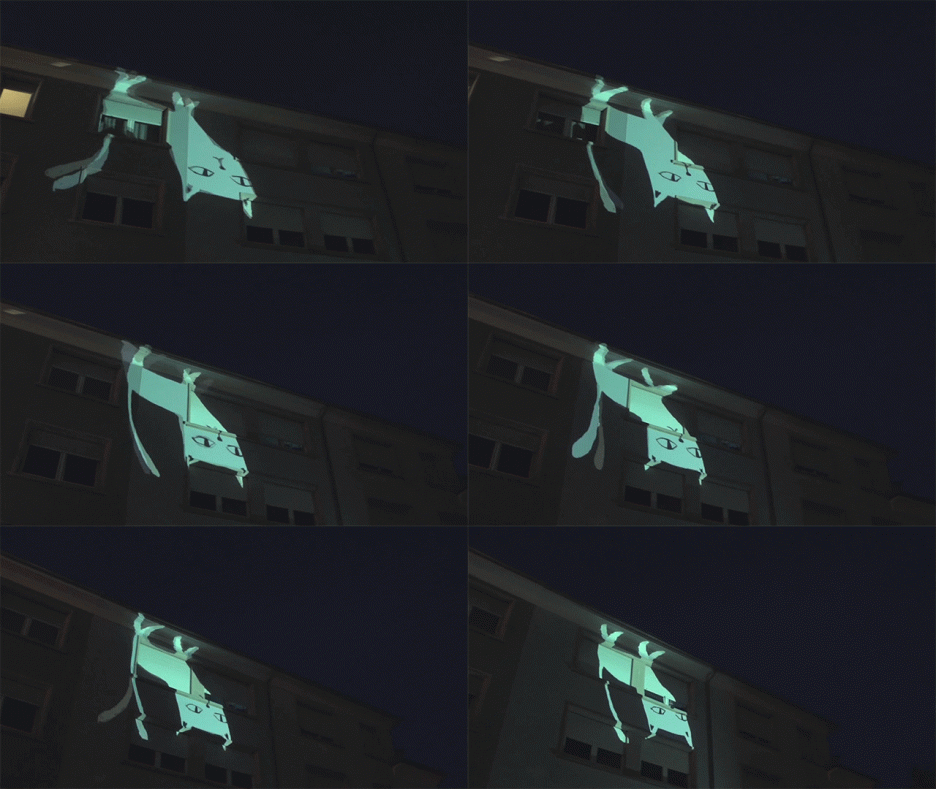
The so-called Suaveciclos were designed by artists Ygor Marotta and Ceci Soloaga of VJ Suave from São Paulo, combining batteries, laptops, projectors and speakers to create a multimedia experience.

portable programmable light art

portable projection wall art

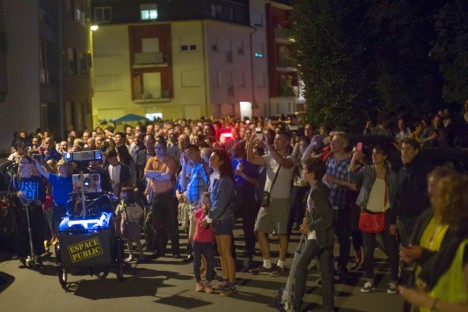
While some of the works are projected up high, those aimed at human-accessible surfaces (roads, sidewalks or low walls) are remarkably engaging, sparking children to start playing with the live projections.

portable light art demo

portable swimming mermaid wall

The versatility of these stop-and-go projection systems (tweakable to context) make it easy for the artists to react to crowds, stopping where popular or pressing on when their work at one site has run its course. They have pedaled their act in cities in Russia, Luxembourg, Slovakia Germany and Switzerland as well.

portable vj sound and light

portable speakers projectors

portable public art

From the artists: “small narratives with characters and poetry can travel open spaces, lighting walls on a large scale. The projections illuminate walls, trees, lakes, sidewalks and propose a playful interactivity with the public. With the video manipulated in real time, Suaveciclos bring art to all audiences and create unique moments between the city and the viewer.
In their playful universe, vjsuave deals with current themes with ambient sound accompanying the performance” (h/t Colossal and  Prosthetic Knowledge).


Share on Facebook


[ By WebUrbanist in Art & Installation & Sound. ]

[ WebUrbanist | Archives | Galleries | Privacy | TOS ]


WebUrbanist

 
Comments Off on Audiovisual Trikes: Portable Projections Animate City Streets

Posted in Creativity


Light L16 packs 16 cameras into a single portable body

09 Oct

US-based startup Light has officially introduced its L16, a portable device packed with 16 individual cameras, ten of which capture an image at the same time at different fixed focal lengths. The resulting photograph is a composite of all the individual images combined, with a final resolution of up to 52 megapixels. An earlier prototype of this camera was shown off this past April. Read more

Articles: Digital Photography Review (dpreview.com)

 
Comments Off on Light L16 packs 16 cameras into a single portable body

Posted in Uncategorized


RED unveils RAVEN, a lightweight and portable 4K camera

26 Sep

RED has launched its new RED RAVEN camera. The model offers 4K recording at 120fps and 2K recording at 240fps using an 8.8 megapixel RED DRAGON image sensor. The new model is one of RED’s smallest and lightest cameras at 3.5lbs, making it suitable for handheld and drone use. Read more

Articles: Digital Photography Review (dpreview.com)

 
Comments Off on RED unveils RAVEN, a lightweight and portable 4K camera

Posted in Uncategorized


G-Technology updates Evolution range with adapters, readers and portable storage

10 Sep

Data storage manufacturer G-Technology has revamped products within its Evolution series and has added adapters to make its family of docks and drives more flexible. Read more

Articles: Digital Photography Review (dpreview.com)

 
Comments Off on G-Technology updates Evolution range with adapters, readers and portable storage

Posted in Uncategorized