RSS
 

Posts Tagged ‘Photos’

Gorgeous color photos of America in the 1930’s and 40’s

18 Aug

color_2.jpg

World War II and Depression-era America was mostly documented in black and white. That’s color photos of the time belonging to the Library of Congress is so engrossing. Shot in color at the same time as more widely recognized black-and-white photos, these images offer a vivid look into American life in 30’s and 40’s. We’ve picked a few favorites of the more than 1500 images total contained within the Library of Congress’ Flickr account. 

News: Digital Photography Review (dpreview.com)

 
Comments Off on Gorgeous color photos of America in the 1930’s and 40’s

Posted in Uncategorized


Add Impact to Your Photos by Including Shadows

17 Aug

In music they say the spaces between the notes are just as important as the notes themselves. Similarly in photography, it can be the spaces that are not in the light that add impact to an image.

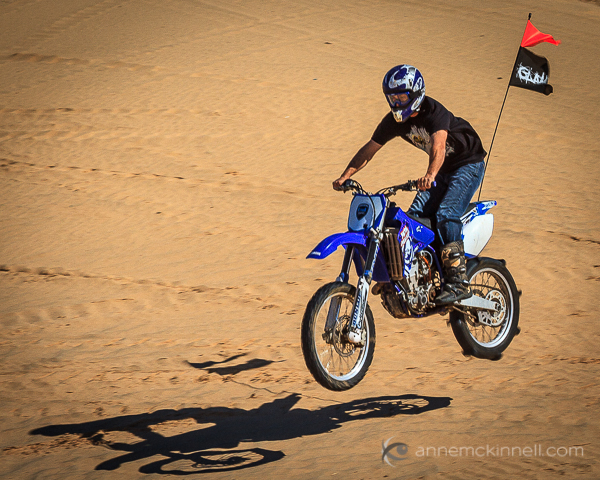
Imperial Sand Dunes, California by Anne McKinnell

If it were not for the shadow cast by the dirt bike, it might be difficult to tell it was off the ground.

Shadows help tell a story and enhance the mood and visual power of a photograph. In fact, they can be so interesting, that they “overshadow” the subject itself!

By focussing your attention on the shadows, you can create beautiful compositions full of contrast, form, and minimalist simplicity. An object and its shadow will strengthen each other. Sometimes you might even want to cut the object out entirely, and play with capturing only the interesting shadows that are cast by it.

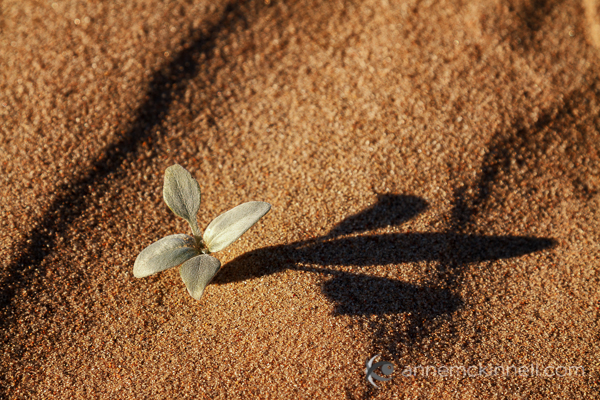
A small plant and it's shadow by Anne McKinnell

In this image of a small plant, it is really the shadow that is the main subject for the image would have very little interest without it.

Photographing shadows works best with strong, simple shapes that make interesting graphic designs such as flowers, sharp lines, or even human beings. After all, who hasn’t taken a picture of their own shadow as it stretches out across the sidewalk in front of them?

You can use shadows compositionally the same way you would use any other element in the scene: as leading lines, patterns, curves that guide the eye into the scene or to create a balance of negative and positive space.

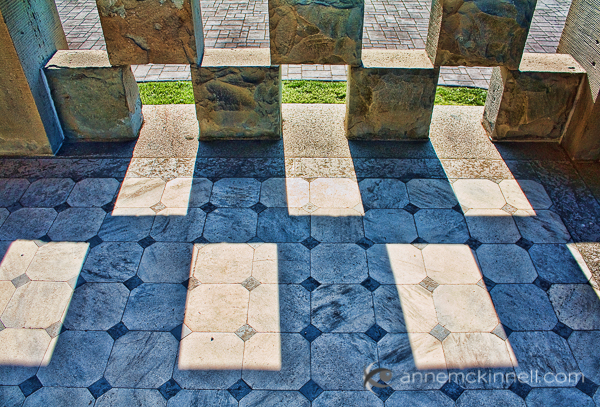
Sandstone blocks and shadows by Anne McKinnell

Look for patterns created by shadows. Here, an interesting pattern is formed by the sandstone blocks and their shadows.

Exposing for the Shadows

If you put your camera on an automatic mode (even aperture or shutter priority mode) and try to photograph a shadow, it’ll probably come out too light. This is, after all, what cameras are designed to do – expose with enough brightness to see detail. Of course, this isn’t always what we want, and shadows are a prime example of when you need to manually change your exposure to make sure the shadow remains in darkness.

There are a few ways that this can be done:

  • Set your camera to manual mode. This is for advanced photographers. On manual mode, you’re responsible for setting your aperture, shutter speed, and ISO value. If you’re not sure what settings to use, you can copy them from the values on your auto setting and then tweak them as you go.
  • Use EV compensation. If you take a shot and see on the LCD screen that it is too bright, you can simply locate the camera’s EV (exposure value) compensation button. Almost every camera will have one, even point-and-shoots and camera phones; it is denoted by a square with a (+/-) symbol. Using that, you can simply turn the exposure up or down to be brighter or darker, as you see fit, and if you’re using live view it will probably render directly in the display. If the shadows come up too bright, just lower the exposure compensation a little to deepen them.
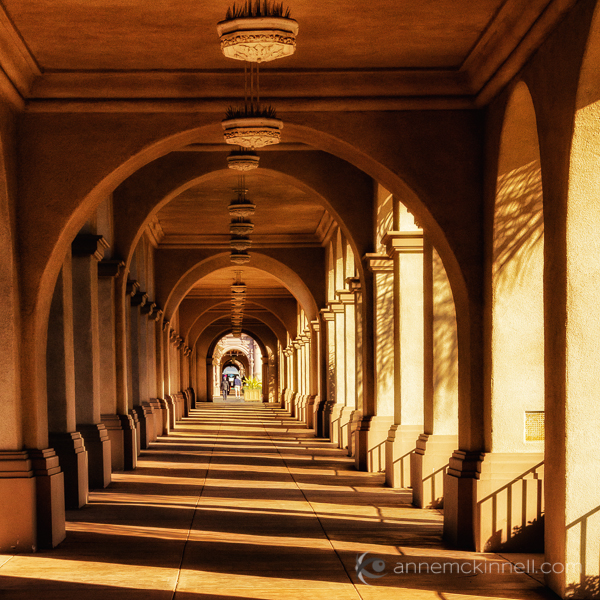
The El Prado Pedestrian Walkway, Balboa Park, San Diego, California, by Anne McKinnell

Late afternoon sidelight created a pattern, an interesting repetition of lines, in this arcade.

  • Lock down your exposure. If you have a DSLR, it probably has an exposure lock feature, though it may need to be configured in the camera’s menu. Using exposure lock, you can fill your frame with the part of your scene that’s not in shadow – or else some well-lit mid-tone – and let your automatic exposure calculate for that. Then you lock it in by pressing the AE-L (auto-exposure lock) button on your camera. This will freeze the settings as they are, so you can recompose the image to include the shadow and the camera won’t re-calculate and brighten the exposure to account for them. This way, you’ll get perfectly exposed highlights and deep shadows. Alternatively, you can simply note the settings, dial them in to manual mode, and bypass the exposure lock altogether.
  • Bracket your shot. When you bracket your image, you take several shots at different exposures. Mid-range cameras and higher will have this feature built in – it might feature a dedicated BKT button, or the option might be available in the menu. If so, you’ll be able to select how many pictures to take and how many stops of difference between them. This makes it simple to take three exposures, for example, one with the exposure the camera thinks is correct, one underexposed by one stop and one overexposed by one stop. If this feature is not available, it can be achieved through changing the settings in manual mode, or by taking several shots with different EV compensations.
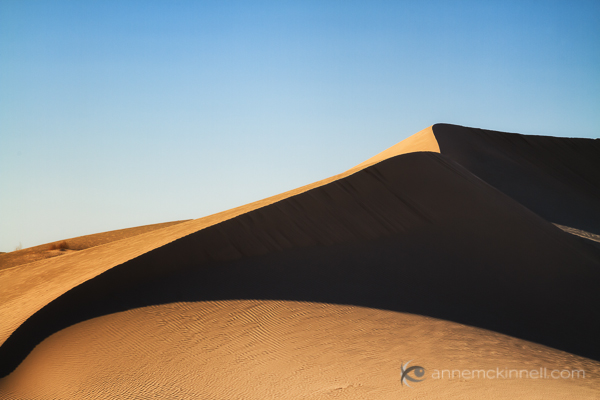
Imperial Sand Dunes, California by Anne McKinnell

In this image of a sand dune, the shadow adds form to the dune and creates a strong and balancing line in the image. I made this image mid-afternoon during a scouting trip. It turned out much better than the image I made of the same location later in the day when the right side of the dune was entirely in shadow.

Next time you’re out shooting, make a point of noticing the shapes of the shadows. Challenge yourself to actively use them to create mood, to add dimension to your subject, or to take center stage in a creatively crafted composition.

Post originally from: Digital Photography Tips.

Check out our more Photography Tips at Photography Tips for Beginners, Portrait Photography Tips and Wedding Photography Tips.

Add Impact to Your Photos by Including Shadows


Digital Photography School

 
Comments Off on Add Impact to Your Photos by Including Shadows

Posted in Photography


Bolivian airline’s demise documented in haunting photos

17 Aug

Ezekiel3.jpg

Photographer Nick Ballon stumbled across the Lloyd Aero Boliviano headquarters on an annual trip to Bolivia. He was captivated by the expansive property and dilapidated buildings he saw, and his curiosity sparked a photo series and collaboration with Bolivian writer Amaru Villanueva Rance. Six months exploring the grounds, talking with employees and researching the long history of the dying airline has resulted in a stunning photo series and a book called Ezekiel 36:36. Click through for a glimpse into the L.A.B. 

News: Digital Photography Review (dpreview.com)

 
Comments Off on Bolivian airline’s demise documented in haunting photos

Posted in Uncategorized


Use Computer Errors to Make Your Photos Amazing.

09 Aug

Photos: Maria_Naverno, JuanCarlos87, Stasyaposhkute, Brianvw1, Juliefab.

Datamoshing sounds kinda like that fun thing you used to do when Slipknot came on the radio in 2002.

While pushing some punks around is totally fun, pushing pixels is fun and less likely to get you elbowed in the face.

So how do you push the pixels around in your photos? Glitché. It’s an app that lets you warp your photos using computer errors and bugs.

You get to pick from eight different types of glitches, each of which you can manipulate to your liking. Swirl, tap, and paint different effects like slit-scanning, 3D renderings (!!!), psychedelic color inversions, and datamoshing.

Within a few minutes of your first glitches, you’ll see why some call Glitché “the Instagram for digital psychedelia.”

In other glitch news, Year of the Glitch is selling glitch art blankets (Thnx, Doc!).

Glitché — Turn Phone Photos into Glitch Art [Thnx, Darby!]

p.s. We’re hiring for an amazing opening at Photojojo. Apply and learn more to be our Editorial & Community Lead.

Related posts:

  1. 10 Tips to Make Your Phone Photos Amazing;
    Plus, Our New Phoneography Blog! Phoneography is the best. No matter where you go, you’ve…
  2. 120 of 2008′s Most Amazing News Photos Getting a pal with a new camera to subscribe to…
  3. Turn your Computer and Webcam into a Photo booth with Cameroid and Phozi Sure your camera’s got 17 megapixels, a 10x zoom, and…


Photojojo

 
Comments Off on Use Computer Errors to Make Your Photos Amazing.

Posted in Equipment


12 stunning photos of Godafoss – Waterfall of the Gods

31 Jul

Godafoss_final.jpg

Godalfoss – Waterfall of the Gods – is one of the most striking natural features of Iceland, a country famed for, well… striking natural features. My Modern Metropolis has published a gallery of 12 stunning images of Godalfoss, including a shot taken by dpreview contributor Erez Marom. Click through to feast your eyes, but be warned – it will make you want to take a trip to Iceland. 

News: Digital Photography Review (dpreview.com)

 
Comments Off on 12 stunning photos of Godafoss – Waterfall of the Gods

Posted in Uncategorized


Dense City: Photos Show Tightly-Packed Hong Kong Towers

30 Jul

[ By WebUrbanist in Art & Photography & Video. ]

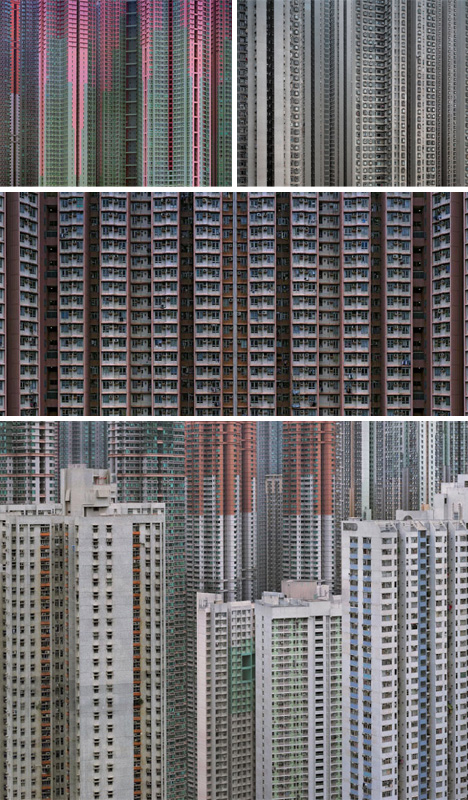
density in hong kong

Twice as dense as New York, and four times as crowded as London, Hong Kong is a fascinating mix of natural landscape edged by incredibly dense human construction.

dense urban city images

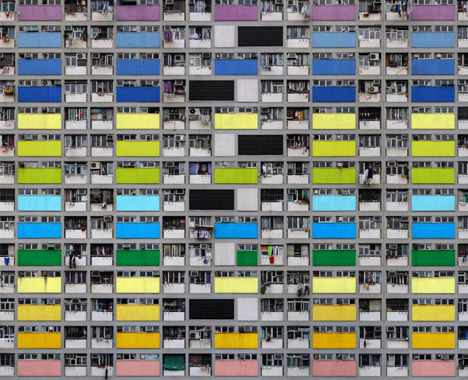
Michael Wolf, a German photographer, focuses on the latter, turning the vast structures of the city into strange stand-alone landscapes that show the enormity and relentless repetitiveness of this vertical urban environment.

dense city urban scaffolding

On the one hand, it is fascinating to see just how overwhelming the overarching rhythms of the buildings are when you take a broad view. At the same time, though, individuality begins to emerge as you zoom in and narrow the scope of your perspective.

dense dark city photos

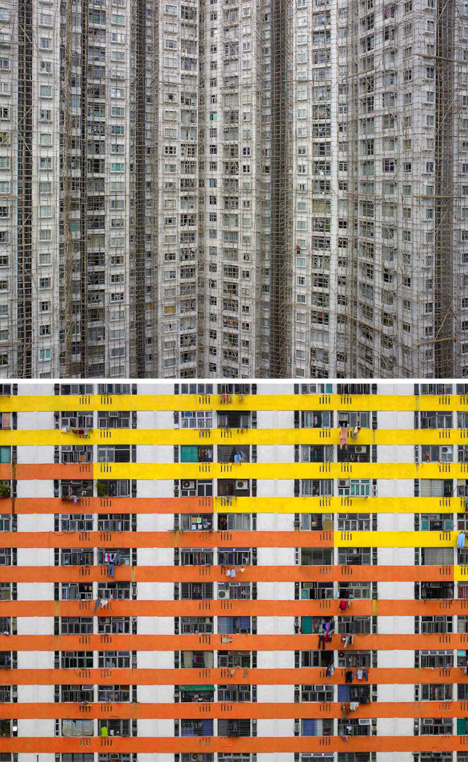
In his book Architecture of Density Wolf explores the patterns and scales of his new home city, testing different angles and distances while remaining focused on the sometimes-bleak yet awe-inspiring man-made side of this incredibly packed island.

hong kong street level

As his main series of photographs show (versus the scout shots directly above), attempts to distinguish scales through details and color seem almost hopeless against the large-scale monotony of it all. To be fair to its inhabitants, however, those upper-level images tell only one half of the story – visiting Hong Kong has many more dimensions than can be seen looking only from on high.

Share on Facebook


[ By WebUrbanist in Art & Photography & Video. ]

[ WebUrbanist | Archives | Galleries | Privacy | TOS ]


WebUrbanist

 
Comments Off on Dense City: Photos Show Tightly-Packed Hong Kong Towers

Posted in Creativity


New cheat sheet tells you how to keep photos sharp when sharing

30 Jul

fb1.png

The cautious photographer is always conscious of what’s happening to their images when they’re being shared online – whether they’re being resized, re-compressed or otherwise modified from the original. Social networks like Facebook and Twitter all treat images differently, but a new cheat sheet can help you keep your pictures sharp by detailing the pixel dimensions of just about every component on the major social networking sites. Click through for more details on connect.dpreview.com

News: Digital Photography Review (dpreview.com)

 
Comments Off on New cheat sheet tells you how to keep photos sharp when sharing

Posted in Uncategorized


5 Tips for Creating fun Campfire Photos

28 Jul

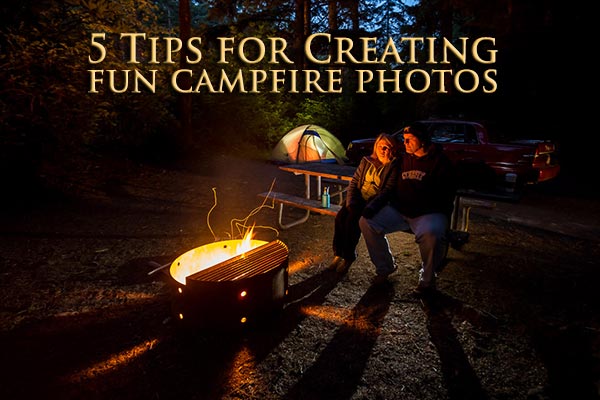
night-campfire-photography-featured

A couple of weeks ago I had the pleasure of meeting the Digital Photography School headmaster, Darren Rowse, in person at a conference we both attended called the World Domination Summit in Portland, OR. The message of the conference (yes, the name invokes much curiosity) is simple: community, adventure, and service. It’s a large group of people that enjoy life, live adventures constantly and give back in service of others. That’s one of the reasons why I love writing on this site so much, I get to share my experience and knowledge and help you!
Me and Darren Rowse

Me and Darren Rowse

Darren was one of the keynote speakers and he most of the attendees (3000+) inspired to move forward and live our dreams. He even fulfilled one of his childhood dreams on stage, but I’ll leave that for Darren to share with you!

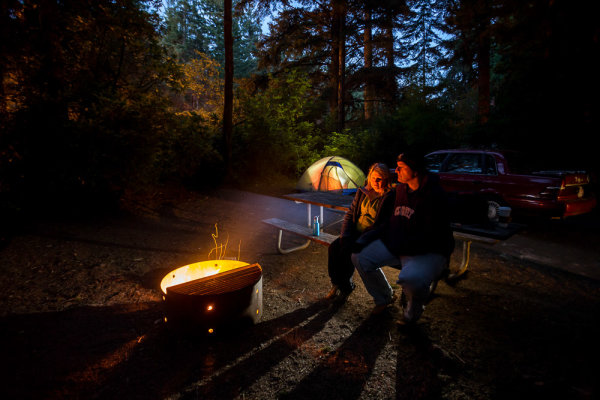
One thing I’ve always wanted to do is visit the Sea Lion Caves in Oregon. So after the conference my husband and I headed to the coast for a few days. We camped in one of the state parks, in the middle of the woods and sand dunes, it was awesome being in nature. But, being a photographer I couldn’t just sit around the campfire and do nothing, so out came the camera!

It’s really not that hard to create some really cool images that will impress your friends. I’m going to walk you through my process for creating the image above and how I adjusted as I went to get the desired result. Remember photography is a journey, not a destination, don’t expect to get it perfect on the first shot – I never do!

Here are my 5 tips for you on creating some fun campfire images.

#1 USE A TRIPOD & SELF TIMER OR REMOTE TRIGGER

A tripod is essential for doing this type of photography as you’ll be dealing with some really long exposures, mine ranged from two to ten full seconds. Make sure you have a sturdy tripod and if you want to get in some of the photos you can either use the self timer, as I did and run into the scene, or get yourself a handy wireless remote you can put in your pocket and fire the camera from your spot in the image.

#2 WAIT UNTIL IT’S DARK ENOUGH OUTSIDE
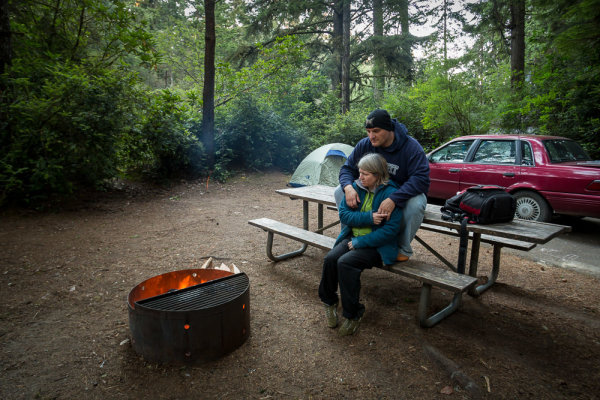
night-campfire-photography-002

ISO 400, f/4, 1/8th of a second

The image above is the first one I made and I wasn’t happy with it. It didn’t have the mood I wanted and the sky was too light. So I had a snack and waited about an hour then made the following image. I’ve given the exposure data for each shot so you can see how I adjusted it as the sun went down and the amount of light diminished.

#3 EXPOSE FOR THE BACKGROUND, KEEP IT DARK
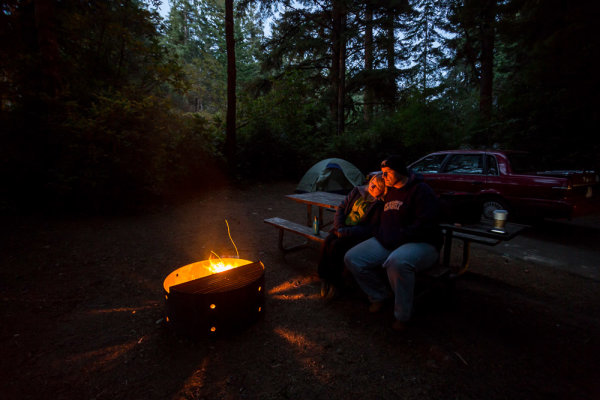
night-campfire-photography-003

ISO 1600, f/4, 2 seconds

Okay, so that’s way better but I felt it was still missing something. I really liked how the light was streaming out of the holes in the rim of the fire pit. The exposure is just right on the background but it seemed a bit boring.

Notice also that I increased the ISO to 1600. If I hadn’t my exposure at ISO 400 would have been 8 seconds. It’s pretty hard to keep perfectly still for 8 seconds so I sacrificed gaining a little bit of noise to get what I felt was a more reasonable 2 second exposure time.

#4 ADD SOME ADDITIONAL LIGHT INTO THE SCENE

Going from the last image, I knew wanted to add a bit of a light to to the tent, to make it look like it was glowing. So I took my headlamp (get one at a camping supply store or use a flashlight) and turned it on inside the tent. I aimed it at the back wall facing away from the camera so I didn’t get a hot spot, and it lit up the whole tent quite evenly. If you have a larger tent you may need more than one light inside.

**NOTE:  do NOT put fire or a gas lantern inside your tent! Please practice good fire safety habits at all times.**
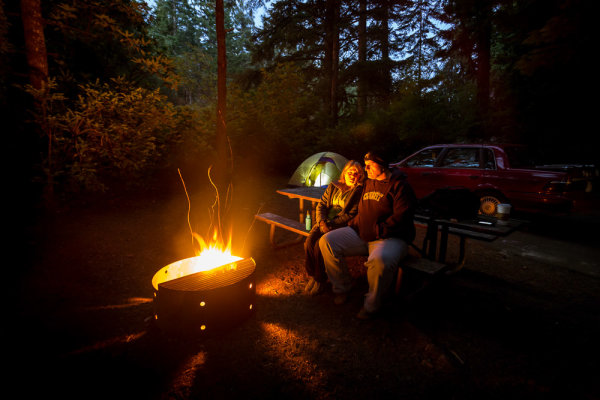
night-campfire-photography-005

ISO 1600, f/4, 2 seconds

Okay almost perfect, except for a couple of little things. As we had just put a log on the fire it was pretty intense and bright. That brings me to the last tip.

#5 SHOOT WHEN THE FIRE BURNS DOWN IF IT’S TOO BRIGHT

There’s no way to control the intensity of the fire except by darkening the whole image, but if I do that then my background will basically disappear into a black abyss. So we waited a while before doing the next image. I also added a second head lamp, this time on the picnic table seat behind us. It is pointed back towards us and I placed it careful so we’d be in front of it and the light itself wasn’t hitting the lens directly.

Here’s a couple of the final shots, with which I was quite pleased. I changed my camera angle a bit and re-cropped but otherwise they are very similar. Notice these last exposures were a bit longer. The light in the sky was almost completely gone so in order to get any detail in the background I had to increase the overall exposure, taking care to not overexpose the fire.
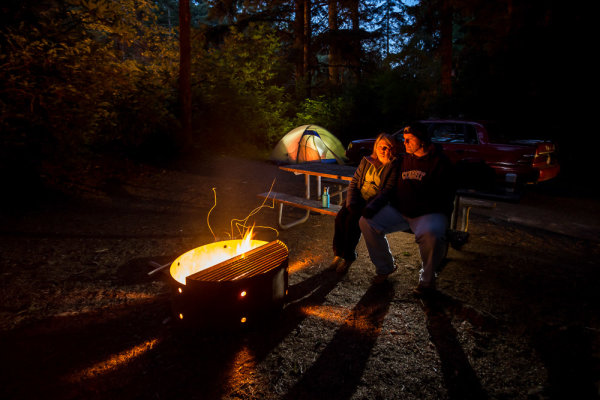
night-campfire-photography-010

ISO 1600, f/4, 5 seconds

night-campfire-photography-009

ISO 1600, f/4, 5 seconds

#6 BONUS TIP – MAKE SURE TO FOCUS THEN TURN IT OFF

Focusing at night is very tricky because your camera can’t see in the dark, neither can you! The best way to focus is to have your friend hold a light where you’re going to sit (or put it on a chair). Aim the light directly at the lens, which will allow the camera to “see” it and lock focus on that spot. Once it’s locked, just switch to manual focus, taking care not to bump the camera or accidentally turn the focusing ring. If you move the camera or recompose the scene, just do the same procedure over again.

ADDITIONAL READING

If you want to read more about other night photography techniques I’ve done a couple of article on Light Painting and some special effects. Links to them below:

  • Light Painting Part one – the photography
  • Light Painting Part two – photoshop
  • Three Special Effects for Night Photography

ACTION PLAN

Since we still have a little bit of summer left in the Northern Hemisphere, if you plan on doing a little camping take the camera gear along and give this a try! You may find your travel companions get into it and have a little fun with it as well. Also gives you a great way to do some fun group photos. You can also use flash if you’re so inclined and skilled. Please do share your images with us and any other tips you want to add that I may have missed.

Cheers, Darlene

Post originally from: Digital Photography Tips.

Check out our more Photography Tips at Photography Tips for Beginners, Portrait Photography Tips and Wedding Photography Tips.

5 Tips for Creating fun Campfire Photos


Digital Photography School

 
Comments Off on 5 Tips for Creating fun Campfire Photos

Posted in Photography


First impressions and photos from Nokia’s 41MP Lumia 1020

24 Jul

Lumia1020inhand.jpg

Nokia’s Lumia 1020 is the company’s second attempt at a 41-megapixel camera phone, and it’s been generating a lot of hype. As the follow-up to last year’s 808 PureView phone, Nokia’s latest has much to prove. The 808 remains one of the best smartphones we’ve ever looked at in terms of its photographic capabilities, so we’ve been keen to get our hands on the 1020 which melds Nokia’s innovative ‘oversampling’ technology with a more modern Windows operating system. We offer our first look at the Lumia 1020 on connect.dpreview.com.

News: Digital Photography Review (dpreview.com)

 
Comments Off on First impressions and photos from Nokia’s 41MP Lumia 1020

Posted in Uncategorized


In case you were curious, here are the 10 most expensive photos ever sold.

23 Jul

expensive05.jpg

Photography has been around for almost two hundred years, but amazingly, it’s only in the past couple of decades that it has gained widespread acceptance as an artform. These days, images by significant photographers command very high prices. But How high is ‘very high’? Internet community FreeYork.org has published a list of the ten most expensive photos ever sold. Click through for the list.

News: Digital Photography Review (dpreview.com)

 
Comments Off on In case you were curious, here are the 10 most expensive photos ever sold.

Posted in Uncategorized