RSS
 

Posts Tagged ‘Photos’

5 Adorable Pet Photos [and How to Make your Shots even Cuter]

04 Nov

A guest post by by Erin McNulty – Pet Photographer and author of Snapn Paws – currently 33% off at SnapnGuides.

Want to get photos of your pet that will make everyone say “aaawwww”? Here are five of my top tips for capturing cuteness.

1. Get down on their level

Adorable pet photos 1

One of the easiest and most often overlooked techniques is to be on the same level as your pet! By being at eye level with them, you will create a connection which translates into a more intimate, engaging photo.

2. Use Props

Adorable pet photos  2

Does your pet have a favourite basket, bed, or toy? If so, incorporate these into your photos. Make sure whatever prop you are using is one that your pet is happy and comfortable around, and don’t force any behaviour that makes them stressed or wary – this will show through in the photos

3. Engage in Play

Adorable pet photos  3

A lot of pets have a sixth sense for when a camera is being pulled out, and will immediately turn their back or engage in a vigorous grooming session to avoid it. By engaging them with a fun toy, you will distract them from the camera as well as capturing some great natural expressions.

4. Get up Close and Personal

Adorable pet photos  4

Want to create a more interesting shot of your pet? Focus in on the little things that make them so cute – whether it be their big puppy dog eyes, their magnificent whiskers, or their tiny little paws.

5. Let them be Themselves – and be Patient!

Adorable pet photos  5

Your best shots will always come when you observe and capture their behaviour, rather than forcing them into unnatural poses. It may take ten minutes or an hour to get that perfect shot, so be patient and calm – pets pick up on your mood!

Want to learn more about Photographing Pets? Check out Erin’s brand new eBook – Snapn Paws over at our sister site SnapnGuides (currently 33% off).

Post originally from: Digital Photography Tips.

Check out our more Photography Tips at Photography Tips for Beginners, Portrait Photography Tips and Wedding Photography Tips.

5 Adorable Pet Photos [and How to Make your Shots even Cuter]

The post 5 Adorable Pet Photos [and How to Make your Shots even Cuter] by Guest Contributor appeared first on Digital Photography School.


Digital Photography School

 
Comments Off on 5 Adorable Pet Photos [and How to Make your Shots even Cuter]

Posted in Photography


RAF photos of the year gives glimpse of high-flyer life

31 Oct

Parade_parade-shun_.jpg

The Royal Air Force’s annual photographic competition invites photographers employed in the service of the RAF to submit photos in eleven categories. Winners are recognized in an awards ceremony and finalists’ photos are available for viewing online. Take a look at a selection of our favorites. The images are a captivating peek inside the RAF on the ground and in the sky. See gallery

News: Digital Photography Review (dpreview.com)

 
Comments Off on RAF photos of the year gives glimpse of high-flyer life

Posted in Uncategorized


Moon Photography: 6 Tips for Better Moon Photos

29 Oct

The moon is something so familiar to us, and yet so strange that it’s mesmerizing. It’s at once commonplace and extraordinary. As photographers, we are drawn to it in an attempt to convey the intrigue we feel when we look at it.

But moon photography can be tricky.
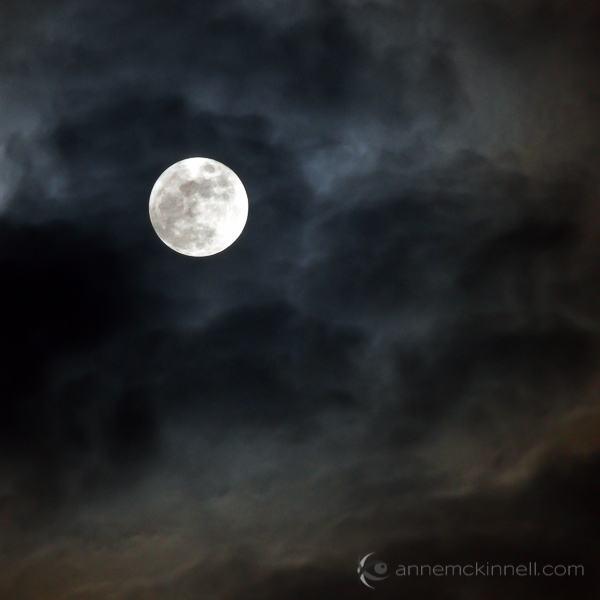
Moon Photography: Just the Moon, by Anne McKinnell

A bright full moon creates one of the most high contrast situations there is, posing a difficult challenge for photographers. Often photos of the moon appear like a spotlight in the sky that looks more like the sun than the moon.

Moon Photography Tips

To get the best possible pictures of our one-and-only moon, it’s important to know a few things about it first.

1. Learn the Phases of the Moon

The moon itself emits no light, it’s simply a huge rock being lit up by the sun. As it orbits the earth, and as the earth orbits the sun, how much we see of that reflection changes from a bright, full moon to no apparent moon at all.

Moon Photography: By Tomruen [Public domain], via Wikimedia Commons

By Tomruen [Public domain], via Wikimedia Commons

Because of our counter-clockwise trajectory around the sun, the shadow it casts on the moon is always moving to the left; after a new moon (no moon), the illuminated side starts to creep in from the right edge, expanding towards the left side each night. As the moon’s apparent size gets bigger, we call it “waxing”.

Once the moon is full, the shadow starts to reappear – again on the right side – and grow leftwards, shrinking the visible moon until it is dark again. This is called “waning”. Therefore, any time you want to know what the moon will look like tomorrow, look at it tonight; if it is lit on its right side, it is waxing towards fullness. But if it’s lit on the left, it is waning, and will soon be gone.

The twilight sky also holds clues to the lunar phases. If the moon is visible before sundown, it is waxing, but if you can see it before sunup, it’s waning. Alternatively, you can always look up a calendar online, or download a moon phase app that will do the calculations for you.

2. Use the Right Equipment

To maximize the success of your moon photography, there are a few bits of a gear that will come in handy.
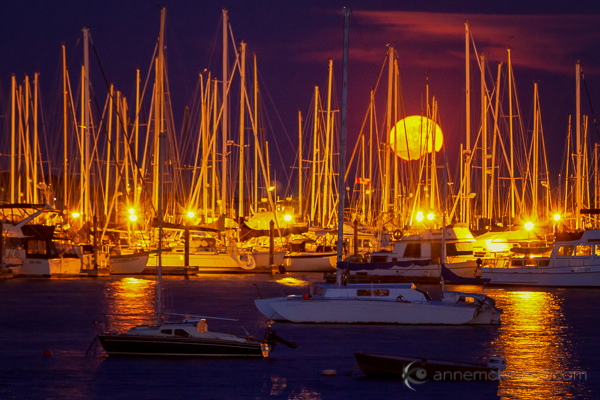
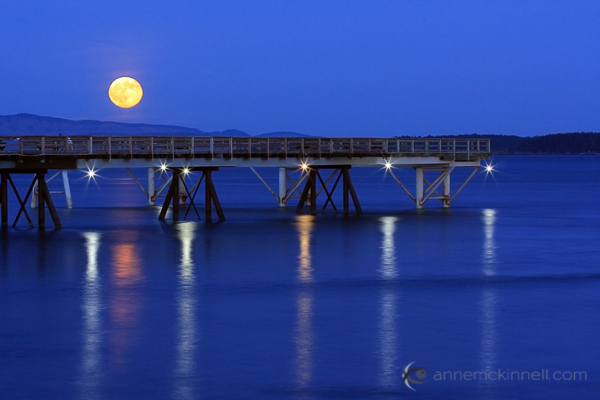
Moon Photography: Moonrise over the Oak Bay Marina, in Victoria, British Columbia, by Anne McKinnell

  • A zoom lens.
    If you’ve ever taken a shot of the moon and been disappointed by the tiny white blob that results, you’re probably using too short of a focal length. A standard wide-angle lens makes everything appear smaller, particularly things that are far in the distance. To get a close-up shot, use a focal length of at least 200mm or more. Longer lenses will result in greater magnification and detail.
  • A tripod.
    To support the weight of this large lens, and to allow the slow shutter speeds that may be necessary to get a good exposure, mount your camera securely on a sturdy tripod.
  • A shutter release.
    These come in both wireless and wired options and will allow you to fire the shutter without having to depress the shutter button and risk camera shake. If you don’t have one, use your camera’s self-timer to achieve the same benefit.

3. Get a Good Exposure

The moon is very intricate and detailed, with craters, channels, and mountains dotting its surface. If the moon in your photo turns out bright white, it is overexposed. This happens frequently because the blackness of the surrounding sky throws the light meter off.

To fix this, turn down your exposure compensation (+/-), or use your camera’s spot metering mode to expose for the moon alone. Check your camera’s manual for information about how to do this on your specific model.
Moon Photography: Long Nights Moon by Anne McKinnell

For best moon photography results, bracket your shots. Some cameras will have an automatic bracketing feature, but if yours doesn’t, you can simply do it manually. First, take one shot at the automatically-determined settings. Then, using exposure compensation, take the same shot at -0.5EV, and one at +0.5EV. Do the same at -1EV and +1EV, and continue to +/-1.5EV and beyond if necessary. Later, you can choose the best exposure when you view them on your computer.

4. Find the Best Times and Places to Shoot

Unless the city is a part of your scene, you probably don’t want a lot of urban light pollution spilling into the sky when you’re trying to photograph a pristine moonlit night. You’ll get the cleanest shots outside of dense civilization. Explore backcountry roads, or take a hike into the nearby mountains to find truly dark night skies.

That said, a common problem photographers run into with moon photography is the harsh difference between a brilliantly lit moon and a pitch-dark sky. To avoid this, consider shooting during the “blue hours”, when the sky glows faintly after the sun goes down, or before it comes up. There is less contrast at this time, though the moon is still bright.

A moon phase app can help you determine when there will be a full moon during twilight.

5. Create an Interesting Composition
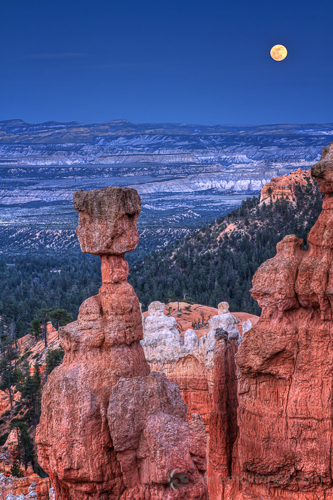
Supermoon at Bryce Canyon National Park, Utah, by Anne McKinnellAs compelling as a beautifully sharp, detailed image of a lonesome moon is, once you’ve seen one, you’ve seen them all. Getting that perfect close-up is excellent practice, but try to get creative by placing the moon within a more complex composition.

For instance, you could try framing it behind trees and buildings, or reflecting it off the surface of a still lake. Placing other objects in the foreground gives the moon context and scale that it lacks on its own. Think of the moon as a single element which should be incorporated along with other compositional elements and techniques to make a great final photograph.

6. Combine Multiple Exposures

Incorporating other objects can complicate things though, and you may find that the perfect exposure for the moon doesn’t match that of the rest of the scene. Sometimes natural light doesn’t cooperate, and the camera doesn’t see things the way our eyes do. This is where digital photography comes in really handy, allowing you to play with your images to create the scene the way you saw it, even if the camera saw it a little differently.

To do this, take several shots at different exposures by bracketing, as mentioned above. When you open the files on your computer, choose two: the one with the best exposure on the moon (‘Image 1′), and the one with the best exposure on the rest of the scene (‘Image 2′). Using an image editing program, select the moon from Image 1 and copy it, then paste it into Image 2, covering the moon in that picture. Use the eraser tool with a heavily feathered edge to remove any imperfections and blend the edges together. This method may take some trial and error to get it just right, so try it several times with several different shots to get the hang of it.
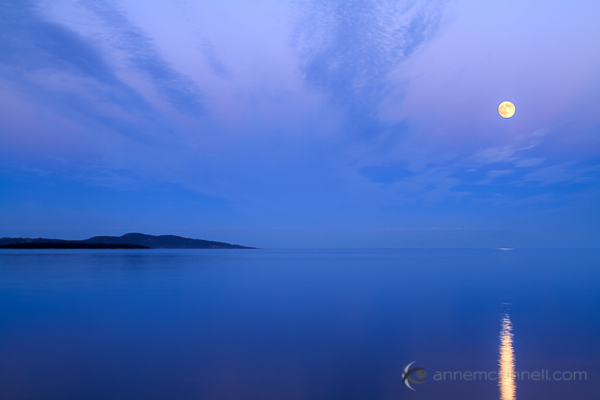
Moonrise over the ocen in Sidney, British Columbia, by Anne McKinnell

When performing this technique, try not to stretch or enlarge the size of the moon. The goal of image editing is to faithfully recreate a scene that the camera simply can’t capture all at once, so beware of any visual exaggerations that make the composition look unnatural or inauthentic.

Share Your Moon Photography Tips and Moon Photos

Got any more moon photography tips to add? We’d love to see them in comments below. Also feel free to share any photos you’ve taken of the moon.

Post originally from: Digital Photography Tips.

Check out our more Photography Tips at Photography Tips for Beginners, Portrait Photography Tips and Wedding Photography Tips.

Moon Photography: 6 Tips for Better Moon Photos

The post Moon Photography: 6 Tips for Better Moon Photos by Anne McKinnell appeared first on Digital Photography School.


Digital Photography School

 
Comments Off on Moon Photography: 6 Tips for Better Moon Photos

Posted in Photography


Hurry Up! Premium Stock Photos For Ultra-low Prices At MightyDeals.com

29 Oct

Stock photos are professional images of ordinary locations, events, nature, landmarks and people. They’re purchased as well as sold on a royalty-free agreement, and what makes them so useful is, of course, the fact that they can be constantly used for commercial-design applications. The photographer who snapped the stock photos owns them, but the person who purchased them gets to Continue Reading

The post Hurry Up! Premium Stock Photos For Ultra-low Prices At MightyDeals.com appeared first on Photodoto.


Photodoto

 
Comments Off on Hurry Up! Premium Stock Photos For Ultra-low Prices At MightyDeals.com

Posted in Photography


Kodak API to help app developers take photos from phone to print

18 Oct

2013-10-15_11.18.16.jpg

One of the remaining arms of the Kodak legacy, Kodak Alaris, is working to remain relevant by focusing its efforts on moving photos from smartphone to print, via one of its 105,000 photo printing kiosks worldwide. The company recently released its API to lure developers into adding Kodak kiosk printing capabilities directly into their mobile photography apps. Learn more at connect.dpreview.com.

News: Digital Photography Review (dpreview.com)

 
Comments Off on Kodak API to help app developers take photos from phone to print

Posted in Uncategorized


Incredible photos of Earth from the European Space Agency

11 Oct

Golden_curves_large.jpg

There’s no better view of the earth than the one you get from space. The European Space Agency’s mission is to ‘find out more about Earth, its immediate space environment, our Solar System and the Universe’, and as such, every year it produces thousands of high-resolution images of earth from orbit. Click through for a selection of stunning photographs and links to the ESA’s website (which, unlike NASA’s US government-funded site, is still online). 

News: Digital Photography Review (dpreview.com)

 
Comments Off on Incredible photos of Earth from the European Space Agency

Posted in Uncategorized


A Review of Think Tank Photo’s “My 2nd Brain”

30 Sep

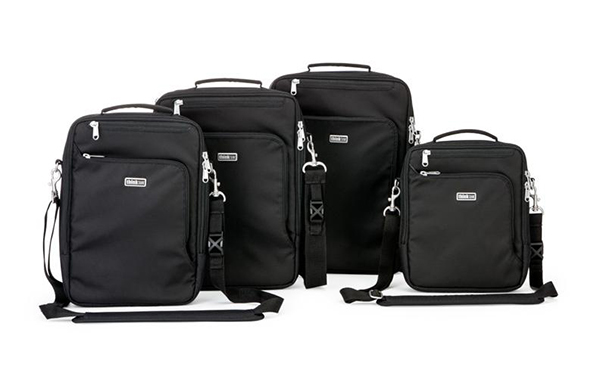
Think Tank has just launched a new line of bags, setting their sights this time not only on the photographic community, but on the Mac-obsessed public at large. My 2nd Brain is a laptop/iPad case that comes in four sizes and three colors (Black, Harbor Blue, and Green Mist), and is designed specifically around the dimensions of Apple products like the 15″ and 13″ MacBook Pros, the 11″ MacBook Air, iPad, iPhone, and all of the cords, cables, chargers, converters, and other accessories that have to travel along with them. Unless you drop in a small point-and-shoot, this is one Think Tank bag that’s not for cameras.

M2B-003-dPS

First Impressions

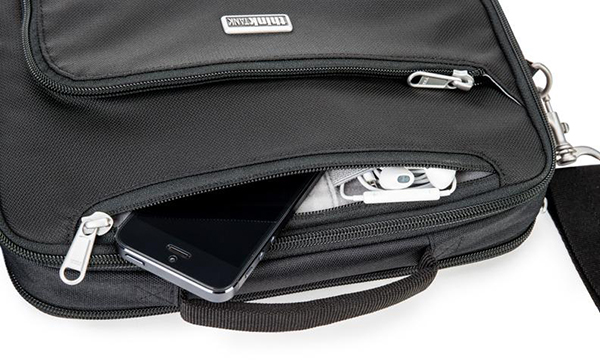
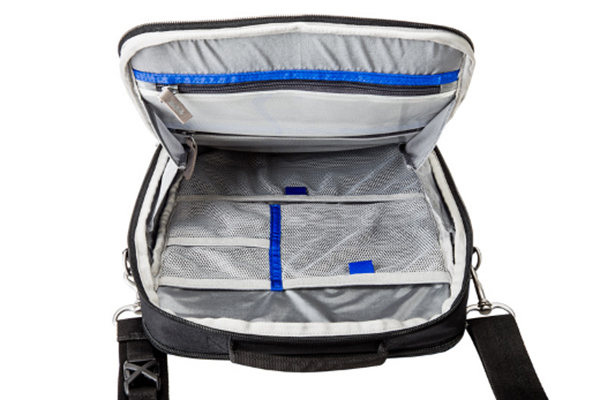
If you have ever owned a Think Tank camera bag this is going to sound very familiar. Fresh out of the box, you know you are holding a quality product in your hands that has been thoughtfully designed and built to last. High-quality, reinforced stitching, a comfortable shoulder strap, and the best zippers around help make up a durable, water-resistant exterior that’s sure to protect what’s inside without adding any unnecessary added bulk.  At first glance, you’re going to think that this bag can’t possibly hold very much. Then you are going to open it and be proven pleasantly wrong. The same attention to detail extends to the inside of the bag, where you’ll find dedicated pockets specifically for your iPad, iPhone, and laptop.

M2B-001-dPS

The accessory section of the bag takes up the most room, and has both see-through zippered and open-mesh pockets– plenty of room for power adapters and cords, as well as chargers, ear buds, keys, wallet, and just about any other reasonably sized item you might need to pack. An exterior zippered pocket on the front of the bag keeps pens, business cards, and small paperwork organized, while a pocket on the back is perfect for file folders, note pads, or magazines. This bag makes an awesome first impression.

M2B-005-dPS

Second Impressions

There are a few minor areas where I see room for a little bit of improvement in Version 2. I always have my phone in either a pants or jacket pocket, so I can at least feel it vibrate, even if I am someplace where I won’t be able to hear it. Unless I’m in a fairly quiet location, there is no way for me to hear my phone ring while in the M2B15, even at a pretty high volume. Additionally, the bag hangs in a vertical orientation. Another D-ring at the other end of the bag would be welcome, giving the user the added option of changing the connecting points for the strap, thus allowing it to be carried in a horizontal position as well.

My only other criticism stems from the very fact that this line of bags was designed around specific products with very specific dimensions. For instance, while a 15″ MacBook Pro fits perfectly in the laptop section of the bag, virtually any other 15″ laptop is going to be too thick for the zipper to close without a fight.  Think Tank’s Artificial Intelligence line of laptop cases is a viable option for non-Apple users, but that leaves out the “hybrid consumer” who uses an iPad and a non-Apple laptop. I think that leaving just a little bit of extra room could have accomplished the goal just as effectively without sacrificing anything in the way of padding and protection.

M2B-004-dPS

Overall

This bag is yet another great addition to the Think Tank family. Quality construction and convenience have always been Think Tank trademarks and the M2B is no exception. It is designed to keep you organized and mobile, without skimping on security or peace of mind. It does exactly what it says it does and it does it well.  In the final analysis, how much more can you ask of it?

Check out the video for more information on My 2nd Brain.

Post originally from: Digital Photography Tips.

Check out our more Photography Tips at Photography Tips for Beginners, Portrait Photography Tips and Wedding Photography Tips.

A Review of Think Tank Photo’s “My 2nd Brain”


Digital Photography School

 
Comments Off on A Review of Think Tank Photo’s “My 2nd Brain”

Posted in Photography


Behind The Scenes of Three of My Most Popular Landscape Photos

26 Sep

In the following post I’m not going to remind you again that you need to bring your tripod with you. I’m not here to warn you that weather is unpredictable and you should check the latest forecast before heading out the door.

Nope this post won’t cover the fact that you should bring a flashlight and a few other miscellaneous tools just in case something goes wrong. And of course I won’t be telling you that you should tell someone where you’re going and when you’ll be back incase you do get lost, hurt or otherwise incapacitated and need help getting home.

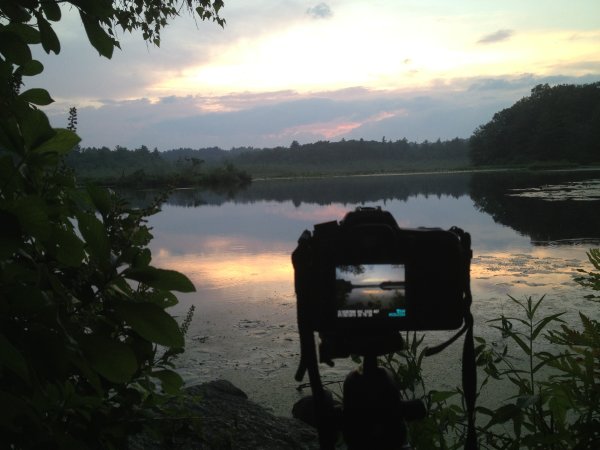
Instead of rehashing the basics or providing some motivational tips to get you off the couch I’m going to show you three ‘behind the camera’ photographs that I took with my iPhone, share the final shot, and talk a bit about how I made each image.

Sound good? Okay let’s start!

First Up – A Small Cascade Near Trap Falls in Ashby MA

IMG_1902

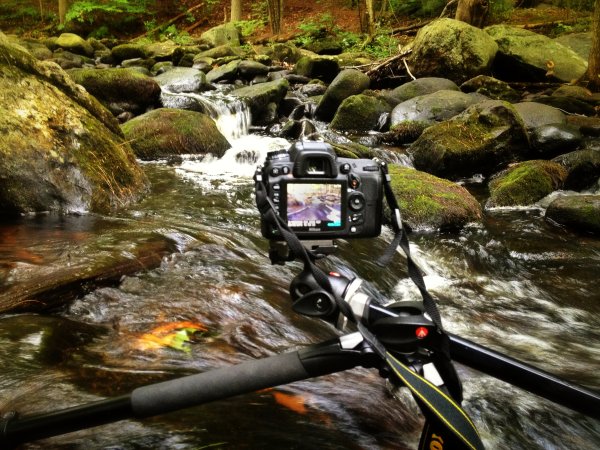
As you can see the camera was positioned as close to the water as I could comfortably get it – one wrong move and it’s all over for me and my love of photography.

So does the fear of putting my camera in the drink stop me from attempting to grab a photograph? Not in the least!

p1637190443-4-650x365

This shot was something I saw from 100 yards up the bank of the river. I noticed the cascade and knew that it’d be the perfect place to set up my D7000 and Tokina 11-16mm, but how was I going to get into the middle of the river?

As I got closer to the scene I noticed that there were a few wet stones no larger than an iPad leading out into the middle of the river – right where I wanted to be. All I needed was a little balance and some luck and both my camera and I would make it back to the shore dry and one ‘keeper’ richer.

Standing on a rock in the middle of the river the size of an iPad is no easy task and trying to fiddle with camera settings and frame a shot doesn’t make it any easier. I used the Manfrotto’s center-column design, which allows you to swing the center column out so that it is parallel to the ground, to get as close to the water as I could, and I used the live view feature on my DSLR to frame the shot and achieve perfect focus.

After taking a few test shots and fine tuning my exposure I settled on the following settings for the shot: ISO 100, 11mm, f/14, 13.0 seconds. (Note: There is also an ND filter in play here which allows for the longer exposure time).

Next Up – A Stunning Sunset at Stony Brook in Norfolk MA

IMG_1713

Okay so this photograph probably isn’t even close to as dramatic as the one above, but it is still able to show you a bit about my thought process when capturing photographs. I could have photographed this scene further back from a nice easily accessible lookout, but I clambered over rocks and got as close to the shore as I could.

By positioning the camera on the tripod I was freely able to adjust the settings and fine tune the exposure and composition of the shot. The settings I used here were: ISO 100, 36mm, f/10, 1/160.

sunset at stony brook

Finally – Capturing Lightning Out Of My Window

Here in south eastern New England we don’t get all that many storms and due to the tall trees and densely populated urban areas it’s not easy to get a clear view of the sky when they do occur.

After hearing my phone alert me to a sever thunderstorm watch that was in effect until well after dark and a quick look at the radar confirmed that it looked like it would pan out. I quickly decided to get a plan together to capture my first lightning bolts as a photographer.

IMG_1571

With a couple hours of notice I was able to get really creative with my set up. I found a piece of cardboard and some duct tape to make a makeshift shelter for my room and the rest of my camera. I knew I wanted to open the window and the screen to get as clear a sight line as possible, but I didn’t want the rain or mosquitos to get into the house. (If you’re curious I finished sealing the cardboard after I took this photo).

I made sure to set my focus while I still had daylight to work with as it would get difficult to do so when darkness hit. I used my ND filter to lengthen the shutter speed which would hopefully allow me better chances to capture bolts of lightning and locked down my settings as follows: ISO 100, 13mm, f/9.0, 20.0 seconds.

Once everything was set up all that was left to do was wait for the storm to get close. As soon as I heard the first crack of thunder I set the Nikon’s intervolometer to capture an image every 25 seconds for about an hour or so, turned out all the lights in my house, and went to bed.

A few hours later, after the storm had long passed, I woke up curious to see if my trap had worked. The end result was a handful of lightning bolts frozen in time – this is one of my favorites.

lightning photo

Do you have any behind the scenes stories to share?

Tell us about how you captured one of your favorite shots in the comments below!


Post originally from: Digital Photography Tips.

Check out our more Photography Tips at Photography Tips for Beginners, Portrait Photography Tips and Wedding Photography Tips.

Behind The Scenes of Three of My Most Popular Landscape Photos


Digital Photography School
 
Comments Off on Behind The Scenes of Three of My Most Popular Landscape Photos

Posted in Photography


5 Ways to Take Better Smartphone Photos

21 Sep

When you think about smartphone photography what comes to mind? My guess is you probably think about Instagram, photo filters, bad selfies and any number of other keywords that describe this new wave of photography.

hero

Today, I’m going to share a few tips on how you can improve your smartphone photography and start capturing interesting photographs wherever you are with whatever you have in your pocket. If you like this post you might also want to check out this DPS eBook specifically written for improving your iPhone photography.

Oh and no just because Apple improved their camera in the 5s doesn’t mean that they’ve created a device that will make you a better photographer – you’ll just get the same boring images – unless you learn how to become a better photographer.

Take Your Time and Treat it Like a DSLR

Smartphone photos on Flickr, Facebook and Instagram get a bad reputation for being terrible because well, 95% of them are terrible. One of the biggest reasons that this is the case is because 95% of the photos on these sites are taken not as photographs, but as a way of sharing moments – they’re snapshots.

IMG_0826-650x650

People aren’t thinking about capturing a photograph – they’re thinking about how cool that thing that happened in front of them is. If you want to truly impress people with your smartphone photographs you have to first and foremost start treating your smartphone more like a camera and less like a phone.

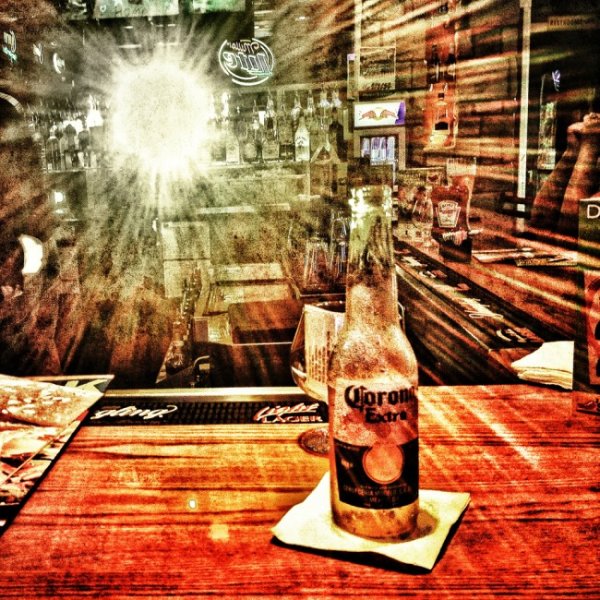
In the photo above I noticed that the sun setting behind me was reflecting off the mirror at the other end of the bar. I positioned my beer and spent a few minutes taking different shots, both in portrait and landscape orientation, as the sun quickly passed its way below the horizon.

Think With Filters in Mind

The great thing about smartphone photography is the ease of which you have to process your captured image. While it might not be true that every photograph looks “better” with a filter, it is certainly true that filters can add interest to an otherwise boring photo. That said you shouldn’t simply think “oh well I’ll just add a filter to it to make it awesome” instead think “that would look really cool with this filter!” and then shoot your photo accordingly.

IMG_0104

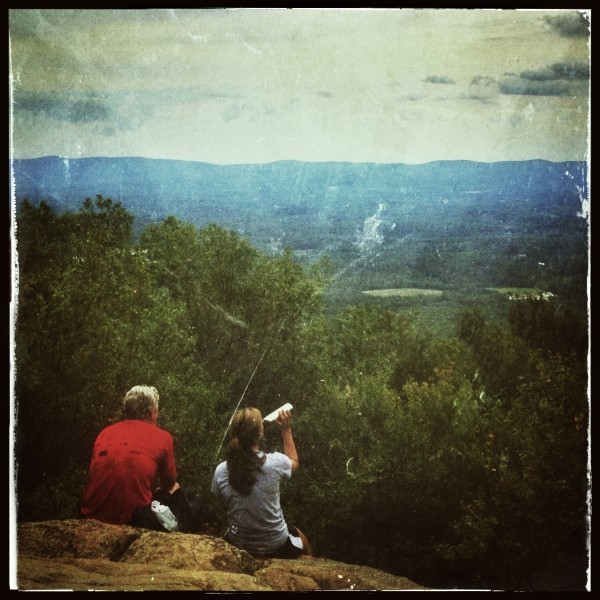
When I saw these two hikers sit down in front of me on a recent hike I knew right away that it’d make for a great “old time” family portrait style photo. I framed the shot and instantly went in that direction when I process the image – there was no doubt in my mind as to how I wanted the image to look from the moment I captured it.

Get Into Strange & Uncomfortable Positions

Smartphones are light, easy to maneuver and have a large screen making it possible to compose your image in awkward positions. Use this to your advantage and don’t be afraid of looking like someone who’s had a few too many hallucinogenic drugs in public. If you’re taking a photo people will understand won’t they?

So get down on your knees, on your back or hang upside down and have fun capturing photos that you would otherwise be unlikely to get with a larger heavier device.

Use Third Party Lenses

In most cases the third party lenses are best used for specialty situations like fisheye or macro photography that the built in cameras just aren’t capable of doing. With the iPhone I use the Olloclip 3 in 1 attachment and absolutely love the macro lens (read my full review here).

Dragonfly Macro

The above photograph was captured using an iPhone 4S with the Olloclip Macro attachment and to be honest the quality of this photograph even stunned me when I finally got it onto my computer. One of the key points to keep in mind here is that when you are using this lens you are required to be about 10-15 millimeters away from your subject to achieve focus – that’s incredibly close to a an insect that typically is fairly skittish.

Use Third Party Camera Apps

Yes the smartphones come with built in functionality, but in most cases they are fairly basic and while they will work well enough if you’re looking to capture a snapshot to go beyond that there are certainly better options out there. Many of the good quality camera apps on the market offer improved stability control, better filter options, and the ability to pick a focus and exposure point separately allowing for better control over the final image. Seeing as there are so many good apps out there rather than listing one that I recommend how about you leave your favorites in the comments below!

Have Fun and Share

Okay so ultimately the best part of smartphone photography is how easy it is to share your creations with the world. So now that you’ve learned how to take better smartphone photos how about sharing some of your favorites below – let us know which phone and apps you’re using to capture the images!

Learn more about taking photos with iPhones with our iPhone PHotography eBook.

Post originally from: Digital Photography Tips.

Check out our more Photography Tips at Photography Tips for Beginners, Portrait Photography Tips and Wedding Photography Tips.

5 Ways to Take Better Smartphone Photos


Digital Photography School

 
Comments Off on 5 Ways to Take Better Smartphone Photos

Posted in Photography


These impressive photos will trick you into thinking they’re paintings

16 Sep

painting30.jpg

Photography, as an art form, can be quite elastic. It can be used to capture the ‘decisive moment’ or a once-in-a-lifetime split-second shot. Or, the form expands into more studied, careful, fine art approaches. These photos fall into the second category. Their use of color and lines, artificial lighting and repetition give them a lot in common with paintings – so much so that they might just trick you at first glance. 

News: Digital Photography Review (dpreview.com)

 
Comments Off on These impressive photos will trick you into thinking they’re paintings

Posted in Uncategorized