RSS
 

Posts Tagged ‘Photos’

A Selection of Photos with a Green Theme

08 Aug

Last week I shared a collection of golden images so to continue on the theme of colors today I present:

A selection of photos with a green theme

Quite fitting for summer in my part of the world. What else do you think of when I say green? Here are a few ideas:

Photograph Sunbathing Gekko on Leaf by Leon Dafonte Fernandez on 500px

Sunbathing Gekko on Leaf by Leon Dafonte Fernandez on 500px

Photograph Green tea field by Jaewoon U on 500px

Green tea field by Jaewoon U on 500px

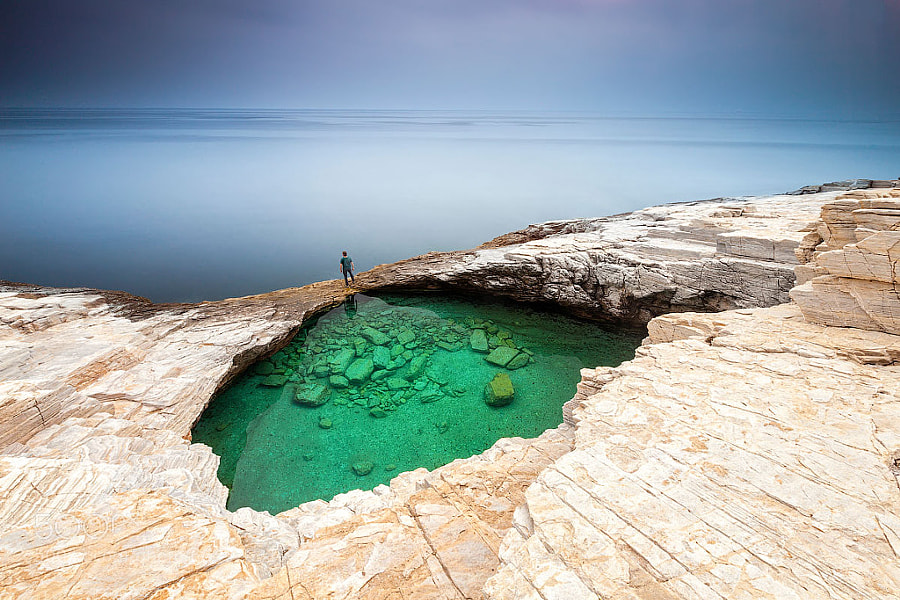
Photograph Green Hole by Evgeni Dinev on 500px

Green Hole by Evgeni Dinev on 500px

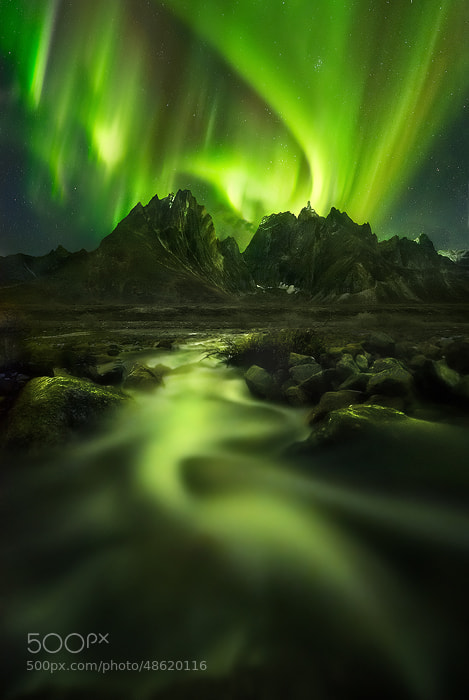
Photograph Peaks of the Lights by Marc  Adamus on 500px

Peaks of the Lights by Marc Adamus on 500px

Photograph *** by Dmitry Marchenko on 500px

*** by Dmitry Marchenko on 500px

Photograph *** by Laura Pashkevich on 500px

*** by Laura Pashkevich on 500px

Photograph Portrait of An Alien 1 by Nhut Pham on 500px

Portrait of An Alien 1 by Nhut Pham on 500px

Photograph Hidden Waterfall by Danny Seidman on 500px

Hidden Waterfall by Danny Seidman on 500px

Photograph Light Beams by Javier Acosta on 500px

Light Beams by Javier Acosta on 500px

Photograph .... by ????????  ??????? on 500px

…. by ???????? ??????? on 500px

Photograph Night bamboo by Ryusuke Komori on 500px

Night bamboo by Ryusuke Komori on 500px

Photograph Path of life by Janek Sedlar on 500px

Path of life by Janek Sedlar on 500px

Photograph well wrapped by Sonja Probst on 500px

well wrapped by Sonja Probst on 500px

Photograph The Green Lantern by Nagesh Mahadev on 500px

The Green Lantern by Nagesh Mahadev on 500px

Photograph fighting !!! by Itamar Campos on 500px

fighting !!! by Itamar Campos on 500px

Photograph kiwi bubbly by Tommy Gamboa Flores on 500px

kiwi bubbly by Tommy Gamboa Flores on 500px

Photograph 90/365  How Many Ways Can You Slice a Kiwi? by Monika Bigelow on 500px

90/365 How Many Ways Can You Slice a Kiwi? by Monika Bigelow on 500px

Photograph Grasshopper Green by Lorraine Hudgins on 500px

Grasshopper Green by Lorraine Hudgins on 500px

Photograph Little Green Tree Frog by Lorraine Hudgins on 500px

Little Green Tree Frog by Lorraine Hudgins on 500px

Photograph Gorging On Grasshopper by Lorraine Hudgins on 500px

Gorging On Grasshopper by Lorraine Hudgins on 500px

Photograph Rose-ringed Parakeet by Doron Hoffman on 500px

Rose-ringed Parakeet by Doron Hoffman on 500px

Photograph Hidden Mode by Suradej Chuephanich on 500px

Hidden Mode by Suradej Chuephanich on 500px

Photograph Mojito by Natasha Breen on 500px

Mojito by Natasha Breen on 500px

Photograph Green apple by Alex Koloskov on 500px

Green apple by Alex Koloskov on 500px

Photograph Green Apple by Alexander Zachen on 500px

Green Apple by Alexander Zachen on 500px

Photograph Self shadow | Laser by Xavier Paillard on 500px

Self shadow | Laser by Xavier Paillard on 500px

Photograph Jagermeister Shot by Andrew Jack on 500px

Jagermeister Shot by Andrew Jack on 500px

Photograph Laser through a glass  by Emil Eddie Andersen on 500px

Laser through a glass by Emil Eddie Andersen on 500px

Photograph My Greeny Eyes..... by Vincent Budi Darmawan Sinaga on 500px

My Greeny Eyes….. by Vincent Budi Darmawan Sinaga on 500px

Photograph I'm Lucky Because I Have You by Niko Vass on 500px

I’m Lucky Because I Have You by Niko Vass on 500px

Photograph Clovers by Redcup2 on 500px

Clovers by Redcup2 on 500px

Photograph Denisa by Vladimir  Dumbrava on 500px

Denisa by Vladimir Dumbrava on 500px

Photograph Al otro lado. / The other side. by Miguel Ángel Sánchez-Guerrero Ros on 500px

Al otro lado. / The other side. by Miguel Ángel Sánchez-Guerrero Ros on 500px

Photograph ## bicycle | | by Paolo Giraudo on 500px

## bicycle | | by Paolo Giraudo on 500px

Photograph Door by Maria Muhtarova on 500px

Door by Maria Muhtarova on 500px

The post A Selection of Photos with a Green Theme by Darlene Hildebrandt appeared first on Digital Photography School.


Digital Photography School

 
Comments Off on A Selection of Photos with a Green Theme

Posted in Photography


How to use the Art of Self Reflection to Make Better Photos

06 Aug

Have you ever “hit the wall” with your photography? Do you sometimes get the feeling your images aren’t improving as much, or as fast as you’d like? Have you ever thought about what you must do to cross that chasm from being a pretty good photographer to being a WOW photographer?
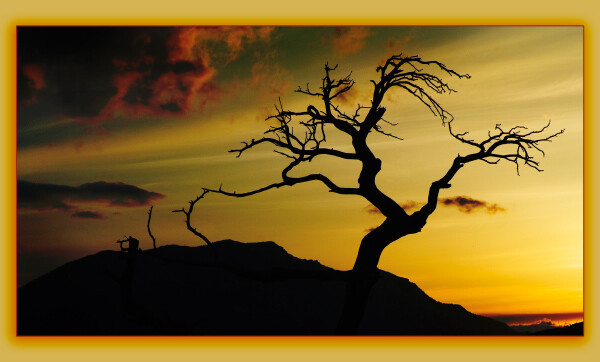
Is this a WOW shot? How do you know?

Is this a WOW shot or not? How do you know?

ONE SKILL FITS ALL

There’s really only one ability that you need to develop to help you advance your talents, and it will serve you well in any creative pursuit, not just your photography. This skill is reflection.

No, not THAT kind of reflection (although reflections in images can be captivating), I’m talking about introspective reflection, the thoughtful self-analysis of your work.

  • What worked well in the image?
  • What is not working?
  • Was your vision translated accurately into your photo, did you achieve your goals?
  • Is it a WOW shot?
  • How can you tell?
  • How can you be objective about your own photos?

Reflection is so important for improvement. Yet many aspiring and seasoned photographers alike, go out and shoot, come back to their computers and fire up Lightroom (or another image processor) and start editing. They edit until they have an image they like; save it, print it and share it. And that’s the end of the workflow. I’d like to encourage you to add reflection to your photographic post-processing methods.
dinosuar_sunset

IT’S CRITICAL TO BE CRITICAL

It’s not easy to be critical about one’s own creative work. Our hearts and souls are embodied in every shot we take and it can be difficult, if not almost impossible to be objective. But I have a handy and easy checklist, to help you critique your images. It’s fast, almost painless, and it works. You can use this checklist as well if your friends or other photographers ask you to critique their images. You can be objective, you can back up your opinion using the checklists items, it  works for almost all genres of photography and it will help you fully absorb new information, and rapidly advance your photography skills.
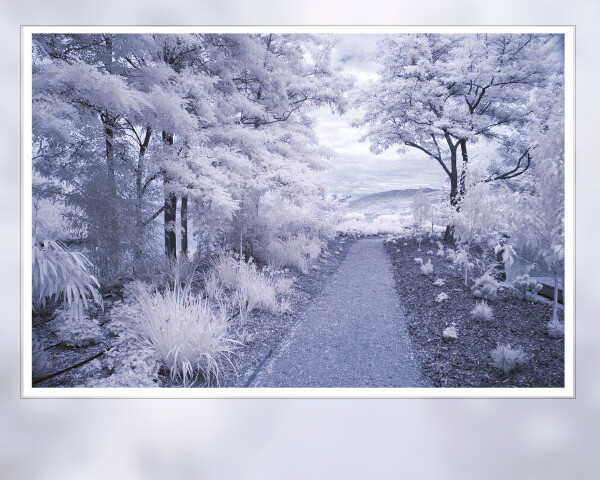
PPOCMB_comp1-copy

BEING OBJECTIVE – THE CHECKLIST*

This checklist will help you evaluate your images, and those of other photographers in an objective way. It’s the prefect way to reflect on your shots and absorb those things you did well. It also allows you to understand why an image isn’t working.

Ask yourself:

Does the image have:

1) Impact

This is the immediate feeling the viewer gets when they first see the image. Compelling images evoke laughter, sadness, anger, pride, wonder or another intense emotion.

Reality Check: When you show someone your image, what is their immediate reaction? Do they instinctively take a breath, or inhale quickly? This is a good sign your image has made an impact.

2) Storytelling

Storytelling refers to the ability of the image to evoke imagination. One beautiful thing about art is that each viewer might collect his own message or read her own story in an image.

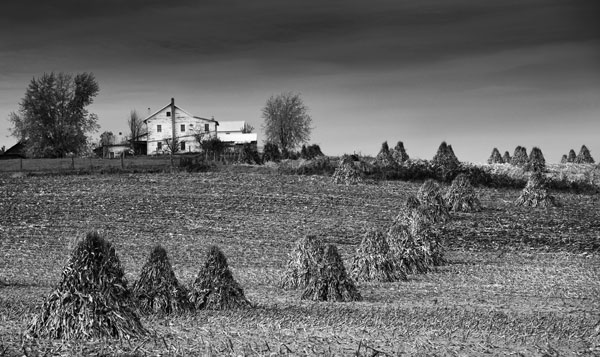
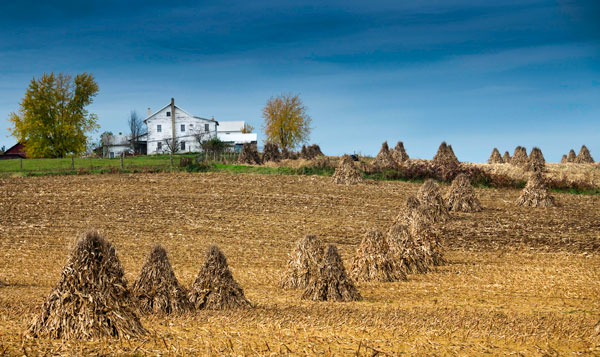
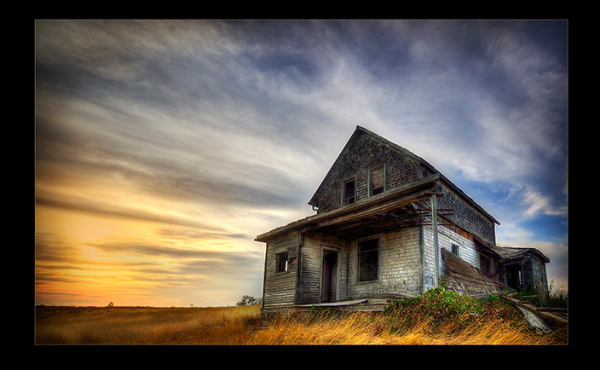
Reality Check: WHAT is the story your image tells? This need not be complicated but perhaps as simple as one sentence. For the image Prairie Sundown, the old house above, is there a story in that photo for you?

3) Creativity

This is the original, fresh, and outward expression of the imagination of the maker by using the photographic techniques to convey an idea, message, or thought. Does your image display something in a very creative and original way?

Reality Check: Have you ever seen an image similar to yours? Why is yours different and better than the similar one?
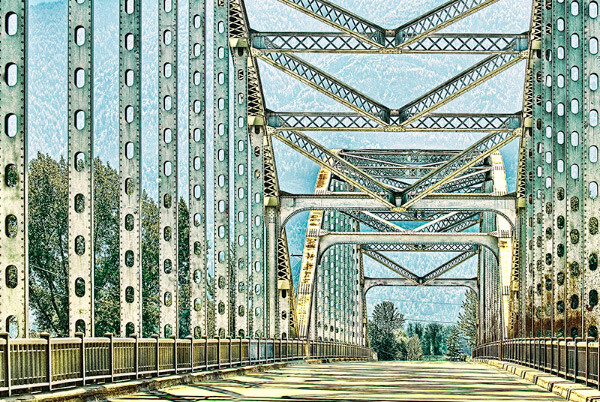
dps_DSC4830W

4) Style

Style is defined in a number of ways. It might be a specific genre or simply recognizable as the characteristics of how a specific artist applies light to a subject.  It can impact an image in a positive manner when the subject matter and the style are appropriate for each other, or it can have a negative effect when they are at odds.

Does your image show a sense of YOUR style? Describe your style? Look at the works of famous photographers and see if you can identify the elements that make up their style.

Reality Check: What have you done in taking this image, or in post-processing it, that makes it uniquely YOUR image? Do you use a certain angle a lot of the time so people start to recognize certain images as being yours? This uniqueness is your style.

5) Composition

Composition is important to the design of an image, bringing all of the visual elements together in concert to express the purpose of the image. Proper composition holds the viewer in the image and prompts the viewer to look where the creator intends. Effective composition can be pleasing or disturbing, depending on the intent of the image maker.

Does your image have leading lines that help the viewer come into your image? Is there enough contrast, pattern, white space, repetition, or tension to keep them looking once they are there?

Reality Check: Have you used any rules of composition in this image (Rule of Thirds, Golden Triangle, etc.). Which one and why did you use this particular one? Have you purposely broken any rules? Which ones and why did you break them?

6) Center of Interest

This is the point, or points, on the image where the photographer wants the viewer to stop as they view the image. There can be primary and secondary centers of interest. Occasionally there will be no specific center of interest and the entire scene collectively serves as the center of interest.

Reality Check: There is a clear and obvious centre of interest with no distracting elements; or the viewer can tell you in a second what is the point of interest. If they can’t then you must score yourself lower.

7) Lighting (the use and control of light)

Light is how dimension, shape and roundness are defined in an image. Whether the light applied to an image is man-made or natural, proper use of lighting should enhance an image.

Have you used unique, or unusual lighting angles? Is the image taken at a time when the sun is NOT directly overhead or using flat light?

Reality Check: The light is a key component of this image. If the light were different would the image be better or worse? If this image had been shot at sunset it would be a better image? If you could do better, score yourself lower for use of lighting.

8) Subject Matter

The subject is appropriate to the story being told in an image.

Reality Check: Is your subject realistic for the story it is telling? Is the symbolism evident? Is there continuity between the logic of the elements you’ve used in your image?
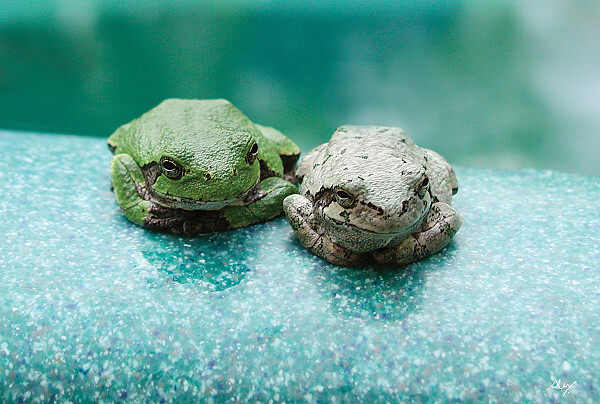
frogbuddiesW

9) Color Balance

Color balance supplies harmony to an image.  An image in which the tones work together effectively supporting the image, can enhance its emotional appeal. Color balance is not always harmonious and can be used to evoke diverse feelings for effect.

Reality Check: The tones and colors you have used in your image are coherent with the type of emotion you want to convey. Dark, shadowy, purples, blues, deep reds etc., evoke a different emotion than whites, pastels and semi-saturate tones. Is your use of color consistent with your story?

10) Technical Excellence

This is quality of the image itself as it is presented for viewing. Sharpness, noise, pixelation, exposure, printing, mounting, and correct color all speak to the qualities of the physical print.

Reality Check: The extreme reality check for this is viewing your image at 100% in Photoshop or other image editor. Is your subject sharp at 100%? If so then it’s sharp. Is there visible noise in the shadows? If yes your exposure is off. Are there “blown-out highlights”, if yes your exposure is off. Check your histogram for clipping. If your images are of people, are the skin tones pleasing and natural?

11) Technique

Technique is the approach used to create the image. Printing, lighting, posing, paper selection (if printed) and other elements are part of the technique applied to an image.

Reality Check: Is everything you have done to create and make this image technically good?

CRITIQUE ME

To help you get the hang of this, I would be delighted to accept your objective assessment of the images in this article, using the points from checklist of course.

Here are a couple more for for you to reflect on, and critique:
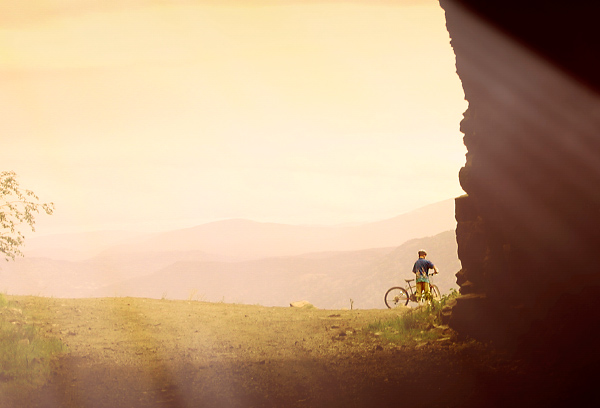
cave-Ver-3-small

What’s working in this image? What’s not?
Does this image have impact, storytelling, anything else? WOW shot or not?

Does this image have impact, storytelling, anything else? WOW shot or not?

Once you have the “feel” for this, give the Reflection Checklist a try on some of your images, and feel free to share your self assessment with us here. You can post your checklist results and images in the comments section.

 You can even download a PDF of the Photographer’s Reflection Checklist with a scoring guide here.

* This checklist has been adapted from the PPA’s 12 Elements of  Merit Image and used with their permission.

The post How to use the Art of Self Reflection to Make Better Photos by Alex Morrison appeared first on Digital Photography School.


Digital Photography School

 
Comments Off on How to use the Art of Self Reflection to Make Better Photos

Posted in Photography


Step by Step how to Brighten the Walls in Your Indoor Photos

06 Aug

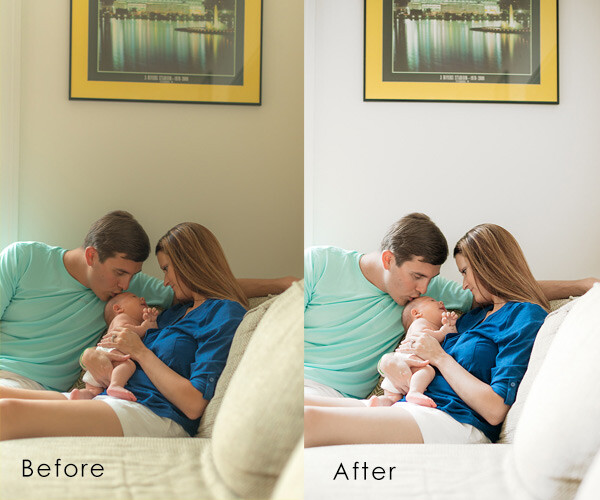
“I swear, the walls were white!” you exclaim as you look through indoor photos taken from an earlier shoot, that now appear to have an annoying yellow tint over everything. Sound familiar? Don’t worry, you’re not crazy. This is a common frustration, photographers of all experience levels face due to what’s referred to as “color casting”. Color casting is simply the effect of light striking different surfaces and bouncing back other colors into your camera’s sensor. Though annoying, it’s also relatively unavoidable without careful calculation and additional equipment.

Before.After2_.jpg

Powerful photographs are created before, during, and after the click of your camera. Sometimes, especially when it comes to photographing wiggly, unpredictable children, you don’t exactly have time to calibrate with a gray card, adjust your camera settings, or take a test shot. If you’re not already bored by the thought of it, by the time you actually work through this process, the moment has passed, and you’re still fiddling with a camera instead of chasing after your little subject.

Since some of the best natural shots occur in the comfort of your home, it’s important to make sure the walls surrounding you aren’t obstructing the emotion you could be catching with awkward color casts. Even though grasping skills like proper exposure, white balance settings, and other in-camera techniques are key to creating good photos, they are only pieces of the greater puzzle. Sometimes, it’s the things like communicating effectively with your subject, learning to naturally direct posing, and mastering basic post-processing tricks that truly take that in-camera image and reveal the emotion behind it. Luckily, correcting dingy-wall syndrome is a quick and easy way to improve your indoor shots. With just a few quick steps in Photoshop, you can restore brightness to your walls and subjects and drastically improve your shot.

Before

Above is the image I started with. The walls were white and the couch was tan, but the color cast over the image makes everything appear dingy. This is what we’re working towards:

After

How to fix this – steps:

Step one

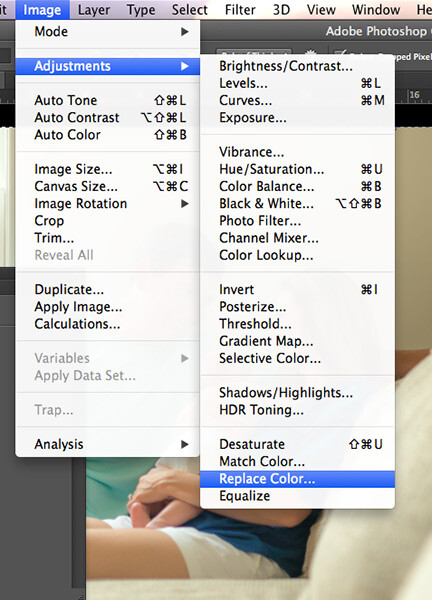
Operating on a new layer, navigate to the ‘Replace Color’ tool by clicking on Image > Adjustments > Replace Color

ReplaceColorSS

Step two

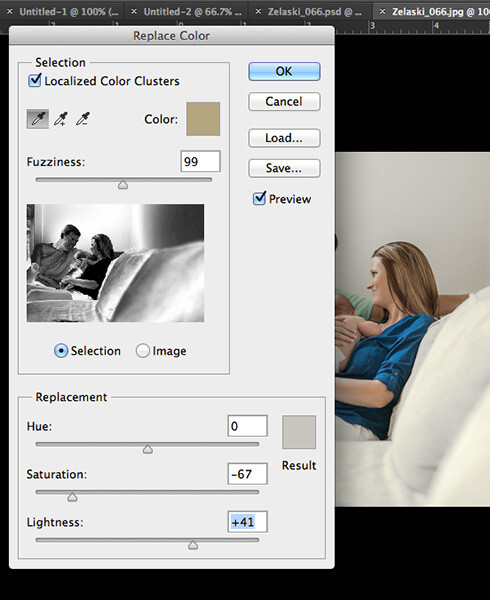
A dialog box will pop up. Make sure the ‘Localized Colors’ box is checked and the ‘Eyedropper’ tool is selected. Sample a section of the wall from the original image you want to adjust. With the ‘selection’ option active, your preview shows what color will be affected by with adjustment in white. Play with the fuzziness slider until your preview shows the best selection. It’s okay if it picks up some colors from other parts of the image you don’t want to adjust; we’ll go back and fix that later.

Option: You can also select just the portion of the image you want to change by using the Quick Select tool.

Step three

Slide the saturation bar to the left to decrease the color tones, but not too far that it creates noise (grain) from the contrast. Slide the ‘lightness’ bar to the right to adjust the brightness of your white, but again, not so much that it creates unusual contrast. Use your judgment based your particular photo to determine the levels that achieve the best result. Click ‘Ok”.

ReplaceColorSS2

Step four

If your fuzziness picked up any samples from areas that you did not wish to change, like faces for example, simply select the ‘Eraser’ tool and paint over those areas to restore the original color. You can adjust the opacity of your eraser to control the amount of color you wish to restore as well. (You can also use a layer mask to do this)

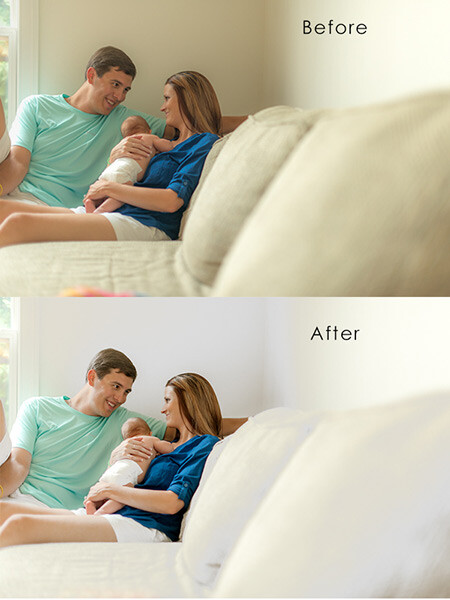
That’s it! Now you can make any other changes or adjustments to the image. This one simple fix makes a huge difference in the impact of your images and takes less than a minute to complete once you get the hang of it. Normally, “I’ll fix it in post-processing” is not a great motto to adopt as a photographer and of course, you should aim to do as much in camera as possible. But hey, life is spontaneous! This quick little trick is an easy way for you to truly enhance the natural beauty of your indoor images and you’ll never have to worry about missing the shot again because of your in-camera white balance.

Before After

The post Step by Step how to Brighten the Walls in Your Indoor Photos by Leah O’Connell appeared first on Digital Photography School.


Digital Photography School

 
Comments Off on Step by Step how to Brighten the Walls in Your Indoor Photos

Posted in Photography


How to use Monochrome Preview to Compose Better Color Photos

04 Aug

You may have heard it said that when you change the way you see – the things you see begin to change. Legendary American documentary photographer and photojournalist, Dorothea Lange once said that “The camera is an instrument that teaches people how to see without a camera.” In this article we are going to use our camera to learn how to see.

Become color blind

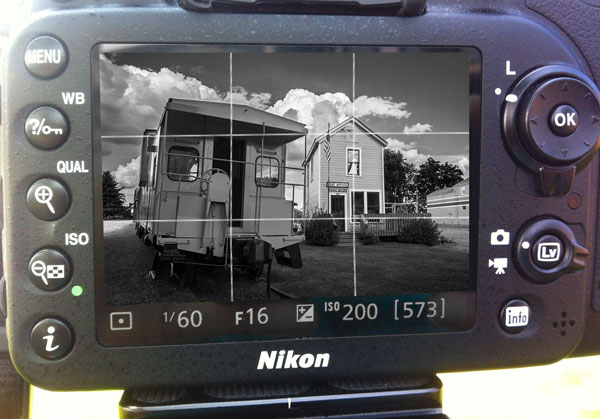
When it comes to photography, color can attract your eye so readily that it can often disguise poor composition. Black and white photography depends totally on composition, so in order to compose images more effectively you may need to become color blind. This article is going to explore how to view your images without color, learning to see the light and shapes in your subjects. Fortunately, these days most digital cameras have a black and white or monochrome shooting mode. In this mode the live preview (and replay) on your camera’s LCD will appear black and white, but your RAW file will still retain all color information. Using this method is meant to be used as an exercise to help you learn to see your compositions more clearly.

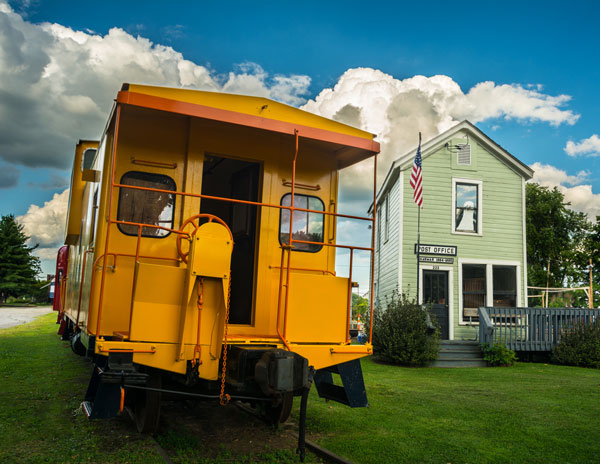
LCD preview of this colorful image is composed using rule of third grid in Black and White

LCD preview of this colorful image is composed using rule of third grid in black and white

DSC_7496-Edit

Camera settings:

  • Set your file type to RAW (This is a must!)
  • Set White Balance
  • Set your Picture Control (Nikon) or Picture Styles (Canon) to Monochrome
  • Set your exposure with whichever method you normally use
  • Turn on your Live View
  • Turn on rule of third grid lines on your preview
  • Use the black and white preview in Live View on your LCD to compose your image, paying special attention to the entire image for tones, shapes, lines and textures. Remember also to use all of the usual rules of composition, such as the rule of thirds, etc.
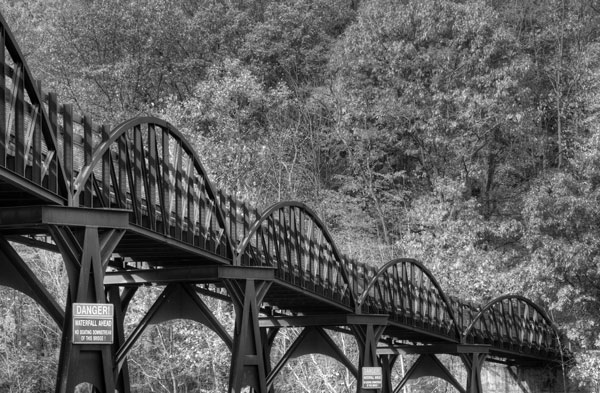
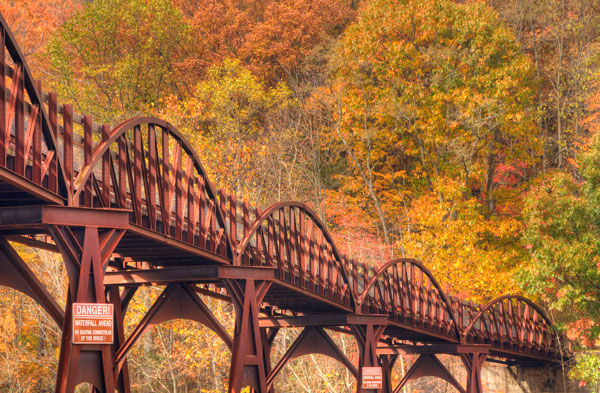
In Black and White it becomes easier to see how this bridge draws the views eye into the mage

In black and white it becomes easier to see how this bridge draws the views eye into the image.

8101686232_48c1bbc3da_o

Tripod use is not a requirement for this system, but is helpful for two reasons: first of all, it frees up your hands to experiment with your camera controls and secondly, (and most importantly) it slows you down to allow you to analyze every aspect of your image.

Removing color from your preview makes it easier to see the shapes, lines, textures and tones and allows you to concentrate on your composition.

Don’t expect to get everything perfect in camera. Post-production is your friend! Even the great Ansel Adams produced most of his magic in the darkroom. But of course you want to get it as close as you can in camera. Be especially sure you get the white balance set as accurately as possible, because when shooting in RAW, white balance and exposure are the only camera settings that are retained by your RAW file. However, the white balance can be corrected in your RAW processing.

It is recommended that since you will be viewing a monochrome image on your LCD that you check your histogram to ensure that your image is properly exposed.

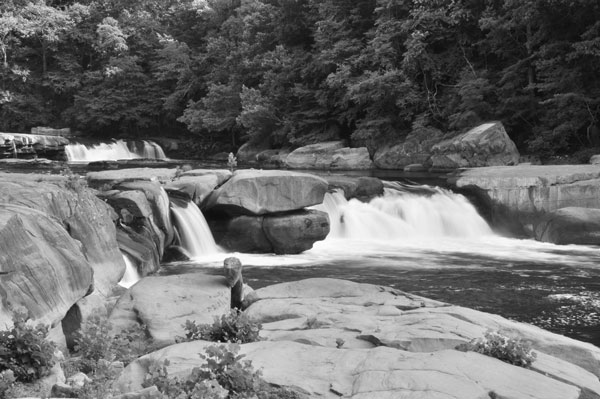
DSC_0216-2bw

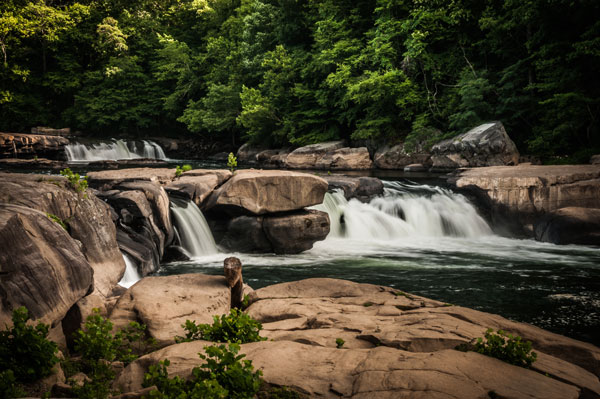
Here we can see how the rocks in the foreground lead the viewer’s eye to the waterfalls.

DSC_0216

As mentioned at the beginning of the article, your image will be previewed on your LCD in black and white, but your RAW file will record color. If you should choose to shoot in RAW + JPG mode your RAW file will be recorded in color but your JPG will record only black and white.

Don’t panic when you see a monochrome preview upon importing your RAW files into Lightroom (or whatever you use for post-processing). As soon as you click on the image you will get a color preview.

There are many methods of creating black and white images and most photographers will agree that it is best to start with a color file. Therefore, another use for this preview method comes into play if you are shooting an image that you know you will later be converting to black and white. You’ll get a good preview of how your image may appear later upon converting your RAW file to black and white, and will know right away whether your image will be effective in black and white.

One disadvantage with this method that is worth mentioning is that using the Live View mode will drain your batteries faster.

As you can see in this preview, that this image could also make a great black and white with lots of textures and a very interesting subject

This image could also make a great black and white with lots of textures and a very interesting subject

8146529877_619ce3dd53_o

This method is great for landscape, architectural, and abstract photography where it is so important to see tones, shapes and lines for composition. Yes, there are some obvious times when color may play an important part of your images such as in the fall where the colors may become your subject, but every method has its exceptions.

Try this experiment. First, shoot your scene as you would do normally with color preview. Then shoot it again with a black and white preview. You might be surprised with the difference in your results.

Give it a try, please share your results in the comments below.

The post How to use Monochrome Preview to Compose Better Color Photos by Bruce Wunderlich appeared first on Digital Photography School.


Digital Photography School
 
Comments Off on How to use Monochrome Preview to Compose Better Color Photos

Posted in Photography


Creatively Recolor Photos with Color Tables in Photoshop

04 Aug

Photoshop-color-tables-opener

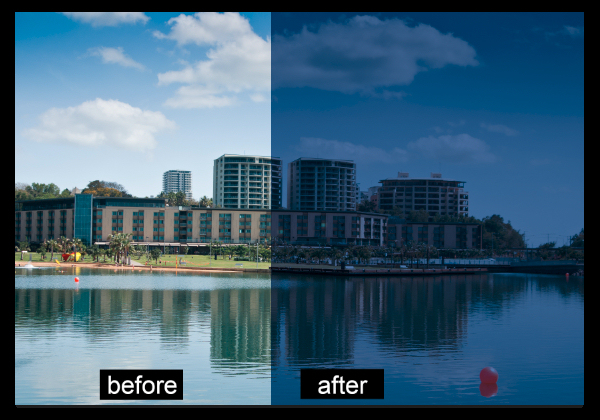
If you’re looking to use some creative enhancements on your photos in Photoshop CS6 or CC then the new Color Lookup adjustment is one to consider. The Color Lookup adjustment is used to remap the colors in an image to a set of colors that comes pre-configured and stored inside a color table file. Color Tables are used primarily with film but they are also useful for applying creative coloring to photos.

You don’t need to know anything about color tables to use this feature, as is a default set of color tables in Photoshop that you can use. Better still, if you like the effects and you subscribe to the Creative Cloud you can grab more color tables from the Adobe Speed Grade application, store them in the Photoshop PresetDLUTs folder, and use them inside Photoshop.

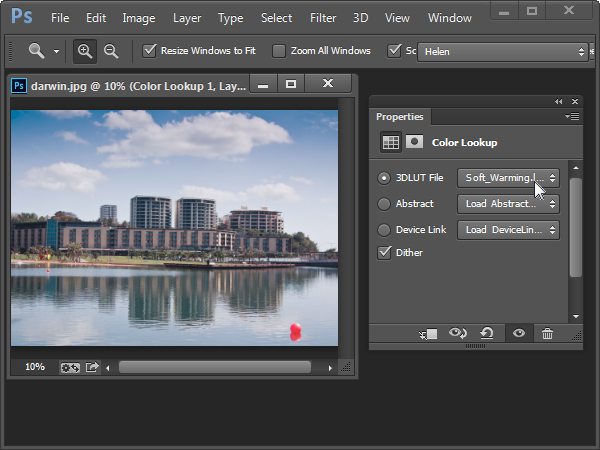
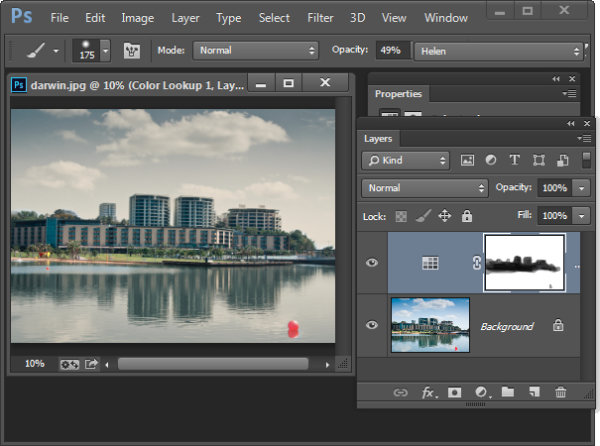
To see the Color Lookup adjustment at work open a photo and choose Layer > New Adjustment Layer > Color Lookup. This opens the Color Lookup dialog where you will find three settings; 3DLUT File, Abstract and Device Link. Select one of the options from one of the dropdown lists to see it at work. When you do this, the colors in the photo will be remapped.

For example the Soft_Warming.Look in the 3DLUT collection warms up the image.

Photoshop-color-tables-img1

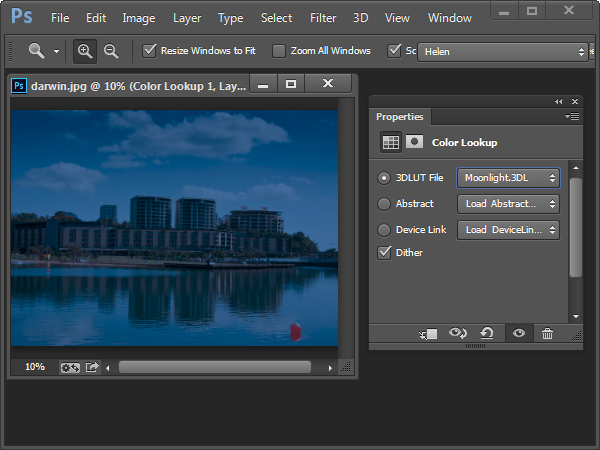
The Moonlight.3DL option gives the image the look of being shot on a moonlit night.

Photoshop-color-tables-img2

You can experiment to see which of the options you like.

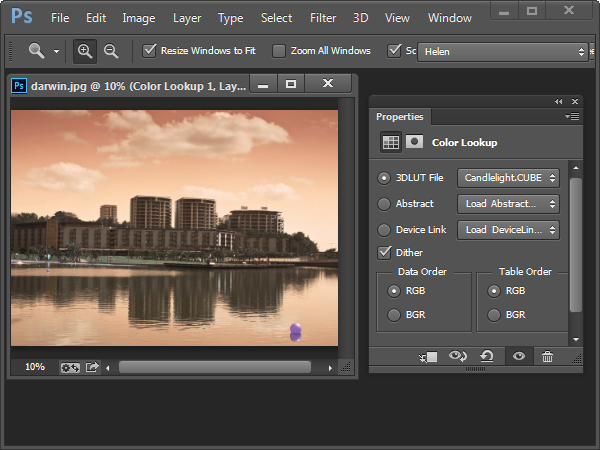
Some of the options open up additional Data Order and Table Order settings which let you create different effects. The Device Link collection on a Mac includes some additional options which are not available on a PC.

Photoshop-color-tables-img3

Like any other Adjustment Layer the Color Lookup option has a mask you can use to mask out the effect on selected areas of the image. You do this by selecting the mask and then paint on the image with black or grey to remove the effect from that area of the image. Paint with white to bring it back.

Photoshop-color-tables-img4

You can also use a blend mode to blend the Color Lookup adjustment into the image layer below and reduce its opacity if desired.

Here is a video tutorial for the Color Table Adjustment Layer. It includes details of how to find and use the .Look files shipped with Speed Grade in Photoshop:

If you haven’t tried this technique before give it a go and show us what you come up with. For more Photoshop tutorials check these:

  • Ten Go-to Editing Tips for Using Photoshop
  • 5 Photoshop Tools to Take Your Images from Good to Great
  • 3 Easy Steps Using Photoshop to Making your Images POP
  • 5 Easy Photoshop Tips for Beginners

The post Creatively Recolor Photos with Color Tables in Photoshop by Helen Bradley appeared first on Digital Photography School.


Digital Photography School
 
Comments Off on Creatively Recolor Photos with Color Tables in Photoshop

Posted in Photography


Capturing Busy Little Ones: Forget the Perfect Pose and Get Photos You Truly Love

29 Jul

PHOTO 1

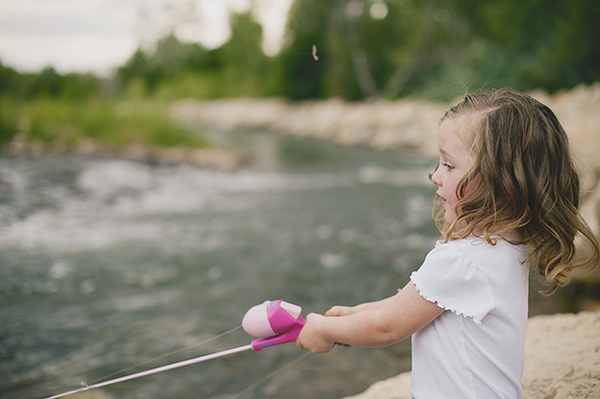
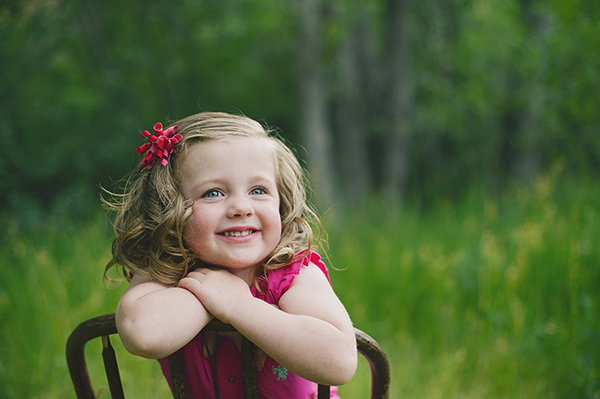
If you have ever tried to get a three year old to sit still for longer than a nanosecond you know what a challenge it can be to get that “perfect” photo. Well, I’m going to be real here, who wants that perfect photo anyway? Okay, I know you may, but maybe I can convince you to let that go. My favorite photos are always the true ones; the ones that make you smile when you look at them, or maybe even cry a tear or two. Sure, it’s nice to get that beautiful portrait, but which photo is going to help you truly remember the fiery three year old who gave you model-in-the-making poses one minute, and wiped her muddy hands on her white shirt the next?

The first thing you have to do, if you want this experience to be fun for both you and the little one, is to let go of expectations. If you have a certain Pinterest pose in mind, and are determined not to be happy until you’ve forced your little tot into it, you’re both going to be miserable. Sure, use those ideas as a starting point, but then go with what is happening in the moment. You’ll be surprised where your wee subject might take you, and you might like the results much better than what you had in mind in the first place.

PHOTO 2 PHOTO 3

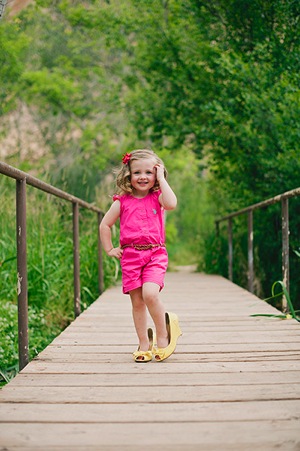
Make sure your cute little one knows that you are on the same team. Most kids have no problem being obstinate, just for fun. If she senses that you really want something from her, she may quickly decide that she wants the exact opposite. I try to take the child by the hand often, even if it’s the first time we’ve met (they usually love this) and let them feel that they are part of where we are going, and what we are doing. If she decides that she wants to put on the pretty dress shoes next, then that’s what we capture next.

PHOTO 4

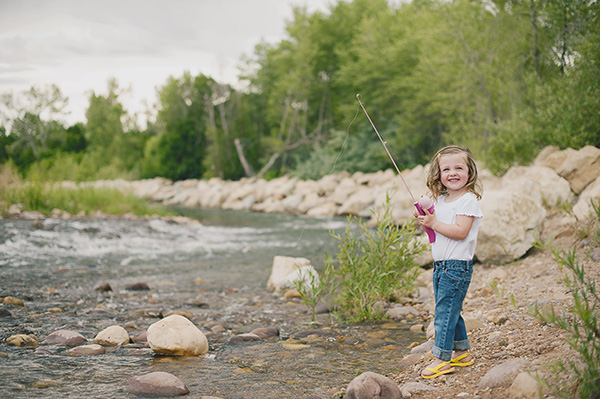
Bring something for her to do. I prefer not to use props generally, but a few well-chosen, meaningful props can work wonders. This keeps her attention, plus you have the added benefit of capturing those hobbies that she is into at the moment. Let her share her passion with you. Instead of trying to pose her just so, and telling her how to hold the fishing pole, and where to look – ask her to show you “how she fishes with daddy”. Let her be the expert, and you just have your camera ready. Favorite dress-up clothes can bring out the model in lots of kids. Chairs or boxes to climb on, sit on, stand on, and peek through, can be great fun.

PHOTO 5

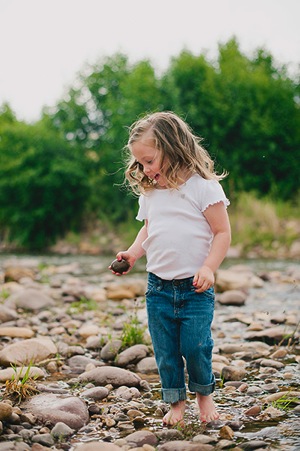
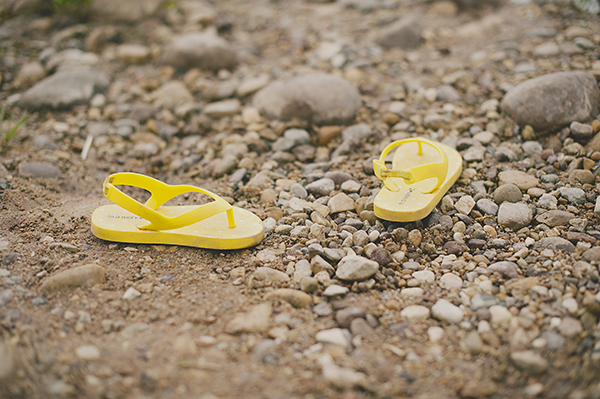
Try not to give too much direction or commands. Kids start to tune you out pretty quickly if all they hear are orders barked at them: “Sit here, look there, smile, smile, smile!!!”. When I can tell that my little subject is about done, I’ll just let her totally do her thing, and have my camera ready for when the moment is right. If she wants to take her shoes off and splash in the water, throwing rocks, I see a perfect opportunity to capture her in her element. This is where you might get the most genuine joy shining through.

PHOTO 6

When your mini-model is done – you are done. Quit before the meltdown, before she decides that this is the worst form of torture an adult ever created. If you didn’t get everything you hoped to get, don’t sweat it. Sometimes when I look through the photos later, I find gems that I didn’t even remember capturing. You may be pleasantly surprised by how many great images you were able to get, even with truly “busy” little tots. You’re not going to get much worth keeping if you try to force more photos. When little ones are done, they are DONE. Try to keep your photo sessions short, even if you have an agreeable little model. I usually spend less than half an hour shooting if they are under five years old.

PHOTO 7

So, next time you are lucky enough to have an adorable, energetic, little one in front of your camera, remember to relax, breathe, and have some fun. You’ll find that those real photos will be your favorites in the end, and you won’t even miss that perfectly posed portrait with every hair in place.

PHOTO 8

For more tips on photographing kids check out these:

  • Photography Hunting: Play the Waiting Game Photographing Kids
  • Cut the Cheese: 5 Tips for Photographing Kids
  • CLICK! How to Take Gorgeous Photos of Your Kids – a dPS ebook
  • How to Photograph Shy Children

The post Capturing Busy Little Ones: Forget the Perfect Pose and Get Photos You Truly Love by Melinda Smith appeared first on Digital Photography School.


Digital Photography School

 
Comments Off on Capturing Busy Little Ones: Forget the Perfect Pose and Get Photos You Truly Love

Posted in Photography


Pelican Imaging releases light field photos from its mobile imaging array

29 Jul

Pelican Imaging has released a set of re-focusable pictures taken with its light field camera for smartphones. Instead of placing an array of microlenses between the sensor and the main lens, Pelican uses an array of main lenses – each with a sensor behind it. Pelican’s offering is more suitable for smartphones, and their sample images allow for re-focusing, changing DOF, and shifting perspective. Click through for more details and links to the images.

Articles: Digital Photography Review (dpreview.com)

 
Comments Off on Pelican Imaging releases light field photos from its mobile imaging array

Posted in Uncategorized


A Collection of Pathway and Roadway Photos to Lead You

19 Jul

As I’ve been on the road for a couple weeks now I’ve seen more than a share of roads recently. So I thought I’d find some pathway and roadway photos to lead you on – hopefully to get out and do some of your own photography.

Enjoy the journey down these highways and byways!

Photograph The Pathway by Ian David Soar on 500px

The Pathway by Ian David Soar on 500px

Photograph bench in foggy autumn park by Sergiy Trofimov on 500px

bench in foggy autumn park by Sergiy Trofimov on 500px

Photograph Foggy Road by Casey McCallister on 500px

Foggy Road by Casey McCallister on 500px

Photograph The pathway by Jorge Maia on 500px

The pathway by Jorge Maia on 500px

Photograph Tuscan Farmhouses by Alberto Di Donato on 500px

Tuscan Farmhouses by Alberto Di Donato on 500px

Photograph Pathway by Derek Toye on 500px

Pathway by Derek Toye on 500px

Photograph foggy mountain forest and man by Sergiy Trofimov on 500px

foggy mountain forest and man by Sergiy Trofimov on 500px

Photograph Along the Way by Carlos Gotay on 500px

Along the Way by Carlos Gotay on 500px

Photograph Untitled by Ursula Rodgers on 500px

Untitled by Ursula Rodgers on 500px

Photograph Margam Abbey Ruins by Linda Bullock on 500px

Margam Abbey Ruins by Linda Bullock on 500px

Photograph Pathway to the light I by David Brand on 500px

Pathway to the light I by David Brand on 500px

Photograph Spring Awakening by Bernard Chen on 500px

Spring Awakening by Bernard Chen on 500px

Photograph Smoky BB by Kalevi Tamm on 500px

Smoky BB by Kalevi Tamm on 500px

Photograph Morning Glory by Stephen Emerson on 500px

Morning Glory by Stephen Emerson on 500px

Photograph In Motion by Bee Eye on 500px

In Motion by Bee Eye on 500px

Photograph Fortress of Solitude by LEE INHWAN on 500px

Fortress of Solitude by LEE INHWAN on 500px

Photograph Coliseum, past and future !  by Beboy Photographies on 500px

Coliseum, past and future ! by Beboy Photographies on 500px

Photograph The road by Vendenis . on 500px

The road by Vendenis . on 500px

Photograph The Cistern by Pawe? Uchorczak on 500px

The Cistern by Pawe? Uchorczak on 500px

Photograph Road to Home by Ethan Shox on 500px

Road to Home by Ethan Shox on 500px

Photograph Phare du Petit Minou by Stefan Cruysberghs on 500px

Phare du Petit Minou by Stefan Cruysberghs on 500px

Photograph Autumn Melancholy by Andreas Steegmann on 500px

Autumn Melancholy by Andreas Steegmann on 500px

Photograph One always wonders about roads not taken... by Sandeep Thomas on 500px

One always wonders about roads not taken… by Sandeep Thomas on 500px

Photograph Trollstigen by Jiri Paur on 500px

Trollstigen by Jiri Paur on 500px

Photograph Road Trip by Jake Olson Studios on 500px

Road Trip by Jake Olson Studios on 500px

Photograph Rainbow Bridge Experience by Loïc Lagarde on 500px

Rainbow Bridge Experience by Loïc Lagarde on 500px

Photograph roadway by Alexa Capricious on 500px

roadway by Alexa Capricious on 500px

Photograph Street Scene Stone Town - Zanzibar Africa by Gerry Legere on 500px

Street Scene Stone Town – Zanzibar Africa by Gerry Legere on 500px

Photograph La Ferrería by Ariasgonzalo . on 500px

La Ferrería by Ariasgonzalo . on 500px

Photograph Street Noir by András Sümegi on 500px

Street Noir by András Sümegi on 500px

Photograph Winding Road by Danny Seidman on 500px

Winding Road by Danny Seidman on 500px

The post A Collection of Pathway and Roadway Photos to Lead You by Darlene Hildebrandt appeared first on Digital Photography School.


Digital Photography School

 
Comments Off on A Collection of Pathway and Roadway Photos to Lead You

Posted in Photography


Reflections from Above: Mirrored Skyscraper Illusion Photos

18 Jul

[ By Steph in Art & Photography & Video. ]

Reflections from Above Skyscraper Photos 1

Illuminated cityscapes multiply and divide in unexpected ways when their nighttime reflections hit the mirrored facades of the skyscrapers found within them. Photographer Donna Dotan, known for her vivid and meticulously composed architectural shots, came across her project ‘Reflections from Above’ by accident while shooting an apartment for sale at the Mandarin Oriental in New York City.

Reflections from Above Skyscraper Photography 3

Holding her camera outside the window to snap a photo, Dotan captured not just the city below, but also its reflection against the building itself.

Reflections from Above Skyscraper Photography 2

Reflections from Above Skyscraper Photography 4

The results play into Dotan’s fascination with symmetry and highlight certain aspects of each scene, whether the frenetic energy of the busy streets or the comparative tranquility of the deserted rooftops.

Reflections from Above Skyscraper Photography 5

According to Dotan’s bio, her interest in the built environment began as a child when her family spent summers in Israel, the architecture speaking to her “in an intimate way.” She believes her success as a young photographer comes from “her unique ability to see spaces from the eye of a camera.”

Reflections from Above Skyscraper Photography 6

The ‘Reflections from Above’ series has only just begun – keep an eye on Dotan’s website for more.

Share on Facebook


[ By Steph in Art & Photography & Video. ]

[ WebUrbanist | Archives | Galleries | Privacy | TOS ]


WebUrbanist

 
Comments Off on Reflections from Above: Mirrored Skyscraper Illusion Photos

Posted in Creativity


How to Create Amazing Reflection Photos using Puddles

17 Jul

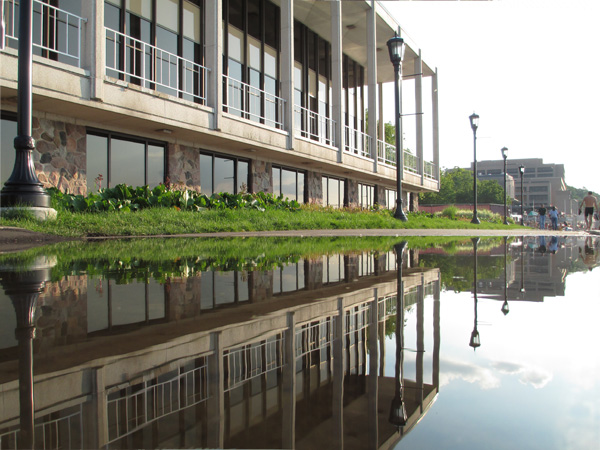
People are captivated by reflections, and photographers eagerly seek out still bodies of water in order to capture stunning reflection shots. But a perfect reflection may be closer than you think, especially if it has just been raining.

puddle, reflection, symmetry, how to

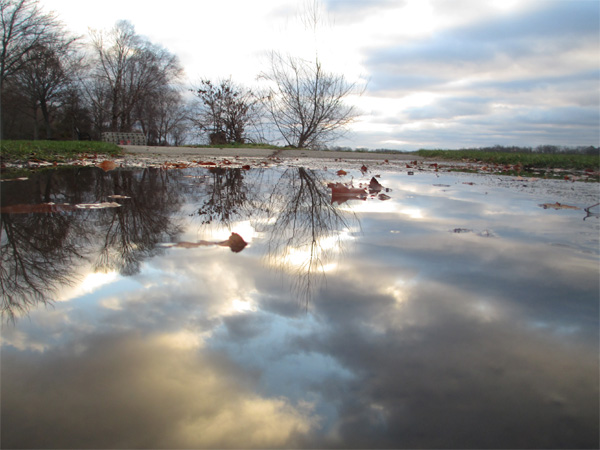
Puddle reflection

Photographing puddle reflections

Puddles are an incredibly useful if perhaps surprising source for reflections. Puddles are generally shallow and found in protected areas or depressions, which means that they are likely to hold smooth, still water. They can also be found in many different locations, providing a variety of options for subjects and compositions. Finally, puddles are so mundane and small that they are often overlooked, so you can create unique and surprising images that others likely missed.

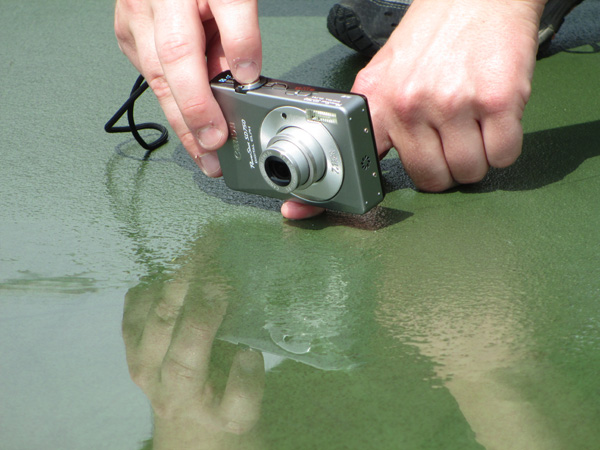
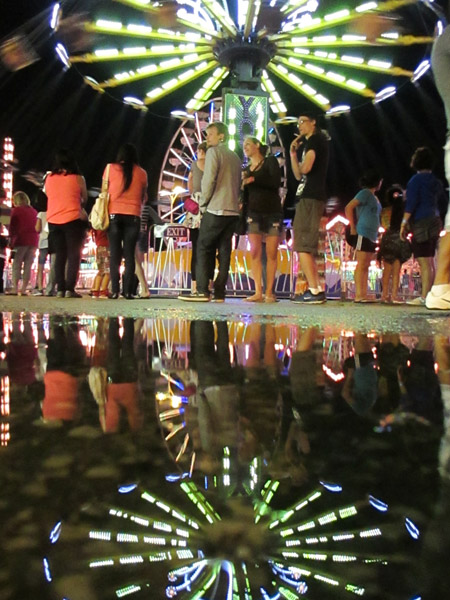
The trick with capturing amazing reflection photos using puddles, is to get down low. You want your camera to get as close to the surface of the puddle as possible. This will make even a small puddle appear expansive in your final image. I recommend putting your hand or a finger under your camera to steady it and keep it out of direct contact with the water. It is also useful to have a small bubble level attached to your camera to judge whether your composition is level.

puddle, reflection, symmetry, how to

This puddle reflection technique works equally well whether you have a DSLR camera or a point-and-shoot. I often use my point-and-shoot for these types of shot, as it is much easier to simply lean down and hold it near, or over, the puddle when shooting, and I am much less worried about it getting wet. When shooting puddles with my DSLR, I am much more likely to squat down to better support the camera with both hands and keep it out of the water or mud.

puddle, reflection, symmetry, how to, sunset

puddle

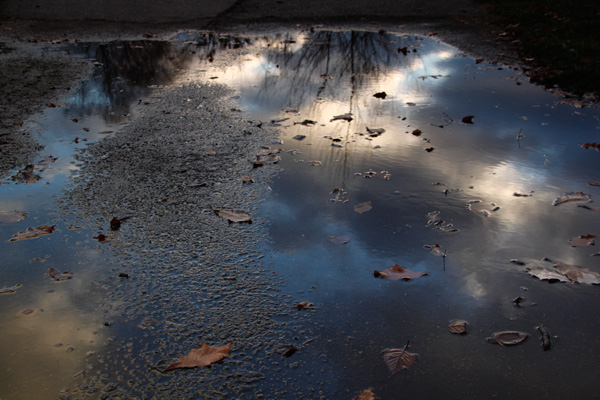
Puddle used for the reflection above

Puddles do not need to be very large for such photographs, but an ideal puddle would be at least a foot or more, long and wide. Puddles that have formed naturally on roads, or on the ground, provide a better transition from subject to reflection than puddles that are surrounded by a set boundary like a curb or a bank. You can also think beyond traditional puddles and try the same technique with wet roadways or stone pillars, which often become highly reflective when wet.

An example: puddle versus puddle reflection

Grand Teton National Park, Tetons, Mormon Row, mountains, landscape, barn

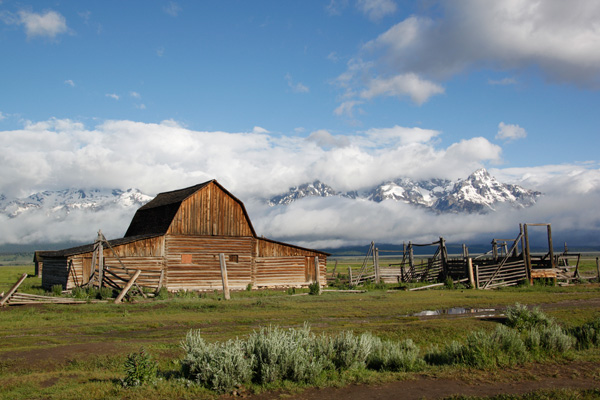
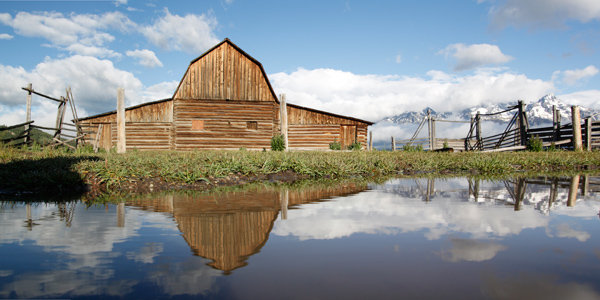
Above is one of the classic scenes from the Grand Tetons: the abandoned houses of Mormon Row. It had rained the previous day, and much of the night, and in the lower right-hand section of the photograph, you will notice a fairly unassuming puddle remaining in the mud.

Grand Teton National Park, Tetons, Mormon Row, mountains, landscape, barn, reflection, puddle

Getting down low and holding my camera just above the surface of that puddle allowed me to capture this shot. Despite the slight breeze and rippling of the water, this reflection clearly highlights both the abandoned building and the incredible mountain view behind it. Merging three different compositions provided the panoramic view below.

McEnaney-Tetons-panorama-final

Seek out puddle reflections

Next time you find yourself in a wet situation, make the most of the puddles around you. Get down low, and you may be surprised at what your camera captures compared to what the scene looks like to you standing up higher. Do not limit yourself to taking the same shots as everyone else – try something new!

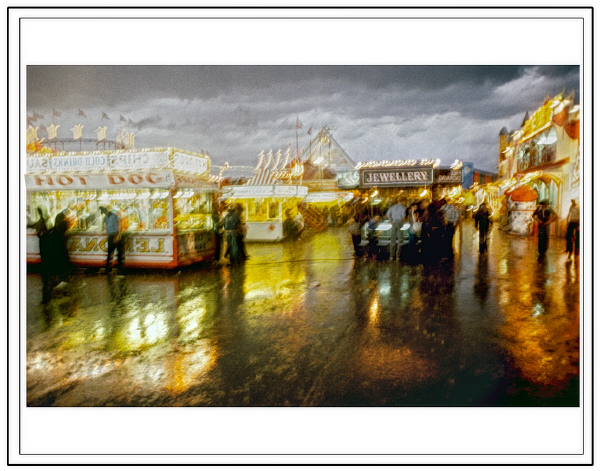
puddle, reflection, how to, carnival, night, street photography

The weekly photography challenge a little while ago was reflections. If you’re still working on that one try these tips out. Want to see more reflections – try this collection.

The post How to Create Amazing Reflection Photos using Puddles by Katie McEnaney appeared first on Digital Photography School.


Digital Photography School

 
Comments Off on How to Create Amazing Reflection Photos using Puddles

Posted in Photography