RSS
 

Posts Tagged ‘Photos’

6 Tips for Creating Leading Lines to Make Your Photos Stand Out More

04 Dec

There is perhaps no more important tool in composition than lines. The eye will virtually always follow an actual or implied line across the picture. Because of this tendency, many lines are referred to as leading lines They are actual, or implied lines that control the eye of the viewer through the frame.
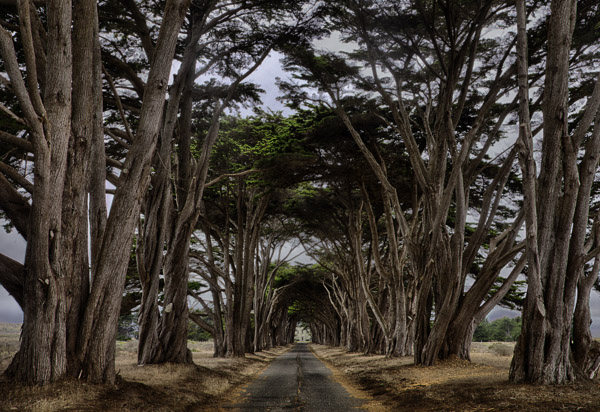
PointReyesTrees

Some leading lines guide the viewer entirely through the frame. Some lines are the subject of the photo themselves. But others, and my favorite sort of leading lines, are the ones that draw the viewer into the picture. They add depth to your image. So today I want to focus on that particular kind of leading line, giving you some examples and ideas for how to create them.

1.  Plan for opportunities

Lines that you can use to lead into your viewer into the frame are everywhere, but you’ve got to look for them. In fact, it is a good idea to plan a few shots ahead of time so that you can consider what to use as a leading line. Leaving it to chance when you are out shooting will often result in the idea of leading lines being overlooked while you are focused on other things.

When you are thinking about possible lines leading into the frame, think about roads and paths, which work great. Plus they are everywhere so you almost never have to search for them. The edges of the road will converge in the distance, thereby pointing the viewer to the center of the frame. Although certainly not as prevalent as roads, railroad tracks also work great. Finally, don’t overlook the use of shadow to create a line toward the center of the picture.

QueensWalk

2.  Finding and using urban opportunities

In an urban environment, besides roads, you can use buildings and other structures. Obviously rows of buildings can work. Perspective will make the buildings appear smaller as they become more distant, resulting in lines pointing to the center of the picture. Fences are another good choice.

Keep your eye open for rows of streetlights, which we often overlook, but which can work great. In addition, don’t forget to look up, as the natural convergence of buildings toward the center of your frame (due to the distortion of your lens) can actually work for you in this context, and create lines that point to the center of the frame.

TubeEscalator

3.  Opportunities in nature

When you are out in the wild, nature often provides you with the leading lines you seek. Patterns on the ground, whether it be paved, sand, or grass, can often provide markings that lead to the center of the frame. In addition, similar to the convergence of buildings mentioned above, looking up into tall trees will create the same effect.

Sand

Leading lines on the ground can be difficult if not impossible to see with the naked eye though. There are times you have to walk around with the viewfinder held to your eye (or looking through your LCD with the camera in Live View) in order to see the lines on the ground. Moving water can also provide lines toward the center of the frame. Again, however, these might not be visible to you. Frequently looking at a a long exposure after the fact is the only way you can actually see these lines. Take test shots when you can.

4.  Manufacture your own lines

Sometimes there are no leading lines tha to use and you have to make your own. There are many ways to do this. One of my favorites is by adding streaking lights that go into the frame. Taking a long exposure of moving water will also result in lines.

GreyWhaleRock

5.  Stay cognizant of lines when shooting

Once you identify leading lines to draw your viewer into the frame, you need to take your picture in such a way that it will show them. We already mentioned shutter speed, which is particularly important when you are allowing lights or water to flow through your frame to show a leading line. But you will also want to keep an eye on your aperture setting. Most of the time you will want the entire leading line sharp, along with the subject that you are leading the viewer’s eye toward. You’ll want to use a small aperture in that case, which will create a large depth of field for your shot. On occasion, however, you want to blur out the background by using a large aperture. In any case, the important thing is to have a plan for showing the leading line in the final picture.

WiseCoRoad

6.  Accentuate the lines in post-production

Finding and using leading lines to draw your viewer into the picture does not end when the shutter closes. Usually you can accentuate them in post-processing. The main way is through selective brightening and darkening. Oftentimes you will want to brighten your leading line to draw the viewer’s eye to it. Sometimes you might want to darken other parts of the frame for the same reason. You also might want to increase the contrast in, and around, your leading lines since the eye is attracted to contrast.

The best way the accomplish this selective lightening and darkening is through curves adjustment layers. Just create a curves adjustment layer (Layer – New Adjustment Layer – Curves). Then brighten the picture by pulling the middle of the curve upward bit. Use whatever selection tools you are most comfortable with to mask away the brightening everywhere you don’t want it (which will be pretty much everywhere except for your leading lines). To darken portions of the picture, just do the same thing on a new adjustment layer, but instead of pulling the curve up, pull it down. Again, mask away the effect where you don’t want it (which, this time will be areas away from your leading lines).
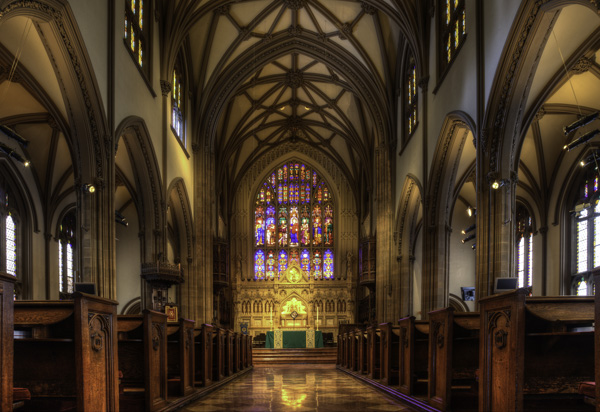
NYC

Effort and reward

The use of leading lines to draw the viewer into the frame is a great way to add depth to your pictures. Rather than looking at the picture the viewer is looking into the picture. But it isn’t always easy. It requires thought before, during, and after the shot. But with the right pre-planning, a little attention while shooting, and some accentuation during the post-processing, you can add an element to your photos that sets them apart.

googletag.cmd.push(function() {
mobile_slots.push( googletag.defineSlot( “/1005424/_dPSv4_mob-all-article-bottom_(300×250)”, [300, 250], “pb-ad-78158” ).addService( googletag.pubads() ) );
} );

The post 6 Tips for Creating Leading Lines to Make Your Photos Stand Out More by Jim Hamel appeared first on Digital Photography School.


Digital Photography School

 
Comments Off on 6 Tips for Creating Leading Lines to Make Your Photos Stand Out More

Posted in Photography


6 Tips for Creating Leading Lines to Make Your Photos Stand Out More

03 Dec

There is perhaps no more important tool in composition than lines. The eye will virtually always follow an actual or implied line across the picture. Because of this tendency, many lines are referred to as leading lines They are actual, or implied lines that control the eye of the viewer through the frame.

PointReyesTrees

Some leading lines guide the viewer entirely through the frame. Some lines are the subject of the photo themselves. But others, and my favorite sort of leading lines, are the ones that draw the viewer into the picture. They add depth to your image. So today I want to focus on that particular kind of leading line, giving you some examples and ideas for how to create them.

1.  Plan for opportunities

Lines that you can use to lead into your viewer into the frame are everywhere, but you’ve got to look for them. In fact, it is a good idea to plan a few shots ahead of time so that you can consider what to use as a leading line. Leaving it to chance when you are out shooting will often result in the idea of leading lines being overlooked while you are focused on other things.

When you are thinking about possible lines leading into the frame, think about roads and paths, which work great. Plus they are everywhere so you almost never have to search for them. The edges of the road will converge in the distance, thereby pointing the viewer to the center of the frame. Although certainly not as prevalent as roads, railroad tracks also work great. Finally, don’t overlook the use of shadow to create a line toward the center of the picture.

QueensWalk

2.  Finding and using urban opportunities

In an urban environment, besides roads, you can use buildings and other structures. Obviously rows of buildings can work. Perspective will make the buildings appear smaller as they become more distant, resulting in lines pointing to the center of the picture. Fences are another good choice.

Keep your eye open for rows of streetlights, which we often overlook, but which can work great. In addition, don’t forget to look up, as the natural convergence of buildings toward the center of your frame (due to the distortion of your lens) can actually work for you in this context, and create lines that point to the center of the frame.

TubeEscalator

3.  Opportunities in nature

When you are out in the wild, nature often provides you with the leading lines you seek. Patterns on the ground, whether it be paved, sand, or grass, can often provide markings that lead to the center of the frame. In addition, similar to the convergence of buildings mentioned above, looking up into tall trees will create the same effect.

Sand

Leading lines on the ground can be difficult if not impossible to see with the naked eye though. There are times you have to walk around with the viewfinder held to your eye (or looking through your LCD with the camera in Live View) in order to see the lines on the ground. Moving water can also provide lines toward the center of the frame. Again, however, these might not be visible to you. Frequently looking at a a long exposure after the fact is the only way you can actually see these lines. Take test shots when you can.

4.  Manufacture your own lines

Sometimes there are no leading lines tha to use and you have to make your own. There are many ways to do this. One of my favorites is by adding streaking lights that go into the frame. Taking a long exposure of moving water will also result in lines.

GreyWhaleRock

5.  Stay cognizant of lines when shooting

Once you identify leading lines to draw your viewer into the frame, you need to take your picture in such a way that it will show them. We already mentioned shutter speed, which is particularly important when you are allowing lights or water to flow through your frame to show a leading line. But you will also want to keep an eye on your aperture setting. Most of the time you will want the entire leading line sharp, along with the subject that you are leading the viewer’s eye toward. You’ll want to use a small aperture in that case, which will create a large depth of field for your shot. On occasion, however, you want to blur out the background by using a large aperture. In any case, the important thing is to have a plan for showing the leading line in the final picture.

WiseCoRoad

6.  Accentuate the lines in post-production

Finding and using leading lines to draw your viewer into the picture does not end when the shutter closes. Usually you can accentuate them in post-processing. The main way is through selective brightening and darkening. Oftentimes you will want to brighten your leading line to draw the viewer’s eye to it. Sometimes you might want to darken other parts of the frame for the same reason. You also might want to increase the contrast in, and around, your leading lines since the eye is attracted to contrast.

The best way the accomplish this selective lightening and darkening is through curves adjustment layers. Just create a curves adjustment layer (Layer – New Adjustment Layer – Curves). Then brighten the picture by pulling the middle of the curve upward bit. Use whatever selection tools you are most comfortable with to mask away the brightening everywhere you don’t want it (which will be pretty much everywhere except for your leading lines). To darken portions of the picture, just do the same thing on a new adjustment layer, but instead of pulling the curve up, pull it down. Again, mask away the effect where you don’t want it (which, this time will be areas away from your leading lines).

NYC

Effort and reward

The use of leading lines to draw the viewer into the frame is a great way to add depth to your pictures. Rather than looking at the picture the viewer is looking into the picture. But it isn’t always easy. It requires thought before, during, and after the shot. But with the right pre-planning, a little attention while shooting, and some accentuation during the post-processing, you can add an element to your photos that sets them apart.

The post 6 Tips for Creating Leading Lines to Make Your Photos Stand Out More by Jim Hamel appeared first on Digital Photography School.


Digital Photography School

 
Comments Off on 6 Tips for Creating Leading Lines to Make Your Photos Stand Out More

Posted in Photography


3 Tips to Take Better Landscape Photos Regardless of the Weather

26 Nov

Photographers are a special type of people that usually pay a lot of attention to detail. They’re also known to be patient and perseverant. However, in my opinion, landscape photographers are a unique breed. I’m sure that only a hand full of people are willing to hike 10 miles with 25 pounds of photography gear on their back, just because they hope to seize the perfect moment.

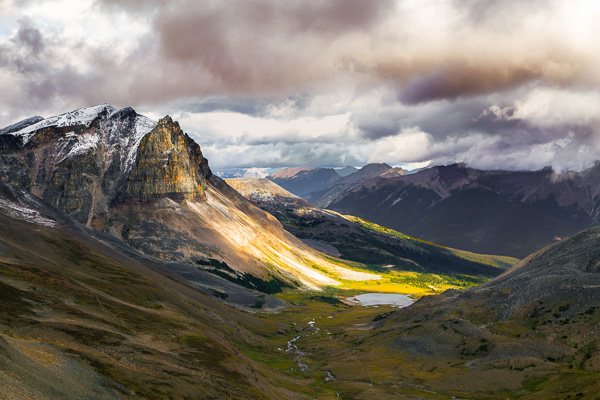
Golden Hour in Pyramid Mountain  Jasper National Park  Alberta  Canada

Generally, in photography, practice leads to improvement. However, practicing landscape photography is a bit trickier since you don’t have control over the light setup, the weather, or the subject. Sometimes, you might plan a trip for three months; you research the best spots, and you bring all your equipment. Then, when it’s show time, you walk outside to face a cloudy, rainy day, if not a snowy mess. All that can be very frustrating. Over the years I’ve learned a few tricks to deal with that. In this article, I will share three simple tips to help improve your images and take better landscape photos, regardless of the weather.

1. Using clouds to avoid harsh light

Let’s start by talking about one of the most important topics in photography, light. Usually, landscape photographers revolve their schedule around the Golden Hour, meaning the early morning or late afternoon. Photographers choose those portions of the day to take full advantage of the magical, warm, rich, natural light available. Yet sometimes, you cannot reach the planned location by car, making a strenuous hike of 10 miles the only available option to get to the desired place. Hiking is great, and if you love landscape photography you probably love the close contact with nature, but sometimes this passion doesn’t translate into mountain exploration at 3:30 a.m. Occasionally, you will find yourself starting your day hike around 6:00 a.m. to reach the desired area around 10:00 a.m., meaning that you will have to work with hard sunlight.

Portrait photographers have an easy fix for that problem, move the model to the shade. I’ve tried using the same approach in landscape; but I’ve never had any luck trying to move mountains and lakes around. Another approach that portrait photographers use to avoid hard light is using light modifiers such as diffusers and softboxes. Unfortunately I don’t believe you can buy one of those big enough to use on a mountain. What you can certainly do is use the clouds as a light diffuser, thus avoiding the harsh sunlight from midday. Depending on how you capture your image, clouds can also help improve your composition by adding depth or a sense of movement. After I grasped this concept my mindset shifted, now I’m always hoping for the perfect cloudy day.

Bald Hills  Maligne Lake  Jasper National Park  Alberta  Canada

2. It’s all about the drama

If this tip wasn’t enough to make you enjoy a cloudy day, let me tell you about a second trick that involves clouds when capturing landscape images. We all like to go online to wonder around photo sharing communities, looking for inspiration, a different point of view or even a new technique. I’m no different. I like to believe that I’m very active in some of those social media channels, however, when I look through pictures, I avoid focusing on landscapes. I like to explore portraits, Black and White, macro, pretty much anything but landscape. I can imagine you asking yourself, “Why would a landscape photographer do that?”. The answer is quite simple; I like to borrow successful techniques used in other fields. Sometimes, when I’m trying to capture an image of a mountain, I don’t face it as a landscape. I try, for example, to approach that image as a portrait. Once you learn how to repurpose techniques from one type of photography to another you will notice an improvement in your art.

In most types of photography, the most striking photos are those with strong contrast; images that harmonize shadows and highlights seamlessly. One side effect of the current advances in digital photography, sensors, and the digital darkroom, is that a lot of landscape artists try to capture everything in one single image. Some will use HDR to bring up the shadows, others will use masking and blending to create a final image. I was no different.

Lately, inspired by the work of great masters such Ansel Adams and Henri Cartier-Bresson, I’m trying to play with the shadow to highlight ratio in my images. Portrait photographers are very good at using artificial light (strobes or speedlights) to create dramatic images. In landscape it might be a bit more difficult to position the sun at a different angle. Still you can use clouds as a light filter, concealing light from distracting spots while revealing patches of bright sunlight that will accentuate your main subject. Once you start to play with this idea you will be able to create very dramatic images during those dreadful cloudy days.

Tekarra Mountain  Skyline Trail  Jasper National Park  Alberta  Canada

3. The path of balance

Finally, keeping up with the idea of creating a dramatic image, photographers must be able to understand an important concept called balance. Not only the shadow and highlights balance, but also color balance, subject positioning, overall image balance and so forth. I remember some of the first photos I took, very often I liked the concept behind the photo, but the final image just didn’t convey what I had envisioned. That was when I discovered the concept of balance.

This concept is very basic, yet extremely powerful. A well-balanced image will stand out on its own and will captivate your audience. Balance, simply put, is how you distribute the elements, colors, and brightness in the frame. There are countless ways to achieve balance, so many that we would probably need another entire article just to talk about it. As a general rule though, a well-balanced picture aims to distribute the elements evenly throughout the image. So next time you are out capturing an image, try noticing how you arrange the elements in the frame. Check if the amount and position of the shadow and highlight are reflecting what you want to show in your photograph. Finally, before you press the shutter, ask yourself if all the elements in the frame are contributing to the overall image. Sometimes, you can get overwhelmed by the landscape, and in an attempt to capture all the beauty you end up with a busy, unbalanced, and unappealing image.

Silence  Banff National Park  Alberta  Canada

I will leave you here, but next time you’re out there during a cloudy day, instead of complaining about it, just try your luck. You might be surprised by what you can achieve when you open your mind to work with whatever mother nature throws at you.

Mountain tops  Banff National Park  Alberta  Canada

Do you have any other cloudy day or landscape tips? Please share in the comments below.

The post 3 Tips to Take Better Landscape Photos Regardless of the Weather by Diego Lapetina appeared first on Digital Photography School.


Digital Photography School

 
Comments Off on 3 Tips to Take Better Landscape Photos Regardless of the Weather

Posted in Photography


The Controversy Around Flickr Selling Creative Commons Licensed Photos

25 Nov

Douglas MacMillan has an article out in the Wall Street Journal today about the controversy surrounding Flickr selling prints of Creative Commons photos and not paying contributors for these images. It should be stressed that Flickr is only doing this on Creative Commons licensed photos where free commercial use is permitted by the license. If you license your photos Creative Commons Non-Commercial, this does not include you.

In the article he quotes Flickr founder Stewart Butterfield: “Yahoo’s plan to sell the images appears “a little shortsighted,” said Flickr co-founder Stewart Butterfield, who left the company in 2008. “It’s hard to imagine the revenue from selling the prints will cover the cost of lost goodwill.”

In addition to the Creative Commons photos that Flickr is selling and not paying photographers for use (legally), they are also handpicking other photos for this sales effort and here they are offering photographers 51% of the revenue on sales of these images who have agreed to participate.

My two cents:

I think it’s important that each photographer fully understand how the license that they are using with their photos online works. It is first and foremost the photographer’s responsibility to understand licensing. Creative Commons is a wonderful and liberal way to share your photos. It’s not for everyone though. You choose how your photos are licensed on Flickr though. By default Flickr licenses images “all rights reserved,” the most restrictive license available. So only photographers who have gone in and changed their license to a more liberal license would be affected by this.

I license my images Creative Commons Non-Commercial. This is one of several variations of the Creative Commons license. This means that people can use my images for personal use or non-profit organizations can use them, but folks like Yahoo/Flickr and others can’t sell them commercially without my permission.

If you are going to license your photos Creative Commons with no restriction, then you ought to be prepared for this type of use. If it’s not Flickr selling them, anyone else can, legally. If you are uncomfortable with this idea, then you should not use Creative Commons without any sort of restriction. If you like the idea of Creative Commons but are uncomfortable with commercial use without being compensated, then consider changing your license to Creative Commons Non-Commercial like I license mine.

I think a lot of people though don’t consider the full implications of the license that they choose and like Stewart I wonder if the revenue is worth potential lost goodwill in this case. Some people will inevitably be put off when they see that the community (and Flickr is as much a community as a company) that is hosting their photos for them is now selling them without sharing the profit or asking for permission. Reminding people to read the fine print of their photo license that they chose without really considering it thoughtfully might not be the best answer to that complaint. People on Flickr LOVE to complain about anything and everything.

I think Flickr does have to figure out how to pay for a free terabyte of storage for every user and maybe this is one way to do that.

I haven’t been asked to participate in the online print marketplace, but if I was and was offered a 51% payout, I’d probably say yes. Anything 50% or better feels pretty fair to me. I create the image, but Flickr is driving the traffic to it for sale and handling fulfillment, etc. If I were to have a physical gallery sell my works, I’d probably be looking for a similar cut.

The idea of selling Creative Commons images and getting to keep all of the money is interesting to Yahoo I’m sure, but maybe Flickr would be better off instead focusing on more of a total revenue share model for the entire effort and treating CC images like they treat CCNC and all rights reserved images. I bet people who license their work CC would be pleased if their images too were handpicked for inclusion and they got paid for use. Even if it were a small amount, it would be a positive affirmation to them about their photography and that would feel good.


Thomas Hawk Digital Connection

 
Comments Off on The Controversy Around Flickr Selling Creative Commons Licensed Photos

Posted in Photography


34 Vertigo Inducing Bird’s Eye View Photos

21 Nov

Last week I rounded up a bunch of worm’s eye view images so this week we’re going the other way and taking the high road with bird’s eye view photos. Angle of view and perspective use is a great way to make more interesting images. As you might suspect bird’s eye view photos are taken from above, look down on the subject. That could mean standing on a chair, climbing a ladder, shooting from a rooftop or even a mountain top.

Enjoy these bird’s eye view photos and allow them to inspire you:

Photograph Conical Lifestyle by Drew Hopper on 500px

Conical Lifestyle by Drew Hopper on 500px

Photograph Socializing by Edwin Leung on 500px

Socializing by Edwin Leung on 500px

Photograph Birds eye view by Ann Weis on 500px

Birds eye view by Ann Weis on 500px

Photograph bird eye view by Anake Seenadee on 500px

bird eye view by Anake Seenadee on 500px

Photograph My Little Photography Buddy by Danny  on 500px

My Little Photography Buddy by Danny on 500px

Photograph Oxbow River by Graham Taylor on 500px

Oxbow River by Graham Taylor on 500px

Photograph Birds Eye View by Paul Byrne on 500px

Birds Eye View by Paul Byrne on 500px

Photograph Abstract night view by 24NOVEMBERS  on 500px

Abstract night view by 24NOVEMBERS on 500px

Photograph Golden Gate Bridge, Birds Eye View by Raj Patel on 500px

Golden Gate Bridge, Birds Eye View by Raj Patel on 500px

Photograph Zebra - Birds Eye View by George Wheelhouse on 500px

Zebra – Birds Eye View by George Wheelhouse on 500px

Photograph Hunting Island Lighthouse by Spiro Mandylor on 500px

Hunting Island Lighthouse by Spiro Mandylor on 500px

Photograph Untitled by Glenn Greathouse on 500px

Untitled by Glenn Greathouse on 500px

Photograph Pull up a chair at the table of life by Stuart Duffy on 500px

Pull up a chair at the table of life by Stuart Duffy on 500px

Photograph Birds Eye View. by Volodymyr Zinchenko on 500px

Birds Eye View. by Volodymyr Zinchenko on 500px

Photograph Birds Eye View by James  Cray on 500px

Birds Eye View by James Cray on 500px

Photograph Daffodog by Sam Spilsbury on 500px

Daffodog by Sam Spilsbury on 500px

Photograph Brett 1 by Stephen Caissie on 500px

Brett 1 by Stephen Caissie on 500px

Photograph Musician by Lene Vold on 500px

Musician by Lene Vold on 500px

Photograph Oh What Fun it is to be Young by Gil Folk on 500px

Oh What Fun it is to be Young by Gil Folk on 500px

Photograph Look Above by Jerry Low on 500px

Look Above by Jerry Low on 500px

Photograph Se acabó la cerveza / We ran out of beer by Cristina Hernandez on 500px

Se acabó la cerveza / We ran out of beer by Cristina Hernandez on 500px

Photograph Untitled by Erik Hecht on 500px

Untitled by Erik Hecht on 500px

Photograph Birds Eye View by pascal steffens on 500px

Birds Eye View by pascal steffens on 500px

Photograph Untitled by Luke Ekblad on 500px

Untitled by Luke Ekblad on 500px

Photograph Singapore 2014 by Edward Tian on 500px

Singapore 2014 by Edward Tian on 500px

Photograph above blue typewriter by Sean Gladwell on 500px

above blue typewriter by Sean Gladwell on 500px

Photograph From Above... by Jacques Szymanski on 500px

From Above… by Jacques Szymanski on 500px

Photograph Ice Hockey - Birds Eye View by Alex Wolf on 500px

Ice Hockey – Birds Eye View by Alex Wolf on 500px

Photograph Floor 999 by Yousef Farki on 500px

Floor 999 by Yousef Farki on 500px

Photograph Burj Khalifa: Looking Down on Dubai by Declan Keane on 500px

Burj Khalifa: Looking Down on Dubai by Declan Keane on 500px

Photograph Perspective  by Abdullah Rhwanjy on 500px

Perspective by Abdullah Rhwanjy on 500px

Photograph steel staircase by Sean Gladwell on 500px

steel staircase by Sean Gladwell on 500px

Photograph Beneath by Ian Smith on 500px

Beneath by Ian Smith on 500px

Photograph A View from above by Sebastian Patron on 500px

A View from above by Sebastian Patron on 500px

The post 34 Vertigo Inducing Bird’s Eye View Photos by Darlene Hildebrandt appeared first on Digital Photography School.


Digital Photography School

 
Comments Off on 34 Vertigo Inducing Bird’s Eye View Photos

Posted in Photography


Deserted Space: Photos Document NASA’s Abandoned Launch Pads

20 Nov

[ By WebUrbanist in Abandoned Places & Architecture. ]

abandoned space graveyard photos

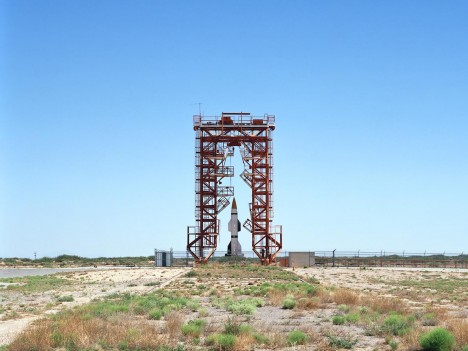
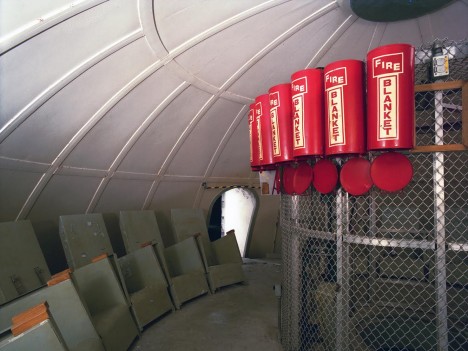
The race for space has shifted gears in recent years with the rise of private programs, leaving a series of amazing space-related graveyards around the United States, which this photographer has spent 25 years exploring and documenting.

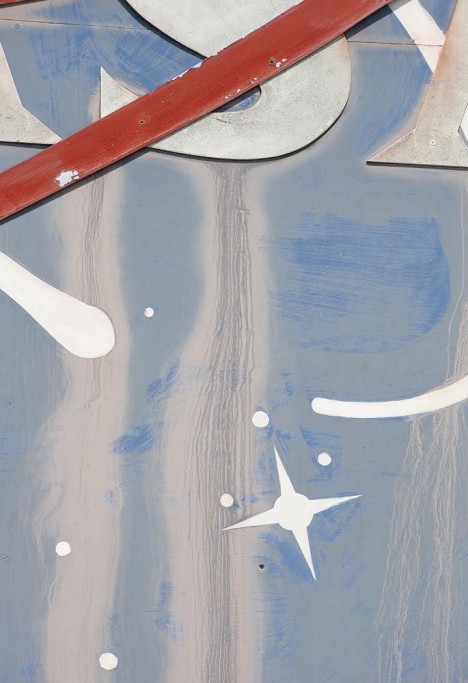
abandoned nasa building sign

abandoned rocket room

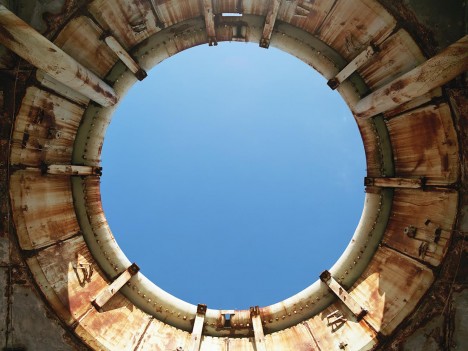
abandoned flight ring rocket

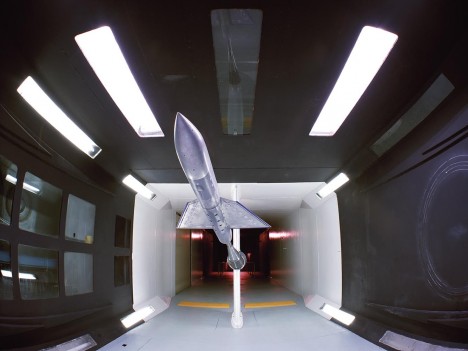
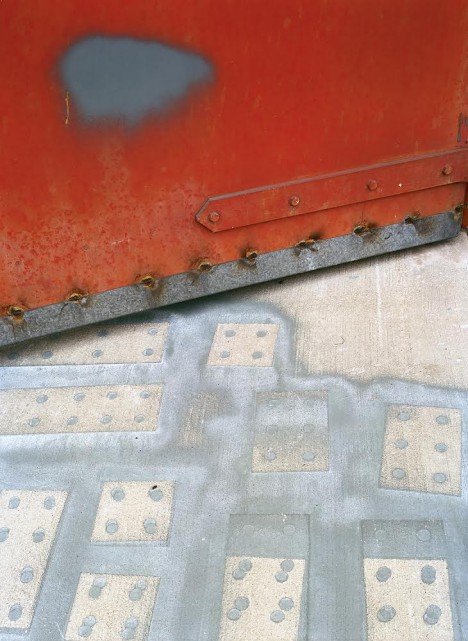
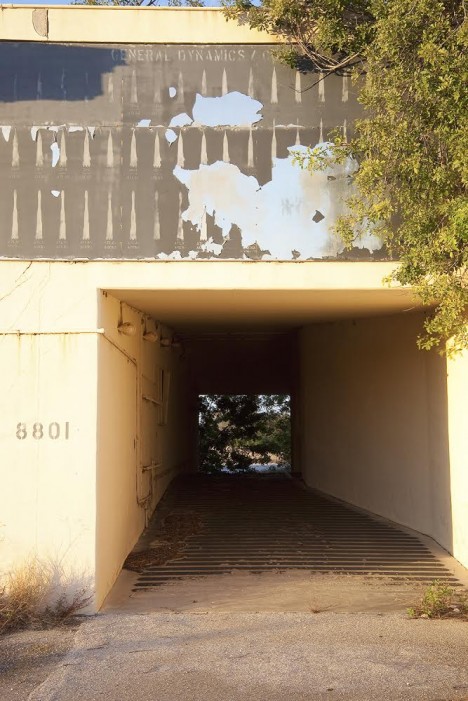
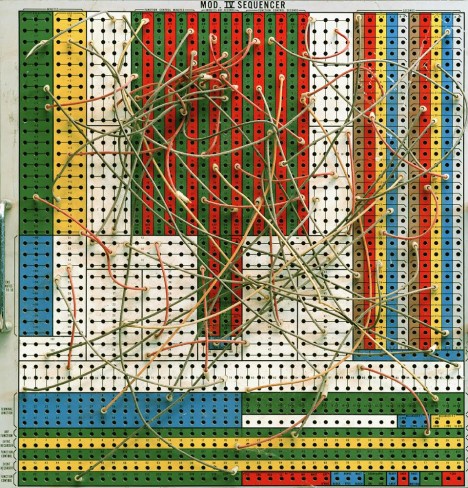
In his upcoming book, Abandoned in Place, Roland Miller takes readers on a “photographic exploration of the American space launch and research facilities that played a crucial role in the early period of space exploration. The goals of this project are to preserve and portray these abandoned, deactivated, and repurposed sites through photography that surpasses the official government approach to documentation and to lend historical and artistic insight to the subject.”

abandoned secret nasa complex

abandoned space program complexes

abandoned space program facilities

With special permission (and an escort every time), Roland has managed to visit locations including the Marshall Space Flight Center in California, the Stennis Space Center in Mississippi and the Kennedy Space Center as well as Cape Canaveral in Florida. His book features 100 full-color photos – the best and brightest of his extension decade-spanning collection.

abandoned nasa deserted spaces

abandoned nasa crane gantry

The photographs cover all kinds of incredible objects and details, from cranes and gantries to blast doors, flame deflector tracks, launch rings and even lunar modules. The book will be released by the University of New Mexico Press and contain poems and essays alongside its rich imagery.

abandoned control panel switchboard

Superstructure,Navaho Complex 9, Cape Canaveral Air Force Station, Florida1990

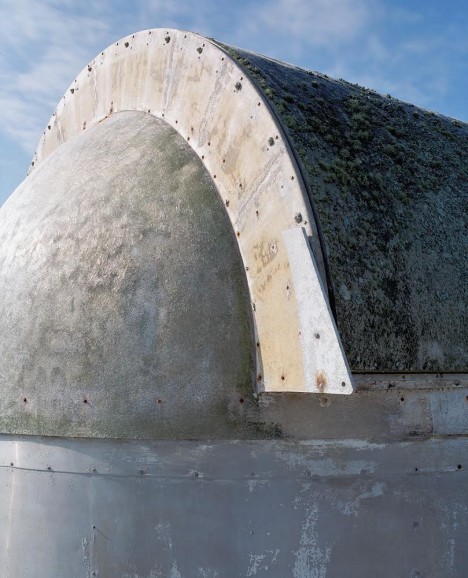
abandoned observatory dome exterior

This project is part guide book and part historical document – it “serves not only as a documentary body of work, but also as an artistic interpretation of these historic sites. The blockhouses, launch towers, tunnels, test stands, and control rooms featured in Abandoned In Place are rapidly giving way to the elements and demolition. By my estimates, fully half of the facilities I have photographed no longer exist. The costs involved in restoring, maintaining, and securing these sites are enormous. Most of these historic facilities are located on secure military or NASA facilities, which drastically limits access by the public. Therefore, photography is the only practical method to preserve and portray these historic locations.”

Share on Facebook


[ By WebUrbanist in Abandoned Places & Architecture. ]

[ WebUrbanist | Archives | Galleries | Privacy | TOS ]


WebUrbanist

 
Comments Off on Deserted Space: Photos Document NASA’s Abandoned Launch Pads

Posted in Creativity


Top 10 Mistakes that Cause Blurry Photos

10 Nov

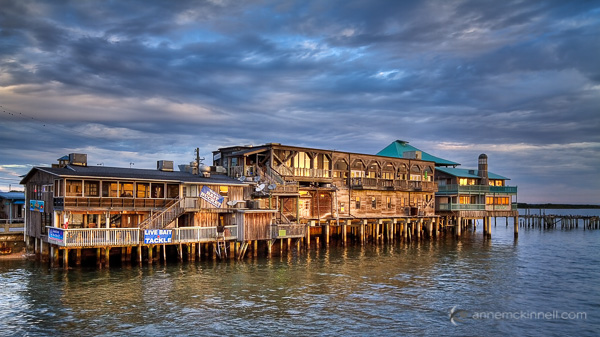
Cedar Key

If your photos are not sharp, you are not alone! The most common question I get asked by beginning photographers is “how do you get your images so sharp?”

Blurry photos is very common issue with a whole plethora of possible culprits, making it very difficult to pinpoint exactly what the problem is. But if you go through this list of the top 10 mistakes that cause blurry photos, you will probably find the answer that works for you.

1. Your shutter speed is too slow

This is the #1 culprit of blurry photos. You might think you can hold perfectly still for half a second, but I assure you there are very few people in the world who can. When hand-holding your camera, remember this rule of thumb to avoid blur caused by camera shake – your shutter speed should be the reciprocal of your lens’ focal length – that is, if you’re using a 60mm lens, your exposure should be 1/60th of a second or faster. With a 200mm lens, use at least 1/200th of a second, and so on. Camera shake is magnified the longer your telephoto length, so wider angle lenses will suffer its effects much less.

Using a 400mm lens, I selected a shutter speed of 1/400th of a second to reduce the possibility of camera shake.

Using a 400mm lens, I selected a shutter speed of 1/400th of a second to reduce the possibility of camera shake.

Some lenses and cameras have image stabilization technology built into them – particularly with longer focal lengths. Image stabilization usually allows you to slow your minimum shutter speed by around three stops, meaning that a 60mm lens can now handle shutter speeds as low as 1/8th of a second without camera shake.

What is YOUR minimum shutter speed?

In addition to this rule of thumb, it’s important to know your own personal minimum shutter speed. We all shake a little, some more than others, so it’s good to know at what point camera shake becomes an issue for you. Try an exercise to find out: put your camera in shutter priority mode and make the same photo at 1/500th of a second and keep going slower and slower. Back at your computer, look at your images and see when you start to notice the blur. Personally, I don’t usually go below 1/125th of a second if I’m hand-holding my camera.

2. Not using a tripod

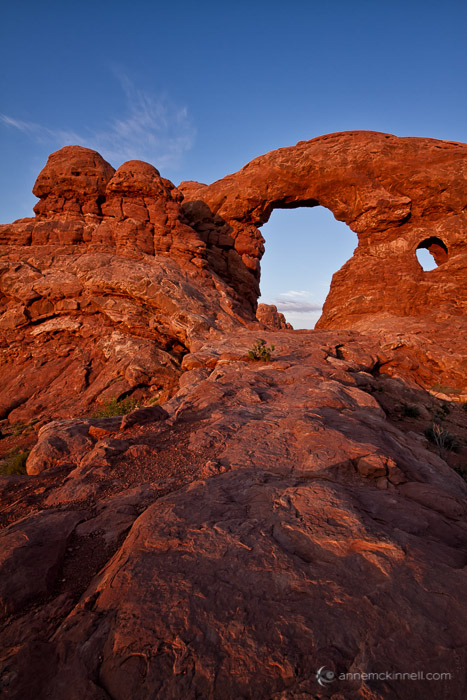
Sunset Arches

If you’re experiencing camera shake and you can’t use a faster shutter speed (due to low light conditions) or you don’t want to use a fast shutter speed (because you’re purposefully trying to blur something in the frame) then you need to steady your camera another way such as using a tripod or monopod.

When you use a tripod, image stabilization is not necessary and may even be counter productive, so it’s a good idea to get in the habit of turning it off when you put your camera on a tripod and turning it back on when you take it off.

3. Bad camera holding technique

For the best stability, practice the official photographer position: stand with your feet slightly apart, one staggered forward, and firmly planted to stabilize your body right-to-left and back-to-front. Support the camera with your left hand by holding the lens from underneath, and use your right hand to grab the grip and gently press the shutter button. Tuck your elbows tight to your chest and use the viewfinder rather than the live view screen, as holding the camera to your face will also help hold it steady. Some photographers even go so far as to listen to their breathing and heartbeat, taking care to fire the shot in between breaths and beats for maximum stability.

Proper technique when hand-holding your camera.

Proper technique when hand-holding your camera.

4. Your aperture is too wide

The size of the aperture also has a direct effect on the sharpness of your photo in that it determines depth of field, which is how much of the image is in focus from front to back.

When a lens finds focus, it locks in on a specific distance known as the plane of focus. If your focus is at, say, 15 feet, everything 15 feet away from the camera will have maximum sharpness, and anything in front of or behind it will start to fall into blur. The amount of this effect depends on the aperture.

If you use a wide aperture, like f/2.8, the depth of field is very shallow. This effect is emphasized with longer focal length lenses. So if you are using a telephoto lens and the aperture is f/2.8, there may be only a razor thin sliver of the image that is in sharp focus. If you use a small aperture, like f/11 or f/18, the depth of field is larger so more of the image will be sharp.

Choosing the right aperture depends on the type of image you want to create. But if you are trying to get everything in the frame as sharp as possible, try using a small aperture (a larger f-number such as f/11 or f/22). However, by using a small aperture you will need to use a slower shutter speed to compensate for the loss of light. See problem #1.

5. Not using autofocus

How good is your eyesight? Not great? Wearing glasses? You should probably be using autofocus. These days cameras are sophisticated – let them do what they are good at. Another thing to keep in mind is that your viewfinder should have a diopter on it. It’s a little wheel next to your viewfinder that allows you to adjust how clearly things appear when you look through it. It is particularly useful for people who should be wearing glasses but are not.

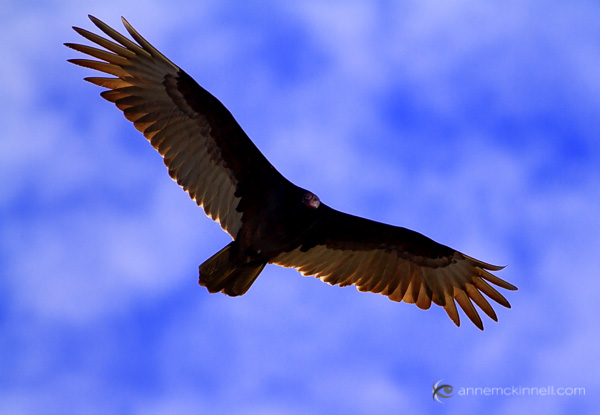
Black Vulture in Flight

6. Not focusing in the correct place

Even if you have a sharp, clear prime lens on a bright day, using a small aperture and a fast shutter speed with a low ISO, it doesn’t count for much unless you can get the camera to focus on the right spot. This is even more crucial when using a wide aperture, which can create a razor thin depth of field. A slight miscalculation in the focus can throw the subject completely out of the focal plane, or give you a portrait with a perfectly sharp earlobe and blurry eyes.

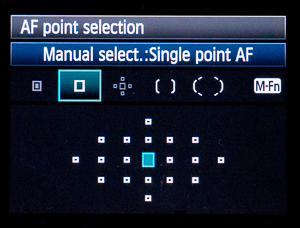
Often photographers leave their cameras set on auto-area AF mode, which tells the camera to use its best judgment to decide what part of the picture should be in focus. Most of the time modern cameras are pretty good at this, particularly if the subject is prominent in the frame. However, with more complex compositions the camera can get confused and try to focus on the wrong thing. To specify the focal point yourself, switch to single-point AF area mode.

f-spotWhen you look through your viewfinder, you should see an array of little dots or squares laid over the display. These are your focus points, and they show you where in the frame the camera is capable of finding focus. In single-point AF area mode, you can use the camera’s direction pad to select one of these dots, and the camera will always focus on that point and that point alone.

To tell the camera to focus, you would normally depress the shutter button halfway before pressing it the rest of the way to take the shot. This works pretty well, but can be sensitive – if you press too lightly, it may come unpressed and try to re-focus after you’ve already found your spot. If you press too hard, you might make the exposure before the focus is ready. If you take multiple pictures in succession, it will try to focus again before each shot. For these reasons, some photographers swear by the back focus button instead.

This is a button on the back of your camera, probably near your thumb. It might be labeled “AF-On” or simply “Fn”, and it might be set up by default or you might have to activate it in your camera’s menu settings, but it can be assigned to take over the autofocus function. When you press it, the camera focuses and won’t focus again until you press the button again. This way, you can re-compose and take shot after shot, and the camera won’t lose your focus every time you hit the shutter button.

7. Using the incorrect focus mode

There are three main autofocus modes that every camera should have. The first is single-shot focus, usually called AF-S or One-shot AF; it is meant to be used with still subjects. The second, continuous autofocus (AF-C or AI Servo) is specially designed to track movement through the frame, so is best to use when your subject is in motion. The third is an automatic mode, AF-A or AI Focus AF, and likely the default setting on your camera. It reads the scene and determines which of the first two modes it should use.

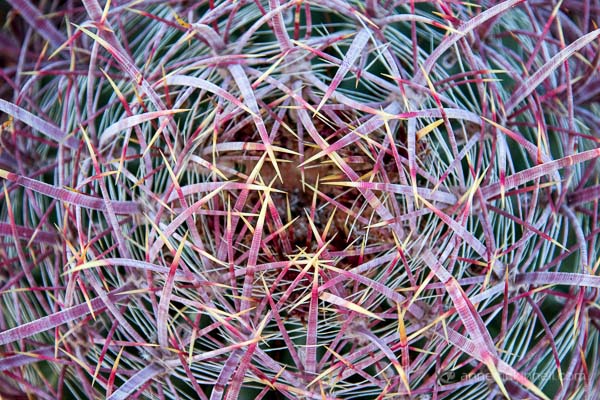
Cactus Flower

8. Not using manual focus

While I’m a big advocate of autofocus, there is one particular time when manual focus comes in very handy. When your camera is on a tripod and you are using a wide aperture to achieve a very shallow depth of field, and you want to make sure the most important thing in your frame is sharp, switch to manual focus and then use the LCD zoom function to magnify the display by 5x or 10x allowing you to make tiny adjustments to the focus to get it just right.

9. Junk on or in front of your lens

If you have a big smear on your lens, that is going to affect the clarity of your image. By the same token, if you put a cheap plastic filter in front of your lens, that is going to degrade image quality as well. If you always use a UV filter, you might want to try taking a few shots without it to see if the quality of your UV filter is negatively affecting your images.

Using an aperture of f/20, everything is sharp from foreground to background.

Using an aperture of f/20, everything is sharp from foreground to background.

10. Poor lens quality

This item is last on the list for good reason; it is the most common thing for beginners to blame their blurry images on, but it is rarely the real reason. Still, lens quality does make a difference.

Lens quality is determined by the materials and construction inside the lens itself, which is usually made up of several pieces of glass precisely aligned in order to focus, zoom, and correct for optical aberrations.

Some lenses are simply sharper than others or are better in different ways. Some lenses may be sharp in the center, but get blurry around the corners and edges of the image. Some are clear at certain apertures but slightly fuzzy at others. Some lenses cause colour fringing around points of contrast. Every lens has a unique character that may or may not be useful to the type of work you’re doing. It’s also worth noting that each lens has a “sweet spot” – a certain aperture at which it performs its best. This is usually in the middle of its aperture range, around f/8 or f/11.

For the sharpest image quality, fixed focal length lenses usually take the cake. It’s not always convenient to carry around two or three lenses rather than a single all-purpose zoom, but their simple construction makes even the cheapest prime lens crystal clear.

The post Top 10 Mistakes that Cause Blurry Photos by Anne McKinnell appeared first on Digital Photography School.


Digital Photography School

 
Comments Off on Top 10 Mistakes that Cause Blurry Photos

Posted in Photography


DIY Pop-Up Photos

07 Nov
Extra photos for bloggers: 1, 2, 3

Flat pack, flat hair, flat soda. Flat out yuck.

Nothing good ever comes with just one level so it’s time for your photos to aim higher.

Step up and give your photos depth with a quick stack, a fold and a pop.

Pop-up photos make sweet keepsake gifts and will make any desk/wall/shelf look great.

Feel that? Another dimension awaits! (oohhh-oohhhh-hhoooh)

Learn How To Make Your Own Pop-Up Photos

(…)
Read the rest of DIY Pop-Up Photos (301 words)


© Erika for Photojojo, 2014. |
Permalink |
No comment |
Add to
del.icio.us

Post tags:


Photojojo

 
Comments Off on DIY Pop-Up Photos

Posted in Equipment


Amazon launches Prime Photos with unlimited storage for Prime members

05 Nov

Amazon has launched a new photo storage service called Prime Photos, and is offering Prime subscribers unlimited cloud storage for their images at no extra cost. Photos can be uploaded to Amazon’s Cloud Drive with iOS or Android apps or the Cloud Drive website. Read more

Articles: Digital Photography Review (dpreview.com)

 
Comments Off on Amazon launches Prime Photos with unlimited storage for Prime members

Posted in Uncategorized


4 Tips for Taking Better Holiday Photos

02 Nov

With the holiday season just around the corner, many of us will be toting our cameras to festivals, parties, and family gatherings to preserve our precious memories for years to come. Unfortunately, you might look back at some of your pictures and wonder why they were blurry, out of focus, or just not all that interesting. Whether you have a smartphone or DSLR, here are a few simple techniques you can use to make your photos not only stand out, but help you learn a bit more about photography along the way.

4 tips for taking better holiday photos

ChildChristmasTree

#1 Get down to eye level with the kids

While you might be tempted to pass the time visiting with adults and catching up with friends at holiday gatherings, some of the best photos years down the road often end up being the ones of kids. It’s fun to see them grow and change over time, and when browsing photo collections people will often linger on photos of children for all the memories they bring back. When you have your camera out, though, remember to get on eye level with the little ones! It can feel a bit strange to squat down or sit on the floor to get a good shot of your three-year-old niece while all the adults are visiting in the other room, but the results will be well worth it. It’s tempting to shoot down at kids from your eye level, but this often results in unflattering pictures that seem cold and distant. Putting yourself physically at the same level as the kids offers a much more interesting view of their world, and makes for photos that are far more personal and memorable.

ThanksgivingFriends

My friend and her daughter before a Thanksgiving feast. I had to crouch down to get on eye level with the girl, but the results make for a much more interesting picture.

#2 Adjust the ISO instead of using the flash

If you leave your camera on Automatic mode, you might notice the flash constantly going off which can result in washed-out colors and unnatural shadows across people’s faces. But if you try to disable the flash, your photos will often come out blurry or out of focus. To fix this, you can set your camera to Program mode instead of Auto, which will allow you to have more direct control over the ISO setting and get better shots in low-light conditions (like indoor holiday parties) without using the flash.

ChristmasEveService

Using a flash would ruin this photo of a candle-lit Christmas Eve service. I got this shot by bumping the ISO up to 3200.

The higher you set your ISO, the less light your camera needs in order to take a photo. This is nice if you want to avoid blinding people with your flash, but the trade-off is that your pictures might look noisy or grainy. Fortunately, most modern cameras do a fine job even at ISO settings as high as 3200 or even 6400 – particularly if you just want to share the photos online or print at smaller sizes like 4×6.

Make sure to practice beforehand so you are comfortable not only setting the ISO, but knowing the limits of what your camera can do. But if used carefully, adjusting the ISO instead of using the flash can result in much better holiday photos with the added bonus of not blinding your guests or having to deal with red-eye corrections later on.

ThanksgivingDinner

If you really want to use your camera to its full potential, ditch Auto or Program mode entirely and try shooting in aperture priority (A or Av) mode where you choose the lens aperture and ISO while your camera calculates the best shutter speed. Or you could try shutter priority (S or Tv) mode, where you choose the shutter speed (1/60 to 1/90 second are good starting points when shooting indoors, such as holiday gatherings) and ISO, and your camera figures out the best aperture. I would recommend getting lots of practice with these modes and making sure you know how to adjust your settings accordingly before the holidays, though. You don’t want to try something new for the first time when everyone is opening presents and have a bunch of dark or out of focus photos as a result!

Finally, it’s worth noting that many modern digital cameras have user-programmable Auto ISO settings. You can use this to tell your camera to select the best ISO when using the semi-automatic (A/Av, S/Tv, or P) modes but stay within a few parameters that you define. For instance, if you know that your camera gets too noisy above ISO 3200, you can set that to be the maximum allowable ISO but let your camera do the rest. Or you can also set a minimum shutter speed before the Auto ISO kicks in.  If you don’t want to shoot anything slower than, say, 1/30 of a second, your camera will do everything in its power to maintain proper exposure by adjusting the ISO in order to stay above that shutter speed.  This can be quite handy at holiday gatherings when you don’t want to spend all night fiddling with your camera’s menus and settings but also want to make sure you get the best shots possible without the pop-up flash constantly blinding your guests.

#3 Shoot moments, not poses

It might be tempting to run around with your camera at holiday parties barking out orders like “Smile,” “Look here!” and “Say Cheese!” But a better option is to be a little more discreet and attempt to shoot moments instead of poses. Capturing the essence of what people are doing – talking, laughing, opening presents, sharing a drink – often makes for much more interesting photos as well as better memories in years to come. There is certainly nothing wrong with posed photos or having people look at you and smile while you take their picture, but these often lack context aside from the clothes people have on. What else was happening? Who else was present? What sort of activities were people doing? By taking a documentary-style approach and shooting pictures of people just being themselves (particularly if you turn the distracting flash off and adjust the ISO instead) you will capture memories that will strike a chord years down the road.

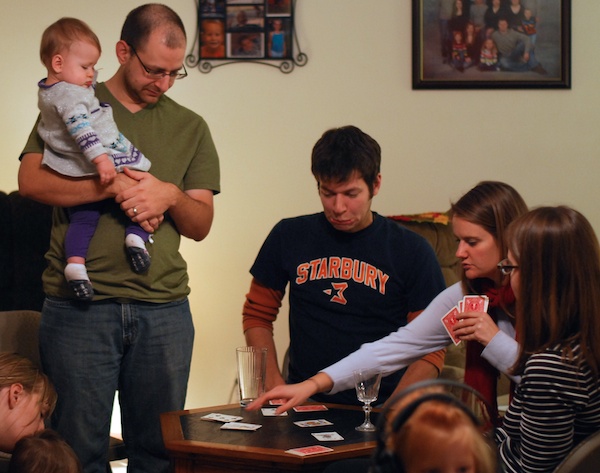
ThanksgivingCardGame

This picture of a game of cards over the holidays carries a great deal more meaning to me than if I had told everyone to look at the camera and smile.

#4 Know when to put your camera down

This might sound counter-intuitive for an article about how to get better holiday photos, but as the saying goes, there is a time for everything under the sun. This includes a time to shoot pictures and a time to just be with friends and family. Rather than 100 photos of your family opening presents, just take a handful and use the rest of your time to simply be with your loved ones and enjoy your time together. Try to be intentional when taking fewer photos, and the result will be more keepers that you want to look at years down the road instead of dozens and dozens of images of the same scene.

ChristmasPresents

Rather than a boat load of present-opening photos, just a handful will likely suffice and the rest of your time can be used to visit, laugh, and share memories.

Bonus tip: Invest in a prime lens

If you are still shooting with the kit lens that came with your camera, now is a fantastic time to spend a little money on a prime lens and get used to it before the rush of the holiday season. While these lenses don’t zoom in and out, the trade-off is an ultra-wide aperture that lets in so much more light (especially compared to a kit lens) that you will rarely have to use the flash even at lower ISO values. You will get the added bonus of having a lens capable of smooth blurry backgrounds that can capture the beauty of even the most mundane subjects. The Nikon 35mm f/1.8 is a fantastic choice, as is the Canon 24mm f/2.8, but there are plenty of options to suit your needs depending on your camera and shooting style.

TreeOrnament

What other tips do you have for getting good pictures at this time of year? Leave any in the comments below, and maybe share a few of your favorite holiday memories too!

The post 4 Tips for Taking Better Holiday Photos by Simon Ringsmuth appeared first on Digital Photography School.


Digital Photography School

 
Comments Off on 4 Tips for Taking Better Holiday Photos

Posted in Photography