RSS
 

Posts Tagged ‘Photos’

5 Unposing Tips for Kids for More Natural Photos

12 Jun

Editor’s note: this week we will be featuring a series of articles on posing for portraits. Look for a new one each day. If you miss any make sure you subscribe to our newsletter and you’ll get a reminder of all our articles once a week.

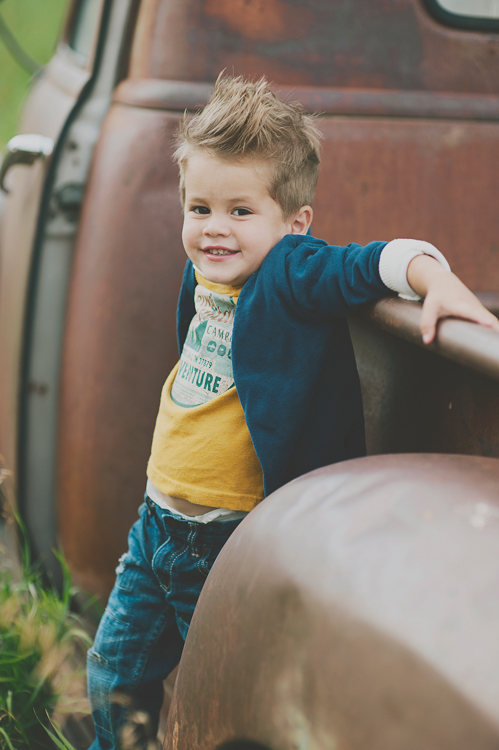
Posing kids is a whole different thing from posing models (unless you’re photographing a child model, and then you might not need this article). My biggest goal when capturing kids is to help them look as natural as possible, so truly I want to “unpose” them. Stiff, awkward, posed shots aren’t really what anyone wants, but I want to take this even a step further and talk about capturing kids’ true inner selves.
159

Have you ever had a kid in front of your camera, and whatever you tell them to do ends up looking like the most unnatural position ever? Chances are, the kid is as baffled as you are. He doesn’t know what you want from him. He hasn’t been studying pinterest boards and kid’s clothing catalogues. He just knows his mom dressed him up and told him not to get dirty or mess up his hair, and now some stranger is telling him to put his hand there, look over here, bend his elbow like this. Most kids don’t understand this.

Let me share some unposing tips with you for helping kids to be more nature, so you and your little model can get some great shots!

1. Kids don’t need much help to be adorable
135

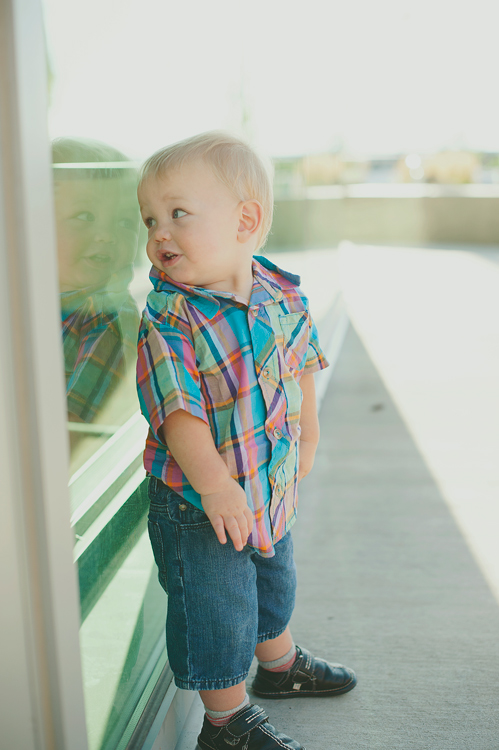
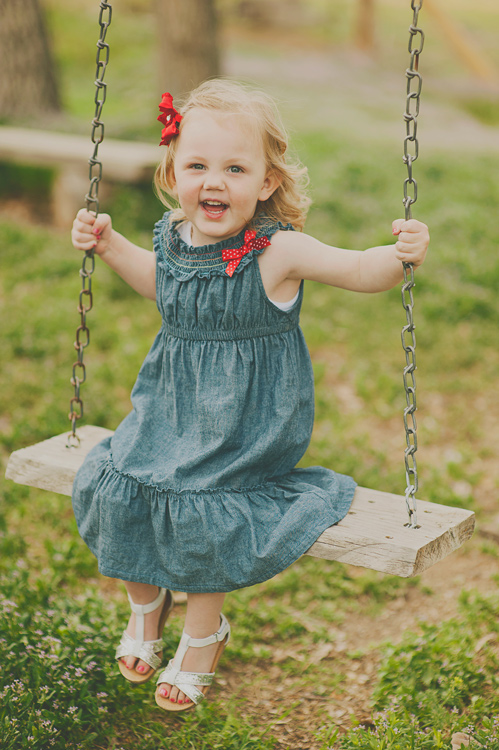
If you can just let a kid be themselves, and explore, sometimes the photos you get can be more adorable than anything you could think up yourself. Part of each session could be unstructured, no posing direction, kid-led, fun. Photos like the above could happen all on their own, or if the child is shy, you could ask them, “What’s in that window?” Make picture time into play time, and let kids be themselves.

Some props can be good, but sometimes they just add to the chaos, and you end up with a lot of canned, posed photos. I love kids’ cute faces, and that’s what I want to be the main focus of my photos. Don’t stress too much about making everything around the kid amazing. Like I said, kids don’t need much help to be adorable!

2. Let them be with a buddy
196

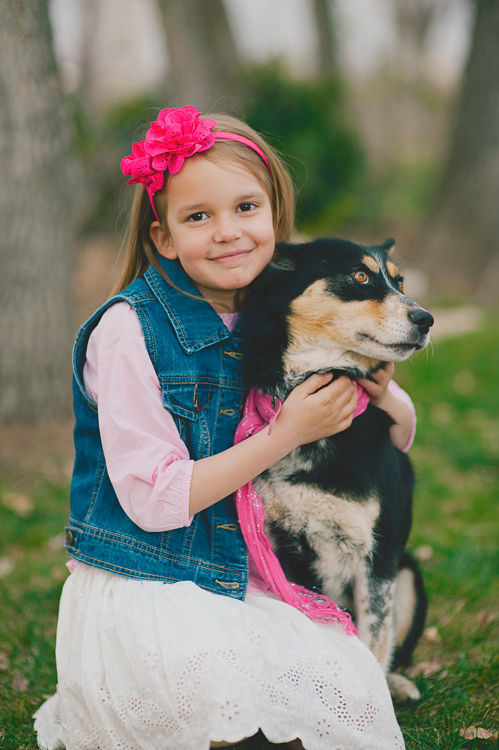
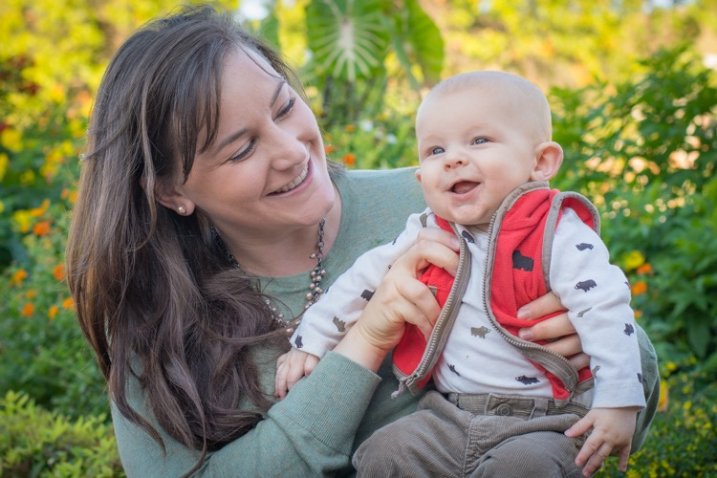
Sometimes kids are nervous and anxious about getting their photos taken. Letting them take a few photos with a beloved pet, favorite stuffed animal, or even Mom or Dad, can really help relieve the pressure, and help them feel comfortable.
186

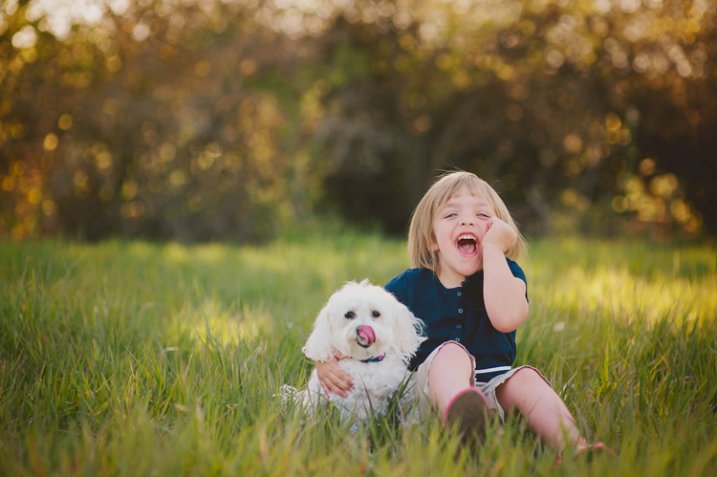
Sometimes the most spontaneous laughs, the happiest smiles, and the most relaxed poses, just happen when they’ve got their buddy with them in the photos. Adding a live wiggly friend can add extra work to getting a photo, but the payoff is often worth the work. Have Mom or Dad help you keep the pet under control, and be quick. Encourage a lot of interaction, and be ready for anything!

3. Work Quickly
161

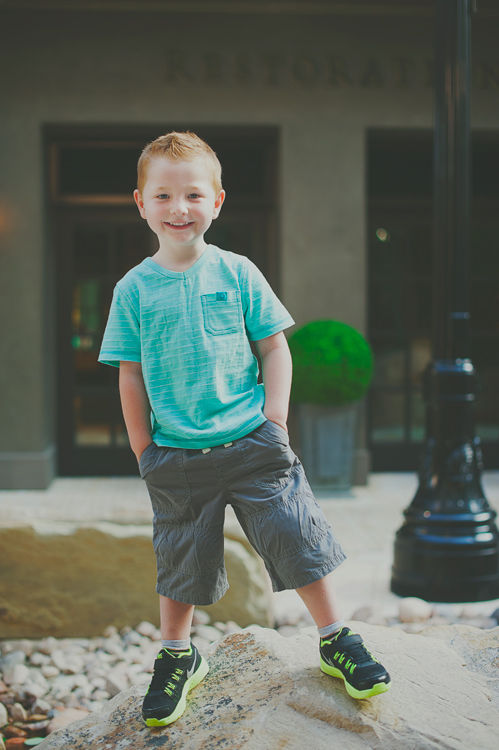
Kids aren’t going to be patient with a lot of posing cues and tweaks. You can give general direction, and then shoot fast. You could give some quick commands, “Now laugh at the silly caterpillar on my head!”, but don’t take a long time moving their arm just so, or turning their heads just so. Most kids won’t respond well to that, and will quickly tire before you get any good photos.

Have your camera on a fairly fast shutter speed (I like mine at least 1/100th for kids), because they’re not going to hold very still for very long.
Kandice3

4. Some direction is good

You don’t want to stand there, staring the kid down, waiting for them to spontaneously be in a spot with great light, doing something amazingly photogenic. You’ve got to give some direction, but try to do it in a way that makes the whole experience fun and relaxed. Here are some phrases that you could try:

  • Could you come sit on my swing over here? Oh, you are so big! I didn’t know you could climb that high!
  • Can you sit here, criss-cross-applesauce? (Or whatever they call sitting cross-legged. You can ask them what they call it. Most kids learn this in preschool).
  • Let’s hug our freezing cold knees. Your knees say, thank you very much!
  • Where’s your tickle smile? Do I need to find your tickle smile? Is it hiding in your armpit?
  • Do you think you would be brave enough to stand on this rock?
  • Whatever you do, don’t smile. No, I said don’t smile! (Classic reverse psychology).
  • Where should we put your hands? We should put them away somewhere. Do they like pockets?
  • Could you hold this tree up with your back? Oh, thank you! That tree was getting tired of standing up by itself!
  • Let’s play copy-cat. Whatever I do, you do it too.
199

5. Pay attention to personality

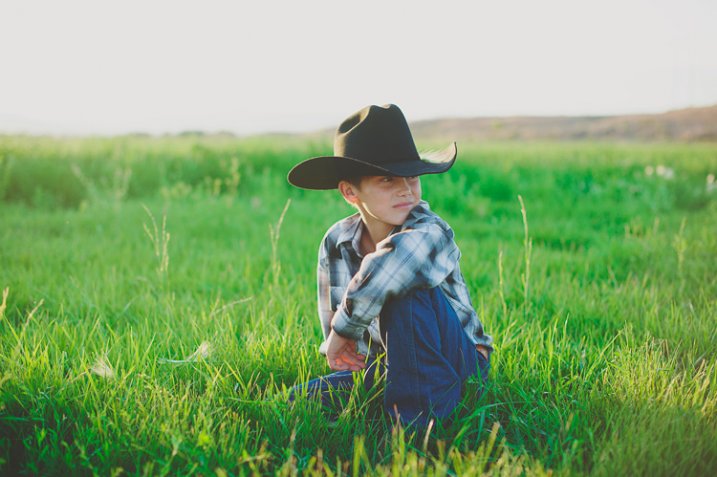
Some kids love silly, others are pretty shy. Pay attention to how they react to you, and adjust accordingly. If they’re really rambunctious, you might want to dial down your silly a bit so you don’t get them too wound up. You can still have fun with them, but talk in a calm voice, and don’t ask them to do too many crazy things, because they’ll take what you say and bring it up a notch or two. Before you know it, you’ve got a kid running in circles that isn’t listening to a word you say.

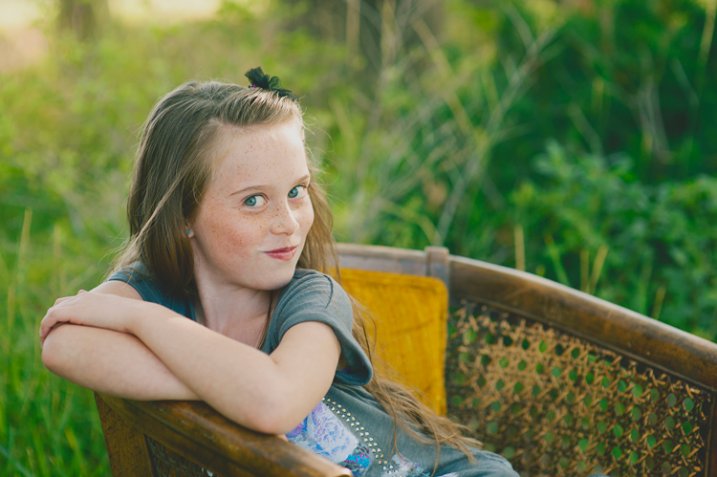
If they’re really introverted, you might want to try to capture more serious photos, and let them be contemplative. Don’t ask them to do things they are obviously uncomfortable with. When they’ve warmed up to you a bit, you may be able to give more requests, but really pay attention to the cues kids are giving you, and focus on capturing who they are, not the canned five poses that you do with every kid.
AB07

I would love to hear your tips for getting great unposed shots of kids! What are the fun things that you say to coax a smile? How do you get their attention, and make photo time fun?

Check out Portrait Posing Tips- How to Help People to Relax and Take Better Photos for more in the posing series.

googletag.cmd.push(function() {
tablet_slots.push( googletag.defineSlot( “/1005424/_dPSv4_tab-all-article-bottom_(300×250)”, [300, 250], “pb-ad-78623” ).addService( googletag.pubads() ) ); } );

googletag.cmd.push(function() {
mobile_slots.push( googletag.defineSlot( “/1005424/_dPSv4_mob-all-article-bottom_(300×250)”, [300, 250], “pb-ad-78158” ).addService( googletag.pubads() ) ); } );

The post 5 Unposing Tips for Kids for More Natural Photos by Melinda Smith appeared first on Digital Photography School.

Digital Photography School

 
Comments Off on 5 Unposing Tips for Kids for More Natural Photos

Posted in Photography


Portrait Posing Tips- How to Help People to Relax and Take Better Photos

11 Jun

Editor’s note: this week we will be featuring a series of articles on posing for portraits. Look for a new one each day. If you miss any make sure you subscribe to our newsletter and you’ll get a reminder of all our articles once a week.

One of the trickiest parts of doing a portrait photo shoot has nothing to do with operating your camera, mastering your lenses, controlling the light, or even dealing with uncontrollable weather. Getting your clients to relax, take it easy, and enjoy themselves during your time with them is just as important as making sure you have all the technical aspects of your equipment figured out.

This is often the key to a successful photo shoot, and yet it’s so easy to get caught up in learning about your camera equipment and buying new gear that many people forget to invest time in developing the human element of a photo session. Portrait posing and how to help your subjects relax is key to taking better people photos.

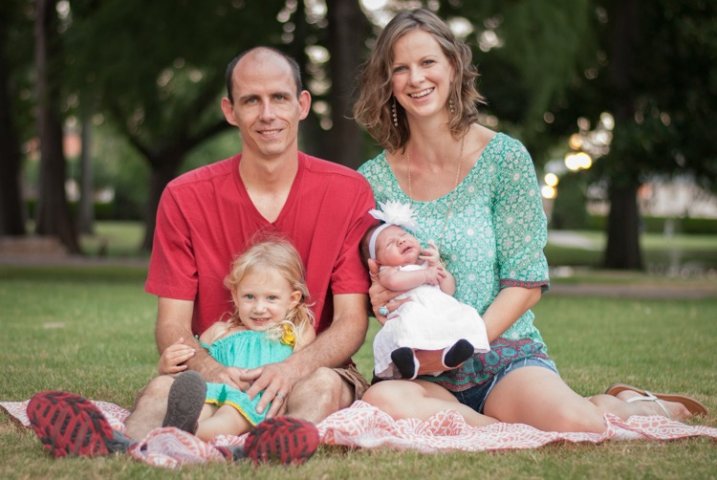
parent-holding-baby

If this aspect of your craft is not managed properly you could easily find yourself in the middle of a photo session where your clients are confused, agitated, bored, or worst of all, frustrated and angry. Every photographer has their own unique style, but generally speaking if you can get your subjects to get comfortable and relax, you can get more of the photos you (and they) are really looking for. It’s a tricky situation to be sure, and every photo shoot is different, but here are three techniques that may be helpful:

1. Get to know your clients beforehand

At its most basic level taking photos for clients is a simple business transaction wherein they pay you money for a service you provide. But it’s really much more than that: people are inviting you to record a point in their lives that they will hold dear for decades to come. When you order a sandwich or cup of coffee it doesn’t matter who you are, what hobbies you enjoy, what professional goals you have, or whether you woke up on the wrong side of the bed that morning. You hand over some cash, get what you ordered, and go about your day. However, taking portraits is almost the polar opposite because everything matters. A good portrait photographer will strive to capture the essence of the people they are working with, and getting to know them first is a key element of making this happen.

family-sitting

On my website I have three simple questions on my Contact page:

  1. Families: What was the best family vacation you ever went on?
  2. Children: If you could have the perfect birthday party, what would it be like?
  3. High School Seniors: If you had $ 1000 to spend, and a week off from school, what would you do?

The answers to these questions help me understand more about my potential clients, but also send a message to them that they mean more to their photographer than just a pay-check. This helps with any pre-session discussions we might have, as well as the photo shoot itself, because the seeds have already been sown for good conversation and a relaxed atmosphere.

I’m a teacher by trade, having taught in K-12 schools as well as at the college level (in addition to six-week classes for other teachers), and one common thread that I have found among people of all ages, is that most of them just want someone who will listen to and take an interest in them. With this foundation laid, classes are always much more productive for me and my students. So it goes for the photographer as well: if you show your clients that you are interested in them as people, you will find them to be much more cooperative as photography subjects. It might take some time to get to know them before you photograph them, but this will pay off handsomely for you and your clients throughout the entire picture-taking experience.

senior-brick-wall

2. Don’t treat the photo shoot like a photo shoot

I did a photo session recently for a bright, intelligent, outgoing young man who simply did not want to have his picture taken. He was nearing the end of his time in high school and his parents wanted to get some nice photographs before graduation, particularly of him in his cap and gown. He would much rather have been at home playing video games or hanging out with friends, but instead was obliged to spend the late afternoon with me taking photos – a prospect that was about as much fun for him as getting a tooth drilled. How on earth can you possibly get someone like this to relax, have fun, and enjoy a photo shoot? Simple: don’t make it about the photos.

One of the first things I said to this student as I hoisted my camera bag to my shoulder was “What video games are you playing right now?” He immediately relaxed and started telling me about one of his current favorites, which then branched into discussion of what his friends were playing, which then led to a dialogue about the recent school year and even his career goals. All the while I was snapping photos, while giving him subtle directions without interrupting the flow of our conversation. I got more good shots than I ever thought I would, and he enjoyed our time together far more than he had anticipated.

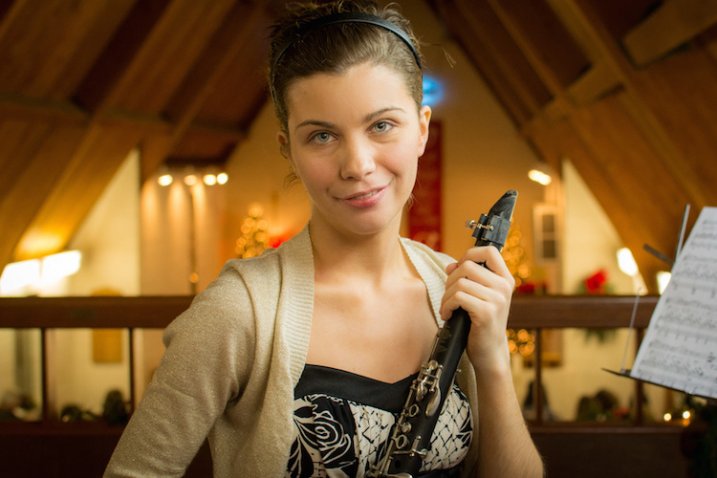
This girl was a bit nervous about having her picture taken so instead we just talked about music. I don't know much about the clarinet, but she was more than happy to tell me about it, and in the process gave me plenty of good photo opportunities.

This girl was a bit nervous about having her picture taken so instead we just talked about music. I don’t know much about the clarinet, but she was more than happy to tell me about it, and in the process gave me plenty of good photo opportunities.

This is just one example, but I have seen the same scenario repeat itself over and over: people tend get nervous and self-conscious when getting their photos taken, so if you want them to relax, have fun, and enjoy the photo shoot, try treating it as an hour of just hanging out. They’ll enjoy it much more and you’ll be surprised at the nice results you can get.

3. Build long-term relationships

When you order a pizza or pick up a tool from the hardware store you’re not looking for any type of lasting personal commitment. It’s merely a simple business transaction that serves a functional purpose, whereas photography is quite the opposite. Because you are dealing with people, and not objects, you should not only get to know your clients and seek to build a rapport with them, but find ways to build a professional relationship with them after money and pictures have changed hands. This won’t necessarily improve a current photo session, but it will pave the way for many successful future sessions while also helping to spread the word to the client’s friends, family, and co-workers about your photography services. A few ideas to try include:

Send a real thank you card

Send a thank-you card to the client (not an email, but a physical handwritten card) a few weeks after they receive their photos. Let them know how much you enjoyed working with them and appreciated their business, which is a good way to build a positive professional relationship that will last for years to come, and help make future photo sessions much more relaxed and enjoyable. You can also slip in a discount for a future photo session, which will give them even more incentive to do business with you again. This is especially important if you work with children or families, as you can easily lay the groundwork for many years of photo sessions by letting them know how much you appreciate them and enjoy working with them.

child-bench-book

This boy’s parents had such a positive experience on his photo shoot that they asked me to take pictures for their whole family a few months later.

Post about the session on social media

As more clients share their lives online, you can take advantage of the medium to publicly say how much you enjoyed working with a particular client, how good the photos turned out, or how you are already looking forward to a future session. Clients often respond quite positively, and this type of public recognition helps to reaffirm their good opinion of you as a photographer. Note that you will want to get your client’s permission first, and posting about a client on Facebook is not the same as friending a client. I don’t necessarily recommend that, though I know several photographers who do.

Scratch their back, and they’ll scratch yours

Many of your clients (or their parents) are working professionals and would appreciate your patronage as much as you like to have theirs. Remember the father of the cute kid from last week’s session who is a local plumber? Give him a call the next time your sink overflows. What about the upcoming wedding shoot with the couple who owns a local deli? Take your family there the next time you go out to eat. Building these types of professional relationships is a good way to help ensure that future photo sessions are relaxed and comfortable for your clients. They will start to trust you, be at ease around you, take directions from you, and also recommend you to their friends and family. This also sends the message that you are interested in more than just taking pictures, but are an active and supportive member of your local community, which is filled with people who might be looking for a photographer to do their next portrait session!

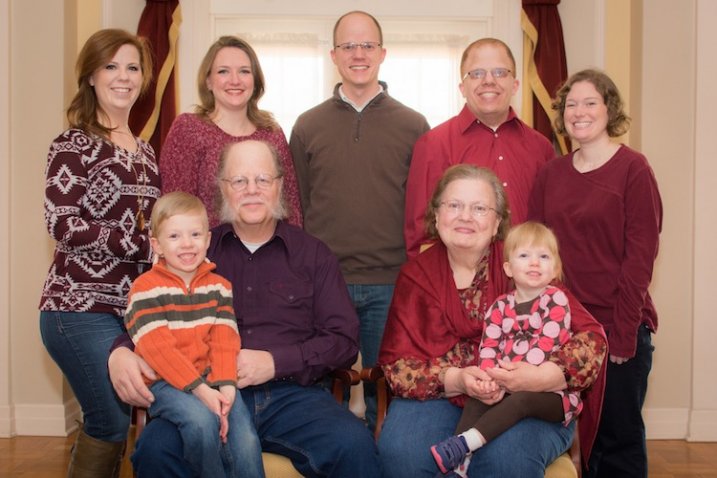
family-portrait

Getting to know this family, finding out about their interests, and building on experiences from previous photo shoots helped make this session fun and enjoyable for them and much easier for me as a result. The children knew me from their photo session earlier in the year, which not only helped them relax but put the adults at ease too.

These are just three ways to help you get people to relax in your photo sessions, but there are many other ideas as well. What about you? What tips and tricks have you learned over the years to help your clients relax, enjoy themselves, and help you get the best shots you can? Leave your thoughts in the comments below.

googletag.cmd.push(function() {
tablet_slots.push( googletag.defineSlot( “/1005424/_dPSv4_tab-all-article-bottom_(300×250)”, [300, 250], “pb-ad-78623” ).addService( googletag.pubads() ) ); } );

googletag.cmd.push(function() {
mobile_slots.push( googletag.defineSlot( “/1005424/_dPSv4_mob-all-article-bottom_(300×250)”, [300, 250], “pb-ad-78158” ).addService( googletag.pubads() ) ); } );

The post Portrait Posing Tips- How to Help People to Relax and Take Better Photos by Simon Ringsmuth appeared first on Digital Photography School.

Digital Photography School

 
Comments Off on Portrait Posing Tips- How to Help People to Relax and Take Better Photos

Posted in Photography


Getting Organized: My Experience Using Google+ Photos

10 Jun

Some time ago, I wrote a post covering different options for organizing and storing your photos. I did this as a first step toward getting my own photographic catalog in order. I decided to pull the trigger, so to speak, and give it a go. I decided to start out with Google+ Photo. I’m already pretty invested in the Google Continue Reading

The post Getting Organized: My Experience Using Google+ Photos appeared first on Photodoto.


Photodoto

 
Comments Off on Getting Organized: My Experience Using Google+ Photos

Posted in Photography


3 Tips for Avoiding Blurry Photos of Kids

09 Jun

One of the best things about kids is also one of the most frustrating when it comes to photographing them; they are so full of life and energy they rarely sit still, which can lead to an abundance of blurry pictures and heavy sighs when you go back to review your images. Instead of smiling faces and cute outfits, you often end up with a memory card full of photos where their cute little faces are a mishmash of fuzzy pixels, and any details in their hair or clothes are hopelessly lost. This is a chronic problem with photos of kids from smartphones, but it’s all too common in pictures taken with more expensive DSLRs too.

One solution is to simply use the flash on your camera, but this has the unfortunate side effect of creating harsh shadows, poorly-lit backgrounds, and ghostly red-eye effects that have to be fixed on your computer. To get the types of photos of kids you’ve always wanted it’s important to know a bit about shutter speed, and look at some of the ways you can harness the controls of your camera .

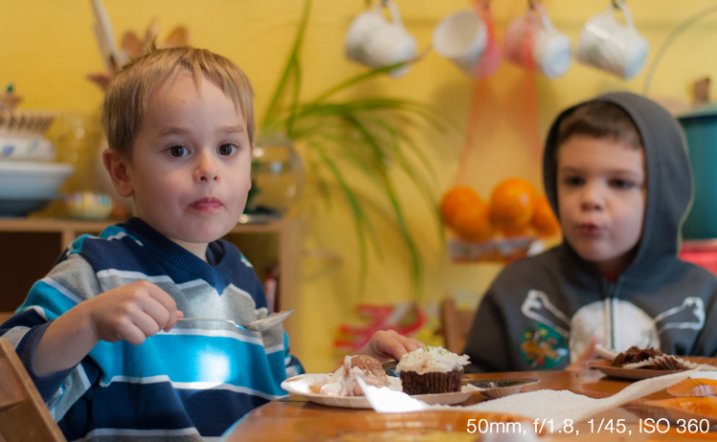
kid-dinner-table-eating

Understanding Shutter Speed

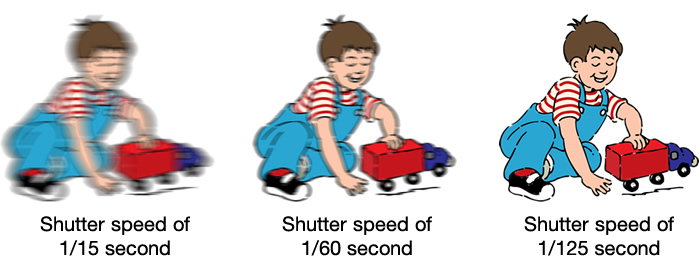
The underlying problem of blurry kid pictures usually stems from your camera’s shutter speed; kids move quickly so a fast shutter is usually required to snap clear pictures. This is fine if you have plenty of light, but as soon as the sun goes down, or you find yourself indoors, your camera’s shutter slows way down in order to let in enough light for exposing – too slow for non-blurry photos of fast-moving children.

A faster shutter will result in sharper photos with less motion blur.

A faster shutter speed will result in sharper photos with less motion blur.

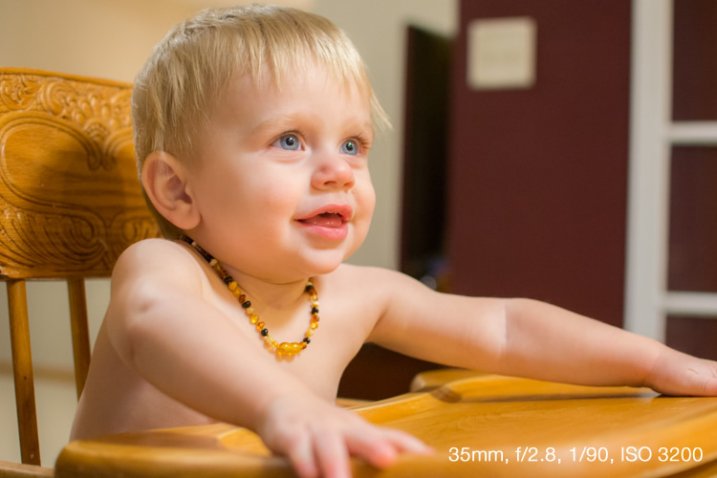
Unfortunately the solution is not always as easy as increasing your shutter speed, as this can lead to pictures that are underexposed if there is not enough light available. This is why your camera will often opt to use the flash if you are shooting in low-light situations on Automatic mode. Rather than decreasing the shutter speed your camera simply creates its own artificial light. If you’re using a kit lens with a focal length between 18-55mm a shutter speed of 1/90 is probably sufficient to capture blur-free images of little ones, though the exact value will change depending on the focal length of your specific lens and how fast the kids are moving. As a general rule I don’t use shutter speeds slower than 1/90 second when taking pictures of kids with my 35mm lens, but that usually means I have to compensate for low light in a few other ways. Here’s a few tips to help:

#1 Increase the ISO

There are three primary ways to control the amount of light that enters your camera:

  • Aperture: Increase size of the opening in your lens so more light can pass through it.
  • Shutter speed: Open the shutter for a longer period of time.
  • ISO: Make the piece of digital film (sensor) in your camera more sensitive to light.

The first method is limited by the physics of your lens. Most basic kit lenses simply don’t have large enough openings, or apertures, to let in much light (unless there is a great deal of light already available i.e. outside during the daytime or in a brightly lit room). The second method is easy if your subjects are not moving. You can leave the shutter open for many seconds at a time and get a non-blurry shot if everything is standing still, but that rarely happens with little kids. The third method, raising the ISO, was not a viable solution until recent years when camera technology advanced to the point that you could greatly increase the sensitivity of your sensor without a massive loss in overall image quality. Camera sensors are now so good that you can use faster shutter speeds to get blur-free shots of kids (even if your lens does not have a wide aperture) simply by raising the ISO.

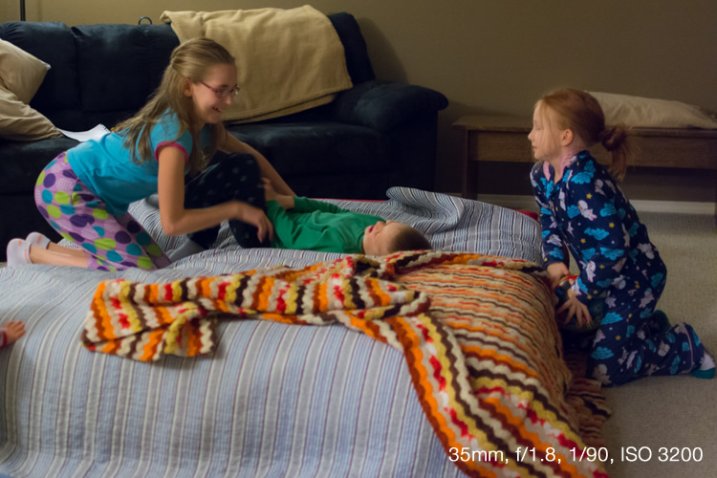
Shooting at ISO 3200 allowed me to get pictures of my nieces' pajama party without using the flash.

Shooting at ISO 3200 allowed me to get pictures of my nieces’ pajama party without using the flash.

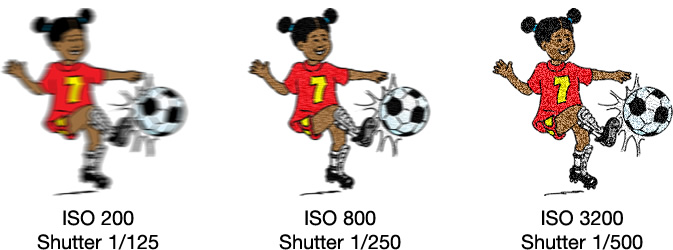
Until a few years ago most DSLR cameras were fine at ISO settings of 400, 800, or even 1600. Beyond that, photos started getting quite noisy and grainy, almost as though they were coated with a fine layer of colored sand. Now even basic consumer cameras like the Canon Rebel T4i or Nikon D3300 can go all the way up to ISO 6400 without too much detriment to their overall picture quality. Granted an ISO 6400 picture is never going to be as clean and sharp as one taken at ISO 100 or 200, but ISO 6400 essentially allows your camera to capture 64 times more light than ISO 100 (equal to 6 stops more). This means an image that would normally require a shutter speed of 1/15 second at ISO 100 could be taken with a shutter speed of 1/1000 second at ISO 6400 – a massive benefit if your goal is to capture pictures that are not blurry.

Shooting at higher ISO values means your photos will have a bit more noise and grain, but you will be able to use much faster shutter speeds. It's up to you whether the tradeoff is worth it, but for me it usually is.

Shooting at higher ISO values means your photos will have a bit more noise and grain, but you will be able to use much faster shutter speeds. It’s up to you whether the trade-off is worth it, but for me it usually is.

One caveat to this technique is you simply cannot do it in Automatic mode. If you don’t feel quite confident to start shooting in Manual, try using the Program Automatic mode instead. Rotate your camera’s command dial to the P setting, then you are free to change the ISO while your camera figures out an appropriate shutter speed and aperture. The more you practice, the more you will get the hang of it, and start feeling comfortable with your particular camera’s capabilities at higher ISO values.

#2 Use a large aperture

I mentioned in the previous section that a wider aperture is one way to let in more light, and the best way to do this is with a prime lens. These lenses do not zoom in and out like the kit lens most cameras come with, but the trade-off is their extraordinarily large apertures – big enough to let in tons of light even at dusk, or in a dimly-lit room.

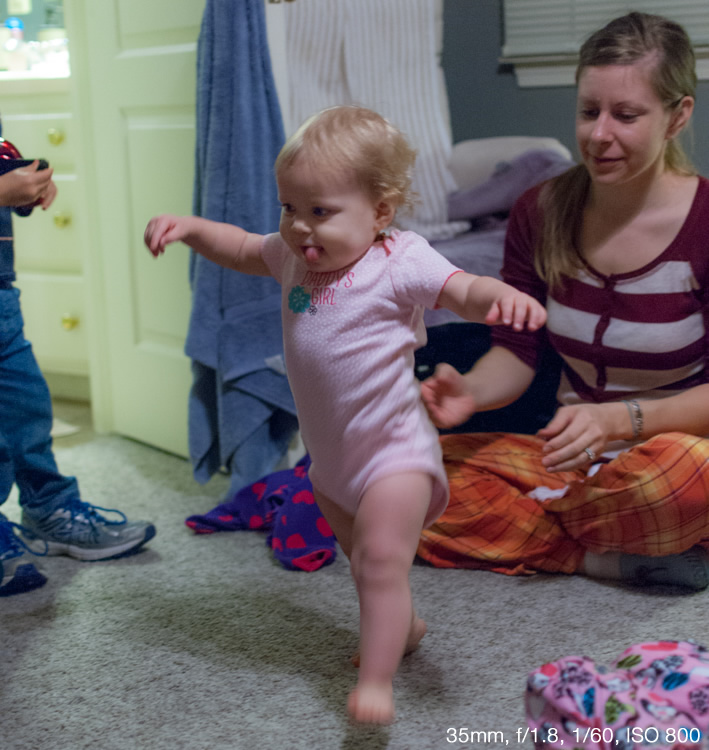
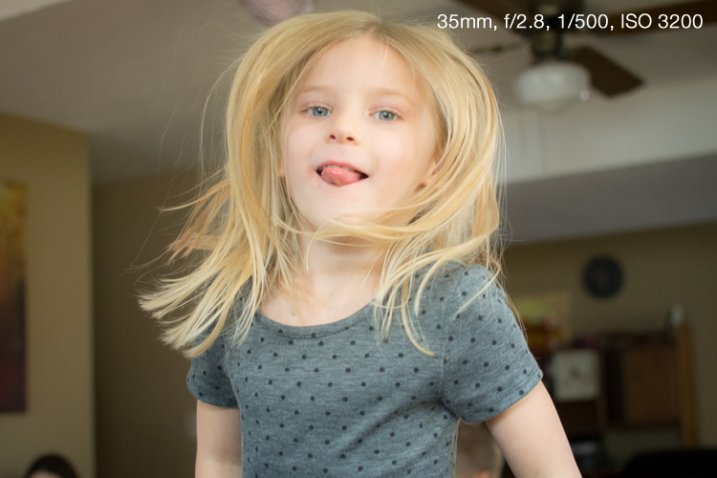
Shooting at an ultra-wide aperture of f/1.8 allowed me to get a picture of this girl taking her first steps. Using the flash would have resulted in washed-out colors and would have been quite a distraction for the little girl.

Shooting at an ultra-wide aperture of f/1.8 allowed me to get a picture of this girl taking her first steps. Using the flash would have resulted in washed-out colors and would have been quite a distraction for the little girl.

If you don’t have a prime lens you can still use wider apertures, but you will likely have to raise your ISO a bit more as well. Most kit lenses have apertures of roughly f/3.5 when zoomed out all the way and f/5.6 when zoomed in, which might not sound like much but it’s actually a massive difference (f/5.6 to f/2 is three stops or 8x less light so it is quite significant – in the example above it would mean shooting at 1/4 second or 6400 ISO instead). This just means you will have to move around a bit more to position yourself closer to the kids instead of standing across the room and using the telephoto end of your lens.

If you’re not entirely comfortable dealing with apertures and f-stops just yet, try using your camera in Shutter Priority (S or Tv) mode with auto-ISO. This lets you set the shutter speed while your camera figures out the best combination of aperture and ISO. As I said earlier, when taking pictures of kids with my 35mm prime lens I like to use a shutter speed of 1/90 second and faster, like 1/125 or 1/250, if they’re running around or jumping on furniture. The shutter speed you use will be different depending on your camera and the focal length you are using on your lens, but when you shoot in S/Tv mode with auto-ISO your camera will generally default to using the widest possible aperture and then start raising the ISO to get a good exposure. In other words, you are telling your camera “I want a fast shutter and no flash, so it’s up to you to figure out the biggest aperture and highest ISO to make this happen.” It doesn’t always work, but it’s certainly a good technique to try if you want clearer pictures of children.

The only way to get a non-blurry picture of this girl jumping on her trampoline was to use both a wide aperture and fast shutter.

The only way to get a non-blurry picture of this girl jumping on her trampoline was to use both a wide aperture and fast shutter.

This might sound a little counter-intuitive, but if you shoot in Aperture Priority (A or Av) mode, you can tell your camera to use a large aperture but in order to get a good exposure it will usually give you a slower shutter speed. By contrast, shooting in Shutter Priority will force your camera to use the widest possible aperture every single time in order to get a good exposure at the shutter speed you set. (Unless of course there is already plenty of light available in which case it might select a smaller aperture, but you would still get the non-blurry photo you want.)

#3 Make better use of light

One of the best sources of light is available for free all day long right in the sky above you. However, while the sun is certainly the brightest light, it is also the least controllable. This means you have to find ways of making use of the light it does provide, which usually is a simple matter of repositioning yourself or your subjects. When working with adults this is fairly easy, but kids are another matter; they rarely go right where you want, and if they do they are not likely to stay there for long. If you’re the kind of person who likes to take pictures while resting comfortably on a couch you might find yourself with plenty of blurry, or excessively dark or light photos, as a result. If you get up and start roaming about the room you can not only get a better vantage point from which to take your pictures, but find ways of making much better use of the sunlight that is likely to be streaming in through the windows.

Sunlight was pouring in through a window just to the right of this photo, so I quickly found a location that took advantage of such a large amount of available light.

Sunlight was pouring in through a window just to the right of this photo, so I quickly found a location that took advantage of such a large amount of available light.

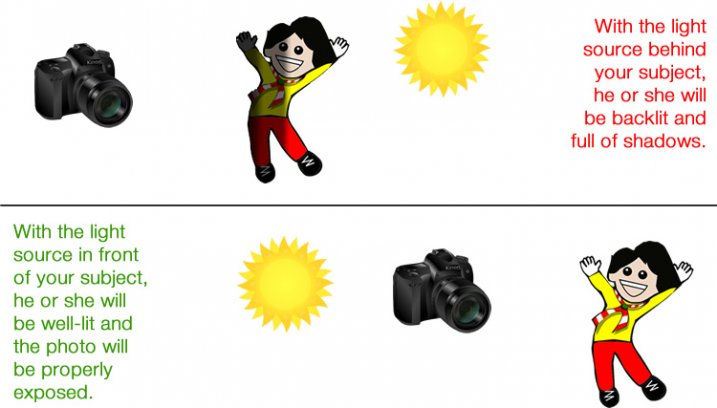
This technique works great even if you don’t have a fancy DSLR or other such expensive camera. I often see pictures of kids posted to social networks that are blurry because the shutter speed was too slow to capture the action, even though there is plenty of sun or other light available. The trick is to learn how to reposition yourself such that your subject is in front of you and the main source of light is behind you. This will help make sure your subjects (whether they are kids, adults, pets, plants, or anything else) are properly lit, while also giving you enough light to use faster shutter speeds.

light-sources


This takes a bit of time to adapt to because you may be used to staying relatively still while kids run around and play. Once you start getting up, moving around, and learning to harness the available light instead of using the flash, you will see a dramatic improvement and far fewer blurry photos, even if you are using an iPhone or an inexpensive point-and-shoot camera.

Do you like taking pics of children? What are some of your favorite techniques for getting photos that are sharp, in focus, and not blurry? Leave your thoughts in the comments below.

googletag.cmd.push(function() {
tablet_slots.push( googletag.defineSlot( “/1005424/_dPSv4_tab-all-article-bottom_(300×250)”, [300, 250], “pb-ad-78623” ).addService( googletag.pubads() ) ); } );

googletag.cmd.push(function() {
mobile_slots.push( googletag.defineSlot( “/1005424/_dPSv4_mob-all-article-bottom_(300×250)”, [300, 250], “pb-ad-78158” ).addService( googletag.pubads() ) ); } );

The post 3 Tips for Avoiding Blurry Photos of Kids by Simon Ringsmuth appeared first on Digital Photography School.


Digital Photography School

 
Comments Off on 3 Tips for Avoiding Blurry Photos of Kids

Posted in Photography


Get your photos featured in an upcoming Readers’ Showcase

07 Jun

We see the work of our talented readers every day when they post their images to our galleries, forums and challenges. Lately we’ve been showing off some of our favorite reader portfolios in a weekly showcase. If you’d like your photos to be considered for a future Readers’ Showcase, just drop us a line. Read more

Articles: Digital Photography Review (dpreview.com)

 
Comments Off on Get your photos featured in an upcoming Readers’ Showcase

Posted in Uncategorized


More Thoughts on Google Photos

05 Jun

More Thoughts on Google Photos

Last week when Google Photos launched, I quickly tested it out and then wrote a post with my immediate initial reaction to the service. Much of my early disappointment centered around the fact that Google chose to limit the size of photos in the service to 16 megapixels. As a DSLR shooter this meant that a large portion of my library would be downsized with Google Photos. Bummer.

Flickr by contrast offers every user 1TB of free storage for your photos (which is more than 99.999% of photographers need at present) at full original high resolution.

So in my mind this made Flickr’s free offering a vastly superior offering over Google Photo’s free offering. Flickr’s had that offer out for a while now which is why I hoped that Google would respond by offering us a similar 1TB (or more) of full high res original storage. Google Photos will let you have a terabyte of storage for your high res photos as well, it will just cost you $ 120 per year vs. Flickr’s free deal.

David Pogue (who works for Yahoo) wrote up a thoughtful review today comparing Google Photos and Flickr and made the same observation pointing to the negative of Google downsizing your original photos in Google Photos.

Despite my disappointment about Google’s decision to downsize our photos with the free version of their product, after having spent a week seriously digging into Google Photos, I’m much more optimistic about the service than I was a week ago. There’s a lot to love here.

1. Google Photos will back up your RAW files.

At present I have two Drobo 5D units with 15TB worth of storage in each of them. In addition, I’ve got an 8TB Western Digital MyBook thunderbolt duo.

I don’t actually have 38TB of storage because both the Drobo and the Western Digital (each in their own way) replicate my data. This protects me against hard drive failure. While it doesn’t necessarily protect me against fire or theft, this is a pretty good first line of defense. Most of the storage that I’m using right now is dedicated to the hundreds of thousands (million?) of RAW frames that I’ve fired off over the last 10 years. These are my RAW, unedited, original negative files.

Flickr does not support RAW yet — although Flickr’s former Chief Bernardo Hernandez mentioned in a tweet after he left that RAW was “coming at some point,” at Flickr.

Even though I am losing a lot of data when Google Photos converts my RAW files to JPG photos and also downsizes them, something (for free) is better than nothing.

While it is still my responsibility to come up with a better suitable offsite backup solution for my terabytes of RAW photos, until I do I’d rather have a converted, compressed 16 megapixel version of my photo backed up online than nothing. I’ve been planning for a year or so now to duplicate all of my original RAW files and then store them on drives in a safety deposit box in a bank vault, but until I get around to doing that it’s nice to know that I’ll have at least an inferior version of my original RAW backed up online.

2. Google’s free offering is unlimited.

Flickr currently gives everyone a free terabyte of storage for your high res originals. In his review Pogue said that Flickr told him that less than 50 users out of 100 million are actually using over 1 terabyte.

One terabyte certainly seems more than enough for Flickr’s present offering for most people. I am one of those few prolific photographers who will exceed the 1 terabyte limit though. At present I’ve uploaded about 950 gigabytes to Flickr (which is about 105,000 high res photos) and I should cross the one terabyte limit sometime within the next year.

Fortunately for me, I was one of the original early Flickr users who signed up for their old paid “Pro” service ($ 24.99 per year). This service has since been discontinued, but old “Pro” accounts have been grandfathered their original unlimited high res storage deal and so I won’t need to worry about exceeding one terabyte when I hit it later this year.

Although I’m an extreme edge case, if we assume that in the future camera makers will continue pushing technology with more and more megapixels (i.e. larger and larger files) and at the same time people begin taking more and more photos, I can see where a lot more people than 50 will end up exceeding their free terabyte at Flickr over the course of their life.

While Yahoo could always extend the offer to two terabytes or raise their limits as people’s storage use increases over their lives, their is no guarantee that they will. It would be a bummer if you spent 10 years uploading all of your photos to Flickr and then ran out of space, which sounds unlikely, but might actually be more likely than we realize, especially given that some of us may actually live to be 150 or more in the future!

Google Photos by contrast is offering unlimited storage if you downsize your photos.

More Thoughts on Google Photos 2

3. Google has interesting facial recognition software.

Google’s facial recognition software is pretty slick. It’s very clever how the software can actually track a face as it ages and include a baby photo in the same batch of photos of someone when they are older. It seems to work best where you have a lot of photos for them to analyze and I found photos of my family members were much more accurately grouped than photos of strangers in crowds or people who I only have one or two photos of.

Flickr doesn’t do facial recognition yet, but I get it’s something that they are working on. One of the advantages that Google has over Flickr here though is that their service is 100% a private service. 100% of your photos on Google can only be seen by your account unless you manually choose to create a link and share it with others. Facial recognition software can be scary stuff and even though Google doesn’t attach names and faces together, it’s the sort of thing that people get easily freaked out over.

Flickr is a hybrid public/private service. Even though by default you can upload your photos privately to Flickr, you can also upload them publicly by default as well. Sometimes even a simple thing like a public vs. private setting on a photo can be screwed up by your average user. It’s not that Flickr won’t offer facial recognition in the future (they probably will) it’s just that they probably need to think a little bit more about privacy and the implications of people accidently making things public that they might not want to.

4. Google Photos Assistant is fun.

Although we’ve all probably seen way too many gifs in our lifetime already, when your own photos are turned into gifs just for you it can still be delightful. Because my photos are personal to me, I find that I’m enjoying Google Photos gifs much more than I thought I would. If someone else posted a gif of Jerry Seinfield moving his microphone stand around on stage I’d probably think it was boring, but when I was actually at the comedy show and watched him do it, and the gif was made from my photos, somehow it makes it more interesting to me. Most people could care less about my dog Bucky sitting in my friend Scott Jordan’s Pocketmobile, but it tickles me to see it — and Scott will probably like it too and I can share it with him and I bet he even posts it on Facebook. ????

I find myself going back to my Google Photos assistant several times a day and hoping that they will have more treats for me.

5. Google Photos is an interesting digital diary.

Although Flickr has Camera Roll, Flickr doesn’t include all of my RAW photos so it is not as complete as Google Photos is turning out to be for me. I’m finding it more enjoyable to just randomly choose times in my life and scroll through my photos on Google Photos. There’s something about all the bad photos, unedited, raw material that feels like a more complete digital diary for me than the finished processed photos I’m posting on Flickr. I’d never want anyone else to see my raw material unedited and bad photos, but just for my eyes only I’m finding it a very interesting experience.

It will be interesting to me to see how I like Google Photos as my digital diary when I’ve finally got everything uploaded into the service. In my case, I have a feeling that this will take a few years. So far I’ve uploaded 39,312 to the site in a little over a week. I’ve had it running pretty much non-stop since Google Photos launched. Sometimes it feels like it’s hanging and I’ll force Google Photos to quit and relaunch it, but still, it’s going to take a long, long time to get all of my photos up there. By the way, Google Photos doesn’t provide you a photo count of your photos, but if you want to see how many you have uploaded you can get that number here (it’s in light gray in the upper right hand corner).

6. Google can give you back all of your photos at once.

One of the things that I like about Google Photos is that they give me an option to get all of my photos back at once. While Flickr will let you get all of your photos back as well, you have to manually drag and select your photos at Flickr (us use an album) to get them put into a zip file that they send you. With tens or even hundreds of thousands of photos online, I like the way that Google can deliver all of my photos back to me better. Although I don’t ever plan on having to get all of my photos back at once, I feel good knowing that Google will let me have them all back with just a few clicks vs. Flickr’s more difficult way.

7. No ads.

It’s nice that Google is giving you Google Photos completely ad-free. Although as a paid Pro Flickr user my Flickr experience is also ad-free, Flickr’s free service does/will have ads. When I’ve browsed Flickr outside of my Pro account I’ve noticed ads every so often. They don’t feel very disruptive, but still, no ads are always better than even just a little.

I did think it was interesting earlier this week when it felt like Apple CEO Tim Cook took a pretty direct swipe at Google’s new photo offering in a speech that he gave highlighting the importance of your digital privacy.

“We believe the customer should be in control of their own information. You might like these so-called free services, but we don’t think they’re worth having your email, your search history and now even your family photos data mined and sold off for god knows what advertising purpose. And we think some day, customers will see this for what it is,” said Cook.

Cook’s comment does make you think just a little bit about how much data you may end up giving sites like Google Photos and Flickr with all of these photos. On the other hand, I’m sure a lot of people probably wonder why you’d want to pay for Apple’s iCloud storage when Google or Flickr will give you all you need for free. Google and Flickr are competitors to Apple’s paid storage service and so you have to wonder how much of Cook’s warning is dire vs. how much is just that he’d rather you pay Apple to store your photos for you than let Flickr or Google do it for free.

Anyways, those are my more detailed thoughts on Google Photos thus far. I’m sure I’ll blog more about Google Photos as I use it more, but after a week of use I have a much more optimistic view of it than I thought I would. I find myself using it much more and going back to it several times a day over and over again.

Disclaimer: yeah, yeah, yeah, nothing is forever (except diamonds right?), both Flickr and Google could always renege on whatever deal they currently are marketing out there.


Thomas Hawk Digital Connection

 
Comments Off on More Thoughts on Google Photos

Posted in Photography


The Most Under-Valued Editing Tool for Architectural Photos

04 Jun

Gradient-header

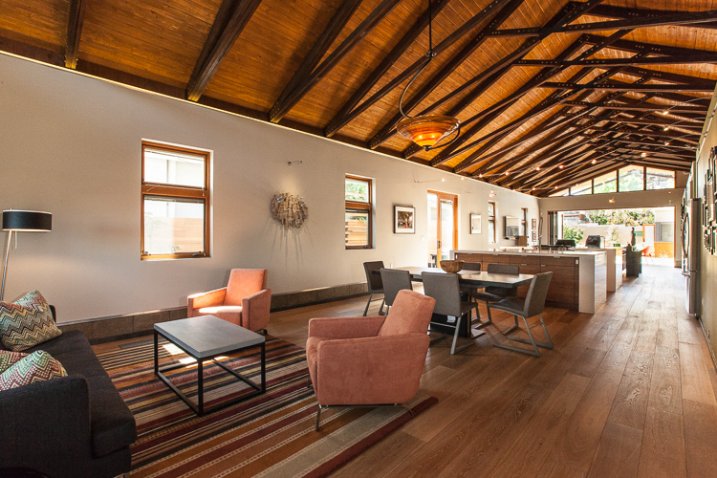
Nothing catches the eye of a potential home buyer or design client quite like a beautiful set of photos. Whether it’s for real estate agents, designers, or homeowners, expectations are high, and restrictions are often many. It’s not uncommon to have to deal with extremely short notice, very short windows of time in which to work, or to be asked for almost immediate turnaround. We, as photographers, become torn between meeting all the needs while still producing work we are proud of… and all while still making a profit! In real estate, especially, this often leads to photos that are “good enough”. But does it have to be this way?

While most are aware of the basics of editing images for interior spaces, there is one tool that is often undervalued – the Gradient Filter. This can be a tremendous tool for helping to balance out fading light on the edges of a frame when you are limited on gear and are not able to balance out the light on location. Adding a few Gradient Filters onto an image can make your mundane interior photos go from acceptable to impressive, with minimal time invested. The Gradient tool is also excellent in helping to sharpen up towards the edges of the frame, helping to compensate slightly for lens distortion.

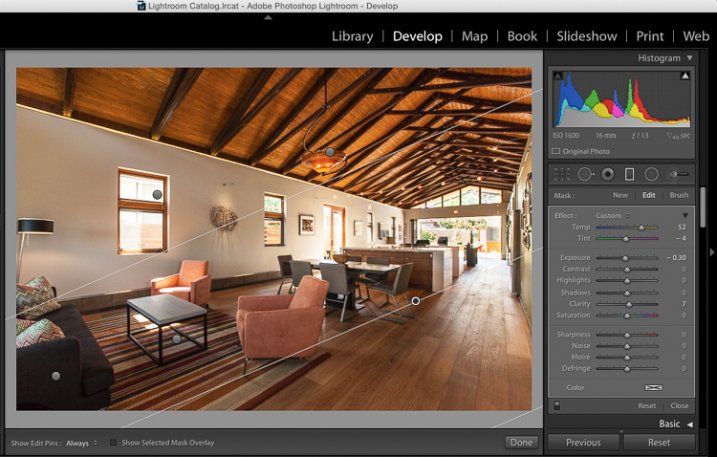
The Gradient Gilter can be found just below the histogram in Lightroom. Once applied, you can move it around by grabbing the central node, you can change the angle of it by placing cursor over center line and clicking to spin it, and you can also spread or tighten the gradient by grabbing the outermost line and moving it inward or outward. The flexibility of positioning alone is a great benefit when trying to keep editing time to a minimum.

Gradient filter tool can be found under the histogram in Lightroom

Gradient filter tool can be found under the histogram in Lightroom

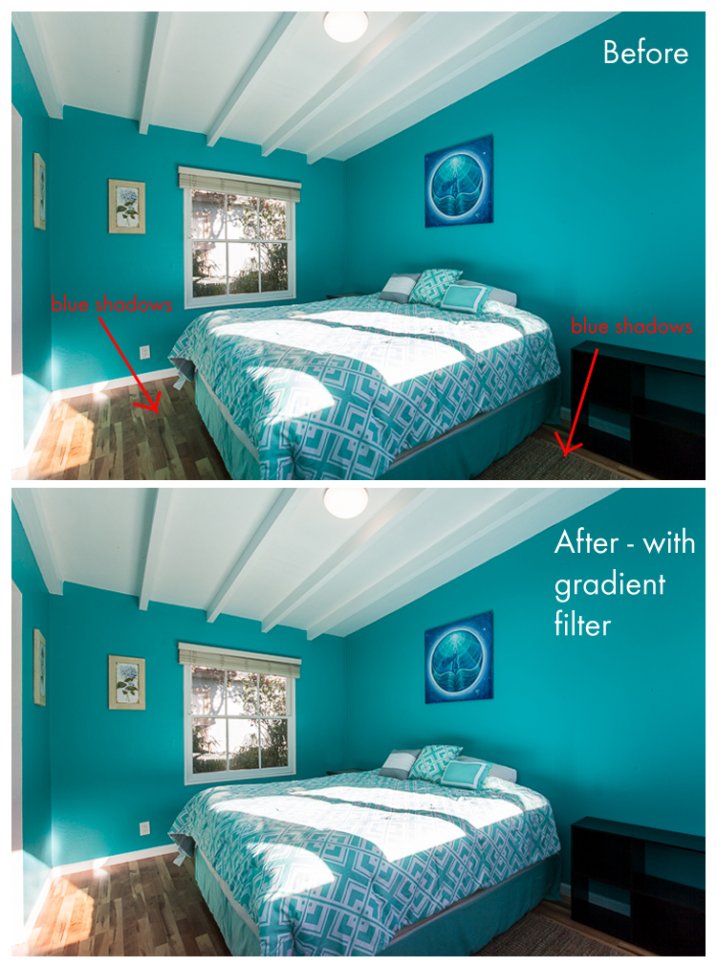
Another great quality about the gradient filter is that, unlike the lens vignetting correction (under the Lens Correction module) or the post-crop vignetting effect, the Gradient Filter can adjust many factors of the image. You can adjust exposure, temperature, tint, sharpness, clarity, and several others. This makes it a very handy tool for making subtle adjustments that would otherwise be tougher to blend in with a brush filter. In this before-and-after example, the gradient filter has been used to adjust for the blue tint in the shadows on the floor due to the bed cover. It’s a subtle adjustment that helps to elevate the quality of work.

Gradient4

Let’s look at a few more before and after photos so you can see the effect of the gradient filter. In the series below, the only change that has been done to the After photos is the addition of Gradient Filters. While the Before photos are acceptable to most, adding the Gradient Filters helps to add extra polish to the photos. It helps to bring it up another notch, and will help to impress your clients even more than usual!

Gradient3

Gradient2

Gradient1

Note that in most cases, you will want to add several gradient filters, not just one. Each space will be a bit different, but the need tends to toward adding a bit of subtle light onto the sides of the frame, along with some clarity and possible slight temperature adjustments depending on light sources.

Exterior photos can benefit just as much from the Gradient Filter as interiors! Not all scenes will need this type of adjustment, but below is an example of a common setup that benefitted greatly from gradient filter adjustments. The shadows in the lower left corner of the frame are too dark, and a gradient filter adjusting the brightness of shadows is ideal for balancing them out.

Gradient-ext

As a final point, it’s worth noting that the Gradient Filter tool is one that should finish off your editing, and should not be the main editing technique used on an image. In nearly all cases, it will be a perfect tool for some finessing of highlights/shadows or temperature so that your image will have that extra bit of polish. Before exporting your final files and sharing with your client, be sure to consider if a Gradient Filter should be added into your arsenal of editing tools.

Do you have a different tool that you feel is undervalued for photo editing? Please share your thoughts in the comments below!

googletag.cmd.push(function() {
tablet_slots.push( googletag.defineSlot( “/1005424/_dPSv4_tab-all-article-bottom_(300×250)”, [300, 250], “pb-ad-78623” ).addService( googletag.pubads() ) ); } );

googletag.cmd.push(function() {
mobile_slots.push( googletag.defineSlot( “/1005424/_dPSv4_mob-all-article-bottom_(300×250)”, [300, 250], “pb-ad-78158” ).addService( googletag.pubads() ) ); } );

The post The Most Under-Valued Editing Tool for Architectural Photos by Natalia Robert appeared first on Digital Photography School.

Digital Photography School

 
Comments Off on The Most Under-Valued Editing Tool for Architectural Photos

Posted in Photography


How to Use the Right Captions on Your Photos to Better Connect With Viewers

03 Jun

30 years ago, we used slides, prints and albums to share photos with family and friends.  Now, between Facebook, Instagram, Flickr, Google+ and 500px, you have more options than ever to share your photos.  The problem is, how do you connect to this much larger audience?

Sharing a story alongside your photo will help you connect with your followers, and often turn a great photo into something spectacular.

When you share a photo, people may wonder where it was taken, why you were there, what made you photograph the scene, or what was going through your head the moment you snapped the shutter. These are all questions that can be spun into a narrative and shared along with your photo.

The right caption draws viewers into the image

Here’s an example. Which of the following captions draws you in and makes the photo more interesting for you?

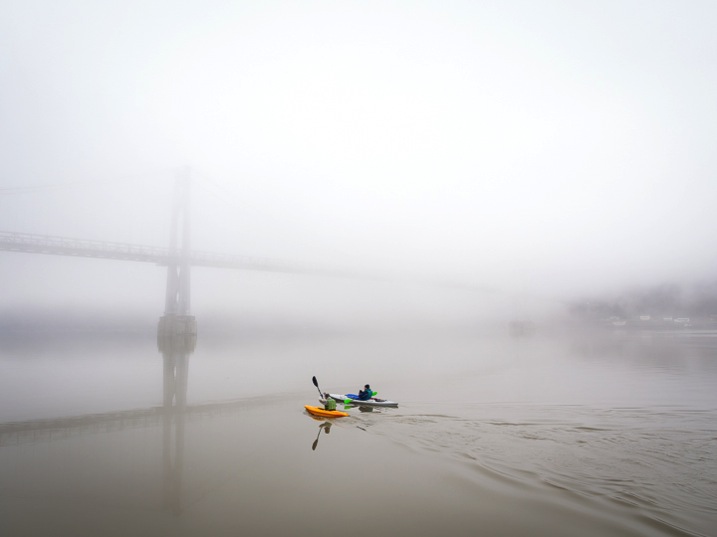
Image1

Caption 1: Kayakers on the Hudson River

Caption 2: Springtime in upstate New York is full of variable weather. The changing temperatures coupled with different types of precipitation can make for beautiful and unpredictable landscapes. On this particular morning, the Hudson River was covered in a thick fog and knowing how fleeting that can be, I hurried down to the waterfront hoping to capture some shots. Out of nowhere, two colorful kayakers appeared, adding life to my scene as they cut their way down the river and disappeared into the abyss.

I may be biased, but for me it’s Caption 2. Seeing a beautiful photo with a story attached to it pulls me in. It puts me in the same space that the photographer was in when they took the photo, enriches my experience, and ultimately makes the photo, which was good in the first place, a great one.

If you went to a yard sale and and saw a beautiful glass bowl for $ 20 you may think, “Well, that’s a bit steep for a simple bowl at a yard sale.” But, I bet your mindset would change if the owner told you a story about the bowl — how she acquired it at a glass blowing factory in Halifax back in the 1950s, how it was one of just a handful made and how the bowl moved around the United States with her and family for the past 60 years. Now $ 20 seems like a bargain!

Nothing changed, you just got some more information. A story enriched your understanding, and in turn, completely changed how you experienced something.

Here’s another example:

Image2

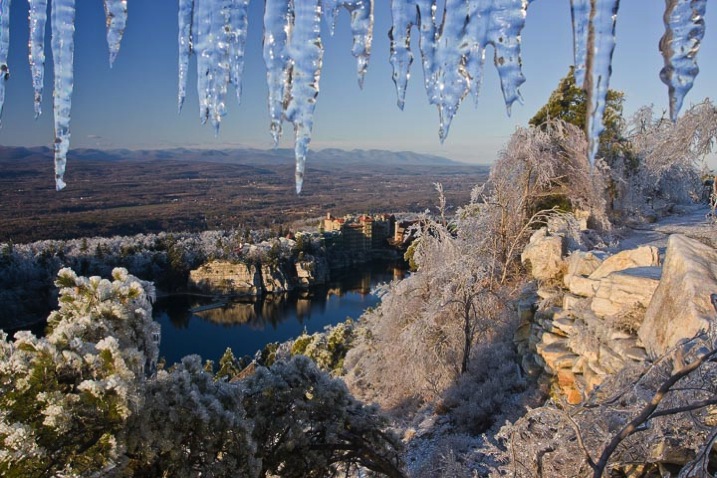
Caption 1: The Mohonk Mountain House after an ice storm

Caption 2: It was early December and an ice storm had just ripped through the Hudson Valley leaving debris, destruction, and a clear blue sky in its wake. My wife and I began our hike that day at a lower elevation, and realized as we got higher that the entire forest was encased in ice. It was a winter wonderland that was both beautiful and dangerous. Limbs of trees were scattered everywhere, boulders were slick with ice and in some spots, five foot long icicles hung like stalactites above our heads. As we made our way to the top of the mountain, I stepped into a small gazebo overlook and focused on the Mohonk Mountain House and surrounding landscape, letting the icicles in the foreground frame my shot.

There’s nothing wrong with the first caption, but the second caption really paints a picture in the viewer’s mind and places them there with you.

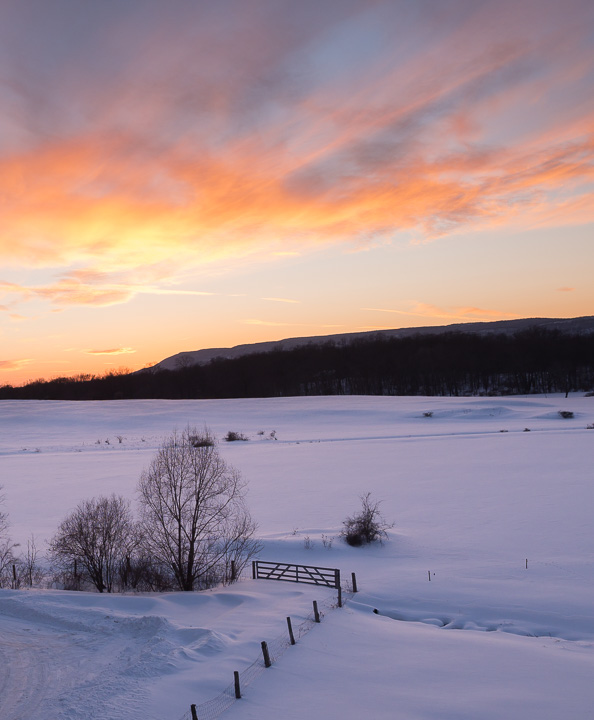
Here’s another shot I took this winter.  In the past I would have shared it with Caption 1 below, but instead I shared it with Caption 2,  and found that it really resonated with my audience.

Image3

Caption 1: Winter Sunset

Caption 2: It was a Friday night and I rushed out of work wanting to photograph something. I made a quick stop at home, put on boots, and grabbed my snowshoes just in case. With so much snow on the ground I racked my brain for a spot that I could easily get to with the potential for a decent sunset shot. Luckily, this incredible vista is just down the street from me. I got there when the sky was beginning to turn all sorts of colors, hurriedly set up my tripod, and captured this winter sunset. I stayed for a little while, watching blues give way to pinks, yellows and oranges until all the color in the sky was gone and my frozen hands signalled to me that it was time to go home.

Viewer experience is enhanced

Not every photo needs a page of text written alongside it, but it’s been my experience that adding a couple of sentences, rather than just a few words (or none at all), greatly enhances the experience of the viewer.  It helps them to connect to your photo and ultimately with you as a photographer.

Image4

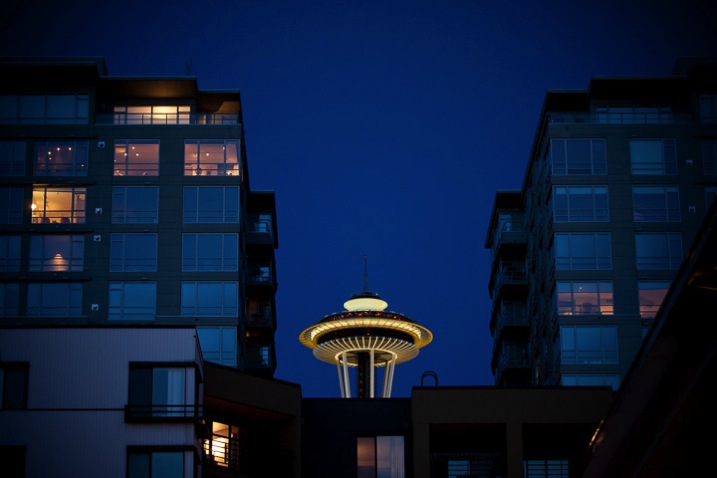
Caption 1: The Space Needle in Seattle

Caption 2: After an afternoon touring Seattle and Pike Place Market, my wife and I headed over to the Olympic Sculpture Park but found it was closing just when we arrived. Disappointed that I wasn’t able to capture any images of the park, I turned my camera around towards the city as we left and captured this unique view of the iconic Space Needle.

Summary

When I share a photo, I want people to respond to it. I want them to share in the moment and feel what I was feeling when I took the photo. Your story might seem mundane to you, but to your audience it gives them a closer look at who you are and how you think — as a person and a photographer.

googletag.cmd.push(function() {
tablet_slots.push( googletag.defineSlot( “/1005424/_dPSv4_tab-all-article-bottom_(300×250)”, [300, 250], “pb-ad-78623” ).addService( googletag.pubads() ) ); } );

googletag.cmd.push(function() {
mobile_slots.push( googletag.defineSlot( “/1005424/_dPSv4_mob-all-article-bottom_(300×250)”, [300, 250], “pb-ad-78158” ).addService( googletag.pubads() ) ); } );

The post How to Use the Right Captions on Your Photos to Better Connect With Viewers by Joe Turic appeared first on Digital Photography School.

Digital Photography School

 
Comments Off on How to Use the Right Captions on Your Photos to Better Connect With Viewers

Posted in Photography


12 Tips for Travellers to Bring Home Better Photos

30 May

There’s nothing better than browsing through old holiday photos during a long cold winter. Capturing the joy of our friends and family as they explore new cities and lands is priceless – travel photography is just as about the subjects as it is about the surroundings. Here are top 12 tips for travellers to help you make the most from Continue Reading

The post 12 Tips for Travellers to Bring Home Better Photos appeared first on Photodoto.


Photodoto

 
Comments Off on 12 Tips for Travellers to Bring Home Better Photos

Posted in Photography


Thoughts on Google Photos

29 May

New Collections Page from Google Photos

Google launched Google Photos today.

For months now people have been talking about how Google was going to decouple photos from Google+ and create a standalone photo product and today at I/O they finally unveiled their latest effort to the world.

Last August when rumors about this new service started circulating I wrote a blog post titled 10 things Google should consider in launching a standalone photo sharing service. Here I outlined ways that Google could come up with a very competitive product in the photo sharing space. Google could have given the world something really amazing today and instead we just got something lackluster.

The new offering is fine, but in a lot of ways it is a big disappointment to me.

The biggest part of today’s announcement was that Google was going to give every user unlimited photo storage.

That sounded pretty good until I understood the catch. The catch is that the unlimited photo storage offer only applies to photos 16 megapixel or smaller.

Although it may be tempting to write this off as a “Pro” problem as most modern DSLRs today shoot over 16 megapixel, there are also a lot of new non-pro consumer cameras that shoot over 16 megapixel today too. Heck, there’s even a mobile phone out now (admittedly an outlier) shooting at 41 megapixel. So what this means is that almost every DSLR out today, along with many smaller consumer cameras, will require your Google Photos images to be downsized.

It’s not just Canon and Nikon DSLRs that produce images over 16 megapixel today, but many models of popular mirrorless and consumer cameras by Panasonic Lumix, Sony, Olympus, etc. Here is a list of currently manufactured digital cameras 15 megapixels and above which shows some models and brands this might include.

While I do understand that storing photos is not cheap, I do not understand why Yahoo’s Flickr is able/willing to give every user a full terabyte of full high res original photo storage, and Google, a company almost 10x the size of Yahoo by market cap cannot or will not. Flickr raised the bar when they offered every user a free terabyte of high res photo storage and Google’s response is to offer us unlimited downsized and compressed photos? Come on Google, you can do better than that!

The other problem is that the camera manufacturers (for better or worse) are in a war of who can raise megapixels the most. Earlier this year Canon came out with a mindblowing 50.6 megapixel 5DS. 16 megapixels is going to feel smaller and smaller as new and better camera, and even mobile phone technology is released.

If this was the year 2003 and Canon had just released the 6.3 10D, this might make sense to me — but in 2015? No way.

While you can purchase Google Drive storage for your photos over 16 megapixel at Google, 1TB of high res storage at Google would cost you $ 120/year — the same thing that Flickr will give you for free.

In my case I have one of the old grandfathered Flickr Pro accounts where for $ 24.95/year I get even more than 1 terabyte of high res storage on Flickr, I actually get unlimited (I’m currently using about 940 GB of my unlimited storage on Flickr, which is a lot).

The other main thing missing from this new offering by Google is social. While Google has had a tough time with social and I get why they are wary of it, I was hoping that there would be a social element to their new photo service. Instead, every photo you upload to Google Photos is private only for you and you then share out your photos to other platforms. One of the most exciting things about Flickr is that there are a lot of social components to the site. While photos are uploaded as private to Flickr by default (like Google), you have the option of making these photos public and sharing them with other users on the site.

While you can use Google and Flickr both as private shoeboxes for all of your photos, I like that Flickr gives you the option to turn your photos public and share them with the world. 99.99% of the photos that I upload to the web are meant to be shared publicly and so I was disappointed that Google didn’t deliver us anything here today. Google does still have Google+, or course, where you can share your photos too and be social, but that’s an entirely different site that you leave Google Photos to go use. Flickr does a much better job at combining both private and social.

Google did showcase some other features with photos today. They released a sort of timeline camera roll view and some image recognition technology. What I saw today was very similar to what I saw two weeks ago when Yahoo rolled out Flickr 4.0. I’m not saying Google copied Flickr here, but it is odd how Flickr shipped these almost identical features two weeks before Google did. Whatever the case, I’m not terribly excited by camera rolls from Google or Flickr, although I do see where they would be helpful and nice features for the broader mass market audience.

I prefer to organize my photos myself rather than have an algorithm try to do it for me. I carefully keyword each of my photos in Lightroom and when I upload them to Flickr I’m able to create smart albums (like smart playlists in iTunes) where I can organize my photos into albums by keywords. That’s something that I still can’t do at Google Photos today, at least not in the automated way that I do it with SuprSetr.

I am glad that Google is still investing time and development into photos. For a while there when they first launched Google+ it really felt like they were going to do something spectacular with photos, today, unfortunately, not as much. To me, today’s offering feels more like a step back from Google+ to Picasa circa 2004.


Thomas Hawk Digital Connection

 
Comments Off on Thoughts on Google Photos

Posted in Photography