RSS
 

Posts Tagged ‘Photos’

How to Compose Brilliant Black and White Photos

30 Aug

Composition in black and white photography

Brilliant black and white photos are created in two steps. The second of these is post-processing, and is very important. But before you get to that stage, you have to learn how to see and compose photos in black and white. This is just as important as processing – it doesn’t matter how creative or clever you are in Lightroom or Photoshop, if the image is badly composed, or the subject just isn’t suitable for black and white, then you are going to struggle to make a half-way decent monochrome conversion, let alone a great one.

I thought it would be interesting for you to look at some of my favourite black and white photos and learn why they work in terms of composition.

Wooden boats – Puerto Aysen, Chile
Composition in black and white photography

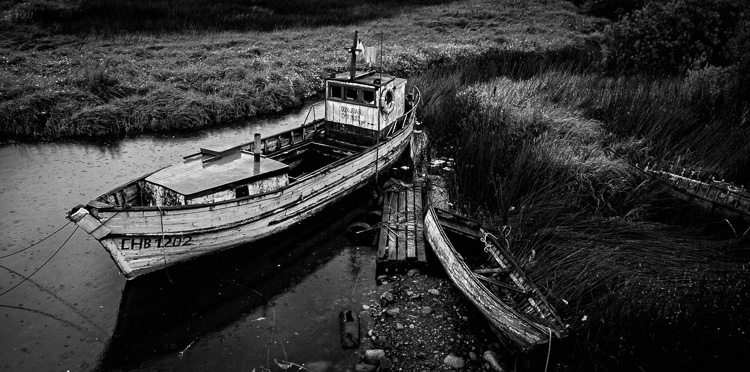
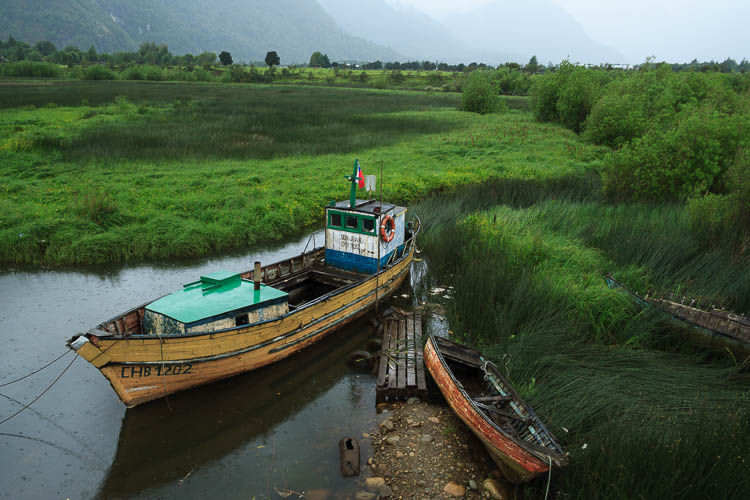
Puerto Aysen is a small port town in south-west Chile. The weather is often cold and miserable, even in summer. It rains a lot. I was wandering around the outskirts of the town when I came across these old wooden boats. Initially I was attracted to the atmosphere of the scene – there was a soft rain, and in the original uncropped photo you can see the hills on the horizon fading through the drizzle. The scene worked in colour (see below), but in the post-processing stage I also realized that it would come out beautifully in monochrome.
Composition in black and white photography

The reasons the image works well in black and white are:

  • Tonal contrast: The boats are painted light tones and the background is mainly comprised of dark tones. The eye is naturally pulled to the largest boat in the scene which becomes the focal point of the photo.
  • Texture: The weathered surfaces of the boats and the grass are beautiful textures which tend to be more effective in black and white than colour. This image wouldn’t have worked nearly as well if the boats were brand new.
  • Lines: The position of the boats in the scene creates two diagonal lines. The first moves from the bottom left through to the top right, and the second line, formed by the rowboat, creates a second diagonal line that meets the first. Diagonal lines pull the viewer’s eye through the photo and help add a sense of movement to the composition.
  • Panoramic crop: I decided the hills in the distance were a distraction and cropped the photo to concentrate attention on the boats. This took place in post-processing and strengthened the composition by focusing attention on the boats.

Chairman Mao watch – Shanghai, China

Composition in black and white photography

I went to Dongtai Road antiques market in Shanghai, an open-air street market comprised of stalls and shops where you can buy a variety of genuine and fake antiques, plus kitsch ornaments and souvenirs. I found the watch that this vendor was offering quite amusing. I didn’t want to buy the watch, but I asked if I could take a photo. The answer was yes.

Why the image works in black and white:

  • Strong use of shape: The watch face is a circle. It is placed in the centre of the composition and dominates it.
  • Lots of texture. The textures of the watch and the vendor’s hand are very strong.
  • Strong diagonal lines. The vendor’s fingers create lines that pull the viewer’s eye up from the bottom of the frame. I deliberately framed the photo so the fingers ran at an angle across the frame rather than parallel with the edges. This creates a more dynamic composition.
  • Simple composition. I moved in close to create a simple composition that emphasized shape, line and texture, the dominant elements of the photo. Another benefit of moving in close and using a wide aperture was that the background went out of focus, eliminating potential distractions.

John – Wellington, New Zealand
Composition in black and white photography

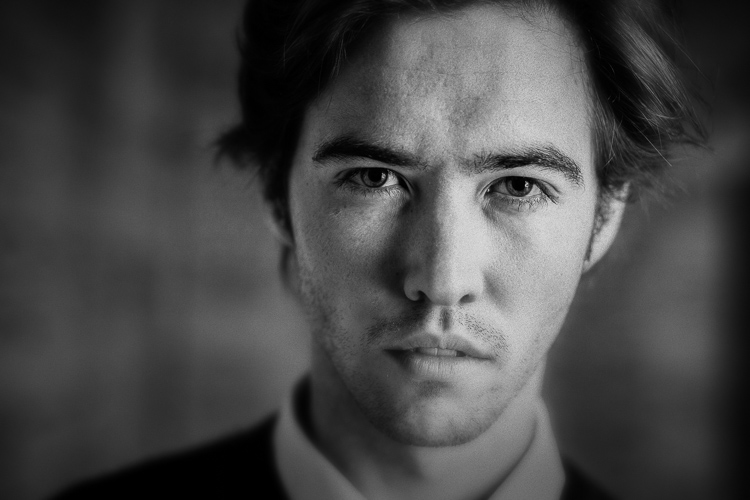
I got in contact with John via Model Mayhem and we arranged a portrait shoot. The setup was simple – I used an 85mm lens (with a full-frame camera) and a wide aperture of f/2.8 to blur the background. The portrait is lit by natural light – John stood underneath an archway so the light fell from his left (camera right).

Men can be great subjects for black and white portraits because there is no pressure to retouch skin. Black and white emphasizes texture – the texture of skin can be a beautiful thing that doesn’t (or perhaps shouldn’t) need retouching as often as some people think it does.

Why this photo works in black and white:

  • Strong eye contact. The strength of this portrait is in the eye contact. John is gazing directly at the camera which creates a powerful connection with the viewer. His face is level with the camera so I could use a wide aperture to defocus the background, while keeping both eyes in sharp focus.
  • Texture. The texture of John’s skin, especially in the sharpest areas around his eyes, renders beautifully in black and white. The background is out of focus and lacks texture, and this sets up a contrast between the sharp areas of the model’s face and the heavily blurred background.
  • Tonal contrast. The model’s face is a lighter tone than the background. Light tones pull the eye, and the tonal contrast here (combined with the strong eye contact) establishes the model’s face as the focal point of the composition. The side lighting effect, created by asking the model to stand in an archway, means that one side of his face is lighter than the other. This creates depth, by revealing the shape of this face.

Common themes

Analyzing these photos is a simple exercise but it brings up several elements that work well in most black and white photos – texture, line, shape, tonal contrast, and simple composition. When you find a subject where these elements come together, you know you have the potential for a great black and white photo.

What do you think is important for a brilliant black and white photo? Please let us know in the comments. I’m looking forward to hearing what you think.

Editor’s Note: We recently ran a series of articles this week featuring black and white photography tips. Look for more on this topic below.

  • 5 Simple Ways to Create Expressive Photos in Black and White
  • Tips for Black and White Wildlife Photography
  • 7 Tips for Black and White Portrait Photography
  • 28 Images with Strong Black and White Compositions
  • Weekly Photography Challenge – Black and White Techniques
  • Tips for Black and White Wildlife Photography
  • How to Convert Images to Black and White and Add a Color Tint in Photoshop
  • Shooting all Black and White for a Day to Improve Your Photographic Eye
  • Split Toning Black and White Images in Lightroom
  • Processing Black and White Photos with OnOne Perfect B&W
  • Color or Black and White for Street Photography?

Mastering Composition ebookMastering Composition

My new ebook Mastering Composition will help you learn to see and compose photos better. It takes you on a journey beyond the rule of thirds, exploring the principles of composition you need to understand in order to make beautiful images.

googletag.cmd.push(function() {
tablet_slots.push( googletag.defineSlot( “/1005424/_dPSv4_tab-all-article-bottom_(300×250)”, [300, 250], “pb-ad-78623” ).addService( googletag.pubads() ) ); } );

googletag.cmd.push(function() {
mobile_slots.push( googletag.defineSlot( “/1005424/_dPSv4_mob-all-article-bottom_(300×250)”, [300, 250], “pb-ad-78158” ).addService( googletag.pubads() ) ); } );

The post How to Compose Brilliant Black and White Photos by Andrew S. Gibson appeared first on Digital Photography School.


Digital Photography School

 
Comments Off on How to Compose Brilliant Black and White Photos

Posted in Photography


27 Shimmering Fish Photos

29 Aug

Fish are slippery, slimy and scaly.

They can also be shiny, silvery, shimmery and photogenic.

They come in many forms, shapes and sizes. Here are a few images captured by photographers of these interesting creatures:

Photograph Deep-sea by Tamás Balogh on 500px

Deep-sea by Tamás Balogh on 500px

Photograph RGB fishing an improved version by Victoria Ivanova on 500px

RGB fishing an improved version by Victoria Ivanova on 500px

Photograph Seeks 6 differences by Jordi Gallego on 500px

Seeks 6 differences by Jordi Gallego on 500px

Photograph Habitat by Sedef ISIK on 500px

Habitat by Sedef ISIK on 500px

Photograph After fishing by taty-eremeeva on 500px

After fishing by taty-eremeeva on 500px

Photograph Dust...  (????...) by Vladimir Shipulin on 500px

Dust… (????…) by Vladimir Shipulin on 500px

Photograph After fishing by Svetlana Dikhtyareva  on 500px

After fishing by Svetlana Dikhtyareva on 500px

Photograph Fish..:) by Alla  Lora on 500px

Fish..:) by Alla Lora on 500px

Photograph pesce d'aprile d'autore by Sabrina Secco on 500px

pesce d’aprile d’autore by Sabrina Secco on 500px

Photograph Still life with fish and a lemon by Elena Eremina on 500px

Still life with fish and a lemon by Elena Eremina on 500px

Photograph Stone Fish by Kenichi HIGUCHI on 500px

Stone Fish by Kenichi HIGUCHI on 500px

Photograph The still life with fish by Felix Felix on 500px

The still life with fish by Felix Felix on 500px

Photograph Dancing in the water by Diana Amelina on 500px

Dancing in the water by Diana Amelina on 500px

Photograph It's just seems impossible, but nothing is impossible by Abhijith  on 500px

It’s just seems impossible, but nothing is impossible by Abhijith on 500px

Photograph The neighbour's glass is always bluer by Elad Shani on 500px

The neighbour’s glass is always bluer by Elad Shani on 500px

Photograph art of fish by reeve lim on 500px

art of fish by reeve lim on 500px

Photograph Red Fish by Masgareng Sucipto on 500px

Red Fish by Masgareng Sucipto on 500px

Photograph like a dead fish... by Catherine MacBride on 500px

like a dead fish… by Catherine MacBride on 500px

Photograph Fried tuna steak in black sesame with chopsticks by Kamil Zab?ocki on 500px

Fried tuna steak in black sesame with chopsticks by Kamil Zab?ocki on 500px

Photograph hunter and the hunted by Alexander Safonov on 500px

hunter and the hunted by Alexander Safonov on 500px

Photograph Lion Fish with Sunburst by Jonathan Lin on 500px

Lion Fish with Sunburst by Jonathan Lin on 500px

Photograph Show Time by Max Rinaldi on 500px

Show Time by Max Rinaldi on 500px

Photograph Einblicke bis tief in die Magengrube by Georg Scharf on 500px

Einblicke bis tief in die Magengrube by Georg Scharf on 500px

Photograph Good Days, Bad Days by Henrik Nilsson on 500px

Good Days, Bad Days by Henrik Nilsson on 500px

Photograph Beach Bum by Henrik Anker Bjerregaard  Lundh III on 500px

Beach Bum by Henrik Anker Bjerregaard Lundh III on 500px

Photograph Cat fishing by Marianna Armata on 500px

Cat fishing by Marianna Armata on 500px

While this is not a fish, this traditional Chinese fisherman catches them!

Photograph Another Day in Paradise by Michael Steverson on 500px

Another Day in Paradise by Michael Steverson on 500px

googletag.cmd.push(function() {
tablet_slots.push( googletag.defineSlot( “/1005424/_dPSv4_tab-all-article-bottom_(300×250)”, [300, 250], “pb-ad-78623” ).addService( googletag.pubads() ) ); } );

googletag.cmd.push(function() {
mobile_slots.push( googletag.defineSlot( “/1005424/_dPSv4_mob-all-article-bottom_(300×250)”, [300, 250], “pb-ad-78158” ).addService( googletag.pubads() ) ); } );

The post 27 Shimmering Fish Photos by Darlene Hildebrandt appeared first on Digital Photography School.


Digital Photography School

 
Comments Off on 27 Shimmering Fish Photos

Posted in Photography


5 Ways to Change Your Composition For Better Photos

28 Aug

If there is one thing in photography that every photographer can work on, it’s composition. Like many of the other techniques in photography, your composition will improve the more you practice. Very often, photographers seem to go to their comfort zone of the rule of thirds. I personally like the rule of thirds as a starting point, not every photograph however, needs to be composed on the rule of thirds. In fact, it is a good idea to shoot the same scene in a few different compositions, even depth of field can be used as a compositional tool.

A good way to work on your composition is to start with the rule of thirds, then change it up, try a few different compositions and see how that works. The challenge is this, what other compositions can you use? Let’s take a look at some advanced compositional techniques that you can try out on your next shoot.

1. Left to right

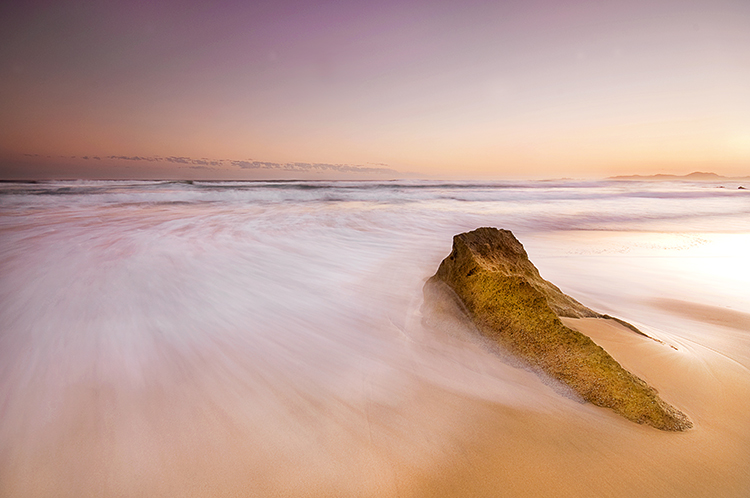
The smooth curving water leads our eye to the rock on the right of the image

The smooth curving water leads your eye to the rock on the right of the image

In the western world, we read the words on a page from left to right. It is logical to think that when someone views your image, they will generally begin on the left side of the image, and move to the right. You can use this technique in a few ways.

Firstly, you could place your subject on the right hand side of the frame with a leading line drawing the eye to your subject. The leading line could be a river, a road, or a railway track – it doesn’t really matter, all that it needs to do is allow the eye of the viewer a natural entry point, then lead them to the subject.

Secondly, if you were shooting street photography, you might have a person in the frame on the left hand side, looking toward your subject on the right. You might even have a vehicle such as a car or a motorcycle, moving from left to right. These techniques will immediately draw the eye to the right side of your image.

2. Use shapes – both seen and unseen

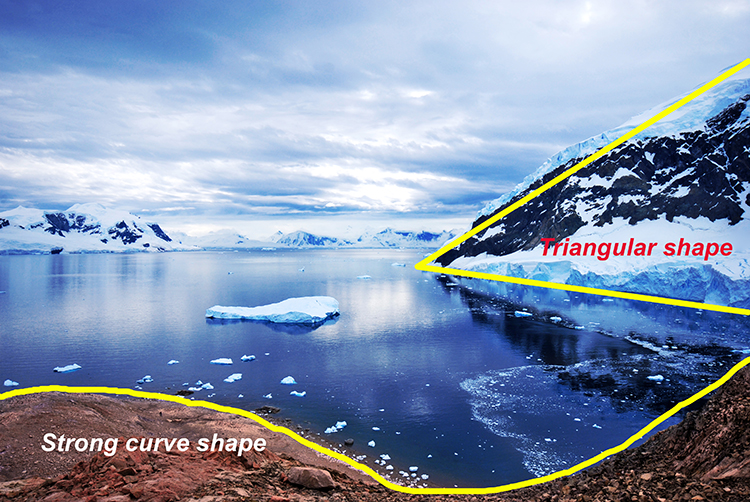
In many images, there are hidden and visible shapes. Window frames are square or rectangular, doors are rectangles, and so on. Look for shapes in your images, look beyond what the actual object is and see its shape. You can also compose the scene to create a shape. Sand dunes can become triangular shapes, open fields can be green rectangles, so look for shapes in your scene and compose your image to include them.

There are many shapes in each scene, use them to enhance your composition

There are many shapes in each scene, use them to enhance your composition

3. Use numbers – not literally!

If you are shooting a scene with trees or leaves, or even a river with some exposed rocks, try and use odd numbers of things. Odd numbers tend to create a dynamic feel in your scene – three trees or rocks will feel more dynamic than two trees or four rocks. This also works well for groups of people. If you have a large group of say 12 people, try not to make three rows of four people, maybe have them pose in two rows, one with seven people and one with five. For people photography, you can also try and create a triangle shape with your subjects. Three people naturally creates a triangle, give it a try!

Odd numbers work well in most images

Odd numbers work well in most images

4. Use negative space

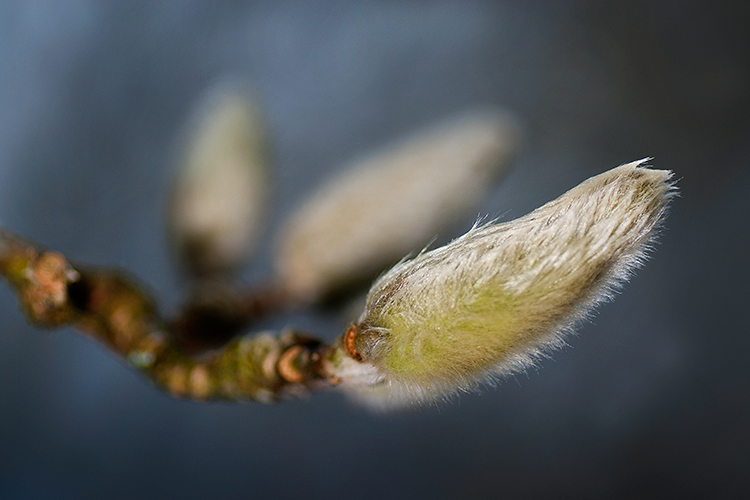
Negative space can really make an image interesting. Negative space is essentially blank space, but really, it helps to anchor your image. It provides really important information about the image. A blue sky can be used to create negative space. The blueness of the sky tells the viewer that it was a sunny day. Your blue sky may have one small cloud in it and that can make the negative space seem interesting.

The blue sky and the hint of a cloud makes this negative space interesting

The blue sky and the hint of a cloud makes this negative space interesting

5. Framing

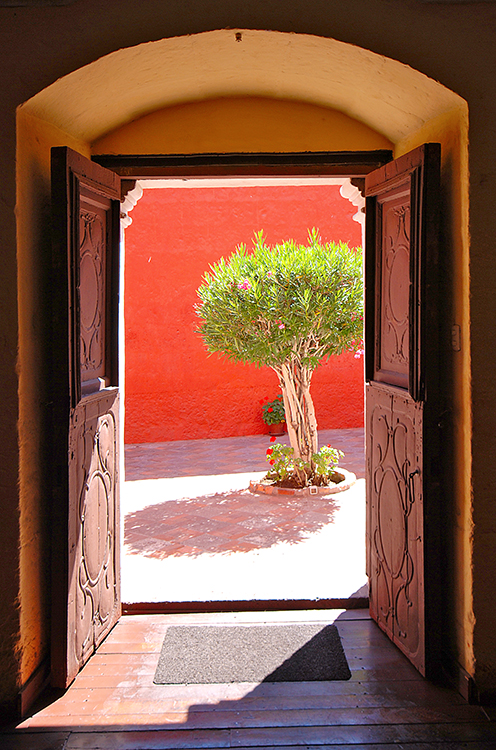
Framing can be used very effectively to showcase your subject. You can use a window, a door, or even trees to frame a subject. The idea is to create a frame around the subject that does not distract from the subject, but causes the viewer to know immediately where to look.

A tree, framed by an old wooden door.

A tree, framed by an old wooden door.

When you are looking at a scene for the first time, try some of these techniques, or try a combination of them. Shoot from different angles and move around your subject before settling on a composition. You will find that by looking at the scene in many different ways, you will unlock more creativity. Your best shot, may not be your first compositional choice. Composition is one of the more flexible tools in your creative toolbox. You don’t need any particular piece of equipment to change it, you simply need to move your camera around. Give it a try, load your results up in the comments!

googletag.cmd.push(function() {
tablet_slots.push( googletag.defineSlot( “/1005424/_dPSv4_tab-all-article-bottom_(300×250)”, [300, 250], “pb-ad-78623” ).addService( googletag.pubads() ) ); } );

googletag.cmd.push(function() {
mobile_slots.push( googletag.defineSlot( “/1005424/_dPSv4_mob-all-article-bottom_(300×250)”, [300, 250], “pb-ad-78158” ).addService( googletag.pubads() ) ); } );

The post 5 Ways to Change Your Composition For Better Photos by Barry J Brady appeared first on Digital Photography School.


Digital Photography School

 
Comments Off on 5 Ways to Change Your Composition For Better Photos

Posted in Photography


Parallax View: Apple patent hints at 3D effect in photos

22 Aug

Patent spotting site Patentlyaple has discovered an Apple patent application titled “Parallax Depth Rendering” which describes a methodology for rendering images and video that, when viewed on a standard 2D display, give the impression of showing a 3D view. Click through for more details

Articles: Digital Photography Review (dpreview.com)

 
Comments Off on Parallax View: Apple patent hints at 3D effect in photos

Posted in Uncategorized


10 Best Photos from the Summer Landscape Photo Contest – Pick the Winner Now!

21 Aug

Our Summer Landscape Photo Contest is entering the final stage. HUGE THANKS to all the participants who uploaded their photos to our Flickr group pool. It’s great to know that so many talented and creative photographers read our blog. The contest jury had difficult time selecting only 10 photos from all the beautiful images submitted. But the finalists are picked and now only YOU decide Continue Reading

The post 10 Best Photos from the Summer Landscape Photo Contest – Pick the Winner Now! appeared first on Photodoto.


Photodoto

 
Comments Off on 10 Best Photos from the Summer Landscape Photo Contest – Pick the Winner Now!

Posted in Photography


Processing Black and White Photos with OnOne Perfect B&W

18 Aug

Black and white photography is classy and powerful. When properly done, it can be enticing and dramatic. In fact, a great portion of fine art photography hanging in galleries is monochromatic. In the age of film, all it took was to load black and white film into your camera, but nowadays most digital camera sensors are recording images in color and with that, if you want to explore the black and white world, you’ll have to convert your images in the post-processing stage.

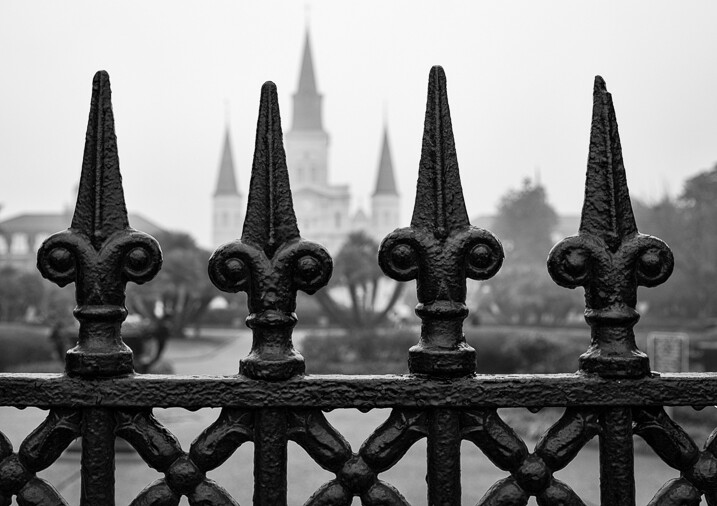
Close up of iron fence around Jackson Square in New Orleans with the St. Louis Cathedral behind.

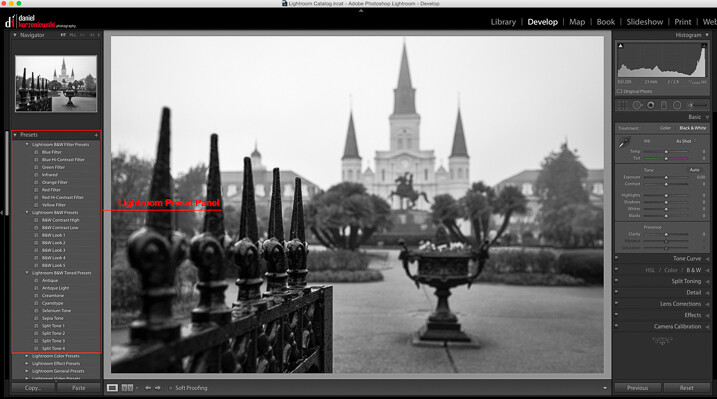
When it comes to converting and processing photos to black and white, there are a number of options. If you are a Lightroom user, there is a black and white option within the Basic Develop panel as well as some presets that come preloaded. All you need to do is click on them, and tweak the sliders until you get the desired effect.

Processing-black-white-photos-onone-perfect-bw-2

There are also, of course, more sophisticated alternatives that could help make your work easier. Among those, Perfect B&W from OnOne Software is one of my favorite options. This application can be used as a plug-in with Adobe Photoshop, Lightroom, Photoshop Elements, Apple Aperture, or as a standalone app. OnOne offers a full set of applications called Perfect Photo Suite, Perfect B&W is included in it, but it can be also purchased separately as a standalone application.

The idea behind this product is to help you to easily enhance your photos. There are controls to adjust tone, curves, color response via filters, and borders – and of course, it also comes with different types of presets. You’ll also be able to create your own presets and save them as well.

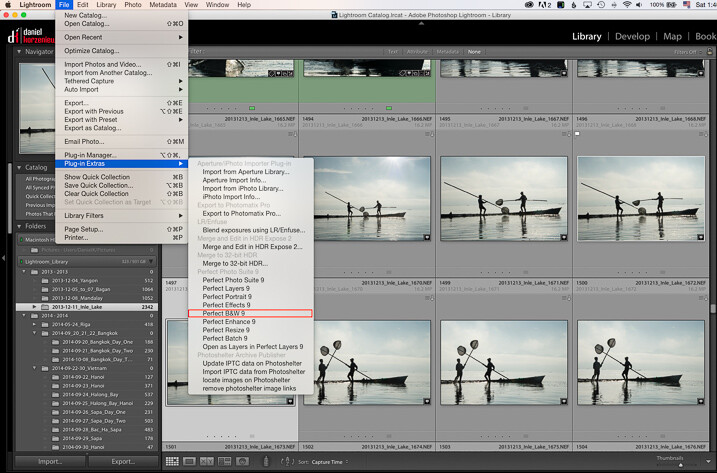
As I am an Adobe Lightroom user, I’ll demonstrate some of the features of the product by opening it from there. To launch the application, you need to select an image from the Library or Develop Module and go to the File Menu, then select Plug-In Extras and navigate to Perfect B&W 9.

Processing-black-white-photos-onone-perfect-bw-3

One of features that you’ll probably like is the possibility to save all your changes as a Smart Photo. It means that even after your edits are done, you’ll be able to come later and redo your settings. This way, you are working in a nondestructive way. The application will pop up a dialog box when you launch it, asking if you want to edit in this work mode.

Processing-black-white-photos-onone-perfect-bw-4

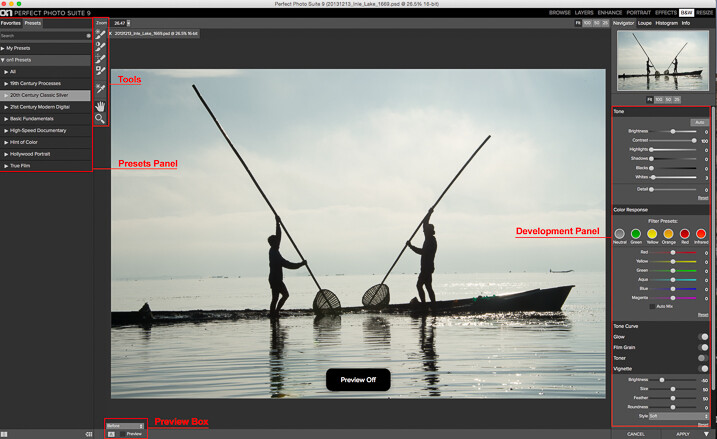
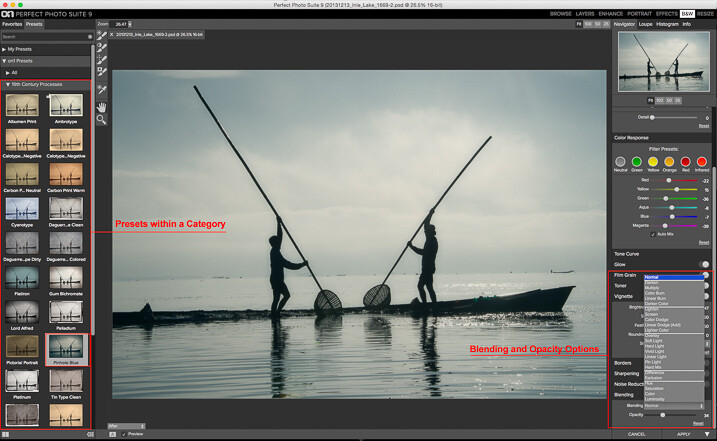
Once the applications opens, the layout is similar to what you find inside Lightroom. The preset panel is on the left and the develop options are on the right. There is also a set of tools that let you selectively add more contrast, brightness, or even mask entire areas in case you want to do a selective color treatment.

Processing-black-white-photos-onone-perfect-bw-5

Once you are ready to work, you have the option to start by selecting the different presets, or just working with the sliders in the development panel. You need to be sure that you have selected the preview option at the bottom to see the effect on the image; you can toggle back and forth to show the before and after.

My preferred way of working is to use one of the presets as a base or staring point, then modify it to my liking with the sliders. The presets are divided into eight categories, as follows:

  • 19th Century Processes
  • 20th Century Classic Silver
  • 21st Century Modern Digital
  • Basic Fundamentals
  • High Speed Documentary
  • Hint of Color
  • Hollywood Portrait
  • True Film

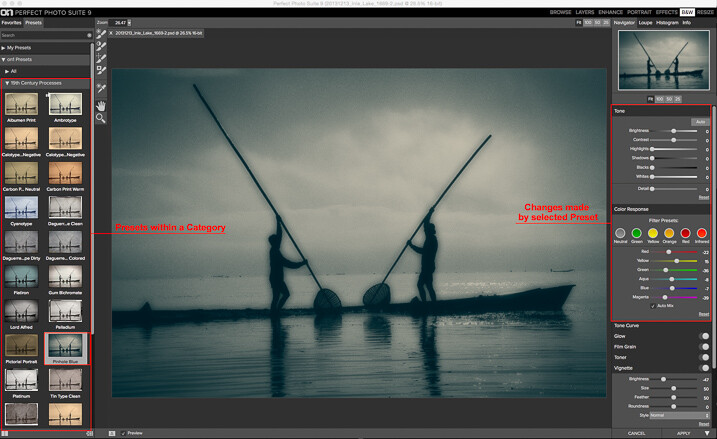
The names are pretty much self-descriptive, and if you click on them, you’ll see all the presets within that category with previews on the side panel itself.

Processing-black-white-photos-onone-perfect-bw-6

As you can see in the image above, the application also allows for duotone images by combining the use of color filters, so you are totally flexible on the type of look you can create. For example, if I click the Pinhole Blue preset from the 19th Century Process, the software will create that effect, and you’ll see how some the sliders from the Develop Panel changed to create it.

From there you can pretty much tweak the image any way you want, and there is also an option where you can select the blending mode, exactly the same way layers work in Photoshop. You can also drop the opacity for a more subtle effect. In the example below I reduced the opacity to 34 percent.

Processing-black-white-photos-onone-perfect-bw-7

The different old century presets are great to create all the vintage looks that are so popular today, with just a few clicks and without the need to know more complicated software.

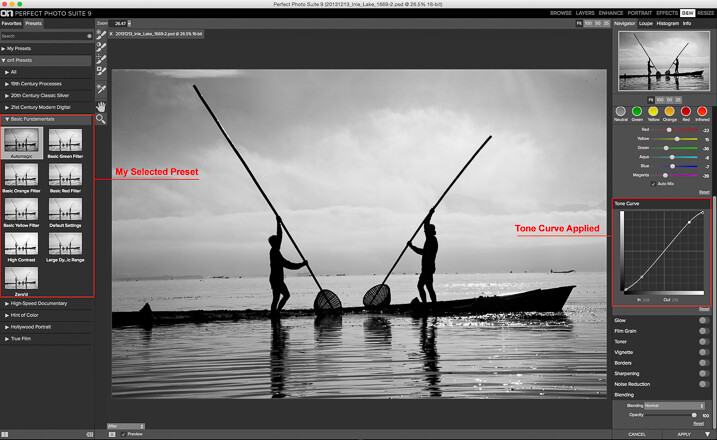
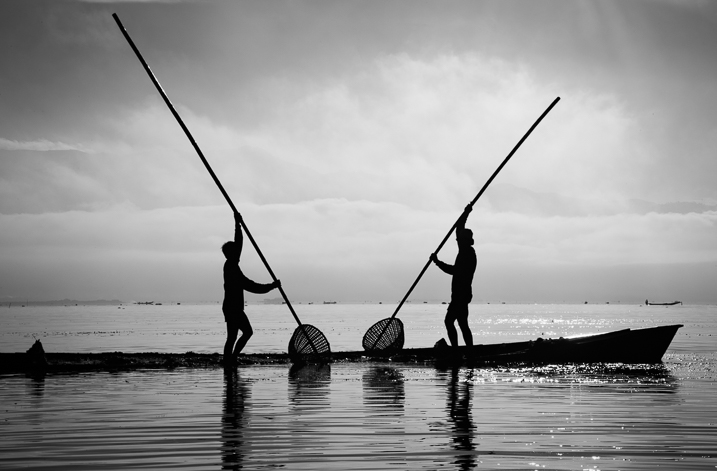
For my final image, I selected Automatic from the Basic Fundamentals, then added contrast by adjusting the Tone Curve. I also moved the Detail slider to 15 so the ripple effect on the water was more noticeable; it also helped to add some drama to the sky.

Processing-black-white-photos-onone-perfect-bw-8

As I knew I wanted to re-crop the image, I didn’t add any other effect here, so I went back to Lightroom cropped the image, then added a vignette.

Processing-black-white-photos-onone-perfect-bw-9

OnOne Perfect B&W is a well-rounded application and a powerful tool for black and white conversions. I believe the best way to judge it is to give it a try. The good thing is that the company is offering a thirty-day trial, so it won’t cost you to play with it; moreover, you can download and test the full suite if you want. The regular price for the standalone application is $ 59.95 and the complete suite is $ 149.95. They can be downloaded straight from the OnOne website.

Editor’s Note: This is second last of a series of articles this week featuring black and white photography tips. Look for earlier ones below and the last one later today.

  • 5 Simple Ways to Create Expressive Photos in Black and White
  • Tips for Black and White Wildlife Photography
  • 7 Tips for Black and White Portrait Photography
  • 28 Images with Strong Black and White Compositions
  • Weekly Photography Challenge – Black and White Techniques
  • Tips for Black and White Wildlife Photography
  • How to Convert Images to Black and White and Add a Color Tint in Photoshop
  • Shooting all Black and White for a Day to Improve Your Photographic Eye
  • Split Toning Black and White Images in Lightroom

googletag.cmd.push(function() {
tablet_slots.push( googletag.defineSlot( “/1005424/_dPSv4_tab-all-article-bottom_(300×250)”, [300, 250], “pb-ad-78623” ).addService( googletag.pubads() ) ); } );

googletag.cmd.push(function() {
mobile_slots.push( googletag.defineSlot( “/1005424/_dPSv4_mob-all-article-bottom_(300×250)”, [300, 250], “pb-ad-78158” ).addService( googletag.pubads() ) ); } );

The post Processing Black and White Photos with OnOne Perfect B&W by Daniel Korzeniewski appeared first on Digital Photography School.


Digital Photography School

 
Comments Off on Processing Black and White Photos with OnOne Perfect B&W

Posted in Photography


Royal Family expresses concerns over alarming measures used by paparazzi seeking photos of Prince George

15 Aug

The Duke and Duchess of Cambridge have expressed concerns with some of the recent tactics used by paparazzi trying to photograph their two-year-old son. The letter details some of the methods photographers have used to try and get their shots, including hiding in sand dunes and using other children to lure Prince George into view at playgrounds. Read more

Articles: Digital Photography Review (dpreview.com)

 
Comments Off on Royal Family expresses concerns over alarming measures used by paparazzi seeking photos of Prince George

Posted in Uncategorized


5 Simple Ways to Create Expressive Photos in Black and White

14 Aug

Can you visualize the world around you in black and white? It’s not easy to do at first with an array bright colors competing for your attention. Look a little closer however, and you may recognize the broad potential for expressive imagery. Of course, not every situation lends itself to this artistic style. There are however, certain characteristics you can look for, to identify the best opportunities.

1) Embrace High Contrast

A subject with dark shadows and bright highlights would not be ideal for a color photograph. In fact, it’s one of the reasons techniques like HDR have become so popular. Yet, for black and white photography, this type of high contrast light can be extremely effective. The harsh mid-afternoon sun is no longer a detriment, but an enhancement. This is a major shift in the way one thinks about exposure. To help recognize these chances, look beyond what is immediately evident and pre-visualize the scene in grayscale. A scene you passed on, in color may prove quite dramatic in black and white.

As is always the case in all good art, rules are meant to be broken. The same is true with black and white exposures. You have even more flexibility as shadows can be inky black, and highlights can clip the histogram while retaining the image’s visual appeal. To maximize the dynamic range of the camera, use the “ETTR” technique (expose to the right). Rather than a muddy exposure, you’ll enjoy the crisp contrast of the full tonal range.

2) Simplify with Shape and Form

In the absence of color, shapes and patterns become more pronounced. Lighter tones will stand out boldly when placed in front of a darker area. This is an effective way emphasize the important parts of a subject while minimizing distractions. To compose this way, think about the process of subtraction. What can you remove from the image that’s not essential to the story? As you simplify, the design of the photo will get stronger.

Even something as simple as a shadow on the ground can be used creatively. To the human eye, detail is evident in the pavement, but with a camera they can be rendered as inky black. This may be a very different style of seeing for you. To practice, I recommend taking a photo hike in which you search for nothing but shadows. You may be pleasantly surprised by how many interesting shots you’ll find.

3) Details Tell a Story

It’s been said that a person’s eyes are the windows to their soul. Their character however, can often be revealed in their hands. In black and white, the subtle details that often go unnoticed become more evident. Wrinkles and texture, for example, benefit from a deeper more textured appearance. This method is especially effective when using flat or overhead light. Typically this direct light would be undesirable, but in grayscale it can be preferable to that of a softer, diffused quality light.

4) Imagine a Mood

Blue skies are often used to symbolize happiness. You’ll see this pattern in magazine ads, television commercials, and even movies. Black and white images however, are associated with a different variety of moods. The precise emotion is ultimately up to the viewer, but a few common themes include solitude, contemplation, and pensiveness. Photographers of all genres can work with these traits to effectively portray their vision.

Use your imagination to visualize the mood you want an image to have. A great place to start is to study some of the masters. While Ansel Adams’ landscapes in black and white are very well known, go further in your research. For example, look at the emotion in Edward Weston’s famous “Pepper No. 30”. Another fine representation of this medium is “White Sands, New Mexico” by Ernst Haas. Of course the list goes on, but these are a good place to start. A visit to a local library will undoubtedly prove inspirational as you may discover work by artists you are not yet familiar with.

5) Dark Spaces and Silhouettes

Subjects that linger in darkness are sometimes more compelling than well-lit scenes. Using black and white photography, you have the ability to show the world in a completely different way. Instead of eliminating the shadowy areas, use them to your advantage. An empty space can actually be an effective method of composition. This type of artistic exposure is more edgy than a literal interpretation.

Take a look through your own catalog of images. There will likely be a number of photos that could be quite dramatic as a black and white. As you convert them from color, experiment with different post production filters to see how it impacts the scene. For example, a blue filter may lighten the sky dramatically, whereas a yellow filter will make it darker. If you’re looking for even greater control, there are a number of excellent plugins available. One of my favorites is Exposure by Alien Skin as it offers nearly endless customization. More terrific options include software by Nik, Topaz, and OnOne.

Editor’s Note: This is the first article in a week full of features on black and white photography. Look for another one later today and daily over the next week.

googletag.cmd.push(function() {
tablet_slots.push( googletag.defineSlot( “/1005424/_dPSv4_tab-all-article-bottom_(300×250)”, [300, 250], “pb-ad-78623” ).addService( googletag.pubads() ) ); } );

googletag.cmd.push(function() {
mobile_slots.push( googletag.defineSlot( “/1005424/_dPSv4_mob-all-article-bottom_(300×250)”, [300, 250], “pb-ad-78158” ).addService( googletag.pubads() ) ); } );

The post 5 Simple Ways to Create Expressive Photos in Black and White by Chris Corradino appeared first on Digital Photography School.


Digital Photography School

 
Comments Off on 5 Simple Ways to Create Expressive Photos in Black and White

Posted in Photography


Class Is In Session! Turn Photos Into School Supplies

13 Aug

Can it be? Summer’s almost over? It feels like it just started.
Guess that means it’s time to switch sunbathing for school supplies. But hey, that’s not a bad thing. Really!

Just check out our list of DIY school supplies that you can make out of your very own photos and you’ll see what we mean.

Now go get crafty and make all your classmates jelly!
(…)
Read the rest of Class Is In Session! Turn
Photos Into School Supplies (445 words)


© Taylor for Photojojo, 2015. |
Permalink |
No comment |
Add to
Photos Into School Supplies”>del.icio.us

Post tags:


Photojojo

 
Comments Off on Class Is In Session! Turn Photos Into School Supplies

Posted in Equipment


Google and MIT team up on clever method to remove reflections and obstructions from photos

06 Aug

Researchers at MIT and Google have developed a technique for removing unwanted reflections and obstructions from photos. Taking advantage of the parallax effect, this method could prove quite useful in locations where shooting behind glass or a fence is the only option. Read more

Articles: Digital Photography Review (dpreview.com)

 
Comments Off on Google and MIT team up on clever method to remove reflections and obstructions from photos

Posted in Uncategorized