RSS
 

Posts Tagged ‘Photos’

6 Reasons Your Photos Might Be Lacking Sharpness

31 Aug

The post 6 Reasons Your Photos Might Be Lacking Sharpness appeared first on Digital Photography School. It was authored by Kav Dadfar.

Capturing sharp photos needn’t be difficult. Most amateur photographers who struggle to capture sharp photos make one of the common mistakes listed below. The good news is that with a little bit of practice and knowhow, you will be able to take sharp photos most of the time. At the very least, you should accept that you will make mistakes and have blurred photos from time to time when starting out. Instead of getting frustrated, try to analyze each blurred photo to understand why it might be lacking in sharpness. In the meantime here are 6 reasons your photos might be lacking sharpness.

Reasons-Your-Photos-Might-Be-Lacking-Sharpness

Reasons your photos might be lacking sharpness

1. Shutter speed too slow

Often this is the number one culprit for photos lacking sharpness. There are three potential mistakes when it comes to shutter speed. The first is simply the question of are you using a fast enough shutter speed for what you are photographing? For example, a cheetah running will need a much faster shutter speed to freeze the action. Whereas, a statue doesn’t. So the first thing you should do is understand what shutter speed you need for the subject you are shooting. As an example, you might be able to get away with something like 1/60th sec when taking a portrait. But for someone running, you will need a shutter speed of something like 1/200th sec.

The second issue is around the lens you are using. As a general rule, your shutter speed should at the least be the same as your lens focal length. So for example, if you are shooting with a 200mm lens, your shutter speed should be at least 1/200th sec. However, there is a slight caveat to this rule. Image stabilization in modern lenses is very good. It can allow you to shoot below the minimum required. But, to be safe, stick to this rule.

Lastly, how fast you need for your shutter speed also comes down to you. If you have steady hands, then you may be able to shoot sharp photos at a slower shutter speed than someone else. Test this out by photographing a scene at different shutter speeds to determine how slow you can go.

Image: Closer inspection of this photo reveals that there is a lack of sharpness.

Closer inspection of this photo reveals that there is a lack of sharpness.

2. Not using the correct aperture

Your aperture determines your depth of field. This also has a major impact on the sharpness of your photo. For example, if you are photographing a landscape scene with a shallow depth of field like f/2.8, then only a small part of your scene will be sharp. Depending on where you focused, only things along that distance will be sharp. So in this scenario, where you want more of your image to be sharp, you need to use a smaller aperture (i.e., higher f/number).

For something like landscape photography, you need to use an aperture of f/8 or smaller.

Reasons-Your-Photos-Might-Be-Lacking-Sharpness

3. ISO is too high

Even though modern-day DSLRs have hugely improved in the amount of noise that appears in photos at high ISOs, unfortunately, it still does affect sharpness. If you set your ISO too high, your image will begin to look soft and as a result lack sharpness. Always remember only to raise your ISO as high as you need to.

Better still, if you can, use a tripod and keep your ISO low.

Image: This photo was taken at 6400 ISO. When zoomed in, as you can see the noise is making it feel...

This photo was taken at 6400 ISO. When zoomed in, as you can see the noise is making it feel soft.

4. Haven’t locked up mirror

A lot of amateur photographers may not be aware of this potential issue when using a tripod. Every time that you click the shutter button, the mirror inside the camera flips over to allow light to hit the sensor.

When you are using a fast shutter speed, this process doesn’t cause any problems. But when you are photographing using a long exposure where your shutter speed is very slow, when the mirror flips over, the vibrations can cause a lack of sharpness in your image. You can either use the function in your DSLR menu to “lock mirror” or shoot in live view mode for the same effect.

Image: An example of the lack of sharpness even when using a tripod when the mirror hasn’t bee...

An example of the lack of sharpness even when using a tripod when the mirror hasn’t been locked.

5. Poor quality tripod

Just like anything else, there are good quality tripods and poor quality tripods. Of course, buying a better and more sturdy tripod might be expensive, but isn’t that a price worth paying for sharper photos?

A poor quality tripod will put your expensive equipment at risk because it may not be sturdy enough even to withstand a gust of wind. However, cheap material can also be prone to vibrations, which, in turn, can mean a lack of sharpness in your photos.

So don’t take the risk. Ideally, invest in a good quality carbon fiber tripod.

6 Reasons Your Photos Might Be Lacking Sharpness

6. Not using a remote or self-timer

Even the faintest of touches can cause camera shake when photographing at long exposures. This means that even when you press the shutter button to take a photo, you are causing movement. The only way to be sure that your photos will not suffer from camera shake is to use a remote release or the self-timer on the camera. This will ensure you will not have to touch the camera when you take the photo.

Reasons-Your-Photos-Might-Be-Lacking-Sharpness

By far the best way to ensure that your photos are sharp is to use a tripod. But whilst that is not always possible or convenient, by following the advice above you can still ensure that your photos will be sharp.

We hope these tips help you achieve sharper photos! Do you have any other tips to add to the reasons your photos might be lacking sharpness? Share with us in the comments!


Reasons-Your-Photos-Might-Be-Lacking-Sharpness

The post 6 Reasons Your Photos Might Be Lacking Sharpness appeared first on Digital Photography School. It was authored by Kav Dadfar.


Digital Photography School

 
Comments Off on 6 Reasons Your Photos Might Be Lacking Sharpness

Posted in Photography


How to take Great Flower Photos without a Macro Lens

27 Aug

The post How to take Great Flower Photos without a Macro Lens appeared first on Digital Photography School. It was authored by Ana Mireles.

Are you interested to try some flower photography but you get discouraged by guides telling you to get a macro lens? I was too at first, but macro is not the only way to get some amazing pictures. Keep reading for some tips on how to take great flower photos without a macro lens or buying any new equipment or accessory.

How-to-take-Great-Flower-Photos-without-a-Macro-Lens

Flower Photography Detail Close Up

Detail and depth of field

One of the reasons photographers recommend a macro lens is to capture small details with shallow depth of field. Some offer alternatives like extension tubes or reverse rings that allow you to focus while being very close to your subject. This is, in fact, a nice look for flower photography, but if you’re not ready to invest in new gear, there are other ways to get it.

How-to-take-Great-Flower-Photos-without-a-Macro-Lens

Focal Distance: 55mm, f/13, 1/400th, ISO 640

I shot this image using a 55mm lens with f/13, 1/400th shutter speed and 640 ISO. As you can see, I managed to get reasonably close, so never let the lack of equipment prevent you from practicing.

You can start by using a wide aperture and the longest focal distance you have to experiment from there. In order to make the best out of the equipment you have, check out the article How to Control Depth of Field in Your Photography.

Draw inspiration from nature

Now that we’ve covered the macro effect, let’s broaden the horizon and think big. There’s much more to flower photography than just the details. Flowers come in all shapes and colors, so include all those natural elements and use them to your advantage.

Flower Photography in Nature

Composition

There are many rules that you can use as guidelines to create interesting images. To learn more about them I recommend the article How to Apply Compositional Theory to Still Life Photography.

In this photo below, I lowered my point of view so I could create three different segments following the rule of thirds: flowers, trees, and the sky.

How-to-take-Great-Flower-Photos-without-a-Macro-Lens

The Rule of Thirds and point of view help your composition.

Color contrast

Using color as a compositional element is very easy to do when photographing flowers. Because they are so vibrant, you’ll always find one that stands out. You can put contrasting colors next to each other to make elements stand out while still being in harmony. You can start by isolating a subject against the background and work your way up to include more elements.

How-to-take-Great-Flower-Photos-without-a-Macro-Lens

Tones or patterns

Another way to use color in your images is to use only one to dominate the image. It may sound easy and perhaps dull, but in reality, if you incorporate different tones of the same color or a pattern, it can become a subject in itself. Megan Kennedy wrote a number of articles here on DPS called Master Colors Series covering the psychology and evolution of each color. Check them all out for inspiration!

Hues and tones from the same color

The cultural aspect

Now that we’ve passed aesthetics and are into content let’s say that flowers are much more than just pretty subjects. They speak their own language as we have given them all sorts of cultural meanings. The color, the season, and even the presentation change our perception. We use them in joyous celebrations and on the occasion of grief, passing through all other kinds of events. When you incorporate this matter on top of the visual aspect, things can become really interesting.

Still life

Defining the line between photography genres is always a tricky subject. Are all flower photography images a still life? No. Are all still life images flower photography? Also, no. But the two genres often intersect, so play within that field to stage your images. You can use different elements, adjust the lighting and even some post-production. To get you started here are some Simple Methods for Creating Better Still Life Images.

Still life is great for flower photography

Still life is great for flower photography

Conclusion

I’m not suggesting you shouldn’t buy a macro lens or any other gear and accessories, especially if you are planning on becoming a professional. However, there’s much versatility in flower photography so you can do without them. Of course, you can also look into many creative techniques like double exposure, light painting, or dynamic zoom.

Do you have other ideas to take flower photos without a macro lens? Share in the comment section!


How-to-take-Great-Flower-Photos-without-a-Macro-Lens

The post How to take Great Flower Photos without a Macro Lens appeared first on Digital Photography School. It was authored by Ana Mireles.


Digital Photography School

 
Comments Off on How to take Great Flower Photos without a Macro Lens

Posted in Photography


4 Necessary Reasons to Look Through Your Old Photos

27 Aug

The post 4 Necessary Reasons to Look Through Your Old Photos appeared first on Digital Photography School. It was authored by Simon Ringsmuth.

As photographers, we mustn’t live with our heads stuck in the past. If we’re not trying new ideas, exploring new techniques, or finding ways to push ourselves to be better, we might quickly find ourselves drowning in a sea of irrelevance and mediocrity. However, there is a time and a place to look in the rear-view mirror. Looking back at some of your old photos can have incredible benefits, aside from just happy feelings of nostalgia. Sometimes the best way forward is to look at the path we have taken. Even though to look through your old photos can be embarrassing, there are some clear benefits to doing so.

Reasons-to-Look-Through-Your-Old-Photos

1. It helps you realize you weren’t that bad

I’m a pretty self-conscious guy, and as such, I don’t like looking at pictures of myself. I always find something to criticize, even if they are things that no one else would ever notice! Looking back at some of the earlier pictures in my photography portfolio is the same way. Sometimes seeing the pictures I shot is enough to make me cringe. So I want to throw my old albums out the window!

This is precisely why it’s good to dust off your old photo albums or look through the image folders on your computer you’ve been neglecting for years. Looking through the images you shot when you were new to photography, can more often than not, let you see how you really weren’t as bad and probably much more talented than you realize.

Reasons-to-Look-Through-Your-Old-Photos

I shot this in 2013. While I had a lot to learn about lighting and editing, it’s actually a pretty decent image.

If the thought of looking at your old pictures makes your skin crawl, there’s a good chance you might have been a lot better than you thought. While your early images were probably not perfect, they can be a source of encouragement. You see that you clearly did have some skills – even if they had a little way to go before maturing.

2. You can learn from your mistakes

Even though your older pictures might not be as bad as you think, you can learn a lot from going through your earlier work. Over the years, you have almost certainly improved your techniques in terms of lighting, composition, framing, or even just posing your clients.

Reasons-to-Look-Through-Your-Old-Photos

I shot this in 2014 when I didn’t know how to use a reflector but brought one with me to the session anyway. The colors on his face just don’t look right.

I know how it can be painful or embarrassing to scroll through your photos from five or ten years ago. It’s almost like looking through your high school yearbook and cringing at the silly hairstyles and weird fashion choices from days gone by. If you do this with your images, instead of turning away from your mistakes, learn from them. Realize what not to do now and in the future.

The image below is a good example of this. While my clients were happy, and so was I at the time, when I look at this picture now all I see are errors to fix. I shot it with a 50mm lens at f/2.8 and focused on the man in the back, which meant everyone else is out of focus. I didn’t have a sense of how to pose, nor was I really paying attention to lighting. The list goes on.

However, rather than pretend this session didn’t exist, I use it as a learning opportunity.

Image: One of my first portrait sessions, shot in early 2013.

One of my first portrait sessions, shot in early 2013.

Here’s another illustration of how much I have learned since my early days, especially when it comes to formal sessions. Why is there an orange shoe in the middle of the picture? Also, why is there a giant tree growing out of the head of the child on the left? Why did I use a 1/80th shutter speed?

The world may never know the answers, and I certainly don’t. However, when I see this old picture, it helps me also see what I can do differently today.

Image: Another family portrait session from 2013. Don’t judge me…I was new and didn...

Another family portrait session from 2013. Don’t judge me…I was new and didn’t know what I was doing. My clients liked it though!

3. It helps you refine your editing style

In addition to photography style and techniques, searching through your old pictures can give you a great deal of insight into your editing process.

It’s not easy to see slow, incremental changes over time. However, when you compare your current editing style to that of when you first started, you might be surprised. You may even be shocked at the difference. This can be a learning opportunity and help give you insight into how you might continue to refine and hone your edits.

I took the following picture in the summer of 2013, and I clearly remember spending a long time working with it in Photoshop. The result is what you see here: over-saturated sky, poor dynamic range, and a weird color balance that seems unnatural and icky.

4 Necessary Reasons to Look Through Your Old Photos

When I edited this RAW file, I was way, way over-thinking the process and ended up with kind of a mess. I can still see myself hunched over an old iMac, refining my selections, creating new layers, and fiddling with color edits ad nauseam. Now I’d just pull this into Lightroom, tweak a few sliders, and end up with a much cleaner and more pleasing image.

Here’s another picture that, upon first look, makes me want to chuck my computer out the window and never look at my cameras again.

Image: Shot in the fall of 2014, when I still had an awful lot to learn.

Shot in the fall of 2014, when I still had an awful lot to learn.

This picture is practically a textbook example of what not to do when shooting or editing a picture. Aside from all the issues in the image itself (soles of shoes, people sitting on an old canvas, awkward posing and hand placements, an disregard for background objects), the editing was atrocious.

My subjects are underexposed. The white balance is all wrong, and there’s no sense of contrast. Moreover, I didn’t bother using any noise reduction, so their faces are kind of patchy if you zoom in to 100%.

I’m a much better editor now than I was back when I shot this seven years ago. When I look at this picture and others like it, I can immediately see how I have changed my editing process over the years. It gives me a few ideas of what I should continue refining in the future.

Reasons-to-Look-Through-Your-Old-Photos

When I edited this picture in 2013, I didn’t know what I was doing. But looking back at it helps me remember what to do, what not to do, and what I can change in my current style.

4. Early photos can inspire you!

There’s a lot I wish I could take back about my early photography. However, I feel some of my work now lacks something: a spark of life and a sense of abandon. When I first picked up a camera, I would see photo opportunities everywhere; inside my home, walking around the neighborhood, even my office at work.

With clients, I had a much more carefree attitude, shooting whatever I wanted, whether I thought it would look good or not. It was a carefree time when I didn’t worry about (or even know about) proper technique, good lighting, high ISO values, rolling shutter, or any of that. Like a kid in a candy store, I remember latching on to anything and everything around me.

I even set my alarm early so I could take pictures of my kids’ toys in the living room before the sun came up.

Reasons-to-Look-Through-Your-Old-Photos

I took my camera to a sporting event back in 2014 and shot everything I could see, even if I didn’t know what I was doing. Including these bocce balls sitting on astroturf. I kind of miss that approach, and looking at photos like this helps rekindle it.

When I started taking pictures more seriously, I saw the world differently. Every tree, building, or animal was a fun and exciting photographic opportunity. I’ve lost that over the years. Now I think I over-analyze situations – trying to find the perfect moment, subject, or lighting condition.

Going back through old photos takes me back to a time when I didn’t care about any of that. I just took pictures of what I thought was fun and interesting. It has inspired me to be a little more creative and a little less analytical with my photography now.

Image: I spent half an hour trying to capture this image with my brother in the summer of 2014. We h...

I spent half an hour trying to capture this image with my brother in the summer of 2014. We had such a fun time doing it! I need to do more shots like this…

Looking at your old pictures can bring up some strange emotions, and it can certainly be awkward or feel silly. But buried in your images from days gone by is a treasure trove of education just waiting to be unlocked.

Reasons-to-Look-Through-Your-Old-Photos

This image of a tree borer I took in 2013 remains one of my favorite insect pictures I have ever taken.

Conclusion

The next time you pull up your photo library on your computer or scroll through images in your photo app, go back to your earliest pictures and see what you can learn from them. You might be surprised at how enjoyable and educational your trip down memory lane can be!

Do you ever look through your old photos? What have you learned from them? Share with us in the comments!


Reasons-to-Look-Through-Your-Old-Photos

The post 4 Necessary Reasons to Look Through Your Old Photos appeared first on Digital Photography School. It was authored by Simon Ringsmuth.


Digital Photography School

 
Comments Off on 4 Necessary Reasons to Look Through Your Old Photos

Posted in Photography


How to Make an Awesome Pop-Up Card with your Photos

25 Aug

The post How to Make an Awesome Pop-Up Card with your Photos appeared first on Digital Photography School. It was authored by Ana Mireles.

If you can cut and fold a piece of paper to make a pop-up, why can’t you make it to an image? A photograph translates our three-dimensional world into a two-dimensional representation. With a pop-up card, you can present it with tridimensionality. Here are some ideas to bring your photos to life by turning them into an awesome pop-up card!

How-to-Make-an-Awesome-Pop-Up-Card-with-your-Photos

From paper crafting to paper engineering, this creative practice can be as complex as you want. I will show you two basic techniques that you can apply to your own images. Keep in mind that each image will need specific measures and some testing before you get it right, so be patient!

What you need to make your awesome pop-up card

I recommend you print some copies of the photo in black and white on a cheap paper so you can do your testing without spending much. Then get scissors, a precision cutter, ruler or measuring tape, double-sided tape, and a cutting board.

How-to-Make-an-Awesome-Pop-Up-Card-with-your-Photos

1.Single image pop-up card

Choose the right image

Because you want to give it a third dimension, images that have a clear separation of elements will work best. For some guidelines on this check out the article How to Use Figure to Ground Art Theory in Photography. Print your image at least two times, and one for each layer you want to add.

Foreground and Background are separated for a better pop-up card

Layers and more layers

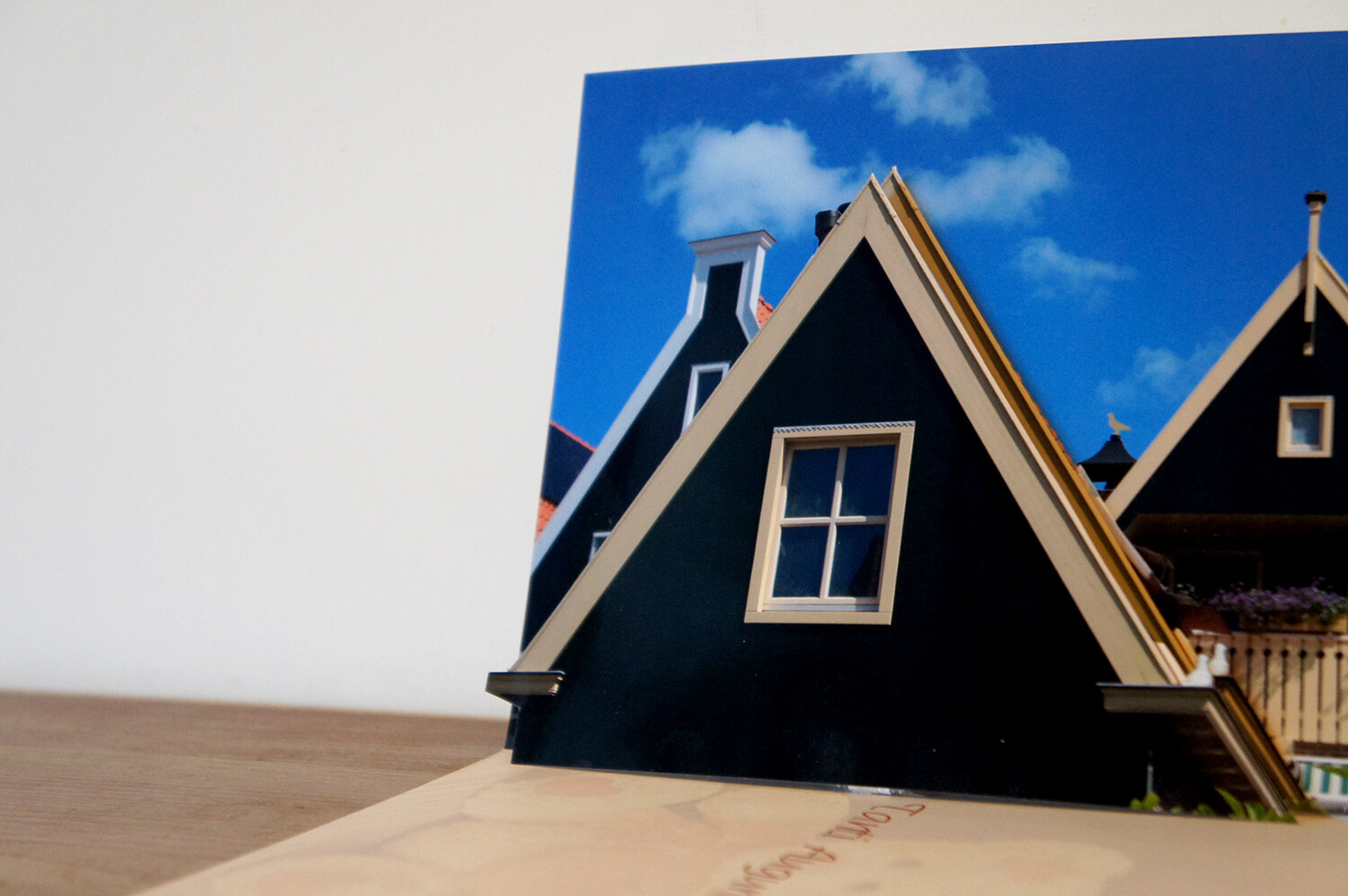
The more elements you separate into layers, the more interesting and elaborate your card will look. I promised to keep it simple so I’ll just add one layer to show you the process, then just repeat it as many times as you want. Cut out the element of the layer that will pop up. In this case, I’ll cut the house in the front.

How-to-Make-an-Awesome-Pop-Up-Card-with-your-Photos

Cut also a stripe of paper, either from the photo or any other thick paper that will hold the layer up. The longer you make it, the bigger the separation to the background.

Fold and paste

Now paste the background to the card which can be store-bought or just a piece of colored paper folded in two that you can later write your message on. Place the base of the photo on the crease where the card folds.

paste background into card

Fold the paper stripe into a square. Then paste one side to the background and one to the bottom side of the card. This will serve as support to the pop-up cutout.

piece of paper to hold the pop-up piece

Paste the other side of the square to the background, and the bottom part to the card. Making sure the cutout matches the original image when you position it. That’s it. Do the same for any elements you want popping out.

How-to-Make-an-Awesome-Pop-Up-Card-with-your-Photos

2. Multiple image pop-up card

This technique is great when you want to showcase many images. For example, an anniversary or a birthday where you want to sum up the highlights of the year. It’s also useful when you want to make a themed card to communicate a concept.

Create the layout

The first thing you want to do is choose your images. Then arrange your images in a grid. To automatize this process you can use Lightroom. If you need some direction just follow the instructions of How to Create Contact Sheets in Lightroom. Set it to the size of the card you’re going to use: for me is an A3 so 4 columns and 3 rows should look nice, but this is entirely up to you.

Print thumbnail images to use

Note that the outer images of the middle row will get folded in half, so use images that fit this crease, or leave it black.

Fold

Fold the paper vertically in half, and then each side again in half towards the opposite direction. As a result, you will have an accordion where the folds separate the columns.

Fold contact sheet as accordion

Cut

Unfold the accordion and just leave it in half. If you do it in a way that the images are towards the outside, you won’t have to measure and just guide yourself by the images. Cut horizontally between rows reaching the middle of the outer image. Then fold inwards the piece you just cut.

How-to-Make-an-Awesome-Pop-Up-Card-with-your-Photos

Paste

Now put some double-sided tape into the side edges and fix it to the card. Make sure the fold in the middle of the accordion coincides with the fold of the card.

pop-up card with accordion photo album

I hope you enjoyed reading How to Make an Awesome Pop-Up Card with your Photos and that you enjoy making pop-up cards yourself! For future occasions, if you want to go deeper into this craft side of photography I’ll leave you some links to check out.

Additional reading

If you’re feeling creative and want to do other types of cards, check out these amazing tutorials:

  • How to Make Your Own Postcards: Cheap!
  • Greeting Card Templates in PS or PSE
  • How to Make Great Photo Invitations in Photoshop


How-to-Make-an-Awesome-Pop-Up-Card-with-your-Photos

The post How to Make an Awesome Pop-Up Card with your Photos appeared first on Digital Photography School. It was authored by Ana Mireles.


Digital Photography School

 
Comments Off on How to Make an Awesome Pop-Up Card with your Photos

Posted in Photography


You can now search for images in Google Photos using text found within the image

24 Aug

Google has confirmed Google Photos is adding the ability to search for images using the text featured in the content. This is different than searching for images based on their filename, instead using Optical Character Recognition (OCR) technology to identify words featured in photographs, such as from an image of a menu or sign.

The feature was first spied by Hunter Walk, who shared the above screenshots of the new capability. The official Google Photos account responded to the tweet, confirming it’s rolling out the new search capability.

Though apps that use OCR to copy text aren’t anything new, the ability to search through albums of uploaded photos for text located within the images will come in handy for many users, particularly those who use Google Photos for storing scanned copies of invoices and other business documents.

According to The Verge, the new OCR-based search option is available on some Android devices at this time. Google indicated in its tweet that the feature is rolling out over the course of this month, so it may take a number of days or weeks to arrive for everyone.

Articles: Digital Photography Review (dpreview.com)

 
Comments Off on You can now search for images in Google Photos using text found within the image

Posted in Uncategorized


5 DIY Macro Photography Hacks for Stunning Macro Photos (on a Budget)

23 Aug

The post 5 DIY Macro Photography Hacks for Stunning Macro Photos (on a Budget) appeared first on Digital Photography School. It was authored by Jaymes Dempsey.

Do you want to take stunning macro photos…

…on a budget?

In this article, I’m going to show you exactly how you can capture amazing macro photos (without breaking the bank). You’ll discover 5 DIY macro photography hacks which you can use for consistently gorgeous images.

5 DIY Macro Photography Hacks for Stunning Macro Photos (on a Budget)

Sound good?

Let’s dive right in, starting with:

1. Use a board for a stunning macro photography background

First things first:

In macro photography, the background matters almost as much as your main subject. Because the background is what makes your main subject stand out.

One of my favorite backgrounds is a solid, uniform color:

Dark black.

Black backgrounds allow you to capture somber, moodier macro photography. Like this:

5 DIY Macro Photography Hacks for Stunning Macro Photos (on a Budget)

Now, achieving a natural black background in nature can be tough. Which is why this DIY hack is so valuable. Because you can use it to create a deep black background in all of your macro photos.

Here’s what you do:

Step 1: Go to your local hardware store and purchase a plywood board. I’d suggest something ultra-thin (because wood can get heavy, fast). I’d also go for a decent size: at least two feet on all sides.

Step 2: Purchase black paint and primer. I recommend getting a sample paint pot (one should be more than enough). These are cheap and work just fine. The primer is to prevent the wood from tainting the color.

Step 3: Add the primer and paint the board. I’d recommend two coats of black paint for that ultra-dark look.

Step 4: Let the board dry.

Now comes the fun part:

Actually taking the photos!

You should choose a main subject that’s fairly light (e.g., yellow and white flowers). Position your main subject so that it’s in the sun, with the black board in the shade, a foot or so behind it. You want to create as much contrast as possible between the board and your subject. That is, you want a light subject on a dark board.

DIY-macro-photography-hacks

The goal is to lose absolutely all detail in the background. If you don’t fully achieve this in-camera, you can use an editing program to drop the blacks in your images.

You can still make this work with diffused (i.e., cloudy) light. But you’ll need to do a bit more work in post-processing to bring down the blacks.

Bottom line?

You can work some serious magic with just a board and some paint.

Try it yourself! And watch as you capture amazing macro images.

2. Use a lightbox for a stunning high-key, transparent look

Have you ever wanted to capture macro photos that look bright and high-key? Maybe even transparent?

With this DIY hack, you can!

All you need is a basic lightbox, often used by artists for tracing. You can purchase one for around 20 dollars on Amazon. While a bigger lightbox is generally better, anything A4 and above should work fine.

Once you have your lightbox, you’ll need to choose a main subject. Flowers with translucent petals work best. And the flatter the flower, the better.

You’ll want to work in a room that has only diffused ambient light. You want your flowers to have a soft, even look.

Then turn on the lightboard, and place your flowers on top of it.

DIY-macro-photography-hacks

I recommend shooting parallel to the lightbox from above. While you can do everything handheld, I don’t recommend this, especially if your flowers are more three dimensional. Instead, mount your camera on a tripod and use a narrow aperture (i.e., f/8 and above) to ensure perfect sharpness.

Once you have your shots, you’ll probably need to do a bit of post-processing. I recommend increasing the whites, to give a slightly brighter, airier look.

3. Shoot with one flower in a vase for powerful compositions

There’s no doubt about it:

The way that flowers are positioned can make a macro shot look amazing…or terrible. If several flowers are overlapping, your photo may fall flat.

But if you can isolate a single flower…

…that’s when things start to look really compelling.

Now, when you’re shooting in nature, you don’t have much control over this. You have to work with what you’ve got.

But if you use this DIY macro photography hack, you can capture a gorgeous set of macro flower photos.

Guaranteed.

Here’s how it works:

Go to your local grocery store, and purchase a bouquet of your favorite flowers. I like to work with tulips, but you can really use anything!

When you get home, check over the flowers for blemishes and other issues. Find the biggest, best-looking flowers of the bunch.

And then put them all in separate vases (or cups).

5 DIY Macro Photography Hacks for Stunning Macro Photos (on a Budget)

Note: You want the flowers to extend pretty far over the top of the vase, which is why I suggest you avoid taller vases.

The next time the light is good, take all the vases outside. Place them in front of a gorgeous background.

(I often use an orange sky at sunset.)

And then photograph all the flowers, individually. Because they’re in separate vases, they’ll all be perfectly isolated. And this will allow you to easily capture powerful compositions.

Try it.

You’ll love the final product.

5 DIY Macro Photography Hacks for Stunning Macro Photos (on a Budget)

4. Detach your lens for an artistic macro look

If you’re bored of getting the same macro look over and over again, then this DIY macro photography hack is for you.

It’ll help you capture photos with brilliant light leaks, like this:

macro-photography-DIY-hacks

If you’re familiar with the concept of freelensing, it’s like that, but with a twist.

Here’s how you do it:

Choose a backup camera body and a cheap camera lens in the 50mm range. (There’s a slight risk of exposing your camera sensor to dirt.)

Focus your lens to infinity.

Then turn off your camera, and detach the lens.

Next, turn the camera back on, and pull the lens just slightly away from the camera (it should still be detached!).

This will actually magnify your subject, while often giving you some amazingly artistic light leaks.

DIY-macro-photography-hacks

And while the technique may require a bit of experimentation, you’ll get the hang of it pretty quick, and you’ll capture some gorgeous macro photos.

5. Use fairy lights for amazing background bokeh

Here’s your final DIY macro photography hack (and it’s one of my favorites):

Use fairy lights for gorgeous macro backgrounds. They’ll get you photos like this:

DIY-macro-photography-hacks

To start, grab a set of fairy lights on Amazon (for around 10 dollars). I recommend a neutral or warmer color.

Go out to shoot around dusk, when the light is really starting to fade.

Find a nice subject, and position the fairy lights directly behind it. You can dangle them from surrounding vegetation, or you can hold them with your left hand.

Now, you don’t want to position the fairy lights too close, or else you’ll capture the wiring in your photos. Instead, you want them to show some nice bright light without being prominently featured.

You should also make sure to use a shallow aperture, in the area of f/2.8 to f/5.6. That way, the fairy lights will be fully blurred, creating some stunning bokeh.

The trick is an easy one, but it’ll get you amazing macro photos!

DIY-macro-photography-hacks

DIY macro photography hacks for stunning macro images: Conclusion

You’ve now discovered five DIY macro photography hacks.

And you can use them for stunning macro photos all the time.

So go ahead and start. Make your black board. Grab yourself some fairy lights.

And take some amazing macro photos!

Do you have any DIY hacks of your own for beautiful macro shots? Share them in the comments!


DIY-macro-photography-hacks

The post 5 DIY Macro Photography Hacks for Stunning Macro Photos (on a Budget) appeared first on Digital Photography School. It was authored by Jaymes Dempsey.


Digital Photography School

 
Comments Off on 5 DIY Macro Photography Hacks for Stunning Macro Photos (on a Budget)

Posted in Photography


Filling the Frame: 5 Simple Yet Powerful Ways to Improve Your Photos

20 Aug

The post Filling the Frame: 5 Simple Yet Powerful Ways to Improve Your Photos appeared first on Digital Photography School. It was authored by Anthony Epes.

ways-to-improve-your-photos

Successful photographs usually have one thing in common – an obvious point of focus or a subject that is the dominating element.

One of the main reasons a photograph falls flat is because there is no central or main feature to draw in the viewer’s attention.

One very easy way to combat boring, flat photos is to practice the simple idea of filling the frame.

Of course, you might say – I always fill the frame; it’s impossible not to!

ways-to-improve-your-photos

With this idea, though, you are working on being a lot more intentional about how you compose.

When we “fill the frame,” we are attempting to make a photo’s intention completely clear. The viewer should have no doubt as to what the photograph is about.

Instead of getting fixated on your subject, and focusing your attention almost totally on that (something I see people doing all the time on my workshops), we are considering every single part of the frame.

ways-to-improve-your-photos

We are looking at the corners. This is probably the most common thing many of my students don’t do – look at what’s in their corners.

Often there are things that don’t need to be there which you only realize afterward when studying your images.

We are considering what is running alongside the edges. What’s poking in that shouldn’t be there? It’s amazing how a stray branch or a bit of litter can make its way into your image without you noticing.

ways-to-improve-your-photos

We become aware of every part of the frame to make sure that every single element is working to complement our subject.

Now, this is key. Every single thing in your frame needs to be working with, or complementing your subject.

If it’s not, you need to move around and try to work the subject and surrounding elements into a better composition.

Filling the Frame: 5 Simple Yet Powerful Ways to Improve Your Photos

Sometimes a photographer will react too quickly. They make a photo from where they are standing instead of thinking about the most favorable position to be in and how it can greatly improve the image.

I mention position here because I believe it is the first option when it comes to filling the frame with a subject.

Usually, what happens when we do not fill the frame with our subject is we end up creating a lot of space in the photograph. This is all fine if you are using this space with intent. However, if you are not, then it just looks vast and empty, and your subject is competing with the “bad space.”

Filling the Frame: 5 Simple Yet Powerful Ways to Improve Your Photos

Changing your position and getting closer to your subject is your best first choice. Remove that unwanted space by physically moving closer or zoom in if you must. (I will always prefer moving to zooming).

Have a look at the photos of mine that I’ve included in this article. They are all images where everything in the frame is 100% relevant. Even with a complex image like this, I have considered every part of it:

Filling the Frame: 5 Simple Yet Powerful Ways to Improve Your Photos

5 Simple but Powerful Ways to Improve Your Photos

1. Always think about your position

In general, bad photographs have way too much wasted space. You can easily remedy this by thinking about your position relative to your subject.

Do you need to get closer to reduce wasted space around your subject? This also has the added benefit of making a photo more intimate when you get closer.

Filling the Frame: 5 Simple Yet Powerful Ways to Improve Your Photos

2. If moving is not an option, then consider switching lenses

If changing position is not possible, then now would be a good time to switch lenses. This method is not as good (I think) as changing your physical position, but it can allow you to fill the frame, drawing interest to your subject.

ways-to-improve-your-photos

3. Check the edges of the frame

This is a very common mistake for beginner-photographers.

Some do not put enough effort into looking at the entire frame and what lies on the edges of it. When you shoot this way, you find yourself cropping a lot more to remove those things you overlooked when shooting.

It is better to learn to see the whole frame than to get good at cropping because you didn’t see it in-camera.

Filling the Frame: 5 Simple Yet Powerful Ways to Improve Your Photos

4. Photography is a process of reduction

Let’s say you moved in closer to fill that frame. Now is a good time to ask yourself – is there anything else that does not need to be in the frame?

You can find the answer to this by asking if it is helping or hurting your subject. If you decide the element does not need to be there then take it out.

This usually requires a change of position or some movement from you!

ways-to-improve-your-photos

5. Don’t fixate on your subject

If you are really dedicated to filling your frame and making better images, then my one ultimate piece of advice is to NOT fixate on your subject.

This is the #1 reason photographers are dissatisfied with their images later.

Sure, be in awe and wonder of what you are shooting, that’s part of the joy of doing photography. However, don’t lose yourself to the point your composition is not it’s very best.

ways-to-improve-your-photos

Conclusion

Remember to always shoot with intent.

I would love to know what you think of my tips and ideas about ways to improve your photos. Please let me know in the comments below.

Is this an idea you practice? Alternatively, is this new and you think you might use this in the future?

Thanks for reading.


ways-to-improve-your-photos

The post Filling the Frame: 5 Simple Yet Powerful Ways to Improve Your Photos appeared first on Digital Photography School. It was authored by Anthony Epes.


Digital Photography School

 
Comments Off on Filling the Frame: 5 Simple Yet Powerful Ways to Improve Your Photos

Posted in Photography


Street Photographer Attacked on Social Media for Taking Photos in Public

19 Aug

The post Street Photographer Attacked on Social Media for Taking Photos in Public appeared first on Digital Photography School. It was authored by Jaymes Dempsey.

Image: Joshua Rosenthal’s Instagram feed.

Joshua Rosenthal’s Instagram feed.

Are you a street photographer?

Have you considered what might go wrong in your line of work?

Most street photographers don’t.

But maybe they should.

View this post on Instagram

A post shared by Josh Rosenthal (@two_stops_ahead) on

Joshua Rosenthal is your average street photographer. He goes out with his camera, photographs people in public places, and posts the photos on his website and Instagram. He does no harm, and nobody is bothered.

Until this past week, when Rosenthal’s actions attracted a lot of attention – and not in a good way.

Rosenthal journeyed to the Ventura County Fair in California. He walked around, taking photos of fairgoers. People noticed, became suspicious, and the police questioned Rosenthal. But doing photography in a public place is not a crime, and so nothing came of it.

According to the police department:

“The subject was contacted by police officers at the Fair on that date and has been contacted again today for questioning. No crime occurred during this incident.”

Rosenthal probably thought that being questioned at the county fair was the end of things; after all, he hadn’t broken the law.

View this post on Instagram

A post shared by Josh Rosenthal (@two_stops_ahead) on


So it was most likely a huge surprise when he awoke the next morning to find his name plastered all over social media alongside accusations of pedophilia and of predatory behavior.

As it turned out, a number of fairgoers took videos and photos of Rosenthal at the fair, which depicted Rosenthal snapping images of a young girl. These videos and photos were promptly distributed on social media, capturing intense attention.

One poster writes “Hey moms and dads, beware of this P.O.S. at the fair. He’s going around taking pictures of…little girls, in dresses.”

Another poster compared Rosenthal’s actions to child traffickers, while a third wondered whether he is a “perv.”

Rosenthal was questioned once again by the police but was not arrested. We can be confident that no legal action will be taken against Rosenthal.

Rosenthal has plans, however. He will be reaching out to the ACLU, which deals with civil liberty cases. He explains, “This is more about the First Amendment and doxing than it is about me.” He also apologized to the parents of the girl he was seen photographing.

For all the street photographers out there:

How would you handle this scenario? And how do you handle taking photos of children?

One way to prevent this kind of thing is to ask permission before photographing children. The parents might refuse, and that’s okay; there are plenty of people to photograph in the world!

Another way to protect yourself is to avoid photographing children entirely. As Rosenthal found out, parents are often extremely uncomfortable with their children being photographed, and for good reason. While there are plenty of harmless photographers out there, dedicated street photographers aren’t the only people taking photos of children.

What do you think? Do you have any tips for avoiding these difficult situations? Do you feel comfortable photographing children?

Leave a comment below!

The post Street Photographer Attacked on Social Media for Taking Photos in Public appeared first on Digital Photography School. It was authored by Jaymes Dempsey.


Digital Photography School

 
Comments Off on Street Photographer Attacked on Social Media for Taking Photos in Public

Posted in Photography


Arcane Photos is a decentralized, blockchain-based Google Photos alternative

17 Aug

A new blockchain-based service called Arcane Photos has launched as an alternative to Google Photos and other cloud-based options for uploading and storing images. The new service is a server-free decentralized solution offering users encryption to protect images from potential data breaches and other privacy issues.

Arcane Photos utilizes the Blockstack decentralized computing network to provide users with access to the new photo-storing service. In a post on Product Hunt, the product’s creator Walterion explained:

‘The most challenging part for us was designing a blockchain app that doesn’t look like a blockchain app! We wanted to make the transition from centralized to decentralized solutions as smoothly as possible. That is where Blockstack comes in to help us with a secure and decentralized authentication service, working on Bitcoin blockchain.Æ

Arcane Photos can be used in any modern web browser and is joined by free office products similarly based on blockchain tech. The service’s primary downside at this time appears to be a lack of options for purchasing more storage; 10GB won’t last long for users who store large full-resolution images.

Articles: Digital Photography Review (dpreview.com)

 
Comments Off on Arcane Photos is a decentralized, blockchain-based Google Photos alternative

Posted in Uncategorized


How to Use Multi-flash to Capture Compelling Action Photos

13 Aug

The post How to Use Multi-flash to Capture Compelling Action Photos appeared first on Digital Photography School. It was authored by Rick Ohnsman.

Have you ever been to a disco, performance, or another place where they used a strobe light? If so, you saw the interesting effect the rapid flashing creates. Smooth movement gets broken into a series of frozen-stepped motion, not unlike the frames of an old-time movie. Now, what if you could do that with your still camera? Create a series of images all within one frame? If you have a portable flash or studio strobe capable of generating the stroboscopic effect, there’s a good chance you can do this. You can create images that are a great way of analyzing and showing motion. This article will show you how.

How-to-Use-Multi-flash-to-Capture-Compelling-Action-Photos

How many times did the flash fire during this sequence? Count the number of steps.

Different flash manufacturers may use different names for this capability.

Canon, GoDox, and Yongnuo call it the Multi-Mode, while Nikon calls it the Repeating Flash Function. Whatever you call it, it’s the capability to have multiple, rapid-fire flashes during one camera exposure.

The best way to see if your flash is capable of this effect is to read your flash manual. If it has the capability, a photo illustration will often accompany it, showing the kind of images possible.

If your flash unit supports it, there will be three constants you can control regardless of the make or model of your flash unit. They are:

1. Power output

This controls the intensity of the light output.  Typically, output runs from 1/1 – (Full power), down in fractions of that, often like 1/2, 1/4, 1/8, 1/16, 1/32, 1/64, 1/128.  The smaller the fraction, the less intense the flash output.

There are two other things to remember about the flash output:

  1. The higher the output, the more battery power used and the longer it will take to recycle the flash before its ready for another burst.
  2. The duration of the flash is shorter as the output power gets lower.  As a result, lower power/shorter durations have more “stopping power” when it comes to freezing motion.

The chart below shows approximate flash durations for various power settings on a Canon 580EX Speedlight.

Flash Output Setting Flash Duration
1/1 1/250 of a second
1/2 1/919 of a second
1/4 1/2,066 of a second
1/8 1/3,759 of a second
1/16 1/6,024 of a second
1/32 1/9,470 of a second
1/64 1/14,000 of a second
1/128 1/20,000 of a second

2. Number of flashes

This one is easy and is exactly what it says – the number of times the flash will fire during the exposure.

Set it for however many times you want the flash to fire in your image. That’s how many “steps” of the moving object you will see.

3. Frequency

This one can sometimes throw the new user as it uses a term not always familiar to everyone – Hertz. In very simple terms, hertz refers to the number of cycles in one second. So, 1Hz = 1 flash per second, 10 Hz = 10 flashes per second, etc.

Image: The three settings you can control are – Power Output, Number of Flashes, Frequency (Fl...

The three settings you can control are – Power Output, Number of Flashes, Frequency (Flashes per second or Hertz). This is a Canon 550EX Flash.

The Formula

Here’s how you put it all together.

Figure out how much power output you need and set that. Your distance from the flash to the subject will help you determine that. So will how fast and how many flashes you expect to fire and how much “freezing action” you need.

Then think about the speed of the action you intend to capture and its duration. Finally, determine how many steps you want to see freezing the action.

The formula looks like this:

# Flashes/Hz = Shutter Speed

Let’s use an example. You want to take a strobed shot of a hammer swinging down and striking a nail. You can put the flash close to the action and so 1/32 power might be enough. If you use a slow swing, you can complete the action in one second. You’d like 6 steps of action in the shot.

Plug those numbers into the formula:

6 Flashes/6 Hz (6 flashes-per-second) = 1 Second

Now say you want to capture something faster like a club hitting a golf ball off a tee. You can still get the flash close enough to use 1/32 power. You want 15 steps in your sequence and guess the action will take just 1/30th of a second to complete.

Here’s how the formula looks for that:

15 Flashes/199Hz = ~1/15th Second

The formula is right, but perhaps the Speedlight you’re using, (in my case a Canon 550EX), is only capable of 199Hz maximum. Even at that, the shutter speed would have to be about 1/15th of a second, not the 1/30th you wanted. Could you live with just 8 steps in your shot?

8 Flashes/150Hz = ~1/20th Second.

Closer. If you slow down your swing, it just might work.

You will find that at the higher hertz rates the flash strobes so fast that it seems like just one burst. However, when you check your shot, a fast-moving subject done with a high flash-per-second (hertz) rate should show the individual steps.

Image: A bright object on a dark background will help a lot when using this technique.

A bright object on a dark background will help a lot when using this technique.

Adjusting Exposure

You’ve used the formula to determine what numbers you want to enter into the flash, and that’s determined your minimum shutter speed. Here, however, the flash is firing within the scope of the shutter duration, and shutter speed isn’t really a factor in setting exposure.

Here’s what is:

Ambient light

You want the flash doing the work here. Also, you will typically be shooting at longer shutter speeds to capture the duration of the action.

Ambient light is not your friend here as it will begin to force settings you may not want. You will also want to eliminate distractions in the shot as the steps of the object in motion will create a busy enough image already. Your best bet is to work in a darkened room and use a black or very dark background.

Do your setup with a work light on and then before making the shot, switch it off, so the flash is the only source of illumination.

That leaves a few things you can do to adjust exposure:

ISO

ISO adjustment can be helpful here as it allows you to have the aperture and shutter speed where you want them and adjust this third leg of the exposure triangle to get the exposure where you need it.  As always, to limit noise try to keep ISO as low as possible, but also remember modern cameras have become far less noisy in recent times.  Know what your camera can do and at what point you will get too much noise.

Aperture

You will want to adjust your aperture as much as anything by the depth of field you need for your particular shot. Also, keep in mind that most lens “sweet spots” where they perform best are between f/8 and f/16 so try to be in that range if you can. After that, adjust your aperture for exposure if you need to. However, use ISO first and this next setting next:

Flash Power

Remember, this is one of the settings you enter into the flash. The flash output will very much control your exposure. The best rule of thumb here is to only use as much as you need.

We spoke earlier about these, but to recap, these are the advantages of lower flash power settings:

  • Uses fewer battery resources  – (If you have an external power source for your flash, use it.  Stroboscopic flash work drains batteries fast.)
  • Flash will recycle faster
  • Lower power = shorter flash duration = more “motion-stopping capability”

Increase the flash output if you need to, but also consider an ISO increase.

You may also find the flash will limit what you can input, especially with higher power settings. To allow sufficient time to recycle between flashes, and also to prevent the flash from overheating, it may not allow many flashes or a higher hertz setting at higher power settings.

For example, my Canon 550EX can shoot 70 continuous flashes at 10Hz if the power is turned down to 1/128 power. However, it can only shoot 2 consecutive flashes at that same 10Hz rate if the flash power is turned up to 1/4 power.

The Multi-Mode on this Canon flash will not work at all if the flash power is set at anything higher than 1/4 power. Full or 1/2 power in Multi-Mode on the 500EX? No can do.

The flash manual has a chart showing how many sequential flashes are possible at various power and hertz settings. Also, the flash programming will not allow settings to be input that exceeds the flashes capabilities.

Canon also warns:

To prevent overheating and deterioration of the flash head, do not use stroboscopic flash for more than 10 frames in rapid succession. After 10 frames, allow the 550EX to cool for at least 10 minutes.

So, whether using a Canon Speedlight or another make/model, know that stroboscopic flash works your unit hard and be aware of its limitations.

One more thing

Here’s one more thing to think about when inputting the three parameters into the flash and calculating the shutter speed. When you click the shutter, the flash will immediately begin it’s strobed sequence.

If you input, say, 1/32 power, 6 flashes at 6hz, per the formula, it will take 1 second for the flash to complete the programmed cycle.  However, there’s no reason that the shutter speed couldn’t be longer, especially since in low ambient light conditions little if any additional light will add to the exposure once the flash cycle completes.

So to amend the formula just slightly:

# Flashes/Hz = Minimum Shutter Speed

With no additional flashes after the sequence completes, further action is not likely to be seen in the shot. So, overestimating the shutter speed is usually not a problem. Underestimating the shutter speed, however, won’t allow the flash sequence to complete before the shutter closes.

Image: These are the settings for the golf club shots below. Count the steps in the photo and you...

These are the settings for the golf club shots below. Count the steps in the photo and you’ll see it corresponds to the setting here – 12 flashes. At 80hz, the flash was firing 80-times-per second or another way to put it, every 1/80th of a second.

Determining the exposure

We’ve covered how to determine shutter speed, but how about aperture, ISO and flash output power?  There’s a couple of ways to approach this:

  • Use an external light meter.  Fire the flash and take a reading as you normally would with an external meter. Use that to determine your camera setting at the predetermined shutter speed.  Adjust ISO, aperture, and/or flash output power to get proper exposure.  If you are familiar with using an external flash meter, you will know how to do this.  But maybe you don’t have an external light meter.  If not you could try…
  • Looking up the Guide Number of your flash, determine the distance to your subject and, using the formulas in your flash manual, calculate your settings.  Uh, yeah, that can work. But if math is not your forte, you could always try Option Three…
  • The “Trial and Error Chimping Method.” Okay, that’s my name for it. But it simply involves starting at say an ISO of 100, an f/stop of about f/8, and flash output power of 1/32nd power. Set the number of flashes and Frequency (Hertz) where you think best. Shoot, “chimp” the shot, (that means take a look at the LCD playback), and if the image is too dark, increase the flash power or open the aperture. Test, chimp, and repeat as needed until you get it dialed in. Digital film is cheap, and once you figure out your settings, unless you change the flash-to-subject distance, you should be set for the session.

Other considerations

Colors/brightness of objects

You will very quickly find that because each step of the sequence in a shot only gets a portion of the total light during the entire exposure, darker objects in motion may not show up well during the exposure. Also, because static objects in the shot will get the full sum of the light, they will be brighter.

You can learn from your mistakes, but why not learn from mine instead?

Image: A patterned background too close to the subject and a golf club with a black shaft and head m...

A patterned background too close to the subject and a golf club with a black shaft and head made this less than it could have been.

In the shot above, I used a dark, patterned photographers popup background. I should have used a solid black background. Also, the background was too close to the subject. Finally, the golf club used had a dark head and shaft, and so while the white ball, golf tee, and reflective chrome parts of the club showed up reasonably well, other parts of the club disappeared. Finally, the patterned background got too much light such that the pattern interfered with the shot.

Here’s the lesson you can learn:

  • Use a black, plain background and place it as far from the subject as you can such that little if any light illuminates it.
  • Pick bright objects to use so that even while in motion, they reflect the light as much as possible so the steps in your sequence show up well.

Above, the bright orange color of the bell pepper and a dark black background worked much better.

A re-do of the golf shot incorporating those principals resulted in a much better shot.

How-to-Use-Multi-flash-to-Capture-Compelling-Action-Photos

Adding some reflective tape to the shaft of the golf club helped it show up better.

Remote trigger

Unless you have an assistant (or maybe three hands), trying to control the camera, perform whatever action you’re trying to capture, and then get the timing right is perhaps not impossible, but adds an additional degree of difficulty. A remote trigger allowing you to fire the camera as you start the action sequence can be a huge help. If you are mounting your flash off-camera, a means of triggering the flash will also be necessary. Use either a wired connection, wireless radio trigger, or infrared camera/flash system.

Another level of sophistication, if you want to add it, would be a flash trigger, perhaps activated by sound, breaking a laser beam or other activation method.

I have used the MIOPS Smart Trigger on other photo projects with success. A real advantage it adds is precision and repeatability of a shot – something that you will otherwise leave up to luck and timing.

In a dark environment, use bulb mode. Open the shutter, and when the action activates the flash trigger, (i.e., breaking the laser beam or creating a sound) the flash fires its strobe sequence.

Good flash triggers aren’t cheap. However, if you do a lot of this kind of work, they significantly speed up the work and the permit repeatability of a shot saving a lot of time and effort.

How-to-Use-Multi-flash-to-Capture-Compelling-Action-Photos

Practice makes perfect

Like any photography, practice will improve your results with stroboscopic flash work. You will better learn how the three flash settings; Flash Power, Number of Flashes, and Flashes-per-Second (Hertz) work together to craft a shot.

You will also learn what kinds of action sequences make good shots and how to tune your composition, camera settings, and finally edit your photo for the best results. You will also find that making lots of shots, checking your work, fine-tuning and repeating is key to getting that one really great keeper.

I hope you will take the time to try and learn this new flash trick and then share your results in the comments. If you have questions or other comments, please share those too.

I’m excited to hear how it went and see some of your images. Best wishes!


You may also find the following helpful:

  • Special Effect – How to Create Multiple Flash Exposures in a Single Frame
  • How to do Multiple Exposures In-Camera
  • How to do Creative Water Splash Photography with Off-Camera Flash
  • Making the Shot: Your Guide to Creating Stunning High-Speed Splash Photos Without Flash


How-to-Use-Multi-flash-to-Capture-Compelling-Action-Photos

The post How to Use Multi-flash to Capture Compelling Action Photos appeared first on Digital Photography School. It was authored by Rick Ohnsman.


Digital Photography School

 
Comments Off on How to Use Multi-flash to Capture Compelling Action Photos

Posted in Photography