RSS
 

Posts Tagged ‘Photography’

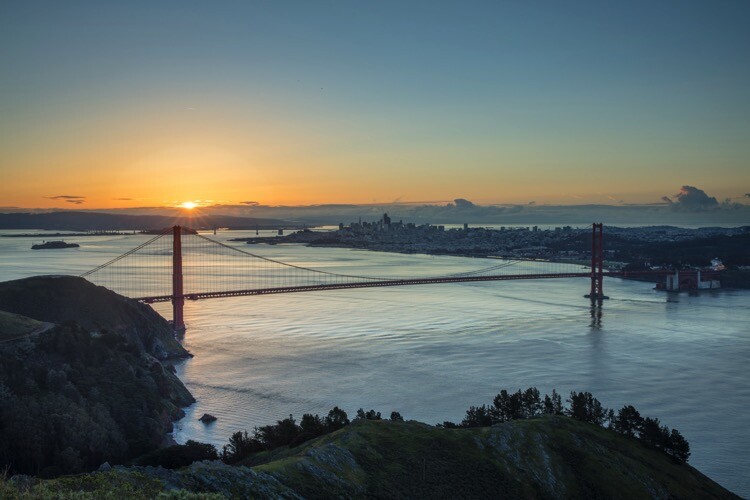
Weekly Photography Challenge – Bridges

30 Jun

I hope you haven’t burned any bridges lately, literally or figuratively. Because it’s time for this week’s photography challenge which is – you guessed it – bridges.

Here are some articles to give you some ideas and tips:

  • Tips for Shooting Blue Hour
  • Tips for Location Scouting to Get the Perfect Sunset Photograph
  • Find the Perfect Photography Location Using Google Maps
  • 26 Sublime Images of Bridges and Connection

Weekly Photography Challenge – Bridges

Simply upload your shot into the comment field (look for the little camera icon in the Disqus comments section) and they’ll get embedded for us all to see or if you’d prefer, upload them to your favorite photo-sharing site and leave the link to them. Show me your best images in this week’s challenge. Sometimes it takes a while for an image to appear so be patient and try not to post the same image twice.

Share in the dPS Facebook Group

You can also share your images in the dPS Facebook group as the challenge is posted there each week as well.

The post Weekly Photography Challenge – Bridges appeared first on Digital Photography School.


Digital Photography School

 
Comments Off on Weekly Photography Challenge – Bridges

Posted in Photography


9 Ways to Create Balance in Your Photography

29 Jun

Sometimes it feels like getting the right composition is an endlessly moving target, with this technique and that idea and many other considerations. Balance is one of the more complicated concepts but is also a really powerful tool that is worth investing some time learning. To help you out, here are 9 ways and elements you can use to help you create balance in your images.

lighthouse - 9 Ways to Create Balance in Your Photography

What is balance?

Balance is a way of composing an image so that all elements complement each other equally. Visual tension or harmony are created which results in a pleasing image.

Many different elements can be involved with incorporating balance into your image composition:

  1. Color
  2. Light versus shadow
  3. Texture
  4. Visual weight
  5. Subject placement
  6. Relation of elements to each other
  7. Symmetry
  8. Depth of field
  9. Negative space

How do you achieve balance?

When you compose your scene you need to think about the different elements and how they interact and relate to each other. What is the story you want to tell or frame up? What is the emotion you are trying to convey?

Balance can be harmonious, where all elements are equally present and form an aesthetically pleasing whole – symmetry is a good example. A landscape scene perfectly mirrored in a still pond or lake is very harmonious.

An image can have visual tension due to unbalance. It may seem counterintuitive to say that this also creates balance but think about negative space or a small spot of bright red in an otherwise dull image.

Often several different factors come into play in considering balance, it’s not necessarily just one problem to solve for each image. Every image has color, a subject, tone, contrast and so on, which are all involved in producing your final image.

Some of these concepts have to do with the mechanics of how you take the photo (light/shadow/contrast/tone) and some are more compositional (symmetry/negative space/subject placement). So there are many different things to consider at once within each image.

Let’s look at each in more detail:

#1 – COLOR

cherries in a bowl - 9 Ways to Create Balance in Your Photography

Even though this is a very dark image with a lot of blacks, the rich intense color of the cherries is not lost in the background – the color, quantity and placement balance out against the black shadows

Color has a great impact on your images.  When color film finally emerged it had a huge impact on photography. Being able to see bright colors instead of monochrome was very different. It lead to many different styles and techniques in photography and is still the dominant way images are processed today.

It allows you to evoke emotion, create tension, highlight a specific element, catch our attention and tell the story of the image in different ways.

garden with a red bush - 9 Ways to Create Balance in Your Photography

Take this garden shot with all the different foliage shades of green and yellow – yet the eye goes immediately to the small but prominent red flowers. This image has balance because the red has a lot of visual weight but physically is only a small part of the overall image.

If it was much bigger it would overwhelm, instead, it gives somewhere to start the journey looking at all the different textures and colors contained in the garden.

b/w of a bike - 9 Ways to Create Balance in Your Photography

Using color to evoke a mood, a feeling, or a period of time

This old bicycle turned into a Welcome sign at a historic homestead. By opting for a slightly sepia tone it picks up all the textures in the shot and evens out all the different competing colors.  The focus becomes the bicycle and not the bright green of the grass or the red of the chicken in the background. Changing the colors balances out all the other elements and allows the subject you want to be the focus.

#2 – LIGHT VERSUS SHADOW

Light and shadow are the opposite elements necessary for photography. If you have light, in general, you will have shadows. When you have both present it gives your subjects added dimension, they become physical rounded elements, not flat even though they are being viewed in a flat 2D medium (either printed or on a screen).

Contrast and tonal difference make an image more dynamic and interesting. Contrast comes from the difference between the amount of light and shadow in an image.  More contrast also widens out the tonal range of the image, when it is too similar it will look very flat (like the seaside landscape below).

overcast seascape image - 9 Ways to Create Balance in Your Photography

This image taken on a heavily overcast day has very little contrast, it’s quite flat and tonally similar and as a result, lacks punch and impact. It is not balanced in the light/shadow equation and it shows up visually as a result.

So learning to use both light and shadow together can create balance in your images. The horseshoe image below was specifically shot to use the harsh midday sun to generate the shadows and capture the patterns and how they hang on the nails. It would be a much less interesting image without the shadows.

horse shoes in b/w - 9 Ways to Create Balance in Your Photography

#3 – TEXTURE

Texture can be present in different ways – in the image of the spoons with spices (below) there are three layers of texture – the background surface, the spices in the spoons, and some scattered spices.  While there is a lot of texture in the image, it balances due to the scale and the blending layer in between which softens the difference between the spices and the industrial background.

If the extra scattered spices were not there it would not work as well as they help transition the eye around the image.

spices in 3 spoons - 9 Ways to Create Balance in Your Photography

This blueberry shot uses texture in a different way, where the subjects themselves become the textural element, with some added interest in the form of water droplets. Without the droplets, it was a much less interesting image, and the fine detail of the droplets help balance out the size of the berries, giving the eye more elements to engage with.

blueberries - 9 Ways to Create Balance in Your Photography

Think tree bark, patterns on the water, brick walls, cracks in the pavement, clouds in the sky, foliage in a garden, shiny reflective metal, stones in a pond, sand at the beach. Think long exposure to produce soft foamy waterfalls or interesting cloud patterns. Consider ICM (Intentional Camera Movement) for soft blurred effect or pretty light trails.

Texture is all around you and in everything you see, but it is often taken for granted. Texture can be highlighted and become a key element in your image if you take the time to see it and take advantage of it.

#4 – VISUAL WEIGHT

This is a tricky concept to come to grips with as it sometimes seems a bit contradictory. How can a small element overwhelm a bigger image? How can one color dominate another one?

In the butterfly image below, the tones are all very similar, even the colors are shades of yellow and brown. Yet the visual weight is actually held by the fuzzy green leaf in the bottom corner.  If you crop the bottom section off it completely changes the feel of the image, and the butterfly becomes more prominent.

monarch butterfly - 9 Ways to Create Balance in Your Photography

One of my personal favourite images is of a fresh new bright limestone headstone in a cemetary of very old and weathered stones (below). The light was at the perfect angle to highlight the one stone which carries the visual weight yet is only a very small element physically within the image.

The central placement works well in balancing the other elements around it and allows more of the story to be told – if the focus was tight on the headstone it would have had a very different feel to the image.

cemetery - 9 Ways to Create Balance in Your Photography

5. SUBJECT PLACEMENT

Where you place the subject in the frame is important in many ways. It can be used to show scale, the relationship between elements, to highlight tension, or to create a specific feel or stylistic tone to an image.

A classic example is the Rule of Thirds – where it is taught that a center placed subject lacks drama and impact – place the subject on the third lines to make it more dynamic within the frame. When the subject is looking in a particular direction, where you place them affects the feeling of the image. If they are looking out of the frame, placing them close to the edge is quite a different image than if you compose the image so that they are looking more into/across the frame.

In the cave image below the people add balance by providing scale. Without them there we would be unable to appreciate the true size of the cave as we have no context to apply. The bright colors of their clothes also offer some visual weight in contrast to the textured details of the rock walls. The positioning at the bottom of the frame grounds the image and helps tell the story.

large cave opening - 9 Ways to Create Balance in Your Photography

The placement of this bellbird on the branch is an appealing balance of angles and lines. The line of the main branch is echoed by the blurred ones in the background – this gives some depth and scale to the image.

The bird is a nice size within the image, large enough to see the details, but not cramped within the frame and his crimson eye holds a lot of visual weight as well. If the bird was angled the other way it would be less pleasing as it would not be balanced the same way, as the X is symmetrical.

yellow bird in a tree - 9 Ways to Create Balance in Your Photography
#6 – RELATIONSHIP OF ELEMENTS

Similar to #5 above, this takes the placement concept a step further. You need to consider the specific relationship between elements and how can you use that in composing your image.

In this landscape shot below, it’s a pretty simple land/sea/sky shot – not really very interesting at all.  But the inclusion of the sign right next to the edge of the cliff changes everything. The bright red of the letters catches our attention (as it should) and even though the sign is small it has large impact.

Had the sign not been so close to the edge, it may have been a less compelling image. In composing this, the Rule of Thirds was also used to provide scale and context with the cliff edge off to the right, showing that the cliff continued (it was actually a whole headland of several hundred meters with just this one sign).

danger sign cliff warning - 9 Ways to Create Balance in Your Photography

Below is a wide-angle landscape shot of some fossilized totara tree trunks at Curio Bay, The Catlins, NZ. Landscapes when taken with a wide angle often lose context if they don’t have a foreground element to anchor them.

The person also helps tell more of the story, while providing a color pop of bright blue visual interest and weight against the sand and rock. His presence in the front of the frame balances out the large wider angle landscape behind him and gives scale to appreciate how big it is.

man in a landscape image - 9 Ways to Create Balance in Your Photography

#7 – SYMMETRY

When done well and with thought, symmetry can be a useful tool. Putting your subject dead center in the frame can be a risk too. While a mirror image in a lake or puddle can be pretty, it can also be quite static and uninteresting. An odd situation where the image is perfectly balanced and yet it doesn’t actually work compositionally!

Below, the autumn tree reflection is a mirror image but the angle at which it has been shot puts the focus on the landscape. So the reflection is not necessarily the point of the image. Instead, it is more of an added bonus. Also, the way the trees are arranged creates balance across the image, the two golden willows are rounded and slightly shadowed.

They are counterbalanced by the taller golden poplar, with similarly toned grass behind, and the green of the reeds in the water. There is enough contrast in the image with the light and shadow elements to add depth and interest while the gold/blue color combination is an aesthetically pleasing one.  The reflection softens the colors and tones enough that they allow the actual landscape to take prominence.

This image was specifically composed with all those things in mind.

fall scene and reflection - 9 Ways to Create Balance in Your Photography

#8 – DEPTH OF FIELD

Does everything in your image have to be 100% sharp? My answer to that is no. You can use Depth of Field creatively, balancing the subject against the softer background, allowing the subject to be prominent and the strong focal element.

Imagine the shot of the larch cones below if the aperture was more like f/11. If all the foliage and trees in the background were in focus then the cones would be lost against it. Portrait photographers use this concept to their advantage, shooting their subject in a similar way to get them to stand out from a sometimes messy or distracting background.

pine cones on a tree - 9 Ways to Create Balance in Your Photography

#9 – NEGATIVE SPACE

Negative space is an interesting composition element that works for some shots. Remembering to keep it in the back of your mind for the rare occasion it might suit can be difficult. Also being brave enough to try a different approach than you normally use is challenging.

When used carefully, negative space adds value to an image by providing a lot of empty space to create balance for a particular subject. It is often used successfully in travel photos, where brightly coloured walls or buildings offer a great canvas for a person to be posed against, often as they walk past.

This gerbera shot has a lot of negative space on the left and underneath the flower. Because of the curving stem and the dynamic angle of the flower, this image has a lot of movement for the eye. The negative space offers a calming balance to that energy.

pink gerbera - 9 Ways to Create Balance in Your Photography

The smooth soft water of this long exposure offers some negative space to balance out the visual weight of the rocks and the busy sky. The light tones of the water also create balance with the darker tones of the sand.

b/w beach scene - 9 Ways to Create Balance in Your Photography

CONCLUSION

Sometimes an image can feel just subtly off even though the subject might be good, the light is good and the composition seems to be alright. It is worth taking a look at those images with fresh eyes and considering the balance of the different elements discussed here. Perhaps you will begin to see some opportunities to compose your images in a different way?

Composition often seems to be a never-ending quest to find the holy grail of elements.  Do you have perfect lighting? Is your subject awesome? Are they doing something cool or interesting? Are the colors fresh and vibrant? Is it exotic? Does it have a wow factor?

Yet your image might have all of those things and still not seem quite right. So take a look at how the different elements relate to each other from a balance point of view.

Maybe instead of trying to remember all the complicated rules of composition – let’s keep it much simpler and start with balance. Or maybe you want your work to be really edgy and challenging and you aim for the tension in a deliberately unbalanced work – that is also a viable creative choice too.

But if you feel that your images lack a certain something, try looking at them from a balance point of view and see what you get. Like everything in photography, there is no one single right way to do it. Instead, there are many different ways, and hopefully one will resonate with you to help you learn something new.

If you are someone who considers balance when composing your images, what other ways do you think about? This is merely a summary of the many possible options that I keep in mind when shooting. Please share any others I haven’t mentioned in the comment area below.

The post 9 Ways to Create Balance in Your Photography appeared first on Digital Photography School.


Digital Photography School

 
Comments Off on 9 Ways to Create Balance in Your Photography

Posted in Photography


6 Ways to Improve your Cityscape Photography

29 Jun

Cityscape photography is becoming increasingly popular and can be a welcome change to capturing rolling hills and scenic vistas. Urban landscape environments can offer you, the photographer, attractive buildings, patterns and lines to capture stunning scenes and an alternative to the familiar nature shots found in the countryside.

6 Ways to Improve your Cityscape Photography

Here are 6 elements you will want to consider to improve your photographs of cities:

1. Shoot at different times of the day

Think about blue hour, golden hour, and daytime for your city images.

As the sun goes down and darkness falls, cities come to life when buildings and architectural details become illuminated and can make for some spectacular image opportunities. However, a common mistake people make when doing cityscape photography is to capture images too late at night when the natural light has disappeared and the sky is completely black.

6 Ways to Improve your Cityscape Photography

Shanghai skyline at night.

Total darkness is generally not the best time to photograph buildings as they will appear less attractive with little detail.

If you intend to photograph in the evenings, I would recommend that you arrive at your location for sunset and wait for dusk to fall. You could shoot during blue hour, a period of twilight when the sun is at a significant depth below the horizon and when the sky takes on a predominantly blue shade.

Although it is called the blue hour, it usually occurs for a window of around 20-30 minutes, depending on your location and the season.

Golden hour is another good time for cityscape photography. During the early morning or late afternoon, you’ll have beautiful long shadows to work with, as well as soft golden light.

6 Ways to Improve your Cityscape Photography

Daytime shot of the same city.

Alternatively, photographing during the day allows for a more interesting composition as scenes can be more crowded. Just add people in your frame that can make intriguing subjects combined with buildings.

2. Use ambient light effectively

If you capture the final elements of ambient light in the sky before darkness falls and combine it with the artificial light of the buildings, this will usually result in good photographs.

Once the city lights come on there is usually a window of about an hour to capture pleasing cityscapes. Shooting scenes at this time will allow you to balance the sky with the artificial lights of the city.

6 Ways to Improve your Cityscape Photography - blue hour bridge

3. Consider color

Look for patterns and blocks of color that may offset one another. Buildings may be painted in different colors that work well together, for example.

The cool blue sky of the blue hour complements the warm, golden, amber hues of street and building lights perfectly. The harmony of an image is apparent when colorful tones come together, such as this image of Oxford at night.

6 Ways to Improve your Cityscape Photography - Oxford at blur hour

Also, the sun can create different colors as it strikes buildings and reflects off them.

4. Consider composition

It is best to try and exclude any distracting and unwanted objects from the frame such as trash bins, signs, and any unsightly buildings that will make your image less attractive. Re-compose your image until it’s free of clutter and you are happy with the way the image looks.

6 Ways to Improve your Cityscape Photography - building at night

Work with the light if you’re capturing cityscapes during the day. Usually, you will want to shoot with the sun lighting the buildings for the best results and to ensure everything in your view is illuminated.

5. Experiment with exposure

Cityscapes often provide a great opportunity to experiment with your exposure. You will discover that after sunset, as the light fades, you will be less able to hand hold your camera to capture your cityscape scene. Recording long exposures in cityscape photography will create motion and that feeling of movement is only possible by using a tripod.

6 Ways to Improve your Cityscape Photography - London Tower Bridge

As twilight unveils, you can capture the low ambient light by using slow shutter speeds to create mobility within your image. The stillness of buildings contrasting the movement of clouds or light trails from traffic, for example, make for an interesting image and can add drama to your composition.

Using fast shutter speeds can help to freeze the motion of different objects in the scene. I recommend that you experiment with different shutter speeds to see what different moods this creates and see which style of image you like.

6. Get creative

Add some beauty to your shot by capturing close up objects such as bridges or signs with the cityscape in the background. You could even try photographing people and the cityscape to show the full setting you are photographing within.

6 Ways to Improve your Cityscape Photography

Don’t be afraid to get closer to your subject and focus on the action. I suggest that you play around with various angles to capture something truly unique and inspirational, one that you are proud of.

Cityscape photography requires a great deal of practice and you most likely won’t walk away with award-winning cityscapes overnight. Keep shooting and with these tips, you will become more adept at capturing urban imagery you can be proud of.

Now it’s your turn, please share your cityscape photography images and tips in the comments area below.

The post 6 Ways to Improve your Cityscape Photography appeared first on Digital Photography School.


Digital Photography School

 
Comments Off on 6 Ways to Improve your Cityscape Photography

Posted in Photography


dPS Ultimate Guide to Night Photography

27 Jun

In this, the next installment of our dPS ultimate guides, learn what you need to know to get started doing night photography.

Introduction

Tower Bridge - dPS Ultimate Guide to Night Photography

Tower Bridge, London. Exposure: shutter speed 2.6 seconds, aperture f/5.6, ISO 100.

Night photography immediately solves a huge problem that you confront constantly in photography. That problem is being faced with ordinary scenes that just aren’t very interesting. If you take a picture of a building or a standard street scene during the day, it can be sort of dull. We are all used to seeing shots taken in the middle of the day. That same scene – shot at night – can be a really interesting photograph though.

The actual taking of pictures at night might seem a little bit like magic if you are just getting started. Even those who have been shooting a while may wonder how to get a proper exposure and focus in the dark. Although photographing in the dark certainly has its challenges, in some ways, it is actually easier than photography during the day.

So let’s take a quick look at the essentials of night photography. In particular, we’ll cover the gear you need, how to expose your photos, how to focus at night, great subject matter, and some post-processing tips. Hopefully, this will help open up the world of night photography to you.

What to Bring for Night Photography

Alpine - dPS Ultimate Guide to Night Photography

Breckenridge, Colorado – Exposure: shutter speed 15 seconds, aperture f/2.8, ISO 3200.

First, let’s talk about what you will need in terms of equipment for doing night photography. The good news is that you will not need much in the way of extra gear. Besides your standard camera and lens, the only thing you will absolutely need is a tripod. The darkness means that your camera needs to use a long shutter speed to gather enough light for a proper exposure (more about that in a second). So you need to be able to hold your camera steady and a tripod is the best choice for that.

Another helpful item for keeping the camera steady is a remote shutter release. I highly recommend that you get one – and the corded ones are very cheap (under $ 10). You can spend a lot on an intervalometer if the extra features will benefit you, but you don’t need that for standard shooting at night.

If you don’t have a remote or find yourself without one on occasion, you can use your camera’s 2-second timer to take the picture so that you don’t touch the camera during the exposure.

Miami - dPS Ultimate Guide to Night Photography

Miami, Florida – Exposure: shutter speed 0.3 seconds, aperture f/2.8, ISO 200.

Although not necessary, here are some additional items to consider having on hand for your night photography:

  • A flashlight: This will come in handy in a myriad of ways. It will help you with finding your camera controls if you don’t know them cold. It will help you set up your tripod and deal with straps and other attachments. Finally, a flashlight will also help you find things in your camera bag. Just keep a small one (or a headlamp) handy.
  • Lens hood: At night you will have bright lights coming at you from different directions – such as street lights and neon lights. Using a lens hood will help keep flares to a minimum.
  • Extra batteries: The long exposures you take at night will drain your camera battery at an alarming rate. You may also be using Live View, which drains them even faster. So does cold weather. Therefore, night photography always calls for spare batteries. Don’t take any chances here – a dead battery means your night is over.

If you are going to capture the night sky, you’ll need to be on top of weather conditions. In addition to your standard weather apps, be sure to add an app to your phone that will help you see where the moon, constellations, and Milky Way (if visible) will be. If you don’t already have apps you are using (there are several), I recommend PhotoPills and Star Walk 2.

Exposures for Night Photography

Pigeon Point - dPS Ultimate Guide to Night Photography

Pigeon Point Lighthouse, California. Exposure: shutter speed of 6 seconds, aperture f/5.6, ISO 1600.

The biggest difference between daytime and night photography is the exposure values you will need to use. The darkness changes everything. Don’t worry though, once you have your camera on a tripod, it is actually not that difficult to get the proper exposure in most cases.

Let’s back up and cover things that you might already know. Your camera’s exposure is a result of three controls (the exposure triangle) – shutter speed, aperture, and ISO. Because of the darkness, you need to let more light into the camera, and you can only do so by affecting one of these three controls. We’ll cover how to do that for each of them now.

Toledo Overlook - dPS Ultimate Guide to Night Photography

Toledo, Spain – Exposure: shutter speed 8 seconds, aperture f/8, ISO 200.

Shutter Speed

During the day, you will typically use shutter speeds that are a small fraction of a second. At night, however, the camera will use shutter speeds that are longer than one second – sometimes significantly longer. Think of it this way: because it is dark, the camera needs a longer period of time to gather light for a proper exposure.

The shutter will now be open for a longer period of time, so the camera needs to be held steady or the picture will move during the exposure process, causing your image to be blurry. That is why a tripod is required equipment at night. You can leave the shutter open as long as you want, as long as the camera is steady and does not move at all.

Millenium and St Paul - dPS Ultimate Guide to Night Photography

Millennium Bridge and St. Paul’s Cathedral, London – Exposure: shutter speed 4 seconds, aperture f/5.6, ISO 400.

Aperture

The aperture is the opening in the lens that lets light into the camera. The size of the aperture determines the amount of light being let into the camera for a given shutter speed, and it also affects the depth of field.

For the most part, there is no difference between how you will use the aperture at night versus how you use it during the day. The only difference is that the camera will struggle to get enough light for a proper exposure, so a small aperture will often require ridiculously long shutter speeds. In addition, the background is usually black, so you don’t need to worry as much about achieving a wide depth of field.

Both of these factors (needing more light, and not needing a wide depth of field) tend to mitigate toward using larger apertures at night.

Top Of Rock - dPS Ultimate Guide to Night Photography

When you are shooting a scene like this where everything is far away, you don’t need a wide depth of field. Hence you can get away with a larger aperture. New York, New York – Exposure: shutter speed 0.3 seconds, aperture f/4.0, ISO 400.

ISO

The third exposure control, ISO, is a measurement of the sensitivity to light of your digital sensor. Higher ISO values make your digital sensor more sensitive to light and thereby allow you to use a shorter shutter speed or a smaller aperture.

But, there is no free lunch here, and using higher ISOs will result in more digital noise in your pictures. Since dark areas of your picture tend to show more digital noise than lighter areas, it is often a problem with night photos. Therefore, resist the temptation to crank up the ISO at night if you can help it.

Since you will be using a tripod, you can usually avoid the need to use a high ISO. In other words, the tripod allows you to use a longer shutter speed, and that long exposure allows more light into the camera such that you don’t need to use a high ISO. However, in those cases where you cannot use a tripod or you have a moving subject, you will need to increase the ISO.

Path - dPS Ultimate Guide to Night Photography

I needed the foreground sharp in this image, so these exposure settings are brighter than the typical night sky shot, which you will learn more about shortly. Shutter speed 30 seconds, aperture f/2.8, ISO 3200.

That is certainly bad news, but the silver lining is that cameras are getting better and better at handling higher ISOs without showing much digital noise. In addition, post-processing software continues to improve at noise reduction, so you should be able to remove the digital noise later.

A Starting Point for Proper Exposure

It might seem a little silly for me to even try to give you some night photography default exposure settings, but that is what I’m going to do anyway in an effort to get you started.

Let’s say you are in Aperture Priority mode, which is what I find a lot of people use. If you are still using an automatic mode, give Aperture Priority a try, as it is still semi-automatic (meaning the camera will set the shutter speed for you to create a correct exposure), but you get to set the Aperture and ISO.

Brooklyn Bridge -

So, let’s talk about the aperture setting first. Start by setting your aperture to f/5.6, which is a fairly moderate choice that lets in a healthy amount of light. It won’t give you as much depth of field as you might like, but remember that you typically don’t need an extremely deep depth of field since the background will be black.

Next, set your ISO. Start at about 400, which is high enough that you won’t have to use an extremely long shutter speed. At the same time, most cameras can shoot at ISO 400 without digital noise becoming a problem.

After that, just see where the shutter speed ends up when you line up your shot. I’m assuming you are using a tripod for this example, by the way. You know the shutter speed is going to be long – probably a few seconds. I have tried to keep the other settings such that you won’t be standing in one spot for a minute or more while the camera creates the exposure.

Chicago River - dPS Ultimate Guide to Night Photography

Chicago River – Exposure: shutter speed 30 seconds, aperture f/13, ISO 200.

That’s not to say you should never do that. Depending on the scene and subject, you might want your shutter speed to be measured in minutes – but it is not the norm.

If you don’t have a tripod, your options are limited. In fact, there is only one option, and that is to open up the aperture all the way, crank up the ISO to at least 1600 (probably 3200 or 6400), and then use whatever shutter speed the camera sets.

Even with a wide aperture and high ISO, the shutter speed is likely to be long enough that camera shake will still be an issue.

Exposing the Night Sky Photo

West Lakes

There is one specific exposure setting I can tell you right now because it is often the same. It is the exposure settings for photographing the night sky. Your exposure settings will be:

  • Shutter speed: 15 seconds.
  • Aperture: f/2.8
  • ISO: 6400

This is not set in stone, and you’ll notice that my night sky photos add a little exposure to these settings, but it is a good starting point. But what if your lens doesn’t open up to f/2.8? Then you have to just increase the ISO or the shutter speed by the corresponding amount.

For example, if your lens’s maximum aperture is f/3.5 – which is the case with many kit lenses – you’ll need to find another 2/3 of a stop of light. Either add that to the ISO, the shutter speed or just increase both by one click (remember one click of your dials is 1/3 of a stop).

Milky Way Big Bend Texas - dPS Ultimate Guide to Night Photography

Big Bend National Park, Texas. Okay, the exposure settings don’t have to be exactly the same. I wanted this brighter to accentuate the Milky Way. Shutter speed was 13 seconds, aperture f/2.8, ISO 6400.

You might be tempted to lengthen your shutter speed a lot on the premise that you are using a tripod. After all, that would seem like a good way to reduce your ISO to control digital noise and also to use a smaller aperture so you don’t have such a narrow depth of field. Don’t do it!

The stars in the sky are moving (okay, it is really the earth’s rotation, but they appear to be moving across the sky). If you lengthen your shutter speed too much, the stars will have little trails which appear as a blur in your shot. You may not see it until you get the pictures home and look at them on the computer screen, but it will be there and will ruin the shot.

Big Bend Night - dPS Ultimate Guide to Night Photography

Big Bend National Park, Texas. Look closely at this picture and you will see little star trails. This was the result of using a longer shutter speed than I mentioned above. Shutter speed 165 seconds, aperture: f/4.0, ISO 1600.

For more in night photography exposure, please read Tips for Getting Proper Exposure for Night Photography.

Circulo de Bellas Artes

Picking a Subject for Night Photography

Now that you have the right gear and know how to expose your photos at night, you have to pick a good subject for night photography. For the most part, that is no different than what you do during the day. A good subject is a good subject. Still, things will look different at night.

Let me introduce you to some of the things I like to photograph at night. Hopefully, these will give you some ideas, which you can take in your own directions.

The Night Sky

If you are out in the countryside, you need nothing more than a clear night to get a great photo. Moonless, clear nights are the best. If you can happen to catch the Milky Way (usually possible from March through October, and best from May to September), all the better.

Check out an app called Star Walk 2 to help you get a handle on the timing of these things. If you can add an interesting foreground to the shot, even better.

Museums and Public Buildings

Louvre - dPS Ultimate Guide to Night Photography

The Louvre, Paris. I was forced to hand-hold this shot (it was taken from inside the Louvre), so I really had to crank the ISO and open up the aperture. Shutter speed 1/8th of a second, aperture f/4.0, ISO 3200.

Well-lit buildings are an obvious choice for a nighttime subject. You almost can’t go wrong here. Although the concept is obvious, when executed well the result can still be great. You can also use this as a starting point for your night photography. You will have additional ideas as you stand there waiting for your pictures to expose.

Fountains

Buckingham Fountain - dPS Ultimate Guide to Night Photography

Buckingham Fountain, Chicago – Exposure: shutter speed 10 seconds, aperture f/18, ISO 100.

Perhaps my favorite nighttime subjects are fountains. Many times they are lit with different colors as well, adding additional interest. The long shutter speeds you use at night make the fountain appear to be flowing.

Bridges

Brooklyn Bridge Park - dPS Ultimate Guide to Night Photography

Brooklyn Bridge, New York – Exposure: shutter speed 15 seconds, aperture f/11, ISO 200.

It seems like every city or town has a bridge. It may not be the Golden Gate Bridge, but there will likely be a bridge and it will be well lit at night, which makes it an interesting subject. Plus the long exposure time you use for night photography will cause the water under the bridge to blur, and the traffic to appear as streaking lights.

Streetlights

Pay close attention to streetlights when you are doing night photography. They can be useful in a lot of different contexts. They can add a point of interest to it otherwise blank area of the picture. If there are multiple lights, they can create a nice leading line into your picture.

Washington Monument - dPS Ultimate Guide to Night Photography

Washington, D.C. For this shot, I wanted the twinkle or starburst effect from the streetlights, so I used a smaller aperture. Exposure: shutter speed 8 seconds, aperture f/16, ISO 800.

Car Light Trails

Dallas Streaking Lights - dPS Ultimate Guide to Night Photography

Dallas, Texas – Exposure: shutter speed 20 seconds, aperture f/16, ISO 100.

A really fun thing to include in your night photos is streaking light trails from moving cars. These are created when a car or other vehicle drives through the frame while you have the shutter open. The camera picks up the lights, but since the car has gone all the way through the frame while you had the shutter open, it shows up in your picture as streaks of lights.

Try to time your pictures so that vehicles move all the way across the frame while you have the shutter open. Read: How to Create Dynamic Photos of Car Light Trails for more tips on this technique.

Reflections

St Paul mirror - dPS Ultimate Guide to Night Photography

Reflections in London, U.K. – Exposure: shutter speed 1.3 seconds, aperture f/8, ISO 200.

A benefit of the longer shutter speeds you will be using at night is that reflections show up better on the surfaces of water. This is obviously true on ponds and lakes. But it is also true for puddles. After a rain can be a great time for night photography.

Overlooks and Vistas

Let’s end with overlooks and vistas. Some of the best night photography I have ever seen are nighttime views of cities. You can often get great skyline shots. Be careful though – a great view often does not translate into a great picture. Make sure you have an interesting foreground and/or a strong center of interest in the picture.

Downtown from Manhattan Bridge - dPS Ultimate Guide to Night Photography

New York City from the Manhattan Bridge – Exposure: shutter speed 10 seconds, aperture f/8, ISO 200.

When picking subjects for night photography, it is important to note that things will not look the same to the camera as they do to you. Take some test shots whenever possible. If the idea of a long exposure test shot seems tedious due to the wait time, crank up the ISO for purposes of your tests which will allow you to use a short shutter speed. When you go to take the final picture you can reduce the ISO and increase the shutter speed by a corresponding amount.

Nashville night - dPS Ultimate Guide to Night Photography

Nashville via drone – Exposure: shutter speed ½ a second, aperture f/5.6, ISO 310.

Focusing

One final difficulty you will face in night photography is that it is often tricky to focus your camera. That is because most cameras focus by detecting contrast. If the scene is too dark, there is no contrast for the camera to pick up. There are a few things you can do to get your camera to focus though.

The first is to focus on a bright light in the picture. A streetlight works well for this. Try focusing on the edge of the light (between the bright part and the black background), which will give you the necessary contrast. Be sure you are focusing the same distance away as where want your final picture to be focused. Once you have the focus set, recompose your picture and press the shutter button to take the picture.

Capital Clouds - dPS Ultimate Guide to Night Photography

U.S. Capitol, Washington D.C. – Exposure: shutter speed 30 seconds, aperture f/16, ISO 400.

Another trick to allow you to use your autofocus is to break out the flashlight and shine it on the thing that you want your camera to focus on. If it is close enough, the flashlight should provide sufficient light for your camera to focus.

Finally, if none of that works, you will need to manually focus your lens. Just put the camera in Live View and look at the LCD as you compose the picture (zooming in if possible) to see if your picture is in focus.

Henry Street nYC - dPS Ultimate Guide to Night Photography

Henry Street, New York – Exposure: shutter speed 1/13th second, aperture f/5.6, ISO 3200.

Processing Your Night Photos

You can make your night photos look a lot better with a minor amount of post-processing. Of course, given all the different types of night shots you may face, giving specific editing advice here is difficult. Still, there are a few general things you might want to consider.

Lincoln Memorial - dPS Ultimate Guide to Night Photography

Lincoln Memorial, Washington, D.C. Another benefit of night photography is that you get to take pictures of memorials without any people in your shot. Exposure: shutter speed 6 seconds, aperture f/11, ISO 200.

Highlights

The first thing to consider is how to handle the highlights. Given the nature of night photography, you are doing to be dealing with some really dark areas, and some really bright areas. Many times those highlights will be slightly blown out. Even if they aren’t completely blown out, they are still bright enough that they would look better toned down a bit.

It wasn’t too long ago that this might have required using HDR (high dynamic range) software, but not anymore. Most RAW editors can bring back the highlights a bit (assuming you’ve’ shot in RAW format).

If you use Lightroom or Photoshop (Adobe Camera Raw or ACR), all you need to do is find the Highlights slider and pull it to the left a bit. That will decrease those highlights. As an added benefit, it will often make those same highlights appear a bit more colorful.

Westminster Bridge - https://digital-photography-school.com/?s=HDR

Westminster Bridge, London. Here I used a 5-second exposure to capture the lights of the bus passing by. Shutter speed 5 seconds, aperture f/8, ISO 200.

Shadows and Blacks

Now you have to deal with the dark areas of your photo. There will be parts you want to brighten, but at the same time, you should allow the darkest parts of the photo to go pure black. There is no point in attempting to preserve detail in a black sky.

To accomplish both of these goals, I have another quick move for you. Pull up on the Shadows slider, and then pull down on the Blacks slider. Areas of detail you want brighter will benefit from the increase in the Shadows, but you will maintain contrast by pushing down the Blacks.

Tabernacle - https://digital-photography-school.com/?s=HDR

Salt Lake City, Utah. In this shot, I needed a wide depth of field to keep both the fountain in the foreground and the Tabernacle building in the background sharp. I used a long exposure, which also created a flowing effect to the water, but I still had to raise the ISO a bit. Shutter speed 6 seconds, aperture f/16, ISO 400.

Sharpening

Sharpen your night photos the same as you would any others, but you will likely need to deal with digital noise more than you are used to. If the whole picture is noisy, then give it a global noise reduction. In Lightroom and ACR, there is a Noise Reduction section in the Detail panel, and you just pull up on the Luminance slider to the right.

You might just need to reduce noise in specific sections of your photo though. Noise often manifests itself in the darkest areas of your image. In that case, apply a local adjustment. If you are using Lightroom or ACR, use the Adjustment Brush, paint where you want the noise decreased, and increase the Noise slider. That should take care of it.

You have to watch noise reduction though. Applying too much of it will reduce detail in your photo. That’s why you don’t want to apply a global adjustment if you don’t have to. If you have a serious noise problem and want to fix it without sacrificing detail, there are some plug-ins that are truly wonderful. I use Noiseware and I am often shocked at what a good job it does of reducing noise but preserving detail. Other good products are Noise Ninja and Dfine by Nik.

Golden Gate Bridge - dPS Ultimate Guide to Night Photography

The Golden Gate Bridge from the Sausalito side – Exposure: shutter speed 30 seconds, aperture f/6.3, ISO 200.

Read more on noise reduction in my article here: Good, Better, and Best Noise Reduction Techniques

Getting Started with Night Photography

Night photography is a great way to get really interesting and unusual pictures. It is also a great time to go shoot since it is not during business hours (you’ll be off work) and others will be asleep (notably spouses and children).

Rockefeller Center

Hopefully, this guide will help you get started with night photography. As you get ready for your next outing, just remember a few things:

  • The only additional items that are necessary for night photography are a tripod and remote shutter release. Some other helpful items are a flashlight, a lens hood, and an extra battery.
  • For exposure, start with moderate ISO (around 400) and aperture (around f/5.6-8) and see where that puts your shutter speed. Adjust from there with an eye toward getting the shutter speed (exposure time) you want.
  • Pick a subject that lends itself to night photography. Remember that things look very different at night, so take some test shots.
  • Focus your camera by finding or creating areas of contrast and setting the autofocus on those areas. When necessary, switch to manual focus.
  • When you get home, edit your images as you wish, but you might try decreasing the Highlights, increasing the Shadows, and pulling down the Blacks slightly.

Brooklyn Bridge Park

If you have these things straight, you should end up with some impressive night photos. Good luck!

The post dPS Ultimate Guide to Night Photography appeared first on Digital Photography School.


Digital Photography School

 
Comments Off on dPS Ultimate Guide to Night Photography

Posted in Photography


5 Camera Filters That Can Enhance Your Photography

27 Jun

Photography can be an expensive hobby, with equipment improvement really making a hole in your wallet. What if I told you there was an inexpensive piece of equipment, which can greatly improve your work! You’d want to know what that is right? Well, step forward the humble camera filter.

Although in truth, there are some camera filter systems that are quite pricey, you can also get ones that are a great value. So let’s take a closer look at what camera filters are all about.

What is a camera filter?

In the age of smart phone filters, it’s worth explaining what the term “filter” used to mean in photography. A filter is something that attaches to the front of your camera lens and is used to alter or adjust the light coming into the camera in some way.

5 Camera Filters That Can Enhance Your Photography - orange warming filter

Camera filters allow you to add more creativity to your photography.

Filters come in two different shapes

  • Circular Filters – These filters screw directly onto the front of your lens. You’ll need to buy a filter of the same diameter of the front of your lens (look at the back of your lens cap for the correct size). It is also possible to buy step-up or step-down rings that will allow you to attach your filter to camera lenses of different diameters.
  • Square Filters – These sometimes come as a rectangular filter, and always as part of a system that allows you to attach them to the front of your lens. There is typically a bracket, which itself attaches to a round ring, that you will screw onto the front of your lens. Systems like this make stacking filters easier and are better for graduated filters.

There are in fact many different filters which you can use, and not all of them are going to be mentioned here. Many people like to use a UV filter to protect the glass on the front of their lens. This is a functional use, and this article seeks to look at the creative use of lens filters.

A few notable omissions to this list are the starburst filters, and the softeners/diffusers used in portrait photography. With all this covered, let’s take a look at the five best camera filters that you can use to enhance your photos.

5 Camera Filters That Can Enhance Your Photography - set of different filters

Circular filter are one of the main options out there.

#1 – Circular Polarizing Filter

The circular polarizer is a great filter, it’s a must-have in your bag. Its primary use is for landscape photography, though it can be useful for outdoor portrait scenes as well. This filter works by only allowing polarized light into the camera, that means light traveling from one direction. This has several effects on your photo.

  • Reflections – A circular polarizing filter can enhance or remove reflections from a scene, depending on what you desire. As you rotate the filter, you will see the reflection either increase or decrease.
  • Saturation – This filter can also add more saturation to your photo, giving it more impact with the viewer. You can adjust how much by rotating the filter.
  • Clouds – Related to the increase in saturation, is the enhancement of clouds. On days where there is a mixture of sky and cloud, this is especially effective.
5 Camera Filters That Can Enhance Your Photography - blue sky and a green field

Circular polarizing filters are great for enhancing skies like this one.

#2 – Neutral Density Filter

Neutral density filters are ones that block the light in varying amounts depending on the strength of the filter. The strength ranges from the ND2 to ND1000, weakest to strongest respectively. These filters are mainly used for either portrait work, or landscape work with the stronger filters used in landscape photography.

The darkness these filters add is referred to as a stop, and a stop means one exposure value (1EV). That means an ND2, which is a 1 stop filter, darkens the photo by -EV1. The ND1000 filter is referred to as a 10-stop camera filter.

  • Portrait filters – ND2, ND4, and ND8 filters can broadly be described as portrait filters. They are used with prime lenses when there is too much light for that lens to be used with a large aperture. Their other function, when using a strobe (flash), is to block enough light so you can use the flash at the camera’s regular sync speed (without the need for high-speed sync HSS).
  • Landscape filters – While there are times you might want to use some of the weaker ND filters for landscape photography, typically you’ll be using an ND110 or ND1000 for landscape photography. This allows you to make dramatic long exposure photos during the day, ideal for moving water or clouds.
  • Solar eclipse – Should you be lucky enough to witness a solar eclipse, you’ll want to use the 16-stop ND100000 filter (a special solar filter).
5 Camera Filters That Can Enhance Your Photography - long exposure scene

If you want to take a daytime long exposure you’ll need a strong ND filter.

#3 – Graduated Neutral Density Filter

These filters are the domain of landscape photographers. Graduated Neutral Density filters come in two types, hard and soft. They’re used to make the sky darker, so it balances out the exposure of the image in relation to the foreground.

Purist photographers who like to create their photos from a single image, and avoid techniques like HDR or digital blending like to use these filters. Even those who like to blend their images will use them, as it makes post-processing easier later on.

If you’re looking to buy one you should look at the square variety, as this gives you the ability to adjust where the horizon line is. Let’s look at the types you could use.

  • Hard – This means there is a sharp line between the dark and light areas of the filter. They are more difficult to use but create nice results when applied correctly.
  • Soft – Soft graduated filters have a more graduated transition from dark to light. Easier to use, and better when the horizon line isn’t sharp if it contains buildings or trees.
  • Strength – As with the regular ND filters these vary with strength. You can get ND2, ND4 and ND8 graduated filters.

Note – The quality of the ND filters will be better the more you spend. Cheaper varieties may introduce a color cast to your image and are therefore not entirely neutral. If you have the money to spend, the Lee filter system is highly recommended.

Read these dPS reviews for more on these filters:

  • Comparison – HDR Versus Graduated Neutral Density Filters for Landscape Photography
  • Review of the Vü Professional Filter System
  • Review of the Wine Country Camera Filter Holder System
  • How to Use Graduated Neutral Density Filters for Landscape Photography
5 Camera Filters That Can Enhance Your Photography

The square shape is best for graduated filters.

#4 – Graduated Filter

Progressing on we now look at the Graduated Filter. These are used to enhance the color in the sky. They work just like the graduated ND filters but instead add color. This type of filter will often be used to make a sunset sky even more dramatic, by making the sky orange, or perhaps rose red.

Other options for graduated filters are adding sepia to the top half of your photo. Even more experimental is adding one color to the bottom of the image, and another color to the top by using two of these filters together. This is a great camera filter to be creative with, but you need to apply it to the right place.

Those wishing to try their hand at this type of photography with a filter should look at this excellent guide.

5 Camera Filters That Can Enhance Your Photography - colored filters

You can use filters to add color to the sky, even when it’s not there yet.

#5 – Infrared filter

Do you want to create a dreamscape from your photos, with foliage that looks like it’s from a snowstorm? Then you’ll need to learn how to make infrared photos.

One of the most accessible ways to do this is by using a filter. When you buy a filter like this it will appear black, that’s because the human eye can’t see the infrared spectrum of light. A popular filter for infrared photography is Hoya’s R72. Even with a filter, you’ll need a camera that will perform with this filter attached, and some cameras are better at this than others.

Most manufacturers will block infrared light from reaching the sensor to some extent, the stronger that block is the less effective this filter will be. Should you choose to use this kind of filter on a non-converted camera expect your exposure times to range from 30 seconds up to 4 minutes, depending on your ISO and aperture settings.

Read more: My First Time Shooting Infrared Photography

5 Camera Filters That Can Enhance Your Photography  - b/w infrared style image

Infrared photography is a lot of fun to try. This photo was shot with the Hoya R72 filter.

What camera filters do you use?

There are lots of methods you can add creativity to your photography, a good camera filter is one of those ways. In this article, you’ve seen five of the best filters available to add that little extra to your image.

Have you used any of these filters? Is there another filter that you use in your photography, that can add more creativity? Those who take black and white photos will no doubt point to the effects that red, orange and yellow filters can add to this genre. As always we’d love to see examples of your photos in the comments section, together with hearing about your experience using filters.

5 Camera Filters That Can Enhance Your Photography  - landscape scene

Filters can be used to darken the sky in landscape photography. This can make it more dramatic.

The post 5 Camera Filters That Can Enhance Your Photography appeared first on Digital Photography School.


Digital Photography School

 
Comments Off on 5 Camera Filters That Can Enhance Your Photography

Posted in Photography


A Few Common Photography Abbreviations Explained

26 Jun

For a visual medium, photography is a bit of an alphabet soup when it comes to abbreviations. AWB, DOF, RGB… Even for the seasoned photographer, photographic abbreviations can be a confusing encounter. Here are a few of the most common photography abbreviations to help you tell your TIFF’s from your TTL’s.

A

Aperture priority commonly abbreviated to A or Av (for aperture value) is a setting on your camera that allows you to adjust the aperture value (otherwise known as the f-number or f-stop) while the camera automatically selects a shutter speed to produce an image with the correct exposure.

As you adjust the aperture for different photographic effects, the camera’s internal light meter measures the lighting conditions of the scene and adjusts the shutter speed accordingly.

Read more here: Getting off Auto – Manual, Aperture and Shutter Priority modes explained

AF

AF is an abbreviation for autofocus. The AF feature automatically adjusts the camera lens to focus on a subject, creating a sharp image.

There are several types of AF focus modes. Single focus, known as AF-S (Nikon) or One Shot AF (Canon) will cause the camera to lock focus on a subject and the camera won’t re-focus while you keep the shutter actuator depressed half way. Continuous or tracking focus – AF-C (Nikon) or AI Servo (Canon) on the other hand, continuously readjusts the focus if you keep the shutter button half-depressed. This maintains focus on moving subjects. Some cameras also have a mode called AF-A (Nikon) or AI Focus AF (Canon) that switches between the two modes automatically.

Read more here:  5 Beginner Tips for More Autofocus Success

Auto

Auto is short for automatic and is sometimes signified by a small green rectangle on the camera’s shooting mode selector wheel. In this mode, the camera calculates and adjusts all camera settings for correct exposure, taking into account shutter speed, aperture, focus, white balance, ISO and light metering automatically.

Some cameras have automatic modes programmed to specialize in taking photographs of a particular subject. For example, action or sports mode prioritizes a higher ISO value and faster shutter speeds. It is represented by a running figure on your dial if your camera offers such modes.

A Few Common Photography Abbreviations Explained - camera mode dial

Auto mode is sometimes signified by a small green rectangle on the camera’s shooting mode selector wheel.

AWB

Light is different under different conditions. AWB or Automatic White Balance works in-camera to measure the white balance (WB) of a scene and remove any color casts that may impede on a photograph. In short, it tries to automatically analyze and color correct your scene. It works fairly well in most cases but can be tricked.

Note: if you shoot in RAW format you can easily tweak the White Balance later in post-production.

Read more: Auto White Balance: Yay or Nay?

B

B stands for Bulb, a mode designed for longer exposures like those often seen in time-lapse photography. In Bulb mode, when you depress the shutter button, the shutter will remain open until the button is pressed again (or until it is released, depending on your camera).

This mode is usually used in conjunction with a tripod and a remote shutter release and is necessary to achieve exposures longer than 30 seconds (the maximum exposure time on most cameras).

Read more: How to Use Bulb Mode for Long Exposure Photography

CMYK

CMYK stands for cyan, magenta, yellow and black. Black is referred to as K which is shorthand for the key plate – a printing tool which makes the artistic detail of a picture in black ink. CMYK is the color space used for most color reproduction printers (magazines, posters, business cards, etc.). This four-color mode utilizes each color in set amounts to create a color print. It is a subtractive process, so each additional color means more light is absorbed to create colors.

Because RGB (the color space in which your camera records an image) provides a larger range of colors available on the digital screen, a printed image will be inconsistent with the image you see when you press “print”. Converting an image to CMYK in Photoshop or Illustrator before printing will produce an image on the screen that is much closer to the printed product, allowing you to print an image accurately.

DOF

Depth of Field or DOF is the zone of focus in a photograph. Depth of field is affected by the aperture. A large aperture creates a shallow depth of field with a small amount of the image will be in focus. A small aperture creates a large depth of field with more in focus. Depth of field is also defined by lens focal length and the distance from the subject to the camera.

Read more: Seeing in Depth of Field: A Simple Understanding of Aperture

A Few Common Photography Abbreviations Explained

A small aperture creates a large depth of field with more in focus

DPI

DPI or dots per inch is often used interchangeably with PPI or pixels per inch. Technically, DPI measures the number of dots that can be printed in a line within the span of one inch. PPI also measures the number of dots in a line within the span of an inch but on a computer screen instead. Printers and screens with higher DPI or PPI values are clearer and more detailed.

You need to know the DPI of your printer or lab to correctly size your images for printing. Read more: How to Choose Your Lightroom Export Settings for Printing

DSLR

DSLR stands for Digital Single-Lens Reflex camera. A DSLR camera has a mirror that reflects the light coming in from the lens and directs it through a prism or set of mirrors to the viewfinder. This arrangement allows you to see what you are shooting by looking through the viewfinder. When the shutter button is depressed, the mirror flips up and allows the light coming through the lens to reach the camera sensor.

Canon 5D Mark IV full-frame DSLR camera – Image by dPS writer Mark Hughes. 

Read more: The dPS Ultimate Guide to Photography Terms – a Glossary of Common Words and Phrases

F-stop or f-number

The f-stop or f-number is a term that indicates the size of the aperture opening on your lens. Every aperture is expressed as an f-stop or f-number, like f/8 or f/2.8.

Read more: How to Take Control of Aperture and Create Stronger Photos

IS

IS stands for Image Stabilization. This technology goes under several names; Vibration Reduction, SR, VR, and VC are a few. Image stabilization is a feature in your lens (not all lenses have it!) that enables you to photograph sharper images when shooting handheld at lower shutter speeds, in dark conditions, at longer focal lengths.

Note: Some cameras have the stabilization inside the camera body. Read your user manual to be sure.

ISO

ISO stands for International Standards Organization. In film photography, ISO (or formerly ASA) was an indication of how sensitive a roll of film was to light. In digital photography, ISO measures the relative sensitivity of the camera sensor. This value can be adjusted in-camera.

The higher the number, the more light the sensor can capture. However, the greater the sensitivity of the film or sensor, the grainier the image will be (in digital photography it’s called noise).

Editor’s Note: Before you jump up and down and add a comment below about the fact that the sensitivity of the camera sensor does not actually change, let’s agree to keep it simple for the purpose of this article and these definitions. No, it isn’t that simple, but people new to photography need to take baby steps in understanding these terms, so please accept that we’ve simplified it here.

A Few Common Photography Abbreviations Explained - digital noise and bokeh

The graininess in this image is caused by a high ISO value.

JPEG

JPEG (sometimes shortened to JPG) is an image file format. It stands for “Joint Photographic Experts Group” – the name of the group that created the format. It’s one of the most common image formats saved by digital cameras, the other being RAW.

JPEG files are lossy which means that images in this file format are compressed. Lossy formats are smaller and easier to handle, but they suffer from a loss of quality.

Read more: RAW Versus JPEG – Which one is right for you and why?

M

M or Manual Mode is a shooting mode on your camera that when activated, means that you have complete control over every setting on your camera. This includes the aperture, shutter speed, ISO, white balance, metering mode, and more.

Note: Manual Mode and Manual Focus are NOT the same thing and are not exclusive of one another. Meaning you can shoot in Manual Mode using Autofocus, or in an Automatic mode using Manual Focus.

Read more: Simplifying Manual Mode to Help You Take Control of Your Images

M4/3

M4/3 is short for Micro Four Thirds and it is also known as MFT. Developed by Olympus and Panasonic in 2008, the M4/3 is a mirrorless interchangeable lens system for digital cameras and lenses. This mirrorless system means that the camera does not have an optical viewfinder system like conventional SLR/DSLR cameras, but an electronic viewfinder (EVF) instead. This system is simpler, lighter and allows for smaller cameras than DSLRs.

Read more: The 19 Most Popular Compact System and Mirrorless Cameras with Our Readers

The Olympus OM-D EM-10 is a micro four-thirds camera which means it has a smaller sensor size but is every bit as capable as most other cameras on the market.

P

P stands for Program Mode. This shooting mode has the camera adjust aperture and shutter speed automatically, while allowing you to adjust other settings like ISO, flash, white balance and focusing functions.

Read more: Your Guide to Understanding Program Mode on Your Camera

RGB

Based on the human perception of colors, RGB stands for Red, Green, and Blue. RGB is an additive color space designed for viewing imagery on digital displays (see CMYK above).

Read more: Adobe RGB Versus sRGB – Which Color Space Should You Be Using and Why

S

Shutter Priority Mode (also known as SP or TV for Time Value) is a setting that allows you to select the shutter speed while the camera automatically adjusts the aperture for proper exposure. As you adjust the shutter speed the camera’s internal light meter measures the lighting conditions of the scene you’re shooting and adjusts the aperture accordingly.

This mode is best used for shooting fast moving objects or when you want to blur or freeze a moving subject.

Panning a moving target is a good time to use Shutter Priority Mode.

Read more: Getting Your Priorities Straight – A Guide to Selecting Your Shot Priority

SLR

SLR or “single lens reflex” refers to a non-digital camera with single-lens reflex capabilities (see DSLR).

TIFF

Short for Tagged Image File Format, TIFF is a file format for digital images that does not lose color and detail in the way that lossy compression formats such as JPEG files do. This type of file format is described as lossless.

TTL

TTL stands for Through the Lens and refers to an automatic flash metering system. The flash fires a short burst prior to the actual exposure, the camera reads the amount of light coming through the lens, and sets the power of the flash according to the selected aperture. This mode is most often used with the flash on the camera.

Read more: How to Understand the Difference Between TTL Versus Manual Flash Modes

TTL versus manual flash – image by dPS writer Kunal Malhotra.

USM

USM stands for Ultra Sonic Motor, a type of autofocus motor in lenses trademarked by Canon. Equivalent systems include Nikon’s SWM (Silent Wave Motor), Sigma’s HSM (Hyper-Sonic Motor) and Olympus’ SWD (Supersonic Wave Drive Motor). They are designed to have the lens’s autofocus work as silently as possible.

WB

WB stands for White Balance, the act of balancing the color cast found in different lighting conditions for an accurate image (see AWB). White Balance can be set in-camera and adjusted in post-processing if you have shot in RAW format.

Read more: How to Use White Balance as a Creative Tool

Conclusion

There you have it. Of course, there are plenty more photography abbreviations where they come from. But knowing these basics will get you on the right track to navigating the alphabet soup that is photographic lingo! Be sure to add any extra abbreviations you’d like to see in the comments below.

The post A Few Common Photography Abbreviations Explained appeared first on Digital Photography School.


Digital Photography School

 
Comments Off on A Few Common Photography Abbreviations Explained

Posted in Photography


How to Use Conceptual Contrast in Photography

26 Jun

Contrast is one of the most important aspects of any photograph. It adds focus, distinction, and punch, and gives the viewer both a first impression of the image as well as a journey into its details.

How to Use Conceptual Contrast in Photography - cat on a tire

At its most basic, contrast is defined as a difference. The most common types, which you’re probably quite familiar with, are tonal contrast and color contrast. In this article, I want to introduce yet another kind of contrast to your photography toolbox: conceptual contrast.

What is Conceptual Contrast?

How to Use Conceptual Contrast in Photography - plant in an electrical box

The photograph above has conceptual contrast. Can you figure out what it is? Conceptual contrast is different from tonal and color contrast; it’s more abstract and perhaps less obvious. It has to do with ideas and as the name suggests, concepts, not with physical aspects such as light levels or color.

Just like other kinds of contrast, conceptual contrast can add punch by bringing together things that you might not normally expect to see in the same image. It makes a photograph more interesting and raises questions about the contrasting parts of the image.

When it’s done well, conceptual contrast can help tell a story, function as an eye-opener, surprise the viewer, and jar them into considering their response.

How to Use Conceptual Contrast in Photography - police and people dressed up

Why should you use conceptual contrast?

Visual storytelling is a part of any great photograph. It’s how your photo goes beyond being just aesthetically pleasing, how you get people to stop and really look at your photograph, and how you create an emotional response in the viewer.

Conceptual contrast is not only a great way to add depth to your photographs but also an opportunity for you (the photographer) to learn to look at and become aware of your surroundings in a new way.

How to Use Conceptual Contrast in Photography - red and yellow subjects

You can use this technique to share a sense of wonder, to make a point, and to bring the viewer out of their comfort zone and make them think. What could be more important than that?

waterfall and garbage - How to Use Conceptual Contrast in Photography

So how do you do it?

It takes some forethought and observation to create a photo with conceptual contrast. Coming up with an idea that works will be the hardest part; the rest is as easy or hard as taking any photograph. The steps I’ll be talking about focus on photography outside of the studio, but it can also be a very powerful tool for posed photographs.

How to Use Conceptual Contrast in Photography - paddle boarder with relics in the ocean

The first and most basic stage is observation. You can find good material for conceptual contrast almost everywhere if you pay enough attention.

Try it right now! Move around in the space where you’re reading this, and see if you can find something that stands out and could make an interesting photograph.

banana leaves and fruit - How to Use Conceptual Contrast in Photography

After finding something to capture, the second stage is developing the idea. Just because the contrast is obvious to you doesn’t mean that it will be to others.

It doesn’t have to be obvious, but think about how you want to take the photo to make it both interesting to look at and eye-opening to explore.

For the best effect, your photo should contain more than just the conceptual contrast. To bring the viewer in and give them a chance to notice and react to the less obvious aspects of the photo, you should use everything else you know about photography to make it stand out and draw them in.

rows of sticks for vines and mountains - How to Use Conceptual Contrast in Photography

The final stage is capturing your photograph. This is the technical part where your abstract idea takes physical form. After you share it with others, it will gain a life of its own as viewers enjoy your photo and interpret it from their own perspective.

man on a beach in the fog - How to Use Conceptual Contrast in Photography

Conclusion

Is conceptual contrast something you have used or will try to use in your photography? What good examples of conceptual contrast have you seen? I’d love to see your images with conceptual contrast and hear your feedback and ideas in the comments below, please share.

The post How to Use Conceptual Contrast in Photography appeared first on Digital Photography School.


Digital Photography School

 
Comments Off on How to Use Conceptual Contrast in Photography

Posted in Photography


Why I Always Use an L-Plate Bracket for Landscape Photography

25 Jun

There’s no secret that there’s an abundance of accessories for landscape photographers. Some of them are considered absolutely essential while others might just be unnecessary extra weight in your backpack. With so many tools to choose between it can be hard to separate the useful from the unuseful, which is probably why we end up purchasing so many unnecessary products.

When talking about accessories that are useful for landscape photographers I find that there’s a handful of products that keep coming up: a tripod, a variety of filters, a remote shutter release and a cleaning kit. There’s no doubt that these are tools that can make a huge difference in your photography.

L-Bracket Plate in use shooting on tripod.

But there’s one that I feel goes under the radar quite often, which is fascinating as it’s one that the majority of professional landscape photographers use: an L-plate bracket.

What is an L-Plate Bracket?

If this is the first time you’ve heard about an L-plate bracket I urge you to keep reading this article and to consider if this is a tool you should be adding to your equipment list.

The L-Plate bracket is a piece of metal that is fastened to your camera body as a replacement for the regular quick release tripod plate. Unlike a regular quick release plate, an L-Plate is shaped as an L, bending 90 degrees up the side of the camera. This makes it easy to quickly switch between a horizontal or vertical orientation, which is a benefit I’ll come back to in a minute.

To connect the camera to the tripod you place a clamp on the tripod’s ball head. These clamps come in a few different options, including a quick-release lock and a twist lock.

Why I Always Use an L-Plate Bracket for Landscape Photography - camera mounted on a tripod with an l-plate bracket

Why I Always Use an L-Plate Bracket

Ever since I started with landscape photography and purchased my first L-Plate, this has been an accessory that I have recommended. During the last few years, I’ve noticed that more and more beginners are understanding the value of this tool and I’m often surprised to see that the majority of my workshop participants use one.

The main benefit of using an L-Plate is that you can easily switch between a horizontal and vertical orientation. Now, you might ask “how is it easier to remove and re-attach the camera than to just loosen the ball head and readjust it?”.

That is a good question and one that might not seem that obvious but the answer is actually quite simple. When shifting from horizontal to a vertical orientation with an L-plate you keep the same composition.

L-Plate Bracket for Landscape Photography - camera mounted vertically using an l-plate

It’s easy to change the orientation of your camera when using an L-Plate

When shifting from horizontal to vertical orientation without an L-Plate you need to move the tripod as you’ve also moved the camera a few centimeters to the side, meaning you’ve lost the composition you had previously. With an L-plate attached, you maintain the composition and don’t have to worry about moving the tripod back and forth each time you change the orientation.

Another big benefit for those who shoot panoramas is that the camera perfectly pivots around the right spot, meaning you won’t have problems stitching the shots together later.

Who are L-Plates for?

Now I’m not going to lie and say that L-Plates are for everyone. If you’re a studio photographer or if you never use a tripod, it’s better not to waste your money on this tool. However, if you’re a photographer who regularly uses a tripod, I highly recommend that you get one right away.

a vertical photo of a landscape scene - L-Plate Bracket for Landscape Photography

It’s easy to quickly change to a vertical orientation when using an L-Plate

Here are a few photography genres which will greatly benefit from using an L-Plate:

  • Landscape photography
  • Astrophotography
  • Architectural photography
  • Commercial photographers
  • Macro photographers
  • Studio photographers (who use tripods)

Shot vertically using the L-Bracket.

What to look for when purchasing an L-Plate

Unlike many of the other types of accessories we find for photography, there aren’t a whole lot of options when it comes to L-plate brackets. There’s no fancy technology or must-have features. This is a simple tool, but there are still a couple of things to look for when you’re purchasing one.

  • Never purchase “universal” plates: When you’re searching for L-Plates you’ll most likely come across several models which are branded as universal plates. Do not purchase one of these! While they claim to be universal, this is rarely the case. Most likely parts of the plate will block the pockets and plugs on the side of your camera.
  • Metal plates are always best: Metal plates might be a few dollars more expensive but they are worth every cent. A sturdy metal plate is more durable and less likely to malfunction (I’ve had my RRS L-Plate for 4 years and it still works like new).

Final tips

The best option is to find a metal plate which is specifically made for your camera model. For example, I’m using a plate that perfectly fits the Nikon D800 and D810 but when using it on my backup camera, the Nikon D750, it covers the ports on the side, meaning I’m not able to use a cable release.

Lastly, you don’t need to purchase the most expensive alternatives. I know many photographers who use L-Plates that cost between $ 10 and $ 30, and these work just as well as more expensive versions. Just make sure that it’s made of metal and fits your camera. You’re likely to find good options for less than $ 50 so don’t feel like you have to get one of the premium $ 200 versions.

The post Why I Always Use an L-Plate Bracket for Landscape Photography appeared first on Digital Photography School.


Digital Photography School

 
Comments Off on Why I Always Use an L-Plate Bracket for Landscape Photography

Posted in Photography


How to Improve Your Landscape Photography By Understanding Portrait Lighting

24 Jun

The further I have gone on my photography journey, the more I have come to learn about the importance of understanding light. I believe light is the single most important element that makes a photograph. Not a great subject. Not great composition. It’s great lighting that will make a photograph amazing.

colorful landscape scene - How to Improve Your Landscape Photography By Understanding Portrait Lighting

So what is great light? There is no one type of light that makes a photograph good or bad. Hardness, brightness, color, direction. All these things and more will dictate how your image looks, and more importantly, how it feels.

One of the ways I’ve learned to see and understand light and how it affects my landscape photography is by learning about and understanding portrait lighting. Portrait photographers know that the way light falls on the human form dramatically affects the photograph.

Although you can’t control the light in landscape photography, learning to apply the principles of portrait lighting will help you create far more dramatic landscapes that make the viewer feel something.

Light and Shadow

At its most basic level, a photograph is made up of light and shadow. We have a tendency to focus a lot on light in photography, but shadows are just as important, if not even more so. Shadows reveal shape, depth, and texture.

aerial photo - How to Improve Your Landscape Photography By Understanding Portrait Lighting

Portrait photographers understand light and shadow better than anyone. They shape a portrait by moving the light source around until the light falls in just the right way so that the shadows reveal the contours of the subject. When shooting with natural light that can’t be controlled, they will move the subject instead.

The transition from light to shadow is often lost in modern landscape photography. Camera sensors with incredible dynamic range, along with the popularity of HDR techniques, have allowed us to bring back a lot of detail in the shadows of our landscapes.

This isn’t a bad thing in itself, because usually, we want some detail in the shadows, but it often goes too far. Just because we can brighten the shadows doesn’t mean we should. Leaving parts of the image in darkness add mood and mystery.

long exposure seascape - How to Improve Your Landscape Photography By Understanding Portrait Lighting

Rembrandt Lighting

I learned about Rembrandt lighting before I had ever heard of the artist it was named after. Rembrandt was a master painter who understood the principles of light and shadow better than anyone. Studying his paintings will teach you a lot about how they can create mood and drama in an image.

Rembrandt self portrait - How to Improve Your Landscape Photography By Understanding Portrait Lighting

Rembrandt self-portrait.

Rembrandt lighting has become known as a classic lighting setup in portrait photography. Using soft side-lighting, this technique creates a beautiful look that you will likely recognize.

When the light source is coming from the side of the subject, it causes the light to reveal and conceal various elements. The parts of the subject that are visible to the light source will be illuminated while the parts which aren’t visible to the light source will be in shadow.

portrait lighting for landscape photography - How to Improve Your Landscape Photography By Understanding Portrait Lighting

Understanding portrait lighting to bring out texture and dimension.

You obviously can’t control the light source when photographing landscapes, but you can still apply the same principles.

Considering how the light will fall on your landscape can guide the way you photograph it. The position you shoot from, your composition, and the time of day will all affect how the lighting affects your landscapes. Even though you can’t control the light, it never stays the same, so waiting for the angle of the sun to change or for a gap in the clouds can make a big difference to that way it illuminates the scene.

Reverse Engineering Photos

A great exercise for learning to understand light is to reverse engineer a photograph. When I was learning portrait photography I would regularly study an image and try to figure out how it had been lit. Is it natural light or flash? How far away from the subject is it? How big is the light source? Is there more than one light source?

How to Improve Your Landscape Photography By Understanding Portrait Lighting - lighthouse on a rocky shoreline

These days as a landscape and travel photographer, I still ask myself those questions when looking at a photograph. Which direction is the light coming from? What time of day was it taken? Was the sky clear or cloudy? Learn to get in the habit of analyzing photos that you admire by asking yourself more specific questions like this rather than what gear or presets the photographer used.

Dodging and Burning

Shaping light and shadow doesn’t stop when you take the photo. Dodging and burning is the process of lightening and darkening areas of a photo in post-production. It doesn’t need to be a complicated process. Often all that is necessary is burning (darkening) areas that could use more shadow or might be distracting.

portrait lighting for landscape photography

One of the best ways to think of dodging and burning is to ask yourself where you want the viewer to look. It may be a specific element of the photo, or you may want to draw the viewer’s eye through the image. You can paint more light and shadow into a photo to guide this process.

Our eyes are naturally drawn to brighter parts of an image. Portrait photographers will often dodge and burn to draw the viewer to the subject’s eyes or another important element of the subject. When editing landscapes, try to paint in light and shadow to control which parts of the image are attracting your attention.

waterfall and mountain and reflection in a pool of water - How to Improve Your Landscape Photography By Understanding Portrait Lighting

Go Practice

The next time you’re photographing a landscape, try taking another look at the light. Ask yourself some of the questions I’ve mentioned. Look for the shadows. Experiment with side-lighting. Wait until the light changes. By understanding portrait lighting you will be better equiped to apply it to your landscape photography.

You’ll find that thinking of the landscape as contours with depth and shape rather than separate elements will help you make more engaging landscapes with mood and drama.

The post How to Improve Your Landscape Photography By Understanding Portrait Lighting appeared first on Digital Photography School.


Digital Photography School

 
Comments Off on How to Improve Your Landscape Photography By Understanding Portrait Lighting

Posted in Photography


Weekly Photography Challenge – Macro

23 Jun

Time to get close-up with some macro photography this week.

Need some tips? Read these dPS articles:

  • 5 Camera Settings That All Macro Photographers Should Know
  • How to Choose the Perfect Macro Lens
  • 5 Tips for Killer Macro Backgrounds
  • How to Use Natural Light for Macro Photography
  • 5 Quick Tips for Outdoor Macro Photography
  • How to Get Stunning Macro Photos with Your Mobile Phone

Weekly Photography Challenge – Macro

Simply upload your shot into the comment field (look for the little camera icon in the Disqus comments section) and they’ll get embedded for us all to see or if you’d prefer, upload them to your favorite photo-sharing site and leave the link to them. Show me your best images in this week’s challenge. Sometimes it takes a while for an image to appear so be patient and try not to post the same image twice.

Share in the dPS Facebook Group

You can also share your images in the dPS Facebook group as the challenge is posted there each week as well.

The post Weekly Photography Challenge – Macro appeared first on Digital Photography School.


Digital Photography School

 
Comments Off on Weekly Photography Challenge – Macro

Posted in Photography