RSS
 

Posts Tagged ‘Photography’

National Geographic editor tells how photography changed her life

21 Apr

Screen_Shot_2014-04-21_at_8.40.28_AM.png

Photographer, producer and Senior Photo Editor at National Geographic, Pamela Chen first picked up a camera at around 9 months old. Although she was pointing the camera the wrong way, as children often do, the photo that Chen shares with us in this video is a sweet remembrance. During the video, which is sponsored by Microsoft OneDrive, Chen tells the story of how capturing one blurry photograph when she was a college student changed the course of her life. See video

News: Digital Photography Review (dpreview.com)

 
Comments Off on National Geographic editor tells how photography changed her life

Posted in Uncategorized


Waterfall Photography Video Tips

21 Apr

To help you out with this week’s photography challenge of waterfalls, I found a few video tutorials to walk you through how to photograph a waterfall. I also shared a collection of stunning waterfall images to get you inspired, if you missed it you can see those here.

This first video shows you the two choices you have when photographing a waterfall. You can either freeze or blur the water. Watch as he walks you through the camera settings for both options.

In this quick tip Tony Northrup goes over such tips as using a sturdy tripod, using shutter priority mode, and using a Neutral Density filter to block some of the light so you can get longer exposures, and finding a unique camera angle.

In this last video the photographer goes over step by step how to get that nice milky looking water. He talks about using a Polarizing filter, a tripod, and back button focus to help you get everything else in the photo nice and sharp.

I hope those help you get a handle on some of the technical aspects of waterfall photography. Now get out there and get shooting for this week’s challenge!

The post Waterfall Photography Video Tips by Darlene Hildebrandt appeared first on Digital Photography School.


Digital Photography School

 
Comments Off on Waterfall Photography Video Tips

Posted in Photography


18 April, 2014 – Why Photography Projects Are Important

19 Apr


When leading workshops I have a topic I like to cover called “Now That You Got It What Do You Do With It”.  This refers to coming home from a workshops with a lot of good images and not really doing anything in particular with them.  On a workshop recently to Tuscany with Art Wolfe he and I were talking and he said you should have a topic or something you concentrate on while shooting and he referred to it as a project.  On that trip I focused on door knockers and the hanging laundry of Sienna.   Today we have come full circle and Alain Briot as part of his continuing series of essays focuses on the topic of projects. Alain’s Why Photography Projects Are Important is a great read and will be a benefit when going out on your next shoot.  I am now going to go back through some of my past work and look for a theme to develop as a few new projects.


The Luminous Landscape – What’s New

 
Comments Off on 18 April, 2014 – Why Photography Projects Are Important

Posted in News


Weekly Photography Challenge Waterfalls

19 Apr

Earlier today I shared a collection of waterfall photographs to get your weekend going, and earlier this week we launched our latest dPS eBook  – Loving Landscapes A guide to landscape photography workflow and post-production. So in keep with the theme of landscape and nature photography the weekly photography challenge will be waterfalls.

By paul bica

Even if you live in the city you can probably find some manmade waterfalls or fountains nearby. Think outside the box. Is there a park with a stream? Perhaps a babbling brook? Do some digging and find some running water and go photograph it. It need not be a full on waterfall, use a fountain if you have to. The principals are the same.

The main concern when photographing a waterfall is how to capture the moving water. You basically have two approaches to choose from: freeze it, or blur it. Freezing the water will give a motionless effect, with water droplets suspended in mid air. Blurring it can have a dreamy, foggy look and a totally different feeling. Neither is right or wrong, they just produce different results. So choose one and see what happens, or better yet, do a variety. You may be surprised with the results and which ones you prefer.

Here are a few examples to give you ideas:

By Kerry Sanders

By Joe Parks

By Centurion

By zev

By blmiers2

By Peter Roome

By thomas brown

By Alex Shamis

Share your waterfall images!

Simply upload your shot into the comment field (look for the little camera icon in the Disqus comments section as pictured below) and they’ll get embedded for us all to see or if you’d prefer upload them to your favourite photo sharing site and leave the link to them.

Need help? How about some articles on nature and waterfall photography like these:

  • 4 Tips for Shooting Drop Dead Gorgeous Waterfalls
  • 3 Tips for Creating Dramatic Images using Motion
  • Picking A Waterfall Shutter Speed For The Best Look
  • Waterfall Digital Photography

Check ou the newest dPS ebook – Loving Landscapes A guide to landscape photography workflow and post-production – a brand new dPS ebook by the authors of Living Landscapes

The post Weekly Photography Challenge Waterfalls by Darlene Hildebrandt appeared first on Digital Photography School.


Digital Photography School

 
Comments Off on Weekly Photography Challenge Waterfalls

Posted in Photography


50 Luxury Fashion Photography Portfolios You Should See

18 Apr

The world of couture and high fashion ?aptivates with its glamor and gloss. With its big audience, glamorous, international lifestyle and high price tags, fashion photography may seem to be one of the world’s most demanded professions. For each fashion photographer who makes it through the door of top magazines, many others find their niche in art photography, fashion advertising, Continue Reading

The post 50 Luxury Fashion Photography Portfolios You Should See appeared first on Photodoto.


Photodoto

 
Comments Off on 50 Luxury Fashion Photography Portfolios You Should See

Posted in Photography


How to do Dreamy Landscape Photography with a Neutral Density Filter

18 Apr
Neutral density filter 01

16mm lens, ISO 100, f/13, 2 second exposure

Perhaps one of the most overlooked and undervalued tools you can own as a photographer is a Neutral Density filter (ND Filter) or Graduated ND Filter. In fact, if photography is considered painting with light then a ND filter would be considered the brush tip. You see, different paint brush tips can be used to regulate, if you will, the amount of paint you apply with each stroke – just like different Neutral Density or Graduated ND filters can be used to regulate the amount of light you allow to enter your camera.

What is a Neutral Density Filter?

A Neutral Density filter reduces the intensity of all wavelengths or colors of light equally. That’s just a fancy way of saying it lets less light into your camera. They come in different intensities and styles. One such style is the Graduated Neutral Density filter which blocks light on half of the filter, and gradually transitions to the other half which is clear.

neutral-density-filter-07

Same scene as above without the Graduated Neutral Density Filter. Notice however that it is the same exposure – 16mm lens, ISO 100, f/13, 2 seconds

Mastering the ND Filter or Graduated Neutral Density filter does not take a degree from Hogwarts School of Witchcraft (though it couldn’t hurt). Below I’ll show you the dynamic photographs you are able to capture with the proper tools and then I’ll show you a technique to replicate the ND filter in the off chance that you don’t already own one, or can’t afford one due to the fiscal restraints your significant other has put in place to reign in your “hobby budget”. Remember, there is often more than one way to achieve the desired results in photography.

The neutral density filter is probably best recognized by its ability to slow your camera’s shutter speed to the point that fast moving water looks calm and silky.

Neutral density filter 02

23mm lens, ISO 200, f/16, 2.3 seconds

Anytime you are working with slow shutter speeds you need to be careful of camera shake so it’s always recommended that you use a tripod and either a remote shutter release, or set the self-timer. Depending on the neutral density filter you use, you may be leaving your shutter open for many minutes at a time. Shooting in RAW is highly recommended as most ND filters leave a color cast on your photograph and you’ll want the flexibility to fine-tune your white balance in post processing.

The Difference

Neutral density filter 03

26mm lens, ISO 100, f/18, 25 seconds

The above photograph was taken with a 10 stop neutral density filter in order to enhance the reflections on the water. The ND filter slows the shutter speed significantly allowing the water to look like glass. This is a more subtle example than the first photograph, but either way the end result is more unique than what you’d be able to do without it.

Think Outside the Box

Neutral density filter 04

16mm lens, ISO 100, f/16, 0.6 second

By now, if you’re a regular reader, you’ll have learned that there is more than one way to photograph a subject or scene. There are many articles that talk about the harsh light during the afternoon – the neutral density filter tames that light and allows you to create some really interesting photography. The shot above was also taken with a 10 stop neutral density filter, on a very bright day. The ND filter allowed me to slow the shutter speed just enough to blur the couple who walked in front of me. The end result ended up being one of my favorite shots that day.

Fine Art

Neutral density filter 05

16mm lens, ISO 3200, f/4, 30 seconds

Fine art photography is created within accordance of your own vision as the artist photographer. Sound vague? It is, but that’s the great thing about fine art, you can express yourself through your photography without following anyones rules, not even your own. The photograph above is actually classified as Intentional Camera Shake (or ICM) and it’s created by moving your camera while the shutter is open. I used a 6 stop neutral density filter for this shot and panned the camera to the left, and then back to the right while the shutter was open. If you are new to Intentional Camera Shake, the ND filter will give you more time with the shutter open in order to make deliberate movements.

What if You Don’t Have a Neutral Density Filter?

If you don’t already have a neutral density filter, but you’d like to improve the look of your photographs right now, there is a little trick you can tuck away in the recesses of your mind for the next time you’re out and about. Remember how your shutter speed and aperture are so closely related? Well, you can slow your shutter speed enough to make choppy water look smooth even without a neutral density filter by making a couple of adjustments.

Note:  I’m going to recommend that you to close your aperture (smaller f-number) to the narrowest setting your lens will allow and you must be aware of the trade off. When you shoot with the smallest aperture your lens allows, you may cause lens diffraction. Lens diffraction is where your images will be less sharp due to light disbursement when passing through the small aperture opening of your lens. This is the tradeoff when trying to replicate the effects of a neutral density filter without having the actual filter.

For this example we are going to talk about fast moving water, the Virgin River to be precise. The photo below was taken at Zion National Park in rather bright conditions. The brighter the scene, the harder it will be to use this technique. In order to smooth the water you need to slow your shutter speed, right? Right. In order to slow your shutter speed without overexposing the image you need to compensate by reducing the amount of light that enters the camera another way. Opening your aperture (smaller f-number) lets more light in, while closing your aperture (larger f-number) will reduce the light, so we must close the aperture.

Neutral density filter 06

34mm lens, ISO 100, f/22, 1.3 seconds – no filter

Close the aperture as far as you can, and make sure your ISO is as low as possible as well. Slow your shutter speed (if you are shooting in aperture priority mode the shutter speed will adjust automatically). Be sure to use a tripod or you’ll have blurry photographs. You will want a shutter speed around 1/4th to 1.3 seconds.

Note: this will be pretty much impossible if you’re in full bright sunlight as the “Sunny f/16 rule” will apply and best you can do without a filter is 1/50th at f/22. So you’d need at least a 3 stop ND filter to slow down more than that, 6 stop would be even better in that situation. 

Finally

Remember, not all neutral density filters are created equally and the glass you put in front of your cameras sensor will directly impact the image quality of the photographs you take. You should strive for the best quality you can afford. The best ND filters can be purchased for $ 50-$ 200+ depending on the size and materials.

When shopping for a neutral density filter I’d recommend purchasing the screw on type to fit the size of your largest lens (the size of filter you need will be written on the lens with a little circle with a line through it next to it, and inside the lens cap). You will save yourself money if you stick with the largest lens size, as you can purchase cheap metal adapters, (called step down rings) generally less than $ 10, to accommodate your smaller lenses.

Let me leave you with this final tip. Your camera lets light in through the lens (and sometimes leakage around the lens) as well as through the viewfinder. When you shoot with fast shutter speeds this is not noticeable but when shooting with longer exposure times you’ll find that the light that comes through the viewfinder will cause brown areas to pollute your image. Cover your viewfinder when using a neutral density filter and you’ll eliminate this phenomenon. Enjoy.

Check out the newest dPS ebook – Loving Landscapes A guide to landscape photography workflow and post-production – a brand new dPS ebook by the authors of Living Landscapes

The post How to do Dreamy Landscape Photography with a Neutral Density Filter by John Barbiaux appeared first on Digital Photography School.


Digital Photography School

 
Comments Off on How to do Dreamy Landscape Photography with a Neutral Density Filter

Posted in Photography


The Power of Post-processing for Landscape Photography

16 Apr

Embracing the power of creative post-processing can transform your landscape photography from dull and lifeless, to lustrous and vibrant overnight!

We’re acutely aware that the preceding statement reads suspiciously like the voiceover script for a ‘next generation, nano-organic hair care’ commercial, but it’s true – digital post-processing can be a transcendent experience for your landscape images.

1 intro 001

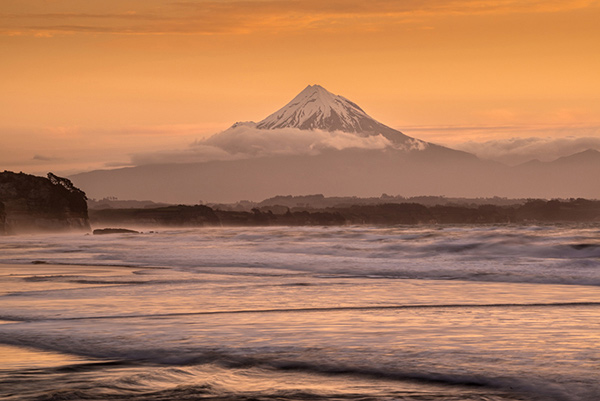
Sunset over the Mount Egmont from Wai-iti Beach, Taranaki Coast, New Zealand (by Sarah). Post-processing doesn’t always have to be complex to be effective. This image has received some basic adjustments to color, contrast and exposure to enhance its visual impact.

Why we need to post-process our landscape images

In the days of film photography we never performed any post-processing on our landscape images. Doing so entailed spending a small fortune on drum scanning and knowing someone with access to a supercomputer. Most landscape photographers were restricted to capturing everything in-camera and living with the results.

That state of affairs meant we needed to make decisions in the field that had permanent repercussions;

  • Which film stock and ISO to use?
  • Which color filters to apply?
  • How to achieve perfect exposure?

It is likely fair to assume that, for most dPS readers, film photography is either a distant memory or something that needs to be looked up on Wikipedia. We digital landscape photographers can gleefully wallow in the knowledge that RAW image capture and robust digital workflow allows us to make most of these decisions from the comfort of an office chair well after the time of capture.

The problem with RAW capture is that it usually produces really, really bland and unappealing images straight from camera. If you want to maximize the visual impact and creative options contained within a RAW file you need to post-process your images. It’s that simple.

2 before after

Sunset at Gentle Annie Beach (by Todd) West Coast, South Island New Zealand. This scene has all the ingredients of a successful landscape image, interesting visual elements, motion, and a nice blend of textures throughout the scene. However, the RAW file delivers an image that is bland, cold and lacking in contrast. Some simple post-processing of a single image file in Adobe Lightroom has resulted in an image that is visually inviting and makes the most of the tonal and color data contained within the image file.

2a intro 002

Lake Matheson and the Southern Alps at dawn (by Todd). Three distinctly different results were achieved from this one (bleak looking) RAW file! Long gone are the days where your creativity is restrained by in-camera results.

Two types of post-processing

In our latest dPS eBook Loving Landscapes – a guide to landscape photography workflow and post-production we break down landscape photography post-production into two distinct approaches:

  • Single exposure post-processing
  • Multiple-exposure post-processing

Let’s take a quick look at these two different approaches enhancing landscape photos.

Single exposure post-processing

As you will have figured from the name, this approach creates the finished image by processing a single image file. This is primarily accomplished within Lightroom and is the simplest approach to post-processing – if you read our first eBook, Living Landscapes, you will know that we love simplicity, particularly when it comes to post-processing!

We always attempt to capture a scene in a single file if possible, as it reduces the time spent in front of a computer and introduces less technical barriers to creativity than are found in multiple exposure post-processing.

3 se at 12

Lake Alexandrina (by Sarah). Single exposure landscape photography offers huge creative scope. Combining in-camera single exposure techniques such as long exposure with post-processing (black & white conversion) can create results that are stunning.

Multiple exposure post-processing

Occasionally it is impossible, for technical or creative reasons, to achieve the desired result with a single image file. Cue multiple exposure workflow – where the final image results from processing and merging elements from two or more image files. Multiple exposure landscape photography is a significantly more complex approach – both in the field and during the post-processing workflow. We use a combination of Lightroom and Photoshop to combine multiple images into a single final result.

One of the most common uses of multiple-exposure post-processing for landscape photography is exposure blending – where two or more exposures are combined to overcome high dynamic range in a scene.

4 exposure blending

The dynamic range of this high contrast scene (image above) exceeded the camera’s capabilities. Exposure blending allowed us to create a technically excellent result from two exposures. We detail three different approaches to exposure blending landscape scenes (including the making of this image) in Loving Landscapes.

5 mi wf 16

Misty sunrise at Castle Hill (By Sarah). HDR is another multiple exposure post-processing approach that resolves technical limitations as well as offering creative options.

In addition to providing solutions to technical challenges, multiple exposure landscape photography allows creative options that are simply impossible to achieve in a single frame. A good example of this is the merging of ‘best elements’ from multiple shots of the same scene taken at different times. This allows us to composite different elements together to create an image that exceeds the results achievable in a single exposure.

6 best elements

Lake Pukaki (by Todd), merging best elements in this scene allowed us to combine the best sun starburst and clouds, with the most dramatic waves and shoreline from the field sequence (of over 20 images). Covering the sun in another frame also allowed us to minimize the appearance of lens flare on the cliff face.

Give it a go!

Post-processing opens up a world of creative opportunities that allow you to better express your vision of the world around you. The technology is there, it is easy to use and the results can be spectacular – why wouldn’t you want to post-process your images?

Post-processing may seem a little overwhelming at first – and it can be – but you don’t require an art school diploma to start making dramatic improvements to your images. Our oft repeated advice is to keep it simple when you are starting out. Take the time to learn about the post-processing tools that affect the fundamental variables of photography: color, exposure and contrast and your images will improve dramatically.

Once you have those mastered, start experimenting with more complex tasks in Lightroom’s wonderfully non-destructive editing environment (there is nothing that can’t be undone in Lightroom) before transitioning to the more complex realm of multiple exposure Photoshop.

We hope that this has been of interest to you and we look forward to your feedback in the comments section.

*Note: photo-puritans can still experience some of the old school ‘thrill’ of making a finished image in-camera by shooting in JPEG-only mode. All of the color, tone and quality decisions can be set by messing around in the bowels of your camera menu. These settings are then baked into the finished JPEG, leaving much less scope for post-processing than with RAW capture. Why anyone would choose to do this deliberately is unclear – apparently, some folks love a challenge.


Check ou the newest dPS ebook – Loving Landscapes A guide to landscape photography workflow and post-production – a brand new dPS ebook by the authors of Living Landscapes

The post The Power of Post-processing for Landscape Photography by Todd Sisson appeared first on Digital Photography School.


Digital Photography School

 
Comments Off on The Power of Post-processing for Landscape Photography

Posted in Photography


Guide to Creative White Balance for Landscape Photography

16 Apr

If you’ve been using a digital camera for any length of time, you’ve probably heard about White Balance. You may still be wondering exactly what it is, and how to use it; or you may be using it right now and be wondering how it can possibly be something “creative”.
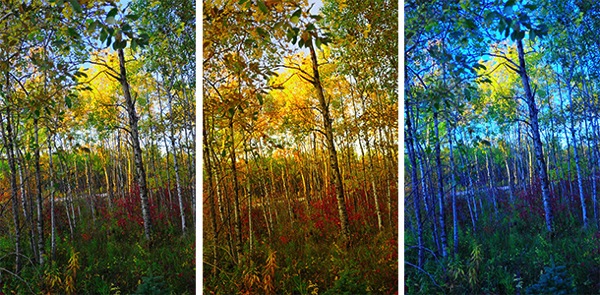
Creative white balance landscape photography

Different white balance settings create different looks

I’m going to show you some of my techniques for using White Balance to creatively enhance your landscape photography and with a few simple steps you can unlock the remarkable power of creative White Balance. Don’t worry, this is not a technical discussion, there are lots of references about that aspect of White Balance online. This article explains a simple shooting technique you can start using right now.

The Color of Light

Creative white balance landscape photography daylight

Daylight setting

Have you ever taken photos in an office, and been dismayed to see that your results had a sickly green cast to them? Or taken photos under cloudy, lifeless, skies only to see your images appear cold, flat and a little blue?

This happens because light comes in a variety of colors. The reasons for these colors is a result of wavelengths of light and the light spectrum. But we’re not going to get into this too deeply here. Just know that all light has different colors, and even the sun has different colors at different times of the day. Every landscape photographer knows about the “sweet light” or the “magic hour” – the times around sunrise and sunset when the color of the light is perfect for photography.

The crazy thing is that your eyes usually adjust to compensate for these color shifts, especially the subtle ones, so you won’t necessarily perceive these color differences, and in some cases your eyes are not as sensitive to color shifts as are the sensors in your camera. So you snap that office photo and the result isn’t as great as you had expected. Because of the color, those fluorescent bulbs cast a green pall over everything but you didn’t see it because your eyes “adjusted” the color for you.

This is where your White Balance settings play an important role in correcting potential problems by adjusting the color of the light in the camera. It is really important when you’re taking images of people, because the skin tones will be unattractive and far from natural looking.

But, if you are a landscape photographer, armed with the knowledge that light has color and your camera has a tool that can change the color of light, you can use this knowledge to do more creative landscape photography.

White Balance for Landscape Photography

Creative white balance landscape photography hicolour fluorescent daylight

Fluorescent setting

I shoot a lot of landscapes, in fact I pretty much ONLY shoot outdoors. Thankfully I almost never have to deal with those ugly green fluorescent lights. But what I do deal with are sunsets, sunrises, autumn colors, mountains, flowers, etc. – all those good things we find in nature.

I noticed that sometimes my sunset images just didn’t pack the punch the way I SAW it at the location. Sure, I could go back to my computer and make adjustments. Or, without degrading any pixels, I could punch up my images in camera by purposely fooling it into using a different White Balance. In other words I don’t use White Balance to correct color casts, I use it to ADD color casts! I deliberately use the “wrong” White Balance setting.

Landscapes created at sunset or sunrise, snow and winter scenes, and those with night sky dominating lend themselves well to creative White Balance techniques.

Sunsets can become more warm, or more soothing, with violet overtones if you use the Cloudy White Balance setting. Autumn foliage pops with yellow and orange when you use Shade as your White Balance! The Aurora Borealis (Northern Lights) becomes a rich alien green, rolling through a deep royal blue sky, by changing your White Balance setting to Incandescent or Tungsten. Please note, that you use these settings regardless of actual light colour.

Creative white balance landscape photography hicolour fluorescent daylight

Fluorescent daylight camera setting

Creative white balance landscape photography customA3 M3

Custom white balance setting A3 M3

Creative white balance landscape photography auto

Auto white balance setting

Creative white balance landscape photography direct sun

Daylight white balance setting

Creative white balance landscape photography shade

Shade white balance setting

How to use Creative White Balance

To use creative White Balance, there are just a few things to understand about using White Balance in general.

Since White Balance is designed to correct color casts, the setting on your camera will compensate, or change the light, to be the opposite of the shooting situation. In other words, incandescent lights are too warm (orange), so changing your White Balance setting to Incandescent or Tungsten will add a blueish tinge. The light in the shade is blueish, so changing the White Balance setting on your camera to Shade adds warmth, orange and red.

To get creative with White Balance you’ll need to find the dial or menu for changing your White Balance settings. Most cameras have presets for Flash, Shade, Cloudy, Incandescent (Tungsten), Fluorescent, Sunny (or Daylight), and Auto.

Look for the ICONS – a cloud (cloudy), a house (shade), a sun (full sunlight), a fluorescent bulb – long and skinny (fluorescent), an old school light bulb (incandescent or tungsten), a lightning bolt (flash), and AUTO or A for automatic.

Next you’ll need to know how to set your White Balance for a specific type of shot. The best way is to experiment by trying all of your White Balance settings for the same scene. So if you want to ramp up your warm colors, say in an autumn scene or sunset, change your White Balance to Shade, Flash, and Cloudy! Compare your results.

Shooting the night sky or the Aurora Borealis, change to Tungsten or Incandescent to make the colors cooler, make that Aurora really pop! The added blue tones give the night sky a rich royal blue tone, while the green light of the Aurora turns an eerie alien glowing green.

Here’s a handy chart I made for you – so you can literally “dial it in”. All you need to do is change your settings according to the type of landscape scene, using the chart. This will give you a great place to start.

Chart

Supercharge your Creative White Balance

Depending on your camera, you may also be able to fine tune and supercharge your custom White Balance once you find one that provides the boost you like.

In Nikon DSLRs you may see this graph that enables you to make your own custom White Balance presets. It’s typically in your shooting menu under the White Balance tab. Consult your camera manual to see if your camera has this option, and how to apply it.

2customWB1

1customWB

Custom white balance in camera

By selecting a specific color balance presets, you can ramp up the warmth and impact for sunrise and sunset, as well as boost the coolness for winter snow landscapes.

Easy Experimentation

If you shoot RAW, and can’t switch White Balance in the field, you can also easily adjust your White Balance in post-production. Lightroom, Photoshop, Nikon Capture and most other image editing programs have a RAW White Balance setting. Nikon shooters note that you’ll get the best results adjusting RAW [NEF] White Balance if you use Nikon Capture, as Nikon encrypts its White Balance “formula”. Other software can only read parts of the White Balance data so your results may not be as high impact as they could be.

If you have some landscape sunset or sunrise shots on your computer, give creative White Balance a try right now. Here are few of my Lightroom White Balance edits so you can see how much control you have over the drama and mood of your lighting.

Creative white balance landscape photography auto

Auto white balance in Lightroom

Creative white balance landscape photography cloudy custom

Cloudy custom white balance in Lightroom

Creative white balance landscape photography auto adjustments 2

Auto white balance adjustment in Lightroom

Creative white balance landscape photography auto adjustments3

Auto white balance adjustment in Lightroom

Do you have some other tips you can share on using White Balance creatively? Please tell us about them in the comments below and share your images as well.

For some other landscape photography tips try some of these articles:

  • 5 Steps to Help you Take Better Landscape Photos
  • 10 Most Common Mistakes in Landscape Photography – and How to Overcome Them
  • So you Want to Shoot Landscapes? [Top 12 dPS Landscape articles from 2013]
  • Living Landscapes – A Guide To Stunning Landscape Photography – a dPS ebook
  • Loving Landscapes A guide to landscape photography workflow and post-production – a brand new dPS ebook by the authors of Living Landscapes

The post Guide to Creative White Balance for Landscape Photography by Alex Morrison appeared first on Digital Photography School.


Digital Photography School

 
Comments Off on Guide to Creative White Balance for Landscape Photography

Posted in Photography


A Guide to Landscape Photography Workflow and Post-Processing

15 Apr

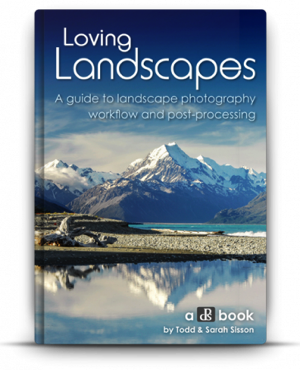
NewImageToday is an exciting day at dPS HQ because we’re releasing an eBook that has been asked for many times by readers – LOVING Landscapes, a Guide to Landscape Photography Workflow and Post-Processing by Todd and Sarah Sisson.

Early in 2013 we looked at our growing library of photography eBooks and realised that we had a big hole to fill – we were yet to publish a Landscape Photography eBook.

We began the hunt for a photographer to create a guide.

After much searching we came across the photography of husband and wife team Todd and Sarah Sisson and fell in love with their images. We began to talk to Todd about creating an eBook with us and mid last year released a guide to Landscape photography called LIVING Landscapes.

The eBook was a huge success and became one of our fastest selling eBooks ever.

That first eBook from Todd and Sarah received some amazing reviews and we still get positive feedback about it almost a year later. But alongside the praise was a request – a request for a guide to post processing landscape photos.

While the first eBook touches on some post production techniques it was not the place for comprehensive teaching on the topic – so… we began to talk with Todd and Sarah about a followup eBook that explored the topics of Workflow and Post Processing.

What they produced in LOVING Landscapes is pretty amazing. Inside you’ll find over 200 pages of practical information that leads you through 12 chapters of advice to help you bring the images that you take to life with a little post processing love.

Here’s the table of contents which will give you a feel for what’s covered.

NewImage

What I LOVE about this eBook is that it is packed with heaps of actionable information that you can apply immediately to the photos you’ve already taken.

Alongside that information are inspirational examples of the techniques in practice.

You’ll come away not only inspired but informed and ready to apply what you’ve learned.

NewImage

An Ideal Companion Bundle or a Great Standalone Guide

With the launch of Loving Landscapes we now feel like we’ve got a great complete guide to both ‘taking’ and ‘processing’ beautiful landscapes.

These eBooks are designed to be useful separately if you’re just interested in one of those topics – but together they also make an incredibly comprehensive guide through the whole topic of creating beautiful landscape images.

Grab Your Copy Today and Save 33%

Our Loving Landscapes eBook will retail for $ 29.99 but as a limited time Early Bird Special you can pick up a copy today for just $ 19.99 USD (33% off).

If you want to pick up both Living Landscapes and Loving Landscapes eBooks together you can bundle them together today for the special price of just $ 39.99 (normally $ 59.99 so today it’s also 33% off).

Want more information about this eBook? Get the full lowdown here.

The post A Guide to Landscape Photography Workflow and Post-Processing by Darren Rowse appeared first on Digital Photography School.


Digital Photography School

 
Comments Off on A Guide to Landscape Photography Workflow and Post-Processing

Posted in Photography


Pulitzer Prize 2014 winners announced for photography

15 Apr

02haner2014.jpg

Two New York Times photographers are honored with Pulitzer Prizes in photojournalism this year. Tyler Hicks takes the award for Breaking News Photography for his work documenting a terrorist attack at a mall in Kenya, and Josh Haner’s photos of a Boston Marathon bombing survivor take the top award in Feature Photography. Five finalists also receive recognition for their contributions to photojournalism in 2014. Read more

News: Digital Photography Review (dpreview.com)

 
Comments Off on Pulitzer Prize 2014 winners announced for photography

Posted in Uncategorized