RSS
 

Posts Tagged ‘Photography’

How to Become a Photography Icon: Inspired by Henri-Cartier Bresson

09 Jul

On the 30th of January in 1948, Mahatma Gandhi was killed by three bullets fired at close range. And while the world lost one of its greatest men (arguably), one man gained even more status as one of the most important photographers in the world.  Henri-Cartier Bresson had photographed Gandhi just about an hour before his tragic death. He also Continue Reading

The post How to Become a Photography Icon: Inspired by Henri-Cartier Bresson appeared first on Photodoto.


Photodoto

 
Comments Off on How to Become a Photography Icon: Inspired by Henri-Cartier Bresson

Posted in Photography


4 Ways Self-Critique Can Improve Your Photography

09 Jul

Self-Critique-PhotoLearning how to analyze and judge your own artistic work correctly is a valuable skill that can be a bit tricky to learn properly. I’m sure you’ve heard the saying “I’m my own worst critic” thrown about, you may have even said it yourself in reference to your own photography. However, there are ways that you can harness this self-criticism and learn from it rather than allowing it to consume you and destroy your self-confidence.

Learning how to constructively critique your own photography can not only help you make better photographs each time you pick up a camera, but it will also build your confidence as a photographer, and prepare you for the inevitable critiques from your peers and colleagues.

This article is a bit different in the sense that the images that I’ve used to illustrate the post showcase one particular case of how I used self-critique to iterate a photograph over the course of a shoot. I will cover the benefits of self-critique and how it can help you become a more confident photographer – so read both the article and the captions of each photograph as you continue along.

#1 Reinforces your knowledge of the craft

improve-photography-self-critic-2

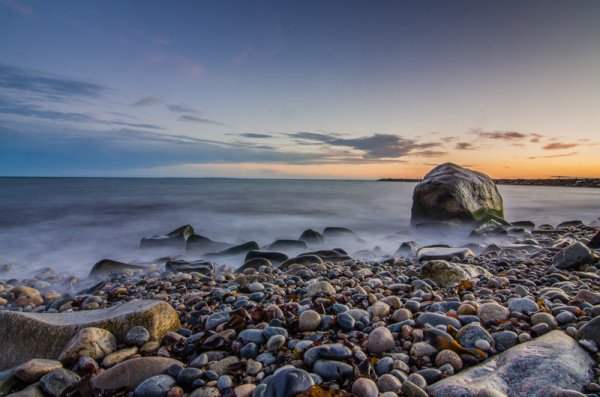
After looking at what I’d captured here on the LCD of my camera I decided that the prominent features of this landscape wasn’t the sky or the foreground, but the large boulder along the right side of the frame.

You read eBooks and tutorials to learn all the technical skill required to make stunning photographs, but in the heat of the moment technique will often slip, especially when you’re just learning. That’s okay, but it’s important to learn how to notice when this is happening and correct for it along the way.

Providing yourself with a thoughtful self-critique from time to time can really help you locate the most common faults in your photography. After performing a few of these critiques you may notice that you commonly forget to double check your settings leading to poorly exposed photographs or improper Depth of Field, or you may notice that you commonly struggle to compose a photograph with purpose resulting in a photograph that doesn’t capture the emotion that you had intended.

#2 Teaches you how to look at a photograph critically

improve-photography-self-critic-3

A second setup left me with a feeling that I was on the right track, but now the scene felt too cluttered and confined.

The ability to articulate what it is about a photograph that makes it special and what needs improvement, as specifically as possible, can drastically improve your photography. This is something that is learned over time and can be difficult at first, especially when looking at your own work.

Eventually, you’ll get to the point where this sort of critical analysis will come naturally. You’ll find yourself fine-tuning your composition and settings in the field, as I’ve done with the photographs that illustrate this point. You probably won’t even be consciously aware of the fact that you’re doing this.

#3 Helps build your confidence

improve-photography-self-critic-4

Now, I had the composition that I wanted. Something that featured the boulder prominently, yet allowed there to be enough room to breath in the foreground., but the water just wasn’t right. Time to adjust the settings to allow for a longer shutter speed.

No one enjoys being told what’s ‘wrong’ with something that they’ve created, but it’s going to happen, whether you ask for it or not. Even the best photographers have their critics so it’s not a matter of skill, it’s simply the way the world works.

By finding the ability to critique your own photography you’ll have an idea of what people might say when they are viewing your work, and as a result, you’ll be more prepared to defend the choices you made to create the image.

#4 You’ll become better at offering advice to others

While this might not directly affect your skill as a photographer, it does help to reinforce the other three points listed above. When you are able to offer constructive feedback to someone who’s just starting out you’ll not only feel great by helping them improve, but you’ll be more confident going forward with your own work at the same time.

improve-photography-self-critic-5

The longer exposure sealed the deal for me creating that milky water effect around the base of the boulder that I was featuring in the shot.

The post 4 Ways Self-Critique Can Improve Your Photography by John Davenport appeared first on Digital Photography School.


Digital Photography School

 
Comments Off on 4 Ways Self-Critique Can Improve Your Photography

Posted in Photography


Photography Hunting – Play the Waiting Game with Kids

08 Jul

What is photography hunting?

I am a hunter. My prey, however, does not scurry through the woods, fly through the sky or swim in the streams. My trophies are instead moments, which I stalk, camera at the ready. When the time is right, the target is placed squarely in my sights. Click.

I’m constantly on the hunt for that fraction-of-a-second gesture, facial expression or scene that takes an ordinary photograph to the next level. Hunting can be tiring and a little like war, in that there are long periods of boredom interspersed with brief moments of excitement. But those moments of excitement and the superior images they provide are well worth this mental approach to photography.

Halloween

Seeing the potential for a nice Halloween silhouette, I waited at the bottom of the hill for several minutes until the perfect moment presented itself.

When I first began the journey of documenting my children’s lives, my methods for doing so were ineffective. Whether the scene was ‘created’ for the purpose of the photograph, or I caught my children in a natural setting, I would go after the end-result with a rapid-fire intensity, hoping one of the many images captured would result in success. Sometimes I would get lucky and catch the optimal moment with one of my stray shots. Other times, I would realize immediately before, or after, I’d pressed the shutter that the best frame had evaded capture. What an awful feeling it is to have your prize slip through your fingers, never to be seen again.

I would also try to control my subjects, in the hope they would appeal to reason and take requests from the man behind the camera. Sensing dad’s genuine desire to capture the moment, the little darlings would naturally do everything in their power to ensure I was unsuccessful.

Hat & Tie

Over time, my approach to photography evolved. Instead of aggressively spraying bullets into the woods, I now calmly sit back and monitor the scene. Rather than attempting to control the scene and my subjects, I now try to take the best photos the situation will naturally allow, without my overt intervention.

3

As with real estate values, photograph hunting hinges on location, location, location. Make sure to set up shop in the ideal location, so that when the moment arises, you’re not scrambling to get into position.

Know your subject

The first rule of photograph hunting is to know your subject. My subjects are two energy-filled kids, interested in anything but sitting stationary and smiling for dad. They have other things on their to-do lists and, if I ever hope to make decent photographs, my approach has to be the yin to their yang. If they are constantly moving and unpredictable, I have to be patient and watchful. If they refuse to pose, I have to fabricate poses using their natural movements and expressions. Essentially, I have to become a hunter, constantly focused on the situation.

Lower quantity – higher quality

Getting used to this alternative strategy may take time, but the transition can be relatively pleasant. Eventually, you won’t get as frustrated when that perfect moment slips away. But more importantly, because you’re strategically lying in wait for the right moment, fewer moments will slip by you in the first place. The days of rapid-fire documentation will gone, which means lower quantity, but higher quality. This reduction in the number of images produced has secondary benefits, in terms of processing time and data storage. Simply grab your camera, get into position, and wait patiently with the camera to your eye for that special moment when the stars align and the shutter goes click.

When the subject has no awareness of the photographer’s presence, the results tend to be more intimate.

A few photography hunting tips:

Camouflage

Become the wallpaper, so as to not influence your subjects’ movements and actions. You want them to be immersed in their own little worlds, as once they become aware of your presence and intentions, the entire situation can quickly unravel. Remaining an observer of the scene, as opposed to a participant within it, results in a more relaxed shooting environment, which fosters superior results.

Know your weapon

Know your camera and know the basics of photography so that you can quickly adapt to new light, positions and situations – without having to take the camera down from your eye. Too often, you will find that it is during those few seconds when you are not ready to take a photo, that the best photo opportunity will come and go.

The Hunter

Don’t fall asleep in your tree stand

Always maintain your mental focus. If you’re personally invested in the opportunity, and if the chance for a trophy photo exists, be ready. It’s amazing that such fleeting moments, which last mere fractions of a second, can have such long-term impact when viewed again and again. Stay focused on the subject so that when that split-second gesture, facial expression or scene presents itself, you’re there ready to capture it.

RMP_3336 - Version 2 (2)

Don’t spray and pray

Take fewer shots, with more precise aim. Put down the fully automatic in exchange for a nice, simple single-shot. Taking fewer photographs, that are each precisely timed and focused to hit the target, will result in more trophies hanging proudly on your wall, and will remove some of the post-process burden associated with sorting, editing and storing images.

Newsie

Photos don’t have to be 100% natural to employ the hunting technique. If I notice a scene with nice light, I’ll place my kids in the right position and watch them play until I see the ideal look or gesture.

Do you have any other tips for photography kids? Please share in the comments below, and show us your images as well.

Happy hunting!

The post Photography Hunting – Play the Waiting Game with Kids by Ryan Pendleton appeared first on Digital Photography School.


Digital Photography School

 
Comments Off on Photography Hunting – Play the Waiting Game with Kids

Posted in Photography


Ebook Review – From Basics to Fine Art Black and White Photography

07 Jul

Ebook Review: From Basics to Fine Art

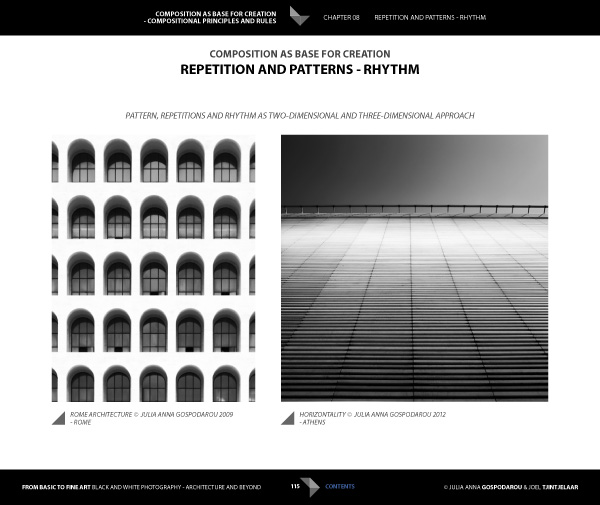
If you’re interested in black and white photography, the names Joel Tjintjelaar and Julia Anna Gospodarou will probably need no introduction. The work of both photographers has helped define, and push the boundaries of long exposure photography, a relatively new genre in the fine art world.

Julia and Joel have joined forces to write a new ebook called From Basics to Fine Art: Black and White Photography – Architecture and Beyond. It is principally aimed at photographers interested in using long exposure techniques to photograph buildings, with some chapters being more general and having a wider appeal.

Ebook Review: From Basics to Fine Art

The contents

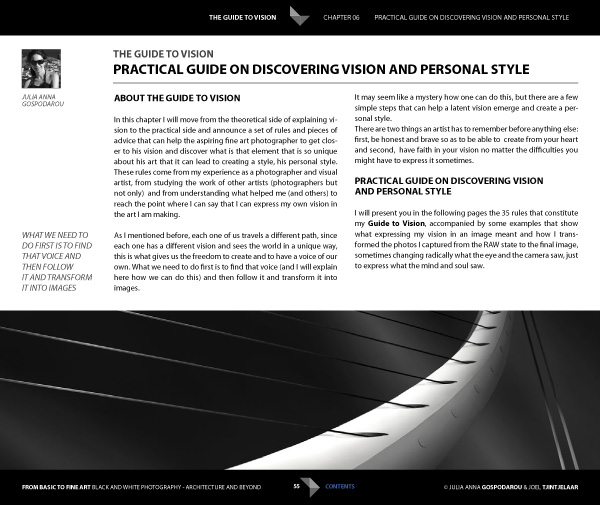
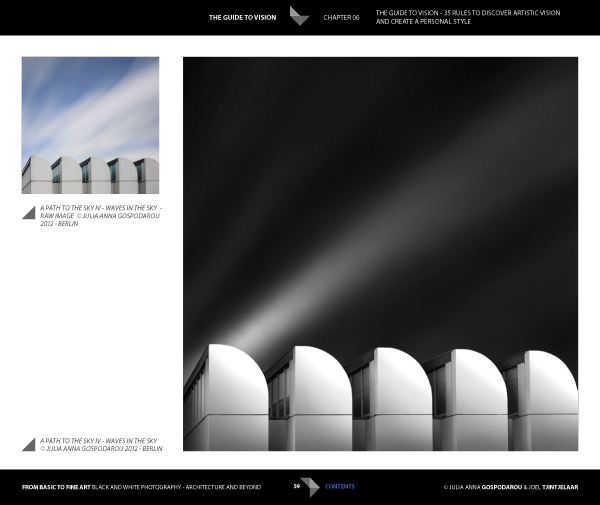
The ebook starts with personal statements from the authors exploring their interpretations of the word vision as it relates to architectural black and white photography. For me, the most interesting concept here is expressed by Joel. He talks about long exposure black and white photography as being several steps removed from reality. It is an interpretation, not a reproduction. The intent is not to capture the scene as it looked to the eye, but to present it in a way that represents the artist’s vision.

This theme is continued in the later chapters where Joel explains his post-processing techniques. Take a good look at his photos (follow the link to see some) and think about whether you could achieve similar results. The likely answer is no, because Joel has developed his processing techniques beyond the level that most photographers achieve. Be warned – Joel takes a long time to process his photos and this section of the ebook reflects that. If you’re looking for quick fixes or shortcuts you will need to look elsewhere.

Ebook Review: From Basics to Fine Art

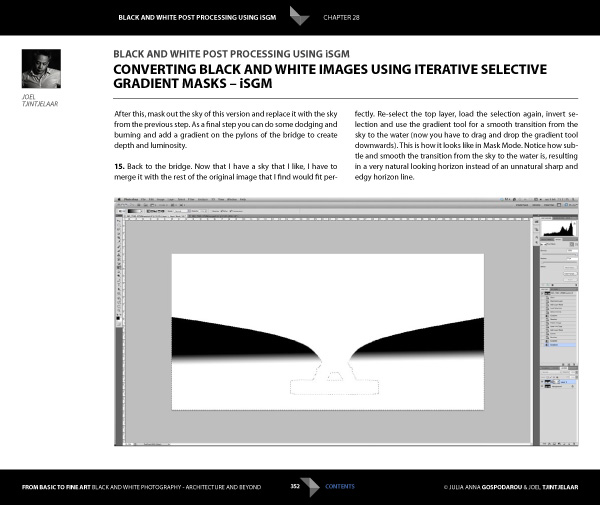
But if you’re looking for a detailed explanation of black and white post-processing techniques that you won’t find anywhere else, then you’re in the right place. Joel explains his workflow, demonstrating how he uses Lightroom and Photoshop, along with plug-ins such as Silver Efex Pro. Most importantly, he shows you how to use what he calls Iterative Selective Gradient Masks, a technique he developed himself, to create the unique look of his black and white images.

He also explores fairly complex techniques modelled on what the calls: the 10 monochromatic commandments for good black and white photography. The idea is that you can create presence and depth in photographs by altering contrast, tonal relationships and defining edges in a way that adds volume, depth and luminosity to the subject.

Don’t be surprised if you don’t understand what this means as it’s an intricate topic that represents a fairly new way of looking at black and white photography. Joel is ahead of everybody else in this respect so you won’t find this information anywhere else. However, the examples in the ebook, and the clear presentation, makes it simple. By the way, the 10 monochromatic commandments I just mentioned are essential reading for anybody interested in black and white photography, regardless of genre.

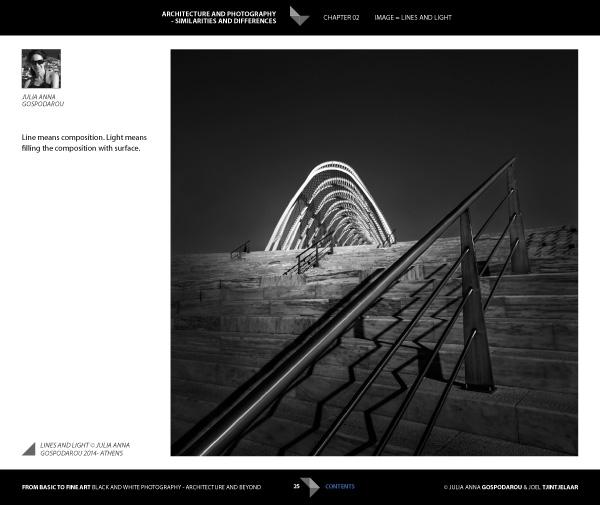
For me, the aspects covered in the previous paragraphs are the most interesting part of the ebook. There’s more, including some interesting thoughts from Julia (a trained architect) on using light to render the form and volume of buildings. She draws on techniques used in drawing and applies them to photography to get you thinking in a new way about rendering three-dimensional objects in photography.

Ebook Review: From Basics to Fine Art

There’s also an extensive chapter from Joel about long exposure photography, and the equipment (including a detailed look at neutral density filters) and techniques required to get results.

Included is more of the usual stuff that you would expect from a book about architectural photography, including composition, the practical aspects of photographing architecture and a chapter on using tilt-shift lenses. There’s also a useful chapter on pricing your work that will be of interest to professionals (or aspiring professionals).

A niggle: the discussions about composition contain a heavy emphasis on rules that continues throughout the ebook. I’m always suspicious of anybody that claims a certain way of things is a rule, and I’m certainly not convinced of the veracity of using (just to give an example) Fibonacci spirals and then stating that there’s a rule attached to it. I’m a strong believer in principles, rather than rules, and I don’t think Fibonacci spirals are going to help readers improve their composition. This minor complaint aside, there is plenty of good and practical information in this ebook.

Ebook Review: From Basics to Fine Art

Conclusion

I came away from reading this ebook with mixed feelings. On one hand, you have two photographers whose work I admire immensely explaining how they create their images, from their general philosophy to the specifics of long exposures and post-processing.

If you’re ever looked at their photos and wondered how they achieved the results they do then this ebook has the answers. It’s a tremendous act of generosity and sharing. No one else seems to be doing this stuff yet, or at least doing it and teaching it, so that makes some of the content unique. If you’re a fan of either of these authors, and want to learn the secrets behind their work, then it’s a must buy.

Ebook Review: From Basics to Fine Art

My main misgiving comes from the price. It’s an expensive ebook and it would be a shame if this information reaches a limited audience because of that. I realize that expense is a relative concept; the ebook is much cheaper than taking a workshop and you will learn things here that you wouldn’t from any other source. It’s a unique resource, and ultimately the buying audience will decide whether it has a fair value.

I have to admit that what I’d really like to see is a print version of this ebook, properly designed to give precedence to the photos of both authors. Their images would be better enjoyed on the printed page, and a book has the potential to become a lasting testament to their body of work and teachings.

From Basics to Fine Art: Black and White Photography – Architecture and Beyond

You can learn more about or buy From Basics to Fine Art: Black and White Photography – Architecture and Beyond by clicking the link. The price is €49 for those of you in the Eurozone, £39 for anybody in the UK and $ US59 for the rest of the world.

The post Ebook Review – From Basics to Fine Art Black and White Photography by Andrew S. Gibson appeared first on Digital Photography School.


Digital Photography School

 
Comments Off on Ebook Review – From Basics to Fine Art Black and White Photography

Posted in Photography


Weekly Photography Challenge Reflections

05 Jul

Earlier I rounded up a set of reflection images. Now it’s your turn!

This week’s photography challenge is reflections

Reflections are great for learning to train the eye to see photographically. Start looking for them everywhere, in windows, doors, car panels, wet pavement, puddles, ponds, or icy surfaces. Rules of composition still apply to make a strong image, as does lighting.

Here’s a few more examples to get you started on the photography challenge:

By Éole Wind

By Denis Collette

By DCSL

By Denis Collette

By Anirudh Koul

By Kevin Dooley

By Trey Ratcliff

By jenny downing

By Taro Taylor

Need some composition tips?

  • Using Balance in Your Landscape Photography Composition
  • A New Photographer’s Guide to Composition
  • Composition and the Power of Line

Show use your reflection images

Simply upload your shot into the comment field (look for the little camera icon in the Disqus comments section as pictured below) and they’ll get embedded for us all to see or if you’d prefer upload them to your favourite photo sharing site and leave the link to them. Okay, ready to impress us?


The post Weekly Photography Challenge Reflections by Darlene Hildebrandt appeared first on Digital Photography School.


Digital Photography School

 
Comments Off on Weekly Photography Challenge Reflections

Posted in Photography


40 Creative Examples of Photography Business Card Designs for Inspiration

04 Jul

What do a graphic designer, an owner of a local cafe, a hairdresser and a photographer have in common? It’s a business card, of course! Tons of similar, ordinary business cards made on a white piece of paper with black lettering on them overload the market. These days, you need to have a really creative business card to impress your Continue Reading

The post 40 Creative Examples of Photography Business Card Designs for Inspiration appeared first on Photodoto.


Photodoto

 
Comments Off on 40 Creative Examples of Photography Business Card Designs for Inspiration

Posted in Photography


36 of the Best Online Tools to Boost Your Photography Business

04 Jul

As a beginner photographer, I put most of my time and energy into the product side of my business. I need to practice, improve my shooting and post processing skills, and just grow as a photographer. However, I have a strong intention to make photography my full-time job and be successful in it, which is hardly possible without a business strategy. Besides, with over five years of experience in social media and content marketing, I know for sure that establishing a sound online presence and effective marketing channels may not show you the money today, but it will shape your business in the long run.
35 photography marketing tools

In this article, I’m sharing the results of my recent research on the online marketing and workflow organizing tools for photographers. I use some of these services on a daily basis; others are carefully stored in my bookmarks, eagerly waiting for the moment to come in handy. Each tool category includes several noteworthy options (both big players and lesser known tools), so that you can use this article as a catalog to refer to in your marketing pursuits.

Photography Website Builders

1. MotoCMS

Since I was looking for a self-hosted solution with no additional costs for the tools I don’t need just yet, this one worked perfectly for me. For $ 139, I got a modern website template based on the quite powerful MotoCMS. Among the key features are advanced drag-and-drop website editor, SEO & social media tools, e-commerce widget, etc.

2. Squarespace

Squarespace offers 25 modern-looking templates with e-commerce integration, custom domains (no self-hosting, though), mobile-ready websites and support. There’s no free plan, but prices start from $ 8 per month, and you have 14 days to give it a try for free.

5. Portfoliobox

There’s a free account option allowing you to select a clean template and fill it with up to 40 images. A $ 6.90/month Pro plan (paid yearly) with Portolfiobox includes more design and marketing options, as well as a custom domain name and email.

6. Wix

The free plan includes a wide gallery of templates, unlimited pages and hosting. Premium plans start from $ 4.08/month, but your website will carry Wix brand ads both on desktop and mobile.

7. Pixpa

Pixpa offers hosted portfolios with private galleries, ec-ommerce with Fotomoto, custom domains, social media sharing and other features. All-inclusive plans start from $ 4.00/month (billed annually) with a 50% discount available for students.

8. Portfolio Lounge

A custom domain is included in Portfolio Lounge’s free plan, which is nice! Upgrading to the Pro ($ 7.99/month) and Max ($ 16.99/month) will get you extra storage space. This is quite a simple service with no pricing gimmicks and overwhelming feature sets.

9. Folio Websites

Folio Websites templates are based on WordPress, which is quite a benefit these days. There’s just one plan available – $ 175/year, and your decision to sign up may only be based on examples and promises since there’s no trial period offered.

10. Carbonmade

Carbonmade is a kinda hipster among portfolio builders – its design is funky, the words are fun, and the service is on trend. Opting in for the free “Meh” plan, you get a 35-image portfolio on the carbonmade.com domain. Upgrade to the $ 12/month “Whoo!” plan, and you get 500 images and 10 video slots, domain binding, ad-free site, private projects and tech support.

10b. Zenfolio (added by the Editor)

Editor’s note: I personally use Zenfolio for my portfolio, and have for several years. The benefits of choosing something like Zenfolio over just a portfolio site is that they also offer a way to sell your images, preview them for clients, have locked or private galleries and even a blog element. Their Basic Plan is only $ 30/year but if you want unlimited uploads, and the ability to price your own work go for the Premium at $ 140/year. This can also act as you backup as well with unlimited storage of images. They do offer a free trial.

By DAVID MELCHOR DIAZ

Have you ever wondered why crappy photographers do better than you? It’s because they know that both creative and business sides of photography are critical for success.

Cloud Storage and Media Library

11. Flickr

With a colossal 1TB of free storage on the table, Flickr remains a first-class service for photographers of all levels. I’m using it to store my photos, too. However, I really hope their sluggish interface will be updated very soon.

12. Streamnation

Streamnation supports a pile of photo file formats, including RAW and C2R – a feature any photographer would appreciate. 20GB of storage is free. The price varies from $ 4/month for 100GB to $ 19/month for unlimited space biled annually.

13. Dropbox

While Dropbox’s experience for photographers still feels half-baked, it’s definitely a solution to consider since, unlike your average cloud hosting startup, the established service provides welcome peace of mind.

14. Google+

You can store up to 15GB in Google+ Photos, Gmail, and Google Drive for free and then pay for additional storage (up to 16TB) as your account grows. A neat thing about Google’s offer is that, unless your photos exceed 2,048 pixels by width, Google won’t count them against your total amount of available space.

15. Crashplan

A neat feature about Crashplan is that you can recover a deleted file no matter how much time has passed. Prices for unlimited online backup to the Crashplan cloud start at $ 5/month with annual billing.

16. Zoolz

Unlike most cloud hosting services, Zoolz is a long-term storage unit designed for storing your data on the cloud for a lifetime. With a 5-year subscription you can have your photos reside on reliable Amazon AWS servers for as low as $ 2/month.

16b. Zenfolio

Editor’s note: see above for Zenfolio info under the website section, also works for image backup.

By Anca Mosoiu

Image Proofing and Selling Prints

17. Pixieset

Pixieset is my number one tool to create beautiful client galleries. It has all the key features to help you deliver, proof, and sell your work (unlimited galleries, proofing system, instant download, password protection, audio, just to name a few). The best part is that all this is available in their free plan. If you’d like more space and a custom domain, you can upgrade your plan (prices range from $ 8/month for 10GB to $ 40/month for 1TB).

18. Nextproof

Nextproof a pay-as-you-go service with a $ 0 plan (1GB of space and a 15% transaction fee) on the table and a free 30-day trial available for every paid plan (ranging from $ 9-99/month).

19. OnlinePictureProof

There’s a single, $ 29/month plan you can buy. Among the key features are slideshows, mobile app and a shopping cart. Online Picture Proof is a simple yet professional picture proofing and sales solution.

20. ProofBuddy

If your website runs on the WordPress platform, you can make use of this free WP plugin, ProofBuddy, to activate a fully-functional proofing system built to show your proofs and accept orders from clients.

21. ShootProof

With ShootProof, you can create public or private galleries that work equally well on desktop and mobile devices. The great feature is that each visitor’s activity is displayed in detail to you. ShootProof has a flexible payment plan (commission-free $ 10-50/month) as well as a free plan allowing up to 100 uploads.

20b. Zenfolio

Editor’s note: see above for Zenfolio info under the website section, also works for image proofing and sales.

By zizzybaloobah

Scheduling

22. Setmore

Getting started with Setmore is very easy thanks to a clean, intuitive interface and wizard-like design. Standard features are free to use and include unlimited appointments, services and customers, as well as the ability to add up to 20 staff members to your account. Upgrading to $ 25/month brings you to the premium level with Google Calendar sync, unlimited SMS (text) reminders and recurring appointments.

23. Ubooq

Ubooq makes it easy for clients to schedule an appointment with an easy-to-use, online reception page. Appointment ticket and reminders help avoid no-shows. You can schedule up to 30 appointments in Ubooq for free, and then, if you like it, pick a plan that suits your needs. There is a 5-grade plan system, with prices starting at $ 19 for the monthly service.

24. BookedIn

A pretty cool feature in BookedIn, that I didn’t see on similar services, is that you can add a booking app to your Facebook timeline. Payment plans include a pay-as-you-go model (you purchase a block of booking for 50 cents each) and a monthly plan costing $ 20/month. You can try out the complete set of features for free during 30 days.

Note: other free options: Calendly and TimeTrade (also have a paid version for more appointments)

By keso s

CRM (Customer Relationship Management) System

25. Simply Studio

For $ 29/month (billed annually) with Simply Studio you get a full-fledged, web-based CRM system with client-money task management, accounting, invoicing and bookkeeping, online proofing, polls and email marketing. All features are included in a free trial version available for 15 days. My workflow of a newbie obviously does not require such software yet, but I surely love the features-price ratio of Simply Studio, as well as the simplicity of its interface. So Simply Studio is already in my bookmarks waiting for my photography business to grow and call for it.

26. StudioCloud

StudioCloud is free desktop software for photography studios. Standard features include cloud syncing, a client database, scheduling, billing, order management and other business-management tools. While the basic functionality (which is quite rich, though), is free to download, some extra tools, such as multiple users, online proofing and automatic client reminders, will cost you between $ 10-60 per month.

27. ShootQ

ShootQ offers the most comprehensive list of management tools, which naturally reflects in pricing. There are three all-inclusive and monthly plans to choose from, and prices range from $ 39.95 to $ 79.95 depending on the desired number of users, pages and amount of storage.

Organization and Automation

28. IFTTT

This brilliant service saves me lots of time for shooting. Using IFTTT’s straight-forward formula, you can automate a variety of tasks, such as tweeting your new blog posts or notifying you of the latest dPS posts.

29. Buffer

A dead simple, yet useful tool, to schedule your social media posts. If you’re a heavy social network user, Hootsuite might work for you better, but if you just don’t want your Twitter and Facebook get dusty while you’re on vacation, Buffer has you covered.

30. Nutcache

Nutcache enables you to easily create unlimited number of invoices, do estimates, and track time. Great tool to operate your photo business in the cloud. It’s also multilingual.

By Staffan Scherz

You won’t believe how many tasks you can manage with some organization and system put in the process.

Mobile Client Galleries

31. Myphotoapp

Myphotoapp boasts the widest library of tools among mobile photo gallery builders. Client email collection, integration with MailChimp and advanced app analytics are some really neat features that make this service my number one choice. I hope, though, the usability of the administrative panel will be soon revised towards a simpler and more intuitive interface.

32. StickyAlbums

Create mobile photo apps that your clients can save on their iPhones, iPads and most Android devices using Sticky Albums. Features include custom branding, built-in Facebook sharing, password protected albums, photo album hosting and sharing via SMS. Prices start at $ 19/month with a free, 14-day trial available.

33. ProImageShare

If you’re a Lightroom diehard, it’s an easy winner here. ProImageShare lets you publish and host your own web app that can be downloaded on iOS devices with the appearance of a custom app. With a one-time payment of $ 69, you can publish as many apps as you want to your own unlimited, shared-web host.

Photograph Rings on her toes by Vanessa Kay on 500px

Rings on her toes by Vanessa Kay on 500px

Brides will definitely appreciate a custom app with their wedding pictures. Expect referrals to come your way!

Multi-platforms and Services

34. Photoshelter

I bet you’ve heard about Photoshelter, as it’s one of the industry’s “big dawgs”. Portfolio websites, integrated e-commerce, cloud storage and client-proofing system are the tools you can find under this shelter. Prices vary from $ 9.99/month for the basic feature set, to $ 49.99/month for the premium toolbox.

35. Zenfolio

Zenfolio is another giant in the field of digital marketing for photographers. The number of features here is impressive, too. One of the recently added ones is Photo Books (order and sell). Prices start from $ 30/year with a free, 14-day trial on hand.

36. Queensberry Workspace

Built around Quensberry’s range of print products, Workspace enables you to create, organize, and market your online presence, as well as order and sell photo books, albums, frames, etc. Its basic version is available for free and you can upgrade from $ 4 monthly.

Editor’s note: once upon a time I was a consultant for Queensberry Albums (for 9 years) and I can attest to their dedication to quality albums, products and software. They also make Photojunction, a powerful album design tool.

Another biggie in this area is SmugMug. Slightly more than Zenfolio with many of the same features.

Last Click

Defrozo

I didn’t include Defrozo on the round-up because currently it’s a private beta, but the features listed on the “coming soon” page make it so worth mentioning.

Website builder, Media Library, Image Delivery and Proofing, Scheduling, E-commerce, CRM system, and Websites for Clients make the initial toolbox Defrozo is going to deliver from the start. Moreover, photo book design tools and retouch services are scheduled to be added to the products’ following updates. How do I know that? Well, I subscribed for early access and received an invitation from the Defrozo team to join the focus group of photographers from 30 countries worldwide. I recommend that you sign up, too, since a new player on the market will likely offer something extraordinary to attract users. There are good chances that it’s gonna be a freemium or at least offer extra benefits to early adopters.

By Pascal

Defrozo seems to have a potential to be the ultimate weapon for your business to reach zen.

What’s in your digital toolbox?

I hope my research will come in handy, and I’m sure there are a lot of other tools and services worth mentioning here that I missed. What do you use to manage your photography workflow and business? Is there any all-in-one tool out there you could recommend? Please share your suggestions and experience in the comments below.

The post 36 of the Best Online Tools to Boost Your Photography Business by Julia May appeared first on Digital Photography School.


Digital Photography School

 
Comments Off on 36 of the Best Online Tools to Boost Your Photography Business

Posted in Photography


Yeehaw! It’s a Firework Photography Roundup

03 Jul

History Fact: Shortly after signing the Declaration of Independence Benjamin Franklin invented fireproof pants. He knew … Freedom = Fireworks.

Before tomorrow night’s celebrations of freedom sparkle across the sky, brush up on your firework photo taking skills.

Study 11 Tips for Photoing Fireworks

Learn to Light-Paint with Sparklers

Or, if you dislike following rules as much as you dislike tea taxes, exercise creative freedom with these twists on firework photography.

  • Shoot a video completely out of focus. Stanislas Giroux did, and it’s so dreamy.
  • Make your firework photos look like sea creature pix with a simple focusing trick á la David Johnson.
  • Or, simply film your fireworks then reverse the video like Julian Tay.

Now, grab your camera, go out, and make ol’ Ben proud.


© laurel for Photojojo, 2014. |
Permalink |
No comment |
Add to
del.icio.us

Post tags:


Photojojo

 
Comments Off on Yeehaw! It’s a Firework Photography Roundup

Posted in Equipment


Getting off the ground: Cheap drones for photography

03 Jul

With the popularity of drone photography ever increasing, curious hobbyists may be looking for a way to try it out without spending a lot. It’s not the most expensive hobby you could pick, but $ 1000 for a DJI Phantom II and a GoPro Hero3+ is about the same cost as a mid-range camera and lens. Low-cost drones with built-in cameras seem like a great option for the curious. But do the price benefits outweigh the inevitable image quality and usability tradeoffs that come with a cheaper quad? Read more

related news: Digital Photography Review (dpreview.com)

 
Comments Off on Getting off the ground: Cheap drones for photography

Posted in Uncategorized


5 Disastrous Mistakes to Avoid When Starting a Photography Business

02 Jul

While starting a photography business, people don’t always understand how to turn their hobby into a full-time job properly. Most newbie photographers make the same mistakes when starting out that they wish to go back and change. Knowing about these mistakes in advance could help you to avoid them. As they say, “wise men learn by other men’s mistakes; fools Continue Reading

The post 5 Disastrous Mistakes to Avoid When Starting a Photography Business appeared first on Photodoto.


Photodoto

 
Comments Off on 5 Disastrous Mistakes to Avoid When Starting a Photography Business

Posted in Photography