RSS
 

Posts Tagged ‘Photography’

5 Hot Tips For Improving Your Summer Photography

01 Jul

TopImage

We aren’t going to talk about cleaning your lenses (although you should), I’m not going to tell you to use a tripod (you should know that), and I’m definitely not going to tell you to compare last year’s photography to this year’s (but that’s not a bad idea). No, I’m going to suggest you get out of your comfort zone and do something new.

If you open up your Flickr, 500px, or wherever you store your thousands of kitty cat photographs you might notice that there may be a lot of similar shots. Different subjects, but a similar style perhaps? Different styles, but the same type of subjects? Most of us have done it, it sounds like this: “I only do portraits”, “I only shoot landscapes”, or “I never use a flash”.

So, in an attempt to bust out of your comfort zones I’m going to share 5 tips with you to use this summer that have helped me overcome my own creative plateaus over the years.

Interesting fact: 77% of all photographers have at least one cat photograph in their portfolio. Another interesting fact: I have no idea if that is true, but there is a 50% chance that it is.

Five tips for improving your summer photography

Tip 1 – Same Place, Different Time

It’s time to master light, your photography will improve leaps and bounds with the mastering of one specific element – timing. Mastering the light means many different things in the art of photography; mastering your manual settings, mastering the flash, or mastering your timing. All of these things impact one another but the one that I want to focus on is timing. Besides, they say timing is everything.
ZionTrail

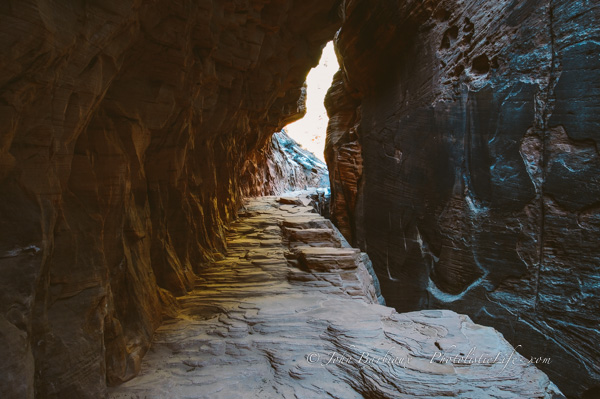
Knowing when and where the light will be gives you a huge advantage over other photographers. Knowing that at around 2:30 p.m. the sun will be at an angle that paints light into the pathway is priceless if you are visiting this place and may not return in the future.

Knowing where the sun sets, where the sun rises, and how the light will illuminate various subjects during different times of the day will help you master your timing. The sun rises in the east and sets in the west, if you know which direction you are facing when the sun is directly above you you’ll have a better idea what time of the day to photograph any interesting subjects or scenes you may find.

There are apps and websites all over the Google machine that can assist you when you are traveling to new and exotic places. There is a program you can download onto your phone, computer, watch (not yet but maybe someday) called The Photographer’s Ephemeris that allows you to input a location and figure out exactly where the sun will be at a given time. You can plot your position on top of a topographical map and determine what direction the sunlight will fall, and then plan accordingly.

*Topographical maps are helpful when planning a photography trip where mountains raise up high enough to throw large shadows on areas you may be planning to photograph. The topographical map gives you the height and depth of the contours of the landscape of your location.

Tip 2 – Be Specific, Don’t Spray And Pray

Do you need a fresh 16GB SD card every time you take a photo walk? Maybe you take 100 photographs in the hopes that one ends up being acceptable. Before you take a photograph ask yourself if it’s really that interesting. Is it throwing a unique shadow? Does the light hit it in a way that will catch viewers eyes? Will it cause viewers to ask a question (other than “Why would you photograph that?”)?

Taking a great photograph doesn’t generally happen by accident. Ansel Adams once said a great photograph is one that fully expresses what one feels, in the deepest sense, about what is being photographed. How many of the thousands of photographs squirrelled away on your hard drive were taken with the type of forethought Ansel Adams described?

This summer, challenge yourself to contemplate each shot, think about whether or not the subject is interesting enough to take the time to photograph. What you will find is that if you take the time to contemplate a shot before you press the shutter you’ll have less overall shots but more “keepers”.

Tip 3 – Use A Different Focal Length

Get out of your comfort zone and force yourself to use a different focal length this summer. If you don’t have multiple lenses then use a different focal length on your zoom lens. By using a different focal length you’re forcing yourself to think before you shoot. You’re forcing yourself to compose the image in your mind before ever putting the viewfinder up to your little peepers.

Renowned photographer Henri Cartier-Bresson used a 50mm lens almost exclusively when he wasn’t on assignment. By using the 50mm lens so frequently he was able to see, and compose, an image without putting the camera up to his eye. If you focus on a single focal length long enough you’ll learn what will be in or out of the frame without having to take the shot.

Tip 4 – Roam Free Like Buffalo. You know, before we shot them all.

Get off the beaten path. Literally, get off of the trails, paths, and otherwise marked walking areas to find hidden gems buried in hard to reach places. The summer’s dry weather creates safer hiking conditions as well as the longer days which allow you to venture further off the beaten path without worry of being eaten by wolves in the dark.
OffThePath

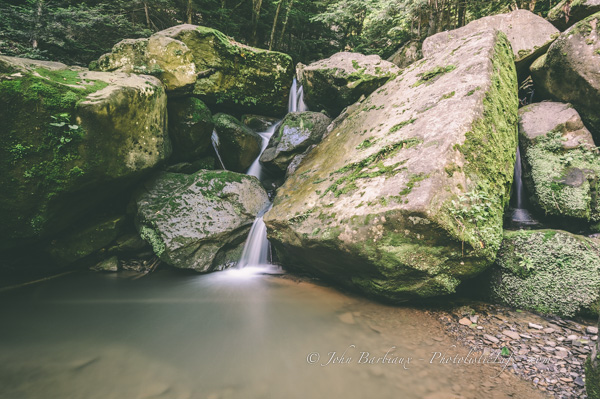
This shot was taken with the Nikon 16-35mm at 19mm, ISO 100, f/10, 15 seconds.

There are a couple of ways to find hidden gems around where you live, searching the internet is the easiest. Flickr is a great resource, you can search the name of your home town and once you find an interesting area you can check the photographs info for a location (assuming the photographer included it). The other way is to grab a hand held GPS (or your phone) and venture off into areas you have not explored before, like Indiana Jones minus the whip and man-purse.

Tip 5 – Photograph In Bad Weather

Bad weather can be a bummer, moods get bent and plans are spoiled. Most people pack up their gear and head home (or don’t go out at all) if the weather is anything but perfect. Take advantage of the warmer weather and plan a photo outing next time the weather looks foul.

Plan to visit places that are normally bustling with people for an opportunity to capture unique shots. When bad weather strikes you’ll have an opportunity to capture people scrambling for a dry place or reflections in puddles. Alternatively, you have an opportunity to capture photographs of places that are normally busy, void of life (think empty sidewalks in the city).
FoggyDay

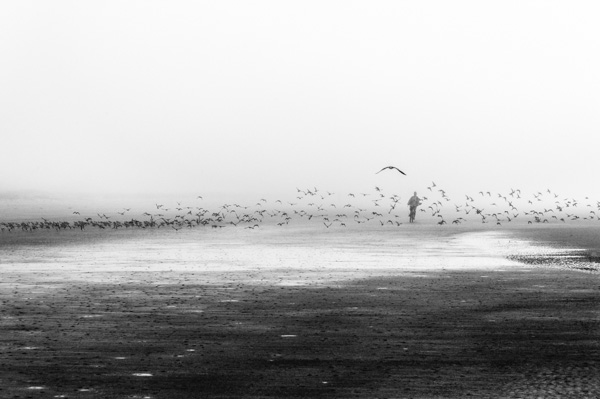
Beaches are a great place to go right before or after a storm, the ominous clouds and rolling fog create dramatic scenes. Be sure to be prepared for rain and/or strong wind, Adorama has cheap covers for your camera that will keep the water and sand from damaging your precious gear. Try not to change lenses in sandy, windy, and wet conditions, there is a good chance that you’ll end up with debris inside your camera or lens.

Summer photography offers hundreds, if not thousands, of opportunities to practice photography morning, noon, and night. The weather is warmer and the days are longer, there are festivals for everything almost every weekend. If you’re having trouble coming up with something to photograph check out local towns websites for their calendar of events, there is a good chance something is going on near you.

The post 5 Hot Tips For Improving Your Summer Photography by John Barbiaux appeared first on Digital Photography School.


Digital Photography School

 
Comments Off on 5 Hot Tips For Improving Your Summer Photography

Posted in Photography


Travel Photography Tips – Video Tutorials

30 Jun

Summer is here in the northern hemisphere and you may be heading out on vacation soon. So today I have a couple videos for you with some travel photography tips.

First up is an interview by This Week in Photo podcast host Frederick Van Johnson with our own dPS writer Ralph Velasco.  They talk about tips on how to scout locations, being prepared, getting out early, avoiding crowds, gear, approaching and photographing people, and more.

See more of Ralph’s images and tips in his dPS articles below:

  • How to Capture the Essence of a Place – Travel Photography Tips
  • 18 Tips for Shooting from a Train
  • The Only Tip You’ll Need for Creating a More Interesting and Well-Rounded Set of Images of Any Destination or Subject

In this second video Justin Weiler from DSLR Traveller shows you his Top 10 DSLR Traveler Tips including: what equipment to bring, vary your shots, shoot  more than you think you’ll need, cut before you share your images, get in some shots yourself, do research, meet the locals, and have a good time.

Do you have any additional travel tips you’d like to share? Please do so in the comments below.

The post Travel Photography Tips – Video Tutorials by Darlene Hildebrandt appeared first on Digital Photography School.


Digital Photography School

 
Comments Off on Travel Photography Tips – Video Tutorials

Posted in Photography


Surf’s Up: Clark Little’s incredible wave photography

29 Jun

Anyone who has attempted surfing can testify to the amazing force generated by even small-seeming ocean waves. That’s part of what makes Clark Little’s photography so impressive. Formerly a surfer himself, Little specializes in capturing shorebreaks – large waves that break on the shoreline. It requires impeccable timing and the dangers are real, but the payoff is evident in his breathtaking photos. Take a look at some of Little’s work. See gallery

related news: Digital Photography Review (dpreview.com)

 
Comments Off on Surf’s Up: Clark Little’s incredible wave photography

Posted in Uncategorized


Weekly Photography Challenge Hills and Valleys

29 Jun

Earlier today I shared a collection of images of hills and mountains. Now it’s your turn.

This week’s photography challenge is to get out and do some landscape photography. Specifically hills, valleys and mountains – get out into some natural landscape.

Some ideas to get started:

By Centurion

By rachel_thecat

By Justin Brown

By Earthwatcher

By arbyreed

By *Light Painting*

By Daniel Peckham

By Mark Wassell

For tips on landscape and nature try these articles:

  • 25 Landscape photography articles
  • Living Landscapes – a dPS ebook
  • Loving Landscapes a guide to landscape photography workflow and post-processing – a dPS ebook
  • How to do Surreal Digital Infrared Photography Without Expensive Gear or Camera Conversions

Show use your mountain and hill images

Simply upload your shot into the comment field (look for the little camera icon in the Disqus comments section as pictured below) and they’ll get embedded for us all to see or if you’d prefer upload them to your favourite photo sharing site and leave the link to them. Okay, ready to impress us?

The post Weekly Photography Challenge Hills and Valleys by Darlene Hildebrandt appeared first on Digital Photography School.


Digital Photography School

 
Comments Off on Weekly Photography Challenge Hills and Valleys

Posted in Photography


Photography Tutorial: Intro Into Lenses

28 Jun

Camera Lens Image
INTRO TO PHOTO: PART 3 – LENSES


Last day of Intro to Photo! Last time we talked about how to set up your exposure. Today, we are going to discussing the ins and outs of lenses.  Here comes the easy stuff!


Lenses


Lenses can be either zoom or prime.  Zoom lenses allow you to vary focal lengths (based on what is built into the lens) and – as the name says – zoom in and out of the frame.  Prime lenses are fixed.  This means that it has one focal length.  In order to “zoom in or out” with a prime lens, you must physically move closer or farther from the subject.  Prime lenses typically have a larger maximum aperture, making them “faster” than zoom lenses.


Lenses that have larger apertures are described as fast lenses because they have the ability to collect light faster.  However, lenses with smaller apertures have a greater depth of field.


Camera Lens Chart

Lenses fall into a few different categories:


A wide-angle lens widens the angle of view thus bringing more into focus.  A wide angle can also have a flattening effect.


– Super wide angle lenses are typically anything under 20mm

– Wide-angle lenses are from 21-35mm


A “normal” is a lens that most accurately portrays what a human eye will see.  With a 35mm camera, this is typically a 50mm lens.  Normal lenses fall into the category of standard lenses.


– Standard lenses range from 35-70mm


telephoto lens reduces the distance between objects in the photo, bringing the subject “closer” to the photographer.


– Medium telephoto lenses are considered portrait lenses. These range around 80-135mm

– Telephoto lenses are between 135-300mm

– Super telephoto lenses are anything over 300mm


Focal length is the distance in millimeters between the lens and the sensor when the camera is focused on a subject at infinity.  Lenses that are classified as “long” lenses have a larger focal length- these are telephoto lenses.


Each lens has its place. Standard lenses are great all around lenses but excel when used for documentary and street work.  Wide angle lenses are great for landscape and architecture whereas telephoto lenses work well with portraiture, sports and wildlife photography.


Be careful when selecting a portrait lens.  Different focal lengths can distort the face in different ways.  Wide angles tend to flatten out the face in an unattractive manner.  The optimal portrait lens depends on what camera you’re using (and if there is a crop factor) but you’re typically safe using a lens between 85-135mm long.  135mm lenses (or about that) are optimal when shooting head shots.


Focal Length Examples

How focal length distorts the face


Megapixels


People are far too concerned with megapixels when it comes to buying a new camera. Let me put this very clearly… MEGAPIXEL COUNT DOESN’T ALWAYS MATTER!  The only time megapixel count really matters is when you’re going to be shooting something which has to be blown up large scale, such as a billboard.


Don’t drive yourself crazy over it!  In the end, it really doesn’t matter that much.


Crop Factor


Most digital camera sensors are smaller than film.  An image created with a 35mm body but smaller sensor will end up cropping a bit of the image out, as compared to what would have been captured with a full sized 35mm film frame.  Hence the term “crop factor.”  This determines how much of the image is cropped out as compared to a “full frame” sensor (a digital sensor the same size as 35mm film).


Be conscious of your gear.  If your camera has a crop factor, it effects how you view the world through your lens.  Because the focal length is effected, a crop sensor zooms in a bit with every lens.  A 50mm lens is closer to a 70mm or 85mm lens.  Each camera model has a different crop factor.  Be sure to look if your camera has a crop factor and what it is.


To determine actual focal length, take the crop factor and multiply it by your lens’ focal length to determine the focal length you’re actually viewing.  (I.e. – If you’re using a 50mm lens on a camera with a crop factor of x1.6, you’re actually shooting at a focal length of 80mm.)


Ken Rockwell Image Taken With A Full-Frame Sensor

Taken with a full-frame sensor


Ken Rockwell Image Taken With A Camera With A x1.6 Crop Factor

Taken with a camera that has a x1.6 crop factor


Last but not least, just a few tips:


– Don’t trust LCD backs for exposure! Always meter when possible.  LCD’s don’t accurately depict the information recorded by your camera’s sensor.  Something that looks perfectly exposed according to your LCD can actually be an entire stop under or over exposed.  The only way to trust what you see on the back of your camera is to learn how to read histograms.

– Check out this article on how to read histograms: How to Use Histograms by Ken Rockwell

– It helps to turn on the “over exposure indicator.”  This feature will cause the whites on your LCD screen to blink when they’re blown out.  (When they contain no detail and are essentially just blobs of pure white.)

– And last but not least.. As boring and nerdy and tedious as it is.. READ YOUR CAMERA MANUAL!


If you’re just tuning in to today, be sure to check out Part 1 – Cameras and Part 2 – Exposure.


I know there was a lot thrown out over the past few days – hopefully you made it through okay!  If you have any questions, feel free to shoot me an email at alana@alanatylerslutsky.com.


Happy shooting!

Alana


PHOTO SOURCE:

Feature Image & Photo 1: www.timeslive.co.za

Photo 2, 3, 4, 5: Alana Tyler Slutsky


Fashion Photography Blog

 
Comments Off on Photography Tutorial: Intro Into Lenses

Posted in Uncategorized


Tips to Establish a Smart Photography Business

27 Jun

Establishing your own photography business is a full time job, if not more. It’s a great gig, don’t get me wrong, but running this or any other business will instantly make you the wearer of many hats. The best way to make it work and avoid headaches along the way is to have a plan, even if it is a Continue Reading

The post Tips to Establish a Smart Photography Business appeared first on Photodoto.


Photodoto

 
Comments Off on Tips to Establish a Smart Photography Business

Posted in Photography


Photography Tutorial: Intro Into Exposure

27 Jun

Retro Photography Gear With Exposures

Intro to Photo: Part 2 – Exposure


Good morning, Fashion Photography Blog readers!  Welcome back to our brief intro to photography. Last post we talked about the camera basics. In this post we are going to going to talk about how to set up your exposure correctly. So let’s jump right in.


Setting Your Exposure


There are three main settings to be aware of prior to taking a photograph. Those settings are ISO, Aperture and Shutter Speed.


ISO – ISO, back in the days of film, was the measure of a film’s sensitivity to light. This system has been adopted by digital cameras and essentially works the same way it did with film. “Less sensitive” films require more light to make an exposure – The higher the ISO number, the more sensitive the film. So, what exactly does this mean?


Let’s say you want to shoot someone outside on a bright, sunny day. You would use a film (or set your digital camera) with an ISO of about 100. Because of the large quantities of light available to you, it’s not necessary to use a sensitive film.


If you’re trying to shoot someone in a room solely illuminated by candle light, you’re going to need film that is much more sensitive. For this situation I would suggest using something closer to ISO 1600. Films that are more sensitive are referred to as “fast films” whereas films that are less sensitive are referred to as “slow films.”


In the case of film, the more sensitive it is, the more grain you will see in the final image (this has to do with the chemistry of the film and something called “silver halides.”). With digital cameras, the higher the ISO, the more noise you will see in your final images. This has to do with the image sensor and how much heat it is giving off while capturing your image, among other things.


ISO Comparison Example

ISO Comparison – Same camera settings, only difference is the ISO


Aperture (f/stop) – Aperture is the size of the hole in the lens that controls the amount of light let in. The larger the f/stop # the smaller the opening in the lens.


Aperture F/Stop Diagram

Shutter Speed – Shutter speed is the other setting which controls how much light is let into the camera. This one is kind of self-explanatory, time works in fractions of a second.


You must understand the relationship between shutter speed and aperture in order to precisely control your exposure. The wider open your aperture, the faster your shutter speed to prevent overexposing your image. The smaller your aperture, the slower your shutter speed to prevent underexposing your image.


Think of it this way… Let’s pretend that your camera is a bucket and light is water. In order to fill your bucket with water, you have to control how much pours in at a time. The larger the opening (the wider open your lens is, i.e. f/2.0) the more water (light) will pour in. Therefore you must shut off the water relatively quickly (use a faster shutter speed, i.e. 1/250th) in order to prevent it from “overflowing” or overexposing your image. It works in the reverse as well… If you have a smaller opening (smaller aperture, i.e. f/22) you must let the light in for longer (use a longer shutter speed, ie 1/15th) in order to prevent an underexposed image.


Shutter Speed Diagram

(The numbers in this image have nothing to do with the number in the paragraph above)


Stops


Everything in photography is measured in stops. You should memorize these stops because you will need to recall them at a moments notice. Cameras and light meters often measure things in thirds of a stop for more precision, but this can be turned off.


The main stops for ISO:


(Least sensitive) 100, 200, 400, 800, 1600, 3200 (Most sensitive)


The main stops for aperture (f/stops):


(Largest opening) f/1.4, f/2.0, f/2.8, f/4, f/5.6, f/8, f/11, f/16, f/22, f/32, f/64 (Smallest opening)


The main stops for shutter speed:


(Longest) 2s, 1s, 1/2, 1/4, 1/8, 1/15, 1/30, 1/60, 1/125, 1/250, 1/500, 1/1000 (Shortest)


Stops either double or halve when opening up or stopping down. This is blatantly obvious with shutter speeds; it works the same with ISO and f/stops. F/8 allows in 1/2 the amount of light that f/5.6 allows in.


Stops work in relation to each other. If you have the combination for a perfect exposure but decide you want to use a more shallow depth of field or want a longer shutter speed for motion blur, you can easily achieve your desired effect without having to re-meter or anything.


This is something called equivalent exposures.


Equivalent Exposures Chart


Count the number of stops between your actual exposure and your desired exposure to figure out what is the new f/stop – shutter speed combination would be. I know this sounds confusing but I promise it’s quite simple.


Let’s say you are shooting at ISO 100 @ f/16 with a shutter of 1/15th of a second.. But you want a shallow depth of field and would rather shoot at f/4. Count the number of stops between the two and adjust your shutter speed accordingly.


The difference between f/4 and f/16 is 4 stops. In this scenario, you’re opening up your aperture, therefore letting in more light. So you must stop down (close) your shutter 4 stops to keep an equivalent exposure. 4 stops difference from 1/15 would be 1/250.


Your new, but equivalent exposure would be ISO 100 @ f/4 with a shutter speed of 1/250th of a second.


F Stops Versus Shutter Speeds Chart

I know this part gets a bit confusing.  Just stick it through and I promise we’ll get to the fun stuff soon.


Check back in tomorrow for Day 3 – Lenses.  (Or if you missed it, catch up on yesterday’s post, Part 1 – Cameras.)


In the meantime if you have any questions, just ask! Shoot me an email at alana@alanatylerslutsky.com.


Happy shooting!


Alana


Fashion Photography Blog

 
Comments Off on Photography Tutorial: Intro Into Exposure

Posted in Uncategorized


26, June 2014 – Acadia National Park – A Quick Guide To Photography

26 Jun


It’s summer time and a lot of you will be heading out to America’s National Parks to capture their beauty and to enjoy the great outdoors.  I was in Yosemite NP last week working on a NEW LuLA tutorial.  It’s one of the grandest National Parks of them all. I’m still working on images and will post some on the home page soon.  Today’s article is by QT Luong.  He is known for being the first person to photograph all 59 US National Parks in Large Format.  He has come on board as a regular contributor and we will be regularly publishing his articles on his National Park Photography guides.  we’ll start with the ‘A’s and today’s article is  Acadia National Park – A Quick Guide To Photography.


The Luminous Landscape – What’s New

 
Comments Off on 26, June 2014 – Acadia National Park – A Quick Guide To Photography

Posted in News


Photography Tutorial: Intro Into Cameras

26 Jun

SLR camera montage

INTRO TO PHOTO: PART 1 – CAMERAS


Hey FashionPhotographyBlog.com readers!  I’m Alana Tyler Slutsky, a NYC based fashion photographer.  For quite a while I had no one to turn to in order to seek advice and ask questions about photography.  From learning the basics to testing with models, I didn’t know what was right and what was wrong.  It’s this very reason that I’m so thankful for FPBlog’s editor, Ed, for giving me the opportunity to contribute.  I hope to shed some light on the subjects I found difficult to understand and give all you readers some much needed help that I didn’t have in the beginning.


Now that FashionPhotographyBlog.com is back up and running, what better way to say “we’re back!” than by dishing out all of the information that everyone asks for when starting in fashion photography?!  Check in weekly for information posts on a range of topics from cameras and lighting, to retouching, to producing a fashion photo shoot!


Now that that’s out of the way… Let’s get to the good stuff!  Over the next three days, we’ll be breaking down the building blocks of photography.


I know that this is going to be one of those pretty generic posts that goes over the basics but I feel obligated to write it… After all, this is a blog that caters to all levels and we were all once new and unsure before.


So, here goes nothing… A brief intro to photo and how cameras work.


(Hey, maybe you experienced folks will pick up a thing or two. If not, use this as a refresher!)


Types of Cameras


There are many different types of cameras out there in the world. What the majority of photographers use is a SLR – a single lens reflex camera. (Digital SLR cameras are referred to as D-SLR cameras.).

SLR cameras use a lens and a mirror to reflect what is seen via the lens into the viewfinder. Essentially, what you see in the viewfinder is what you get.


How a SLR camera works diagram

How an SLR camera works – The mirror lifts up to reveal the film or shutter

The most common type of camera body that is used is a 35mm camera. 35mm camera bodies are designed to use, you guessed it, 35mm film. The cameras that you most of you use and own are digital 35mm cameras.


Pentax K1000 Camera

Pentax K1000 – My favorite!

While 35mm cameras are popular among professionals, it’s not uncommon to find a pro using a “medium format” camera. These cameras, in the days of film, were used with specific film which was larger in format, thus yielding a larger negative. So why is this important today? Digital medium format cameras have larger sensors, which allow them to have more megapixels. While megapixel count isn’t always that important, it helps to have the most megapixels you possibly can when shooting something that will be displayed in a relatively large format – such as a billboard. We’ll get more into this in a bit. The most common brands of medium format cameras are Hasselblad, Mamiya and Phase One.


Hasselblad 501 Camera

Hasselblad 501 – A film medium format camera which can be outfitted with a digital back

Film Size Comparison Diagram

645, 6×6 & 6×7 films are all forms of medium format film.

Be sure to check back tomorrow for Day 2 – Exposure.


If you have any questions, feel free to shoot me an email at alana@alanatylerslutsky.com.


Happy shooting!

Alana


PHOTO SOURCE:

Feature Image & Photo 1: www.arts.tau.ac.il
Photo 2, 3, 4, 5: Alana Tyler Slutsky


Fashion Photography Blog

 
Comments Off on Photography Tutorial: Intro Into Cameras

Posted in Uncategorized


Winners of the NYIP Photography Courses Announced

25 Jun

The Winners of the NYIP Photography Courses Are:

NYIP spread  Light Direction

A BIG thank you to everyone who entered our recent contest to win one of three photography courses from our friends at NYIP.
The response was terrific with over 650 entries. In fact, it was so great that the team at NYIP decided to offer a special 15% discount off any of the courses (details below).

But first – here are the three winners of the Complete Course in Professional Photography:

NYIP Logo for Front Graphic 2

  • Shannon Moseley
  • Douglas Quintanilla
  • DoctorDW

A Message from NYIP (and a 15% discount)

Wow! Here at NYIP we were thrilled with the quality and the quantity of the responses we received for this contest. As always, the dPS community came out in full force looking for quality photography education. Unfortunately, not everyone can win. But for those of you who did not win, we’d like to extend a special discount on the NYIP course of your choice.

The discount code ‘BU3′ can be used when you enrol online, or by phone, to take 15% off either payment plan on any of NYIP’s courses. Simply get started by visiting www.nyip.edu.

Thanks again for all the wonderful submissions,
The NYIP Team

The winners of this contest were chosen by the Admissions Team at the New York Institute of Photography based on how well the commenters understood NYIP’s programs and how NYIP could help them as photographers. All three winners will be emailed by our team to collect contact information and notified by NYIP with details of how to collect their prize.

NYIP Logo

Thanks again to everyone for entering and to NYIP for sponsoring this competition.

The post Winners of the NYIP Photography Courses Announced by Darlene Hildebrandt appeared first on Digital Photography School.


Digital Photography School

 
Comments Off on Winners of the NYIP Photography Courses Announced

Posted in Photography