RSS
 

Posts Tagged ‘Photography’

Weekly Photography Challenge – A Need for Speed

07 Feb

In this set of speed busting images you can see the effect that using a fast shutter speed can have on your images. If you want to photograph a moving subject and freeze them in mid-action, that is what is required.

TexasEagle

By TexasEagle

Weekly Photography Challenge – A Need for Speed

This week your challenge is to find something moving – fast! It could be traffic on a busy street, or something involving sports of some kind. Just get out there and work on using a fast shutter speed to freeze the subject at the peak of action.

You can try the following settings to help you get sharp images:

  • Continuous focus mode, will continually focus on the moving target as long as you have the button pressed part way down.
  • Zone focus or having some or all of your focus points active. That allows the camera to pick where to focus.
  • Back button focus – this is how the sports shooters I know do work.
  • High speed or continuous drive – so you take a few shots in succession when you press and hold the shutter button.
  • Shutter priority set to a fast setting. You will usually need at least 1/500th or faster to freeze anything moving quickly. NOTE: if you do use shutter priority keep an eye on your exposure. If the aperture is flashing at you in the viewfinder it means your shutter speed is TOO fast and the aperture cannot open wide enough to make a good exposure. In that case you may have to increase your ISO – but just keep an eye on it. OR use aperture priority set to your widest aperture which in turn will automatically give you the fastest shutter speed possible in that light. If it’s not fast enough – bump that ISO!

Here are a few examples to get you started:

Danny Perez Photography

By Danny Perez Photography

Contact-Centres-Highland

By Contact-Centres-Highland

BANAMINE

By BANAMINE

Mark Robinson

By Mark Robinson

Ib Aarmo

By Ib Aarmo

USAG- Humphreys

By USAG- Humphreys

Pepe´ Cam Photography

By Pepe´ Cam Photography

Share your fast images here:

Simply upload your shot into the comment field (look for the little camera icon in the Disqus comments section) and they’ll get embedded for us all to see or if you’d prefer upload them to your favourite photo sharing site and leave the link to them. Show me your best images in this week’s challenge. Sometimes it takes a while for an image to appear so be patient and try not to post the same image twice.

googletag.cmd.push(function() {
tablet_slots.push( googletag.defineSlot( “/1005424/_dPSv4_tab-all-article-bottom_(300×250)”, [300, 250], “pb-ad-78623” ).addService( googletag.pubads() ) ); } );

googletag.cmd.push(function() {
mobile_slots.push( googletag.defineSlot( “/1005424/_dPSv4_mob-all-article-bottom_(300×250)”, [300, 250], “pb-ad-78158” ).addService( googletag.pubads() ) ); } );

The post Weekly Photography Challenge – A Need for Speed by Darlene Hildebrandt appeared first on Digital Photography School.


Digital Photography School

 
Comments Off on Weekly Photography Challenge – A Need for Speed

Posted in Photography


Landscape Photography Tips & Tricks: Getting the Big Picture

04 Feb

Of all the different types of photography, capturing images of landscapes is one of the most popular.   The compulsion to capture breathtaking images of sweeping vistas, crystal shorelines and towering mountains comes on especially strong whenever people travel to new places. You’ve probably noticed this whenever some of your friends go on vacations. Their Facebook walls become flooded with Continue Reading

The post Landscape Photography Tips & Tricks: Getting the Big Picture appeared first on Photodoto.


Photodoto

 
Comments Off on Landscape Photography Tips & Tricks: Getting the Big Picture

Posted in Photography


Why I Switched From LEE Filters to Formatt-Hitech for Landscape Photography

03 Feb
A hard graduated neutral density filter worked great here to darken the sky.

A hard graduated neutral density filter worked great here to darken the sky.

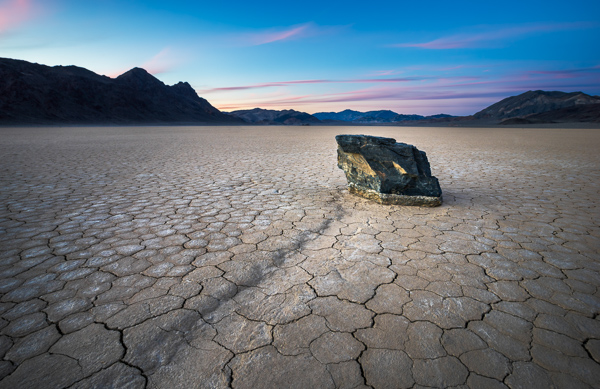
There are three types of photographers in the world; those that try to get it right in camera, those that simply rely on post-processing, and those who believe that both mindsets together lead to the best possible outcome. I try to always keep the mindset of that third type. If I can get everything right in camera (and save minutes or even hours in post) I will. I also have always loved post-processing and the art of making an image come to life. When shooting landscapes, you are more often than not at the mercy of mother nature. You can certainly schedule your time wisely and shoot at the best times of day but that doesn’t always mean that you’ll be able to capture everything in camera, as it is.

I’ve been using filters in one way or another for the better part of four years now. I started off with those bloody screw in filters (my gosh were those a pain in the rear). I remember very vividly just how frustrating it was to need a separate filter for each and every lens. I also remember how long it took to get to a scene, set up my tripod, look at the scene, decide I needed a filter, realize the filter I needed doesn’t fit the lens I had on, switch lenses, get the filter out of its case, screw it on, refocus and then finally take a shot.

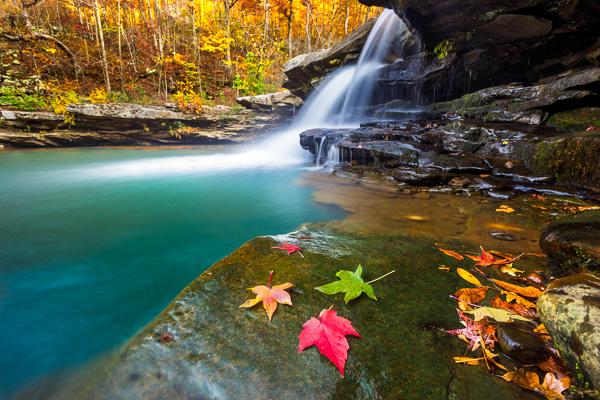
I used a my Formatt-Hitech 105mm circular polarizer here to remove glare from the rocks and water. The images without the filter were virtually unusable.

I used a my Formatt-Hitech 105mm circular polarizer here to remove glare from the rocks and water. The images without the filter were virtually unusable.

My brief stint with LEE Filters

After giving up on the screw-in filters, I eventually discovered the LEE Filter system. Those LEE filters are dang near impossible to get your hands on. I had to put my name on a waiting list at a camera store just to get the foundation system to attach the filters to my lenses. I then had to buy my filters on eBay and pay over retail to get them. My absolute favorite filter from LEE was (and still is) the Big Stopper. The Big Stopper is a 10 stop neutral density filter that will slow your shutter speeds down by…well…10 stops. This is a long exposure filter that is meant to slow time down drastically. You can easily get one to two minute exposures in broad daylight. The problem with the Big Stopper is that it’s a glass filter. This means that you have to be very careful with it and any time it’s on your person, you have to be extra cautious.

This 2 minute exposure caused the hundreds of tourists in the scene to disappear completely! © James Brandon

This two minute exposure caused the hundreds of tourists in the scene to disappear completely! © James Brandon

So what went wrong with LEE? Well, I’ll tell you…

Back in 2013, I was in California and was traveling up the coast from San Luis Obispo to San Francisco with my buddy Brian Matiash. We made it up to Big Sur and were trying to get down to Pfeiffer Beach for sunset. As we made our way up Highway 1, we pulled over to photograph Big Creek Bridge. I decided to put my Big Stopper to good use and started grabbing some long exposures of the bridge with the waves crashing against the shore below. I got a few shots where I was standing but soon decided to switch lenses and try something else. When I’m out in the field and need to switch lenses, I always point my camera down to the ground so that minimal dust will get into the censor during the swap. I pointed the camera down toward the ground (while still on the tripod) and then reached for my filter pouch to take off my Big Stopper before changing lenses. That’s when it happened. I felt a big thud against my shoe and then heard the terrible sound of glass hitting the gravel beneath my feet. Ugh…

It turns out the LEE filter holder can’t support the weight of a heavy Big Stopper. I’m not sure if this is a design flaw or what, but it certainly seems like oversight to me. With LEE filters (just like Formatt-Hitech) you have to screw an adaptor onto the lens you’re using (I just leave these adaptors screwed on most of the time). The filter holder then clips onto the adaptor via a pull pin on one side. This pull pin is angled away from the lens to match the shape of the ring adaptor. Because of the angle of this pull pin, you can actually just pull the filter holder off of the adaptor with surprisingly little force. Of course this will never happen if your camera is pointed out toward the horizon, but who among us never points their camera down? I got lucky that day because the filter hit my shoe first before hitting the ground. It didn’t bust the entire filter but one of the corners did however get a big chunk taken out of it.

My introduction to Formatt-Hitech

Colby Brown has been a friend of mine for a couple years now. I met him during the very, very early days of Google+ when a group of five or six of us would do hangouts almost daily. I have had the pleasure of watching his career virtually explode over this time and was really excited to see him land a signature edition filter kit with Formatt-Hitech. I’ll be the first to admit, I was pretty skeptical about trying any other type of filter besides LEE. Still to this day, I love my Big Stopper. However, that “event” in Big Sur really left me uneasy and nervous about using the LEE holder. So when Colby offered to send me his kit to review, I said what the heck, let’s see how it stacks up (see what I did there?) against LEE.

Unboxing

Don’t worry, I’m not posting one of those monotonous unboxing videos where I show you how the filters were packaged or how much paperwork is included. I’m including this section because of one thing; when I pulled the Formatt-Hitech filter holder out of the box, I knew instantly that it was better than LEE. It just feels better. It’s aluminum instead of plastic for one, but on top of that – the filter holder has a fastening screw to attach to the adapter ring instead of the little notched pull tab that’s on the LEE system. At first I wasn’t really sure this would be any better because, after all, you’re essentially just tightening the filter holder onto the adapter ring with a single screw. As it turns out though, the filter holder fits very snuggly onto the adapter ring, so when you tighten the screw the filters aren’t going anywhere. It takes a very strong push to cause it to budge at all, and no amount of filters will ever weigh that much. The LEE, on the other hand, requires surprisingly little force (see the video above).

Quality between LEE and Formatt-Hitech

The Colby Brown Signature Edition Landscape Filter Kit comes with basically everything you need to get started and stay satisfied using filters in the field for a very long time. I went all out and got the 100mm Premier Kit which comes with two graduated ND filters, a 6 Stop ND filter, the aluminum filter holder and to top it all off, a 105mm circular polarizer. Everything in the kit is extremely high quality and I use the filters on virtually every photo trip I take.

In all honesty, there isn’t a massive difference in the quality of images that come from either filter. Some will disagree with me on this of course. The LEE Big Stopper puts out a very obvious blue color cast in your images while Formatt-Hitechs new Firecrest filters put out virtually zero color cast. I’m actually quite fond of that blue/cool color cast though and have left it in several of my images to some extent. It’s also very easy to correct with a simple white balance adjustment so I’ve never considered it a huge deal.

I used my Formatt-Hitech 105mm Circular Polarizer for this shot as well to remove the glare from the rocks in the foreground.

I used my Formatt-Hitech 105mm Circular Polarizer for this shot to remove the glare from the rocks in the foreground.

Where Formatt-Hitech wins

There are three main areas where Formatt-Hitech Filters excel and where LEE falls short.

  1. The first of those areas is the one I already covered; a superior filter holding system constructed of durable aluminum and a tightening mechanism that won’t fail in the field when pointed at a downward angle.
  2. The second area where Formatt-Hitech wins is availability. The simply produce and ship enough filters so photographers like you and me don’t have to be put on waiting lists, or pay over retail to acquire their products.
  3. The third reason Formatt-Hitech takes the cake is that they continue to push to boundaries of what filters can do. They continue to innovate and advance. Their new line of Firecrest filters can stop down a scene by up to 16 stops! That means you could shoot in broad daylight at f/8, ISO 100 and a shutter speed of 1/1000th of a second and as soon as you slide that filter on, you’re shutter speed will drop all the way down to 1 minute. That’s insane!
Here I used my 10 stop neutral density filter to slow the shutter speed way down. This was a 25 second exposure taken before sunset. The clouds coming over the Sierras in the background is actually smoke from the rim fire that occurred back in 2013.

Here I used my 10 stop neutral density filter to slow the shutter speed way down. This was a 25 second exposure taken before sunset. The clouds coming over the Sierras in the background is actually smoke from the rim fire that occurred back in 2013.

Conclusion

Both LEE and Formatt-Hitech make great filters (although Formatt-Hitech has a slight edge in my opinion). However, the fact that I simply can’t trust the filter holder from LEE was enough to make me look at other options. Sure, I could have just stuck with LEE filters and got a new filter holder system, but I like to be all in with the brands I associate with in the industry. The failure of the LEE system caused me to look into Formatt-Hitechs options and when I did, I was pleasantly surprised to find a superior company making superior products. I’m not sponsored by Formatt-Hitech, I just honestly believe their products are top notch. Let me know if you have any questions below.

googletag.cmd.push(function() {
tablet_slots.push( googletag.defineSlot( “/1005424/_dPSv4_tab-all-article-bottom_(300×250)”, [300, 250], “pb-ad-78623” ).addService( googletag.pubads() ) ); } );

googletag.cmd.push(function() {
mobile_slots.push( googletag.defineSlot( “/1005424/_dPSv4_mob-all-article-bottom_(300×250)”, [300, 250], “pb-ad-78158” ).addService( googletag.pubads() ) ); } );

The post Why I Switched From LEE Filters to Formatt-Hitech for Landscape Photography by James Brandon appeared first on Digital Photography School.


Digital Photography School

 
Comments Off on Why I Switched From LEE Filters to Formatt-Hitech for Landscape Photography

Posted in Photography


Weekly Photography Challenge – Long Exposures

30 Jan

In this collection of long exposure photographs you can see some great examples of how you can use this technique to produce stunning images.

Stewart Ayrey

By Stewart Ayrey

I teach a night photography class and many times I’ve seen a whole new world of exciting things open up for my students when they learn about long exposures. Of course you can use this technique in the daytime as well, but it is often associated with night photography. On a weekend workshop I lead we go out and photograph the sunset and I MAKE them use tripods, amid much grumbling. Then after the sun goes down they start to pack up and head back to our hotel. I tell them to keep shooting. Many times I’ve been told “I didn’t know you could take photos in such dim light”. Then we get out the flashlights and do some light painting and the magic begins.

To see some of the top articles on night photography on dPS in 2014, head over here.

Weekly photography challenge – long exposures

Have you tried any long exposure photography before? If not, now is the time. You will need a good, sturdy tripod and ideally a remote trigger to fire the camera (reducing camera shake). Here are a few long exposure images to give you some ideas on what you can do:

Mike

By Mike

Kostas Kokkinos

By Kostas Kokkinos

José Miguel

By José Miguel

Duane Schoon

By Duane Schoon

Howard Ignatius

By Howard Ignatius

Bill Devlin

By Bill Devlin

Abi Booth

By Abi Booth

Trey Ratcliff

By Trey Ratcliff

William Cho

By William Cho

José Miguel

By José Miguel

Jason

By jason

Dave Wilson

By Dave Wilson

Nicholas Chai

By Nicholas Chai

Note: please take note if you are going to attempt doing fire spinning with steel wool, please make sure you read about safety and do so at your own risk. IT IS dangerous and can result in fire or injury if precautions are not taken.

Okay it’s your turn – go! Show us what you can come up with. Get creative.

Share your long exposure images here:

Simply upload your shot into the comment field (look for the little camera icon in the Disqus comments section) and they’ll get embedded for us all to see or if you’d prefer upload them to your favourite photo sharing site and leave the link to them. Show me your best images in this week’s challenge. Sometimes it takes a while for an image to appear so be patient and try not to post the same image twice.

googletag.cmd.push(function() {
tablet_slots.push( googletag.defineSlot( “/1005424/_dPSv4_tab-all-article-bottom_(300×250)”, [300, 250], “pb-ad-78623” ).addService( googletag.pubads() ) ); } );

googletag.cmd.push(function() {
mobile_slots.push( googletag.defineSlot( “/1005424/_dPSv4_mob-all-article-bottom_(300×250)”, [300, 250], “pb-ad-78158” ).addService( googletag.pubads() ) ); } );

The post Weekly Photography Challenge – Long Exposures by Darlene Hildebrandt appeared first on Digital Photography School.


Digital Photography School

 
Comments Off on Weekly Photography Challenge – Long Exposures

Posted in Photography


Food Photography – How to Shoot A Beverage With Only Two Lights

30 Jan

The wonderful thing about food photography is that you can easily turn your apartment, home, or garage into a studio. This image was shot for a local ice cream franchise that offers a different spin on the traditional root beer float. The set was constructed on a coffee table with common household items, and was lit with just two lights.

Final image with real ice cream

Final image

You might be thinking that the featured photo does not look like your normal, every-day root beer float, and you would be right. The ice cream pellets in the float were created by flash freezing ice cream mixed with liquid nitrogen.

Because the ice cream was made up of these small pellets, it melted quickly, leaving little time to get the “money shot”. To solve this problem, I created a stand-in cup that was filled with soda and mini marshmallows. This stand-in allowed me to tweak my lights while the ice cream was safely stored in an ice chest filled with dry ice.

Marshmallow stand-in

Marshmallows used as stand-in for ice cream, during set up phase.

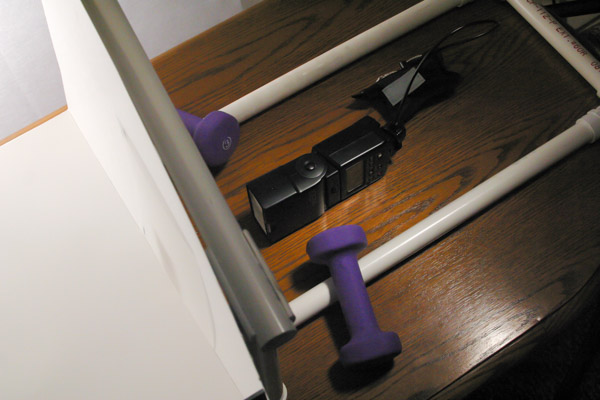
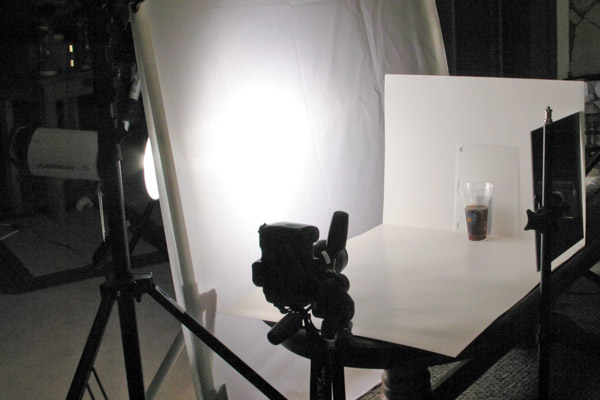
Two pieces of white poster board were used to construct the set. One for the floor and one for the background. The background piece was attached to sections of PVC tubing, which were re-purposed from homemade DIY light panel frames. Small one pound dumbbells were placed on top of the PVC frame to secure it and keep it from moving around.

Whenever you photograph beverages, it is important to backlight them in order to show the transparency of the container and/or liquid. That is what makes soda, iced tea and beer ads look so delicious.

For this shot, I decided to achieve the effect by creating a really tiny pseudo-softbox behind the glass of root beer. I started by cutting a rectangular hole in the back of the poster board. Careful attention was taken to insure that the hole was large enough to cover the entire lower portion of the glass, while still being hidden from the camera’s view.

A small off-camera flash fitted with a radio trigger was then placed behind the background. Since the hole and glass were tall and narrow, the strobe was placed on its side, to match.

View from behind background

View of PVC frame and hotshoe flash with radio receiver. Notice how flash is placed on its side, vertically.

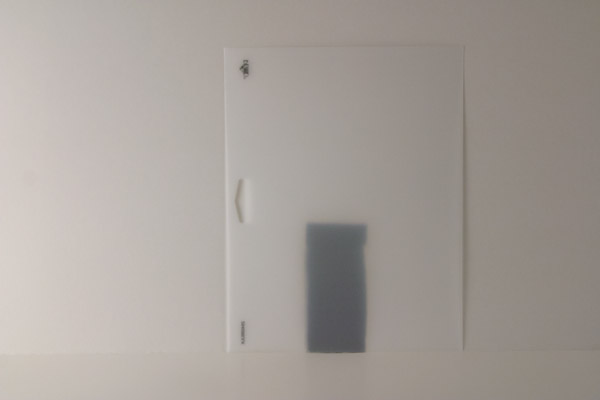
Next, a small sheet of frosted stencil paper purchased from a local hobby store was placed in front of the hole, to evenly diffuse the light across the opening. The translucent properties of the paper also created a soft falloff to the background, as if it were being lit from the front instead of the back.

frosted stencil paper

Frosted stencil paper was butted against the background, behind the glass, to evenly diffuse the light shining through the hole in the poster board. The sheet was moved so that the edges, logo and holes were not seen from the camera’s angle of view.

backlit root beer

First backlight test, before marshmallows were added.

Now that the liquid was backlit, we needed to add a light to illuminate the ice cream. To do this, a large piece of diffusion fabric attached to a PVC frame was placed just out of frame, towards camera left. A strobe light was then placed behind the panel. The diffusion fabric created a large source of illumination, which created a very soft transition from the highlights to the shadows.

float without backlight

Light shining through diffusion panel with back light turned off

Finally, an acrylic mirror was attached to a light stand and placed just out of frame, towards camera right. The mirror reflected and bounced some of the light from the large panel back into the shadows.

Before and After of Mirror Fill

Mirror fill: Before and After

setup view

View of entire setup.

The final image was shot using a Canon EF 100mm f/2.8 Macro lens. The camera was set to f/14 at ISO 100.

Final image with real ice cream

Final image using real ice cream.

With a little imagination and ingenuity you too can create professional looking food images on a budget, with minimal equipment. In fact, here are a few cheaper alternatives that could have been used to create the image above:

CFL or LED Light Bulbs

The wonderful thing about still photography is that your subject is “still”. This means you can use regular household bulbs to light your scene if you do not have the money for strobes. All you have to do is lower and adjust the shutter speed of your camera, since the bulbs do not emit as much light as a strobe or off-camera flash. Experiment with different bulb wattages, or try alternating the amount of bulbs to create different lighting ratios. Just make sure you have the bulbs placed behind some source of diffusion. By diffusing the lights, you will create a single large light source; otherwise, you will create multiple shadows and weird reflections from the various sources of light.

White Twin Bed Sheet

A white bed sheet is an inexpensive and great form of diffusion. You can attach it to a PVC frame or stretch it between two light stands using spring clamps. The sheets are also great for portrait work. Need a GIANT softbox? Try a king size sheet!

googletag.cmd.push(function() {
tablet_slots.push( googletag.defineSlot( “/1005424/_dPSv4_tab-all-article-bottom_(300×250)”, [300, 250], “pb-ad-78623” ).addService( googletag.pubads() ) ); } );

googletag.cmd.push(function() {
mobile_slots.push( googletag.defineSlot( “/1005424/_dPSv4_mob-all-article-bottom_(300×250)”, [300, 250], “pb-ad-78158” ).addService( googletag.pubads() ) ); } );

The post Food Photography – How to Shoot A Beverage With Only Two Lights by Joel Dryer appeared first on Digital Photography School.


Digital Photography School

 
Comments Off on Food Photography – How to Shoot A Beverage With Only Two Lights

Posted in Photography


5 Tips for Getting Fresh Ideas for Macro Photography

28 Jan

Are you seeking some inspiration for getting creative with some new macro photographs? Perhaps you’ve grown tired of taking close-ups of typical macro subjects like flowers and insects. Help is on the way.

There is a whole world of macro photography available to you that doesn’t involve the typical subject matter so often associated with close-up photography. There are some amazing images of insects and flowers to enjoy on the web, but what about going in a different direction?

Photo 1 macro photography ideas

Here are some ideas to get your creative juices flowing, to challenge your imagination, and direct you to doing more interesting macro photography:

1. Pick a location

This is a good technique to use when the weather outside isn’t the best for macro work. Your kitchen is the easiest place to start generating ideas. I usually grab a notebook, or a tablet and a pen, and start brainstorming by opening drawers and cabinets and writing ideas down.

You have appliances, silverware, glasses, cooking utensils, and plates to start with. Add food and liquids to your list and you’ve got a great big inventory to work with. Coffee beans, cherry tomatoes, and peanuts work well because of their size and variety in surface and color (see photo above).

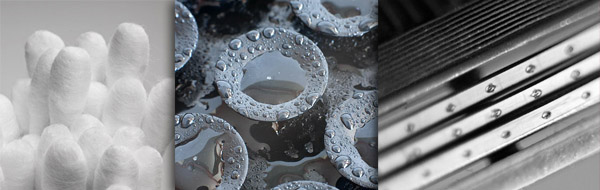
A few years back, I gave myself a photo assignment to create some new macro images using bathroom subjects. I don’t consider myself an expert macro photographer, but I did have a good time with the challenge of making a few non-typical macro photos. Cottons swabs, a suction-cup shampoo bottle holder, and a razor became the subjects from the bathroom.

Photo 2 macro photography ideas

Other locations could be an office, a workshop, or yes, perhaps even the bedroom. You could also leave your house and take a trip into town, visit a junkyard, or go to a local thrift store.

2. Come up with a theme

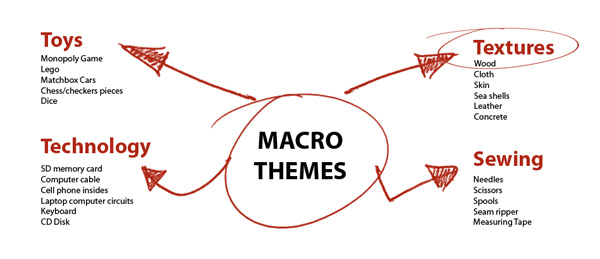
Rather than limit yourself to a single location, take a theme approach. What if you picked texture as a theme to develop? Take a second right now to jot down anything you can think of that has texture. Take a deep breath, relax, clothes your eyes, and let your mind go.

Use a mind map like the one pictured below. This is just a brainstorming method to generate creative possibilities. Here are just four random examples. These can lead to other tangent ideas so write down all of your thoughts and you can edit your lists later.

Photo 3 macro photography ideas mind map

3. Take a workshop

There are plenty of courses online you can take, or find a live workshop nearby. Not only will you be exposed to the close-up photos from the instructor, but you’ll surely have an opportunity to interact with other budding macro shooters.

You could ask them what their most unusual macro subject has been. They may have ideas that never would have occurred to you.

I started a practice of attending a minimum of at least two workshops or seminars yearly, and it has been a great way for me to recharge my creativity.

4. View macro photography portfolios

One of the most powerful idea tools I use is Google. Try using a variety of keyword searches with “macro” and “close-up”. Search specific categories and those search results will lead you to other themes and ideas.

You can go to big photo gallery web sites that have search boxes to explore literally millions of macro images. Do a variety of macro searches, based on subject, lighting, or location at web sites like 500pixels, SmugMug, or Flickr, just to mention a few.

5. Play with the lighting

Challenge yourself to come up with a few completely different ways to light one of your subjects. We know photography is a form of painting with light. Try to significantly change the appearance of your subject by dramatically changing the way you light it.

Change the direction, the size of your light source, and the shadow to highlight ratio in a variety of ways to get new results. This may lead to the discovery of different ways to reveal specific characteristics of your subject like texture, color or compositional lines.

The red pepper photo below was lit with a single speedlight, bounced off of a small white piece of cardboard, above and behind the subject.

Photo 4 macro red pepper speedlite

Idea generating tips

The best time for creative thinking is when your mind is fresh and rested. Many personal development books and various brain studies make the point that there are specific peak performance conditions that you can implement to boost your creativity and effectiveness.

For many, certain environments or activities can work. A few minutes of focused and relaxed breathing, time during or after exercise, a walk in the woods, or even brainstorming while in the shower can bring forth great ideas.

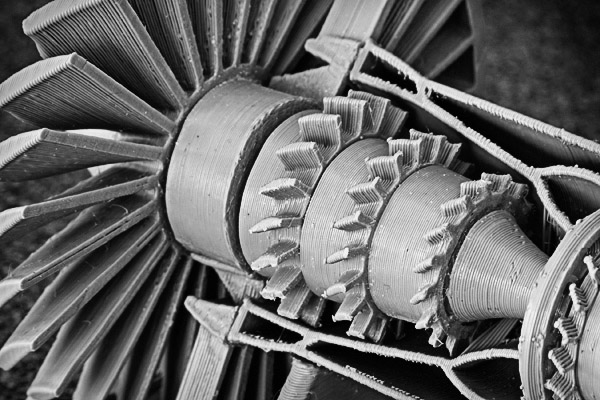
Other avenues you can explore can be taking your macro photographs with different lenses or manipulating them afterward with software. The photo below is of a plastic model turbine engine.

Photo 5 macro photography ideas software

I liked all of the details revealed in the close-up, but the original photo had remnants of a yellowish glue from its assembly. I used Nik Silver Efex Pro 2’s Low Key filter to convert it to a black and white image.

In addition to these five ways of getting creative ideas for macro photography, there is a wealth of information available to you for creativity, imagination, and brainstorming techniques in general which you can apply to your photography.

Some of the books by Michael Michalko, Amy Wallace, and Austin Kleon are worthwhile reading if you are looking to apply creativity to your photography or any another aspect of your life.

Have a blast and share any comments or images you have below.

googletag.cmd.push(function() {
tablet_slots.push( googletag.defineSlot( “/1005424/_dPSv4_tab-all-article-bottom_(300×250)”, [300, 250], “pb-ad-78623” ).addService( googletag.pubads() ) ); } );

googletag.cmd.push(function() {
mobile_slots.push( googletag.defineSlot( “/1005424/_dPSv4_mob-all-article-bottom_(300×250)”, [300, 250], “pb-ad-78158” ).addService( googletag.pubads() ) ); } );

The post 5 Tips for Getting Fresh Ideas for Macro Photography by Bruce Lovelace appeared first on Digital Photography School.


Digital Photography School

 
Comments Off on 5 Tips for Getting Fresh Ideas for Macro Photography

Posted in Photography


A Starter’s Guide to Film Photography: What You Need to Know

28 Jan

Photography has never been more accessible than it is now in the digital age. Every cell phone features a camera, and those cameras are quickly becoming more advanced. DSLRs are becoming more affordable while offering increasingly higher quality and functionality. And the advent of mirrorless cameras are packing more photo punch into smaller and easier to use packages. So why would Continue Reading

The post A Starter’s Guide to Film Photography: What You Need to Know appeared first on Photodoto.


Photodoto

 
Comments Off on A Starter’s Guide to Film Photography: What You Need to Know

Posted in Photography


7 Photography Podcasts That are Worth a Listen

28 Jan

There is no shortage of podcasts about photography. They cater for everyone from beginners to experienced amateurs, semi-pros and professionals. A quick search in Google returns so many options it can be a bit overwhelming. It’s impossible to listen to them all, so how do you decide which ones to download or subscribe to? The simplest answer is to follow recommendations from friends and colleagues. So, in no particular order, here are seven photography based podcasts that I currently subscribe to, that I think will be of interest to you as a photographer:

1. This Week in Photo

Image 1 twip podcast logo sans text 480

This Week in Photo (TWiP) has been on my playlist for a long time now. My listening goes back to when Scott Bourne was running it. I found the show early in its lifetime, and have enjoyed listening each week as the many guests and co-hosts share their knowledge and expertise. TWiP is now hosted by Frederick van Johnson. It’s a light hearted look at the major stories from the previous week. Frederick and his guest hosts get down to the nitty gritty of the photographic world. The show is topical, very relevant and usually delivered with just a smattering of humour. It’s one of those podcasts that hasn’t left my playlist from the time I first discovered it quite a few years ago!

Editor’s note: yours truly, Darlene Hildebrandt, has been a co-host on the show several times as well! Always a good time and great discussion.

2. TWiP Street Focus

Image 2 TWiP SF

Street Focus is a new podcast under the TWiP umbrella, hosted by dPS author, Valerie Jardin. She says on her website, “The day I picked up a camera I became a storyteller. Photography is my passion, my obsession, my addiction. I live and breathe in pixels!”

This is obvious when you listen to the Street Focus podcast. I listened to a couple of episodes and immediately subscribed. These days I have to think a podcast is very good before I subscribe because I always unsubscribe from another to make way for the new one. There just isn’t enough time to listen to all the great podcasts out there. This one was good enough for me to do just that! Valerie shares her knowledge about street photography openly, and freely, and has some great guests too.

Her interviews draw out interesting snippets of information from her guests. If you’re thinking of travelling somewhere for the first time, it might pay you to check out the Street Focus archives and see if Valerie has interviewed a photographer from the city you’re visiting. They always describe locations, often in areas not usually frequented by tourists, that offer great opportunities for street photography.

3. The Digital Story

Image 3 Derrick with TDS logo

The Digital Story is a short and pithy podcast hosted by Derrick Story. He usually covers a few topical stories at the beginning of each episode before getting into three more in-depth stories. His technical knowledge is very good and he distills that knowledge into language that everyone can understand. Derrick wears many hats as a photographer and technologist, and his stories cover all manner of subject matter that relate in some way or another to photography. Derrick is also known as the “Nimble Photographer” and enjoys sharing ways to make your life easier as a travelling photographer. He is also a semi-regular guest host on This Week in Photo.

4. The Candid Frame

Image 4 TCFlogo3

I discovered The Candid Frame a couple of years ago and it is one of the most refreshing photography podcasts I’ve heard. You won’t find anything to do with the latest cameras or equipment. Nor will you find anything to do with technique. What you will discover is Ibarionex Perello, a man with a deep insight and understanding of the photographic world.

Each episode, Ibarionex interviews someone new and delves deep into their psyche to extract information about their thought processes. He has grown as an interviewer and is a pleasure to listen to. It’s obvious that Ibarionex does his research before each interview because his questions are not those you would normally expect to hear. They are insightful and deliver responses that go to the core of the interviewee.

5. Photobiz Xposed

Image 5 PhotoBizX logo 600

The Photobiz Xposed podcast by Andrew Hellmich is well worth a listen for any photographer. Its primary focus is the business of photography, particularly for those specializing in portraits and weddings. To be honest though, any photographer can learn from the expert guests Andrew has on his show. In fact, I’d say many of the strategies and much of the information could be helpful to anyone running a business, no matter what it is. The principles explained during the podcast episodes could translate equally well across many platforms.

Andrew has a relaxed way of interacting with his guests and manages to elicit great information from them. There are two levels for this podcast – a free version and a subscription version. Those that pay the monthly subscription get the full interview, whereas those that subscribe to the free version get a shortened, but still very valuable, version. There are usually downloads for those who subscribe too. I’m a fan, and I do pay the monthly subscription.

6. Martin Bailey Photography Podcast

Image 6 mbpp logo 600px

The Martin Bailey Photography Podcast is another long running show. Martin has been putting out weekly episodes since 2005. He hails from England originally, but has been based in Tokyo for many years and specializes in nature and wildlife photography. He’s also a regular guest host of This Week in Photo, an author, and a Master in The Arcanum. Martin is a font of knowledge and his relaxed attitude makes him easy to listen to each week. He covers many topics related to photography and the business of photography. Another must listen!

7. Tips from the Top Floor

This is probably one of the first, if not THE first photography podcast to hit the air. Hosted by Chris Marquardt, Tips from the Top Floor has been running since about 2005 and covers all sorts of photography related topics – from photographing the night sky, to answering reader / listener questions and shooting portraits. Each episode is relatively short and easy to listen to. Like the other podcasts in the list, Chris has an easy going approach and shares his knowledge freely.

Honourable Mentions

Although this is the list of seven podcasts I currently listen to, there have been many others I’ve subscribed to over the years. There just aren’t enough hours in the day to listen to them all, so I have to unsubscribe from some occasionally. That doesn’t mean they’re bad podcasts, or not as good as the seven above, it simply means that at this current time I find myself listening to these seven. So, here’s a few more that might be more suitable for you (check out them all and you decide):

TWiP Your Itinerary is a new addition to the TWiP network and I’ve listened to them all so far to check them out. I’m not sure I’ll subscribe at this point, but I’m certainly keeping my eyes and ears on it. The content is good and Rob Knight is well suited to the hosting role. The podcast covers topics related to travel photography.

TWiP All About The Gear is another one from the TWiP network. Frederick van Johnson has made some really good decisions with the format of the main show and then branching out into sub-genres. This one is no different. Host Doug Kaye and Frederick discuss the nitty-gritty of cameras and other related products. They delve into the heart of the subject to keep listeners informed about all the latest gear. This is a great podcast, but not one I subscribe to. I regularly visit their website to check what the latest episode is about and then listen if it’s of particular interest to me. So I pick and choose the episodes I listen to.

Ready Steady Pro is a podcast hosted by Michael Rammell out of the United Kingdom. It’s dedicated to those moving from amateur to pro and has some great information. The show has been on a bit of a hiatus lately but Michael is planning more episodes again soon. The podcast will be moving from weekly to bi-weekly when it resumes. I’m looking forward to listening to this one again as Michael always covers interesting topics.

Digital Photo Experience hosted by Juan Pons and Rick “Godfather” Sammon is a fantastic listen. Although I’m not currently subscribed, I highly recommend this podcast. Both Juan and Rick discuss all sorts of topics around photography. They’re easy to listen to and get the information across in a way that’s easy for beginners to understand, without being too simplified for the advanced amateur. I’m sure Rick’s mind only stops when he’s sleeping and I’m not sure it even stops then! There’s always something new and exciting on this show.

Adorama TV post numerous video podcasts covering quite a range of topics. There’s tutorials by Mark Wallace, Gavin Hoey, Tamara Lackey – there’s something for everyone under the Adorama banner. They’re well worth checking out. I tend to watch them ad hoc when I have some spare time because they’re video related and I usually listen to my regular podcasts while I’m driving.

Do you have any other favourite podcasts not on this list? We’d love to hear about them or if you listen to the ones mentioned tell us what you enjoy about those.

googletag.cmd.push(function() {
tablet_slots.push( googletag.defineSlot( “/1005424/_dPSv4_tab-all-article-bottom_(300×250)”, [300, 250], “pb-ad-78623” ).addService( googletag.pubads() ) ); } );

googletag.cmd.push(function() {
mobile_slots.push( googletag.defineSlot( “/1005424/_dPSv4_mob-all-article-bottom_(300×250)”, [300, 250], “pb-ad-78158” ).addService( googletag.pubads() ) ); } );

The post 7 Photography Podcasts That are Worth a Listen by Ken Lyons appeared first on Digital Photography School.


Digital Photography School

 
Comments Off on 7 Photography Podcasts That are Worth a Listen

Posted in Photography


6 Steps to Growing Your Photography Business Using a Recommended Vendors List

26 Jan

In this article I talk about a technique used in all types of business, but of course will relate it to photography. To make it easy to understand, I am going to discuss the technique specifically for wedding photographers. But it is important to know that the technique you will learn in this article can work for any type of photography niche or genre.

Wedding cake

Utilizing a business partner vendor list to grow your business

How so? By creating something of value to offer website visitors, which will in turn get them to give you their name and email address. When someone offers you contact information in exchange for something of value, they are now considered a lead. From there you have the potential to convert that lead into a paying customer.

Let’s break it down piece by piece. I’ll start with a list and then talk about each individually:

  1. Create a PDF document that is attractive to your potential customers. This PDF is intended to act as a conversion tool – a free offer.
  2. The offer utilizes a business partner vendor list by recommending preferred and partner vendors. This helps add more value to the download and also improves the relationship between you and the vendor.
  3. Create a way for site visitors to enter their contact information on a landing page, a magnetic spot like blog sidebars, or a pop-up box.
  4. Capture emails of website visitors, which then turn into quality leads (because they downloaded something specifically for their intention of hiring a photographer).
  5. The vendors included in the document are also likely to further promote the document.
  6. You now have huge potential of converting those leads into customers, via phone calls and email marketing.

Now let’s get into the nitty-gritty of each of those points. As mentioned earlier, this is geared to wedding photography. So if you are not a wedding photographer, take all I am saying and relate it to the type of photography you do.

Step one – create a PDF

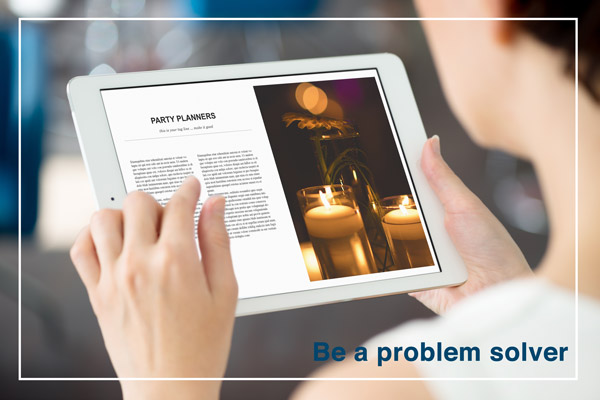
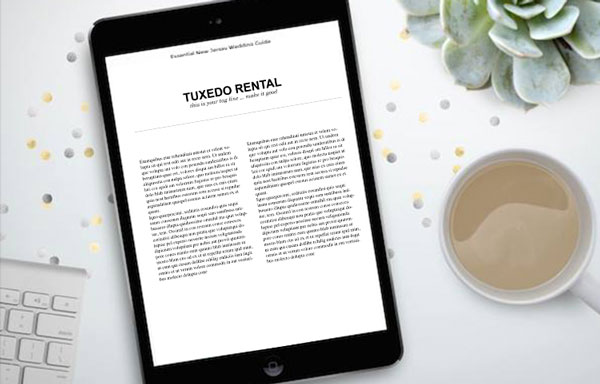
The first step is to come up with a PDF document which you can offer for free on your website. Ideally it will contain everything that your potential customer would need to know about planning a wedding. It’s important that the document is branded to your business, and has an attractive design overall. You can use your letterhead (with logo of course), or a pre-made design for the task at hand (which I have made available) or templates from Keynote or PowerPoint. The important part is that your branding is in the design and that it won’t turn people away by looking unprofessional.
Photographer free pdf

Step two – utilize your list

Inside the PDF categorize it for different types of vendors. You may have a page of florists, and another for wedding venues that you recommend. Ideally make each a two-page spread if possible. One page would provide the information on the vendors, and the other page would contain your photography examples related to the vendor. Think of it like a portfolio of your best work combined with your recommended vendor list.

The beauty of this is that you are getting your photographs in front of couples planning their wedding. Your brand is there as well vendors, which the couple might also hire.

Step three – create the opt-in

Next up is creating a way convert website visitors into leads. This is a bigger section due to the complexity. By this point you will have already created the PDF, which leads will download. But the process of gathering the email addresses confuses many people.

The first step is to use an email marketing service like Mailchimp or Aweber. Both are fantastic. I personally use Mailchimp for its ease of use and pricing.

Both services offer a feature, which can automatically send emails based on certain actions. In Mailchimp it is called Automation, in Aweber it’s called Follow Up Series. There you will set up an automated email, which will be sent to anyone who signs up for the “Free PDF” list that you will have created. Definitely name the list something you will recognize immediately when logging into your account.

These services allow you to attach a PDF to an email, which is what I recommend. But if you are using a service that does not allow attachments then create a Dropbox or Google Drive link and include that in the email.

This is where the fun part starts. There are many places where you can place what’s called an opt-in form. That means, a form which asks a website visitors for a name and email address, or any other information you want to request like a phone number.
Note that the less information you request the higher your conversion rate will be – meaning, the more people will fill it out. So I typically ask for email addresses only (you will see why later).

The first place you want to place the opt-in form is on a landing page specific to the free PDF. The benefit of having a unique page for the document is connected to SEO (search engine optimization). A dedicated page can be filled with additional text and image content optimized to rank well on search engines. It can also increase the conversion rate (percentage of people who sign up compared to number of page visits) for the opt-in because there are no distractions from blog articles or other content available only your website. Services like Mailchimp and Aweber offer embed codes for your opt-in forms. You use it like you were copying and pasting HTML from YouTube, Vimeo or 500px.

The second place you can have the opt-in form is on your blog’s sidebar, or in a pop-up form. These are called magnetic areas because they draw the attention of a visitor’s eye directly to them. There are a few ways you can do the magnetic opt-ins. For sidebars you can use the standard embed code. Some services offer pop-up codes as well. For WordPress sites I recommend services like OptinMonster or Pippity, which come with many design options as well as timing and split testing so you can see what converts the best. I have helped a many photographers with this method.

Optinmonster

Step four – leads versus quality leads

Now that you have the PDF done, and everything set up for visitors to convert into leads – it is important to note the difference between a lead and a quality lead.

A lead is anyone who contacts you about anything. An example of a standard lead is a couple who contacts you for a price list. They might be interested in your services, but there is no way of knowing how interested they really are, how far along they are in their wedding planning, or how serious they are about you.

A quality lead is someone who has taken specific actions to do research and wants valuable information. For example, a quality lead would be a couple downloading your free PDF because it contains information specific to their needs. They understand that it will contain every vendor they need to know about to plan their wedding.

Quality leads have a much higher chance of converting into paying customers over standard leads. That’s because a quality lead is already more interested in your services than a standard lead.

Step five – inform your vendors

If the couple books a venue listed on your PDF, then it is highly possible they will mention you as a referral. Your vendor partners will appreciate that. So, be sure to send a copy to your partners so they know what you are offering potential customers. Then they are also more likely to promote it, and promote you.

Your best sales people are your brand advocates. Those are your customers and your business partners.
Biz partners

Step six – converting to customers

You have your free PDF and are converting site visitors into leads. You are utilizing an email marketing service as recommended. Next is where it really comes into play.

I mentioned earlier that I typically only ask for email addresses. That is because with email marketing you can learn more about your leads, so names and phone numbers are NOT essential. In fact, you may find that through nurturing those leads via email marketing that you will have more people contacting you than you contacting them.

After doing some testing, I came to the conclusion that sending one email a week to my list is most effective. You may find yourself in a different situation. But having an email marketing service that tracks statistics will help you identify the optimal sending scenario – days and times.

One effective trick I find for converting leads into paying customers is to ask a question, which warrants a reply. Whatever the question might be, you will find people replying. That is where the conversation really takes off. Something like this perhaps:

As a wedding photographer I am always so curious what types of gowns brides pick.  Please reply with the type of dress you will be wearing at your wedding.  Or if you already picked it out, I’d love to see a photo!

What have you learned

To wrap-up this article, I want to restate what you learned here and what your first step should be.

Your business partner vendors are more important than ever to your business. You can foster those relationships online, and offline, by creating a free PDF as described here. That PDF will be used as leverage for converting website visitors into quality leads. Using email-marketing you can nurture those leads and convert them into paying customers. All with a little help from a simple PDF that includes super valuable information.

New family

Once again, I used wedding photography as an example, so if you are not a wedding photographer then be sure to think hard about your vendor list and what your clients would need. Then start creating that document.

Hop to it!

Disclaimer: dPS does not agree or disagree with any recommendations made by the author. The author receives no extra compensation for these referrals and benefits in no way. He only recommends them because these are the services he uses – do your own due diligence when selecting any service for your business.

googletag.cmd.push(function() {
tablet_slots.push( googletag.defineSlot( “/1005424/_dPSv4_tab-all-article-bottom_(300×250)”, [300, 250], “pb-ad-78623” ).addService( googletag.pubads() ) ); } );

googletag.cmd.push(function() {
mobile_slots.push( googletag.defineSlot( “/1005424/_dPSv4_mob-all-article-bottom_(300×250)”, [300, 250], “pb-ad-78158” ).addService( googletag.pubads() ) ); } );

The post 6 Steps to Growing Your Photography Business Using a Recommended Vendors List by Scott Wyden Kivowitz appeared first on Digital Photography School.


Digital Photography School

 
Comments Off on 6 Steps to Growing Your Photography Business Using a Recommended Vendors List

Posted in Photography


Weekly Photography Challenge – Dance

24 Jan

Earlier I shared a bunch of elegant images of the world of dance.

Dance is an art form just like photography. It take discipline and endurance to be a dancer. Can you relate as a photographer? Each is a passion, something which needs practice to perfect. Dance is picturesque and often is partnered with photography as the are symbiotic – they work well together.

Michael Dunn

By Michael Dunn

Weekly photography challenge – dance

Now it’s your turn. Do you know a dancer? Can you approach the local dance school to offer to take some photos for them? Maybe even something less formal like your own children dancing just for the fun of it?

Here are a few ideas:

Garry Wilmore

By Garry Wilmore

Stefanos Papachristou

By stefanos papachristou

Tiziano L. U. Caviglia

By Tiziano L. U. Caviglia

Paul Cox

By Paul Cox

Felix Padrosa Photography

By Felix Padrosa Photography

Chris JL

By Chris JL

Dixie Lawrence

By Dixie Lawrence

John Curley

By john curley

Share your dance images here:

Simply upload your shot into the comment field (look for the little camera icon in the Disqus comments section) and they’ll get embedded for us all to see or if you’d prefer upload them to your favourite photo sharing site and leave the link to them. Show me your best images in this week’s challenge. Sometimes it takes a while for an image to appear so be patient and try not to post the same image twice.

googletag.cmd.push(function() {
tablet_slots.push( googletag.defineSlot( “/1005424/_dPSv4_tab-all-article-bottom_(300×250)”, [300, 250], “pb-ad-78623” ).addService( googletag.pubads() ) ); } );

googletag.cmd.push(function() {
mobile_slots.push( googletag.defineSlot( “/1005424/_dPSv4_mob-all-article-bottom_(300×250)”, [300, 250], “pb-ad-78158” ).addService( googletag.pubads() ) ); } );

The post Weekly Photography Challenge – Dance by Darlene Hildebrandt appeared first on Digital Photography School.


Digital Photography School

 
Comments Off on Weekly Photography Challenge – Dance

Posted in Photography