RSS
 

Posts Tagged ‘Photography’

31 Mystical Night Photography Images

19 Jun

There is something magical, mystical about the night, and night photography. Things you can’t see with the human eye, a certain peacefulness.

Here on dPS night photography is a popular topic, with many articles to choose from if you want to learn how to do it.

In this collection let’s look at some stunning examples of night photography done well:

Photograph Black Lotus by Mathijs van den Bosch on 500px

Black Lotus by Mathijs van den Bosch on 500px

Photograph The beginning by Marco Bocelli on 500px

The beginning by Marco Bocelli on 500px

Photograph Along the Thames by Giuseppe Torre on 500px

Along the Thames by Giuseppe Torre on 500px

Photograph In New Orleans by Boberic Photography on 500px

In New Orleans by Boberic Photography on 500px

Photograph *H--H* by ömer yücel on 500px

*H–H* by ömer yücel on 500px

Photograph Shanghai at Night by Clemens Geiger on 500px

Shanghai at Night by Clemens Geiger on 500px

Photograph DUBAI by Ibrahim Albeshari on 500px

DUBAI by Ibrahim Albeshari on 500px

Photograph the queen by Ronny Behnert on 500px

the queen by Ronny Behnert on 500px

Photograph San Francisco, unseen night 2 by Ali Erturk on 500px

San Francisco, unseen night 2 by Ali Erturk on 500px

Photograph Belchite night 2 by Tony Goran on 500px

Belchite night 2 by Tony Goran on 500px

Photograph ?n Brugge by ?lhan Eroglu on 500px

?n Brugge by ?lhan Eroglu on 500px

Photograph Salamanca in the night by Isidoro M on 500px

Salamanca in the night by Isidoro M on 500px

Photograph A Night To Remember by Arild Heitmann on 500px

A Night To Remember by Arild Heitmann on 500px

Photograph Celestial Cypress by Paul Marcellini on 500px

Celestial Cypress by Paul Marcellini on 500px

Photograph Fossilized UFO by Sakhr Abdullah on 500px

Fossilized UFO by Sakhr Abdullah on 500px

Photograph Portal by Brad Goldpaint on 500px

Portal by Brad Goldpaint on 500px

Photograph Stars over Teton homestead by Royce's NightScapes on 500px

Stars over Teton homestead by Royce’s NightScapes on 500px

Photograph My bike! by Khatawut J on 500px

My bike! by Khatawut J on 500px

Photograph M11 By Winter's Night - London by Pete Dobson on 500px

M11 By Winter’s Night – London by Pete Dobson on 500px

Photograph What Once Was by Aaron J. Groen on 500px

What Once Was by Aaron J. Groen on 500px

Photograph Reaching for the stars by Dan Barr on 500px

Reaching for the stars by Dan Barr on 500px

Photograph Ball of Light by Richard Steinberger on 500px

Ball of Light by Richard Steinberger on 500px

Photograph Star Filled Sky over The Grand Tetons #2 by Matt Anderson on 500px

Star Filled Sky over The Grand Tetons #2 by Matt Anderson on 500px

Photograph Galiano Island Stars by James Wheeler on 500px

Galiano Island Stars by James Wheeler on 500px

Photograph Moonlight Dock by James Wheeler on 500px

Moonlight Dock by James Wheeler on 500px

Photograph An appropriate night for anything by Milos Savkovic on 500px

An appropriate night for anything by Milos Savkovic on 500px

Photograph Thousand star Hotel by shaiith on 500px

Thousand star Hotel by shaiith on 500px

Photograph Ai-Petry. Night, Full Moon. by Denis Belitsky on 500px

Ai-Petry. Night, Full Moon. by Denis Belitsky on 500px

Photograph industrial portrait by Alina Cürten on 500px

industrial portrait by Alina Cürten on 500px

Photograph Wat arun under loy krathong day ,Thailand by Prasit Rodphan on 500px

Wat arun under loy krathong day ,Thailand by Prasit Rodphan on 500px

Photograph Good night by Fehrum on 500px

Good night by Fehrum on 500px

googletag.cmd.push(function() {
tablet_slots.push( googletag.defineSlot( “/1005424/_dPSv4_tab-all-article-bottom_(300×250)”, [300, 250], “pb-ad-78623” ).addService( googletag.pubads() ) ); } );

googletag.cmd.push(function() {
mobile_slots.push( googletag.defineSlot( “/1005424/_dPSv4_mob-all-article-bottom_(300×250)”, [300, 250], “pb-ad-78158” ).addService( googletag.pubads() ) ); } );

The post 31 Mystical Night Photography Images by Darlene Hildebrandt appeared first on Digital Photography School.


Digital Photography School

 
Comments Off on 31 Mystical Night Photography Images

Posted in Photography


Tips for Enhancing Night Sky Photography in Photoshop

17 Jun

You will learn some important steps of enhancing a night sky photo in this tutorial. It is specifically useful if your photos were shot in areas with notable light pollution. Light pollution could spoil your photo by outshining the comparatively dim stars in the sky. Here are the tips for bringing back those spectacular stars in the sky.

First a slight digression, I recommend to shooting your night sky photos in RAW format if you aren’t already. This is because RAW has an incomparable dynamic range which enables you to bring back the details of the photo, including the night sky in post-processing.

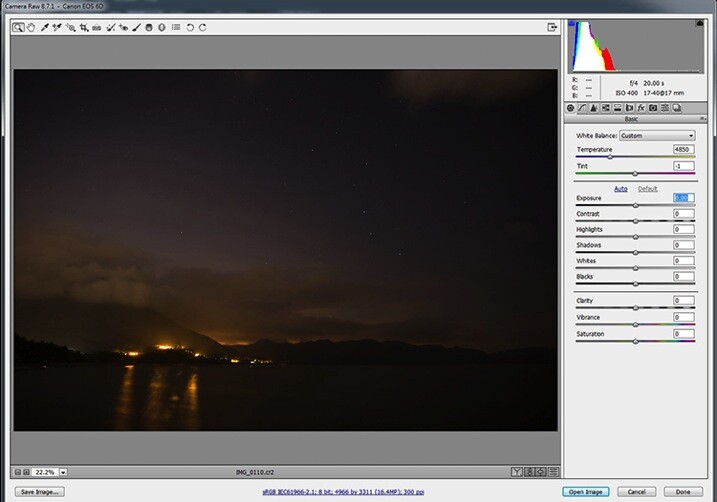
Pic1

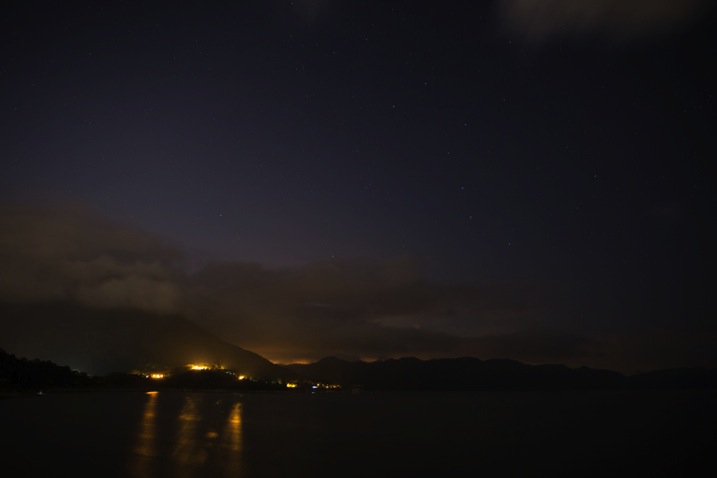
The photo in the above screen capture is underexposed. We will need to play around with the exposure adjustments in a RAW Editor first. Generally, if the exposure of a dark image is boosted too much, there will be tons of noise. It is because the sensor failed to capture sufficient photons when the photo was underexposed. Therefore, the differences in the number of photons among pixels are significant. Such differences are the culprit of noisy images.

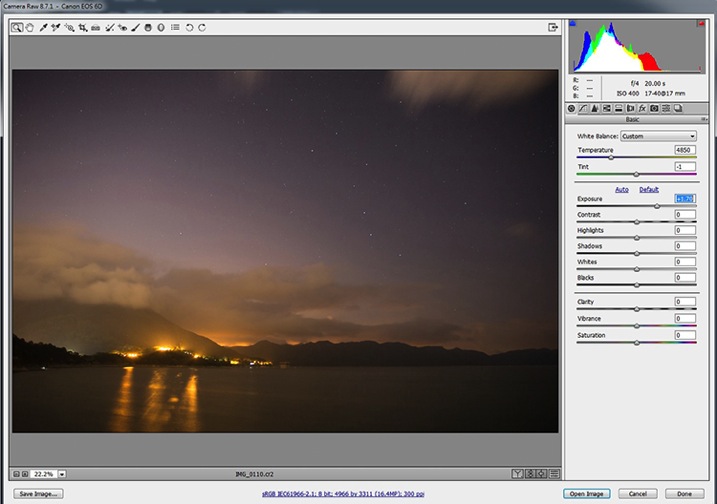
Pic2

First, you have to increase the exposure until the brightness of the photo appears to be appropriate. While adjusting the exposure parameter, use the histogram in the top right corner as a reference.

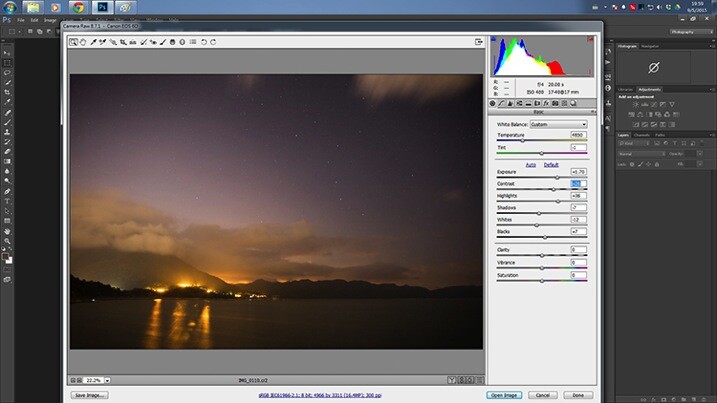
Pic3

You may want to play around with the value of the Highlight, Shadows, Whites and Blacks sliders for fine tuning the exposure. After that, add some contrast to the photo, this will make the stars stand out a little bit.

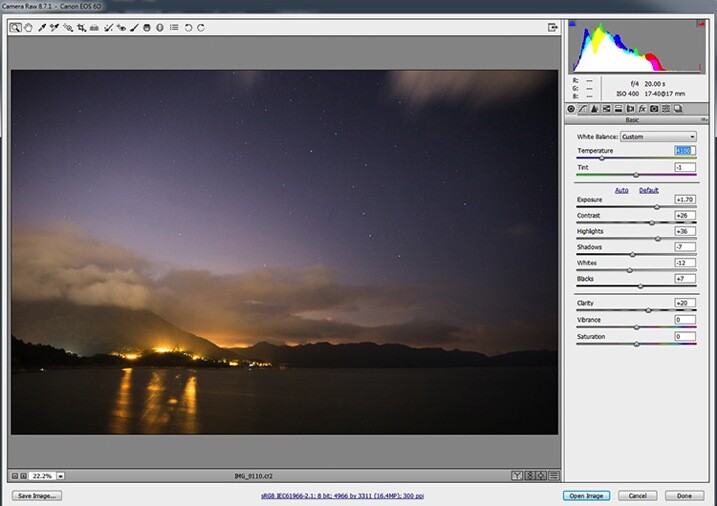
Pic4

You will need to boost the Clarity here for the whole scene. This improves the sharpness of the photo, including the stars. In my opinion, a bluish night sky is far more impressive and, therefore, you will need to adjust the Temperature setting. I would recommend a color temperature between 3500-4100. This will strike a balance between realism and aesthetic. Then, click “Open Image” (if you’re using Lightroom right click and choose “Edit in Photoshop” to continue with the next steps).

pic5b

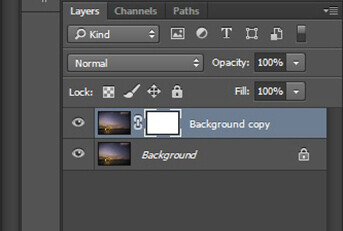
Make a duplicate a copy of the Background layer after opening the image. Right click on the original layer, and click on “Duplicate Layer” from the pop-up menu. After that, create a layer mask for the duplicated layer. To create a layer mask, you will need to have the new layer chosen and click on the third button at the bottom of the Layer panel. Then, select the image next to the layer mask in the Layer panel.

Pic6

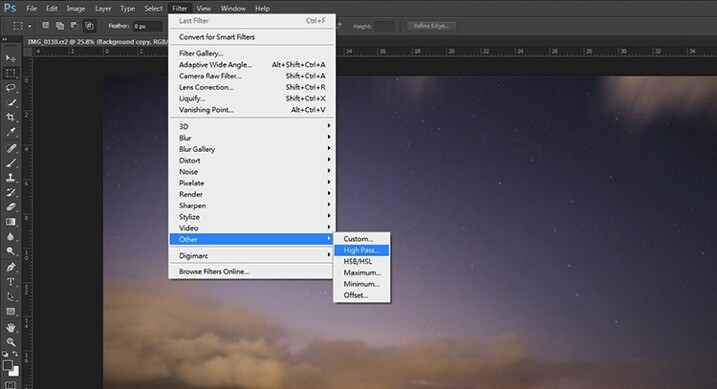
Now you are going to add a High Pass filter to the newly duplicated layer. Choose Filter > Other > High Pass. This is to further enhance the visibility of the stars.

Pic7

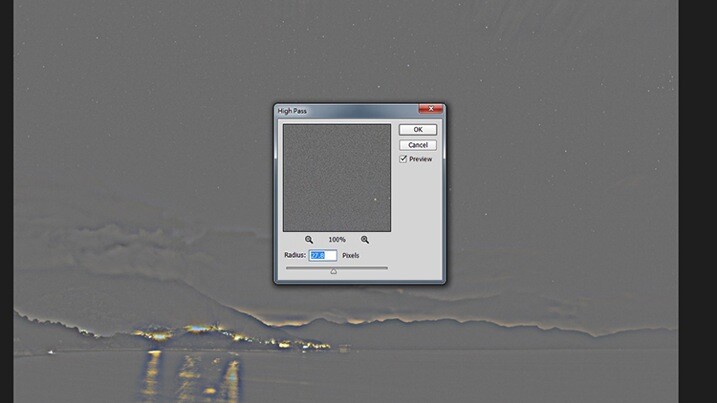
A pop-up window will appear, tweak the Radius until the stars are being highlighted in the preview.

pic8b

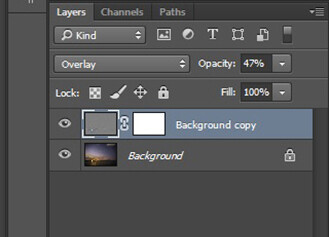
Head back to the Layers panel. You will have to switch the Blending Mode of the layer from Normal to Overlay. The whole image will be sharpened noticeably. If you feel like the image is over-sharpened, you can lower the Opacity of the layer.

Pic9

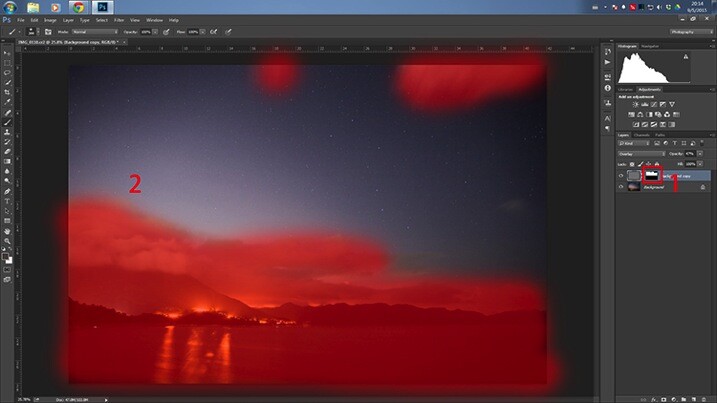
You may find that the areas outside the night sky are being oversharpened. In order to remove the excessive sharpening from the other areas, you will have to erase (hide) them by painting on the layer mask that you created earlier.

Pic10

First, choose the layer mask in the Layer panel. Then, paint over the unwanted areas (the highlighted area in the above screen capture) with a black-colored brush.

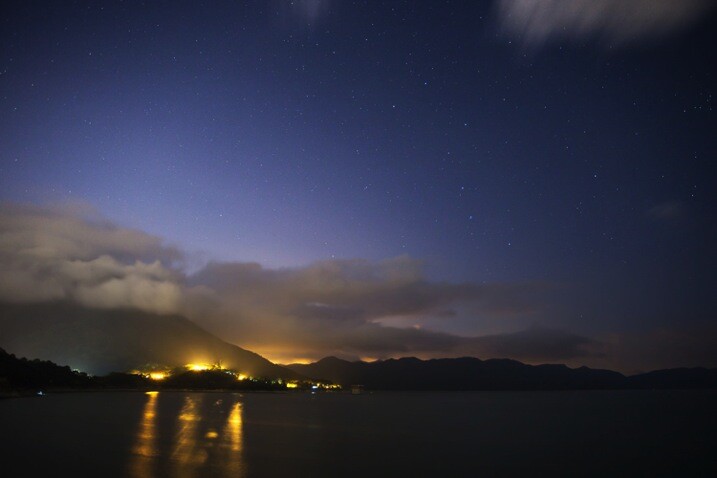
Here is the final result:

Before

BEFORE

IMG 0110

AFTER

Conclusion

There are three techniques for enhancing the visibility of stars in the night sky. First, adding some contrast to the photo will help to a certain extent. Secondly, increase the clarity of the whole photo. Lastly, don’t forget to use the High Pass filter sharpening for the final enhancement. Thanks for reading, I hope you enjoyed it.

googletag.cmd.push(function() {
tablet_slots.push( googletag.defineSlot( “/1005424/_dPSv4_tab-all-article-bottom_(300×250)”, [300, 250], “pb-ad-78623” ).addService( googletag.pubads() ) ); } );

googletag.cmd.push(function() {
mobile_slots.push( googletag.defineSlot( “/1005424/_dPSv4_mob-all-article-bottom_(300×250)”, [300, 250], “pb-ad-78158” ).addService( googletag.pubads() ) ); } );

The post Tips for Enhancing Night Sky Photography in Photoshop by Chris Yiu appeared first on Digital Photography School.


Digital Photography School

 
Comments Off on Tips for Enhancing Night Sky Photography in Photoshop

Posted in Photography


Adobe Updates Photoshop and Lightroom with Creative Cloud 2015 and Launches Adobe Branded Stock Photography Library

16 Jun

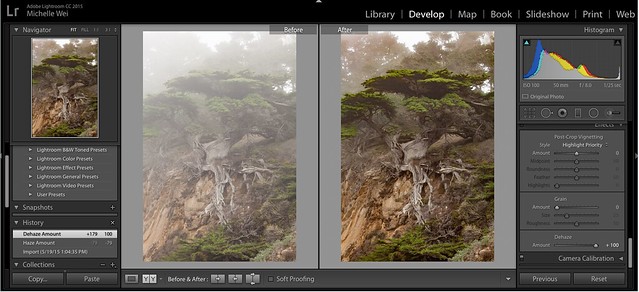
Lightroom Dehaze UI

Today Adobe is announcing updates for their Creative Cloud 2015 Photography package as well as the launch of their new stock photography offering Adobe Stock.

I saw a demo last week of the new Creative Cloud enhancements. The enhancement that I liked the most was a new slider in Lightroom for haze and dehaze. With the haze slider you can now reduce unwanted haze in photos or add haze back in if you want more of an ethereal foggy type mood. I think that this tool will be especially dramatic when working with long exposure photography where you have clouds or low fog and want to get the mix of fog to subject just perfect.

Photoshop is also adding in an additive noise function where you can produce more camera like realistic bokeh and blur noise when desired, making the transition in blur more natural. The Photoshop healing brush also now heals in real time and is faster than previous versions.

These feature enhancements and updates will not be available to the current desktop versions of Lightroom and Photoshop, they will only be available for Adobe Creative Cloud subscribers. This is in line with Adobe’s previous stated goal of providing fast and rapid real time updates and upgrades to their subscription customers. I’m assuming that eventually these new enhancements will make their way to desktop upgrades/updates, but at present Adobe seems to be focused on providing the best and most current features available to their subscription customers.

There are also additional features being launched for the mobile versions of Adobe products including better tone and vignette adjustment for Lightroom mobile and an Android version of Photoshop Mix.

Adobe’s Creative Cloud photography package costs $ 9.99/month and you can subscribe to it here. They also offer a 30 day trial for you to try out Creative Cloud to see if it is right for you.

Adobe Stock

In addition to the improvements in Lightroom CC and Photoshop CC, Adobe is also announcing the launch of their new stock photography service simply called Adobe Stock.

Because Adobe is so widely used by creatives in general, leveraging their software products to sell an Adobe labeled stock photography library seems to make a lot of sense. Adobe’s stock photography service will be featured as a menu item in Photoshop and will allow stock buyers to use watermarked versions of stock photos to create mockups and test design/layout ideas. Once a stock buyer is ready to license an image they can license it directly from Photoshop and download the unwatermarked version of the image.

Images will cost $ 9.99 each to license or Creative Cloud subscribers can purchase one of two different subscription plans. The first plan costs $ 29.99/month and allows a subscriber to license up to 10 images a month and a second plan will cost $ 199.99 per month and will allow a subscriber up to 750 images per month.

Adobe will pay out 33% of their sales proceeds to photographers — photographers interested in applying can apply here.

Because so many stock photography buyers are connected into Adobe’s ecosystem, I think this stock photography offering will end up being very successful and represents formidable competition to the current stock photography giant Getty Images. Earlier this year Adobe purchased the stock photography agency Fotolia, but this new stock offering appears to be a different offering marketed directly under the Adobe brand and available through Adobe’s flagship Photoshop product.

More: MacRumors, The Verge, Engadget, Techmeme.


Thomas Hawk Digital Connection

 
Comments Off on Adobe Updates Photoshop and Lightroom with Creative Cloud 2015 and Launches Adobe Branded Stock Photography Library

Posted in Photography


How to Pose Groups for Portrait Photography

16 Jun

Group Main

For many years the gold standard for posing groups looked just like my first grade school photo. Everybody would be lined up and asked to stand as awkwardly as possible, feet together and for the lucky ones in the front, hands clasped together in their laps.

The photographer would shoot two frames (one for safety) and count every one in with a “1..2..3…say cheese” my grade one teacher Mrs. Witchell was way too cool to do cheese. She busted out her own version of Blue Steel instead. Respect.

Sadly this style of posing large groups is still pretty much the norm. But with some careful planning, and a little imagination, portraits of large groups can look far more dynamic than my grade one school photo.

Group 1

The classic school or sports style group photo is rigid and posed awkwardly. Introducing some variation in height, pose and shape of the group with give your portraits more life and energy making them far more interesting and dynamic.

There are four main styles I like use to shoot my groups:

1. The 90210

I learned this style of posing groups by studying the publicity shots of the American teen drama from the 90s, 90210 (I had a huge crush on Dilan). I have now developed, and modified, this technique and it has become my go to pose for many of the cast shoots I do.

I like to create interest in these group shots by staggering the levels of all my models. I will have the back row standing. Middle row seated at various heights including high stools, chairs, lower ottomans or boxes. I then have a third level either on the floor or seated on very low stools or boxes. Lastly I pose each person individually and bring them onto the set one at a time, so I can see how the overall shot is looking.

90210 2 3 90210 2 4
90210 2 90210 2 6

Checklist

  • Shoot at 50mm or longer, as wider lenses will distort the group and make people in the front appear larger than those at the back. I usually shoot at around 100-150mm.
  • Ensure everyone is clearly visible.
  • Try and space everyone out so the image does not feel too constricted.
  • Shoot at least 10-15 frames. This is harder than it sounds because large groups can be intimidating and many people in the group tend to lose interest after two or three frames. The way around this is to warn everyone that you will be shooting at least 10 frames.
  • Keep the dialogue going. Be complimentary. Never single anyone out for doing the wrong thing.
  • If you need to, stop the shoot and give more direction.
  • Don’t be afraid to make people wait. I used to rush through my group shots (particularly with corporate males and athletes) because they intimidated me. I now realize that when I rush I don’t get great shots. Be confident and explain that you want to get this right, and if everyone does their bit it should all be over in five minutes.
  • Keep the dialogue going. Silence is a cue that you are unhappy with the shot or are finished shooting.
  • Lower your tone and speak calmly. This is a great trick I learned from my teacher training. Whenever I’m speaking to a large group I lower my voice rather than raise it. This way everyone becomes silent to hear you. I also find that women’s voices tend to go up and sound shrill when they try and raise it. This doesn’t sound very assertive or authoritative.

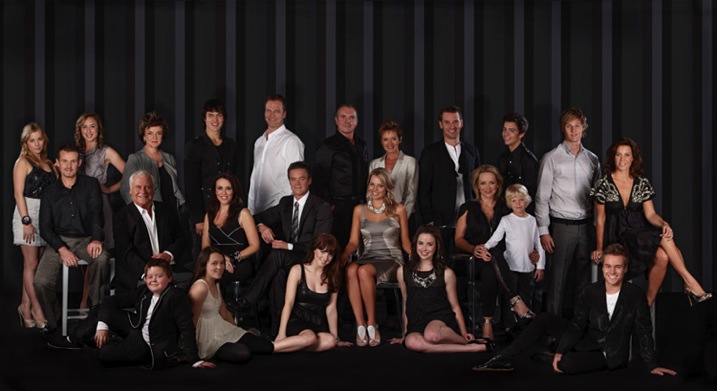
90210 3

The 90210 style also works for larger groups like this shot of the entire cast of the Australian Soap Opera, Neighbours ( above) or the cast and crew shot of the musical Moonshadow (below). I use the exact same approach and set up my shot in groups of three and five, staggering the head heights to keep the shot from looking too square.

Big Groups

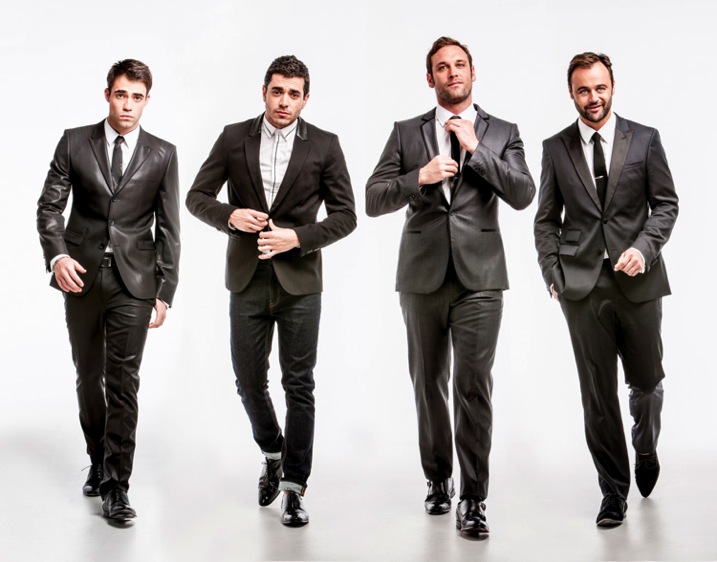
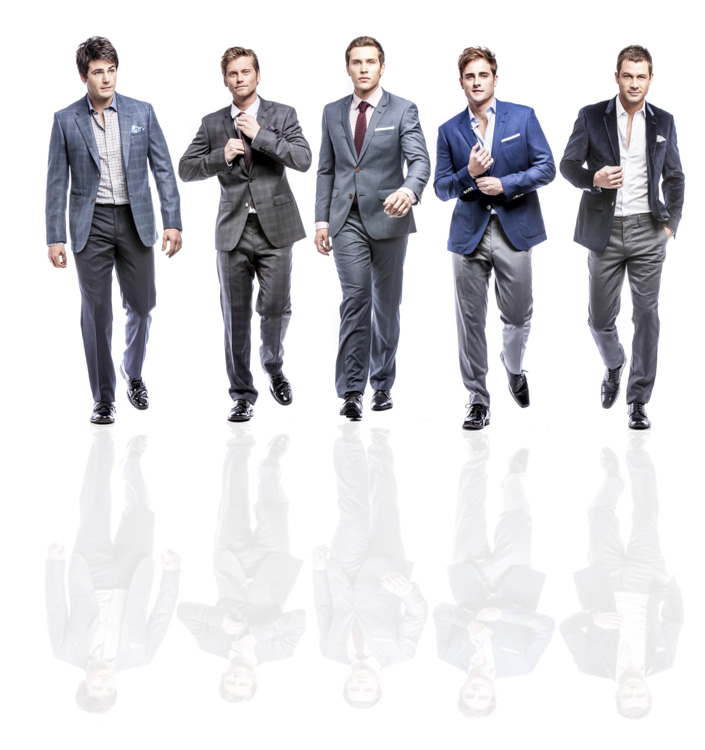
2. The Reservoir Dog

This shot was inspired by the opening sequence of a Quentin Tarantino movie, Reservoir Dogs.

Resdog

This is a great option to photograph groups if you are pressed for time, need something more dynamic, or have a group of people that have trouble posing or taking direction.

I like to shoot very low to the ground (sitting or laying) and ask the group to walk towards me. It works best when I give each person individual direction before we start. Eg., Person 1 put one hand in your pocket;,Person 2 walk and fix your tie as you go, Person 3 button your jacket up as you walk, Person 4 walk with a strut and attitude.

Reservoir Dog 2

If this shot is left to chance you may get lucky, but a little direction will really take it to another level.

When shooting set your camera to autofocus (AI servo for Canon or continuous for Nikon) and shoot with a long lens 150-200mm (to remove background distraction). I recommend aperture of f/5.6, a shutter speed of 1/250th of a second or higher, and focus on the face.

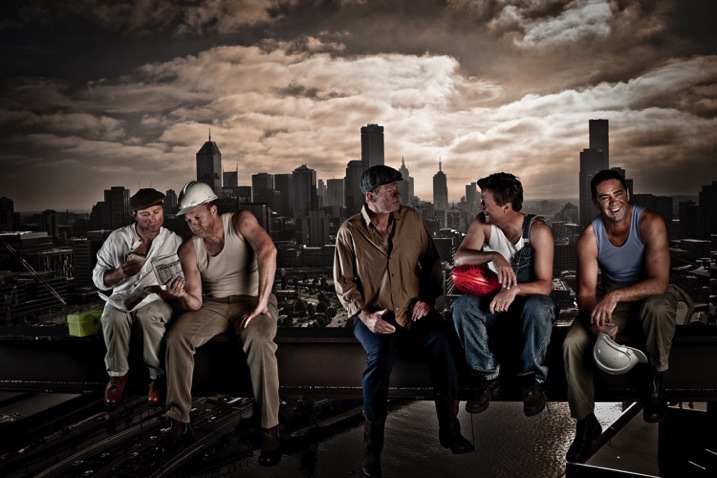
3. The Cartier-Bresson

This style is named after Henri Cartier-Bresson, a French photographer who took snapshots of everyday life and made them look extraordinary. He was a true master of candid photography.

I love photographing groups in is this fly on the wall style, which is posed to look like a candid snap-shot of life. I often get my inspiration for these poses from popular culture.

Cartier Bresson

This photo of the cast of The Footy Show is homage to the famous 1932 image Lunch atop a Skyscraper.

When I’m directing a shoot like this I give everyone a role and ask him or her to repeat it over and over again. Poses are varied only minutely. For example: Billy and Shane (far left) were directed to look at the newspaper and eat the sandwich. Sam and JB (center) were asked to have an animated conversation and Garry (far right) was asked to laugh off camera. Expression was varied slightly but the pose was kept the same.

Lastsupper

This image was inspired by DaVinci’s Last Supper, and was photographed using a very similar technique to the Footy Show image.

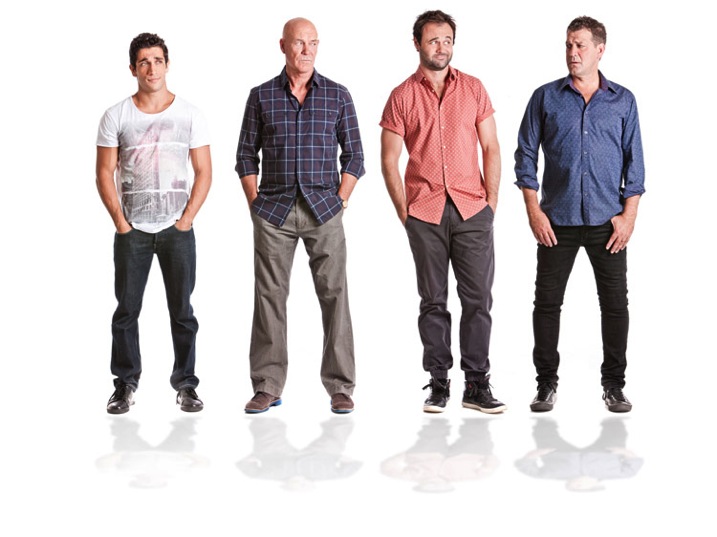
4. The lineup and “v” posed group shot

Small Time Gangster

I photographed the cast of Small Time Gangster individually for this movie poster and then the shots were Photoshopped to create a “V” shape that is really popular in advertising and the entertainment industry.

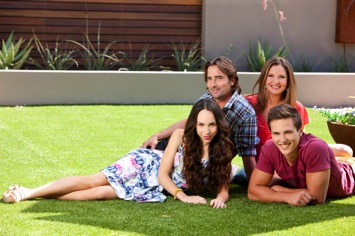
Husbands A

The Cast of House Husbands was shot individually for this group shot, then the best expressions and poses were selected to create this image.

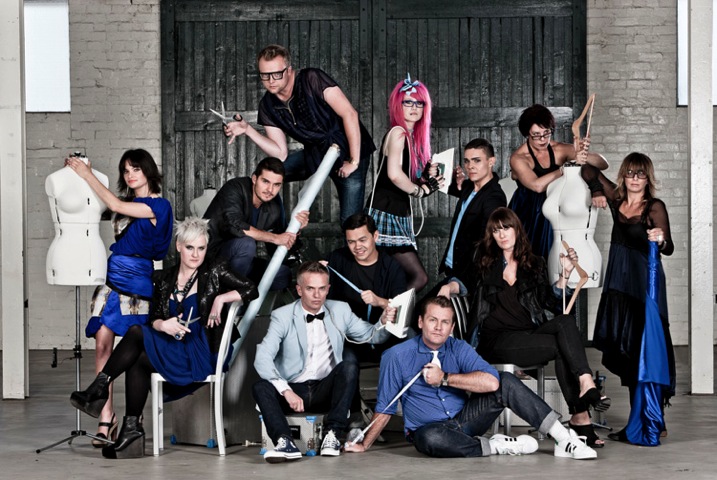
Project Runway S4

This style of photography works really well for large families and corporate groups, and really lets the individual personalities come through. I thought this was the ideal way to capture the cast of Project Runway Season 4.

This style of shooting was born out of necessity. Many of the TV shows I shoot cast shots for can’t schedule all their talent to be on set at once so I shoot them individually, and combine the shots in post-production. This is a great technique to capture everyone’s personality and it always looks dynamic.

Finally, don’t forget to have fun when shooting group portraits and let their personality (and yours) shine!

Lifestyle

These images were all posed to look like they had been taken candidly. The problem with candid photography is that you are relying on too many variables to be just right before you can get your shot. You need good light, location and expression. Miss out on one of these and your shot may turn to caca. If you set up the shot and give everyone great direction, you are guaranteed a great shot.

What are your favourite ways to pose and direct groups? Is there anything I may have missed or do you have a group portrait you are really proud of? I’d love to hear from you.

All images copyright Gina Milicia 2015

googletag.cmd.push(function() {
tablet_slots.push( googletag.defineSlot( “/1005424/_dPSv4_tab-all-article-bottom_(300×250)”, [300, 250], “pb-ad-78623” ).addService( googletag.pubads() ) ); } );

googletag.cmd.push(function() {
mobile_slots.push( googletag.defineSlot( “/1005424/_dPSv4_mob-all-article-bottom_(300×250)”, [300, 250], “pb-ad-78158” ).addService( googletag.pubads() ) ); } );

The post How to Pose Groups for Portrait Photography by Gina Milicia appeared first on Digital Photography School.


Digital Photography School

 
Comments Off on How to Pose Groups for Portrait Photography

Posted in Photography


6 Strategies for Launching a Successful Photography Blog

15 Jun

Blogging become one of the most popular pastime and income source for photographers these days. If you’re going to start a photography blog, you have probably faced with a lot of issues which are quite confusing. And the very first question is: where to start out? Fortunately, modern software solutions enable everyone to create a blog easily with no coding Continue Reading

The post 6 Strategies for Launching a Successful Photography Blog appeared first on Photodoto.


Photodoto

 
Comments Off on 6 Strategies for Launching a Successful Photography Blog

Posted in Photography


Weekly Photography Challenge – Posing People

13 Jun

Editor’s note: this week we will be featuring a series of articles on posing for portraits. Look for a new one each day. If you miss any make sure you subscribe to our newsletter and you’ll get a reminder of all our articles once a week.

Creating portraits is hard. There’s a lot of technical stuff you need to handle, and you have a real live subject in front of your camera. Even further, they are going to look to you for help to make them comfortable and look good in their photos. The right pose, whether casual or structured, is key.

Greg L. Photos

By Greg L. photos

James Schaap

By James Schaap

Adults, teens and kids each come with different challenges. So you need to figure out what’s best for each individual, and guide them gently. Groups add even more complexity.

Weekly Photography Challenge – Posing People

This week’s challenge is about practicing working with people and doing some posing. If this is an area that’s new for you then try and get a model or subject that will be patient with you as you try different things. Or you could work with a professional model (in exchange for prints is a common practice if you can’t afford to pay for one) who can help you suggest poses or even do their own. Learning by watching is great way to go too.

Darlene Hildebrandt

By Darlene Hildebrandt

Chemisti

By chemisti

Darlene Hildebrandt

By Darlene Hildebrandt

Clappstar

By clappstar

Lyndsay Esson

By Lyndsay Esson

Share your images below:

Simply upload your shot into the comment field (look for the little camera icon in the Disqus comments section) and they’ll get embedded for us all to see or if you’d prefer upload them to your favourite photo sharing site and leave the link to them. Show me your best images in this week’s challenge. Sometimes it takes a while for an image to appear so be patient and try not to post the same image twice.

You can also check out the dPS ebook Portraits: Striking the Pose or our set of posing guides 67 Portrait Poses (printable) if you need some tips.

googletag.cmd.push(function() {
tablet_slots.push( googletag.defineSlot( “/1005424/_dPSv4_tab-all-article-bottom_(300×250)”, [300, 250], “pb-ad-78623” ).addService( googletag.pubads() ) ); } );

googletag.cmd.push(function() {
mobile_slots.push( googletag.defineSlot( “/1005424/_dPSv4_mob-all-article-bottom_(300×250)”, [300, 250], “pb-ad-78158” ).addService( googletag.pubads() ) ); } );

The post Weekly Photography Challenge – Posing People by Darlene Hildebrandt appeared first on Digital Photography School.


Digital Photography School

 
Comments Off on Weekly Photography Challenge – Posing People

Posted in Photography


How to Use Video for Your Photography Website

12 Jun

In modern society websites are all about storytelling and conveying the right message. Designers try to “make it big” by using proper images and videos to give users the maximum impact. Videos rose in popularity in 2014, and have been a growing trend ever since. Being a sister medium to photography, video can help you enhance your online brand presentation Continue Reading

The post How to Use Video for Your Photography Website appeared first on Photodoto.


Photodoto

 
Comments Off on How to Use Video for Your Photography Website

Posted in Photography


8 Tips For Baby Photography Using Natural Light

12 Jun

Babies. Do you find them a challenge to photograph?

They gurgle, spit, vomit, laugh, cry, smack their hands together… They do a whole lotta things that we don’t need to see forever in a photograph!

But in between all that uncontrollable baby-behaviour are those moments that parents see every day and would love to keep alive forever in beautiful photos – the big eyes, cute smiles, tiny fingers, soft skin, and round cheeks – all those wondrous little details that only come with brand new life. Those are the things that connect to a parent’s heart in the moment, they happen and what they long for once their children have grown up.

00 Copyright Beth Jennings Photography Digital Photography School Baby battle 5932

Ruby, 3 months – ISO 1600, f/2.8, 1/250th

It’s the reason why, in the whirl-wind madness of baby’s first year, that your friend or family member may call on you to ask you to photograph their beloved treasure.

Maybe on one hand you feel honoured to be asked, but also that dreadful, pit-of-the-stomach feeling – do you worry they expect you to swaddle their baby up Anne Geddes style, and photograph him or her with stunning studio lighting and an elaborate set? Do you feel the pressure to create something amazing in the small window of only a couple of hours that you’ll have with them?
How are you going to maximize on the time you’re given, while baby goes through his sleep-awake-feeding cycle?

How are you going to interrupt that cycle to create something amazing, when the last thing you want to do is disturb the baby, wake him up, move him too much and make him cry? How the heck are you going to do it at all?
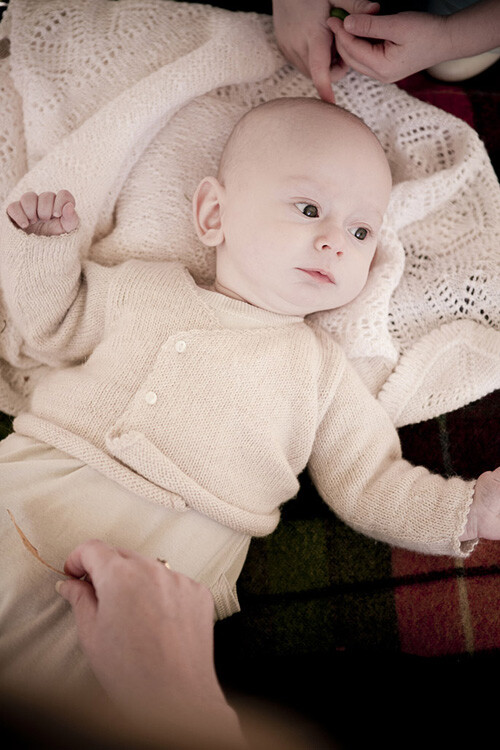
01 Copyright Beth Jennings Photography Children Photography 2310

Cody, 2 months – ISO 200, f/2.8, 1/200th

Let’s assume you don’t have the studio lighting and equipment to set up in the parent’s home. All you have is you, and your camera, and you’ll work with natural, available lighting. It may sound like it’s not enough, but actually, it’s more than enough if you know how to make do with what you’ve got.

The formula to successfully capturing babies within a limited time frame, one camera and no additional equipment, comes in eight tips total:
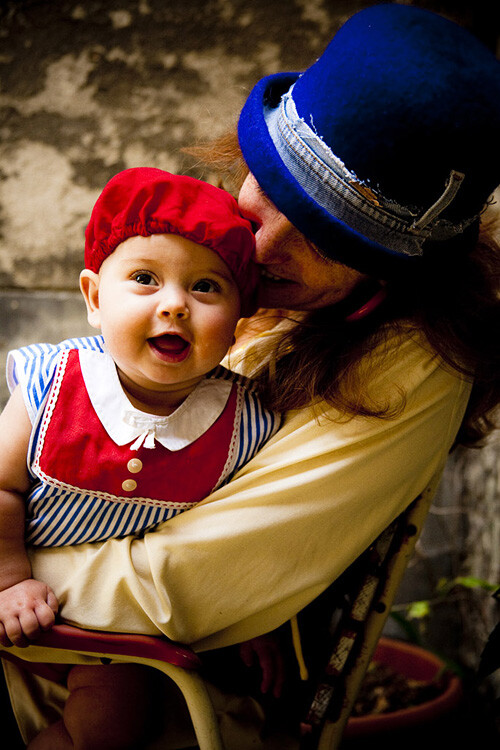
02 Copyright Beth Jennings Photography Children Photography 2173

Eliette, 9 months – ISO 1000, f/5, 1/160th

Part 1 Planning

Plan well, and it sets you up for your best chances of success on the day. Follow these steps in the one to two weeks before your shoot:

Step #1 Timing

Babies set their own criteria that rotates around a 1-2 hour schedule of sleeping, eating, crying, playing and nap time. Find out from the parents what that current cycle is, and build your plan from there.

Step #2 Lighting

Will you be photographing at their home? If so, this can include where their baby sleeps in a dimly lit room, by a window in Mom’s arms, perhaps also out in the backyard through dappled light if your shoot will include play time. Stay out of direct sun and just work with soft, diffused lighting. Find out what time of day is best for available lighting in their home and backyard.

Step #3 Clothing

It’s special for the parents to have you there to photograph their baby because it’s something they can’t actually do themselves. Advise them on having their baby’s preferred outfit clean and ready in advance, and a back-up in case of accidents. In order to feel safe and warm, babies also do well with accompanying blankets, bottles, beanies and soft toys. Check that the items all marry well together in terms of colours. If you have some clashes on the day and can’t change it, then shoot anyway and consider black and white for post-production to help strip it back a notch.

Step #4 Schedule
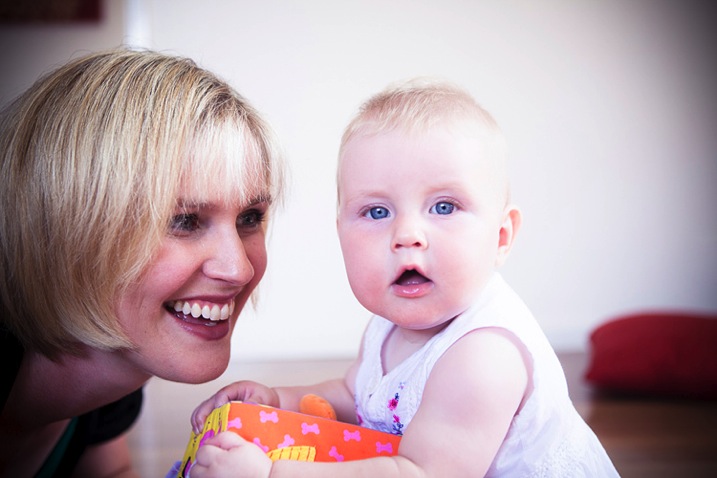
03 Copyright Beth Jennings Photography Children Photography 2195

Anna, 8 months – ISO 400, f/2.8, 1/200th

As best you can, plan the order of mini-events that the parent would like captured. For example, at noon baby will wake up, so you’ll be there from 11:45 and be quietly ready. That will be followed by feeding in the kitchen, and then tummy time in the backyard. If it all comes undone on the day, that’s okay. Just go with the flow of what is presented to you in the natural order that it happens.

Part 2 On the Day

It’s likely you won’t have much time with your subject, so follow these steps to be as prepared as possible before you actually start shooting:

Step #1 Look for the light

See where it is coming from, and where it is falling. For each of the baby pictures in today’s lesson, take note of the light source. Look at the shadows, as they indicate where the light source is positioned. Also observe the catch light (the little reflected glint) in the baby’s eyes which gives life and character. Notice that the pictures here are all created inside by window light, or outside in shaded areas.

Step #2 Compose for the background

Once you’ve established where the best light is coming from, then think about your composition, building up from the background first. See the picture of Cody above? What surrounds him? The rug and white blanket, with small elements of his sister and mother protectively surrounding him.

Step #3 Set up your shoot flow

While the parent is still preparing their baby to be photographed, get your technicals for ISO, shutter speed and aperture established with a test shot, and quick histogram check, to ensure you are achieving technically beautiful captures. Once in place, they are unlikely to change much because the light is constant, and baby won’t move much unassisted. (Shoot Flow is my seven step process for setting up your camera correctly in manual mode).

Step #4 Time to shoot

Once you’ve covered steps one to three, then position the baby (with the parent’s help) in the scene. Time is of the essence now, but it’s also the part you can’t control. All you need to do is be calm and observe what’s actually playing out in front of you in real time. Remember you can move, so keep yourself flexible and mobile. Compose your images, one by one, and keep your camera near your eye, finger at the shutter. When you see something worth capturing, be quick and go for it. One stunning capture is worth so much more than 10 average ones. Imagine your budget is $ 1 a shot and take your time.

04 Copyright Beth Jennings Photography Children Photography 6370

Olivier, one month – ISO 100, f/3.2, 1/160th

What to do with a sleeping baby?

Sometimes you don’t have the luxury to control all the set-up elements. See baby Bent (it’s a German name) below? He was already placed in the stroller and sleeping beautifully, and it would have been cruel to wake him!

  • Where is the light coming from?
  • Is the light play pleasing? Yes it is. It’s soft and softly coats the baby’s face – so the moment is worth capturing.

Then compose the image for what you want to say – in this one, it’s all about those gorgeous cheeks and button chin, as well as the nestling, safe space of the bassinet. So come in close and make your composition for that.

05 Copyright Beth Jennings Photography Children Photography 8987

Bent, newborn – ISO 1600, f/2.8, 1/160th

Technical tips for successful baby photography

Have a look at the technical settings for all of the pictures in this article.

ISO – whatever the light gives you is what you’ll use for ISO. If you’re shooting indoors, place the child nearer to window light than away from it, watching all the time how the highlights are rendering (ie, keep the tones gentle and not too hot).

Aperture – isolating the beautiful child from the background is the perfect approach if you want to make your pictures about their gorgeous details.

Shutter speed – for easy mobility you will likely be hand held when photographing babies, so make sure you are at least using your safe shutter speed of 1/125. Remember that children move quickly, so a faster shutter speed like 1/200 is recommended if they’re up and actively moving around.
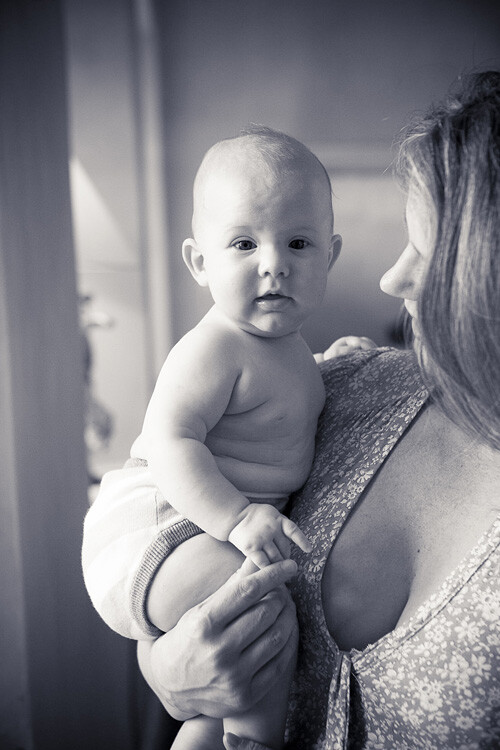
06 Copyright Beth Jennings Photography Children Photography 2478

Rupert, 1 year – ISO 1000, f/4, 1/160th

Three final notes for creative observations:

  • Look for the light: Where is it coming from and travelling to? How does it illuminate the subject and where are the shadows?.
  • Observe the composition: Close-up? Horizontal? Low camera angle? Why?
  • The decisive moment of capture: What was happening at the exact moment that the shutter actually fired?.

How do these three elements come together in each photograph?

Have you ever had a friend or family member ask you to photograph their baby? Were you pleased to be asked, or hesitant? How did you handle it? Let us know in the comments section below.

googletag.cmd.push(function() {
tablet_slots.push( googletag.defineSlot( “/1005424/_dPSv4_tab-all-article-bottom_(300×250)”, [300, 250], “pb-ad-78623” ).addService( googletag.pubads() ) ); } );

googletag.cmd.push(function() {
mobile_slots.push( googletag.defineSlot( “/1005424/_dPSv4_mob-all-article-bottom_(300×250)”, [300, 250], “pb-ad-78158” ).addService( googletag.pubads() ) ); } );

The post 8 Tips For Baby Photography Using Natural Light by Beth Jennings appeared first on Digital Photography School.


Digital Photography School

 
Comments Off on 8 Tips For Baby Photography Using Natural Light

Posted in Photography


How to Build an Impressive Photography Portfolio from Scratch

08 Jun

Creating a photography portfolio can be a daunting experience. As a rule, photographers have basic or no knowledge of design at all. Moreover, creating a site with the pictures in focus can be a tricky task.

Being a photographer makes you a wearer of many hats. It’s critically important to have an online portfolio, so you can easily show your potential clients what you’re capable of. If you have no idea how to start, where to take pictures, how many of them you need for a site, and how to make your portfolio work for you, these tips may help you get started:

What is a portfolio? How Many Shots Do You Need?

A portfolio is an opportunity for you to present your work, but it’s important to consider why you need this portfolio. Are you going to use it to apply for a job? Do you want to use it to start your own photography business? Or do you just want to exhibit your work?

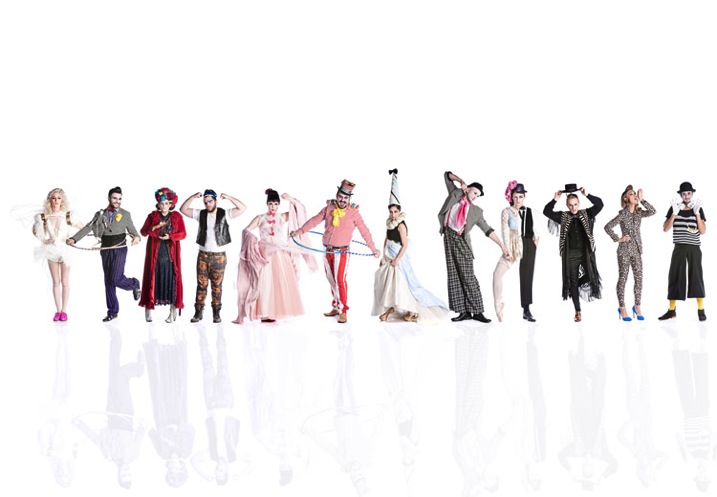
1

Portfolio by Marcus Smith

Also, you have to think about how many images you need to upload to your site. The layout usually looks good with a small amount of images uploaded on the home page. There should be a balance between the number of images you’re going to show and the negative spaces you leave between, or around them. If you have many images, consider separating them into categories.

When it comes to the home page, there should be something to pull the user in, then let them decide what to look at next. Value visitors’ time – they don’t need to see all the photos you took since 2008. Rather, display only your top-notch work and then show the potential client more photos if they request it. Don’t overwhelm them with pictures. Put the best pictures on the first page to stand out, and leave your other good work on the second page.

Think of Your Audience

Once you have decided why you need an online portfolio, you need to consider the audience you’re going to reach. Think of the reaction you want to evoke – do you want your clients to be touched, surprised or even shocked by your pictures?

2

Portfolio by Brian Ingram

If you’re aiming to specialize in wedding or portrait photography, it’s logical to include these shots first in your portfolio. There is no need to demonstrate your awesome landscape shots if you are aiming to attract clients for portrait photography. Keep your target audience in mind and do your best to create a site that solves their problems and provides answers to their queries, rather than simply bragging about your versatility as a photographer.

Brainstorm Project Ideas

If you have no idea what photos to upload to your portfolio, or you have no photos yet, you need to do some brainstorming. You’re building your portfolio in hopes of getting more clients, meaning that you don’t have hundreds of photo models knocking at your door. Start photographing your friends for free, shoot some events for charity, or even ask a popular wedding photographer from your area to hire you as an assistant, just to get wedding photos for your portfolio.

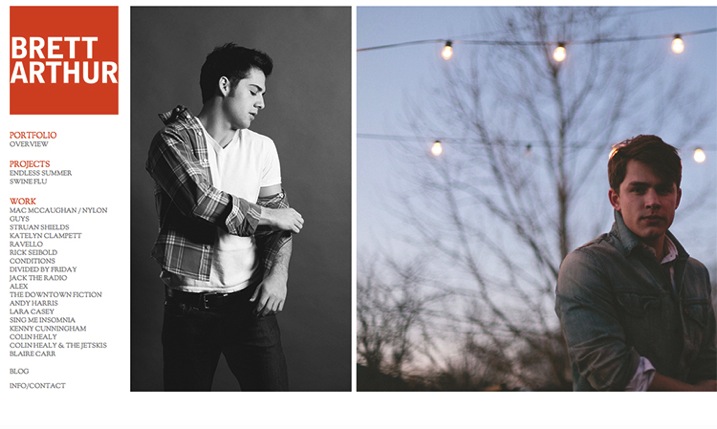
3

Portfolio by  Brett Arthur

There are many options when trying to find new project ideas: you can start a 365-day or 52-week project which will give you a great chance to practice as a photographer. This could lead to you shooting a subject that you never thought about and may result in a set of great shots for your online portfolio. Look at the work of other photographers to get new ideas for shooting, analyze their portfolios and try to make your own.

Present Like a Pro

Your portfolio website is nothing but a presentation, so when creating it, refer to some iconic presenters like Steve Jobs for better results. For instance, here are three presentation techniques from Apple’s founder you can apply to your own portfolio:

1. Make your passion prominent.

Jobs was passionate about every product he was involved in, his enthusiasm was obvious to anyone who heard him speak. There are few things in the world that spread as quickly as enthusiasm. Connect with your website visitors on an emotional level by showing your passion for what you do. This can be achieved through things like personal notes or comments on every image in your portfolio, a funny story told on your About page, or a set of behind-the-scenes photos shown in your main image slider or website background.

2. Build a clean, visual interface.

In his iPhone presentation, Steve Jobs used 19 words compared to the average 40 words used in a PowerPoint presentation. Make your website less wordy by utilizing a spacious preview page layout, big image sliders, and clean typography. Your business is about good pictures after all, not about writing essays. Make sure your site looks great on mobile devices and tablets, as that’s where the lion’s share of your visits will come from.

4

Defrozo

Among some free website builders that enable you to create beautiful, mobile-friendly websites are Defrozo and Koken. The first one is actually a multi-tool marketing platform that includes a full-fledged photography CRM (customer relation management), shopping-cart system, and other photo business tools in addition to a website builder. While Defrozo is a hosted service offering automatic updates and user support, Koken needs to be deployed on your own server.

3. Inspire your audience.

Every presentation by Steve Jobs was a great source of inspiration and education for his listeners. Images are a powerful medium that you, as a photographer, take advantage of by default. On your website, create a combination of images and words that would make people want to act and achieve something.

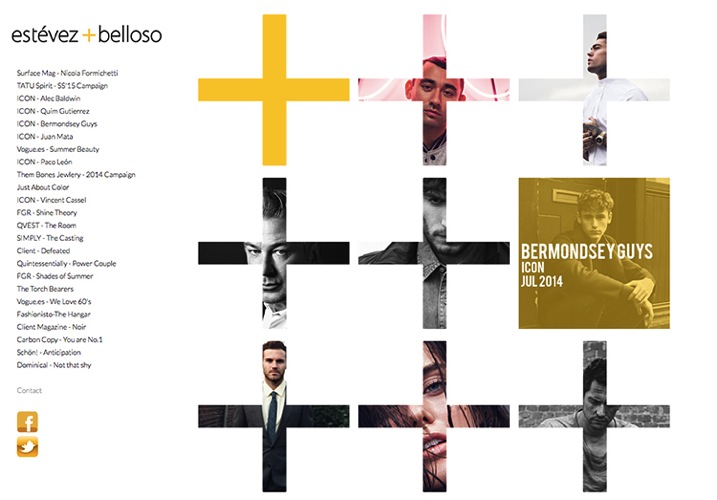
5

Portfolio by Estevez & Belloso

For instance, using a famous quote next to a photo, or telling a story behind one of your projects, can do the job of creating an extra layer of interactivity and inspire your web viewers.

Tell a story

Who doesn’t like a good story? Storytelling has become a powerful marketing engine lately and there’s no reason you can’t leverage it for your own business.

When uploading photos to your portfolio, you must describe them. A description is even more important than a title. Remember, when people see your photos for the first time, they want to know who or what is displayed in the image, what the context is behind the image. Maybe there were some interesting facts connected to the image. Feel free to share this with your audience.

Ask for Feedback

Getting your portfolio in front of other eyes can help you pick up on the omissions and bugs in the site’s design and performance. Submit the preview link to some forums and photography communities you’re a member of, or simply let your friends and family play around the site. Create a quick survey for them to fill in after they have checked it out – keep it short and to the point, asking only questions you plan to act on, and include some open-ended questions at the end.

Have different options

You need to decide what kind of portfolio you need: digital or paper? In the past, everything was on paper.

6

Portfolio by Michael David Adams

While a digital portfolio seems the ultimate solution these days, it’s also good to have a print portfolio for meetings with clients. Digital cannot fully replace print because of the special feel a printed photograph gives to the viewer. Consider creating your printed portfolio in a smaller format for portability purposes.

A beautifully designed image slideshow with emotional music added to it is also an essential element to your portfolio package. Along with a responsive website and personalized client photo galleries, it will make your digital showcase toolkit work at full power.

Over to You

What are your top techniques of building your photography portfolio? Share your proven tips with fellow photographers in the comments below.

googletag.cmd.push(function() {
tablet_slots.push( googletag.defineSlot( “/1005424/_dPSv4_tab-all-article-bottom_(300×250)”, [300, 250], “pb-ad-78623” ).addService( googletag.pubads() ) ); } );

googletag.cmd.push(function() {
mobile_slots.push( googletag.defineSlot( “/1005424/_dPSv4_mob-all-article-bottom_(300×250)”, [300, 250], “pb-ad-78158” ).addService( googletag.pubads() ) ); } );

The post How to Build an Impressive Photography Portfolio from Scratch by Nancy Young appeared first on Digital Photography School.


Digital Photography School

 
Comments Off on How to Build an Impressive Photography Portfolio from Scratch

Posted in Photography


6 Tips on How to do Horse Show Photography for Parents

06 Jun

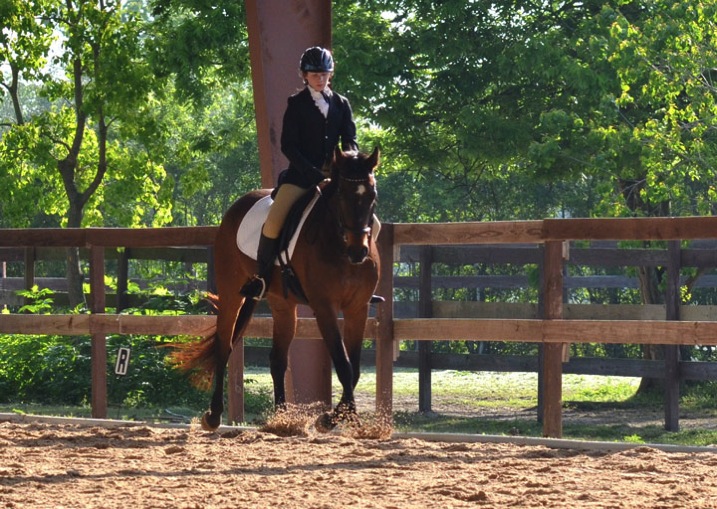
The sport of horse riding and showing can be very rewarding and beneficial to a young child. However, capturing those memories to print and share with family and friends can be a challenge for parents. Basic horse knowledge is helpful not only in keeping your child and their horse safe, but others around them as well. The following are a few dos and don’ts to get you started successfully, and safely, photographing your child at horse shows.

#1 Avoid the use of flash

Bowman sun

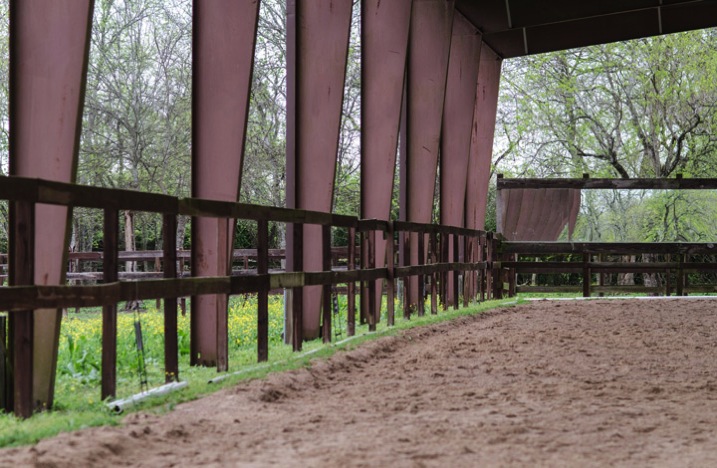
Camera flashes from the audience during rodeos and exhibitions are common, and for the most part those horses are accustomed to many distractions. However that may not be true for the horse your child is riding. An experienced horse with an inexperienced or nervous rider, at an off-property show (and sometimes the excitement of a show at their home barn) may react differently from their usual calm, sensible self. A covered arena can be challenging in terms of lighting and on-camera flashes won’t effectively reach the far end. If they are riding in the morning or late afternoon one side of the arena should be sunny. Wait until the horse and rider are in the sunlit area before capturing the moment. Obviously, this will cut down on the number of images taken, but they should be sharper and brighter, and worth the wait.

#2 Make yourself visible to the horses

Do not hide behind a fence post, arena support, fence, etc. Wide arena supports can be tempting to steady yourself, but this is essentially playing peek-a-boo with a half-ton animal (that has a mentality of a young child) which your son/daughter is sitting on. Horses notice change and if an object or person has moved they may look for it; taking their attention away from the rider. In addition to being noted as a comment or error on the rider’s test, this could also create a dangerous situation if your child’s horse is a bit on the nervous side. Stand or sit out in the open – let them see you, and stay there until the test is complete. Standing on a lower step of a mounting block, outside the arena, will get your camera higher than the fence. But, position yourself during the time riders are entering and exiting the arena, and remain there for the duration of the ride.

Bowman arena

#3 Shoot hand held without a tripod or monopod

Do not use a tripod or monopod. Depending upon the type and location of the event there may be several horses, riders and their trainers, waiting to enter or exit the arena, return to stalls, etc. Extended tripod legs can be a tripping hazard for people, and a scary thing for horses. Fence railings, tables and tucking your arms into your body are good solution to stabilize your camera.

Bowman horse

Besides, most tests are over in a few minutes, so foregoing that extra gear will allow you to quickly rejoin your child. Larger shows often hire official show photographers who will take pictures inside the main arena (from a vantage point different from spectators) that you can purchase later. Additionally, if you are using a tripod or monopod you may be viewed as a professional (whether that is the case or not) by show officials who may ask that you refrain from taking any pictures if they feel you are in competition with the official photographer.

#4 Use a fast prime lens

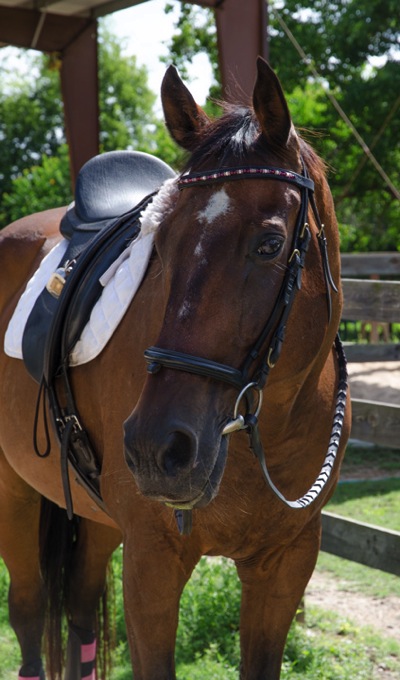
DO buy, rent, or borrow the fastest prime lens you can – 50mm or 85mm preferred (keeps the horse’s head in proportion). A longer lens (85mm) also keeps your camera out of everyone’s personal space and avoids any possible flight response in the horse. There are many bomb-proof horses for young riders who will absolutely not react to anything (near or far), but you don’t want to test that out – especially with your child holding the reins or sitting on top of all that power.

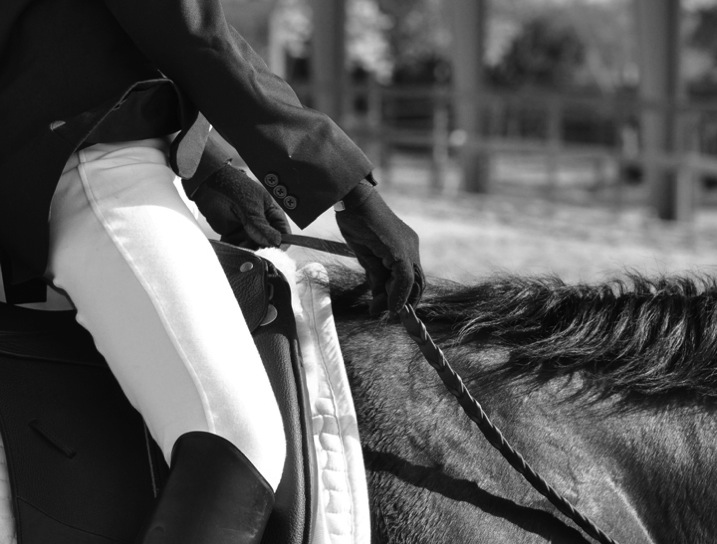
A fixed focal length lens also means you won’t be able to adequately shoot across a large arena. Riding tests often have the horse and rider cover the entire arena, so capture your child when they are closer to you; details such as the rider’s hands, legs, and boots produce great images too.

Bowman hands

#5 Know the routine your child will be doing

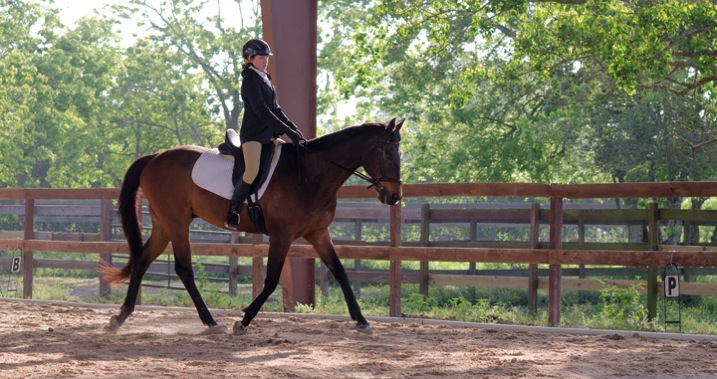
DO learn the tests your child is riding. Tests in both English and Western disciplines require specific movements, to be performed at certain places in the arena. Being familiar with the tests will allow you to anticipate the next movement and be ready to shoot, especially when using a fixed focal length lens. Some movements are photographically more appealing than others, but simply ensuring that all four legs of the horse are visible, arena supports are not coming out of the rider’s head, and the focus is centered on the rider’s or the horse’s eyes, will improve your images. Test movement patterns can usually be found on the internet (In the states, the United States Equestrian Federation website is a good starting place for all disciplines).

Bowman test

#6 Take details shots outside the show ring

Do shoot the details outside of the show ring; the relationship between horse and rider, grooming/tacking up, show clothes, friends, bridle, stalls, etc., – all those moments leading up to and after riding the actual test.

Bowman showprep

Photographing activities of the entire day completes the horse show story, which the show’s official photographers do not usually cover. Using a 50mm or 85mm lens captures the action without being too close (not adding to a rider’s show nerves) and produces casual, natural photographs. Older, more experienced riders, often assist the younger riders with tacking up and grooming for shows (among their many other duties that day) held at their home barn. An experienced rider can be a valuable asset on show day and may already have an established relationship with your child.

Bowman boots

Horse show photography can be exhausting, dirty, and a continuous learning opportunity, but can also be an amazing experience. Dress comfortably, avoiding open toed shoes, and approach the day as an adventure that you and your child will remember forever.

googletag.cmd.push(function() {
tablet_slots.push( googletag.defineSlot( “/1005424/_dPSv4_tab-all-article-bottom_(300×250)”, [300, 250], “pb-ad-78623” ).addService( googletag.pubads() ) ); } );

googletag.cmd.push(function() {
mobile_slots.push( googletag.defineSlot( “/1005424/_dPSv4_mob-all-article-bottom_(300×250)”, [300, 250], “pb-ad-78158” ).addService( googletag.pubads() ) ); } );

The post 6 Tips on How to do Horse Show Photography for Parents by Sherry Bowman appeared first on Digital Photography School.


Digital Photography School

 
Comments Off on 6 Tips on How to do Horse Show Photography for Parents

Posted in Photography