RSS
 

Posts Tagged ‘Photographers’

Review of the Venus Laowa 15mm F/4 Wide Angle Lens for Landscape Photographers

07 Feb

The choice of camera lens always represents a crucial moment for every photographer. But it is not always easy to find the lens that fits our actual needs, as too often we get seduced by features that we don’t really need, and are therefore just useful in raising the price.

Have you chosen a stabilized lens and you always use the camera on a tripod? You exclusively take landscape photos in the daylight but have chosen to rely on a f/2.8 lens. Sound familiar?

Especially if you are at the beginning of your journey through the world of photography, your budget won’t likely be particularly high and you may want to maximize your investment by choosing something that can be really useful to you now.

Review of the Venus Laowa 15mm F/4 Wide Angle 1:1 Macro Lens for Landscape Photographers

This is why today I want to tell you about the Venus Laowa 15mm f/4 Lens (with macro), an entry-level lens that every landscape photographer should take into consideration.

Why? Let’s see it together.

Review of the Laowa 15mm F/4 Lens for Landscape Photographers

Construction features

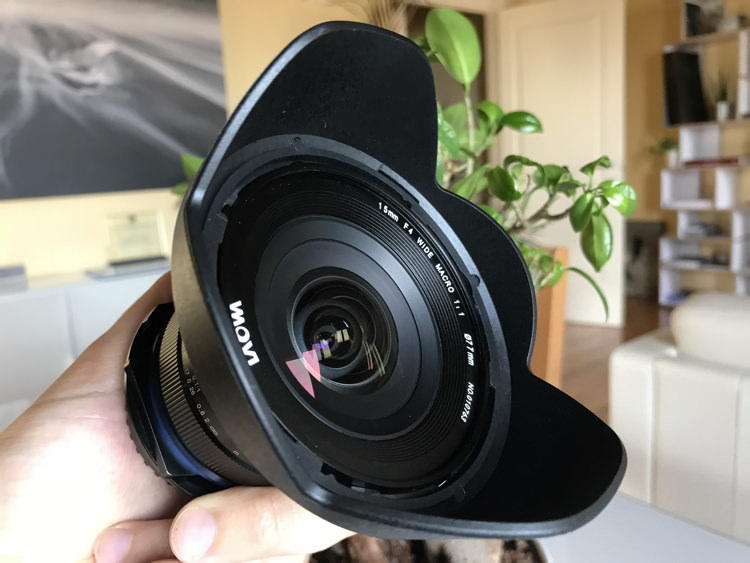
The Venus Laowa 15mm f/4 Macro is a lens that has been on the market since 2015. Although it certainly does not stand out for its cosmetic appearance, it comes with features that really make this a unique lens in the world. So much so that it can simultaneously seduce landscape photographers, lovers of macro photography, and architectural photographers.

Here are its main features, that I’m going to examine with you:

  • Focal length: 15 mm
  • Angle of view: 110.4°
  • Maximum Magnification: 1:1
  • Maximum Aperture: f/4
  • Shift function: +/- 6 mm
  • Minimum Focusing Distance: 12.2 cm
  • Filter Thread: 77 mm
  • Mounts: Canon, Nikon, Sony A, Pentax K, Sony E

Exactly, you’ve read it right. The Venus Laowa 15mm f/4 is a Macro 1:1 lens with an angle of view of 110° and a shift function that allows a translation equal to +/- 6mm.

The optical scheme is composed of 12 elements in 9 groups, including 3 high refractive index elements and one low dispersion element, and on paper that holds great promise for excellent performances in terms of sharpness.

And in case that wasn’t enough, add the fact that this lens is compatible with most of the mounts currently available on the market.

One last point, and it’s absolutely not a negative one, is the price. While I’m writing, the list price of the Venus Laowa 15mm f/4 Wide Angle 1:1 Macro is only $ 499.

Review of the Venus Laowa 15mm F/4 Wide Angle 1:1 Macro Lens for Landscape Photographers

Using this lens for landscape photography

When evaluating a lens, we’re always going to start from the analysis of its MTF charts, and then we carry out an almost infinite series of laboratory tests so as to bench-test it, from a perspective that is more theoretical than practical.

Of course, these tests are absolutely fundamental and I encourage you to look at them. But I also think that you are likely more interested in the real-world behavior of the lens. Knowing that certain optical limits of the lens will be then invisible in the real world, and what you are more concerned about is understanding whether the lens has the features that are really essential to you or not.

Review of the Venus Laowa 15mm F/4 Wide Angle 1:1 Macro Lens for Landscape Photographers

While there are many online reviews available regarding the use of this lens for macro and architectural photography, I haven’t found much regarding its use for landscape photography. So, my purpose here is to examine this lens from the point of view of the landscape photographer, omitting other features that are not fundamental for us hunters of sunrises and sunsets.

So let’s start to analyze the features seen in the previous chapter, now with a more critical eye.

Features

The fact that this is a prime lens and not a zoom gives us great hope with regard to quality, as the optical scheme will be optimized for a single focal length.

Review of the Venus Laowa 15mm F/4 Wide Angle 1:1 Macro Lens for Landscape Photographers

We are not afraid at all of the maximum aperture available, which is f/4. As good landscape photographers, we’ll be normally working around f/11, where sharpness will also be clearly higher.

The lens does not have stabilization or autofocus. While this may make you turn your nose up at first sight, surely you will soon realize that you really don’t care about those things. As you likely use the camera on a tripod you should turn off stabilization anyway, and you may choose to adjust the focus based on hyperfocal distance, making use of the hyperfocal marks available on the lens body.

Review of the Venus Laowa 15mm F/4 Wide Angle 1:1 Macro Lens for Landscape Photographers

So, those are two fewer functions that you don’t need, and their absence has certainly had a positive impact on the market price of the lens.

Using Filters with the Laowa 15mm Lens

With regard to the focal length, this clearly is not the first 15mm lens available on the market. But it is the only one with a feature that has convinced me to test this lens in action – the 77 mm filter thread.

Review of the Venus Laowa 15mm F/4 Wide Angle 1:1 Macro Lens for Landscape Photographers - filter thread 77mm

The 77mm filter size is very handy!

Normally all wide-angle and ultra wide-angle lenses (usually 15mm is considered the boundary between those two worlds) have a front optical element that is particularly curved. They often come with a built-in lens hood that makes it impossible to mount filters, unless we resort to particular solutions. Ultra wide-angle lenses whose front lens is not so curved and without a built-in lens hood, usually come with a large diameter and it’s therefore impossible to find filter threads smaller than 95 mm.

Thanks to the absence of a built-in lens hood (it does have a bayonet one) and to the 77 mm filter thread, the Venus Laowa 15mm f/4 lens opens the door to using a tool that I deem absolutely essential for every landscape photographer – drop-in filters.
Review of the Venus Laowa 15mm F/4 Wide Angle 1:1 Macro Lens for Landscape Photographers

As I was saying above, with a lens that has a built-in lens hood or a 95 mm filter thread it is possible to use systems that can hold 150 mm filters. But with a 77 mm filter thread, you will be able to use the same system that you use on any other lens equipped with a filter thread up to 82 mm. In a word, it is priceless.

Shift Function

The last of the features coming with this multi-purpose lens is the shift function. Thanks to a lever mechanism positioned next to the lens mount, it is possible to shift the lens by +/- 6mm. Even if this function might not seem very interesting for landscape photography at first sight (after all a rock is always a rock), it turns out to be useful in case there are human artifacts, like buildings, within the frame.

Review of the Venus Laowa 15mm F/4 Wide Angle 1:1 Macro Lens for Landscape Photographers

Shift lever.

Review of the Venus Laowa 15mm F/4 Wide Angle 1:1 Macro Lens for Landscape Photographers

The lens in shifted position.

The lens in action

If this lens appears very promising on paper, despite a very moderate price, let’s see its actual real-world behavior.

I have tested the Venus Laowa 15mm f/4 lens with my trusty Nikon D810, a full-frame camera body.

Testing the filter mount

Since this is fundamentally the reason why I decided to try this lens, again thanks to the existing 77 mm filter thread, I quickly mounted my loyal Nisi V5 Filter Holder, which holds 100mm filters. Even if it is possible to mount the holder, the fear of vignetting is too high, considering that we’re talking about a 15mm lens after all.

Review of the Venus Laowa 15mm F/4 lens

Review of the Venus Laowa 15mm F/4 lens


Although the Nisi filter holder is guaranteed to be vignette-free up to a 16mm focal length, once mounted on the Venus Laowa 15mm the result was doubtlessly amazing. Vignetting was practically invisible, as you’re going to see below, and it’s possible to quickly remove it in post-production by activating the lens correction profile.

A little dream of mine was substantially coming true. The dream of using an ultra wide-angle lens, and adding up to three 100mm filters and a polarizer without vignetting!

Review of the Venus Laowa 15mm F/4 lens

Review of the Venus Laowa 15mm F/4 lens

Review of the Venus Laowa 15mm F/4 lens

Review of the Venus Laowa 15mm F/4 lens

The lens barrel

On the lens body (which is sturdy metal, not plastic) you find the focus and aperture rings, whose operations are smooth and precise.

On the aperture ring, I would have preferred a locking system or a snap selection so as to make sure that I never lose the desired aperture. But actually, I haven’t encountered any problems during real-world use of the lens.

The focusing ring is really precise, as well as the existing focusing marks, which allow you to focus using the hyperfocal distance in no time. Just for the sake of being fussy, I would have placed the metric indications of distance upside down, or a vertical line next to each distance, just to be really precise. But you simply have to check the photo you’ve just taken, so as to make sure you have got the desired focus.

Review of the Venus Laowa 15mm F/4 lens

Review of the Venus Laowa 15mm F/4 lens

Although the manufacturer does not formally advertise this lens as weather sealed, most of my tests have been carried out in the rain (just for a change!). I protected the lens using only an umbrella or makeshift means, and no problems were detected.

Results

When I examine the images, the results were really comforting.

Sharpness

Shooting at both f/8 and f/11, the image definition is really excellent in the center of the frame. Obviously, the image becomes softer the closer you get to the edges, but doubtlessly the result is much more than acceptable. If you try to use higher apertures, you can naturally start to see that optical phenomenon called diffraction. But, as good landscape photographers, we know that we can go past f/16 only for situations of extreme necessity.

Definition Center - Review of the Venus Laowa 15mm F/4 lens

Centre image sharpness.

Definition Center Low - Review of the Venus Laowa 15mm F/4 lens

Lower center of the image sharpness.

Definition Corner - Review of the Venus Laowa 15mm F/4 lens

Corner of the image sharpness.

Aberration and vignetting

There are no particular problems with regards to chromatic aberration with this lens. I mean, some chromatic aberration is there, but nothing that can’t easily be solved using the automatic chromatic aberration removal included in any post-production software.

Chromatic Aberration With - Review of the Venus Laowa 15mm F/4 Wide Angle lens

Chromatic aberration showing before correction.

Chromatic Aberration corrected - Review of the Venus Laowa 15mm F/4 Wide Angle lens

After the chromatic aberration has been corrected in post-production.

As for vignetting, as I said above, the problem is almost non-existent when using the 100mm Nisi filter holder. For me personally, this fact alone is worth the purchase price of this lens.

Distortion

It is worthwhile to talk a little about distortion. It is predictable that a 15 mm lens will have barrel distortion. To landscape photographers, this is not a great concern. As I said before, a little distortion on a rock will not invalidate your image, as an irregular rock will always remain an irregular rock. Unfortunately, though, barrel distortion will invalidate the only real line included in your landscape – the horizon.

Review of the Venus Laowa 15mm F/4 lens

The distortion caused by this lens to the horizon is of the “mustache” type, which doubtlessly is the most annoying kind. If when we take a first look at the live view this problem may give us some concern,

If this problem gives you some concern when you first notice it in Live View, as soon as you import the image into any post-production software the correction becomes really easy and immediate.

Unfortunately, at the present time, there is no automatic correction profile for this lens included in Adobe software (Lightroom and Photoshop). But the Venus Laowa technical support is very efficient and within a few hours, they emailed the correction profile that I needed. Once installed, one click was enough to do the job and the image automatically recovered from both distortion (completely removing the mustache horizon) and peripheral shading.

Distortion Original - Review of the Venus Laowa 15mm F/4 lens

Original

Distortion Corrected - Review of the Venus Laowa 15mm F/4 lens

Corrected

Conclusion

The Venus Laowa 15mm f/4 lens has really turned out to be a surprise, exceeding my expectations. Although it comes with a very moderate price, this lens really provides remarkable results in terms of image quality.

Once the lens distortion is corrected, the only thing that still needs attention is edge softness which is absolutely within acceptable values for an entry-level lens.

Construction quality is really remarkable and you can notice that as soon as you take the lens into your hands. Lastly, the possibility of using a 100mm filter holder makes this lens really priceless.

If you are a landscape photographer who is looking for an ultra wide-angle lens with a very advantageous quality to price ratio, then the Venus Laowa 15mm f/4 lens is undoubtedly what you are seeking.

Review of the Venus Laowa 15mm F/4 Wide Angle 1:1 Macro Lens for Landscape Photographers


PROS

  • Price
  • Ability to use a 100mm filter holder
  • Excellent sharpness in the center of the frame
  • Low chromatic aberration when not used at macro distances
  • Lens shift function
  • Lightweight and small

CONS

  • Manual focusing
  • Slight edge softness
  • Barrel distortion (but it can be solved in post-production without any problems)
  • Cosmetic appearance

The post Review of the Venus Laowa 15mm F/4 Wide Angle Lens for Landscape Photographers by Francesco Gola appeared first on Digital Photography School.


Digital Photography School

 
Comments Off on Review of the Venus Laowa 15mm F/4 Wide Angle Lens for Landscape Photographers

Posted in Photography


Reuters photographers banned from Olympic opening ceremony over leaked photos

31 Jan

Reuters is in hot water with the IOC and PyeongChang Winter Olympics organizing committee after the news agency broadcast several images of the olympic cauldron being lit during an opening ceremony rehearsal this past weekend. The lapse—highly uncharacteristic for a major news agency with decades of experience respecting image embargoes—has gotten Reuters banned from covering the Opening Ceremony.

The news broke through the Yonhap News Agency, who is reporting that Reuters pulled the photos after the IOC and PyeongChang organizers complained.

However, as the damage had already been done, the IOC has decided to punish Reuters all the same, revoking the agency’s media accreditation for the Opening Ceremony on Friday, February 9th. Furthermore, the Reuters photographer who took the leaked photos has been banned from covering the games altogether.

The PyeongChang organizing committee wants to make it clear that violating Olympic media embargoes is being taken very seriously, telling Yonhap that it will “enforce strong penalties on media companies and their reporters who disobey embargoes of the opening and closing ceremonies.”

Articles: Digital Photography Review (dpreview.com)

 
Comments Off on Reuters photographers banned from Olympic opening ceremony over leaked photos

Posted in Uncategorized


Google teamed up with pro photographers to train its Clips lifelogging camera

26 Jan

Google debuted its $ 250 ‘Clips’ lifelogging camera to the public during the October 2017 launch event for the Google Pixel 2. Now, with the camera becoming officially available in only a few weeks time, the company has published a blog post that explains how the Clips camera’s underlying algorithms were trained to identify and keep the best shots, and discard the leftovers.

It turns out Google relied on the expertise of a documentary filmmaker, a photojournalist, and a fine arts photographer to train the AI and feed some high-quality photography into its machine learning model. The group collected and analyzed recorded footage from members of the development team to try and answer the question: “What makes a memorable moment?”

“We needed to train models on what bad looked like,” said Josh Lovejoy, Senior Interaction Designer at Google. “By ruling out the stuff the camera wouldn’t need to waste energy processing (because no one would find value in it), the overall baseline quality of captured clips rose significantly.”

The learning process includes basic elements of photography, such as an understanding of focus and depth-of-field, or the rule of thirds, but also some things that are obvious to most humans but less so to an algorithm—for example: don’t cover a lens with your finger and avoid abrupt movements while recording.

Google admits that there is still a ways to go before perfection. It says the AI has been trained to look at “stability, sharpness, and framing,” but without careful calibration, a face at the edge of the frame will be appreciated just as much as one at the center, even if the focus of interest is really somewhere else in the image.

“Success with Clips isn’t just about keeps, deletes, clicks, and edits (though those are important),” Lovejoy says. “It’s about authorship, co-learning, and adaptation over time. We really hope users go out and play with it.” More detail on the development and training process is available on the Google blog.

Articles: Digital Photography Review (dpreview.com)

 
Comments Off on Google teamed up with pro photographers to train its Clips lifelogging camera

Posted in Uncategorized


Wedding photographer’s work lambasted by clients in detailed 30-page report

12 Jan

A dissatisfied newlywed couple in Hong Kong have reportedly published a 30-page report that extensively details the various issues they have with photos taken by their wedding photographer.

The critique, which was released on Chinese social media and later published in a report by DCFever, is said to be written like a lab report, including highlighted explanations of alleged issues in individual images. Many of the images even included a rule-of-thirds overlay with specific compositional mistakes pointed out.

According to DCFever’s video, the critique was “leaked” onto social media, where it has since been heavily discussed. Complaints reportedly include overexposed backgrounds and framing issues, with some commentators agreeing and others backing the photographer by saying that the photos hadn’t yet been retouched.

It is unclear based on DCFever’s written report whether the photos had been retouched before the couple received them, and whether the photographer was paid for their work. But if you want to see the full report for yourself, DCFever published several screenshots with thumbnails of the alleged wedding photos… for better or worse.

Articles: Digital Photography Review (dpreview.com)

 
Comments Off on Wedding photographer’s work lambasted by clients in detailed 30-page report

Posted in Uncategorized


WD launches two new portable SSDs designed for photographers and drone users

10 Jan

In addition to revealing the world’s smallest 1TB USB-C flash drive, Western Digital has launched two new portable SSDs specifically designed for “avid photographers and drone enthusiasts” at this year’s Consumer Electronics Show (CES) in Las Vegas.

The SanDisk Extreme Portable SSD offers both high performance and durability in an extremely portable package, while the My Passport Wireless SSD gives photographers a solid state version of WD’s popular My Wireless Pro, which features built-in WiFi, an SD card slot, and other convenient features for photographers on-the-go.

SanDisk Extreme Portable SSD

The SanDisk Extreme Portable SSD is a lightweight (79g / .17lbs) pocket-sized USB-C drive encased in a durable housing with an IP55 dust- and water-resistant rating. Thanks to the housing, the drive can withstand operating temperatures ranging from 0°C to 45°C (32°F to 113°F), as well as storage temperatures ranging from -20°C to 70°C (-4°F to 158°F).

The Extreme Portable SSD drive has a USB 3.1 Gen 2 interface, read speeds up to 550MB/s, and out-of-the-box compatibility with Windows and macOS.

The drives are currently listed on SanDisk’s website as “not in stock” at the following capacities and price points: 250GB for $ 100, 500GB for $ 170, 1TB for $ 350, and 2TB for $ 700.

WD My Passport Wireless SSD

The My Passport Wireless SSD, as the name suggests, is a solid state version/update to the original My Passport Wireless Pro that we reviewed and actually quite liked.

Housed in an enclosure with an integrated 802.11ac wireless connection, this drive allows users to access content on the drive over WiFi, including streaming 4K videos to a computer or mobile device. The wireless feature works with the My Cloud mobile app, as well as some third-party apps including LumaFusion and FiLMiC Pro.

In addition to wireless access, this My Passport product also has an integrated SD card reader so that photos and videos can be copied onto the SSD directly from the media card at speeds up to 65MB/s. For other types of media cards, the Wireless SSD supports direct transfers via a cable and connected media card adapter. Finally, the drive also features a USB port for transferring content to a computer via USB 3.0 at speeds up to 390MB/s.

Because this model has built-in wireless, Western Digital has packed a 6700mAh battery into the drive case, enabling the WiFi feature to be used for up to 10 hours before it needs to be recharged. And for convenience’ sake, the device’s built-in battery doubles as a power bank for charging other USB devices, such as a smartphone.

The My Passport Wireless SSD will be available in 250GB ($ 230), 500GB ($ 300), 1TB ($ 500), and 2TB ($ 800) capacities. Pre-orders are available now, with shipping estimated to start on February 15th.

Articles: Digital Photography Review (dpreview.com)

 
Comments Off on WD launches two new portable SSDs designed for photographers and drone users

Posted in Uncategorized


The Best Promotional Alternatives To Social Media For Photographers

28 Dec

There is a love/hate relationship the majority of us have with social media. We promote our work there, but we also waste a huge amount of time on it.  What are the best alternative to social media then? Where can we publish our work in order to gain visibility and, why not, some paid projects? Let’s step back for a Continue Reading

The post The Best Promotional Alternatives To Social Media For Photographers appeared first on Photodoto.


Photodoto

 
Comments Off on The Best Promotional Alternatives To Social Media For Photographers

Posted in Photography


5 Must-Know Photoshop Retouching Tips and Tricks for Photographers

23 Dec

Here are five quick tips for doing retouching in Photoshop that are essential to know. Learn them to do better retouching on your photos.

#1 – Load Luminosity as a Selection

In Photoshop you can use the luminosity of an image (the bright pixels) as selections. The easiest way to make a selection out of the bright pixels of a photo is by pressing Command+Option+2, (Windows: Ctrl+Alt+2).

If you cannot remember the keyboard shortcut, you can also load luminosity as a selection by holding Cmd/Ctrl and clicking on the RGB thumbnail in the Channels panel.

01 selection - 5 Must-Know Photoshop Retouching Tips and Tricks for Photographers

With a selection active, you can create an Adjustment Layer to apply the selection to the Layer Mask.

02 adjustment mask - 5 Must-Know Photoshop Retouching Tips and Tricks for Photographers

This Adjustment Layer will only target the brighter pixels of your image. If you make an adjustment, you’ll notice that you will only affect the bright pixels and not the dark ones.

03 adjustment lights - 5 Must-Know Photoshop Retouching Tips and Tricks for Photographers

You can target dark pixels by inverting the selection. To do so, Select the Layer Mask, and clicking on Invert in the Properties panel.

04 invert mask - 5 Must-Know Photoshop Retouching Tips and Tricks for Photographers

Now if you make an adjustment, the dark pixels will be affected and not the bright.

05 adjustment darks - 5 Must-Know Photoshop Retouching Tips and Tricks for Photographers

#2 – Spot Healing Brush Tool Modes – Lighten and Darken

One way to remove wrinkles, blemishes, and other distractions from the face quickly and efficiently is to use the Modes in the Spot Healing Brush Tool and Content-Aware.

First, think of the blemish, wrinkle, or distraction that you are trying to remove. Is it darker than the skin tone or is it brighter than the skin tone?

06 portrait - 5 Must-Know Photoshop Retouching Tips and Tricks for Photographers

In this case, the wrinkles are darker than the skin tone. That means that you want to “lighten” those wrinkles.

With the Spot Healing Brush Tool selected, in the Options bar, click on Content-Aware, and under the Mode drop-down menu, select Lighten.

07 lighten - 5 Must-Know Photoshop Retouching Tips and Tricks for Photographers

Then start painting with a small brush and small strokes over the wrinkles to remove them. But you will not lose essential details in the highlights. The Spot Healing Brush tool is only targeting dark pixels which are the wrinkles.

08 before after - 5 Must-Know Photoshop Retouching Tips and Tricks for Photographers

If your blemish or distraction is brighter than the skin tone, such as the bright wrinkles above the lip, then select Darken from the Mode drop-down menu, and paint them away.

10 final heal - 5 Must-Know Photoshop Retouching Tips and Tricks for Photographers

To learn more about how this technique works, check out this video on the Spot Healing Brush Tool:

#3 – Open the Same Image in Two Windows

In Photoshop, you can open the same image in two windows and set them side-by-side to work on both details and the overall image at the same time.

This technique is great when you are working with two monitors. But even with one monitor, this technique can be very useful.

To open the same document in two windows, go to Window > Arrange, “New Window for [Name of Document].” Then go to Window > Arrange > Two up Vertical to put the two tabs side-by-side. You can then Zoom into one window, and zoom out on the other.

same doc two windosw - 5 Must-Know Photoshop Retouching Tips and Tricks for Photographers

These are not two separate files. They are the same document, and any adjustments that you make to one will reflect on the other instantly.

#4 – Targeted Selections with Color Range

The Color Range command can be an excellent tool for selecting difficult areas of an image. However, if you simply use the Color Range on a problematic image, it may not give you the results you want. Sometimes there is too much information on a single image, and you need to focus on just one area.

To focus the Color Range in only one area, create a selection around the object that you want to select. A simple rectangular selection will be fine.

12 selection - 5 Must-Know Photoshop Retouching Tips and Tricks for Photographers

Then go into Select > Color Range, and you will see that Color range is now focusing solely on the selected area.

13 color range - 5 Must-Know Photoshop Retouching Tips and Tricks for Photographers

Select a red color on the shirt using the eyedropper, then use the fuzziness slider to adjust the selection.

Keep in mind that it is going to be next to impossible not to select the hands or the railing that she’s leaning on because the skin tones and the paint on the railing are very similar in color to the red that you are trying to select.

But you can use the Lasso tool to quickly deselect those areas, leaving only the red in the shirt selected.

14 selection only red - 5 Must-Know Photoshop Retouching Tips and Tricks for Photographers

With a selection active, you can create a Hue and Saturation Adjustment Layer that will just target the red in the shirt.
Then use the Hue slider to change the color of the shirt.

15 change color - 5 Must-Know Photoshop Retouching Tips and Tricks for Photographers

#5 – Use the Lab Color Mode

Most of the time, you will work with RGB or CMYK while in Photoshop. But there is another Color Mode that you can use that can be very useful in certain situations. If you go to Image > Mode > Lab Color, you will change your photo’s color mode to Lab.

16 color mode - 5 Must-Know Photoshop Retouching Tips and Tricks for Photographers

The Lab color mode has three channels: Lightness, A, and B.

  • The Lightness channel contains the detail of the image – the Luminance values.
  • “A” is the relationship between green and magenta. These are the same colors as the Tint slider in Lightroom and Camera Raw.
  • “B” is the relationship between blue and yellow. These are the same colors as the Temperature slider in Lightroom and Camera Raw.

17 lab graphic

One of the most significant advantages of working with the Lab color mode is that Lab separates detail (luminosity) from color. This separation allows you to work with color without affecting detail and vice versa.

17 red dress - 5 Must-Know Photoshop Retouching Tips and Tricks for Photographers

For example, you could turn a red dress green by duplicating the layer, and then selecting “A” from the Channel’s panel, and pressing Cmd/Ctrl+I to invert the channel.

18 a channel

Notice that the color of the image changed, but the detail was left intact.

19 green layer - 5 Must-Know Photoshop Retouching Tips and Tricks for Photographers

You could then use a Layer Mask to contain the adjustment to only the dress.

20 mask dress

Another advantage of using the Lab color mode is that you can sharpen without affecting the color of a photo. If you apply any sharpening filter to the Lightness channel, you will only target the detail and will leave the color intact.

The example below has the same Sharpening filter applied to both the regular image and the Lightness channel in Lab Color. I’ve made sharpening effect an extreme one for demonstration purposes, to make the results more noticeable.

Notice that when you apply sharpening to the Lightness channel (right), the colors on the edges are not saturated or changed. They only become brighter or darker. While the sharpening on the regular layer increases the saturation of the edge pixels.

21 sharpening

As a side note, Photoshop doesn’t really add detail to an image when you apply sharpening. It creates the illusion of detail by adding contrast to the edges in the photo. You can see that edge contrast in these extreme adjustments.

You can learn more about sharpening in this video on sharpening photos in Photoshop:

One important thing to note is that the Lab color mode does not have access to all the Adjustment Layers, and some Adjustment Layers will work a bit different than their RGB counterparts.

If you are working with Adjustment Layers and you would like to go back to the RGB color mode, you will have to put the image, and the Adjustment Layers in a Smart Object then make the conversion. Otherwise, Photoshop will ask you to delete the Adjustment Layers or flatten the image.

Conclusion

I hope you found these tips helpful for retouching or editing your images in Photoshop. Do you have any other tips or tricks that you use? Please share in the comments below.

The post 5 Must-Know Photoshop Retouching Tips and Tricks for Photographers by Jesus Ramirez appeared first on Digital Photography School.


Digital Photography School

 
Comments Off on 5 Must-Know Photoshop Retouching Tips and Tricks for Photographers

Posted in Photography


German publisher Steidl ordered to pay $77k after losing photographer’s prints

22 Dec

German publisher Steidl has been ordered to pay photographer Lawrence Schwartzwald €65,000 / $ 77,000 after losing his portfolio prints. According to Artnet News, Schwartzwald sent the prints to Steidl in September of 2014 for inclusion in a book project. The photographer was reportedly told in June of 2015 that the project wouldn’t proceed, and that he’d get his photos back… but that never happened.

Despite repeated requests, Schwartzwald never did receive his portfolio. And so, after a year of waiting, he filed a lawsuit in a German court against Steidl for the return of his prints, which he valued at $ 1,200 each. That lawsuit has now culminated in a ruling that Steidl must pay Schwartzwald €65,000 in compensation for the lost prints, plus legal fees.

Gerhard Steidl, the company’s founder, gave Artnet News a different version of events, claiming that Schwartzwald’s photos had been selected for print publication, but the photographer grew impatient with the duration of the process and requested that his prints be returned.

Regardless of which version of events is true, however, the outcome is the same: Schwartzwald’s portfolio went missing.

Steidl acknowledged this in his statement to Artnet, explaining that it was an accident and that the portfolio couldn’t be located. “Someone probably packed it incorrectly and it ended up somewhere else, but it’s not there anymore,” said Steidl. “It just happened, in my opinion I don’t deserve the death penalty.”

Articles: Digital Photography Review (dpreview.com)

 
Comments Off on German publisher Steidl ordered to pay $77k after losing photographer’s prints

Posted in Uncategorized


When photographers become pitchmen

14 Dec

This article was originally published on the PhotoShelter blog, and is being republished in full on DPReview with express permission.


It’s not surprising when camera companies hire photographers to pitch their products. But photographers have also been enlisted to sell other types of products; the result of Madison Avenue trying to romanticize the occupation, even though the reality often fails to meet the expectation. Nowadays photographers are more likely to spend the majority of their time sitting at a desk in post processing, or trying to collect on invoices that are 6 months past due.

Nevertheless, we’ve seen a number of companies in a variety of industries employ photographers in their ad campaigns in the past few years, spaning the gamut from the old living icons to the newest generation of light chasers.

Elliott Erwitt for Cole Haan

As a part of their “Born in 1928” campaign launched in 2013, shoe brand Cole Haan teamed up with the legendary Elliott Erwitt to celebrate the “off” year 85th anniversary of the brand. The cherubic-faced Erwitt looks smartly dressed in a pair of Cole Haan kicks, while draping his camera over his shoulder. Photographer Daniel Jackson shot the campaign.

Lynsey Addario for Audi

Decorated war photographer Lynsey Addario’s decision to appear in a 2014 Audi ad wasn’t without controversy, given the glamorization of the job vis-à-vis the death of her driver at the hands of her captors.

On the other hand, the choice to use a female war photographer undoubtedly had an impact on the public’s understanding and definition of war photographer—showing that both men and women put their lives on the line to cover the atrocities of war.

Steve McCurry and David Alan Harvey for Filson

In 2014, Filson, the longtime purveyor of outdoor clothing and bags, teamed up with Magnum Photographers Steve McCurry and David Alan Harvey to design a set of camera bags that Harvey described as, “something I could use in the Favelas in Rio, but still take to a dinner party.”

Although the bags had a limited run, Filson cleared banked on the mythology of two of the industry’s heavyweights.

Pei Ketron and Paul Nicklen for American Express

Photographer and educator Pei Ketron burst to prominence as one of the early “recommended” photographers to follow on Instagram, helping to make her one of the first photographers to gain half a million followers.

Biologist/photographer Paul Nicken’s incredible undersea images and prominence in the National Geographic’s Instagram feed has helped to propel him to over 3.8 million followers and growing.

The significant social media reach likely influenced American Express’ decision to tap both photographers in early 2016 for a series of travel-based ads touting the benefits of the AMEX Gold Card (“double and triple points, plus no foreign transaction fee!”)

Barbara Davidson for Volvo

Former Los Angeles Times photojournalist and Pulitzer Prize-winner Barbara Davidson was tapped by Volvo in 2017 to show off their XC60 urban camera safety system. Volvo’s unorthodox approach used Davidson’s skills as a photographer combined with the car-as-camera to create a commercial and gallery exhibition.

Andre D. Wagner for Cole Haan and Theory

Omaha-born social worker turned NYC street photographer, Andre D. Wagner, has been blowing up lately. His timeless street photography has gained him an appreciative audience and broad media coverage with simultaneous comparisons to photographers like Garry Winogrand.

Doing what I do, chasing light and life in @ColeHaan’s grand explore all terrain. #Extraordinaries #ColeHaanPaidSponsor

A post shared by Andre D. Wagner (@photodre) on

Young, talented, black, and handsome—it’s no wonder that brands like Cole Haan and Theory has started to flock to him as an authentic voice of a generation. Plus, he’s still shooting and developing black and white film!


Allen Murabayashi is the Chairman and Co-Founder of PhotoShelter. He’s an avid photographer and frequently speaks on how photographers can use online marketing to grow their businesses.

Articles: Digital Photography Review (dpreview.com)

 
Comments Off on When photographers become pitchmen

Posted in Uncategorized


7 Tips for Business Cards for Photographers

29 Nov

Having a proper business card is the first step towards establishing branding as well as earning potential customers, regardless of whether you are a freelance photographer or engaged within photography agencies. Not only do they serve to boost the reputation of an individual or corporation, they are also an opportunity to showcase the many good qualities one has to offer. Continue Reading

The post 7 Tips for Business Cards for Photographers appeared first on Photodoto.


Photodoto

 
Comments Off on 7 Tips for Business Cards for Photographers

Posted in Photography