RSS
 

Posts Tagged ‘Photographers’

Are Photographers Artists? Let’s Discuss

21 Nov

Are Photographers Artists? Let's Discuss

I took this image while on a trip out west to the Grand Teton Mountains and Yellowstone National Park with my family and about 50 other people. We were driving towards our next lodge, past the mountains and the Snake River where we would be rafting the next morning when I became rather fascinated with the scene that lay before me.

Having never seen mountains before in my life – besides seeing the photographs online and in movies – I was awestruck. Immediately I grabbed my camera and began snapping away, fighting the glare of the window while also paying careful attention to the meter in my viewfinder. After I had arrived home about a week later, I was culling the images I had taken on the trip. Almost immediately, this became my favorite.
Are Photographers Artists? Let's Discuss

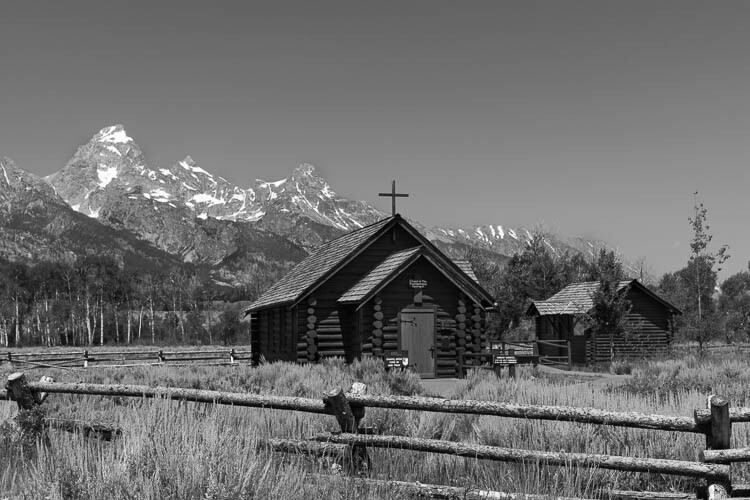
This image was also taken in the mountains, another favorite of mine, was a much more thought out composition. Our tour guide had told us that we would be stopping to see a church with plenty of photographic opportunities. Almost immediately I knew the shot that I wanted.

I set up my tripod ever so perfectly, did a few test shots to make sure my exposure was right-on, and then explored the area, leaving my camera in position until everyone else was back on the bus. Although I knew I would be the last back in my seat, I knew it would be worth the wait. And it most definitely was, for as everyone else was loading on the bus, the scene was almost completely empty. I took three exposures of the scene, bracketing it just in case the light had changed, and got back on the bus.

Are we artists or photographers?

The reason I’m telling you about these two images is not to make you jealous of my amazing adventure with my family. Rather, I tell you about these to get you thinking. You see, since the days of Ansel Adams, there has been a major debate regarding whether or not photographers should be considered artists.

Ansel Adams himself had struggled with this, having been amongst many other photographers in the beginning of the craft who used soft-focus lenses to create images which looked less like reality and more like paintings. Why? Because photography as a form of art was not taken seriously at the time and to make it among other artists, you had to make your images look like they were painted, not photographed.

Do we document or make art?

So, this begs the question: as photographers, are we crafting works of beautiful art? Or are we simply documenting the world around us with some special – yet easily done by others – ability?

Are Photographers Artists? Let's Discuss

One argument that is commonly brought to light against photography being an art form, is that anyone can do it. There is no need for special gear, no apprenticeship is mandated; you do not even need to take a class to learn photography. Most professional photographers haven’t taken a formal education.

But if this is the case, why do we bother honing our skills? What is the point of constantly learning new compositional techniques, new ways of post-processing? Why do we bother to buy “better” camera bodies, new lenses, sturdier tripods, if our craft is not considered a form of art? If anyone can do it, what is the point of buying a $ 4000 Nikon D850 that everybody is drooling over?

Because not everyone can do what we do

Are Photographers Artists? Let's Discuss

Yes, everyone can be a photographer; every random guy on the street can pick up a camera – or use his smartphone – and take a pretty picture of the sunset. Just look on Instagram and you will see what I mean. But that can be said of painters, sketch artists, etc., as well. Everyone can be an “actual artist” as well. I can pick up a paintbrush, slap some paint on a canvas, and call it modern art. I can draw a single line in the center of a 20×30 foot canvas, hang it in a prestigious art gallery, and sell it for millions. It’s been done before, and it will continue to be done. So, the question is, is this still art?

So if you tell me that painting a single stroke on a canvas is art, then you must also allow me to tell you that photography is art. Otherwise, you are saying that everyone can do photography yet not everyone can paint a line, correct?

Are Photographers Artists? Let's Discuss

Photographers as documentarians

There is also the argument that, as photographers, we are simply documenting the world. We are merely at a location at the right time; we are lucky.

But if we are lucky, how can you explain the countless hours we spend sitting in one spot, waiting for the light to hit, only for the photograph to not turn out as we had hoped. And then we go back to that same location and wait even longer, hoping that the light will turn out this time. Then when it doesn’t, we continue to go back until finally, that light works out. Is that truly luck?

Are Photographers Artists? Let's Discuss

Yeah, just like painters we could probably find a way to Photoshop in some light, replace the sky in the scene to something more visually appealing, and then call it a day.

It’s more than just luck

To say, however, that we are lucky with almost all the shots that we obtain only undermines the countless hours, months, years that we have spent attempting to get better at our craft. Studying compositions of the great photographers before us, buying tutorials of the photographers we admire in hopes that they know something we do not – that does not constitute luck.

Yes, as photographers, we rely on chance. We rely on the weather turning out how we had hoped and the scene we are looking for to be found. At the same time, however, we must learn to adapt to our surroundings, and to our situation. If we are to make it as photographers, we must learn that not everything will turn out as perfectly as we had hoped.

Are Photographers Artists? Let's Discuss

And at that point, we can either come back to the location later or find a way to make it work. We must use our creativity to craft a scene that will be just as good, if not better, than the one we had originally planned in our head.

Looking back at the photographs I had taken while out west, I must ask myself, am I an artist?

What does the master say?

I think Ansel Adams had it right when he said:

“A photograph is made, not taken. A photograph is not an automatic recording, neither is it an accident. It is a concept, a vision of the world translated into shades of gray, communicated in terms of simple devotion to the medium – a statement of the utmost clarity and perfection possible…”

Are Photographers Artists? Let's Discuss


Art has always been subjective. It doesn’t matter if you are taking a picture of your cat or a grand vista in Iceland. In my opinion, if you have an opinion, a mood or emotion, that you are trying to convey to the world through your imagery, then you are an artist.

So, the question is, do you consider yourself to be an artist? Let’s discuss in the comments below.

The post Are Photographers Artists? Let’s Discuss by Cody Schultz appeared first on Digital Photography School.


Digital Photography School

 
Comments Off on Are Photographers Artists? Let’s Discuss

Posted in Photography


Best Black Friday & Cyber Monday Deals for Photographers

19 Nov

While Black Friday was born in the United States, people from all over the world now wait for this day to do some serious shopping too, and photographers are no exception. The Friday after Thanksgiving has become popular everywhere marking the beginning of the winter holiday season. So are Black Friday deals really a “big deal” for photography enthusiasts? Yes, Continue Reading

The post Best Black Friday & Cyber Monday Deals for Photographers appeared first on Photodoto.


Photodoto

 
Comments Off on Best Black Friday & Cyber Monday Deals for Photographers

Posted in Photography


Surface Beast: A photographer’s review of the Microsoft Surface Book 2

17 Nov

This review was originally published on Blair Bunting’s blog, and is being republished in full on DPReview with express permission from the author.


Over the last year I have been slowly migrating from Apple to Windows, and to be honest, breaking out of the walled gardens that I lived within (some known, some unknown) has not been easy, but it has been freeing.

I have to hand it to Apple, they made a system, an environment, that has been comfortable and creatively useful for many years; however, slowly the sparkle that was once held in such high regards by artists, has begun to dull. For me, there was one piece of hardware that remained from my Apple past, one that traveled with me to all my photoshoots and pre-production meetings, coffee shops and airport bars, studios and locations alike… my MacBook Pro.

When I began transitioning to Windows, I had made concessions. I thought at the time, that one of the few pieces of Apple hardware that would stay in my repertoire was the MBP. I had even decided to upgrade it to the newest one before the announcement, for I knew it would be cutting edge in the ways that other Apple products of the past had been. Then, to the horror of myself and many around, we watched as Apple gave us the new MacBook Pro, complete with… wait for it… the scroll bar (ready to suit all of my emoji needs).

That very day I bought a Microsoft Surface Book (the very one that I am typing this blog on) and never looked back. To be honest, I had intended to write a review of it for quite some time, however, that blog had been put on the backburner. What was striking about the original Surface Book was something I had a very hard time quantifying. While there were many things I fell in love with on it, such as the keyboard, and the detachable screen, the thing that won me over more than anything was how much it just worked.

Almost overnight I started to see my productivity rise as I was able to re-focus on the business side of advertising photography.

I was transporting my RAWs from set on the original Surface Book and would occasionally do minor edits on it in airports; however, the 100-megapixel files from the Hasselblad H6D-100cwere taxing on it once layers were added in Photoshop and file sizes surpassed the 5GB mark. Now I know that 5GB files are rarely opened on a laptop, but I had to test it out and did notice that the large files sizes were tough on the processor.

Then, about a month ago, the phone rang and it was Microsoft, wondering if I would like to hear about a new piece of equipment… the Surface Book 2. Previously they had let me try out their Surface Pro, which I liked, but still found myself using the Surface Book more. It was a no brainer and I quickly signed to have a loaner unit sent over immediately.

The Surface Book 2 arrived only days before I was to fly out for a campaign I was shooting in New York and New Jersey. I have always had a rule that any gear headed to set has to have a backup. No matter how different the backup is, there needs to be a safety net in case something unforeseen happens.

For the past year, I was traveling with the Surface Book in my carry on while the MacBook Pro was in my checked baggage. Perhaps there was part of me that was nervous about letting go of that laptop. However, the campaign on the East Coast would be the first one completely void of an Apple product, backups included.

All this had been planned before the Surface Book 2 arrived.

Then the FedEx delivery man arrived with the package that I had been sitting next to the door waiting for all day (on a side note, does FedEx know when I am anxiously awaiting a package and then decide to be late as hell delivering it?).

In the box was the clean white box containing a new Surface Book 2, and to my surprise… IT WAS THE 15” MODEL. While I knew it existed, I had told the gentleman on the phone to send out whatever was easiest and I didn’t want to hassle them with demands. To be honest, I had grown quite comfortable with the 13-inch model that I bought and didn’t think there was a need for the extra two inches… I was wrong.

As it turns out, the new model was completely rebuilt from the ground up, and I could tell it within the first hour of using it. The details were even more refined and it was even MORE comfortable to type on. A funny little side note… with the screen being completely detachable, you can pop it off and walk around set with a tablet bigger than any other on the market and, as it turns out, the only thing my clients talked about for hours.

Now at this point you are probably asking, “but Blair, how does it perform?” … please refer to the title of this blog.

I have NEVER used a laptop that felt as powerful as the Surface Book 2. The thing ate 100 megapixel files for lunch and came back for more. In a way, it felt as though my laptop had hooked up with my desktop and the resulting baby was the Beast. Credit where it is due, the phrase “Surface Beast” was actually coined by one of the art directors on the photoshoot when he compared it to his MacBook Pro (scroll bar and all) and decided we would preview the shoot on the Surface from there on out.

One area where there isn’t even a comparison to my previous Apple MBP life is when it comes to retouching. More specifically: while traveling. Even more specifically: sitting at the airport bar while the airline tells you the delay is because the plane can’t fly (FML).

The Surface Book 2 has an option to have a secondary processor in the keyboard base of the computer. What this means is that you can detach the screen, flip it around and fold it backwards and have a drawing tablet with near desktop power—it is completely insane. This feature, combined with the increasing inebriation, led to me laughing/near-cheering with the announcement that my flight was further delayed.

In three hours of sitting at the airport bar, I had finished key art retouching on one of the images from the campaign (this is huge) and rung up a healthy bar tab of Hendricks.

For me, the Surface Book 2 was the MacBook Pro that we had all wanted/expected from Apple—it just wears a different logo.

While other reviews will read off the spec sheets and talk about the 17 hour battery life and GX yadda yadda yadda processor, they sometimes forget that we (the creative professionals) use these as tools. What Microsoft has done with the Surface Book 2 is make a system void of gimmicks, because gimmicks don’t hold up in the working world. Our jobs will not benefit from being able to tap an emoji on a scroll bar… they will benefit from the ability to get work done.

As a photographer, it feels extremely odd to say this, but I sincerely feel that the Surface Book 2 is not only a strong contender for the laptop to own, but actually the clear cut choice of the computer to have on set.

These weeks with the Surface Beast have won my allegiances completely, and probably resulted in me making a third computer purchase for the year. However, it has also given me the confidence and comfort to say that the transition away from Apple will soon be complete.


Blair Bunting is an advertising photographer and Hasselblad ambassador who has shot campaigns around the globe for a diversified list of clients that range from television shows shot for The Discovery Channel to athletes photographed for Muscle Milk.

To see more of his work, visit his website, check out his blog, or follow him on Facebook, Instagram, and Twitter.

Articles: Digital Photography Review (dpreview.com)

 
Comments Off on Surface Beast: A photographer’s review of the Microsoft Surface Book 2

Posted in Uncategorized


Professional photographers explain why they shoot Panasonic Lumix

13 Nov

Being a professional photographer used to mean carrying around heavy SLRs and medium-format camera, tripods and cumbersome accessories. As cameras have evolved to become smaller and smaller, those days are over.

Panasonic was a pioneer in the mirrorless camera market, and over the past decade its G and GH-series cameras have been adopted by a wide range of photographers, including professionals in various different fields. In a new video by filmmaker Griffon Hammond, professional photographers Daniel J. Cox, Ben Grunow, William Innes and Jennifer Maring explain why they choose to shoot with Panasonic Lumix cameras.

Panasonic’s latest G-series camera is the impressive flagship Lumix DC G9, which features a suite of powerful features including high frame-rate stills shooting and 4K video.

Read more about the G9 here

$ (document).ready(function() { SampleGalleryV2({“containerId”:”embeddedSampleGallery_8049518911″,”galleryId”:”8049518911″,”isEmbeddedWidget”:true,”standalone”:false,”selectedImageIndex”:0,”startInCommentsView”:false,”isMobile”:false}) });
Articles: Digital Photography Review (dpreview.com)

 
Comments Off on Professional photographers explain why they shoot Panasonic Lumix

Posted in Uncategorized


The new BenQ SW271 27″ 4K monitor gives photographers full color control

02 Nov

BenQ has launched a new monitor designed for professional photographers who need both high resolution and extremely accurate colors: the 27″ SW271. This model builds upon the company’s previous SW2700PT display, offering support for HDR10 alongside a 4K 3840 x 2160 resolution and the maker’s AQCOLOR technology.

With the AQCOLOR tech, users are given total control over the display’s color via hardware calibration and the maker’s Palette Master Elements software. The inclusion of advanced hardware color calibration helps enable the SW271 to meet strict color accuracy standards, according to BenQ, which says its display is ideal for “color-critical applications.”

Users have the option of viewing content simultaneously in different color spaces via GamutDuo, plus there’s a Hotkey Puck for toggling between the monitor’s various modes, including: 99% Adobe RBG coverage, 100% sRGB/Rec. 709 coverage, 93% DCI-P3 coverage, plus a Black & White option.

Monitor connectivity includes DisplayPort 1.4 and HDMI 2.0; there’s also an SD card reader, USB-C, and a USB 3.1 port. The shade featured in the above image is included with the monitor and can be removed. The monitor is available now for $ 1,100 USD.

$ (document).ready(function() { SampleGalleryV2({“containerId”:”embeddedSampleGallery_4235714787″,”galleryId”:”4235714787″,”isEmbeddedWidget”:true,”standalone”:false,”selectedImageIndex”:0,”startInCommentsView”:false,”isMobile”:false}) });

Press Release

BenQ’s Dynamic SW271 Monitor Offers Professional Photographers Picture-Perfect Performance

New 4K HDR-Enabled Color-Accurate Display Comes Equipped With BenQ’s AQCOLOR™ Technology and USB-C™ Connectivity

COSTA MESA, Calif. — Nov. 1, 2017 — BenQ America Corp., an internationally renowned provider of visual display solutions, today introduced a new 27″ 4K UHD (3840×2160) monitor that offers professional photographers unprecedented color accuracy through new AQCOLOR technology, high specifications and picture-perfect performance.

Building on the success of its award-winning predecessor the SW2700PT, the SW271 sets a new benchmark for image quality. The HDR10-enabled monitor allows users to see their images and videos in a wider dynamic range than a typical monitor. The sleek display is user friendly and offers colors so true that it brings out the fine detail and creative essence of every photo, whether it’s been taken by a seasoned professional or an amateur hobbyist.

BenQ’s AQCOLOR technology allows users to have complete color control over images. AQCOLOR uses a combination of hardware calibration, BenQ’s signature Palette Master Elements software and Technicolor® Color Certification, which ensures the monitor meets the strict color accuracy standards used in Hollywood and the entertainment media.

“We are proud to present the SW271, which joins our full line of professional monitors developed for photographers,” said Steve Yang, Senior Director at BenQ America Corp. “The SW271 brings users specialized tools and advanced hardware calibration for color-critical applications. It also has USB-C™ connectivity for transmitting video and data signals using just one cable for convenience.”

With 99% Adobe RGB, 93%DCI-P3 and 100% sRGB/Rec. 709 coverage, users are given an unrivalled image performance for visual perfection in professional photo editing. The SW271 also features Delta E?2, with its true 10-bit IPS panel and advanced 14-bit 3D lookup table (LUT). GamutDuo enables users to view content simultaneously in different color spaces side-by-side, and a Hotkey Puck allows users to effortlessly switch between a variety of modes, such as Adobe RGB, sRGB and Black & White modes.

The monitor also features an SD card reader, USB 3.1, USB Type-C, HDMI 2.0, and DisplayPort 1.4 ports. A detachable shading hood is also included to reduce the monitor’s screen glare.

The BenQ SW271 monitor retails at $ 1,099. For more information on the SW271, see http://www.benq.us/product/monitor/sw271 and to view the full line of BenQ creative class monitors, visit http://www.benq.us/product/monitor/creative_class/.

Articles: Digital Photography Review (dpreview.com)

 
Comments Off on The new BenQ SW271 27″ 4K monitor gives photographers full color control

Posted in Uncategorized


6 Reasons You Should Hang Out With Other Photographers

29 Oct

Solo indulgence in any form of creative expression can leave you in a vacuum unless you are completely confident and never lack inspiration. I don’t think I know anyone like that. Being a photographer, whether for a living or as a hobby, is often something people do on their own. Here are 6 reasons you should hang out with other photographers, they’re cool.

6 Reasons You Should Hang Out With Other Photographers

#1 – Build Photography Friendships

If you are interested in photography, meeting other photographers is a great way to make new friends. It’s easier to talk with people who have the same interests as yourself. A conversation about common topics flows more readily and remains more engaging.

One of the greatest advantages of being friends with other photographers is going places together. You can enjoy spending more time taking photos without being harassed that you’re taking too long. Which is what usually happens when you go places with people who don’t have a camera.

6 Reasons You Should Hang Out With Other Photographers

#2 – Enjoy Diversity

Meeting other photographers who have interests in different subjects can lead to fresh inspiration. For example, if you love photographing landscapes and become friends with someone who loves photographing people, you can inspire, encourage and challenge one another. This is a wonderful way to learn and explore different subjects, methods, and styles of photography.

Getting together with photographers who have more or less experience than you brings lots of opportunities to learn, and teach. You will see things differently and use alternative camera settings than other photographers.

6 Reasons You Should Hang Out With Other Photographers

Talking about what you do and how you do it can be a fun learning experience. Spending time making photos with others and sharing your experiences and ways of working will help you become a better photographer.

#3 – Share Experience

If you are new to photography, being around other photographers is one of the best ways to learn more. Naturally, it’s advantageous to read and do courses, but photographing with others and sharing the experience is also valuable.

How you each set your camera, choose what to photograph, how to compose an image and loads of other things can seem overwhelming when you’ve just bought your first camera. Talking about these things with other photographers will teach you more effectively than just reading or doing courses.

Reviewing your photographs with someone you trust will also be encouraging and help you grow in your creative expression. If you only ever look at your photos alone and do not get any feedback on them it’s very easy to stagnate and not develop creatively.

6 Reasons You Should Hang Out With Other Photographers

Having someone more experienced help you choose your best photos and give you constructive feedback can lead to new understanding and different ways of taking photos that you may not think of on your own.

#4 – Collaborate

Collaboration on photographic projects is a lot of fun. Spending time working on the same subject with a common purpose, maybe a gallery show, book or website, with other photographers can really stretch you creatively and help you grow. Each photographer will see things differently and your styles will complement or contrast the other, and add a richer dynamic to your project.

6 Reasons You Should Hang Out With Other Photographers

#5 – Best Friends

I bought my first camera (a Nikkormat FTN) from a friend who wanted to upgrade. We have another friend who loved photography and the three of us would go out often to different places to take photos together. I learned a terrific amount from these two guys and we had a lot of fun together.

We’d also review the photos we’d made on previous excursions.  That usually meant sitting around a slide projector for hours enjoying one another’s photos and planning where to go on our next photography outing.

Over the years I have had photographer friends, some professional, some hobbyists. They’ve been some of my best friends. Now I am married to a photographer and it’s wonderful always having someone to share the experience with, getting constructive informed feedback and continually encouraging one another to do better.

6 Reasons You Should Hang Out With Other Photographers

#6 – Meet Photographers

There are many ways to meet other photographers and make friends. Local meet-up groups, camera clubs, online groups and forums (like the dPS facebook group). I’m sure if you go down to your local camera store and talk with the owner they would know other keen photographers they could introduce you to.

6 Reasons You Should Hang Out With Other Photographers

Concluding Recommendations

One other recommendation I would make is to hang out with other photographers who have a similar way of enjoying photography.

Some people love to go out as much as possible and explore new ways of making great photos. Other people like to spend time discussing equipment and what their next purchase will be. Others still discuss technical details for hours on end.

6 Reasons You Should Hang Out With Other Photographers

Finding yourself with people who love the tech side of photography if you’re one who loves to just get out and photograph can be discouraging, so choose your friends carefully. Have fun!

The post 6 Reasons You Should Hang Out With Other Photographers by Kevin Landwer-Johan appeared first on Digital Photography School.


Digital Photography School

 
Comments Off on 6 Reasons You Should Hang Out With Other Photographers

Posted in Photography


Video: Why the Profoto A1 is a ‘gamechanger’ for wedding photographers

09 Oct

Daniel Inskeep and Rachel Gulotta of popular photography YouTube channel Mango Street Lab recently got to test out the Profoto A1—an ultra-high-end $ 1,000 speedlight that Profoto is calling “the world’s smallest studio flash.” The flash has raised a lot of eyebrows with that steep price tag, but as they explain in their short ‘review’ of the A1, Daniel and Rachel believe this is a ‘gamechanger’ for wedding photographers.

Why is that exactly? Because while it might look like a speedlight, it offers a combination of power, simplicity, and reliability that has the duo tossing their Canon speedlights in the bin.

Their adulation for these flashes really comes down to three main advantages:

1. Simplicity and Ease of Use – The menus are easy to navigate and syncing multiple flashes is a cinch.

2. Built-in Air Remote – No need to purchase a separate air remote, just use the A1 on your camera to control all of your other Profoto lights.

3. Fast Recycle Time – The duo’s favorite feature by far, this ensures that they don’t miss key shots, even when they’re running on only a partial charge.

Check out the video to hear their thoughts on this light, and share your own in the comments down below. Are you considering the Profoto A1? Are the advantages worth the price tag? And if they’re not, what would you recommend instead?

Articles: Digital Photography Review (dpreview.com)

 
Comments Off on Video: Why the Profoto A1 is a ‘gamechanger’ for wedding photographers

Posted in Uncategorized


From the sidelines to the driver’s seat: A photographer’s evolution

06 Oct

I have worked as a race photographer, a wedding photographer, landscape photographer; I photographed architecture, food, portraits and hot air balloons.

One of the most incredible things about a photography career is how it has this magical ability to open doors—how my camera has, time and again, taken me from a spectator on the sideline and put me right in the middle of the action.

In my own career, I’ve experienced this many times. Here are just three of those stories (and some shooting tips along the way).

A teenager at the race track

I was fortunate as a teenager when a race car driver threw me a rag and told me to get under his race car and clean it from the tire rubber that was stuck to the underside. I had gone to the racetrack after spending earlier years building models of these very race cars. I wanted to see the real deal.

From that relationship, I grew to become a professional photographer, since I was lucky enough to sell all of the images from my first roll of film to the drivers at that same racetrack. I always had a desire to drive one of those 200mph “funny cars.”

This wonderful eye-opening experience led me to create work for the NHRA, AP and many racing magazines creating story-telling images of these now 300mph plus vehicles across the country.

Shooting Tips

What is most important to me when capturing cars in the drag racing world is to isolate the car from the distractions near the racecar. Generally, I let the car move down the track, away from the starting line crowds, creating a soft, dimensional background in order to allow the car to stand out.

By using a telephoto lens like my EF 200-400mm f/4L IS USM Extender 1.4x on my Canon 1DX Mark II, I can create a background made of the heat and exhaust, totally drawing the viewers attention to the razor sharp car. Compression is a wonderful tool to use in order to maintain a story-telling image, but first and foremost seeing every detail of the subject: the race car.

Another technique that I use commonly in my motorsports imagery is panning with the moving car as it goes by. Panning emphasizes speed by keeping the camera moving at the same speed as the race car. This then blurs the background, making the car look as if it is moving very quickly.

A slow shutter speed helps illustrate the movement. I may select shutter speeds of 1/30 – 1/500 sec depending upon the speed of the car that I am photographing. For this effect I am choosing to use the TV or shutter priority setting in order to allow me to maintain that certain amount of motion blur. I still try to include some of the race signage to continue that story-telling aspect of your imagery. This image was created with my workhorse EF 70-200mm 2.8L II IS lens.

While capturing the cars on the racetrack is a wonderful way to spend the day, I do look to see what I can do to add some personal element by visiting the drivers as they are strapped in to their cockpits or as they sit peacefully, contemplating their upcoming run.

One of the last tips that I would like to share with you about capturing image of powerful race cars is about the launch. I prefer to stand down track and create interesting edges to frame the main part of the composition. A drag race uses a “Christmas tree” of lights to indicate when to go. Many cars have perfected the weight transfer of the start of the race which lifts the front wheels high in the air.

The fun of flying and photography

Not too long after that amazing career-carving experience of photographing race cars, I drove to Norwalk, Connecticut in order to see and photograph a small hot air balloon festival. A few weeks later, I needed another balloon festival fix and drove north to Glens Falls, NY where I would buy my first hot air balloon ride.

All I can say is “Wow.” The hook was in. I would soon become a hot air balloon pilot.

Fast forward to today: I will soon head out to New Mexico for AIBF happening October 7th-15th, 2017. I will be there to both fly and photograph this magnificent spectacle.

5 a.m. comes early in the chilly desert air. My team and I need to be at the launch field for a 6:15 am pilot briefing in order for me and nearly 600 other pilots to take to the air filling the New Mexican blue skies with our colorful fabrics. I will be photographing right up until the time that I need to begin my inflation.

We are treated to “Dawn Patrol” when eight to twelve hot air balloons will go aloft into the dark sky about 1 hour before the rest of us do, showing what the winds are doing that day.

Shooting Tips

As most balloon events happen in the still of the early morning, we are treated to the rising sun illuminating the rich, colorful, flowing fabric that can be backlit showing leading lines and the abstract beauty that surrounds them. Wide angle lenses as well as longer telephotos are often used here to create diversely different dimensional images.

As a pilot, I so enjoy the ability to capture images from the air looking down to see so many unique compositions. This image of the “Mass Ascension” shows how you can create gorgeous landscape images as we fly over and into the river for a “splash and dash.” Pilots descend to gently float along in the rivers current.

I choose to fly with the EF 28-300mm 3.5-5.6 IS L lens so I can create images that are either wide angle or zoom in to make a tight composition while carrying only one camera body. My best tip to you when you go aloft in a balloon is to be ready to react with lightning reflexes: images come and disappear quickly as everything is moving in many different directions all at once.

I prefer to use TV or shutter priority in order to use a pre-determined shutter speed that should guarantee sharp images while moving along.

My final tip as you walk amongst the bags of fabric that will soon grow to be a balloon as tall as a 10 story building is to search out a very pretty, colorful foreground that could nicely balance a floating balloon slowly flying past, creating a multidimensional look like the above image captured through the EF 28-300mm IS L lens.

I can create images of hot air balloon events with hundreds of other balloons around me or I can fly in the desert at sunrise or sunset to have a unique perch in order to take some beautiful landscape images. It certainly puts a smile on my face whenever I get to fly, either in a balloon or even a small fixed-wing aircraft, all to enjoy being off the ground as well as seeing images from a different perspective.

Taking to the skies… again

My last story of coming from the sidelines into the driver’s seat (or in this case cockpit) would be when I furthered my flying abilities and accomplished my fixed-wing license that would carry me to locations that driving just would not allow in a relatively short time.

My first flight after successfully adding to my airmen’s license was to head to the beautiful island off the Massachusetts coast called Martha’s Vineyard. From my home on Long Island, it would take me 5-6 hours to reach the ferry that would bring you over to the island. I could fly the same route in 45 minutes.

I would do this a few times a year to go have lunch and shoot on the island before heading home for the day, very content. Photographing the beauty, flying and navigating and enjoying some remarkable culinary delights makes for a wonderful day!

Shooting Tips

Whether I’m in a fixed wing plane or a helicopter, I need to select the best lens that will be able to reach out beyond the boundaries of the aircraft to capture what I am looking for.

I will then make sure to remove my lens hood and anything else that could come off the camera while flying along at over 100 mph, and set my ISO high enough to give me a shutter speed of at least 1/1000 sec for the sharpest images.

Personally, I enjoy flying with the EF 100-400 mm f/4 IS L lens because it’s both compact and provides a great range of focal lengths. I find it important to crop my photographs in the camera, taking advantage of each and every mega-pixel my Canon gives me. Zoom lenses like this allow me to be exact in my cropping.

I always consider the lighting as a part of the planning of the flight time. I want to be able to fly in the most dimensional light possible. That lighting will provide shadows that will define the landscape below. What a great way to see and create images of iconic locations but from a different perspective.

Shape, shadow and color are very important tools that I make use of as often as possible. It may be the warm light of a sunset on the red rocks of the desert southwest or the cool morning flight over the lava fields of Hawaii. You can reserve any aircraft for the time that you would like to fly, so, select that right time for the image that you see in your mind’s eye.

In order to create the best images of any subject, you need to be intimately familiar with that subject. Throughout my photographic career, I have been able to succeed at photographing anything as long as I had some knowledge of what I was photographing.

Having knowledge of the race cars that I was learning about working on gave me the edge to be able to create story-telling imagery. I then took that and ran in order to be the best that I could be. The same followed when I chose to be a hot air and fixed wing pilot—photography opened the door to be more than a spectator, but then the experience provided me the knowledge and platform to succeed.

So much of being a successful photographer comes down to being knowledgeable of the subject and the relationships that you make along the way. From there, it’s up to you to continue to drive to be the best that you can—you are only as good as your most recent project.

I hope that, at least, will be an incentive for you to continue to grow and improve your skills. It certainly worked for me!


Ken Sklute is a multi-talented photographer and Canon Explorer of Light with over 42 years of professional photography experience. Over the course of his career, he’s photographed people, professional sports, architecture, weddings and landscapes (among other things).

To see more of his work, be sure to visit his website, or by following him on Facebook and Instagram.

Articles: Digital Photography Review (dpreview.com)

 
Comments Off on From the sidelines to the driver’s seat: A photographer’s evolution

Posted in Uncategorized


Cravar unveils new Rana Series of leather messenger bags for photographers

04 Oct

Leather goods company Cravar has launched a new range of Rana Series messenger bags, and its attempting to crowdfund the release through Kickstarter. The new series is comprised of four leather messenger bags designed for photographers to use as either a camera bag or an everyday carry. All four bags feature solid brass hardware, a full grain veg-tanned leather exterior, closed-cell foam padding, and an interior made with linen and Sunbrella fabrics.

The Cravar Rana Series is comprised of the Rana 7, Rana 10, Rana 13, and Rana 15 leather messenger bags—each number approximates the bag’s width.

The Rana 15 is the largest of the bunch, and is able to accommodate most 15″ laptops as well as a full-frame DSLR and three lenses or more, depending on the size of said lenses. The bag has an aluminum-reinforced top flap, three vertical and two stack dividers, a luggage handle slot, two front pockets, and one rear pocket.

Similar, but slightly smaller, is the Rana 13 which is also able to fit a full-frame DSLR and three or more lenses, in addition to a smaller 13″ laptop. The Rana 10, meanwhile, can fit a full-frame DSLR, two or more lenses, and a 9.7 – 10.5″ tablet. Finally, Rana 7 can accommodate a full-frame DSLR and one or more lenses, depending on size, plus an iPad mini or other small tablet.

Cravar is offering the Rana Series bags at the following Kickstarter pledge prices ahead of the higher planned retail costs (assuming the bags are successfully funded and brought to market):

  • Rana 7: $ 165 or more
  • Rana 10: $ 195 or more
  • Rana 13: $ 245 or more
  • Rana 15: $ 275 or more

To learn more about these bags or order your own, head over to Kickstarter. Shipping to backers is expected to start in February 2018.

Articles: Digital Photography Review (dpreview.com)

 
Comments Off on Cravar unveils new Rana Series of leather messenger bags for photographers

Posted in Uncategorized


5 Reasons for Lightroom Photographers to Use the Edit In Photoshop Feature

01 Oct

Since its Version 1.0 release in 2006, Adobe Lightroom has gone from strength to strength, firmly establishing itself as the go-to software for photographers around the globe. With each new update, you’ll be relieved to find you have fewer reasons for awakening the software’s fuller-figured big brother, Photoshop CC.

That said, there are some limitations with Lightroom that have stood the test of time. Thankfully, with more signups for the Creative Cloud Photography plan, there are now few photographers without access to both solutions. But for the times you need it, here are five reasons you’ll likely find yourself firing up Photoshop CC for better results.

1 – Cloning and Healing

Lightroom is a whiz at removing simple sensor spots from that top left corner of your images (Nikon users, you know what I’m talking about!). Punching Q then A allows me to quickly visualize any distracting spots with the handy white on black overlay, and their removal is typically a swift one-click solution using the Spot Healing tool.

However, the same cannot be said when attempting to remove distractions from more complex textures such as dust spots in the grass, for example, or people, as in the image below. For those situations, I rely on the smarter algorithms and expanded capabilities of Photoshop.

Cloning before - 5 Reasons for Lightroom Photographers to Use the Edit In Photoshop Feature

Want to feel like the only person at Angkor Wat? Then, you’ll need Photoshop!

To remove and replace objects that Lightroom cannot handle, start by right-clicking the image and choosing Edit in Photoshop. Then create a duplicate layer (CTRL/CMD + J) of your image in Photoshop (I generally do this every time I start processing so I can always get back to the original if I make a mistake or don’t like the result).

Next, erase the distraction with the Eraser Tool (E) so that you can see a “missing piece” where the culprit used to lie (be sure to turn off the visibility of the original background layer if nothing appears to have been erased). Select the area using the wand tool (W) and then in the menu bar at the top of your screen choose Select > Modify > Expand (choose around 5 pixels as your setting).

Next, choose Edit > Fill and select “Content-Aware” in the Contents dropdown list. Hit OK and Photoshop will attempt to replace what you’ve erased with something sensible.

Cloning demo - 5 Reasons for Lightroom Photographers to Use the Edit In Photoshop Feature

A before, during, and after shot showing the simple removal of people from an image using Erase and Content-Aware Fill.

I’ve been able to seamlessly remove crowds of people from the image you see here using this technique, and the process took only around two minutes. Whereas Lightroom relies on finding a similar texture it can use to cover up distractions/blemishes, Photoshop uses its clever algorithms to create its own texture.

Cloning final - 5 Reasons for Lightroom Photographers to Use the Edit In Photoshop Feature

Going, going, gone! Photoshop makes light work of the unwanted people in the image.

2 – Digital Blending

Sometimes you just can’t quite capture enough dynamic range in your image to get away with a single exposure (at least not without introducing an unacceptable amount of noise or strange artifacts). While Lightroom has attempted to cater to those who wish to combine exposures with the introduction of HDR Photo Merge, using the feature can sometimes lead to incredibly flat images that are tricky to process (and in the case of the image you see below, caused the sun to completely disappear by virtue of it not appearing in both of the photographs).

Hdr both frames - 5 Reasons for Lightroom Photographers to Use the Edit In Photoshop Feature

Pulling up the shadows on the darker of these two exposures would introduce too much noise, and so HDR seemed the way to go.

Lightroom hdr attempt - 5 Reasons for Lightroom Photographers to Use the Edit In Photoshop Feature

…if only it wasn’t for Lightroom’s attempt to fix global warming.

Lightroom hdr after post-production - 5 Reasons for Lightroom Photographers to Use the Edit In Photoshop Feature

The plight of a freezing earth aside, even after post-production in Lightroom, the blended exposure looks flat and uninteresting.

The advanced masking abilities of Photoshop, combined with a technique called Luminosity Masking makes combining exposures much simpler. Using this technique, you choose exactly what appears from each exposure, so blending images that have uncommon elements (as in the case of the sun in the example image) is simple.

Photoshop hdr blend - 5 Reasons for Lightroom Photographers to Use the Edit In Photoshop Feature

Not only is the sun retained, but the image looks punchier overall, too.

3 – Advanced Tone and Color Control

The local adjustment tools in Lightroom including the Adjustment Brush (K), Graduated Filter (M) and Radial Filter (Shift+M) give you far less need for Photoshop than was the case before they were introduced. They are excellent targeting tools, yet they all suffer a major weakness – there is no access to HSL (Hue, Saturation, and Luminosity) adjustments.

In daytime landscape images, you’ll often want to deepen the blue of the sky. While this can be done using the HSL panel, the problem is that blue is not a color found exclusively above the horizon, as is the case with the walls and clothing in the example image below. The only way I could deepen the blue here would also cause detrimental effects to the blue everywhere else. Targeting the sky with the Adjustment Brush didn’t give me access to the necessary HSL sliders.

Color control before - https://digital-photography-school.com/understanding-the-hsl-panel-in-lightroom-for-beginners/

I wanted to bring a bit of life to the sky in this image. But in Lightroom, there is no way to adequately control the blues without affecting the same tones in other areas of the image.

Color can be better controlled in Photoshop by hitting Select > Color Range, then using the eyedropper tool to select a color you want to affect in isolation. You can then create an adjustment layer of your choice to affect the selected area; most often you’ll find a Hue/Saturation adjustment is the best method.

The benefit of this last method is a dramatic one: Whereas in Lightroom you can only make wholesale adjustments, i.e. changes that affect the entirety of the image, to Hue, Saturation, and Luminosity, you aren’t subject to the same limitation in Photoshop. By selecting an appropriate color, then masking out the effect in undesirable areas, you’ll retain more control, as is the case with the image below.

Color control after - 5 Reasons for Lightroom Photographers to Use the Edit In Photoshop Feature

Targeting only specific areas while retaining full access to every adjustment Photoshop offers is hugely appealing. Note the sky is darkened here but not the wall or people’s clothing.

To achieve my aim, I simply created a Hue/Saturation adjustment layer and then masked away the effect from everywhere but the sky. I’d tried all manner of adjustments in Lightroom but could only get the sky to look how I wanted at the expense of adding too much blue elsewhere.

Another great option when this happens is to simply create two virtual copies in Lightroom, one with the sky (or another problem area) as you want it, and another before you did the damage with the other edit. You can then blend the two together in Photoshop.

4 – Stitching Panoramas

When Adobe announced they’d be adding the Panorama Photo Merge feature to Lightroom, I figured that’d be yet one more thing scratched from my “Must use Edit in Photoshop” list. Alas, it wasn’t to be, predominantly because of the likelihood of “blank canvas” – the phenomenon where you’ll find blank, white space in your Lightroom panoramas. Try it for yourself. CTRL/CMD + Click to select all of the images you wish to stitch, then right-click and select Merge > Panorama. I bet there’s an area missing from the photograph.

Lr pano demo - 5 Reasons for Lightroom Photographers to Use the Edit In Photoshop Feature

Here you see Lightroom’s attempt at creating a 6-frame panorama.

The effect is caused by the distortion inherent to some degree in every lens, and Photoshop will produce near identical results. Where Photoshop excels, however, is in its ability to offer a more flexible solution. In Lightroom, you are left to merely crop away the now-useless areas. But in Photoshop you can use the same Content-Aware Fill method described in #1 above to cleverly re-create a convincing replacement area of sky (although you may want to try expanding your selection by 20 or so pixels, as opposed to the 5px recommended for removing smaller items).

Left to the solutions in Lightroom, I’d have been forced to crop away more of the sky than I’d have liked in this image. With Photoshop I was even able to replicate some tricky texture in the water at the bottom of the frame. I still needed to crop away a little of the image, but nowhere near as much.

Pano in photoshop - 5 Reasons for Lightroom Photographers to Use the Edit In Photoshop Feature

Pano complete - 5 Reasons for Lightroom Photographers to Use the Edit In Photoshop Feature

Photoshop’s Content-Aware Fill allowed me to retain much more of the final image and forced less cropping.

5 – Chromatic Aberrations

Lightroom generally does a pretty good job of dealing with chromatic aberration, the color fringing that can appear where dark and light tones meet. You’ll often see this in daytime cityscapes where the top edges of buildings meet a bright sky, for example, usually manifesting itself as a green or purple edge straying into the brighter tone.

Chromatic aberration before - 5 Reasons for Lightroom Photographers to Use the Edit In Photoshop Feature

While this nun is a holy person, the blue glow on the shoulder is a bit much.

Lightroom has a couple of ways of dealing with this. First, there’s the Remove Chromatic Aberration checkbox in the Lens Corrections panel. I’d say 90% of the time, this is enough to correct the problem. Where the fringing persists, heading into the manual tab of the same panel allows you to grab the Fringe color Selector (the eye-dropper-like icon) and click on the offending area.

This will generally fix a more complex problem, but every once in a while you’ll encounter fringing so stubborn that Lightroom can’t handle it. This happens most frequently with blue fringing, which Lightroom is pretty much powerless against. Fortunately, blue fringing is quite rare, but it does happen.

Fringe color selector - 5 Reasons for Lightroom Photographers to Use the Edit In Photoshop Feature

Lightroom is powerless against the dreaded Blue Glow!

You could try to desaturate the offending edge with Lightroom’s adjustment brush but you run the risk of accidentally straying into the surrounding area. Alternatively, you could try to completely desaturate the blue and cyan in the HSL panel. In this case, I didn’t want to do either of those as it would put my blue-green background at risk, making it look far too much like color-select for my liking.

Photoshop affords so much more control in fixing this problem. It’s as simple as heading to the menu bar to hit Select > Color Range and then clicking on the color fringing with the eyedropper tool that appears automatically. This will create a selection based on that very blue causing the problem.

By altering the “Fuzziness” you’re basically setting color sensitivity. The lower the number, the more precisely Photoshop will select that color; the higher the number, the more leeway you give the software to find similar colors. Don’t worry if there’s an identical or similar color elsewhere in the image that Photoshop picks up on; it’s easy to mask that out later.

Once you see that your mask has isolated the problem area well enough, open a Hue/Saturation adjustment layer, which should have automatically applied your selection as a mask. Reduce saturation in the Blues and Cyans until the problem is gone. If you’ve accidentally desaturated some other important area of your photograph, click on your mask, grab the black brush, and mask it out. Easy.

Color range with mask - 5 Reasons for Lightroom Photographers to Use the Edit In Photoshop Feature

Targeting doesn’t get any easier.

Chromatic aberration demo

The nun’s blue glow is successfully removed. I’m not quite sure how she’d feel about this.

Conclusion

The next time one of the few remaining weakness of Lightroom is exposed, you can try one of the above techniques so the software doesn’t have to get in the way of your vision.

Have you found any other Lightroom limitations? Please share in the comments below.

The post 5 Reasons for Lightroom Photographers to Use the Edit In Photoshop Feature by Chris Cusick appeared first on Digital Photography School.


Digital Photography School

 
Comments Off on 5 Reasons for Lightroom Photographers to Use the Edit In Photoshop Feature

Posted in Photography