RSS
 

Posts Tagged ‘Photograph’

16 December, 2014 – Photograph America Newsletter

17 Dec


For the last 15 years, I have been purchasing and using the Photograph America Newsletter published by Robert Hitchman.  I got turned onto this publication when I visited Big Bend National Park with some fellow photographers.  His guide was a tremendous help getting us to the best spots.  Every time I took a trip to a National Park or other popular photographic location I would check the big binder of newsletters from Robert. Now all his newsletters are available and fit on a jump drive.

The opportunity presented itself a few months ago to visit with Robert and along with Chris I did a short interview of the man behind the Photograph America Newsletter.  This short video is now available to view and download for $ 10 USD.  I know $ 10.00, but you receive 2 PDFs with the download plus, there is also an included PDF giving details of a 25% discount on your first purchase of the Newsletter or the whole collection – printed or electronic.  Check out the details and links to this offer at Photograph America Newsletter.

My good friend and mate Ken Duncan, from Australia, sent me a link to his Christmas Message yesterday.  Ken has an amazing landscape photography business and is one of the nicest guys I know. I’d like to share a link to this video as it contains some of Ken’s amazing landscape photography put to a classic Christmas song.  Enjoy!


The Luminous Landscape – What’s New

 
Comments Off on 16 December, 2014 – Photograph America Newsletter

Posted in News


Peter Lik’s ‘Phantom’ photograph breaks world record with $6.5 million sale

12 Dec

The world’s most expensive photograph has sold for $ 6.5 million to a private collector. The photograph ‘Phantom’ was taken by fine art photographer Peter Lik, and was joined by sales of his “Eternal Moods” for $ 1.1 million and “Illusion” for $ 2.4 million for a total of $ 10 million. Read more

Articles: Digital Photography Review (dpreview.com)

 
Comments Off on Peter Lik’s ‘Phantom’ photograph breaks world record with $6.5 million sale

Posted in Uncategorized


How to Photograph Your Baby with a Special Gift or Toy

24 Nov

This week, I had the opportunity to shoot photos for an adorable boutique clothing line called Bella and Gracies. Karen, the fabulous owner/designer had some super soft plush puppies that she wanted to show the world, so I lined up some of the most beautiful children known to mankind and we went to town. While I was shooting, I thought Continue Reading

The post How to Photograph Your Baby with a Special Gift or Toy appeared first on Photodoto.


Photodoto

 
Comments Off on How to Photograph Your Baby with a Special Gift or Toy

Posted in Photography


How to Photograph a Tent and the Night Sky

10 Nov

In this Adorama video tutorial host Corey Rich shows you how to photograph the iconic (as he puts it) glowing tent and starry sky photo. It’s easier than you think! Watch the video and scroll down for some added bonus tips below:

He also mentions a second episode of shooting around a campfire at night, you can watch that video below as well or check out my own article here on dPS: 5 Tips for Creating fun Campfire Photos

I tend to disagree with two things he mentioned: shooting with a tripod lessens your creativity and shoot in burst mode to make sure you have it in focus. For me just the opposite is what I tell my students. I find that using a tripod makes you slow down for sure – but that’s more often than not a good thing.

Shooting to quickly is the cause of many issues such as not checking your composition or exposure closely, and getting carried away with the shot and not thinking it all the way through. In a scenario like this you have time to do test shots as the light goes down so do those hand held and once you find your perfect spot, set up and shoot on a tripod to get the sharpest images.

As for shooting in burst mode, that’s a bit of a pet peeve of mine. I come from the days of film where every button press cost money in terms of film and processing so you shot a lot more deliberately. Shooting a whole bunch of shots on burst mode might get you a good shot but I personal find that slow and methodical will get better results and way less culling and editing later.

Where do you stand on these two issues?  Tripod or not? Burst mode or decisive moment? Discuss  it in the comments and share any tent or campfire photos you’ve taken as well.

The post How to Photograph a Tent and the Night Sky by Darlene Hildebrandt appeared first on Digital Photography School.


Digital Photography School

 
Comments Off on How to Photograph a Tent and the Night Sky

Posted in Photography


How to Photograph Lightning – the Ultimate Guide

07 Oct

If someone told me I could only take pictures of one thing for the rest of my life – I’d think about it for awhile, and then choose lightning. Luckily I live in reality and no one will ever say that to me, but it does speak to how passionate I am about photographing this stuff.

I’m a storm chaser at heart, so I love everything about weather. It would be difficult if I couldn’t also capture awesome dust storms, supercells, flash floods and whatever else might happen out there. But lightning – I love lightning.
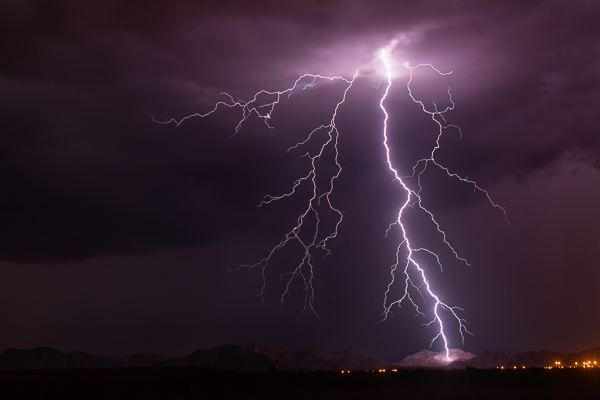
MountainSide

“MountainSide” – Buckeye, Arizona – 50mm, ISO 100, f/8.0, 20 sec

The Adrenaline Rush

What is it about lightning? I’ve lived in Arizona my entire life and I grew up loving our summer monsoon season. One of my early memories as a kid was sitting on our back porch with my dad and being blinded by a strike hitting the field behind our house. I still remember being blinded for a few seconds. It was that close and that intense.

Arizona is a fantastic venue to capture lightning. We get a lot of high-based storms, which means you tend to see more of the strike. Our landscape is beautiful, from deserts and cacti, to rolling grasslands and the Grand Canyon. I once met a guy in Tucson who was spending two whole weeks in Arizona solely to photograph lightning, and he was from Germany!

Trying to capture lightning is an adrenaline rush. It’s addicting. You can look at the back of your camera and know you just caught an epic bolt, but still not be satisfied, or maybe that’s just me. It’s never enough. I want more. More and more.
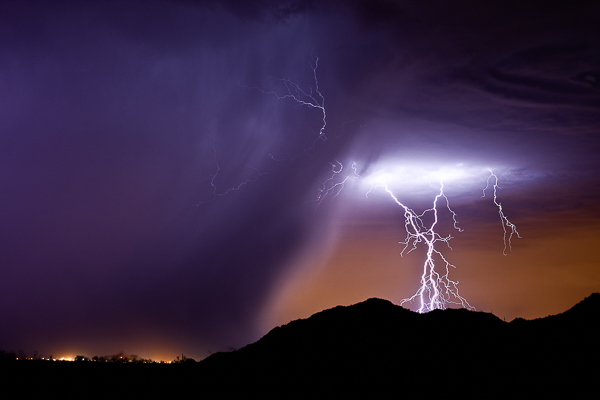
PurpleRain

“Purple Rain” – Highway 347, AZ 50mm, ISO 200, f/6.3, 25 sec

Lightning is freaky. You want to get close, but not too close. The closer the better – sometimes. Suddenly it gets quiet and you realize a storm just built up right over your head and a strike from nowhere makes you double-check your shorts. I am usually out in the middle of nowhere, late at night, and there is something crazy spooky about seeing an entire landscape get lit up in the blink of an eye.

What makes lightning fun to photograph is the uniqueness of it all. No two bolts are the same. You never know what you’ll end up with. Plus, if you are all alone out there, no one else can have the same image as you do.

Finding the Storms

This is in reality the hardest part of photographing lightning. You may worry about your settings and lenses and all that, but if you do this for a while, that all becomes second nature. Finding the storms is the difficult task. You may live in a part of the United States, or even the world, where lightning just doesn’t happen much, if at all. But if it does, then you have to learn the patterns and watch the forecasts to be prepared.

The best way to do that here in the U.S. is to bookmark the webpage of your local National Weather Service, which you can find on NOAA.gov. Their pages have links to radars where you can track the storms. If you want to really get intense, grab a copy of RadarScope (iOS or Android) to have it on your Smartphone anytime you want.

If you don’t have lightning in your area, you may want to invest in a storm chasing tour, or vacation somewhere like Arizona during the summer.
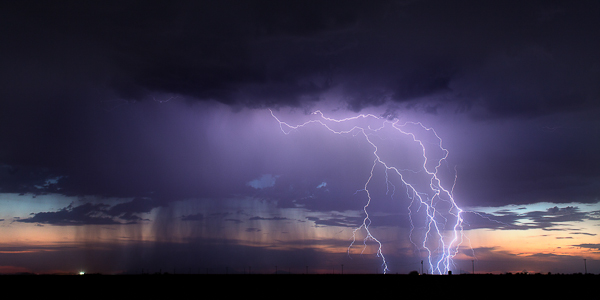
BUckeye

“Buckeye” – Buckeye, AZ – 50mm, ISO 160, f/10, 8 sec

Tools You Need

Okay, these next few sections are what you really care about anyways, so let’s get to it. Tools, meaning things you need to capture lightning.

The fact is, I started out with a little point and shoot that took three shots per second. I actually caught a crazy strike with it on my third or fourth time out, and that’s what really got me hooked. So you can literally capture lighting with basic cameras if you want to depend on luck. There are even apps for your Smartphone.

But if you want to eliminate as much luck as you can AND capture mind-blowing, jaw dropping images – you’ll likely want to upgrade your tools. You don’t have to go crazy though. Here’s the basic list of what you need:

  • A DSLR, SLR or any camera that lets you control the length of your exposure.
  • Lenses of course. Varying focal ranges are a must, although I’m a fan of primes.
  • A tripod – the sturdier the better.
  • A wireless shutter release or intervalometer.

That’s really the essentials. You don’t need the most expensive equipment either. Basic DSLRs are a good starting point. My first upgrade from the point and shoot was a Canon Rebel XSi. It did the job for about a year, but I knew I wanted to go full frame eventually.
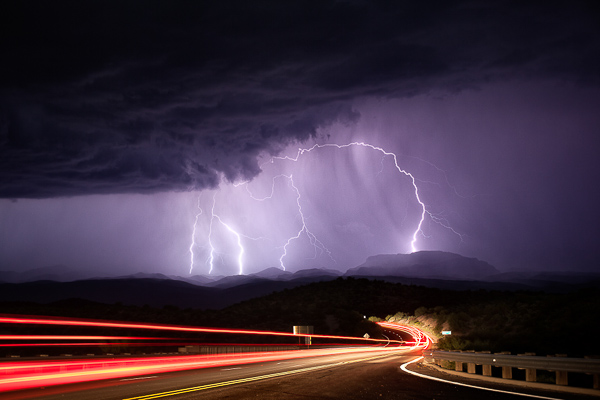
Mammoth

Mammoth, AZ – 50mm, ISO 200, f/6.3, 25 sec

I use Canon products, specifically a couple of 5D Mark III’s and a Mark II as a backup. The lenses I carry on a storm chase:

  • Rokinon 14mm f/2.8 (mostly for time-lapse photograph, but also for big landscape shots)
  • Canon 16-35mm f/2.8
  • Canon 17-40mm f/4.0
  • Canon 35mm f/1.4
  • Canon 50mm f/1.2
  • Canon 135mm f/2.0

Your tripod just needs to sturdy and heavy duty. When you are shooting during a thunderstorm there will usually be wind issues. I’ve had tripods get blown right over by a strong gust of wind. I haven’t spent as much on tripods as I do on camera gear and time-lapse tools, but I use Manfrotto legs and heads. If you can afford it, upgrade to a tripod that has independent legs and a steadier base, that will allow you to shoot with a wider stance.

Finally, you will need some kind of external shutter release. It can be anywhere from your basic wired cable release, all the way up to a wireless intervalometer. I personally like the wireless intervalometers because you can control your camera from inside the car where you are safer than standing outside during a lightning storm. I also love the wireless ones because the cabled ones can get tangled in your tripod legs if you are packing up in a hurry. They are are just easier to use.

A Little About Lightning Triggers

Another external control for lightning photography is a lightning trigger. The brilliance of one of these triggers is that it senses the flash of lightning and automatically fires the shutter on your camera. You can comfortably put it on your camera, day or night, and sit back in your car and let the trigger do all the work.
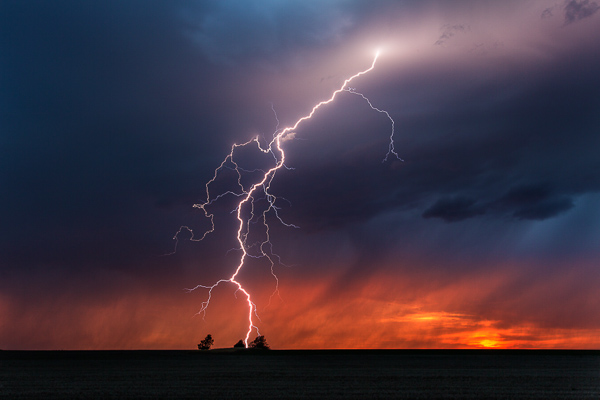
Kansas

Scott City, KS – 33mm, ISO 100, f/16, 2 sec, lightning trigger

The tough part about lightning triggers is finding one that is reliable. I’ve had three different ones and it took until I bought one of the most expensive (The Lightning Trigger IV) for me to feel like I found one that works. I’ve had a few of the $ 100-200 variety and they don’t always trigger from a flash of lightning. That’s kind of the point right? So to me, if you can save up for a good one, it’s worth the price instead of spending $ 100 two or three times trying to find one that works.

My opinion on lightning triggers is that they are good during the day, but become less useful the darker it gets. Most photographers like to use a trigger because it helps for shooting daytime lightning, and it also saves your shutter. During the day, you could either take a ton of photos in a row and hope to get lucky, or you could use a trigger. The triggers works then. Great invention.
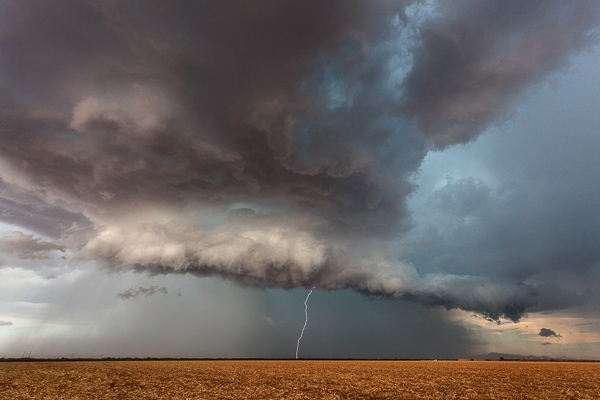
RedRock

Red Rock, AZ – 17mm, ISO 400, f/8.0, 1/160th, lightning trigger

There is also an argument that it can save your shutter at night too. But whenever I’m out shooting lightning, there is enough flashing going on that my trigger is going to keep firing over and over anyways. The anatomy of a lightning bolt is that there are parts of it that could be missed if you wait for a trigger to fire your shutter. I’d much rather increase my odds of a capturing the entire lightning bolt by doing 15-25 one second exposures over and over. Once the sun goes down and I can start getting two or three second exposures, I take off the trigger and use the intervalometer. But that’s just me!
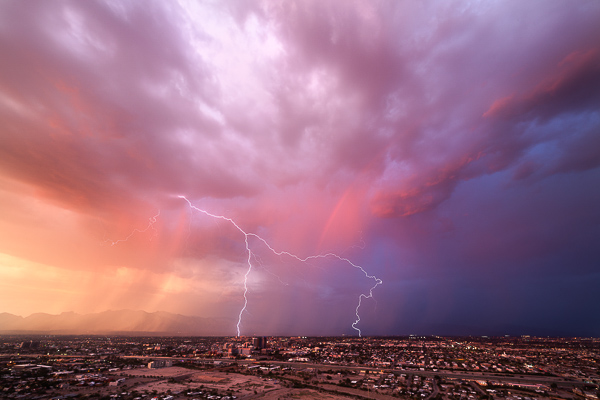
TucsonSunset

Tucson, AZ – 14mm, ISO 50, f/16, 2 sec, time-lapse capture

During the day, since I love to do time-lapse, I’ll actually get lucky enough to capture bolts just from that, without a trigger. Taking shots every one or two seconds allows you to record a sweet time-lapse and also hopefully snag a few lightning strikes. This has happened to me countless times. I’ve even captured a few with an even longer interval on the time-lapse. You might give it a try if you are interested in time-lapse at all.

Camera Settings

People ask me all the time “What are good settings for taking lightning photos?” and the answer is that it varies just like anything else in photography. But there are some good guidelines to get you started.

For daytime lightning, you want to do your best to to have as slow of an exposure as you can, which might mean f/16-f/22 and maybe a neutral density filter. I personally don’t like ND filters for this kind of photography because when I’ve used them in the past, they tend to wash out the lightning a little, but it’s something to at least try. You might slap an ND filter on, increase the ISO to 200, and hope that helps the bolt show up a bit more intensely. Daytime lightning is tough regardless. The best results are usually when it’s really dark with heavy clouds, without much sunlight. The strikes are going to show up a lot better against a dark background.
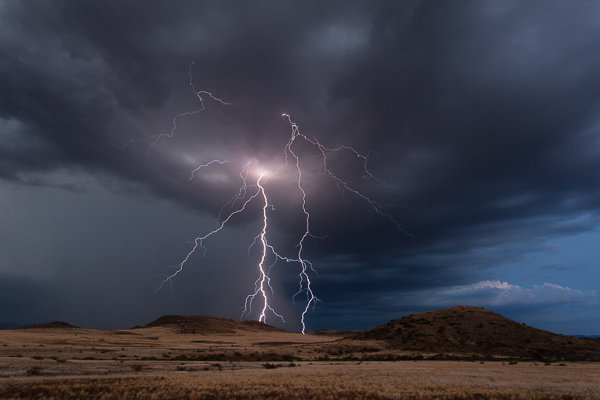
CampVerde

Camp Verde, AZ – 23mm, ISO 100, f/18, 6 sec

Nighttime is a whole different ballgame. There are lots of things that can alter your settings. Are you in the city? Complete and utter darkness? Is there a full moon? Are the bolts coming in fast and furious, or spaced minutes apart? Is the lightning a only a few miles, or 25 or more mile away?

Here are some situations and common settings to use as the sky darkens on a night out chasing storms:

  • Dusk/sunset: f/10-16, 2-10 seconds, ISO 200. You might raise your ISO even more because the sky still has some light in it and you want the lightning to really stand out.
  • Blue hour – as it gets darker, you will open up your aperture and maybe increase your shutter speed.
  • Once it gets dark, your ISO becomes more important. The lightning flash against a dark sky means you don’t need as high of an ISO or you risk blowing out your bolt.
  • After dark in the city – narrower aperture yields better results with city lights, so you might be shooting at f/10-16 even after dark. The shutter speed would depend on how bright the lights are; same with the ISO. Usually in the city I like 10-15 second exposures.
  • After dark, away from light – wider apertures – typically f/5.6-f/8. You’ll want to drop your ISO to 100 to make sure you don’t have blown out shots. If it’s really dark, you may want longer exposures, 20-30 seconds.
  • After dark, but lots of ambient light, for example, a full moon – shorter exposures to reduce motion in the clouds if you don’t want that.
  • Close lightning – narrower aperture, low ISO.
  • Far away – varied aperture, maybe higher ISO so the bolts show up better.

The bottom line is none of this is set in stone. You have to get out there and practice to learn the best settings for you and what you like.
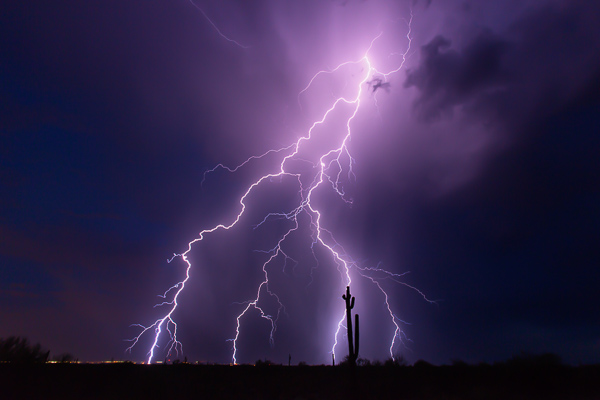
SaguaroBolt

“Saguaro Bolt” – Wickenburg, AZ – 16mm, ISO 200, f/11, 10 sec

The Biggest Things to Watch for:

•Don’t blow out your lightning. Sometimes bolts are so bright that there is nothing you can do about it. But when you realize the strikes are so intense that you are blowing stuff out, narrow your aperture or drop the ISO.
•Don’t let your lightning be too dark. Ah the other side of the coin. If your aperture is too narrow and your ISO too low, that distant lightning may not be so bright and vivid. It will require a lot of post-production, and might result in excess noise if you have to increase your exposure to make it look good. You are also probably not going to get a lot of the surrounding clouds and landscapes unless the bolt is very bright. You want to make sure you still have a good exposure so you get details in the clouds and landscape if you can.
•Cloud ghosting. If you are taking really long exposures for lightning (25 seconds or longer), you will risk seeing ghosting in your clouds as they get illuminated by different strikes over the course of your shot.

Focusing

I could have included focusing in the above section, but I find it so important that I wanted to put extra emphasis on it. The biggest, most common mistake I see in lightning photography is out of focus images (close second is blown-out lightning). This seems to be the toughest thing to learn how to do correctly.

I include myself in that! Even this past summer I was excited about some lightning images only to get home and realize they were out of focus. We all mess this up.
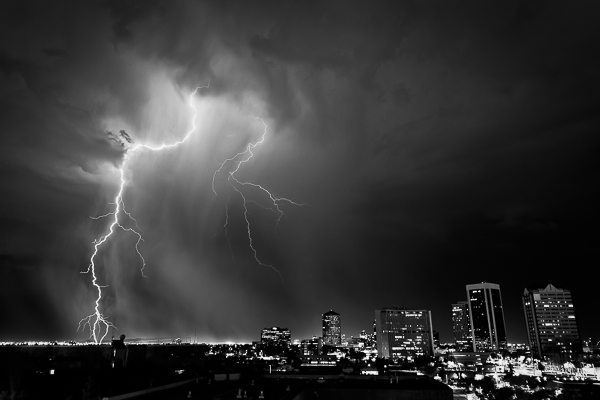
DowntownPhoenix

Phoenix, AZ, ISO 200, 26mm, f/8.0, 15 sec

I think the biggest reason for this is that ofter we rely on the “infinity” setting on our lenses. While some lenses have a hard stop for infinity (I am definitely not well versed in many lenses other than Canon), most of them don’t. Even if it does have a hard stop, is that actually perfect?

The best way to focus at night:

  • Autofocus on distant city lights if you can. I find this to be the most reliable way at night. Sometimes the moon is out which is another good way.
  • If there aren’t enough lights to focus on, then Live View is your next best method. Use Live View, zoom in (on the screen only not with your lens) to anything you can – even if it’s a single light on the horizon, and manually focus on it.
  • If all else fails, use infinity. But once you get a lighting strike on camera, check to see if it’s in focus. If not, adjust.

Remember, the wider your aperture (like f/5.6), the tougher the focusing. For example, you could focus on lights that are only a mile away, but the bolt lands five miles away and it might be slightly soft. A narrower aperture really does help with this issue. Once for me, it was so completely dark, I chose to focus on an incoming truck’s lights about a half mile down the road. Turns out, the lightning 10 miles away was out of focus. I cried – a little.
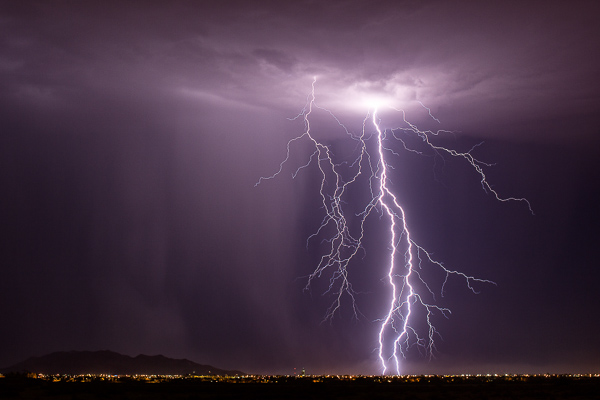
CasaGrande

Casa Grande, AZ – 50mm, ISO 125, f/9.0, 25 sec

Another tip, which I’ve never done myself, is that when you find that perfect infinity spot at say f/8-f/10, put a little scratch on your lens with an X-Acto knife, or a thin line with a paint pen, and just line it up whenever you need it.

Last but definitely not least – if you don’t have back button focus set up on your camera, then you will need to set your lens to manual focus. You don’t want to go through all the work of focusing on distant lights with Live View, only to take your first shot and have your camera try and focus in the dark! Your absolute best solution here to is look up back button focus on dPS. From landscape to wedding and portrait photographers, this is a must.

Practice, Stay Safe and Have Fun!

All my advice is based on my experience. You may find different opinions or thoughts elsewhere, or you might even have your own methods. That’s okay. Figuring out what works best for you is how photography works in general.

The best advice I can give you though, is to practice. You may not have much lightning where you are, so perhaps plan a trip somewhere (like Arizona) where you can spend a few weeks just shooting lightning every chance you get.
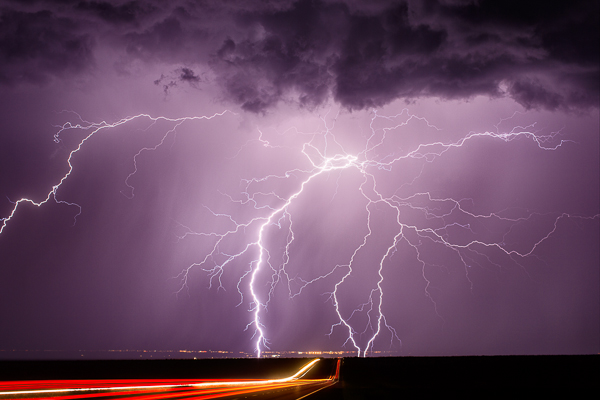
Whetstone - (Highway 90 near Whetstone, AZ 50mm, ISO 100, f/5.6, 25 sec)

Whetstone – (Highway 90 near Whetstone, AZ 50mm, ISO 100, f/5.6, 25 sec)

Like anything in life, practice makes you better. You can read this article and totally have a good idea of what to do, but actually being out there, in the moment, is a different story. I’ve done this enough that I can pull up to a spot and pretty much know my settings before I pull the camera out of the bag. But there are still times when I’m not quite sure and need to take a few practice shots. Not all situations are the same, so you will slowly learn the right settings for each scene.

Please stay safe! In the last three months, I’ve had lightning strikes hit within 75 feet of me. Yikes. It’s scary for sure. Do this knowing the closer you get, the more risk you run of getting hit. Two storm chasers have been struck by lightning this year. It’s a real danger.

But have fun. There is nothing like capturing an amazing strike on camera. I wish you the best of luck.

The post How to Photograph Lightning – the Ultimate Guide by Mike Olbinski appeared first on Digital Photography School.


Digital Photography School
 
Comments Off on How to Photograph Lightning – the Ultimate Guide

Posted in Photography


Netflix is seeking Instagram users to photograph movie locations

03 Oct

Netflix is looking to hire a trio of photographers who will travel the country snapping photos and posting them to the entertainment company’s Instagram account. The three Instagram users selected for the roles will travel with expenses paid for two weeks, taking pictures of iconic movie and TV locations. Learn more

Articles: Digital Photography Review (dpreview.com)

 
Comments Off on Netflix is seeking Instagram users to photograph movie locations

Posted in Uncategorized


How to Photograph Teenagers: a Kick-ass Guide

23 Sep

Whether it’s for a magazine beauty and fashion spread, senior pictures, or my daughters and their friends just dressing up and having fun, teenagers are up for absolutely anything, which makes them my favorite subjects to photograph. Stand fully dressed under a freezing cold waterfall while hanging ten off a surfboard and holding a drooling English Bulldog? “Sure!” Go to Continue Reading

The post How to Photograph Teenagers: a Kick-ass Guide appeared first on Photodoto.


Photodoto

 
Comments Off on How to Photograph Teenagers: a Kick-ass Guide

Posted in Photography


Carry Less – Photograph More: Elevate Your Travel Photography

22 Sep

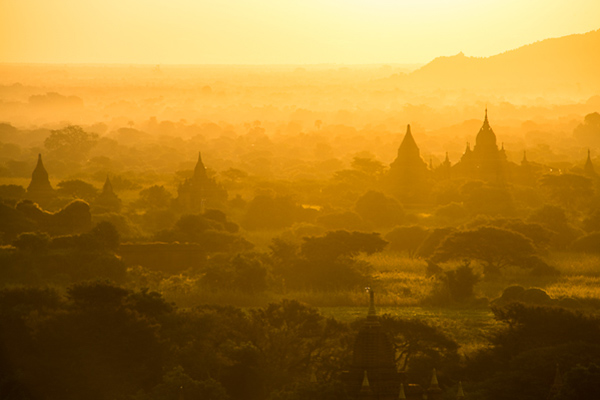
20131206_Bagan_563b

As a travel photographer, either on assignment or shooting a personal project, capturing great quality images that represent the spirit of a place and its people is key.

Looking to achieve that was a priority for me, so I always traveled with a bag full of gear, including at least two DSRL bodies, three or four lenses, flash, tripod, batteries, etc. It was a heavy load, and it slowed me down. I am a Nikon shooter, so my first approach to unload weight was to carry an all-purpose lens. I got the Nikon 28-300mm, and along with this, I’d carry the 14-24mm for wide-angle shots. Now I needed a backup camera or second body. I debated whether to keep carrying another Nikon body or to try something more compact. Finally I decided to get myself a mirrorless camera; enter the Fuji X system. My first mirrorless camera was the Fuji X-E1 with the kit lens, the wonderful Fuji 28-55mm. That camera was a turning point for me, and after my first trip I was sold on the system. Yes, I still shoot Nikon, but I just don’t travel with those big guns anymore.

The mirrorless technology is now really advanced – gone are the days when the image quality was not up to par with DSRLs and the availability of lenses was scarce. There are similar options from different manufacturers: Sony, Olympus, and Panasonic all have systems that eliminated the reflex portion and bulkiness of the typical DSRL. Please understand that I am mentioning Fuji because that’s the camera I use, but this is not an article to discuss a specific camera or brand. What you should consider is that for the most of us, the image quality of these cameras nowadays is amazing.

20131212_Inle_Lake_535b

I’d say I’ve switched, at least for travel. Fuji is now my go-to system for everything on the move, including photo walks. If you are planning to invest in a camera system, you should at least give mirrorless consideration, and here is why:

1) Travel Light

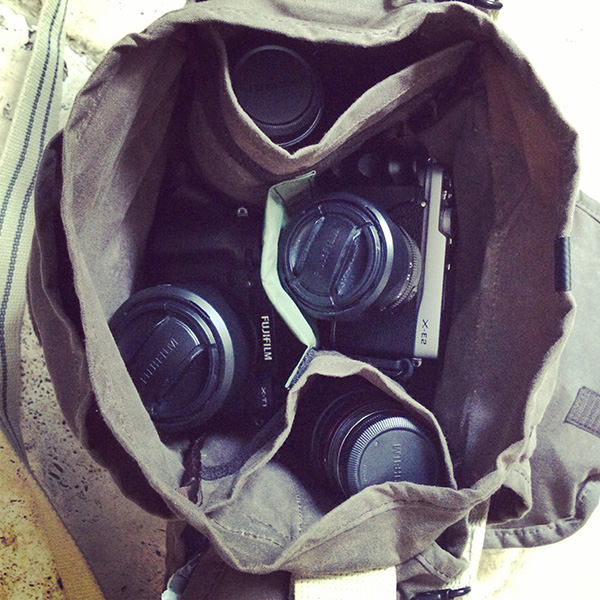
When using a mirrorless system, traveling light doesn’t mean that you’ll be out of options in the field. In just a small camera bag, you can fit a lot. This Domke F-3X Super Compact bag contains two bodies, five lenses, a flash, four extra batteries, radio triggers, a GPS for geotagging and SD cards. What I have here in terms of camera are the Fuji X-T1, Fuji X-E2, Fuji18-55mm zoom, Fuji 55-200 zoom, the 23mm and 35mm primes and an 8mm fish-eye from Rokinon. Believe me, I can carry this all day long without putting strain on my back, which brings me to the second point.

CAMERA BAG

2) Shoot all day

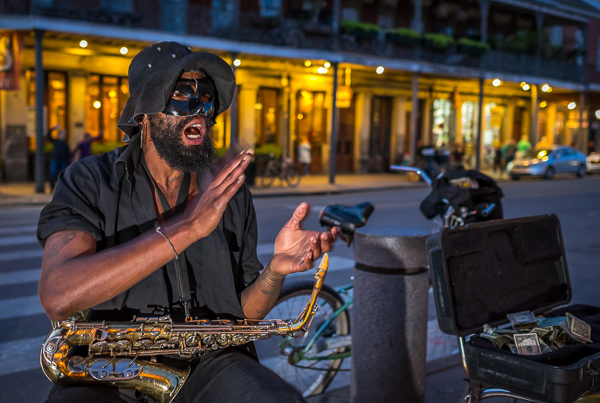
Wandering light means you can wander more. A small and light kit won’t wear you out and you can pretty much shoot all day long. With these cameras you can always have one on you, even if you are not carrying a camera bag. There are plenty of options where you can take them on your belt and even inside the pocket of a jacket. Having a camera with you all the time brings more opportunities to capture the people and places where you are traveling. The photo below was taken my first day in New Orleans; after a long flight I just went out for a walk with the Fuji X-E2, the 23mm prime and a flash in my pockets, and when the opportunity presented itself I was able to shoot it.

Street performer at night in New Orleans

3) Be invisible, blend in

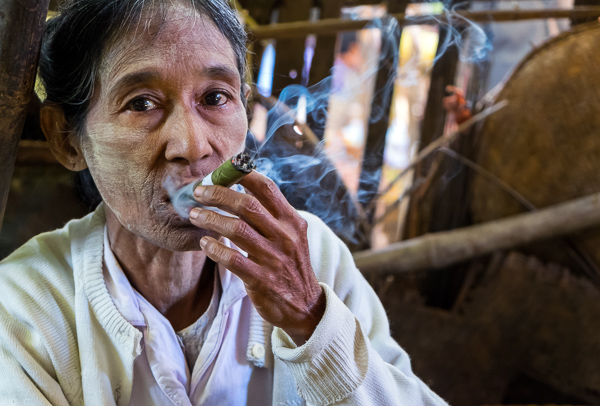
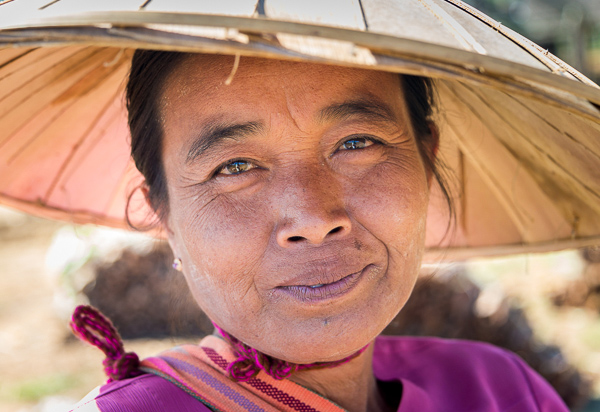
There is nothing more annoying than people being scared of you. Trying to stick a big lens or camera in front of people in public spaces, or even worse, in remote locations where you don’t speak the local language, is a formula for disaster. There is also a difference if they see you as a pro photographer or just another tourist. When you carry a small camera, you’ll most likely go unnoticed or they won’t feel as intimidated as they would when they think you are pro shooting for a magazine. I personally love to shoot markets: these places, away from big cities, are one the best ways to explore local cultures. I’ve noticed a big difference since I started to shoot with the Fujis on my trips. I can blend in more, I can aim the camera, smile, and get a photo with no problems, whereas before many times I’d have people turning their faces down or away from me. Just consider this fact alone and the difference it can make in your photography.

Old Burmese woman smoking a cigar

Another great feature besides what is mentioned above is how easy it is to work with an electronic viewfinder. Imagine being able to see exactly what are you getting in your viewfinder before making the shot. You can quickly adjust camera settings and see the changes on the fly. Seeing where your whites are clipping or how the shooting mode will affect the result of the image without having to move your eyes out of the viewfinder is phenomenal. I could go on an on about the benefits, but I am not a technical person.

If you like to travel and go places, in my opinion this is the way to go. The future is even brighter, as manufacturers continue to develop their lineups. Mirrorless is versatile and delivers excellent results. Touring light will make your travel photography better and you’ll be able to enjoy your trip more.

Any other mirrorless fans here? Show us your photos and tell us about it.

The post Carry Less – Photograph More: Elevate Your Travel Photography by Daniel Korzeniewski appeared first on Digital Photography School.


Digital Photography School
 
Comments Off on Carry Less – Photograph More: Elevate Your Travel Photography

Posted in Photography


How to Photograph Fairground Rides

05 Sep

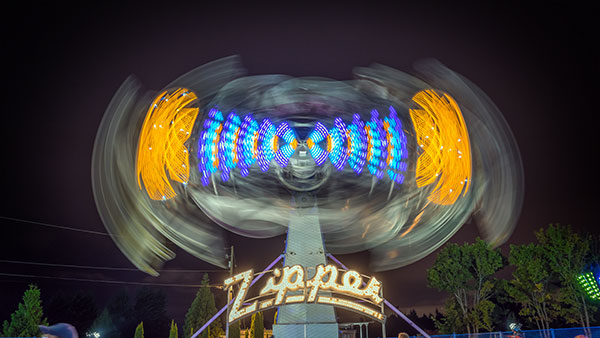
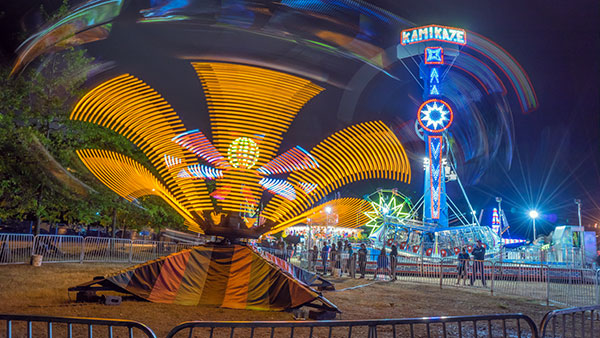
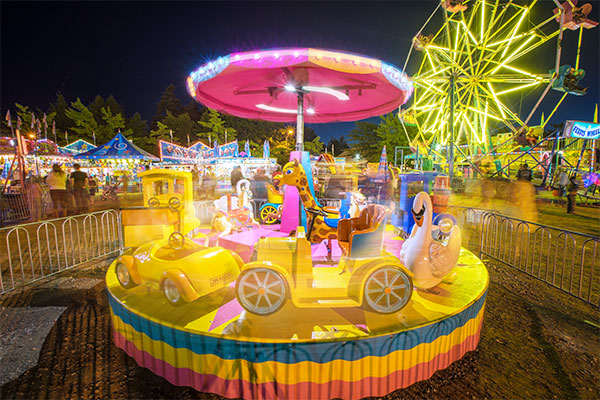
Learn how to photograph the fairground at night

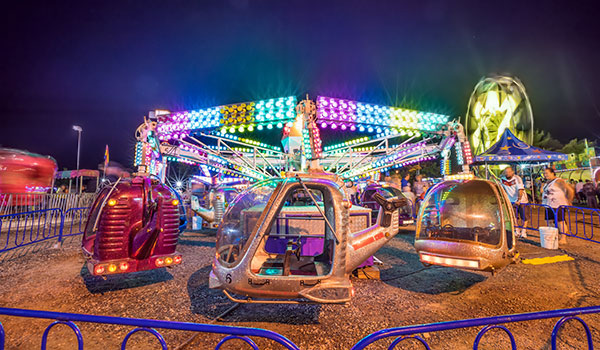
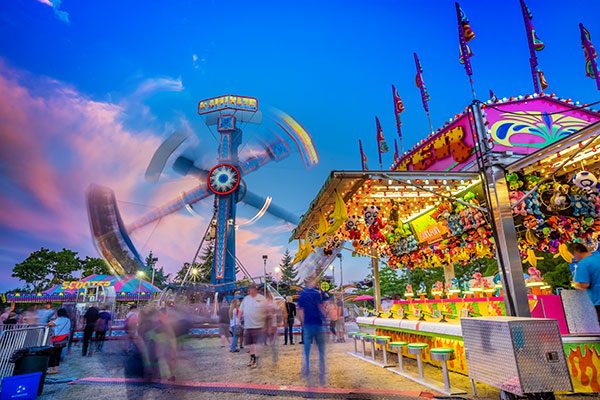
When it comes to taking pictures of the fairground or amusement park, you’ll be amazed at just how easy it is to get super colourful, vibrant, and bright images of those awesome rides. Twilight is the best time to shoot, when all those mega-joules of artificial lights burst into action to give you amazing effects that aren’t possible during the day time.

Here’s what you’ll need:

  • A tripod – essential for long exposures
  • A DSLR or Mirrorless camera with manual (M) mode
  • A wide angle lens
  • To shoot in RAW format (always)

When is the best time to shoot?

The optimum time is about 30 minutes after the sun has set. If you’re lucky, there will be a beautiful colourful afterglow in the clouds, but it will still be dark enough for all the artificial light to be the brightest parts of your image. When it gets fully dark you can still get stunning shots, but the sky may just be a dark blanket if there is cloud cover.

How to Photograph Fairground Rides

Harness the power of higher ISO

By increasing your ISO settings to around 400,  you’re increasing the light sensitivity of your camera. You can try higher settings (larger ISO numbers) but your goal here is to achieve an exposure time of around one to two seconds so that you capture some motion blur in the people and in the rides. Using a higher ISO than 400 will speed up your exposure time and you don’t necessarily want that, unless you want to totally freeze all of the motion in your shot. There’s some trial and error involved, depending on the available light of your scene, so my number of 400 is approximate.

When the rides are static, you won’t capture any motion blur but as soon as they start to move (and they usually move fast), you’ll find that the one to two second exposure time is ideal for capturing a lot of movement.

Shoot in time-lapse mode

By taking pictures every four seconds, you’ll end up with a huge variation of different motion blur as the rides progress through their cycle. It’s almost like shooting video, but by shooting time-lapse, you’ll ensure that every frame is a full resolution image – video can’t compete with that. This technique ensures that you capture lots of images at different stages of the ride. Here’s a one minute time-lapse movie I made while shooting stills at the fair using this technique.

If your camera has a built-in intervalometer or time-lapse app, you’re in luck. Set your interval at four seconds, and your camera will take a picture every four seconds. If you’ve set your exposure time to two seconds that gives you a two second gap after your shot has finished before the next shot will be triggered. Make your time-lapse last for about a five minute duration, and you should be able to capture images of the rides while they are static and while they are moving – it depends on how busy the rides are and how long the ride cycle lasts.

You can then overlay those blurred images with the static images in Photoshop to create the ultimate composite of sharp static scenes, and motion blurred scenes.

Don’t worry if your camera doesn’t have a time-lapse function, you’ll just need to take as many pictures as you think will capture your desired motion blur and static states. Alternatively you could buy an intervalometer which will connect to your camera and trigger the shutter for time lapse shooting.

Top Tip: Be sure to switch off your built-in noise reduction as this will slow down your write times to the memory card, and will mess up your intervals.

Photographing Amusement Parks

Choose the right white balance

It’s important to set the right white balance on your camera for this type of shooting. Don’t trust the auto setting because there are so many different light sources that your camera won’t know which setting to choose. For all of the shots I took with the Sony A7R, I used the Fluorescent Warm setting.

Experiment to get the most pleasing looking white balance for your scene, try to avoid everything looking super orange. Look at the scene with your eyes, then look at your shot to try and get the most accurate colour temperature.

It’s full of stars!

Night time photography tutorial

In shots like the one above, you can see a very pleasing looking blue star on the lamp post. All lenses produce their own characteristic stars, some are better than others. One thing you can do to get the best star out of your lens is to select a very narrow aperture like f/16 or f/22. This will also have the added benefit of forcing your shutter speed to be slower which gets you closer to the two second exposure time I mentioned earlier.

Get up close

Remember that wide angle lens I mentioned at the start? That lens will allow you to fill your frame with all the fun of the fair. Wide angle lenses create a pleasing looking distortion that adds drama and intensity to your shot. A 14-16mm shot on a full frame camera can cram in a LOT of action. By getting close to your subject and positioning yourself at a point that creates a nice looking distortion effect, you’ll really make your images POP!

Wide Angle lens used for Night Photography

Post-production

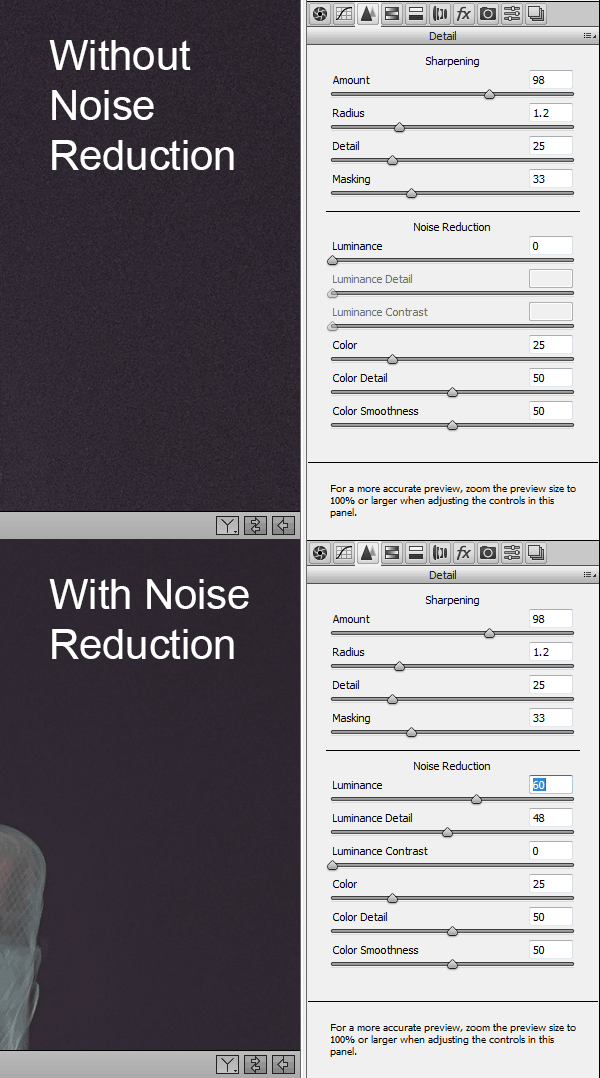
Noise reduction

What happens to your image quality when you use higher ISO settings? Noise, that’s what. We don’t like noise do we? No, so lets get rid of it using the brilliant noise reduction of Adobe Camera Raw. Your specific settings will depend on your camera’s sensor, as not all sensors are made equal. Here are the settings that I found gave me the best results for my pictures. Experiment with these sliders to get rid of as much noise as you can while still retaining image detail.

Noise Reduction Settings

Fix the shadows

You’ll probably want to brighten up your shadows and blacks a little but don’t overdo it. We actually need those dark areas in our image to contrast with the bright lights, that’s what gives our image its PUNCH!

Fix the highlights

If the brightest parts of your image look a little blown out, pull them down a little with the whites and highlights sliders. Again, don’t overdo it or you’ll run the risk of ending up with a totally fake looking image.

Clarity

Increase the clarity a little to introduce some contrast to the mid tones.

Vibrance

Increase the vibrance a little to make the colours pop and give a subtle blue hue to the sky area.

Use graduated filters in Adobe Camera RAW

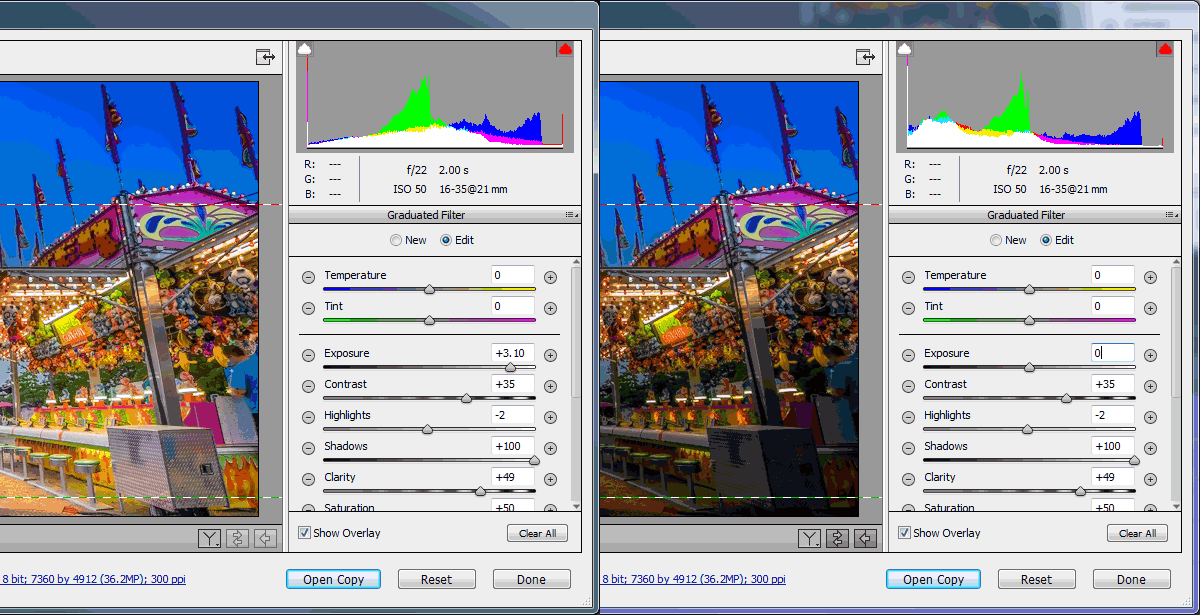
The graduated filter simulator is a really powerful tool, but did you know it’s not just for making a part of your sky darker? You can use multiple graduated filters to selectively brighten or darken large parts of your image. If you want to brighten just your foreground, simply add a graduated filter and increase its exposure value like in the image below. You can further tweak just that selected area with the other powerful ACR tools like shadows, clarity, contrast etc.

Using Grad Filters in Adobe Camera Raw

Combine your images to make the ultimate composite

Once you’ve finished tweaking your images in Adobe Camera Raw, it’s time to open them in Photoshop to make a composite image that captures the motion blur and the static state of your fairground ride. It’s worth pointing out that this is just a creative choice, if you’re happy with just a single image, that’s cool too.

Step 1 – Choose and open your Images

From your images, choose one that shows your ride in its static state. This could either be while it’s not moving or perhaps you took a super fast, high ISO shot while the ride was moving and managed to freeze the motion nicely. Either way, pick an image that you like, and open that in Photoshop.

Step 2 – Copy and paste your images

Next you’ll choose an image, or images, that perfectly capture the motion blur of the ride; maybe it’s a roller-coaster ride and you want to catch the long streaking lights of the carriage. Open this in Photoshop so that you’ve now got two tabs, each with their own image.

With the motion blur image open, hit ctrl+a (or Cmd+A for Mac) on your keyboard to select the entire image. You should see the marching ants around the image. Next hit ctrl+c (Cmd+c) to copy that image on to your clipboard.

Now click on the other tab to switch to your first image which shows the static or frozen motion shot, and hit ctrl+v (Cmd+v) to paste your clipboard image on to a new layer above the default (Background) layer. Photoshop will call your new pasted layer “Layer 1″.

Step 3 – Blend your images

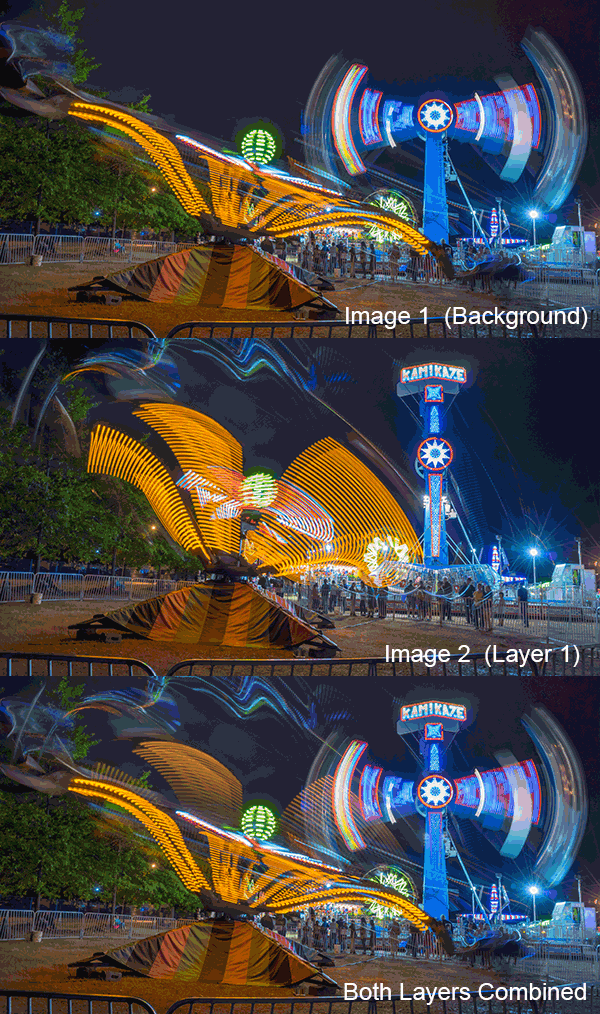
Assuming that you used the exact same ACR develop settings for both images, just go ahead and change the blend mode of the motion blurred image (Layer 1) that you just pasted on to the new layer to “Lighten”. The blend mode lives in your Layers panel and defaults to Normal, so change Normal to Lighten.

Now you should see both images combined to give you a lovely composite of both moments in time. If the effect is too pronounced, try turning down the opacity of the second layer to around 50%. For fun you could also try the Overlay blend mode or Screen, for a more intense effect. Remember to play with the layer opacity to get the look you want.

Step 4 – Erase the parts you don’t like

It’s likely that when you’ve blended both layers together by choosing the Lighten blend mode, you’ll want to erase certain parts of Layer 1 if the image gets too complicated. You can do that easily by choosing the Eraser tool and selecting a soft brush size, appropriate to the area you’d like to erase. Simply click on Layer 1 where you’d like to erase and bam – it’s gone (or use a layer mask for non-destructive editing).

Combine Layers in Photoshop

That’s it! You’ve now learned how to shoot and process your amazing images of those mind blowing fairground rides. Go out and have some fun with this, just don’t overdo it on the cotton candy and doughnuts like I did, ugh.

If you have another other tips for photographing fairground rides, please share in the comments.

The post How to Photograph Fairground Rides by Gavin Hardcastle appeared first on Digital Photography School.


Digital Photography School
 
Comments Off on How to Photograph Fairground Rides

Posted in Photography


How to Photograph People: 7 Tips for Photographers Who Never Photograph People

19 Aug

lynseymattingly7

No matter what type of photography you specialize in or prefer, at some point you will find yourself having to photograph a human, or multiple humans. For favor, for fun, or because they share your genetic make-up or home address. If you own a fancy camera, there you will be at least once in your photographic life (but probably many more) where you will find yourself taking a portrait. Taking pictures of people is much different than beautiful mountains, scenic oceanscapes, historic architecture, butterflies, plates of food, or whatever it is that you usually photograph. Here are some basic tips to get the best portrait possible, especially for you if don’t usually see a human on the other side of the lens.

#1 Be realistic

Don’t overpromise your abilities or expect too much out of yourself. If someone asked me to take a picture of the snowcapped Rocky Mountains, which, as they have been my entire life, are right outside my window and something I know like the back of my hand, it would not be a good picture. I lack the skills for landscape photography, and more importantly, the interest. In my favor though, people aren’t likely to ask me to take a landscape image near like a non-portrait photographer will be asked to take portraits. Be upfront if you are willing to try it so that in the event it doesn’t go as planned, it won’t bother you enough to affect how you feel about photography in general.

lynseymattingly2

#2 Simplify everything

Backgrounds, clothing, props, light, etc. – simplify everything. Give yourself a running start out of the gate by having a solid foundation to work with. Look for flat or level backgrounds, horizon lines that don’t run through people’s heads, even lighting, and solid colors. I can’t emphasize this enough. The details which are the focus should only relate to the person, whether it’s a portrait of just the face or a full body, everything else should compliment this, or completely disappear to the viewer’s eye.

lynseymattingly5

#3 The easiest setting I know

At the risk of starting a heated discussion or this becoming a dumping ground for comments debating otherwise, I am going to share what I consider to be my best general setting and equipment advice.

First a few disclaimers: I shoot Canon and have no idea if these will translate to something else. Also, you must promise you will not be upset if this doesn’t work for you; sometimes finding what doesn’t work is just as important as finding what does (I tell myself this often to justify my many mistakes). Lastly, taking a great portrait is a lot more complicated than just one setting, but you have to start somewhere. There are likely to be people who disagree with my advice and I hope that this could start a supportive discussion on what has worked for others, rather than unhelpful commentary. Now, on with it…

  • Using natural light only if at all possible, dial in your ISO for something that makes sense; ISO 200 if it’s bright, 400 if it’s cloudy but even, 600 if it’s darker.
  • Shooting in Aperture Priority mode will allow you the most room for error, and is how many portrait photographers shoot regularly.
  • I like the f-stop to be at f/2.2 for one or two people, and f/2.8 or f/3.2 for groups of three or more (obviously this is speaking very generally and would best be used as a starting point to find what works for you). These settings will give you that “portrait blurry background effect” known as good bokeh.
  • Shooting in RAW will give you more wiggle room later when editing, though it takes more space on your memory card.
  • Use a prime lens if you can; I shoot nearly everything I take with my 50mm L1.2. This is a fancy lens no doubt, but any prime lens will typically be faster (have a larger maximum aperture) than a zoom lens, and with everything else going on, I find that using my feet as my zoom is one less adjustment my eyes and hands have to do.
  • I typically underexpose my images one stop. This works for me because I like to get the details and then bring it back up as needed myself in post.

This may not work for you, and there is absolutely no shame in running everything you aren’t sure about on auto. This doesn’t make you less of a photographer. All it means is that you think in this scenario, your camera – a magnificent piece of machinery that was created by thousands of professionals over decades with countless research, information, and experience – might guess better than you. That’s all.

lynseymattingly1

#4 Shoot from their eye level or higher, and at an angle

While photographing a person from below and not capturing an amazing view of 15 chins they don’t even have is possible, it’s not easy. For the best, most flattering set-up, shoot at their same eye level or above. I often have people kneel down and look up at me while I remain standing. As someone who has 20 different chins that only come out and play for pictures, I’m sensitive about this one and I find that even a child with the most adorable chubby cheeks and double chin is best photographed on a level playing field.

Additionally, taking pictures of someone straight on is both unflattering and uninteresting. Asking them to twist at the waist, shoulders, or neck and not face their body square-on, but rather follow their face’s direction will not only be much more forgiving to any subject (every single human has one eye that is smaller than the other – I’ve researched it), but will also make for a more professional finished portrait.

lynseymattingly3

#5 Don’t command a smile

Don’t command a smile, or instruct “cheese!” or say “hold still!”, or anything that could be interpreted as you attempted to force your feelings, or agenda, onto your subject. Even if you are going for a serious tone, and are trying to catch an image when they don’t realize or least expect it, you are much better off engaging them in conversation than setting up the moment and expecting a single second of utter perfection. A true portrait is genuine at its very least.

lynseymattingly6

#6 Resist the urge to run your final images through every Photoshop trick you’ve ever learned

If you don’t usually photograph people, the idea of playing around with editing tools might be fun. There are so many! This one turns their eyes into laser beams. This one makes their skin look like pure plastic perfection. It’s fascinating, I get it. However, if you’re wanting to stick to the basics, there isn’t much that needs to be done. Clean up blemishes with the Spot Healing Brush Tool, run a basic sharpen (I like the oddly named Unsharp Mask at 60%/2.0/0), and adjust your color and levels if needed. If I get stuck while editing an image, I ask those thousands of professionals what they think by running auto color, tone, and contrast just to see what it does. It nearly always takes everything too far, but it gives me an idea of where I want to go sometimes, just by showing me where I don’t.

lynseymattingly4

#7 Don’t try to turn it into something it’s not

Oh how I wish this image had a little more POW. A little zing. I’d love it if her entire face was showing and her hair was either more haphazard, or more perfectly fanned out. I wish there was more background showing. However, this is not a picture for a fashion magazine cover, but rather an image of my stepdaughter I took with my iPhone. We were on a walk and I spotted the purple flowers on the ground and told her to go lay in them. And because all of my stepdaughters do whatever I say, and think that I am totally magical, she raced right over and did it. Then an enchanted unicorn wandered up and flew us home. It’s drastically cropped, not necessarily for effect, but because she was giving me a snarl and wearing a very busy shirt. Is this a portrait? To me, it is. It’s a perfectly fine, authentic image and the subject herself loves it.

That is probably the most important thing when taking pictures of people.

Do you have any other tips you’d like to share? Please leave a comment below.

The post How to Photograph People: 7 Tips for Photographers Who Never Photograph People by Lynsey Mattingly appeared first on Digital Photography School.


Digital Photography School
 
Comments Off on How to Photograph People: 7 Tips for Photographers Who Never Photograph People

Posted in Photography