RSS
 

Posts Tagged ‘Photo’

Is the Apple iPhone 5s’ photo quality rotten or ripe?

03 Oct

TS1600x1200~sample_galleries-6257125045-8226324209.jpg

The camera on Apple’s iPhones are well-known for their excellent photo quality. The new iPhone 5s features a larger sensor, faster lens, and new ‘True Tone’ flash. Head on over to connect.dpreview.com to see if the improvements have made the iPhone 5s a top choice for mobile photographers.

News: Digital Photography Review (dpreview.com)

 
Comments Off on Is the Apple iPhone 5s’ photo quality rotten or ripe?

Posted in Uncategorized


Photo Ninja adds preliminary support for X-Trans Raw images

03 Oct

AppIcon-2-_dragged_-1.png

Another contender has entered the relatively small ring of Raw converters that can work with Fujifilm’s X-Trans sensors: Photo Ninja. The latest version of this already-capable image editor has added ‘preliminary’ support for X-Trans Raw, and early results seem promising. To see how this $ 129 software performs, click through to see side-by-side comparisons.

News: Digital Photography Review (dpreview.com)

 
Comments Off on Photo Ninja adds preliminary support for X-Trans Raw images

Posted in Uncategorized


Fair use? US stamp featuring photo of monument nets sculptor $650,000

29 Sep

Stamp.jpg

Heard the one about the sculptor awarded over half a million dollars because a stamp was made including a war memorial he’d designed? At first that may sound surprising, but reading the court’s judgement (and the rejections of the various defenses put forward by the US Postal Service), is an informative lesson about copyright and fair use. Click here to read more.

News: Digital Photography Review (dpreview.com)

 
Comments Off on Fair use? US stamp featuring photo of monument nets sculptor $650,000

Posted in Uncategorized


Latest and greatest smartphones battle it out in mobile photo comparison

28 Sep

shootout.jpg

Thinking of upgrading to the latest smartphone, and want to see which takes the best photos? We pit four top photocentric mobile devices in an imaging showdown to test three new smartphones — the Sony Xperia Z1, Nokia Lumia 1020 and LG G2 — and Samsung’s Galaxy S4 Zoom in real world shooting scenarios. See how they fared in our tests on connect.dpreview.com.

News: Digital Photography Review (dpreview.com)

 
Comments Off on Latest and greatest smartphones battle it out in mobile photo comparison

Posted in Uncategorized


Chromatic Vortex: 3D Art from 4,416 Sheets of Photo Paper

23 Sep

[ By WebUrbanist in Art & Installation & Sound. ]

chromatic storefront installation art

A site-specific installation in a New York City storefront, this twisting multi-colored tunnel was suspended in mid-air and held together with no less than 17,000 standard office bind clips.

chromatic reflective photo paper

chromatic hanging tunnel inerior

chromatic binder clip assembly

Composed of over 4,000 panels of high-gloss photographic paper, CHROMAtex from SOFTlab (photos by Alan Tansey) was designed to suck passers by right in (proverbially not literally, fortunately for pedestrians).

chromatic art intersection interior

Situated in the Lower East Side of Manhattan, this sculptural work was built from the outside in. As illustrated in the video above, it slowly took shape as it moved from the front of the empty shop toward the back, breaking out into various subsidiary tunnels along the way.

chromatic suspended art sculpture

chromatic art entryp oint

These twists in turn split and curve, morphing from circular tubes into square ports and providing other internal perspectives for those curious enough to enter the interior space in order to see more of the suspended sculpture.

chromatic tunnel installation entrance

SOFTlab itself is composed of “artists, believers, listeners, directors, geeks, architects, sketchers, dreamers, programmers” and above all: designers. It was created by Michael Szivos who has a degree from the “Graduate School of Architecture, Planning and Preservation at Columbia University. The studio has since been involved in the design and production of projects across almost every medium, from digitally fabricated large-scale sculpture, to interactive design, to immersive digital video installations. As the studio adjusted to a wide range of projects, we began to focus less on the medium and style and more on ideas [and] we are able to approach every project from a fresh perspective to create rich spatial, graphic, interactive and visual experiences.”

Share on Facebook


[ By WebUrbanist in Art & Installation & Sound. ]

[ WebUrbanist | Archives | Galleries | Privacy | TOS ]


WebUrbanist

 
Comments Off on Chromatic Vortex: 3D Art from 4,416 Sheets of Photo Paper

Posted in Creativity


Peace, Love and Photo Curtains

20 Sep

Extra photos for bloggers: 1, 2, 3

Gotta keep those good vibrations flowing, man.

Transport yourself and your living space back to the 1960′s with a beaded curtain inspired Photo Curtain.

It’s simple! Grab your favorite jpeg, a few supplies and string together a far out curtain of photographs.

Put on your rose colored sunglasses and paisley poncho and hop on the diy Photo Curtain train.

Craft a Photo Curtain of Your Very Own

p.s. You (and your best pal) could snag a free trip to Way Over Yonder music festival *PLUS* Photojojo gear. Entering takes all of 5 seconds!

Why It’s Cool

The photo curtain adds a little pizazz to any window or door.

Walking through the curtain and you’ll feel like your are being transported through the present and into the past.

You’ll feel like a teenager again, except for this curtain isn’t made out of plastic beads and you are not listening to the latest music on cassette anymore.

Added bonus: When the wind catches the photos they spin like little butterflies made out of photographs.

Ingredients:

  • One photograph, to be printed on multiple pages (we’ll teach you how to do this). Or, a variety of small images
  • Laminating Sheets
  • Circular object for tracing
  • Pen
  • Scissors
  • Fishing line
  • Hot glue gun
  • Hot glue sticks
  • Curtain rod (any longish stick will do)

STEP 1: Enlarge Your Image

before

Making a large image to prints on multiple pages is super simple thanks to blockposters.com.

Choose an image and upload it to blockposters.com.

Choose how many sheets of paper you would like your image to be printed on. The more sheets of paper you use the larger the final image will be and the larger your curtain will be.

Download your pdf and click print.

Sit back and watch as your large scale image prints out in little pieces.


STEP 2: Make it Durable

beforeTo help your curtain stand up to the elements, laminate each page you just printed.

If you don’t have a laminating machine, don’t fear! These laminating sheets are easy to get and simple to use.

Place one sheet face down and peel off the paper from the back. Place your photo face down on the sheet and rub to get the bubbles out.

Grab another sheet of laminate and stick it to the back of your photo. It’s a laminated photo sandwich!

STEP 3: Shape up

beforePlace your laminated sheets next to one another to form the large image.

Use your circular object and start tracing circles from the top of the image to the bottom.

Start at the top edge of the large image and make sure the circles line up with one another as you trace circles down the image vertically.

STEP 4: Cut your Circles

beforeCut out the circles you just traced.

Make sure you lie your circles down in the order you cut them, so your image stays in tact on the strands of your curtain.

STEP 5: Measure the Line

before

Measure and cut the fishing line to fit the length of each row of circles.

Add about 4 inches extra at each end of the fishing line.

STEP 6: Fasten Your Circles

beforeFlip your nicely lined up circles over to create the strands of the curtain.

Place a heavy object on the top and bottom 4 inches of the fishing line to keep it in place and run the line down the center of your circles.

Place a couple of dots of hot glue over the fishing line at the center of each circle to adhere the fishing line.

(No hot glue? Tape works too).

STEP 7: Tie ‘em to the Top

beforeTie the top 4 inches of the fishing line to the curtain rod (you can also use a wood dowel, or a cool piece of driftwood, really anything you want).

A couple of knots should do the trick for each strand of the curtain.

Now, hang it up and admire. Nice work!

Taking It Further

  • Print your photos double sided so when the wind catches the curtains you will see images on either side.
  • Cut different shapes out instead of circles. Hearts would be super cute for a wedding.
  • Skip hanging the strands of the curtain on the dowel and string them along a mantel or hang from your ceiling like a garland.
  • Hang the curtain above your bed to create a headboard. Sweet dreams!

Related posts:

  1. How to Make a Fun Interlocking Photo Display! Extra photos for bloggers:1,2,3 What happens when you combine the…
  2. The Ultimate Guide to Photo Shadow Play: 30 Ways to Show Shadows Some Love Extra photos for bloggers: 1, 2, 3  In Photo 101…
  3. Photo Projects from Miranda July: When homework feels like love Ever feel like you need a boost of artistic inspiration?…


Photojojo

 
Comments Off on Peace, Love and Photo Curtains

Posted in Equipment


Our Fujifilm X-M1 review: big photo quality in a small package?

17 Sep

X-M1_Black_Front_16-50mm.png

We’ve completed our review of the Fujifilm X-M1, which is the company’s lowest-priced X-Trans-based mirrorless camera. It takes the sensor from the X-E1 and X-Pro1 and puts it in a simpler, more portable body. Fujifilm also added a tilting 3-inch LCD and Wi-Fi, which puts the X-M1 on much the same level as mirrorless cameras like the Panasonic Lumix GF6 and Sony NEX-5T. For a detailed look at the X-M1, follow the link.

News: Digital Photography Review (dpreview.com)

 
Comments Off on Our Fujifilm X-M1 review: big photo quality in a small package?

Posted in Uncategorized


Get 6 Days of Online Photography Training For Free This Week at Photo Week

16 Sep

photoweek_logo1.pngHere at dPS we are all about helping people of all experience levels to improve their photography.
This week we’re excited to see our friends at CreativeLIVE putting on a free online event that will help you do just that – it is called Photo Week and we think you’ll really love what is on offer.

Starting today and over the next 6 days CreativeLIVE have 50 amazing photographers coming into their studios to run full days of live workshop training on many many aspects of photography.

They’ve arranged the training into 3 tracks:

  • Wedding and Family – Explore the art — and business — of capturing life’s most important moments.
  • Portrait and Commercial – Learn how to delight commercial and editorial clients with these 20 workshops.
  • Create what you love – This series of 19 workshops covers everything you need to know about exploring your passion — whether it’s exploring toy cameras or getting back to the basics

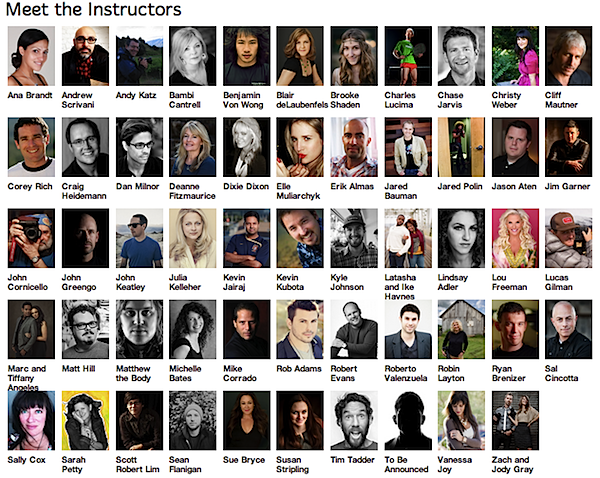
The quality of trainers and training will be amazing – I hardly know where to begin with the lineup they’ve got. Here’s a quick screen shot of the instructors!

photo-week.png

The best thing about Photo Week is it is all shown on the CreativeLIVE site for free throughout the week.

You can pay to get recordings if you can’t make all of the sessions you want to see or would like to play them back over and over again – but if there’s just a few sessions you want you can tune in when they are on and grab them completely for free.

See the full 6 day schedule and RSVP for Photoweek here.

Post originally from: Digital Photography Tips.

Check out our more Photography Tips at Photography Tips for Beginners, Portrait Photography Tips and Wedding Photography Tips.

Get 6 Days of Online Photography Training For Free This Week at Photo Week


Digital Photography School

 
Comments Off on Get 6 Days of Online Photography Training For Free This Week at Photo Week

Posted in Photography


Google+ Releases Advanced New Photo Editing Tools

12 Sep

All At Once Her Heart Opened Up

Today Google+ released a whole new enhanced online photo editing suite of tools. I’ve been playing around with them for the past few hours and am impressed with what you can do with them as an online editor. While they won’t replace my more traditional desktop tools (i.e. Lightroom, Photoshop, Nik, FX Photo Studio Pro, etc.), I think a lot of more casual users will love them.

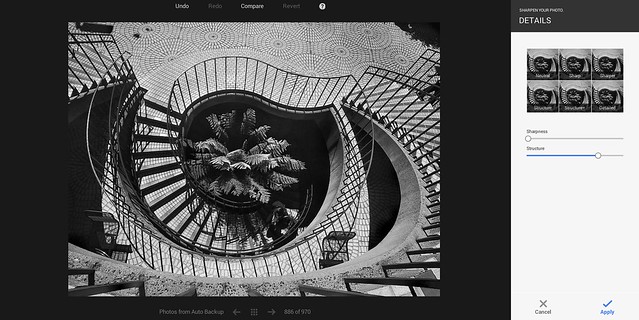
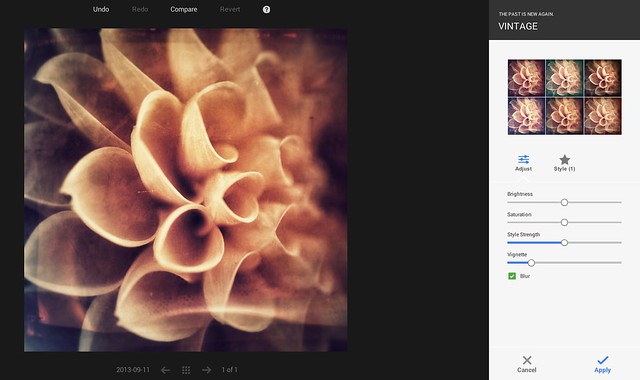
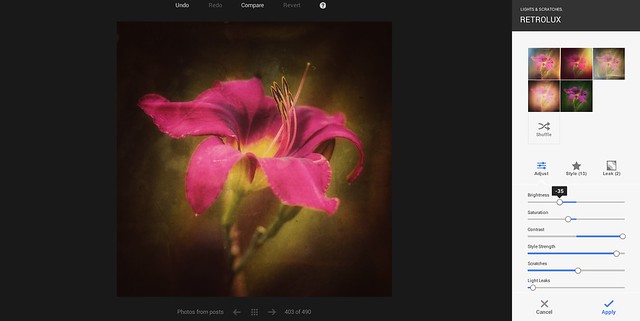
The online editor does a lot of the basics of editing (contrast, brightness, shadows, cropping, sharpening, structure etc.), but it also comes with some pretty slick vintage and what they call retrolux editing. These new tools allow you to customize your photos in a lot of the more popular faux photo styles currently hip with the Instagram crowd. While G+ offers some quick filters, they also give you more granular control over how much of each sort of effect you want.

The new editor also includes spot editing tools, which allow you to adjust only parts of a photo that need it and some interesting spot focusing tools, including tilt shift editing.

I edited the photo at the top of this post using the new G+ tools. It’s great to see Google continue to invest and innovate in the online photo sharing space. Below are some screen shots of some of the tools in action.

You can find more information about the new tools here and in the embedded post at the bottom of this post.

Google+ New Retrolux Editing

Google+ Structure and Sharpening Editing

Google+ Vintage Filters

Google+ Cropping Tools


Thomas Hawk Digital Connection

 
Comments Off on Google+ Releases Advanced New Photo Editing Tools

Posted in Photography


Photo project documents rivers of the interior U.S.

11 Sep

RICH0006.jpg

Jeff Rich’s photo project started at the French Broad river outside of Asheville, North Carolina. Since then, ‘Watershed Project’ has taken him to the Tennessee River and now the Mississippi in an effort to document and raise awareness of the safekeeping of these rivers. To create some boundaries for the project, he’s limited the scope to capturing the stewardship, pollution and control of the rivers. Click through and check out some of his images.

News: Digital Photography Review (dpreview.com)

 
Comments Off on Photo project documents rivers of the interior U.S.

Posted in Uncategorized