RSS
 

Posts Tagged ‘Photo’

The Impossible Instant Photo LabTurns Pixels Into Polaroids

25 Oct

Extra photos for bloggers: 1, 2, 3

Congrats! You’ve got a golden ticket.

If you manage to be good and live through this tour, you’ll be the proud owner of your very own Candy Factory Photo Lab!

The Impossible Instant Photo Lab takes any photo from your phone and turns is into a real live physical polaroid.

This portable lab uses the traditional photo chemistry inside of Impossible Project Polariod film to make you a beautiful analog print.

Pull up any photo on your phone, edit it to your liking, then print!

Combine the thrill of instant prints with the camera you always have on you. We’d take that over a chocolate river any day (and we love chocolate).

Check Out The Impossible Instant Photo Lab
$ 299 at the Photojojo Store

 Tweet it!      Share

Related posts:

  1. How To Make Photo Transparencies with Impossible Project Instant Film! Extra photos for bloggers: 1, 2, 3, 4 If you…
  2. How to Turn Instant Photos into Dreamy Image Transfers with Impossible Project Film Extra photos for bloggers: 1, 2, 3 It was just…
  3. Two New Impossible Project Instant Films! PX 600 Silver Shade & PX 70 Color Shade Harvest moons, nippy weather, technicolor leaves. *Sigh* This is what…


Photojojo

 
Comments Off on The Impossible Instant Photo LabTurns Pixels Into Polaroids

Posted in Equipment


Apple Aperture 3.5 adds iCloud Photo Sharing, SmugMug support

23 Oct

shared:Aperture.png

While not the major update that many users had been hoping for, Apple did sneak in an update to its Aperture software amongst yesterday’s iPad madness. New features include iCloud Photo Sharing, integration with SmugMug, and support for iOS 7 camera filters. In addition, Aperture 3.5 now uses Apple Maps for its ‘Places’ feature (we’re not sure if that’s a good thing), and numerous bugs were squashed. Follow the link for the full change log.

News: Digital Photography Review (dpreview.com)

 
Comments Off on Apple Aperture 3.5 adds iCloud Photo Sharing, SmugMug support

Posted in Uncategorized


Olympus UK teases new ‘premium compact’ in photo competition launch

23 Oct

olycompact.jpg

Olympus UK has teamed up with exhibtr.com to launch a completion for student photographers, and in the process teased an upcoming ‘premium compact’ as one of the prizes. The Student Photography Competition 2013/14 has a theme of ‘People & Portraits’, and the overall winner will receive an OM-D E-M5 12-50mm lens kit, while two runners-up will receive the soon-to-be-announced camera. UK-based photographers will be able to get an ‘exclusive preview’ of the new model at London’s Covent Garden from November 2nd to 9th. Click through for more details. 

News: Digital Photography Review (dpreview.com)

 
Comments Off on Olympus UK teases new ‘premium compact’ in photo competition launch

Posted in Uncategorized


Nokia to offer Raw photo support for Lumia 1020 and 1520 smartphones

22 Oct

raw.jpg

In addition to announcing a trio of new mobile devices today, Nokia is also making headlines by offering Raw photo support for one of those Lumia models, the new 1520 ‘phablet.’ The oversized smartphone will have the option to save uncompressed Digital Negative (DNG) files. The feature will also come to the 41MP Lumia 1020 early next year. Learn more about the new devices and new Raw support on connect.dpreview.com.

News: Digital Photography Review (dpreview.com)

 
Comments Off on Nokia to offer Raw photo support for Lumia 1020 and 1520 smartphones

Posted in Uncategorized


Stellar Photo Projects Showcase: Alexandre Bordereau’s “Oh, My Head!”

21 Oct

All photographers, with no exceptions, have their own photo projects that show the personal layer of their being, bring some new ideas to life and provide attitude to particular things. However, a huge number of such projects went unnoticed by an audience. Thus, here on Photodoto, we decided to launch a series of articles that is aimed to showcase little-known, Continue Reading

The post Stellar Photo Projects Showcase: Alexandre Bordereau’s “Oh, My Head!” appeared first on Photodoto.


Photodoto

 
Comments Off on Stellar Photo Projects Showcase: Alexandre Bordereau’s “Oh, My Head!”

Posted in Photography


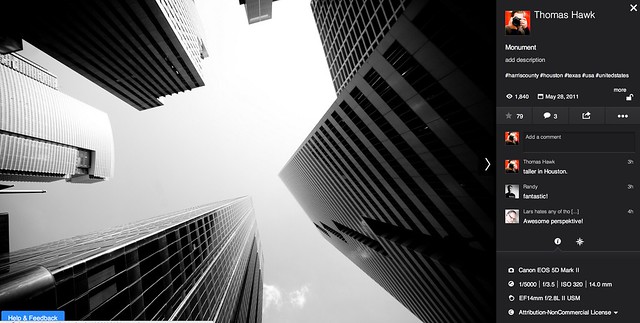
Flickr Rolls Out New Photo Preview Page to All Users

16 Oct

Flickr Opens Up New Photo Preview Page to Users

Yesterday Flickr opened up their new photo page preview to the world. I opted in to the new photo page this morning and here are my initial thoughts on it. Overall I like it.

1. Photos are bigger. The bigger the photo the better. Flickr eliminated top menu items on the page. They also eliminated the hint area to encourage people to scroll below the fold. By moving the top and bottom non-photo information to the side of the photo, this allows bigger photos.

2. You no longer have to scroll to see a lot of the important information around a photo. Having a lot of the information that people care about to the side of the photo, makes it easier to get to this information. You know, sort of like how Google+ does it. ;)

3. I’ve got mixed feelings on the new hashtags. I do like the fact that Flickr has added #tags to all Flickr tags… I think. This is the new methodology for tags in social media (i.e. Twitter, Instagram, Facebook, Google+ and everybody else in the world), so it would make sense that people would be more familiar with this concept, especially new users.

On the other hand, hashtags don’t really work very well for multi word tags and descriptions (the space between words gets stripped out). So “Saved by the Deleteme Uncensored Group” on the old Flickr photo page now becomes #savedbythedeletemeuncensoredgroup, which looks like a big mess. A lot of Flickr users would tag phrases and thoughts in the tag section of their photos and these are now pretty much unreadable.

Also Flickr now hides a lot of tags underneath a “more” button. This to me would seem to discourage users from using lots of descriptive tags, which I think are important for organizational and search reasons on Flickr. I don’t think any tags should be hidden under a “more” button. All tags should be shown on the photo page.

Groups and others who relied on multi word tags for photo games, may not like the new tagging structure.

4. A lot of the full functionality of the new photo page is being developed. This new photo page is by no means the final product. I think it’s good that Flickr lets people opt in and opt back out, to try it out. It’s a little bit of perpetual beta in a way and I like that Flickr is willing to put itself out there without having everything at 100%. Move fast and break things (as they say over at Facebook).

5. The new Flickr photo page is an under-developed preview, this means that there are quite a few things that still need to be done (some of which are planned and in the works by Flickr).

We need to be able to generate html code to blog images off site still (it’s coming). We need to be able to see all sizes of our photos and download our photos (it’s coming). We need to be able to click on favorites and see who has favorited an image. We need to be able to click on a date an image was taken and have it take us to the calendar archive view for that day of our photos. You can’t edit a comment on a photo after you make it (you can only delete your comment and start over). HTML formated links seem to be borked in photo descriptions.

Lots of little things still need to be added in to the photo page. It’s missing a lot of functionality still. The design looks good though and I hope they implement all these little things quickly.

6. My favorite thing about the new photo page is that it really highlights your sets. Sets are one of my favorite things on Flickr. I’ve made over 1,800 sets on Flickr. With the new photo page, Flickr now shows other thumbnails of photos from the same set and not just a link to the set. I think this will drive more views to people’s sets on Flickr, which is a great thing. [Note: this seemed to be working earlier today, but now it seems like this feature is not showing on my photos]

7. According to Neil Howard, the new Flickr photo page doesn’t support secure SSL browsing. SSL is the “https://” that makes a connection encrypted which is used by a lot of people.

8. I do like the new feedback forum that Flickr is also pushing with this preview. It has a way to vote answers up or down. This seems like an interesting way for staff to pay attention to the things that need to be fixed the most. The forum is already full of the “who moved my cheese” cheeshead bellyaching that comes with every Flickr change, but there is some useful criticism and feedback there that seems to bubble up to the top at the same time.

One other thing worth noting with these new bigger photos. A lot of photographers have told me over the years that they only load small, low res images on social media sites like Flickr. They think that these smaller photos are “good enough” and fret about having their larger images “stolen.”

I’ve always uploaded my full high res originals to the Flickr. As display sizes keep getting bigger and bigger, some of the people who have uploaded low res, small photos are going to see their photos begin to look bad in the larger size formats. On the other hand, those of us who always upload high res photos, our photos will still look good at these larger sizes. Especially as more and more photos are being consumed on things like the Flickr app on AppleTV, people ARE actually looking at your photos in much larger format than what you may have initially considered. Everything with photos on today’s web is going BIGGER — just something to think about.

It is pretty cool that Flickr gives everyone a full terabyte of high res original sized images for free — which means virtually unlimited free storage for your high res photos on Flickr. Google and Facebook should do that too.

These are my initial thoughts. Now I’m actually going to revert back to the old photo page (so that I can get the html code to blog the image in this post) and then revert back to the new page and keep testing it out.

What do you think of the new Flickr Photo Page? Do you like it? Love it? Hate it? And why?

More from The Verge here.


Thomas Hawk Digital Connection

 
Comments Off on Flickr Rolls Out New Photo Preview Page to All Users

Posted in Photography


DIY: Fringed Photo Cupcake Toppers

14 Oct
Extra photos for bloggers: 1, 2, 3

There is only one thing better than a cupcake with sprinkles… a cupcake with sprinkles AND a personalized cupcake topper. That’s a fact.

Yes friends, store bought toppers are like, so 2001.

We’ll show you how you can turn your photos into fun fringed cupcake toppers.

Dig out the scissors, print out some photos, frost and sprinkle your cupcakes, and let’s get fringing!

Learn How to Make Fringed Photo Cupcake Toppers

WHY IT’S COOL

The great thing is that you can really go anywhere with this.

It’s your party and you’ll put your face on all the cupcakes? Grab those selfies and go for it, if you want to.

In the mood for summer? Beach photos!

Oh, how about the thousands of sunset snaps you are hoarding on your phone? You know what to do…

Ingredients:

  • Photos sized about 1” tall x 1.5” wide (printed double sided if possible)
  • Scissors
  • Skinny double sided tape
  • Toothpicks
  • Cupcakes, frosted and sprinkled

STEP 1: Tape

before

Stick a strip of double sided tape neatly along the bottom edge on the back of your photo.

STEP 2: Cut

before

Cut even, thin strips from the top of the photo to just before the edge of the double sided tape.

Continue cutting until the entire photo is fringed.

STEP 3: Get Ready to Roll

before

Remove the protective layer from the double sided tape and place the top of a toothpick at the edge of the photo.

STEP 4: And we’re Rollin’

before

Roll photo around the toothpick tightly and evenly until you get to the other end.

Press firmly at the edge so that there are no flappy bits, and the end is stuck down smoothly.

STEP 4: Zhoozh

before

Carefully fluff the fringe to create volume, until your topper looks ready to party.

STEP 5: Voila

before

Stick one or more toppers into a frosted cupcake and watch your friends exclaim their love for you.

Taking It Further

  • Roll multiple photos onto a toothpick (or even a satay stick) to create mega layered toppers.
  • Make your toppers shine by using a metallic paper at the back instead of double siding your photos
  • Use different parts of the same photos to make a set of toppers that all work together

Related posts:

  1. Photo Cupcakes: Have your face and eat it too! Just when you thought cakes and cupcakes couldn’t get any…
  2. Photos That Pop Out of the Page, Literally! DIY Photo Pop-Outs in 20 Minutes Got a photo you just adore and want a unique…
  3. DIY Jewel Case Frames: Wonderful Wall Art Faster than you can say Polar Bears! Come clean. Most of your walls are as bare as…


Photojojo

 
Comments Off on DIY: Fringed Photo Cupcake Toppers

Posted in Equipment


7 Tips for Helping Women Love having their Photo Taken by You

14 Oct

When I look at a picture of myself, I can point out a million things I hate: my hair is always flat, I hate the ptosis in my left eye, I hate the shape of my brow bone, I have a bad complexion. And I’m a photographer! How can I expect women in front of my camera to feel any different than I do when I have to endure having my photo taken? I know that some men hate having their photo taken, too, and many of them probably aren’t as easy to admit that they hate their complexion or the shape of their brow bone, but I’m sure they think these things.

As in any situation, we photographers just need to start by asking ourselves…what would we want? How would we want a photographer to treat us? It’s a pretty simple, solution, really…to behave in line with the golden rule.

Women usually aren’t afraid to offer criticism about themselves. In fact, we’re downright professionals at criticizing ourselves. So if a woman truly hates having her photo taken, she usually says so upon making the booking with you. At that point, I would first congratulate her on coming to the point of actually making the booking in the first place. That’s a big step!

I wouldn’t have a questionnaire for her to fill out about the things she hates about herself. And I wouldn’t make promises and I definitely wouldn’t mention the word ‘Photoshop’. The instant you say ‘Photoshop’, I guarantee that 90% of women instantly begin thinking of Madonna, Kim Kardashian…any and every celebrity who looks NOTHING in real person like they do in magazines. And they may expect/require you to edit every last hair on their head, freckle on their body, roll of fat on their hips. And before you know it, you’ve aged 10 years infront of your computer editing one session.

Instead, this is how I would proceed:

  • Upon the first conversation and placing the booking, just assure her that having photographs taken by a professional is different and if she’s never done it before, she will probably love it in the end.
  • Simply ask: “what do you hate about it?” This will probably lead on to things she hates about herself. But don’t let her dwell on it too long. Ask what she loves about herself. Make notes about all this and keep them to yourself.
  • When you start shooting,  she might behave or seem awkward and uncomfortable. If so, talk to her as you’re shooting. Ask if she feels a certain side is her ‘good side’. Get her laughing. Tell her she looks great. But don’t patronize her. I mean…I know my left eye is droopy from Ptosis. If someone said it wasn’t, that would make me more uncomfortable.
  • When I edit, I will subtly smooth and ‘suck in’ bumps and bulges. I won’t eradicate them all together because that wouldn’t be natural. But I just do a little work that she won’t even notice and I’ve never had a woman as to get her muffin top put back the way it was! Of course, I understand that this is a controversial topic and doesn’t work for everyone.

Some tips on photographing women:

  • For goodness sake. Please PLEASE be responsible with low shots. I very rarely see a photo of a woman taken from down low (looking up) that doesn’t make her look totally unattractive. This isn’t a good angle no matter the size or shape of who you’re photographing. Friends don’t let friends get photographed this way so beware that a loving friend may tackle you at any point should you choose to proceed with a low shot.
  • On the opposite side of the spectrum. shooting from above (or even a slightly down-angeled POV) can be very flattering for a lady, particularly a fuller figured one. But also beware that this is the calling card of a large lady – this trick has become so well known. Don’t overdo it or you’ll be kind of highlighting the fact that she’s larger rather than minimizing it.
  • Learn from the red carpet – those poses aren’t accidental. Celebrities have training for how to handle the red carpet photographers. Learn their tricks so you can guide your subjects through poses that will highlight their lovely long legs or help minimize their post-partum baby bulge. And you don’t have to tell them what you’re doing because naturally, that will make them feel self conscious.

One hour with a sensitive professional can change a woman’s view of herself forever.

Post originally from: Digital Photography Tips.

Check out our more Photography Tips at Photography Tips for Beginners, Portrait Photography Tips and Wedding Photography Tips.

7 Tips for Helping Women Love having their Photo Taken by You

The post 7 Tips for Helping Women Love having their Photo Taken by You by Elizabeth Halford appeared first on Digital Photography School.


Digital Photography School

 
Comments Off on 7 Tips for Helping Women Love having their Photo Taken by You

Posted in Photography


5 new must-have photo editing apps

13 Oct

TS520x0~cms_posts-7576049294-Screen_Shot_2013-10-02_at_4.33.02_PM.png

Apps come and go, but every once in a while, a newcomer will jump on the scene and make you shake up your mobile photography routine. Over the past few weeks, a number of photo editing apps have emerged on every mobile platform and a few have the potential to change our mobile photography workflow. Click through for our list of five new must-have photo editing apps.

News: Digital Photography Review (dpreview.com)

 
Comments Off on 5 new must-have photo editing apps

Posted in Uncategorized


Photo Magnetism: Super Simple Photo Magnets

04 Oct

Extra photos for bloggers: 1, 2, 3

Simple is the name of the game with these photo magnets.

Using only a few ingredients you can turn small photos into awesome pieces of refrigerator art.

They are fun to make, easy on the brain and cute as all get out. Once you make the first one you’ll want to start an assembly line of relaxation. A very productive assembly line of relaxation.

Simple, short and sweet. Score!

Make Super Simple Photo Magnets

Why It’s Cool

Sometimes it’s nice to have a project to do that doesn’t take much set up or clean up… AND that makes a super cute finished product!

These photo magnets fit the easy bill and dazzle like special little gems showcasing your memories.

Ingredients:

  • Photos
  • Scissors
  • A Quarter
  • A Pen
  • Glue that will adhere to glass and metal (we used “Liquid Fusion”)
  • Small circular magnets (.75 inch in size)
  • Clear glass circles – they look like large squished down marbles and are usually labelled “decorative fillers” at the craft store

STEP 1: Ring Around the George Washington

before

Use a quarter to trace a circle around the part of your photo that you want to turn into a magnet.


STEP 2: Cut a circle

before

Cut out the circle you just traced.

Make sure you cut off the pen marks because those will be magnified if ya don’t get rid of them.

STEP 3: A light layer of glue

before

Place glue on the flat side of a glass circle.

Get a nice thin even layer on the entire back of the circle. A little goes a long way.

STEP 4: Make it permanent

before

Place your circular photo face down in the glue.

Hold the image down in the glue for 30 seconds to make sure the photo doesn’t drift around.

STEP 5: Glue the magnet

before

Place a light layer of glue on one side of the magnet.

Adhere the magnet to the back of the the photo you just glued down.

Let the glue dry for a couple of hours, and you’re all set (cuz so is the glue)!

Taking It Further

  • Place a set of the photo magnets in a mint tin for a sweet and simple little photo gift.
  • Words and phrases look cool under the glass circles…take photos of text you’d like to have magnified up on your fridge.
  • Cut all of your circles from the same photo. When they’re on the fridge they’ll be a tiny photo puzzle.

Related posts:

  1. DIY Speech Bubble Photo Fridge Magnets Sticking your photos under refrigerator magnets is old hat. Making…
  2. The DIY CanFrame: Transform a Tin Can into a Simple Photo Frame in 15 Minutes Beautiful! Simple! Cylindrical! All the qualities you look for in…
  3. Magnetic Photo Rope: The Perfectly Simple Photo Frame That Isn’t a Photo Frame We’ll admit it: when we first saw this thing, we…


Photojojo

 
Comments Off on Photo Magnetism: Super Simple Photo Magnets

Posted in Equipment