RSS
 

Posts Tagged ‘Photo’

Google offering Nik Collection photo editing applications for free

25 Mar

Starting immediately, Google’s Nik Collection of desktop image editing plug-ins is being offered free of charge. Nik’s Analog Efex Pro, Color Efex Pro, Silver Efex Pro, Viveza, HDR Efex Pro, Sharpener Pro and Dfine apps are all available as a free download from Google, a substantial savings over the previous $ 150 price.

Nik’s applications put a focus on ease of use and accessibility, compatible with Photoshop, Lightroom and Aperture. The company was purchased by Google in 2012, and prior to that each program cost around $ 100 for a total of up to $ 500 for the software suite. Google opted to offer the whole bundle for $ 150, and made it available for all of its supported applications via a single installer. 

To download the collection without dropping a dime, head to Google’s Nik Collection site.


System requirements:

Mac:

  • Mac® OS X 10.7.5 through 10.10
  • Adobe Photoshop CS4 (CS5 for HDR Efex Pro 2) through CC 2015
  • Adobe Photoshop Elements 9 through 13 (apart from HDR Efex Pro 2, which is not compatible with Photoshop Elements)
  • Adobe Photoshop Lightroom 3 through 6/CC
  • Apple® Aperture® 3.1 or later

Windows:

  • Windows Vista®, Windows 7, Windows 8
  • Adobe Photoshop CS4 through CC 2015
  • Adobe Photoshop Elements 9 through 13 (apart from HDR Efex Pro 2, which is not compatible with Photoshop Elements)
  • Adobe Photoshop Lightroom 3 through 6/CC

GPU Compatibility:

NVIDIA GeForce 8 Series, GeForce 9 Series, GeForce 100 Series, GeForce 200 Series, GeForce 300 Series, GeForce 400 Series, GeForce 500 Series, ATI Radeon HD2000 Series, Radeon HD3000 Series, Radeon HD4000 Series, Radeon HD5000 Series, Radeon HD6000 Series.

If no compatible card is available, GPU acceleration will be disabled and the CPU will be used.

Articles: Digital Photography Review (dpreview.com)

 
Comments Off on Google offering Nik Collection photo editing applications for free

Posted in Uncategorized


Panasonic Lumix GH4 firmware 2.5 brings Post Focus and 4K Photo Mode

16 Mar

Panasonic has announced a firmware update for the Lumix DMC-GH4, bringing Post Focus, 4K Photo Mode and burst shooting with flash to the video-centric mirrorless camera. The update will be available at the end of March, free of charge. 

Post Focus was first announced in July of last year. It captures a short clip of 4K footage while racking focus from one end to the other, allowing the user to select a frame in playback mode after capture with the desired focus point. The Lumix GX8, G7 and FZ300 were the first in line to get the feature via firmware update.

Also taking advantage of the GH4’s video capabilities is the newly added 4K Photo feature, which enables 4K burst, 4K Burst (Start/Stop) and 4K pre-burst. These modes optimize 4K shooting for still photo extraction, and aim to help photographers catch hard-to-get moments, like the elusive group shot with all eyes open. Firmware 2.5 also enables consecutive shooting with compatible Panasonic external flash units.

In the past, Panasonic has used Photokina to launch its DSLR-style mirrorless cameras, so it would make sense if we see an update to the GH-series come September. However, a significant firmware update in the meantime indicates that it’s still alive and kicking.

Check Panasonic’s support website at the end of March to download the update.


Press release:

DMC-GH4 Firmware Update Version 2.5

Newark, NJ (March 16, 2016) – Panasonic has today announced the new firmware update Version 2.5 for the DMC-GH4 to further enhance its performance at no charge. The new firmware Version 2.5 includes following functional updates:

-Post Focus
Post Focus is a special function that enables users to select an in-focus point after shooting. It has already been integrated in new LUMIX cameras such as the GX8. With this function, users can enjoy changing the perspective for greater photographic expression or to choose the best in-focus shot for macro shooting.

-4K PHOTO (4K Burst / 4K Burst (Start/Stop) / 4K Pre-burst)
With 4K PHOTO mode there are three dedicated modes – 4K Burst / 4K Burst (Start/Stop) / 4K Pre-burst – are all now available on LUMIX GH4*. The addition of these modes further enhances the usability of 4K PHOTO to capture fleeting photo opportunities at 30p. 

-External Flash Burst
Consecutive shooting with flash burst is available with an external flash that is capable of continuous emission.  This includes the following Panasonic models: DMW-FL580L, DMW-FL360L, DMW-FL500, DMW-FL360 and DMW-FL220.

The new DMC-GH4 firmware Version 2.5 is scheduled to be released at the end of March 2016 at the LUMIX Customer Support website: http://panasonic.jp/support/global/cs/dsc/

Articles: Digital Photography Review (dpreview.com)

 
Comments Off on Panasonic Lumix GH4 firmware 2.5 brings Post Focus and 4K Photo Mode

Posted in Uncategorized


Affinity Photo coming to Windows

16 Mar

$ (document).ready(function() { SampleGalleryV2({“containerId”:”embeddedSampleGallery_2763137514″,”galleryId”:”2763137514″,”isEmbeddedWidget”:true,”standalone”:false,”selectedImageIndex”:0,”startInCommentsView”:false,”isMobile”:false}) });

Serif has announced its Affinity apps, previously available only to Mac users, will soon be available for Windows. Affinity Photo is an image editing program, first introduced in February 2015. It’s considerably cheaper than Photoshop, but promises robust performance and many tools that will be familiar to those used to Adobe’s programs.

Affinity Photo will debut as a free public beta early this summer, according to Serif. The company promises feature parity with its Mac version, and will offer it for the same one-time price of $ 50/£40. Windows users interested in becoming beta testers can sign up now at Serif’s website.


 Press release:

Affinity applications are coming to Windows

NOTTINGHAM, UK – March 15, 2015 – Serif is delighted to announce that it will be bringing its highly regarded, multi award-winning Affinity creative apps to Windows.

The Affinity apps—which currently include Affinity Designer and Affinity Photo—have enjoyed tremendous success over the last 12 months with both apps regularly charting in the top 10 of the Mac App Store and gaining 1,000s of 5 star reviews from users. They have also received some serious recognition from Apple themselves having won a Design Award in July, and Affinity Photo being chosen as their best app of 2015 in December last year.

But the fact they have only been available on Mac has caused frustration for PC users, and the company has been inundated with requests to produce Windows versions.

“Pretty much any article, blog or social post about our Affinity apps now seems to attract a rush of comments from users asking why we don’t make them available on Windows. Well, I’m really excited to finally reveal we are working on it and the development team are making incredibly rapid progress.” said Ashley Hewson, Serif’s Managing Director. “We already have an early build of Affinity Designer running on our PCs in the office here, and we will be making it available as a free public beta early in the summer”.

Affinity apps for Windows will have exactly the same feature set as the Mac apps that have set the creative world alight, as well as sharing the same single file format that has become a core feature of the Affinity suite. Coming to Windows makes the Affinity range ideal for inter-agency collaborations, cross-platform creative workflows, and for a huge number of design studios, photographers and freelancers who have a PC based set-up.

As well as feature parity, Serif also promises to match the business model of the Mac versions with a purchase price of $ 49.99 / €49.99 / £39.99 with no subscription.

You can sign up for the free beta of Affinity for Windows here: affinity.serif.com/windows.

Articles: Digital Photography Review (dpreview.com)

 
Comments Off on Affinity Photo coming to Windows

Posted in Uncategorized


Tips to Help You Start a Successful Photo Blog

29 Feb

As you learn more about using your camera, and start taking beautiful pictures, you might also want a way to share them with the rest of the world. There are many social networking platforms that are ideal for this sort of thing like: Instagram, Flickr, Google Photos, Tumblr, and Facebook, along with hundreds more.

However, one of the most popular, and effective ways, to share your pictures is a simple, humble, tried-and-true blog. Even though blogs are sort of like grandpas in our modern internet age, there’s a reason they have stuck around for more than two decades: they’re intuitive, easy to set up, and they allow you to have full control over your content. Many photographers enjoy using blogs because of their flexibility and customizability, and if you want to spent a bit of money for a dedicated blog platform like Squarespace, or a self-hosted WordPress installation, you can get even more creative.

If you are thinking about pursuing this route there there are some things you need to consider before setting up your own photo blog.

There are many sites that let you build photo blogs, several of which do it for free.

There are many sites that let you build photo blogs, several of which are free.

Know why you are doing a blog

This first point seems kind of obvious, but a lot of photographers find their blogs stalling out, and gathering dust after a few months, because they did not define their purpose for doing the blog when they first began. Many people start blogs because they just want to share random pictures, but if you want a viable long-term blogging solution, you’re going to need something more.

Are you starting a photo blog to get your name out there, and generate sales leads (potential customers)? Do you want to make a mark in your community? Do you want to simply post photos you think are interesting? Whatever your reason for doing a photo blog, it’s important to make sure you at least have one, in the first place. If you have never done a photo blog, then it’s likely you are doing it for personal reasons, such as trying to learn and grow as a photographer. That is an outstanding goal, and one that has helped many other bloggers, become much better at photography as well.

Once you know precisely why you are doing your blog, it will serve as a guide for everything you post. Brandon Stanton started the well-known Humans of New York blog with a specific purpose: to photograph 10,000 people living in New York City. This helped him have a sense of purpose and direction when taking and posting photos, and doing the same thing can greatly benefit you as well. If you cannot explicitly state why you are doing a blog, it is much more likely to gather virtual dust after a short time, and any readers you do manage to pick up, will possibly stop investing their time in it as well.
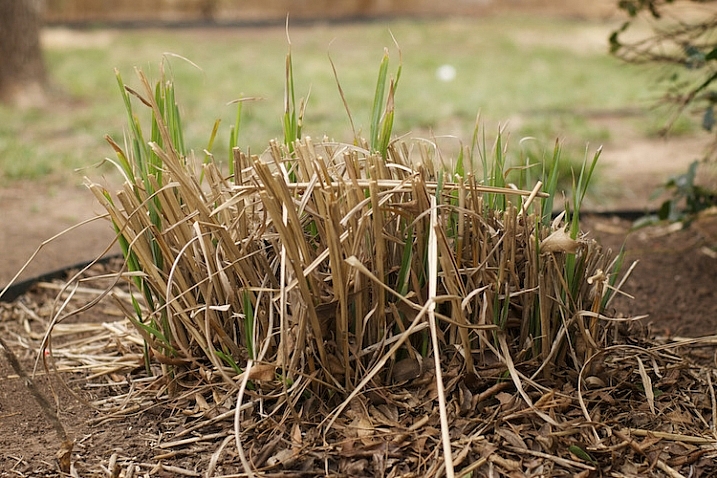
One of the first pictures I ever posted to my blog. It's not even an interesting photo but I was just starting out and can look back on this to see how much I have learned since then.

One of the first pictures I ever posted to my blog. It’s not even an interesting photo, but I was just starting out, and can look back on this to see how much I have learned since then.

In 2008 the web analytics firm Technorati found that roughly 95% of the blogs it tracked, went more than 120 days without being updated. When your blog goes four months without anything new, it is more than likely a failure. So how can you keep your blog not only surviving, but thriving past 120 days, and well beyond? Here are few more tips that might help:

Clearly articulate the purpose of your photo blog to your viewers

Attention spans are short, and people today have a never-ending stream of tweets, news clips, soundbites, app updates, and cat videos coming their way, almost every waking moment. So,how on earth can you make your blog stand out, and get noticed amid all the other sites, apps, and feeds that people check on a daily basis?

New readers should be able to tell within five seconds, what your blog is about. The best option is to have a specific niche that your photo blog serves (e.g. wildlife, surfers, snowflakes, street pictures, etc.). But, even if it’s just pictures you like taking for no particular reason, you should at least make that clear to your readers upfront. You’re basically setting expectations right from the outset, and giving your audience a clear sense of what they will get out of reading your photo blog. Some people do this by having a descriptive name for their blogs, a brief tagline, or a set of pictures that instantly conveys a sense of purpose (e.g. flowers, cattle, cars, sunsets, etc.). Whatever the purpose of your photo blog is, if your readers can’t figure it out, they’re going to quickly move elsewhere.

My blog is specifically for photos I take with my 50mm lens, and I make that clear to my readers immediately when they visit the site. If you don't let your readers know what your blog is about they will probably not stick around very long.

My blog is specifically for photos I take with my 50mm lens, and I make that clear to my readers immediately when they visit the site. If you don’t let your readers know what your blog is about, they will probably not stick around very long.

Post new content regularly

Not every blog that is updated regularly is going to be a success, but every successful blog is updated regularly. I have seen too many photographers start blogs that are updated daily, then weekly, and before long, the rate at which new pictures are posted slows to a trickle. Soon it’s a photo every couple weeks, then one a month, and then a written apology by the blogger about how he or she has just been so busy lately, but they promise to start posting more photos soon. More often than not, soon becomes later, then later becomes never, and a once-promising photo blog becomes another statistic of failure rates.

The best way to combat this problem, is to not post pictures whenever you feel like it, but instead post them on a regular and predictable basis. This gives your readers something to expect, and also imparts upon you, the blogger, a sense of accountability, which helps keep your camera in your hands and out of your closet. My photo blog is titled “Weekly Fifty”, and because it requires me to post a picture every single week, I almost always carry my camera with me, and am constantly looking for photo opportunities. In almost three years I have never failed to post a photo each Wednesday morning, which has helped me build a nice following, with regular commenters as well.

A few years ago I ran out of ideas for pictures to post, but I knew I had to stick with my weekly schedule so I made this image that turned out to be one of my more popular photos.

A few years ago I ran out of ideas for pictures to post, but I knew I had to stick with my weekly schedule. So, I made this image, that turned out to be one of my more popular photos.

One trick I like to recommend for photo bloggers, is to schedule your posts in advance. This doesn’t work well for blogs about news or current events, but as a photo bloggers you do not have to be timely in the same manner. I currently have complete posts (each with a photo, written explanatory text, and an accompanying 4-minute audio commentary) scheduled for the next six weeks. I use WordPress, which allows me to schedule posts in advance, so each of these six posts will be automatically published on subsequent Wednesdays at 1:00 a.m. This gives me a bit of padding, if I ever find myself in a position with lots of things going on in my life, and my readers know that they will get a new picture each week, no matter what.

Of course the catch here, is that I can’t merely sit on my laurels in the meantime. I have to keep taking pictures, and producing new blog posts, so that six weeks from now I don’t run out of material. This type of accountability is enormously helpful for photo bloggers, and if you’re not sure where to start, I always recommend doing one picture each week. If that’s too much you can lower it, and if it’s not often enough you can increase it, but I have found that a weekly schedule is a sweet spot that gives you enough time to take pictures, and doesn’t overload your readers with so much new content that they start ignoring it.

Engage with your audience

Building a loyal audience is the holy grail of almost every blogger, but it’s not easy to do. Your readers have many obligations, alerts, people demanding their time, and often it’s difficult enough just to get them to visit your blog in the first place, much less comment on a photo, or offer some kind of reaction to it. Early in the life of your blog, visitors will usually not be invested in your pictures enough to leave comments. But, as you start to build traffic, and readership over time, you will likely have a few people who start to offer feedback on your images.

When you do get commenters it’s essential that you interact with them, in order to build a sense of community, respect, and mutual sharing. If someone likes one of your pictures, say “Thank you” and ask if you can see some of their photos too. If someone offers a bit of constructive criticism on a picture, try re-taking a similar photo using their suggestions. You can offer a Call to Action by posting a photo, and encouraging your readers to take, and share similar photos in the comments section. This type of audience engagement benefits all parties; by giving you even more reasons to continue your blog, giving your readers a reason to keep coming back, and giving new readers a sense that your photos are interesting and worthy of comments.
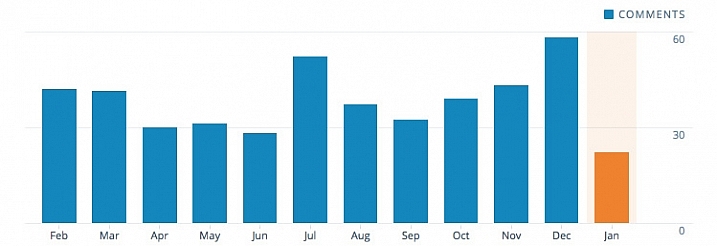
I ran my blog for almost a year and a half before getting any regular commenters. Now I get about 40 comments each month, a number with which I am very happy.

This chart shows my comment statistics for calendar year 2015. I ran my blog for almost a year and a half before getting any regular commenters, and now I get about 40 comments each month. It’s not huge, but it’s a number with which I am very happy.

If your blog grows to mammoth proportions, and you start getting hundreds of comments on each picture, it might not be reasonable to reply to every single one, but until that happens you need to take care to give each commenter a personal response. If people are taking time out of their day to leave comments on your pictures, knowing that you personally read and responded, will make them want to keep visiting your blog, and engaging with you as well as other readers.

On my blog I have a few loyal readers who comment on every single picture, and it’s well worth a few minutes of my time each week to respond to the things they write. This helps make my commenters feel valued, and builds a sense of community that would not exist otherwise.

Push content to your readers

People rarely go out of their way to visit a blog, so instead you need to find a way to push your new pictures to them. One of the most effective ways of doing this is to ask your readers to sign up for email updates, but you can also use social networks to get the word out about each new post.

Every Wednesday my email subscribers get that week’s photo in their email inbox, but I also publish a link to my blog on Facebook and Twitter, and put that week’s image in my Instagram feed as well. (With the last option people are not directed to my blog, but I still get to engage with them about my pictures.) If you would like to ultimately generate revenue from your blog you might want to focus on ways of pushing content to your readers that, as often as possible, will bring them directly to your site and not to somewhere else that also has your photos.
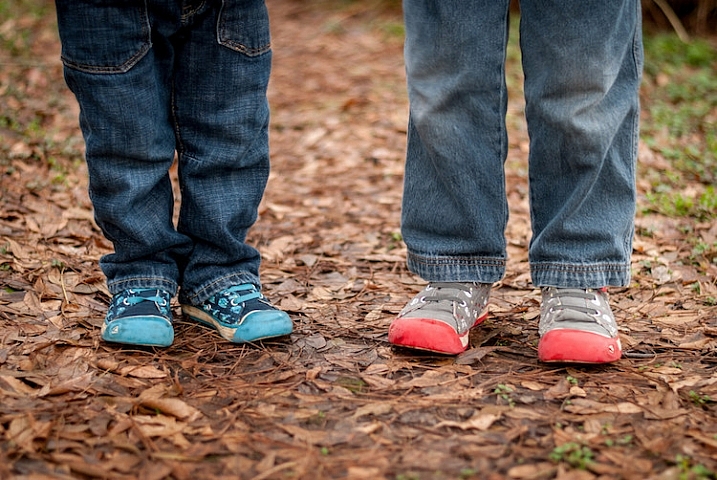
I woke up the morning this photo was published and found two comments had already been posted at about 2am. This type of engagement is possible because these people subscribed to email updates. If you don't have a way of pushing content to your readers you will likely not get the same level of engagement as you would otherwise.

I woke up the morning this photo was published and found two comments had already been posted at about 2am. This type of engagement is possible because these people subscribed to email updates. If you don’t have a way of pushing content to your readers you will likely not get the same level of engagement as you would otherwise.

Define your success criteria

I teach a Project Management class at Oklahoma State University. One concept we talk about often is how to tell if a project is successful, and the same holds true for your photo blog. At what point will you know that your blog has succeeded in meeting your goals? Will you be happy if you have two comments, and 10 social media shares for each picture you post? Are you looking for a way to generate a specific amount of revenue from your blog? Or is your success criteria more esoteric, such as using your blog for a sense of personal growth and development?

Having a set of clearly-defined success criteria is not necessarily essential for a blog, but it will give you something to shoot for, and a way of knowing whether you have gotten there or not. Whatever your success criteria is, take care to not compare it to anyone else’s. For example one of your photos might get five comments and 10 social media shares, but then you talk to a friend who just had five thousand visitors to his blog. Whose blog is more successful? The answer is…they both are.

Success depends entirely on how you define it, and thankfully the internet is big enough for millions of photo blogs to coexist. Congratulate your friend, and ask to see the photo that was so popular. Don’t make your blog’s success a competition, because and as long as you are happy with how things are going, then that’s the only thing that matters.
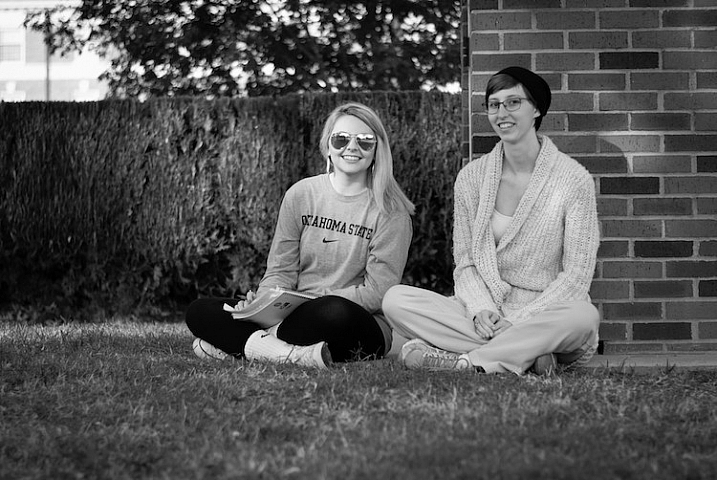
This photo had a great deal of personal meaning to me, but it generated very little traffic and almost no comments. If my success criteria is only quantifiable through numbers I would have been let down, but instead taking this photo forced me out of my comfort zone and made me try something new. Because of that I considered this one of my better photos even though raw numbers might say otherwise.

This photo had a great deal of personal meaning to me, but it generated very little traffic, and almost no comments. If my success criteria was only quantifiable through numbers I would have been let down, but instead the sheer act of taking this photo, forced me out of my comfort zone, and made me try something new. Because of that I considered this one of my better images, even though raw numbers might say otherwise.

Ignore the numbers

Visitor statistics can be so exciting, but they can also lead you down the path to the blogging dark side. It can be fun to log in to your account dashboard, and see that a recent picture generated 200 visitors, but those numbers don’t mean anything, if they don’t translate to reader engagement. Imagine building a store and getting hundreds of people to come see your wares, but having every one of them leave without making a purchase. Not only would your store be a failure, but you would quite likely be disappointed on a deeply personal level.

As a photo blogger you need to strive for quality over quantity, and look for ways to build a loyal following, not just try to increase raw visitor statistics. You might get a nice feeling seeing one of your photos get hundreds or thousands of views, but what happens when a different (or far better) picture you post gets only a couple dozen views? Visitor traffic is a fickle mistress, and if you pin your blogging hopes and dreams on simply making the numbers go up, you could very well be setting yourself up for a painful failure.
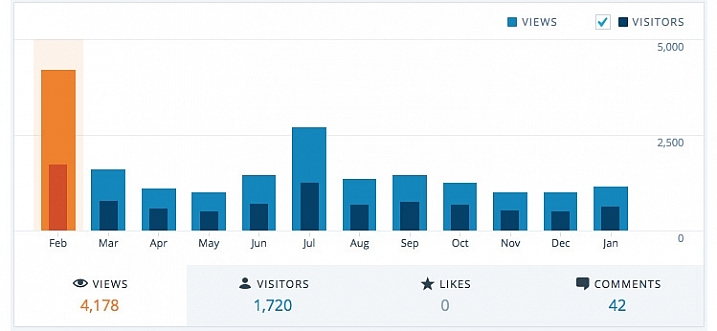
February 2015 was a big month for my blog, but the numbers have gone down dramatically ever since. Since my success criteria is not measured in raw numbers this drop in traffic makes no difference to me, but if numbers are your goal then you could very well end up chasing a white whale that can never be captured.

February 2015 was a big month for my blog, but the numbers have gone down dramatically ever since. Since my success criteria is not measured in raw numbers this drop in traffic makes no difference to me, but if numbers are your goal then you could very well end up chasing a white whale that can never be captured.

I used to run a movie and TV review website, and wrote an article about the now-defunct show, “Man versus Food” on The Travel Channel. Somehow the host of the show found out about the article, tweeted it to his followers, and that single article generated more traffic than anything else we had ever posted. The problem was that those visitors did not stick around, and within a few weeks we were back to the same relatively low numbers we always had. At the time I figured blogging success meant getting sky-high traffic numbers, and when those numbers did not pan out I thought we had failed.

When I started my Weekly Fifty photo blog, I took an entirely different route and tried hard to ignore numbers about visitor statistics, and have been much happier as a result. I do my blog because it helps me learn and grow as a photographer, and I get a great deal of personal satisfaction out of it. I appreciate the continual challenge it offers. In short, I’m a happy and successful small-time photo blogger, because I don’t let numbers and statistics define what success means to me.

This is by far the worst photo I have ever posted on my blog, and it's almost painful to look at it now. But early on in my blog I had no idea what I was doing, and it was only through taking lots of bad pictures that I learned how to make a good image. Even though this picture is kind of embarrassing, it served a valuable purpose both on my blog and for me as a photographer.

This is by far the worst photo I have ever posted on my blog and it’s almost painful to look at it now. But early on in my blog, I had no idea what I was doing, and it was only through taking lots of bad pictures that I learned how to make a good image. Though this picture is kind of embarrassing, it served a valuable purpose both on my blog, and for me as a photographer.

Do you have a photo blog, or are you thinking about starting one? I’d love to hear any tips you would like to share, and will try to answer any questions you might have as well. Leave your thoughts in the comments section below and I’ll do my best to engage with you, the dPS readers, so you feel valued and keep coming back to our site. :)

googletag.cmd.push(function() {
tablet_slots.push( googletag.defineSlot( “/1005424/_dPSv4_tab-all-article-bottom_(300×250)”, [300, 250], “pb-ad-78623” ).addService( googletag.pubads() ) ); } );

googletag.cmd.push(function() {
mobile_slots.push( googletag.defineSlot( “/1005424/_dPSv4_mob-all-article-bottom_(300×250)”, [300, 250], “pb-ad-78158” ).addService( googletag.pubads() ) ); } );

The post Tips to Help You Start a Successful Photo Blog by Simon Ringsmuth appeared first on Digital Photography School.


Digital Photography School

 
Comments Off on Tips to Help You Start a Successful Photo Blog

Posted in Photography


How to Choose the Best Black and White Photo Printer

23 Feb

In the digital age, color accompanies most of the images we come across during our daily lives. So when it’s intentionally missing, as is the case with artistic black and white photography, people take notice. Monochrome photography is popular in the fine arts for a variety of reasons, many of which come down to how it emphasizes different aesthetic components Continue Reading

The post How to Choose the Best Black and White Photo Printer appeared first on Photodoto.


Photodoto

 
Comments Off on How to Choose the Best Black and White Photo Printer

Posted in Photography


Monument is an intelligent personal photo storage device

20 Feb

Cloud photo storage services are abundant, but not all photographers are willing to pay the monthly fees associated with large storage amounts. Monument, a project currently seeking crowdfunding, aims to bring the organization and syncing features found in cloud services like Google Photos to a photography-centric storage device that you keep in your own home. Read more

Articles: Digital Photography Review (dpreview.com)

 
Comments Off on Monument is an intelligent personal photo storage device

Posted in Uncategorized


World Press Photo of the Year 2015 awarded for moonlight migrant portrait

19 Feb

$ (document).ready(function() { SampleGalleryV2({“containerId”:”embeddedSampleGallery_4257680311″,”galleryId”:”4257680311″,”isEmbeddedWidget”:true,”standalone”:false,”selectedImageIndex”:0,”startInCommentsView”:false,”isMobile”:false}) });

Australian photographer Warren Richardson has won the 2015 World Press Photo of the Year. Richardson’s winning photo, taken on the night of August 28, 2015 at the Hungarian-Serbian border, shows a baby being passed through a barbed wire fence by a refugee.

Speaking about his photo, Richardson explained:

I camped with the refugees for five days on the border. A group of about 200 people arrived, and they moved under the trees along the fence line. They sent women and children, then fathers and elderly men first. I must have been with this crew for about five hours and we played cat and mouse with the police the whole night. I was exhausted by the time I took the picture. It was around three o’clock in the morning and you can’t use a flash while the police are trying to find these people, because I would just give them away. So I had to use the moonlight alone.

According to World Press Photo Foundation, the latest contest received 82,951 images from 5,775 photographers across 128 countries. A total of 41 photographers from 21 countries were awarded prizes across eight categories – see a few above (click for full captions) and a full gallery at World Press Photo’s website.

Via: World Press Photo

Articles: Digital Photography Review (dpreview.com)

 
Comments Off on World Press Photo of the Year 2015 awarded for moonlight migrant portrait

Posted in Uncategorized


Photo Editing Workflow for Travel Photography

09 Feb

Get Viktor’s Lightroom Rapid Editing System for Travel Photography Course 50% off now at SnapnDeals for a limited time only – February 9th-23rd, 2016.

A few years ago, just as I returned with 5,000 brand new photos from a driving trip to California, Utah and Nevada, I realized that I needed a completely new editing workflow. Two months later, I was not even close to being done with editing.

Photo Editing Workflow for Travel Photography Image 01

I spent the following year or so testing different approaches and systems, with the main goal to streamline, simplify, and speed up the entire process – from the moment the picture is taken, until it is published and safely backed up to the cloud.

After implementing my new workflow, using it for over a year and tweaking it along the way, I can now process and edit thousands of photos in a matter of hours. I would love to share my new workflow with you.

On the Road

The biggest change in my editing workflow happened when I practically stopped editing photos while traveling. Instead, I concentrated only on shooting, rather than wasting time on anything else.

Photo Editing Workflow for Travel Photography Image 02

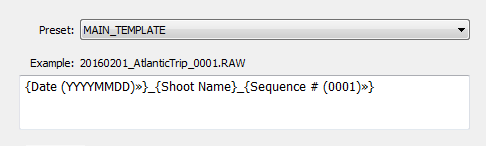
By the end of each day on the road, I import all new photos to a temporary Lightroom catalog, and during the import, I select the option to generate Smart Previews. This allows me to have access to all my photos through Lightroom Mobile on my tablet. I also rename all the images using my renaming template.

Photo Editing Workflow for Travel Photography Image 03

After renaming, my photos then have the following naming structure:

  • 20160201_AtlanticTrip_0001.RAW
  • 20160201_AtlanticTrip_0002.RAW
  • 20160201_AtlanticTrip_0003.RAW

During initial import, I also apply top level tagging based on the location, or type of photos. For example, I might apply very generic tags like “Canada” and “New Brunswick.”

But, even before I import the photos to Lightroom and generate the Smart Previews, I always have another option to access my images. Since switching to mirrorless, I can now connect to my camera using my tablet or smartphone at any time, grab a few images for a quick edit in Snapseed, and post them to social media. As I mentioned before, my editing workflow is minimal on the road.

At Home

The real processing work starts as soon I am home. Sometimes, however, it can start even sooner. If it is a long flight home, I might cull some photos on the plane using Lightroom Mobile, with the main purpose simply to refresh my memories of the trip and make notes.

Import

At home, I connect my master travel external hard drive to my desktop computer, and use the Lightroom option “Import from Another Catalog.” I then bring all the new photos to my main catalog and generate full-size previews for all of them. Because it typically takes a while to import thousands of RAW files and generate full-size previews, I often start the process before going to bed, so that when I wake up in the morning everything is ready.

Culling

Culling is the process of selecting the best photos for editing, and rejecting the bad ones. For a long time, I struggled with this step, as it was always time consuming, and quite often I would get distracted with an interesting image and start editing before finishing my selection.

Lightroom has multiple organizational features for culling that can, to be honest, be overwhelming at times. Features include: Flagging, Starring, Color Tagging, Collections, Smart Collections, Quick Collection. In the past, I tried to use all of them to design an elaborate system that was impossible to sustain for very long. Each time I failed with one system, I would come up with an even more complex scheme. Eventually, I recognized that it was time to simplify the process.

The inspiration for my new culling strategy was from the book, The ONE Thing, by Gary Keller. It states that in order to be 100% efficient you should concentrate on only one thing at a time. In other words, multitasking is evil. Inspired by the book, my process soon changed. My first goal, after importing new photos to Lightroom, is now to remove all the bad shots, the ones that can never be used (out of focus photos, for example). I quickly go through all my photos and use the keyboard shortcut “X” to flag all rejected shots. The process goes very fast even if I have thousands of photos because I concentrate on only one task.

After I finish marking the photos, I immediately delete the rejected files so they do not go to my backup system.
The next step is my favorite. I go through the photos again, and with the help of the keyboard shortcut “P” (P is for PICKED), I flag all the photos that have the potential to be processed and published (keepers). Once again, I only concentrate on a single task as I am not trying to grade picked photos or set star value. This approach allows me to identify the keepers at an incredible and efficient speed.

The next step is to make the keepers pretty.

Rapid Editing

The development of a new Lightroom editing approach was triggered by the realization that 80-90% of the edits I perform in Lightroom are identical for every edited image, and only 10-20% contributes to the uniqueness of any given photograph. The rationale was to automate the 80-90% of the editing process to save time on repetitive tasks.

In order to automate the editing, I created a two-level preset based system, one that I call Lightroom Rapid Editing. Lightroom Rapid Editing allows me to overcome the limitation of the presets, such as when any given preset produces a very different result depending on the level of exposure, lighting conditions, shadows and the dynamic range of the scene. With this two-level approach, I am able to compensate for various lighting conditions without touching the main Lightroom editing tool.

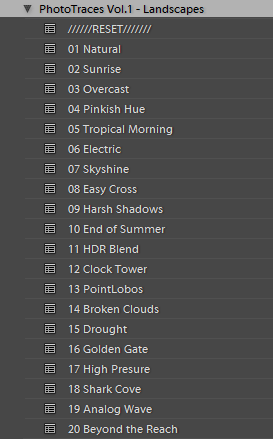
Level 1 – Style Presets. The presets that define the “LOOK” and style of the photograph. For example: cool or warm, cross processed or natural, contrasted or soft.

Photo Editing Workflow for Travel Photography Image 04

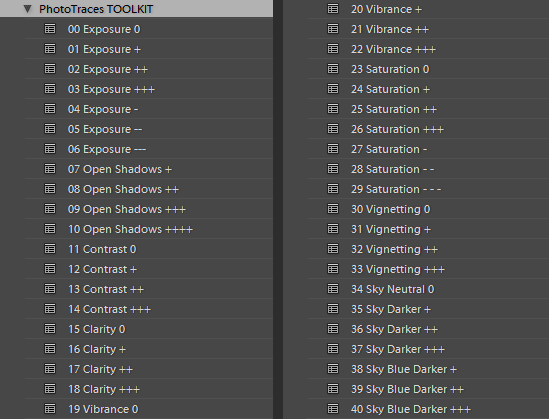
Level 2 – Adjustment Presets. The presets that allow fine-tuning of a photo without altering the style, and without the use of Lightroom editing tools. I named them the TOOLKIT.

Photo Editing Workflow for Travel Photography Image 05

Here is a real life scenario

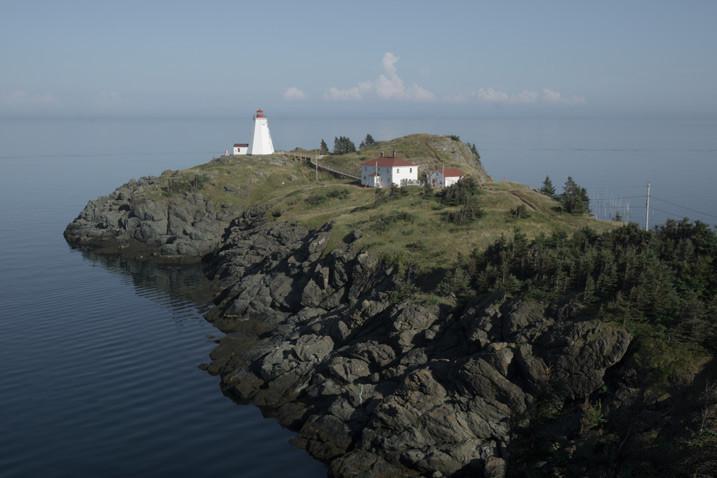
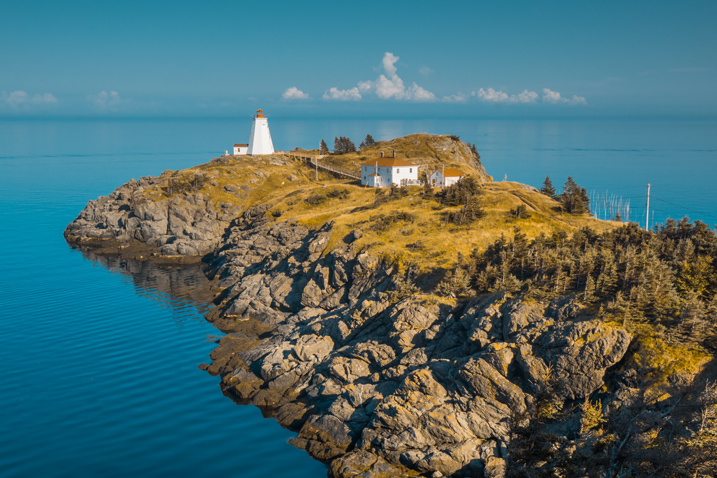
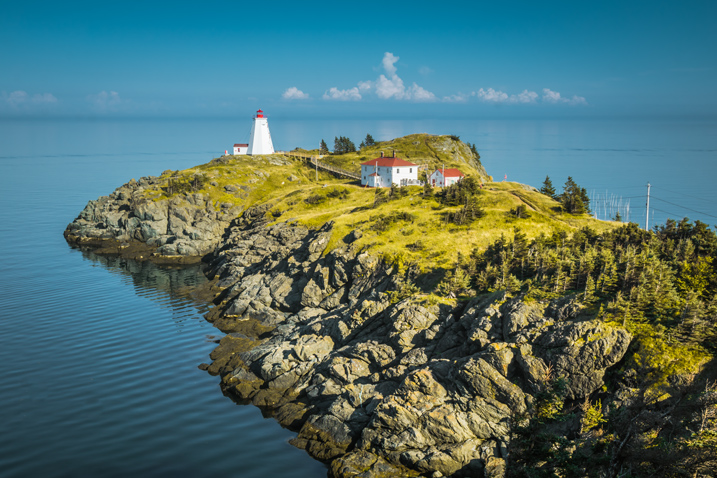
When I returned from a driving trip to Atlantic Canada, I brought back over a thousand new photos. After selecting around 10 keepers, I wanted to edit them using a similar style, and then publish them as the Atlantic Series on my travel photography blog. I started with my favorite photo from the selection.

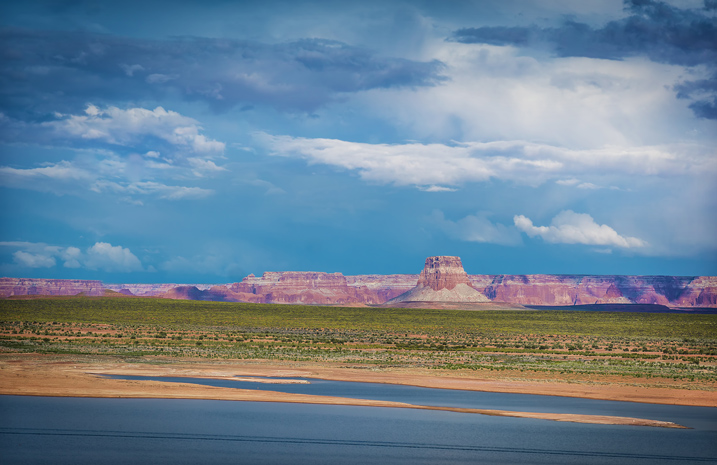
Photo Editing Workflow for Travel Photography Image 06

I began with Level 1 of Rapid Editing by applying the NATURAL style preset to the selected image (above).

Photo Editing Workflow for Travel Photography Image 07
Natural style preset applied.

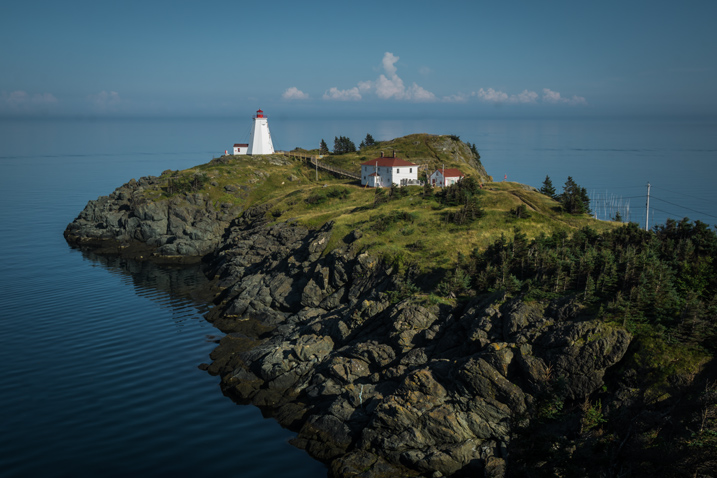
Even though I liked the style, the image did not look good at all, because it was too dark, with deep shadows in the background. This is when the second level of editing came into play.

From the TOOLKIT adjustment presets collection, I applied the following presets:

  • 01.Exposure +
  • 09.Open Shadow +++
  • 16.Clarity +
  • 20. Vibrance ++

Below is the final result. It took me five clicks to go from the original unprocessed RAW image to the final edit.

Photo Editing Workflow for Travel Photography Image 08

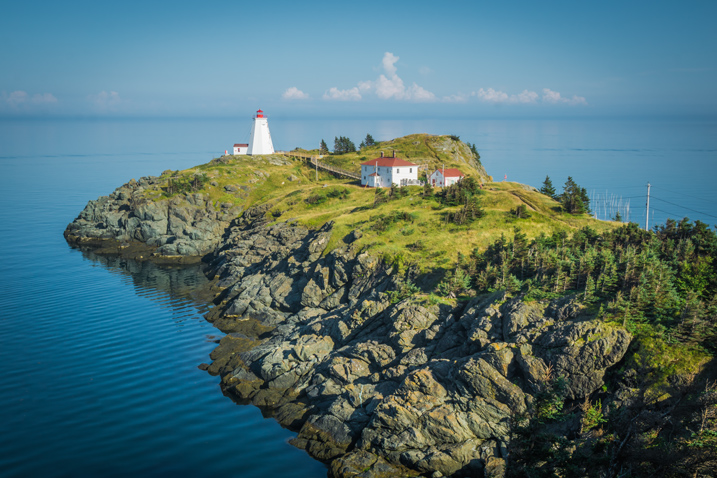
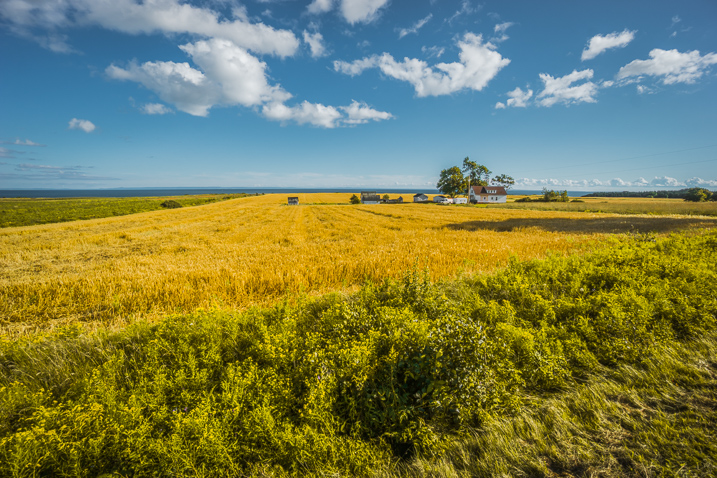
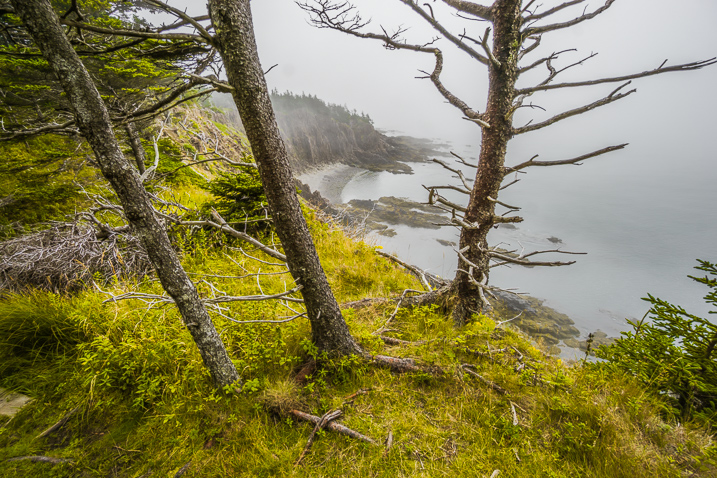
The next step was to come up with a more creative style for this particular photograph. I used the two-level Lightroom Rapid Editing process to produce three more creative versions.

Photo Editing Workflow for Travel Photography Image 09
Preset: Broken Clouds

Photo Editing Workflow for Travel Photography Image 10
Preset: Drought

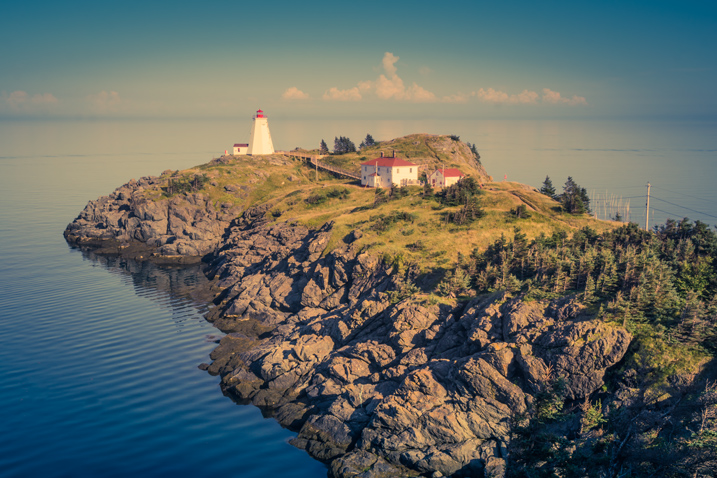
Photo Editing Workflow for Travel Photography Image 11
Preset: Point Lobos

During the next step, I selected the edited version I liked the best. In this particular case, I chose the image with the Point Lobos preset effect. I then used the SYNC SETTINGS functionality of Lightroom, to synchronize the editing settings with the rest of the flagged photos (the other nine keepers).

In the last step, I went through the photos one more time, using only the TOOLKIT, and focused on each photo individually. At this stage, I mostly adjusted the Exposure and Open Shadow to compensate for different lighting conditions and exposure imperfections (underexposure and overexposure). This process typically does not take long – an average of 10-15 seconds per photo.

Photo Editing Workflow for Travel Photography Image 12

Photo Editing Workflow for Travel Photography Image 13

Photo Editing Workflow for Travel Photography Image 14

Photo Editing Workflow for Travel Photography Image 15

Photo Editing Workflow for Travel Photography Image 16

Photo Editing Workflow for Travel Photography Image 17

Photo Editing Workflow for Travel Photography Image 18

Photo Editing Workflow for Travel Photography Image 19

Photo Editing Workflow for Travel Photography Image 20

At this point, I was finished with Rapid Editing. I managed to complete 80-90% of the editing process without touching any of the Lightroom editing tools. As you can see, Lightroom Rapid Editing allows me to process a high volume of photos in a relatively short amount of time, while also giving the photos a similar look and feel, that makes the set distinguished and unique.

After this two-level editing process, it was then time to perform the last 10-20% of editing that cannot be automated.
Depending on the image, I might open it in Photoshop for selective editing. In most cases, I clean the images by removing distracting elements from the composition (electric wires, debris). Another option I often use is Lightroom Adjustment Brushes for selective editing.

Publishing

The very last step of my workflow is publishing. I use the plugin functionality of Lightroom to synchronize my newly created photos with my cloud portfolio on SmugMug. With SmugMug cloud service, I have access to all my photos at full resolution, and 100% quality anytime and anywhere.

One of my favorite features of SmugMug is the ability to create custom sized images on the fly by manually changing an image URL, without using any editing tools.

Conclusion

What I learned after designing my photo editing workflow is that there is no perfect solution for travel photography that fits every photographer. Any system we put in place is in a constant state of fluctuation, and all we can do is keep adjusting it based on the type of photography and our individual habits and routines.

Do you have a workflow you’d like to share with us? Please do so in the comments section below.


If you found this helpful, get Viktor’s Lightroom Rapid Editing System for Travel Photography Course 50% off now at SnapnDeals for a limited time only – February 9th-23rd, 2016.

googletag.cmd.push(function() {
tablet_slots.push( googletag.defineSlot( “/1005424/_dPSv4_tab-all-article-bottom_(300×250)”, [300, 250], “pb-ad-78623” ).addService( googletag.pubads() ) ); } );

googletag.cmd.push(function() {
mobile_slots.push( googletag.defineSlot( “/1005424/_dPSv4_mob-all-article-bottom_(300×250)”, [300, 250], “pb-ad-78158” ).addService( googletag.pubads() ) ); } );

The post Photo Editing Workflow for Travel Photography by Viktor Elizarov appeared first on Digital Photography School.


Digital Photography School

 
Comments Off on Photo Editing Workflow for Travel Photography

Posted in Photography


Find Love Through Your Lens: 3 Ideas for a Valentine Photo Shoot

09 Feb

Editor’s note: Valentine’s Day is a good opportunity for aspiring portrait photographers to practice love story and romantic / family photo shoots. Below you can find three practical tips and ideas for a Valentine photo shoot from our regular writer, a portrait photographer, Barbara Stitzer. *** Ahhh, Love. It can be giddy, maddening, complacent, jealous, warm and gooey, and downright Continue Reading

The post Find Love Through Your Lens: 3 Ideas for a Valentine Photo Shoot appeared first on Photodoto.


Photodoto

 
Comments Off on Find Love Through Your Lens: 3 Ideas for a Valentine Photo Shoot

Posted in Photography


Nikon apologizes for awarding prize to digitally altered photo

03 Feb

Last week, Nikon Singapore chose an image submitted by photographer Chay Yu Wei as the winner of a ‘casual photo contest.’ Critics quickly pointed out that the airplane featured in the image had been digitally inserted, given away by the highly visible white square around the plane’s silhouette. Nikon and Yu Wei have both issued apologies over the submission, with Nikon saying it will bolster its image reviewing process ‘to avoid similar situations in the future.’

Nikon, which has since deleted the original Facebook post awarding the photograph, posted a status update on Saturday that reads:

We have heard your comments and feedback on this, and you are right – we should not compromise standards even for a casual photo contest. We have dialogued internally, with the community and with our loyal fans, and Yu Wei has also posted his own views on this issue. We have made an honest mistake and the rousing response from the community today is a reminder to us that the true spirit of photography is very much alive. Moving forward, we will tighten our image review process to avoid similar situations in the future. Thank you once again for all your responses today – for your humour and most of all, your candour and honesty. We hope not to disappoint you in the future and to continue to have your support.

Most sincerely, your Nikon team

Yu Wei posted his own lengthy apology on his Instagram account, saying in part:

Like one user commented, I was on a photo walk in Chinatown and I chanced upon that set of ladders. I snapped a picture of it, and subsequently felt that a plane at that spot would make for an interesting point of view. Hence, I inserted the plane with PicsArt and uploaded it to Instagram. That’s how I use Instagram, sometime it’s to showcase the work I’m proud of, sometimes just to have fun. This case, that small plane was just for fun and it was not meant to bluff anyone. I would have done it with photoshop if I really meant to lie about it, but no, it was a playful edit using the PicsArt app and uploaded to Instagram. When my friends commented with some questions, I also answered it jokingly, saying it’s the last flight of the day and saying it was my lucky day that I did not wait too long. At that time, of course everyone who read it took it as a joke, before this issue arrived and it is taken seriously.

However, I made a mistake by not keeping it to Instagram as a casual social media platform. I crossed the line by submitting the photo for a competition. I meant it as a joke and I’m really sorry to Nikon for disrespecting the competition. It is a mistake and I shouldn’t have done that. I also shouldn’t have jokingly answered Nikon that I caught the plane in mid-air and should have just clarified that the plane was edited in using PicsArt. This is my fault and I sincerely apologise to Nikon, to all Nikon Photographers, and to the photography community as general.

While Nikon’s apology seems genuine, we can’t help wondering how such an obviously altered image slipped through. We’re also not quite convinced by Wei’s apology, and DigitalRev points out that the concept for the image may not even be his either. What’s your take on the controversy? Let us know in the comments.

Articles: Digital Photography Review (dpreview.com)

 
Comments Off on Nikon apologizes for awarding prize to digitally altered photo

Posted in Uncategorized