RSS
 

Posts Tagged ‘Photo’

23 Quick Tips for Street Photography or Your Next Photo Walk

26 Jun

The guys over at the Cooperative for Photography (COOPH) have some good quick tips from Thomas Leuthard for you. If you are planning on doing some street photography this summer, joining a photo walk, or even doing travel photography – apply this tips to those genres and have some fun. Let’s see the tips:

My faves are:

  • #2 control your camera remotely: I never even thought of that but will work great with my Fuji X-T1
  • #10 get down low: another thing cameras like the Fuji X-T1 do well with a tilting screen.
  • #13 shoot water as a slow shutter speed: this is starting to sound like an ad for the Fuji X-T1, but I love the fact my camera is weather resistant (WR) and I’ve stood in the rain, and taken a direct hit from an ocean wave and it withstands it and keeps going! Read more on this camera here.
  • #17 shadows make great photos: see How to Use Shadow and Contrast to Create Dramatic Images for more on that

Thomas Leuthard, “Street photography is like fishing, catching the fish is more exciting than eating it.”

Which of those quick tips did you like best?

googletag.cmd.push(function() {
tablet_slots.push( googletag.defineSlot( “/1005424/_dPSv4_tab-all-article-bottom_(300×250)”, [300, 250], “pb-ad-78623” ).addService( googletag.pubads() ) ); } );

googletag.cmd.push(function() {
mobile_slots.push( googletag.defineSlot( “/1005424/_dPSv4_mob-all-article-bottom_(300×250)”, [300, 250], “pb-ad-78158” ).addService( googletag.pubads() ) ); } );

The post 23 Quick Tips for Street Photography or Your Next Photo Walk by Darlene Hildebrandt appeared first on Digital Photography School.


Digital Photography School

 
Comments Off on 23 Quick Tips for Street Photography or Your Next Photo Walk

Posted in Photography


Announcing the Winners of the Tamron Sunshine Photo Contest

20 Jun

The winners of the Tamron Sunshine Photo Contest for a Tamron 28-300mm Di VC PZD lens, a Tamron SP 90mm F/2.8 Di VC USD lens, and a Tamron SP 70-300mm Di VC USD lens are:

A huge thank you to everyone who entered our recent contest to win one of the following lens: a 28-300mm Di VC PZD lens, an SP 90mm F/2.8 Di VC USD lens or an SP 70-300mm Di VC USD lens from our friends at Tamron. This was a sunshine themed competition, and many of you shared your beautiful images, so we encourage everyone to go back and scroll the comments section to view these wonderful photos.

Yet again, the response was absolutely AMAZING with over 285 entries! But now, on to the winners. Drumroll please, and the winners are:

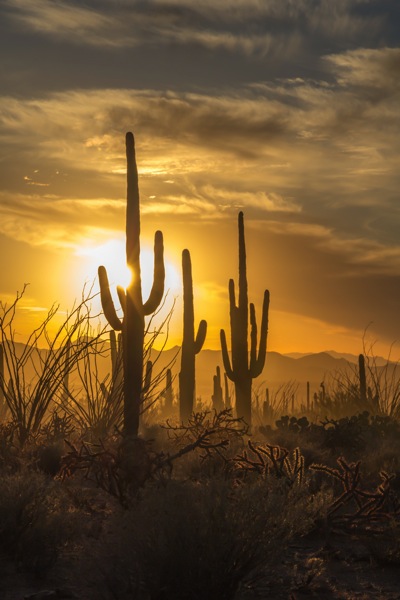
First Prize – a Tamron 28-300mm Di VC PZD: the winner is Graham P.
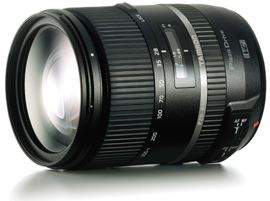
Grand Prize 28300VCPZD

Tamron 28-300mm Di VC PZD (model A010)- $ 849 value (For canon, Nikon or Sony cameras.)

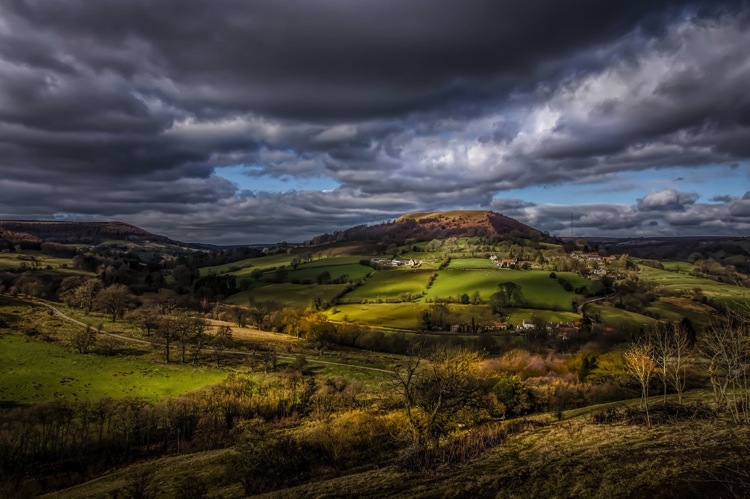
Graham’s winning comment and image:

It would be fantastic to win the Tamron 28 – 300 lens the need for a lighter kit as I am getting older is a must, this lens would not leave the camera and has all the versatility to capture everything from near to far in great detail and of course no more sensor dust from not switching lenses all the time. The image I have entered lookers great with the sun playing across the landscape.

Graham P original

Second Prize – Tamron SP 90mm F/2.8 Di VC USD: the winner is Annee.

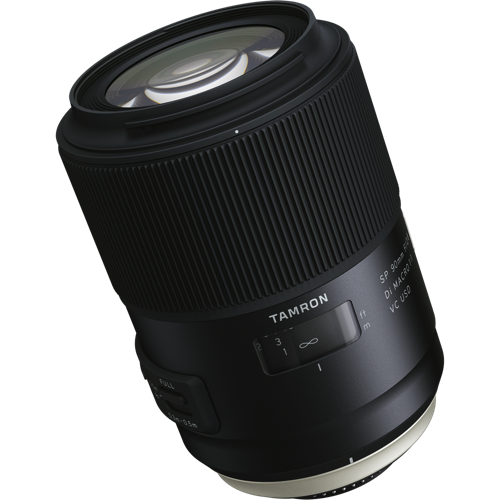
Second Prize SP 90mm

Tamron SP 90mm F/2.8 Di VC USD (model F017-new) – $ 649 value (For canon, Nikon or Sony* cameras. *Sony mount model without VC)

Annee’s winning comment and image:

Wow! The new Tamron SP 90mm is a dream lens! I love bringing out details in wide landscapes but want to explore nature’s beauty at a more intimate level. I like to shoot into the sun and bright backgrounds but chromatic aberration and lens flare are problematic with my current lens. The optical construction of the new Tamron SP 90mm will be a major step forward for my art. I also love shooting from low angles where tripods are impossible. The enhanced VC functionality will help me achieve a steadier shot and the moisture-proof / dust-resistant qualities will be a blessing when I get a little too close to the ground! I’m always amazed at how little breeze is needed to move flowers and delicate objects out-of-focus. The increased focusing speed of the new Tamron SP 90mm combined with its large aperture will help me capture shots at the perfect moment.

I could go on but, in short, this lens looks amazing! I know it will help me to hone my craft AND increase my passion for photography. I can’t wait to start playing with one!

Annee original

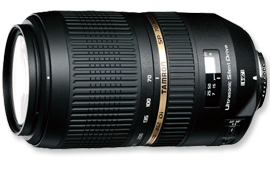
Third Prize – Tamron SP 70-300mm Di VC USD: the winner is Ron S.

Third Prize70300VC

Tamron SP 70-300mm Di VC USD (model A005) – $ 449 value (For canon, Nikon or Sony cameras.)

Ron’s winning comment and image:

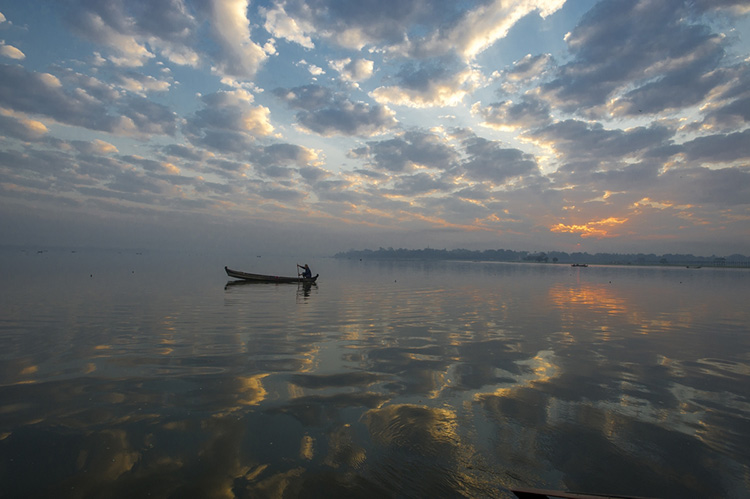
I shot this sunrise from a life guards chair on Delray Beach in Florida. I was there well before sunrise, hoping to catch the sun breaking the horizon over the ocean, but the clouds were there too, blocking the sun. Finally, the clouds broke a bit, allowing the sun to come thru and the Rays to pinball off them, a more dramatic shot for sure than the one I had planned.

I would use the telephoto zoom lens to give me more flexibility and reach with my travel photography and real close ups on the basketball court – I have season tickets for both the men’s and women’s at a local college and love sharing my amateur shots with the coach, players and college community via Instagram and Facebook.

The macro lens would make my wife very happy – she’s an avid gardener but my photos don’t do her magnificent flowers justice. A first class macro lens would certainly help!

I love that these lenses will fit my Sony NEX -6 e-mount, and, when the budget allows, A6000!
Fingers crossed….

Ron S original

We were all thrilled with the entries: you tugged at our heartstrings, made us laugh, made us smile, but most importantly, you made us keep wanting to do more of what we are doing; providing you quality information and guidance to become a better photographer. We were so pleased to see that you came from every part of the world, young adults to grandparents, and everyone in between. Thank you all for your entries!

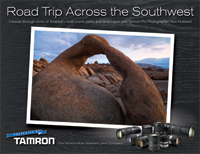
Roadtrip ebook cover

Now, for those of you that didn’t win, Tamron has invited ALL dPS readers download their 2015-2016 eBook Series! You can find those HERE!

The winners will be emailed with details of how to collect their prizes. Please make sure to look for our email. Thank you again for all the wonderful submissions and to Tamron for sponsoring this competition.

Tamron Rebates

For all of you residing in the USA, when you do purchase your next Tamron Lens, make sure to take advantage of the rebates* up to $ 130 through June 30, 2016. Find additional information HERE!

*Current rebate offers end June 30, 2016. US RESIDENTS ONLY.

Tamron logo

About Tamron

Disclaimer: Tamron is a paid partner of dPS.

googletag.cmd.push(function() {
tablet_slots.push( googletag.defineSlot( “/1005424/_dPSv4_tab-all-article-bottom_(300×250)”, [300, 250], “pb-ad-78623” ).addService( googletag.pubads() ) ); } );

googletag.cmd.push(function() {
mobile_slots.push( googletag.defineSlot( “/1005424/_dPSv4_mob-all-article-bottom_(300×250)”, [300, 250], “pb-ad-78158” ).addService( googletag.pubads() ) ); } );

The post Announcing the Winners of the Tamron Sunshine Photo Contest by Darlene Hildebrandt appeared first on Digital Photography School.


Digital Photography School

 
Comments Off on Announcing the Winners of the Tamron Sunshine Photo Contest

Posted in Photography


Avast Photo Space lets you store more photos on your iPhone

18 Jun

Software maker Avast is known by most users for its mobile and desktop anti-virus products, but now the company has launched an app with a totally different use case. Avast Photo Space allows you to increase the number of pictures you can store on your iPhone by up to 7 times. 

It does so by reducing the resolution of the images that are stored on your device down to the resolution of the screen. At the same time, the app connects to your personal cloud service – currently Dropbox or Google Drive are supported –  where it stores the full-size versions. So you can always access the original files when needed, but still have a usable smaller image on your device. 

Avast Photo Space also comes with its own camera app which automatically transfers, optimizes and syncs your images right at the point of capture, for a totally seamless user experience. Given the iPhone does not offer any local storage expansion options the app sounds like a good idea for those users who are constantly on the verge of running out of photo storage space and don’t rely much on image magnification while viewing. Avast Photo Space is now available as a free download from the Apple App Store. 

Articles: Digital Photography Review (dpreview.com)

 
Comments Off on Avast Photo Space lets you store more photos on your iPhone

Posted in Uncategorized


Affinity Photo for iPad early build showcased at Apple’s WWDC 2016

15 Jun

At Apple’s Worldwide Developer’s Conference 2016, software maker Serif demonstrated an early build preview of its Affinity Photo for iPad software. Affinity Photo is a Photoshop alternative currently available for macOS with, as previously announced, a Windows version in the pipeline. This newly demonstrated version of Affinity Photo is designed specifically for the iPad, and brings with it the same features found on the desktop version.

Though the company hasn’t formally detailed all of the iPad version’s functionality, the video does showcase a handful of features and capabilities, including a high level of performance enabling it to handle very high resolution photos, full 32-bit HDR editing, the ability to view and edit panoramas in a 360-degree view, and focus merging.

‘We’ve still got a load of work to do on [the iPad version],’ Serif stated, ‘but we thought you might like a peek.’ An anticipated release date was not provided. The company currently offers a macOS version for $ 49.99, while Windows users can sign up for access to a pending Windows beta release.

Articles: Digital Photography Review (dpreview.com)

 
Comments Off on Affinity Photo for iPad early build showcased at Apple’s WWDC 2016

Posted in Uncategorized


Think Tank Photo launches Helipak backpack for DJI Inspire drone

11 Jun

$ (document).ready(function() { SampleGalleryV2({“containerId”:”embeddedSampleGallery_7764010080″,”galleryId”:”7764010080″,”isEmbeddedWidget”:true,”standalone”:false,”selectedImageIndex”:0,”startInCommentsView”:false,”isMobile”:false}) });

Bag manufacturer Think Tank Photo has announced a new backpack designed for users of the DJI Inspire drone and other quadcopters of a similar size. The Helipak is capable of holding a single DJI Inspire craft as well as its gimbal, three lenses, spare propellers and six batteries, according to Think Tank Photo. There are also compartments for a 17in laptop and a pair of 8in tablets.

The idea of the Helipak is that it makes transporting the drone to ‘scenic’ locations much easier than via a hard flight case as it features shoulder straps that allow the whole thing to be carried on the user’s back. The backpack straps can also be stowed away to make the Helipak into a normal case with top and side handles.

While the case is made with soft materials it uses ‘twinwall’ reinforcement via a pair of ABS plastic shields within the outer construction that add extra rigid protection for the drone. The exterior is made with nylons and polyester that the company says provides a hardwearing and water repellent barrier, while zips are YKK RC Fuse and feature metal ‘hardwear’. In a promotional video Think Tank Photo claims that DJI’s own $ 200 case for the Inspire has poorly made zips that are prone to failing.

The bag is available now and costs $ 339.75. For more information see the Think Tank Photo website.

Press release

Think Tank Photo’s Helipak™ for DJI Inspire Backpack

Offers Superior Organization, Comfort, and Travel Portability

SANTA ROSA, CALIFORNIA –Think Tank Photo has released the most well thought-out, comfortable, and protective backpack for users of DJI Inspire or other similarly sized quadcopters. The Helipak for DJI Inspire easily holds a DJI Inspire (parked with gimbal and rotors detached), Zenmuse gimbal with 3 lenses, 6x batteries, 2x controllers, 2 x 8” tablets, lots of extra propellers, and a 17” laptop and charger.

Movable dividers allow users to customize the fit of their gear in this fully featured backpack. The contoured tuck-away harness with lumbar support, cut-away air-channel, the adjustable sternum strap, and the removable padded waistbelt allow for extreme comfort while trekking into remote areas or simply pulling it from the car.

“The backpack’s ABS twinwall reinforcement provides a rigid shell that protects sensitive gear from impacts, bumps and scrapes,” said Think Tank Photo’s president and
lead designer, Doug Murdoch. “It also features YKK™ RC Fuse zippers, 1680D Ballistic nylon bottom panel, metal hardware, and nylon webbing that are the most durable, longest
lasting materials on the market. The last thing drone users want to worry about is if their backpack will hold up in rigorous outdoor conditions.”

ADDITIONAL KEY FEATURES

  • Large front pocket fits auxiliary items for the day’s outing: light jacket, 17” laptop pocket or a large tablet
  • Lockable zippers
  • Internal see-through mesh pockets for small accessories: propellers, screwdriver, cables, etc.
  • Deluxe organizer for smart phone, wallet, pens, keys, business cards, etc.
  • Water bottle pocket on side
  • Height adjustable sternum strap
  • Elastic pockets on shoulder straps for phone, energy bar, etc.
  • Robust handles on three sides ensure rapid and easy retrieval from airline overhead bins, car trunks, etc.
  • Seam-sealed rain cover helps to protect gear and stows away inside backpack when not in use

MATERIALS
Exterior: For superior water-resistance, all exterior fabric has a durable water-repellant (DWR) coating, plus the underside of the fabric has a polyurethane coating. It also has YKK® RC Fuse (abrasion-resistant) zippers, 1680D ballistic nylon bottom panel, 600D polyester, 420D velocity nylon, 3D air mesh, ultra-stretch pockets, Y-buckles, antique finish metal hardware, nylon webbing, and 3-ply bonded nylon thread.

Interior: 6mm ABS twinwall, removable closed cell foam dividers with PE board reinforcement, 200D polyester, polyurethane-backed 3-layer velex liner, 2x polyurethane coated nylon 210T seam-sealed rain cover, Belly-O mesh pockets, and 3-ply bonded nylon thread.

TECHNICAL SPECIFICATIONS
Exterior Dimensions: 19.3” W x 24” H x 9.4” D (49 × 61 × 24cm)
Interior Dimensions: 17.3” W x 21.7” H x 7.9” D (44 × 55 × 20cm)
Laptop Compartment: 12.6” W x 16.9” H x 1.2” D (32 × 43 × 3cm)
Weight (with all accessories): 8.5 lbs. (3.9 kg)

Articles: Digital Photography Review (dpreview.com)

 
Comments Off on Think Tank Photo launches Helipak backpack for DJI Inspire drone

Posted in Uncategorized


Facebook adds 360 photo viewing to iOS and Android apps

10 Jun

Facebook has rolled out the ability to upload and view 360-degree images on its iOS and Android apps. These images can be taken via a phone’s panorama function or with a 360 capture device, such as the Samsung Gear 360.

Once uploaded, any user can click on the image and move through the scene by moving their phone in space or just scrolling with a finger. Owners of Samsung cameras which support the company’s Gear VR headset can view the 360s by tapping a button in the Facebook app.

The updated version of the Facebook app will be available for iOS and Android tomorrow, June 10th.

Articles: Digital Photography Review (dpreview.com)

 
Comments Off on Facebook adds 360 photo viewing to iOS and Android apps

Posted in Uncategorized


Nine black-and-white photo apps to elevate your monochrome game

05 Jun

Black-and-white photo apps to elevate your monochrome game

Not so long ago, novice photographers began learning their craft with black and white film. While many eventually mixed color into their portfolios, others eschewed hues entirely, opting for the smoothness of subtle monochrome tones.

Then came the digital revolution where all native output was in color by default, and anyone who pined for black-and-white had to figure out how to make it look real. Today, a multitude of black and white shooting, editing and conversion apps offer iOS and Android shooters many monochrome styles — from specific film analogs and grains to authentic borders, tints and vignettes, most with the ability to export and share via social media.

While any stock camera app will happily shoot monochrome images, these apps go further with filter options and interfaces tailored to black-and-white shooting. We ransacked the pile to uncover nine worth downloading.

Black-and-white photo apps to elevate your monochrome game

Dramatic Black & White
$ 1.99 | iOS | Android

JixiPix wasn’t kidding when it made ‘drama’ the central focus of its app and even its name. Whether you shoot with Dramatic Black and White’s built-in camera or pull a color image from your Camera Roll, the app’s highly configurable interface, flexible presets and editing tools set it apart.

Images open in black and white with an adjustable ellipse spotlight that lets you zero in on the subject. From there, you can crop (rectangle or square) or adjust tone, sharpness, brightness or contrast. Individual red, green, and blue filters give images definition, while at the same time you can mix in grain or apply a color tint. Multiple levels of tweaking are possible but it’s also possible to use the app’s extensive one-click presets (Black & White, Dramatic B&W and Infrared) for a hands-off approach.

In addition to its infinite choices, the app’s performance is outstanding — there’s no waiting for a preview to render as as you experiment with different settings.

Black-and-white photo apps to elevate your monochrome game

Lenka

Free | iOS | Android 

Introduced two years ago, Lenka, designed by photographer Kevin Abosch, sparked renewed interest in the mobile genre. Because it’s exclusively a image capture app, you can’t dig up an older photo from your Camera Roll and apply the Lenka treatment; the app forces you to concentrate on tone and contrast from the outset.

Lenka is minimalist and designed to be smart: It operates in full auto exposure mode, but if you want more control, you can tap the subject onscreen or the MF (manual focus) button on the control panel. Its four slider-based buttons for exposure, contrast, tint and focus toggle on and off. You can also summon extra illumination for fill lighting or extreme low light by tapping the light bulb icon for a continuous flood of light. There’s no front facing camera either, so no selfies.

Lenka is fast, easy and fun to use, and its auto setting works well enough to give you some great shots without much effort. 

Black-and-white photo apps to elevate your monochrome game

BlackCam
$ 1.99 | iOS | Android

BlackCam, XnView’s capture and editing app, offers more than two dozen adjustable presets to impart a wide assortment of monochrome looks to your existing pictures – or you can shoot using live preview. Despite the number of adjustments available: Classic, Vintage, Light, Shadow, Dark, High Contrast and more, the app is easy to use. Classic editing tools let you adjust brightness, contrast, exposure, vignette and simulated film grain. Colored lens and professional conversion filters show up on screen. You can easily get by with the free version, which includes a large assortment of filters, but to get rid of distracting ads and unlock additional presets like Hard boiled, Vintage Deep and Platinum, you’ll have to upgrade.

Black-and-white photo apps to elevate your monochrome game

Photolab Black
Free | Android 

Photolab Black, an Android-only photo capture and editor from Sand 5 Apps mixes retro-style black and white analog photo and Polaroid film effects with monochromatic file emulation filters to give new photos an old-time look. If you’re in the mood for grain, vintage, grunge and textures, feel free to go crazy with stylized filters like Ilford, Lomography, Pan F, Provia 100F and more. The app also provides a full set of classic editing tools like color balance, crop, rotate, and straighten or the ability to adjust brightness, contrast, color temperature, saturation, exposure, vignette, sharpen and blur with a swipe. The app is free, but to unlock certain modules like frames, you have to invite a friend on Google Plus or Facebook.

Black-and-white photo apps to elevate your monochrome game

Hueless
$ 1.99 | iOS

Hueless, a popular black and white photo app for iOS, is another capture-only (not editing) app from Curious Satellite. Think of Hueless as a film camera with black-and-white stock and use it when you want to avoid post processing. The main (H) icon lets you choose TIFF or JPEG format and can hide the menu to maximize your concentration on composition: A simple screen tap records the image. If you want to shoot fast without setup, the app lets you record up to four presets. Advanced touches include a live exposure compensation slider, live contrast adjustment slider and adjustable photo filters in blue, green, yellow, orange and red, which give definition to grayscale images. The app’s interface feels natural, though if you commit to using all controls in the moment, it may seem overwhelming. Hueless can save your photos to the Camera Roll or a special Hueless album. 

Black-and-white photo apps to elevate your monochrome game

BLACK
$ 0.99 | iOS 

BLACK puts the focus on retro film emulations. Ten distinctive film looks let you preview via swipe: Experiment with stocks like Tura P400, Paterson Acupan 800, Fujifilm FP-3000B and others. Just browse through each filter to find the one that best suits your image. Familiar tools like Curves, Fade and Vignette are also available. Curves puts tone and contrast at your disposal with a dynamic preview and histogram. Vignette’s slider adjustments let you play with contrast and shadow around the subject. Fade’s filmic effect adjusts for shadows. A full preview is available in Collection mode, as you tilt your iPhone 90 degrees. BLACK is a stylish and elegant monochrome rendition that offers some unique throwback effects. 

Black-and-white photo apps to elevate your monochrome game

Simply B&W
Free | iOS 

Fotosyn’s Simply B&W offers a variety of choices for both shooting and editing. Select from an assortment of familiar films such as T-Max, HP5, Tri-X, XP2, Delta, SFX-IR and Vintage, and you can leave it at that. If you’re into more tweaking, sliders let you control brightness, contrast and grain, while vignettes and frames add a finishing touch. The real treat with this app lies in its selection of filters (Red, Green, Polarizer, IR Filter) that emulate analog filters for black and white photography. A unique pro feature is the app’s integration with Adobe Creative Cloud, which lets you access your account directly from the app and work on your image on your phone.

Black-and-white photo apps to elevate your monochrome game

Ansel
$ 0.99 | iOS 

Not a single photographer – pro or amateur – doesn’t know the name Ansel, practically synonymous with monochrome shooting today. When launched, Ansel even reads the Camera Roll in black and white, where you can immediately preview the conversion of any of your color images. Once a photo is opened in Ansel, the app provides more than a dozen controls to aid in the transition. A minimal number of presets offer a starting point, but it’s just as easy to dive right into the sliders to alter tone, contrast, exposure, shadows and highlights. Add a gradient or vignette while using the Mix filter and choose any color at all as a filter. If you’re unhappy with the result, you can either reset changes or revert to the original photo. While you can use the app in landscape mode, the icons don’t flip to accommodate the new position, but they’re big enough to easily read.

Black-and-white photo apps to elevate your monochrome game

Argentum Camera
Free | iOS

A newcomer to the scene, Argentum Camera has an unusual take on black and white photography. The filters in Argentum Camera for iPhone are not names for films, but rather iconic photographers. Specifically, this app lets you shoot in styles inspired by Ansel Adams, Henri Cartier-Bresson, Irving Penn, Garry Winogrand, Yousuf Karsh and Dorothea Lange, which you view on screen while you focus and compose your shot.

The camera interface was built for larger iPhones. Additional options include a speed shooting mode for one-tap shots and Double Exposure to superimpose two images in a single photo. The app does not support the front facing camera – so no selfies. As you store your original unprocessed photos in your Camera Roll, a narrow line in the bottom indicates how much free space you have left. You can even take shots remotely via Apple Watch. The app is free with the Ansel Adams filter and a $ 2.99 in-app purchase buys you all five additional filters.

Black-and-white photo apps to elevate your monochrome game

While all nine of our picks offer polished results and an original approach, there are a couple of standouts.

Best free option

For the easiest shooting experience and the most enticing results, Lenka is our overall favorite among the free apps. There’s practically no setup, but rather a simple point and shoot interface that provides just enough control to get great results.

Best paid option

On the paid side, Dramatic Black and White simply hits it out of the ballpark with its flexible, easy-to-use shooting and editing controls, sizable number of presets and outstanding performance.


The apps above are just a small sample of the mobile black and white apps out there. Do you have a favorite that was not mentioned? Please share it in the comments.

Articles: Digital Photography Review (dpreview.com)
 
Comments Off on Nine black-and-white photo apps to elevate your monochrome game

Posted in Uncategorized


Photo business: the rise and impending fall of social media ‘influencers’

24 May

With so-called ‘influencers’ in the news recently, an anonymous social media executive confesses to Digiday just what contributed to the rise of the phenomenon and the somewhat startling realities of the new ecosystem.

While it may come as no surprise to the general public that the ‘influencer’ ecosystem is going through some turmoil as of late, it is somewhat surprising that it came about in the first place. According to the interview, it took brands until 2014 to realize what most of us saw much earlier – social media is addictive and engrossing for much of the general public, and it’s here to stay.

Instead of a handful of TV commercials to make each year, brands and agencies realized that they needed to greatly increase the sheer volume of their content creation in a never-ending quest for ever more ‘impressions’ via their social media channels. So, what easier way to get your product out there than to simply pay someone to post your product in front of their hundreds of thousands of followers? Thus, the influencer was born.

‘We have no idea what to pay them.’

What started as a simple $ 500 investment for someone to ‘show up and take some photos’ has ballooned into paying ‘$ 300,000 for a few photographs because the CEO’s kid liked someone.’ It’s pretty absurd, with the executive going on to admit ‘we have no idea what to pay them.’ Although it appears there’s more of a vetting process being developed at some agencies, you still get influencers whose entire pitch is ‘I want to take a car and pick it up in London and drive it around Europe, so give me $ 100,000.’

So it’s no surprise that the interview concludes on a bleak note regarding the future for Instagram superstars. The unnamed executive predicts influencers will start to disappear as brands recognize that the value isn’t there. ‘Just because photos look good and have 200,000 followers means nothing.’ While it lasts, it sure seems like a pretty sweet gig.

Via: digiday.com

Articles: Digital Photography Review (dpreview.com)
 
Comments Off on Photo business: the rise and impending fall of social media ‘influencers’

Posted in Uncategorized


Photo bomb: Student project sends Instax camera skyward

24 May

In what must be a one-of-a-kind project, a visual media student at the Rochester Institute of Technology has installed a Fujifilm Instax camera on a DJI drone, making it possible to shoot instant photos from the air.

Nicholas Kundrat created the drone/instant camera hybrid for a new course called ‘Visual Media Innovation Project.’ Bringing the project to life started with a DJI Flamewheel 450 quadcopter kit as the base with an Instax Mini 25. From Kundrat’s Vimeo page:

‘A servo motor was then fitted onto the camera and plugged into the auxiliary port on the receiver to be controlled by the SX6i transmitter. A flip of the aux switch on the transmitter fires the camera and before you know it a picture is ejected from the camera.’

The drone can fly up to twelve minutes with the camera and motor attached. Kundrat hopes his creation will challenge views of drones as dangerous and harmful by creating a positive connection between observer and drone. If nothing else, it brings a whole new meaning to the term ‘photo bomb.’

Via: PetaPixel

Articles: Digital Photography Review (dpreview.com)
 
Comments Off on Photo bomb: Student project sends Instax camera skyward

Posted in Uncategorized


Photo Composition Tips from Bob Holmes – Composition in Travel Photos

23 May

Who better to get photo composition tips from than four-time Travel Photographer of the Year award-winner, Bob Holmes? He shares some techniques you can use to work with composition and take better photos, no matter where your travels may take you.

Havana 012016 1314 Thumb dPS

Bob has been all over the world, and his travel photos have appeared in National Geographic, Departures, and 46 books as the sole photographer. Working outdoors on most of his trips, Holmes is an expert at using natural lighting in photos.

He loves looking for composition that grabs you, and his unique tip is that you need to “get in the zone” and be fully responsible for everything in the frame. The key to learning composition is to practice – you can’t become a great photographer in a week, but you will get there by shooting as much as you can.

Bob Holmes dPS

Watch this video interview I did with Bob Holmes, then look below the video for more helpful resources.

Check out these dPS resources for more info:

  • LIFE IN NATURAL LIGHT- The Ultimate Guide to a photographer’s most powerful tool
  • NATURAL LIGHT – Mastering a Photographer’s Most Powerful Tool
  • TRANSCENDING TRAVEL – A guide to captivating travel photography

googletag.cmd.push(function() {
tablet_slots.push( googletag.defineSlot( “/1005424/_dPSv4_tab-all-article-bottom_(300×250)”, [300, 250], “pb-ad-78623” ).addService( googletag.pubads() ) ); } );

googletag.cmd.push(function() {
mobile_slots.push( googletag.defineSlot( “/1005424/_dPSv4_mob-all-article-bottom_(300×250)”, [300, 250], “pb-ad-78158” ).addService( googletag.pubads() ) ); } );

The post Photo Composition Tips from Bob Holmes – Composition in Travel Photos by Marc Silber appeared first on Digital Photography School.


Digital Photography School

 
Comments Off on Photo Composition Tips from Bob Holmes – Composition in Travel Photos

Posted in Photography