RSS
 

Posts Tagged ‘Photo’

Make Super Simple DIY Photo Coasters

18 Aug

Get your photos off of your phone and under a drink!

Turn your photos into Photo Coasters to show off your photography skills, crafting skills and ring-free coffee table.

These coasters are simple to make, fully functional, totally waterproof and super-dee-duper gifty.

Plus, they’re a heck of a lot safer than setting a hot coffee mug on your phone.

(…)
Read the rest of Make Super Simple DIY Photo Coasters (556 words)


© laurel for Photojojo, 2016. |
Permalink |
No comment |
Add to
del.icio.us

Post tags:


Photojojo

 
Comments Off on Make Super Simple DIY Photo Coasters

Posted in Equipment


Gulf Photo Plus PopUP_Berlin is Live

11 Aug

Just a quick note to let you know that tickets have just gone on sale for the Gulf Photo Plus PopUP event in Berlin for the weekend of October 29-30.

If you are unfamiliar with GPP’s PopUP, it is a road version/distillation of their world-famous Photo Week in Dubai. Each year, it is held in a far-flung city somewhere in the world that is not Dubai. It is done over a weekend, so as to be able to be fit in with many peoples’ work schedules.

The faculty sometimes varies, but this year it is the core group: Greg Heisler, Joe McNally, Zack Arias and me. The weekend will feature a half-day with each person. Basically, like being in front of a fire hose.

This is the fourth PopUP GPP has held. I have been involved in three of them, and they are one of the most enjoyable photo events I can think of. If Berlin is reachable for you and you are available for a weekend this fall, I strongly encourage you to attend.

(And as an FYI, Berlin has a large and thriving photo community, so this is expected to sell out quickly.)

For more info, and/or to register, head over to the Gulf Photo Plus PopUP site.

Cheers,
David
Strobist

 
Comments Off on Gulf Photo Plus PopUP_Berlin is Live

Posted in Photography


Instagram Stories launch as ‘disappearing’ photo and video slideshows

03 Aug

Instagram has taken inspiration from Snapchat and launched a new feature called Stories. With Instagram Stories, users can capture numerous videos and photos, alter them with stickers, drawing tools, and by adding text, then post them to a single ‘story’ slideshow that won’t clutter up followers’ feeds. Once 24 hours pass, these story posts will disappear.

Instagram Stories are only visible to followers when the account is set to private; likewise, users can block specific followers from seeing their stories. Though story posts do not allow comments, users can swipe up to see which followers and accounts have viewed the content. Instagram users can feature parts of their stories on their profiles, as well.  

Stories posted by the people you follow are accessible via a bar at the top of your content feed. The profile photo of users with new story content will be visible with a colored ring around it in this bar. Tapping on the profile photo will pull up the story and navigate the user back and forth within the story, while swiping will jump the user to a different story altogether.

Instagram says the feature will be rolling out to iOS and Android users across the globe over the next few weeks.

Via: Instagram Blog

Articles: Digital Photography Review (dpreview.com)

 
Comments Off on Instagram Stories launch as ‘disappearing’ photo and video slideshows

Posted in Uncategorized


Popular Prisma photo app now available on Android

27 Jul

Just when we thought filter apps were falling by the wayside, along came Prisma – a wildly popular iOS app now available for Android. Prisma uses a mix of neural networks, artificial intelligence and cloud-based machine learning to apply a range of filter effects, mimicking styles of artists such as Munch or Picasso, to your images. Since its launch a month ago for iOS it has become one of the year’s most popular imaging apps.

Until now, Android users had been limited to a buggy beta-version app, but today Prisma Labs, the developers of the app, has finally released the production version on Google Play. As on iOS, the app creates dynamic brush strokes and pencil drawings based on your images. Filters are fine-tunable and the final results can be shared in a variety of ways. Prisma for Android is compatible with devices running version 4.1 or newer of the Google mobile OS and can be downloaded and installed for free from the Google Play Store now. 

Articles: Digital Photography Review (dpreview.com)

 
Comments Off on Popular Prisma photo app now available on Android

Posted in Uncategorized


Review – The ThinkTank Photo Airport Roller Derby Bag

24 Jul

For those who know me, they know that I have a slight obsession with camera bags. There are just so many varieties; roller bags, backpacks, shoulder bags, etc., so it gets a little hard to get bored of them!
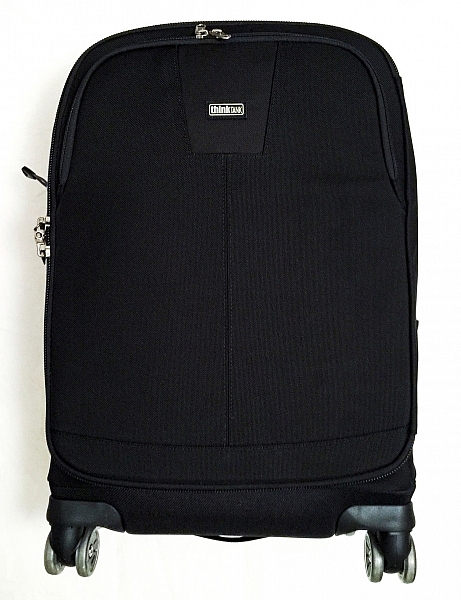
IMG_4880

Recently though, I’ve been using a ThinkTank Photo Roller Derby bag as my everyday roller. Now, using a roller bag may not be ideal for everyone. But for people like me who need to transport a lot of kit, they are lifesavers! This isn’t the only roller bag I have, though. I also have a ThinkTank Airport Security V2.0 which is absolutely fantastic, too.

But why did I jump to a slightly smaller bag? The answer to that is simple: the ThinkTank Photo Airport Roller Derby bag has four wheels, whereas the Airport Security only has two. This doesn’t seem like a big deal, but it makes moving the bag around that much easier.

So before we begin the review, let’s take a look at the Roller Derby’s features as from the ThinkTank website:

OVERVIEW

Materials: Exterior

  • 3D air mesh
  • 3-ply bonded nylon thread
  • Polyurethane coating
  • 1680D ballistic nylon
  • 420D velocity nylon
  • Durable water-repellant (DWR) coating
  • YKK® RC Fuse (abrasion-resistant) zippers
  • Custom-designed, replaceable wheels with sealed steel bearings
  • Rubberized laminate reinforcement

Materials: Interior

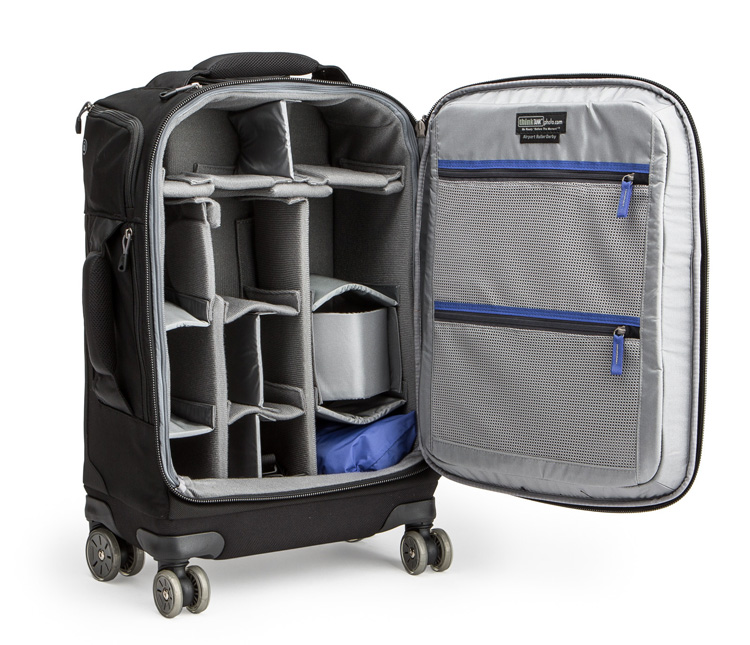
airport-roller-derby-5-750

Image courtesy ThinkTank

  • 210D silver-toned nylon
  • Polyurethane backed velex liner & dividers
  • 2x polyurethane coated nylon 210T seam-sealed rain cover
  • Closed cell foam & PE board reinforced dividers
  • Belly-O mesh pockets
  • 3-ply bonded nylon thread

Specifications:

  • Internal Dimensions: 12.6” W x 18.5” H x 5.5–7.5” D (32 × 47 × 14–19 cm)
  • Exterior Dimensions: 14” W x 22” H x 9.0” D (35.6 × 55.9 × 22.9 cm)
  • Tablet Compartment: 10.5” W x 10.3” H x 0.6” D (26.7 x 26.1 x 1.5 cm)
  • Laptop Compartment: 10.5” W x 14.5” H x 1.0” D (26.7 x 36.8 x 2.5 cm)
  • Weight: 9.5–11.5 lbs (4.3–5.2 kg) depending on accessories used.

Additional Features:
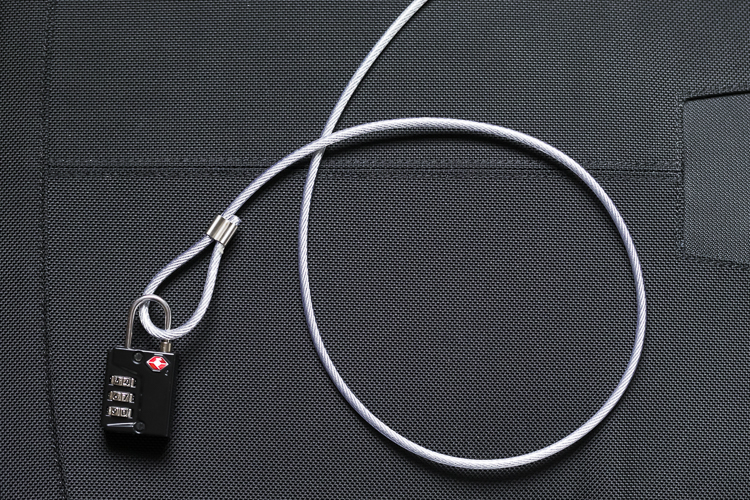
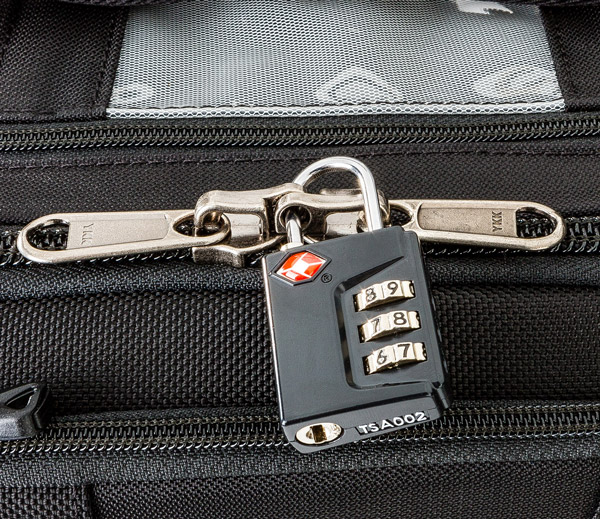
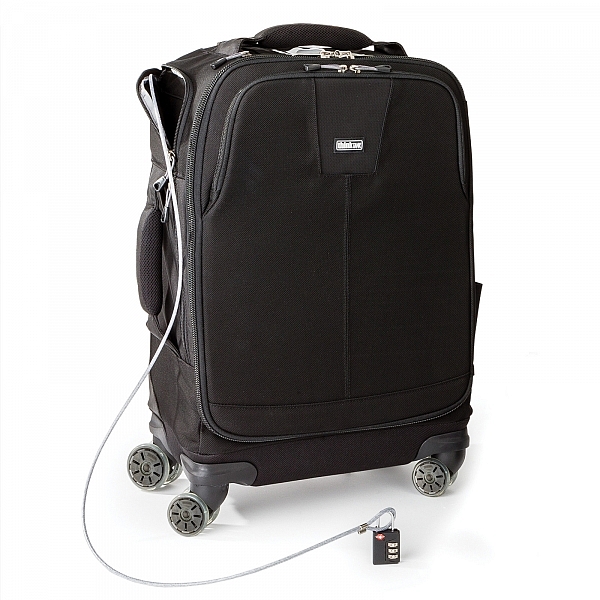
Cable Lock

  • Lock & cable to secure lockable zippers and tether the bag
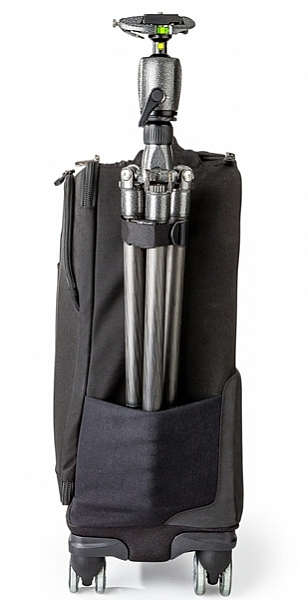
  • airport-roller-derby-9-6003-ways to roll: upright at your side, back wheel tilt, or side wheel tilt
  • Seam-sealed rain cover included
  • Bottom handle for easy over head lifting
  • Tripod mount and water bottle pocket on side
  • 2-position locking handle extends to 39–42” for better ergonomics when pushing
  • Interior zippered pockets for batteries, CF cards, filters and accessories
  • Top zippered pocket for wallet or cell phone
  • Rapid access side pocket for travel essentials
  • Reinforced back panel for increased durability
  • User replaceable wheels
  • Seam sealed rain cover included
Image courtesy ThinkTank

Image courtesy ThinkTank

BUILD QUALITY

If you have used ThinkTank products in the past, you are most likely already familiar with the overall quality of their products. The ThinkTank Photo Airport Roller Derby bag is no exception. I have been using this bag almost everyday for the last eight weeks. It has been dragged through mud, wet grass, over gravel, been pulled in and out of my car, and been shoved around on public transport. Through all of this, not once have I had any issues with any of the wheels (they just keep going, no matter what!), and most importantly, my equipment has come out of it completely unharmed.
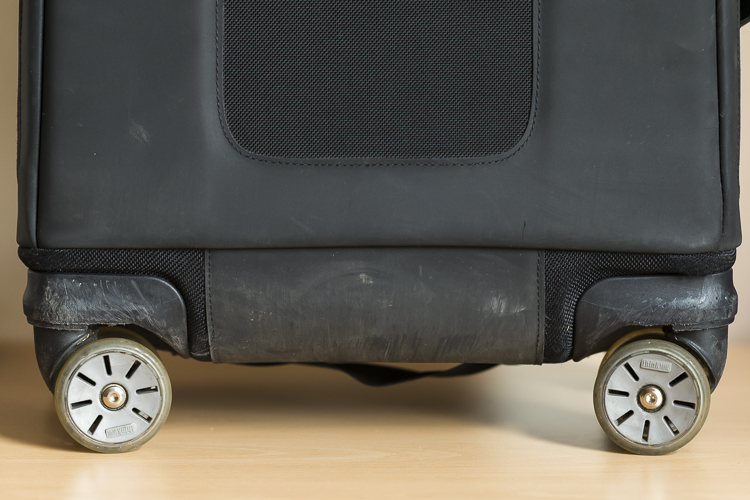
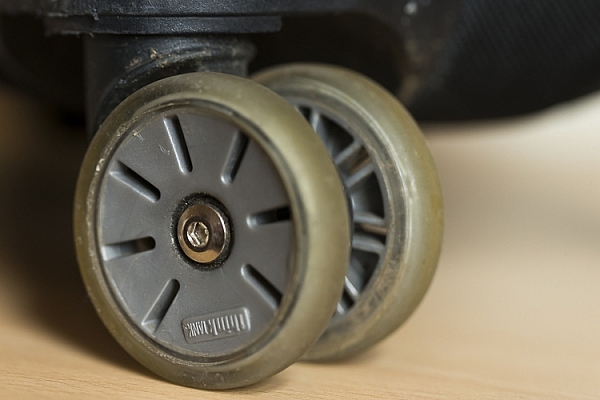
Wheel:wear.2

Wheels showing wear but mostly just scratches.

It’s been dragged a bit over concrete and other hard surfaces, and other than a few little scuff marks on its exterior, it’s perfectly fine and shows no sign of giving up any time soon. The telescopic handle feels more sturdy than the one on my other roller, and is easily pulled up and down for use. Most bags’ weakness appears first with the zippers; especially if you’re packing a lot of kit into the bag. However, the zippers used on this bag are no different to that of any other ThinkTank product. The zippers are easily opened and closed no matter how much equipment is packed in. In fact, I’ve yet to see any of the zippers across all my bags (yes, I have a few!) even begin to show any sign of strain.
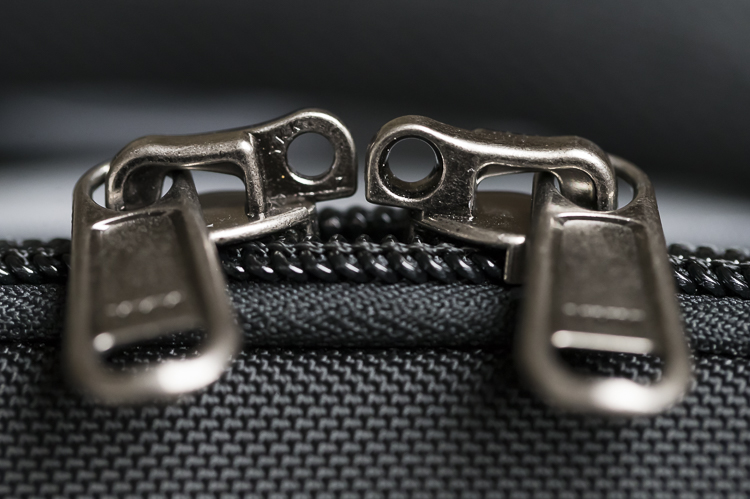
Lockable Zipper

At the base of the bag, extending up the back a little way, is a tougher nylon cover which is perfect for protecting the material of the bag as you pull along; such as when going down stairs or whatnot. Internally, the bag is no really different to any other ThinkTank bag. The removable inserts provide ample protection for all of my kit. The rollers on the bag have also proven to be very durable. I’ve taken my bag through puddles, mud, wet grass, gravel – you name it – and all without a single problem.

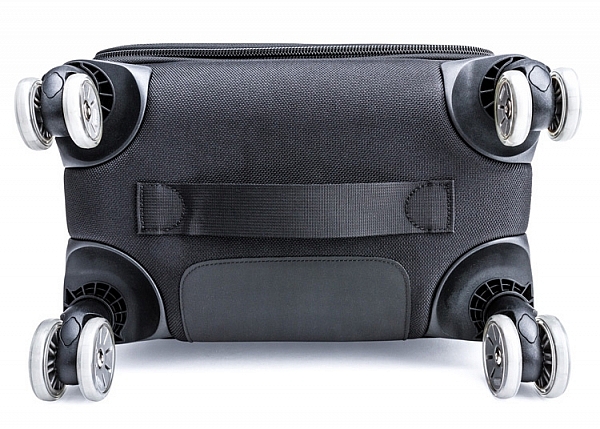
What really helps the wheels is that there are actually eight wheels in total; two wheels on each castor. This helps spread the weight of the bag and its contents out more effectively, thereby reducing the strain on each individual wheel.
airport-roller-derby-6-750

Image courtesy ThinkTank

Wheels

DESIGN

The design of the Roller Derby is very well thought out. The main camera compartment is easily accessible. The opening hinges across the bag, not up/down. This does make it easier to work with in smaller spaces, or out of the trunk of your car, as you don’t need much space to open it.

On the inside of the opening are three compartments where you can put extra items like memory cards, cleaning tools etc. On the front of the bag you’ll find there’s also a handy compartment to fit your laptop/tablet and other little bits and bobs too.
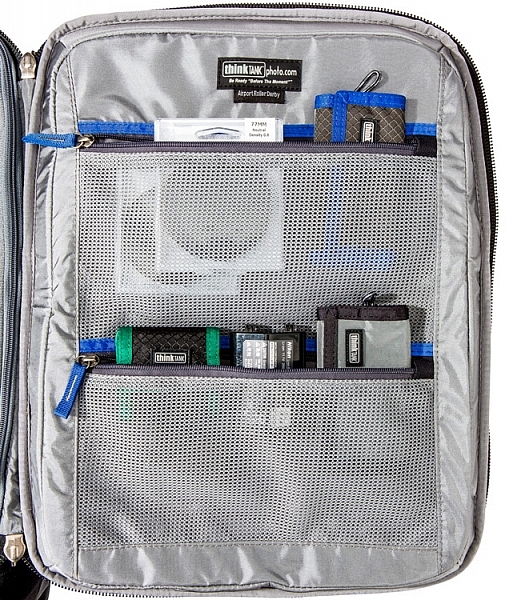
Image courtesy ThinkTank

Image courtesy ThinkTank

If you need to leave your bag unattended, ThinkTank has you covered there, too. They have provided a cable, which is attached to the bag, and a lock which will enable you to lock the bag to an object so it’s more secure. The zippers to the main camera compartment are also lockable, so all your kit is safe; this is also perfect for air travel or public transport, for that little extra peace of mind.

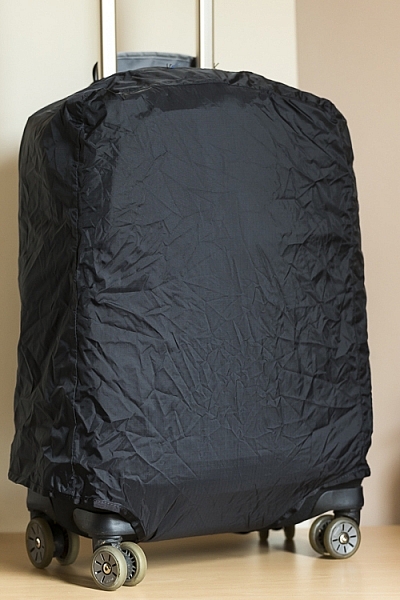
The bag also ships with a rain cover which, I might add, is one of the easiest rain covers to put on bag! It covers the bag nicely and gives your equipment that extra level of protection from the elements.
Rain cover on

Image courtesy ThinkTank

Image courtesy ThinkTank

IN USE

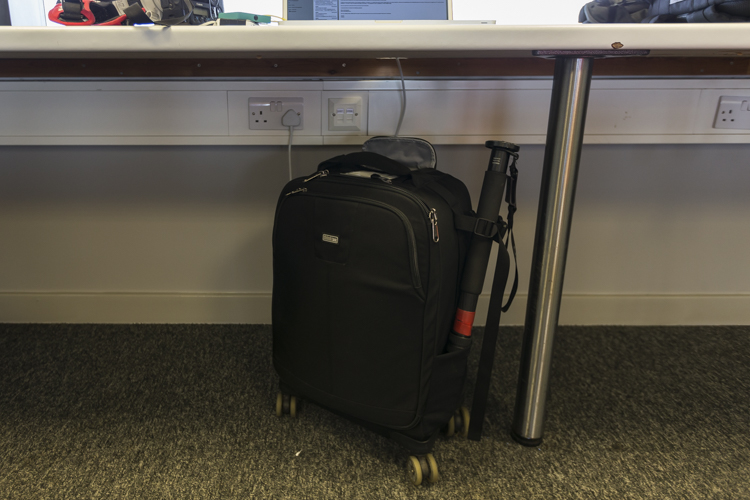
This has now become my go-to bag for day-to-day use. It’s smaller than my other roller bag, which makes it easier for fitting in to cars, on trains, etc., and is also easier to fit under a table in a media room. The four castor design makes it easier to put the bag under a table, and take it out again; without having to move myself about to maneuverer it. I can just simply push it under, or grab it out.
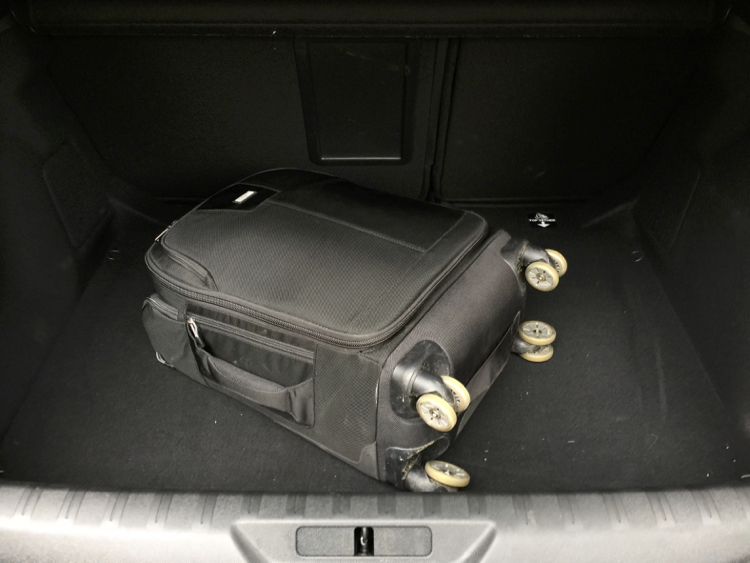
Boot

Here it is in the trunk (boot) of my car.

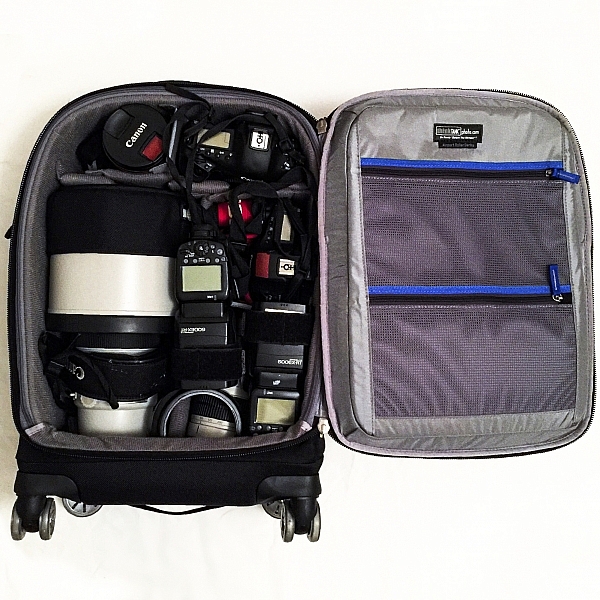
I’ve found the compact design of the bag to be very helpful when working in tighter spaces (some of the media rooms here in the UK are very ah….cozy!) as it doesn’t get in the way when I am unpacking my kit from it. Yet, despite its compact nature I can still fit my everyday required kit.

In this bag I can fit:

  • Two EOS 1-D series cameras
  • A 400mm f/2.8 lens
  • A 70-200 f/2.8 lens
  • A 16-35 f/2.8 lens
  • A 1.4x Teleconverter
  • Two 600-EX RT Canon Speedlites
  • Other little bits and pieces

IMG_4882

CONCLUSION

I love roller bags, they work perfectly for my requirements. For me, this bag is a winner. It’s compact design, yet high carrying capacity, make this bag ideal for people who want to carry larger amounts of equipment easily. Here are my thoughts:

Who is this bag for:

This bag is ideal for people who want a bag that they don’t have to carry around. The wheels make transporting equipment so much easier. It’s particularly ideal for travel on public transport, as its compact design will easily fit in the luggage area of many trains, or next to you on the seat.

Who is this bag NOT for: 

If you’re someone who needs to travel with a bag with them all the times, you may want to look outside roller bags. If you want to carry more equipment, this particular model may be a little too small as well.

Pros:

Empty, the bag is quite light for a roller bag, weighing in at 5kg (11 pounds). Its compact design makes it easier to store when you’re in transit and at home, and the wheels make it a lot easier to move around. A well thought out design makes the most of its compact size to fit a generous amount of kit inside.
Media

Cons:

I wouldn’t say this is necessarily a con; rather just something to be aware of, but the 4-wheel design can mean the bag can tend to roll away if it’s left on a slope, so be careful of this! When using a large lens (such as a 400mm f/2.8 or 600mm f/4, etc.) with the hood on, you are no longer able to put a laptop in the laptop compartment in the front of the bag. The price may be a con for some if you’re not in the market for a bag that’s almost $ 400.

If you’re on the market for a good quality, durable, and ergonomic roller bag, I would strongly suggest you take a look at the ThinkTank Photo Airport Roller Derby!

googletag.cmd.push(function() {
tablet_slots.push( googletag.defineSlot( “/1005424/_dPSv4_tab-all-article-bottom_(300×250)”, [300, 250], “pb-ad-78623” ).addService( googletag.pubads() ) ); } );

googletag.cmd.push(function() {
mobile_slots.push( googletag.defineSlot( “/1005424/_dPSv4_mob-all-article-bottom_(300×250)”, [300, 250], “pb-ad-78158” ).addService( googletag.pubads() ) ); } );

The post Review – The ThinkTank Photo Airport Roller Derby Bag by Daniel Smith appeared first on Digital Photography School.


Digital Photography School

 
Comments Off on Review – The ThinkTank Photo Airport Roller Derby Bag

Posted in Photography


Affinity Photo 1.5 update detailed ahead of autumn release

24 Jul

Affinity Photo, software maker Serif’s non-destructive photo editing alternative to Photoshop, is set to receive its fifth major update this fall. The company has published a video detailing features arriving in Affinity Photo v1.5 for Mac, saying it expects the same features to be made available in the upcoming Windows version of the software, as well.

Affinity Photo 1.5 will bring the following features, says Serif:

  • Advanced HDR merge producing full 32-bit linear colour space images
  • An entirely new workspace for tone mapping
  • Focus stacking to bring depth to multiple combined images
  • Batch processing for smoother, faster workflow
  • Macros to record and replay a set of commands
  • An all-new way to edit 360 degree images

The 1.5 update will be available to existing Affinity Photo customers for free. New customers can get the software with a 20% discount today at $ 39.99/€39.99/£29.99. The price will revert back to its regular $ 49.99/€49.99/£39.99 price starting tomorrow. Windows users can sign up to be alerted when the Windows beta version is available here.

Articles: Digital Photography Review (dpreview.com)

 
Comments Off on Affinity Photo 1.5 update detailed ahead of autumn release

Posted in Uncategorized


Blincam is a wearable camera that takes a photo when you wink

23 Jul

A Tokyo-based startup has successfully crowdfunded a wearable camera concept called Blincam. Much the way Google Glass works, Blincam would attach to a pair of glasses and snap photos when the wearer winks or blinks. According to the team behind the product, the final product will be compatible with a mobile app that immediately provides access to photos taken with the camera.

Blincam is said to feature a patent-pending Eye Movement Sensor that detects when the wearer blinks, as well as an integrated speaker for playing a shutter sound, an LED battery indicator light, Bluetooth connectivity, microUSB, 32GB of internal storage and an ‘HD CMOS’ camera sensor. 

Blincam Co Ltd, the company behind the campaign, claims to have already developed an alpha version of Blincam, and that it has worked out most of the technical issues. The crowdfunding campaign is intended to raise part of the funds needed to launch the camera. The company anticipates starting deliveries to backers this coming December; as with other crowdfunding projects, however, it is possible the device will never come to fruition.

Articles: Digital Photography Review (dpreview.com)

 
Comments Off on Blincam is a wearable camera that takes a photo when you wink

Posted in Uncategorized


We’re Giving Away a Photo Drone!

21 Jul

It’s time to take your photography to new heights, cuz we’re giving away a drone!

Yup, a Phantom 2 Vision+ Drone with a built-in 14MP, HD, wide-angle camera.

We’ve got five ways to enter. So, enter! Five times.

(…)
Read the rest of We’re Giving Away a Photo Drone! (10 words)


© laurel for Photojojo, 2016. |
Permalink |
No comment |
Add to
del.icio.us

Post tags:


Photojojo

 
Comments Off on We’re Giving Away a Photo Drone!

Posted in Equipment


You’ve got mail: Five photo postcard apps tested

04 Jul

In this age of sharing images via email, social media and text messages, one form of photo communication has sadly been left behind. It is something we all used to look forward to getting from anyone who was traveling. I’m speaking of the humble postcard.

Be it a trip as mundane as a work conference in Kansas City or as exotic as a trek through the Amazon rainforest, getting a postcard in the mail was something that we all looked forward to from friends and family. Even today, if I want to make my grandmother happy, sending even the cheesiest of postcards will bring a smile and a thank you. Perhaps more surprisingly, my kids go completely nuts when someone sends them a postcard. At 6 and 8, they both already have email addresses, but the postcards all go right up on the wall above their beds.

But what if we could merge the old-school and the new-school? What if, instead of relying on the spinning metal rack of cards at a roadside diner or airport giftshop, you could easily send a postcard of an image you took yourself? Through the magic of smartphone apps, doing so is far easier than you might expect.

Putting them to the test

I tried out five different postcard apps on an iPhone 5s: Touchnote, Postcard, Ink, Postagram and Snapshot Postcard. All of the apps are free and charge only for sending cards. I sent myself three postcards from each app using the same three images. One of the images was taken with a DSLR and another with a Micro Four Thirds camera, then transferred to my iPhone. The third image was a photo taken with the iPhone’s rear-facing camera. The data regarding pricing was reported by the app companies themselves. I did my best to make it clear what the costs would be for both US and International users. If the company reported specific non-US pricing, it is listed. But if they did not, pricing will be in whatever your local exchange rate is from USD.

Touchnote
www.touchnote.com

Cost: $ 2.99/£2.99/€2.99
Usable worldwide: Yes
Cardstock: 110 lb glossy
Android/iOS: Both
Additional products: Greeting cards

As with all of these apps, Touchnote has iOS and Android versions. What is unique is that it also has a web interface so you can order while at your desk. This is actually surprisingly handy if you intend to send non-phone images regularly. Full-bleed, white border, square or 1-6 multi image layouts are available. Images can be cropped, zoomed and rotated within the app. In addition to traditional messages on the back of the postcard, Touchnote allows you to add up to a 33 character caption on the front side as well. There is a confirmation email after you send a card and you can see (as well as copy for future use) all of your past sent cards in a nice timeline view.

Postcard by PrintMe
www.printmeapp.com/card

Cost: $ 2.99/£1.79/€2.49
Usable worldwide: Yes
Cardstock: 300 gr/qm (aprox 110 lb) luster
Android/iOS: Both
Additional products: Greeting cards, photo books, calendars

Postcard by PrintMe aims to be more of a ‘photo products’ app than the others in this article. That said, its postcard options are plenty strong on their own. Full-bleed, white border, and multi-image layouts are available, as well as many ‘occasion/holiday’ designs. The image can be zoomed and cropped, but not rotated.

Rare in these apps is Postcard’s ability to change the font for your message on the back. Sadly, there is no drop-down list, you just have to keep pressing the ‘font’ button over and over. Still, it is one of the only apps that give you any font option at all. Much cooler is the ‘signature’ box option which allows you to sign your name on-screen and have it print on the card. Finally, though I did not test it, Postcard offers the option to pick up folded greeting cards, but not postcards, next-day at Walgreens locations.

Postagram
www.sincerely.com/postagram

Cost: $ 0.99 domestic $ 1.99 international
Usable worldwide: Yes
Cardstock: 12 pt (approx 92 lb) with thick glossy laminate
Android/iOS: Both
Additional products: None

Looking to differentiate itself from the other apps out there, Postagram is unique both because it is designed around a, presumably, Instagram-inspired square image layout, and also because that square image comes pre-perforated and ready to pop out in a sort of trading-card style. Your message is printed on both the back of the image ‘card’ and on the front side as well. In a nice touch, you can choose a secondary 0.75 inch x 0.75 inch ‘avatar’ style secondary image to appear in the corner. Which is neat for including an image of yourself along with your landscape image from a trip somewhere, for example. Currently the non-image area of the Postagram cards are black. However, an upcoming app update will offer more colorful options.

Both Ink (described below) and Postagram are from the same company, so if you have set up an account on one, it will work on the other. They apps are also virtually identical in design and features, with the few small differences owing mostly to the differing focus of each product. There are some basic Instagram-style image filters available as well as the ability to zoom and crop. Rotating your image does not seem to be an option. To make sending multiple cards faster, you can copy a past card and update the address/message. There is a clever payment option that allows you to take a photo of your credit card instead of entering in the numbers manually. Both apps are very good with order-received/card-sent confirmations. I will say that unless you turn them off, they are both a little heavy on the marketing notifications (‘It’s a week until Mother’s Day!’ etc).

Ink
www.sincerely.com/ink

Cost: $ 1.99 within the USA, $ 2.99 International, $ 2.99 extra for “Premium” option
Usable worldwide: Yes
Cardstock: 12 pt (approx 92 lb) with thick glossy laminate, Premium cards are 120lb with eggshell finish
Android/iOS: Both
Additional products: None

Ink is designed as more of a greeting-card style postcard app, with many pre-formatted designs for various holidays and occasions that you can add your image to. But they also offer standard postcard options as well as full-bleed, white border or multi-image layouts. Ink postcards are the largest of any tested here, at 5×7 (vs roughly 4×6 for the others). They also offer an upgraded “Premium” card that is printed on heavier matte cardstock and comes in an embossed envelope with a real stamp.

SnapShot Postcard
www.snapshotpostcard.com

Cost: $ 1.99 domestic $ 2.99 international (first card is free from anywhere)
Usable worldwide:  Yes
Cardstock: 110 lb glossy
Android/iOS: Both
Additional products: None (though they do have a greeting card app, SnapShot Greeting Card, as well)

SnapShot Postcard is the only one of the apps that offers a quick ‘getting started’ video as part of its signup flow. While none of these apps are what I would call confusing for anyone who is used to mobile apps, a quick video walkthrough is pretty handy for those who aren’t as tech savvy. Another area where SnapShot Postcard is ahead of the others is that you can send your first card free. Trying a product before you buy is always a nice thing. While user interface is not particularly fancy, all the basics are there in the app. You can set a return address, place a caption on the front, and crop/zoom/rotate (with a handy ‘shake to reset’ function). You can choose borders or full bleed for your images. The borders are fairly cheesy and there isn’t any ‘white’ border option, so full-bleed is going to be your best bet. You are asked if you would like to send the same card again to a different address, handy for vacation or family photos where you might send the same card to many people. There is a nice order history, but you cannot copy old cards. 

Articles: Digital Photography Review (dpreview.com)

 
Comments Off on You’ve got mail: Five photo postcard apps tested

Posted in Uncategorized


Enter to Win one of 10 Copies of Corel’s AfterShot Pro 3 Photo Editor

27 Jun

Win one of 10 Copies of AfterShot™ Pro 3 Photo Editor from Corel!

Enter the After Photography Contest Today!

After dark, after thought, after noon, after work, after school, after life, after all…

You pick your after theme and have fun with it.

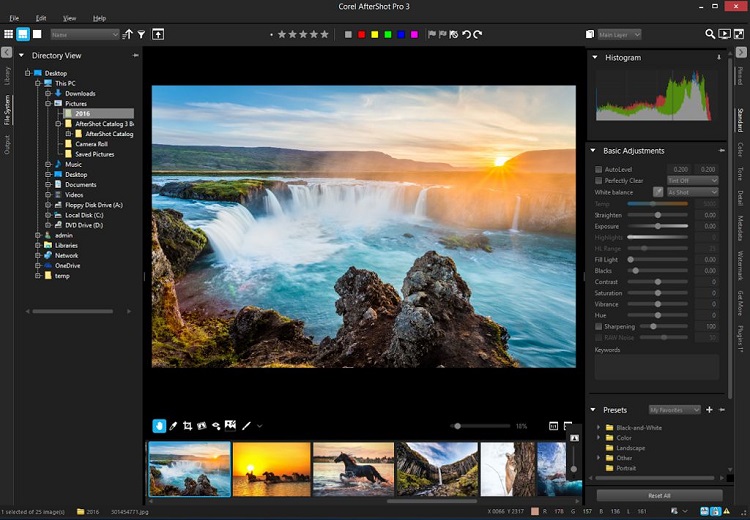
ASP 3 workspace

Over the last few years here at dPS, we’ve run very some very popular contests with our partners, to give away some of their great photographic products to lucky dPS readers. We are lucky enough to be able to do it again now.

For this competition, Corel is giving away TEN copies of AfterShot™ Pro 3 Photo Editor!

These prizes are designed to help every level of photographer create BETTER pictures. Since 1989, with the introduction of CorelDRAW, Corel boasts a range of award-winning products that includes graphics, painting, photo, video, and office software with a community of over 100 million strong. Each copy of AfterShot Pro 3 will be won by a different dPS reader.

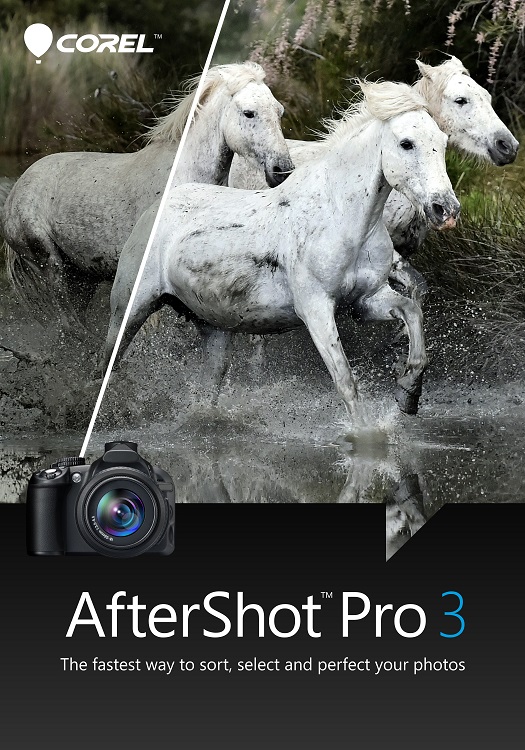
ASP3 box front

Our 10 prize winners will receive the full version of Corel’s leading RAW Photo Editor – A $ 79.99 Value

Corel® AfterShot™ Pro 3 is up to four times faster than Adobe® Lightroom (claim based on a batch export workflow, using Lightroom CC 2015.5.). It’s the photo editor that helps you reveal your true creative potential. With AfterShot™ Pro 3 there are no subscriptions, and no longer a need to spend hours editing at your computer. You can import, process, output faster, and get back to taking photographs. Take a look at a few of the new, improved and classic features:

  • Faster workflow
  • Simple photo management
  • New comprehensive watermarking
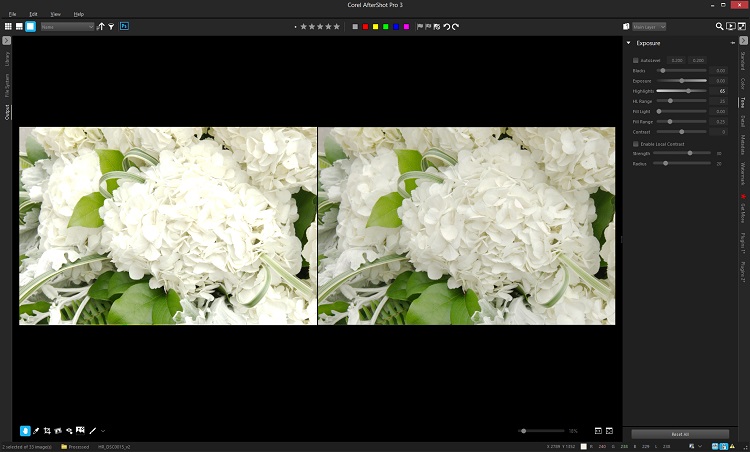
  • Enhanced highlight recovery
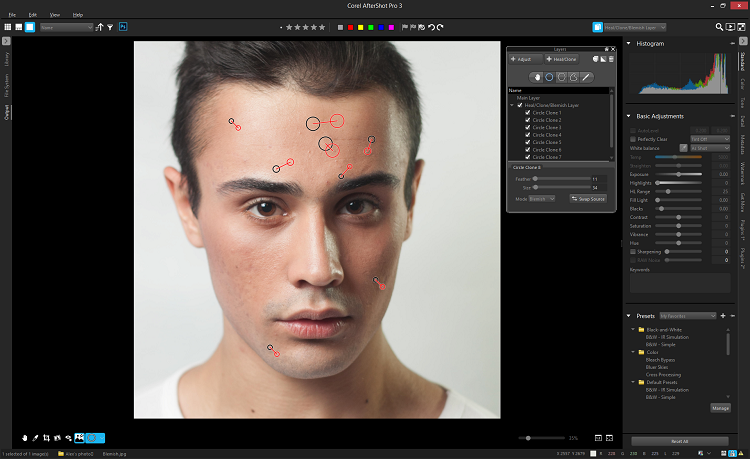
  • New blemish remover tools
  • New image preset library
  • Powerful batch processing

Adobe®, Lightroom® and Photoshop® are either registered trademarks or trademarks of Adobe Systems Incorporated in the United States and/or other countries.

ASP 3 Highlight Recovery

New Blemish Remover

Learn a little more about AfterShot Pro 3 HERE:

ASP3 Logo

How to win

To win this contest you’ll need to:

  • Edit your favorite ‘After’ photo. To make it even better, download a free trial of AfterShot Pro 3 HERE
  • Post your After photo, along with a few words on how you feel AfterShot Pro 3 would help your photography in the comments section below, and of course, your After themed image. It’s as easy as that!
  • Do this in the next 21 days and on August 5, 2016, the team at Corel will choose the 10 best photos and comments, and we will announce the winners in the following days.
  • Deadline Is July 19, 2016, at 11:59pm PDT. Photos and comments left after deadline will not be considered.

By best – we’re looking for people who have an understanding of photography post-processing, and how AfterShot Pro 3 may best suit your needs. So you’ll need to check out the product page to put yourself in the best position to win. Don’t forget to grab a free trial download.

There’s no need to write essay length comments to win – but we’re looking to hear what you like about the software, and how it would help your development as a photographer. Don’t forget to include your favorite After themed photo. We encourage you to have fun and be creative!

This competition is open to everyone, no matter where you live – but there is only one entry per person. To enter – simply leave your photo and comment below.

ASP3 Logo

Disclaimer: Corel is a paid partner of dPS.

By entering the After photo contest, the Entrant is providing permission to Corel to publish their photo, if it is chosen as a winner, to be utilized within media post(s) by Corel announcing the winners and promoting. Entrants will be provided a full photo credit if photo is used, and will retain their copyright – Please click HERE or full contest rules, terms and conditions.

googletag.cmd.push(function() {
tablet_slots.push( googletag.defineSlot( “/1005424/_dPSv4_tab-all-article-bottom_(300×250)”, [300, 250], “pb-ad-78623” ).addService( googletag.pubads() ) ); } );

googletag.cmd.push(function() {
mobile_slots.push( googletag.defineSlot( “/1005424/_dPSv4_mob-all-article-bottom_(300×250)”, [300, 250], “pb-ad-78158” ).addService( googletag.pubads() ) ); } );

The post Enter to Win one of 10 Copies of Corel’s AfterShot Pro 3 Photo Editor by Darlene Hildebrandt appeared first on Digital Photography School.


Digital Photography School

 
Comments Off on Enter to Win one of 10 Copies of Corel’s AfterShot Pro 3 Photo Editor

Posted in Photography