RSS
 

Posts Tagged ‘Photo’

Midwest Photo camera store thieves reportedly cut hole in roof to steal gear

23 Mar

Midwest Photo, a retail store in Columbus, Ohio, has been the subject of a reported theft that the company president Moishe Appelbaum describes as ‘Mission Impossible style.’ On Wednesday, March 15th, an unknown thief or multiple thieves broke a hole through the store’s roof and used that hole to gain access to a pipe, which was then used by the thieves to slide down into the shop.

Once inside, the thieves stole a cache of items from Midwest Photo’s storage area, including cases, cameras, and lenses. A surveillance camera was able to capture at least part of this theft, though the store says it has now rolled out additional security crews. Speaking to local news affiliate FOX 28 Columbus, Appelbaum said, ‘[It was a] really professional crew that knew what they were doing.’

Appelbaum goes on to state that this may be the work of a professional burglary ring that is targeting camera shops across the Midwest and possibly the nation. ‘This is the third camera store burglary overnight we’ve seen in the Midwest in the past week-and-a-half,’ he said. ‘This is a crew I believe is making their way across the country.’ The company is encouraging anyone with info to contact Midwest Photo or the Columbus police department.

As DPReview previously reported, California lens company Veydra suffered a similar theft a couple days prior to Midwest Photo’s burglary. In that case, thieves broke into Veydra’s California headquarters on Sunday, March 12, and made off with more than 200 lenses. Whether the two incidents are related is unknown. At this time, it doesn’t appear the stolen items in either case have been recovered.

Via: FOX 28

Articles: Digital Photography Review (dpreview.com)

 
Comments Off on Midwest Photo camera store thieves reportedly cut hole in roof to steal gear

Posted in Uncategorized


It Happened to Me: I Made a Photo Book in Less Than 15 Minutes

22 Mar

Scrolling through your camera roll is cool and all, but leafing through the pages of a photo book is just more magical.

We’d make a photo book for every occasion, but who has the time?

Turns out, if you’ve got 15 minutes, you do!

Photojojo-er and all around great gal, Laurel, just got back from a trip to Thailand, and put together a photo book of her adventures in less than 15 minutes.

And, she’s here to tell you just how she did it.
(…)
Read the rest of It Happened to Me: I Made a Photo Book in Less Than 15 Minutes (339 words)


© laurel for Photojojo, 2017. |
Permalink |
No comment |
Add to
del.icio.us

Post tags:


Photojojo

 
Comments Off on It Happened to Me: I Made a Photo Book in Less Than 15 Minutes

Posted in Equipment


How to Create an Antique Photo Look Using a Lemon and Layer Masks in Photoshop

17 Mar

Layers were presented for the first time in Adobe Photoshop in version 3.0, which launched in 1994. We take them for granted nowadays, but they were a total game changer at the time as they allowed image composites to be taken to a whole different level with image stacking and transparencies.

Layer Masks may seem like a scary monster for a Photoshop newbie, but they are in fact quite easy to understand as they work the same way as layer transparency. But layer masks use a non-destructive way to reveal or hide portions of a layer by defining pixel opacities without affecting the original data.

It all happens with greyscale data: think of black as transparent, white as opaque and gray as different levels of opacity depending on if they are lighter or darker. Following this theory, this also means that you can convert any greyscale image into a Layer Mask and use it to create many types of effects on your image.

This tutorial is a step-by-step example on how to use this technique.

How to create your own Layer Mask

Create an old school effect

For this particular image, I wanted to create an old-school or antique effect, like an alternative darkroom process of developing a black and white image with a brush. This mask could be done in many different ways, but, because I wanted to make it really textured and as authentic as possible, I used an oxidation process.

Prepare the paper first

To give this process a try, you will need a paper sheet and some lemon juice.

02 How to create your own Layer Masks

Brush the paper with the lemon juice and create you mask area

03 How to create your own Layer Masks

The lemon juice will oxidate upon contact with air, but it will take a long time. To accelerate the process, you can put the paper near a heat source like a tungsten lamp or if you want it even faster, you can use an oven at a low temperature setting like I did here.

04 How to create your own Layer Masks

The lemon juice will start to turn a brown color. Remove the paper from the oven when you get the color and texture you intend, and your paper sheet is ready to be scanned or photographed to create an image file like this:

05 How to create your own Layer Masks

Photoshop technique

Now open Photoshop and the image on which you want to create the mask.

06 How to create your own Layer Masks

Convert the layer to a mask

Now click on the layer mask icon on the bottom of the layers’ palette and your background layer will be converted into Layer 0 with a white mask next to it.

Press the alt/option key on your keyboard and click on the white mask to make it visible and active. This is a very important step! If you miss this step the image itself will be active and visible instead of the mask, that is what you will be working on.

Once you have done this, the image itself will not disappear, it will just be hidden.

07 How to create your own Layer Masks

Convert to greyscale

Now it’s time to open your mask image and convert it to greyscale. One easy way to do it is to use the desaturate function located in: Image > Adjustments > Desaturate (or keyboard shortcut Control/Cmd+Shift+U)

08 How to create your own Layer Masks

The final image you want to create is white around the edges, so your mask should be the opposite. You can use the invert function for this: Image > Adjustments > Invert (Control/Cmd+I)

09 How to create your own Layer Masks

Put the image into the mask

Next, it is time to paste the image into the mask with these simple steps:

  • Select > All (Control/Cmd+A)
  • Edit > Copy (Control/Cmd+C)
  • Now click on the original image where you created the layer mask and go to: Edit > Paste (Control/Cmd+P)
  • Click on the eye icon on the left side of the layers’ palette to see the image and the mask working together.

10 How to create your own Layer Masks

Add a white layer

As you can see the mask creates different levels of transparency on the image. To be able to see the transparency as white we can create a new white layer to use as a background.

  • Go to: Layer > New > Layer (Control/Cmd+Shift+N)
  • Edit > Fill > Contents: White; Mode: Normal; Opacity: 100%

11 How to create your own Layer Masks

Now just drag the new white layer to the bottom position of the layers panel, and you will have a full view of the final image appearance.

12 How to create your own Layer Masks

Fine-tune the effect

Now it is just a matter of a few adjustments to fine-tune the effect you want. In this particular image, I will adjust the size of the mask. Click on the mask icon in the layers’ palette and then click on the chain between the image and the mask icon to unlink them.

13 How to create your own Layer Masks

Next go to: Edit > Transform > Scale (Control/Cmd+T). Drag the image edge lines to transform the shape of the mask and adjust it to the image size.

14 How to create your own Layer Masks

The size of the mask is right, but the image looks to washed out. We can increase the contrast of the mask to make the blending with the image look better.

Go to: Image > Adjustments > Levels (Control/Cmd+L). Adjust the sliders on the levels dialogue box to create the effect you want.

15 How to create your own Layer Masks

Lastly, for the old image look, you can use the black and white function. Click on the image icon in the layers’ palette so that you are editing the image and not the mask, then go to; Image > Adjustments > Black & White (Control/Cmd+Alt+Shift+B). Adjust the sliders on the Black & White dialogue box to create the effect you want.

Note: You can also add the black and white as an adjustment layer to keep your editing non-destructive. Additionally, you can paint on the mask with a black brush, over any areas you want to keep clear (such as her eyes or face). 

16 How to create your own Layer Masks

There it is, a quick and easy way to create your own layer masks. Give it a try and share your images with us in the comments below.

The post How to Create an Antique Photo Look Using a Lemon and Layer Masks in Photoshop by Ivo Guimaraes appeared first on Digital Photography School.


Digital Photography School

 
Comments Off on How to Create an Antique Photo Look Using a Lemon and Layer Masks in Photoshop

Posted in Photography


Photo planning app PhotoPills now available for Android

17 Mar

PhotoPills has for long time been one of the most popular photography planning apps for the iPhone. Now finally, after a long wait, the Android version has arrived on the Google Play Store.  Like its iOS-counterpart, PhotoPills for Android will set you back a hefty $ 10 but if you take your photo planning seriously this could be a small price to pay.

Among a host of other functions PhotoPills allows you to find out when and where the sun will set at a particular location, when the moon will rise and where the Milky Way will be visible. The Android version has been one year in the making and on an especially setup Android Version Page the team behind the app explains that it was the goal to offer exactly the same features, attention to detail and reliability as the iOS version. 

It’s worth mentioning that the app is still in public beta stage, with the full release expected by the end of the month. So it’s possible you might still encounter the occasional bug or malfunction. If that doesn’t put you off you can can download PhotoPills now and install it on any device that runs Android 4.1 or newer.

Articles: Digital Photography Review (dpreview.com)

 
Comments Off on Photo planning app PhotoPills now available for Android

Posted in Uncategorized


Geotagger World Atlas: Most Scenic City Routes Mapped Using Photo Data

16 Mar

[ By WebUrbanist in Destinations & Sights & Travel. ]

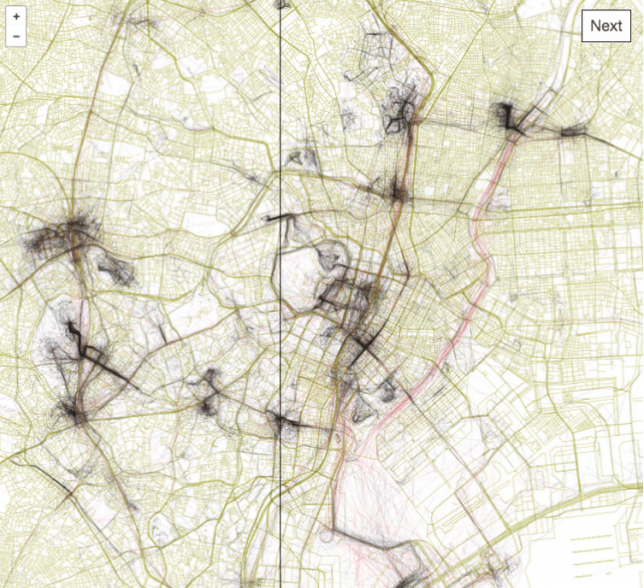
tokyo

Tapping into geo-tagging data and the collective wisdom of photographers, you can use this interactive tool to follow in the footsteps of those who have mapped out the most beautiful routes through cities. Click to pan and zoom through London below:

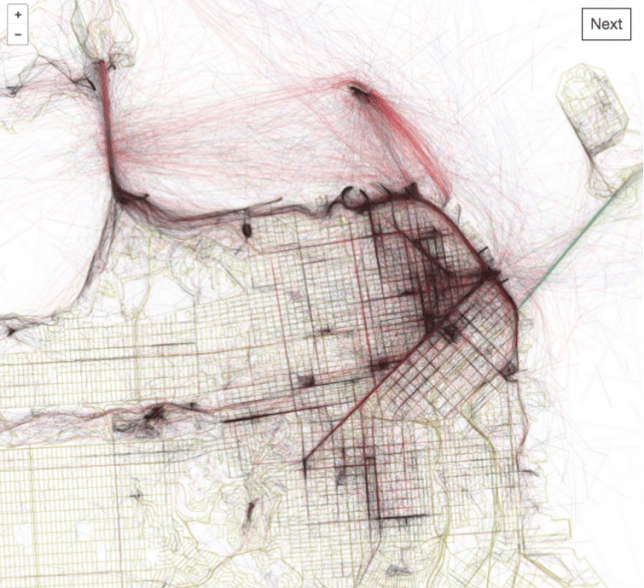
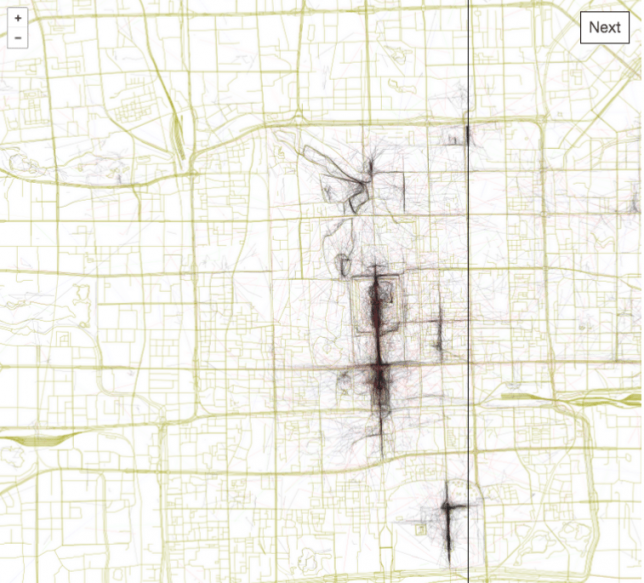
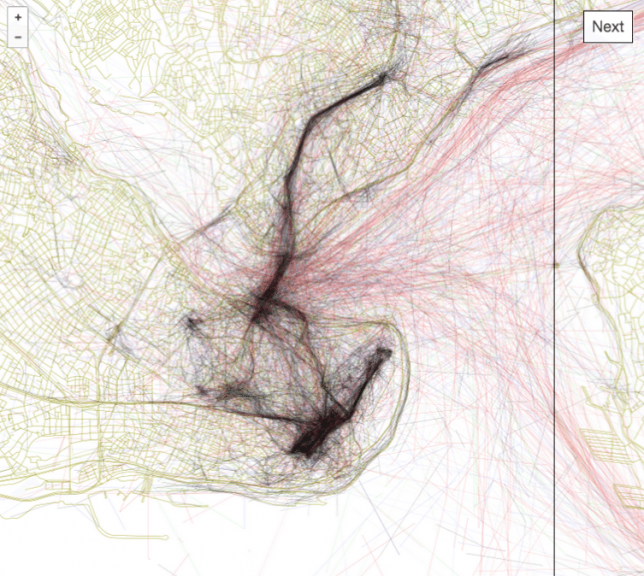
Eric Fisher of Mapbox has spent years compiling data from Flickr users, turning their sequential geo-located uploads into paths through urban environments including San Francisco, Beijing, Istanbul and Tokyo.

san francisco

The result is the Geotaggers’ World Atlas, a data-driven compendium of paths to take through cities. It is more than just a connection of dots — Fisher’s interactive guides specifically highlight trajectories from one image to the next.

beijing

“It signifies that people went there in the first place,” he says, and “saw something worth taking a picture of, and put the extra effort into posting it online for others to appreciate. And a sequence of photos along a route is even more significant, because it indicates that someone sustained their interest over distance and time rather than taking one picture and turning back.”

istanbul

The results are predictable in some cases, tracing lines between major landmarks, but often show side routes off of beaten tourist paths where keen photographers have found fascinating architecture and landscapes worth documenting along their way.

Share on Facebook


[ By WebUrbanist in Destinations & Sights & Travel. ]

[ WebUrbanist | Archives | Galleries | Privacy | TOS ]


WebUrbanist

 
Comments Off on Geotagger World Atlas: Most Scenic City Routes Mapped Using Photo Data

Posted in Creativity


Smithsonian.com announces annual photo contest finalists

05 Mar

14th annual Smithsonian.com photo contest

Smithsonian.com, a publication of the Smithsonian Institution, has announced the finalists of its 14th annual photo contest.

Over 48,000 photos were submitted by photographers representing 146 countries and territories, with ten finalists selected in each of the following categories: The Natural World, Travel, Sustainable Travel, People, Mobile, The American Experience, and Altered Images.

Voting is currently open for the Readers’ Choice award, which will be announced alongside the Grand Prize and category winners on March 28. Click through the slides above to see a few of our favorite images, and head over to Smithsonian.com to see all the finalists and vote for the Readers’ Choice winner.

Surreal: A man bikes by an octopus statue at the Burning Man festival in Black Rock City, Nevada.

Alina Rudya, Berlin, Germany

Category: Mobile

14th annual Smithsonian.com photo contest

Take Me Away Deer! Since ancient times, the Nenets have led a nomadic life. Reindeer harnessed to sleds is the most reliable form of transport on the tundra, and the people of the North make use of their navigational abilities. In severe conditions, such as a blinding snow storm, deer are not only loyal companions, but sometimes the only hope for survival.

Tamil Nureev, Noviy Urengoy, Russia

Category: Travel

14th annual Smithsonian.com photo contest

The Longing of an Opera Artist: Mdm Tai, a Chinese opera artist for the past forty odd years, thinks of her children while preparing for her performance. She, like most of the opera artists, is away for months traveling to one place to another, far away from her home. The Chinese opera is a custom that is slowly being diminished, taken over by modern performances. It is worth seeing and it is with hope that, through images, the custom will be sustained for future generations.

Nick Ng, Kuala Lampur, Malaysia

Category: People

14th annual Smithsonian.com photo contest

Swamp Raccoon: While I was looking for alligators at a swamp in Louisiana, this beautiful little creature wandered out of the murky waters right into the morning light.

Kim Aikawa, Santa Rosa, California

Category: Natural World

14th annual Smithsonian.com photo contest

Prom Night

Trinja Henrickson, Ludington, Michigan

Category: The American Experience

14th annual Smithsonian.com photo contest

Turtle-Back Ride: The thing that draws me to the ocean the most is that I never know what I’m going to come across on any given day. I count myself extremely fortunate to have been in the right place at the right time to capture this image.

Michael B. Hardie, Hawaii

Category: Natural World

14th annual Smithsonian.com photo contest

Firewalking: Firewalking is the act of walking barefoot over burning charcoal. In Ha Giang, a mountain province in northern Vietnam bordered by China, the Pa Then ethnic group observes this practice to wish for prosperity in the new year.

Binh Duong, Hanoi, Vietnam

Category: Travel

14th annual Smithsonian.com photo contest

Break Time: Break time during a street theater festival known as FITECA. Periphery of Lima, Peru.

Sharon Castellanos, Cusco, Peru

Category: People

14th annual Smithsonian.com photo contest

Last Dance: A couple dances in the backyard of a home in the West Village neighborhood of Detroit.

Amy Sacka, Detroit, Michigan

Category: The American Experience

14th annual Smithsonian.com photo contest

 
The Bear Odd Couple: My wife and I were visiting Cabárceno Natural Park with our kids when we realized that dozens of bears were just in front of us. I got the camera and my 70-200mm and took almost two hundred pictures. Then I saw this bear odd couple that seemed to be upset with each other but together. It reminded me of “The Odd Couple” movie with Jack Lemmon and Walter Matthau.
 
Alfonso Dominguez, Laguna De Duero, Spain
 
Category: Altered Image

14th annual Smithsonian.com photo contest

Brown-Eyed Beauty: Sustainable travel is travel that does not have a negative impact on the environment and ideally would not only protect the environment, but also provide opportunities for local communities. I see visiting the mountain gorillas in Uganda as sustainable travel because the visits support the local community while protecting the endangered gorillas. Tourists can pay to visit families of these magnificent animals for one hour a day, up to eight trekkers at a time. Over time, the gorillas have habituated to people and are tolerant of their visitors. The rangers dedicate their lives to protecting the gorillas, and you can clearly see that they love their job. Porters are hired from the local community to help the trekkers through the jungle. The porters are rotated on a regular basis so that more people in the community can work. This way, the local community receives a benefit and poaching of the gorillas is less likely. This photo was taken during our one-hour visit with the Mubare Gorilla Family Group in Bwindi Impenetrable National Forest, Uganda. After about one and a half hours of trekking through the forest, we were fortunate to be able to watch these magnificent animals up close. This photo is of a female gorilla enjoying a midday meal. There are less than 1,000 mountain gorillas left on Earth.

Lynda Hanwella, San Francisco, California

Category: Sustainable Travel

14th annual Smithsonian.com photo contest

Noon: Shot in Poly Plaza, Beijing, China

Jian Wang, Beijing, China

Category: Mobile

Articles: Digital Photography Review (dpreview.com)

 
Comments Off on Smithsonian.com announces annual photo contest finalists

Posted in Uncategorized


This photo of some strawberries with no red pixels is the new ‘the dress’

02 Mar

UCLA neuroscientist Matt Lieberman posted the ‘no red pixels’ image on the left. It’s developed from an original by Experimental Psychologist Akiyoshi Kitaoka (right) that, despite appearances, does have some very slightly red-tinged pixels in it.

Remember internet kerfuffle that was ‘the dress’ ? Well, there’s another optical illusion that’s puzzling the internet right now. Behold: the red strawberries that aren’t really red. Or more specifically, the image of the strawberries contains no ‘red pixels.’

The important distinction to make here is that there is red information in the image but, despite what your eyes might be telling you, red is not the highest value for any individual pixel in the image. Hence, no ‘red pixel’ in the image.

As was the case with ‘the dress,’ it all relates to a concept called color constancy, which relates to the human brain’s ability to perceive objects as the same color under different lighting. Which should immediately bring to mind a familiar photographic concept: white balance. Although there’s a significant cyan cast to the whole image, your brain is able to correct for it without you having to consciously identify a neutral part of the image (as you’d need to in processing software).

This got us thinking: without any understanding of what strawberries look like, how well would a camera’s auto white balance cope with the significant color cast in this image?

Here’s what a Nikon D7200’s auto white balance algorithms made of the image (defocused slightly, to avoid moiré from the monitor’s pixels)

The answer? Pretty well, actually. We don’t know whether it’s been able to detect the overall cyan cast or has assumed that the brightest point in the image is probably neutral, but it’s done a good job.

We have Experimental Psychologist Akiyoshi Kitaoka to thank for turning this puzzle loose on the world, and neuroscientist Matt Lieberman for turning it viral. Curiously, the first image contains a few red-dominated pixels (which Lieberman’s edited version doesn’t), yet appears more grey than Lieberman’s version.

Articles: Digital Photography Review (dpreview.com)

 
Comments Off on This photo of some strawberries with no red pixels is the new ‘the dress’

Posted in Uncategorized


How to do a Cake Smash Photo Session

28 Feb

How to do a Cake Smash Photo Session

One-year-olds are the best! They’re adorable, of course. They’re hilarious, and you never know what you’re going to get from them. Toddlers are full of wonder and inquisitiveness about everything. Truly, they’re a dream to photograph. One of my favorite moments to photograph is a one-year-old’s first birthday cake – often called a cake smash session.

I’ve laughed so hard that I’ve cried during many of these sessions. Maybe you are lucky enough to have a one-year-old in your life who could enjoy a cake for your camera sometime soon. It’s not too hard to set up, and you almost always get photos that you’ll want to keep forever. Here are some cake smash photo session tips to help you.

How to do a Cake Smash Photo Session

Capture a few frames before it gets messy

Once the cake is put in front of a one-year-old, you’re not going to get one more clean-faced shot. Even after you’re done with the cake, it’s a sure bet that your little subject will be done, and uninterested in posing for one more photo. To be honest, most sessions end with the little one crying because she realizes she’s a mess, or because you took the cake away from him.

How to do a Cake Smash Photo Session

So it’s best to catch a few photos before you even let the child see the cake. I love to capture who he is at the moment because this age is just so much fun. Grab a few photos with his favorite toy, or in her bedroom, or taking some wobbly toddler steps.

googletag.cmd.push(function() {
ruleset_slots.push( googletag.defineSlot( “/1005424/_dPSv5topic-rhs(300×250)”, [300, 250], “pb-ad-0” ).addService( googletag.pubads() ) ); } );

Yes, it’s going to get messy

Choose your location wisely, because you never know what’s going to happen. Some toddlers are very cautious and don’t want to do much except poke at the cake. Other toddlers like to fling cake and frosting across the room. I’ve found it best to do cake smash sessions outdoors in good weather, and in the kitchen if it’s too cold outside. The kitchen table works great, because it’s easy to maneuver around for different angles, it keeps the child somewhat contained (I have mom or dad standing close by in case she decides to dive off for some reason, although most one-year-olds are very aware that they don’t want to go near the edge.)

The kitchen table works great, because it’s easy to maneuver around for different angles, it keeps the child somewhat contained (have mom or dad standing close by in case she decides to dive off for some reason, although most one-year-olds are very aware that they don’t want to go near the edge).

How to do a Cake Smash Photo Session

Put your cute little subject in clothes (or no clothes) that are okay to get ruined or dirty. The parent might want to be prepared to give their toddler a bath right after the session. I’ve seen cake in eyelashes, ears, and every nook and cranny you could think of.

I prefer lighter colored cakes with some bright elements to them. Chocolate cake with chocolate frosting may taste the best (if you’re a chocolate lover like I am), but sometimes ends up looking like a bunch of mud on the little one’s face. Usually, the parent chooses whatever cake they’d like, and I make it work.

Make it festive for the birthday boy or girl

How to do a Cake Smash Photo Session

Since you are celebrating the little one’s first birthday, it’s fun to have some photos where it’s very obvious that it’s a birthday celebration going on. Balloons, streamers, party hats, banners, flags, and festively wrapped gift boxes can all add a nice touch. However, these fun props can sometimes distract your overwhelmed little one, so you may have to just move them away and out of the frame if they aren’t helping to create a fun cake smash atmosphere.

googletag.cmd.push(function() {
ruleset_slots.push( googletag.defineSlot( “/1005424/_dPSv5topic-rhs(300×250)”, [300, 250], “pb-ad-1” ).addService( googletag.pubads() ) ); } );

Remember to keep it fairly simple, because you want the focus to be on the birthday girl or boy, and you may not end up being able to use any of your thoughtful props anyway.

Get close-ups

How to do a Cake Smash Photo Session

Dimpled fingers, cute little toes, and hilarious cake smashing action are a must to capture close up. I love to show cake in between the toes, or frosting in the eyelashes. I adore those little chubby hands grabbing the cake and shoving it in his mouth. Get shots of those dainty fingers poking at the cake, tentatively testing it out.

You can tell a much better story of the cake fun if you get some close-ups of everything, along with the shots that take everything in. Get lots of angles; try shooting from above, from her eye level, from below, and from every side (as long as your light and your background are okay from all of the angles).

Encourage smashing if needed

How to do a Cake Smash Photo Session

Sometimes you’ll get a little one that is really hesitant to dig in, and much more of a “taster” than a “cake shoveler”. Sometimes she might not even want cake on her hands at all. You will want to try to capture some photos showing that because photos showing her true personality will be much more valuable than something that is completely out of character and set up by you.

However, there are only so many photos you can take with nothing happening. It may help to have mom or dad give the little guy a taste, making him want more. Maybe you might give him a baby spoon to attack the cake with. When all else fails, you might try breaking a piece out of the cake and putting it in her hand. Oftentimes, she just doesn’t know what she’s supposed to do. We don’t usually put an entire cake in front of our children and tell them to make a mess of it.

Be prepared for all of the emotions

How to do a Cake Smash Photo Session

googletag.cmd.push(function() {
ruleset_slots.push( googletag.defineSlot( “/1005424/_dPSv5topic-rhs(300×250)”, [300, 250], “pb-ad-2” ).addService( googletag.pubads() ) ); } );

Something this new and different can bring out happiness in some kids, and overwhelmed tears in others. Be prepared for those tears, and make sure to capture a few photos before dad or mom comforts him and cleans him up.

It’s okay if every photo isn’t smiling and happy, because, as any parent of a one-year-old can tell you, they are not always smiling and happy. Toddlers often dissolve into tears when things feel overwhelming. Try to keep the session as light and easy as you can, and don’t plan on everything going your way.

Enjoy it all

How to do a Cake Smash Photo Session

You only get a first birthday once in your life, and it should definitely be something to celebrate! Enjoy every moment photographing your little one’s first cake tasting (smash) experience. Hopefully she will enjoy it as much as you do. After all, it’s not every day that you get an entire cake to yourself.

Have you ever heard of cake smash sessions? Have you ever photographed one? I’d love to see your photos in the comments.

googletag.cmd.push(function() {
ruleset_slots.push( googletag.defineSlot( “/1005424/_dPSv5topic-rhs(300×250)”, [300, 250], “pb-ad-3” ).addService( googletag.pubads() ) ); } );

The post How to do a Cake Smash Photo Session by Melinda Smith appeared first on Digital Photography School.


Digital Photography School

 
Comments Off on How to do a Cake Smash Photo Session

Posted in Photography


Photographer Edin Chavez shares his favorite Miami Beach photo spots

26 Feb

$ (document).ready(function() { SampleGalleryV2({“containerId”:”embeddedSampleGallery_6758783119″,”galleryId”:”6758783119″,”isEmbeddedWidget”:true,”standalone”:false,”selectedImageIndex”:0,”startInCommentsView”:false,”isMobile”:false}) });

When a nagging desire to unleash his creative juices wouldn’t leave him alone, Edin Chavez left a successful self-made painting business to pursue photography. He’s now a Miami-based commercial photographer with clients like Nikon, National Geographic and Corona on his resume. Photography has brought him all over the world, but it’s Miami where he honed his skills and found his first go-to photo spots.

He recently shared ten of his favorites with Resource Travel, where you’ll helpfully find embedded Google Map widgets so you can hone in on exactly the right spots. Head over to the full post – after all, it takes an insider to tell you that the Best Buy parking garage is one of the best places for a sunset view of the city.

Read ’10 Best Photography Spots in Miami Beach’ at Resource Travel

Articles: Digital Photography Review (dpreview.com)

 
Comments Off on Photographer Edin Chavez shares his favorite Miami Beach photo spots

Posted in Uncategorized


Get your pictures in front a NASA photo editor by entering Astronomy Photographer of the Year 2017

24 Feb
Serene Saturn Winner Planets, Comets & Asteroids 2016 © Damian Peach (UK)

The Insight Astronomy Photographer of the Year 2017 competition is set to open next week offering space photographers the chance to have their work judged by a picture editor from NASA as well as to win the top prize of £10,000. The competition is open to professional and amateur photographers who can choose from nine categories in which to enter their images. Entry is free but restricted to ten images in total all of which need to have been taken since January 1st 2016.

The winner of each category will receive a £1500 prize while those in runner-up positions get £500 and Commended images win £250. There are an additional two special awards for The Sir Patrick Moore Award Best Newcomer and for Robotic Scope Image of the Year – both of which earn the photographer £750.

Joining the judging panel this year is photographer Rebecca Roth, the Image Coordinator and Social Media Specialist at NASA’s Goddard Space Flight Center in Maryland. She will judge alongside a collection of astronomers and astro-photographers as well as presenters from the BBC Sky at Night TV program. Photographer Wolfgang Tillmans is also on the judging panel.

The competition is open for entries from Monday February 27th and closes on Friday April 7th. It is run by the Royal Observatory Greenwich in the UK along with the BBC’s Sky at Night magazine. The Royal Observatory is a charitable organization and has some terms regarding additional uses beyond the realms of the competition that entrants should acquaint themselves with before submitting their work.

For more information see the Royal Museums Greenwich website and the terms and conditions page.

Press release

INSIGHT ASTRONOMY PHOTOGRAPHER OF THE YEAR 2017 ANNOUNCES COMPETITION DATES AND WELCOMES REBECCA ROTH OF NASA TO THE JUDGING PANEL

The Royal Observatory Greenwich, in association with Insight Investment and BBC Sky at Night Magazine, announces the dates for the Insight Astronomy Photographer of the Year 2017 competition – its annual global search for the most beautiful and spectacular visions of the cosmos, whether they are striking pictures of vast galaxies millions of light years away, or dramatic images of the night sky much closer to home.

Now in its ninth year, the hugely popular competition will open to entrants on Monday 27 February giving them a chance of taking home the grand prize of £10,000. Entrants will have until Friday 7 April to enter up to ten images into the various categories of the competition via www.rmg.co.uk/astrophoto.

The competition also welcomes Rebecca Roth of NASA to the judging panel. Based in Washington D.C. Rebecca is a photographer, photo editor and social media specialist, currently working as the Image Coordinator and Social Media Specialist at NASA’s Goddard Space Flight Center. Rebecca has worked at NASA for nearly 8 years and is charged with sharing amazing images of our universe with the media and with the public through channels such as Instagram, Twitter and Facebook. Prior to working at NASA, Rebecca worked as a photojournalist and photo editor for outlets including National Geographic Television & Film, Roll Call Newspaper, and USA Weekend Magazine. Of her latest role as a judge for the Insight Astronomy Photographer of the Year 2017, Rebecca has said, “At NASA Goddard, we build spacecraft and instruments, and invent new technology to study the Earth, the sun, our solar system, and the universe – a favorite part of my job is sharing images of these spacecraft and the images they produce with the public. This will be an exciting and unique opportunity to see the spectacular images of space captured by the public themselves and discovering their photographic interpretations of the night sky and beyond.”

Insight Astronomy Photographer of the Year 2017 has nine main categories:

– Skyscapes: Landscape and cityscape images of twilight and the night sky featuring the Milky Way, star trails, meteor showers, comets, conjunctions, constellation rises, halos and noctilucent clouds alongside elements of earthly scenery.

– Aurorae: Photographs featuring auroral activity.

– People and Space: Photographs of the night sky including people or a human interest element.

– Our Sun: Solar images including solar eclipses and transits.

– Our Moon: Lunar images including lunar eclipses and occultation of planets.

– Planets, Comets and Asteroids: Everything else in our solar system, including planets and their satellites, comets, asteroids and other forms of zodiacal debris.

– Stars and Nebulae: Deep space objects within the Milky Way galaxy, including stars, star clusters, supernova remnants, nebulae and other intergalactic phenomena.

– Galaxies: Deep space objects beyond the Milky Way galaxy, including galaxies, galaxy clusters, and stellar associations.

– Young Astronomy Photographer of the Year: Pictures taken by budding astronomers under the age of 16 years old.

There are also two special prizes: The Sir Patrick Moore Prize for Best Newcomer is awarded to the best photo by an amateur astrophotographer who has taken up the hobby in the last year and who has not entered an image into the competition before, and Robotic Scope, acknowledges the best photo taken using one of the increasing number of computer-controlled telescopes at prime observing sites around the world which can be accessed over the internet by members of the public.

Entries to the competition must be submitted by 7 April 2017, and the winning images will be showcased in the annual free exhibition at the Royal Observatory Greenwich from 14 September 2017.

Photographers can enter online by visiting www.rmg.co.uk/astrophoto and each entrant may submit up to ten images to the competition.

Articles: Digital Photography Review (dpreview.com)

 
Comments Off on Get your pictures in front a NASA photo editor by entering Astronomy Photographer of the Year 2017

Posted in Uncategorized