RSS
 

Posts Tagged ‘Photo’

Picture of Russian ambassador’s assassin wins World Press Photo award

15 Feb

2017 World Press Photo Contest winners

An Assassination in Turkey. © Burhan Ozbilici, The Associated Press. World Press Photo of the Year

The 60th World Press Photo award has been won by a Turkish photographer for an image of the direct aftermath of the assassination of the country’s Russian ambassador. Burhan Ozbilici, who works for Associated Press in Istanbul, beat 5,034 other photographers from 125 countries to the top prize in one of the world’s most prestigious professional photography contests.

Ozbilici’s image was taken during the opening of a photography exhibition in Ankara at which the Russian ambassador Andrey Karlov was making a speech. Ozbilici wasn’t scheduled to cover the event but dropped in on his way home from work. During the presentation an off-duty Turkish policeman pulled out a gun and shot Karlov nine times, shouting that it was revenge for Russia’s part in the conflict in Syria. Immediately after the killing the gunman, Mevlüt Mert Alt?nta? told the gallery visitors to get out, which Ozbilici took to signify that Alt?nta? wasn’t going to harm anyone else. He is quoted as saying that he ‘remembered’ his ‘professional duty’ and decided to try to photograph the situation.

Ozbilici’s image also won the competition’s Spot News Stories category, but the chair of Judges, former Magnum President Stuart Franklin, wrote in the British newspaper The Guardian that he was ‘strongly opposed to it becoming photo of the year’. He went on to say ‘Unlike the assassination of Archduke Ferdinand in Sarajevo in 1914, the crime had limited political consequences. Placing the photograph on this high pedestal is an invitation to those contemplating such staged spectaculars: it reaffirms the compact between martyrdom and publicity…. Photography is capable of real service to humanity, promoting empathy and initiating change. This image achieves neither…’

The contest attracted 80,408 images across its eight categories, and in total there were 45 winners. Ozbilici’s winning image will net him €10,000 and a ‘selection’ of Canon camera equipment. The winning images will be displayed in a traveling exhibition that will open in Amsterdam on 14th April and which will go on to visit 99 other cities during the year. A book will also be available. For more information visit the World Press Photo website.

Press release

World Press Photo announces winners of 2017 contests

The 2017 World Press Photo Contest
The World Press Photo of the Year honors the photographer whose visual creativity and skills made a picture that captures or represents an event or issue of great journalistic importance in the last year.

Burhan Ozbilici’s picture–which also won first prize in the Spot News Stories category–shows how Mevlüt Mert Alt?nta?, a 22-year-old off-duty police officer, assassinated the Russian ambassador to Turkey, Andrey Karlov, at an art exhibition in Ankara, Turkey, on 19 December 2016. Alt?nta? wounded three other people before being killed by officers in a shootout. Ozbilici is a staff photographer for The Associated Press, based in Istanbul.

Mary F. Calvert, member of the jury, spoke about the winning photograph:

‘It was a very very difficult decision, but in the end we felt that the picture of the Year was an explosive image that really spoke to the hatred of our times. Every time it came on the screen you almost had to move back because it’s such an explosive image and we really felt that it epitomizes the definition of what the World Press Photo of the Year is and means.”

Jury member João Silva added:

“Right now I see the world marching towards the edge of an abyss. This is a man who has clearly reached a breaking point and his statement is to assassinate someone who he really blames, a country that he blames, for what is going on elsewhere in the region. I feel that what is happening in Europe, what is happening in America, what is happening in the Far East, Middle East, Syria, and this image to me talks of it. It is the face of hatred.”

The 2017 Photo Contest in numbers
The 2017 contest drew entries from around the world: 5,034 photographers from 125 countries submitted 80,408 images. The jury gave prizes in eight categories to 45 photographers from 25 countries: Australia, Brazil, Canada, Chile, China, Czech Republic, Finland, France, Germany, Hungary, India, Iran, Italy, Pakistan, Philippines, Romania, Russia, South Africa, Spain, Sweden, Syria, New Zealand, Turkey, UK, and USA.

Discover all of the winners and the awarded photos in an image gallery: http://www.worldpressphoto.org/collection/photo/2017

Jury member Tanya Habjouqa said about this year’s winners:

‘It was a very intense, sometimes brutal, discussion—sometimes even emotional—but I feel proud. I think we were brave in our decision. We were bold. I think the selection is definitely going to push forward a debate and I think it is a debate that is essential to have.”

You can also watch and download exclusive video interviews with the jury members here: https://vimeo.com/album/4395034

2017 Photo Contest jury and procedures
A group of internationally recognized professionals in the fields of photojournalism and documentary photography—chaired by Stuart Franklin—convened in Amsterdam to judge all entries. The jury is independent, and all entries were presented anonymously. A secretary without voting rights safeguards the fairness of the process, which is explained in full here: http://www.worldpressphoto.org/activities/photo-contest/judging

For the full list of jury members and secretaries, please see: https://www.worldpressphoto.org/activities/photo-contest/jury

The World Press Photo Foundation will release a technical report reviewing the contest, including the code of ethics, entry rules, and verification process on Monday, 27 February.

Prizes
The premier award, the World Press Photo of the Year, carries a cash prize of 10,000 euros. In addition, Canon will present the winning photographer with a selection of camera equipment. For more information about Canon, please visit: http://www.canon-europe.com/pro/

Award winners have their travel and lodging paid for by the World Press Photo Foundation to Amsterdam so they can attend the World Press Photo Festival, an event taking place 20-22 April featuring photographer presentations, screenings, and talks. For more information, see festival.worldpressphoto.org. They also receive a diploma and a Golden Eye Award at the Awards Ceremony.

2017 Exhibition
The prize-winning photographs are assembled into an exhibition that travels to 45 countries and is seen by more than 4 million people each year. The winning pictures are also published in the annual yearbook, which is available in multiple languages. The first World Press Photo exhibition opens in De Nieuwe Kerk, Amsterdam, on 14 April 2017. For more information about the exhibition in Amsterdam, please go to: http://www.worldpressphoto.org/exhibitions/2017-exhibition/amsterdam

This year’s exhibition displays will be printed on Canon large-format and Arizona flatbed printers. Please see the Canon website for further information: http://www.canon-europe.com/

The 2017 World Press Photo Digital Storytelling Contest
The Digital Storytelling Contest (previously known as the Multimedia Contest) rewards those producing the best forms of visual journalism enabled by digital technologies and the spread of the Internet. The contest is open to digital storytellers, visual journalists and producers, with submissions that include the work of a professional visual journalist.

Katerina Cizek, Chair of the Immersive Storytelling category said:

‘This year, the entries in the Immersive Digital Storytelling Category were very strong, diverse and ambitious. The projects also ranged widely in scale and scope. Because of this, the jury deliberated on how to weigh and balance the diverse qualities of the projects, and agreed on the criteria of: excellence in visual storytelling, importance and originality of reporting, innovation in immersivity and depth of social relevance. We ultimately agreed upon three winners, who each excel in their own ways, exemplifying distinct developments in our emerging field.”

DJ Clark, Chair of the Short Form category added:

‘This is a rapidly evolving media format in its early stages. We need people to push the boundaries and experiment. It won’t always work, but when it does it stands out.”

See a gallery of all the winners: http://www.worldpressphoto.org/collection/mm/2017

The 2017 Digital Storytelling Contest in numbers
This year 282 productions were submitted to the contest: 135 Short Form, 54 Long Form, 62 Immersive Storytelling and 31 Innovative Storytelling.

Prizes
Winners in each category are invited to the World Press Photo Festival in Amsterdam. A representative from each of the winning productions will have their travel and lodging paid for by the World Press Photo Foundation. The winners in each category will receive a diploma and a Golden Eye Award, presented during the annual Awards Ceremony. The prize-winning projects are assembled into an exhibition that travels to select locations. In 2016, the exhibition locations included China, Denmark, Germany, Italy, the Netherlands, Spain, and UAE.

2017 World Press Photo Contest winners

Taking A Stand In Baton Rouge. © Jonathan Bachman, Thomson Reuters. Contemporary Issues – First Prize, Singles

Lone activist Ieshia Evans stands her ground while offering her hands for arrest as she is charged by riot police during a protest against police brutality outside the Baton Rouge Police Department in Louisiana, USA, on 9 July 2016. Evans, a 28-year-old Pennsylvania nurse and mother of one, traveled to Baton Rouge to protest against the shooting of Alton Sterling. Sterling was a 37-year-old black man and father of five, who was shot at close range by two white police officers. The shooting, captured on a multitude of cell phone videos, aggravated the unrest coursing through the United States in previous years over the use of excessive force by police, particularly against black men.

2017 World Press Photo Contest winners

Migrant Crossing. © Vadim Ghirda, The Associated Press. Contemporary Issues – Second Prize, Singles

A woman is supported by two men while crossing a river, as refugees attempt to reach Macedonia on a route that would bypass the border fence, on 14 March 2016. Hundreds of refugees walked out of an overcrowded camp on the Greek-Macedonian border on this day, shortly after the closure of Macedonia’s borders, determined to head north despite the dangers of the crossing.

2017 World Press Photo Contest winners

The Libyan Migrant Trap. © Daniel Etter. Contemporary Issues – Third Prize, Singles

Two Nigerian refugees cry and embrace in a detention center for refugees in Surman, Libya, on 17 August 2016. The detention center houses hundreds of women escaping precarious conditions. Many claim they are regularly beaten or sexually assaulted, and receive insufficient amounts of food and water at the center. Most of these women were attempting to reach Europe by being smuggled across the Mediterranean in boats setting sail from neighboring Sabratah.

2017 World Press Photo Contest winners

Standing Rock. © Amber Bracken. Contemporary Issues – First Prize, Stories 

Riot police clear marchers from a secondary road outside a Dakota Access Pipeline (DAPL) worker camp using rubber bullets, pepper spray, tasers and arrests. In other incidents they’ve employed militarized vehicles, water canons, tear gas and have been accused of using percussion grenades.

Story: For nearly 10 months, members of the Standing Rock Sioux tribe and their allies camped out in opposition to the Dakota Access Pipeline crossing their territory and threatening their water supply. The estimated $ 3.78 billion project, backed by Energy Transfer Partners, is nearly complete, covering almost 1,172 miles. In military vehicles and body armor, police used tear gas, pepper spray, rubber bullets, and water cannons against the protesters, and have been accused of inhumane treatment of arrestees.

2017 World Press Photo Contest winners

Standing Rock. © Amber Bracken. Contemporary Issues – First Prize, Stories

Jesse Jaso, 12, enters the Unity Teepee, at the Sacred Stone Camp. The teepee is signed by camp supporters from all over North America and around the world. Oceti Sakowin, or the Seven Council Fires, is the true name of the great Sioux nation and refers to the coming together of the different factions of the tribe. Oglala, Cheyenne, Ut, Cree, Hopi and non-indigenous all are among the 200+ tribes represented in the camps and on the front lines. The last time there was a similar gathering was before the Battle of the Little Bighorn, 1876.

2017 World Press Photo Contest winners

Victims Of The Zika Virus. © Lalo de Almeida, for Folha de São Paulo. Contemporary Issues – Second Prize, Stories

Marcela (2) observes her sisters in her mother’s lap at the family’s home in the rural area of Areia. Twin sisters Heloisa (left) and Heloá (right) were born seven months prior with microcephaly caused by the Zika virus.

Story: In September 2015, babies in Brazil began to be born with microcephaly and other malformations, and in April 2016 the link between the Zika virus and these malformations was confirmed. Northeastern Brazil, where most of the Zika cases of microcephaly were reported, is one of the poorest regions in the country, and lacks an adequate health system. Many children with microcephaly often live hundreds of kilometers away from the nearest health center and spend hours traveling in order to receive medical and physical therapy. Most come from poor households and receive little governmental support.

2017 World Press Photo Contest winners

Victims Of The Zika Virus. © Lalo de Almeida, for Folha de São Paulo. Contemporary Issues – Second Prize, Stories

Heloá, seven months old, takes a bottle of milk on her grandmother’s lap at the family’s home in Areia. She and her sister Heloísa were born with microcephaly caused by the Zika virus.

2017 World Press Photo Contest winners

Copacabana Palace. © Peter Bauza. Contemporary Issues – Third Prize, Stories

A pastor, who also lives in the occupied buildings, explains all the construction problems. A couple of weeks ago, the hall floors from a building crashed down at night. Fortunately everybody was sleeping and nothing serious happened. Most of the buildings are exposed to corrosion.

Story: “Copacabana Palace”, an ironically named series of condominiums in Brazil, houses more than 300 homeless families. Built more than 30 years ago, construction on this complex was never finished and has since become squatted. A lack of fresh water, electricity, or a working sewage system means residents here often face serious health problems. Most of the people here come from favela communities, some of whom may have been offered social housing as part of governmental rehousing schemes that they don’t feel safe enough to occupy due to the presence of drug-gang families. According to official statistics from the Brazilian Institute of Geography and Statistics, it is estimated that there are 1.8 million homeless people in Brazil.

2017 World Press Photo Contest winners

Copacabana Palace. © Peter Bauza. Contemporary Issues – Third Prize, Stories

Domingo, from Angola, came several years ago to Brazil in search for a better life.
Articles: Digital Photography Review (dpreview.com)

 
Comments Off on Picture of Russian ambassador’s assassin wins World Press Photo award

Posted in Uncategorized


How to do Digital Blending in Photoshop to Create a Composite Photo

14 Feb

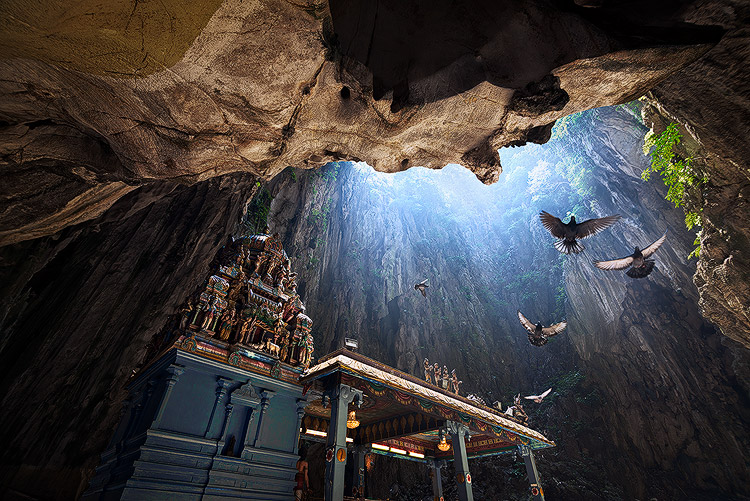
Normally when talking about digital blending, people will first think of exposure blending. That is correct, but it can do more than that. There is several situations where digital blending can be very handy. Not only can it help create a better photo, it also eases you in your shooting experience. In this article, I will share how I use a digital blending in Photoshop to create a much more interesting composition.

digital blending

I took the photo above of Batu Cave in Malaysia. I chose to add a few pigeon photos from a series that I captured, and blended them all together into a single photo with the digital blending technique.

Select images

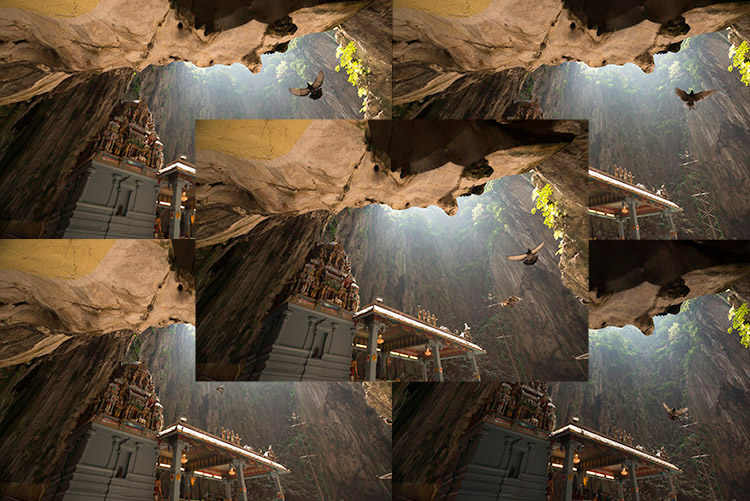
Here are the raw photos that I going to use. You can see that there are pigeons in different locations in each of the photos.

digital blending Photoshop

Open Photoshop

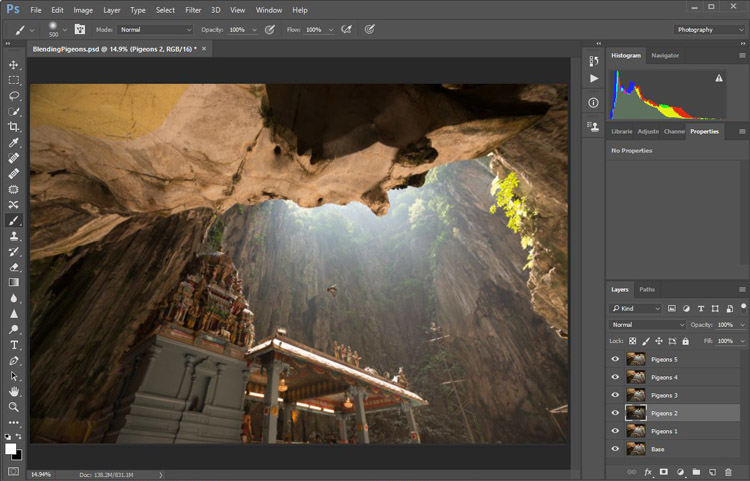
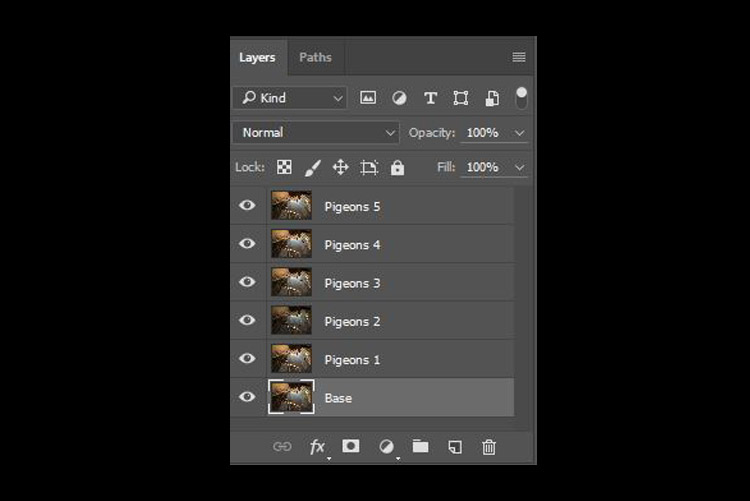
Next with Photoshop open, I load all the photos into one place as different layers. You can rename them if you want, as I did here.

digital blending in Photoshop

Back up for a second: How the shots were done

Notice there’s a “base” layer at the bottom. That image was captured with different camera settings compared to the pigeon shots. I do this because normally before capturing any additional photos such as the pigeon images, I will first take a few photos with the BEST camera settings for that situation. In this case, that was ISO 100, aperture of f/8, 1/30th of a second shutter speed.

However, the 1/30th shutter speed was too slow to capture any photos of pigeons. So I needed a faster shutter speed which ended up with camera settings of; ISO 800, f/5, and 1/640th of a second. This allowed me to freeze the movement of the pigeons, but at the same time, it also generated more noise in the photos (ISO 800 compare with ISO 100) and a slightly more shallow depth of field (f/5 compared with f/8) resulting in a softer background.

So the ideal scenario is to have them both together in one final image. Using the digital blending technique you can have the best image quality photo with lesser noise and better focus, and then blend in only the pigeons from later photos. The pigeons will appear to have more noise than other areas of the photo but only in very small areas and you can do a separate Noise Reduction just for the pigeons if needed.

Shooting sequence

Here is the shooting process in sequence, to give you a better picture:

  1. Decide on a composition.
  2. Take your photo with the best (optimal) camera settings for the scene.
  3. Without moving your composition, change the camera settings to capture anything that looks interesting to you. For example; animals, people that able to bring out the atmosphere of the place such as monk praying in a temple, or even any lifeless objects such as trains or boats, or anything else you can think of or notice in the scene.

Photoshop steps

Step #1 – Turn off some layers

Back in Photoshop, you will see there is an “Eye” icon beside each layer. This means that all these layers are visible. Temporary, let’s hide all the pigeon photos first by clicking on the “Eye” icon to uncheck each layer. Leave only two visible, the Base and Pigeons 1 layers.

digital blending

Step #2 – Add a layer mask

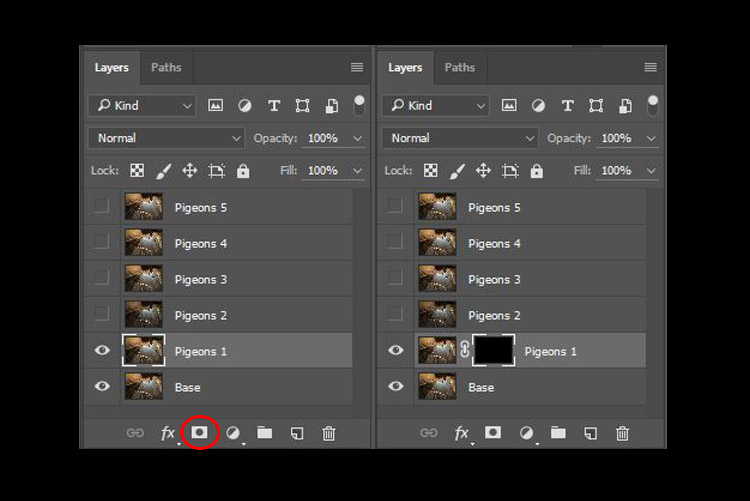
Next, select the Pigeons 1 layer and while holding down the Alt key, click on the “add layer mask” icon (circled in the red in the photo below left). You shall have a black rectangle appear at the right side of the layer, as seen in the photo below right. This is to add a reverse layer mask on your layer, the black mask means it is hiding what is currently in this layer. If you don’t hold the Alt key when you click on the icon, it will create a white mask which will reveal what is currently in the layer.

digital blending layer mask

Step #3 – Paint on the mask to reveal the bird

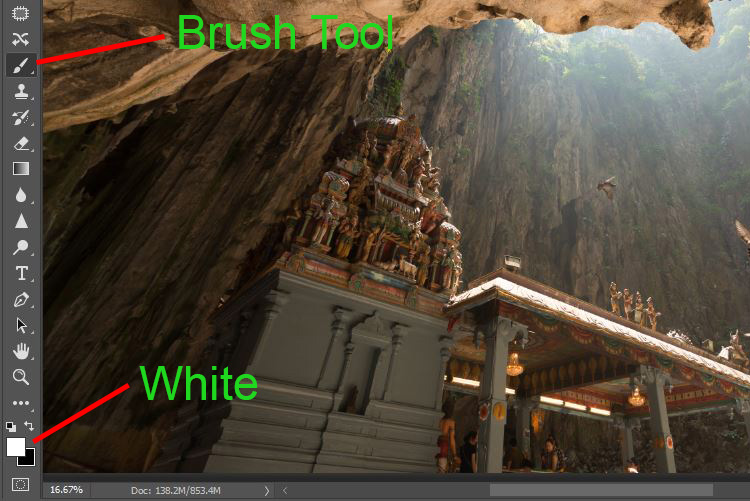
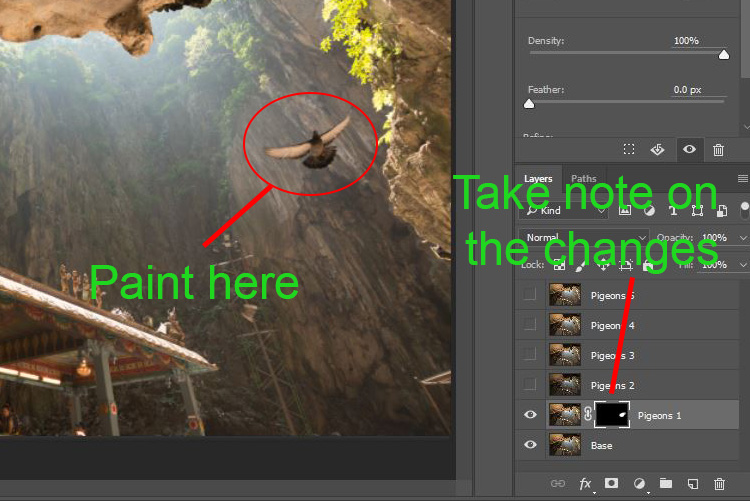
Now we have a black mask. To blend in only the pigeon from that layer, we will need to select the Brush Tool and paint on the mask in white over the pigeon’s area. Note: A black mask means hiding and white means revealing the layer.

digital blending Photoshop

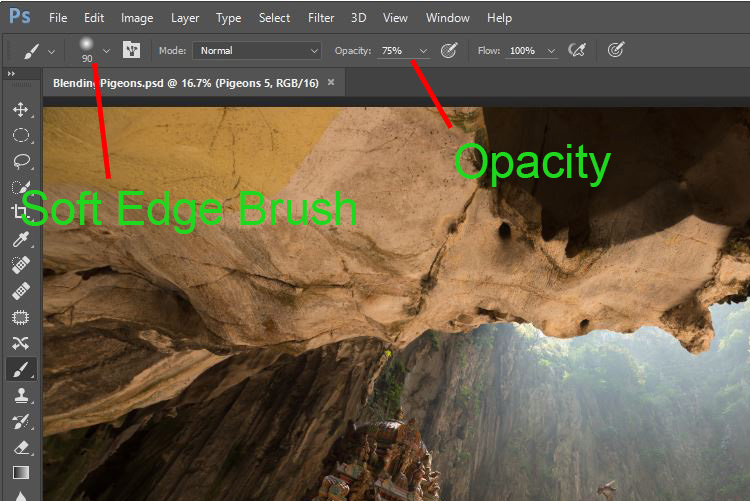
After selecting the Brush tool, make sure you are using a soft edged brush, and the opacity is set to about 75%. The opacity will affect how much of your painting result will be applied. Using opacity at 100%, you only need to paint once to fully reveal that particular area. However at 75 % or lesser opacity, you will need to repeat the painting few times in order to achieve the 100% effect. It is slower, but at the same time it create a smoother edges and the layer is better blended to the original image.

digital blending brush tool

Notice when you do the painting, the mask on the layer also reflects your painting result. Congratulations, now you have the first pigeon blended in! Let’s repeat the same process for the next layer.

digital blending Photoshop

Step #4 – Repeat on next layer

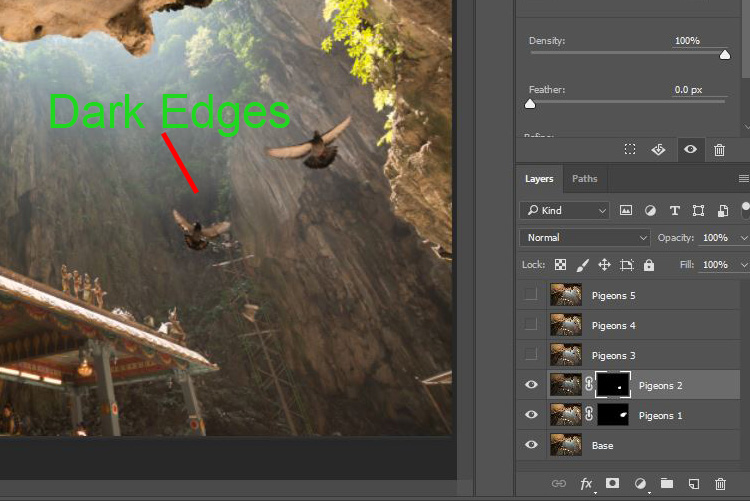
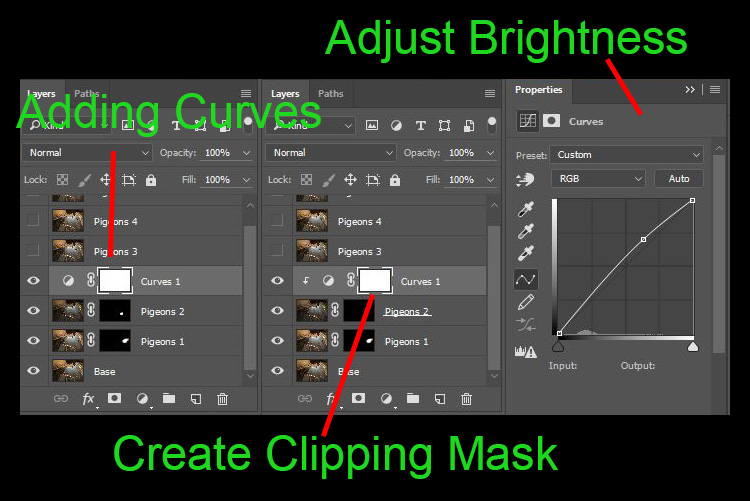
By performing the same steps on the “Pigeons 2” layer, you will now have the second pigeon added. But wait, something is not right. Do you notice that the second pigeon has dark edges surrounding it? Why?

digital blending Photoshop

This is because even at the same camera settings, the lighting conditions may have changed during the shooting process. This image was captured when there were clouds blocking the sun and it dimmed the light in the cave. Instead of solving this by doing some really precise masking (by zooming in and brushing carefully on the edge of the pigeons, which can be a tedious process), let’s try adding a Curves adjustment layer.

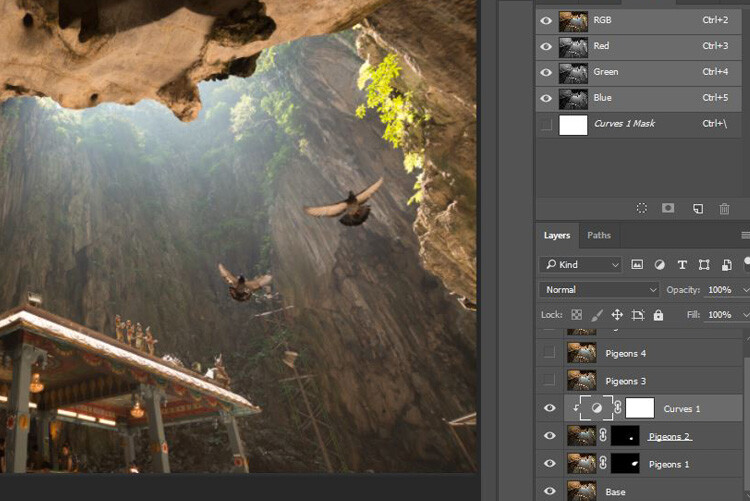
Before doing any adjustment with the curve layer, right-click on it and choose “create clipping mask”. This will make sure whatever adjustment is done here will only affect the layer below it. Now add some brightness by slightly pulling the curve up, as shown below right.

digital blending Photoshop

The surroundings of the second pigeon looks much better now. Other than using a Curve, you can do this on any other adjustment layers such as color balance adjustment layer to correct the tone of the particular layer, if the white balance is not equal with the background.

digital blending Photoshop

You can see the bird blends in much better now with the Curve applied.

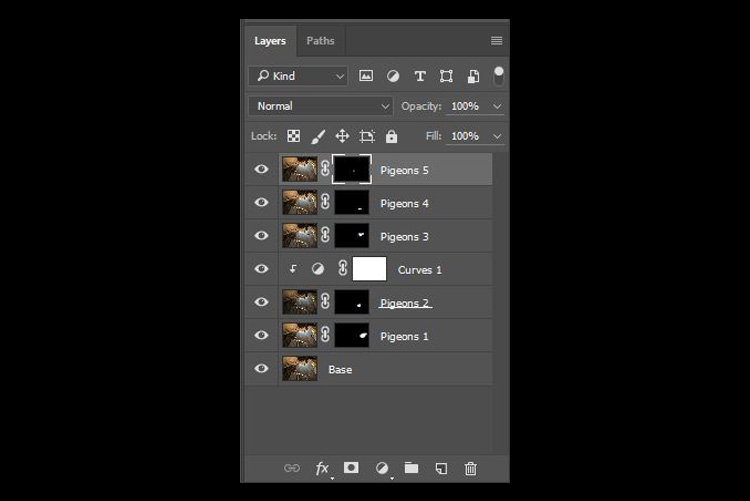
Step #5 – Complete masking on all layers

Let’s continue with the rest of the layers. The masking results will look like the photo below once you have done the blending process.

digital blending Photoshop

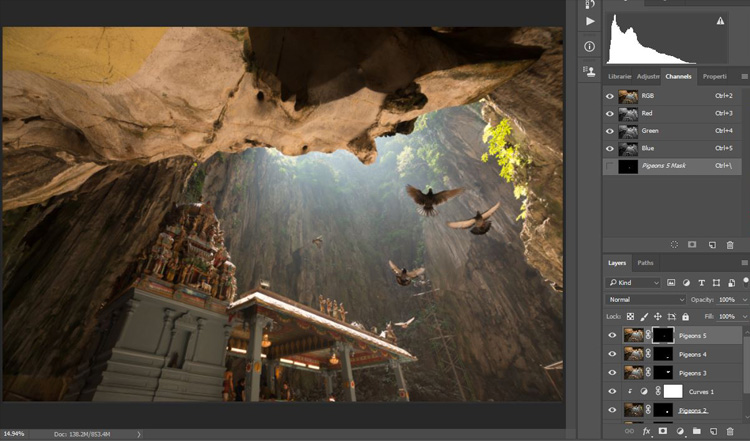
Finally

Here is the final output of the digital blending. Now you can perform any other post-processing adjustments from here by applying contrast, changing color balance, sharpening, or any other process that you think is necessary to enhance your photo.

digital blending Photoshop

I hope you have enjoyed this article, and it gives you some ideas or inspiration. If you have any questions or suggestions, feel free to leave a comment below.

googletag.cmd.push(function() {
tablet_slots.push( googletag.defineSlot( “/1005424/_dPSv4_tab-all-article-bottom_(300×250)”, [300, 250], “pb-ad-78623” ).addService( googletag.pubads() ) ); } );

googletag.cmd.push(function() {
mobile_slots.push( googletag.defineSlot( “/1005424/_dPSv4_mob-all-article-bottom_(300×250)”, [300, 250], “pb-ad-78158” ).addService( googletag.pubads() ) ); } );

The post How to do Digital Blending in Photoshop to Create a Composite Photo by Grey Chow appeared first on Digital Photography School.


Digital Photography School

 
Comments Off on How to do Digital Blending in Photoshop to Create a Composite Photo

Posted in Photography


Benjamin Von Wong takes aim at coal pollution with post-apocalyptic photo shoot

31 Jan
Shot on the Phase One IQ3, Schneider 35mm | ISO400, 35mm, f/8, 1/400 with Broncolor Move & Siros. Photo by Benjamin Von Wong

Benjamin Von Wong’s latest project doesn’t pull any punches. For this shoot, he collaborated with the Wasteland Warriors – a pair of artists who pay homage to a Mad Max-style post-apocalypse by creating custom clothing and props. Von Wong began planning the shoot months ago, hoping it would bring awareness to the impacts of global reliance on coal. When the political climate in the US shifted and then-President Elect Donal Trump called for a return to coal, it all seemed suddenly very timely.

Shot on the Phase One IQ3, Schneider 35mm | | ISO100, 35mm, f/6.3, 1/200 with Broncolor Move & Siros. Photo by Benjamin Von Wong

The concept envisions a future where oxygen is a precious commodity, controlled and traded by Mad Max-style soldiers. The backdrop is a mining museum in Germany called Ferropolis, and the dramatic setting is complemented by Wasteland Warrior’s custom props and elaborate costumes. 

Shot on the Phase One IQ3, Schneider 35mm | ISO800, 35mm, f/12, 1/640 with Broncolor Move & Siros. Photo by Benjamin Von Wong

Per usual, Von Wong provides plenty of behind-the-scenes information, including a post-apocalyptic lighting demo. For the shoot he used a Phase One IQ3 and Schneider 35mm lens. And yes, he did use smoke bombs on the set for effect. He acknowledges how this is somewhat at odds with his message, but ultimately decided it was the only way to achieve the right visual impact and paid a voluntary carbon emissions tax.

$ (document).ready(function() { SampleGalleryV2({“containerId”:”embeddedSampleGallery_5410520016″,”galleryId”:”5410520016″,”isEmbeddedWidget”:true,”standalone”:false,”selectedImageIndex”:0,”startInCommentsView”:false,”isMobile”:false}) });

In his blog post, Von Wong makes it clear that he doesn’t believe this truly the future for the US. 

‘To be fair, I don’t expect our country to ever become this polluted. That would be an unrealistic and improbable projection even if President Trump completes his promise to save jobs and bring back “clean coal.”

Yet despite that, coal still presents some very real risks if we ignore what science tells us and turn our backs on developing sustainable, renewable energy.

I think we can all agree that coal is a finite resource that will only carry us so far. Shouldn’t we focus on the future and not dig up the past?’

Does Von Wong’s message come through in his photos? Let us know what you think in the comments. 

Articles: Digital Photography Review (dpreview.com)

 
Comments Off on Benjamin Von Wong takes aim at coal pollution with post-apocalyptic photo shoot

Posted in Uncategorized


Valentine Gift Guide for Photo Lovers

30 Jan

Give a Valentine from the heart or rather … from your camera roll. Or, BOTH.

Our print shop, Parabo Press, makes it easy to whip up the perfect Valentine’s gift from your photos!

Print up just the thing to win over a handsome stranger or let the ol’ ball-and-chain know you couldn’t be happier to have them around.
(…)
Read the rest of Valentine Gift Guide for Photo Lovers (0 words)


© laurel for Photojojo, 2017. |
Permalink |
No comment |
Add to
del.icio.us

Post tags:


Photojojo

 
Comments Off on Valentine Gift Guide for Photo Lovers

Posted in Equipment


Here’s the first known photo of a US Presidential Inauguration

20 Jan

When James Buchanan was sworn into office on March 4, 1857, John Wood made history by making the first known photograph of a US Presidential inauguration. 

Wood was hired by Montgomery C. Meigs, an engineer managing the expansion of the US Capitol which added wings for the Senate and House. According to Robert O’Harrow’s The Quartermaster, Meigs was an early days photography enthusiast. As prints became easier and more affordable to produce, he saw the value in using photography to make copies of architectural plans and hired Wood.

For the inaugural photo, Meigs constructed a small stage so that Wood could capture the scene. The crowd of more than 20,000 mostly stood on a platform Meigs had built to hide construction debris. His journal mentions that Wood was able to make the inauguration exposure in 4 seconds, as he had been experimenting with a ‘photography process of great speed,’ referring to the wet collodion process that was being widely adopted at the time. The image that resulted is an albumen print, resulting from a method of making prints that used a substance found in egg whites and table salt to bind photographic chemicals to paper. 

Articles: Digital Photography Review (dpreview.com)

 
Comments Off on Here’s the first known photo of a US Presidential Inauguration

Posted in Uncategorized


Flashing a peace sign in a photo could lead to identity theft

18 Jan

The National Institute of Informatics (NII) in Japan claims that taking and publishing photos of subjects who are flashing the popular two-fingered ‘V’ or peace sign could lead to identify theft. It warns that fingerprint recognition technology is now so advanced that even casual snapshots can be used to retrieve fingerprint information. The report also says the technology is widely available and easy to use.

According to the NII, the danger lies in a combination of widely available smartphones with high-resolution cameras and the rising popularity of posting images on social websites. In an experiment the researchers were able to copy fingerprints from photos that were captured 3 meters (9 feet) away from the subject. That said, the fingers in question have to be in focus and the scene has to be well illuminated as presumably noise reduction at higher ISOs would destroy the fine low-contrast fingerprint lines. We would also assume that the experiment only works with high-resolution out-of-camera images. Many social media websites reduce the size and increase compression of posted images which should, with current technology, make it pretty much impossible to extract any fingerprint information. 

However, if you frequently flash a peace sign in photos and are worried about the possibility of identity theft, the NII also has a solution to the problem: it has developed a transparent film that can be attached to your fingers. It contains titanium oxide and makes it impossible to scan your fingerprints from a photo but doesn’t interfere with identity verification. Unfortunately, the technology won’t be ready for another two years. For now, think twice about showing your fingertips in a photograph.

(Photo: ‘Comic Fiesta 2014’ by Vernon Chan / Wikimedia Commons. Used under CC license)

Articles: Digital Photography Review (dpreview.com)

 
Comments Off on Flashing a peace sign in a photo could lead to identity theft

Posted in Uncategorized


Improve Your Photos with the Very Best Photo Editing Apps

12 Jan

We snap photos so fine, we don’t need editing apps … but every now and then a photo needs a touch of sharpening, or a cooling filter, or a clip art robot, just to spruce it up.

Who are we kidding? We’re obsessed with editing apps. And so are you – we asked!

Read along to see our favorite editing apps, and the favorites of all of our followers.

You’ll be a pro editor in no time, whether you snap perfect pics or not.

(…)
Read the rest of Improve Your Photos with the Very Best Photo Editing Apps (638 words)


© laurel for Photojojo, 2017. |
Permalink |
No comment |
Add to
del.icio.us

Post tags:


Photojojo

 
Comments Off on Improve Your Photos with the Very Best Photo Editing Apps

Posted in Equipment


Voice-controlled photo editing: coming soon to Photoshop?

12 Jan

Adobe Research is experimenting with a voice-controlled photo editing virtual assistant. A demo video uploaded to Adobe’s YouTube account shows how the tool might function, performing and undoing basic edits to an image, and exporting the final product to Facebook – all achieved through spoken commands. 

The demo shows this feature being used for extremely basic editing functions (cropping, flipping an image), which Adobe calls ‘a first step towards a robust multimodal voice-based interface’ for its mobile applications. 

Given that voice control is popping up in just about every gadget you can think of, it seems logical for Adobe to be considering adding voice control to its apps. The Internet of Things is rapidly turning out to be the Internet of Shouting at Things, so voice-controlled photo editing seems inevitable. 

Do you think Adobe could make voice control sophisticated enough for the complex needs of serious photo editing? Let us know in the comments.

Articles: Digital Photography Review (dpreview.com)

 
Comments Off on Voice-controlled photo editing: coming soon to Photoshop?

Posted in Uncategorized


Chipotle sued for $2.2b for allegedly using womans photo without permission

10 Jan

Mexican fast-food restaurant chain Chipotle is being sued for $ 2.2 billion by a customer who claims a photo of her has been used in advertising without her consent. According to the lawsuit, photographer Steve Adams took Leah Caldwell’s photo in mid-2006 while she was dining in a Denver area Chipotle restaurant. Caldwell claims she refused to sign Adams’ release form before leaving the restaurant, but that her refusal didn’t stop Chipotle from using the photo in some promotional materials.

Both Adams and Chipotle CEO Steve Ells are named as defendants in the lawsuit. Caldwell states that she became aware of the photo’s usage in Chipotle promotional materials in December 2014 in Orlando, later seeing the photo in multiple California locations in 2015. She also claims the photo was edited to include alcoholic items on the dining table.

Chipotle has declined commenting on the pending litigation, but the lawsuit alleges that Chipotle bought and used the Adams’ photo without confirming whether Caldwell has signed a release. Due to the lengthy span of time that the photo was in circulation, the lawsuit is seeking a massive $ 2,237,633,000, the amount that Chipotle allegedly profited from the photo.

No doubt it’s a reminder to photographers everywhere that getting models to sign a release form is an absolute must. Will Chipotle end up paying over $ 2 billion as a result of the oversight? It seems unlikely. Let us know what you think in the comments.

Source: The Denver Channel

Articles: Digital Photography Review (dpreview.com)

 
Comments Off on Chipotle sued for $2.2b for allegedly using womans photo without permission

Posted in Uncategorized


Deal 11: Black & White Photo Artistry Course – 60% OFF!

29 Dec

NewImageOn the eleventh day of Christmas dPS gave to me …

Sebastian Michaels smashed every dPS record recently with his Fine Art Grunge Composition course. Now he’s back, with his bigger, better and brand freshly updated Black & White Photo Artistry course!

… and you can save 60% on the regular price right now.

This course brings together all the best photo artistry approaches and techniques from the original course and expands on them within the realm of creative black and white.

You’ll discover the pro secrets for producing stunning works of photo art. Awesome, intricate black and white compositions fit for print and canvas. All while honing your own photography skills!

Ready to create the most artistic photo works of your life? Grab this deal with a 60% saving today only!

Here’s the link to order – you won’t be disappointed.

This huge offer to this brilliant course not only comes with lifetime access, but also a heap of extra bonuses. You’ll get FREE software, bonus Lightroom presets and more.

We think it’s a stunning deal in the 12 dPS days of Christmas and well know you’ll cherish everything it will teach you about black and white photography artistry.

googletag.cmd.push(function() {
tablet_slots.push( googletag.defineSlot( “/1005424/_dPSv4_tab-all-article-bottom_(300×250)”, [300, 250], “pb-ad-78623” ).addService( googletag.pubads() ) ); } );

googletag.cmd.push(function() {
mobile_slots.push( googletag.defineSlot( “/1005424/_dPSv4_mob-all-article-bottom_(300×250)”, [300, 250], “pb-ad-78158” ).addService( googletag.pubads() ) ); } );

The post Deal 11: Black & White Photo Artistry Course – 60% OFF! by Darren Rowse appeared first on Digital Photography School.


Digital Photography School

 
Comments Off on Deal 11: Black & White Photo Artistry Course – 60% OFF!

Posted in Photography