RSS
 

Posts Tagged ‘need’

5 Killer Reasons Why Photographers Need Social Media

01 Mar

fashion-photography-blog-social-media-for-photographers

Hey there everyone,


This is Ed a.k.a Edrenalin, the editor of FashionPhotographyBlog.com, here to bring you insights from the inside.


After all of my client’s photography businesses I’ve helped improve, one thing is common across each and everyone one of them, they wanted to have a presence online and they wanted to be on social media. That’s understandable since that’s where all the major businesses across every industry is moving towards. However, when I asked them why they wanted to be on social media and what they wanted social media to do for them, they couldn’t answer the question. At the end of the day, they felt that they needed to be on social media because everyone else told them they had to.


So how can you work towards your social media objectives if you don’t know what they are in the first place? Don’t despair though, because if you are thinking similarly in this way, then you are not alone. It is a common misconception amongst photographers and creatives based on the encounters that I’ve come across. I’m going to share with you what I share with them to help clear up the reasons why you should consider incorporating social media in your own marketing strategies for your photography business.


Top 5 reasons why photographers need social media today


1. Social media accounts proves that there is a real person behind the photography business and that you didn’t just “open shop” yesterday. The accounts establish that the business has history and participates in dialogue and that you are active online.


2. Google now is starting to incorporate social signals from your social media accounts as a factor in their SEO algorithms to determine the relevancy and engagement of your website when deciding to show your website on the search results pages. The weight social signals has in this algorithm is unknown and is locked away in the unbreakable vaults of Google however, I can confirm that it is now a factor.


3. Your target audience can see social proof based on what others are saying about your photography business in your social media accounts such as in your comments and reviews section.


4. Potential business partners and magazine editors, might want to see how engaged are your followers. If they do business with you or publish your work, then you publish the news on your social media accounts, they might want to know how many people following you would actually know about it and get eyeballs to their brand.


5. Not everyone will know your website address, before they know about your business. With social media you are able to engage with your target audience in other social networks and hang out where they hang out. Here’s a question, how many people visit your website every day? and now how many people visit Facebook every day? which is the greater number?


The concept behind social media marketing is that you are participating in discussions with communities of these larger social networks, “borrow” them from these established networks and introduce them to your photography business.  


If there is one thing that you can do to improve your business this year, is to get onto social media for your business to increase the online presence for you.


Do you like this article? Want to read more articles like this? Then please SHARE this article on social media. If you have any comments or questions please feel free to put them in the comment section below. 


Fashion Photography Blog

 
Comments Off on 5 Killer Reasons Why Photographers Need Social Media

Posted in Uncategorized


DL or No DL? What you need to know about the Nikon DL compacts

23 Feb

Three’s company

Are compact cameras still relevant? Nikon seems to think they can be, if they’re good enough. It’s announced three premium compacts, all built around 20.8MP 1″-type BSI CMOS sensors its latest, ‘EXPEED 6A’ processor. If that sensor spec sounds familiar, it’s because the Nikon J5 uses a very similar…probably the same…one.

The firepower in that new processor results in 4K video capture capabilities and bursts up 60 fps without AF, and 20 fps with. Combine this speed with a hybrid AF system that uses 105 phase-detect and 171 contrast-detect points (the same one found in the 1-System), and you should have three seriously capable compacts.

When we sat down with Nikon reps back at CES 2016, they explained how engineers developed the three in unison, but targeted each camera’s focal length range toward a very specific customer. However, all three customers are expected to be DSLR shooters looking for a smaller, lighter alternative for everyday shooting. As such, all three can shoot RAW, offer Adobe RGB, can utilize Nikon i-TTL Speedlights, and use a menu system very similar to that found in their pro and enthusiast DSLRs.

Meet the family

The three cameras that make up Nikon’s DL line of premium 1″-type compacts include the DL24-85, DL18-50 and DL24-500. They may not have the most exciting or creative names, but at least they’re straightforward. As you might have guessed, the 24-85 offers a 24-85mm equivalent F1.8-2.8 lens and is the standard zoom compact of the bunch. Reasonably fast on the wide end, this camera has a lot of appeal as an everyday pocketable shooter.

The DL18-50 is the first 1″-type camera to have an ultra-wide lens which, in this case, is a 18-50mm equiv. It also features an impressively fast 1.8-2.8 aperture range, and sits as the DL’s wide/normal option. And on the tele end you have the DL24-500 F2.8-5.6. It isn’t as fast as the other two and certainly isn’t pocketable, but it is easily offers the most versatile focal range of the three.

Yet more choices

Style-wise, the DL24-85 and DL18-50 may seem oddly familiar. The concealingly small dial on the back looks a lot like those on the Nikon 1 series bodies, but from the front, they look almost as if Nikon’s borrowed the leftover tooling from Panasonic’s LX5. This is no bad thing – the LX5 was a really classy little enthusiast compact, but we thought it was faintly amusing, given how fiercely Nikon has protected its industrial design in the past.

We’re joking, of course, and there’s no such precedent for the DL24-500 – perhaps because its design resembles every other superzoom on the market. It’s pretty difficult to make an interesting-looking superzoom, just as it’s difficult to make an interesting looking SUV. And often inadvisable to do so.

How do they compare?

We’ve had to approximate how the available F number on each lens will decline, as you zoom in, but even with these approximated values, you can see that the DL24-85 sits between the lens range of the Sony Cyber-shot RX100 Mark III and IV, and that of Canon’s Powershot G7 X II.

The graph should also make clear just how unusual the DL18-50’s lens is. 18mm equivalent is significantly wider than any of the other 1″ sensor compacts currently on the market, yet it’s bright and able to reach a relatively practical 50mm equivalent focal length.

As usual, we’ve plotted these graphs to show both equivalent focal length and equivalent aperture.

Reaching for it

The DL24-500 joins an already impressive group of 1″ sensor superzooms, including the Sony RX10 II, Panasonic FZ1000 and Canon G3 X. These cameras are undeniably popular, especially amongst travel photographers. From its specs alone, the DL24-500 certainly seems like a competitor. Its 4K capture and slow motion video options compete directly with some of the most stand-out specs from the RX10 II (which we recently gave a Gold Award to).

All of these cameras offer considerably better image quality than conventional, small-sensor superzooms. So, although they can’t boast >80x on the little metallic stickers they wear on camera store shelves, they still offer a degree of reach that will be suitable for a huge variety of shooting situations.

And again, the factor that could set the Nikon apart from its competition is its Hybrid AF system. If the DL24-500’s AF system offers similar performance to that of 1-Series cameras (and there’s little reason to think it wouldn’t), the competition will have good reason to be concerned.

Super steady

Each of the three DL compacts offers a secret power, specific to their zoom range and unique to each. In the case of the DL24-500, its super power is Sports VR for added stability when panning at the tele end. Of course, all three cameras have Dual Detect Optical VR and historically, Nikon cameras have impressed us with their stabilization, especially the Nikon P900 superzoom. So we definitely have high expectations for the DL24-500.

Of course, what good is VR and reach if you don’t have quality glass? All three Nikkor lenses have fluorine coatings to keep away moisture and grime, and the 18-50 is the company’s first compact to have a Nano Crystal Coat, which reduces flare and ghosting.

The everyday pocket cam to beat?

The Sony RX100 series of cameras has long been viewed as the pocketable premium compacts to beat. The most recent Sony RX100 IV in particular impressed us. But the Nikon DL24-85 has us ready to reconsider the crown.

The two cameras share a whole lot of similar specs, including 4K video capabilities, optical image stabilization, fast burst rates with continuous AF, and tilting LCDs. They both offer 20MP 1″-type sensors and very similar focal range, though the Nikon does have a bit more reach.

But the two do vary in some key areas. While the Sony has a pop-up EVF, you’ll have to pony up for an optional tilting model on the DL18-50 and 24-85. Conversely, the DLs all have touchscreen OLED displays, while the RX100s use non-touch LCDs. 

But an even bigger difference can be found when looking into each camera’s AF system: the Sony uses a contrast-detection AF system, while Nikon uses a hybrid approach (combining depth-aware phase detection with high-precision contrast detection). But before you dismiss the Sony entirely, it’s worth noting that the RX100 IV really impressed with its AF capabilities during our testing. So, while the Nikon DL24-85 should  be able to outperform the Sony, we’ll just have to wait until we get one in to know for sure.

Nice and close

The DL24-85 is the only DL of the three to offer a 1:1 macro mode (its secret power). It can be accessed by turning the zoom ring all the way to the right to the S.macro position. In the macro mode, users have a 35mm equiv. field of view. And while all three cameras offer a manual focus mode, the DL24-85 also has a focus bracketing feature, which should be particularity useful for macros.

Unfortunately, the ring around the lens barrel of the DL24-85 is not customizable (same goes for the other DL’s). It can only be used for manual focusing.

Wide street shooter

The DL18-50 is the widest DL of the bunch, and while its 18-50mm focal length may not appeal to casual shooters, street photographers are sure to be enticed by its range and fast lens. Its tilting touchscreen allows for tap-to-focus and, we assume, tap-to-shoot capabilities that should suit that ‘decisive moment’ shooting style.

This camera’s focal range will also likely appeal to architecture and landscape shooters. To further tempt said group, it has a built-in perspective control feature that can be used to distort the image to correct for perspective distortion.

Unlike the other two, it doesn’t have a built-in flash – perhaps because it would be too difficult to offer such wide coverage without some clever optics and a lot more distance away from the lens.

Touch, see, shoot and share

Touchscreens can be great, especially when paired with physical control points (this way you can choose). All three DLs offer 1.04M-dot OLED touch displays. The displays on the DL24-85 and DL18-50 can tilt, while the display on the DL24-500 is fully articulating. This only adds to the DL24-500’s appeal as a video-centric all-in-one.

The DL24-500 also offers a 2.4M-dot OLED electronic viewfinder, while the other two cameras accept the the rather bulky accessory DF-E1 tilting electronic viewfinder with the same XGA resolution. 

The three DLs are also Wi-Fi and Bluetooth enabled, allowing them to take advantage of Nikon’s ‘SnapBridge’ technology, first unveiled to the world at CES 2016 during the company’s press event announcing the D500. ‘SnapBridge’ allows a camera to stay connected to one’s smart device via low power Bluetooth connection, without the need to reconnect. It’s worth noting that while we’ve written about SnapBridge in the past and are excited by its implication, we have yet to try it. The cameras also support NFC, for quick and easy pairing with Android devices.

Where they fit on the 1″ scale

Here’s how they fit into the wider market. We don’t yet know exactly how their apertures will change as you zoom, so we’ve had to approximate them here.

The pricing is exactly as we’d expect: the DL24-85 with its fast standard zoom is a direct competitor for Sony’s RX100 III and Canon’s G7 X Mark II. It doesn’t have a viewfinder, as the Sony does, so it’s no surprise to find it’s being pitched at $ 150 lower than the RX100 III’s launch price and $ 50 below the Canon’s.

Meanwhile, the DL24-500’s long, increasingly slow lens makes it look like Nikon is targeting the same customers as the G3 X. And, guess what? The Nikon MSRP is exactly the same as the Canon’s, at $ 999.

Finally, although it shares a lot in common with the 24-85, there’s a premium to be paid for the DL18-50. With no direct rivals, and the challenges of making such a fast, wide lens, it’s no surprise that it’s to be launched for $ 849.

In summary

It’s interesting to see how these new models fit in to the market. Ever since Sony announced the RX100, manufacturers have been developing ever more variations and options around the 1″ sensor. Since most cameras take at least two years to develop, it’s still relatively early in the timeline, but with the arrival of Nikon there are now four manufacturers building large sensor compacts.

So far we’ve seen Sony focus its RX100 series on the idea of a small camera with a large sensor and a bright lens, with zoom range being the trade-off being made. Canon very much followed suit with its G7 X models. And the Nikon DL 24-85mm, with its F1.8 – 2.8 is clearly targeting the same potential buyers.

Meanwhile, Sony, Panasonic and Canon have all developed riffs on the large bodied, long zoom theme. Sony’s RX10 (both I and II) opt for constant aperture zooms, while Panasonic’s FZ1000 gives greater range that gets slower as you zoom. Nikon’s DL 24-500mm is much closer to Canon’s G3 X, in offering still more zoom by letting the aperture drop even further.

As such, the standout camera in this group is the DL 18-50. It’s fast (F1.8-2.8), ultra-wide to just-beyond-normal zoom range is unique, and offers an exciting option for wide-angle shooters looking for a pocketable camera with what should be good image quality. Whatever our reservations have been in the past about Nikon compacts, the image quality has usually been very good.

Articles: Digital Photography Review (dpreview.com)

 
Comments Off on DL or No DL? What you need to know about the Nikon DL compacts

Posted in Uncategorized


5 Essential Things You Need to Know About the Lightroom Library Module

16 Dec

Essential things Lightroom

For those of you who have been following my Lightroom articles I thought it would be fun to test your knowledge. We’ll start with the Lightroom Library module because the work you do here, lays the foundation for everything you do inside Lightroom. Master the Library module and you’ll be well on your way to becoming an expert on the entire program.

Ready? Let’s start with what is probably the most important thing of all – backing up your Catalog.

1. How to back up your Catalog

This is really important. Your Lightroom Catalog is absolutely essential because it’s where Lightroom stores every piece of information it has about your photos. Not only does this include the location of your photos (i.e., where they are saved on your hard drive) but any metadata associated with them (from camera settings to keywords), Lightroom specific information (such as which Collections a photo belongs to) and any edits you have made in the Develop module. Yes, these are all stored in the Catalog.

How much of a disaster would it be if you lost all this data? I’m sure it would be a major loss. That’s why it’s so important that you back up your Catalog regularly. You should also back it up to an external hard drive, not to an internal one, in case your computer is lost or stolen.

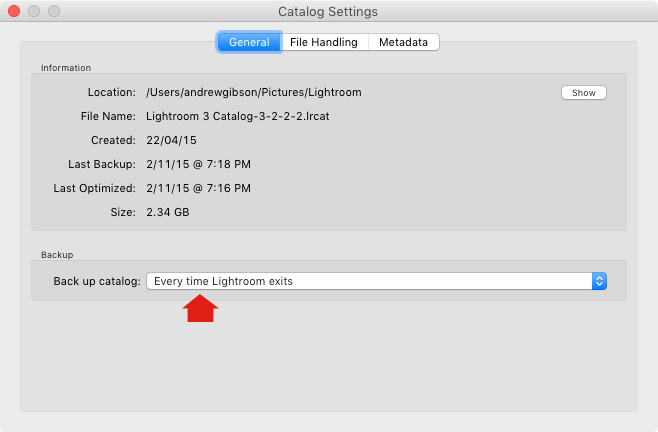
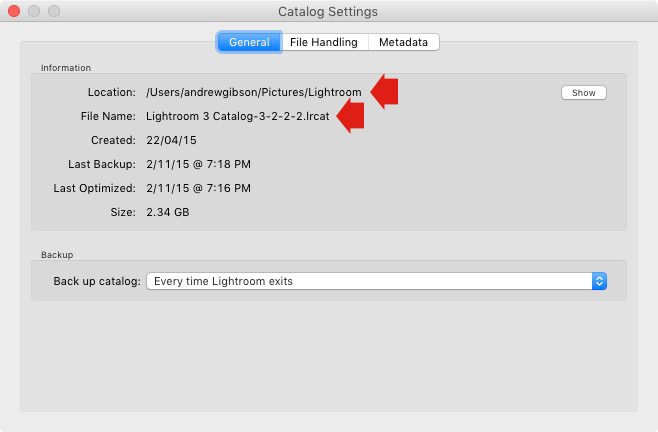
You can check your back up settings by going to Lightroom > Catalog Settings. Click the General tab – Back up catalog should be set to Every Time Lightroom Exits as shown below.

Essential things to know about Lightroom

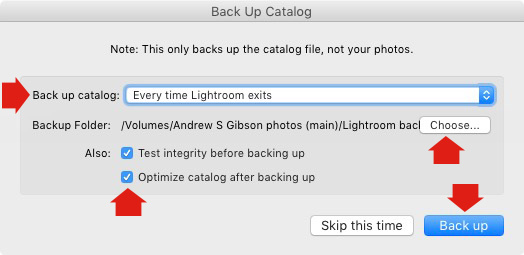
Connect the external hard drive on which you back up your Catalog, then exit Lightroom. Before Lightroom closes down, it displays the Back Up Catalog window. The Backup Folder setting should point to a folder on your external hard drive. If it doesn’t, click Choose and change it now.

Essential things to know about Lightroom

When you exit Lightroom is the only time you will see this popup box, and the only place you can change where it saves the backup of your catalog.

Make sure the Test integrity before backing up and Optimize catalog after backing up boxes are ticked. When you’re done click the Back up button. Lightroom will save a backup of your Catalog to your external hard drive before closing. This may take some time, especially for a large Catalog, so be patient.

Some important things to note about Catalog backups:

  • You only need to keep the last two or three backups. You can delete older ones to free up hard drive space.
  • If you have Lightroom 6 or Lightroom CC the backed up Catalogs are compressed, saving hard drive space.
  • You should always back up your Lightroom Catalog to a different hard drive than the one the main Catalog is stored on. That way, if your main hard drive fails, the backed up Catalog is safe.
  • Once a month (or more often if you like) copy the latest backup to Dropbox, Google Drive or another cloud storage solution. This is to protect you in case you lose both your computer and your external hard drive to theft or fire. The location and name of your Lightroom Catalog are recorded in Catalog Settings.

Essential things to know about Lightroom

2. How to back up your photos

This is important to mention because I want to make sure you understand that your photos are not stored inside Lightroom, or in the Catalog. Your photos are saved on your hard drive (or drives) and you need to back them up yourself. It is your responsibility – Lightroom doesn’t do it for you.

There are many ways of backing up photos, you need to find the method that works best for you. However I’m sure it will help if I share my method. Feel free to use, adapt or ignore it.

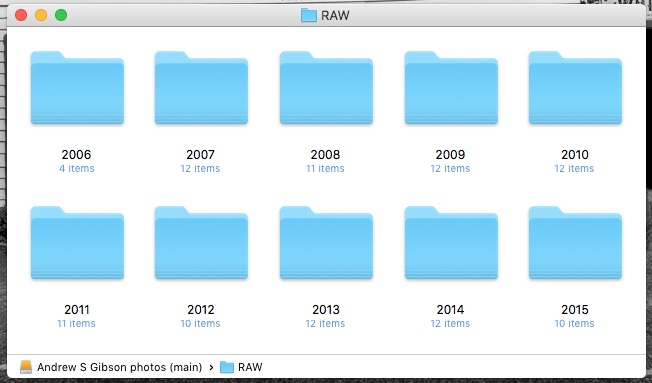
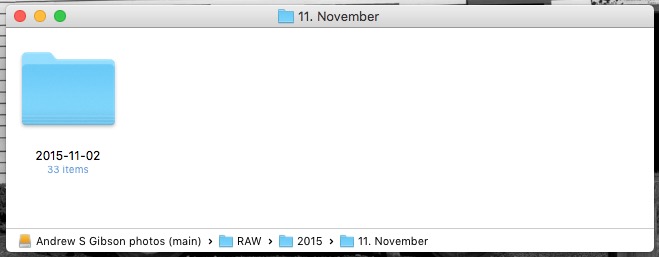
  • Create a folder called Raw. All your Raw files are stored in there (I shoot everything in Raw – you could simply call your folder something like Photos if you shoot a mixture of Raw and JPEG).
  • In that folder create a new folder for every year you take photos.

essential things about Lightroom

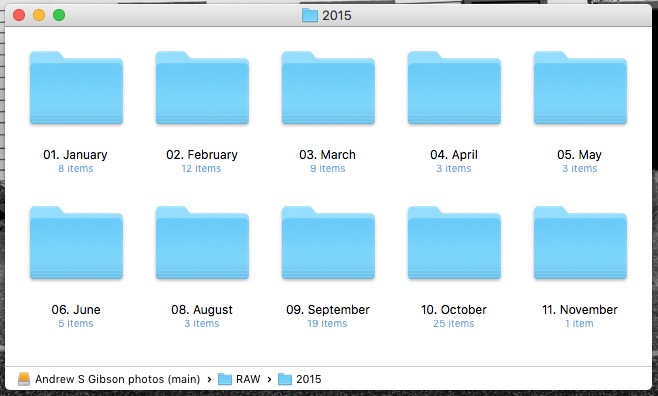
  • In each of those folders, create 12 folders, one for every month of the year.

essential things about Lightroom

  • Whenever you import photos into Lightroom, select the correct destination folder depending on the month and year the photos were taken.
  • Place each shoot into a folder of its own. You can either give it a name or organize the folders by date.

essential things about Lightroom

This system works because it’s easy to see whether your Raw files are backed up. Want to back up all your Raw files to another hard drive? Just copy the Raw folder. Want to see whether you’ve backed up all the photos you’ve taken this month? It’s easy to do so with this system.

By the way, I keep my Raw files backed up to four different external hard drives, one of which is stored off-site. That way, if one of the hard drives fails, I have three other copies.

3. How to set up File Handling in Catalog Settings

The File Handling settings are important because they help you strike a balance between optimizing Lightroom’s performance speed, and using hard drive space.

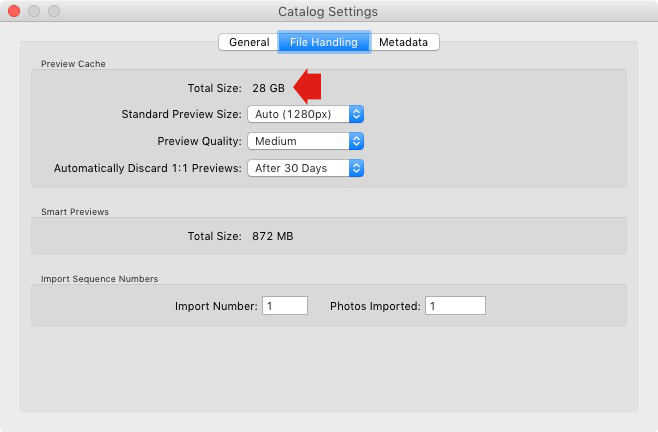
The first thing you need to look at is the total size of the cache. This tells you how much hard drive space your previews take up. For example, looking at mine (see below) I can see my Lightroom previews are currently taking up 28GB.

Essential things to know about Lightroom

It’s important to keep some of your hard drive free (at least 10%, but preferably more) otherwise Lightroom will slow down (as will everything else your computer does). If you are running out of hard drive space, come and have a look here to see if your preview files are too large.

There are two steps to keeping your previews file under control.

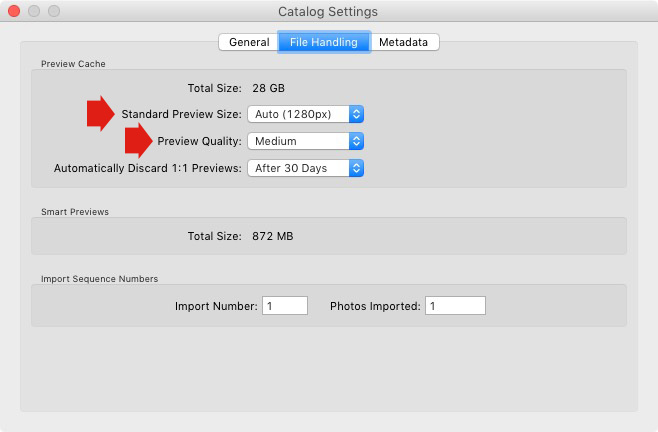
1. Make sure Lightroom is generating the optimum size Standard Previews. These are used to display your photos in Loupe View and don’t need to be any larger than your monitor’s resolution.

If you have Lightroom 6 or Lightroom CC you can set the size to Auto. Lightroom will calculate the optimum size for you. In Lightroom 5 or earlier pick the size that best matches your monitor’s resolution.

Set Preview Quality to Medium – it gives you the best balance between quality and size.

Essential things to know about Lightroom

2. Set Automatically Discard 1:1 Previews to After 30 Days. You need 1:1 previews for zooming in to photos, and working on them in the Develop module. However, they are very large. If you generated 1:1 previews for every photo in your Catalog, and never deleted them, you would eventually run out of hard drive space. To be honest, it doesn’t really matter which setting you choose here as long as it’s not set to Never. You can always regenerate discarded 1:1 previews if you need them again later.

4. How to search for images

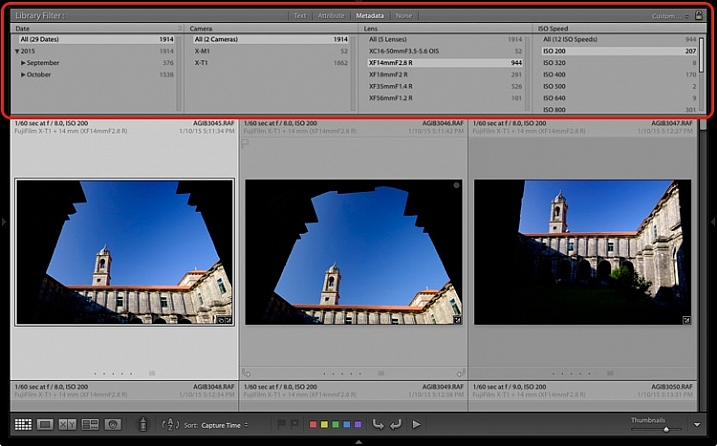
One of the benefits of building the Lightroom architecture on a database is that it is easy to search your photos. You do this in the Filter Bar, which is displayed above the Content Window in Grid View (press ‘\’ on the keyboard if you don’t see it).

There are three types of searches:

  1. Text: Search keywords, filenames, titles, captions, etc., for text sequences.
  2. Attribute: Filter by flag, star rating, colour label or file kind (master photo, virtual copy, or video).
  3. Metadata: Search by date, camera, lens, camera setting (ISO, shutter speed, aperture, etc.), aspect ratio or any of the dozen or so search options listed there.

Have a play with these options to see how it works. Just bear in mind that Lightroom is searching the selected folders or Collections, not your entire Catalog when you do so (select All Photographs to search your entire library).

Essential things to know about Lightroom

5. How to use Collections

Collections are virtual Folders, which you use to organize your images. Folders are limited because a single photo can only be stored in one Folder at a time. The same photo can be stored in as many Collections as you like, making Collections the easiest, and most flexible, way to organize your photos.

An example of this is a photo taken of a person called Jenny in Rome in November 2015. The photo can only be stored in one Folder, but it can be added to a Collection called Jenny, another one called Rome, another called 2015 – in fact as many as you need.

Your folders should be set up to make backing up easy (see earlier point). Your Collections should be used to organize your photos. My article Use Lightroom Collection to Improve your Workflow will help you with this.

Your turn

Of course, this list is not exhaustive, but I’d like to hear your thoughts as well. What do you think is essential to know about the Library module? Do you have any questions about the points raised in this article? Please let me know in the comments below.


The Mastering Lightroom CollectionMastering Lightroom ebook bundle

My Mastering Lightroom ebooks are a complete guide to using Lightroom’s Library and Develop modules. Written for Lightroom 4, 5, 6 and CC  they  show you how to import and organise your images, use Collections, creatively edit your photos and how to work in black and white.

googletag.cmd.push(function() {
tablet_slots.push( googletag.defineSlot( “/1005424/_dPSv4_tab-all-article-bottom_(300×250)”, [300, 250], “pb-ad-78623” ).addService( googletag.pubads() ) ); } );

googletag.cmd.push(function() {
mobile_slots.push( googletag.defineSlot( “/1005424/_dPSv4_mob-all-article-bottom_(300×250)”, [300, 250], “pb-ad-78158” ).addService( googletag.pubads() ) ); } );

The post 5 Essential Things You Need to Know About the Lightroom Library Module by Andrew S. Gibson appeared first on Digital Photography School.


Digital Photography School

 
Comments Off on 5 Essential Things You Need to Know About the Lightroom Library Module

Posted in Photography


4K video: What you need to know

19 Nov

If you’ve been shopping for a camera recently you’ve probably seen the term ‘4K video’ plastered on shop displays and even written on the labels stuck on the front of products. 4K is a new video format that offers considerably higher resolution than standard HD, and even if you’re not someone who’s particularly interested in shooting video, you shouldn’t completely ignore 4K. We’ve put together an article explaining why. Read more

Articles: Digital Photography Review (dpreview.com)

 
Comments Off on 4K video: What you need to know

Posted in Uncategorized


10 Crucial Things You Need to Think About for Portrait Photography

20 Oct

Darlene’s Portrait Fundamentals course is on sale for $ 75 (50% off) now until November 3rd only. Find out more or grab the deal over at Snapndeals.com.


There are many pieces to doing a portrait – it’s not easy. You have to think about the technical stuff like exposure and focus, as well as the non-technical stuff like composition and working with a live subject. It can be daunting if you’re just starting out doing portrait photography so let’s break it down into all the pieces so you can work on one at a time, then put it all together.

Portrait tips dps717px 04

Here are the 10 crucial elements you need to think about when doing portrait photography:

  1. Lighting Pattern
  2. Lighting Ratio
  3. Quality of light
  4. Lens selection
  5. Background
  6. Exposure/metering
  7. Sharpness – getting it in focus
  8. How to position the subject (posing)
  9. Facial view and camera position
  10. Expression

THE TECHNICAL STUFF

#1 Lighting pattern

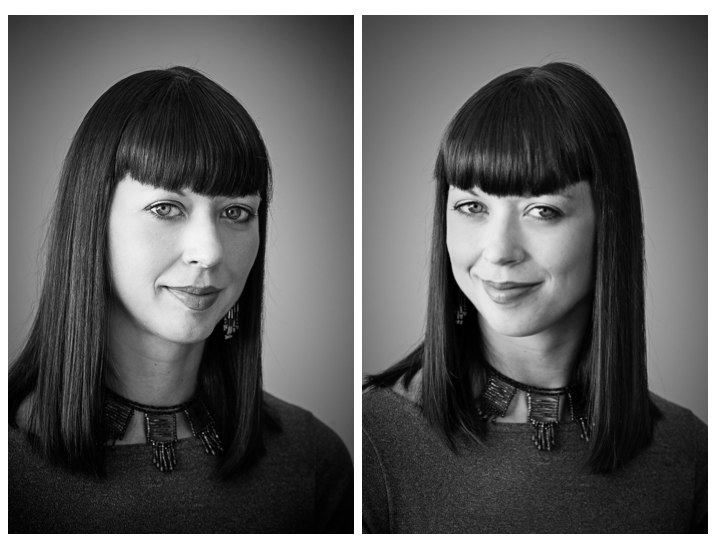
This is how the light falls on the subject’s face. How you set up the light will determine the mood of the final portrait and whether or not the subject is flattered. Lighting partner is a critical piece to get right. There are four main type of patterns and two styles, they are:

  • Split lighting
  • Loop lighting
  • Rembrandt lighting
  • Butterfly lighting
  • Short lighting
  • Broad lighting
Portrait tips 02

Left – Split lighting. Right – Loop lighting.
Portrait tips 01

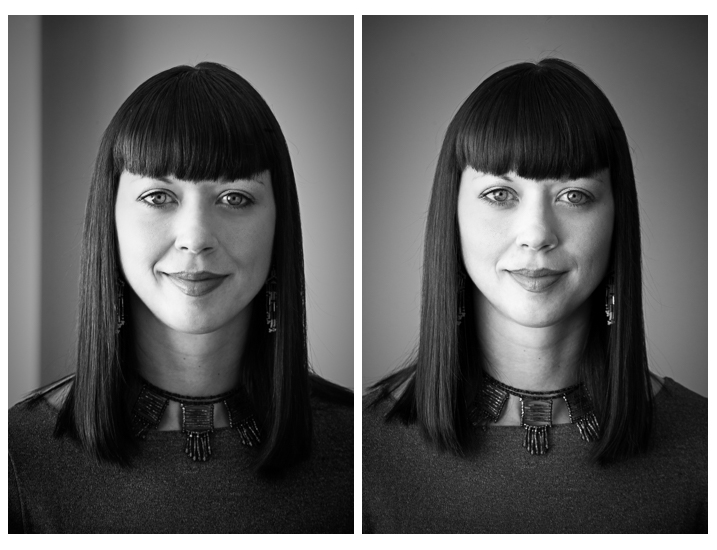
Left: Broad lighting. Right: Short lighting. Notice how different she looks in each image, particularly her nose!

Knowing what each looks like and when to use them is very important. Read more here: 6 Portrait Lighting Patterns Every Photographer Should Know.

#2 Lighting ratio

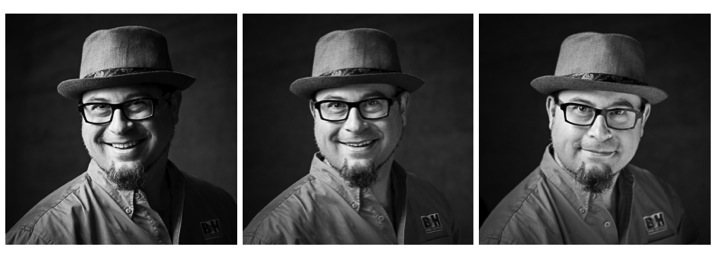
A ratio is a comparison of one thing to another and in terms of lighting it is comparing the dark and light sides of the face. How much difference is there is from the shadow, to the highlight side? The greater the ratio, the more contrast the image will have, and the more moody the portrait will become. The lower the ratio, the less contrast, and the portrait will have a lighter, fresher feeling.

Look at the following examples:
Portrait tips 03

In the images above the ratio on the left is very strong, about 16:1 or four stops. The missing is about 4:1 or two stops, and the right is almost 1:1 or even. The only difference from one to the next is use of a reflector. Notice how the mood and feel of the portrait changes, as the contrast is adjusted.

For more detail on ratios read: Lighting Ratios to Make or Break your Portrait

#3 Quality of light

Another aspect of lighting you need to decide is whether you will use hard or soft light.

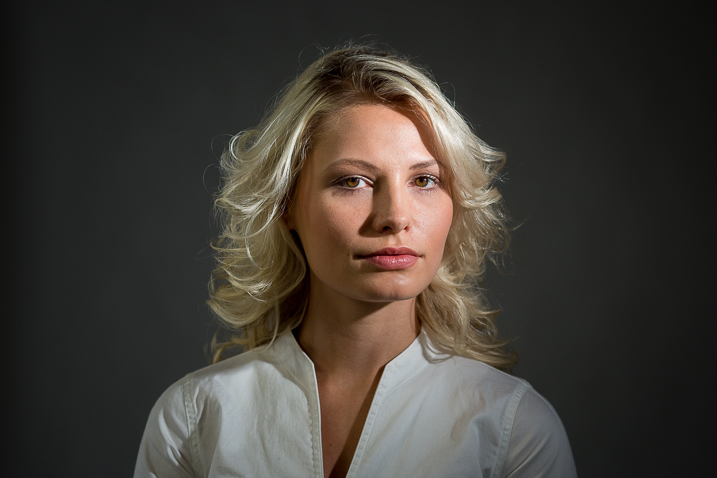
Hard light is produced by a small light source and is characterized by high contrast, enhanced texture of the subject, added drama, and harsh well edge-defined shadows. Examples of hard light sources are:

  • The sun (even though it is large, it is far away so its relative size is small)
  • A bare light bulb
  • The small built-in flash on your camera (including your speedlight without modifiers)

Here are two portraits done using hard light. Which is more appropriate use of this type of lighting for the subject?

Portrait tips dps717px 08

Portrait tips dps717px 05

Soft light is produced by a very large light source. It is low contrast (or can even be quite flat), less textureenhancing, and is more forgiving and flattering for people photography. Examples of soft light sources are:

  • The sky on an overcast day
  • Large studio softboxes
  • A large reflector like 42” or 52”
  • An on-camera flash that has been bounced off a ceiling or wall

Here are two portraits done using soft light. Which is more appropriate use of this type of lighting for the subject?
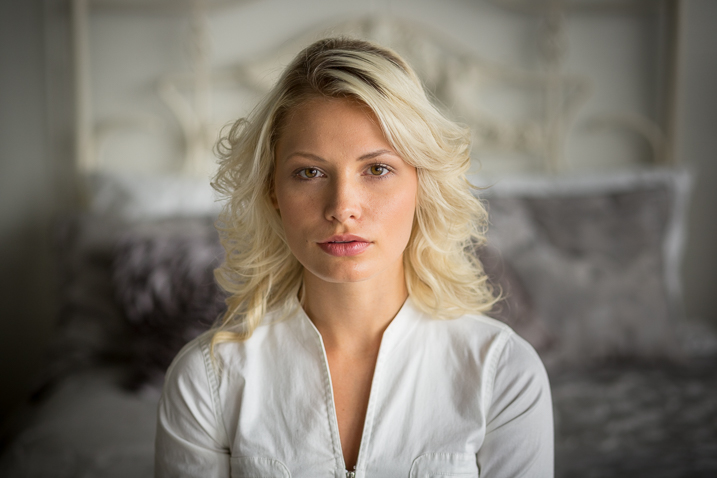

Portrait tips dps717px 09

Portrait tips dps717px 07

So along with the ratio, the quality of light will have a great affect on the mood and feeling of your portrait. Choose soft light for portraits that flatter the subject, and choose hard light for an edgier look with more grit and drama.

#4 Lens selection

The lens you select will change the appearance not only of the subject, but the background as well.

Using a wide angle lens will introduce distortion and cause the subject’s face to look abnormal, sort of stretched. It will also allow you to see a large sweeping view of the background behind them.
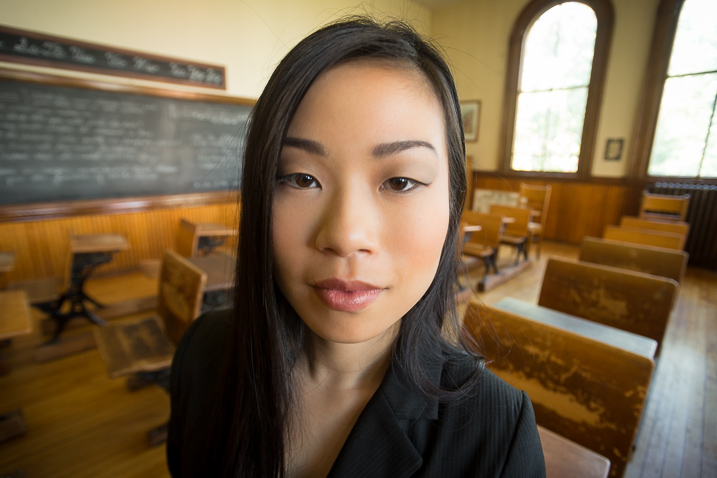
Portrait tips dps717px 13

Notice how the shape of her face and her features are distorted? This is not something most people will desire.

However, there may be instances where you want this look such as a humorous portrait, kids, or an editorial style portrait of a street vendor at a market where you want to see his environment.
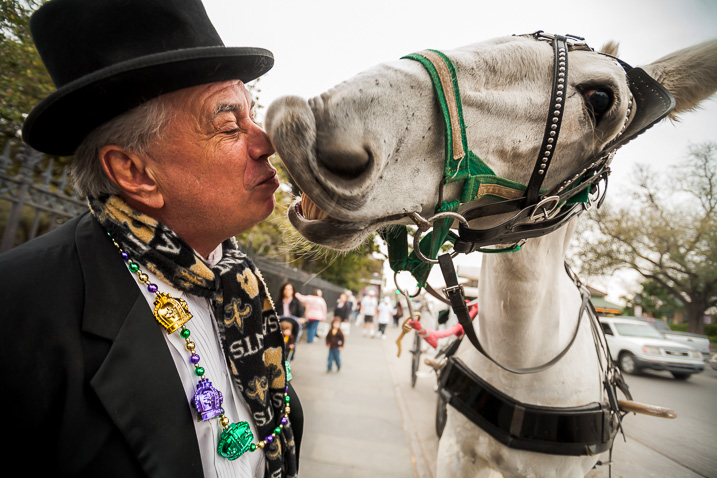
Portrait tips dps717px 12

The wide angle view adds to the comical nature of this portrait.

Telephoto lenses compress perspective – this does two things. First it is usually more flattering to the subject, their facial features look less distorted. Second, it simplifies the background by seeing less of it, and often it’s less in focus as well (dependant on distance to the background) putting more emphasis on the subject, which is what you want. Read more at: How to Achieve Blurred Backgrounds in Portraits.

Portrait tips dps717px 14
Same girl as the portrait above. Compare her face in the two images, and take note of the background as well. See how much less of the room, and how it is more out of focus than the wide image above?
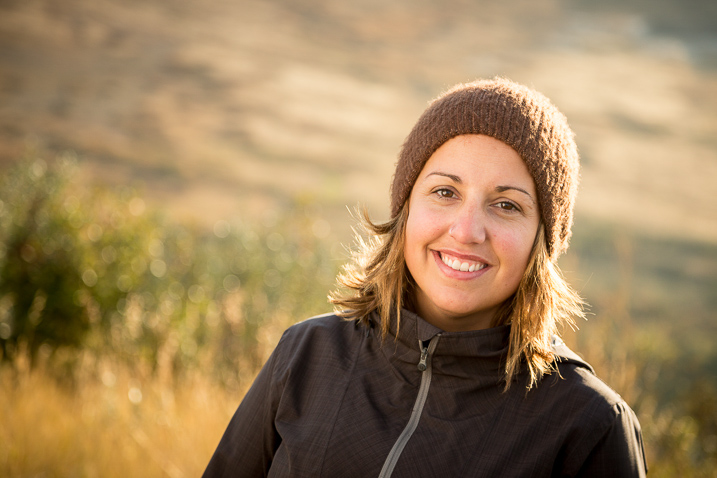
Portrait tips dps717px 11
The long lens used for this image has compressed the background and because it is so far away (across the river on the other side) it is really out of focus and provides a soft background to enhance the portrait, not take away from the girl.

#5 Background

One thing many of my students forget to control and think about is the background. It’s so easy to be focused on all the other stuff and working with your subject that you forget to even look at the background.

Two things you want to make sure about for the background are: it makes sense with the portrait, and doesn’t distract the viewer from the subject. There are four things that can do that, watch for them in your background and adjust your camera position or composition accordingly if they show up:

  • Contrast
  • Bright colours (warm tones are the worse for distraction like red and yellow)
  • Sharpness
  • Bright areas
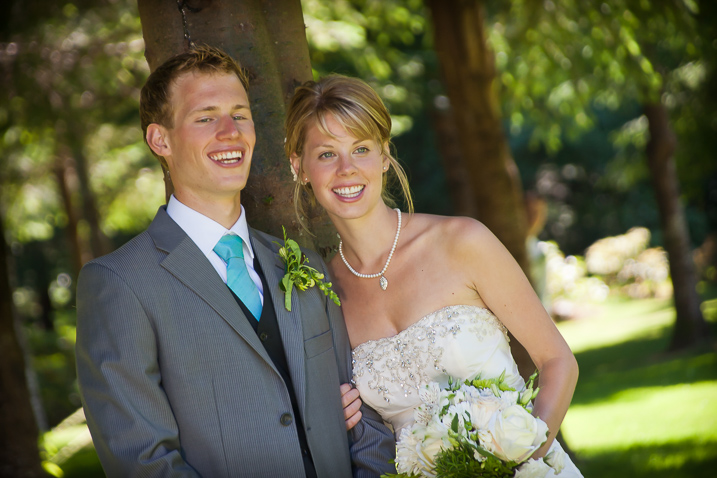
Portrait tips dps717px 15

See how the bright areas, which are also high contrast, in the background draw your attention away from the wedding couple?

Any or all of those can draw the eye away from the subject if they are in your background. The eye is attracted to the brightest area of an image, as well as the sharpest. So get your portrait subject away from the background far enough to get it out of focus, and watch for hot spots that grab the eye. Sometimes simply moving your camera a foot or two to the left or right can eliminate trouble areas and give you a cleaner background – allowing the subject to be the star.
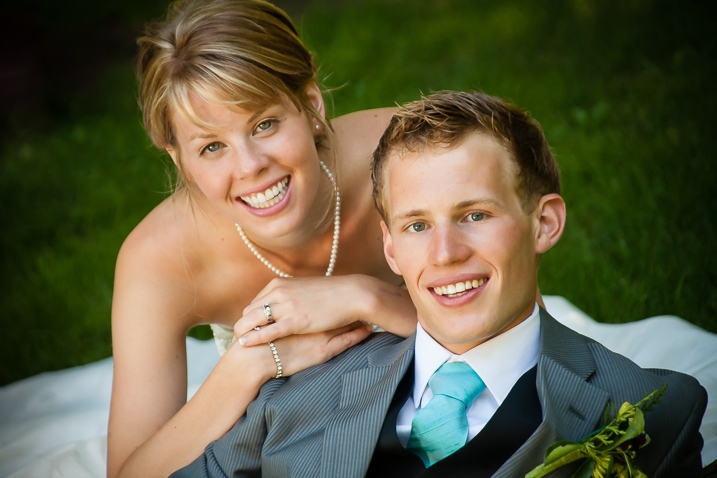
Portrait tips dps717px 16
Use of multiple techniques here have drastically improved this portrait over the one above. The background is now solid, out of focus, and it does not take your eye away from the couple but rather compliments the overall portrait.

#6 Exposure and metering

For a portrait where the subject is not moving, I almost always use the following camera settings:

  • Manual shooting mode
  • Single shot drive mode (when I press the button it takes one image only)
  • Single point focus (not multi or zone)
  • One-shot or AF-S focus mode to focus and lock (not continuous)
  • Shade White Balance preset (as I am usually working in the shade, if you’re in the bright sun choose that – but pick one that matches your lighting condition and leave it, anything but AWB!)
  • Shoot in RAW

That gives me the most control over doing one very important thing – having a consistent exposure from one frame to the next. That may not seem like a bit deal but if you ever decide to do portraits for a friend or have real paying clients – you want to be able to show them the images on the back of the camera and not worry about the one in the middle that was black cause you forgot to adjust the exposure.
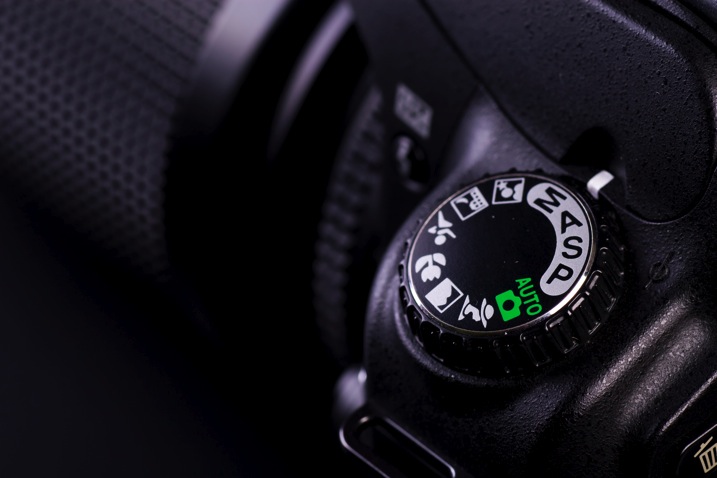
Photodune 1733468 camera controls m

The other thing it does is makes editing in the post-production stage much faster.

So basically set your exposure, do a test shot (review it for exposure using the histogram), then don’t touch it unless you either move to a new location, or the light changes.

#7 Sharpness – getting it in focus

I already mentioned the settings I use for focus above. Back button focus is something I highly recommend as well. It allows me to lock focus on the subject, precisely on their eye if I’m in close enough, and then recompose my portrait and shoot away. Unless the subject or I move, changing the distance between us, there is no need to refocus.

Here are a few more focus tips from a past article I did: 5 Tips for Getting Sharper Images. Obviously if you’re shooting a moving target, like kids in action, you’ll want to choose different focus settings. Try Continuous focus (Servo or AF-C) and burst mode (continuous shooting mode or drive).

THE AESTHETIC STUFF

#8 Posing the subject

Getting your subject or model into a comfortable, yet flattering pose can be tricky. People are generally nervous when being photographed and will look to you for guidance on how to stand, hold their body, turn their head, and adjust their hands. So you need to have a few ideas ready for them, making sure they can hold it comfortably and they look good at the same time.

Here are a few tips:

  • You’ve likely heard this before, but if it bends – bend it. Meaning get them out of a stiff body position bending one leg slightly, and bending elbows and wrists.
  • Get them to shift their weight away from the camera (hip away) it will be more flattering that way.
  • Add a slight head tilt for ladies to add a touch of femininity.
  • To get people to turn their body when standing – tell them to turn and point their feet, the body will follow naturally.
  • Turn shoulders slightly to narrow the body width, which is more flattering for most people.
  • Let them pose naturally and just make slight tweaks or adjustments. Watch how they move on their own so it still looks like them.
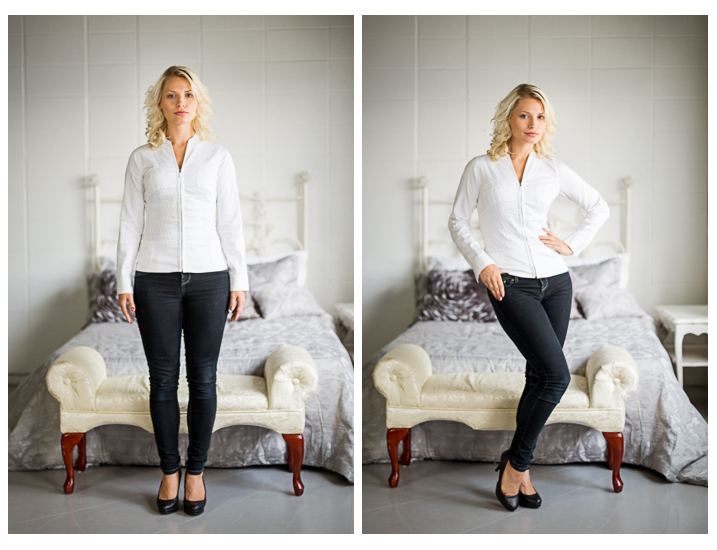
Portrait tips dps717px 17

Left – stiff and boring. Right – bend the parts that bend and make a more dynamic pose, it’s also more flattering, and in this case feminine.

For more tips on posing read these dPS articles:

  • Portrait Posing Tips- How to Help People to Relax and Take Better Photos
  • Tips for Posing Men
  • Posing Guide for Photographing Women: 7 Poses to Get You 21 Different Photos
  • Or grab the dPS ebook Portraits: Strike the Pose

#9 Facial view and camera position

How you position the subject’s face is another factor that determines how flattering the portrait will be, and the mood. Some people look really great in full face view (facing the camera directly) while most benefit from turning slightly to one side, thus narrowing the face a little.

Profile view is something people cannot see in the mirror, so many have never seen theirs, and have no idea what they look like from the side. Only by trying it out will you see and know if it’s flattering for them.

The key to choosing the right angle for their face is to observe them. Do they tend to turn slightly when talking to you? Take note – that is probably the side the subconsciously prefer.
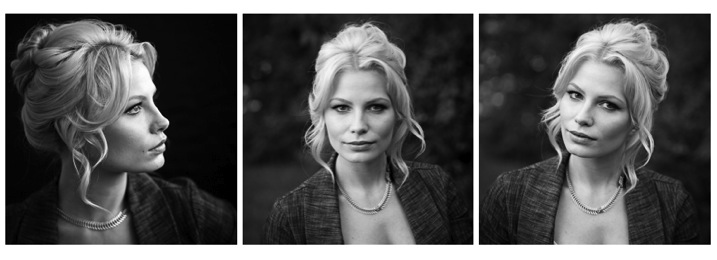
Portrait tips dps717px 18
Three different views of the same girl’s face (above). She has a really gorgeous profile and a square jaw. I think the profile and last image (¾ face view) are the most flattering for her but she looks great in any image. Not all your portrait subjects will have that, so you have to help them look their best by making choices like this. If in doubt, shoot all three and choose later, or let them pick. You’ll learn from the subject what they like and what they think looks flattering.

Tip: for people who have a bump on their nose that do not want it to show – try photographing them facing both ways. One way will show the bump, the other it will be hidden. How you do that is shoot one way with the light say off to camera right. Then trade places with them so the light is coming from the other way and do a second shot. See which shows, and which hides the bump – then you’re ready to go.

What camera position you choose will decide what you’re emphasizing on the subject. A low camera angle can show height (especially if shooting full body) and make someone look taller, but it also emphasizes the body more. Not a good choice if someone wants to appear slimmer. Getting low down near kids level puts you closer to the action and makes them appear less small.

A slightly above eye level camera angle will emphasize the face and minimize the body, a good choice for most people. It also makes kids look smaller and can be effective if that’s the look you want. A really high angle will make the forehead prominentant (perhaps not the best choice for a receding hairline).

Just be conscious that where you place your camera will affect the final look of the portrait.

#10 Expression

Portrait tips dps717px 20

Even though my Spanish is limited I was able to talk to this little girl and got this reaction and expression. She is holding a photo of her auntie’s ultrasound and her new baby cousin to be that she was really excited about. I just asked her to show me her baby primo (cousin) and she did this.

Okay, this is the ultimate thing you need to get right for great portraits. You can nail all nine points above, but if the subject has a bad expression, they will not like the image. There is one big tip I have for getting the best expressions in your portraits – talk to the subject and interact with them. There is one huge barrier to doing that which I see happen all the time.

There is a big black thing in between you and the real person sitting in front of you!

Yes, I mean the camera. Try this exercise if you dare:

Get a friend, or one of your kids or grandkids, to pose for you. Now put the camera up to your eye and take a few shots. How did it feel to you? Did you feel connected to your subject? Ask them how they felt?

Now put the camera on a tripod – yes the dreaded beast we all hate but it a necessary evil – and take a few shots using a remote trigger to fire the camera. How did you feel then? What about your subject? Were you able to make them laugh or smile? I’m going to go out on a limb and guess that you both had a better experience the second time and you got better expressions in the photos.

The key to expression is eye contact and you cannot do that with a camera between you.

Portrait tips dps717px 21
I’ve photographed Bob many times. He is a volunteer at an old coal mine where I do a workshop twice a year. He was a miner way back in the day and is as spry in his 70s as many people who are 40! He loves telling stories about the mine and ghosts so I just get him talking and let him go. We have fun, he loves being a “model” for a day, and it shows in the images.

Try it and see if it doesn’t make a difference. The tripod will also make you slow down and think about your camera, settings, and everything. Your tripod is not evil, it is your friend. Make friends with your tripod and use it.

Putting it all together

Whew! See I told you doing portraits is a lot to think about. But you can do this, you got this. Just take it one step at a time. If you aren’t at the stage of getting all 10 of these things yet, just pick one at a time and work on that. Choose patient models that will help you and practice. The only way to get better is by doing.

My students often ask me, “How do you make it look so easy?” – then answer – I’ve been doing this a really long time and it becomes instinct and subconscious after so many hours. Put in your 10,000 hours and we’ll talk!

If you have any questions or want to share your images – please do so in the comments below.


snapdeal-330-x-220Darlene’s Portrait Fundamentals course is on sale for $ 75 (50% off) now until November 3rd only. Find out more or grab the deal over at Snapndeals.com. Take more professional looking portraits in 30 days! The Portrait Fundamentals course covers everything you need to know, from camera basics to using a multi-flash set-ups. Over 6.5 hours of video lessons with two experiences instructors.

googletag.cmd.push(function() {
tablet_slots.push( googletag.defineSlot( “/1005424/_dPSv4_tab-all-article-bottom_(300×250)”, [300, 250], “pb-ad-78623” ).addService( googletag.pubads() ) ); } );

googletag.cmd.push(function() {
mobile_slots.push( googletag.defineSlot( “/1005424/_dPSv4_mob-all-article-bottom_(300×250)”, [300, 250], “pb-ad-78158” ).addService( googletag.pubads() ) ); } );

The post 10 Crucial Things You Need to Think About for Portrait Photography by Darlene Hildebrandt appeared first on Digital Photography School.


Digital Photography School

 
Comments Off on 10 Crucial Things You Need to Think About for Portrait Photography

Posted in Photography


Canon’s new G5 X, G9 X, and EOS M10: What you need to know

13 Oct

Canon has dropped a trio of new cameras on the world – one mirrorless and two fixed lens – and we wanted to give you a quick summary of the most interesting features are for each of them. Keep reading if you’ve got a hankering for more about the EOS M10 or the PowerShot G5 X and G9 X. Read more

Articles: Digital Photography Review (dpreview.com)

 
Comments Off on Canon’s new G5 X, G9 X, and EOS M10: What you need to know

Posted in Uncategorized


13 Useful Tips You Need To Shoot Stress-Free Fashion Events

14 Sep

13 Useful Tips You Need To Shoot Stress-Free Fashion Events

Hi there FashionPhotographyBlog.com readers, today we have a Peter Werner on our site. He has been a long time follower of FPBlog for many years and took time out of his day to write us a response to an article we posted before titled on how to shoot fashion shows. We at FPBlog thought that his reply had great insights and brought another viewpoint to our previous post, that we want to share it with you, because we know it will be useful to photographers currently shooting at fashion events, or thinking about doing it soon. 


We have invited Peter Werner to share with our community, his tips for shooting at fashion events so photographers can get a sneak peak into what to expect as well as how to prepare themselves so they don’t miss great photo moments in the middle of all the commotion at fashion events.


Just a word of warning before we dive into Peter’s tips – fashion shows and fashion events may not be suited for everyone. There are lots of people running around at these fashion events; triggers are going off everywhere, peak noise levels and you are constantly on your feet lugging around your photography gear. Then again, you could be an adventure seeker and live for the adrenaline rush. We just want you to be wary so you can be on point, focused on the shooting great photos and not getting distracted by all the commotion all around you. The stage is now all yours, Peter!


Fashion Events: How To Shoot Without The Stress


Thanks for the post (great stuff as usual)! I haven’t shot a fashion show yet, but I have shot several other types of fashion events so far. I absolutely hate it, too, but I think it is very good training for problem-solving when you have to move fast on a regular photo shoot. Here are a few things I have learned the hard way:


1. Don’t use the biggest memory card you have. If it dies or gets stolen, all your photos will be lost, and that’s a great way to destroy all the reputation you have built. Instead, use smaller ones.


2. If one memory card is full, continue shooting with your other camera body until you have time to change cards, don’t trade important moments for a card change.


3. Keep the full memory cards and the empty ones in separate pockets so you don’t lose time by re-inserting a full one by accident.


4. Use the two-pocket system for your flash batteries.


5. Don’t waste time deleting failures. You are very likely to miss your second chance to get it right.


6. Only check your images occasionally to make sure nothing is wrong (like a leftover exposure compensation or something like that). But don’t look at every single image you take right away.


7. Do take multiple shots of the same subject. The auto focus system sometimes focuses on the background, people have their eyes closed etc. So you want to have a backup in such a situation, plus you get to choose the best one of the set when you’re doing your editing. I usually take two or three shots per subject, depending on how much time there is, but you definitely need more for groups.


8. Always shoot RAW (even if you usually don’t), especially if you are using bounce flash a lot. Lighting often changes very quickly and people sometimes move in unexpected ways, so it is hard to get the exposure perfect every time. By shooting RAW, you can compensate for problems to a certain degree. Plus, you get between 12 and 16 bits of color depth instead of 8 with JPEG. Don’t rely on RAW’s ability to save you, though, you still need to expose as well as you can.


9. Get ear plugs. Not only can music be annoying, it can also be very loud. This is probably more relevant to concerts, but ear plugs also allow you to position yourself right in front of the speakers, where usually nobody is standing (or not for long), not even photographers, even if it gives you a perfect view on what’s happening.


10. Use a fast lens. Both Nikon and Canon make very sharp very fast zoom lenses. That way you can use more of the available light and thus get better recycle times on your flashFast lenses also enable you to use a shallow depth of field if you have to deal with a very busy background and but don’t have a chance to move.


The fast zooms are usually the more professional ones and, therefore, tend to give you sharper images, and they maintain their minimum aperture throughout the whole zoom range. And you can take non-shaky pictures at greater focal lengths if flash is not permitted or your flash does not reach far enough.


Even if you don’t use the aperture wide open, fast lenses are stopped down more at identical apertures, thus you are more likely to photograph on the lens’ sweet spot if you use an f2.8 lens at f4.5 than an f4.5 lens at f4.5. The Nikon VR system is great for low light, too.


11. If you know an important shot is coming up, make sure you don’t press the shutter release a few seconds before because your flash may not be ready again in time.


12, If you don’t own a good lens, you can always rent one, it’s worth it.


13. Also, be sure to get all the info you can in advance. If you know how the lighting is going to change, what the durations of individual segments are etc., you can plan in advance and for instance use a fresh card if you know you won’t have time to swap in the next 20 minutes. If you know that very shiny dresses are coming up, you can switch to spot metering and so on. Knowledge is power.


All those things can not only help in getting the pictures you want, they also help differentiate your images from those of the seven other guys right next to you with the exact same equipment as you have. I hope this is helpful for those of my fellow readers who are doing fashion events. Thanks again for this awesome blog, it is really an invaluable resource for the “secret” stuff that can’t be found anywhere else on the internet. Keep up the great work!


Peter Werner 


Did you find Peter’s tips for fashion events helpful? Please share this post on social media if you did. If you have tips of your own that were not covered in Peter’s list, please write them down for us in the comments box. below We would love to hear your tips!


Lastly, if you would like to be featured as a guest writer like Peter Werner, do send us a message and get in touch with us. We’d love to hear from you! For more details on how to contribute to FashionPhotographyBlog.com click here –> CONTRIBUTE TO FPBLOG HERE


Fashion Photography Blog

 
Comments Off on 13 Useful Tips You Need To Shoot Stress-Free Fashion Events

Posted in Uncategorized


Squeeze to Zoom: No Need to Fold this Egg-Shaped Analog Map

04 Sep

[ By WebUrbanist in Design & Products & Packaging. ]

egg shaped map design

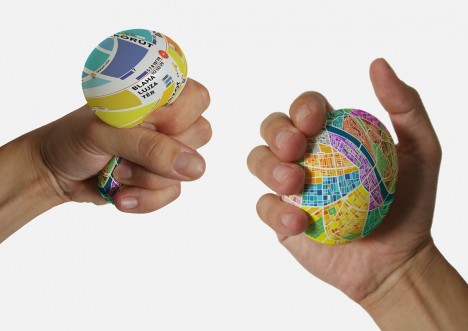
Tapping into the natural expansion of a squeezable ball under pressure, this urban micro-globe provides both big-picture views and detailed streetscapes on one continuous surface.

squeeze color coded map

Hungarian designer Dénes Sátor created the rubber EggMap ball in response to both traditional paper maps and newer digital equivalents, wanting a to pack more information into less space without relying on external energy or connectivity.

squeeze eggmap zoom out

squeeze eggmap zoomed in

The spherical solution addresses classic issues with other geographical guides. Folding maps wear out over time, are susceptible to weather and conspicuous to examine publicly in unfamiliar places. Online maps may fail for lack of battery or internet.

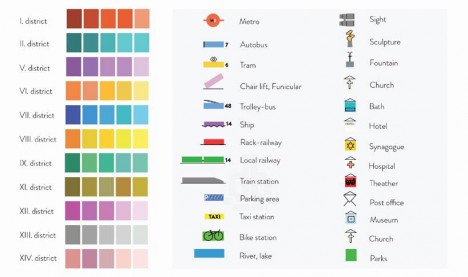
squeeze map legend

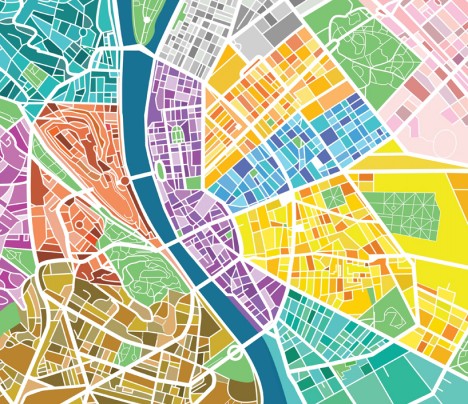
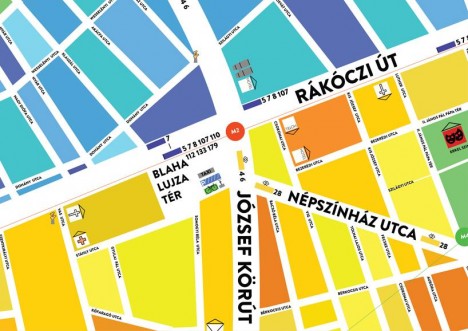
Color-coded city sections let you easily spin and locate places on the map; a quick squeeze then reveals street names, specific locations and transit details (illustrated in the legend above).

squeeze to zoom map

squeeze ball egg map

Made to be robust and portable, the air-filled ball easily resists rain, wind, mud or snow and can be tossed in a pocket or backpack when not in use. And if you still manage to get lost, you can always throw it against the wall in anger – it will rebound.

Share on Facebook


[ By WebUrbanist in Design & Products & Packaging. ]

[ WebUrbanist | Archives | Galleries | Privacy | TOS ]


WebUrbanist

 
Comments Off on Squeeze to Zoom: No Need to Fold this Egg-Shaped Analog Map

Posted in Creativity


Olympus OM-D E-M10 II: What you need to know

25 Aug

The E-M10 II is the successor to the original E-M10, and Olympus’s new mid-range Micro Four Thirds camera. Offering a raft of features in a compact body, the E-M10 II has everyone in the DPReview office quite charmed, and our impressions so far have been very positive. We’ve been using an E-M10 II for some time now, and we’ve created a short slideshow explaining some of its key features. Read more

Articles: Digital Photography Review (dpreview.com)

 
Comments Off on Olympus OM-D E-M10 II: What you need to know

Posted in Uncategorized


10 Items You Need for Your Night Photography Kit

29 Jul
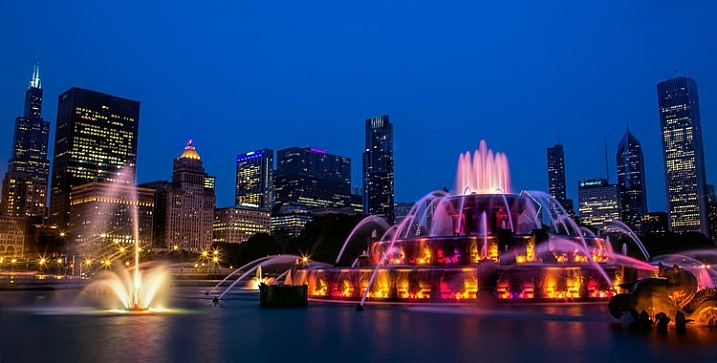
Night Photographers Toolbox - Buckingham Fountain in Chicago

Buckingham Fountain, Chicago (Shutter Speed: 10 seconds; Aperture f/18; ISO 100; focal length 21 mm)

Louis Pasteur famously said that “chance favors the prepared mind.” This statement definitely applies to photography, as there is always an element of chance, with the odds of success growing with preparation. The quote seems particularly applicable to night photography, which has unique requirements for exposure and stability. Preparation is everything.

Your odds of getting a great night photograph are greatly improved if you have taken the time make sure you have the tools needed to get the job done. In this article, you’ll learn the tools of the trade for the night photographer. You many not need all of these, but you will find most of them helpful – and some essential – for getting great pictures at night.

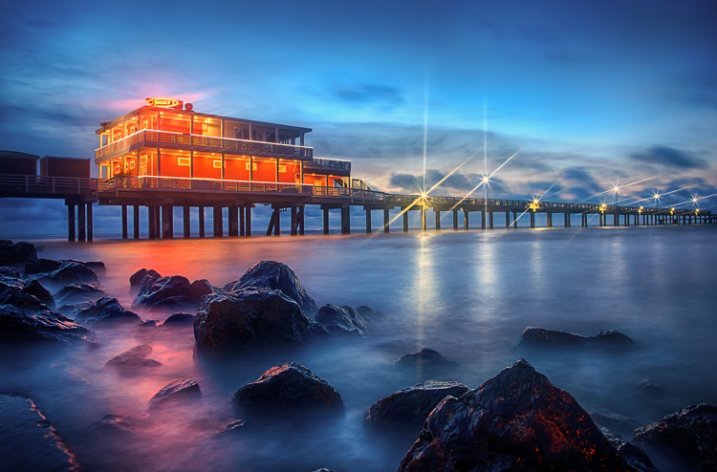
Night Photographer's Toolkit - Galveston fishing pier photo

Fishing Pier, Galveston, Texas (Shutter Speed: 3 image bracketed HDR of 5, 13, and 30 seconds; Aperture f/16; ISO 200; focal length 24 mm)

1. The Right Camera

It is perfectly obvious that you will need a camera for your night photography. But not just any camera will do. The adage that “the best camera is the one you have with you” does not apply to night photography. The first part of making sure you have the right camera is ensuring that it gives you the right amount of control. You will need one that:

  • Is capable of Raw capture, so that you can get the best image quality possible and keep digital noise to a minimum
  • Has manual controls, including manual exposure settings and manual focus, as sometimes it will be too dark for your camera’s auto-focus to work
  • Has Bulb mode for taking super-long exposures.

Beyond that, you will need a camera with good low-light performance. How do you tell that? It isn’t really that simple, and there is no particular specification you can check. Even if your camera is capable of shooting at high ISOs, that doesn’t necessarily mean that your pictures will look good at those levels. In other words, it doesn’t matter if your camera is capable of shooting at ISO 25,600 if pictures shot at ISO 1600 are full of digital noise.

Fortunately, there has been some testing done of cameras and their low light performance. Check out the testing done by DxO mark and DP review (check the review on their site for your particular model) to make sure your camera measures up.

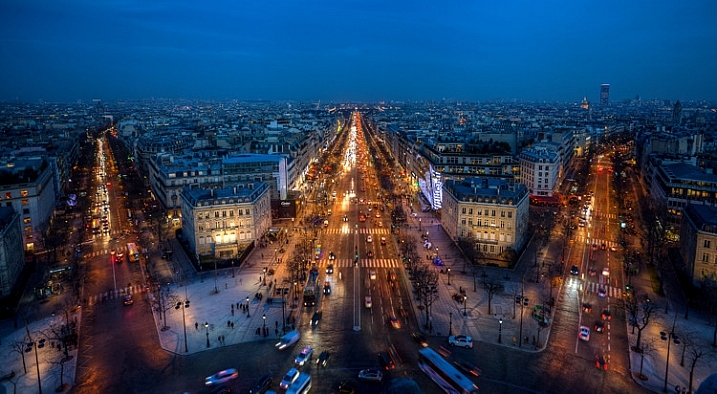
Night Photographers Toolkit - Champs Elysees from the Arc de Triomphe

Champs Elysees from atop the Arc de Triomphe, Paris (Shutter Speed: 3 image bracketed HDR of 1/4, 1/15, and 1 seconds; Aperture f/5.6; ISO 200; focal length 17 mm – note that these settings were used only because tripods are not allowed here)

2. A Small Flashlight

The next thing you’ll need is a flashlight. This will serve many purposes, one of which is helping you see your camera’s controls. That said, you should become extremely familiar with your camera before heading out, such that you can use the controls without even looking. You might even test yourself in a dark room before going.

In any case, having a flashlight with you will help with a variety of things, whether it be finding something in your bag, setting up your tripod, dealing with straps and other attachments, etc. There is no end of uses for a small flashlight, and flashlights are cheap, so you should definitely stash one (or perhaps a few) in your bag.

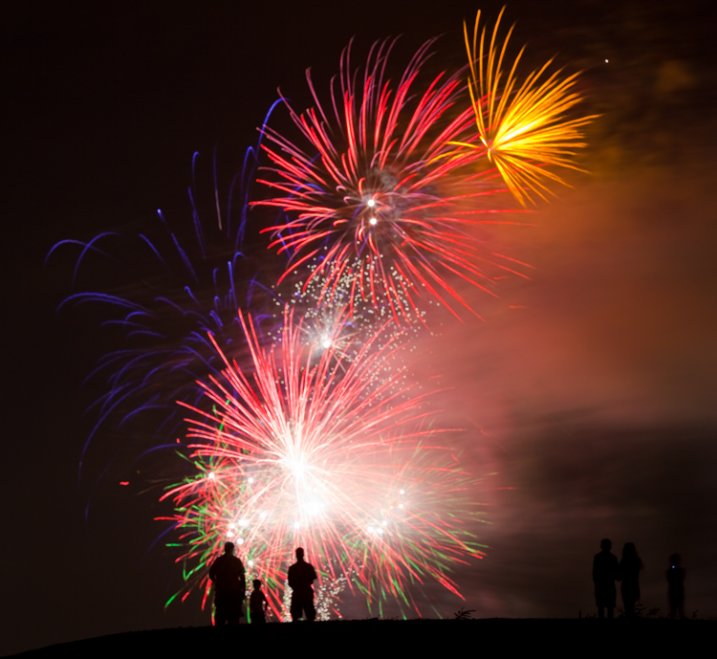
Night Photographer's Toolkit - fireworks picture

Fireworks in Southlake, Texas (Shutter Speed: 8 seconds; Aperture f/14; ISO 100; focal length 135 mm)

3. Spare Batteries

The long exposures that are inherent in night photography drain your camera battery at an alarming rate. In addition, when photographing at night, quite often you will be shooting using Live View, which will cause batteries to drain even faster. If you are dealing with cold temperatures, the battery power will be further limited. Therefore, night photography always calls for spare batteries.

Even if you have a battery grip with two fully-charged batteries, bring a couple of spares. Don’t take any chances. There is no getting around dead batteries – it means your night is over.

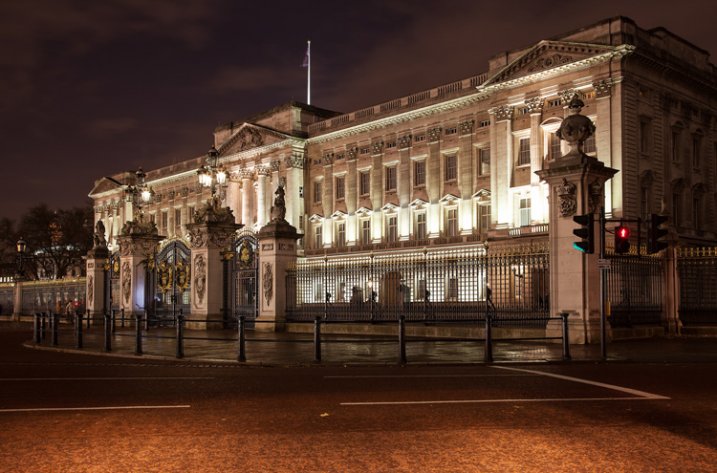
Night Photographer's Toolkit - Buckingham Palace picture

Buckingham Palace, London (Shutter Speed: 3 image bracketed HDR of 1.3, 5, and 20 seconds; Aperture f/8; ISO 400; focal length 35 mm)

4. Tripod

It is probably already obvious that you will need a tripod for your night photography, in order to keep the camera steady during the long exposures necessary due to the low light conditions. But what kind of tripod?

Most will recommend that you buy a very expensive, large, carbon-fiber tripod to keep your camera as steady as possible. To be sure, those sorts of tripods work great. In fact, if you aren’t going to do much walking – and you can afford it – you should definitely invest in a tripod like that.

Oftentimes, however, night photography involves a lot of walking around. Lugging around a big tripod when you are walking for miles is difficult, and limits your mobility as well. Why not start out with a lightweight, smaller, cheaper tripod? Check out something like a Me-Foto travel tripod or a Manfrotto BeFree. Unless you are using big, heavy lenses, they will hold your rig steady and are supremely portable. They don’t cost that much either. If you later decide you need a bigger, more substantial tripod (and you might) one of these smaller models will still make a great travel tripod.

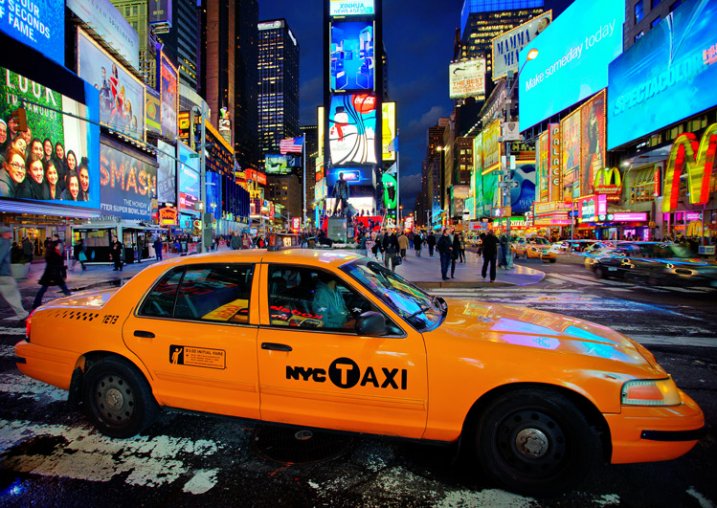
Night Photographer's Toolkit - Times Square picture

Times Square, New York (Shutter Speed: 1/100 seconds; Aperture f/4; ISO 800; focal length 17 mm – note that I used these settings only because I was forced to hand hold during this picture)

5. Remote Shutter Release (or intervalometer)

The idea behind a remote shutter release is that you are able to trigger the shutter without touching the camera, thereby avoiding shaking the camera during the exposure. They are a necessity for many photographers – especially night photographers.

The good news is that these are relatively cheap (really cheap if you don’t buy the Canon or Nikon models). What’s more, while they used to be nothing more than a way to click the shutter, there are models available now with many additional features, such as:

  • Timers and Exposure Length: These are useful when shooting in Bulb mode, which does not have a timer for shutter speed.
  • Intervals: Most models provide for shooting at intervals, which will also allow you to do time-lapse and star trails photography.
  • Delay: They will allow you to set delays (besides the 2 and 10 second delays built into most cameras).

6. Lens Hood

Night photography often involves harsh lights coming from different directions. Light hitting the front lens element from the side can lead to unwanted lens flare. A lens hood is designed to avoid this problem.

Many lenses came with a hood, but some do not. If your lens did not come with one, you can order one from the manufacturer or pick one up at a camera store. They are not too inconvenient to carry because you can store them on the lens by attaching it in a reverse position when you are not using it. When it comes time to shoot, turn the lens hood around to its proper position.

In addition, remember that a lens hood may do more to protect your lens than a UV filter. They protect the lens in the event that it is dropped or you bump into something.

7. Neutral Density Filters

googletag.cmd.push(function() {
tablet_slots.push( googletag.defineSlot( “/1005424/_dPSv4_tab-all-article-bottom_(300×250)”, [300, 250], “pb-ad-78623” ).addService( googletag.pubads() ) ); } );

googletag.cmd.push(function() {
mobile_slots.push( googletag.defineSlot( “/1005424/_dPSv4_mob-all-article-bottom_(300×250)”, [300, 250], “pb-ad-78158” ).addService( googletag.pubads() ) ); } );

The post 10 Items You Need for Your Night Photography Kit by Jim Hamel appeared first on Digital Photography School.


Digital Photography School

 
Comments Off on 10 Items You Need for Your Night Photography Kit

Posted in Photography