With its 25-600mm equivalent F2.8 lens and solid image quality, the Panasonic Lumix DMC-FZ200 was one of our favorite cameras in 2012. With its FZ300, Panasonic has kept the lens and sensor but has improved just about everything else, from its image processor to video specs. We recently had some hands-on time with the FZ300 and have plenty of highlights to share. Read more
Tag: need
-
The First 3 Photoshop Blend Modes You Need to Understand
Photoshop can be extremely intimidating to learn, but once you start to get a grasp on some of the tools it has to offer, you’ll wonder how you ever processed photographs without it. If there’s one area of Photoshop that is both extremely confusing, and yet, extremely powerful when harnessed properly, it’s got to be the collection of blend modes. While this article won’t cover all of the options available within Photoshop, it should give you a good place to start your journey into using Photoshop blend modes.
Photoshop blend modes: a few basics to get you started
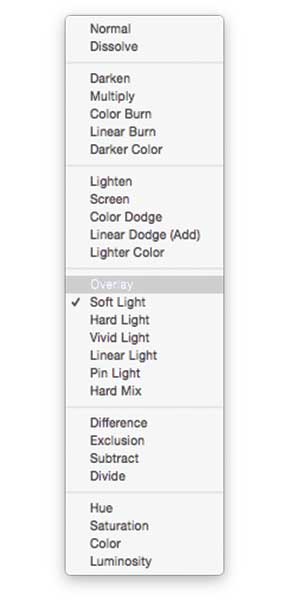
- Photoshop blend modes are found in a drop down menu at the top of the layers panel (it defaults to “Normal”)
- There are 27 different options to choose from, including the default “Normal” blend mode.
- Adobe has organized these 27 blend modes into six different categories
- Normal – Contains blend modes that don’t actually blend the layer being selected. (Normal shows the layer, and the dissolve layer essentially just removes pixels from the top layer as you reduce the opacity this effect is increased).
- Darken – These blend modes use 100% white as a neutral, they have an overall darkening effect on images.
- Lighten – Here Photoshop is using 100% black as a neutral, they have an overall lightening effect on images.
- Overlay – In the Overlay mode Photoshop is blending the top layer and bottom layer together in a way that adds contrast. The effect of this changes based on the opacity of the layer, and the type of blend mode selected.
- Difference – The difference set can be referred to as the inversion group, as these blend mode options are often used to either cancel colors of the layer below it, or to invert them.
- Hue – Here Photoshop allows you to get very creative with the HSL of the layers in question.
- When you apply a blend mode to a layer, it takes the effect of the given blend mode and it is applied to the layer directly below it within Photoshop.
To simplify the process of trying to learn all 27 blend modes at once below, let’s learn about the three most versatile blend modes Photoshop has to offer.
The first three Blend Modes you need to learn
In all the example photographs below I’ll be using two layers to demonstrate the different effects of each of the three blend modes. The top layer is simply a white, gray, black layer and the bottom layer is the same image placed under those three colors.

White, gray, black layer.
Multiply Blend Mode
This blend mode falls within the “Darken” group and therefore it is considering 100% white a neutral. The basic math behind how this blend mode works is that the dark pixels of the background layer are multiplied with those of the foreground layer and combined. Therefore the result you end up with is an overall darkening of the image, as the dark pixels within both layers become more significant while the light pixels are essentially removed.
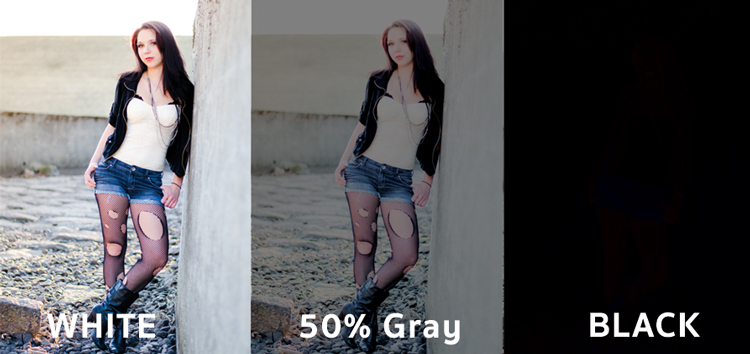
As you can see in the 50% gray layer, the darker pixels from the gray foreground layer are helping to darken the layer below it.
This blend mode is great for creating shadows or removing bright pixels from an underlying layer. It can be used in conjunction with a curves adjustment layer to add additional darkness to a layer. By effecting the dark end of the curve this can become really handy when trying to emphasize shadows, or darken an image.
Screen Blend Mode
As mentioned above, the lighten group sets black as neutral and therefore when we use the screen blend mode the black layer has no effect, 100% white stays as white and the 50% gray is somewhere in the middle.
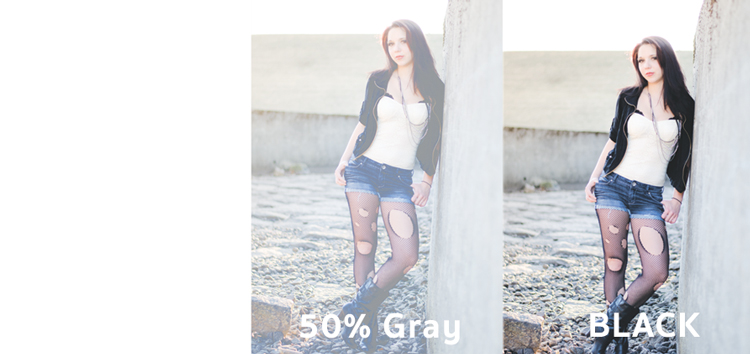
In a similar mathematical method to the Multiply blend mode the screen blend mode is multiplying the light pixels of both the foreground and background layers to achieve the final blend. As you can see in the above example, at 50% gray the light pixels are made even lighter as the bright pixels of the gray layer are multiplied with those of the layer below it.
The Screen blend mode is therefore great for removing darkness from an image or can even be used to create soft glow effects around a subject.
Soft Light Blend Mode
Here the formula used by Photoshop is essentially both that of the Multiply and Screen blend modes, then that effect is divided by two. What this means is that you’ll be darkening the dark pixels and lightening the light pixels, and then dividing the end result by two (or 50% of full strength). What ends up happening is an overall increase in contrast of the image
As a result, the Soft Light blend mode, is a great way to add a bit of contrast to an image. For an even stronger effect – use the Overlay blend mode.
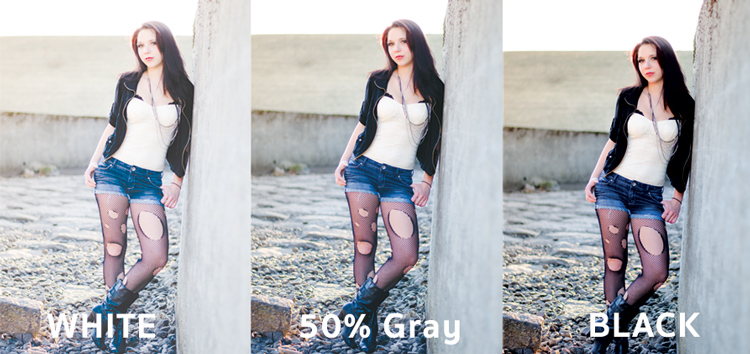
One of the best techniques for using this technique is to duplicate your layer and apply the Soft Light blend mode to that layer. You’ll se an instant increase in contrast which can then be fine tuned with the opacity slider of your duplicated layer.
An example of Photoshop blend modes in action
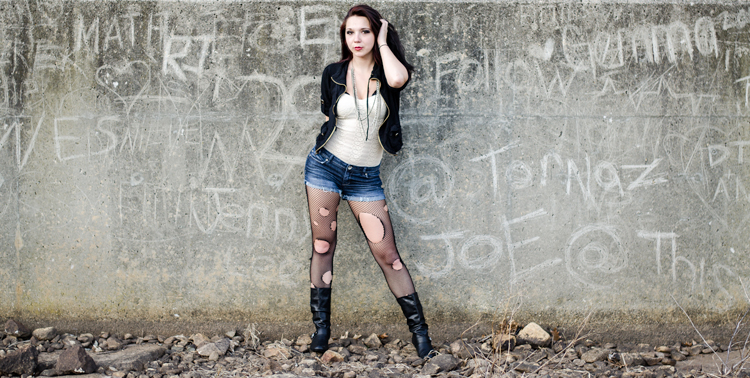
Original – (placed as Full Size 750 x 378)
The original image was a bit on the flat side, so by duplicating this layer, and changing it Soft Light blend mode, you’ll notice an increase in contrast. This higher contrast look works well with the rocks, and graffiti wall behind the model.
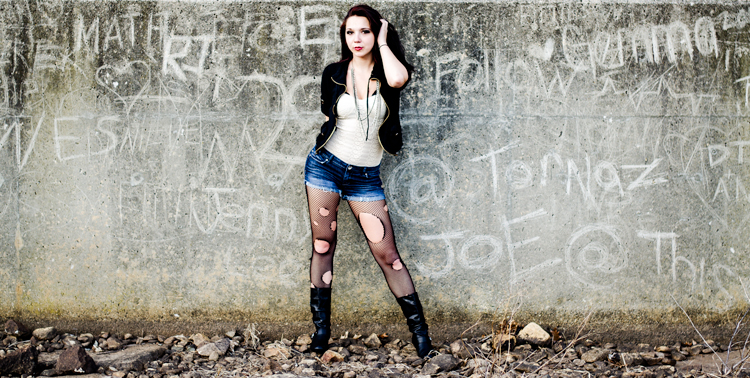
Duplicated with Soft Light blend mode
To take it a step further, a Curves Adjustment Layer was added above the duplicate layer and the blend mode was set to multiply. A layer mask was then applied to this Curves layer to reveal it only over the model’s upper body and face. By applying this small adjustment you’ll notice a bit more definition in the face and shadows.
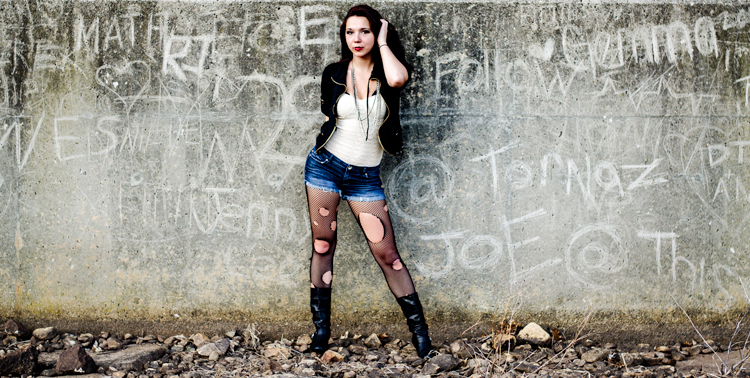
Curves adjustment + Multiply blend mode added to model’s face and upper torso to add definition and shadow detail.
These three Photoshop Blend modes are just the beginning, but the key to learning a program the size and depth of Photoshop, is to take it in bite sized pieces or you’ll get frustrated and give up quickly. I hope that by focusing your attention to just these three blend modes you’ll be able to digest the program a bit easier.
googletag.cmd.push(function() {
tablet_slots.push( googletag.defineSlot( “/1005424/_dPSv4_tab-all-article-bottom_(300×250)”, [300, 250], “pb-ad-78623” ).addService( googletag.pubads() ) ); } );googletag.cmd.push(function() {
mobile_slots.push( googletag.defineSlot( “/1005424/_dPSv4_mob-all-article-bottom_(300×250)”, [300, 250], “pb-ad-78158” ).addService( googletag.pubads() ) ); } );The post The First 3 Photoshop Blend Modes You Need to Understand by John Davenport appeared first on Digital Photography School.
-
Do You Really Need the Latest Greatest Gear?
If you’re like me, you enjoy reading and learning about the latest photography gear as soon as it comes out. Looking each month at popular photo magazines and online sites, reading the reviews, product articles, and ads, it’s hard not to head to your local camera shop and start spending money! But, really needing that new gear can be a very different issue. Let’s take a look at what you may, or may not, truly need as tools to create your art.

Caught up in Marketing, or do you have a true need?
Yes, those big number megapixel camera bodies can be very sexy, and every month it seems that there are new, better than ever, lenses to consider. Besides photography, I also have a passion for sports cars. I have often chuckled at what a friend and I call the “horsepower wars”. Auto manufacturers stoke up the fires of desire for their cars with the ever raising horsepower number – resulting in more power than you would ever need, unless you’re a racecar driver! Camera companies, to an extent, have done likewise with megapixel marketing causing some to jump to buy because more must always be better, right? Or is it? That all depends. Ask yourself these questions:
#1 Are you happy with the results that you’re getting with your current camera body or system – for what you shoot?
If you can say yes, great! Keep shooting and growing, and you’ll know when it’s time to upgrade gear.
#2 Have you explored all settings and capabilities and understand them with your current camera?
I bet very few of us have fully explored all the capabilities of our current cameras.
#3 Do you have a clear understanding of megapixels, their size and relationship to sensors, and what that means to print sizes?
It’s best to understand this before you jump to a new body just because it has more megapixels (read this article on sensor size).
#4 Are you able to shoot the right size files for the size prints you need with consistently high quality results?
If you need to create bigger high-quality prints than you are capable of now, consider upgrading.
#5 Are you making money and growing happy customers with your current gear if you are a pro?
Then why mess with a good thing? Keep shooting and booking those gigs. Stay aware of updates and new gear. and you’ll know when you need a change.
#6 Are you comfortably ready to spend another several thousand dollars for the latest new gear?
The latest and greatest usually comes with a significant price tag. You may also need new batteries, memory cards or a computer upgrade. So factor it all in.
#7 Do you feel you need to upgrade to be taken seriously as a photographer?
Do you feel intimidated that you don’t own a “pro” body, and think that you need to in order to be a serious photographer – even though you may not really need a metal, sealed, or full-frame body?
This is the worst reason to buy more gear! Keep learning, growing, and be confident that your work comes from your eye and brain – not from how cool your new gear may be.
#8 What will the latest camera body, lens, etc., give you that you aren’t able to produce today with current gear?
If you can point to something that would definitely result in better quality work, then it is worth considering investing in better, or more gear.
If you answered: “yes, the latest, greatest new gear would make a significant difference in my work or business” then it would seem to make sense to jump in and spend what is needed to achieve that. But, if you feel the need to buy some new gear in order to feel more accomplished, or to keep up with your buddies, or think buying a new camera would be the main determinant of good work versus less than good work – or if your current gear is doing the job just fine and there are many settings/capabilities yet to explore with it, you should probably reconsider spending the money right now.
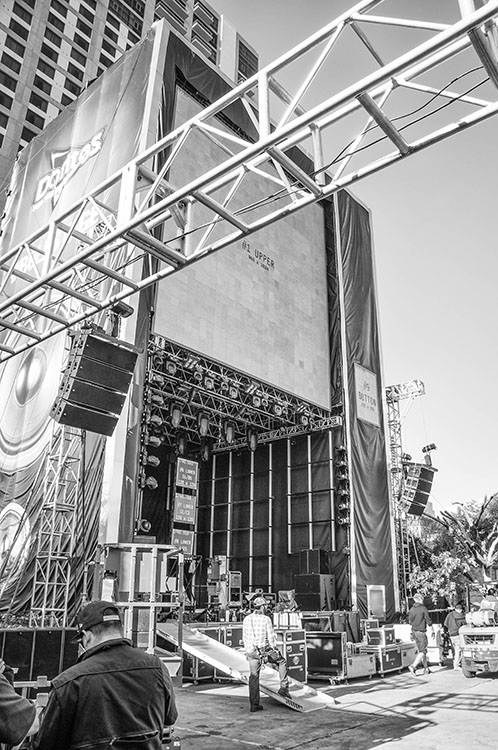
Knowing when you NEED new gear
If you just love to buy all the latest gear as soon as possible, and can afford to do so, that’s very cool, fun, and good for you – but to me it’s always been about what you see, how you see it, and how you capture it – not the gear used. Currently I own a Nikon D800, D700, and I still have my D300 (I traded my D80 and other stuff towards the D300). I was a late adopter of the D800, buying it nearly a year after it was released. I admit that all the hype and the reviews of this 36.3 megapixel marvel very nearly tempted me to immediately run out and spend the $ 3000 right away on the latest and greatest camera. Instead I looked at my needs, and at that time all they were served very well with my D700 – which I still love.
As my fine art photography business grew, I became in need of providing larger files to produce much larger prints than I had been doing. It was only then that I really considered the D800, and eventually bought it – because I needed that tool. With regard to my lenses, I slowly but surely worked my way to a couple of professional level lens that cost a bunch, but really made a huge difference in my work. Once again, it wasn’t about buying gear because it was new, or well-known and on magazine covers, but because I had grown to need it. I worked alongside other photographers who used the latest pro level bodies and lenses, but I stayed the course using my 12.3 megapixel D300 body and DX lenses until I grew to where I had a sincere need for better gear, and not before.
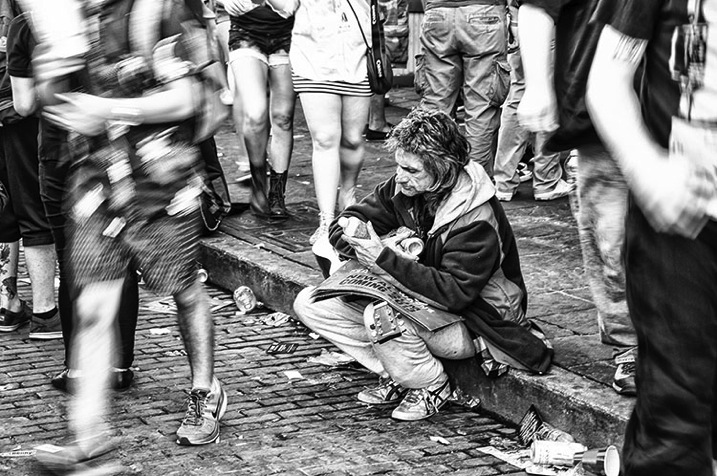
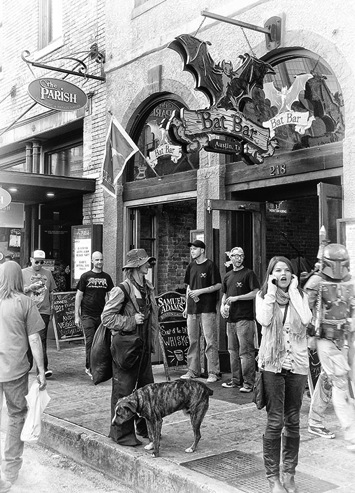
A while back I visited Austin, Texas on non-photography business, and knowing that my visit coincided with the SXSW event, I wanted to be sure to take a camera along. I threw my trusty ol’ D300 in my suitcase with an 18-200mm DX lens. Yes, I took my oldest, non-full frame DX body and a lens that cost a third of my favorite FX lens to shoot SXSW. And you just know that everywhere I turned that week in Austin, I saw someone shooting with the latest greatest camera. That bothered me not one bit! You can see the results of this shoot on my website in SXSW Portfolio. The images were reviewed by Shutterbug Magazine which wrote of the collection, “it makes you want to be there, an interesting link to the musical nature of Bobby Baker’s remarkable photography.” I didn’t need the latest gear to successfully capture this opportunity, just a good, solid camera (one that happened to be discontinued for more than five years) the understanding of how to use it well, and a good eye.
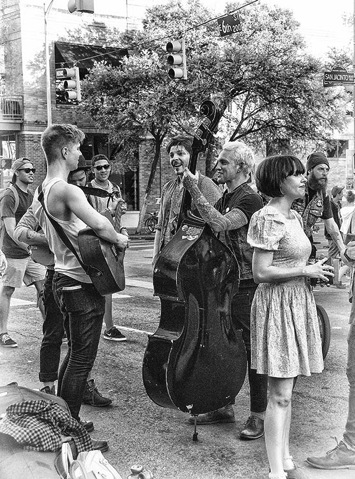
I am not saying that you shouldn’t buy new gear when it hits the market; what I am saying is buy the gear that you need and can afford, and don’t get caught up in marketing numbers or worse, pressure because your buddy has a mega-megapixel camera and you feel you need one to keep up. It’s about what you see, and what you create when capturing it, not what you used to shoot it. I look at other photographers work all the time, not their gear.
googletag.cmd.push(function() {
tablet_slots.push( googletag.defineSlot( “/1005424/_dPSv4_tab-all-article-bottom_(300×250)”, [300, 250], “pb-ad-78623” ).addService( googletag.pubads() ) ); } );googletag.cmd.push(function() {
mobile_slots.push( googletag.defineSlot( “/1005424/_dPSv4_mob-all-article-bottom_(300×250)”, [300, 250], “pb-ad-78158” ).addService( googletag.pubads() ) ); } );The post Do You Really Need the Latest Greatest Gear? by Bobby Baker appeared first on Digital Photography School.
-
10 Essential Pieces of Gear you Need for Landscape Photography
If you are interested in going out and getting some high quality landscape photographs, here’s a comprehensive list of items you will either want to consider, or must have, in order to increase your chances of getting some keepers:
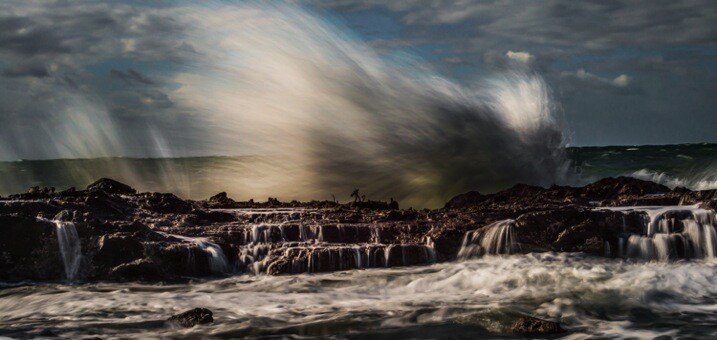
#1 – The Internet
Whenever I start to plan a photo shoot to a particular location, I usually begin by googling the area. If it’s a relatively well-known location, you will probably find some very interesting, and comprehensive, websites made by other photographers or adventurists/bloggers. The problem is, if it’s a famous location, you will also get a ton of not-so-interesting and even incorrect information as well. Weeding through Google to isolate the helpful and high quality blogs or websites from the crummy ones is an art form all its own. Once you get used to perusing Google, reading just a few sentences of a blog will clue you in as to whether or not the information you’ve found is worth taking it to heart or not.
If you aren’t lucky enough to find two or three really good blogs about the location, head over to Alltrails.com. It has a sizeable database of locations around the country that have been hiked, including user’s reviews of the location and the level of difficulty in getting there. If it’s a famous site, TripAdvisor.com has a good database of information, including the places to stay nearby.
From there, you’ll be off and running with more information than you probably need. In most cases, what becomes tricky is weeding through everything you find and parsing it down into just a few brief paragraphs on your overall plan of action.
#2 – A Strong Backpack
If you’re looking for a place to save some money, a backpack is not where you want to be counting pennies. You get what you pay for, and when it comes to choosing a backpack to take on a landscape shoot, it is very important you use a bag that is strong and water resistant, with reinforced padding.
Don’t fall victim to the lame zipper bug (you know you’ve been there before, trying to unzip the bag and before you know it, the zipper pops off the bag like a cricket). Do yourself a favor and invest in a high quality bag, like the Tamrac Expedition Series, or the Lowepro Pro Trekker. It will last you many years, and will help you take care of your camera and lenses in the long run.

#3 – A Weather-Sealed DSLR Camera
Generally speaking, for various reasons, I still much prefer a DSLR (such as the Nikon D810) over a full-frame mirrorless camera (such as the Sony A7r) for landscape photography. One reason is that certain DSLR models are significantly more rugged and weatherproof than mirrorless.
Eventually you’re going to drop a camera. It happens to all of us (at least that’s what everyone told me the first time I dropped a camera), especially those of us who are out in less than perfect weather conditions. DSLRs made from composite magnesium handle some rough treatment much better than the plastic-bodied entry level DSLRs. My first full-frame DSLR was the Nikon 700. That camera could survive being run over by a small truck. A perfect companion for the clumsy, just-starting-out landscape photographer that I was then.
Also consider investing in a quality raincoat for your lens/camera. I don’t recommend getting one of the cheap, flimsy, clear plastic covers made from recycled sandwich bags…they will tear easily and won’t stay put in windy conditions. Get a cover that is heavy duty…one good coat will last a long time, and they aren’t pricey.
#4 – A Sturdy Tripod
To handle poor footing out in the muddy, rocky, sandy wilderness, and to protect your camera lens setup, a tripod is one item you don’t want to mess around with. In fact, this is the one item more than any other that I would recommend you consider heading to the northern end of your projected budget in order to select a high quality tripod.
A flimsy tripod could end up costing you a chunk of a paycheck in repair bills. It only takes one good gust of wind to knock over an unstable tripod. Having a nice camera and lens, but an entry-level tripod is like putting four worn down, old tires on a Ferrari. It won’t run properly and it’s dangerous for the rest of the setup.

A good tripod will outlive both of us, so it’s rare you’ll need to invest in more than one over the course of many years. A few extra bucks goes a long way towards getting having a more stable, secure setup.
See Really Right Stuff, Manfrotto, Gitzo, or Feisol for excellent tripods. In my opinion, you should strongly consider carbon fiber over aluminum; they are the lightest and strongest on the market.
#5 – Lenses
This is where the fun begins, and your wallet ends. Lenses are the single most important piece of equipment in photography. You can have the finest camera, tripod, backpack, media card, and accessories available, but if you don’t have quality glass, it will severely complicate your ability to take a good photograph.
I typically prefer to shoot with prime (fixed focal length) lenses, as opposed to using zoom lenses. My preference for primes is mostly about making sure that I get as personal and into the scene as possible.
With zoom lenses, I tend to get a bit lazy and shoot without adequately working the scene. There is no substitute for moving your feet and SEEING the composition with your own eyes, and not just through the viewfinder. The element of perspective is lost if you simply zoom, instead of walking around and checking things out with your own eyes first.
That said, it’s strictly a subjective thing. I know plenty of photographers who prefer using zoom lenses, and that’s great. Most of the time, the best gear for you is the gear you’re most comfortable with. The key suggestion here, with any lens, prime or zoom, is that you RENT one and try it out before buying it. You can’t know how the lens will work for you until you use it in various situations.
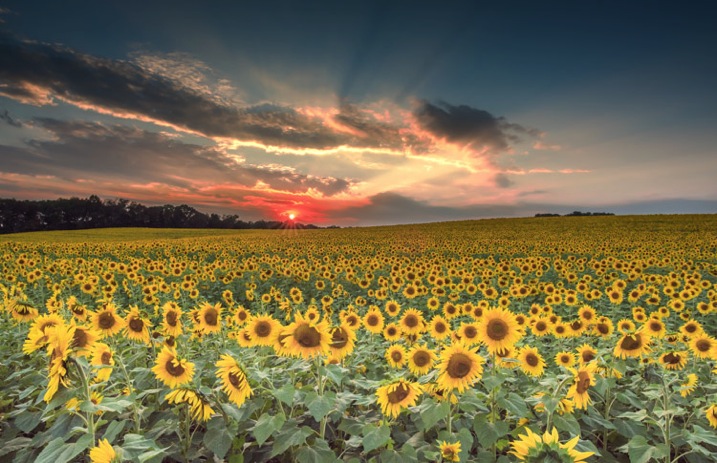
#6 – A Reliable Remote Trigger or Shutter Release
This is often overlooked by many photographers, but I firmly believe having a remote trigger makes a big difference. Without one, you have to physically press on the top of the camera. No matter how careful you are, and no matter how securely fastened the camera is to the tripod, this will introduce some micro-shake into the setup. If you want your image to be as tack-sharp as possible, you don’t want anything touching the camera that doesn’t have to. Once the mirror locks up, you want your setup to be as steady as a concrete slab. Every DSLR has its own proprietary remote shutters, and you can also find quality third-party remote shutters available at a lower cost.
#7 – Filters
For landscape photography, some filters are almost as essential as lenses. I’ll keep it brief here and stick with just a few basic filters I would always want to travel with:
Circular Polarizer
A polarizing filter helps mitigate the nasty, harsh reflection of the sun off of shiny objects such as water or anything wet. To get it to work, you simply turn the filter until you see the glare disappear, then you stop turning the filter. A polarizer will also help darken a blue sky and make it a deeper, richer blue. Some people like that look, some don’t. If you do, a polarizer will help you achieve it. I use a polarizer practically all of the time when shooting in daylight.
Neutral Density Filter
An ND filter basically acts as sunglasses for your lens, it blocks some light from reaching the camera’s sensor, thereby slowing down the exposure. For example, a 3-stop ND filter (usually denoted as an 8X or 0.9 ND filter) allows three stops less light through than you’d get without the filter attached. A 5-stop ND filter will allow five stops less light, and so on. For the serious landscape photographer I’d recommend having a 2-stop, 3-stop and 10-stop ND filter. If you want to do some long exposure waterscape work, the 10-stop will come in handy to help make the water look silky smooth. You can also stretch out clouds or turn people into invisible ghosts with ND filters.
Graduated Neutral Density Filter
These are similar to ND filters, but instead of the entire filter being tinted, only the upper portion is darkened, with the tint getting darker from the middle to the edge. So, for example, if you’re photographing a horizon with a sky that’s two or three stops brighter than your foreground, you could use a graduated ND filter to help bring out the foreground more, without blowing out the horizon. It will effectively balance the amount of light received from both the brighter horizon and the darker foreground. Usually just a two or three stop GND filter is necessary. Here’s a photograph of a Graduated ND Filter:

Reverse Graduated Neutral Density Filter
Same principle as the one above, except instead of the tint getting darker from the middle of the filter to the edge, it’s reversed. The middle of the filter starts out the darkest, and gradually gets lighter as you travel towards the edge. These are excellent for shooting sunrises and sunsets, where the horizon line is the brightest area of the frame, and as you go higher in the sky, it becomes less bright. This is what a Reverse Graduated ND Filter looks like:

UV or Clear Filter
If it’s my lens, I want to do everything I can to protect it from wear and tear. I always have a clear, or UV, filter on the front of every lens I own. It does nothing to help improve the photograph in any discernible way, but it does a great job protecting the front lens element from dirt and dust, or from me walking into a door lens-first, which has happened more times than I prefer to admit.

#8 – Extra Batteries and Media Cards
Always, without exception, carry an extra battery for your camera, an extra media card, and an extra battery for any other battery-consuming device. If you’re bringing along a flash that takes four AA batteries, take an extra set of four with you. Chances are you won’t ever need them, but there will always be the one time when you do, and you’ll wish you had them.
#9 – The Photographer’s Ephemeris
This clever app (TPE) does an amazingly accurate job at detailing when and where the sun, and moon, will rise and set. If you’re out chasing sunsets and sunrises for photographs, this app is a must-have.
#10 – A good pair of shoes
No joke; having a comfortable pair of shoes is like having good vision. If your feet aren’t comfy, then nothing else matters. You will not be as good a photographer as you otherwise would be with comfy feet. This especially holds true on longer hikes; invest in a good pair of hiking boots. A pair that strike a balance between breathing well but also offering some water resistance.
That’s enough for the list of equipment you’d want to consider having to photograph landscapes. If you’ve made it this far in this article, I hope you’ve gotten something useful out of it. Have fun shooting those landscapes!

googletag.cmd.push(function() {
tablet_slots.push( googletag.defineSlot( “/1005424/_dPSv4_tab-all-article-bottom_(300×250)”, [300, 250], “pb-ad-78623” ).addService( googletag.pubads() ) ); } );googletag.cmd.push(function() {
mobile_slots.push( googletag.defineSlot( “/1005424/_dPSv4_mob-all-article-bottom_(300×250)”, [300, 250], “pb-ad-78158” ).addService( googletag.pubads() ) ); } );The post 10 Essential Pieces of Gear you Need for Landscape Photography by Jeb Buchman appeared first on Digital Photography School.
-
Do I Need a Photo Release For That?
With the increasing presence of quality Smartphone cameras and affordable, pro-grade compact digital cameras, there are more people than ever who have the power of taking photos. But how many people are aware of the legal constraints that come with being a photographer, even on a hobby or amateur basis? Perhaps more importantly, how many of us know when it’s legally okay, or not okay, for someone to snap a photo of ourselves?

The answers to these questions are important for both photographers and photo subjects to know, so let’s examine some of the laws that have to do with photography. Before we dive into it, let’s also establish that these are the rules that apply in the United States in particular. If you are based elsewhere, or an American traveling abroad, it may be worth it to investigate photography rules pertaining to specific countries. Also, please note that I am not a legal professional and this is simply advice from another photographer based on experience and consensus of other online sources.
Public versus private places
First of all, let’s be clear that you are always free to sell photos of any subject without permission or a signed release, with one big exception: You cannot legally photograph people in private places without their expressed permission. In the United States, every citizen is guaranteed a reasonable expectation of privacy, meaning if you are in your home or on private property, you have the right to prevent someone from taking your photo if they are standing on your private land. However, the moment you step out into public areas, such as a public park, you forfeit your right to privacy and may be photographed by anyone without your consent. Thinking of this from a photographer’s perspective, it’s also important to realize that no one can legally prevent you from taking a photo in a public space, but they can do so in private spaces.
Editor’s note: Just because you have the legal right to take someone’s photo it doesn’t mean you have the right ethically if they do not wish to be photographed. Be respectful of others as you’d want for your own wishes.

Example of a private space
Using someone’s likeness for promotion
Despite the above notion of freely photographing people in public spaces, it doesn’t mean you can do as you please with those photos. This is where the idea of a person’s likeness comes into play, and this same concept also applies to recognizable private property. In a legal sense, one’s likeness has to do with a representation of that person or private property being used to promote something, such as a product, service, or idea. Every person, whether it be a celebrity or your average Joe/Jane, has the right to protect his or her likeness.
Put into practice, this means that if you take a photo of someone in a public space and were to sell it to a publication or newspaper, you’re likely within your rights of doing so since that person and photo is not being used for the sake of promoting anything. However, you would be restricted from selling or using that photo for any sort of promotion, such as an ad for your product, service, or cause. The reasoning is simple: that person didn’t consent to having their likeness used to further your promotion. Imagine being dedicated to a specific political party and seeing your mugshot used in an advertisement to promote the opposing party’s campaign. If you didn’t agree to it, you would have the grounds to ask the opposing campaign to take your photo down.

To use this photo to promote something or sell something you would need a release
When photo model releases come into play
This idea of protecting one’s likeness is where the need for photo model releases becomes necessary. As a photographer, it all comes down to intent. If you snap a photo knowing there’s a high chance you’ll use it to promote something, it’s best to evaluate that scenario for any instances where a model release might be necessary. In fact, photo releases aren’t just for people. Depending on the use of the photo, you may also need a property release for privately owned buildings. Again, it all comes back to how you plan to ultimately use the final image, as well as the specific rules set in place by the agency or company selling the images. Below are some specific scenarios when you’ll want to have a photo (model or property) release.
Stock Photography
Selling images as stock photography can be a way to make a small, yet somewhat steady side income, but it does come with the expectation that any shots with identifiable people or landmarks come with a photo release to make them commercially licensed. The rules may vary according to the stock agency you work with, but most agencies require releases because there’s a high chance customers will use the photos for commercial purposes to sell something. In these cases, the likeness of people will need to be protected, or at least authorized, for possible commercial use via the photo model release.
Editorial Photography
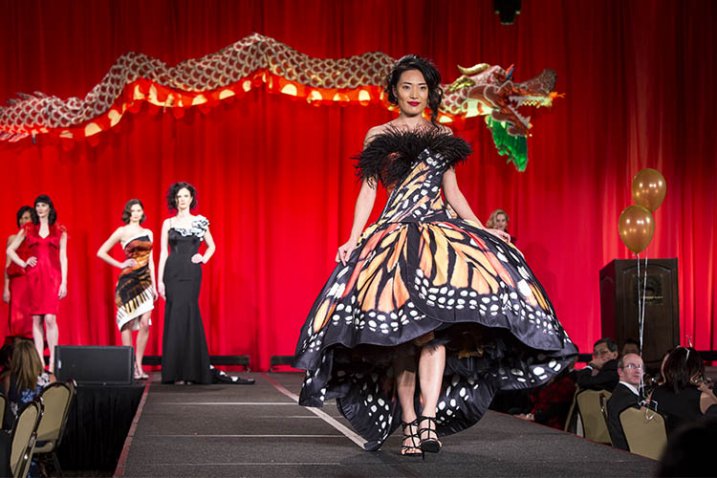
Could be used for editorial
There is one exception to the stock photo rule. In some cases, stock images of people can be sold without a photo release, but only for editorial use in magazines, newspapers, textbooks or other such publications. The one catch to this scenario is that the payout for editorial stock photos is usually significantly lower than if the same photo had a signed release and a proper commercial license. If you have any aspirations of making good money by selling stock photos, you should definitely consider going the commercial licensing route.
Photography Contests
With the number of photo contests available today, many photographers wonder if model or property releases are needed to submit photos to these contests. Again, it all comes down to intent. Some contests are hosted by companies who may want to use those photo entries for possible commercial use, in which case they’ll need signed photo releases. However, consider a magazine that wants to publish winning photos in an upcoming issue, or print images for an exhibit or gallery. In this case, photo releases most likely won’t be necessary. The bottom line is be sure to read the fine print before submitting your work to any photography contests and be on the lookout for how your submitted photos may be used.
Summary
In a nutshell, this is a brief summary to photo releases and some common scenarios when you may want to investigate the need for one. Do you have any advice or questionable encounters with photo releases to share? Let us know in the comments below!
googletag.cmd.push(function() {
tablet_slots.push( googletag.defineSlot( “/1005424/_dPSv4_tab-all-article-bottom_(300×250)”, [300, 250], “pb-ad-78623” ).addService( googletag.pubads() ) ); } );googletag.cmd.push(function() {
mobile_slots.push( googletag.defineSlot( “/1005424/_dPSv4_mob-all-article-bottom_(300×250)”, [300, 250], “pb-ad-78158” ).addService( googletag.pubads() ) ); } );The post Do I Need a Photo Release For That? by Suzi Pratt appeared first on Digital Photography School.
-
Canon PowerShot G3 X: What you need to know
The PowerShot G3 X sits above the G7 X in Canon’s lineup of compact cameras, offering a much longer zoom range, tilting LCD screen and a hot shoe. We’ve been poring over the specification sheet for a while, and have prepared a quick run-down of its key features. Take a look and learn about the new camera. Read more
-
The Bridal Portrait: Everything You Need to Know
Everyone knows that a woman is the most beautiful she’ll ever be on her wedding day. She’s in love, and happy and excited about the wonderful day she’s about to have, and, if you did your job and insisted that she has a wedding planner, she’s stress free. The Bridal portrait is one of those shots that’s just as important Continue Reading
The post The Bridal Portrait: Everything You Need to Know appeared first on Photodoto.
-
4 Things Commercial Photographers Need to Discuss with Their Small Business Clients
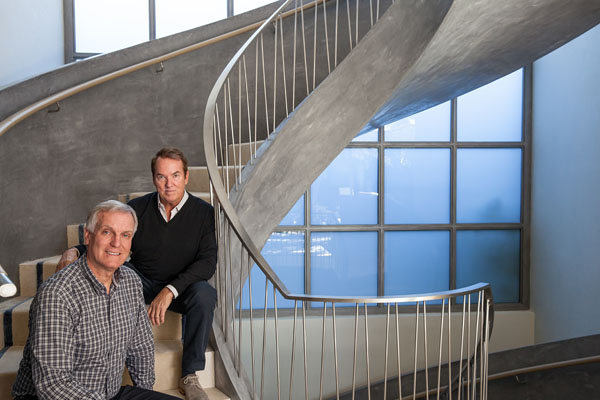
Lead architects of a high-end design firm.
Providing successful images for a business can be very rewarding, especially when it’s for a budding business that you get to witness growing. While all businesses, big and small, essentially have the same demands, a small business is most likely still learning how to work with various professionals and creating their processes as they go. Diving into a project with a small business can lead to lots of time and money being wasted if terms and project details are not discussed openly, early on. The following are some key factors to discuss with your small business client during an initial consultation so that conflicts can be avoided down the line:
1. Brand

Large family-run urban farm
While we are hired in part because of the individual style that we have developed over time, a business’s brand is the first thing that needs to come across to their audience. When working with a small business especially, the branding should be clearly defined in order to be able to provide images that will be a great benefit to them. Do they have certain color palettes they work with? Are their graphics portraying a more formal brand, or a very casual brand? Are they nature-oriented, or do they work in traditional office spaces? What clientele are they catering to? All of these are questions that should be addressed in the initial consultations. A small business may still be developing their brand or creating a branding package, so without a brand to guide the images, there may be a need for updated photos once the brand is clearly defined. Expressing this to a client will not only help them understand that professional photography is an investment intended to last a long time, but it will also show them that you are keeping their best interest in mind for their long-term success.
2. Budget
Small businesses will typically have very low budgets, so the decision to invest in professional photography services will be a big one for them. Regardless of the cost for your services, there is likely to be very little (if any) wiggle room in their budget allowance. Being aware, and respectful, of the client’s budget restrictions will not only help ensure that there is less run-around in the planning stages, but it will also give the client more confidence that you are an ally. If you offer packages geared towards commercial work, consider having several options to select from, or to use as a kick-off for budget discussions. Often a custom quote is required depending on their specific needs, but some packages to give the client a ballpark idea of pricing can let them know what they can expect to spend.

Independent financial advisor
3. Timeline
Depending on how experienced your small business client is, their timeline for getting final images may not be very realistic. This is where it’s your job to educate clients on your process and, more importantly, on your specific ability to turn around jobs in a time crunch. Knowing their expectations about timing and delivery will be vital in creating a quote, coordinating any vendors (venue, props, assistants), and making sure that the client gets their images in time to use them.
Do they require any extensive editing techniques or talent that requires outsourcing? Did they request a location or backdrop that requires reservations and a long wait for booking? Will they need models, and if so, do they have specifics in mind? Are they planning on using these images for a specific event, or marketing campaign that has a set date? Which leads to the final factor to keep in mind…
Home-based food business products
4. Usage
Many folks will assume that if they hire you to take photos, they then get to keep the photos and do as they wish with them. In reality, commercial work is generally very specific about what usage is permitted. If they are planning to use the photos on a product label, do you get any royalty from that product sale? If they are hiring you because of a large print marketing campaign, can they then use the images in email campaigns several years down the line? Are you granting them use for a certain amount of time, or can they use these images forever? Once you turn over the images, are they allowed to do any alterations to them?
While there is no one answer to these questions, be sure to discuss the planned use of these images and to clearly specify it in a contract. Both parties need to be in agreement with what is decided, and having this discussion up front will once again show your client that you value your work and intend to be completely open with them about terms.

Owner of a co-working space
Although there are many factors to discuss with your client at the beginning of a project, these four points will help get the basic information clarified, and get both parties on the same page. These discussion points will also go a long way to helping you create a quote for them that is accurate and all-inclusive; avoiding time-consuming confusion farther into the project.
Do you have any additional points of conversation that are a must for initial client consultations? Please share in the comments below.
googletag.cmd.push(function() {
tablet_slots.push( googletag.defineSlot( “/1005424/_dPSv4_tab-all-article-bottom_(300×250)”, [300, 250], “pb-ad-78623” ).addService( googletag.pubads() ) ); } );googletag.cmd.push(function() {
mobile_slots.push( googletag.defineSlot( “/1005424/_dPSv4_mob-all-article-bottom_(300×250)”, [300, 250], “pb-ad-78158” ).addService( googletag.pubads() ) ); } );The post 4 Things Commercial Photographers Need to Discuss with Their Small Business Clients by Natalia Robert appeared first on Digital Photography School.
-
Wedding Photography Infographic: Everything You Need to Know
Wedding Photography is one of the most important things to consider before your big day. Wedding photos are something you will cherish for the rest of your life so it’s vital that you are completely satisfied with them. Take the time to choose the right photographer for your needs as well as communicating effectively with them during the process is Continue Reading
The post Wedding Photography Infographic: Everything You Need to Know appeared first on Photodoto.
-
Canon XC10: What you need to know
Canon’s new XC10 is the first product we’ve seen which is neither a stills camera with a video feature or a video camera that can capture stills. In terms of both specification and ergonomics it is a true ‘convergence’ product with the potential to shake up more than one market segment. We’ve been poring over the specifications for a while now – here’s what you need to know