RSS
 

Posts Tagged ‘More’

ON1 reveals Photo RAW 2018.5 with ‘massive performance boost’, LUTs and more

12 May

ON1 has released a major update to its ON1 Photo RAW photo editor. Version 2018.5 will be available in June and boasts, “a massive boost in overall performance” in addition to bug fixes and two major feature additions: a new LUTs filter in the effects panel, and the ability to select brand-specific in-camera profiles, including Fujifilm’s much-loved film simulations.

There are also some other new features like the ability to collapse RAW + JPEG frames into a single image to de-clutter your library, nested albums, background export, and more. But the big three additions are performance, LUTs, and Camera Profiles.

Performance Boost

ON1 says Photo RAW 2018.5 comes with a “massive overall performance boost,” which should be noticeable across Browse, Develop, and Effects. This is particularly obvious when you flip through photos in the filmstrip view, regardless of module. You should see practically no lag at all.

In addition to culling images, brushing performance, switching between modules, and exporting/sharing photos have all benefitted noticeably from this performance boost.

LUTs Filter in Effects

A much-requested feature, LUTs (or Look-Up Tables) are a popular way to add various color grading looks to your images. This feature is now available inside the Effects module in ON1 Photo RAW 2018.5, which will launch with “a ton” of LUTs, alongside packs you can purchase from professional photographers like Matt Kloskowski and Tamara Lackey. You can also import both the .3DL and .CUBE LUT formats into Photo RAW if you have LUTs of your own.

Applying a LUT will work like all of the current filters available in the Effects module, meaning you’ll be able to “stack them, mask them and control the blending options.”

Camera Profiles

The final feature update coming in 2018.5 is the ability to apply brand-specific camera profiles to your pictures. If you shoot Canon or Nikon, that means your Natural, Landscape, Portrait, etc. profiles will all be available. If you shoot Fuji, that means your film simulations.

Additionally, you’ll have some built-in ON1 profiles—in addition to ON1 Standard, you now have ON1 Faithful, ON1 Landscape, ON1 Portrait, and ON1 Vivid—that can be applied across brands, just like the recently-announced Adobe RAW profiles in Lightroom.

$ (document).ready(function() { SampleGalleryV2({“containerId”:”embeddedSampleGallery_8405143667″,”galleryId”:”8405143667″,”isEmbeddedWidget”:true,”selectedImageIndex”:0,”isMobile”:false}) });

ON1 Photo RAW 2018.5 is scheduled to arrive officially in June. It’ll be a free upgrade for owners of ON1 Photo RAW 2018, but if you’re not part of the ON1 ecosystem yet, there are some discounts to be had before launch.

Owners of previous versions of ON1 Photo RAW can upgrade for just $ 80 (usually $ 100) and new users can purchase ON1 Photo RAW 2018.1 for $ 100 (usually $ 120). Each license of ON1 Photo RAW includes both Windows and Mac installers, and can be activated on up to five devices.

To learn more about ON1 Photo RAW, visit the ON1 website. And if you want to learn more about 2018.5, the company has set up a landing page where they’ll be demoing new features every week before the official release goes live.

Press Release

ON1 Photo RAW 2018.5 – Coming this June

Portland, OR – May 10, 2018 – Today, ON1, Inc. announces the new ON1 Photo RAW 2018.5, a significant update to Photo RAW 2018. Version 2018.5 will include a massive boost in overall performance, fixes for user reported issues, and new key features such as LUTs and camera profiles.

“We’re incredibly excited to unveil the new features in ON1 Photo RAW 2018.5 over the next several weeks. We plan on showcasing the new features and improvements through weekly videos leading up to the June release,” says ON1 President, Craig Keudell.

Key Features and Improvements

  • Camera Profiles – Select the same looks you see on the back of your camera in ON1 Photo RAW. Select from Natural, Portrait, Landscape, etc. depending on what your camera offers. These are not presets as they don’t adjust any of the sliders, and are non-destructive. These will include popular cameras like Fujifilm®.
  • LUTs in Effects – LUTs or Look-Up Tables are a favorite way to add matte, vintage or cinematic color grading looks. These will be available inside Effects in version 2018.5. A ton of LUTs will be available in the release along with individual packs from Matt Kloskowski, Tamara Lackey, and Hudson Henry. The common .3DL and .CUBE formats found online can be imported into Photo RAW. LUTs will work like any of the current filters in Effects. You can stack them, mask them and control the blending options.
  • RAW+JPG – If you shoot RAW and JPG at the same time, you will be able to collapse and hide the JPG copy, so your library isn’t cluttered. Any metadata or file changes you make are mirrored to the JPG seamlessly.
  • Faster Film Strip for Culling – Using the Filmstrip in Develop and Effects will be just as fast as in Browse. You will be able to switch photos instantly! You can even perform your editing and culling tasks, like ratings, labels, rotate and delete, while you are adjusting your raw processing.
  • Transform Enhancements – The Transform pane in Develop will include new tools to correct perspective and rotation issues along with a new grid will make it easier to visualize results.
  • Nested Presets – Ability to better organize presets into a nested category structure will be added along with the ability to move, rename, delete, and nest presets and categories.
  • Nested Albums – Nest albums or photos inside of other albums. If you are migrating from Lightroom®, your nested collections are brought over by the Lightroom migration assistant.
  • Improved Brushing Performance – Brushing with the Masking Brush will be more fluid and responsive, especially on Windows computers with large or high-dpi displays.
  • Export Improvements – Exporting will be processed in the background so customers can continue to work on another job without having to wait for the export to finish. You can even stack multiple export jobs and continue working on your photos.
  • Performance Boost & Increased Stability – Significant under the hood speed and stability improvements are coming in 2018.5. These include speedier switching of modules between Browse, Develop, and Effects along with switching and culling photos using the film strip in Develop and Effects.
  • New Cameras & Lenses – Each update includes new cameras and lenses. The list is continuously updated, and we will share the final details when version 2018.5 is released.

ON1 Photo RAW 2018.5 Exposed

Each week ON1 will be adding videos showcasing the new features and improvements available in version 2018.5. Get a sneak peek of the new camera profiles, new LUTs, and overall performance improvements at www.on1.com/exposed.

Price and Availability

ON1 Photo RAW 2018.5 will be available this June. New customers can purchase version 2018.1 today and receive 2018.5 as a free update once it becomes available. ON1 is running an introductory price of $ 99.99 for new customers for a limited time (Reg: $ 119.99). Owners of previous versions of ON1 can also upgrade at an introductory price of $ 79.99 (Reg: $ 99.99). Version 2018.5 is a free update for all owners of ON1 Photo RAW 2018. A single purchase of ON1 Photo RAW will include both Mac and Windows installers and activation for up to five computers. It comes with a 30-day money-back guarantee, world-class customer support, hundreds of free video tutorials, and free ON1 Loyalty Rewards every month.

About ON1 Photo RAW

ON1 Photo RAW is the only photo editor designed by photographers for photographers. ON1’s unique community-driven development approach via The Photo RAW Project gives customers a voice in how it’s designed, allowing users to submit ideas and vote on new features. The majority of new features and updates in version 2018.5 have come as a result of the Photo RAW Project. With fast photo organizing, hundreds of customizable photo effects, powerful masking tools, LUTs, Camera Profiles, HDR, panos, layers, and other Lightroom and Photoshop®-like features, Photo RAW is the ultimate all-in-one photo editor and raw processor with no subscription.

ON1 Photo RAW 2018.5 isn’t just for raw files. It also supports JPEG, TIF, PSD, PSB, PNG, and DNG are supported and benefit from the speed, performance, and abundance of editing tools in the app. Photo RAW 2018.5 will continue to work seamlessly within current photography workflows. The app will integrate as a plug-in for Adobe® Lightroom Classic CC and Photoshop CC. Like the current version, Photo RAW 2018.5 will integrate with the major cloud services to allow for uploading, managing, and editing photos across multiple computers. This enables users to sync photos and their edits across multiple computers or in a studio setting.

Articles: Digital Photography Review (dpreview.com)

 
Comments Off on ON1 reveals Photo RAW 2018.5 with ‘massive performance boost’, LUTs and more

Posted in Uncategorized


Major Fuji X-T2 firmware update adds internal F-log recording, slow-mo, and more

09 May

Fujifilm has released a major firmware update for the Fuji X-T2 that may make it even harder for owners of that camera to justify the jump to the newly-released Fuji X-H1. As we mentioned in our review—and as Chris and Jordan pointed out in Episode 2 of DPRTV—the price of the X-H1 makes it a tough sell to owners of the X-T2 who have been looking to upgrade. And now, with Firmware Version 4.0, those users may not want to upgrade anymore anyhow.

Version 4.0 replaces version 3.0 (imagine that), and adds nine new features in all. Some of the video highlights include the ability to record 4:2:0 F-log directly to the SD card, and the addition of a 1080p 120fps slow motion mode. There are also major improvements to the Phase Detect AF algorithm, with the low-light limit dropping from +0.5EV to -1.0EV, the maximum aperture increasing from F8 to F11, and “major improvements” in AF-C performance while operating zoom. Finally, a focus bracketing feature has been added that lets you bracketing up to 999 frames in intervals of focus shift between 1 and 10.

There’s no word on whether the X-T2 gains the improved video processing of the X-H1 (it doesn’t gain 200Mbps capture), but this is one of the things we’ll be checking when we re-assess the X-T2 review in the coming weeks.

To learn more about this update or download it for yourself (and if you own an X-T2, you definitely need to download it ASAP), read the release notes below and then pay Fuji’s support website a visit.

Release Notes:

The firmware update Ver.4.00 from Ver.3.00 incorporates the following issues:

  1. Addition of “Focus Bracketing”
    The update will enable the photographer to shoot focus distance bracketing up to 999 frames. When the photographer starts shooting, the focal location is shifted with each activation of the shutter by the step of focus shift set from 1 to 10.
  2. Compatible with the newly developed cinema lens FUJINON MKX18-55mm T2.9 lens and FUJINON MKX50-135mm T2.9 lens
    • Aperture information can be displayed on the monitor. The upgrade allows users to select T-stop or F-stop.
    • The upgrade allows users to check the focus distance with the distance indicator shown on the monitor.
    • Automatically corrects the distortion and the color/brightness shading.
    • Camera automatically calculate the White Balance based on the lens position and deliver the color expressions with Film Simulation modes.
  3. Enlarged and customizable indicators or information
    The upgrade allows users to enlarge indicators and information in the viewfinder and/or LCD monitor. This upgrade will also enable users to customize the location of where the information is shown on the display.
  4. Addition of F-log SD card recording
    The upgrade allows users to record F-log movie data into their SD card.
  5. Addition of 1080/120P high-speed video mode
    The upgrade allows users to shoot 1080/120P high-speed video (1/2, 1/4 and 1/5 speed slow motion), ideal for recording spectacular slow-motion footage.
  6. Enhanced Phase Detection AF
    Latest updates to the AF algorithm provide the following performance enhancements:
    • The low-light limit for phase detection autofocus has been improved by approximately 1.5 stops from 0.5EV to -1.0EV, raising the precision and speed of autofocus in low-light environments.
    • The range at minimum aperture has been expanded from F8 to F11. For example, even when using the XF100-400mmF4.5-5.6 R LM OIS WR with the tele converter XF2X TC WR, phase detection autofocus can now be used.
    • Major improvements have been made to the AF-C performance while operating the zoom, which provides major benefits when shooting sports and other scenarios in which the subjects moves unpredictably.
    • Finely-detailed surface textures of wild birds and wild animals can now be captured at high speed and with high precision as a result of improvement in phase detection autofocus.
  7. Addition of “Flicker Reduction”
    For enhancing the quality of indoor sports photography, the upgrade allows users to reduce flicker in pictures and the display when shooting under fluorescent lighting and other similar light sources.
  8. Addition of “Select Folder” and “Create Folder”
    Enables the user to choose the folder in which subsequent pictures will be stored. And also enable to enter a five-character folder name to create a new folder in which to store subsequent pictures.
  9. New functions are added to store and read of camera settings by FUJIFILM X Acquire
    Once connecting a camera to a computer via USB cable, the “FUJIFILM X Acquire” allows users to backup/restore camera settings to/from a file. With “FUJIFILM X Acquire” (ver.1.7 or newer), CUSTOM REGISTRATION/EDIT settings are also stored and read.
Articles: Digital Photography Review (dpreview.com)

 
Comments Off on Major Fuji X-T2 firmware update adds internal F-log recording, slow-mo, and more

Posted in Uncategorized


SLC-1L-03: Need Light With More Edge? Aim It Away From Your Subject.

04 May

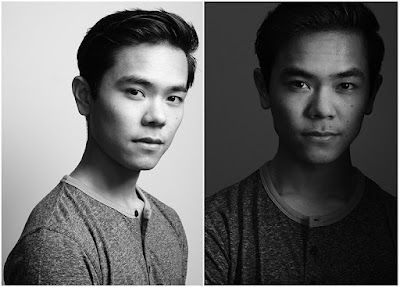
The two photos above have the same light source, same light location and same white background. The only difference in the second photo is that the light has been aimed differently. Pointing your light away from your subject—and using the edge of the beam—is a quick way to sculpt much more interesting light on a head shot or portrait.

But how far away do you need to aim it? Further than you'd think. And finding the nice edge to your light is definitely a game of inches.

Here's how to do it.Read more »
Strobist

 
Comments Off on SLC-1L-03: Need Light With More Edge? Aim It Away From Your Subject.

Posted in Photography


Halide update adds Apple Watch support, self-timer and more

01 May

The makers of Halide today released an update to version 1.8 of the iPhone camera app, introducing a number of major new features.

A new Apple Watch companion app gives you access to framing tools, lets you set the timer and trigger the camera remotely, all from your wrist. You get an image preview on the watch display and according to the developers the watch app has been designed for fast and responsive operation.

For those without an Apple Watch, there is now also a timer mode in the main app, which can be set to 3, 10, or 30 seconds and comes with a countdown on the display for front camera use. When shooting with the main camera, countdown progress is signaled by the flash LED.

In addition there is an updated image review module with a grid-style layout, support for Dynamic and Bold type and VoiceOver support for improved accessibility. For privacy purposes you can now also prevent location information from being embedded in your EXIF data and select options to limit location sharing with connected social apps.

The Halide 1.8 update is free to existing customers. Everyone else can download the latest version of the app from the App Store for $ 5.99.

Articles: Digital Photography Review (dpreview.com)

 
Comments Off on Halide update adds Apple Watch support, self-timer and more

Posted in Uncategorized


GIMP 2.10.0 released: Features 32-bit support, new UI and more

01 May

Open-source image editor GIMP has been updated to version 2.10.0, its first major update in six years. In this new version, GIMP has been “nearly” fully ported to the GEGL image processing engine, which brings support for up to 32-bit images, multi-threaded processing, and optional GPU-side processing for systems with stable OpenCL drivers.

According to the team, GIMP 2.10.0 uses GEGL for all of its tile management and to build an acyclic graph for each project. That satisfies the prerequisites for eventually adding non-destructive editing, a future feature slated for version 3.2.

The new image processing engine aside, GIMP 2.10 brings an updated UI with a new default dark theme; the symbolic icons are also now enabled by default. This gives users a total of four theme option: Dark, Light, Gray, and System. However, themes and icons have been separated so that users can choose them independently for better customization.

Additionally, there are now four icon sizes to improve their look on HiDPI displays. The software automatically detects the best size for the display; however, since it may not always be accurate, users can manually change the size if necessary.

Many new features and improvements, as well as expanded support, have arrived in 2.10.0—complete details of the changes are available in the full release notes. Notable among the changes is support for multiple new formats (including OpenEXR, WebP, RGBE, and HGT) on-canvas previews for filters ported to GEGL, improved warp tools, color management has been revamped as a core feature, and the digital painting experience has been enhanced.

GIMP 2.10.0 can be downloaded now for Windows, macOS, Linux, BSD, and Solaris.

Articles: Digital Photography Review (dpreview.com)

 
Comments Off on GIMP 2.10.0 released: Features 32-bit support, new UI and more

Posted in Uncategorized


This AI-powered chatbot scores your Instagram photos on color, emotion, and more

28 Apr

Do you ever wonder just how ‘Instagram-worthy’ your latest photo is? If so, you might want to check out this chatbot. The team at BBC Tomorrow’s World have built a chatbot that uses artificial intelligence to tell you just how much potential your photo has in terms of attracting likes and comments.

The free Messenger is available for Facebook Messenger and ties directly into your Instagram account. After you’ve granted it permission to access your Instagram content, it’ll ask you to upload the next photo you plan on posting. Once it’s been uploaded, the Tomorrow’s World chatbot will take roughly five to ten minutes to analyze the image, taking into account the colors, composition, and even landmarks that may be in the image.

As it crunches the pixels—which can take upwards of fifteen minutes—the chatbot provides little nuggets of information on how you can make the most of Instagram. For example, it let us know that blue is a popular color on Instagram, due to its ability to ‘evoke feelings of serenity and calmness.’ It also informed us that ‘breakfast’ is the most popular hashtag on Instagram… which was news to us.

Once your image analysis is complete, you’ll get a notification and be shown a video that breaks down multiple components of your photos, scoring each section along the way. It grades the image based on color, the emotions the bot believes the snap will evoke, any landmarks that might be in the image, features within the image, and your Instagram following as a whole.

To test the chatbot, we used an image from the Lamborghini Huracan camera car article yesterday. It scored a +94. Not bad considering it received zeroes in emotions and landmarks.

Would we replace the judgement of our own two eyes with this chatbot to curate our Instagram feed? No chance. But it’s still fun to take it for a spin and see what the BBC’s ‘artificial intelligence algorithm’ thinks of various images we throw at it.

To take the BBC Tomorrow’s World for a spin, head on over to the chatbot’s page and get it installed.

Articles: Digital Photography Review (dpreview.com)

 
Comments Off on This AI-powered chatbot scores your Instagram photos on color, emotion, and more

Posted in Uncategorized


New 2018 dPS Reader Survey – Tell Us More About You

27 Apr

At dPS we value you, our readers, above all else. We want to help you take better pictures.

By doing this survey you will be helping dPS serve you better. By knowing what kinds of things are you struggling with, and the types of articles you want to see we can work toward providing more of what you need to move your photography forward.

We value your time, and you, as our regular reader and always strive to improve – you will help us by completing this form, for which we will be especially grateful.

Click on this link, or the image below to start the survey.

dPS-annual-reader-survey

Thank you for your continued support and being a dPS reader. We wish you all the success on your photography journey.

The dPS Team

The post New 2018 dPS Reader Survey – Tell Us More About You appeared first on Digital Photography School.


Digital Photography School

 
Comments Off on New 2018 dPS Reader Survey – Tell Us More About You

Posted in Photography


Video: Remember that your gear is more advanced than Ansel Adams’

25 Apr

“Every famous photograph was made with a camera less advanced than the one you are using now.” This paraphrased quote is the inspiration behind The Art of Photography’s latest YouTube video titled “Your camera is better than Ansel’s.” In the ten-minute video, Ted Forbes breaks down his thoughts on the idea that, instead of taking an introspective approach to our photography work, we tend to blame the gear and use that as an excuse to our shortcomings as artists.

How often do you hear the phrase “I don’t have the right lens to get the shallow depth of field I want” or “I don’t have this camera body that shoots 15 frames per second.” These laments aren’t uncommon among photographers, but according to Forbes, they miss the point.

Sure, it’s fun to gawk over the latest and greatest gear, but it’s by no means necessary in order to create fantastic artwork—this morning’s Behind the Scenes article by Michael Benanav should more than prove that point. As Forbes elaborates throughout the video, gear is little more than a tool to create the artwork we’ve envisioned in our head—a means to an end.

Forbes summarizes this concept in the video’s description:

The truth is that important work… work that matters… doesn’t have anything to do with the technology we have access to. It has everything to do with what we have to say and communicate visually. Photography is an act of speaking.

It’d be an oversight to say there’s never a time when you need new gear. After all, it’s almost impossible to properly photograph a deer a few hundred yards away without a 400mm lens. But it’s something to think about when considering new equipment. Is that new camera actually necessary to produce the results you desire? Or is the gear you’re lusting over little more than a crutch that will help you avoid addressing your lack of a vision or direction?

Articles: Digital Photography Review (dpreview.com)

 
Comments Off on Video: Remember that your gear is more advanced than Ansel Adams’

Posted in Uncategorized


Discuss: Better Equipment Versus Knowledge – Which Will Help You Improve Your Photography More?

22 Apr

As a photographer, you always have the urge to buy new equipment thinking it will bring you better results. This might be true, but only up to a certain point, because if you don’t have the knowledge you can’t make the most out of your equipment. I started with a Nikon D3200 and I use it to this day because, in my opinion, it’s not the equipment that is going to help me take better photos.

If you’re asking yourself, “What can I do with my entry-level camera?” then this is the article that’s going to prove that you can achieve great things and be a great photographer with your own camera. There are many photographers that took some amazing pictures with film cameras, photographers like; Andreas Feininger, Henri Cartier-Bresson, Eve Arnold, etc.

What keeps you from taking better photos, your EQUIPMENT or your KNOWLEDGE? - portait in a field

We cannot deny that their cameras were the best of their time. But my point is that even today they could compete with any owner of a fancy camera because having the latest camera is not going to guarantee a better vision.

I’m going to give you some tips and tricks on how to take better photos and overcome the obstacle of not having the latest equipment.

1. Read

The most important thing you can do is to read. Many people skip this step and think that only by practicing will they improve. It is true that you have to practice, but unless you study the theory first there is no way of practicing in an efficient way.

For example, if you read an article about shutter speed and aperture it’s easier the understand the mechanism and then apply it, than trying to figure it out all by yourself.

Start here to get to many great dPS articles and find the topics that interest you the most.

girl reading in the grass - What keeps you from taking better photos, your EQUIPMENT or your KNOWLEDGE?

2. Know your equipment

You just bought your first camera and you are stuck with your kit lens. But before buying a new lens you have to learn the basics. You can use your kit lens for numerous types of photos, from landscapes to portrait photography.

I took more than 5,000 images with my kit lens before buying my second one, and I learned a lot of helpful things. If you’re shooting portraits, 35mm focal length can get a nice bokeh having an aperture of f/4.5. This focal length is perfect because it’s not wide so you’re not going to distort the face and you can have more light than shooting the same lens at 55mm, f/5.6.

3. Know what to buy

Buying equipment can be difficult when you can’t afford expensive things and you have to spend your money right. I am speaking from the perspective of a portrait photographer. My first portrait lens was (and still is my main lens) a 35mm f/1.8. If you want nice bokeh for a cheap price this is the right choice. I’m still exploring with this lens and I always find new perspectives.

Knowledge Over Equipment

Next, I’m going to present some arguments on why better equipment doesn’t necessarily make you a better photographer and on why knowledge can help you overcome your equipment struggles.

Buying new equipment is always tempting, but you have to learn how to make the best of what you already have. The best thing you can do as an amateur is buying an entry-level camera and a prime lens. Stick with it and see if you can come up with a new vision every time you go out to take photos.

At first, I didn’t know how to use manual mode. But do you think buying a better camera is going to help with that? No is the answer, you have to read and understand how the relationship between ISO, shutter speed and aperture affect everything in a photo.

After learning that no picture is the same and the settings are going to change every time, you have to do a lot of trial and error. If you practice enough you can achieve great things. After learning how to use your equipment you have to learn how to process your pictures because it makes a big difference as well.

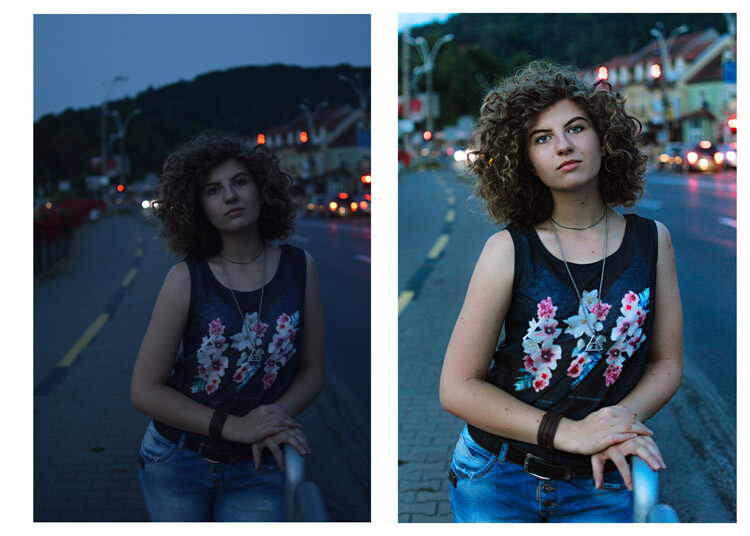
What keeps you from taking better photos, your EQUIPMENT or your KNOWLEDGE? - before and after processing

What keeps you from taking better photos, your EQUIPMENT or your KNOWLEDGE?

The next thing you have to know is that light makes the difference in every picture, you have to learn how to manipulate and control the light. Once you know how light works you are going to love your equipment.

lady and umbrella snowing - What keeps you from taking better photos, your EQUIPMENT or your KNOWLEDGE?

lady in leaves - What keeps you from taking better photos, your EQUIPMENT or your KNOWLEDGE?

When do you need better gear?

There are a few situations where better equipment can be helpful. I’ll give you a few examples and some tips to overcome the difficulties.

1. Shooting in low light conditions

Having expensive equipment can help you here, you can have a higher ISO without a lot of digital noise. With my entry-level camera, I can raise the ISO to 400 and it already looks really noisy. With a full frame camera or even an expensive DX sensor you can raise the ISO to 1600, or 3200 and your image is still going to look fine.

girl walking in the woods in winter - What keeps you from taking better photos, your EQUIPMENT or your KNOWLEDGE?

2. Sports photography

This is another hard thing to do with an amateur camera, you can still achieve great things. Your autofocus is going to play some tricks on you, so you have to work on your timing. Knowing where and when to press the trigger will help your autofocus a lot. Another thing you can do is to learn the panning technique.

Conclusion

So in summary, equipment is just a tool. It doesn’t help you to shape your vision and buying the latest gear as a beginner is not the best choice you can make. When you find that you have difficulty expressing your vision with your current equipment, then you can start thinking about upgrading.

The post Discuss: Better Equipment Versus Knowledge – Which Will Help You Improve Your Photography More? appeared first on Digital Photography School.


Digital Photography School

 
Comments Off on Discuss: Better Equipment Versus Knowledge – Which Will Help You Improve Your Photography More?

Posted in Photography


Venus Optics reveals four new Laowa lenses for Sony FE, Fuji GFX, and more

21 Apr

Venus Optics has unveiled several new lenses today, including a wide-angle lens for the Fuji GFX mirrorless medium format camera, and the “world’s widest zoom lens for Sony full-frame E-mount cameras.” There are four new lenses in all: the Laowa 10-18mm f/4.5-5.6 FE Zoom, Laowa 100mm f/2.8 2X Ultra Macro APO, the Laowa 17mm f/4 GFX Zero-D, and the Laowa 4mm f/2.8 Fisheye MFT.

All four will be on display at Venus Optics’ booth at the Beijing P&E Imaging fair. But in case you don’t happen to be in Beijing between May 3rd and the 6th, read on to find out what these lenses are all about.

Laowa 10-18mm F4.5-5.6 FE Zoom

The Laowa 10-18mm F4.5-5.6 FE Zoom is the aforementioned “world’s widest zoom lens for Sony full-frame E-mount cameras.” According to Venus Optics, the lens was primarily designed for travel photography, offering an angle of view between 102° and 130° in a package that weighs only 496g and is less than 100cm in length.

Inside the 10-18mm F4.5-5.6 you’ll find 14 elements in 10 groups, including two aspherical elements and one extra-low dispersion element. The lens’ aperture can be de-clicked using a switch on the lens barrel, and if you like using filters, you’ll be happy to know the lens features a rear filter slot built to handle 37mm filters.

This Laowa 10-18mm F4.5-5.6 FE Zoom will be available only in Sony FE mount.

Laowa 100mm F2.8 2X Ultra Macro APO

Next up, the Laowa 100mm F2.8 2:1 Ultra Macro APO is… well… it’s an ultra-macro lens that offers a maximum magnification of 2x with a minimum focusing distance of just 24.7cm. The lens can focus from 2:1 macro to infinity, and promises “crystal [clear] sharpness image in both macro and tele distances” thanks to an optical design consisting of 12 elements in 10 groups.

The Laowa 100mm F2.8 2X Ultra Macro APO is the only lens released today that isn’t limited to a single mount. When it ships, you’ll be able to get it in Canon EF, Nikon F, Pentax K, and Sony FE mounts.

Laowa 17mm F4 GFX Zero-D

Third party options for the mirrorless medium format Fujifilm GFX camera are still somewhat limited—at least compared to more popular mounts like Sony FE, not to mention Canon EF or Nikon F. So it was a nice surprise to see Venus Optics release the 17mm F4 GFX Zero-D.

The 14mm F4 GFX is another of Venus Optics Zero-D lenses, offering a full-frame equivalent focal length of 13mm and a field of view of 113° with “close-to-zero distortion.” The lens is made up of 21 elements in 14 groups, including two aspherical and three extra-low dispersion elements. Venus Optics claims this lens is “ideally suited for landscape, architecture and interior photography.”

Laowa 4mm F2.8 Fisheye MFT

Last but not least, we have the only Micro Four Thirds lens of the bunch: the Laowa 4mm F2.8 Fisheye MFT. This circular fisheye lens offers a 210° angle of view at a full-frame equivalent 8mm focal length. Made up of 7 elements in 6 groups, the ultra-portable lens weighs just 135g to keep your MFT kit light and agile.

Here are detailed specs for all four lenses:

All of the new lenses are expected to ship “in mid/late 2018” according to Venus Optics, although “exact ship date and pricing are to be confirmed.”

Press Release

Venus Optics announces 4 new & unique lenses in development, led by the Laowa 10-18mm f/4.5-5.6 FE, World’s widest zoom lens for Sony full frame E-mount cameras

All 4 lenses will make their debut in the coming Beijing P&E Imaging Fair.

Anhui China, Apr 20, 2018 – Venus Optics, the camera lenses manufacturer who had previously launched a number of unique Laowa camera lenses, is proud to announce 4 new and unique lenses.

  • Laowa 10-18mm f/4.5-5.6 FE Zoom
  • Laowa 100mm f/2.8 2X Ultra Macro APO
  • Laowa 17mm f/4 GFX Zero-D
  • Laowa 4mm f/2.8 Fisheye MFT

Laowa 10-18mm f/4.5-5.6 FE Zoom

This lens is currently the widest zoom lens available for Sony full frame E-mount cameras. Designed primarily for travel photography, Venus optics have managed to compress the size to smallest in its class, less than 10 inch (<100cm) and only 1.1 pounds (<500g). The 102° (18mm) to 130° (10mm) angle of view provides flexibility for photographers to compose landscape or architecture photos with ease. The lens houses with 14 elements in 10 groups with 2 aspherical elements & 1 extra-low dispersion element to deliver exceptional performance. It can focus as close as 15cm for some mini-macro shooting. A rear filter slot is included to fit with 37mm filter. Click/clickless aperture can be toggled by the switch on the lens barrel.

Laowa 100mm f/2.8 2X Ultra Macro APO

Followed by the success of the Laowa 60mm f/2.8 2:1 Macro, the 100mm f/2.8 2:1 Macro is the 2nd member of Laowa 2:1 macro line-up. This new 100mm lens can cover full frame sensor size and focus from 2:1 magnification to infinity. The wide magnification range allows macro photographers to capture subject at any sizes. This 100mm portrait lens also features an apochromatic (APO) characteristic that no chromatic aberration can be found. The 12 elements in 10 groups optics design delivers a crystal sharpness image in both macro and tele distances. Canon EF / Nikon AI / Pentax K / Sony FE mounts are available.

Laowa 17mm f/4 GFX Zero-D

This is currently the widest available native lens option for Fujifilm G-mount cameras. The new Laowa 17mm f/4 GFX has a field of view equivalent to 13mm in 35mm format (113°). Featuring a close-to-zero distortion and 86mm filter thread, this lens is ideally suited for landscape, architecture & interior photography. The 21 elements in 14 groups design with 2pcs of aspherical & 3pcs of Extra-low dispersion elements successfully help to control the distortion & chromatic aberrations to the minimal.

Laowa 4mm f/2.8 Fisheye MFT

Featuring a 210° angle of view, this lens delivers unique circular fisheye field of view on Micro four thirds cameras. The ultra-wide angle view allows photographers to create 360° panorama with ease. Despite the unique & ultra-wide perspective, the lens only weighs 0.3 pounds (135g).

Availability

All four lenses will be available for trial at Venus Optics’ booth (T225) in Beijing P&E Imaging fair during 3rd-6th May 2019. They are expected to be shipped in mid/late 2018. Exact shipping date and pricing are to be confirmed.

Articles: Digital Photography Review (dpreview.com)

 
Comments Off on Venus Optics reveals four new Laowa lenses for Sony FE, Fuji GFX, and more

Posted in Uncategorized