Tag: mobile

  • Retired Buses to Become Mobile Homeless Shelters & Showers

    [ By WebUrbanist in Architecture & Cities & Urbanism. ]

    converted mobile homeless shelter

    A fleet of still-functional city buses in Hawaii sits idle simply because the vehicles have too many miles for continued use in their current capacity, creating a unique opportunity to redeploy them toward helping the homeless. Thanks to a group with a vision and starting this summer, these retired transit vehicles will begin to be turned into mobile spaces and service centers for local populations in need of a place to stay and other basic necessities.

    converted bus interior space

    Developed by volunteer architects and Honolulu-based Group 70 International, the idea is simple: each of the dozens of buses will be converted to a single new purpose, providing bedroom spaces in some cases but also places to get cleaned up, accept and deploy donations (warm meals, fresh produce and clean clothes) and much more.

    converted bus diagram design

    From bathrooms and showers to sleeping quarters, each conversion can be done with tools and materials from the local hardware shop and be completed with unskilled volunteer labor. These relatively low-cost retrofits are designed to be donation-driven, providing all of the amenities of traditional homeless shelters with added flexibility and portability.

    converted bus homeless shelter

    converted buses hawaii

    The resulting fleet will be versatile, able to split up and move in sections depending on need and travel to various locations to serve target groups where they are found. Existing seating inside the buses will be stripped and removed then replaced with remodeled elements suited to each vehicle’s new use. The first two conversions are to be completed by the end of this summer, ready for test deployments.

    Share on Facebook


    [ By WebUrbanist in Architecture & Cities & Urbanism. ]

    [ WebUrbanist | Archives | Galleries | Privacy | TOS ]


    WebUrbanist

  • Mobile, Modern & Modular: 15 Capsules for Off-Grid Living

    [ By Steph in Architecture & Houses & Residential. ]

    off grid open roof 5

    Why stay tethered to the grid in a fixed location when you could live in a compact mobile pod that can be transported to the location of your choice? These modern capsules are what 21st-century off-grid dreams are made of, ranging from spacious self-sustaining retreats to accordion-like expanding shelters that are lightweight enough to tow behind a bicycle.

    Tricycle House

    off grid tricycle house

    off grid tricycle house 2

    off grid tricycle house 3

    off grid tricycle house 4

    off grid tricycle house 5

    Made mostly out of folded polypropylene, ‘Tricycle House’ by People’s Industrial Design Office is lightweight enough to be towed around like a bike trailer. The house can be expanded like an accordion to increase the space inside or make it more compact for travel. Translucent walls let in daylight and all amenities within – including a sink, stove, bath tub, water tank and transforming furniture – is manually powered. The firm also makes ‘tricycle gardens’ to tow alongside the house.

    Egg-Like Ecocapsule

    off grid ecocapsule 5

    off grid ecocapsule 1

    off grid ecocapsule 3

    off grid ecocapsule 2

    off grid ecocapsule 4

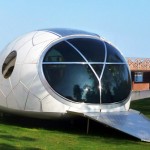
    Shaped like a massive egg, the Ecocapsule by Nice Architects is a tiny off-grid living pod that’s equipped with all the comforts of home, including a bed, hot showers, flushing toilets and the capability to cook. Powered by solar panels and a built-in turbine, with a back-up battery for cloudy and still days, it can be shipped, air-lifted or towed and fits into a standard shipping container.

    Diogene Hut by Renzo Piano

    off grid diogene 3

    off grid diogene 2

    off grid diogene 1

    Designed by architect Renzo Piano for the Vitra campus in Weil-am-Rhein, Germany, the Diogene cabin offers 80 square feet for an individual occupant as a “voluntary place of retreat.” Photovoltaic panels and a rainwater retention tank make it self-sufficient, and it’s highly portable. There’s just enough room inside for a bed, table and chair.

    Portable Retreat with a Roof Hatch

    off grid open roof 1

    off grid open roof 2

    off grid open roof 3

    Three hinged panels open this two-level off-grid retreat to the sky on both the top and bottom floors, enhancing the occupant’s connection to whatever environment they’ve chosen. This mobile wooden shelter by Allergutendinge features a bunch of fold-down elements, hidden storage and a bed that doubles as a staircase to the loft.

    Camouflage Stacked Wood Cabin

    off grid yeta log cabin 1

    off grid yeta log cabin 2

    off grid yeta log cabin 3

    This ‘invisible hut’ looks like no more than a stack of logs when it’s all closed up, but a hatch on one side drops down to become the terrace for a rustic cabin. The Yeta Log Cabin by Lab Zero can be set up virtually anywhere, and as small and minimal as it is, it comes complete with a kitchen, shower, toilet and solar panels.

    Next Page – Click Below to Read More:
    Mobile Modern Modular 15 Capsules For Off Grid Living

    Share on Facebook


    [ By Steph in Architecture & Houses & Residential. ]

    [ WebUrbanist | Archives | Galleries | Privacy | TOS ]


    WebUrbanist

  • DxOMark Mobile Report on HTC One M9

    DxOMark Mobile has published their report on the HTC One M9, HTC’s latest top-end smartphone. The new model is a touch smaller and thinner than its predecessor, the One M8, but under the hood HTC upgrades the 4MP “ultrapixel” 1/3″ BSI sensor of the predecessor to a larger, higher resolution 20MP 1/2.3″ BSI CMOS sensor. The F2.2 lens provides no optical image stabilization, but the M9 is the first One model capable of recording 4K video. Read our report on DxOMark’s findings

    Articles: Digital Photography Review (dpreview.com)

  • Mobile Village: Seattle Teens Build Micro-Homes for Homeless

    [ By WebUrbanist in Architecture & Houses & Residential. ]

    seattle shack designs

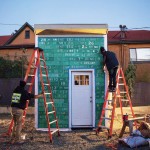
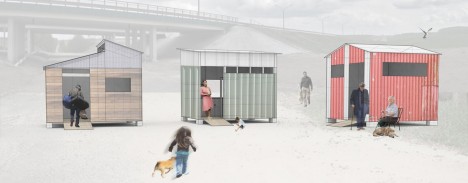
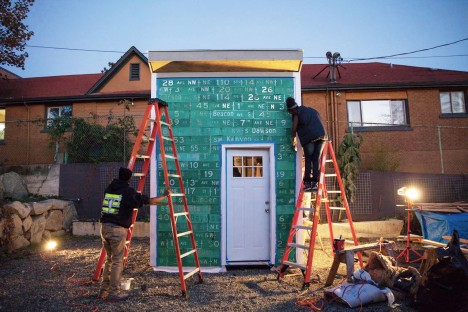
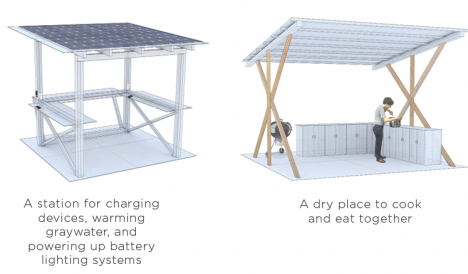
    Serving a nomadic homeless shanty town known as Nickelsville, the Impossible City project involves a group of a teenagers who are creating not just tiny houses but also solar power stations, composting latrines and a community kitchen.

    seattle homeless build

    seattle homeless camp help

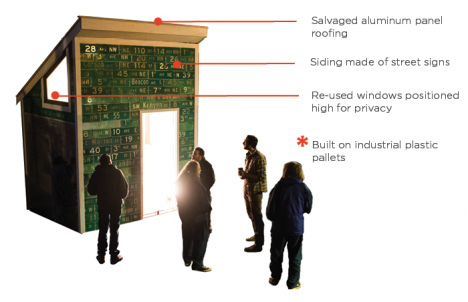
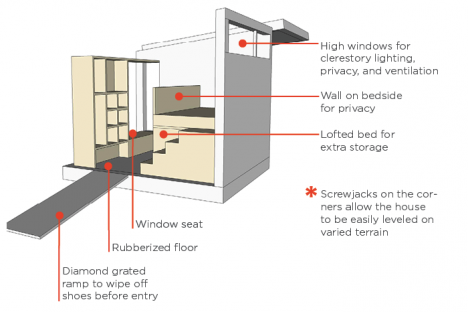
    Nickelsville moves from place to place, going where land is available since its residents cannot afford to pay rents. Slowly but surely, thanks to this project, its rickety collection of tarps, tents and donated Home Depot shacks are being replaced by modest but functional shelters.

    homes for homeless

    seattle homeless home

    The challenge is non-trivial – the structures need to be somewhat easy to disassemble and move while also meeting city code and basic safety standards. Backing the youth builders is Sawhorse Revolution, an area non-profit that teaches kids how to use tools and build structures.

    seattle homeless project

    seattle homeless shelter

    While many institutions, organizations and governments take an all-or-nothing approach, trying and generally failing to get the homeless off the streets, this project attempts to take on the actual situation on the ground, bridging the gap between sleeping on the streets and having a permanent residence.

    Share on Facebook


    [ By WebUrbanist in Architecture & Houses & Residential. ]

    [ WebUrbanist | Archives | Galleries | Privacy | TOS ]


    WebUrbanist

  • DxOMark Mobile report added to our Samsung Galaxy Note 4 review

    DxOMark has just released its test results for the Galaxy Note 4, putting it just behind Samsung’s Galaxy S6 but above Apple’s flagship iPhone 6 Plus. Our comprehensive review of the Note 4 and its 16MP BSI CMOS sensor, F2.2 lens and optical image stabilization has been updated with DxOMark’s findings. See how it stacks up against the competition. Read more

    Articles: Digital Photography Review (dpreview.com)

  • DxOMark Mobile report: Samsung Galaxy S6 Edge tops rankings

    DxOMark has just released test results for Samsung’s latest flagship smartphones, the Galaxy S6 Edge and, by extension, the Galaxy S6. Both phones share the same hardware and specifications, including a 16MP BSI CMOS sensor, F1.9 lens and optical image stabilization. The S6 Edge’s camera performance puts it at the top of DxOMark’s mobile rankings – find out why. Read more

    Articles: Digital Photography Review (dpreview.com)

  • Mobile Pop-Up Libraries: 12 Temporary & Traveling Book Lenders

    [ By Steph in Architecture & Cities & Urbanism. ]

    traveling library tank

    Peruse the waterproofed selections at Minnesota’s Floating Library, renew your library card at a bus stop in Bogota, or select a volume from the shelves mounted to a tank-shaped ‘Weapon of Mass Instruction.’ These 12 traveling libraries and pop-up book stands bring the love of reading to the city streets, and even to the most remote corners of Mongolia via camel.

    Weapons of Mass Instruction Tank Library

    traveling library tank 2

    Artist Raul Lemesoff was commissioned by 7UP to create ‘Weapons of Mass Instruction,’ a 1979 Ford Falcon transformed into a tank-shaped library, for World Book Day 2015. The vehicle features a rotating upper chamber, a faux cannon and room to store nearly 900 books in various compartments along the exterior. The library travels throughout Argentina, both urban and rural, to bring free books to anyone who wants them.

    Mobile Beach Library in France

    traveling libraries beach 1

    traveling library beach 2

    French architecture firm Matali Crasset brought more than 300 titles to becah goers in the seaside town of D’Istres via a pop-up library made of steel and tarps. The tent-like structure includes three shaded reading alcoves.

    Bus Station Library

    traveling libraries bus station

    This urban book stand in Bogota, Colombia is part of the Paradero Para Libros Para Parques (PPP) program, created to promote literacy across the country. There are currently 47 of these bus stop libraries across Bogota, with many more located in other cities. A volunteer staffs each one for about 12 hours per week.

    Pedal-Powered Mobile Library

    traveling libraries denver pedal

    The Denver Public Library literally brought its services to the streets in the form of DPL Connect, a pedal-powered mobile library and wi-fi hotspot that can travel to parks, concerts, farmer’s markets, coffee shops and anywhere else people gather. It’s stocked with a rotating collection of books tailored to the bike’s location, and the librarian pedaling the cart can provide traditional library services like help with digital downloads and reading suggestions.

    Next Page – Click Below to Read More:
    Pop Up Books 12 Mobile Libraries

    Share on Facebook


    [ By Steph in Architecture & Cities & Urbanism. ]

    [ WebUrbanist | Archives | Galleries | Privacy | TOS ]


    WebUrbanist

  • Pop-Up Office: 14 Modern Mobile Studios for Creatives

    [ By Steph in Architecture & Offices & Commercial. ]

    mobile office observatory 1

    Whether you’re an artist looking to work in the most inspiring environment possible or just want to break beyond the cubicle, these mobile and pop-up offices offer adaptability, portability and access to optimal daylight levels.

    Volkswagen T6 Mobile Office
    mobile offices volkswagen t6

    mobile offices volkswagen t6 2

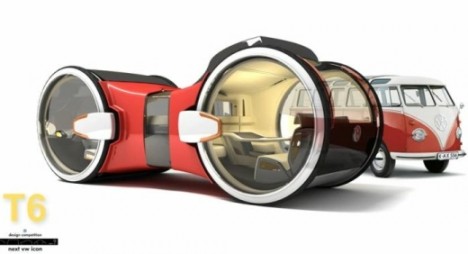
    Volkswagen’s bizarre-looking T6 is a mobile office in the most literal sense – it’s a van and workspace in one. The idea is that you wouldn’t have to miss a moment of work time while commuting, but this design – which features a meeting area as well as a personal cubicle – might be even better suited to parking somewhere pretty and enjoying the view out of those big round windows.

    Observatory Modern Artist Residence

    studio

    mobile office observatory 2

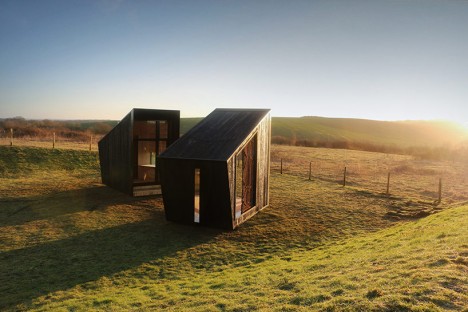
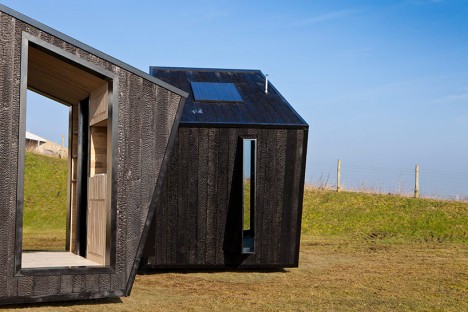
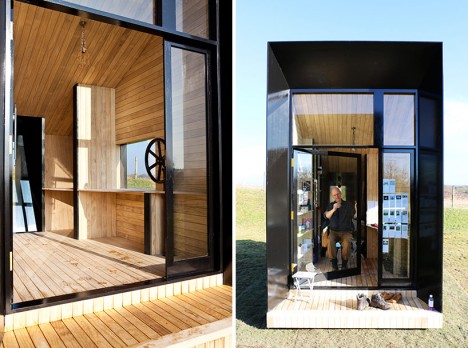
    These mobile ‘observatory’ studios are perfect for creative work with their massive glazed walls opening up to whatever landscape is deemed desirable for the work at hand. Designed by four graduate students from the English design firm Feilden Clegg Bradley Studios, these two small timber structures sit on prefabricated swiveling bases so they can be moved even once they’re transported via flat-bed truck to their destination.

    SPACE Shipping Container Office

    mobile office shipping container 1

    mobile office shipping contaienr 2

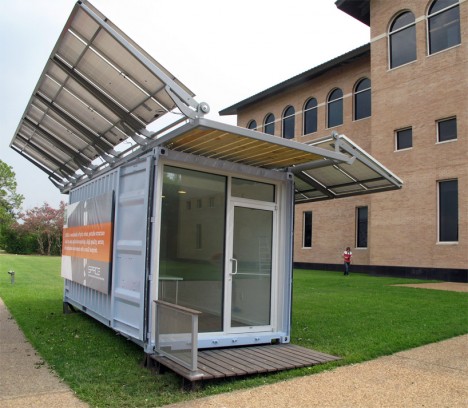
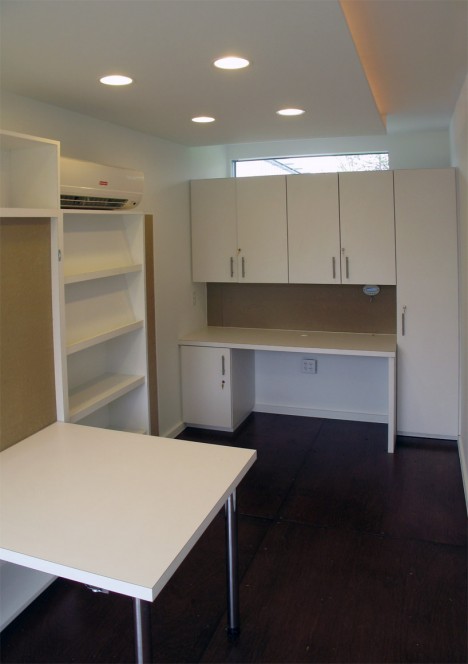
    The SPACE shipping container office by Metalab is made up of a reclaimed shipping container with a fold-out solar rack system. It’s designed for rapid deployment so it could function as an emergency relief office, but also as a park ranger’s station or an everyday work space in areas where access to the power grid isn’t available.

    Mobile All-in-One Office Unit

    mobile offices all in one 1

    mobile offices all in one 2

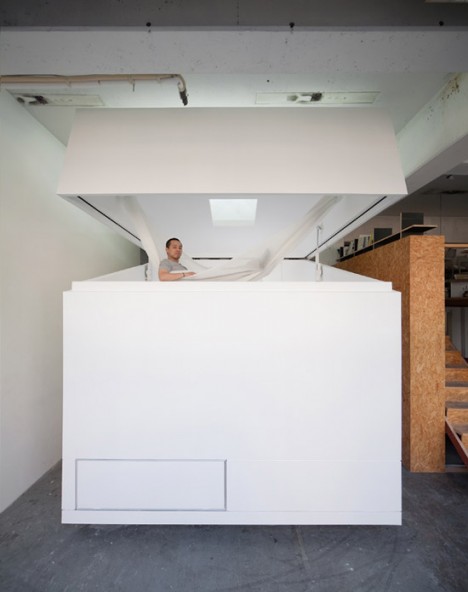
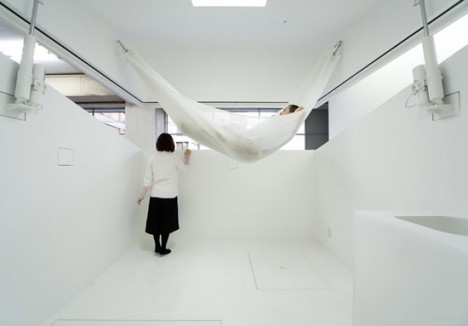
    This office-within-an-office makes it easy to maintain a comfortable, modern, minimalist workspace no matter where your office might be physically located -even if it’s a dreary warehouse. THe Paco all-in-one unit by Jo Nagasaka + Schemata Architecture Office is a white cube with a roof that opens up to allow interaction with the world outside, but offers privacy when closed. The interior is fitted with a hammock, a table and even a bathroom.

    Comic Book Style Pop-Up Office
    mobile office comic book style

    OLYMPUS DIGITAL CAMERA

    This fun pop-up office turns a display window into a creative comic-book inspired workspace, showcasing local artists in London to entertain passersby. Employees of the Weiden + Kennedy ad agency took turns working in the window at the company’s headquarters. Most of the office is made of paper and cardboard in stark black and white, and some elements are kinetic, like a phone that rocks as if it’s ringing and a clock that runs backwards.

    Next Page – Click Below to Read More:
    Pop Up Office 14 Modern Mobile Studios For Creatives

    Share on Facebook


    [ By Steph in Architecture & Offices & Commercial. ]

    [ WebUrbanist | Archives | Galleries | Privacy | TOS ]


    WebUrbanist

  • Driverless Living Space: Future Car Envisioned as Mobile Room

    [ By WebUrbanist in Conceptual & Futuristic & Technology. ]

    driverless car in city

    Blending elements of rigorous automotive and interior design, this concept car may look like a streamlined vehicle but is more akin to a communal living room on wheels on the inside.

    driverless car conversing commuitng

    driverless car dash board

    driverless car test model

    Unveiled  by Mercedes-Benz at the Consumer Electronics Show in Las Vegas, features include swiveling seats for conversing and viewing, individual touchscreen displays and interactive gesture-based interfaces for driving and recreating alike.

    driverless car sitting relaxing

    driverless car seating interface

    driverless car exterior view

    The exterior presents as a classy and aerodynamic sports car  with carbon fiber-reinforced plastic, aluminium and steel. Within, walnut, leather and glass make for a a likewise-luxurious but human-oriented set of materials and finishes.

    driverless car interior view

    driverless car doors open

    Of the design and its direction, Dieter Zetsche notes that “Anyone who focuses solely on the technology has not yet grasped how autonomous driving will change our society. The car is growing beyond its role as a mere means of transport and will ultimately become a mobile living space.”

    driverless car sleek look

    futuristic driveress car design

    The open question remains: how much will cars of the future even look like cars on the outside? As platooning and other hive-like concepts are further explored, we may find vehicles look far different down the line than we might imagine.

    Share on Facebook


    [ By WebUrbanist in Conceptual & Futuristic & Technology. ]

    [ WebUrbanist | Archives | Galleries | Privacy | TOS ]


    WebUrbanist

  • Setting up Lightroom Mobile for First Time Users

    I laughed at Lightroom Mobile the first time I saw it. “Why would I ever want to use that stripped down gadget on a small screen?” And now, here I am about help you install and use it. Why is this?

    It’s because I have found how totally useful the app is in sorting through hundreds or thousands of images from the world of “any time, any where”. Most notably, in a comfy chair with good light or on a weekly airplane flight. iPads also became lighter and iPhone screens larger.

    Let’s start with how to set up Lightroom Mobile on your iPad or iPhone and then give some examples of how I find it useful in managing a huge library. I will be using a Collection of mine that is a work in progress to craft black and white images of the Himalayas.

    Setting up Lightroom for mobile use

    Connect Lightroom to your Adobe ID

    The first step is to make sure you have the right version of Lightroom on your PC or Mac. You need to have version 5.4 or later, you can download the latest version from Adobe here. You also need an Adobe ID (free) for this to all work as it is the hub in the cloud that makes this all spin. If you don’t have one, sign up here.

    With Lightroom open, you will notice in the upper left corner the phrase “Get started with Lightroom mobile”

    1

    Click the triangle next to the words and log in with your Adobe ID

    2

    You will then see that the top left of the screen has changed to the name you gave to Adobe upon creating your Adobe ID.

    3

    Great! Now let’s set up Collections to synchronize

    Setting up Collections to sync

    Lightroom Mobile will currently only work with Collections. If you need help setting up a Collection, the free Adobe video here will help. To enable a Collection for syncronization, simply right click on the Collection and choose “Sync with Lightroom mobile”. Pretty easy!

    4

    After clicking, you will notice a double arrow appears to the left of the Collection. This indicates the Collection will be syncing when sync is turned on.

    5 copy

    Now, up in the top left, Lightroom will let you know it is starting the sync of those images.

    6

    As a first pass, we are done! Simply repeat this process for Collections you have already created. Additionally, when creating a new Collection, there is a box that can be checked to automatically sync the new Collection. It looks like this:

    7

    Setting up your iPad or iPhone for use

    This is the easy part. First, ensure your iPad/iPhone is connected to the Internet. Go to the App Store and search for Lightroom Mobile.

    Peter-West-Carey-adobe2014-1217-0225

    Install (it’s free) and then start the app.

    Peter-West-Carey-adobe2014-1217-0229

    You will be presented with an Adobe ID screen after paging through the first time introduction.

    Peter-West-Carey-adobe2014-1217-0230

    After signing in you will be taken to a page showing all the Collections you have set up to sync on the desktop version of Lightroom.

    Peter-West-Carey-adobe2014-1217-0232

    Tap the main image and you will be taken to the Collection itself. The first time you run through Lightroom Mobile it will give you helpful contextual hints.

    Peter-West-Carey-adobe2014-1217-0233

    Tap on any picture to edit it.

    Peter-West-Carey-adobe2014-1217-0235

    Quick filtering with Lightroom mobile

    While there are a lot of features in Lightroom Mobile that make it useful for photographers, this post is going to concentrate on the basics to get you started.

    Now that you have a Collection synced to your iPad/iPhone (note: it might take a while to fully sync a larger Collection), you can start filtering. For me, filtering is the best use of this app, currently. I enjoy being able to filter my images from the comfort of my living room or while traveling. I also do some basic edits to images but I usually leave the major edits to my desktop. To filter images, I use both the flags and stars features. You can switch between changing those features by tapping the icons in the bottom left corner.

    Peter-West-Carey-adobe2014-1217-0238-2

    Peter-West-Carey-adobe2014-1217-0238

    When the flag icon is highlighted, as it is here, simply move your finger up or down on the screen to pick, unpick or reject images. These settings will then sync over to your desktop within seconds as long as Lightroom is open on the desktop.

    Peter-West-Carey-adobe2014-1217-0237

    Peter-West-Carey-adobe2014-1217-0239

    I use these two features to sort images. Flags are images I especially like and I know I want to work on back at my desktop. I then use two stars to indicate the image should be used for my stock photography work (the scale then goes up to three stars once edits are done, four stars when title and keywords are done and five stars when completely finished).

    There are a lot of editing options available in Lightroom Mobile that can be accessed from tapping the icons at the bottom of the screen on an individual image.

    Peter-West-Carey-adobe2014-1217-0241

    All of these features are best left for a future post.

    Offline use

    One last thing; Lightroom Mobile usually needs to ‘see’ your desktop’s version of Lightroom in order to show previews the first time and make edits. Therefor, once I have a Collection fully sync’d, I will then turn on Offline Editing which allows me freedom from wifi to make edits, knowing they will sync the next time I am online.

    To do this, click on the three little dots on the bottom of the Collection image:

    Peter-West-Carey-adobe2014-1217-0232-2

    This brings up a menu with many options.

    Peter-West-Carey-adobe2014-1217-0243

    Choose to Enable Offline Editing and Lightroom Mobile will now bring across Smart Previews of the images to your mobile device.

    Peter-West-Carey-adobe2014-1217-0242

    How do you use Lightroom Mobile

    Lightroom Mobile has a host of other features such as automatically uploading images shot on your iPhone/iPad into Lightroom on your desktop.

    What about you? What have you found useful in Adobe Lightroom Mobile?

    googletag.cmd.push(function() {
    tablet_slots.push( googletag.defineSlot( “/1005424/_dPSv4_tab-all-article-bottom_(300×250)”, [300, 250], “pb-ad-78623” ).addService( googletag.pubads() ) ); } );

    googletag.cmd.push(function() {
    mobile_slots.push( googletag.defineSlot( “/1005424/_dPSv4_mob-all-article-bottom_(300×250)”, [300, 250], “pb-ad-78158” ).addService( googletag.pubads() ) ); } );

    The post Setting up Lightroom Mobile for First Time Users by Peter West Carey appeared first on Digital Photography School.


    Digital Photography School