RSS
 

Posts Tagged ‘mobile’

Snoozeboxes: Mobile Container Hotels Travel by Truck or Rail

22 Dec

[ By WebUrbanist in Boutique & Art Hotels & Travel. ]

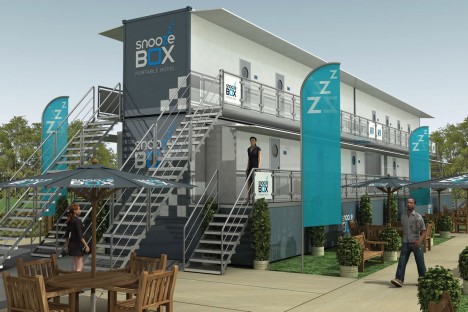
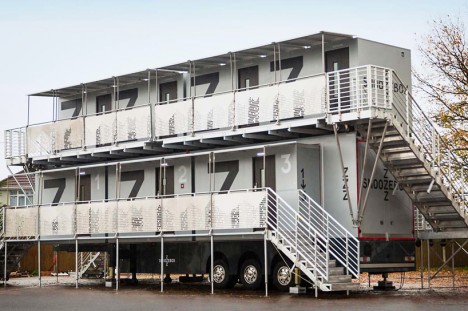
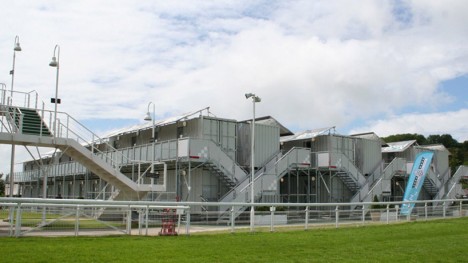
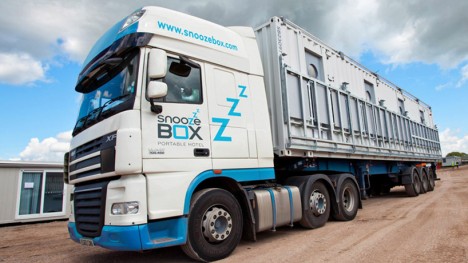
snoozebox trailer flat bed

Modular, stackable and robust, these cargo containers may not look like much on the outside but provide surprisingly refined accommodations inside and can be packed and shipped cheaply and easily around the world to meet different demand.

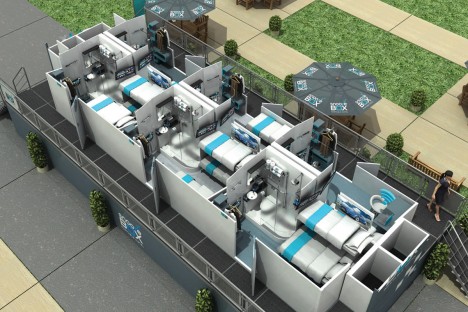
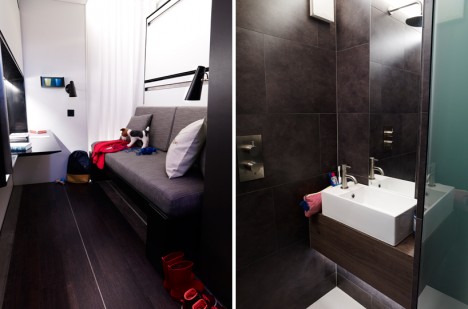
snoozebox modular system interior

snoozebox interior module design

Recently renovated, the newest Snoozebox models can be shipped by road, rail, air or sea, fully deployed within two days and configured in a variety of ways for festivals, events or emergency housing.

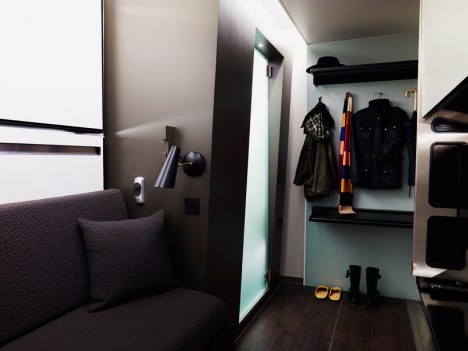
snoozebox shelves sofa door

snoozebox fashionable interior design

snoozebox new remodel version

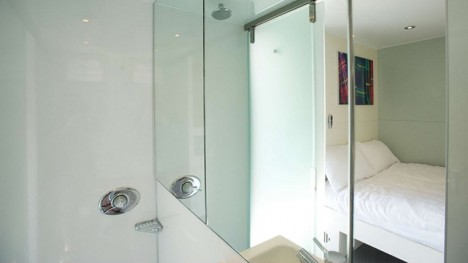
Making them appealing for off-the-grid contexts as well, “each of the units require no mains service – no provision for electricity, water or sewerage is necessary. each room is climate controlled and features a wet room, double bed, flat screen TV, power sockets, free wi-fi and a safe.”

snoozebox wet room walls

snoozebox door room divider

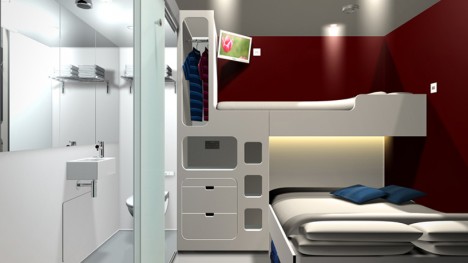
These small-footprint shipping container modules allow for “two upper level units, each offering two bedrooms, can be placed on top of the lower level, accessed by stairs with a walkway leading to each dwelling. internally, each temporary residence has four stowed bunk beds, which can be readily and easily converted.”

snoozebox stairs and ramps

snoozebox interior space design

shipping container hotel design

The older models were a bit more bare-bones in terms of their cladding but still provide all of the essential basics, including flat-pack circulation structures and shade provisions for sunny and hot climates.

Share on Facebook


[ By WebUrbanist in Boutique & Art Hotels & Travel. ]

[ WebUrbanist | Archives | Galleries | Privacy | TOS ]


WebUrbanist

 
Comments Off on Snoozeboxes: Mobile Container Hotels Travel by Truck or Rail

Posted in Creativity


Urban Transformer: Bus Unfolds into Mobile Fresh Food Market

07 Dec

[ By WebUrbanist in Technology & Vehicles & Mods. ]

mobile food market bus

Bringing healthy and organic fruits and vegetables into low-income areas of Toronto lacking grocery stores, this converted bus is much more than a normal food truck – it looks like an ordinary vehicle until it stops and deploys its colorfully-stocked shelves (images by Laura Berman).

converted food truck side

As in many cities, there are ‘food deserts’ in Toronto in which it is hard to find fresh seasonal produce. Using a vehicle donated by the Toronto Transit Commission, LGA Architectural Planners helped convert this vehicle to address this issue.

Mobile Good Food Market bus launch

“Even in a city as dynamic as Toronto, there remain neighbourhoods where residents are unable to access the foods essential to a healthy diet. This happens for a variety of reasons, including low-income, lack of access to public transit, and long distances to groceries and markets. Such conditions make it extremely difficult for individuals and families without access to a vehicle to find and purchase healthy foods. Senior citizens who might be less mobile are hit especially hard by this type of isolation.”

mobile food desert vehicle

Lettuce, berries, okra, yucca, broccoli, apples and more fill the fold-out shelves extending out from the side of the Mobile Good Food Market. Inside, bins of additional veggies and fruits can be accessed by walking or wheelchair, a handy feature for cold and wet weather.

mobile food interior exterior

The project  was commissioned by FoodShare Toronto in partnership with the City of Toronto and United Way Toronto in a joint effort to help supplement unhealthy local options in neighborhoods starved for good and fresh foods.

Mobile Good Food Market bus launch

“The design also offered the opportunity to shop from the inside in inclement weather,” notes Dean Goodman of LGA, pointing out that as a former Wheel-Trans bus, ramps for ease of entry and exit were already in place. “Good food is beautiful when displayed well, so when we decided we wanted this to be a feature we worked out the mechanism so one person could fold out the shelves, restock as necessary and display the food so it was attractive.””

Share on Facebook


[ By WebUrbanist in Technology & Vehicles & Mods. ]

[ WebUrbanist | Archives | Galleries | Privacy | TOS ]


WebUrbanist

 
Comments Off on Urban Transformer: Bus Unfolds into Mobile Fresh Food Market

Posted in Creativity


Google Nexus 6 DxOMark Mobile Report

22 Nov

The Nexus 6 is Google’s showcase phone for Android 5.0 ‘Lollipop’ and the first Nexus device made by Motorola. It comes with a dual-LED ring flash, a 13MP sensor with a fast F2.0 aperture, optical image stabilization and 4K video recording. DxOMark Mobile put the Nexus 6 through its image quality tests and has just published the results. Read more

Articles: Digital Photography Review (dpreview.com)

 
Comments Off on Google Nexus 6 DxOMark Mobile Report

Posted in Uncategorized


DxOMark Mobile Report added to our Amazon Fire Phone review

05 Nov

We just updated our full review of the Amazon Fire Phone’s camera capabilities with data from DxOMark’s mobile analysis. With an overall score of 69, the Fire Phone lands at 18th on DxO’s mobile rankings, tied with the HTC One M8 and coming in well behind flagship phones from Apple, Samsung and Sony. Read more

Articles: Digital Photography Review (dpreview.com)

 
Comments Off on DxOMark Mobile Report added to our Amazon Fire Phone review

Posted in Uncategorized


Mobile 3D Clay Printer: Whole Houses from Local Mud & Fiber

03 Nov

[ By WebUrbanist in Architecture & Houses & Residential. ]

3d printing dirt water

Easy to disassemble and transport on demand, this 3D-printing solution uses natural materials to build completely stable homes from readily available resources.

3d printed architecture mud

Designed by WASP (World’s Advanced Saving Project) and deployed recently at a maker fair in Rome, the Delta device itself is lightweight and can be loaded onto a truck, moved then rebuilt in a matter of hours.

3d printed architectural home

Structurally, the system employs curved walls, arches and domes to create solid buildings that can withstand the test of time. For its source material: dirt, clay and water are fed into the machine, leaving the results to dry naturally in the sun. Other substances like wool can be added to help bind the solution. Architecturally, the designs draw on regional vernaculars.

3d printer delta machine

Part of WASP’s larger goal here is to raise awareness of non-plastic building materials that can be used in 3D printers, all with the same degree of precision found when using plastics. This process has started with demo models and is leveling up to full-scale structures.

3d house printing technology

As for future endeavors: “the company is in the process of exploring 3D printing implantable ceramics, such as hydroxylapatite, bioglass and aluminium oxide, to create bone implants with the same porous structure as natural bone.”

Share on Facebook


[ By WebUrbanist in Architecture & Houses & Residential. ]

[ WebUrbanist | Archives | Galleries | Privacy | TOS ]


WebUrbanist

 
Comments Off on Mobile 3D Clay Printer: Whole Houses from Local Mud & Fiber

Posted in Creativity


Give Your Photographs The Stage They Deserve – Make Sure Your Website is Mobile Ready

12 Oct

If you post amazing professional-quality photographs to your website and nobody can access them, are they really that amazing? Nobody will know. All that hard work, focus, determination, and artistic ability -POOF – all for nothing. This is exactly what is happening to many very talented photographers. They pour their heart and soul into their art form and then entrust it to outdated technology that doesn’t adequately display their work on mobile devices.

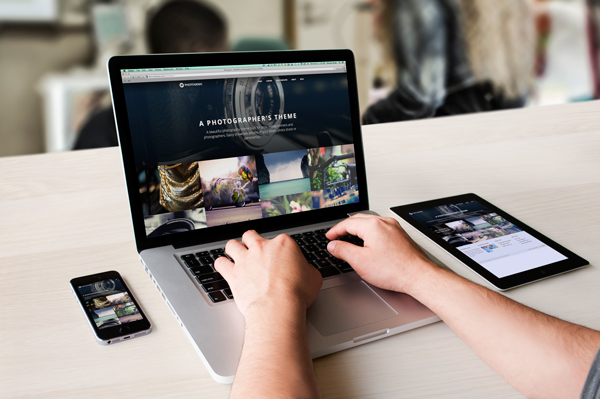
ResponsivePortfolioSite

How important is being mobile friendly?

With the proliferation of mobile devices, it’s no surprise that many people do most of their web browsing on the go. Consider the following eye-opening statistics found on visual.ly:

  • Mobile search queries have grown five times in the past two years.
  • Nine out of 10 mobile phone searches result in a purchase or visit.
  • Three out of every five searches are conducted on a mobile device.
  • 99% of Smartphone owners use their mobile browsers at least once a day.
  • 52% of all local searches are conducted on a mobile device.
Mobile Search Statistics

Those are startling numbers, especially if you’re not keeping up with the changing face of the web. Unfortunately, it seems that there has been a lag in photographers adopting the appropriate web technology to showcase their work in a way that accommodates mobile users. To ensure that your site and your photography work are presented in an impactful way, it must be optimized specifically for mobile viewing.

Desktops and mobile devices don’t always play nice

Just building a site for the desktop doesn’t guarantee that the results will transfer to phones and tablets, or even the new smart watches. You do not want interested viewers to open your site on a mobile device and find a helter-skelter layout with distorted or inaccessible images. If this happens, it puts you in a difficult spot – you’re left hoping that they remember and desire to seek out your site for a second time when they’re back at a desktop computer. That’s wishful thinking considering the deluge of distractions we all encounter every day and the somewhat shrinking attention spans of the high-definition, high-speed digital generation. Here today, gone tomorrow, or maybe sooner in the case of your hard work and aspirations.

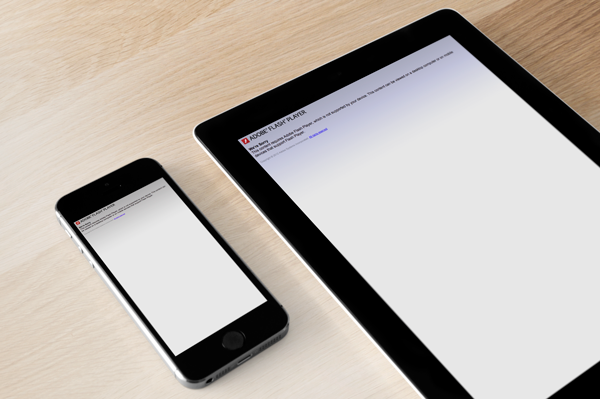
One of the worst-case scenarios you could be in is with a portfolio site that is completely based on Adobe Flash, leaving you to lose a whole group of mobile users who will rapidly look elsewhere when your site doesn’t load on their device. No one likes seeing a blank screen or a message saying, “This content cannot be displayed on your device.”

FlashOnlySite

Mobile devices often will not play Flash websites

Making your work accessible

It’s vital to give your audience exactly what they want – fast, fluid access to your dazzling work anytime anywhere. If they can’t clearly navigate your web site, it raises questions in their minds about your professionalism and your commitment to viewers and to your art form. This is not a good place to be for a proud, ambitious photographer. The good news, however, is that there are readily available solutions that you could leverage whether you already have an existing site or are starting one from scratch.

The key to optimizing the mobile user’s experience is to have a site that uses responsive web design or adaptive web design. These are two types of site programming that ensure a seamless transition of your content from the desktop to all mobile devices, regardless of screen size. Anything less than that, and you’re severely limiting exposure for your work and jeopardizing your chance of making a significant first impression. Negative experiences can turn into negative reviews. These travel fast in the digital age, and it’s difficult to change those perceptions once they’re public.

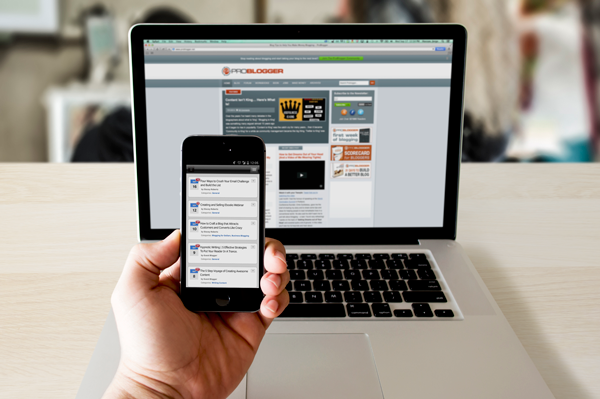
Using an adaptive design, you get a site that is specifically designed for particular browser sizes found on most mobile devices. In a lot of cases, the mobile site almost looks like a native app. Problogger.net (also run by dPS owner Darren Rowse) is an example of such a site. With this type of design, the experience on a mobile device is a bit different than that of a desktop, but you could still access the content in a readable format. This results in a fast and easy to read site that is user-friendlier on small web browsers.

ProBlogger Adaptive

Example of an adaptive design

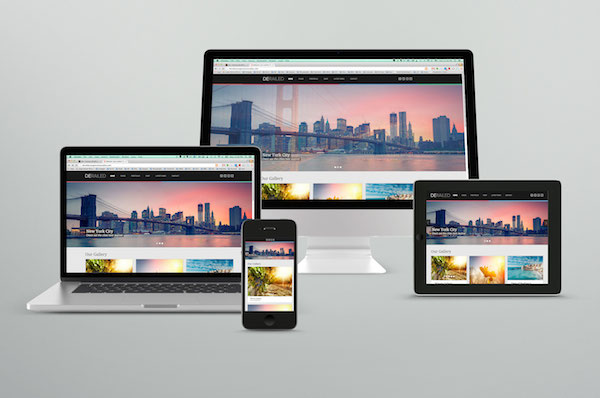
A Responsive site is even better in that it is flexible in displaying the same content across a large array of devices while keeping much of the same styles. It maintains a fluid layout by using elements that are automatically resizable and could be placed where they fit best on the screen. This even works great on desktops when you want to shrink the browser window.

A perfect example of a website with a responsive design is Digital Photography School’s own site. If you’re accessing the site from a desktop browser, notice how the site responds fluidly as you resize the window. If you’re reading this from a mobile device, you’re still able to read the content just fine without having to manipulate the browser by zooming in and out or doing a lot of horizontal scrolling.

ResponsivePhotoSite

dPS is a responsive site

Simple changes make a HUGE difference

Updating your site from a clunky old format is quite simple, and the tools are readily available. Most people who have a blog use a Content Management System (CMS) such as WordPress, Joomla, or Drupal. These systems allow you to change the overall look and feel of your site by offering different designs or themes. There are plenty of available themes that are already responsive or adaptive right out of the box. These range in cost from free up to $ 100. A simple web search will reveal many sites that specialize in offering a variety of this type of themes. I’ve had great success using Theme Forest.

In addition to themes that are optimized for mobile browsing, these CMSs also allow you to install plugins that display the same content in a mobile-only theme. In some cases, especially if you already have an existing site, this might be the easier route to take.

Rock the mobile web

At some point, we’ve all experienced the disconnect between the artistic or creative world and the technology world. But in the modern age, you really can’t draw a distinction without suffering the consequences. It’s much wiser to embrace the role of technology in displaying art – in this case photography – and use it to your advantage.

With just a bit of effort, you can make sure that you nail that vital first impression with your fans and give your work the digital stage that it deserves!

The post Give Your Photographs The Stage They Deserve – Make Sure Your Website is Mobile Ready by Jorge Hassan appeared first on Digital Photography School.


Digital Photography School

 
Comments Off on Give Your Photographs The Stage They Deserve – Make Sure Your Website is Mobile Ready

Posted in Photography


Adobe rolls out CC update with new desktop and mobile tools

06 Oct

Adobe has announced updates to several of its mobile and desktop software applications, just in time to kick off the company’s Adobe Max conference. While Photoshop itself only receives a couple of minor updates, such as more 3D printing profiles, there are some interesting new features added to the Adobe ecosystem. Among them is a new Libraries feature, making it possible to save layers and graphic elements for use across apps and platforms. Read more

Articles: Digital Photography Review (dpreview.com)

 
Comments Off on Adobe rolls out CC update with new desktop and mobile tools

Posted in Uncategorized


DIY Boho Photo Mobile

03 Oct
Extra photos for bloggers: 1, 2, 3

Remember that time you went to the beach and took a zillion polaroids and picked up some sea glass and coral?

Go grab those things and throw together this awesome boho photo mobile!

It’s completely personalised art made from your photos and trinkets.

Those rocks? Hang it up! That stack of photos? You know what to do. That bunny? Umm, put him down and follow us!

Learn How To Make Your Own Boho Photo Mobile

(…)
Read the rest of DIY Boho Photo Mobile (239 words)


© Erika for Photojojo, 2014. |
Permalink |
No comment |
Add to
del.icio.us

Post tags:


Photojojo

 
Comments Off on DIY Boho Photo Mobile

Posted in Equipment


DxOMark Mobile tests iPhone 6 Plus

25 Sep

DxOMark has put Apple’s iPhone 6 Plus through its mobile imaging tests and the results are in. Tested alongside its iPhone 6 sibling, the 6 Plus has the added benefit of optical image stabilization. Both phones scored well enough to place them at the top of DxOMark’s mobile rankings, pushing the Galaxy S5 and Sony Xperia Z3 down the list. Take a look at the full test results and how the iPhone 6 Plus compares to its sibling and its peers. Read more

Articles: Digital Photography Review (dpreview.com)

 
Comments Off on DxOMark Mobile tests iPhone 6 Plus

Posted in Uncategorized


Mobile Triggers Compared to Help You Choose the Right One

25 Sep

When it comes to mobile triggers or cable releases photographers often have multiple responses:

  • I got the knock-off brand and it doesn’t work when I need it
  • I got the basic button kind and have to count the time on my own
  • The intervalometer is way too expensive
  • I could save money and build a DIY release but that’s too much effort
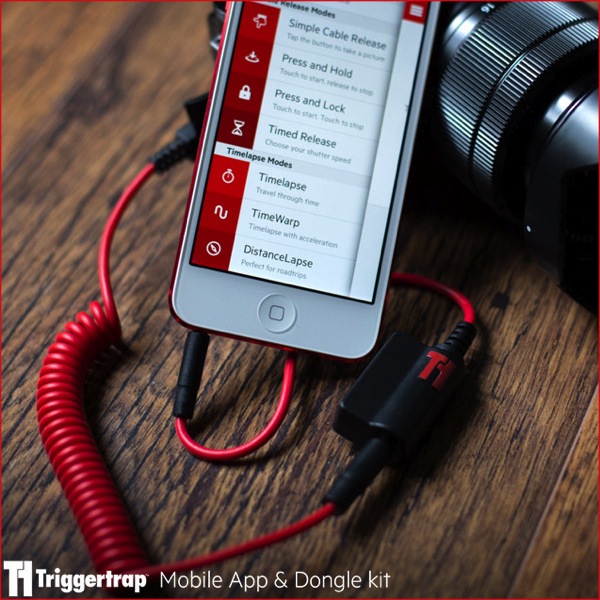
Triggertrap

Image from Triggertrap site

Image from the Triggertrap website.

I hear comments like that on almost a daily basis. In my previous article on long exposure photography accessories I mentioned Triggertrap and Trigger Happy. In this article I’m going to discuss both of those (with a bonus tip at the end) and also discuss some other options that are available to you.

This article is not a review of the products but rather just an overview of what each offers. It is worth noting that I do own each of the products and will share my personal recommendation at the end of the article. So if you don’t care so much about the comparison then please skip down to the bonus tip and my recommendation.

However, if you’re considering a mobile trigger for your camera, but haven’t purchased one yet, then please continue reading.

Triggertrap

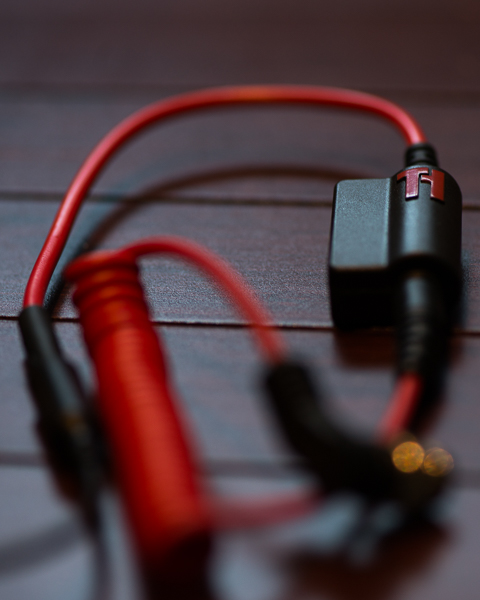
Triggertrap started as a Kickstarter project, and really set the bar high for its standards and features. The Triggertrap software is open source and can be found on Github. The quality of the physical cables is top notch, very durable, and they’re also attractive.

The mobile kits are available for Nikon, Canon, Fuji, Sony, Olympus, Samsung, Panasonic, Pentax, Sigma, Leica, Lytro, Hasselblad, Contax, Konica Minolta and Kodak.

A mobile kit is available for nearly every camera you could possibly want. It connects to the headphone jack of your phone and then the cable release part of your camera. The mobile kits start at $ 37.46 USD.
Triggertrap 1

The mobile app (iOS and Android) has a variety of trigger options that can go way beyond just pushing the button. Here is a list of all the trigger options:

  • Sound sensor
  • Vibration sensor
  • Motion sensor
  • Facial recognition
  • Time-lapse
  • TimeWarp
  • DistanceLapse
  • Bramping
  • Star Trail
  • Long Exposure HDR
  • Long Exposure HDR time-lapse
  • Press and Hold
  • Timed Exposures
  • Simple Cable Release
  • Wifi Trigger
  • Triggertrap also includes a neutral density filter calculator, which is convenient. Although I prefer Slower Shutter, it is convenient having a calculator in the same place as the trigger. The app also includes local sunrise and sunset times which is very convenient.

It is worth noting two more things about Triggertrap. First, all the features of the apps are not available on both iOS and Android. Second, that is likely to change quick because Triggertrap is always working on improvements and new features.

The apps are free so while you are paying for the mobile kits, you are not paying for the software side.

Trigger Happy

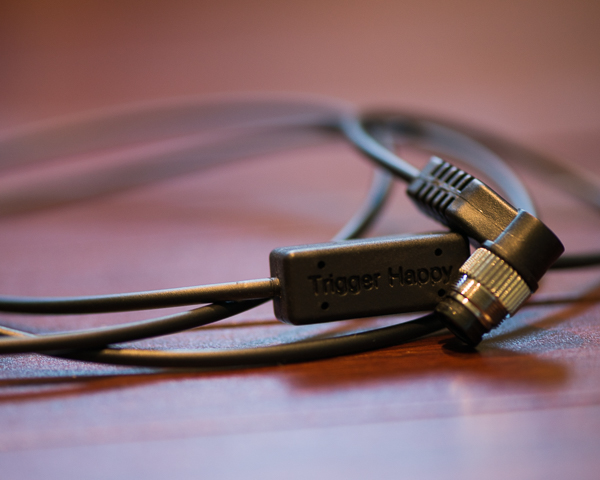
Trigger Happy also began as a Kickstarter project and was successfully funded. It works the same way at Triggertrap, using the headphone jack of your mobile device.

NOTE: Since writing this article, TriggerHappy has closed for business, but some of the products are still available. They decided to open their software up to the world and made it Open Source available on GitHub.  They are also recommending people to check out Triggertrap.
Triggerhappy

The kits are available for Canon, Nikon, Pentax, Olympus, Sony only and retail at $ 29-49 USD. The apps are limited to the most basic features including the following trigger options:

  • Simple camera trigger
  • Bulb
  • Time-lapse mode / Intervalometer
  • HDR mode
  • Bramping

This system was the first I owned, via the Kickstarter project; it’s changed since then but even the original still works very well. The apps are also free, so while you are paying for the kit you are not paying for the software side.

SmartShutter

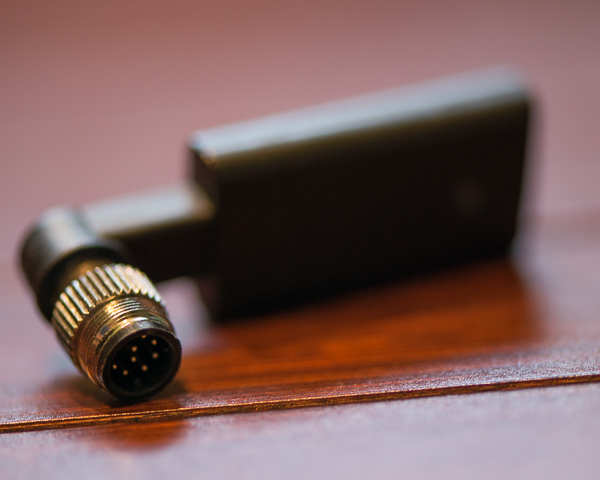
SmartShutter is from a company called Zesty Accessories in Japan, and is different than the other mobile releases as it uses Bluetooth to trigger instead of a wired release. Cool, right? The product sells for between $ 39.99 and $ 64.99 direct or through Amazon.

It works very well, but the app is extremely limited. I do have some issues with the design of the Nikon version, but instead of re-stating it here you can see to my full review and video of the product here.
Zesty

I mentioned that the product uses Bluetooth, but you should know that it relies on your camera’s battery for power. That means if you’re using a camera like the Sony A7, which has poor battery life, then this device will drain your camera battery faster. But if you have a camera like the Nikon D810 your battery life will continue performing well.

The devices are available for Nikon, Canon, Sony, Olympus, Pentax, Konica Minolta, Contax, Fuji, Sigma, Hasselblad and Samsung.

The free app allows for a quick trigger of the camera or a timed exposure. But the timed exposure allows for intervals, a delayed start, and even the number of photos to capture. In addition, the app has the ability to geotag your photographs using your phone’s GPS as well. The app is only available for iOS and is also free.

ioShutterPro

ioShutter is made by enlighten photo, the people who created Orbis and other amazing products for photographers. ioShutter is also the priciest of each of the triggers coming in at $ 69.99 for the cable kit. They do have a limited number available right now at 50% off due to what seems to be damaged packaging.

It comes in a nice package and includes a pouch to hold the cable when not in use. The design is actually very similar to the Triggertrap where there is a module with a cable that connects the module to the camera. That way if one part breaks only half of the cable needs to be replaced.
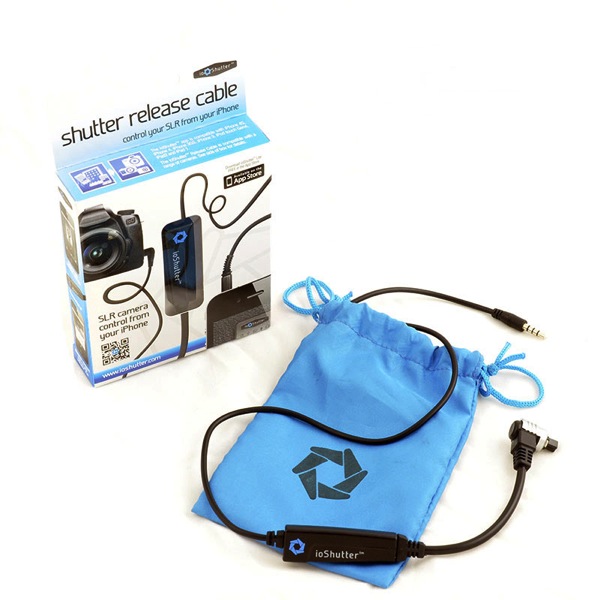
IoShutter

Photo from enlighten photo website

ioShutter is available for Canon, Nikon, Fuji, Pentax, Samsung and Hasselblad. But the mobile app(s) are only available for iOS at the time I’m writing this. Yes, I used plural because the ioShutter app comes in two versions: Lite which is free and Pro, which is an additional $ 5.99.

ioShutter Lite gives you the standard shutter release function you’d expect to find in a cable release. However the Pro version comes with other trigger options:

  • Timed exposure
  • Time-lapse
  • ClapToSnap
  • ShakeToTake

You can also stack features like creating a time-lapse with timed exposures.

Bonus Time

There are two quick things I want to mention before moving on to my recommended product.

The first is for Lifeproof case users. Your case comes with a headphone adapter. I leave mine connected to my earbuds all the time. So I picked up a second adapter, which connects, to my mobile kits.

The second tip is if you already own one of the cables mentioned above, but you want to try another app. I started with Trigger Happy but do not use their app anymore because I now use my favorite of them all, Triggertrap. Before I got my hands on a Triggertrap mobile kit I was using my Trigger Happy cable with the Triggertrap app. So it’s worth knowing that your cable kits should work fine with other apps. I also tested the Trigger Happy cable with ioShutter so I know it works there as well.

Suggested Product

My favorite mobile trigger is Triggertrap for two reasons. For one the app is amazing and contains so many useful features that shouldn’t and can’t be ignored. The team at Triggertrap is also looking for more ways to innovate in the industry, and they’re working on amazing things. For the price of the mobile kits, and the quality of the product itself, on top of the incredible mobile apps, the product is truly a winner.

So there you go – a simple comparison of your options, some tips and my recommendation. Feel free to comment with questions and comments as I’m sure you have your own preferences.

The post Mobile Triggers Compared to Help You Choose the Right One by Scott Wyden Kivowitz appeared first on Digital Photography School.


Digital Photography School
 
Comments Off on Mobile Triggers Compared to Help You Choose the Right One

Posted in Photography